
All services with one user login
Use your Business Account credentials to access any WithSecure service. You will be automatically logged in, so there's no need to sign in again.
Elements Security Center
Elements Security Center is a user portal for WithSecure's cloud-based platform, which provides a full range of cyber security capabilities, serving your end-to-end security management needs from a single portal.
eService Portal
The WithSecure eService Portal is a support case management portal that allows customers with advanced or premium support contracts to submit and follow up on their support tickets and access self-service options or knowledge bases.
Partner Portal
The Partner Portal is an online service that allows WithSecure Partners acess to the tools that help them sell our solutions. See all your customers in one place, calculate offers and send orders easily through the Portal.
Frequently Asked Questions
Use a different browser or a private window to log in if you have trouble. Check that you are using your Business Account username and password.
To reset your password, click on the Forgot your password link on the login page.
Log in to the portals with your Business Account credentials. Your email address is your username.
In case of breaking or losing device which served as authentication method for your account, please follow this guide.
Latest announcements
-
Changes to WithSecure Support Channels
Read more
We're writing to let you know that from December 2, 2026, we are updating how you reach WithSecure support. Our goal is to get you a faster answer to everyday questions, and to handle anything tied to your account where we can confirm it is really you asking. Here's what that means.
Web form: faster first answers
- Tickets sent through the web form on support.withsecure.com get a reply around the clock from our AI Engineer, an AI-powered support assistant.
- It answers currently from more than 1,300 verified knowledge base articles written by our customer support engineers, and names the article each reply is based on.
- If no verified article applies, it doesn't guess. It points you to the right channel.
Account-specific requests
- The AI Engineer has no access to account or customer data.
- Anything about your account, licenses or environment is handled by our customer support in the Partner Portal or eService Portal.
Existing cases
- Existing cases and case history are unaffected.
How to get started
There's no setup. Keep using the web form on support.withsecure.com for questions about our products, and sign in to the Partner Portal or eService Portal for anything about your account.
-
Upcoming Change: Improved Exposure Management Scoring and Recommendation Prioritization (December 8, 2026)
Read more
Introduction
We are introducing a new and improved scoring for Exposure Management recommendations in WithSecure™ Elements. The change will take effect on December 8, 2026. The current scoring measures risk on an absolute scale that can drift as data grows and leaves most recommendations in Low or Inconclusive. The new scoring ranks risk against a global, daily-recalibrated percentile scale, recalculates recommendations' remediation impact several times a day, and provides detailed impact breakdowns in the UI, making recommendation remediation impact easier to understand, more transparent, and more actionable.
The scoring will be enabled for all organizations automatically. This announcement describes what will change, how it affects your recommendations and reports, and the actions you may need to take.
What is new?
Recommendations List
-
The Recommendations List will include new scoring-related columns. Not all of them are visible by default.
-
Two new default columns, Assets by importance and Findings by severity, will show a breakdown of the affected assets by importance and of the findings by severity, respectively.
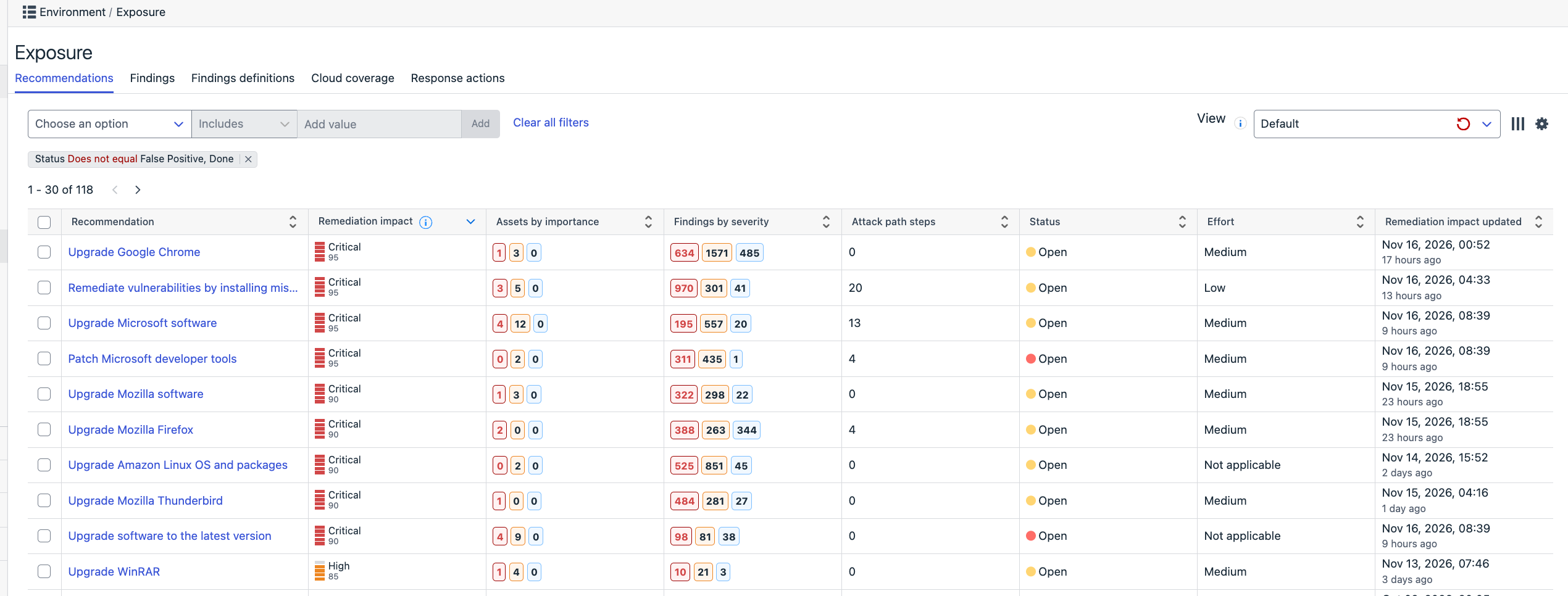
You will be able to see why a recommendation has its current remediation impact, including:
-
How many attack paths contribute to the recommendation remediation impact
-
How the findings contributing to the recommendation remediation impact are distributed across assets, and how many of them are exploitable
-
A breakdown of the affected assets by importance and Internet exposure
Recommendation details page
-
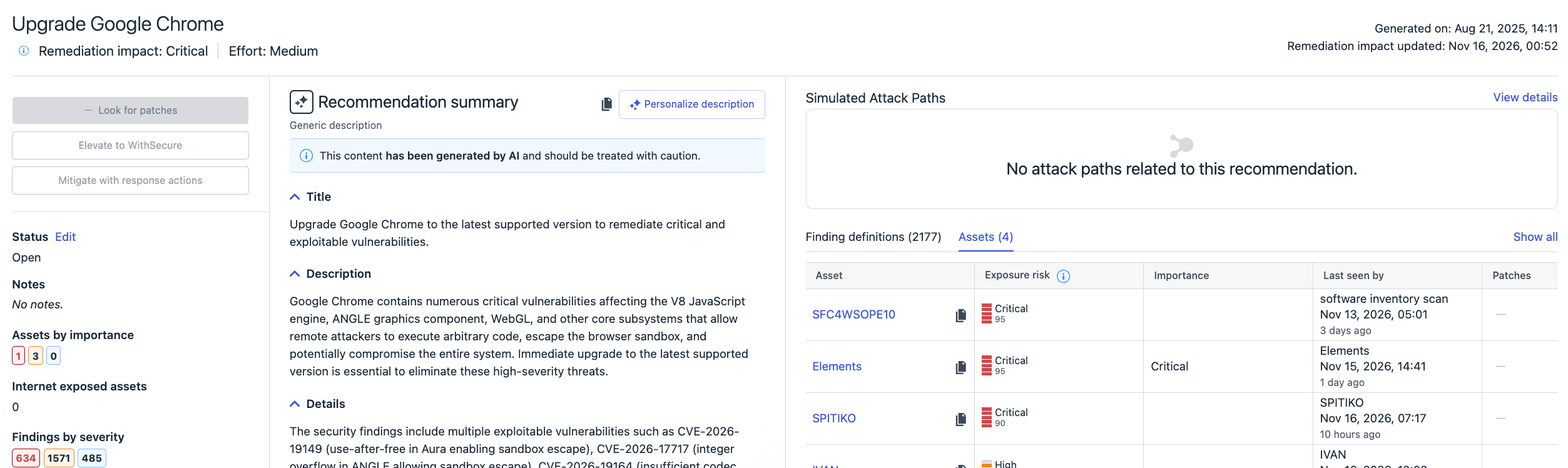
The recommendation details page will present the factors affecting the recommendation remediation impact.
-
Asset exposure risk will be shown on a new 0–100 percentile scale.
Recalculation
Recommendation remediation impact will be recalculated several times a day, based on the latest risk data. Actions such as fixing a vulnerability on a device, changing a device's importance, or modifying its exposure to the internet will be reflected in the recommendation remediation impact within hours.
Impact for customers
Recommendation prioritization
The order of recommendations in lists will change, as the new scoring reflects risk more accurately. Based on internal analysis across customer environments:
-
Approximately 5% of organizations will see little or no change in their top recommendations.
-
For about 75% of organizations, the change is moderate: roughly half of the current top 10 recommendations are expected to remain, with the rest reordered or replaced as the new scoring reflects risk more accurately.
-
About 20% of organizations may see a more significant change, with a different set of recommendations at the top of the prioritization list.
Remediation impact classification
Recommendation remediation impact will be classified as Low, Medium, High or Critical, calculated from the risk percentile. The Inconclusive category will be removed. The new scoring produces a fairer and more balanced distribution, so you will see more recommendations classified as High or Critical. This reflects a more accurate representation of exposure risk, not an increase in your actual risk. The new scoring takes all active assets into account, whereas the previous scoring considered only the riskiest ones. Recommendations that were previously outside the scope of scoring may therefore appear with higher impact levels, and some recommendations currently classified as Critical may receive a lower impact level.
Exposure risk scores
-
Asset exposure risk will be shown on a 0–100 percentile scale instead of an absolute value.
-
The organization risk score and grade will become relative. They will show where the organization stands compared to all other organizations. Both will change with the new scale; a change reflects the shift in comparison across organizations, not necessarily a change in your actual risk.
Reporting and history
The new scoring is based on percentiles and is not comparable with the previous absolute scoring. Historical scoring results will no longer be available after the change, and scores and grades will change once the new scale takes effect. Values from before and after the change cannot be compared directly.
Status updates at the switch
When the new scoring is enabled, recommendation statuses will be updated in a single, short wave within hours of the switch: recommendations closed by the previous scoring may be reopened according to the new rules. This may cause a temporary increase in Security Events, which will settle after the wave. Going forward, statuses follow the new rules with recalculations several times a day. Statuses set by users, such as False positive, Accepted risk and Acknowledged, will not be changed by the system. A recommendation marked Done will reopen if its risk increases between two calculations.
Needed actions
No action is required for most customers. Please review the following:
-
MSP partners with PSA integrations: each reopened recommendation can create a ticket in your PSA system. During the launch wave this may result in a high number of tickets in a short time. Consider temporarily raising your PSA ticket threshold during the transition, and inform your customers about the change to avoid confusion.
-
Reports: if the reports you deliver to your customers rely on historical recommendation scoring, please save the data you need before December 8, 2026. After the change, the historical data will no longer be available, and scores and grades before and after the launch cannot be compared directly.
If you have any questions about the new scoring, please contact support.
-
-
Delays in Elements Collaboration Protection scanning
Read more
Between the morning of 30 October and 2 November, an issue affected email scanning for a subset of mailboxes.
During this period, approximately 1 in 128 mailboxes did not receive email scanning as expected. As mailboxes are distributed across the service, organizations with a larger number of mailboxes were more likely to have some users affected.
During the affected period, email scanning was disrupted for a subset of emails, resulting in some scans being missed or delayed.
The issue was identified and resolved on the morning of 2 November.