


What’s New in Elements: May 2023
Editor’s Highlights
WithSecure launches Elements Cloud Security Posture Management
With many organizations moving some or all of their infrastructure to cloud services such as AWS or Azure, it’s important that this infrastucture is secure. Our new Elements Cloud Security Posture Management can analyze and suggest changes to make these more secure. More details below.
Software Updater for Mac
We have released Software Updater for Mac. This addition brings much-requested functionality to our Mac EPP product. You can find more details below
Elements Security Center
Elements Endpoint Protection Portal
New features:
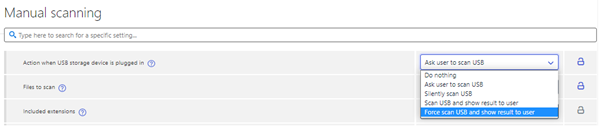
Force USB scan
Added „Force scan USB and show result to user“ option. (This requires WithSecure Elements Agent 23.4)

Security Events Trend Detector
Security events trend detector for infections shown in Dashboard view’s Issue list. This is an experimental feature looking at risky trends in the amount of malware infections from your computers over the last two weeks. At present it looks for two specific trends:
- A large spike or sudden increase in detections
- A strong growing trend towards the end of the two week time window
Our suggestion is that you investigate if everything seems normal by using the check report link to look in the Security Events reporting page at the following items:
- The infections handled report shows a count of the same detections, is there a growing trend?
- Computers generating large numbers of detections can be identified from the „Top computers“ graph, clicking the name of a computer will show you specific detections
- Top infections will show most common detections, this can help investigation
Acknowledging security events will exclude them from trend detection but not from the reporting page. This can be used to make this warning go away, otherwise it will vanish once the trend changes or settles. Please use the feedback form at the top of Security Events to give us feedback.
Security Events navigation from Infections handled chart
It is now possible to navigate from Infections Handled chart (Reports → Security Events tab) to a Security Events list filtered to a day corresponding to the clicked bar. This is to foster faster investigation of spikes in the handled infections.
Improvements:
Active Directory Group renamed
Active Directory Group has been renamed Active Directory Organizational Unit (abbreviated as OU in some places where space is restricted) in Device, Unprotected Devices and Profile Assignment Rules views. This is done to be more precise on what kind of data our clients collect from Active Directory.
DataGuard paths display
DataGuard included paths and trusted applications are now rendered as a list in device details.

Status icons added
Status icons have been added to the Device list for Application control, Device control, and Software update status.

Elements Endpoint Protection
Elements Agent for Windows and Server version 23.4
A new version of the endpoint clients is available and our Early access program participants already use it. Full availability starts from 20.6.2023
This release makes the Elements Agent version 23.4 available (internal version 23.4.163).
The endpoints automatically upgrade, without a reboot.
This release introduces new features and fixes,
Features:
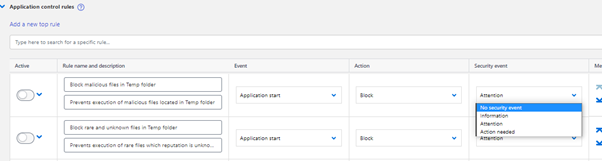
Disable Alerts for Application Control events
It is now possible to disable alerts for certain Application control rules.
Application control rules have a new setting „Security event“ that can be used to define what kind of security event the rule triggers if any.
USB Scan Stop button can be disabled
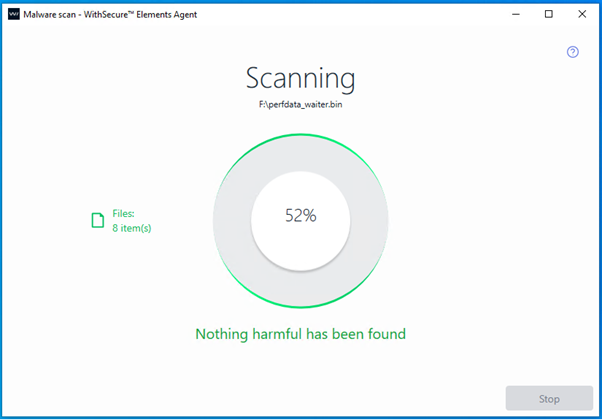
The Administrator can disable Stop button of the Scanning dialog for USB scans to prevent end users from stopping the USB device scans. This feature can be enabled from the profile’s Manual scanning page. Setting is „Action when USB storage device is plugged in“.
Additions to WMI interface
Elements Agent WMI interface provides now RebootStatus class. This class contains two Properties.
- Pending (True/False)
- Reason („swup“ / „update“ / „virus“ / „spyware“ / „critical“ / „malfunction“).
Elements Mac Agent version 23.1.50165
Features:
Software Updated
Software Updater can be enabled in the Mac profile editor.

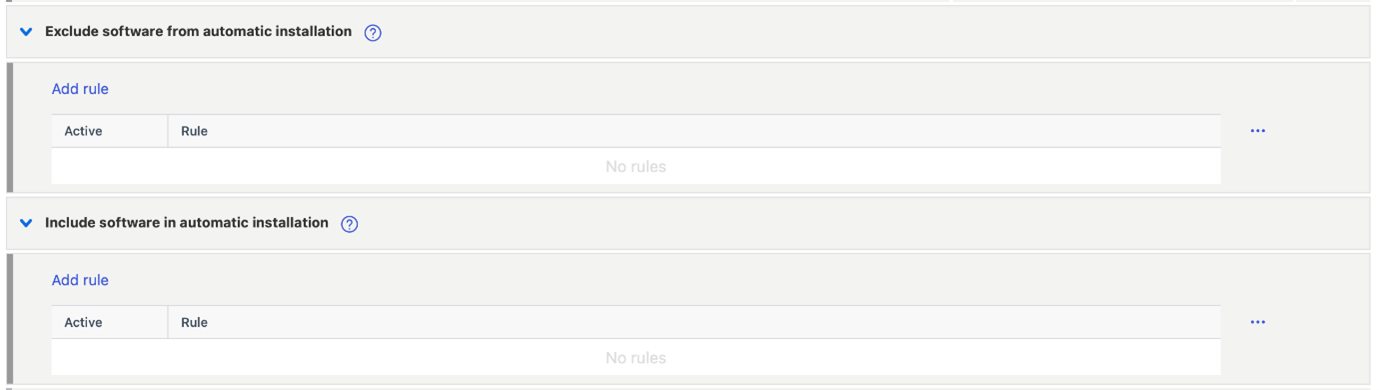
You can specify which software you would like to include/exclude from scan results or automatic installations
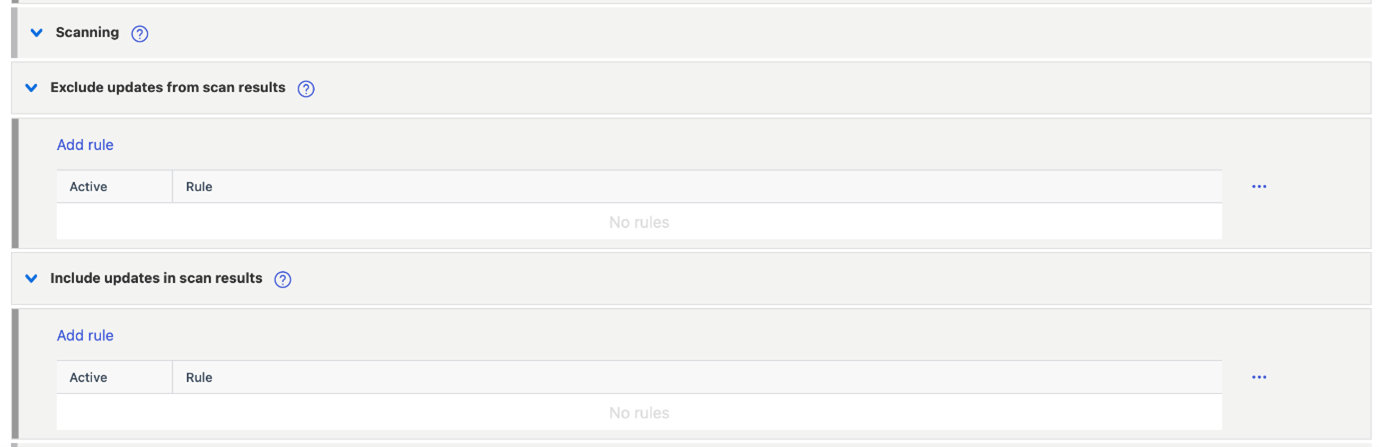
Running applications can be force-closed or update installation can be cancelled.

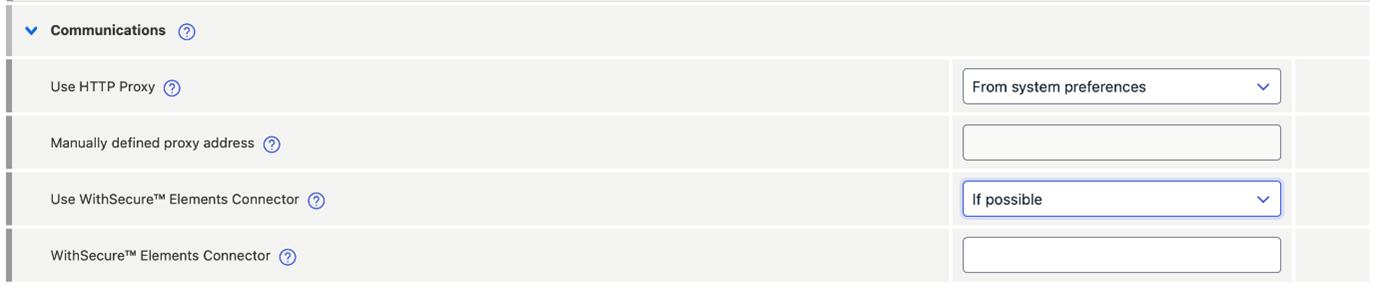
Software updates can be downloaded via HTTP proxy or from Elements Connector
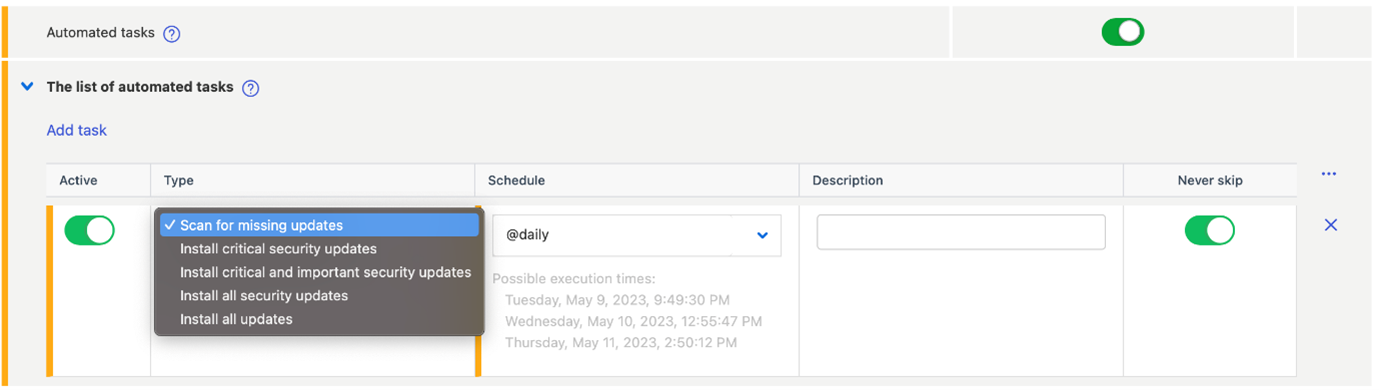
Software updater can scan for missing software or install updates automatically, these operations can be scheduled in the Automated tasks section of the profile.
Other changes
- Automatic InTune deployment support
- Adds an option to download definition updates from via HTTP
Elements Collaboration Protection
New features and Improvements
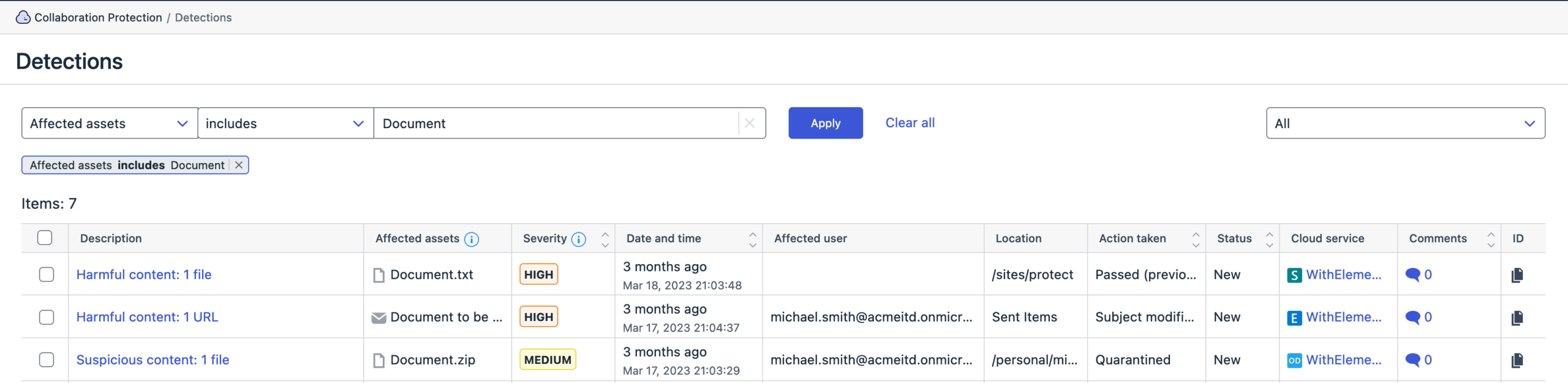
The filter „Affected assets“ was introduced to detections list.
- The new functionality allows to search detections across all the protected tools: by a file name shared in SharePoint, OneDrive and Teams, or by email subject.
We have also reduced false positives for deleted emails
Elements Vulnerability Management
Elements Vulnerability Management System Scan
New features
Capability to detect vulnerabilities in:
- Beekeeper Studio in authenticated scanning for Windows
- Qualys Cloud Agent in authenticated scanning for Windows
- Acronis Snap Deploy in authenticated scanning for Windows
- Golang in authenticated scanning for Windows
- Nessus Agent in authenticated scanning for Windows
- Stimulsoft Designer (Desktop) in authenticated scanning for Windows
Integrations
Endpoint Protection API: Provisioning invitations endpoints end of life on 3rd of November 2023
The old invitations endpoints are deprecated and should be replaced by the new Elements devices endpoints:
The following Endpoint Protection API invitation endpoints will stop working on the 03.11.2023:
- Create new invitation
- List pending or expired invitations
- Remove invitations
- Renew expired invitations
- Resend pending invitations
Reminder: In order to provide a better and unified set of APIs for WithSecure Elements, we are progressively deprecating the Endpoint Protection API and replacing it by Elements API. The following Endpoint Protection endpoints end of life dates are below:
- Computers endpoint: 30th of May, 2023
- Security events endpoint: 30th of June, 2023
- Companies endpoint: 31st of July, 2023
Provisioning API update
Update Service Partner (SEP) name
This new API call allows to change an existing Service Partner(SEP) name by using the unique identifier as described in
Elements API: New properties in devices list
New properties have been added to to device list endpoint:
- total and free space on system drive
- total and free physical memory
- Vulnerability Management risk score. That values is calculated only for devices with active VM module
- EDR incidents counters
- computer model and BIOS version
- version of malware database and timestamp of its last update
- list of MAC addresses
- property that indicates if user has administrator privileges
Other items of interest
Threat Highlight Report – April
Threat Intel monthly highlights: Ransomware gangs get Papercuts, Lockbit and BlueNoroff get into MacOS, pro-Russian ‚hacktivism‘ continues and 3CX continues.
- Ransomware: Trends and notable reports
- Capita
- Nokoyawa – CVE-2023-28252
- Rorschach Ransomware discovered
- Other notable highlights in brief
- DuckTail new update?
- APT41 HOODOO
- Service Location Protocol Vulnerability
- Google Chrome Zero Day attacks
- Continued targeting of Networking Devices
You can Download the full report here
In case you missed it
WithSecure launches Elements Cloud Security Posture Management
At our recent SPHERE23 event, we launched a new product, Elements Cloud Security Posture Management.
This is designed to help organizations who are using Cloud platforms for their infrastructure, to find and resolve any configuration issues before the bad guys do.
You can find out more about Elements Cloud Security Posture Management on our website
Share your ideas with us
Our purpose is to co-secure the world with you – now as WithSecure™. To co-create the best possible cyber security products and services, we warmly recommend you share your ideas via our Ideas Portal, now accessible directly from WithSecure™ Elements Security Center.

Further information
Changelogs and Release Notes for all parts of WithSecure™ Elements can be found at the Help Center