
-
New roles for better access control in Elements
Read more
We are introducing new Elements roles. New roles make it easier to manage access in the Elements portal.
- Endpoints: Reading all – read access to servers, workstations and mobile devices. Does not grant permission to Device or profile management, Patch management, Device security posture, Software reputation, Security Events, Home/Endpoint protection, Reports.
- Endpoints: Editing all – editing access to servers, workstations, and mobile devices. Grants permission to security information, including device status, dashboard, security events, and software updates. Allows executing security operations such as removing or isolating devices and assigning profiles. Does not grant permission to manage profiles.
- Endpoints: Editing non-servers – edit access to workstations and mobile devices; read access to servers. Grants access to workstation and mobile security information, including device status, dashboards, security events, and software updates. Allows security operations on workstations and mobile devices, such as removing or isolating them and assigning profiles. Does not permit profile management.
- Endpoints: Editing servers – edit access to servers; read access to workstations and mobile devices. Grants access to server security information, including device status, dashboards, security events, and software updates. Allows security operations on servers, such as removing or isolating them and assigning profiles. Does not permit profile management.
- Endpoints: Organizing non-servers – Edit access to non-server devices, excluding remote operations. Includes actions that affect device security configuration (e.g., profile assignment) or metadata (e.g., alias, label, asset group), but not actions that execute on the device itself. Also includes read access to devices, security events, profiles, and reports for servers, workstations, and mobile devices.
- Endpoints: Organizing servers – edit access to server devices, excluding remote operations. Includes actions that affect device security configuration (e.g., profile assignment) or metadata (e.g., alias, label, asset group), but not actions that execute on the device itself. Also includes read access to devices, security events, profiles, and reports for servers, workstations, and mobile devices.
- Endpoints: Non-server remote operations – allows execution of remote security operations on non-servers, such as removing or isolating devices. Includes read access to devices, security events, profiles, and reports for servers, workstations, and mobile devices.
- Endpoints: Server remote operations – allows execution of remote security operations on servers, such as removing or isolating devices. Includes read access to devices, security events, profiles, and reports for servers, workstations, and mobile devices.
- Profiles: Editing for non-servers – allows management of security configurations and profiles for workstations and mobile devices. Does not permit access to server profiles.
- Profiles: Editing for servers – allows management of security configurations and profiles for servers. Does not permit access to workstation or mobile device profiles.
- Profile assignment rules: Editing – allows management of profile assignment rules.
- Security events: Managing – grants permission to take action on security events (e.g., acknowledging or allowing a website URL). Includes read access to devices, security events, profiles, and reports for servers, workstations, and mobile devices.
- Reports: Managing – allows managing reports. Includes read access to devices, security events, profiles, and reports for servers, workstations, and mobile devices.
-
Why incident response matters?
Read more
When a cyber incident affects your business, you need to decide which systems can keep running and what is safe to restore. You also need to understand whether sensitive information has been exposed and whether the attacker still has access. Those decisions depend on a reliable picture of what happened.
Digital forensics and incident response (DFIR) provides the expertise to establish those facts and act on them.Experienced investigators and responders help contain the incident, guide recovery and address the weaknesses that allowed the attack. For your organization, this can mean less disruption, better-informed decisions and less pressure on internal teams.
Building on your existing security investment
Endpoint detection and response (EDR) provides visibility into device activity and tools to investigate and contain threats. Managed detection and response (MDR) adds experts who monitor, investigate and respond within an agreed scope.
These capabilities are valuable during an incident. A dedicated DFIR team builds on that work when the situation requires deeper forensic investigation, coordination across a wider environment or additional recovery support. Investigators bring together evidence from endpoints, identities, cloud services and other systems to establish the extent of the compromise and guide the next decisions.
What DFIR can uncover
The following illustrative scenarios show why that wider investigation matters.
The fraudulent invoice inside a trusted conversation: A finance team receives new bank details within an existing supplier email conversation. The payment looks legitimate until the supplier calls to ask where it is. DFIR investigators uncover a compromised mailbox that the attacker used to monitor payment discussions. They identify affected conversations and hidden forwarding rules, helping the company secure its accounts, support bank enquiries and assess what information was exposed.
The ransomware incident that started days before the outage: EDR detects ransomware and isolates the affected server. Investigation reveals earlier use of a compromised administrator account and additional access to a backup server. DFIR responders identify the remaining access routes, assess evidence of data theft and help determine which backups can be trusted. Recovery can then address the wider compromise, reducing the risk of reconnecting systems while the attacker retains access.
The quiet intrusion targeting valuable information: Business continues normally while an intruder spends weeks accessing sensitive project files. An unusual sign-in prompts an investigation that connects activity across workstations and cloud services. DFIR specialists reconstruct the timeline, uncover mechanisms used to maintain access and assess evidence of data collection and transfer. The organization gains a clearer understanding of the exposure and a plan to remove the intruder.
Evidence for decisions, reporting and recovery
Even after an attacker has caused damage, effective response can prevent further loss and protect unaffected operations. Experienced responders help prioritize actions according to business impact while preserving evidence needed for the investigation.
Clear reporting gives management a factual basis for decisions. It also supports cyber insurance claims and regulatory reporting through documented timelines, findings on affected systems and data, and records of response actions. Legal and compliance teams can use these findings to assess notification obligations and prepare reports under NIS2 and GDPR, where applicable. Reports distinguish confirmed findings from assessments and explain any remaining uncertainty.
Expertise available when you need it
At WithSecure, our incident response team is completely technology agnostic. We work across vendors, platforms and environments, alongside your existing teams and providers. Our investigations cover business email compromise, ransomware, cyber espionage and insider threats. Or any other needs.
A WithSecure DFIR retainer provides 24/7, SLA-backed access to specialists, with services available on demand at pre-agreed rates and no requirement to pre-purchase investigation days. Your organization has an established contact and activation process, reducing the time spent arranging expert support during an incident. Internal teams gain additional capacity when demands on them are greatest.
We also help you prepare through custom tabletop exercises, runbooks and plan reviews, covering incident response, crisis management and recovery. Each engagement reflects your environment, business priorities and team responsibilities. Your people can practise difficult decisions, test escalation routes and address gaps before a real incident puts those arrangements under pressure.
The result is an organization better prepared to understand an incident, make informed decisions and restore operations with confidence grounded in evidence.
Read more about our Incident response services from here:
-
New Feature: Onboarding Assistant in Elements Security Center
Read more
We have introduced the Onboarding Assistant in Elements Security Center, a built-in virtual assistant that guides new users through their first steps in WithSecure™ Elements. The assistant appears on first login and leads you through the setup actions needed for the products and services your organization has purchased.
Until now, getting started often relied on hands-on help from a partner or a WithSecure solutions engineer. The Onboarding Assistant gives every customer the same clear, step-by-step path to a working setup, so you reach your first security outcomes faster and with less manual support.
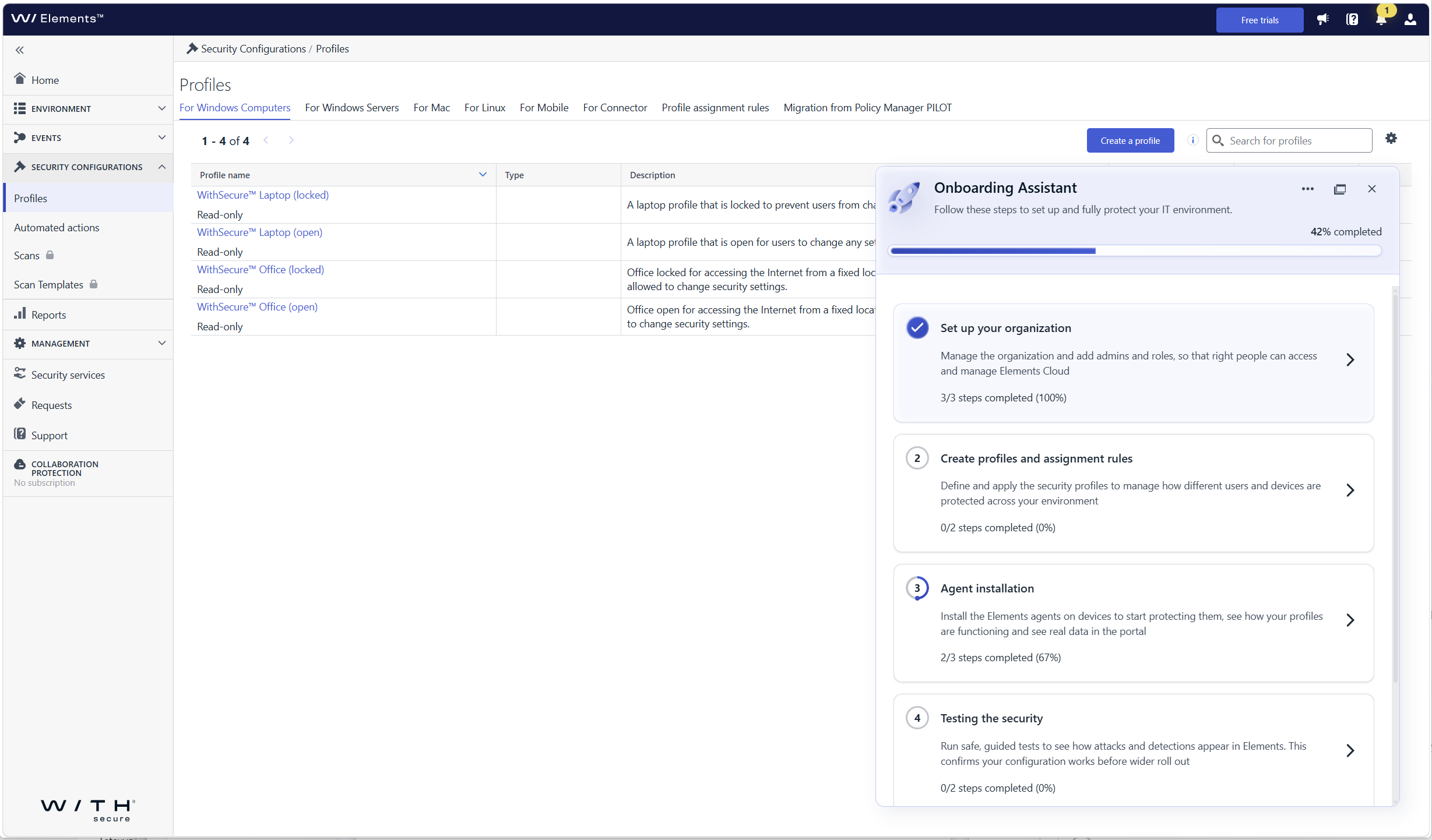
What’s new
- Guided first login: the assistant opens automatically when you log in to Elements Security Center for the first time and walks you through each required onboarding step
- Organization onboarding: set up your organization, including users and single sign-on (SSO)
- Device and profile onboarding: get your devices connected so that they are protected and visible in Elements
- Steps tailored to your subscriptions: you only see the steps that are relevant to the Elements products and services your company has, so there is nothing extra to sort through
- Help where you need it: each step includes contextual guidance, links to documentation, and prompts for the next action
Who sees the assistant
The assistant is shown to the first user who logs in with permission to manage users and access rights in the organization. This person can hand over product setup to other users by giving them access to Elements Security Center, so user and product administration can be split. In this release, the assistant is shown to customer users only, not to partner users with access to several companies.
How to get started
Log in to Elements Security Center. The Onboarding Assistant opens on the right side of the portal and shows your onboarding progress. Select a step to see what needs to be done and follow the guidance until all the steps relevant to your subscriptions are completed.
-
Introducing WithSecure Elements AI Security
Read more
We have launched AI Security Early Access for eligible WithSecure™ Elements subscriptions.
The new AI Security Dashboard gives users a single view into how AI is being used across organizations’ IT environments.
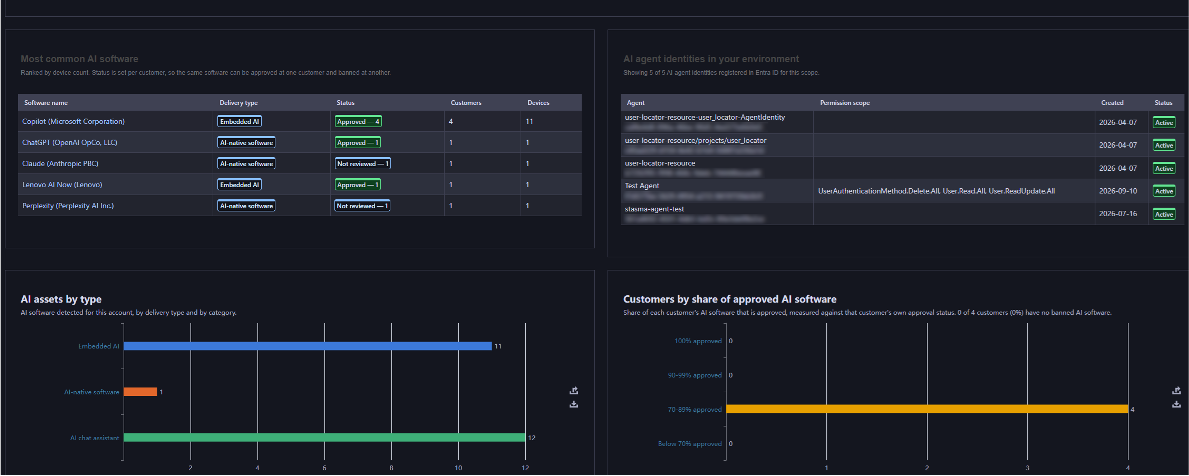
What’s new:
- Shadow AI discovery, through a dedicated AI Security Dashboard and Software Inventory that lists the AI tools in use across the organization, including tools that were never formally installed.
- Agentic identity visibility, integrated with Microsoft Entra ID, to surface Service Principals attributed to AI agents, AI chat assistants, AI coding assistants, and other generative AI tools operating with their own credentials.
- Browser extension tracking, surfacing AI-related browser plug-ins from chatbot sidebars to AI-powered productivity add-ons across every managed endpoint. To be added shortly after the initial release.
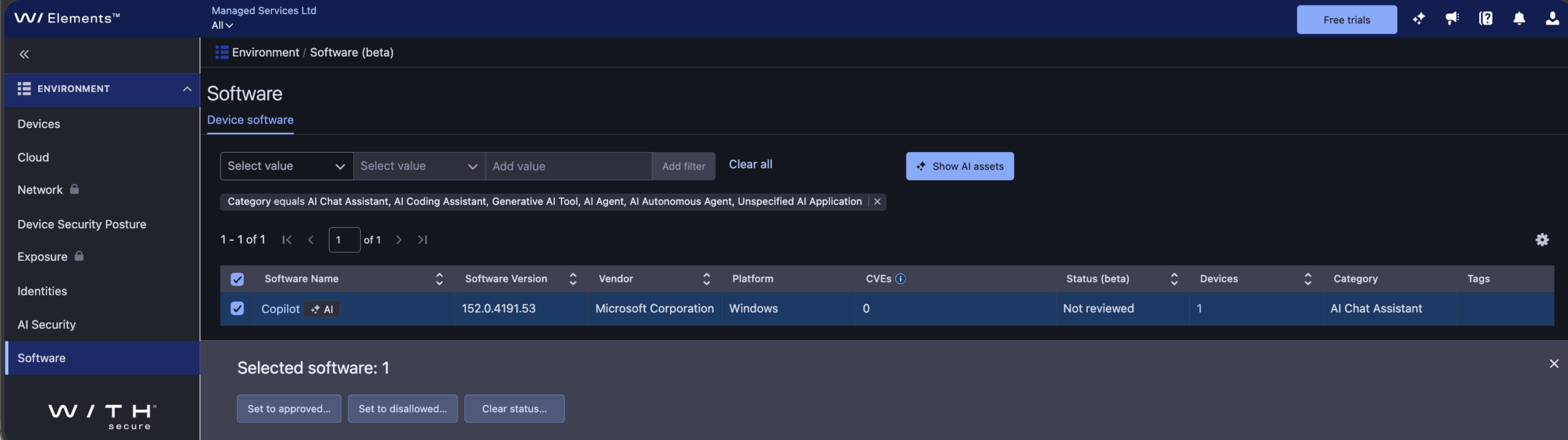
The initial release of AI Security includes asset status for discovered AI software, helping you identify which AI tools are approved for use versus “shadow AI.” In this release, asset status doesn’t restrict AI software use since it’s intended for reporting purposes only.
Learn more:
To learn more about AI Security, including how to use the dashboard, software inventory, and asset status, see the AI Security section of the Elements User Guide.
How to get started:
AI Security is available as an Early Access feature for eligible WithSecure Elements subscribers, at no extra cost and with no installation or setup required, until further notice.
If you’re an Elements user but aren’t currently subscribed to an eligible module, you can start a free 30-day trial via the Free Trials tab in Elements Security Center.
Eligibility:
- Software incl. Browser extension tracking: WithSecure Elements Protect and Proactive Bundles, WithSecure Elements XDR / Endpoint Detection and Response (EDR), WithSecure Elements Exposure Management (XM) for Business / Users / Devices.
- Identity: WithSecure Elements Protect and Proactive Bundles, WithSecure XDR Identity Security, WithSecure Elements Exposure Management (XM) for Business / Users / Identities.
-
Major Capricorn update for Endpoint Protection – October 2026
Read more
UPDATE 2026-10-15: This has now been released to production with version “2026-10-14_01“
We would like to inform you about a larger Virus Definition File (VDF) update than usual, scheduled for October 13, 2026.
What does this update mean?
As part of the regular maintenance cycle, the signature database is periodically reorganized — approximately twice a year. This update signifies that affected endpoints will download a larger, refreshed signature base of up to 130 MB, compared to the usual few KB to few MB size of standard updates.
Standard updates will resume immediately afterward, returning to their normal size.
Update Details
- Platform coverage: This update applies to all WithSecure Endpoint Protection products — across Windows, Mac, and Linux platforms that utilize the Capricorn engine.
Deployment
- The update will be delivered automatically through the regular VDF update mechanism.
- Updates containing this release will start with “WithSecure Capricorn Engine (2026-10-xx-xx)”.
Users of WithSecure Elements EPP may wish to consider taking the Elements Connector into use, to help reduce internet access, if they have several deployed endpoints. You can find more details of how to deploy this at:
https://support.withsecure.com/userguides/data/pdf/ws_elements_connector_eng.pdf
-
New Feature: Pre-Authorization settings in Elements Security Center
Read more
WithSecure MDR customers can now view and manage pre-authorization for manual response actions directly in Elements Security Center. Previously, WithSecure managed these settings based on the agreement with each customer. Pre-authorization can now be configured at two levels: as an organization-wide default and separately for individual devices, identities, or groups of them.
Customers benefit from faster response during incidents and more precise control over sensitive assets. For example, they can apply stricter settings to servers that contain sensitive data while using different settings for regular laptops.
How to get started
Start in Elements Security Center by reviewing the default settings your organization. You can then manage settings for Devices and Identities in corresponding pages.
Organization-level defaults in Security services
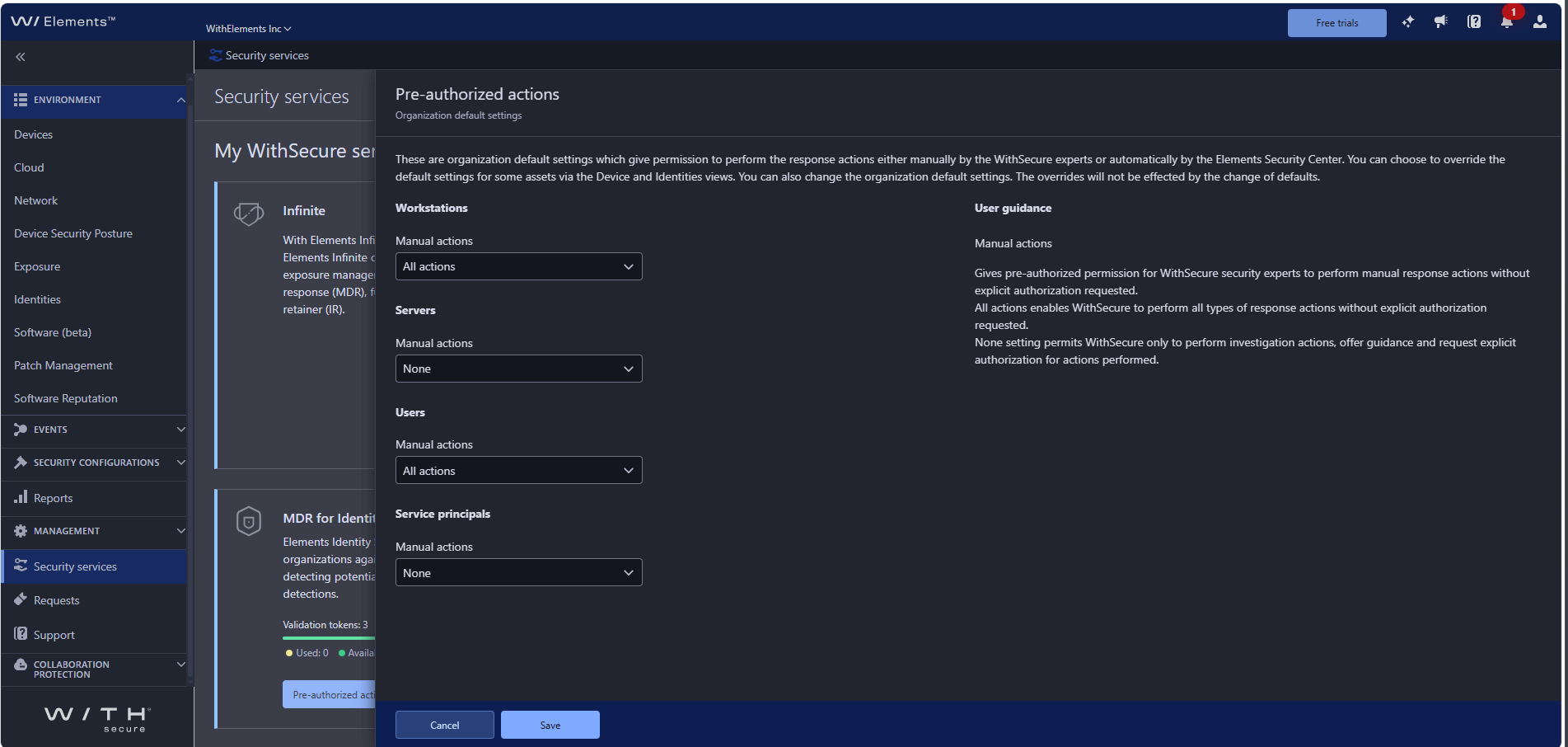
Under Management → Security services, the service tiles (“MDR for Endpoints” and “MDR for Identities”) have the Pre-authorized actions setting. Here you set the organization-level default authorization separately for Workstations, Servers, Users, and Service principals.
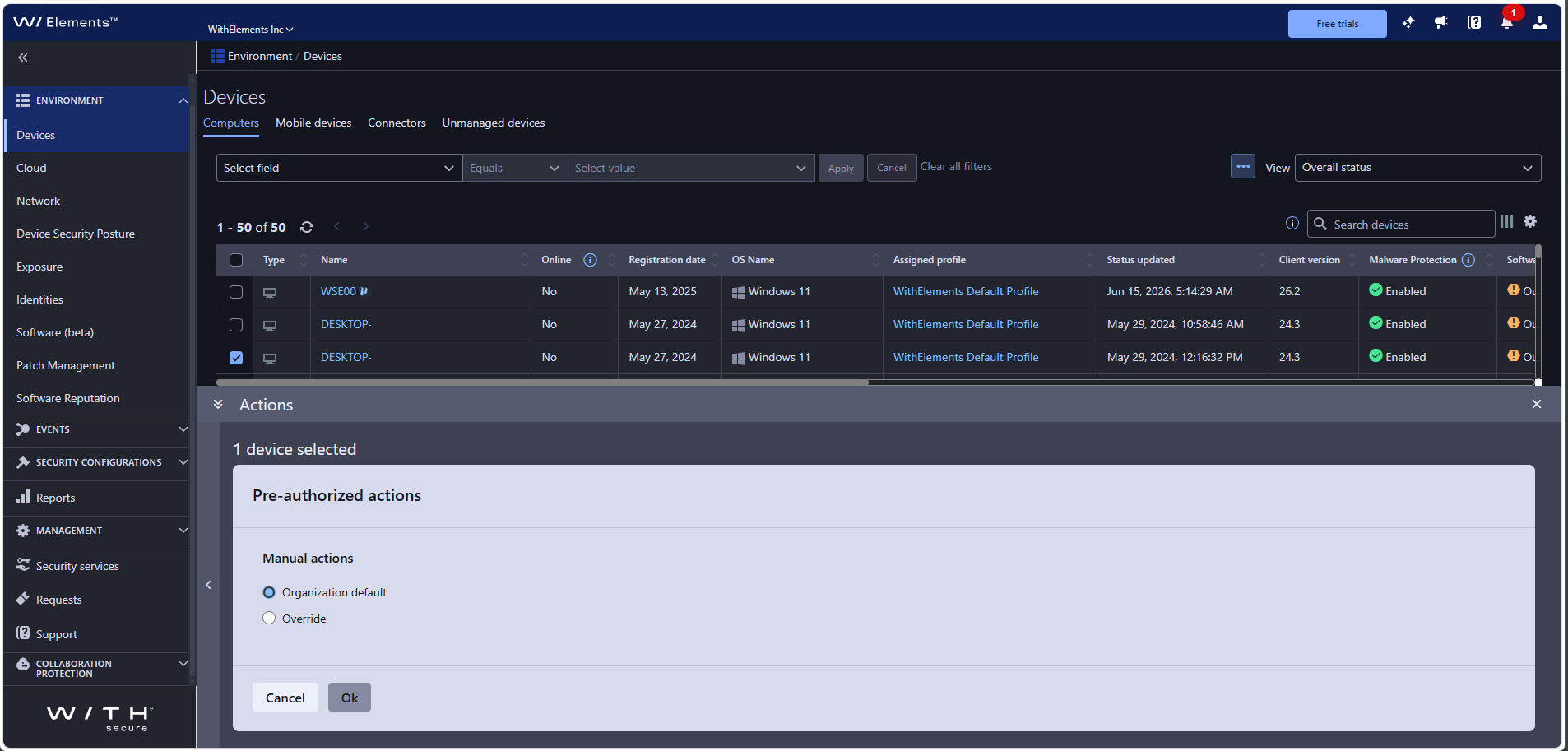
Per-device control in Devices
In Environment → Devices, select one or more devices and open Pre-authorized actions from the Actions panel to keep the organization default or override it for the selected device(s).
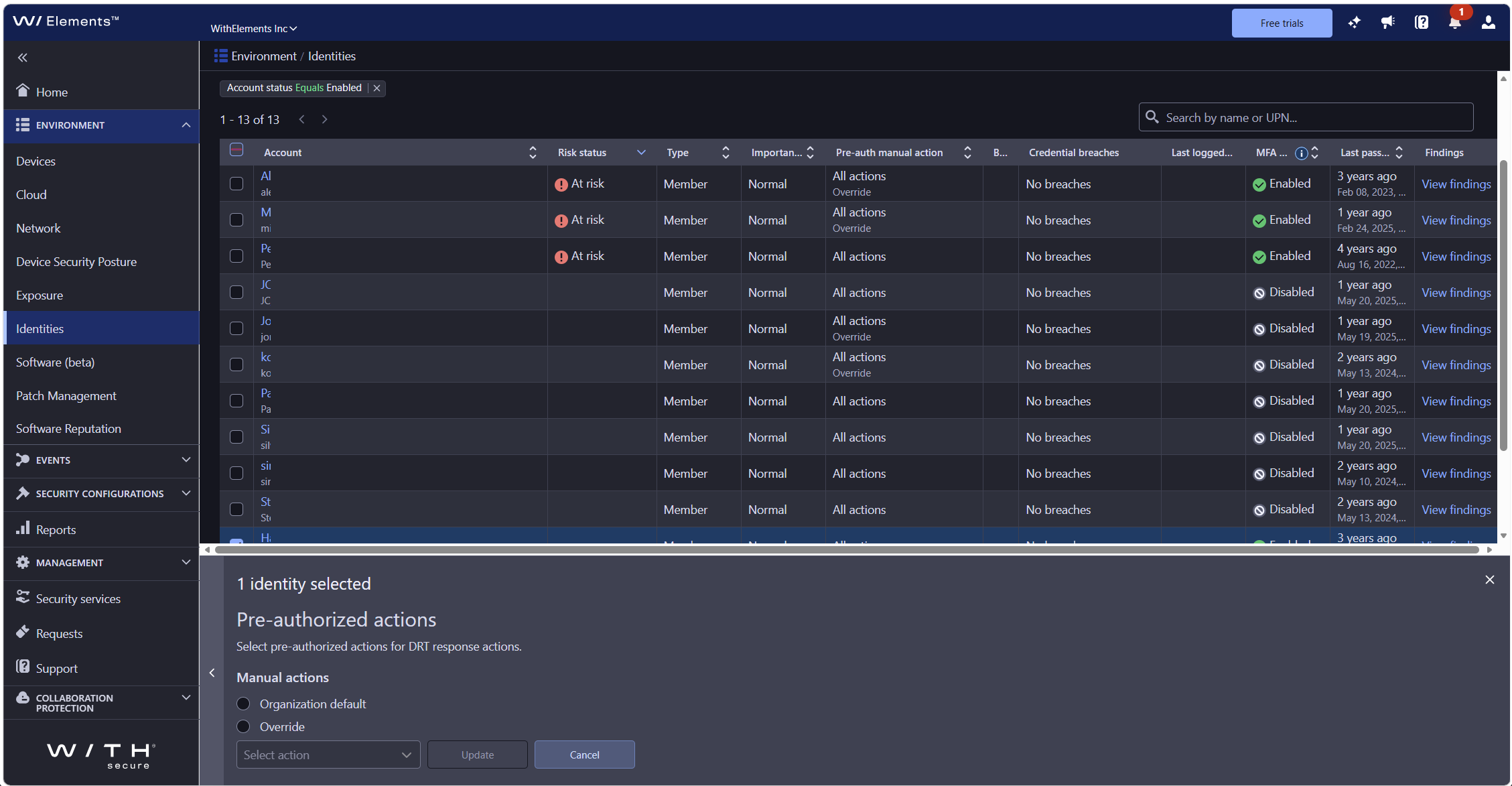
Per-identity control in Identities
In Environment → Identities, select one or more devices and open Pre-authorized actions from the Actions panel to keep the organization default or override it for the selected identity(ies).
If you do nothing
Any pre-authorization already agreed with us remains in place. For identities, the initial setting is no pre-authorization. If an action is not pre-authorized, our analysts will contact you for approval before acting, just as they do today.
-
Community Platform Retirement
Read more
We’re writing to let you know that we are winding down operations on the WithSecure Community, with full closure planned for October 27, 2026.
Our goal is to ensure that important product information and support content remain easily accessible while we simplify and improve our digital customer experience.
Here’s what that means and when it happens.
Troubleshooting articles
Will continue to be published on the Community until October 27, 2026. These will then move to the WithSecure Support page.
Changelogs & Announcements
Will continue to be published on the Community until October 27, 2026. These will then move to the WithSecure Support page.
Product Ideas
- New ideas can be submitted until October 27, 2026.
- We’re continuing to work through the existing backlog, and you’ll see the results show up as launched features in our changelogs.
- We are also working on a new long-term approach for collecting and managing feature requests.
Questions (Community Q&A)
- New questions cannot be posted from September 22, 2026.
- Existing discussion posts remain read-only until the Community closes on October 27, 2026.
Partner Forum
- Closed on August 31, 2026.
What’s Next
We’re building bigger, better things, and we’ll share details as soon as they’re ready to launch.
As part of the Community platform retirement, your Community account data may be retained for a limited period after October 27, 2026 to support the transition and ensure that all migrated content and services are functioning as expected. We expect this verification process to be completed by October 27, 2026, and in any event no later than December 31, 2026. Once completed, the remaining account data associated with the retired platform will be securely removed. For more detail on how we handle retention periods more generally, see Privacy policy – WithSecure™ and Community forums – WithSecure™
-
Introducing Role-Based Access Control (RBAC) for WithSecure Elements
Read more
We’re introducing a new Role-Based Access Control (RBAC) model for WithSecure Elements, giving partners and companies more granular, flexible, and secure control over who can access what within their organization.
What’s new:
- Full Microsoft Entra ID integration — sync users and security groups automatically, so day-to-day access management can happen entirely from Entra ID
- Security groups — assign permissions to groups of users instead of managing access one person at a time
- Access without organization membership — ability to assign partner roles within partner organizations without inviting partner security administrators to managed companies.
- “All” roles — assign “Elements Reading All” or “Elements Editing All” to grant read or edit access across the entire solution in a single role, automatically kept up to date as new features are added.
How to get started:
RBAC is not enabled by default. It must be explicitly turned on under Management → Access Control, per organization, by an Identity and Access Management (IAM) Administrator. Enabling it for a partner organization does not automatically enable it for any managed company organizations below — each organization opts in independently.
Note: Due to caching, the Management → Access Control area may not appear immediately — clearing your browser cache can help it show up sooner.
Once enabled, the familiar Organization Settings → Security Administrators page becomes dedicated to SSO federation and Entra provisioning only, while all user, security group, and role assignment management moves to the new Management → Access Control area.
For full details on the new model and step-by-step guidance, see the user guide:
Access control | WithSecure Elements User Guide -
New Feature: Support Assistant — AI-powered help, right in Elements Security Center
Read more
We’ve added Support Assistant to the Support page in Elements Security Center. It combines instant search and conversational chat, right where you already go for help — so you can find your own answers without leaving the portal.
Why we built this
Finding the right answer used to mean leaving Elements to search the WithSecure Community, or opening a support ticket and waiting. Now, Support Assistant is built directly into the Support page of the Elements Security Center. You can easily search for help articles, or ask a question in your own words, and get an answer immediately. This means no extra tabs, no waiting.
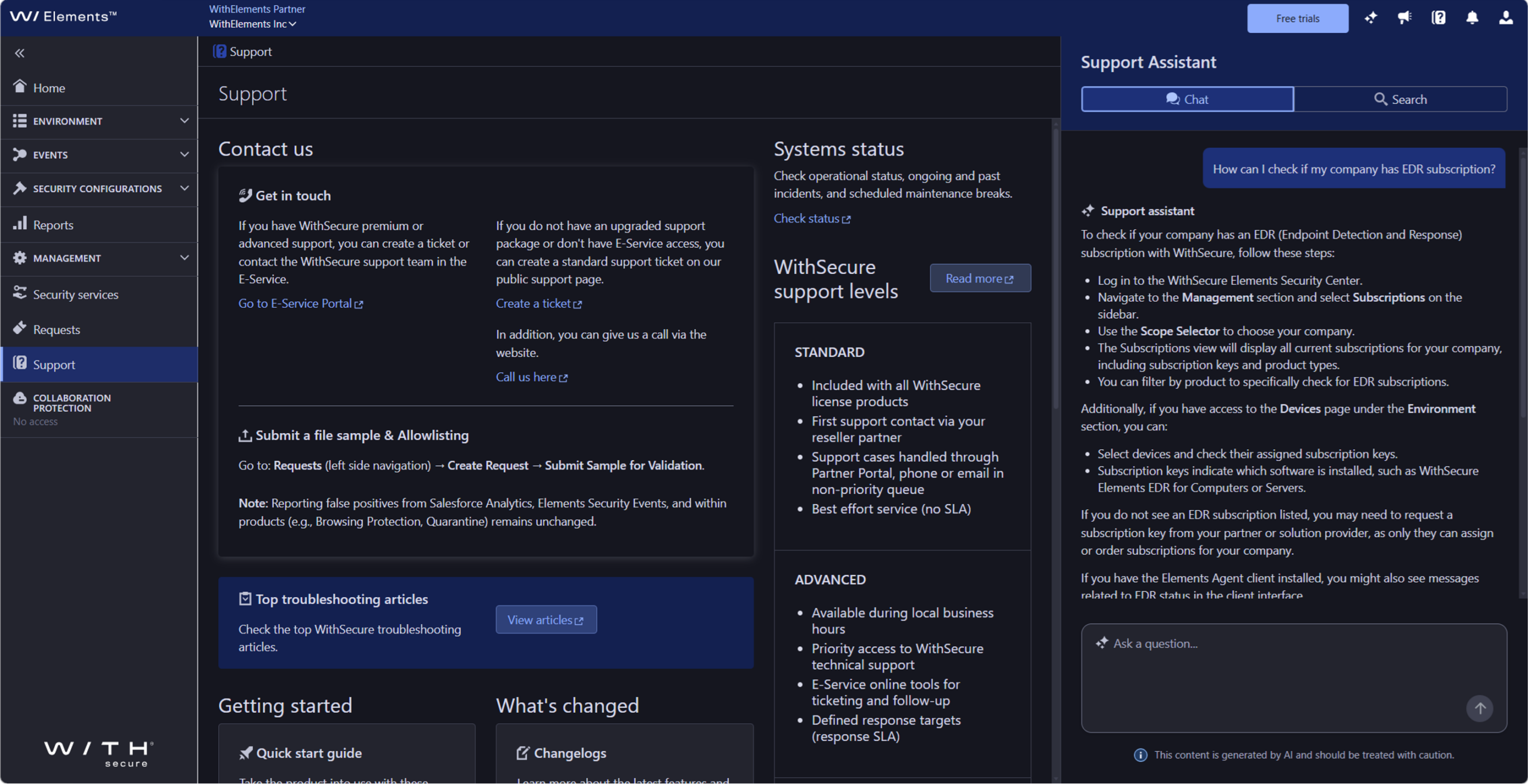
What’s new for you
Support Assistant gives you two ways to get help, side by side:
- Search mode – Type a question or keyword and get direct links to relevant Community and support articles.
- Chat mode – Have a conversation with the assistant and get a written answer, with links back to the source articles.
How to get started
There’s no setup. Open Support in Elements Security Center (ESC), and the Support Assistant panel opens automatically. Use the switcher at the top to move between Search and Chat, type your question, and press Enter (or select the arrow) to get your answer.
Here’s to fewer clicks and faster answers — and when you need us, we’re right there in the panel.
-
System Maintenance (minor): Upgrade of WithSecure Elements MDR backend service
Read more
On Thu 27th August 2026, 16:00 UTC we are planning to upgrade WithSecure Elements MDR backend service in production environment. This operation is expected to take a maximum of 60 minutes.
During the maintenance, users can’t update the Contact Details of their MDR subscriptions. An error message will be shown if attempted.
Other parts and features of the Elements Security Center are not affected.