


New Feature: Identity Inventory
What is it?
Identity Inventory is a new capability in WithSecure™ Elements that provides a unified place for administrators to configure and manage Entra ID tenants. It simplifies Tenant management by centralizing visibility and control within the Elements Security Center.
What it replaces
This feature replaces earlier methods of managing Entra ID tenant connections to Elements Exposure Management — eliminating the need for manually running scripts and offering a more streamlined onboarding experience
Phased Rollout
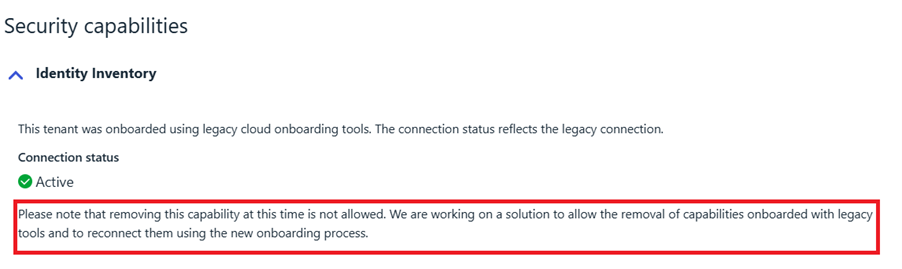
The Identity Inventory feature will be released in phases. Some functionalities may not be immediately available to all users. The user interface will guide you through any actions that are not yet accessible. For instance:
What’s in the Initial Release
For Elements Exposure Management (XM) Users
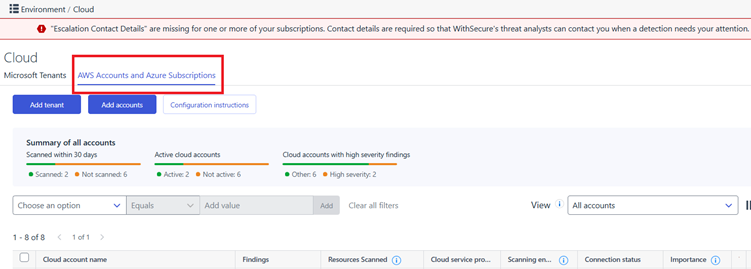
- The Exposure tab under Environment → Cloud will be renamed to:AWS Accounts and Azure Subscriptions
What it does
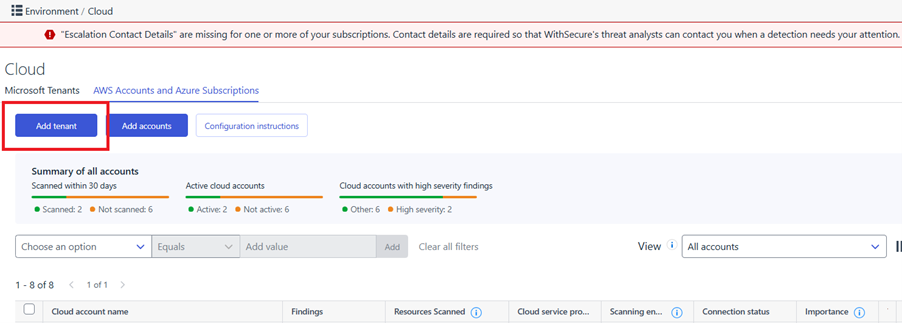
- Introduces a new “Add Tenant” button under: Environment → Cloud → AWS Accounts and Azure Subscriptions
- Moves all XM cloud accounts of type “Tenant” to be managed exclusively under: Environment → Cloud → Microsoft Tenants
How to onboard/re-onboard
- New XM customers: Use the new “Add Tenant” button to onboard Entra ID tenants via Identity Inventory.
- Existing XM customers: If a tenant was previously onboarded using the legacy method (via PowerShell script), these tenants cannot be deleted at this time. This limitation will be addressed in an upcoming release, which will enable re-onboarding of Entra ID tenants through the new Identity Inventory feature. Once available, this enhancement will fully transition tenant management to a script-free process.
More information can be found in the user guide
What is Coming in Subsequent Releases
For Elements Identity Security or EntraID (IDsec) Users
- Identity Inventory will also be available under: Environment → Cloud → Microsoft Tenants
- You will be able to view your Entra ID identities directly through the Elements Security Center, unlocking new identity-focused views and features.
- Note: Scripts will still be needed for configuring Elements Identity Security at the current time.
A separate article will be published with more details once this part is finalized.