


What’s New in Elements – August 2025
Editor’s Highlights
Summertime is traditionally a quiet time for developing and releasing new features. During August, our teams have largely been focusing on improving existing functionality, to bring a better experience to our customers.
Exposure Management
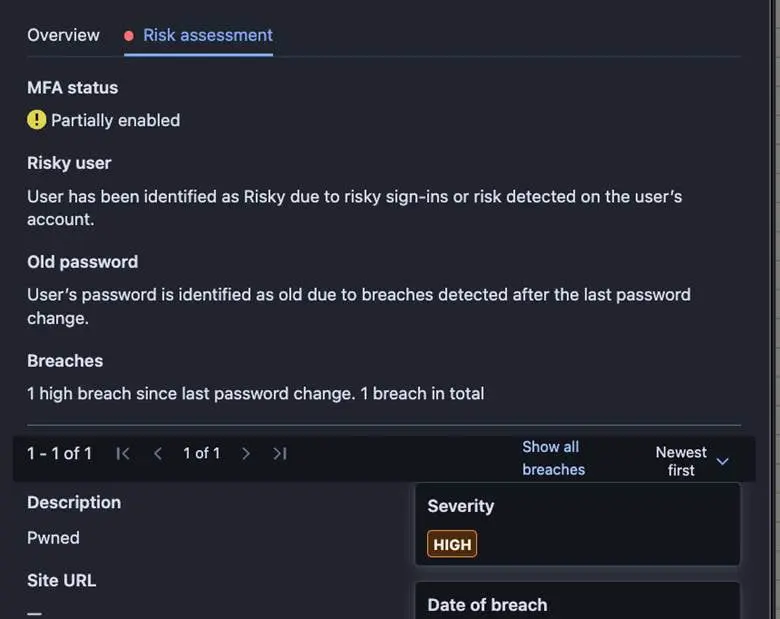
Enriched Identity risk assessment
The Identity risks assessment tab has been enriched with data impacting the calculation of Identity’s risk factor.
Exposure Management for Business
System Scan
Support for detecting vulnerabilities in the following products was added to Authenticated Scanning for Windows:
- Apache Commons Lang
- Apache Jackrabbit
- Apache Jena Fuseki
- Apache Struts Extras
- BeeDrive for desktop
- Comodo Dragon
- Elastic Beats
- hMailServer
- Logpoint AgentX Client
- MagicINFO Server
- Malwarebytes Binisoft Windows Firewall Control
- qBittorrent
- Reactor Netty
- Veeam Backup for Microsoft 365
- Veeam Recovery Orchestrator
- Wazuh Agent for Windows
Elements Foundations
Elements Security Center
New roles for managing access to XDR features
As previously announced, changes were made to the Security Administrators screen.
All Endpoint Protection(EPP) users in the system as of June 30, 2025, were automatically granted access to XDR features to maintain backward compatibility. New EPP users created after this date must have their XDR access explicitly assigned with one of the new XDR roles:
- Broad Context Detections
- Full editing or
- Read-only
- Response
- Execute responses or
- List Responses or
- No access
- Event Search
- Read-only or
- No access
Elements IAM Admin is the only role authorized to grant or revoke XDR access.
Integrations
WithSecure Elements API
New fields in Devices endpoint and Security Events
The latest release in Elements API brings several new fields to the query devices endpoint and human-readable descriptions to Security Events.
New device endpoint fields
More information on connectivity status, various security parameters, installation tags and browsing protection status are exposed from the query devices endpoint.
The full list of new device fields below:
- installationTags
- connectivityStatus
- unreachableConnectionAddresses
- unstableConnectionAddresses
- networkExtensionContentFilterServiceEnabled
- systemIntegrityProtectionEnabled
- systemExtensionEnabled
- guestAccount
- fullDiskAccessGranted
- defaultBrowser
- defaultBrowserStatus
- browsingProtectionExensionChrome
- browsingProtectionExensionFirefox
- browsingProtectionExensionSafari
- browsingProtectionExensionEdge
See more information on the fields from the api specification (under Devices).
New human-readable Security Events fields
Two new fields are added:
- message — details of the security event
- description — short general description of the type of the event
You can see examples of these fields from Security Events specification.
In case you missed it
WithSecure Elements Collaboration Protection and Microsoft SharePoint Embedded
You can find out more about support for Microsoft SharePoint Embedded here.
Update to Exposure Management to improve coverage for RPM based Linux
We recently significantly expanded our coverage of RPM based Linux distributions in Exposure Management. You can find out more in this dedicated article.
Share your ideas with us
Our purpose is to co-secure the world with you – now as WithSecure™. To co-create the best possible cyber security products and services, we warmly recommend you share your ideas via the Ideas section of the WithSecure Community, now accessible directly from WithSecure™ Elements Security Center.
Further information
Changelogs and Release Notes for all parts of WithSecure™ Elements can be found at the Help Center