


What’s New in Elements: November 2023
Editor’s Highlights
Elements Vulnerability Management Scan Node Agents
During the last month we have released new versions of the Scan Node Agents for Elements Vulnerability Management. If you have problems connecting these to our servers, please be sure to read the notes below.
Elements Security Center
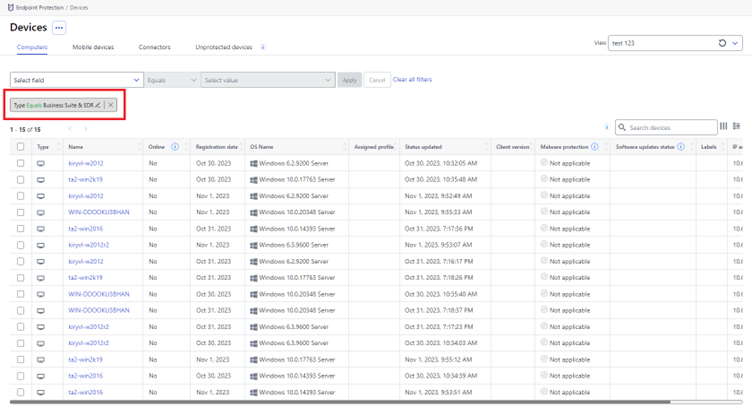
Business suite + EDR devices visibility
Devices using the Business Suite version of EDR are now visible in Elements Endpoint Protection devices view.
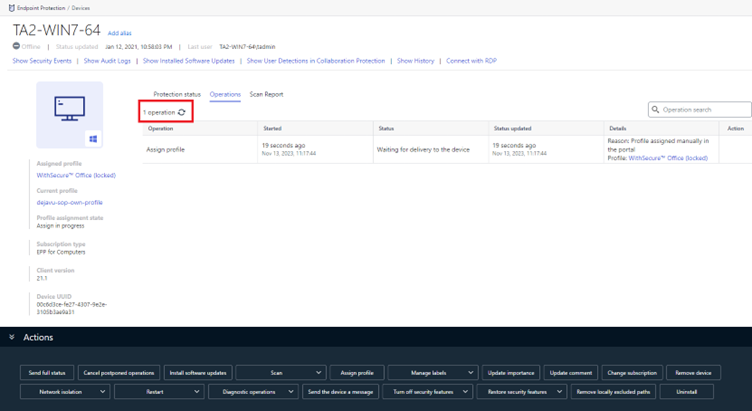
Reload button in Account and Device Details views
We have now added a reload button to manually refresh the page in account and device details operation views.
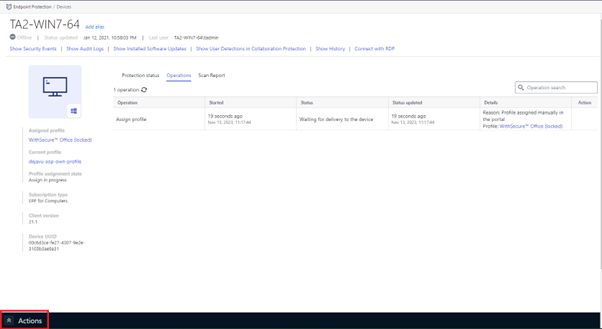
Collapsable Action panel
The Action panel can now be collapsed in device details and device listing views.
Company Administrator access to WS-Diag files
Company admins can now download WS-Diag from the portal operations view.
Elements Endpoint Protection
Elements Agent for Windows and Server Changes
This release makes the Elements Agent version 23.9 available (internal version 23.9.204).
The endpoints automatically upgrade, without a reboot.
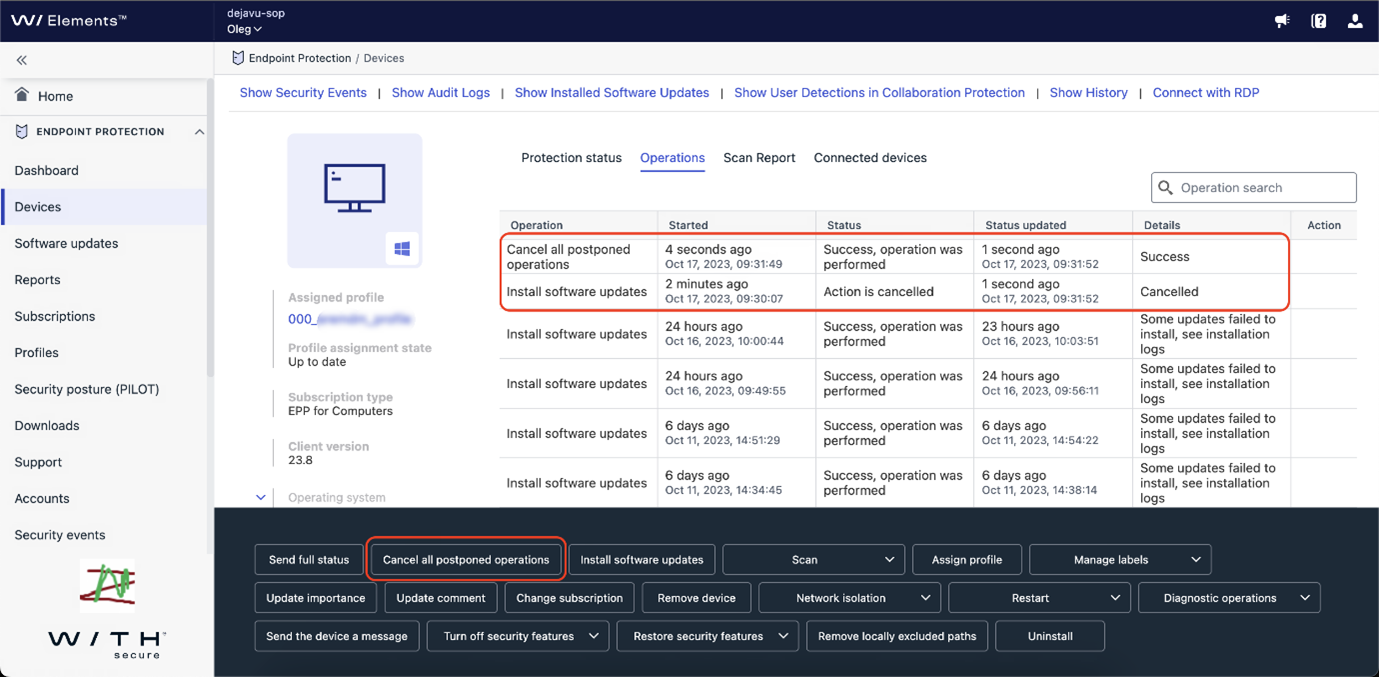
Cancel postponed remote operations
We have enhanced the remote operations by providing admins to possibility to cancel postponed remote operation(s). Remote operations which can be canceled are:
- Send the device a message
- Install software updates
Now it is possible to cancel single remote operation or to cancel all postponed remote operations from the which support cancellation.
It is possible to cancel single operation from Device details view Operations tab, by choosing Cancel operation from the remote operation menu.
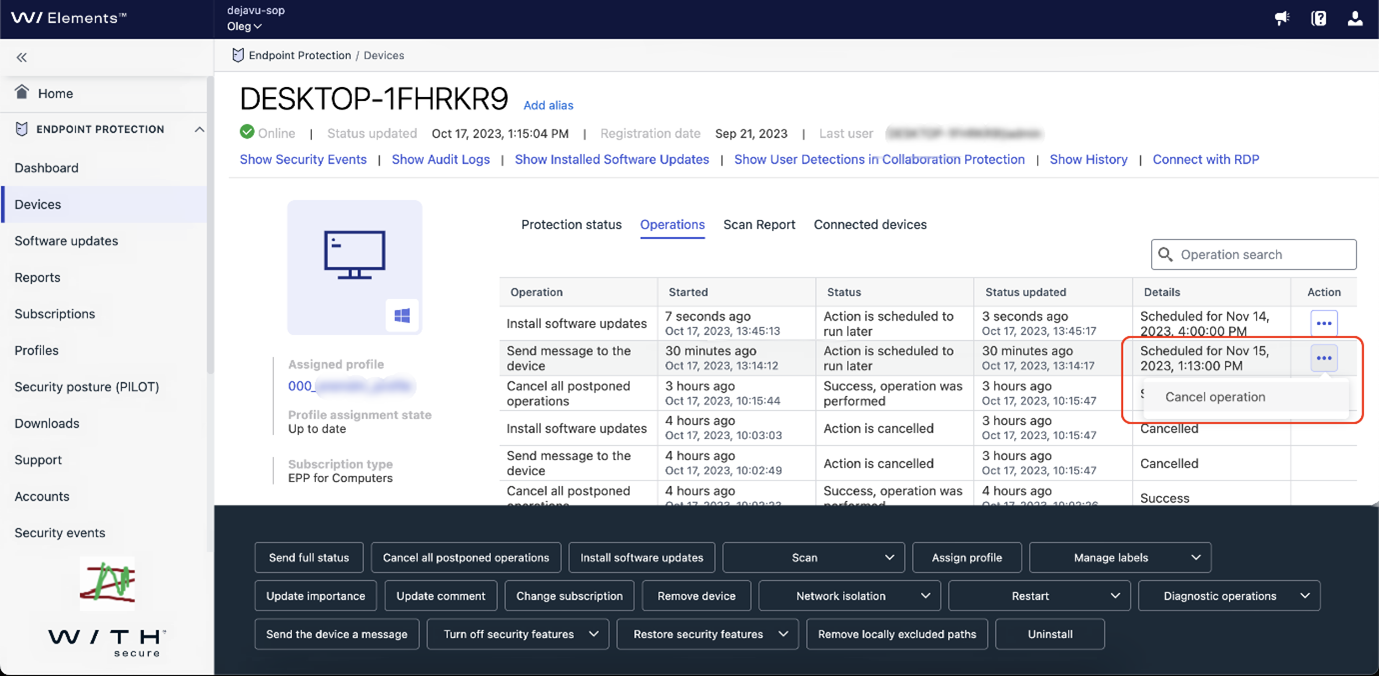
It is also possible to cancel all postponed remote operations for the device by pressing Cancel all postponed operation button from the action panel.
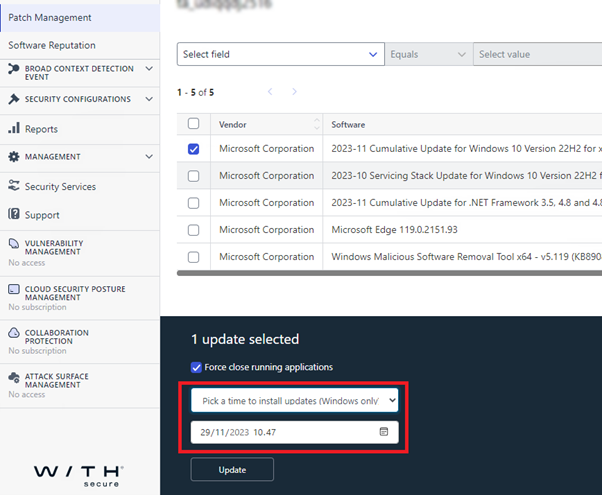
When installing single update it possible to postpone operation
When installing a single software update, instead of installing the update immediately, it is now possible to postpone the update to later time.
Support multiple proxies from .pac script file
In previous versions multiple proxies, during install time, was supported with –proxy argument but not from the .pac file. In this release we have enhanced the support for .pac file and now .pac file can also contain multiple proxy definitions.
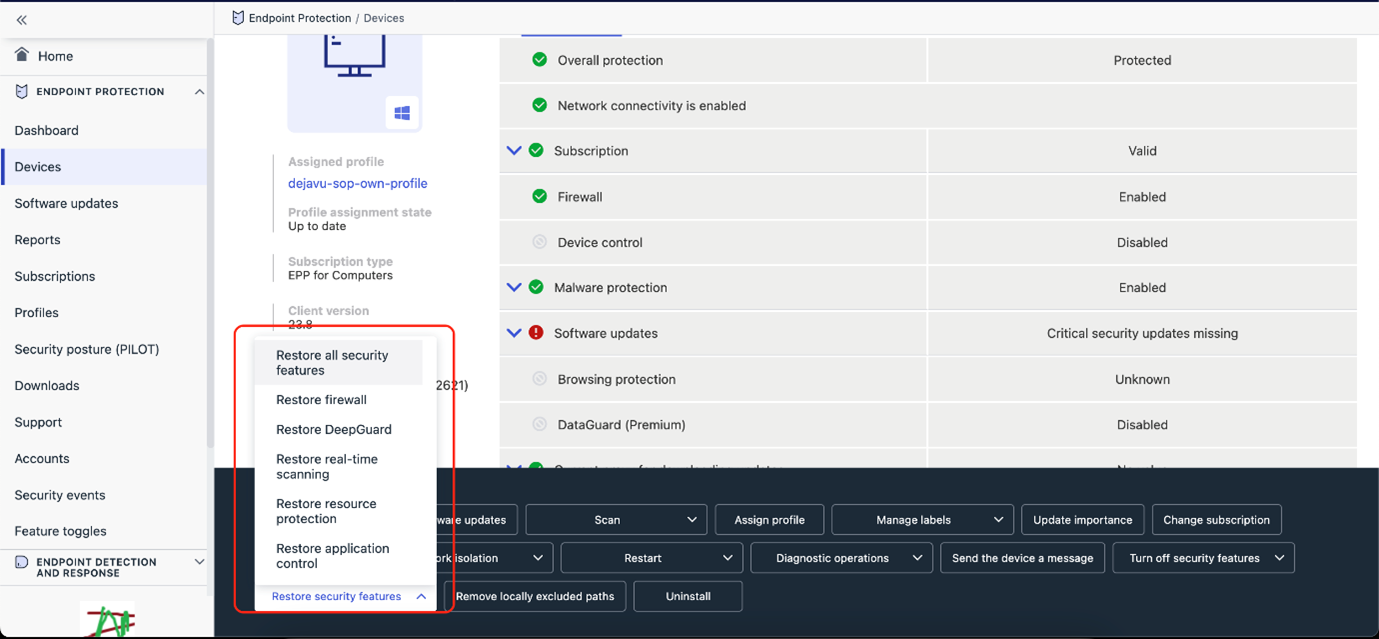
Remote operation to restore protection
In previous releases admins had the possibility to turn off security features from the action panel. Now we have added the possibility to restore security features from the action panel.
Elements Agent for Mac Changes
Our teams working on the Elements Agent for Mac hav been working hard to support macOS 14 “Sonoma”, and we are pleased to announce the Sonoma-compatible Elements Agent is now available for first time installation, as well as an automatic update to existing installations.
Elements Endpoint Detection and Response
Portal performance improvements
We have released changes to the portal which significantly improves its performance. This change should be noticeable for all users but especially for partners who have a large customer base – for example, improved performance should be seen when navigating between customers (using the scope selector) as there were some instances where the portal was slowing down when changing customer.
Due to this change, you may need to log out completely from Elements and clear your browser’s cache, local storage and cookies. This step is only necessary if you find the EDR portal getting stuck on loading and showing only a “spinner“.
Exporting data to CSV from the Event Search view
It is now possible to export Event Search results into a comma-separated value (CSV) file.
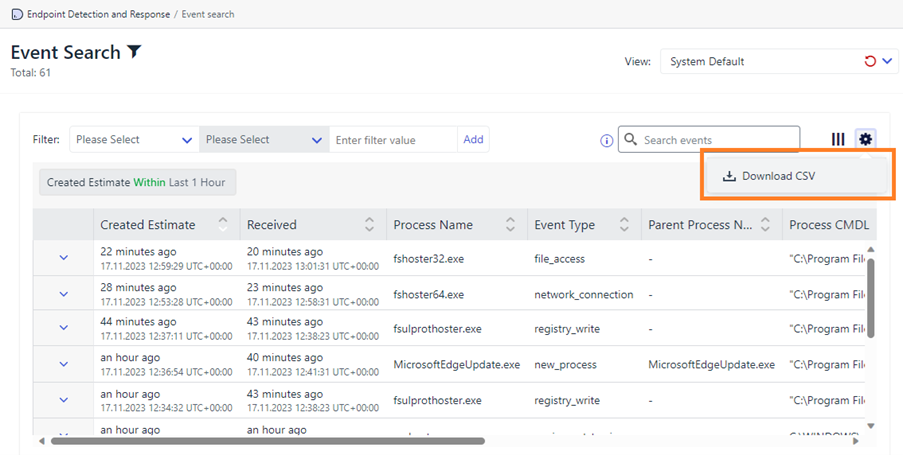
The exported data will align with how it is displayed in the portal – for example, if you have added/removed/reordered the columns then this will be the layout (of the data) in the CSV file.
Please note there is currently a maximum limit of 500 rows that can be exported at any one time.
Localisation is supported with this functionality.
Benefits
With this functionality, you now have more flexibility – for example, it allows you to share this information with fellow security analysts offline, combine it with telemetry from other systems, and/or carry out further analysis, such as, using pivot tables in Excel.
Elements Collaboration Protection
Support for Security Awareness Training Solutions
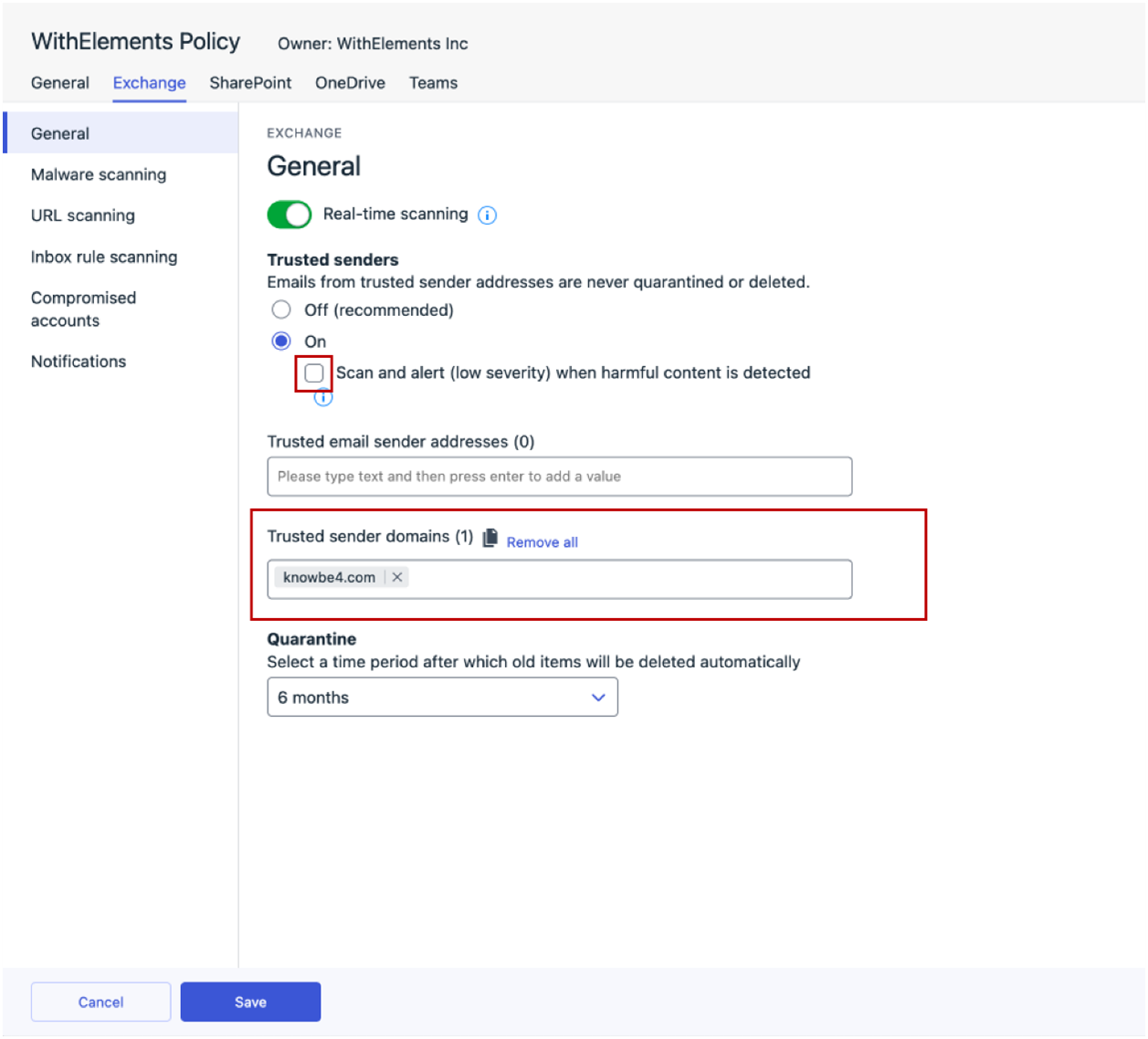
Collaboration Protection now supports security awareness training solutions, such as KnowBe4. To allow phishing training emails to pass through our security measures, admins need to whitelist the provider domain in the policy settings under ‘Trusted sender domains’.
Important Note: Please ensure that the “Scan and alert (low severity) when harmful content is detected” option is turned off to avoid triggering scan for these emails.
Elements Vulnerability Management
Elements Vulnerability Management: System Scan
The following capabilities have been added to authenticated scanning for Windows:
- Detect vulnerabilities in PDF-Tools
- Detect vulnerabilities in PDF-XChange PRO
- Detect vulnerabilities in Symantec Protection Engine
- Detect vulnerabilities in Dell Repository Manager
- Detect vulnerabilities in FSSO Windows CA and FSSO Windows DC Agent
- Detect vulnerabilities in FortiEDR Collector
- Detect vulnerabilities in Veeam ONE
- Detect vulnerabilities in Node.js
- Detect vulnerabilities in Dell OS Recovery Tool
- Detect vulnerabilities in Velociraptor
- Detect vulnerabilities in SolarWinds Network Configuration Manager
- Detect vulnerabilities in Dell OS Recovery Tool
- Detect vulnerabilities in Adobe RoboHelp
Elements Vulnerability Management: Windows Scan Node Agent
A new version of the Windows Scan Node Agent has been released.
Due to upcoming changes please remember to check the following article if you need to whitelist remote network addresses in your firewall configuration:
Network addresses for WithSecure Elements (cloud-managed products) – WithSecure Community
Elements Vulnerability Management: Linux Scan Node Agent
A new version of the Linux Scan Node Agent has been released.
Due to upcoming changes please remember to check the following article if you need to whitelist remote network addresses in your firewall configuration:
Network addresses for WithSecure Elements (cloud-managed products) – WithSecure Community
Integrations
Elements API: New capabilities
The Security Events Query endpoint supports new filters and response properties:
- EPP security events contain device label. Label is only present in events that were created after administrator had added label to EPP device,
- client can filter security events by targetId – id of EPP device or e-mail address of Office 365 user,
- client can filter security events by acknowledgement status. To select only not acknowledged events client should add acknowledged=false to request parameters,
- acknowledged events contains acknowledgement status:
- acknowledge date,
- name of user that acknowledged event.
Clients can use special value “no-value” in anchor parameter to get first page. It might be useful in various No-code or low-code services
Other items of interest
WithSecure and other Technology Providers
Did you know that WithSecure works with other technology providers, to help give you the best possible overall solution? You can find out more about these providers at our Technology partnership page.
In case you missed it
Upcoming changes to the Elements Security Center
As part of our ongoing work to improve the usability of the Elements Security Center for administrators, we will be introducing some changes in January 2024. You can find out more details in a dedicated Community article
Account Security
The security of your Elements account is important to us, and should be important to you too. We’ve recently added extra options for using Multi-Factor Authentication with Elements, and there’s an article about it too
In addition, we’re raising the minimum standard for passwords in Elements. Further details are available
Client changes in 2024
In early 2024, we will be releasing new client installers for the Elements products. While most of the changes are small, there are some slightly larger changes that Administrators need to be aware of. We have a separate article in the Community that lists these in more detail.
https://community.withsecure.com/en/kb/articles/31236-upcoming-changes-to-withsecure-elements-client-installations
Share your ideas with us
Our purpose is to co-secure the world with you – now as WithSecure™. To co-create the best possible cyber security products and services, we warmly recommend you share your ideas via our Ideas Portal, now accessible directly from WithSecure™ Elements Security Center.
Further information
Changelogs and Release Notes for all parts of WithSecure™ Elements can be found at the Help Center