


What’s New in Elements: September 2022
Elements Security Center
Linux Malware Protection status now visible in the devices view:

URL inclusion in security events
For profiles, browsing protection section, a new setting has been added “Include the blocked URLs in all security events”.

By default we only include information on blocked domains when the site was blocked for security reasons. Now you have an option to also include blocked sites when the feature is for enforcing policy (such as Content Control). Due to differences in local legislation regarding monitoring online activity of employees, this feature is disabled by default
Email notification for infection alerts moved to security events
To improve its visibility, the configuration of infection alerts is moved to Security events section.
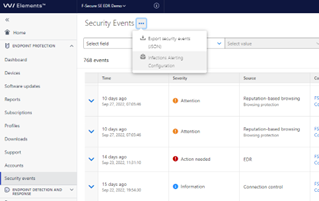
Please note this feature only supports infection types of Security events:
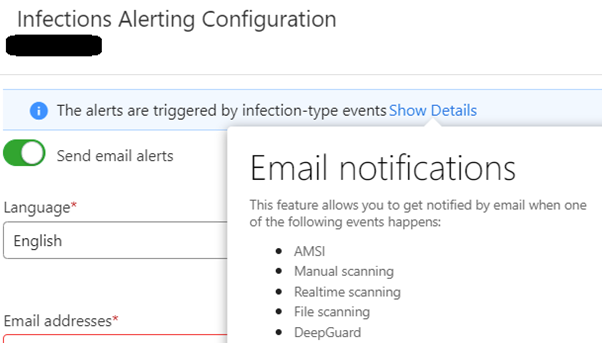
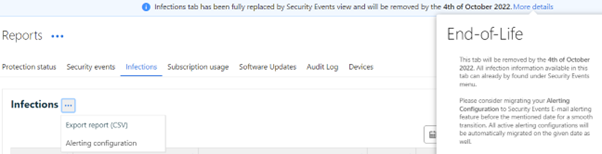
We migrated everyone who has configured emails in the old old Reports -> Infections -> Alert configuration feature to receive them from the new Security Events side.
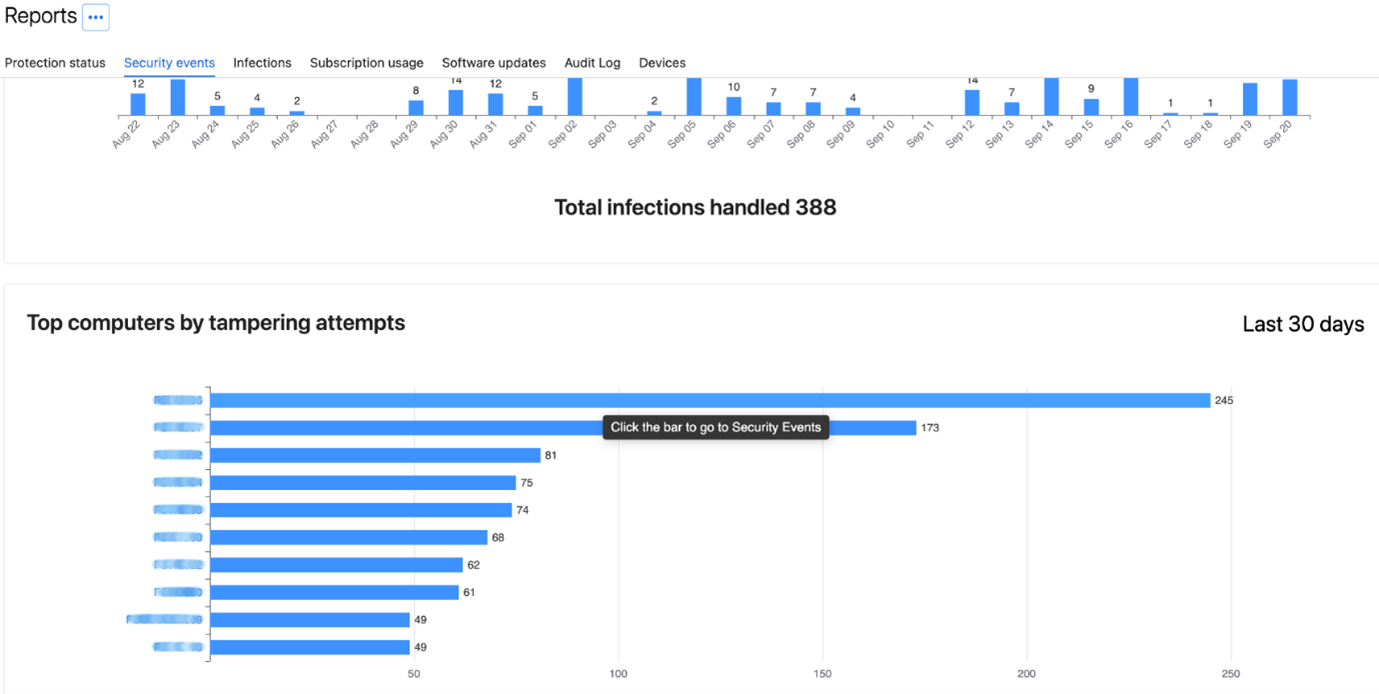
New Chart reporting Top Computers by Tampering Attempts
A new chart in Reports under Security Events section has been added: Top computers by tampering attempts.
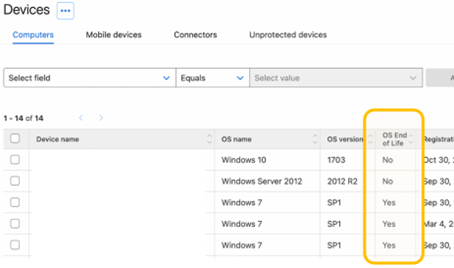
Device list shows End of Life status of the Windows Operating System
We introduced new column in device list: OS End of Life. It shows if Windows device is running an OS version that is no longer supported by Microsoft.
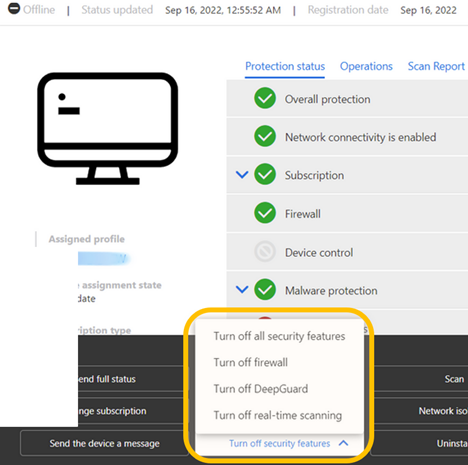
Option to temporarily turn off security features
It’s now possible to temporarily turn off security features. It has been added as operation in device view.
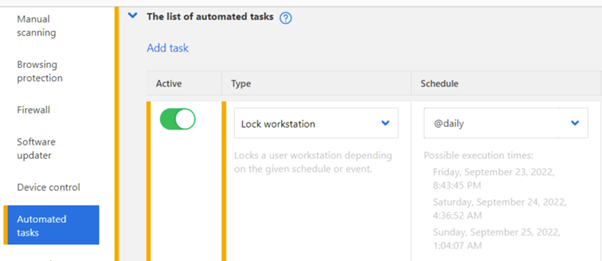
Lock Workstation automatically
A new type of automated tasks has been added: Lock workstation. It locks user workstation depending on the given schedule or event.
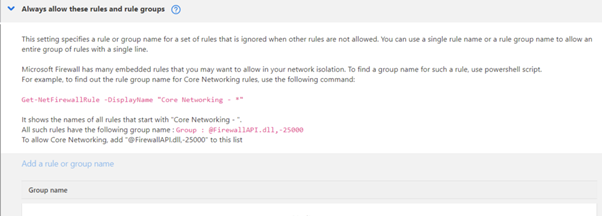
Additional options in Firewall profile
A new Table has been added to the Firewall profile. It allows to always allow specific rules and rule groups.
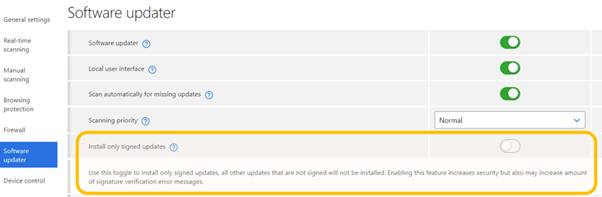
Allow “signed only updates” in Software Updater
In Software Updater settings a new toggle has been introduced: Install only signed updates. When turned on all unsigned updates will not be installed. Enabling this feature increases security as only verified updates will be installed.
Elements Endpoint Protection
Elements Endpoint Agent 22.6 (Early Access)
A new version of the endpoint clients is made available and our Early access program participants started seeing it on 26.09.2022. Full availability starts one week later.
The endpoints get automatically upgraded, without a reboot.
This release introduces new features and fixes so be sure to enable Early access program on some of your computers to try this out.
Feature changes include
- Full list of IP addresses will be shown in each alert in portal
- AD GUID can be used as unique UUID during installation
- App control alerts and rules support parent command line options
- Added functionality of waiting for Software Updater process to end before proceeding to collect logs
- Client now reports amount of duplicated alerts it has filtered out and it’s visible in Security Events on portal.
- Added a new feature to send selected Windows Security Events to portal (requires Premium subscription)
- Multiple improvements in Connection tool: allow to copy list of all required URLs, added description for SSL errors, allow to install missing certificates etc

Elements Agent for Mac Early Access
We have now started upgrading existing F-Secure Computer Protection & Rapid Detection and Response for Mac to the new WithSecure™ Element Agent 22.3.46135, for clients participating in the Early Access program. Wider production rollout of this upgrade will start soon.
New Release: Elements Mobile Protection for Android
New WithSecure Elements Mobile Protection for Android (18.5.0020216) has been released on 03.10.2022.
New features and improvements:
- The app now uses the WithSecure brand.
- The profile version is now visible in the About view.
- OS Security patch is now visible in the WithSecure Elements Endpoint Protection portal.
- Support was added for Samsung Knox.
Elements Endpoint Detection and Response
Elements EDR – new response actions
WithSecure Elements EDR has launched new features and functionalities.
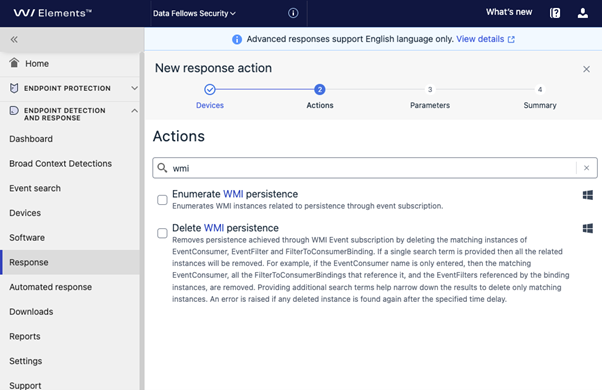
- New investigative response action: Enumerate WMI persistence
- New remediation response action: Delete WMI persistence
These actions are designed to determine whether Windows Management Instrumentation (WMI) persistence mechanisms are in use by an attacker and to delete specified WMI objects related to persistence.
You can find these new advanced features “Response” page “Create new” action wizard:
Read more (online user guide):
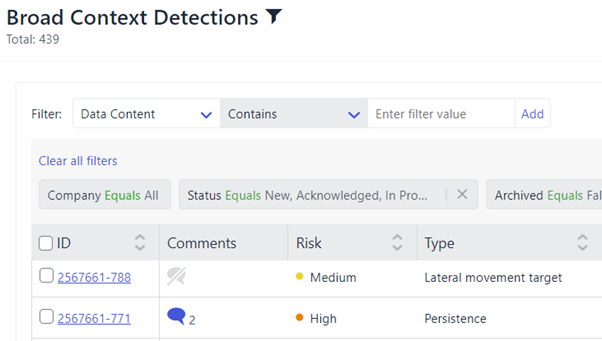
New: Comments Broad Context Detection list view
By clicking comment icon in Broad Context Detection view you can have quick view to latest comments without a need to move into details view. This enables efficient review of comments without additional page changes.
Inside BCD:

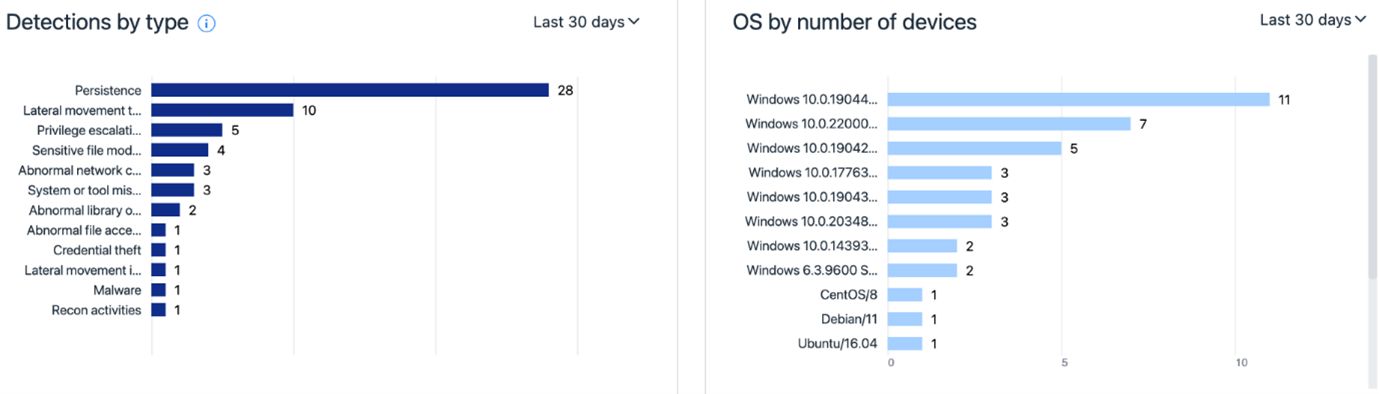
The EDR Dashboard has been renewed:
- Broad Context Detection information is the dashboard is actionable meaning that when clicked user can deep-dive into details behind the numbers.
- For example when clicking a section in a graph or the number in the legend you can get access to details of those 29 High risk level Broad Context Detections with a single click
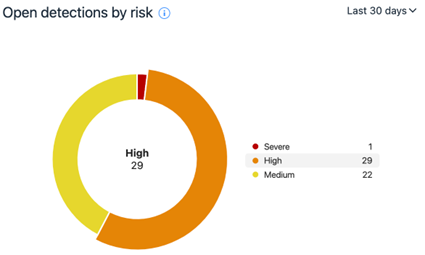
There is new information items available showing e.g. Broad Context Detection type and device operating system breakdown.
Elements Collaboration Protection
During the last month we’ve improved the stability of Elements Collaboration Protection, and also updated the localizations. In addition, there have been improvements to the performance of the solution.
Elements Vulnerability Management
During September, the behaviour of the selection grids has changed. When the user selects items, the “Select all” action only refers to the data seen on the current page (subset of data).
The multi-page selection remains only in the Summary Reposts wizard when Assets are in use to define the scope.
Integrations
Elements Provisioning API
The following products are now supported in Provisioning API:
· WithSecure™ Elements EDR for Computers
· WithSecure™ Elements EDR for Servers
· WithSecure™ Elements Vulnerability Management
Terminate subscription:
This new API call allows to remove the subscription by using the key as
Other items of interest
Vulnerabilities in on-premise Microsoft Exchange
On September 29th 2022, Microsoft announced that some previously unknown vulnerabilities had been found in their Microsoft Exchange product.
WithSecure’s teams immediately started assessing the issue, and determining what we can do to help affected customers. Our ongoing summary can be found here, and as the situation evolves we will keep the article updated.
Labs Research Blog redesigned
Our Labs Research Blog has been redesigned, and is now fully in line with the new WithSecure branding.
In the blog, our Labs staff detail some of the items they’ve been working on, together with links to public advisories that customers may encounter. As a bonus, there’s some tools that our team find useful, or have developed themselves.
WithSecure™ Threat Highlights Report – September 2022
Access the monthly Threat Highlights Report PDF – following this link.
- Iran attacks Albania
- Uber and Rockstar breached by “Tea Pot”
-
Russian ‘hacktivist’ groups have close ties to GRU
- Ransomware: Trends and notable reportsLockBit bug bounty and leaks
- Sparta ransomware
- Nations targeted by ransomware
- BianLian ransomware
- Ragnar Locker deep dive
- Technical analysis of Redeemer
- ExMatter for exfiltration and corruption
- Other notable highlights in briefRaspberry Robin spread through print shops
- Censys state of the internet
- MooBot leverages D-Link vulnerabilities
- BEC group targets schools
In case you missed it
Share your ideas with us
Our purpose is to co-secure the world with you – now as WithSecure™. To co-create the best possible cyber security products and services, we warmly recommend you share your ideas via our Ideas Portal, now accessible directly from WithSecure™ Elements Security Center.

Further information
Changelogs and Release Notes for all parts of WithSecure™ Elements can be found at the Help Center