-
Collaboration Protection – 2026-09-15 Update
Read more
Exchange scanning moves to Microsoft Graph API
Collaboration Protection has transitioned Exchange Online scanning from Exchange Web Services (EWS) to Microsoft Graph API, aligning with Microsoft’s platform modernization following EWS’s retirement. Email protection, the primary security workload, continues uninterrupted with no change to detection capabilities. As a result of this change, scanning of calendar events, contacts, tasks, notes, and sticky notes is no longer supported.
Quarantine cleanup correction
We’ve corrected an issue where some expired quarantined items were not being cleaned up in line with the retention period defined in the policy.
Reminder
To ensure continued support for inbox rules scanning via Graph API, customers who haven’t already done so must grant the updated Microsoft Graph API permissions via the notification banner in the Collaboration Protection Portal.
-
Collaboration Protection – 2026-09-01 Update
Read more
As of today, Collaboration Protection no longer provides protection for non-email items in Exchange (such as calendar entries, contacts, or tasks). Email protection is not affected and continues to work as before.
We are continuing the transition of customer tenants to the Microsoft Graph API. A portion of tenants have already been moved over, and this process is ongoing. We are closely monitoring the transition, making adjustments as needed, and investigating any issues that arise.
For background on this transition, please see our earlier announcement:
Collaboration Protection: Transitioning Exchange Protection to Microsoft Graph APIPossible known issue
We’ve identified a small number of cases where an email that was previously quarantined and released using EWS (Exchange Web Services) may appear to be quarantined again after a tenant moves to the Graph API, if item is modified. If an item is re-quarantined this way, an administrator should release the item again.
We’re flagging this proactively since it can be confusing if you encounter it. There is no clear, consistent pattern yet for when this happens — it appears to stem from differences in how EWS and Graph API report certain email properties. We expect the number of cases to decrease over time, and we’ll continue monitoring closely in the meantime.
-
Collaboration Protection – 2026-07-31 Update
Read more
Action Required: Existing EWS‑Quarantined Items
Following the announcement about the Collaboration Protection Exchange protection transition to Microsoft Graph API, action may be required by administrators.
What’s changing
Items previously quarantined via EWS — particularly Calendar events, Contacts, Tasks, Notes and Sticky notes — will no longer be accessible via the Graph API once the migration is complete. Due to this limitation, action is needed for items that were previously quarantined via EWS.
What you need to do
Administrators must verify if they would like to release or delete any of the existing EWS-quarantined items, which will no longer be accessible via Graph API, no later than August 31, 2026. Any items left unreleased by this date will be automatically deleted by ECP on September 15, 2026.
How to identify affected items
Items requiring action can be identified in the Collaboration Protection portal, on the Quarantine page, in two ways:
- Check the item type via detection details – Select “View detection” on the quarantined item and verify whether the Item type is one of: Appointment, Contact, Contact group, Post item, or Task.
- Use the new Item type filter – Apply the filter: Exchange → Item type: Calendar event, Contact, or Other.
Either method will help you identify items that require verification and possible action before the deadlines above.
-
Collaboration Protection – 2026-01-20 Update
Read more
Exchange Application Permissions Update
The Collaboration Protection Exchange application has been updated with a new set of permissions in preparation for upcoming support for Microsoft Graph API. As a result, tenants already configured in the service may require re‑authorization.
When updated permissions are needed for one or more tenants, the Collaboration protection portal will display a banner prompting administrators to refresh the Exchange application permissions.
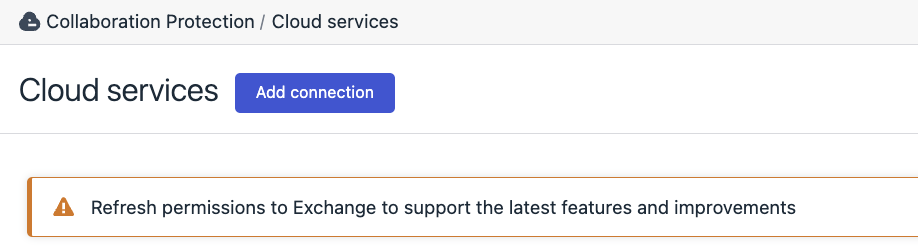
Please follow the on‑screen flow on Cloud services page to accept the new permissions, or refer to the Elements Collaboration Protection User Guide for detailed instructions on service authorization.
-
Collaboration Protection – 2025-11-26 Update
Read more
New version includes minor security improvement.
Disclaimer in the email notifications
New disclaimer message has been added to the external administrator email notifications with content configured in the policy. Disclaimer text is “You are receiving this email because your organization uses the WithSecure Elements Collaboration Protection solution, and an administrator has set up this notification. If you have any questions, please contact your administrator.”, in English.
-
Collaboration Protection – 2025-11-24 Update
Read more
Product Release 24.11.2025
We have released an update of number of underlying libraries to improve performance, maintain compatibility and unify the use with other Elements Security Center components.
Please note: These updates have resulted in minor adjustments to some UI styles.Thank you for your continued support and feedback!
-
Collaboration Protection – 2025-06-03 Update
Read more
We are delighted to share that we have released an important improvement of the release from quarantine feature for Teams. The feature has shown some reliability issues in the recent past. We were able to identify the root-cause and address it accordingly, improving the overall reliability considerably.
Update: 17 June 2025:
Clarification on the above mentioned reliability issue: under certain conditions, we noticed the release from quarantine feature in the Portal was not able to process files exceeding 2097152 bytes. Fortunately, a workaround for releasing files manually was available, and has been shared on request. We are currently working on including the procedure for manual release of files from Sharepoint, Teams and OneDrive in the guide. Meanwhile, we have addressed the issue and, based on our monitoring activities, are confident the specific issue is no longer occurring.
-
Collaboration Protection – 2025-05-29 Update
Read more
We are pleased to share that a fix was released to address the discrepancy in mailbox usage counts in the ECP Portal.
As a result, the mailbox usage counts showed in “Cloud Services” section is fully synced and aligned with the usage counts showed in “Management/Subscriptions” section
-
Collaboration Protection – 2025-05-22 Update
Read more
Released a fix for the license control mechanism. This fix ensures proper calculation of the licenses in use, even when a mailbox is temporarily failing to connect to the Microsoft Services. Before this fix, mailboxes on temporarily failure state were excluded from the calculation, leading to a situation where the total amount of used licenses was inaccurate.
-
Collaboration Protection – 2025-05-20 Update
Read more
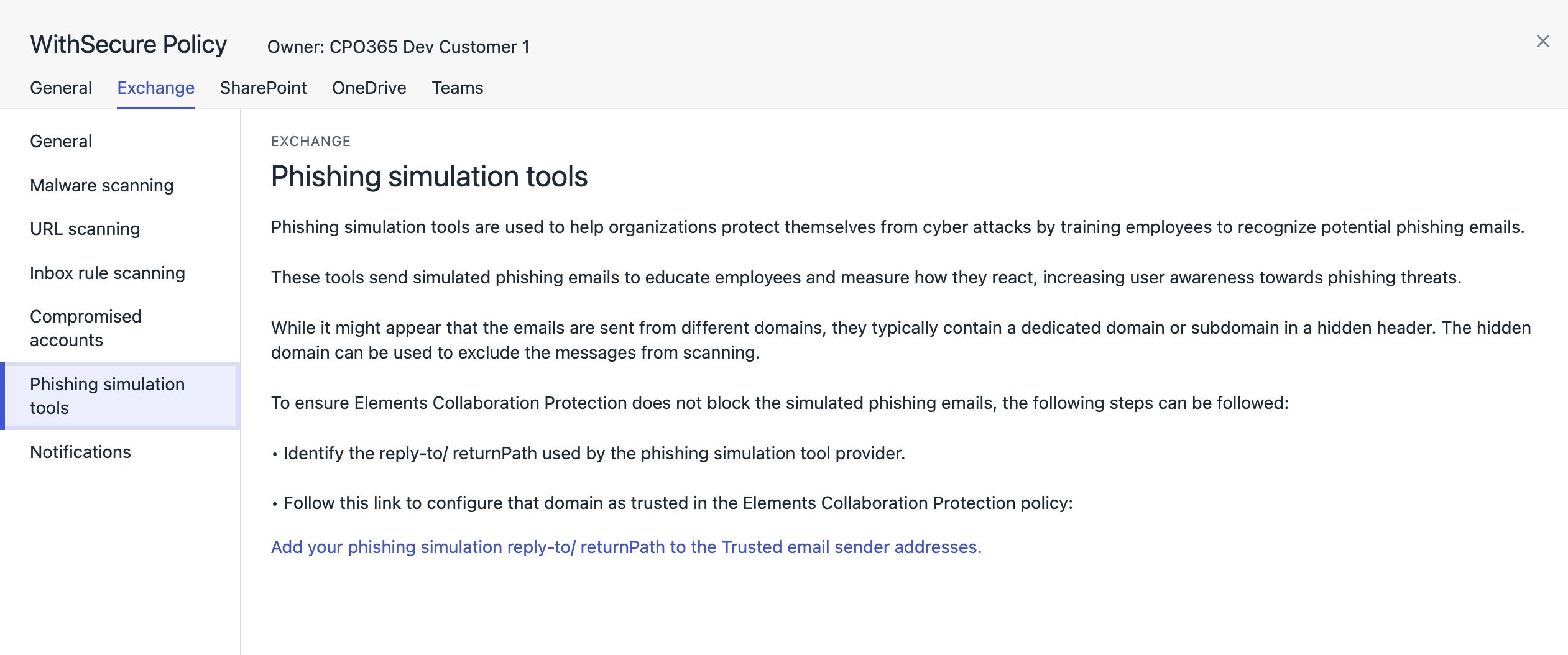
We added clear description and instructions on how Phishing Simulation Tools can be utilised without causing any conflicts in Element Collaboration Protection.
Under the Policy section in Elements Collaboration protection we added a specific policy item, “Phishing Simulation Tools”.
At the end of the policy there will be a link to the existing section: Policies/Exchange/Trusted email sender addresses
This existing feature can be used for allowing the Phishing Simulation Tool to work properly.
Please find below a screenshot of the introduced section in the Elements Collaboration Protection policy section: