
Agent for Mac
-
Agent for Mac – 2026-10-06 Update
Read more
WithSecure Elements Agent for Mac 26.4 (56192) became generally available on 6 October 2026.
This release includes:
New Features
- New malware scanning platform with improved performance and detection capabilities.
- New reputation service providing faster and more accurate reputation lookups.
- New quarantine handling for detected threats.
Bug Fixes
- Fixed an issue where one of the agent’s components could occasionally enter a crash loop when processing certain malformed data.
- Fixed a crash that could occur during software update shutdown.
Installer can be downloaded from:
https://download.withsecure.com/PSB/latest/ElementsAgentInstaller.mpkg
WithSecure Elements Agent for Mac 26.4 (56192) supports the following macOS versions:
- macOS 27 Golden Gate
- macOS 26 Tahoe
- macOS 15 Sequoia
- macOS 14 Sonoma
Agent for Mobile
-
Agent for Mobile – 2026-09-21 Update
Read more
An update to the WithSecure Elements Mobile Protection app for Android (26.6.23772) will be completed 21 September 2026. It will be released as a phased rollout over the next seven days.
It includes the following new features and improvements:
- The browsing protection engine was updated
- The privacy policy screen now opens the current WithSecure corporate privacy page
It also includes the following bug fixes:
- General stability and performance improvements to reduce crashes and cases where the app could stop responding
- The end user license agreement, privacy policy and third party license screens no longer show a blank page when the page cannot be loaded, and the retry button now reloads it
- Web Content Control is no longer left enabled when an administrator turns it off in the WithSecure Elements Endpoint Protection portal
- Reputable sites are no longer blocked when the Banking content category is disabled
- The scan result details no longer show a removed detection as still present
Agent for Windows and Server
-
Agent for Windows and Server – 2026-09-24 Update
Read more
A new version of the endpoint clients is available and our Early access program participants will start seeing it starting on 24.09.2026. Full availability will begin within the next week and takes some days to reach all customers.
This release makes the Elements Agent version 26.4 available (internal version 26.4.612).
The endpoints automatically upgrade, without a reboot.
This release introduces new features (with Profile Editor Update).
Features:
- The “Upload suspicious samples to WithSecure Security Cloud” setting is now a three-option choice instead of an on/off toggle.

- Windows system event 4726 “A user account was deleted” can now be enabled from the Security Configurations profile in the portal. Once selected, WithSecure Elements Agent monitors this event and forwards it to Security Events.

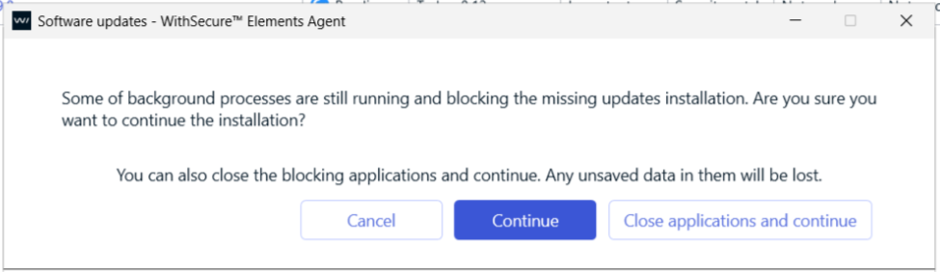
- Software Updater: When an update is blocked by a running application, the Blocking Processes dialog now offers a “Close applications and continue” option to force-close the blocking app(s).
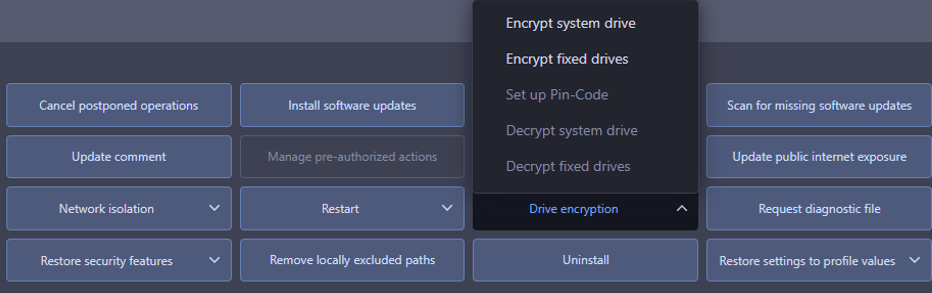
- Encrypt and decrypt fixed drives options are enabled and available from portal.
- More reliable EDR sensor status reporting that stays in sync with the profile setting.
- Improved Fsscan.exe compatibility with non-administrator accounts.
- The “Upload suspicious samples to WithSecure Security Cloud” setting is now a three-option choice instead of an on/off toggle.
Collaboration Protection
-
Collaboration Protection – 2026-09-15 Update
Read more
Exchange scanning moves to Microsoft Graph API
Collaboration Protection has transitioned Exchange Online scanning from Exchange Web Services (EWS) to Microsoft Graph API, aligning with Microsoft’s platform modernization following EWS’s retirement. Email protection, the primary security workload, continues uninterrupted with no change to detection capabilities. As a result of this change, scanning of calendar events, contacts, tasks, notes, and sticky notes is no longer supported.
Quarantine cleanup correction
We’ve corrected an issue where some expired quarantined items were not being cleaned up in line with the retention period defined in the policy.
Reminder
To ensure continued support for inbox rules scanning via Graph API, customers who haven’t already done so must grant the updated Microsoft Graph API permissions via the notification banner in the Collaboration Protection Portal.
Endpoint Security (formerly Endpoint Detection & Response)
-
Controlled Updates for WithSecure Elements agents
Read more
Dear community,
We are introducing Controlled Updates for WithSecure Elements agents, giving you the ability to align agent updates with your own change and maintenance windows rather than receiving them as soon as they are published.
What is changing?
Until now, Elements agents have updated automatically as new versions became available. You can now choose the update mode per profile:
- Automatic Updates — devices receive new agent versions as they are released. This remains the default, and nothing changes for profiles you leave as they are.
- Controlled Updates — devices stay on an assigned release group until you upgrade them, or until that group expires.
Because the setting is applied per profile, you can mix modes across your estate — for example, keeping workstations on Automatic Updates while applying Controlled Updates to servers.
What to know before you start
- Security intelligence updates are not affected by this setting. They continue to be delivered to all devices regardless of the update mode you choose.
- This is not a way to postpone updates indefinitely. Devices are brought up to date automatically once their assigned release group expires.
- Controlled Updates is not supported alongside the Elements Connector.
- Available for Windows, macOS, and Linux Elements agents.
For release group schedules, configuration steps, and how to assign devices, see Controlled Updates in the user guide.
We believe this improvement will give administrators working under strict change control the predictability they need, without weakening the protection on the devices themselves.
Endpoint Security Portal (formerly Endpoint Protection Portal)
-
Endpoint Security Portal (formerly Endpoint Protection Portal) – 2026-04-03 Update
Read more
Dear community,
Following are the few improvements we have done in Endpoint Security Portal:
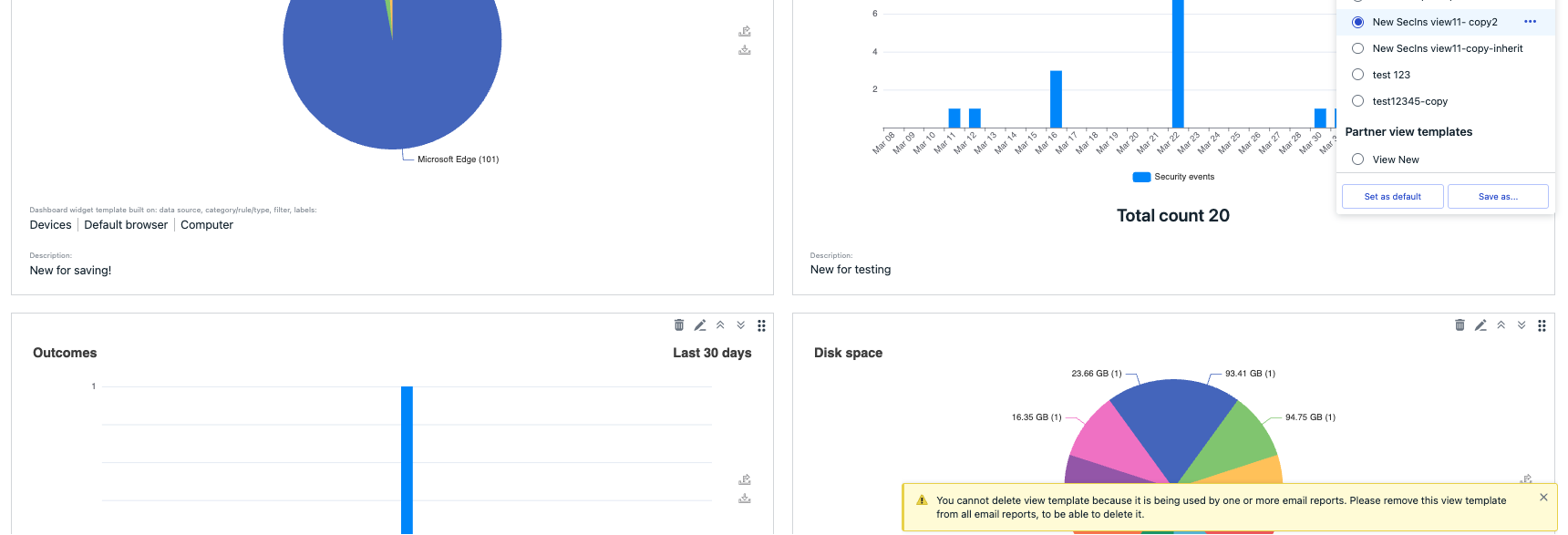
Improved user-facing message on attempt to delete view template that is used for updatable email reports.
To prevent timeouts for large partners, the Manage Operations screen now shows only the most recent 1,000 operations. If a partner has fewer than 1,000 operations, all are displayed and no flyout appears.


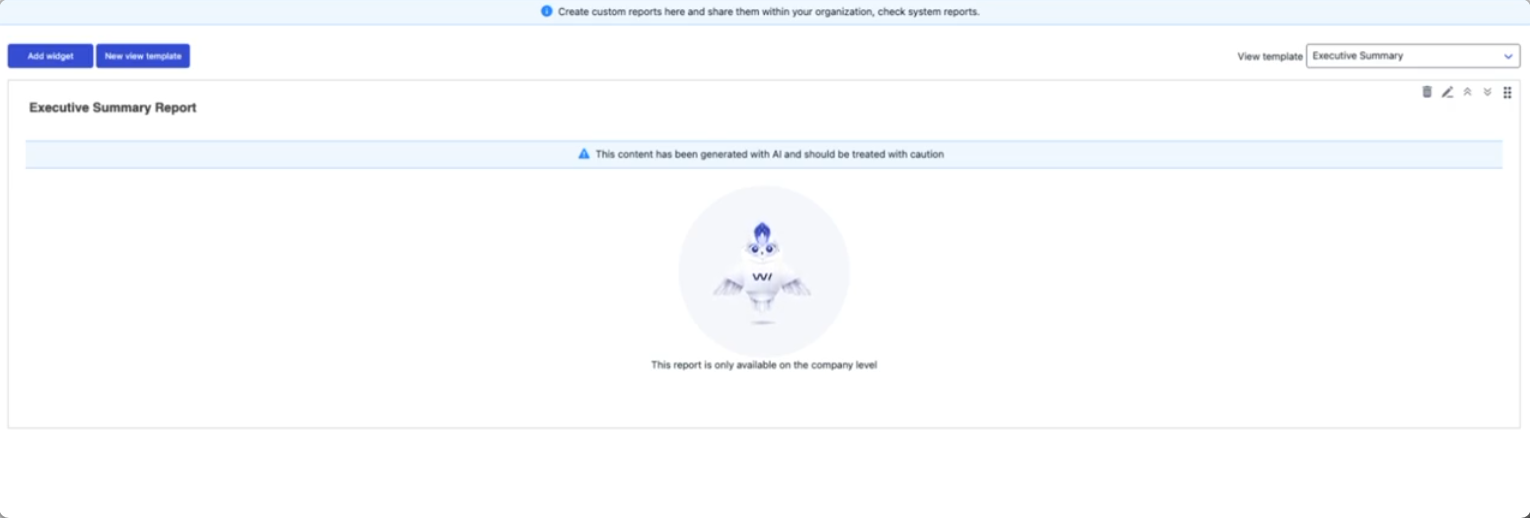
Added luminen animation to the reports.
Identity Security
-
Identity Security – 2025-11-14 Update
Read more
Exciting New Release: Identity Inventory Capability!
We are excited to introduce a new feature in WithSecure Elements Identity Security for Entra ID: the Identity Inventory capability.
How to Set Up:
- Go to the Cloud → Microsoft tenants page in Elements.
- Connect the new Identity Inventory capability by giving permission to read Entra ID data (no Azure subscription needed).
- Wait for the scan to complete (it may take up to 36 hours).
- View all identity data in Environments → Identities.
With Identity Inventory, you can easily see:
- All users and service principals
- Their types and roles
- MFA (Multi-Factor Authentication) status.
This update gives you a clear view of identities in your Entra ID environment.
Linux Agent LS64 (Elements, Business Suite, Standalone)
-
Linux Agent LS64 – 2026-10-15 Update
Read more
FSBG version 1.0.938 is now available. FSBG is an internal component of Linux Security 64. This version includes the following changes:
- Fixed an issue that occasionally caused on-access scanning to fail, resulting in errors in the system journal and alerts.
Exposure Management (including XM for Business and XM Frontline Add-on)
-
Exposure Management – 2026-09-18 Update
Read more
Real-time vulnerability findings from software inventory and CVE threat intel
Exposure Management (XM) will surface vulnerability findings automatically generated from your software inventory data cross-referenced against CVE threat intelligence — including CVSS score changes as they happen.
What this means for you:
- Newly disclosed or updated CVEs affecting your installed software are detected automatically, without needing to manually check whether a given CVE applies to your environment or re-run scans to confirm.
- This extends vulnerability visibility to Mac and Linux devices via software inventory data, in addition to Windows.
Currently, vulnerability findings are refreshed on a 24-hour cadence.
Exposure Management for Cloud
-
Version 2.48.0 released August 18th, 2026
Read more
- Updated Azure rule:
- “Guest User can invite external users” has been split into two rules for more accurate severity:
- Tenant permits anyone including guests to invite external users (High) – triggers when guest invites are set to “Anyone in the organization” (most inclusive)
- Tenant permits member users to invite external users (Medium) – triggers when guest invites are set to “Member users and users assigned to specific admin roles”
Exposure Management Portal (formerly Vulnerability Management Portal)
-
Vulnerability Management Portal – 2026-10-06 Update
Read more
Version 4.39.4 released October 6th, 2026
- Added Ukrainian translations for summary reports and notifications.
- Resolved an issue where German, French, and Japanese Excel summary reports showed the exposure risk column header in English instead of the local language.
- Overall performance improvements.
Exposure Management System Scan (formerly Vulnerability Management System Scan)
-
Exposure Management System Scan – 2026-08-19 Update
Read more
SystemScan 112563, released August 19, 2026
New features and improvements:
[RADAR-35661] – Capability to detect vulnerabilities in DriveLock Enterprise Service in authenticated scanning for Windows
-
Elements Security Center Common Features – 2026-10-09 Update
Read more
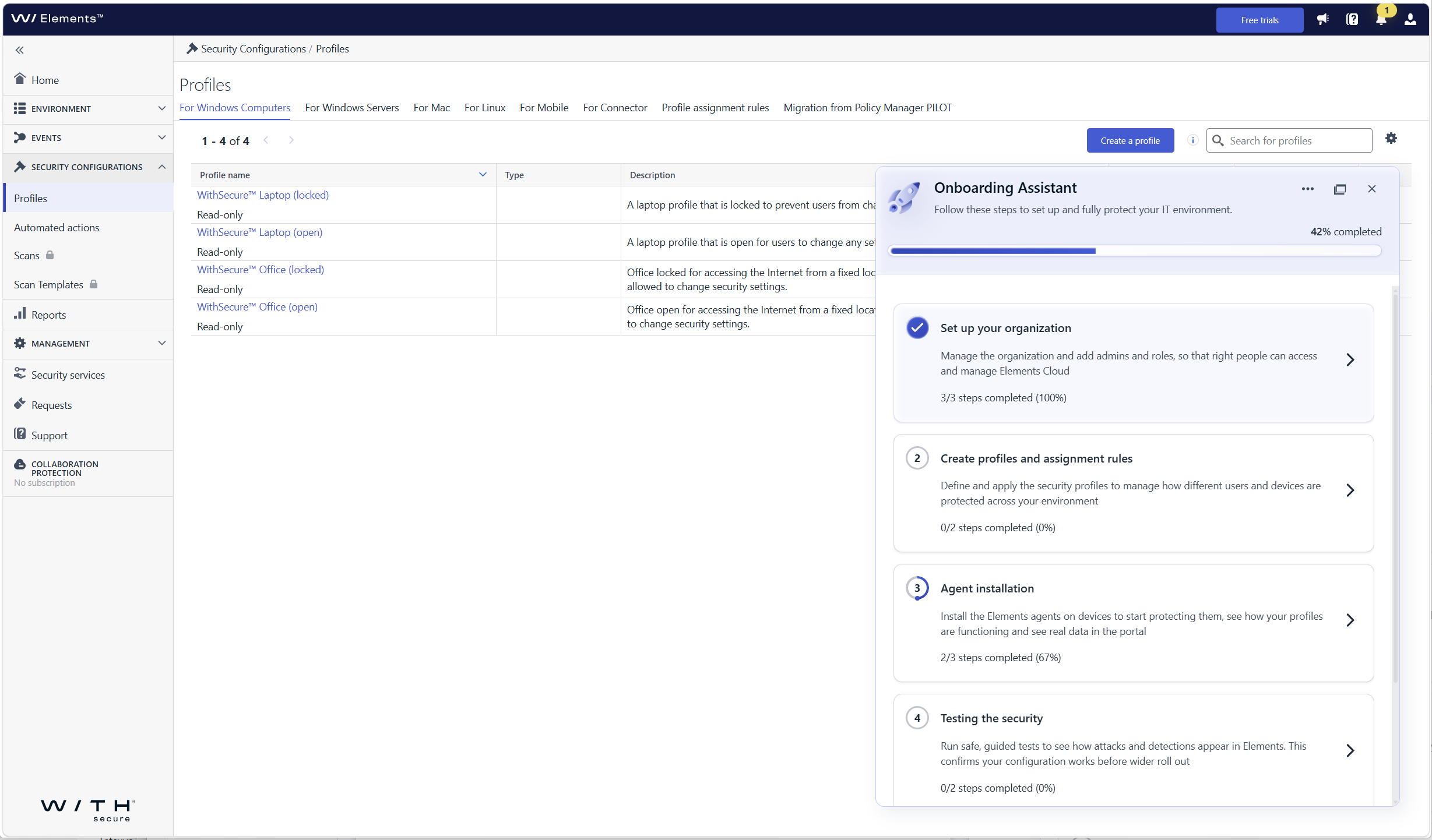
Onboarding Assistant
We have introduced the Onboarding Assistant in Elements Security Center, a built-in virtual assistant that guides new users through their first steps in WithSecure™ Elements. The assistant appears on first login and leads you through the setup actions needed for the products and services your organization has purchased.
Check separate announcement for more info: New Feature: Onboarding Assistant in Elements Security Center
Commercial API
-
Commercial API 2026-07-23 Update
Read more
We’ve extended the List Subscriptions endpoints to return Deal Based subscriptions together with Total Volume subscriptions.
All endpoints for listing subscriptions and Get subscription by the key now return both subscription types. (Deal Based and Total Volume). This means the Commercial API allows you to get everything that belongs to a specified reseller.
Key capabilities:
- Retrieve Deal Based and Total Volume subscriptions together for a given reseller
We’ve extended the documentation with the list of Deal Based product codes.
The documentation now lists the Deal Based product codes that may be returned by the API, in addition to the existing Total Volume codes. We’ve also introduced a fallback product code,
W99999, which may be returned for non-commercial products or when a product code cannot be identified from the available data.For more details, please refer the Commercial API documentation.
Elements API
-
Elements API 2026-07-08: New fields in invitations responses
Read more
The latest Elements API release adds new fields to the invitations object returned by the Send new device invitations and List invitations endpoints (POST and GET /invitations/v1/invitations). These fields provide the caller with the urls sent with the invite.
This is an additive, backward-compatible change. Existing integrations continue to work without modification. New fields are populated when they are present in the invitation. The actual urls are invite specific.
New top-level fields
In both service’s responses:
androidLink(string): Link to the android installeriosLink(string): Link to the iOS installerwindowsLink(string): Link to the Windows installermacLink(string): Link to the Mac installer
See the full Elements API specification for details:
Elements Connector
-
Elements Connector – 2025-11-04 Update
Read more
Elements Connector
A new release of Elements Connector 25.44 for both Windows and Linux is now available. This release includes the following changes:
Event forwarding:
- Language option for forwarded events
A new setting in the Elements Connector profile allows localization of forwarded event messages. - Support for Exposure Management (XM) events
XM events are now supported, enhancing visibility into exposure-related data.
Vulnerability fixes:
- Java 17 update to (17.0.15 → 17.0.17)
Addressed vulnerabilities: CVE-2025-53066, CVE-2025-53057. - Spring Framework 6.2 update (6.2.3 → 6.2.11)
Addressed vulnerabilities: CVE-2025-41248, CVE-2025-41249.
Other fixes and improvements
- Early-access group support
Elements Connector now correctly supports early-access group updates, aligning behavior with public channel versions. - Linux uninstallation Fix
Fixed an issue where the update service was not properly removed during uninstallation on Linux systems
Release schedule:
- First-Time Installers: Available on our Software download page today, November 4th 2025.
- Automatic Channel Upgrade: Scheduled for Wednesday, November 5th 2025.
- Language option for forwarded events
PSA/RMM Integrations
-
PSA/RMM integrations 2026-07-02: Automated subscription provisioning for Halo PSA and Autotask PSA
Read more
Automated subscription provisioning for Halo PSA and Autotask PSA
No more manual subscription setup. If you manage WithSecure™ Elements for your customers through Halo PSA or Autotask PSA, you can now skip the manual work of creating and updating customer organizations and subscriptions in the Partner Portal entirely — it happens automatically from the billing tools you already use.
What’s new
- Organizations and subscriptions provision themselves. Add a WithSecure™ product to a customer’s recurring invoice (Halo PSA) or recurring service contract (Autotask PSA), and the matching Elements subscription (and organization) is created automatically — no separate step in the Partner Portal or interaction with WithSecure’s support
- Seat counts stay in sync. The quantity/units you set on the invoice or contract line item controls the number of seats available for that customer. Need to add or remove seats later? Just update the quantity
- One less system to reconcile. Because provisioning is driven by your PSA’s billing data, your customer subscriptions and your invoicing stay aligned by default, cutting down on mismatches between what you’re billing and what’s actually provisioned.
- Fast turnaround. New subscriptions and seat changes are picked up automatically within 15 minutes — or trigger it instantly with a one-click “Sync sites” action in the Elements Security Center if you don’t want to wait.
- Clear visibility when something needs attention. If a customer is missing required billing details (like address or a billing contact), provisioning simply won’t happen for that account, and you can see exactly why in the integration logs — no silent failures.
Why it matters
Previously, keeping WithSecure™ subscriptions in sync with what you’d sold a customer meant maintaining them twice: once in your PSA for billing, and once in the Partner Portal for provisioning. That’s manual effort and a chance for the two to drift out of sync. Now your recurring invoices and contracts are the single source of truth — set it up once, and every new customer, upsell, or seat change flows straight through.
Availability
Available now to WithSecure Partners using the Halo PSA or Autotask PSA integrations in the Elements Security Center. Just turn on Provisioning in the integration configuration to get started. Not available for free trials or company-managed subscriptions.
Learn how to set it up: Halo PSA Integration · Autotask PSA Integration
Request for feedback
As this is the first release of automated provisioning, we’d be delighted to hear your feedback on how to improve it.
Countercept Agent for Linux
-
Countercept Agent for Linux – 2026-05-20 – FSBG update
Read more
The update is related to the Countercept Agent’s FSBG components. The FSBG component is responsible for the core functionality (e.g. settings management and updates) of the Countercept Agent and does not affect the components responsible for telemetry collection or response.
Product Name: Countercept Agent for Linux – FSBG
Version: 1.0.931
Pilot Availability: 21/05/2026
General Availability: 01/06/2026
Predecessor: 1.0.930
Release Purpose:
- Generic Maintenance
Customer Action Required:
- N/A
Name Changes:
- Several auxiliary files have been added in this release.
- No changes to process, or service names.
Files Updated:
- Most files are updated with this release.
New Features and Enhancements:
- N/A
Generic Maintenance:
- Changes to the functionality not utilized by Countercept.
- Minor bug fixes and improvements.
OS Support:
- AMD64
- AlmaLinux 8.4 – 9.x
- Amazon Linux 2
- CentOS 7, 8
- Debian 10, 11, 12
- Oracle Linux 7, 8, 9 (RHCK and UEK)
- RHEL 7, 8, 9
- Rocky Linux 8, 9
- SUSE Linux Enterprise Server 12 SP3 – SP5
- SUSE Linux Enterprise Server 15
- Ubuntu 18.04, 20.04, 22.04, 24.04
- ARMv8/AArch64
- Debian 11, 12
- Rocky 9
- Ubuntu 22.04, 24.04
Countercept Agent for macOS
-
Countercept Agent for macOS 25.2 GA release
Read more
Countercept Agent for macOS 25.2 has been released to general availability (GA) on 26th of November 2025.
Release contents:
- Updated sensor with new detection capabilities
- Refreshed product icons (macOS 26 compatible)
- Discontinued support for macOS 13
Installer can be downloaded from
https://download.withsecure.com/countercept/macos/latest/WithSecure-Countercept-Agent-54880.pkg
Countercept Agent for Windows
-
Countercept Agent for Windows – 2026-09-16 – Ultralight Core update
Read more
The update is related to the Countercept Agent’s Ultralight Core. Ultralight Core provides low-level functionality such as file hash calculation as part of the agent’s reporting of endpoint activity.
Product Name: Countercept Agent for Windows – Ultralight Core
Version: 2.1.22462
Pilot Availability: 17/09/2026
General Availability: 24/09/2026
Predecessor: 2.1.22416
Release Purpose:
- General maintenance
Customer Action Required:
- The Operating System should be Azure Code Signing (ACS) compliant to receive this update. See
for more details.
Any endpoints which are not ACS-compliant will continue to run the older version of the Ultralight Core (2.1.16183).
Name Changes:
- No changes to file, process, or service names.
Files Updated:
- CapricornScanner.exe
- fshoster64.exe
New Features and Enhancements:
- N/A
General Maintenance:
- General maintenance of functionality not utilized
by Countercept
OS Support:
- Windows 10, 11
- Windows Server 2012, 2012 R2, 2016, 2019, 2022, 2025
Business Suite Client Security and Server Security
-
Business Suite Client Security 16.10 and Server Security 16.10 – 2026-03-24 Update
Read more
WithSecure Client Security provides protection for workstations: Microsoft® Windows 11, all editions excluding ARM.
WithSecure Server Security provides protection for servers: Microsoft® Windows Server® 2016, 2019, 2022, 2025.
The solution can be licensed and deployed as Standard or Premium. For WithSecure Server Security both per-server or terminal connection basis are applicable.
Products contain following features:
- Virus & spyware protection – protects your computer against viruses, trojans, spyware, riskware, rootkits, and other malware.
- DeepGuard™ – offers proactive, instant protection against unknown threats. It monitors application behavior and stops potentially harmful activities in real-time.
- DataGuard (Premium) – monitors protected folders to prevent untrusted applications from modifying your files.
- Web traffic scanning – detects and blocks malicious content in web traffic (HTTP protocol) to provide additional protection against malware.
- Firewall – consists of Windows Firewall integration and the network access control.
- Application control (Premium) – allows you to restrict virtually any application from starting.
- Botnet Blocker – allows the Policy Manager administrator to block Domain Name System (DNS) queries from the host for domains that have a malicious reputation.
- Browsing protection – provides additional protection against unsafe web sites.
- Web Content Control (Premium) – blocks web sites that contain unsuitable content.
- Connection control (Premium) – detects when users access an online banking web site (HTTPS only) or another defined web site that handles sensitive information.
- Device control – lets you control and disable hardware devices.
- Software Updater (Premium) – keeps your system and applications up to date by automatically installing patches as they are released by vendors.
- Offload Scanning Agent – moves malware scanning operations to WithSecure Atlant for Offload Scanning Server.
- Rapid Detection & Response – uses lightweight, discreet sensors that collect behavioral data from endpoint devices to identify a wide range of attacks.
What’s new in this version
This section describes the new features, enhancements and most important issues that have been solved since the previous release.
System requirements
Client Security supports the following operating systems:
- Microsoft® Windows 11
Server Security supports the following operating systems:
- Microsoft® Windows Server 2016
- Microsoft® Windows Server 2019
- Microsoft® Windows Server 2022
- Microsoft® Windows Server 2025
Note: Please see the Client Security and Server Security user guides for the full list of supported operating systems and detailed system requirements.
New features and improvements
- Software updates can now be scanned and installed for non‑admin users.
- Software Updater download errors caused by software vendors are now shown in the local user interface.
- A new uninstallation security event has been added (requires the Policy Manager release).
- A new Artificial Intelligence URL category has been introduced (requires the Policy Manager release).
- The DataGuard overlay icon has been updated to a more lightweight version.
- Improved network state event handling to speed up definitions and policy updates.
- A new
--skip_cachecommand line option of fsscan.exe has been introduced, allowing a forced full rescan of all files. - Dell Common Event Enabler integration is now introduced with Server Security in this release.
Bug fixes:
- Fixed an issue with offline definition updates.
- Fixed an issue where the connectivity checker could fail in certain conditions.
- Fixed an issue with firewall rules restoration during client uninstallation.
- Other minor fixes and improvements.
Installation
Policy Manager 16.10 or newer is required.
Business Suite Client Security for Mac
-
Client Security for Mac – 2026-01-19 Update
Read more
Client Security for macOS v16.03 has been released to general availability (GA) on 19th of January 2026.
This release brings following new features:
- macOS 26 (Tahoe) support
- macOS 26 compatible icons
- Minimum required macOS version is now macOS 14
- Accessing SecurityCloud uses macOS native networking libraries
Bug fixes
Crashes
- Fixes crashes in following components; wsuplinkd, wssettingsd, wssecuritycloudd and wsbootstrapnative
User interface fixes
- ‘Allow new system extension’ dialog led to the incorrect settings page
- Chrome browsing protection was always shown as disabled in Elements Security Center and in local GUI
- Open Settings button was not localized properly
- Allow button in Browsing Protection was not ‘clickable’
Other fixes
- wsavd component was sometimes left running even when it was ‘disabled’
- Realtime scanning (RTS) was not disabled properly even though settings had it disabled
- Malicious files were not detected on macOS 14 when SecurityCloud was turned on
- Rating icons were not shown in Google search results (Safari)
Business Suite Policy Manager
-
Business Suite Policy Manager 16.x – 2025-11-17 Update
Read more
WithSecure Policy Manager 16.11 and WithSecure Policy Manager Proxy 16.11
Changes in this release
Platform & Technology Upgrades
- Java: 17.0.17
- Netty: 4.1.125
- Solr: 9.9.0
- Spring Framework: 6.2.11
- Spring Security: 6.4.11
Security & Vulnerability Fixes
- Java 17: CVE-2025-53066, CVE-2025-53057
- Spring: CVE-2025-41248, CVE-2025-41249
- Other third-party libraries: CVE-2025-55163, CVE-2025-58056, CVE-2025-58754, CVE-2025-7962
Bug Fixes and Improvements
- Corrected issue where HTTP proxy settings were not applied when connecting to Corporate Registration Server.
- Fixed issue with exporting reports in Policy Manager Console.
- Improved Web Reporting stability by stopping the Chrome process from opening when report data is invalid.
- Fixed issue where Disallow user changes is not effective for Trusted sites/Disallowed sites table.
Policy Manager and Policy Manager Proxy 16.11 supports the following operating systems:
Windows:
- Windows Server 2016
- Windows Server 2019
- Windows Server 2022
- Windows Server 2025
- Windows 10
- Windows 11
Linux:
- Alma Linux 8, 9
- Debian 11, 12
- openSUSE Leap 15
- Oracle Linux 8, 9
- Red Hat Enterprise Linux 8, 9
- Rocky Linux 8, 9
- SuSE Linux Enterprise Server 12, 15
- SuSE Linux Enterprise Desktop 12, 15
- Ubuntu 18.04, 20.04, 22.04, 24.04 LTS
Email and Server Security
-
Email and Server Security – 2025-05-16 Update
Read more
A new version of the WithSecure Ultralight Core update (expected version 2025-05-09_01), part of the Windows endpoint client, will be released on 26th of May 2025.
This release introduces a new ‘wsulavprothoster‘ service, executing ‘fsulprothoster.exe‘ process. For partners and customers who have custom integrations in their endpoint devices to ensure that the EPP product is functioning correctly, we advise that these integrations are reviewed to ensure correct functionality.
For more details please check Changes to the Windows EPP Scanning Components – May 2025
Linux Atlant
-
Linux Atlant – 2026-10-15 Update
Read more
New FSBG update (version 1.0.938) has been released. FSBG is a component of Atlant. This update includes the following changes:
- Miscellaneous bug fixes and stability improvements.
Linux Agent LS64 (Elements, Business Suite, Standalone)
-
Linux Agent LS64 – 2026-10-15 Update
Read more
FSBG version 1.0.938 is now available. FSBG is an internal component of Linux Security 64. This version includes the following changes:
- Fixed an issue that occasionally caused on-access scanning to fail, resulting in errors in the system journal and alerts.