
-
Exposure Management System Scan – 2026-06-18 Update
Read more
SystemScan 110020, released June 18, 2026
New features and improvements:
[RADAR-34880] – Capability to detect vulnerabilities in Micrometer in authenticated scanning
-
Exposure Management System Scan – 2026-06-17 Update
Read more
SystemScan 109986, released June 17, 2026
New features and improvements:
[RADAR-34966] – Capability to detect vulnerabilities in Spring Statemachine in authenticated scanning
[RADAR-34965] – Capability to detect vulnerabilities in Spring Cloud Sleuth in authenticated scanning
[RADAR-34929] – Capability to detect vulnerabilities in Spring Data Redis in authenticated scanning
[RADAR-34918] – Capability to detect vulnerabilities in Spring REST Docs in authenticated scanning
[RADAR-34901] – Capability to detect vulnerabilities in Spring Retry in authenticated scanning -
Exposure Management – 2026-06-16 Update
Read more
Vulnerability scanning now supported in OT and isolated network environments
WithSecure Elements Vulnerability Management can now scan operational technology (OT) networks and other isolated or segmented environments by routing scan node traffic through an Elements Connector acting as a proxy.
With this change, scan nodes deployed within isolated network segments can route all communication to the Elements backend over ports 80/443 via a centrally deployed Elements Connector — without requiring internet access or additional firewall exceptions from within the segment.
Asset sub-type support in findings
Findings in Exposure Management now include asset sub-type information, giving users a more precise understanding of which type of asset a finding is associated with.
Assets across all supported sources (Identity, ASM, VM, Cloud, and Device Service) now carry an optional sub-type property that provides a second-level classification beyond the primary asset type. For example, identity assets can be distinguished as Member, Guest while internet assets can be classified as Domain, Subdomain, or IPv4 Address.
Asset sub-type data is now available in the Findings list (Environment → Exposure → Findings) via:
- A new “Asset sub-type” column (hidden by default, sortable, can be enabled via column settings)
- A new “Asset sub-type” filter to narrow findings down to a specific asset classification
These improvements make it easier to prioritize and investigate findings based on the precise nature of the affected asset.
-
Exposure Management System Scan – 2026-06-16 Update
Read more
SystemScan 109956, released June 16, 2026
New features and improvements:
[RADAR-34978] – Capability to detect vulnerabilities in AWS SDK For Java in authenticated scanning
-
Vulnerability Management Portal – 2026-06-12 Update
Read more
Version 4.38.1 released June 12th, 2026
- Added OWASP vulnerability tags to web scan plugins.
- Resolved an issue where the discovery scan report did not display all data for large reports.
- Resolved an issue where scan groups did not fully collapse properly.
- Resolved an issue that occurred when accessing the network scans list page.
- Resolved an issue that caused invalid vulnerability counts in emails after finishing a scan.
- Overall performance and security improvements.
-
Exposure Management System Scan – 2026-06-11 Update
Read more
SystemScan 109842, released June 11, 2026
New features and improvements:
[RADAR-34812] – Capability to detect vulnerabilities in Apache Fesod in authenticated scanning
-
Exposure Management – 2026-06-05 Update
Read more
Authenticated scan via SSH on Windows hosts
System authenticated scans can be now created for Windows targets using SSH protocol.
In addition to WinRM which has been the main protocol for performing authenticated vulnerability scans on Windows hosts, SSH is now supported. This feature was previously enabled only for Linux targets
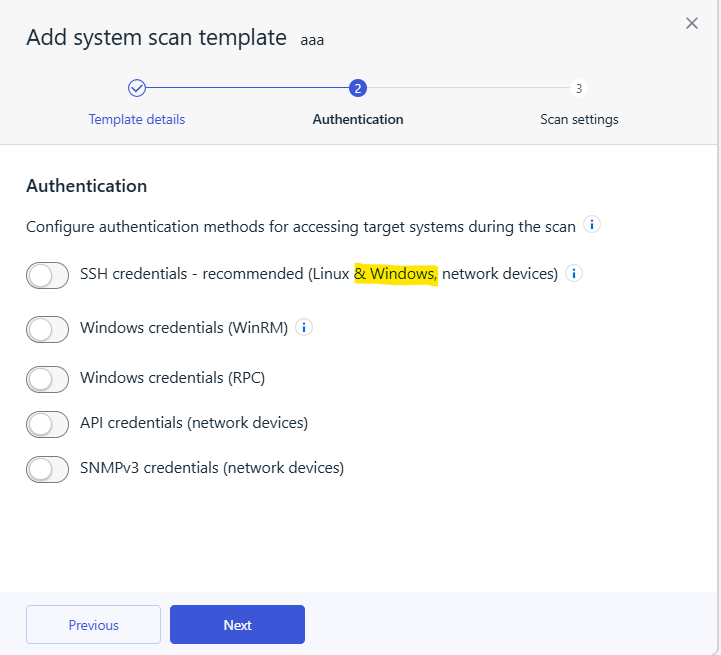
This requires SSH service to be enabled on the target host. We have released a KB article to explain how to enabled SSH service on Windows at Elements Announcements.
In order to access the wizard chose
Security Configuration→ Network Scan templates → Add system scan template. Some new options will apply only if the target is Windows. -
Exposure Management System Scan – 2026-06-05 Update
Read more
SystemScan 109702, released June 5, 2026
New features and improvements:
[RADAR-34813] – Capability to detect vulnerabilities in Apache Directory LDAP API in authenticated scanning
-
Exposure Management System Scan – 2026-06-03 Update
Read more
SystemScan 109666, released June 3, 2026
New features and improvements:
[RADAR-34817] – Capability to detect vulnerabilities in Apache Calcite in authenticated scanning
[RADAR-34812] – Capability to detect vulnerabilities in Apache Fesod in authenticated scanning -
Exposure Management System Scan – 2026-06-02 Update
Read more
SystemScan 109640, released June 2, 2026
New features and improvements:
[RADAR-34713] – Capability to detect vulnerabilities in Kiro CLI in authenticated scanning for Windows
[RADAR-33877] – Capability to detect TLS v1.3 cipher suites on server
[RADAR-31783] – Capability to detect HTTP/2 support on HTTP server
[RADAR-33879] – Capability to detect HTTP/3 support for existing HTTP server