-
Exposure Management – 2026-09-18 Update
Read more
Real-time vulnerability findings from software inventory and CVE threat intel
Exposure Management (XM) will surface vulnerability findings automatically generated from your software inventory data cross-referenced against CVE threat intelligence — including CVSS score changes as they happen.
What this means for you:
- Newly disclosed or updated CVEs affecting your installed software are detected automatically, without needing to manually check whether a given CVE applies to your environment or re-run scans to confirm.
- This extends vulnerability visibility to Mac and Linux devices via software inventory data, in addition to Windows.
Currently, vulnerability findings are refreshed on a 24-hour cadence.
-
Exposure Management – 2026-09-03 Update
Read more
Pre-authorization for automatic response actions on identities
We’re introducing pre-authorization response actions, so response to identity-based threats can be authorized in advance. For each identity pre-authorization values can be set:
Manual actions – response actions action before it runs. This is the setting used when mitigation actions are triggered from a recommendation.
Pre-authorization can be set for a single identity, for many at once, or governed by a company default that applies automatically to identities as they enter the environment. The company default is configured per organization, and all existing identities have already been set to it, so a consistent baseline is in place from day one.
Filter for AI-related identities in the Identity view
AI agents and automations increasingly appear as identities in customer environments, and they introduce new risk. The new AI Assets quick filter in the Identity view displays only the service principals classified as AI-related, allowing them to be located without manual searching.
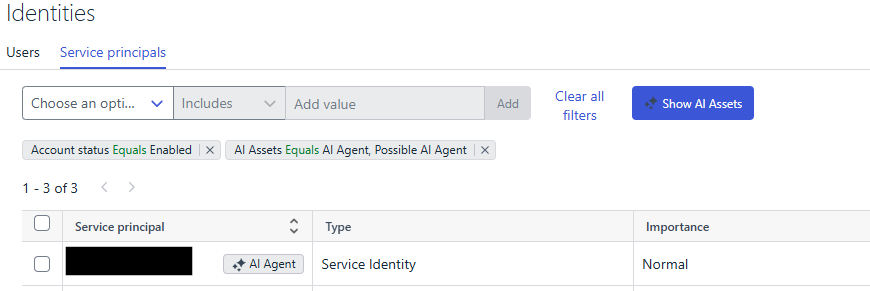
By selecting the filter, customers can view all AI-related identities in a single place, making it easier to review AI activity and address anything that requires attention.
-
Exposure Management – 2026-07-21 Update
Read more
Clearer identity findings and recommendations for breach exposure
We’ve renamed and updated the Identity findings and recommendations that deal with credential breaches so they’re easier to understand and act on. The names now describe exactly what each finding or recommendation covers, and for each one we’ve refreshed the supporting content – descriptions, risk explanations, details, immediate actions, and proactive actions — so the guidance is clearer and more actionable.
Here’s what’s changed:
“User has old password” is now “Account exposed in breach after last password change”
The new name makes the finding’s purpose clear: it flags accounts whose credentials were exposed in a known breach and haven’t been changed since.
“Remind your users to change their password” is now “Reset passwords exposed in breaches”
The new name reflects the specific action that reduces risk — resetting passwords that have been exposed in breaches.
“Remediate identity breach of multiple users” is now “Review identities with breaches”
The recommendation now includes clear guidance for addressing Identity breach findings. Since these findings belong to a unique category that can’t be resolved through standard means, they call for a different approach.
-
Exposure Management – 2026-07-14 Update
Read more
Pre-zero-day exposure detection and mitigation actions from Recommendations
We’re extending Exposure Management (XM) with two capabilities that bring XM and Extended Detection and Response (XDR) closer together — helping you catch risk earlier and act on it faster, without leaving the Recommendation view.
Pre-zero-day exposure detection
For customers running both XM and XDR, XM can now surface exposure risks that traditional vulnerability scanning misses entirely: privilege-escalation vulnerabilities spotted in real time from endpoint detection data, before a CVE even exists. You’ll see a new finding and recommendation in your Exposure dashboard describing the risk and the recommended action, including guidance on next steps such as reinstalling or patching affected software.
Take mitigation action straight from a Recommendation
For customers running both XM and XDR, the Recommendation view now offers response actions matched to the type of asset affected — so you can act immediately instead of switching tools.
Depending on the type of fix the recommendation requires, you’ll be able to isolate a device or update file permissions. Later on, recommendations related to Identities will offer the option to reset a password, block user access, or end a user’s active session..
Select the affected assets in the Recommendation view and trigger the action directly — no need to pivot to a separate XDR console.
Web Scan and OWASP Top Ten 2025
Our Vulnerability Management Web Scan engine has been updated to detect and classify findings according to the latest OWASP Top Ten (2025) categories, alongside continued coverage of the 2017 and 2021 lists. Findings from Web Scan contain tags for OWASP categories.
-
Exposure Management – 2026-06-16 Update
Read more
Vulnerability scanning now supported in OT and isolated network environments
WithSecure Elements Vulnerability Management can now scan operational technology (OT) networks and other isolated or segmented environments by routing scan node traffic through an Elements Connector acting as a proxy.
With this change, scan nodes deployed within isolated network segments can route all communication to the Elements backend over ports 80/443 via a centrally deployed Elements Connector — without requiring internet access or additional firewall exceptions from within the segment.
Asset sub-type support in findings
Findings in Exposure Management now include asset sub-type information, giving users a more precise understanding of which type of asset a finding is associated with.
Assets across all supported sources (Identity, ASM, VM, Cloud, and Device Service) now carry an optional sub-type property that provides a second-level classification beyond the primary asset type. For example, identity assets can be distinguished as Member, Guest while internet assets can be classified as Domain, Subdomain, or IPv4 Address.
Asset sub-type data is now available in the Findings list (Environment → Exposure → Findings) via:
- A new “Asset sub-type” column (hidden by default, sortable, can be enabled via column settings)
- A new “Asset sub-type” filter to narrow findings down to a specific asset classification
These improvements make it easier to prioritize and investigate findings based on the precise nature of the affected asset.
-
Exposure Management – 2026-06-05 Update
Read more
Authenticated scan via SSH on Windows hosts
System authenticated scans can be now created for Windows targets using SSH protocol.
In addition to WinRM which has been the main protocol for performing authenticated vulnerability scans on Windows hosts, SSH is now supported. This feature was previously enabled only for Linux targets
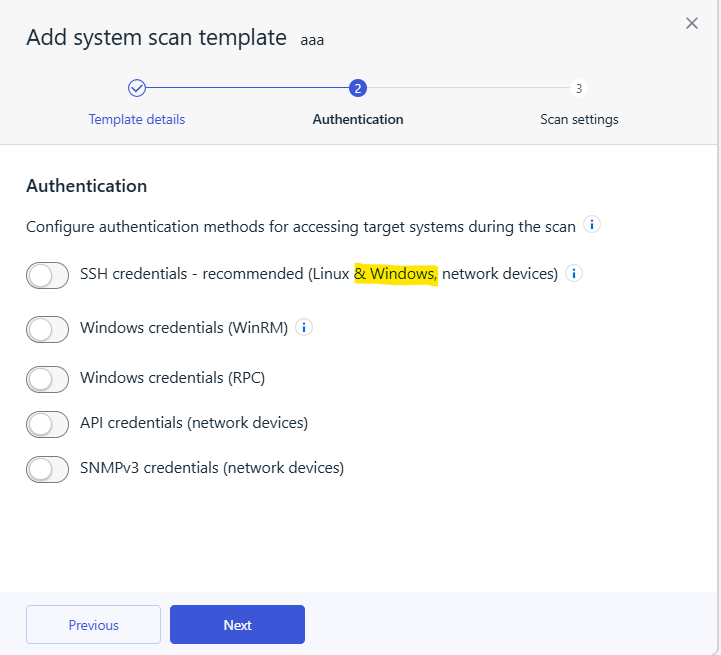
This requires SSH service to be enabled on the target host. We have released a KB article to explain how to enabled SSH service on Windows at Elements Announcements.
In order to access the wizard chose
Security Configuration→ Network Scan templates → Add system scan template. Some new options will apply only if the target is Windows. -
Exposure Management – 2026-05-07 Update
Read more
New release include updates related to Identity views, reports, XM Recommendations, XM Findings and Devices views
Identity
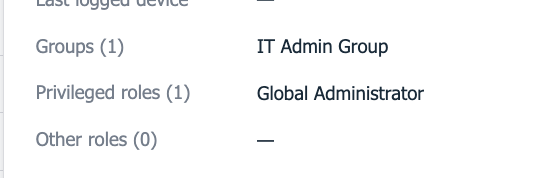
Identity Details –> Entra Group Membership
Entra group membership is now visible in the Identity details pop-up, complementing the already-available Entra roles view.
Reports
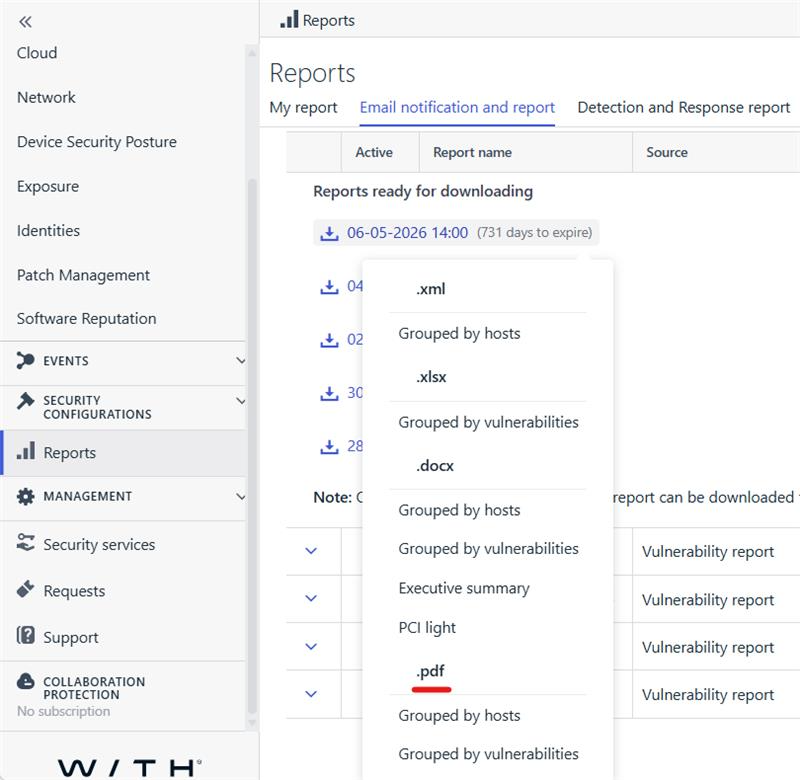
XM vulnerabilities reports are now available in pdf format
Elements Vulnerability Management Reports, accessible from
Reports -> Email notification and reportmenu are now also downloadable in pdf format from the same context menu as before.Note: This applies to only newly generated reports where the pdf.
Devices
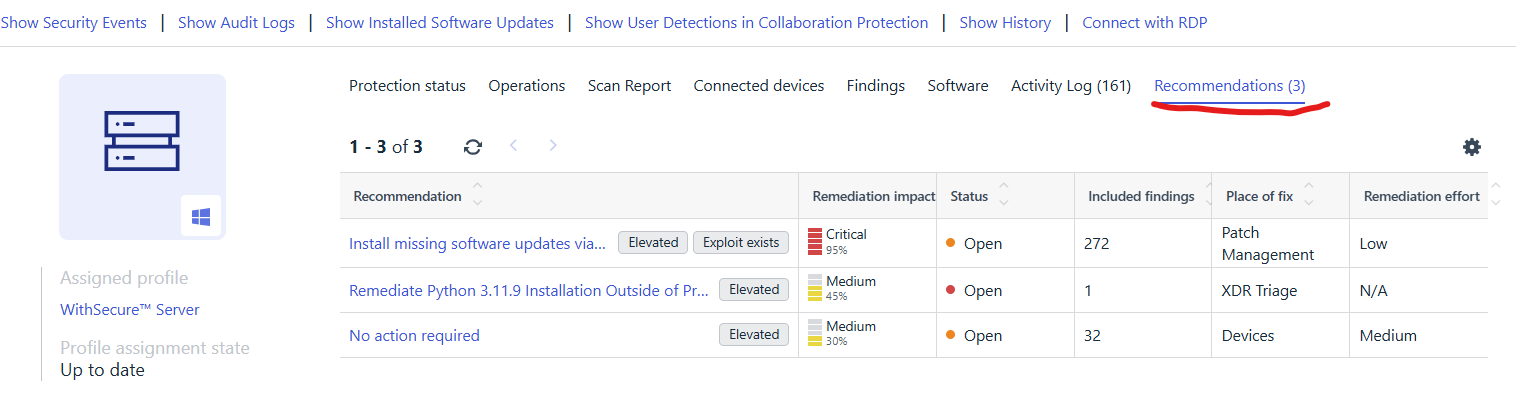
Device details page features recommendations list
The device details page
Environment → Devices → (Computers & Unmanaged devices)features a new tab for showing XM recommendations only for the selected device.Note: This tab lists only open recommendations (status category = Open)
Recommendations and Findings
Direct navigation from Finding instances to the affected device view is now possible.
Affected asset of the
Environment -> Exposure -> Findingsview has a hyperlink which opens the details view of the affected asset in a new browser tab.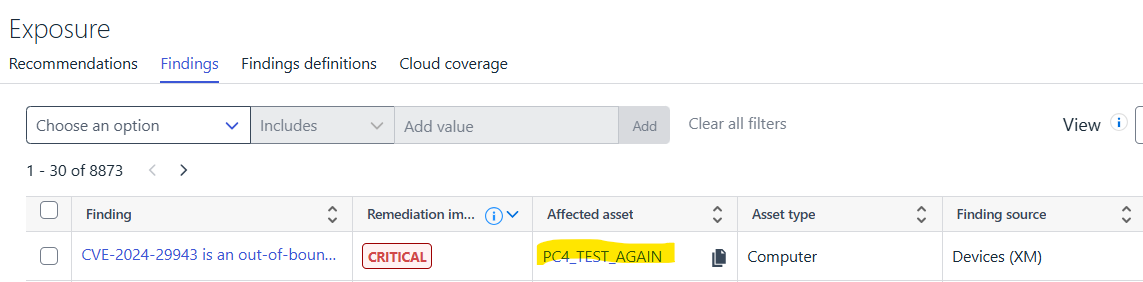
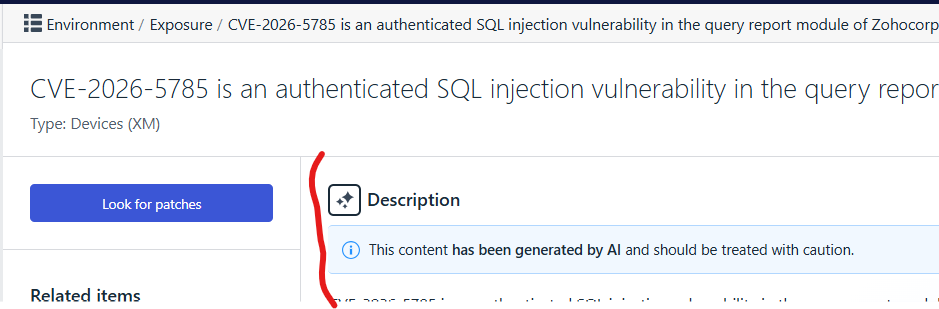
CVE-based findings being part of any Attack Paths, get an enhanced AI-generated description.
Finding details page, explicitly shows an icon to indicate whether the description is AI-generated. e.g:
Note: Not available to all CVEs, only if CVE is part of any attack paths to help with understanding the attack path step
Device Security posture issues are now advised in XM as recommendations (requires EPP license).
In case of EPP subscription is already active for a company, security posture issues are already visible via Elements portal at
Environment -> Device Security Posturemenu. However if the company has XM subscription on top of EPP, all device security posture issues now presented also as XM recommendations. This will help with how to prioritize device security posture recommendations over all other recommendations.Device Security Posture recommendations are visible from
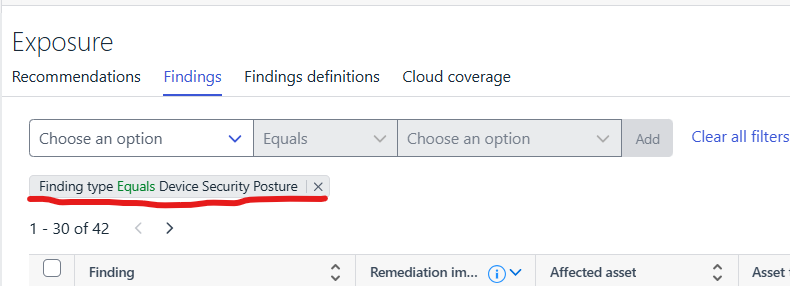
Environment -> Exposure -> Recommendationslist view also their Findings fromEnvironment -> Exposure -> Findingsby applying filterFindingType = 'Device Security Posture'Note: Security Posture Recommendations are only guaranteed for the newly found device posture issues which are created after the date of this release.
-
Exposure Management – 2026-03-27 Update
Read more
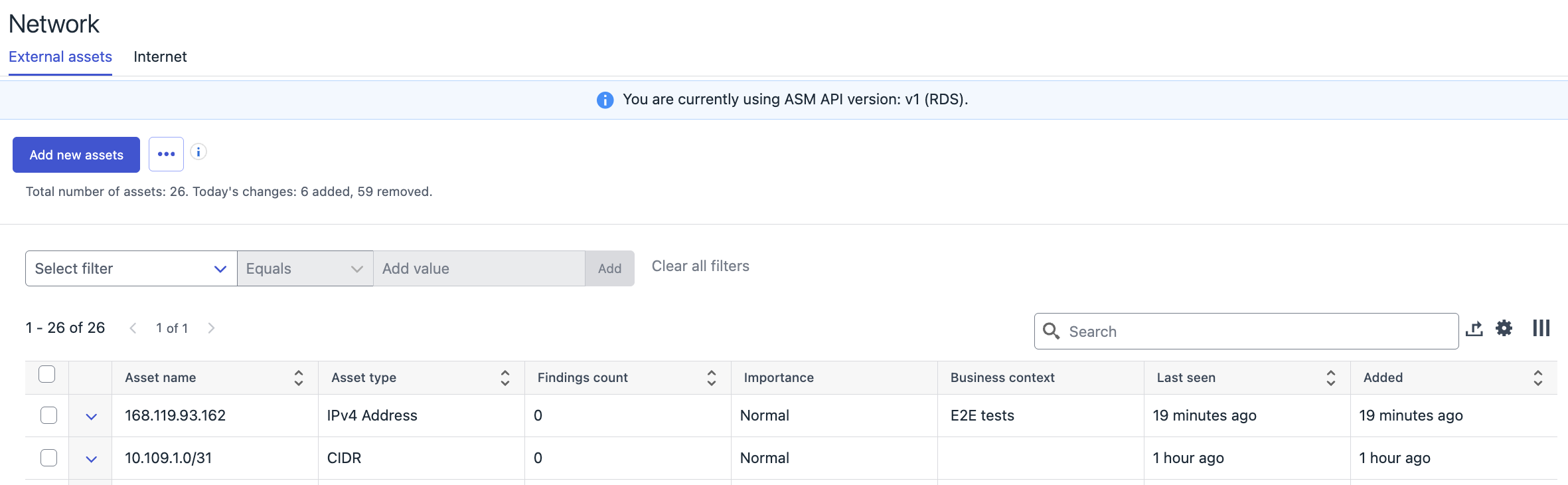
New release includes following updates in the external assets list (Network->External assets):
A Record History
External asset details now display only the latest DNS resolution result. Previously, the full DNS resolution history was shown.
External Asset Source
A new Source column has been added to the table, indicating how each external asset was discovered. List of assets can be filtered using Source. Possible values include:
- User import – Manually imported by a user via CSV.
- Internet – Manually added from the Internet Discovery page.
- DNS resolution – Automatically resolved via DNS from another asset.
- Subdomain discovery – Discovered through automated subdomain enumeration.
- Webscan – Automatically added based on Webscan activity.
External Asset Exposure Risk
A new Exposure Risk column has been introduced, showing the exposure risk of an external asset. Risk calculation is available only for assets with findings.
-
Exposure Management – 2026-01-14 Update
Read more
New release includes updates in the Identity onboarding process and Recommendations page partner level view:
Near Real-Time Identities for Newly Onboarded Tenants
- Identity onboarding process has been improved. Until now, the list of identities for a newly onboarded Microsoft Entra tenant could take up to 24 hours to populate. With our new functionality, list of identities will populate in near real-time for successfully onboarded tenant. Instead of waiting hours, the process now completes in minutes, depending on scanning time and current processing queues.
- This improvement is part of our ongoing commitment to provide up to date data in near real time including changes in the Identities data. Stay tuned for more updates as we continue to work on the improvements!
Recommendation list – partner level view
- Recommendation list (Environment -> Exposure -> Recommendations) page is now available in the partner level views also. Page contains a list of recommendations for all organizations for which partner has access to.
-
Exposure Management – 2025-12-02 Update
Read more
New release includes updates on the Attack Path visualization and Environment→Network page:
AttackPath visualization:
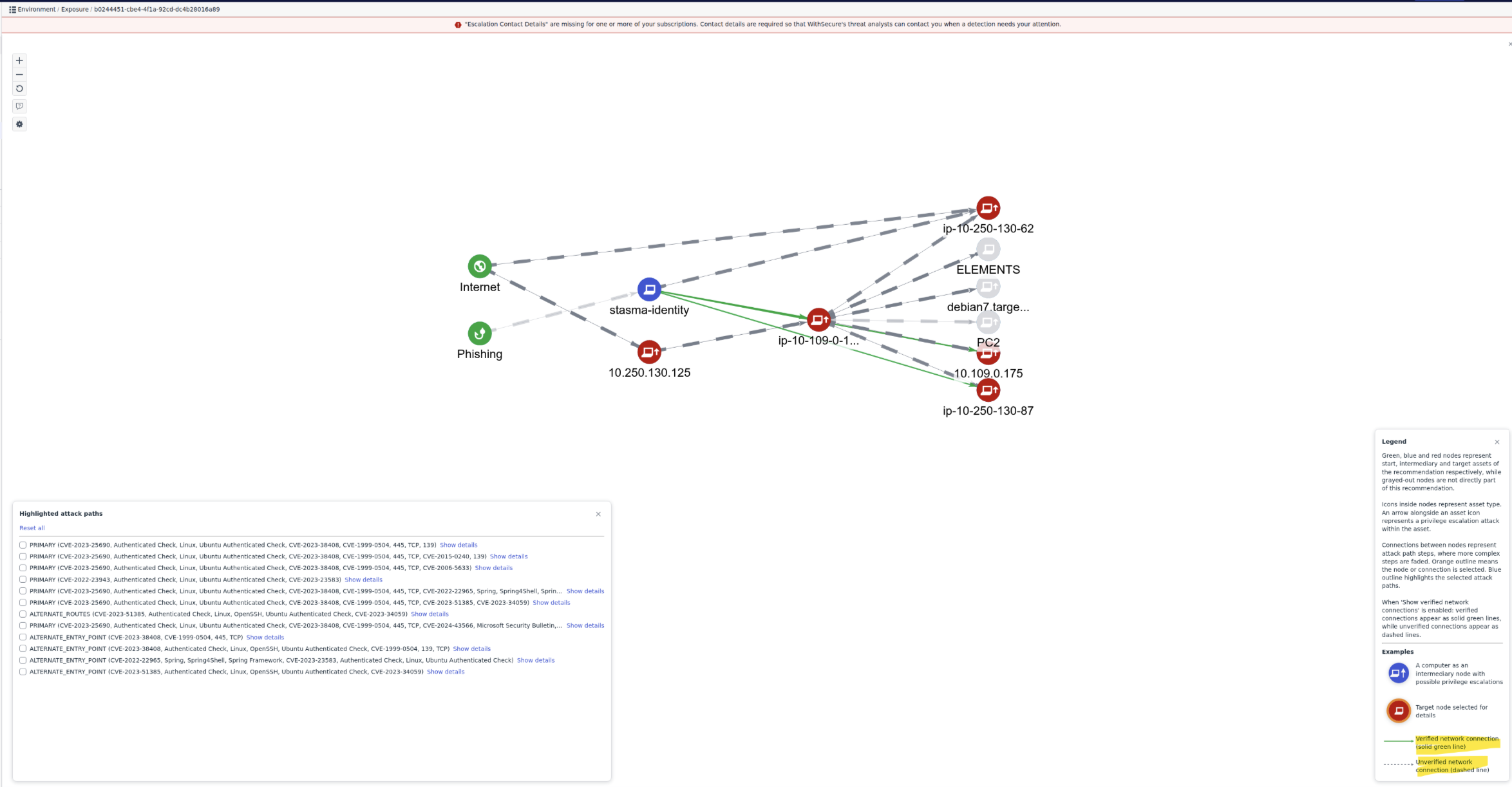
- The AttackPath visualization has now been updated to show verified connections between nodes in the attack path diagrams.
- An option to show verified network connections has been added to the main Attack
Path visualization view. This option is enabled by default and may be toggled through
the control panel. - Connections are green when verified connection findings are available. Connections
are shown as dashed lines where verifications are unavailable. Verifications will not be
possible if the source node does not have the EDR agent installed. The step flyout now
includes fields that show which ports are reachable from the source node. - The legend panel includes new explanatory text and a key for the new line styles.
- The Attack Path simulator discards findings older than 30 days.
Environment → Network page:
- List of company external assets in now default landing page on the Environment → Network page
- Page design has been updated while preserving all of the functionality as before
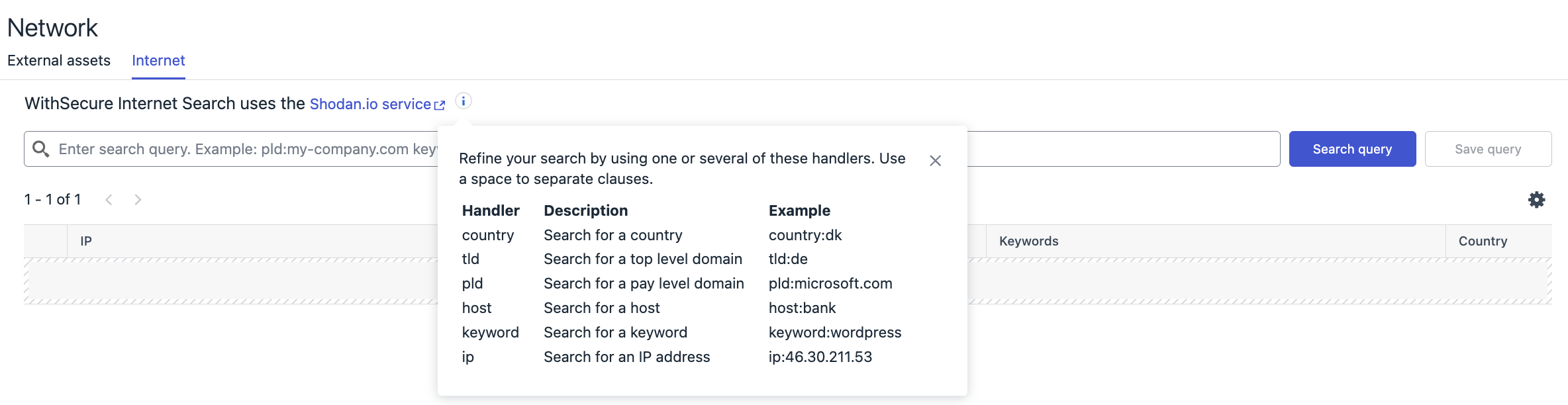
- Internet tab is moved as a secondary tab providing possibility to search for the publicly visible assets
- Page design has been updated while preserving all of the functionality as before
- Search results now contain also an indicator (checkmark) if publicly visible assets is already added to the scan group