
-
Controlled Updates for WithSecure Elements agents
Read more
Dear community,
We are introducing Controlled Updates for WithSecure Elements agents, giving you the ability to align agent updates with your own change and maintenance windows rather than receiving them as soon as they are published.
What is changing?
Until now, Elements agents have updated automatically as new versions became available. You can now choose the update mode per profile:
- Automatic Updates — devices receive new agent versions as they are released. This remains the default, and nothing changes for profiles you leave as they are.
- Controlled Updates — devices stay on an assigned release group until you upgrade them, or until that group expires.
Because the setting is applied per profile, you can mix modes across your estate — for example, keeping workstations on Automatic Updates while applying Controlled Updates to servers.
What to know before you start
- Security intelligence updates are not affected by this setting. They continue to be delivered to all devices regardless of the update mode you choose.
- This is not a way to postpone updates indefinitely. Devices are brought up to date automatically once their assigned release group expires.
- Controlled Updates is not supported alongside the Elements Connector.
- Available for Windows, macOS, and Linux Elements agents.
For release group schedules, configuration steps, and how to assign devices, see Controlled Updates in the user guide.
We believe this improvement will give administrators working under strict change control the predictability they need, without weakening the protection on the devices themselves.
-
Endpoint Security (formerly Endpoint Detection & Response) — 2026-06-29 Update
Read more
Dear community,
We are expanding the Automated actions feature in Elements EDR to help partners respond to endpoint threats faster and at scale. With this update, you can now create automated rules that trigger six new EDR response actions whenever a Broad Context Detection (BCD) is created or updated to a medium, high, or severe risk level.
What is changing?
Automated Actions for endpoint rules already supported Device Isolation as an automated response. We are now adding six new response actions, giving you greater flexibility to automate incident response across your customer organisations.
With this update, six new response actions are available for automation:
- Retrieve files – collects files from endpoints based on path patterns,
- Enumerate services – lists all installed services on Windows endpoints,
- Retrieve browser artefacts – collects browser history and data from major browsers,
- Netstat – retrieves network connection information,
- Enumerate scheduled tasks – lists Windows scheduled tasks,
- Enumerate processes – lists all running processes.
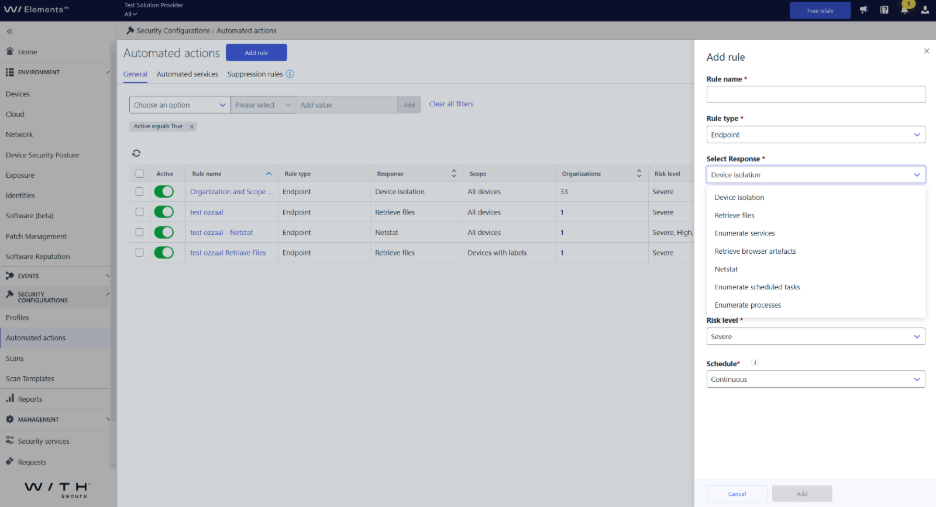
How rules work
When creating a rule with one of the new response actions, you choose a risk level trigger (Medium, High, or Severe) and a device scope. Rules set to “All Devices” can span multiple customer organisations; rules scoped to “Devices with specific labels” apply to a single organisation only. Schedule options remain Continuous or Custom, and the rule type is fixed to Endpoint. As with existing rules, the rule type and response type cannot be changed after creation, all other fields remain editable.
With automated EDR response actions, you can:
- Reduce manual effort when responding to endpoint threats,
- Ensure consistent, policy-driven responses to similar risk levels,
- Scale security operations across many customer organisations,
- Focus expert attention on complex investigations rather than repetitive tasks.
We believe this improvement will meaningfully reduce the manual burden on partners managing high volumes of endpoint detections, and bring the power of EDR response actions into your automated workflows.
-
Endpoint Security (formerly Endpoint Detection & Response) – 2026-06-29 Update
Read more
Dear community,
We are expanding the suppression rule capabilities in Elements EDR to give you greater control over large, complex detections. With this update, you can now suppress key detections individually from BCD Details – directly from the Timeline, Process tree, or Process details views.
What is changing?
Previously, the Accepted Behavior closure wizard was limited to BCDs with up to five unsuppressed key detections. This limit exists intentionally to keep auto-generated rule sets small, precise, and easy to audit. Raising it could produce unwieldy or overly permissive rules.
With this update:
- For BCDs with more than five key detections, you can now suppress each remaining detection individually after closing the BCD as Accepted Behavior.
- A new per-detection suppression option is available directly in the BCD Details view (Timeline, Process tree, and Process details tabs) for all BCDs closed as Accepted Behavior.
Three-level organizational hierarchy
Suppression rules follow a three-level organizational hierarchy: Company, SEP (Service Partner), and SOP (Solution Provider). Each level can independently create its own suppression rule for the same key detection, with a maximum of one rule per level. A rule created at a given level can only be edited by administrators at that same level or above – when editing is not permitted at your level, the Edit button is disabled and a tooltip explains who can modify the rule.
What does this mean for you?
- For large BCDs with more than five key detections, you no longer need to work around the detection limit – you can suppress the remaining detections individually after closure.
- You retain full precision – each suppression rule is still tied to a specific key detection and pre-populated from its context, keeping rules targeted and auditable.
- The existing Accepted Behavior wizard for BCDs with five or fewer key detections is unchanged.
We believe this improvement will significantly enhance the day-to-day experience of security teams managing large, complex detections, and make the suppression workflow more flexible without compromising precision or auditability.
-
Endpoint Security (formerly Endpoint Detection & Response) – 2026-06-26 Update
Read more
Dear community,
We are expanding device isolation capabilities in WithSecure Elements to now include Linux devices. Security administrators can remotely isolate a Linux device directly from the Elements Security Center when a security incident is detected, bringing Linux in line with the isolation functionality already available for Windows and macOS.
What is changing?
Device isolation has been available for Windows and macOS devices for some time, allowing administrators to contain active threats by restricting network communication while keeping the device visible and manageable in the Security Center. With this update, the same capability is now extended to Linux.
When a Linux device is isolated, its network communication is restricted to help contain active threats, prevent lateral movement, and limit potential impact during investigation and remediation. Isolation can be triggered as a response action from the Devices view and released once the incident has been resolved.
We believe this improvement will meaningfully strengthen your ability to respond to threats across mixed-OS environments, giving your security teams consistent containment capabilities whether the device in question is running Windows, macOS, or Linux.
-
Endpoint Security (formerly Endpoint Detection & Response) – 2026-06-01 Update
Read more
Dear community,
Following our earlier updates regarding the Detection and Response Reports view, we have now completed the final step of this transition.
What has changed?
As of today, Monday, June 1, the Detection and Response Reports tab has been removed from Elements and is no longer available.
What does this mean?
- The Detection and Response Reports tab is no longer accessible.
- Reports that were not downloaded before the removal are no longer available through this view.
What should you do now?
We recommend using the My Reports tab to create and manage your reports going forward. It provides a more unified and up-to-date reporting experience and is now the main place for all reporting activities.
Moving to My Reports ensures you can continue working with your reports without interruption.
Thank you for your support during this transition and for helping us simplify and improve the reporting experience.
-
Endpoint Security (formerly Endpoint Detection & Response) – 2026-05-07 Update
Read more
Dear community,
Following up on our earlier updates regarding the Detection and Response Reports view, we are now moving to the final step of this transition.
What is changing next?
On Monday, June 1, the Detection and Response Reports tab will be removed from Elements and will no longer be available.
The page already includes a notification to help you prepare for this change:
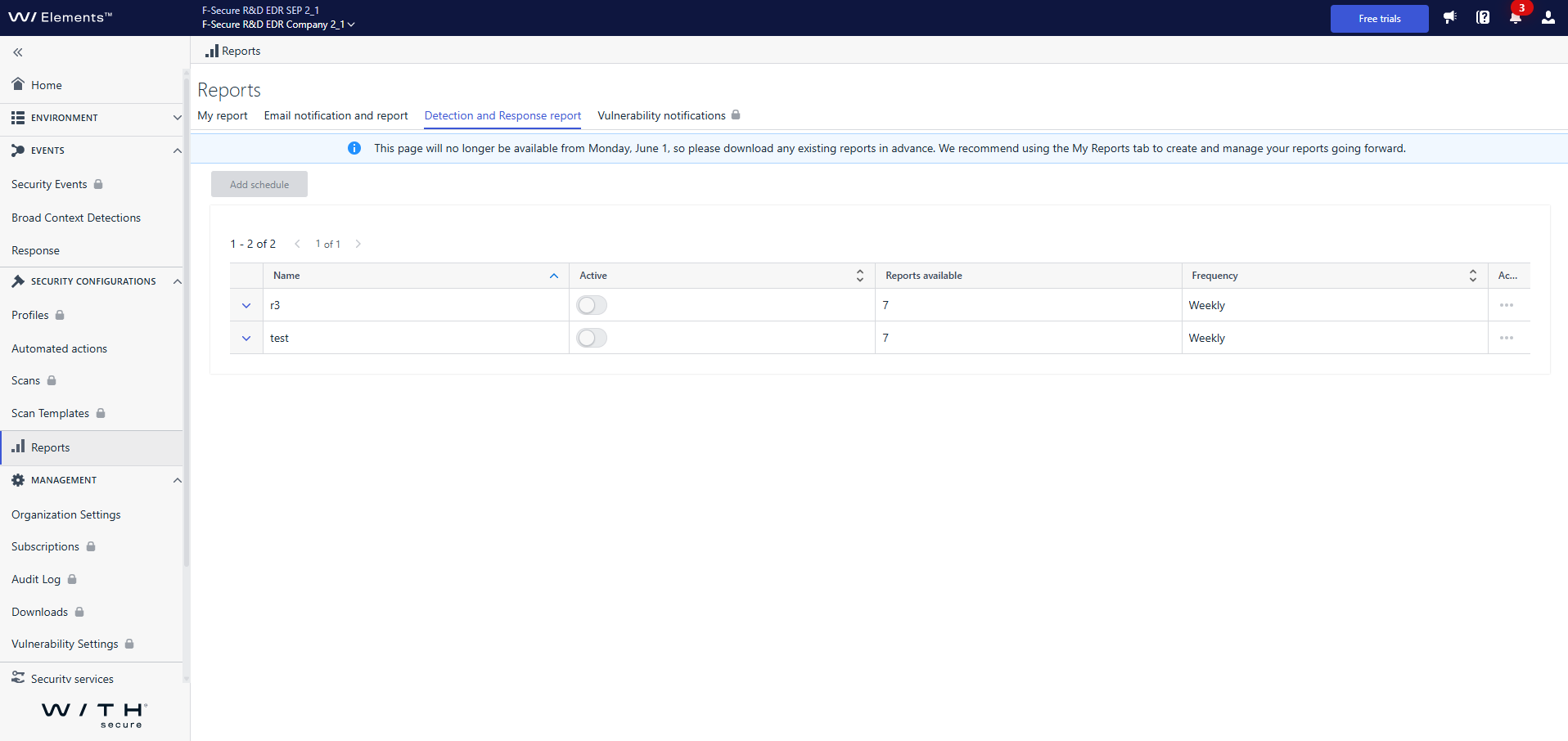
After this date:
- The Detection and Response Reports tab will no longer be accessible.
- Any reports that have not been downloaded before this date will no longer be available through this view.
What should you do now?
Please make sure to download any reports you want to keep before June 1.
We recommend using the My Reports tab to create and manage your reports going forward. It provides a more unified and up-to-date reporting experience and is now the main place for all reporting activities.
Moving to My Reports ensures you can continue working with your reports without interruption.
Thank you for your support during this transition and for helping us simplify and improve the reporting experience.
-
Endpoint Security (formerly Endpoint Detection & Response) – 2026-04-10 Update
Read more
Dear community,
Following up on our recent update about the Detection and Response Reports view being moved to read-only mode, we want to share an important next step.
What is changing next?
On 20 April, all existing schedulers in the Detection and Response Reports view will be deactivated.
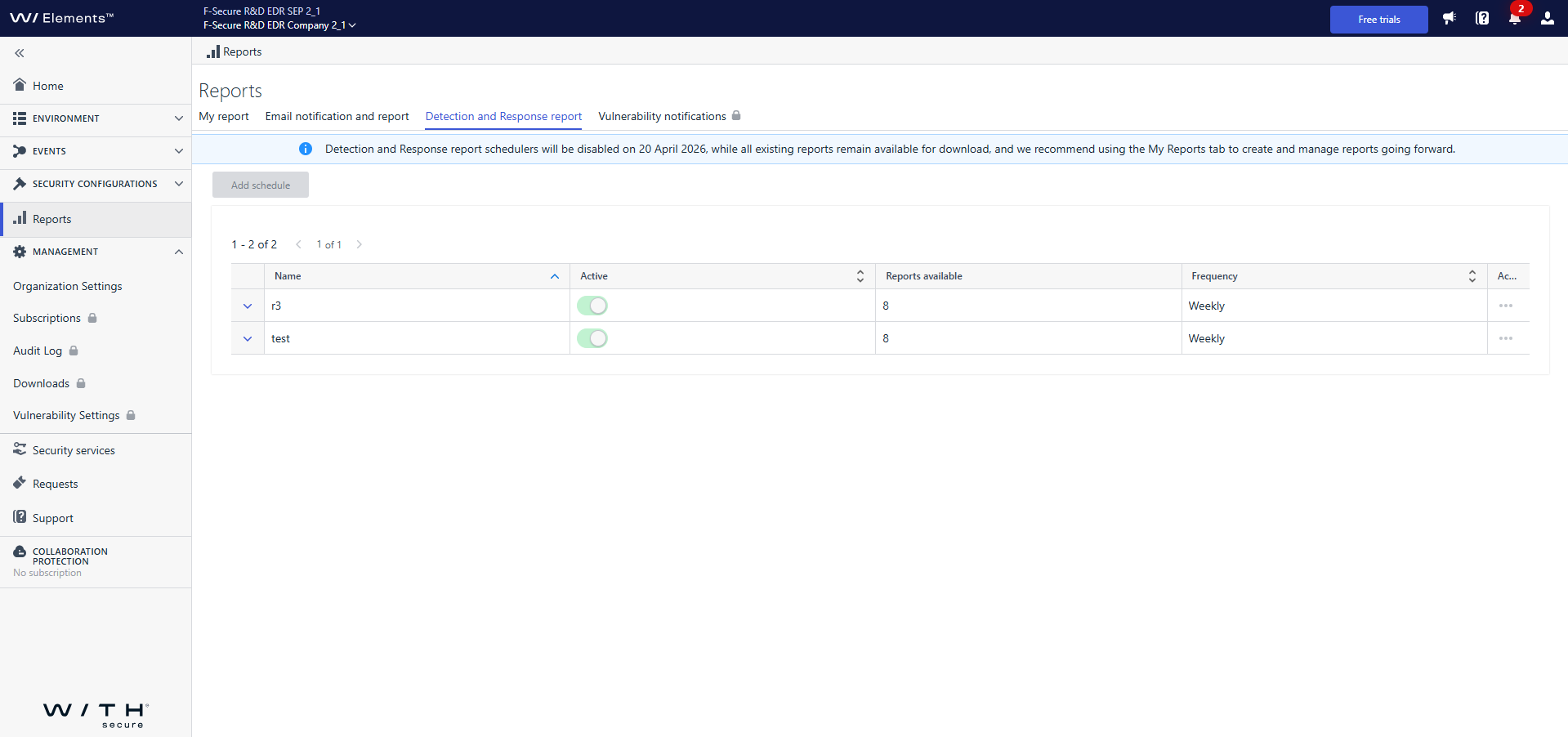
After that date:
- Reports will no longer be generated in this view.
- Previously generated reports will still be available for download in the Detection and Response Reports tab.
The Detection and Response Reports tab itself will be removed entirely soon.
What should you do now?
We encourage you to start using the My Report tab and set up your report there as soon as possible. My Report provides all the same reporting capabilities as the previous view – and even more. It offers an improved and more intuitive experience, with ongoing enhancements and new features planned.
Moving to My Report now will ensure you have uninterrupted access to your reports and benefit from the latest updates.
Thank you for adapting early and helping us move forward with a more unified reporting experience.
-
Endpoint Security (formerly Endpoint Detection & Response) – 2026-03-30 Update
Read more
To help you create more flexible and maintainable suppression rules, wildcards are available for Accepted Behavior suppression rule parameters. Wildcards allow you to match patterns instead of exact values, making it easier to suppress recurring or similar events without creating multiple rules.
What are wildcards?
Wildcards let you define suppression rules using partial matches rather than exact strings. This is especially useful when values vary slightly, such as file names, paths, or user names.
The following wildcard characters are supported:
*– matches any sequence of characters (including empty)
Example:*.exematchesfile.exe,test.exe,.exe?– matches any single character
Example:file?.txtmatchesfile1.txt,fileA.txt
To treat wildcard characters as literal values, use the backslash (
\) as an escape character:\*– matches a literal asterisk
Example:test\*.txtmatchestest*.txt\?– matches a literal question mark
Example:test\?.txtmatchestest?.txt
Supported parameters
Wildcards are supported in suppression rules for Accepted Behavior when matching the following parameters:
- Process name
- Process path
- Process command line
- Username
- Parent process name
- Parent process path
How to use wildcards
You can create or edit wildcard-based suppression rules in two ways:
- From Events → Broad Context Detections, when closing a detection as Accepted behavior and choosing to create a suppression rule.
- From Security Configurations → Automated actions → Suppression rules, by editing an existing rule.
In both flows, select Wildcard for the chosen parameter in the Parameters step, then define the pattern using
*,?, or escaped characters as needed.Using wildcards helps reduce rule duplication, keeps configurations cleaner, and makes suppression rules easier to maintain over time
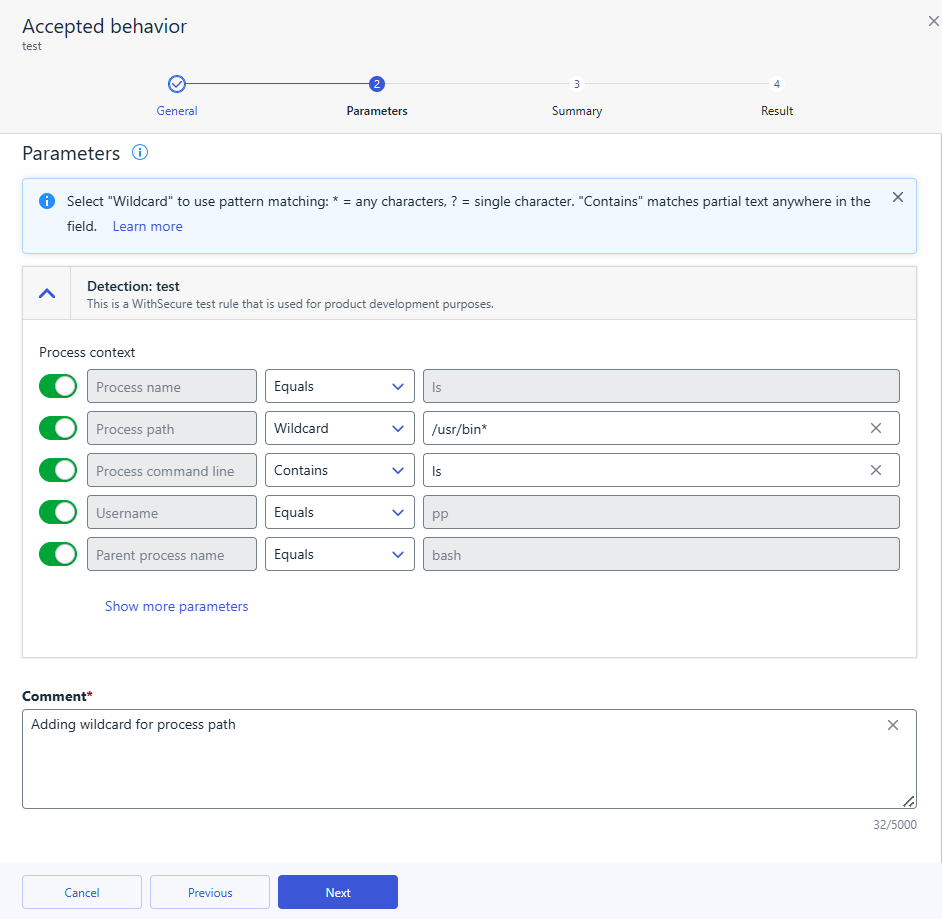
-
Endpoint Security (formerly Endpoint Detection & Response) – 2026-01-27 Update
Read more
Dear community,
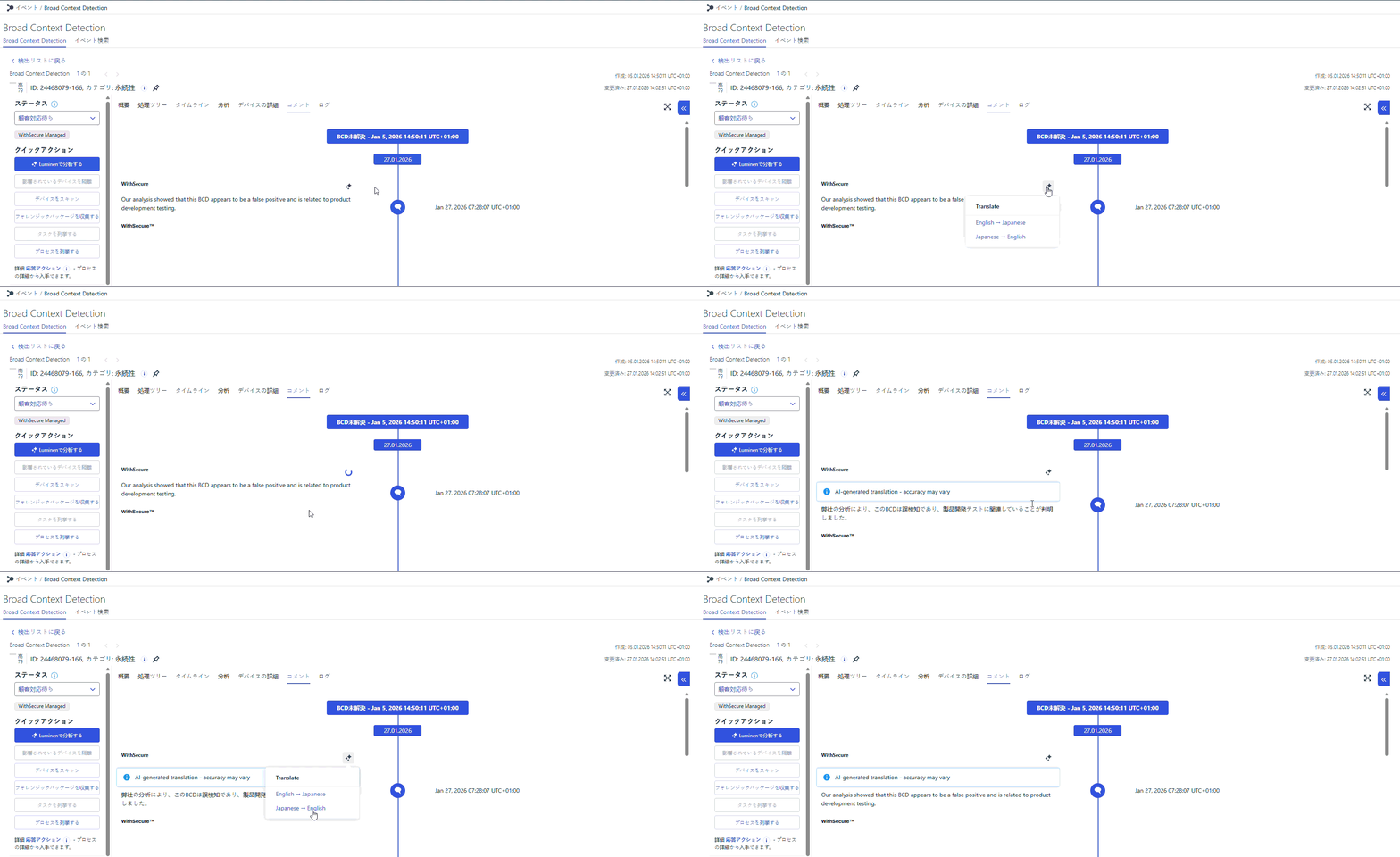
To make it easier for our Japanese MDR customers to work in their native language, we are introducing AI-powered on-demand translation for communication in elevated BCDs in Elements.
Starting from 1 February 2026, customers with an active MDR service and the Elements user interface set to Japanese will be able to exchange messages with analysts in elevated BCDs in Japanese, with translations provided on demand by an approved AI (LLM) service.
What is changing?
- In the BCD details view in Elements, users will see new options to translate comments on demand:
- from English to Japanese, and
- from Japanese to English.
- Japanese-speaking users can write and read BCD comments in their native language, while still being able to request an English version when needed.
- Translations are not automatic in the background – they are triggered explicitly by the user for each comment via dedicated translation buttons.
What does this mean for you?
- If you are an MDR customer using Elements in Japanese, communication in elevated BCDs becomes clearer, more natural, and easier to follow in your own language.
- You keep full control over when translations are requested, allowing you to focus on the comments that matter most.
- The way you work with elevated BCDs in Elements stays familiar – this enhancement adds a convenient translation capability on top of your existing experience, without introducing new complexity into your daily workflow.
We believe this improvement will significantly enhance the day-to-day experience of our Japanese MDR customers and pave the way for further localization and usability enhancements in the future.
- In the BCD details view in Elements, users will see new options to translate comments on demand:
-
Endpoint Security (formerly Endpoint Detection & Response) – 2025-11-14 Update
Read more
Dear community,
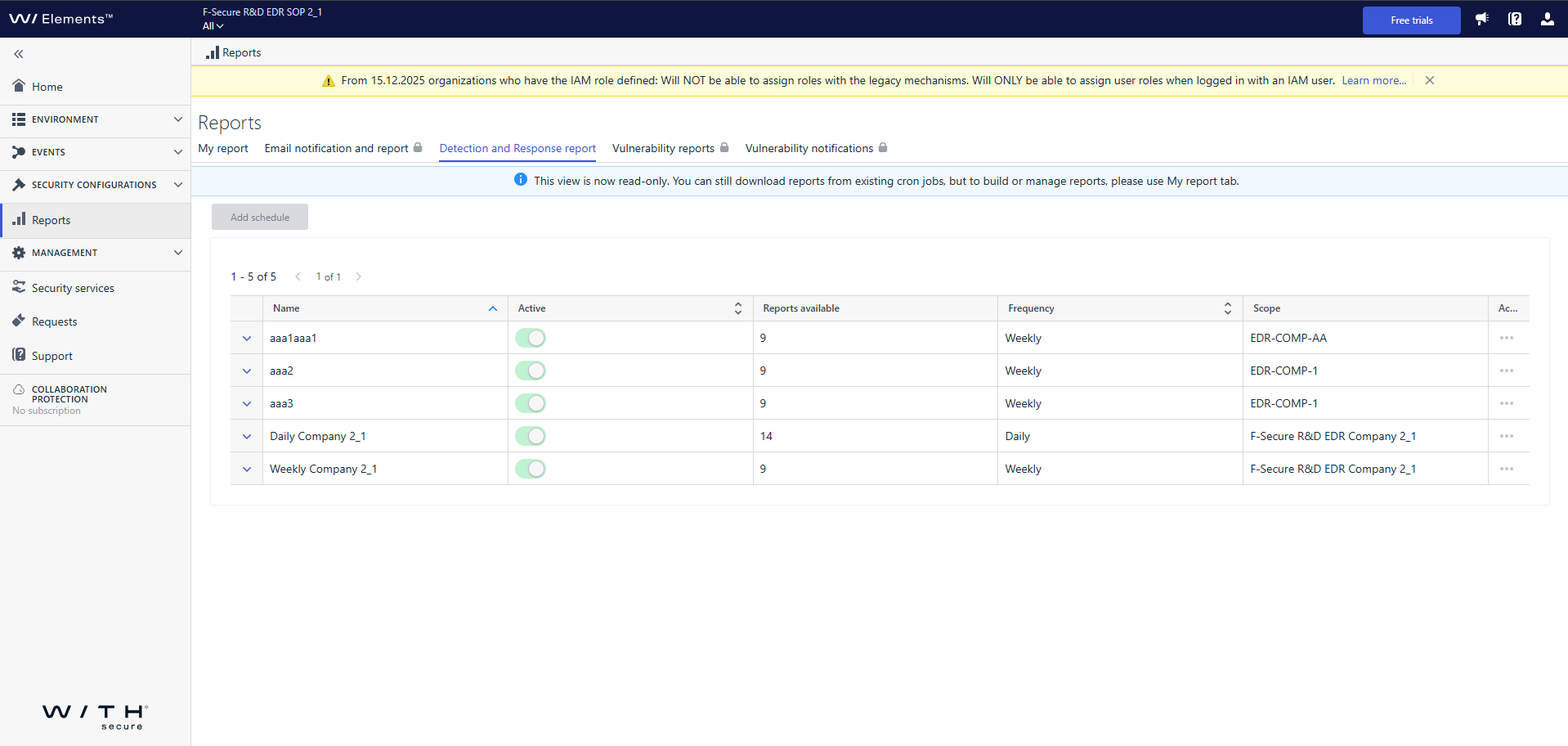
In line with our plans for unification and streamlining the reporting experience, the Detection & Response Reports view in Elements has now been transitioned to read-only mode.
What does this mean?
- You can no longer create new schedulers or modify existing ones in the Detection & Response Reports view.
- Existing active schedulers will continue to generate reports, and you can still download these reports as usual, until the view is fully removed.
What should you do next?
We encourage you to start using the My Report tab and set up your report there as soon as possible. My Report provides all the same reporting capabilities as the previous view – and even more. It offers an improved and more intuitive experience, with ongoing enhancements and new features planned. Moving to My Report now will ensure you have uninterrupted access to your reports and benefit from the latest updates.The complete removal of the Detection & Response Reports view is planned for Q1 2026.
Thank you for being proactive and embracing these improvements.
We appreciate your cooperation as we continue to enhance your Elements experience!