


General product lifecycle policies
Supported product versions
Elements announcements
-
New roles for better access control in Elements
Read more
We are introducing new Elements roles. New roles make it easier to manage access in the Elements portal.
- Endpoints: Reading all – read access to servers, workstations and mobile devices. Does not grant permission to Device or profile management, Patch management, Device security posture, Software reputation, Security Events, Home/Endpoint protection, Reports.
- Endpoints: Editing all – editing access to servers, workstations, and mobile devices. Grants permission to security information, including device status, dashboard, security events, and software updates. Allows executing security operations such as removing or isolating devices and assigning profiles. Does not grant permission to manage profiles.
- Endpoints: Editing non-servers – edit access to workstations and mobile devices; read access to servers. Grants access to workstation and mobile security information, including device status, dashboards, security events, and software updates. Allows security operations on workstations and mobile devices, such as removing or isolating them and assigning profiles. Does not permit profile management.
- Endpoints: Editing servers – edit access to servers; read access to workstations and mobile devices. Grants access to server security information, including device status, dashboards, security events, and software updates. Allows security operations on servers, such as removing or isolating them and assigning profiles. Does not permit profile management.
- Endpoints: Organizing non-servers – Edit access to non-server devices, excluding remote operations. Includes actions that affect device security configuration (e.g., profile assignment) or metadata (e.g., alias, label, asset group), but not actions that execute on the device itself. Also includes read access to devices, security events, profiles, and reports for servers, workstations, and mobile devices.
- Endpoints: Organizing servers – edit access to server devices, excluding remote operations. Includes actions that affect device security configuration (e.g., profile assignment) or metadata (e.g., alias, label, asset group), but not actions that execute on the device itself. Also includes read access to devices, security events, profiles, and reports for servers, workstations, and mobile devices.
- Endpoints: Non-server remote operations – allows execution of remote security operations on non-servers, such as removing or isolating devices. Includes read access to devices, security events, profiles, and reports for servers, workstations, and mobile devices.
- Endpoints: Server remote operations – allows execution of remote security operations on servers, such as removing or isolating devices. Includes read access to devices, security events, profiles, and reports for servers, workstations, and mobile devices.
- Profiles: Editing for non-servers – allows management of security configurations and profiles for workstations and mobile devices. Does not permit access to server profiles.
- Profiles: Editing for servers – allows management of security configurations and profiles for servers. Does not permit access to workstation or mobile device profiles.
- Profile assignment rules: Editing – allows management of profile assignment rules.
- Security events: Managing – grants permission to take action on security events (e.g., acknowledging or allowing a website URL). Includes read access to devices, security events, profiles, and reports for servers, workstations, and mobile devices.
- Reports: Managing – allows managing reports. Includes read access to devices, security events, profiles, and reports for servers, workstations, and mobile devices.
-
Miksi tapahtumien hallinta on tärkeää?
Read more
Kun kyberhyökkäys vaikuttaa yritykseesi, sinun on päätettävä, mitkä järjestelmät voivat jatkaa toimintaansa ja mitä on turvallista palauttaa. Sinun on myös selvitettävä, onko arkaluonteisia tietoja päässyt vuotamaan ja onko hyökkääjällä edelleen pääsy järjestelmään. Nämä päätökset riippuvat luotettavasta kuvasta tapahtuneesta.
Digitaalinen rikostekninen tutkimus ja tietoturvapoikkeamien hallinta (DFIR) tarjoavat asiantuntemusta, jonka avulla nämä tosiseikat voidaan selvittää ja ryhtyä tarvittaviin toimenpiteisiin.Kokeneet tutkijat ja tilanteeseen reagoivat asiantuntijat auttavat hallitsemaan tapahtumaa, ohjaamaan palautumista ja korjaamaan heikkouksia, jotka mahdollistivat hyökkäyksen. Organisaatiollenne tämä voi tarkoittaa vähemmän häiriöitä, paremmin perusteltuja päätöksiä ja vähemmän painetta sisäiselle teams.
Nykyisten tietoturvainvestointienne pohjalta
Endpoint detection and response (EDR) tarjoaa näkyvyyttä laitteiden toimintaan sekä työkaluja uhkien tutkimiseen ja torjumiseen. Managed detection and response (MDR) tuo mukaan asiantuntijoita, jotka valvovat, tutkivat ja reagoivat sovitun laajuuden puitteissa.
Nämä valmiudet ovat arvokkaita tietoturvaloukkauksen sattuessa. Erityinen DFIR-tiimi jatkaa tätä työtä, kun tilanne vaatii perusteellisempaa rikosteknistä tutkintaa, laajemman ympäristön kattavaa koordinointia tai lisäapua järjestelmien palauttamisessa. Tutkijat kokoavat todistusaineistoa päätelaitteista, tunnistetiedoista, pilvipalveluista ja muista järjestelmistä selvittääkseen tietoturvaloukkauksen laajuuden ja ohjatakseen seuraavia päätöksiä.
Mitä DFIR voi paljastaa
Seuraavat esimerkkitilanteet osoittavat, miksi tämä laajempi selvitys on tärkeä.
Petollinen lasku luotettavassa keskustelussa: Talousosasto saa uudet pankkitiedot osana olemassa olevaa sähköpostikeskustelua toimittajan kanssa. Maksu näyttää lailliselta, kunnes toimittaja soittaa ja kysyy, missä se viipyy. DFIR-tutkijat paljastavat hakkeroidun sähköpostilaatikon, jota hyökkääjä käytti maksukeskustelujen seuraamiseen. He tunnistavat asiaan liittyvät keskustelut ja piilotetut edelleenlähetyssäännöt, mikä auttaa yritystä turvaamaan tilinsä, vastaamaan pankkien tiedusteluihin ja arvioimaan, mitä tietoja on vuotanut.
Lunastusohjelmahyökkäys, joka alkoi jo muutama päivä ennen järjestelmän häiriötä: EDR tunnistaa kiristysohjelman ja eristää tartunnan saaneen palvelimen. Tutkinnassa käy ilmi, että vaarantunutta järjestelmänvalvojan tiliä on käytetty aiemmin ja että hyökkääjällä on ollut pääsy myös varmuuskopiointipalvelimeen. DFIR-tiimin jäsenet tunnistavat jäljellä olevat pääsyreitit, arvioivat tietojen varastamista koskevat todisteet ja auttavat selvittämään, mihin varmuuskopioihin voi luottaa. Palautusvaiheessa voidaan sitten puuttua laajempaan tietoturvaloukkaukseen, mikä vähentää riskiä järjestelmien uudelleenkytkemisestä tilanteessa, jossa hyökkääjällä on edelleen pääsy järjestelmään.
Arvokasta tietoa havitteleva huomaamaton tunkeutuminen: Liiketoiminta jatkuu normaalisti, vaikka tunkeilija pääsee viikkojen ajan käsiksi arkaluonteisiin projektitiedostoihin. Epätavallinen kirjautuminen käynnistää tutkimuksen, jossa yhdistetään eri työasemien ja pilvipalveluiden välinen toiminta. DFIR-asiantuntijat rekonstruoivat tapahtumien kulun, paljastavat mekanismit, joilla pääsyä on ylläpidetty, ja arvioivat todisteita tietojen keräämisestä ja siirtämisestä. Organisaatio saa selkeämmän käsityksen tietoturvariskistä ja suunnitelman tunkeilijan poistamiseksi.
Päätöksenteon, raportoinnin ja elvytyksen perustelut
Vaikka hyökkääjä olisi jo aiheuttanut vahinkoa, tehokkaat vastatoimet voivat estää lisävahingot ja suojata vahingoittumattomia toimintoja. Kokeneet vastatoimien toteuttajat auttavat asettamaan toimet tärkeysjärjestykseen liiketoiminnalle aiheutuvien vaikutusten perusteella ja säilyttämään samalla tutkintaan tarvittavat todisteet.
Selkeä raportointi tarjoaa johdolle tosiasioihin perustuvan pohjan päätöksenteolle. Se myös tukee kybervakuutuskorvaushakemukset ja viranomaisraportointi dokumentoitujen aikataulujen, vaikutuksen kohteeksi joutuneista järjestelmistä ja tiedoista tehtyjen havaintojen sekä toteutettujen vastatoimenpiteiden kirjausten avulla. Oikeudelliset ja sääntelyasioista vastaavat tahot teams voivat käyttää näitä havaintoja arvioidakseen ilmoitusvelvollisuuksia ja laatiakseen tarvittaessa NIS2-direktiivin ja GDPR-asetuksen mukaisia raportteja. Raporteissa erotetaan toisistaan vahvistetut havainnot ja arviot sekä selitetään mahdolliset jäljellä olevat epävarmuustekijät.
Asiantuntemusta saatavilla juuri silloin, kun sitä tarvitset
WithSecurella, onnettomuustilanteiden hallintatiimimme on täysin teknologiariippumaton. Toimimme toimittajista, alustoista ja ympäristöistä riippumatta yhteistyössä asiakkaan nykyisten teams ja palveluntarjoajien kanssa. Tutkimuksemme kattavat yrityssähköpostin väärinkäytön, kiristysohjelmat, kybervakoilun ja sisäpiirin uhat. Tai muut tarpeet.
WithSecure DFIR -asiakassopimus tarjoaa 24/7, SLA:n mukainen pääsy asiantuntijoiden palveluihin, ja palvelut ovat saatavilla tarpeen mukaan ennalta sovituilla hinnoilla ilman velvollisuutta ostaa tutkimuspäiviä etukäteen. Organisaatiollanne on vakiintunut yhteydenotto- ja aktivointiprosessi, mikä lyhentää asiantuntijatuen järjestämiseen kuluvaa aikaa poikkeustilanteessa. Sisäiset teams saavat lisäkapasiteettia juuri silloin, kun heihin kohdistuvat vaatimukset ovat suurimmillaan.
Autamme sinua valmistautumaan myös seuraavien avulla: räätälöidyt pöytäharjoitukset, toimintakäsikirjat ja suunnitelmien tarkastukset, joka kattaa tapahtumien hallinnan, kriisinhallinnan ja palautumisen. Jokainen toimeksianto on räätälöity vastaamaan asiakkaan toimintaympäristöä, liiketoiminnan painopisteitä ja tiimin vastuualueita. Henkilöstö voi harjoitella vaikeiden päätösten tekemistä, testata eskalointireittejä ja korjata puutteita ennen kuin todellinen tapahtuma asettaa nämä järjestelyt koetukselle.
Tuloksena on organisaatio, joka on paremmin valmis ymmärtämään tapahtuman, tekemään perusteltuja päätöksiä ja palauttamaan toiminnan todisteisiin perustuvan varmuuden avulla.
Lue lisää tapahtumien hallintapalveluistamme täältä:
-
New Feature: Onboarding Assistant in Elements Security Center
Read more
We have introduced the Onboarding Assistant in Elements Security Center, a built-in virtual assistant that guides new users through their first steps in WithSecure™ Elements. The assistant appears on first login and leads you through the setup actions needed for the products and services your organization has purchased.
Until now, getting started often relied on hands-on help from a partner or a WithSecure solutions engineer. The Onboarding Assistant gives every customer the same clear, step-by-step path to a working setup, so you reach your first security outcomes faster and with less manual support.
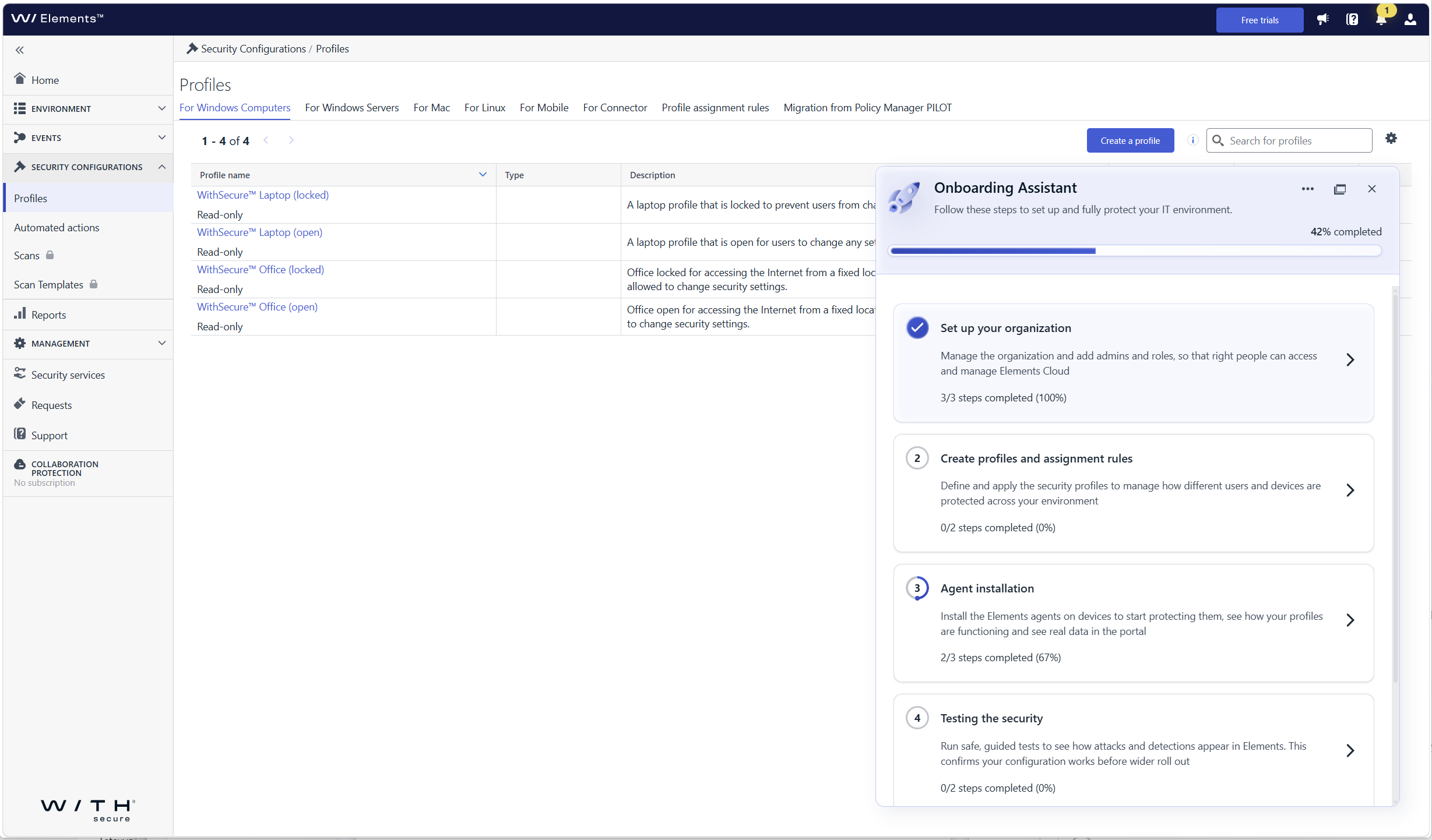
What’s new
- Guided first login: the assistant opens automatically when you log in to Elements Security Center for the first time and walks you through each required onboarding step
- Organization onboarding: set up your organization, including users and single sign-on (SSO)
- Device and profile onboarding: get your devices connected so that they are protected and visible in Elements
- Steps tailored to your subscriptions: you only see the steps that are relevant to the Elements products and services your company has, so there is nothing extra to sort through
- Help where you need it: each step includes contextual guidance, links to documentation, and prompts for the next action
Who sees the assistant
The assistant is shown to the first user who logs in with permission to manage users and access rights in the organization. This person can hand over product setup to other users by giving them access to Elements Security Center, so user and product administration can be split. In this release, the assistant is shown to customer users only, not to partner users with access to several companies.
How to get started
Log in to Elements Security Center. The Onboarding Assistant opens on the right side of the portal and shows your onboarding progress. Select a step to see what needs to be done and follow the guidance until all the steps relevant to your subscriptions are completed.
-
Introducing WithSecure Elements AI Security
Read more
We have launched AI Security Early Access for eligible WithSecure™ Elements subscriptions.
The new AI Security Dashboard gives users a single view into how AI is being used across organizations’ IT environments.
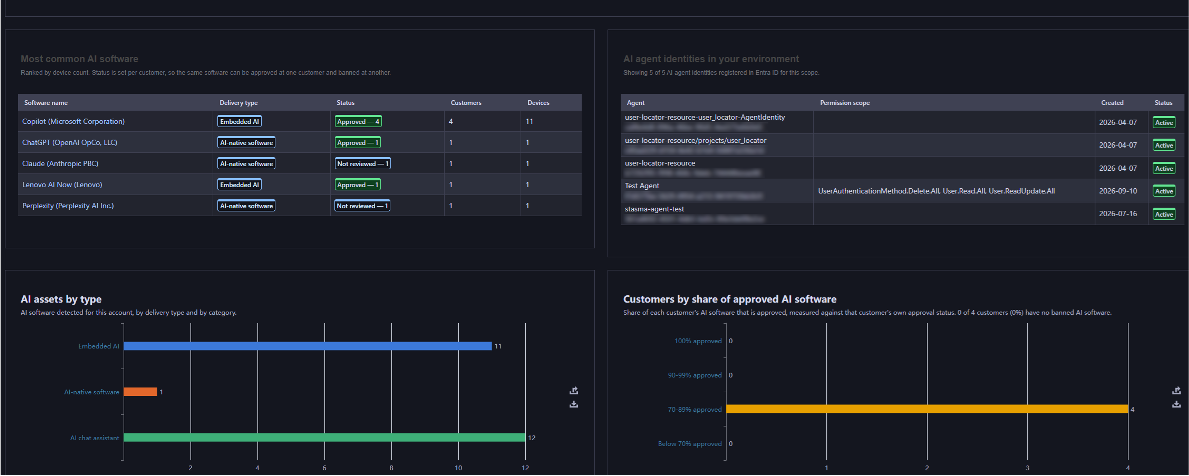
What’s new:
- Shadow AI discovery, through a dedicated AI Security Dashboard and Software Inventory that lists the AI tools in use across the organization, including tools that were never formally installed.
- Agentic identity visibility, integrated with Microsoft Entra ID, to surface Service Principals attributed to AI agents, AI chat assistants, AI coding assistants, and other generative AI tools operating with their own credentials.
- Browser extension tracking, surfacing AI-related browser plug-ins from chatbot sidebars to AI-powered productivity add-ons across every managed endpoint. To be added shortly after the initial release.
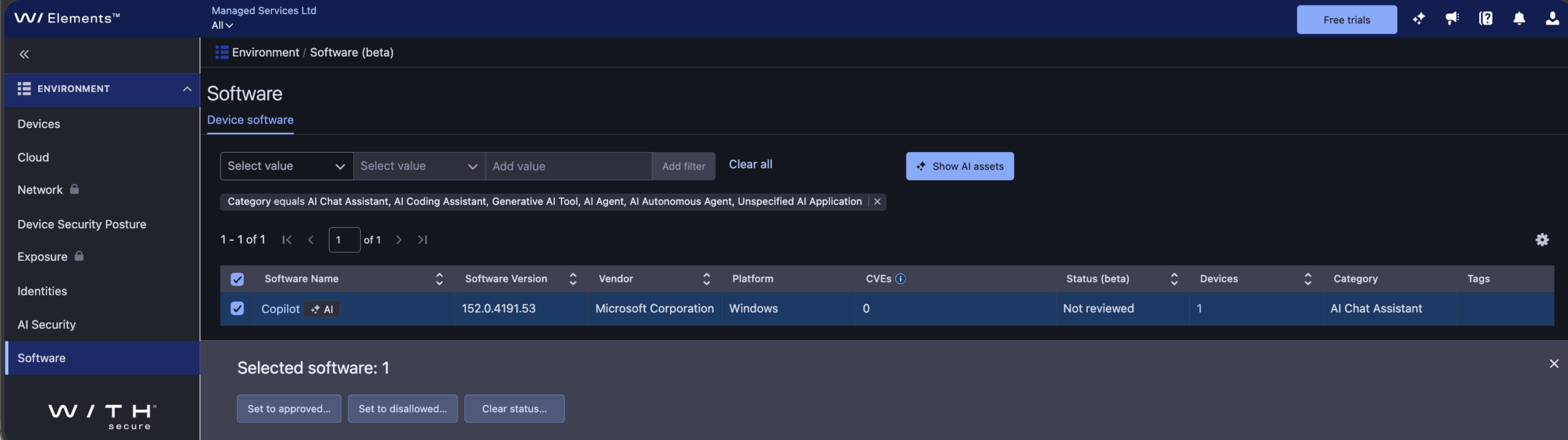
The initial release of AI Security includes asset status for discovered AI software, helping you identify which AI tools are approved for use versus ”shadow AI.” In this release, asset status doesn’t restrict AI software use since it’s intended for reporting purposes only.
Learn more:
To learn more about AI Security, including how to use the dashboard, software inventory, and asset status, see the AI Security section of the Elements User Guide.
How to get started:
AI Security is available as an Early Access feature for eligible WithSecure Elements subscribers, at no extra cost and with no installation or setup required, until further notice.
If you’re an Elements user but aren’t currently subscribed to an eligible module, you can start a free 30-day trial via the Free Trials tab in Elements Security Center.
Eligibility:
- Software incl. Browser extension tracking: WithSecure Elements Protect and Proactive Bundles, WithSecure Elements XDR / Endpoint Detection and Response (EDR), WithSecure Elements Exposure Management (XM) for Business / Users / Devices.
- Identity: WithSecure Elements Protect and Proactive Bundles, WithSecure XDR Identity Security, WithSecure Elements Exposure Management (XM) for Business / Users / Identities.
-
Major Capricorn update for Endpoint Protection – October 2026
Read more
UPDATE 2026-10-15: This has now been released to production with version ”2026-10-14_01”
We would like to inform you about a larger Virus Definition File (VDF) update than usual, scheduled for October 13, 2026.
What does this update mean?
As part of the regular maintenance cycle, the signature database is periodically reorganized — approximately twice a year. This update signifies that affected endpoints will download a larger, refreshed signature base of up to 130 MB, compared to the usual few KB to few MB size of standard updates.
Standard updates will resume immediately afterward, returning to their normal size.
Update Details
- Platform coverage: This update applies to all WithSecure Endpoint Protection products — across Windows, Mac, and Linux platforms that utilize the Capricorn engine.
Deployment
- The update will be delivered automatically through the regular VDF update mechanism.
- Updates containing this release will start with ”WithSecure Capricorn Engine (2026-10-xx-xx)”.
Users of WithSecure Elements EPP may wish to consider taking the Elements Connector into use, to help reduce internet access, if they have several deployed endpoints. You can find more details of how to deploy this at:
https://support.withsecure.com/userguides/data/pdf/ws_elements_connector_eng.pdf
Business Suite announcements
-
Major Capricorn update for Endpoint Protection – October 2026
Read more
UPDATE 2026-10-15: This has now been released to production with version ”2026-10-14_01”
We would like to inform you about a larger Virus Definition File (VDF) update than usual, scheduled for October 13, 2026.
What does this update mean?
As part of the regular maintenance cycle, the signature database is periodically reorganized — approximately twice a year. This update signifies that affected endpoints will download a larger, refreshed signature base of up to 130 MB, compared to the usual few KB to few MB size of standard updates.
Standard updates will resume immediately afterward, returning to their normal size.
Update Details
- Platform coverage: This update applies to all WithSecure Endpoint Protection products — across Windows, Mac, and Linux platforms that utilize the Capricorn engine.
Deployment
- The update will be delivered automatically through the regular VDF update mechanism.
- Updates containing this release will start with ”WithSecure Capricorn Engine (2026-10-xx-xx)”.
-
TLS certificate provider update for GUTS2 backend (May 19, 2026)
Read more
We would like to inform you about an upcoming change to the TLS certificates used by the WithSecure GUTS2 Server (definition update backend), planned for May 19, 2026.
We are transitioning from DigiCert to Let’s Encrypt certificates. This update aligns our backend infrastructure with our existing services, where Let’s Encrypt is already in use, and helps us streamline certificate management while maintaining industry‑standard security practices.
What does this mean for you?
- No changes are expected for the majority of environments.
- The change will be transparent if your system trusts the ISRG Root X1 certificate (the root certificate used by Let’s Encrypt).
Common environments where no action is required:
- Windows systems with Windows Update enabled
- Environments where automatic root certificate updates are allowed (not restricted by GPO / MDM policies)
- Systems where ISRG Root X1 is not explicitly removed or blocked
When action may be needed:
- Systems with restricted certificate updates
- Environments with custom trust stores
- Devices where ISRG Root X1 is missing or not trusted
In such cases, please ensure that the ISRG Root X1 root certificate is present in your trust store.
WithSecure products currently require the following root certificates for TLS communication to WithSecure backends, therefore must be present on all machines, across all Operating Systems:
- Amazon Root CA 1
- Amazon Root CA 2
- Amazon Root CA 3
- Amazon Root CA 4
- Starfield Class 2 Certification
- Starfield Services Root Certificate Authority – G2
- DigiCert Global Root CA
- ISRG Root X1
- ISRG Root X2
All of these are included in the default trust stores of modern, up-to-date operating systems and should not require manual installation in the majority of deployments.
-
Major Capricorn update for Endpoint Protection – May 2026
Read more
UPDATE 2026-05-13: This has now been released to production with version ”2026-05-13_01”
We will soon be releasing a major update for our Capricorn engine, used by our Endpoint Protection products. This is expected to be released on May 12th 2026.
This will result in a larger download as an updated version of the virus definition files are distributed.
Key improvementsOptimized databases through consolidation of overlapping detections, resulting in:
- Smaller footprint: Size on disk expected to decrease by ~160MB, decreasing by about half.
- Faster updates and reduced initialization disk I/O due to reduced database size
Update Details
- Platform coverage: This update applies to all WithSecure Endpoint Protection products — across Windows, Mac, and Linux platforms that utilize the Capricorn engine.
- Download size: All affected endpoints will now download a larger one-time update package of approximately 130-150 MB during the rollout.
Deployment
- The update will be delivered automatically.
- No manual action or configuration is required.
- The release time will be confirmed 24 hours in advance through our community channels.
- Updates containing this release will start with ”WithSecure Capricorn Engine (2026-05-xx-xx)”.
- With this update, you can expect leaner, faster, and more efficient endpoint protection — without compromising security.
General announcements
-
CVE-2026-40175 for Axios JavaScript library
Read more
What is Axios?
Axios is a JavaScript library intended to ease interaction with internet HTTP services. It is used by some organizations to simplify their codebase compared to using standard browser functionality.
What is the vulnerability?
Prior to version 1.15.0, the Axios library is vulnerable to a specific ”Gadget” attack chain that allows Prototype Pollution in any third-party dependency to be escalated into Remote Code Execution (RCE) or Full Cloud Compromise (via AWS IMDSv2 bypass).
Ref: https://nvd.nist.gov/vuln/detail/CVE-2026-40175
Has the vulnerability been fixed?
This vulnerability has been fixed in 1.15.0.
What are WithSecure’s recommendations for partners and customers?
We recommend partners and customers who use Axios act immediately to ensure their systems are not vulnerable.
WithSecure Exposure Management can detect and notify partners and customers that they have a vulnerable version.
Detection for vulnerable versions is available in unauthenticated scanning, and we are investigating the possibility to detect them on hosts via authenticated scans
What is the status of WithSecure systems in relation to this vulnerability?
WithSecure has thoroughly checked its own systems, and has confirmed that all services using Axios are using the latest version which is not vulnerable.
Are any WithSecure products affected?
WithSecure Policy Manager does contain a vulnerable version of the Axios library, and we have created a hotfix for this issue. We advise all our Business Suite partners and customers to apply this hotfix at the earliest opportunity.
The risk can further be mitigated by ensuring that Policy Manager’s Web Reporting interface is not accessible from the internet. This can be done with external firewall configurations.
The hotfix can be downloaded from the WithSecure Download Center.
-
Merkittävä Capricorn-päivitys Endpoint Protection
Read more
PÄIVITYS: 2024-09-25: Tämä päivitys on nyt julkaistu nimellä WithSecure Capricorn Engine (2024-09-25_04). Huomaa, että koska asiakkaat tarkistavat päivitykset, jotkut asiakkaat saavat tämän vasta hieman myöhemmin päivällä. Myöhemmät Capricorn-päivitykset sisältävät myös tämän muutoksen.
PÄIVITYS 2024-09-24: Odotamme, että tämä päivitys toimitetaan asiakkaillemme 25.09.2024 kello 9.00 UTC, mutta tarkkaa aikaa ei valitettavasti ole mahdollista antaa, koska asiakasasennukset tarkistavat päivitykset. Päivityksen koko on ~39MB, eikä aiemmin ilmoitettu 42,6MB.
Aiomme julkaista suuren Capricorn-tietokantapäivityksen 24. syyskuuta 2024.
Mitä tämä päivitys tarkoittaa?
Tämä päivitys tarkoittaa, että kaikki Withsecure Endpoint -tuotteet – Windows-, Mac- ja Linux-alustoilla (jotka käyttävät Capricorn-moottoria) lataavat nyt suuremman päivityspaketin, joka on noin 42,6 Mt tavanomaisen 5 Mt:n sijasta.
Suuria ympäristöjä hallinnoiville tai kaistanleveysrajoituksista kärsiville asiakkaille nämä tiedot voivat olla erityisen tärkeitä. Lisäksi käyttäjät voivat odottaa parempia alustusaikoja ja pienempää muistinkulutusta osana päivityksen etuja.
Päivitys on automaattisesti eikä se vaadi lisäkonfigurointia.
- Julkaisuajankohta ilmoitetaan 24 tuntia etukäteen community -kanavissamme.
- Tämän julkaisun sisältävät päivitykset alkavat sanoilla ”WithSecure Capricorn Engine (2024-09-xx-xx-xx)”.
- WithSecuren Elements EPP:n käyttäjät voivat harkita Elements Connectorin käyttöönottoa internet-yhteyden vähentämiseksi, jos heillä on useita käytössä olevia päätelaitteita. Lisätietoja tämän käyttöönotosta on osoitteessa https://www.withsecure.com/userguides/data/pdf/ws_elements_connector_eng.pdf
-
Tärkeä muistutus: Kaikki F-Secure-merkkisten B2B-tuotteiden suojaus päättyy kokonaan 31. joulukuuta 2024.
Read more
Jos käytät F-Secure brändätty B2B-tuote, ole hyvä ja lue eteenpäin, koska tämä artikkeli sisältää tietoja, joita tarvitset suojauksen ja toimivuuden varmistamiseksi. jatkuu vuonna 2025.
Olemme jo aiemmin ilmoittaneet kumppaneillemme ja loppuasiakkaillemme, että tuki on F-Securen tuotemerkillä tiloissa olevat tuotteet loppuvat kokonaan vuoden 2024 lopulla. Tämä tieto julkaistiin myös tässä artikkelissa.
Vanhojen tuotteiden päivityspalvelimet lakkautetaan osana infrastruktuurimuutoksia, jotka liittyvät F-Securesta irtautumiseen. Tuki päättyy Näiden vanhempien tuotteiden suojauspäivitykset loppuvat useimmissa tapauksissa syyskuun lopussa, mutta pyrimme jatkamaan suojauspäivitysten toimittamista vuoden loppuun asti.
Vuoteen 2025 tultaessa se on IMPOSSIBLE että voimme tarjota tukea näille tuotteille, koska meillä ei ole mahdollisuutta tarjota päivityksiä näihin tuotteisiin. Tuotteet lakkaavat saamasta päivityksiä, eivätkä ne enää tarjoa suojaa.. Varmistaaksesi päivitysten jatkuvan toimittamisen ja siten järjestelmiesi suojaamisen, on erittäin tärkeää, että järjestelmät päivitetään ennen määräaikaa..
Tämä muistutus tuen päättymisestä koskee erityisesti seuraavia tuotteita, mukaan lukien Premium-versiot. Löydät tuetun vähimmäisversion.
Vanha F-Secure-tuote
Korvaaminen turvallisella tuotteella
F-Secure Business Suite
WithSecure Business Suite 16 series
F-Secure Client Security
WithSecure Client Security 16.x
F-Secure Client Security for Mac
WithSecure Client Security for Macille 16.x
F-Secure Server Security
WithSecure Server Security 16.x
F-Secure Policy Manager & Policy Manager Proxy (myös Linux-versiot)
WithSecure Policy Manager 16.x
F-Secure Sähköposti- ja palvelinturva
WithSecure Email and Server Security 16.x -palvelimen kanssa
F-Secure Linux Security
WithSecure Linux Security 12.0.482
F-Secure Atlant
WithSecure Atlant 1.0.319
Kaikista näistä tuotteista on saatavilla korvaavia WithSecure-merkkisiä versioita osoitteessa osoitteessa latauskeskus.
Huomaa että jotkin palveluverkko-osoitteet ovat muuttuneet näiden WithSecure-brändättyjen tuotteiden osalta, ja asiakkaidemme on varmistettava, että yhteys uusiin osoitteisiin sallitaan. Löydät lisätietoja on erillisessä artikkelissa
Yhteistyökumppanit ja asiakkaat ovat jo saaneet avainkoodit uusia versioita varten.
WithSecure-tuotemerkillä varustettuja tiloissa olevia tuotteita ja kaikkia WithSecure Elements -tuotteita tuetaan edelleen. niiden julkaistuun käyttöiän päättymispäivään asti.