


General product lifecycle policies
Supported product versions
Elements announcements
-
New roles for better access control in Elements
Read more
We are introducing new Elements roles. New roles make it easier to manage access in the Elements portal.
- Endpoints: Reading all – read access to servers, workstations and mobile devices. Does not grant permission to Device or profile management, Patch management, Device security posture, Software reputation, Security Events, Home/Endpoint protection, Reports.
- Endpoints: Editing all – editing access to servers, workstations, and mobile devices. Grants permission to security information, including device status, dashboard, security events, and software updates. Allows executing security operations such as removing or isolating devices and assigning profiles. Does not grant permission to manage profiles.
- Endpoints: Editing non-servers – edit access to workstations and mobile devices; read access to servers. Grants access to workstation and mobile security information, including device status, dashboards, security events, and software updates. Allows security operations on workstations and mobile devices, such as removing or isolating them and assigning profiles. Does not permit profile management.
- Endpoints: Editing servers – edit access to servers; read access to workstations and mobile devices. Grants access to server security information, including device status, dashboards, security events, and software updates. Allows security operations on servers, such as removing or isolating them and assigning profiles. Does not permit profile management.
- Endpoints: Organizing non-servers – Edit access to non-server devices, excluding remote operations. Includes actions that affect device security configuration (e.g., profile assignment) or metadata (e.g., alias, label, asset group), but not actions that execute on the device itself. Also includes read access to devices, security events, profiles, and reports for servers, workstations, and mobile devices.
- Endpoints: Organizing servers – edit access to server devices, excluding remote operations. Includes actions that affect device security configuration (e.g., profile assignment) or metadata (e.g., alias, label, asset group), but not actions that execute on the device itself. Also includes read access to devices, security events, profiles, and reports for servers, workstations, and mobile devices.
- Endpoints: Non-server remote operations – allows execution of remote security operations on non-servers, such as removing or isolating devices. Includes read access to devices, security events, profiles, and reports for servers, workstations, and mobile devices.
- Endpoints: Server remote operations – allows execution of remote security operations on servers, such as removing or isolating devices. Includes read access to devices, security events, profiles, and reports for servers, workstations, and mobile devices.
- Profiles: Editing for non-servers – allows management of security configurations and profiles for workstations and mobile devices. Does not permit access to server profiles.
- Profiles: Editing for servers – allows management of security configurations and profiles for servers. Does not permit access to workstation or mobile device profiles.
- Profile assignment rules: Editing – allows management of profile assignment rules.
- Security events: Managing – grants permission to take action on security events (e.g., acknowledging or allowing a website URL). Includes read access to devices, security events, profiles, and reports for servers, workstations, and mobile devices.
- Reports: Managing – allows managing reports. Includes read access to devices, security events, profiles, and reports for servers, workstations, and mobile devices.
-
Why incident response matters?
Read more
When a cyber incident affects your business, you need to decide which systems can keep running and what is safe to restore. You also need to understand whether sensitive information has been exposed and whether the attacker still has access. Those decisions depend on a reliable picture of what happened.
Digital forensics and incident response (DFIR) provides the expertise to establish those facts and act on them.Experienced investigators and responders help contain the incident, guide recovery and address the weaknesses that allowed the attack. For your organization, this can mean less disruption, better-informed decisions and less pressure on internal teams.
Building on your existing security investment
Endpoint detection and response (EDR) provides visibility into device activity and tools to investigate and contain threats. Managed detection and response (MDR) adds experts who monitor, investigate and respond within an agreed scope.
These capabilities are valuable during an incident. A dedicated DFIR team builds on that work when the situation requires deeper forensic investigation, coordination across a wider environment or additional recovery support. Investigators bring together evidence from endpoints, identities, cloud services and other systems to establish the extent of the compromise and guide the next decisions.
What DFIR can uncover
The following illustrative scenarios show why that wider investigation matters.
The fraudulent invoice inside a trusted conversation: A finance team receives new bank details within an existing supplier email conversation. The payment looks legitimate until the supplier calls to ask where it is. DFIR investigators uncover a compromised mailbox that the attacker used to monitor payment discussions. They identify affected conversations and hidden forwarding rules, helping the company secure its accounts, support bank enquiries and assess what information was exposed.
The ransomware incident that started days before the outage: EDR detects ransomware and isolates the affected server. Investigation reveals earlier use of a compromised administrator account and additional access to a backup server. DFIR responders identify the remaining access routes, assess evidence of data theft and help determine which backups can be trusted. Recovery can then address the wider compromise, reducing the risk of reconnecting systems while the attacker retains access.
The quiet intrusion targeting valuable information: Business continues normally while an intruder spends weeks accessing sensitive project files. An unusual sign-in prompts an investigation that connects activity across workstations and cloud services. DFIR specialists reconstruct the timeline, uncover mechanisms used to maintain access and assess evidence of data collection and transfer. The organization gains a clearer understanding of the exposure and a plan to remove the intruder.
Evidence for decisions, reporting and recovery
Even after an attacker has caused damage, effective response can prevent further loss and protect unaffected operations. Experienced responders help prioritize actions according to business impact while preserving evidence needed for the investigation.
Clear reporting gives management a factual basis for decisions. It also supports cyber insurance claims and regulatory reporting through documented timelines, findings on affected systems and data, and records of response actions. Legal and compliance teams can use these findings to assess notification obligations and prepare reports under NIS2 and GDPR, where applicable. Reports distinguish confirmed findings from assessments and explain any remaining uncertainty.
Expertise available when you need it
At WithSecure, our incident response team is completely technology agnostic. We work across vendors, platforms and environments, alongside your existing teams and providers. Our investigations cover business email compromise, ransomware, cyber espionage and insider threats. Or any other needs.
A WithSecure DFIR retainer provides 24/7, SLA-backed access to specialists, with services available on demand at pre-agreed rates and no requirement to pre-purchase investigation days. Your organization has an established contact and activation process, reducing the time spent arranging expert support during an incident. Internal teams gain additional capacity when demands on them are greatest.
We also help you prepare through custom tabletop exercises, runbooks and plan reviews, covering incident response, crisis management and recovery. Each engagement reflects your environment, business priorities and team responsibilities. Your people can practise difficult decisions, test escalation routes and address gaps before a real incident puts those arrangements under pressure.
The result is an organization better prepared to understand an incident, make informed decisions and restore operations with confidence grounded in evidence.
Read more about our Incident response services from here:
-
New Feature: Onboarding Assistant in Elements Security Center
Read more
We have introduced the Onboarding Assistant in Elements Security Center, a built-in virtual assistant that guides new users through their first steps in WithSecure™ Elements. The assistant appears on first login and leads you through the setup actions needed for the products and services your organization has purchased.
Until now, getting started often relied on hands-on help from a partner or a WithSecure solutions engineer. The Onboarding Assistant gives every customer the same clear, step-by-step path to a working setup, so you reach your first security outcomes faster and with less manual support.
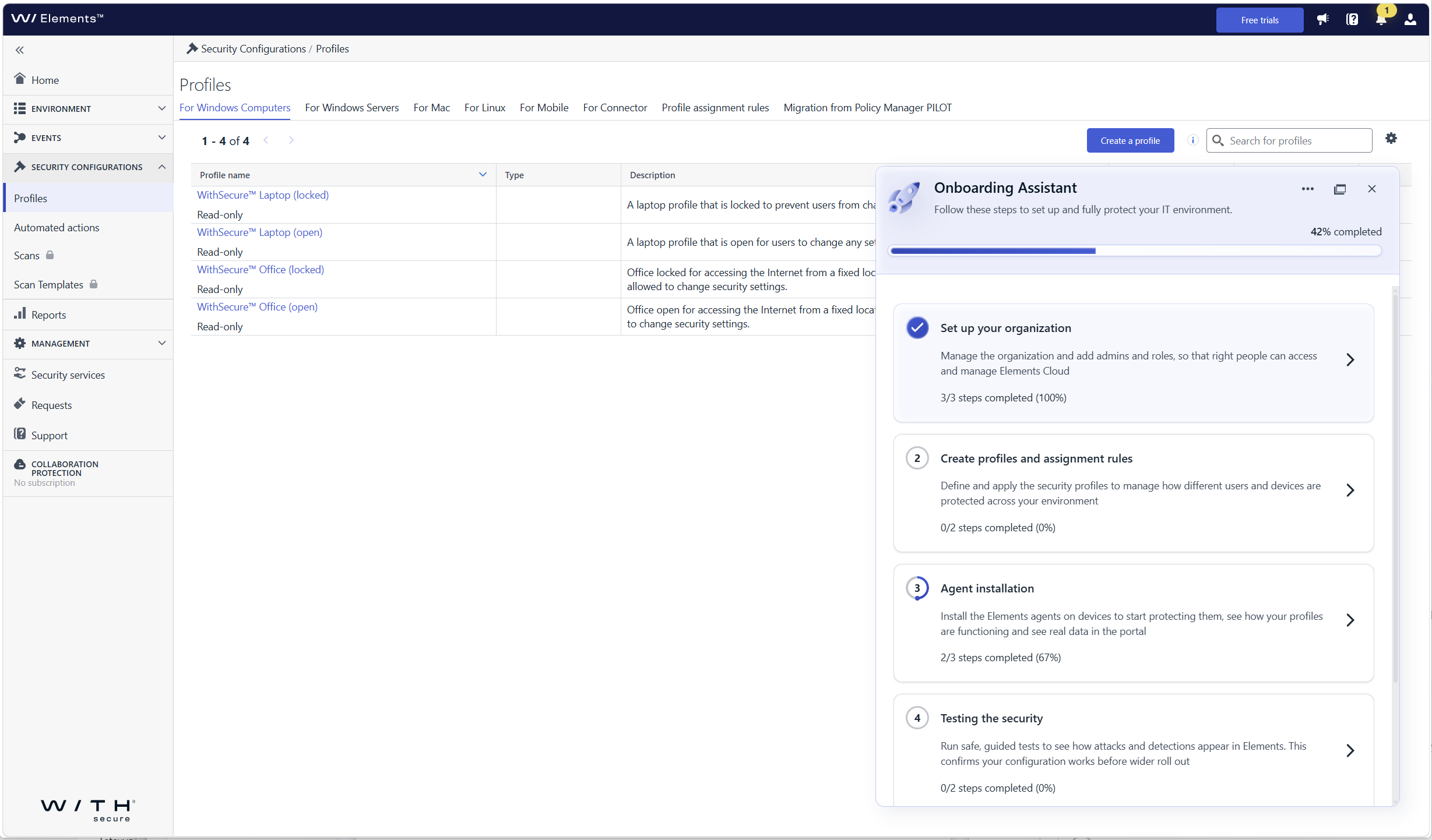
What’s new
- Guided first login: the assistant opens automatically when you log in to Elements Security Center for the first time and walks you through each required onboarding step
- Organization onboarding: set up your organization, including users and single sign-on (SSO)
- Device and profile onboarding: get your devices connected so that they are protected and visible in Elements
- Steps tailored to your subscriptions: you only see the steps that are relevant to the Elements products and services your company has, so there is nothing extra to sort through
- Help where you need it: each step includes contextual guidance, links to documentation, and prompts for the next action
Who sees the assistant
The assistant is shown to the first user who logs in with permission to manage users and access rights in the organization. This person can hand over product setup to other users by giving them access to Elements Security Center, so user and product administration can be split. In this release, the assistant is shown to customer users only, not to partner users with access to several companies.
How to get started
Log in to Elements Security Center. The Onboarding Assistant opens on the right side of the portal and shows your onboarding progress. Select a step to see what needs to be done and follow the guidance until all the steps relevant to your subscriptions are completed.
-
Introducing WithSecure Elements AI Security
Read more
We have launched AI Security Early Access for eligible WithSecure™ Elements subscriptions.
The new AI Security Dashboard gives users a single view into how AI is being used across organizations’ IT environments.
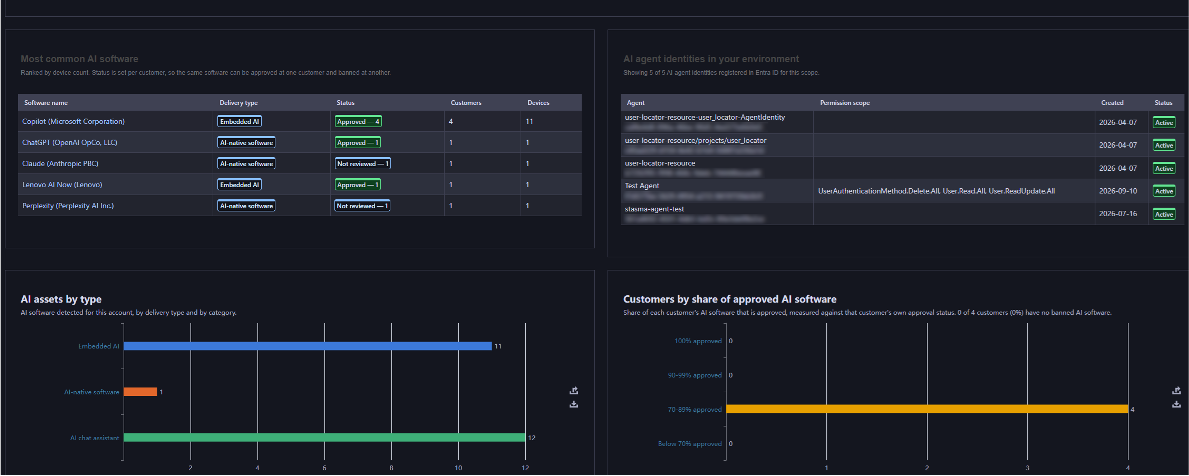
What’s new:
- Shadow AI discovery, through a dedicated AI Security Dashboard and Software Inventory that lists the AI tools in use across the organization, including tools that were never formally installed.
- Agentic identity visibility, integrated with Microsoft Entra ID, to surface Service Principals attributed to AI agents, AI chat assistants, AI coding assistants, and other generative AI tools operating with their own credentials.
- Browser extension tracking, surfacing AI-related browser plug-ins from chatbot sidebars to AI-powered productivity add-ons across every managed endpoint. To be added shortly after the initial release.
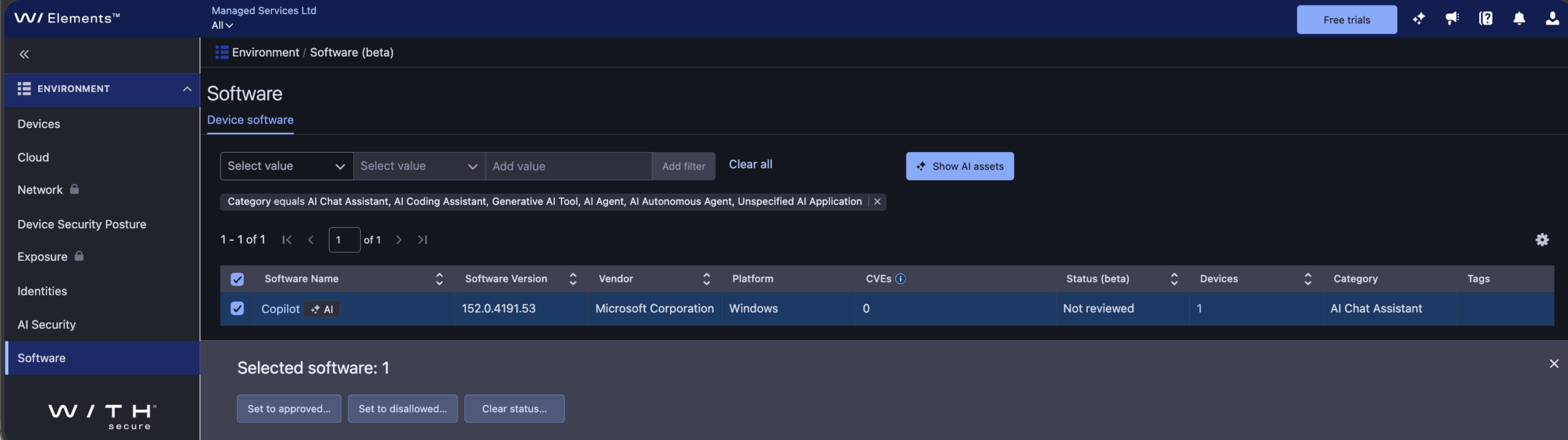
The initial release of AI Security includes asset status for discovered AI software, helping you identify which AI tools are approved for use versus “shadow AI.” In this release, asset status doesn’t restrict AI software use since it’s intended for reporting purposes only.
Learn more:
To learn more about AI Security, including how to use the dashboard, software inventory, and asset status, see the AI Security section of the Elements User Guide.
How to get started:
AI Security is available as an Early Access feature for eligible WithSecure Elements subscribers, at no extra cost and with no installation or setup required, until further notice.
If you’re an Elements user but aren’t currently subscribed to an eligible module, you can start a free 30-day trial via the Free Trials tab in Elements Security Center.
Eligibility:
- Software incl. Browser extension tracking: WithSecure Elements Protect and Proactive Bundles, WithSecure Elements XDR / Endpoint Detection and Response (EDR), WithSecure Elements Exposure Management (XM) for Business / Users / Devices.
- Identity: WithSecure Elements Protect and Proactive Bundles, WithSecure XDR Identity Security, WithSecure Elements Exposure Management (XM) for Business / Users / Identities.
-
Major Capricorn update for Endpoint Protection – October 2026
Read more
UPDATE 2026-10-15: This has now been released to production with version “2026-10-14_01“
We would like to inform you about a larger Virus Definition File (VDF) update than usual, scheduled for October 13, 2026.
What does this update mean?
As part of the regular maintenance cycle, the signature database is periodically reorganized — approximately twice a year. This update signifies that affected endpoints will download a larger, refreshed signature base of up to 130 MB, compared to the usual few KB to few MB size of standard updates.
Standard updates will resume immediately afterward, returning to their normal size.
Update Details
- Platform coverage: This update applies to all WithSecure Endpoint Protection products — across Windows, Mac, and Linux platforms that utilize the Capricorn engine.
Deployment
- The update will be delivered automatically through the regular VDF update mechanism.
- Updates containing this release will start with “WithSecure Capricorn Engine (2026-10-xx-xx)”.
Users of WithSecure Elements EPP may wish to consider taking the Elements Connector into use, to help reduce internet access, if they have several deployed endpoints. You can find more details of how to deploy this at:
https://support.withsecure.com/userguides/data/pdf/ws_elements_connector_eng.pdf
Business Suite announcements
-
Major Capricorn update for Endpoint Protection – October 2026
Read more
UPDATE 2026-10-15: This has now been released to production with version “2026-10-14_01“
We would like to inform you about a larger Virus Definition File (VDF) update than usual, scheduled for October 13, 2026.
What does this update mean?
As part of the regular maintenance cycle, the signature database is periodically reorganized — approximately twice a year. This update signifies that affected endpoints will download a larger, refreshed signature base of up to 130 MB, compared to the usual few KB to few MB size of standard updates.
Standard updates will resume immediately afterward, returning to their normal size.
Update Details
- Platform coverage: This update applies to all WithSecure Endpoint Protection products — across Windows, Mac, and Linux platforms that utilize the Capricorn engine.
Deployment
- The update will be delivered automatically through the regular VDF update mechanism.
- Updates containing this release will start with “WithSecure Capricorn Engine (2026-10-xx-xx)”.
-
TLS certificate provider update for GUTS2 backend (May 19, 2026)
Read more
We would like to inform you about an upcoming change to the TLS certificates used by the WithSecure GUTS2 Server (definition update backend), planned for May 19, 2026.
We are transitioning from DigiCert to Let’s Encrypt certificates. This update aligns our backend infrastructure with our existing services, where Let’s Encrypt is already in use, and helps us streamline certificate management while maintaining industry‑standard security practices.
What does this mean for you?
- No changes are expected for the majority of environments.
- The change will be transparent if your system trusts the ISRG Root X1 certificate (the root certificate used by Let’s Encrypt).
Common environments where no action is required:
- Windows systems with Windows Update enabled
- Environments where automatic root certificate updates are allowed (not restricted by GPO / MDM policies)
- Systems where ISRG Root X1 is not explicitly removed or blocked
When action may be needed:
- Systems with restricted certificate updates
- Environments with custom trust stores
- Devices where ISRG Root X1 is missing or not trusted
In such cases, please ensure that the ISRG Root X1 root certificate is present in your trust store.
WithSecure products currently require the following root certificates for TLS communication to WithSecure backends, therefore must be present on all machines, across all Operating Systems:
- Amazon Root CA 1
- Amazon Root CA 2
- Amazon Root CA 3
- Amazon Root CA 4
- Starfield Class 2 Certification
- Starfield Services Root Certificate Authority – G2
- DigiCert Global Root CA
- ISRG Root X1
- ISRG Root X2
All of these are included in the default trust stores of modern, up-to-date operating systems and should not require manual installation in the majority of deployments.
-
Major Capricorn update for Endpoint Protection – May 2026
Read more
UPDATE 2026-05-13: This has now been released to production with version “2026-05-13_01“
We will soon be releasing a major update for our Capricorn engine, used by our Endpoint Protection products. This is expected to be released on May 12th 2026.
This will result in a larger download as an updated version of the virus definition files are distributed.
Key improvementsOptimized databases through consolidation of overlapping detections, resulting in:
- Smaller footprint: Size on disk expected to decrease by ~160MB, decreasing by about half.
- Faster updates and reduced initialization disk I/O due to reduced database size
Update Details
- Platform coverage: This update applies to all WithSecure Endpoint Protection products — across Windows, Mac, and Linux platforms that utilize the Capricorn engine.
- Download size: All affected endpoints will now download a larger one-time update package of approximately 130-150 MB during the rollout.
Deployment
- The update will be delivered automatically.
- No manual action or configuration is required.
- The release time will be confirmed 24 hours in advance through our community channels.
- Updates containing this release will start with “WithSecure Capricorn Engine (2026-05-xx-xx)”.
- With this update, you can expect leaner, faster, and more efficient endpoint protection — without compromising security.
General announcements
-
CVE-2026-40175 for Axios JavaScript library
Read more
What is Axios?
Axios is a JavaScript library intended to ease interaction with internet HTTP services. It is used by some organizations to simplify their codebase compared to using standard browser functionality.
What is the vulnerability?
Prior to version 1.15.0, the Axios library is vulnerable to a specific “Gadget” attack chain that allows Prototype Pollution in any third-party dependency to be escalated into Remote Code Execution (RCE) or Full Cloud Compromise (via AWS IMDSv2 bypass).
Ref: https://nvd.nist.gov/vuln/detail/CVE-2026-40175
Has the vulnerability been fixed?
This vulnerability has been fixed in 1.15.0.
What are WithSecure’s recommendations for partners and customers?
We recommend partners and customers who use Axios act immediately to ensure their systems are not vulnerable.
WithSecure Exposure Management can detect and notify partners and customers that they have a vulnerable version.
Detection for vulnerable versions is available in unauthenticated scanning, and we are investigating the possibility to detect them on hosts via authenticated scans
What is the status of WithSecure systems in relation to this vulnerability?
WithSecure has thoroughly checked its own systems, and has confirmed that all services using Axios are using the latest version which is not vulnerable.
Are any WithSecure products affected?
WithSecure Policy Manager does contain a vulnerable version of the Axios library, and we have created a hotfix for this issue. We advise all our Business Suite partners and customers to apply this hotfix at the earliest opportunity.
The risk can further be mitigated by ensuring that Policy Manager’s Web Reporting interface is not accessible from the internet. This can be done with external firewall configurations.
The hotfix can be downloaded from the WithSecure Download Center.
-
Major Capricorn update for Endpoint Protection
Read more
UPDATE: 2024-09-25: This upgrade has now been published as WithSecure Capricorn Engine (2024-09-25_04). Please note that due to the way clients check for updates, some customers will not receive this until slightly later in the day. Subsequent Capricorn updates will also include this change.
UPDATE 2024-09-24: We anticipate that this update will start being delivered to our customers from 9.00 UTC 25.09.2024, but it is unfortunately not possible to give an exact time due to the way client installations check for updates. The update size will be ~39MB, and not the 42,6MB announced earlier
We plan to release a major Capricorn database update on September 24th, 2024.
What does this update mean?
This update signifies that all Withsecure Endpoint products – across Windows, Mac, and Linux platforms (those utilizing the Capricorn engine) will now download a larger update package of approximately 42,6 MB, compared to the usual 5MB.
For customers managing large environments or dealing with bandwidth constraints, this information could be particularly relevant. Additionally, users can expect improved initialization times and reduced memory consumption as part of the update’s benefits.
The update is provided automatically and does not require any additional configuration.
- The release time will be announced 24 hours in advance through our community channels.
- Updates containing this release will start with “WithSecure Capricorn Engine (2024-09-xx-xx)”
- Users of WithSecure Elements EPP may wish to consider taking the Elements Connector into use, to help reduce internet access, if they have several deployed endpoints. You can find more details of how to deploy this at https://www.withsecure.com/userguides/data/pdf/ws_elements_connector_eng.pdf
-
Important Reminder: ALL Protection for F-Secure branded B2B products ends completely on December 31st 2024
Read more
If you are using an F-Secure branded B2B product, please read on, as this article contains information you need to ensure protection and functionality continues in 2025.
We have previously communicated to our partners and end customers that support for F-Secure branded on-premises products will end completely in late 2024. This information was also published in this article.
As part of infrastructure changes related to our separation from F-Secure, the update servers for the old products will cease to exist. Support ends for these older products at the end of September in most cases, but we will endeavour to continue providing protection updates for these until the end of the year.
As we roll into 2025, it will be IMPOSSIBLE for us to offer any support for these products, as we will have no possibility to provide updates to these products. The products will stop receiving updates, and will no longer provide protection. To ensure continued delivery of updates, and therefore protection of your systems, it is vitally important that you update systems before the deadline.
In particular, this end of support reminder affects the following products, including Premium versions. You can find the minimum supported version.
Legacy F-Secure Product
Replacement WithSecure Product
F-Secure Business Suite
WithSecure Business Suite 16 series
F-Secure Client Security
WithSecure Client Security 16.x
F-Secure Client Security for Mac
WithSecure Client Security for Mac 16.x
F-Secure Server Security
WithSecure Server Security 16.x
F-Secure Policy Manager & Policy Manager Proxy (also Linux versions)
WithSecure Policy Manager 16.x
F-Secure Email and Server Security
WithSecure Email and Server Security 16.x
F-Secure Linux Security
WithSecure Linux Security 12.0.482
F-Secure Atlant
WithSecure Atlant 1.0.319
Replacement WithSecure branded versions are available for all of these products at our download center.
Please note that some service network addresses have changed for these WithSecure-branded products, and our customers need to ensure that connectivity is allowed to the new addresses. You can find more information at the dedicated article
Partners and customers have already received keycodes for the new versions where applicable.
On-premises products that are branded as WithSecure, and all WithSecure Elements products, continue to be supported until their published end of life dates.