


General product lifecycle policies
Supported product versions
Elements announcements
-
New roles for better access control in Elements
Read more
We are introducing new Elements roles. New roles make it easier to manage access in the Elements portal.
- Endpoints: Reading all – read access to servers, workstations and mobile devices. Does not grant permission to Device or profile management, Patch management, Device security posture, Software reputation, Security Events, Home/Endpoint protection, Reports.
- Endpoints: Editing all – editing access to servers, workstations, and mobile devices. Grants permission to security information, including device status, dashboard, security events, and software updates. Allows executing security operations such as removing or isolating devices and assigning profiles. Does not grant permission to manage profiles.
- Endpoints: Editing non-servers – edit access to workstations and mobile devices; read access to servers. Grants access to workstation and mobile security information, including device status, dashboards, security events, and software updates. Allows security operations on workstations and mobile devices, such as removing or isolating them and assigning profiles. Does not permit profile management.
- Endpoints: Editing servers – edit access to servers; read access to workstations and mobile devices. Grants access to server security information, including device status, dashboards, security events, and software updates. Allows security operations on servers, such as removing or isolating them and assigning profiles. Does not permit profile management.
- Endpoints: Organizing non-servers – Edit access to non-server devices, excluding remote operations. Includes actions that affect device security configuration (e.g., profile assignment) or metadata (e.g., alias, label, asset group), but not actions that execute on the device itself. Also includes read access to devices, security events, profiles, and reports for servers, workstations, and mobile devices.
- Endpoints: Organizing servers – edit access to server devices, excluding remote operations. Includes actions that affect device security configuration (e.g., profile assignment) or metadata (e.g., alias, label, asset group), but not actions that execute on the device itself. Also includes read access to devices, security events, profiles, and reports for servers, workstations, and mobile devices.
- Endpoints: Non-server remote operations – allows execution of remote security operations on non-servers, such as removing or isolating devices. Includes read access to devices, security events, profiles, and reports for servers, workstations, and mobile devices.
- Endpoints: Server remote operations – allows execution of remote security operations on servers, such as removing or isolating devices. Includes read access to devices, security events, profiles, and reports for servers, workstations, and mobile devices.
- Profiles: Editing for non-servers – allows management of security configurations and profiles for workstations and mobile devices. Does not permit access to server profiles.
- Profiles: Editing for servers – allows management of security configurations and profiles for servers. Does not permit access to workstation or mobile device profiles.
- Profile assignment rules: Editing – allows management of profile assignment rules.
- Security events: Managing – grants permission to take action on security events (e.g., acknowledging or allowing a website URL). Includes read access to devices, security events, profiles, and reports for servers, workstations, and mobile devices.
- Reports: Managing – allows managing reports. Includes read access to devices, security events, profiles, and reports for servers, workstations, and mobile devices.
-
Warum ist die Reaktion auf Vorfälle so wichtig?
Read more
Wenn Ihr Unternehmen von einem Cybervorfall betroffen ist, müssen Sie entscheiden, welche Systeme weiterlaufen können und welche Daten sicher wiederhergestellt werden können. Außerdem müssen Sie herausfinden, ob sensible Informationen offengelegt wurden und ob der Angreifer noch Zugriff hat. Diese Entscheidungen hängen von einem zuverlässigen Überblick über den Vorfall ab.
Die digitale Forensik und die Reaktion auf Sicherheitsvorfälle (DFIR) bieten das Fachwissen, um diese Sachverhalte zu ermitteln und entsprechend zu handeln.Erfahrene Ermittler und Einsatzkräfte helfen dabei, den Vorfall einzudämmen, die Wiederherstellung zu steuern und die Schwachstellen zu beheben, die den Angriff ermöglicht haben. Für Ihr Unternehmen kann dies weniger Betriebsunterbrechungen, fundiertere Entscheidungen und weniger Druck auf das interne teams bedeuten.
Aufbauend auf Ihren bestehenden Investitionen in die Sicherheit
Endpoint detection and response (EDR) bietet Einblick in die Geräteaktivitäten sowie Tools zur Untersuchung und Eindämmung von Bedrohungen. Managed detection and response (MDR) stellt Experten zur Verfügung, die im Rahmen eines vereinbarten Umfangs die Systeme überwachen, Vorfälle untersuchen und darauf reagieren.
Diese Fähigkeiten erweisen sich im Falle eines Vorfalls als äußerst wertvoll. Ein spezielles DFIR-Team knüpft an diese Arbeit an, wenn die Situation eine eingehendere forensische Untersuchung, die Koordination über eine größere Umgebung hinweg oder zusätzliche Unterstützung bei der Wiederherstellung erfordert. Die Ermittler tragen Beweismaterial von Endgeräten, Identitäten, Cloud-Diensten und anderen Systemen zusammen, um das Ausmaß des Angriffs zu ermitteln und die nächsten Schritte zu leiten.
Was DFIR aufdecken kann
Die folgenden Beispielszenarien verdeutlichen, warum diese umfassendere Untersuchung wichtig ist.
Die betrügerische Rechnung in einem vertrauenswürdigen Gespräch: Ein Finanzteam erhält im Rahmen eines bestehenden E-Mail-Austauschs mit einem Lieferanten neue Bankdaten. Die Zahlung erscheint zunächst legitim, bis der Lieferant anruft und nachfragt, wo die Zahlung bleibt. DFIR-Ermittler decken ein kompromittiertes Postfach auf, das der Angreifer genutzt hat, um Zahlungsgespräche zu überwachen. Sie identifizieren betroffene Konversationen und versteckte Weiterleitungsregeln und helfen dem Unternehmen so, seine Konten zu sichern, Bankanfragen zu beantworten und zu ermitteln, welche Informationen offengelegt wurden.
Der Ransomware-Vorfall, der bereits Tage vor dem Ausfall begann: EDR Erkennt Ransomware und isoliert den betroffenen Server. Die Untersuchung ergibt, dass zuvor ein kompromittiertes Administratorkonto genutzt wurde und zusätzlicher Zugriff auf einen Backup-Server bestand. Die DFIR-Einsatzkräfte identifizieren die verbleibenden Zugriffswege, bewerten die Hinweise auf Datendiebstahl und helfen dabei, festzustellen, welche Backups vertrauenswürdig sind. Im Rahmen der Wiederherstellung kann dann die umfassendere Kompromittierung behoben werden, wodurch das Risiko einer erneuten Verbindung der Systeme verringert wird, solange der Angreifer noch Zugriff hat.
Das heimliche Eindringen mit dem Ziel, an wertvolle Informationen zu gelangen: Der Geschäftsbetrieb läuft normal weiter, während ein Eindringling wochenlang Zugriff auf sensible Projektdateien hat. Eine ungewöhnliche Anmeldung löst eine Untersuchung aus, bei der Aktivitäten über verschiedene Arbeitsplätze und Cloud-Dienste hinweg miteinander in Verbindung gebracht werden. DFIR-Spezialisten rekonstruieren den zeitlichen Ablauf, decken die Mechanismen auf, mit denen der Zugriff aufrechterhalten wurde, und werten Hinweise auf Datenerfassung und -übertragung aus. Das Unternehmen erhält ein klareres Verständnis des Ausmaßes der Gefährdung und einen Plan zur Entfernung des Eindringlings.
Grundlagen für Entscheidungen, Berichterstattung und Sanierung
Selbst wenn ein Angreifer bereits Schaden angerichtet hat, kann eine wirksame Reaktion weitere Verluste verhindern und die nicht betroffenen Betriebsabläufe schützen. Erfahrene Fachkräfte helfen dabei, Maßnahmen entsprechend ihrer Auswirkungen auf den Geschäftsbetrieb zu priorisieren und gleichzeitig die für die Ermittlungen erforderlichen Beweismittel zu sichern.
Eine klare Berichterstattung bietet der Geschäftsleitung eine sachliche Entscheidungsgrundlage. Außerdem unterstützt sie Schadenfälle im Bereich der Cyberversicherung und aufsichtsrechtliche Meldungen anhand von dokumentierten Zeitabläufen, Erkenntnissen zu betroffenen Systemen und Daten sowie Aufzeichnungen über die ergriffenen Maßnahmen. Das Rechts- und Compliance- teams kann diese Erkenntnisse nutzen, um Meldepflichten zu bewerten und gegebenenfalls Berichte gemäß NIS2 und DSGVO zu erstellen. In den Berichten wird zwischen bestätigten Erkenntnissen und Einschätzungen unterschieden und auf verbleibende Unsicherheiten eingegangen.
Fachwissen, das Ihnen zur Verfügung steht, wann immer Sie es brauchen
Bei WithSecure, Unser Incident-Response-Team ist völlig technologieunabhängig.. Wir arbeiten hersteller-, plattform- und umgebungsübergreifend und kooperieren dabei mit Ihren bestehenden teams und Anbietern. Unsere Untersuchungen umfassen Business-E-Mail-Compromise, Ransomware, Cyberspionage und Insider-Bedrohungen. Oder sonstige Anforderungen.
Ein WithSecure DFIR-Berater bietet Rund um die Uhr, SLA-gestützter Zugang zu Spezialisten, wobei die Dienste auf Abruf zu vorab vereinbarten Tarifen zur Verfügung stehen und keine Vorabbuchung von Untersuchungstagen erforderlich ist. Ihr Unternehmen verfügt über einen festgelegten Kontakt- und Aktivierungsprozess, wodurch sich der Zeitaufwand für die Organisation von fachlicher Unterstützung während eines Vorfalls verringert. Interne „ teams “ erhalten zusätzliche Kapazitäten, wenn die Anforderungen an sie am größten sind.
Außerdem unterstützen wir Sie bei der Vorbereitung durch Maßgeschneiderte Tabletop-Übungen, Runbooks und Planüberprüfungen, die sich auf die Reaktion auf Vorfälle, das Krisenmanagement und die Wiederherstellung erstrecken. Jedes Projekt ist auf Ihre Umgebung, Ihre geschäftlichen Prioritäten und die Zuständigkeiten Ihres Teams zugeschnitten. Ihre Mitarbeiter können schwierige Entscheidungen einüben, Eskalationswege testen und Lücken schließen, bevor ein tatsächlicher Vorfall diese Vorkehrungen auf die Probe stellt.
Das Ergebnis ist eine Organisation, die besser darauf vorbereitet ist, einen Vorfall zu verstehen, fundierte Entscheidungen zu treffen und den Betrieb auf der Grundlage von Fakten sicher wiederherzustellen.
Erfahren Sie hier mehr über unsere Dienstleistungen im Bereich Incident Response:
-
New Feature: Onboarding Assistant in Elements Security Center
Read more
We have introduced the Onboarding Assistant in Elements Security Center, a built-in virtual assistant that guides new users through their first steps in WithSecure™ Elements. The assistant appears on first login and leads you through the setup actions needed for the products and services your organization has purchased.
Until now, getting started often relied on hands-on help from a partner or a WithSecure solutions engineer. The Onboarding Assistant gives every customer the same clear, step-by-step path to a working setup, so you reach your first security outcomes faster and with less manual support.
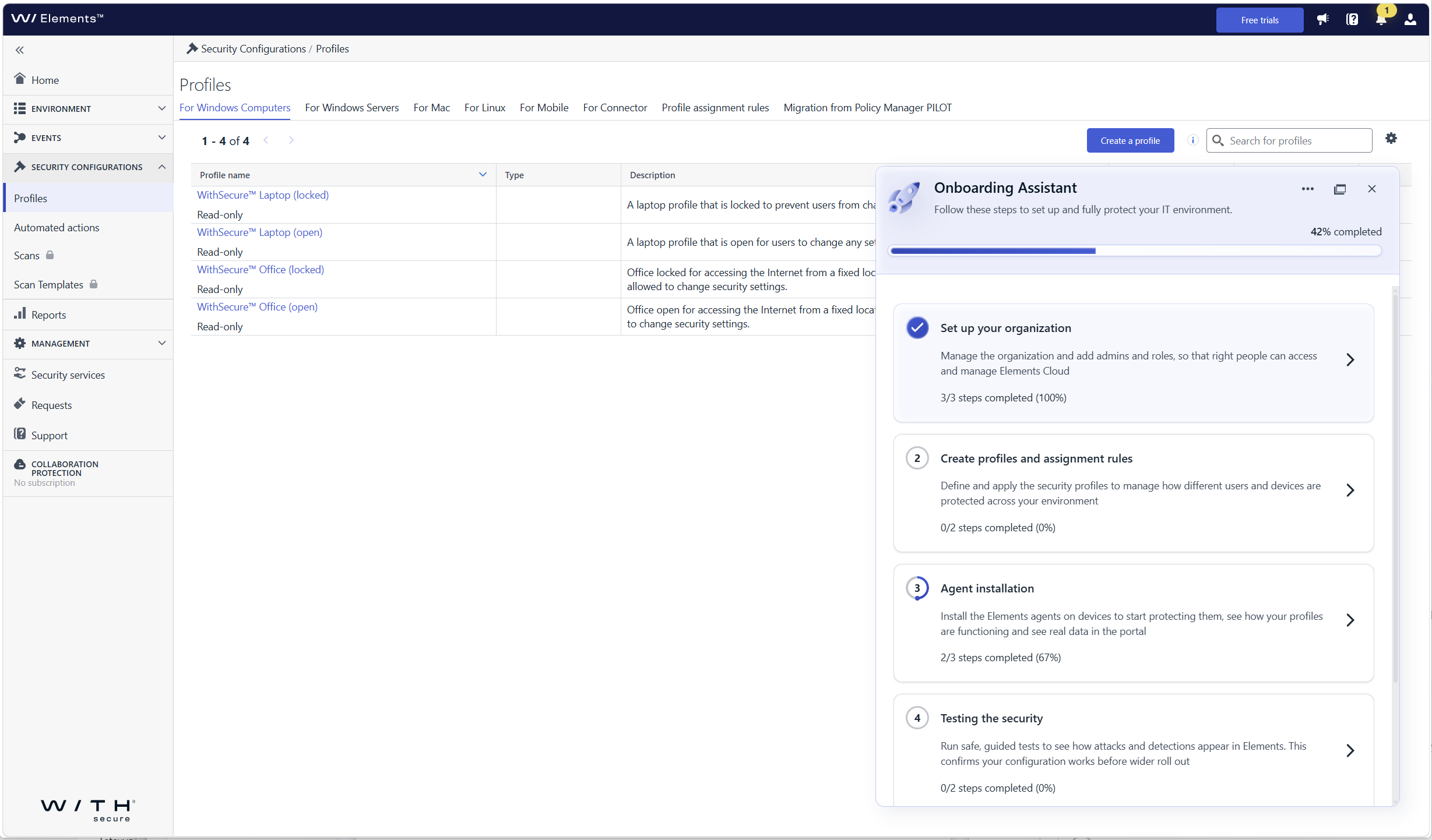
What’s new
- Guided first login: the assistant opens automatically when you log in to Elements Security Center for the first time and walks you through each required onboarding step
- Organization onboarding: set up your organization, including users and single sign-on (SSO)
- Device and profile onboarding: get your devices connected so that they are protected and visible in Elements
- Steps tailored to your subscriptions: you only see the steps that are relevant to the Elements products and services your company has, so there is nothing extra to sort through
- Help where you need it: each step includes contextual guidance, links to documentation, and prompts for the next action
Who sees the assistant
The assistant is shown to the first user who logs in with permission to manage users and access rights in the organization. This person can hand over product setup to other users by giving them access to Elements Security Center, so user and product administration can be split. In this release, the assistant is shown to customer users only, not to partner users with access to several companies.
How to get started
Log in to Elements Security Center. The Onboarding Assistant opens on the right side of the portal and shows your onboarding progress. Select a step to see what needs to be done and follow the guidance until all the steps relevant to your subscriptions are completed.
-
Introducing WithSecure Elements AI Security
Read more
We have launched AI Security Early Access for eligible WithSecure™ Elements subscriptions.
The new AI Security Dashboard gives users a single view into how AI is being used across organizations’ IT environments.
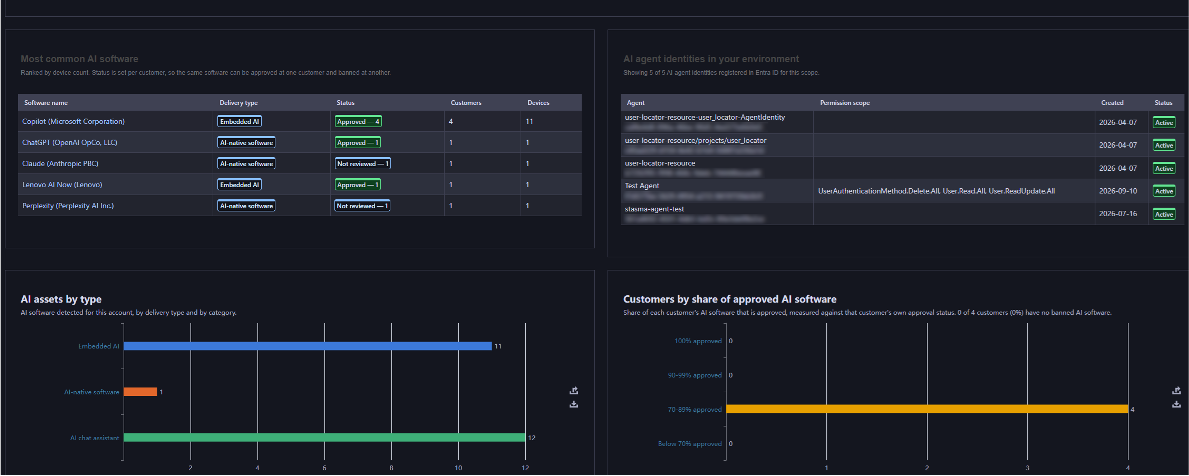
What’s new:
- Shadow AI discovery, through a dedicated AI Security Dashboard and Software Inventory that lists the AI tools in use across the organization, including tools that were never formally installed.
- Agentic identity visibility, integrated with Microsoft Entra ID, to surface Service Principals attributed to AI agents, AI chat assistants, AI coding assistants, and other generative AI tools operating with their own credentials.
- Browser extension tracking, surfacing AI-related browser plug-ins from chatbot sidebars to AI-powered productivity add-ons across every managed endpoint. To be added shortly after the initial release.
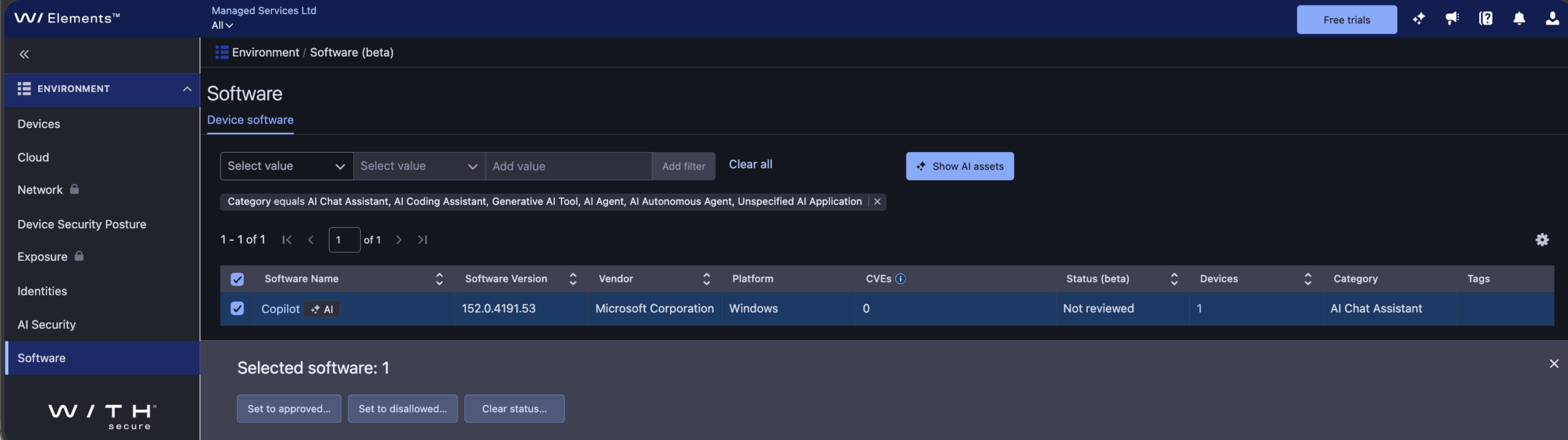
The initial release of AI Security includes asset status for discovered AI software, helping you identify which AI tools are approved for use versus „shadow AI.“ In this release, asset status doesn’t restrict AI software use since it’s intended for reporting purposes only.
Learn more:
To learn more about AI Security, including how to use the dashboard, software inventory, and asset status, see the AI Security section of the Elements User Guide.
How to get started:
AI Security is available as an Early Access feature for eligible WithSecure Elements subscribers, at no extra cost and with no installation or setup required, until further notice.
If you’re an Elements user but aren’t currently subscribed to an eligible module, you can start a free 30-day trial via the Free Trials tab in Elements Security Center.
Eligibility:
- Software incl. Browser extension tracking: WithSecure Elements Protect and Proactive Bundles, WithSecure Elements XDR / Endpoint Detection and Response (EDR), WithSecure Elements Exposure Management (XM) for Business / Users / Devices.
- Identity: WithSecure Elements Protect and Proactive Bundles, WithSecure XDR Identity Security, WithSecure Elements Exposure Management (XM) for Business / Users / Identities.
-
Major Capricorn update for Endpoint Protection – October 2026
Read more
UPDATE 2026-10-15: This has now been released to production with version „2026-10-14_01„
We would like to inform you about a larger Virus Definition File (VDF) update than usual, scheduled for October 13, 2026.
What does this update mean?
As part of the regular maintenance cycle, the signature database is periodically reorganized — approximately twice a year. This update signifies that affected endpoints will download a larger, refreshed signature base of up to 130 MB, compared to the usual few KB to few MB size of standard updates.
Standard updates will resume immediately afterward, returning to their normal size.
Update Details
- Platform coverage: This update applies to all WithSecure Endpoint Protection products — across Windows, Mac, and Linux platforms that utilize the Capricorn engine.
Deployment
- The update will be delivered automatically through the regular VDF update mechanism.
- Updates containing this release will start with „WithSecure Capricorn Engine (2026-10-xx-xx)“.
Users of WithSecure Elements EPP may wish to consider taking the Elements Connector into use, to help reduce internet access, if they have several deployed endpoints. You can find more details of how to deploy this at:
https://support.withsecure.com/userguides/data/pdf/ws_elements_connector_eng.pdf
Business Suite announcements
-
Major Capricorn update for Endpoint Protection – October 2026
Read more
UPDATE 2026-10-15: This has now been released to production with version „2026-10-14_01„
We would like to inform you about a larger Virus Definition File (VDF) update than usual, scheduled for October 13, 2026.
What does this update mean?
As part of the regular maintenance cycle, the signature database is periodically reorganized — approximately twice a year. This update signifies that affected endpoints will download a larger, refreshed signature base of up to 130 MB, compared to the usual few KB to few MB size of standard updates.
Standard updates will resume immediately afterward, returning to their normal size.
Update Details
- Platform coverage: This update applies to all WithSecure Endpoint Protection products — across Windows, Mac, and Linux platforms that utilize the Capricorn engine.
Deployment
- The update will be delivered automatically through the regular VDF update mechanism.
- Updates containing this release will start with „WithSecure Capricorn Engine (2026-10-xx-xx)“.
-
TLS certificate provider update for GUTS2 backend (May 19, 2026)
Read more
We would like to inform you about an upcoming change to the TLS certificates used by the WithSecure GUTS2 Server (definition update backend), planned for May 19, 2026.
We are transitioning from DigiCert to Let’s Encrypt certificates. This update aligns our backend infrastructure with our existing services, where Let’s Encrypt is already in use, and helps us streamline certificate management while maintaining industry‑standard security practices.
What does this mean for you?
- No changes are expected for the majority of environments.
- The change will be transparent if your system trusts the ISRG Root X1 certificate (the root certificate used by Let’s Encrypt).
Common environments where no action is required:
- Windows systems with Windows Update enabled
- Environments where automatic root certificate updates are allowed (not restricted by GPO / MDM policies)
- Systems where ISRG Root X1 is not explicitly removed or blocked
When action may be needed:
- Systems with restricted certificate updates
- Environments with custom trust stores
- Devices where ISRG Root X1 is missing or not trusted
In such cases, please ensure that the ISRG Root X1 root certificate is present in your trust store.
WithSecure products currently require the following root certificates for TLS communication to WithSecure backends, therefore must be present on all machines, across all Operating Systems:
- Amazon Root CA 1
- Amazon Root CA 2
- Amazon Root CA 3
- Amazon Root CA 4
- Starfield Class 2 Certification
- Starfield Services Root Certificate Authority – G2
- DigiCert Global Root CA
- ISRG Root X1
- ISRG Root X2
All of these are included in the default trust stores of modern, up-to-date operating systems and should not require manual installation in the majority of deployments.
-
Major Capricorn update for Endpoint Protection – May 2026
Read more
UPDATE 2026-05-13: This has now been released to production with version „2026-05-13_01„
We will soon be releasing a major update for our Capricorn engine, used by our Endpoint Protection products. This is expected to be released on May 12th 2026.
This will result in a larger download as an updated version of the virus definition files are distributed.
Key improvementsOptimized databases through consolidation of overlapping detections, resulting in:
- Smaller footprint: Size on disk expected to decrease by ~160MB, decreasing by about half.
- Faster updates and reduced initialization disk I/O due to reduced database size
Update Details
- Platform coverage: This update applies to all WithSecure Endpoint Protection products — across Windows, Mac, and Linux platforms that utilize the Capricorn engine.
- Download size: All affected endpoints will now download a larger one-time update package of approximately 130-150 MB during the rollout.
Deployment
- The update will be delivered automatically.
- No manual action or configuration is required.
- The release time will be confirmed 24 hours in advance through our community channels.
- Updates containing this release will start with „WithSecure Capricorn Engine (2026-05-xx-xx)”.
- With this update, you can expect leaner, faster, and more efficient endpoint protection — without compromising security.
General announcements
-
CVE-2026-40175 for Axios JavaScript library
Read more
What is Axios?
Axios is a JavaScript library intended to ease interaction with internet HTTP services. It is used by some organizations to simplify their codebase compared to using standard browser functionality.
What is the vulnerability?
Prior to version 1.15.0, the Axios library is vulnerable to a specific „Gadget“ attack chain that allows Prototype Pollution in any third-party dependency to be escalated into Remote Code Execution (RCE) or Full Cloud Compromise (via AWS IMDSv2 bypass).
Ref: https://nvd.nist.gov/vuln/detail/CVE-2026-40175
Has the vulnerability been fixed?
This vulnerability has been fixed in 1.15.0.
What are WithSecure’s recommendations for partners and customers?
We recommend partners and customers who use Axios act immediately to ensure their systems are not vulnerable.
WithSecure Exposure Management can detect and notify partners and customers that they have a vulnerable version.
Detection for vulnerable versions is available in unauthenticated scanning, and we are investigating the possibility to detect them on hosts via authenticated scans
What is the status of WithSecure systems in relation to this vulnerability?
WithSecure has thoroughly checked its own systems, and has confirmed that all services using Axios are using the latest version which is not vulnerable.
Are any WithSecure products affected?
WithSecure Policy Manager does contain a vulnerable version of the Axios library, and we have created a hotfix for this issue. We advise all our Business Suite partners and customers to apply this hotfix at the earliest opportunity.
The risk can further be mitigated by ensuring that Policy Manager’s Web Reporting interface is not accessible from the internet. This can be done with external firewall configurations.
The hotfix can be downloaded from the WithSecure Download Center.
-
Major Capricorn Update für Endpoint Protection
Read more
AKTUALISIERUNG: 2024-09-25: Dieses Upgrade wurde jetzt veröffentlicht als MitSecure Capricorn Engine (2024-09-25_04). Bitte beachten Sie, dass aufgrund der Art und Weise, wie die Clients nach Updates suchen, einige Kunden diese Änderung erst etwas später am Tag erhalten werden. Nachfolgende Capricorn-Updates werden diese Änderung ebenfalls enthalten.
UPDATE 2024-09-24: Wir gehen davon aus, dass dieses Update ab dem 25.09.2024, 9.00 UTC, an unsere Kunden ausgeliefert wird. Aufgrund der Art und Weise, wie Client-Installationen nach Updates suchen, ist es leider nicht möglich, eine genaue Zeitangabe zu machen. Die Größe des Updates wird ~39MB betragen, und nicht die früher angekündigten 42,6MB
Wir planen, am 24. September 2024 ein größeres Update der Capricorn-Datenbank zu veröffentlichen.
Was bedeutet diese Aktualisierung?
Dieses Update bedeutet, dass alle Withsecure Endpoint-Produkte – für Windows-, Mac- und Linux-Plattformen (die die Capricorn-Engine nutzen) – nun ein größeres Update-Paket von ca. 42,6 MB herunterladen werden, im Vergleich zu den üblichen 5 MB.
Für Kunden, die große Umgebungen verwalten oder mit Bandbreitenbeschränkungen zu kämpfen haben, könnten diese Informationen besonders relevant sein. Darüber hinaus können die Nutzer mit verbesserten Initialisierungszeiten und einem geringeren Speicherverbrauch als Teil der Vorteile des Updates rechnen.
Die Aktualisierung ist automatisch bereitgestellt und erfordert keine zusätzliche Konfiguration.
- Die Veröffentlichungszeit wird 24 Stunden im Voraus über unsere community Kanäle bekannt gegeben.
- Updates, die diese Version enthalten, beginnen mit „WithSecure Capricorn Engine (2024-09-xx-xx)“.
- Benutzer von WithSecure Elements EPP können den Elements Connector in Betracht ziehen, um den Internetzugang zu reduzieren, wenn sie mehrere Endpunkte einsetzen. Weitere Einzelheiten zur Bereitstellung finden Sie unter https://www.withsecure.com/userguides/data/pdf/ws_elements_connector_eng.pdf
-
Wichtige Erinnerung: ALLER Schutz für B2B-Produkte der Marke F-Secure endet vollständig am 31. Dezember 2024
Read more
Wenn Sie ein F-Secure B2B-Markenprodukt, lesen Sie bitte weiter, denn dieser Artikel enthält Informationen, die Sie benötigen, um Schutz und Funktionalität zu gewährleisten wird im Jahr 2025 fortgesetzt.
Wir haben unseren Partnern und Endkunden bereits mitgeteilt, dass die Unterstützung für F-Secure gebrandmarkt Vor-Ort-Produkte werden Ende 2024 vollständig eingestellt. Diese Information wurde auch veröffentlicht in diesem Artikel.
Als Teil der Infrastrukturänderungen im Zusammenhang mit der Trennung von F-Secure werden die Update-Server für die alten Produkte nicht mehr existieren. Unterstützung endet für diese älteren Produkte in den meisten Fällen Ende September auslaufen, aber wir werden uns bemühen, bis zum Ende des Jahres weiterhin Schutz-Updates für diese Produkte bereitzustellen.
Auf dem Weg ins Jahr 2025 wird es sein UNMÖGLICH Wir können keinen Support für diese Produkte anbieten, da wir keine Möglichkeit haben, Updates für diese Produkte bereitzustellen. Die Produkte erhalten keine Updates mehr und bieten keinen Schutz mehr.. Um die kontinuierliche Bereitstellung von Updates und damit den Schutz Ihrer Systeme zu gewährleisten, Es ist von entscheidender Bedeutung, dass Sie Ihre Systeme vor Ablauf der Frist aktualisieren..
Diese Erinnerung an das Ende des Supports betrifft insbesondere die folgenden Produkte, einschließlich Premium-Versionen. Sie können die minimal unterstützte Version finden.
Älteres F-Secure-Produkt
Ersatz durch sicheres Produkt
F-Secure Business Suite
MitSecure Business Suite 16 Serie
F-Secure Client-Sicherheit
MitSecure Client Security 16.x
F-Secure Client Security für Mac
WithSecure Client Security für Mac 16.x
F-Secure Server-Sicherheit
MitSecure Server Security 16.x
F-Secure Policy Manager & Policy Manager Proxy (auch Linux-Versionen)
MitSecure Policy Manager 16.x
F-Secure E-Mail- und Server-Sicherheit
MitSecure E-Mail- und Server-Sicherheit 16.x
F-Secure Linux Sicherheit
WithSecure Linux Security 12.0.482
F-Secure Atlant
WithSecure Atlant 1.0.319
Ersatzversionen der WithSecure-Marke sind für alle diese Produkte in unserem Download-Center.
Bitte beachten Sie dass sich einige Service-Netzwerkadressen für diese WithSecure-Produkte geändert haben und unsere Kunden sicherstellen müssen, dass die Verbindung zu den neuen Adressen erlaubt ist. Sie können finden Weitere Informationen finden Sie in dem entsprechenden Artikel
Partner und Kunden haben gegebenenfalls bereits Keycodes für die neuen Versionen erhalten.
Vor-Ort-Produkte, die unter der Marke WithSecure vertrieben werden, sowie alle WithSecure-Produkte Elements werden weiterhin unterstützt. bis zu ihrem veröffentlichten End-of-Life-Datum.