


What’s New in Elements: January 2023
Editor’s Highlights
Upcoming changes to WithSecure Business Account
In early March, we will be upgrading the WithSecure Business Account, which will give us more possibilities for integrations in the future. The Business Account is used to log in to services such as Elements, or the WithSecure Community. For more information, including user actions needed, please see our dedicated article in the WithSecure Community
New view for Broad Contect Detections
We are in the process of introducing a new Broad Context Detection (BCD) view that will help improve viewing, navigating and filtering the data whilst investigating detections. Please see the Endpoint Detection and Response section below for more information.
Elements Security Center
Profile Assignment rules allow multiple values
Currently, when a device changes its AD group, IP, DNS or WINS, it is possible to automatically assign a profile and labels based on the rules to that device
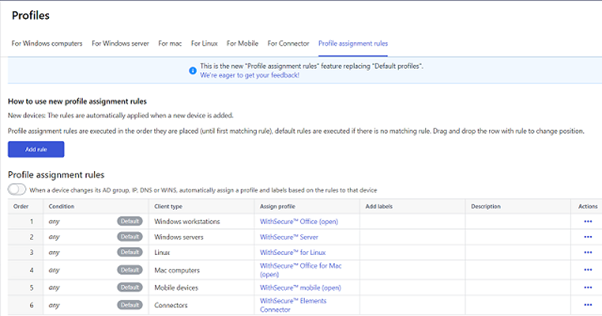
The profile assignment rules now support multiple values in a single rule. This means it is possible to match multiple IP segments, DNS/WINS patterns or Active Directory groups with a single rule.
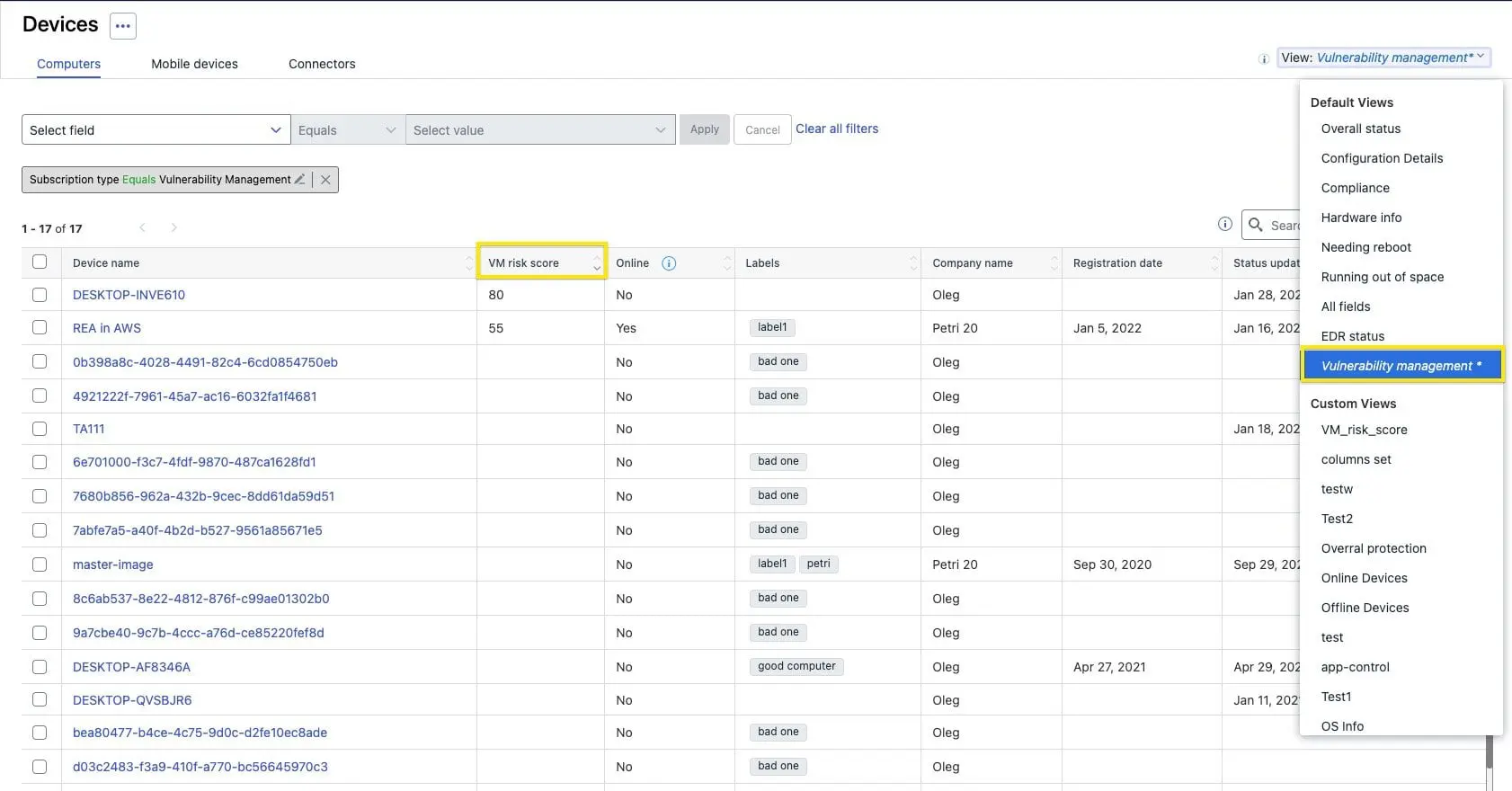
Vulnerability Management Risk Score visible in Device listing
The Risk Score from Elements Vulnerability Management is now visible in the device listing. We have also added a new default view « Vulnerability management ».
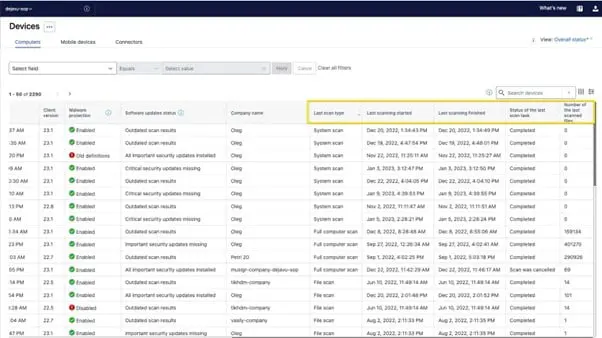
Device list now contains the last scanning status
We have now added the last scanning status columns into devices list
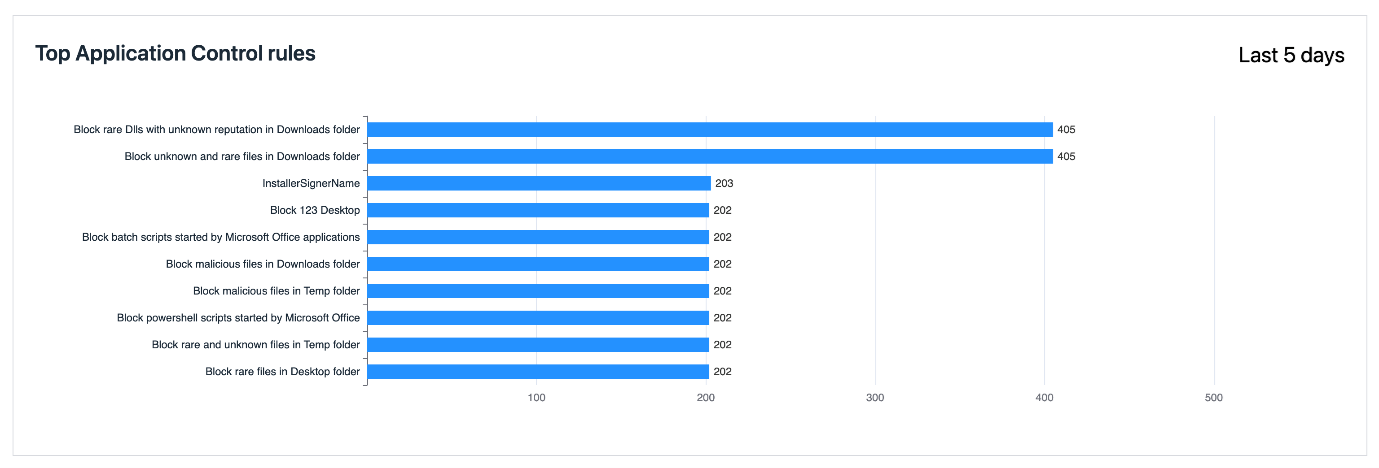
Top 10 most applied Application Control Rules are now visible in reports
Administrators visiting the “Reports → Security Events” tab can now see a list of the top 10 rules triggered.
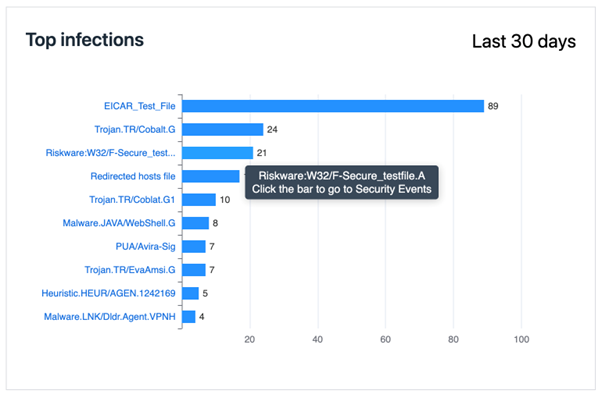
New Software Updates views released
These new views provide improvements, new features and changes compared to old ones:
- Installation related tabs are merged. All installation related information can now be found under single tab called « Installation Logs ». The « Installation summary » style view is currently missing from the UI and will be reintroduced later via grouping functionality
- Improved installation status information for Installation logs. On top of the existing installation status, you can now also find more specific installation code / reason for all performed installations per device
- Access « View affected devices » from the Computers and Servers columns directly. Previously this information was only available via the Action panels « View affected devices » button.
- Number of affected devices on action buttons. When you perform a selection on set of updates, you can now also see the combined total of devices to be updated on the action panel.
- Select all – Previously when using select all checkbox the selection affected only the updates visible at the given time. With the new views, the select all includes all updates matching the filters used currently.
- Force close – Certain updates require target application to be closed before installing the updated. Now you can force the application to be shut down from the portal when making the installation request.
Ability to search in filter rules in the Device View
The Administrator can now use search in filter values in device view. This will help them quickly find relevant rules for updating.
Additional items added to Audit Logging
- FSdiag download actions are audited
- « Show message » operations are audited
- Audit logs support follow two new remote operations « Turn security off » and « Assign Profile ».
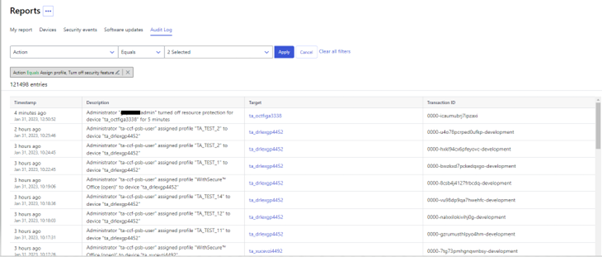
- Audit logs can be now filtered by the audit action type.
- All device-related audit logs allow navigating to a device by clicking the link in the target column
- Device deletions are audited and visible in the Audit Logs page
Elements Endpoint Protection
Elements Agent 23.1
A new version of the endpoint clients is now available. This release makes the Elements Agent version 23.1 available (internal version 23.1.433).
The endpoints automatically upgrade, without a reboot.
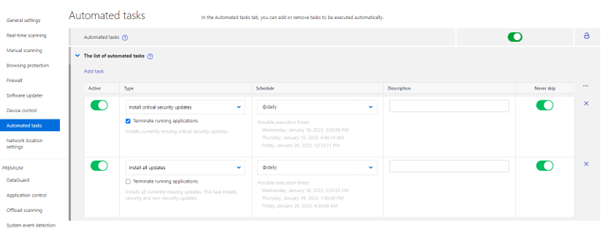
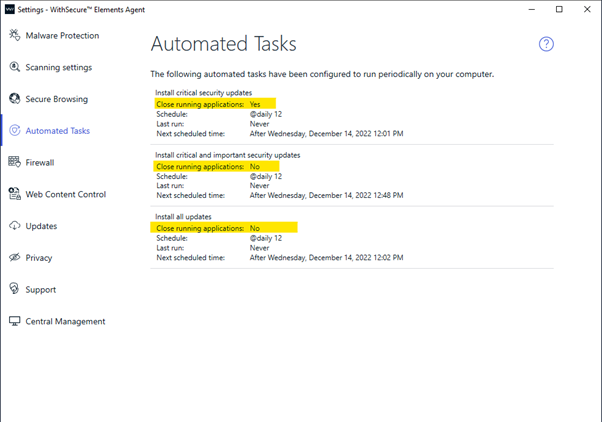
Support « Terminate running applications » toggle in Software Updater Automated Tasks.
Added a remote action to turn off Tamper Protection temporarily.
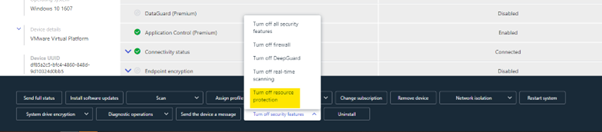
Added an alert to portal when user disables Tamper Protection locally.
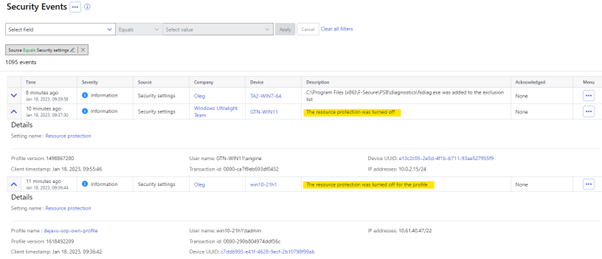
Remote Operations can temporarily disable locked Security features
You can now use remote operations to temporarily disable locked security features, no need to unlock them in profile. That way you don’t need to weaken your security posture to be able to temporarily disable features.
New Installer Filenames
With this release we are changing file names for installers, to properly represent the brand of the product. These are now ElementsAgentInstaller.exe and ElementsAgentOfflineInstaller.msi. The old file names are still available to download but will not be published in future.
Elements Endpoint Detection and Response
Preview of new Broad Context Detection view now available
We are in the process of introducing a new Broad Context Detection (BCD) view that will help improve viewing, navigating and filtering the data whilst investigating detections. You can view the new BCD version by clicking on the link at the top right of the BCD page.
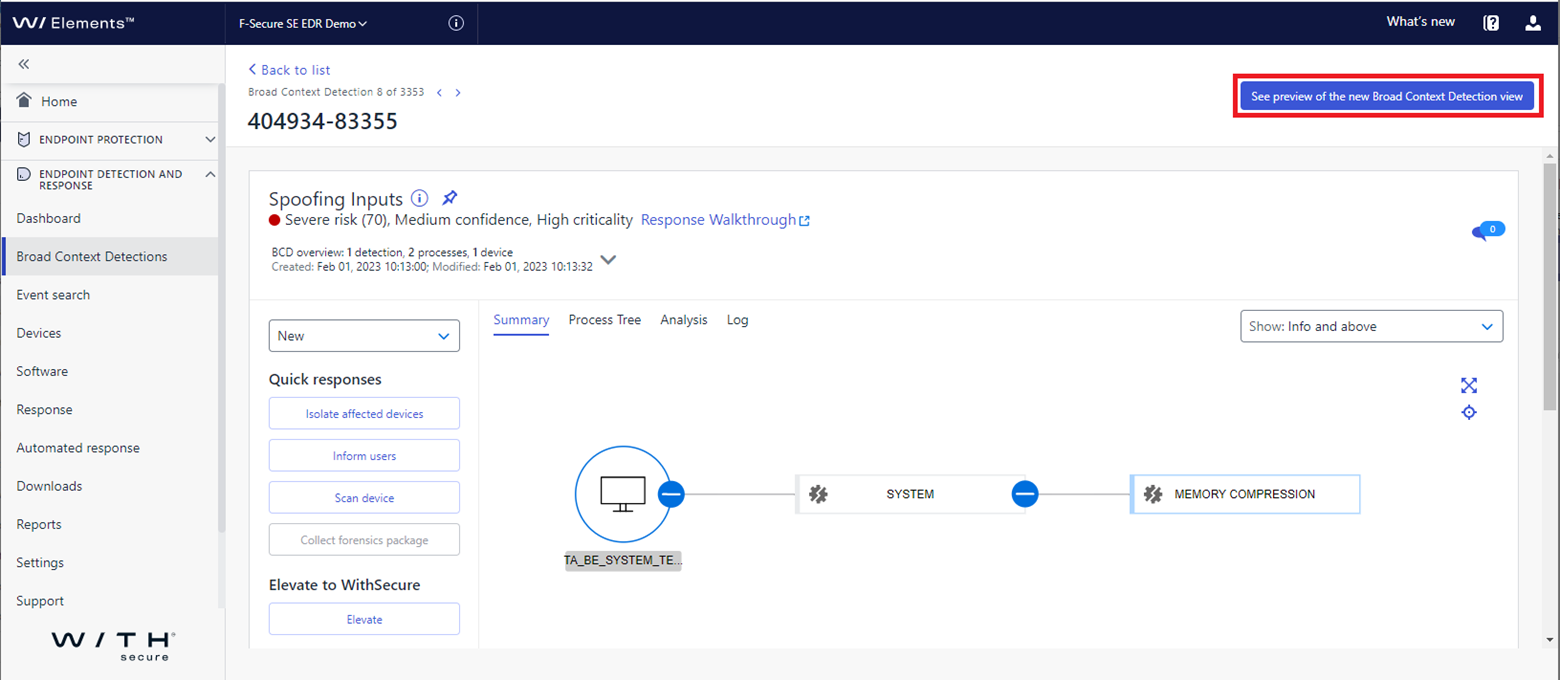
The new BCD view combines the summary process tree and the process details so they are visible together on the same page with no need to switch between the two tabs. Also, the process details are visible on whichever tab you are viewing making it easier to view the process data, for example, when writing up your findings.
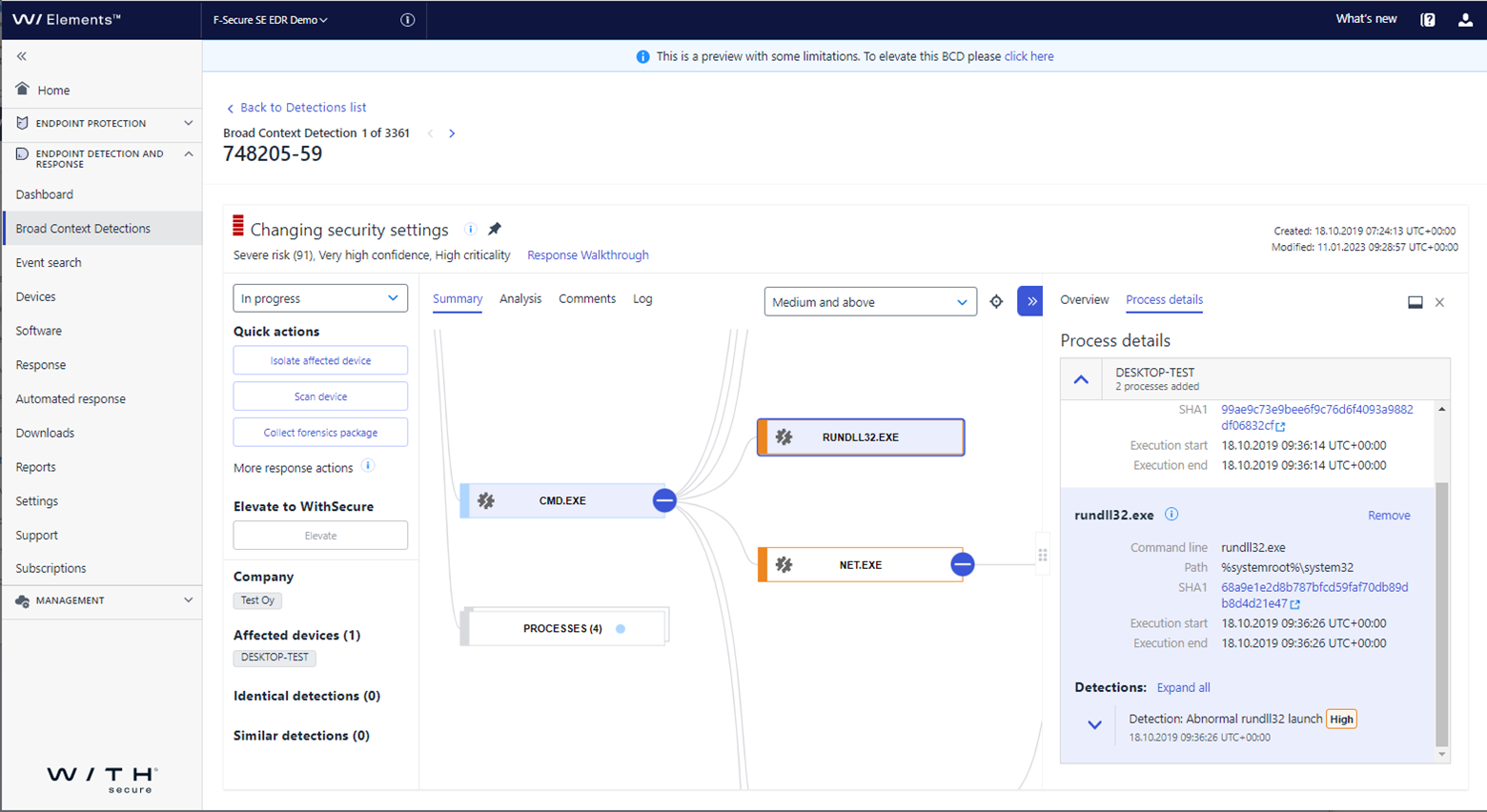
It is still a work-in-progress and there is continued focus on improving useability – such as, selecting/de-selecting multiple data points – and the ‘Elevate’ service. Please do check it out and give us your feedback to help us shape the final version for you. This can be done via our Elements Ideas portal – ideas.withsecure.com.
Elements Collaboration Protection
Improvements for Mailbox Protection Management
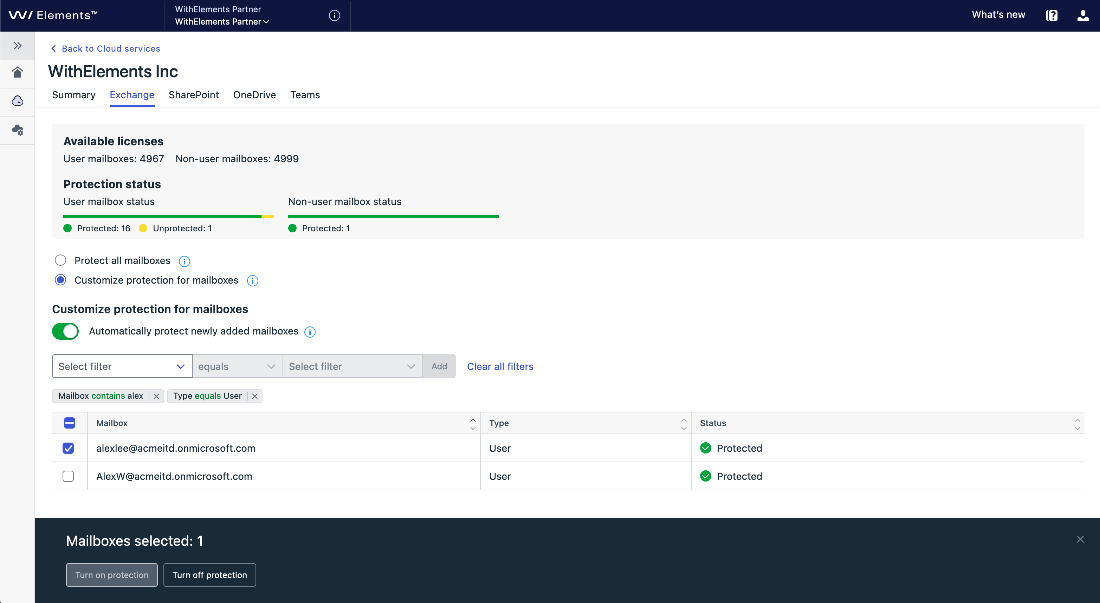
The filter feature is introduced for mailbox management in Exchange tab under Cloud Services. This enhances management of mailboxes protection, in particular for large tenants. The mailbox list can be pre filtered before changing a protection status by protection status or mailbox type or by a user name or domain.
Detections new filter
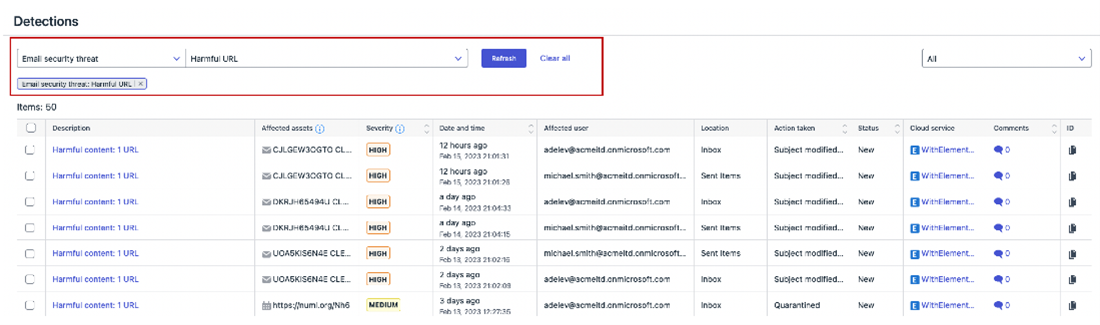
The detections with Exchange origin can now be filtered by type of email security threat: suspicious URL, suspicious attachment, harmful URL or harmful attachment.
Other improvements
- The Protection Trend widget includes the unsafe content detected in OneDrive and Teams
- The quarantine statistic on partner level is updated more frequently
Elements Vulnerability Management
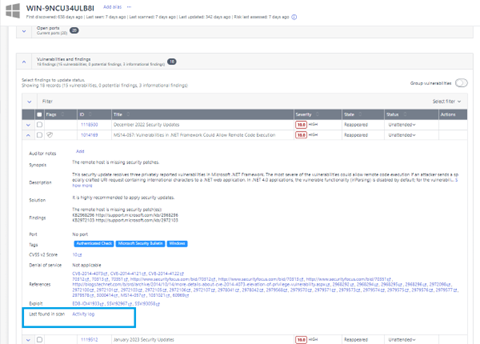
Added a direct link from a single vulnerability instance in the asset details view to the Activity log tab.
With this connection, we have made it easier for admin to realize from which scan the individual vulnerability is originating. It is especially important in case when vulnerability list is developed from various sources, including network and agent-based scans.
AlmaLinux joined the list of Linux distributions supported by Elements VM Authenticated Scan
By popular request, we have now added support for AlmaLinux to the platforms supported by Authenticated Scan
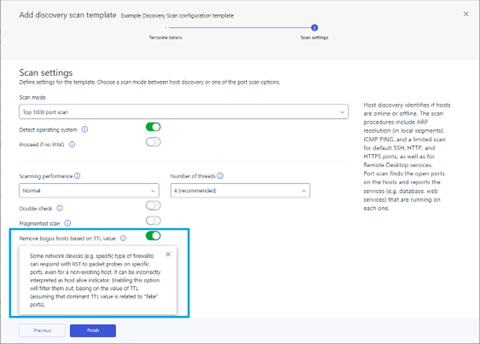
Eliminate bogus hosts in Discovery Scan
The option of ignoring false positives on the Discovery scan configuration user interface has been added. By filtering out false or unreliable hosts based on their TTL (Time to Live) value, it helps to ensure that only accurate and trustworthy information is utilized within the network.
For more information, please refer to Elements VM changelog in WithSecure Community:
Reminder about upcoming change to take CVSSv3 into use
Starting from March 1, 2023 Elements Vulnerability Management will start using CVSS v3.1
Integrations
Changes in Elements and Endpoint Protection API
Companies endpoints are deprecated: Clients should use instead Organizations endpoint from Elements API.
Support for Companies endpoint will end by 31.07.2023
Elements API changes in existing endpoints
Devices endpoint now supports filtering by device serial number. You can find durther information at
Other items of interest
Threat Analysis: No Pineapple!
Our crack team of Threat Analysts have created an in-depth article about a new threat from North Korea’s Lazarus Group, which targets the Medical Research and technology sectors.
As the analysis progressed, our teams created detections for both our EPP and EDR solutions, helping to protect our customers.
You can read more about this on our Labs website
December 2022 – Threat Highlights Report
Monthly highlights:
Ransomware: Trends and notable reports
- RansomBOGGS
- Ikea struck by Vice Society
- Guatemala hit by Onyx
- Trigona launch leak site
- Rackspace attack causes widespread issues
Other notable highlights in brief
- Twitter data breach exposed 5-400 million phone numbers
- Citrix and Fortinet patch actively exploited vulnerabilities
- Dolphin backdoor used by APT37
- InTheBox, a web-inject marketplace
- Infraguard breach
Research highlights
- CISA’s known exploited vulnerabilities catalog
You can download the full report here: Download Report
January 2023 – Threat Highlights Report
Monthly highlights:
- GoTo (LogMeIn) breach
- The rise of Emotet (again)
- SEO poisoning at an all-time high
- Mac malware of 2022
Ransomware: Trends and notable reports
- Royal Mail hit by LockBit… affiliate
- A history of LockBit
- BianLian decryptor and shift to I2P
- Newcomers: CatB
- An interview with Mallox
Other notable highlights in brief
- Nordic common cybersecurity strategy
- Cellebrite & MSAB XRY data leaked
- OWASSRF, a technical write-up
- Breach of Slack
- Poland warns of Russian cyber attacks
- Denmark struck by Russian hacktivist DDoS
- Freejacking
- SugarCRM actively exploited
- Kela report on cybercrime in 2022
You can download the full report here: Download report
WithSecure™ Elements Quarterly Launch
The Elements Quarterly Launch is here again, highlighting the key developments of Q4/2022.
This time we introduce two major Elements evolutions: Microsoft Teams protection in WithSecure™ Elements Collaboration Protection and Server share protection against ransomware in WithSecure™ Elements Endpoint Protection.
Read more on the campaign page:
In case you missed it
Elements Vulnerability Management will soon be updated to use CVSSv3 ratings, instead of the current CVSSv2. You can find out more information about this change, including potential actions you will need to take, at our dedicated Community article
Share your ideas with us
Our purpose is to co-secure the world with you – now as WithSecure™. To co-create the best possible cyber security products and services, we warmly recommend you share your ideas via our Ideas Portal, now accessible directly from WithSecure™ Elements Security Center.

Further information
Changelogs and Release Notes for all parts of WithSecure™ Elements can be found at the Help Center

https://community.withsecure.com/categories/withsecure-elements-vulnerability-management
https://www.withsecure.com/en/solutions/software-and-services/elements/withsecure-elements-quarterly