


What’s New in Elements: July 2023
Elements Security Center
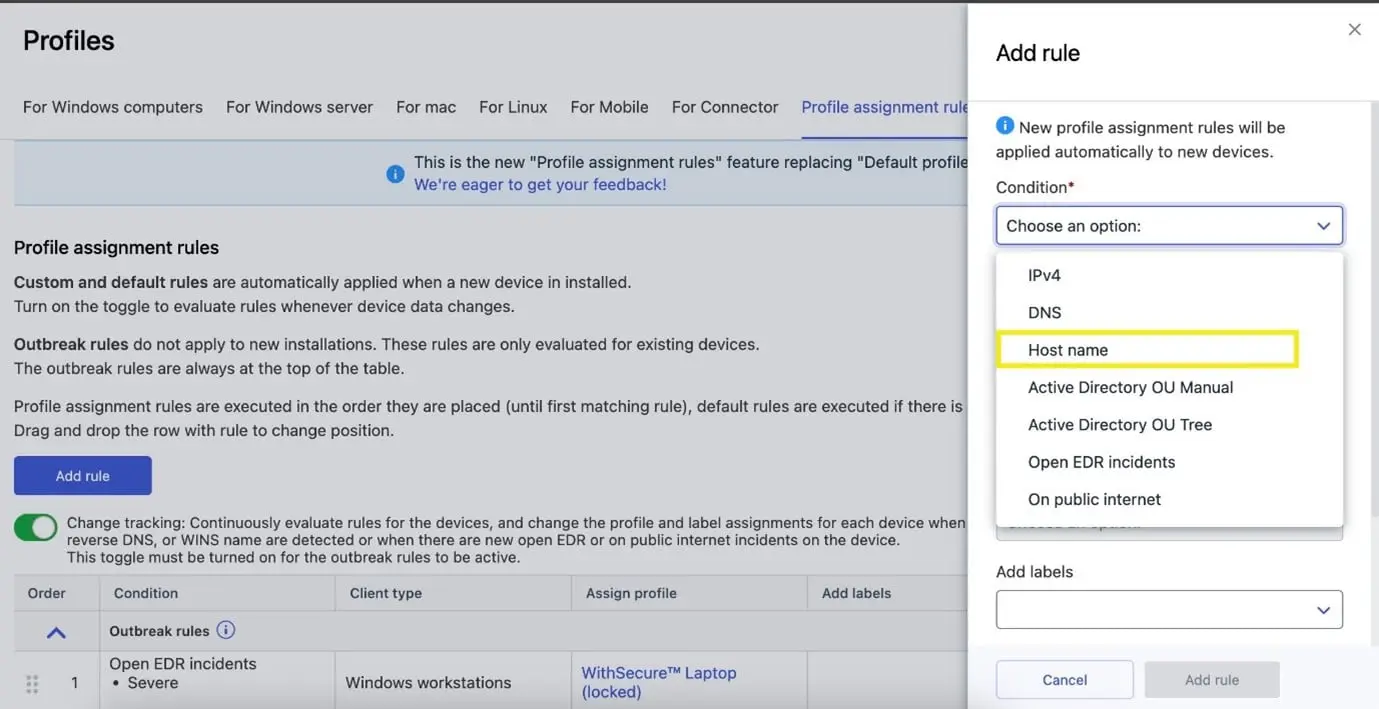
„WINS“ has been renamed to „Host name“ in profile assignment rules
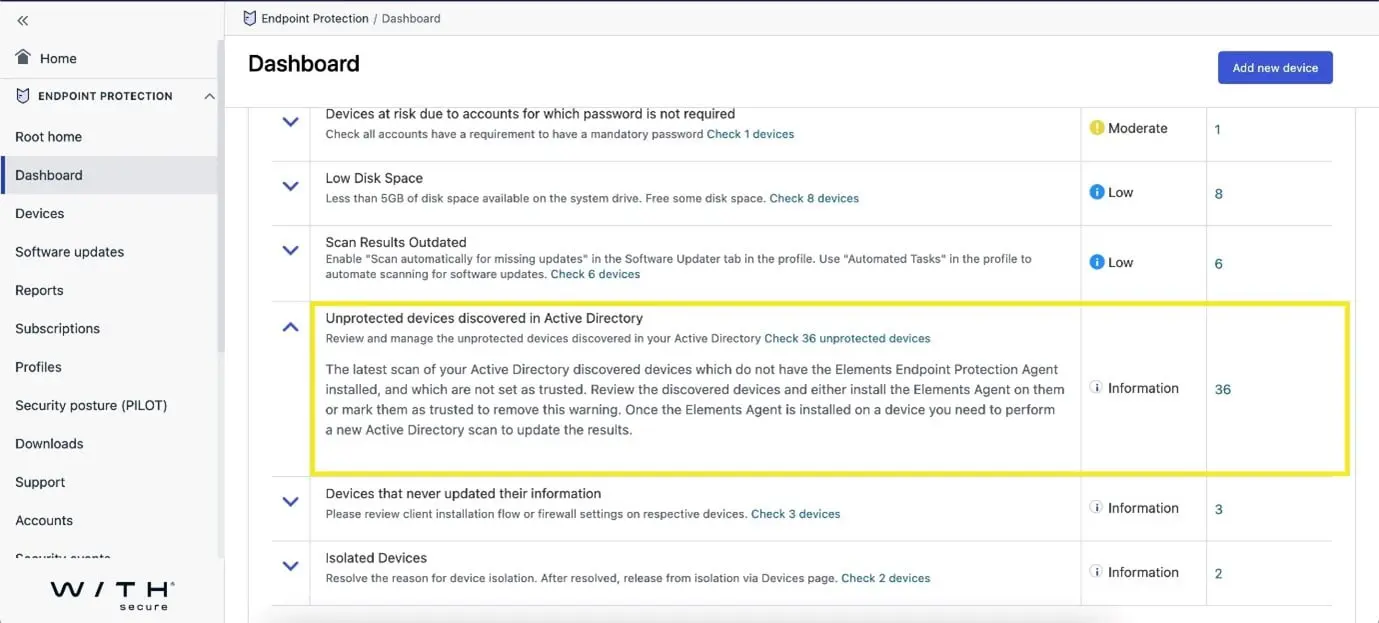
Dashboard- Issue list now shows the number of untrusted devices for a company
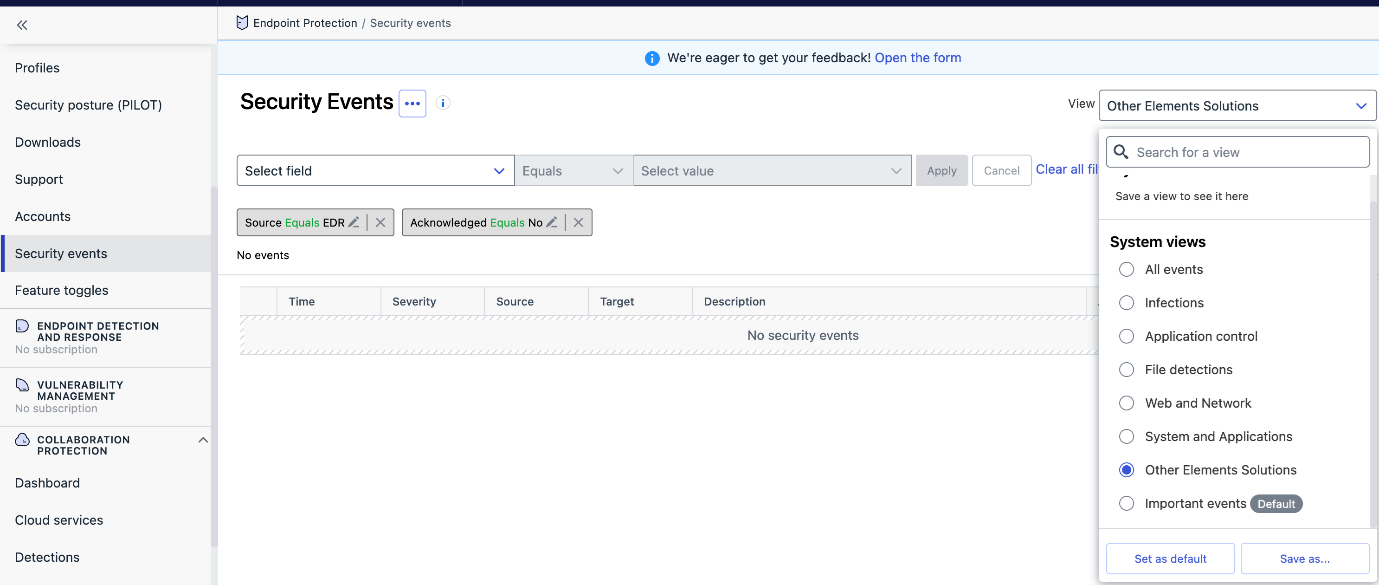
New System Views have been added to Security Events
- File detections
- Web and Network
- System and Applications
- Other Elements Solutions
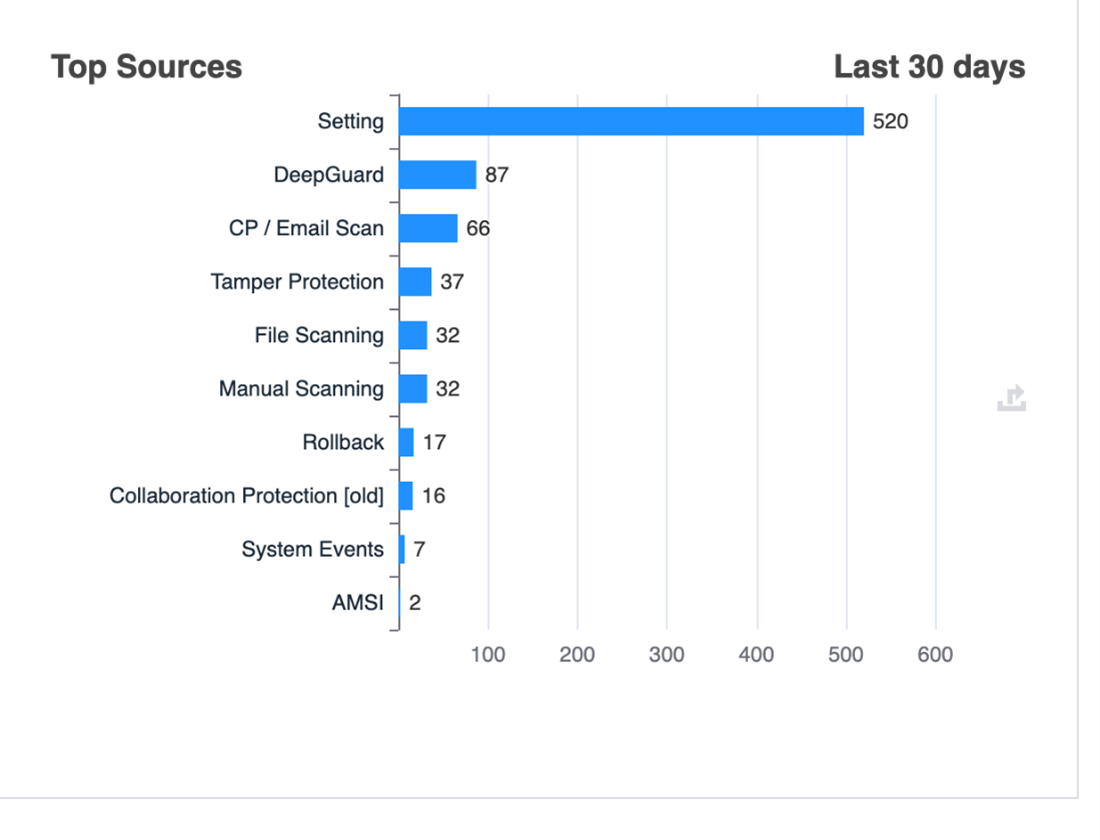
New charts have been added under Security Events tab
We have added some new charts in the Reports section to show the number of events grouped by their source.
In addition, there are charts for:
- Web Content Control – Top Blocked Categories
- Data Guard – Top Blocked Applications
- Device Control – Top Rules Blocking Devices
- Tamper Protection – Top Alert Types
- System Events – Top Event Types
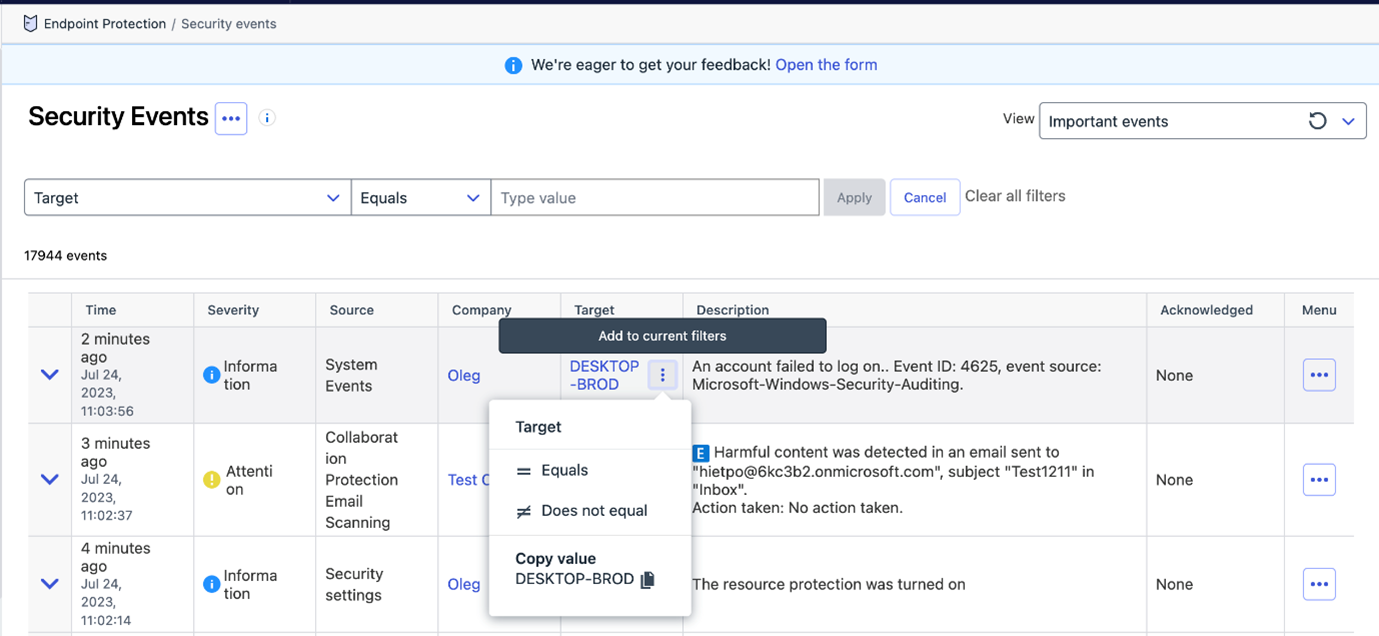
Security Events can be filtered by the Target column (both in Filter Panel and as a Quick Filter)
- filter is effective for events from the 1st of June 2023 onwards
- for older events „Device UUID“ filter should be used as a fallback option.
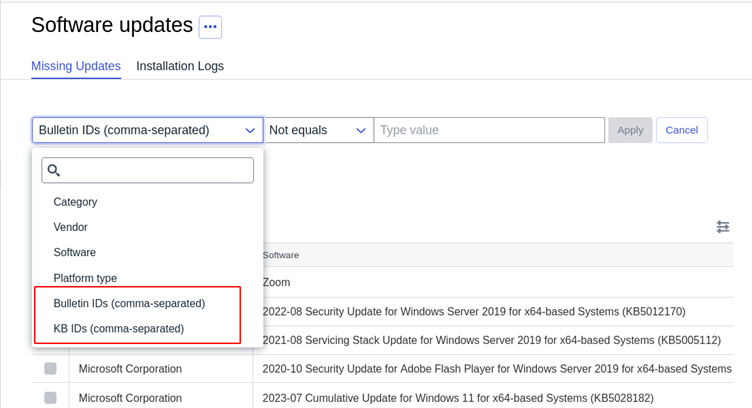
Missing updates are now filterable by Bulletin id and KB id
Security Events acknowledgement Operations are now audited
These acknowledgements are visible under Reports → Audit Log for analysis.
Elements Endpoint Protection
Elements Mobile Protection: iOS version 23.1.10291 released
An update to the WithSecure Elements Mobile Protection app for iOS (23.1.10291) has been released.
This release brings:
- Improved and more efficient error handling during the activation phase
- The app now supports:
- quick actions to turn on/off Network Protection
- per-app VPN via shortcuts automation
The app together with the WithSecure Elements Endpoint Protection portal now support:
- „Request diagnostic file“ remote operations
- the following security parameters:
- Changes in notification permissions
- Jailbroken device detection
- Devices connected to an open WiFi
- The app running on a simulator
- The app being a clone
- Checking for person-in-the-middle vulnerabilities
- Outdated operating system
- The network uses proxy configuration
- Checking for available disk space
Elements Mobile Protection: Android version 23.1.0022525
An update to the WithSecure Elements Mobile Protection app for Android (23.1.0022525) has been released.
This release includes:
- The app is now more reliable when running in the background
The app together with the WithSecure Elements Endpoint Protection portal now show
- if a device is enrolled in an MDM
- The app version format is now compliant with the other WithSecure products
- The assigned profile’s name and version are now visible in the user interface under the About section
- The app now request the user new needed permissions after an update
The app and the WithSecure Elements Endpoint Protection portal now support the following remote operations:
- Request diagnostic file
- Send the device a message
- Start malware scan
- Send full status
And the following security parameters:
- Changes in notification permission
- Changes in location permission
- Changes in file access permission
Additionally the following security events:
- Infection found
Elements Endpoint Detection and Response
Although we have not yet released this change to production, we have announced an upcoming change to the EDR automated actions. You can find more details of this change at a dedicated community article
Elements Collaboration Protection
The onboarding logic for the newly-added mailboxes was revisited to meet users expectations and needs.
Previously, when the “Automatically protect newly-added mailboxes” option was turned on, newly-added mailboxes were automatically protected. If there were not enough licenses, the protection was removed from older mailboxes (following an alphabetical order).
In this release, the newly-added mailboxes are automatically protected only if there are enough available licenses.
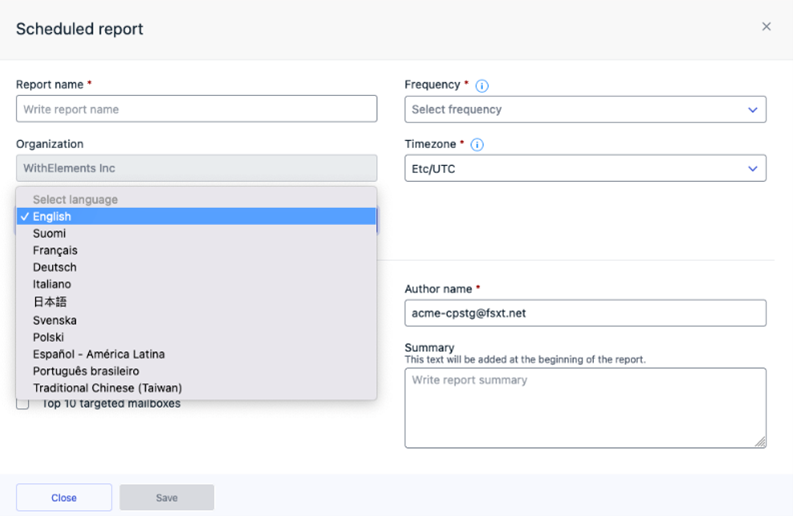
In addition, reports are now available in multiple languages:
English, Finnish, French, German, Italian, Japanese, Swedish, Polish, Spanish, Portuguese and Traditional Chinese (Taiwan).
Administrators could generated report in preferred language, but also edit language settings for already scheduled reports. The language defined in user settings is set as a default for report localization. This feature ensures the convenient report format aligned with the language preferences of target audience.
Elements Vulnerability Management
Elements Vulnerability Management Portal
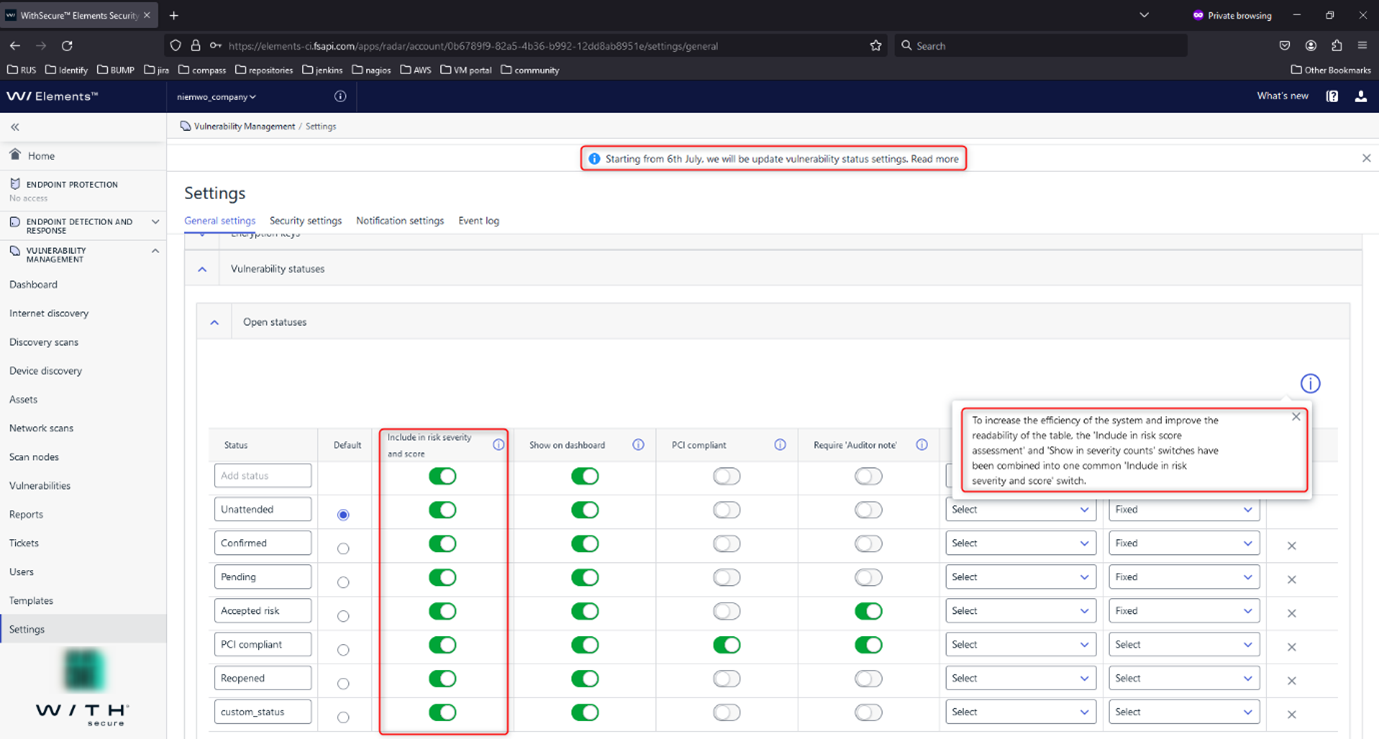
To enhance system efficiency and table readability, we have merged the ‚Include in risk score assessment‘ and ‚Show in severity counts‘ switches into a single, unified switch called ‚Include in risk severity and score‘.
When this switch is disabled for a specific vulnerability status:
- The vulnerabilities with that status will not be considered when evaluating asset risks.
- The vulnerabilities with that status will not be counted in the overall vulnerability counts.
This update aims to streamline the configuration process and provide users with more clarity and control over the risk and severity assessment of vulnerabilities.
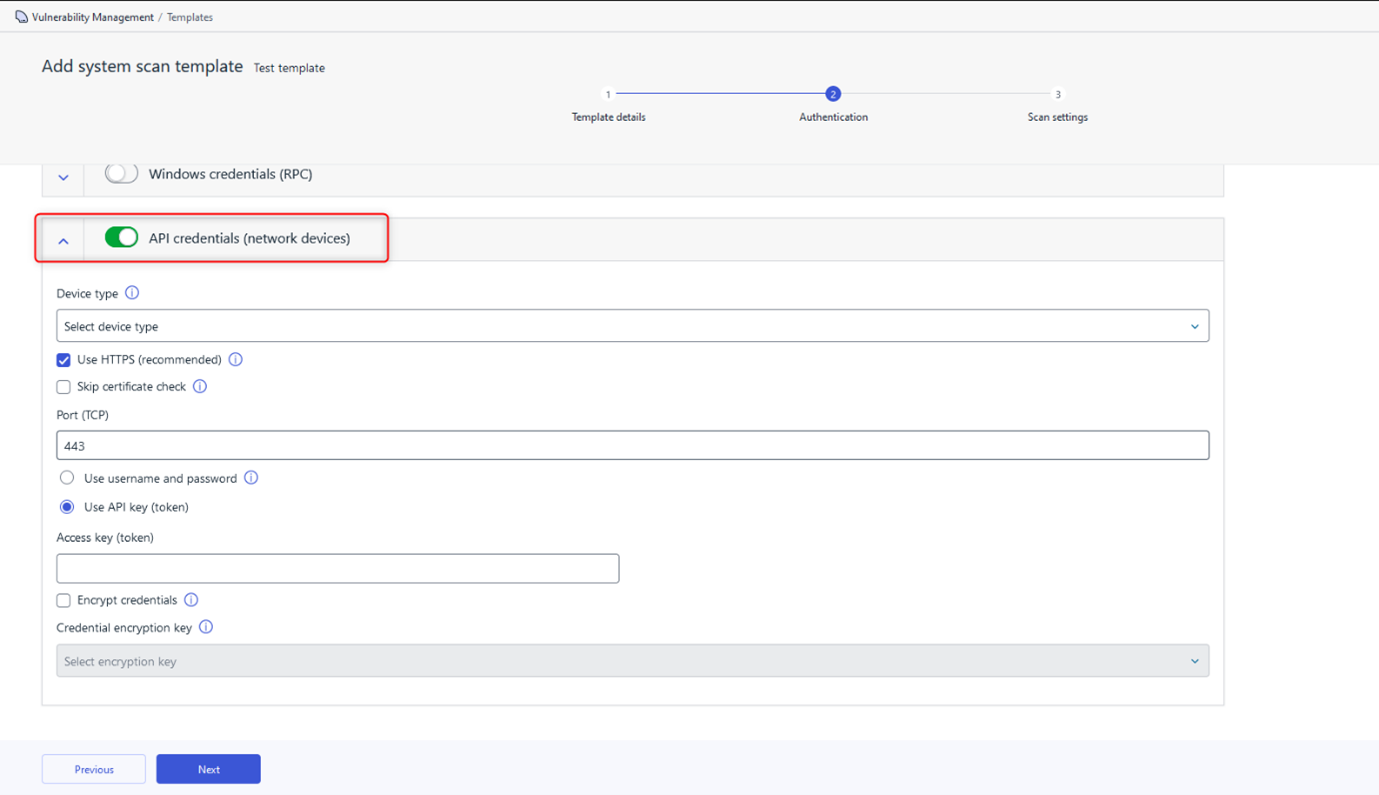
We have also added portal support for authenticated network device scans using API key credentials. Users can now authenticate scans by providing a secret API token to the remote device.
Elements Vulnerability Management System Scan
The following capabilities have been added to authenticated scanning in Windows
- Detect vulnerabilities in Progress MOVEit Transfer
- Detect vulnerabilities in GLPI Agent
- Detect vulnerabilities in Dell Display Manager
- Detect vulnerabilities in Veeam Agent
- Detect vulnerabilities in Bitwarden Desktop
- Detect vulnerabilities in Audacity
- Detect vulnerabilities in Citrix Virtual Apps and Desktops
- Detect vulnerabilities in Nessus Network Monitor
- Detect vulnerabilities in HPE Integrated Smart Update Tools
- Detect vulnerabilities in Atera Agent
- Detect vulnerabilities in NinjaRMM Agent
- Detect vulnerabilities in QNAP QVPN Device Client
Additionally:
- Report vulnerabilities detected for MongoDB software also in authenticated Windows and endpoint agent scan.
Elements Vulnerability Management Linux Scan Node Agent
A new version of the Linux Scan Node Agent has been released, which brings the following changes:
Base64 decoding for credentials used in Api mode scan
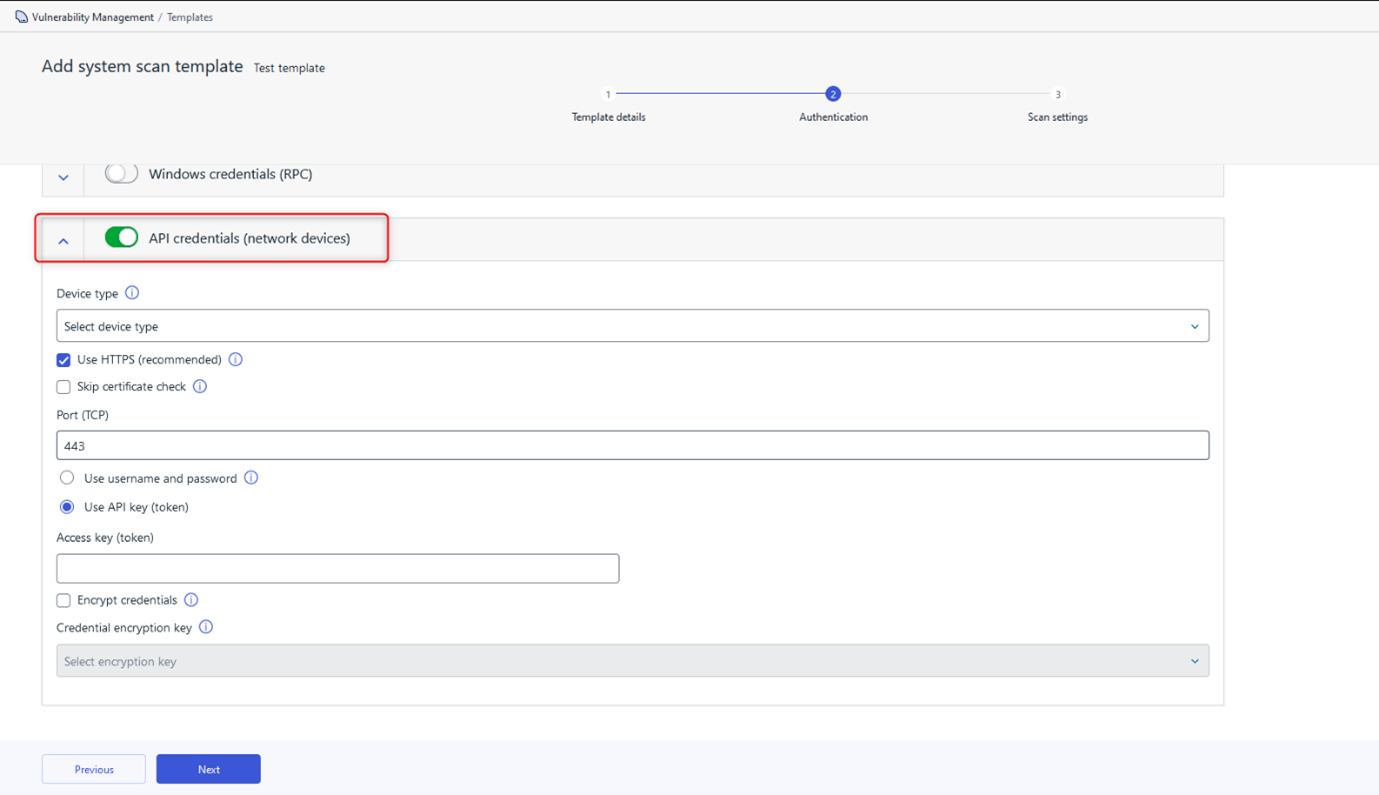
Portal support for authenticated network device scan via API
Integrations
Elements API:
Managing status of EDR incident
A new endpoint for managing the status of EDR incidents is now available. It allows an MSSP to update the status of an EDR incident from their SOC platform (eg SOAR). This is important not only to keep the status up-to-date in the Elements Security Center, but also to automatically whitelist certain incidents when closing as false-positive.
New filters for devices and incidents
Some new filters have been added for Incidents and Devices:
- Incidents: new filter riskLevel has been introduced to the incidents listing endpoint. It may be used to list incidents with higher risk levels.
- Devices: new filter subscriptionKey has been introduced to the devices listing endpoint. It allows the possibility to list only devices from specified subscription key.
Other items of interest
Monthly Threat Highlights Report: June 2023
The mass exploitation of a vulnerability in MOVEit by Clop
The Clop ransomware group has exploited a vulnerability in MOVEit, a secure file transfer software, to gain access to sensitive data belonging to multiple organizations. The attack resulted in the leaking of data belonging to 78 organizations.
The use of „Bring Your Own Vulnerable Driver“ (BYOVD) techniques in terminating AV/EDR
We look into a technique used by threat actors to bypass antivirus (AV) and endpoint detection and response (EDR) systems by exploiting vulnerabilities in third-party drivers. This technique involves the attacker bringing their own vulnerable driver to the system, which can then be exploited to gain access to sensitive data.
Activity relating to the Chinese APT group Volt Typhoon
Chinese Advanced Persistent Threat (APT) group known as Volt Typhoon is known to favor exploiting vulnerabilities in Fortinet products to gain initial access to targeted systems.
The poisoning of mods for popular video game Minecraft
Threat actors have created malicious mods for the popular video game Minecraft. These mods were designed to steal users‘ login credentials and spread malware.
Hacktivism landscape updates
Latest developments in the world of hacktivism, including new groups, tactics, and targets. Hacktivism is a form of cyber activism where individuals or groups use hacking techniques to promote a political or social agenda.
Ransomware trends
We look into the identification of three new ransomware groups and updates on the scale of attacks and statistics relating to the most active groups throughout June.
In case you missed it
Share your ideas with us
Our purpose is to co-secure the world with you – now as WithSecure™. To co-create the best possible cyber security products and services, we warmly recommend you share your ideas via our Ideas Portal, now accessible directly from WithSecure™ Elements Security Center.

Further information
Changelogs and Release Notes for all parts of WithSecure™ Elements can be found at the Help Center