


Changing an Elements Vulnerability Management agent to use an Elements Exposure Management subscription
Existing customers of WithSecure Elements Vulnerability Management (EVM) who migrate to WithSecure Elements Exposure Management (XM), and use the EVM-only client, will need to change it to use a new subscription key.
How to change the subscription
This is really easy to do, simply follow these steps:
Log into the Elements Security Center
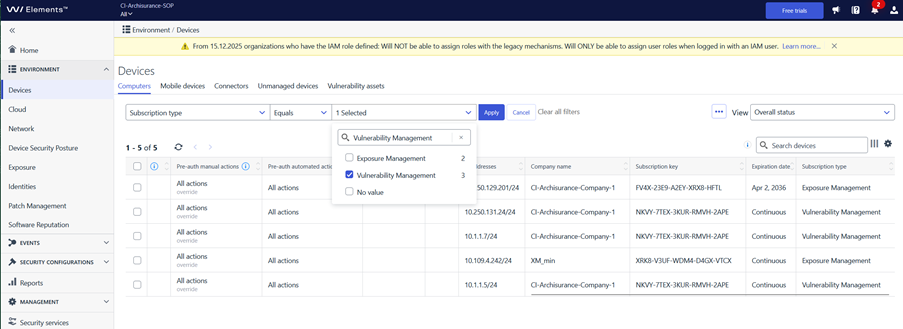
Navigate to Environment / Devices / Computers
Set the filtering to “Subscription type” “Equals” “Vulnerability Management” as shown in this image
Select all devices that match the filtering
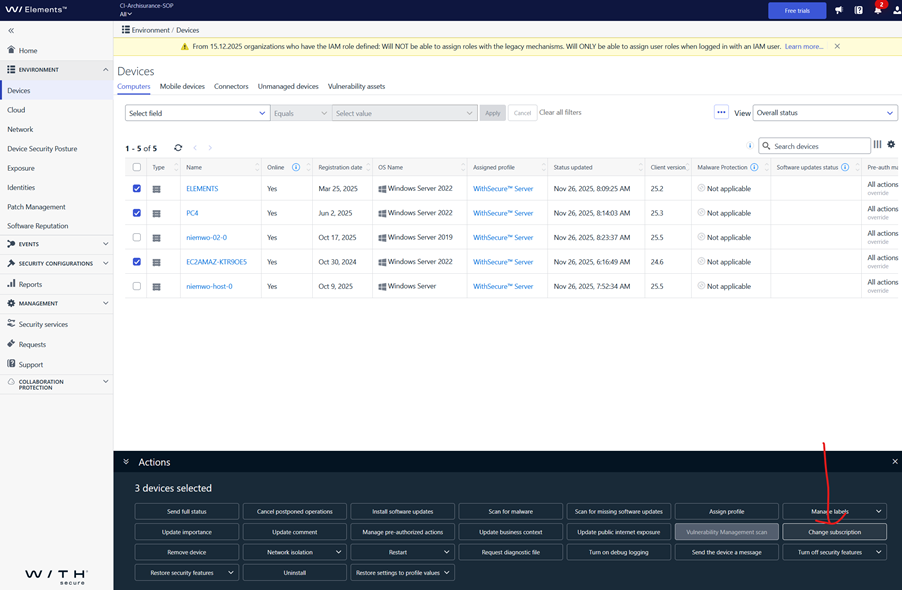
Click “Change Subscription” in the lower pane.
Enter the new subscription key for Exposure Management
That’s all you need to do. The new key will be assigned to all the selected devices.