


Elements Vulnerability Management agent をElements Exposure Management に変更する。
WithSecureElements Vulnerability Management (EVM) をご利用の既存のお客様が、WithSecureElements Exposure Management (XM) に移行し、EVM専用クライアントをご利用の場合、新しいサブスクリプションキーを使用するように変更する必要があります。
購読の変更方法
これは本当に簡単で、以下のステップに従うだけだ:
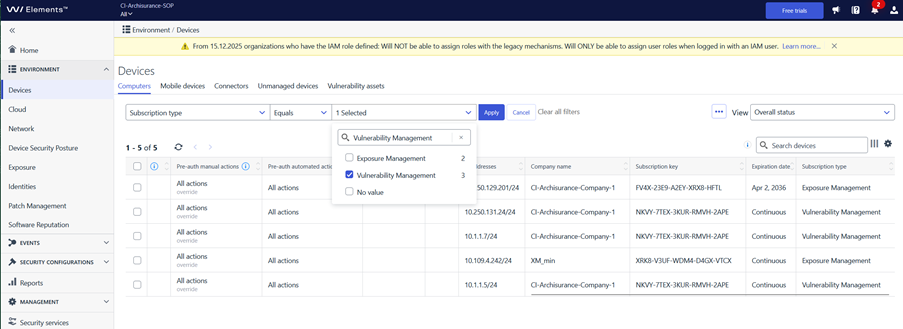
に移動する。 環境 / デバイス / コンピューター
フィルタリングを”サブスクリプション・タイプ“”イコール“”Vulnerability Management「この画像のように
フィルタリングに一致するすべてのデバイスを選択する
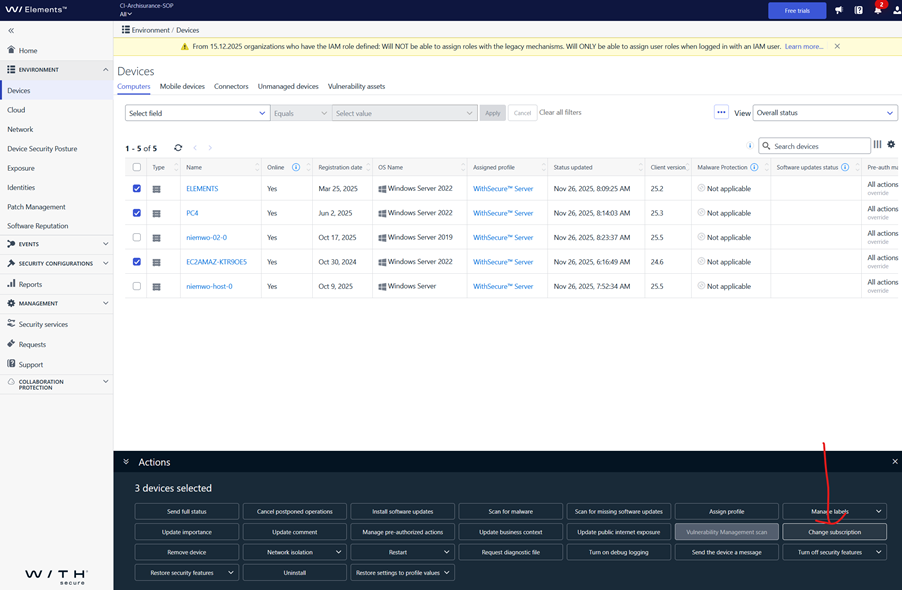
下のペインで “Change Subscription “をクリックします。
の新しいサブスクリプション・キーを入力する。Exposure Management
これだけです。新しいキーは、選択したすべてのデバイスに割り当てられます。
This announcement was machine translated. The English version is the original.