


What’s New in Elements: October 2023
Editor’s Highlights
Elements API support many response actions
We’re excited to announce the launch of additional response actions in our production environment. These include:
- Assigning profiles
- Scanning for malware
- Displaying messages
- Enabling features such as debug logging
- Collecting diagnostic files
These enhancements are crucial for our partners working with SOAR, as they can now build playbooks to automatically trigger specific actions.
For instance, they can assign a restricted profile (instead of isolating) and display a message to inform the user about the reason for the restriction. The playbook could also immediately trigger a scan, set a profile to collect Microsoft event logs as security events, enable debug logging, or collect a diagnostic file. This allows an analyst to have more information at their disposal when they start working on an incident.
Endpoint Protection API is now deprecated
With the support of the “missing software update” feature in the Elements API, the Endpoint Protection API has been fully replaced. We urge you to transition to the Elements API as soon as possible, and ensure that your Elements Connector no longer uses the old Endpoint Protection API.
Elements Security Center
Introducing the Elements News Center
We are pleased to announce the release of Elements News Center, one of the latest features added to our Elements Security Center. This feature will make it easy for you to stay up to date on what is happening in the Security Center, read more about new features you might want to try out, quickly consult the latest changelogs, and be prepared to react to the ever-changing threat landscape.
You can find out much more about the News Center in our dedicated article
Elements Endpoint Protection Portal
Email Reports
Email reports can now be configured to be sent on daily, weekly or monthly intervals. Admins can also select the desired time of the day for when they want to receive the report.
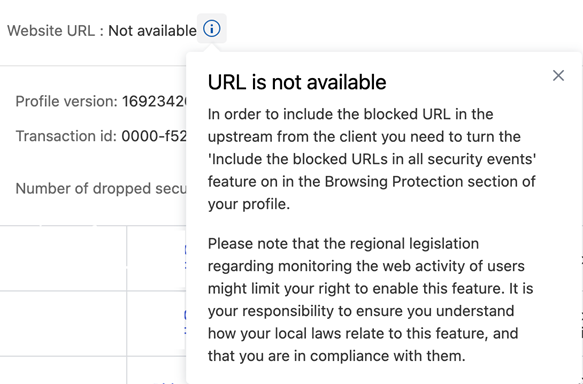
Privacy Note for URL information
We have added an info in the Security Events details explaining why the website URL information is missing from the event together with a guidance on how to enable it in the profile.
Dynamic Risk Score and Outbreak Control
Dynamic risk score can now be used as a trigger for Outbreak control in Profile assignment rules. This allows the administrator to define even more rules to ensure that the endpoint device is more secure when there are active exploits on known threats.
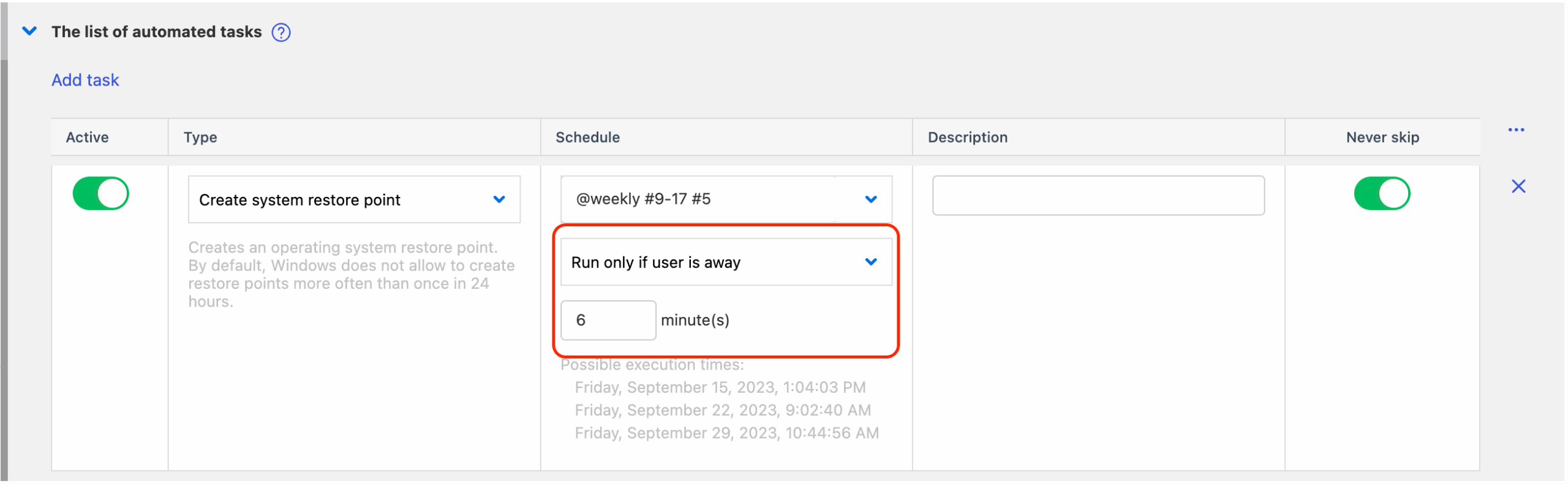
Automated tasks can run when user is away
It is now possible to define automated tasks that can be triggered after the user is “away”
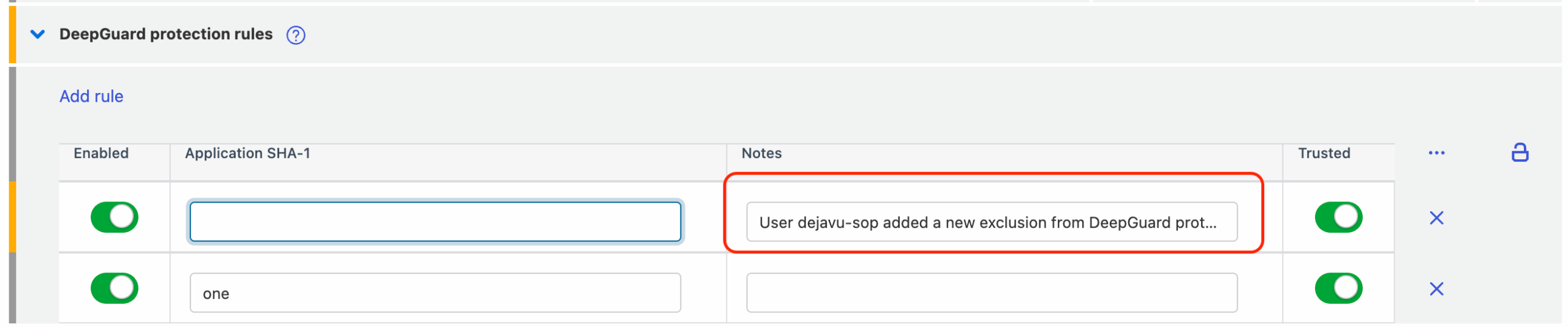
Custom notes for rules and exclusions
It is now possible to add custom notes for new exclusions and rules, so the administrator can make it clearer why it was added.
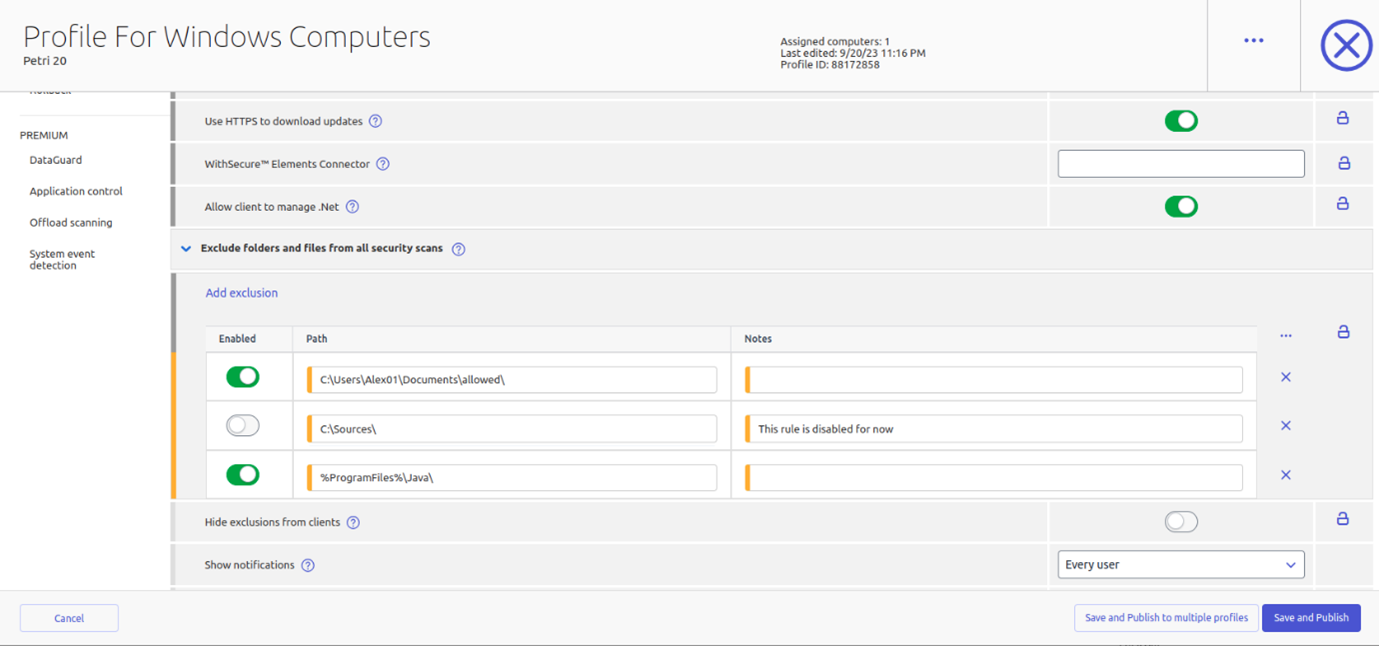
Global exclusions for all security scans
We have now added the possibility to define global exclusions for all scans.
Elements Endpoint Protection
Elements Mobile Protection for Android
An update to the WithSecure Elements Mobile Protection app for Android has been released.
This release includes the following new features and improvements:
- The Notifications view in the app shows all the operations that the administrator requests
- The Notifications view in the app supports filtering
- Subscription status is now moved to the About view
Elements Mobile Protection for IOS
An update to the WithSecure Elements Mobile Protection app for iOS has been released.
This release includes the following new features and improvements:
- The Notification view in the app now shows all operations requested by the admin
- The Notification view in the app now supports filtering functionalities
Elements Agent for Windows workstation and server
A new version of the endpoint clients is available, and the endpoints automatically upgrade, without a reboot.
This release brings the following changes:
Network installer improvements
This update includes new reliability improvements to the network installer; it handles network connectivity problems and error reporting better during the installation process.
Privacy and License Terms location
The Privacy Policy and End-User License Terms links have been changed to point to WithSecure site “download.withsecure.com”, having previously been using f-secure.com.
Diagnostic file renamed
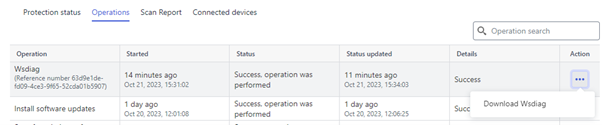
The diagnostic file “fsdiag.zip” has been renamed to “wsdiag.zip”.
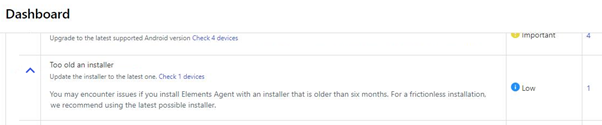
Old Installer warning
The Elements Security Center dashboard now displays a warning if the Elements Agent has been installed with an installer that is older than six months. For a frictionless installation we recommend using the latest possible installer.
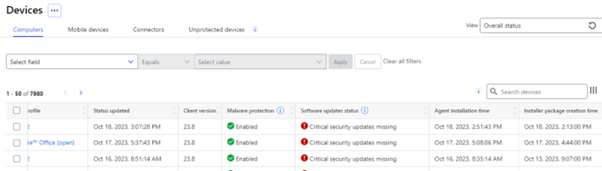
Additional information about Installation in Devices view
We have added extra information related to installation to the Elements Security Center’s Devices view. This includes Elements Agent installation time and Installer package creation time.
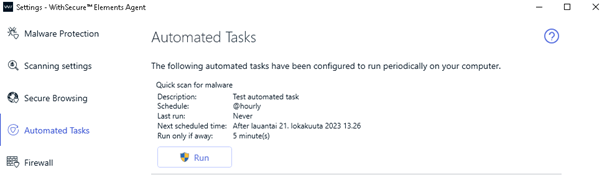
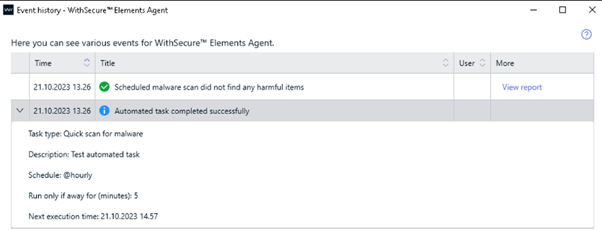
Improvements to Event History and Automated Tasks
The Agent Settings-Automated Tasks view and Event history list have been improved to show the Automated Tasks “away” option. Away option allows to run automated task after user has been away for defined number of minutes.
Elements Collaboration Protection
New detection details view
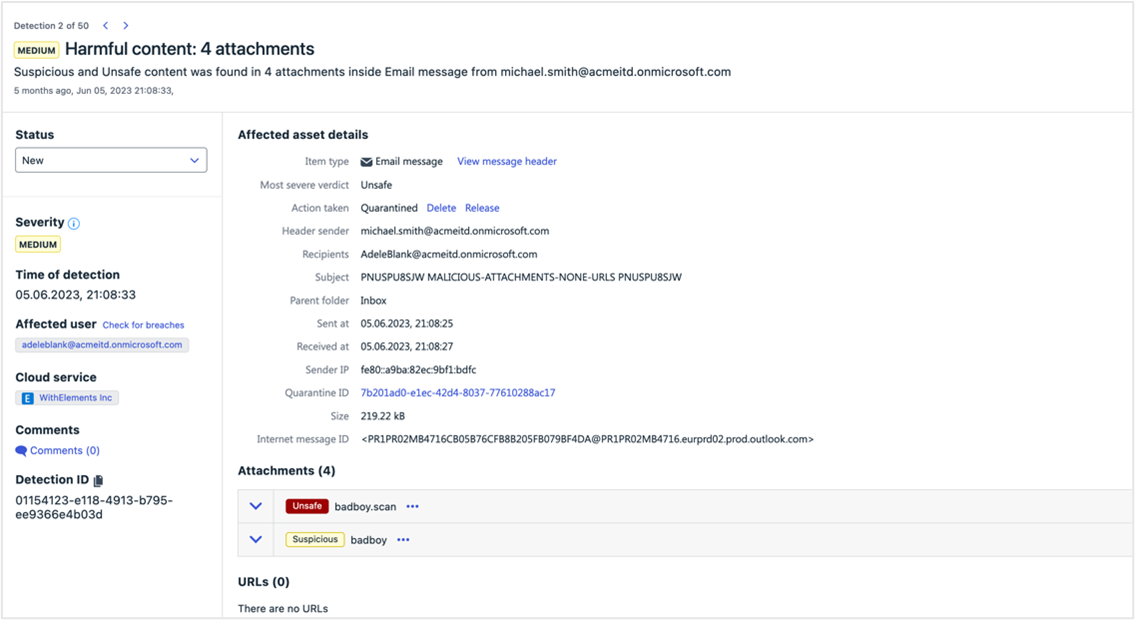
The Detection details view was renewed to serve better the security admins’ needs and support their day-to-day work flow.
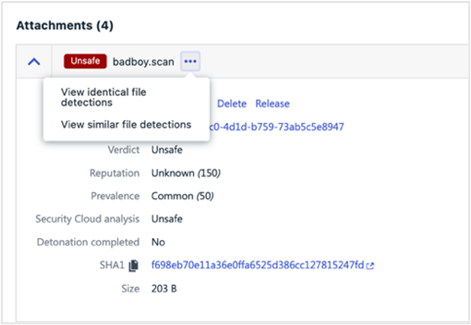
The page got completely redesigned to support the Elements consistency in design and functionality. E.g. now a security admin can navigate between pre-filtered detections with no need to return to Detections view.
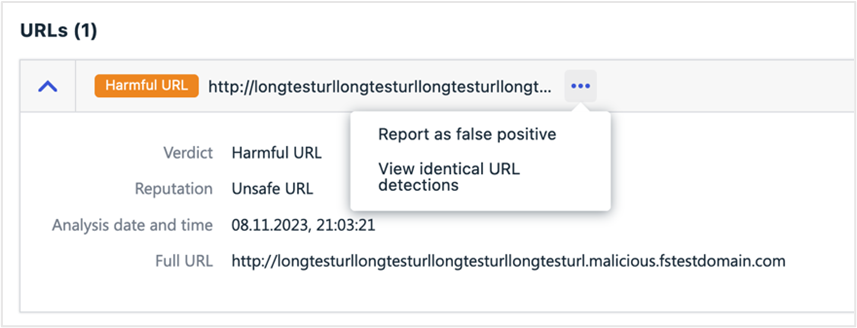
However, the update goes beyond the facelift. The response actions were introduced to that view to illuminate the unnecessary navigation between the Quarantine and Detection detail views. The additional information and cross linking are aiming to support the decision-making process.
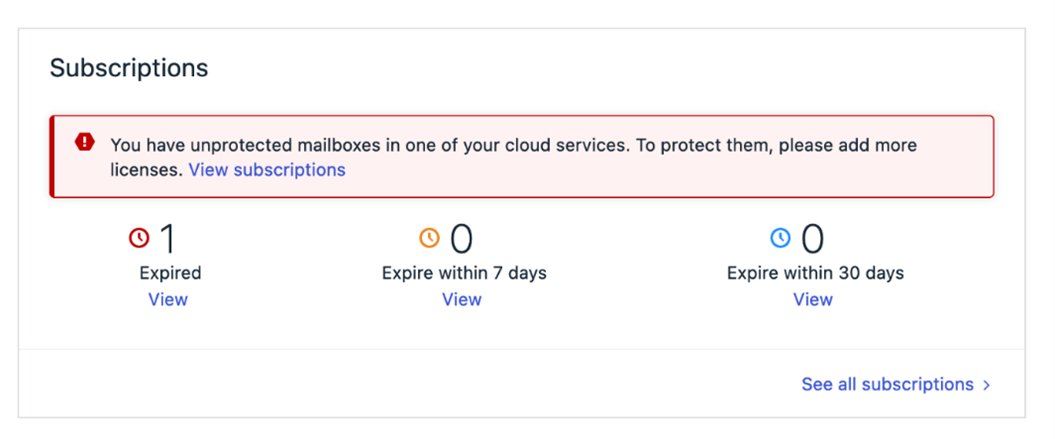
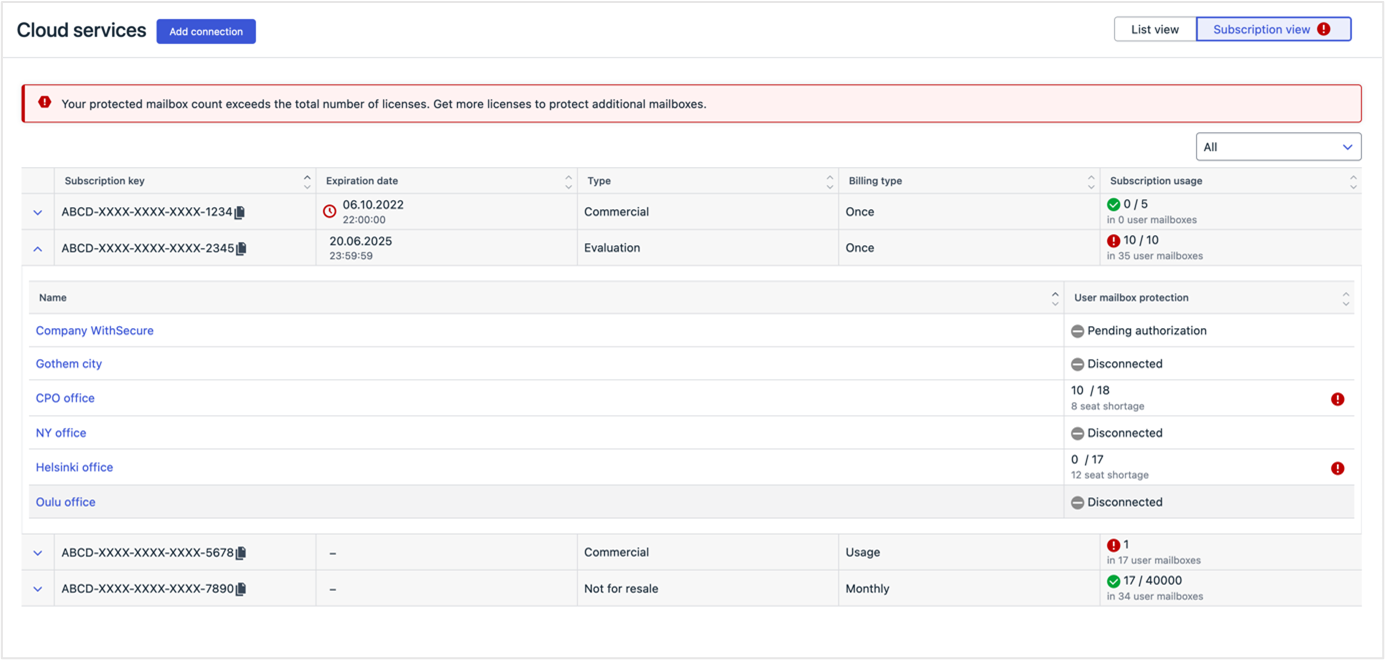
No more unprotected mailboxes due to license outage
There is now a better overview of available licenses, their usage, and outages across cloud services. The redesigned subscriptions view on the Cloud Services page brings transparency to which assets are unprotected due to license outages.
Furthermore, the feature notifies security administrators on Dashboard and Cloud Services pages if the mailbox count exceeds the total number of licenses. This helps to ensure that the organization remains compliant with licensing requirements.
Elements Vulnerability Management
System Scan
The following capabilities have been added to authenticated scanning for Windows:
- Detect vulnerabilities in Vivaldi
- Detect vulnerabilities in JSCAPE MFT
- Detect vulnerabilities in Honeyview
- Detect vulnerabilities in GitHub
Additionally, the detection of the JSCAPE MFT Server product (without version) has been added to remote scanning.
Integrations
Elements API
Elements Collaboration Protection (ECP) Security Events
Security events related to email, Teams, Onedrive, Sharepoint have been added.
Please Note: To access these events, integrations need to change to a new API endpoint “Query EPP, EDR and Collaboration Protection Security Events” that replace the previous “Read list of security events”
Description added to both EDR incidents and detections endpoints
One may read the EDR incident analysis through API and add it to a report or a ticket. Human-friendly descriptions of the detection within an EDR incidents help triaging incidents within a SOAR.
Better filtering of devices
It is now possible to Filter using AD group, Operating System and public IP address
Query missing Softwares Update per device
It is now possible to check which devices have missing patches, and then get the list of missing patch.
With the release of these new functionalities in Elements API, we announced the end of life of the corresponding endpoint in Endpoint Protection API, and consequently Endpoint Protection API is fully deprecated.
Performance improvement in Incidents endpoint
To improve performance, the API caller should include archived=false in the query
Example:
curl -H “Authorization: Bearer $TOKEN” https://api.connect.withsecure.com/incidents/v1/incidents?archived=false
New response actions available
For the device operations endpoint support for the following new operations has been added:
- assign profile
- scan for malware
- show message
- turn on feature: debug logging
- collect diagnostic file
Other items of interest
Monthly Threat Highlights Report: September 2023
QakBot and DarkGate
QakBot is a banking Trojan that has been active since 2007. In recent years, it has been used to distribute ransomware and other malware. DarkGate is a new malware family that has been observed filling the void left by QakBot.
TeamsPhisher and Storm-0324
TeamsPhisher is a phishing tool that is designed to target Microsoft Teams users. Storm-0324 is a threat actor that has been observed using TeamsPhisher to distribute malware.
Malicious takeover of subdomains
This refers to a technique where threat actors take control of a subdomain belonging to a legitimate website and use it to host malware or launch phishing attacks.
Mis-scoring of a vulnerability in Juniper firewalls and switches
Refers to a vulnerability in Juniper firewalls and switches that was initially scored as low severity, but was later found to be more serious. The vulnerability could allow an attacker to bypass authentication and gain access to sensitive information.
Hacktivist attacks in Canada and Europe
Hacktivism refers to the use of hacking and other forms of digital activism to promote a political or social cause. The report highlights recent hacktivist attacks in Canada and Europe, including attacks on government websites and critical infrastructure.
Ransomware trends
Ransomware is a type of malware that encrypts a victim’s files and demands payment in exchange for the decryption key. The report provides statistics and trends on ransomware attacks, as well as highlighting several new ransomware families.
High-profile vulnerability and exploit issues
The report highlights several vulnerabilities and exploits that could be used by attackers to gain access to sensitive information or disrupt critical infrastructure. These include CVE-2018-0802, CVE-2018-8653, CVE-2018-0798, CVE-2023-23397, CVE-2017-0199, CVE-2017-11882, CVE-2010-0033, CVE-2023-28274, CVE-2010-4452, and CVE-2023-21716.
Monthly Threat Highlights Report: October 2023
Phishing campaign impacting Finland
Phishing campaign that is targeting Finnish organizations. The attackers are using a variety of tactics to trick users into giving up their login credentials, including sending fake emails that appear to be from legitimate sources.
Infostealer market
Current state of the infostealer market, which is a type of malware that is designed to steal sensitive information from infected systems. The report notes that the market is currently dominated by a few key players, and that the malware is often sold on underground forums.
Fallout following the compromise of Okta
Overview of the fallout following the compromise of Okta, a company that provides identity and access management services to many other third parties. The report notes that the attackers were able to access customer accounts at 1Password, Beyond Trust, and Cloudflare by abusing credentials, cookies, and session tokens contained within HAR files.
HTTP/2 rapid reset DDoS technique
A new DDoS technique that is designed to exploit a vulnerability in the HTTP/2 protocol. The technique involves sending a series of specially crafted requests that cause the server to reset the connection, which can result in a denial of service.
Hacktivist landscape
Current state of the hacktivist landscape, which has been further shaped by ongoing conflict in Israel. The report notes that hacktivist groups are increasingly using social media to spread their message and coordinate their activities.
Ransomware landscape
Statistics on known ransomware attacks, including the number of attacks and the amount of ransom demanded. The report notes that ransomware attacks continue to be a major threat to organizations of all sizes
Darkgate malware
The report includes a reference to a wider piece of research on the Darkgate malware, which is a financially motivated cybercrime actor that is using multiple malware families to target digital marketing professionals.
In case you missed it
Support for macOS 14 “Sonoma”
You can find out more about our current support for macOS 14 at our dedicated article
Network addresses for WithSecure Elements
For most customers, WithSecure Elements will work out of the box. However, some administrators tightly control the addresses that are reachable from their networks, and for them we have made a comprehensive list of all the servers our clients connect to.
Share your ideas with us
Our purpose is to co-secure the world with you – now as WithSecure™. To co-create the best possible cyber security products and services, we warmly recommend you share your ideas via our Ideas Portal, now accessible directly from WithSecure™ Elements Security Center.
Further information
Changelogs and Release Notes for all parts of WithSecure™ Elements can be found at the Help Center