


What’s New in Elements: November 2024
Editor’s Highlights
Extended Detection and Response
Endpoint Protection
Elements Agent for Windows: version 24.6
A new version of the endpoint clients is available.
This release makes the Elements Agent version 24.6 available (internal version 24.6.339).
The endpoints automatically upgrade, without a reboot.
Features:
Elements Agent now supports migration from Countercept. Activating a subscription containing the EDR component uninstalls the Countercept Agent.
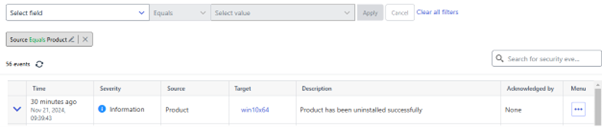
A new security event is sent when Elements Agent is uninstalled
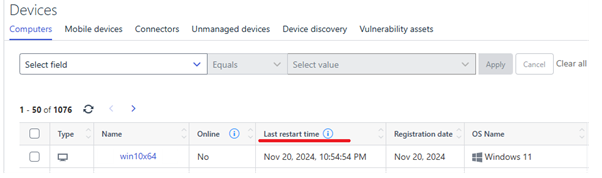
A new “Last restart time” status is sent to the portal
In addition:
- Elements Agent supports configuring APIPA (automatic private internet protocol addressing) addresses in Network location settings / Locations and rules.
- Elements Agent now supports Windows Server 2025.
Elements Agent for macOS: Release version 24.5.53798
A new version of the Elements Agent for macOS has been released
This release brings an EDR-only product variant
The Installer can be downloaded from here.
Elements Agent macOS 24.5.53798 supports following macOS versions:
- macOS 15 Sequoia
- macOS 14 Sonoma
- macOS 13 Ventura
Elements Mobile Protection: New release for iOS (24.8.11250)
An update to the WithSecure Elements Mobile Protection app for iOS (24.8.11250) has been released.
It includes the following new features and improvements:
- Allows users to block any processed URLs locally.
- Supports the “Block everything except allow list” setting.
- Supports extended filtering for alert notifications related to blocked URLs.
Endpoint Detection and Response
EDR: Filtering enhancement
With our new filtering enhancement, you can easily drill down and browse events from the agent. This allows you to use EventSearch to investigate the events and ignore events that are not useful to your investigation. This improvement is designed to make your experience with the portal smoother. Happy searching!
We have following improvements released to the Event Search view:
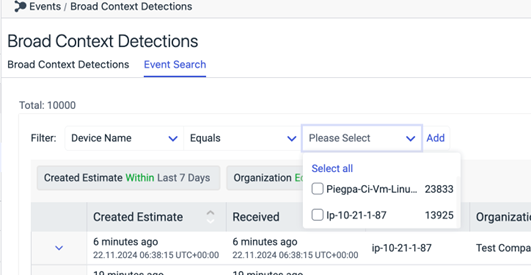
Pre-populated filters
When applying filters, the user can see the value dropdown being populated with all the unique values.
There are max 500 values that will be displayed in the dropdown. If admin cannot find the value in the list, they need to narrow down their search by applying appropriate filters.
Some of the fields will also have the option to select ‘Does Not Equals’ operator to search based in exclusions.
While applying filters, the admin can now select multiple values from dropdown. This applies to both the ‘Equals’ and ’Not Equals’ operators
EDR: Trigger response actions now available from with the BCD
In order to enable faster investigation and enhance the user experience for Endpoint BCDs, the Elements admin user can now trigger response actions from with the BCD details, so that they do not need to switch between the BCD view and the Response view while doing the investigation of a BCD.
How to submit a response action:
The admin can navigate to the Endpoint BCD in the Elements portal
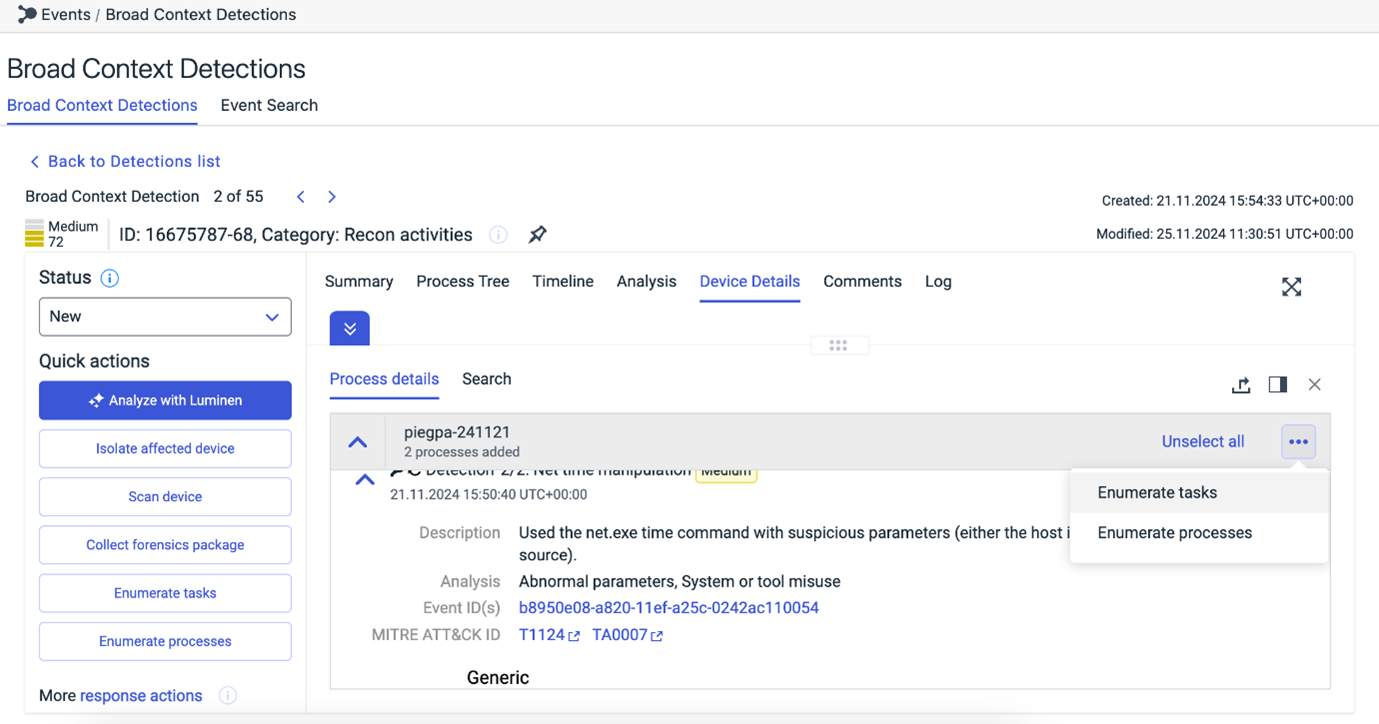
In the BCD details -> Quick actions, admin can see the list of response actions that can be triggered for the BCD. Currently, the user can trigger following response actions:
Enumerate tasks
Enumerate processes
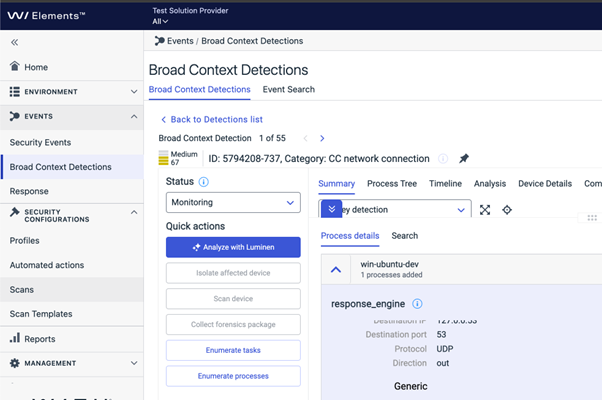
The admin also has the option to perform these response actions from the Process details
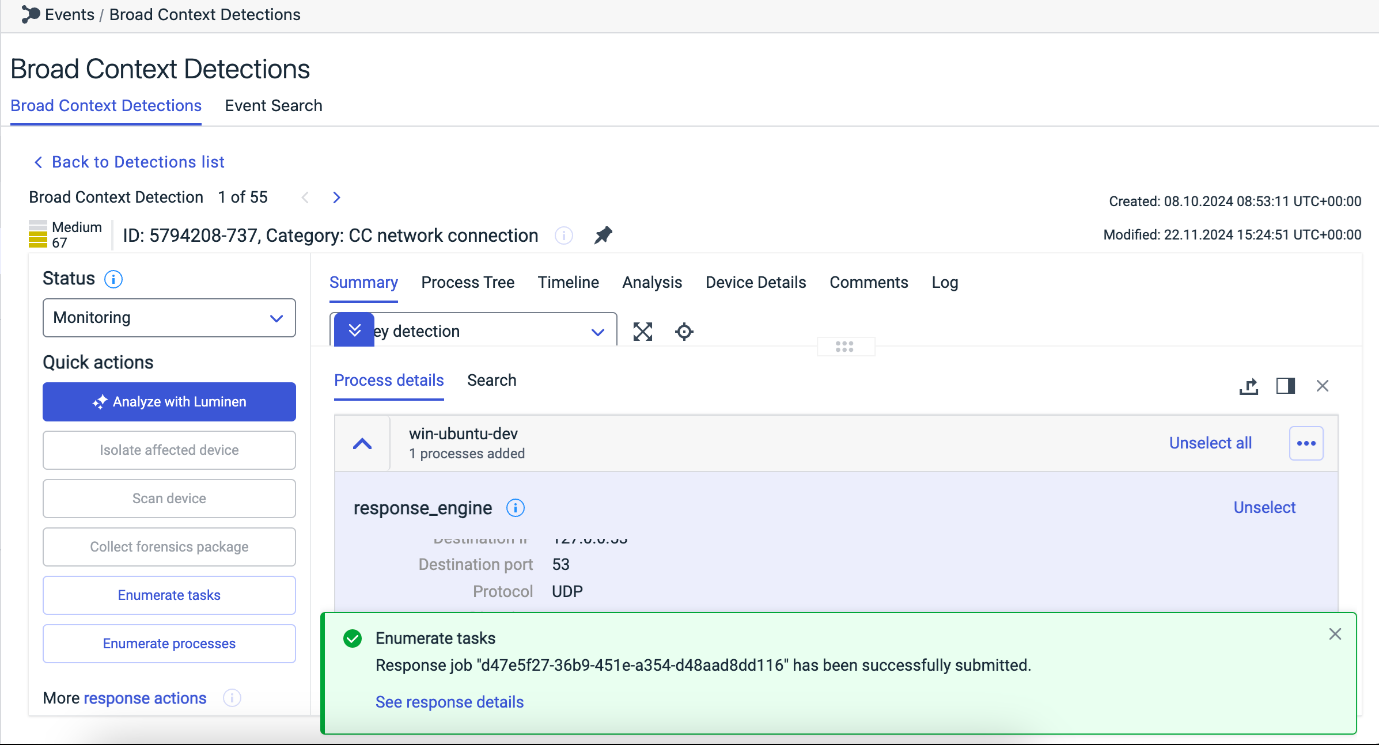
Once the admin triggers a response job, a pop message will be displayed and they can see if the response job was successfully submitted along with the link to the response details
On clicking the “See response details”, admin can view the details of the response job being submitted
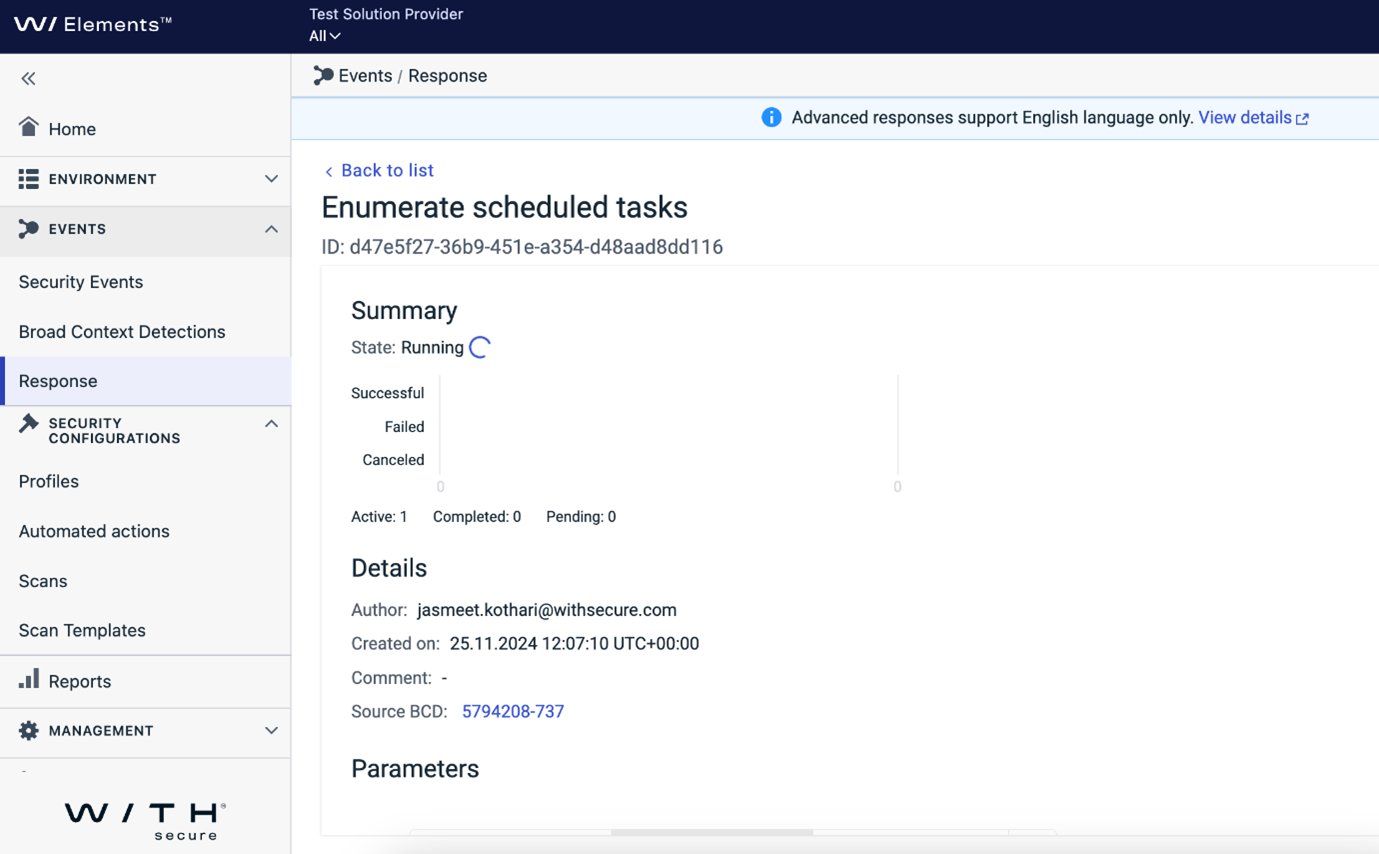
The admin can navigate back to the BCD by clicking the “Source BCD” link.
The admin can also view all the responses in the Response view. To see only the Endpoint responses, filter the data by Action Type = ‘Endpoint’.
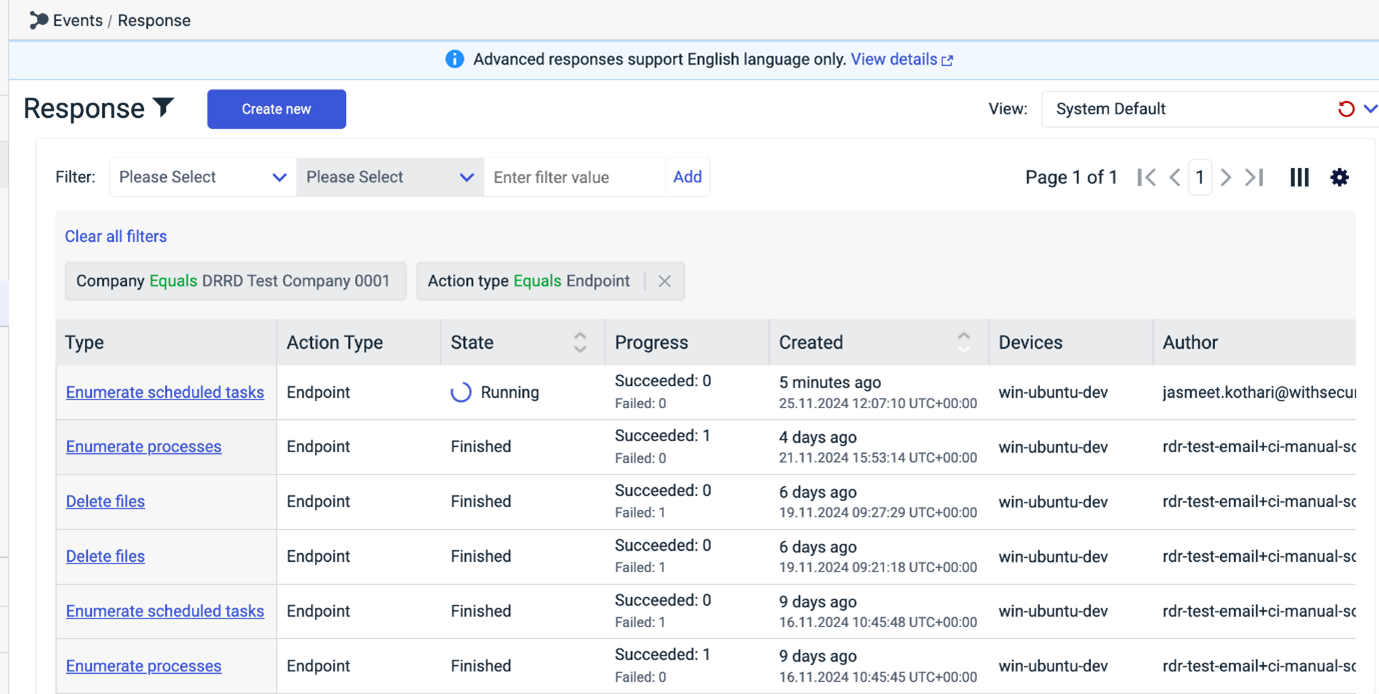
Identity Security
Updates to Sign-in Detection Model
- Enhanced Location Context: We’ve improved our model to better recognize regular locations, reducing false alerts for impossible travel on a user-by-user basis.
- VPN Awareness: Our model now has enhanced detection for both personal and corporate VPNs. This improvement helps reduce false positives caused by VPN usage, which can make it appear as though you are signing in from a new location when, in fact, you are not. By recognizing VPN patterns, the model can more accurately determine your true location and reduce unnecessary alerts
Reducing Noise in Risk Sign-in Reports (for customers with Microsoft P2 license)
- Fewer Unactionable Alerts: We’ve removed alerts with too many anomalies that don’t require action, making it easier to focus on important issues.
- Suppressing Common Anomalies: We’re now suppressing frequent anomalies from known sources to reduce unnecessary noise.
Exposure Management
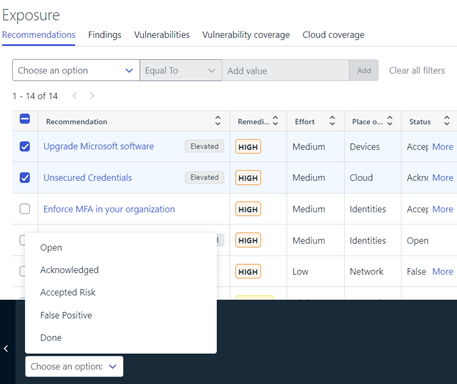
Status of multiple Recommendations can be now set from Recommendation List page
Multiple Recommendation selection will activate the action panel. The status will be saved to the recommendations for further tracking. e.g The status appearing on Home → Exposure widget will show only active recommendations (active recommendation = status not “Done” or “False Positive”)
“Findings in this recommendation” widget changes
This widget on the Recommendation detail page has a new “last seen” column showing the time stamp when last time this finding has been seen. This column gives clearer idea about how fresh the scan results are.
Improved remediation impact score precision
This will help with more accurate distinguishment of recommendations and more enhanced prioritization of them when their remediation impact scores are close to each other.
Identity audit log changes
When user modifies Identity properties such as importance and business context, are now available in Elements Audit Logs. In addition, when user does actions such as elevating a recommendation to WithSecure, these are also included.
Extended logic for checking identity’s MFA status
Correct MFA status is now shown on the Identity with traffic light colors depending on reported MFA status in O365, Portal and elsewhere by Microsoft.
New “Coverage” widget on Home → Exposure Widget
This new widget shows the Exposure Management coverage of a selected company from different angles.

Green Color in each area indicates whether the company has completed WithSecure Exposure Management onboarding successfully and scans are running perfectly on that area.
Orange Color: Indicates that the company has the proper licenses to get onboarded to the Exposure management, but not all configuration or onboarding is complete. in this case, by clicking on the area, user will be taken to a relevant view where the configuration or onboarding can be completed.
Gray Color: Indicates that the company does not have required licenses to get onboarded on the area. In this case, please reach out to the sales staff for more info on how to obtain the relevant license.
Vulnerability Management
EVM: System Scan
The ability to detect vulnerabilities in the following products was added to Authenticated Scanning for Windows:
- Acronis Cyber Files
- Autodesk Revit
- BandiView
- HP Hotkey Support
- Intel oneAPI Base Toolkit
- iTunes for Windows
- NetApp 7-Mode Transition Tool
- Okta Verify for Windows
- Solarwinds Kiwi CatTools
- Splashtop Personal and Business
- Splashtop Software Updater
- Synology Active Backup for Business Agent
- Synology Assistant
- Synology Cloud Station Drive
- Synology Drive Client
- Vagrant VMware Utility
Other items of interest
Threat Highlight Reports: November
Threat Advisory: Citrix Virtual Apps & Desktops (CVE-2024-8068 / CVE-2024-8069)
Citrix released a security advisory on November 12th 2024 regarding a vulnerability affecting their product “Virtual Apps & Desktops”.
The “Citrix session recording” feature of the product has a vulnerable implementation of the networking messaging ability (MSMQ HTTP messaging) used to connect the virtual desktop and Citrix session recording server.
Exploiting the vulnerability allows for privilege escalation to a SYSTEM-level user (as well as impersonating existing users).
Citrix advisory notes that the vulnerability requires certain conditions to be met (namely an authenticated user on the same active directory domain). However, the researchers who disclosed the vulnerability noted that having a session recording server reachable via the internet might allow for successful remote exploitation of the vulnerability.
A proof of concept was released on the same date as the advisory and soon afterwards attempts to exploit the vulnerability have been observed online.
Threat Advisory: Command & Scripting Interpreter
In October 2024 Splunk compiled multiple recent security reports. From this compilation, a technique stands out: Command and Scripting Interpreter (T1059)
This technique leverages the fact that most Operating Systems come with some built-in command-line interface and scripting capabilities.
Adversaries can abuse these technologies in various ways as a mean of executing arbitrary commands.
You can sign up to receive the monthly Threat Reports, with full details of these threats.
Further information
Changelogs and Release Notes for all parts of WithSecure™ Elements can be found at the Help Center.