
-
Agent for Mac – 2026-03-17 Update
Read more
WithSecure Elements Agent macOS 26.1.55351 has been released to General Availability on 17th of March 2026.
This release brings
- Performance improvements in wsagent
- New response version with python 3.12
- Client side support for software inventory feature (available later in 2026)
Bug fixes
- “Allow” button in Browsing Protection is not clickable
Installer can be downloaded from
https://download.withsecure.com/PSB/latest/ElementsAgentInstaller_55351.mpkg
Elements Agent macOS 26.1.55351 supports following macOS versions:
- macOS 26 Tahoe
- macOS 15 Sequoia
- macOS 14 Sonoma
-
Linux Agent LS64 – 2026-03-16 Update
Read more
FSBG update version 1.0.930 has been released. FSBG is a component of Linux Security 64. This release includes the following changes:
- Improved on-access scanning behavior under high system load. Previously, bursts of rapid file access could overwhelm the scanning subsystem and lead to file access failures. The updated behavior applies controlled backpressure—intentionally slowing certain filesystem operations when overload is detected—to prevent scanning saturation and maintain reliable file access.
- Reduced the rate at which available-memory telemetry is reported to the backend. The previous reporting cadence generated unnecessary traffic with limited operational benefit.
- The scanning service now runs under a non-privileged user account and incorporates additional hardening and sandboxing measures to further improve security.
- On-access scanning now skips the special
tracefsfilesystem, which has never been compatible with scanning. - Update log entries now consistently use UTC timestamps.
-
Agent for Mobile – 2026-02-25 Update
Read more
An update to the WithSecure Elements Mobile Protection app for Android (26.2.0023541) has been completed 25 February 2026. It will be released as a phased rollout over the next seven days.
Fixed issues:
- Fixed an issue where browser traffic was not captured on ChromeOS devices
- Fixed an issue where the last status update was showing an incorrect date
- Fixed an issue where all browser traffic was blocked in Mozilla Firefox
-
Agent for Mac – 2026-02-23 Update
Read more
WithSecure Elements Agent macOS 26.1.55351 has been released to our early access customers on 23rd of February 2026. As usual, full availability will start 1-2 weeks later.
This release brings
- Performance improvements in wsagent
- New response version with python 3.12
- Client side support for software inventory feature (available later in 2026)
Bug fixes
- “Allow” button in Browsing Protection is not clickable
Installer can be downloaded from
https://download.withsecure.com/PSB/latest/ElementsAgentInstaller_55351.mpkg
Elements Agent macOS 26.1.55351 supports following macOS versions:
- macOS 26 Tahoe
- macOS 15 Sequoia
- macOS 14 Sonoma
-
Agent for Mobile – 2026-02-20 Update
Read more
An update to the WithSecure Elements Mobile Protection app for iOS (26.2.12082) has been finalised 12.02.2026. The update will be delivered as a phased rollout over the next seven days and will become available for everyone on 20.02.2026.
Improvements and bug fixes:
- New information alerts:
- Diagnostic file permission request
- Push notifications permission request
- Subscription will expire soon
- Network connectivity issues
- Critical bug fix for early logout on some big screen devices
- iOS 26 glass design disabled for better presentation
- Minor bugfixes and optimisations
- New information alerts:
-
Agent for Windows and Server – 2026-02-17 Update
Read more
A new version of the endpoint clients is available and our Early access program participants will start seeing it starting on 17.02.2026. Full availability will begin within the next week and takes some days to reach all customers.
This release makes the Elements Agent version 26.1 available (internal version 26.1.549).
The endpoints automatically upgrade, without a reboot.
This release introduces new features
- Windows License Status is displayed under Security Parameters in the portal UI.

- SHA256 is now included in more security events.
- DataGuard icon changed to look more lightweight
- DriveProtector/BitLocker minor improvements
- Profile and definitions are downloaded faster if network configuration has changed (earlier network configuration did not affect at all and all checks were according to schedule)
- Allow untrusted browsers setting enables access from non-trusted browsers (requires portal too)
- Report AD guid if set
- Fix for Malware Protection reporting Disabled for healthy hosts
- Increase remote wsdiag size limit to 512 Mb (previously it was just 200Mb)
- Quarantine release tooltips explain file restoration reasons
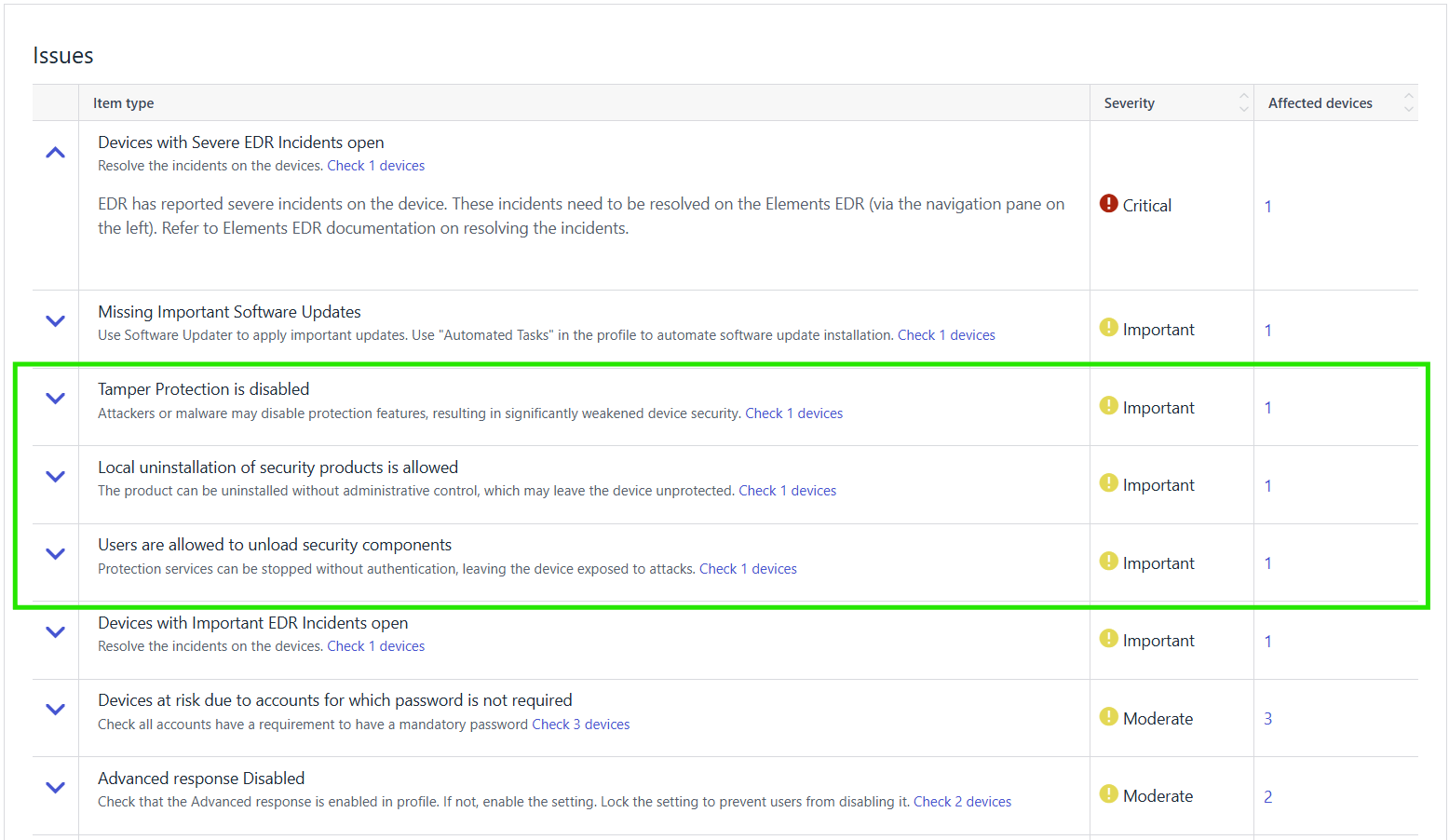
- New host issue detection and reporting for insecure configuration allowing Agent uninstallation (Empty uninstallation password status detection and reporting requires the portal release as well)
-
Endpoint Security (formerly Endpoint Detection & Response) – 2026-01-27 Update
Read more
Dear community,
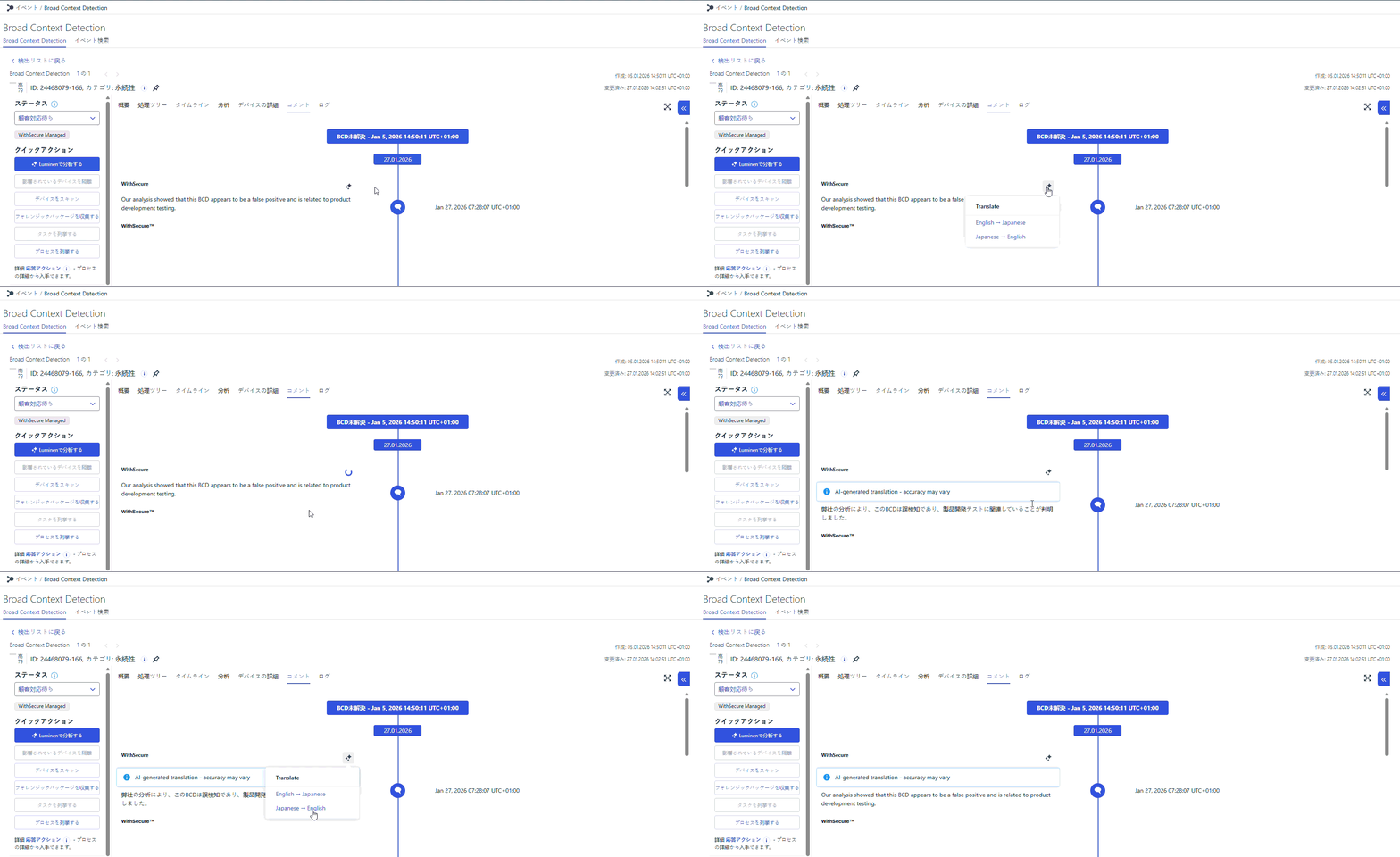
To make it easier for our Japanese MDR customers to work in their native language, we are introducing AI-powered on-demand translation for communication in elevated BCDs in Elements.
Starting from 1 February 2026, customers with an active MDR service and the Elements user interface set to Japanese will be able to exchange messages with analysts in elevated BCDs in Japanese, with translations provided on demand by an approved AI (LLM) service.
What is changing?
- In the BCD details view in Elements, users will see new options to translate comments on demand:
- from English to Japanese, and
- from Japanese to English.
- Japanese-speaking users can write and read BCD comments in their native language, while still being able to request an English version when needed.
- Translations are not automatic in the background – they are triggered explicitly by the user for each comment via dedicated translation buttons.
What does this mean for you?
- If you are an MDR customer using Elements in Japanese, communication in elevated BCDs becomes clearer, more natural, and easier to follow in your own language.
- You keep full control over when translations are requested, allowing you to focus on the comments that matter most.
- The way you work with elevated BCDs in Elements stays familiar – this enhancement adds a convenient translation capability on top of your existing experience, without introducing new complexity into your daily workflow.
We believe this improvement will significantly enhance the day-to-day experience of our Japanese MDR customers and pave the way for further localization and usability enhancements in the future.
- In the BCD details view in Elements, users will see new options to translate comments on demand:
-
Agent for Mobile – 2026-01-21 Update
Read more
An update to the WithSecure Elements Mobile Protection app for iOS (26.1.12041) has been finalized 21.01.2026. The update will be delivered as a phased rollout over the next seven days.
Bug fixes:
- Improvements to Apple CarPlay compatibility with Network Gateway.
- Improvements to web content filtering and exception handling.
- Improvements to log file management.
- Improvements to security event reporting.
Important: Dropped support for the following iOS versions:
- iOS 15
- iOS 16
-
Collaboration Protection – 2026-01-20 Update
Read more
Exchange Application Permissions Update
The Collaboration Protection Exchange application has been updated with a new set of permissions in preparation for upcoming support for Microsoft Graph API. As a result, tenants already configured in the service may require re‑authorization.
When updated permissions are needed for one or more tenants, the Collaboration protection portal will display a banner prompting administrators to refresh the Exchange application permissions.
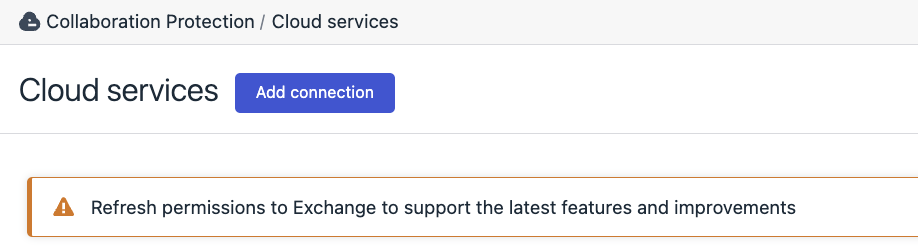
Please follow the on‑screen flow on Cloud services page to accept the new permissions, or refer to the Elements Collaboration Protection User Guide for detailed instructions on service authorization.
-
Linux Agent LS64 – 2026-01-14 – Installers update
Read more
New Linux Security 64 and Elements Agent installers have been released (2026-01-14)
The new product installers released are as follows:
- Linux Security 64 Policy Manager installation package version 5.0.15, compatible with Policy Manager Server version 16.00 and above.
- WithSecure Elements Agent for Servers.
The updates fix several installation issues and remove compatibility with no longer supported Policy Manager versions.
If you have already successfully installed the product, there is no need to download or install these packages. The product installer is only needed for the initial setup process and does not need to be kept up to date afterwards.