
-
Enhanced Device Isolation Capabilities for XDR
Read more
We are excited to introduce significant improvements to Device Isolation, enhancing your ability to manage threats more effectively. Here are the key updates:
Multiple Rules:
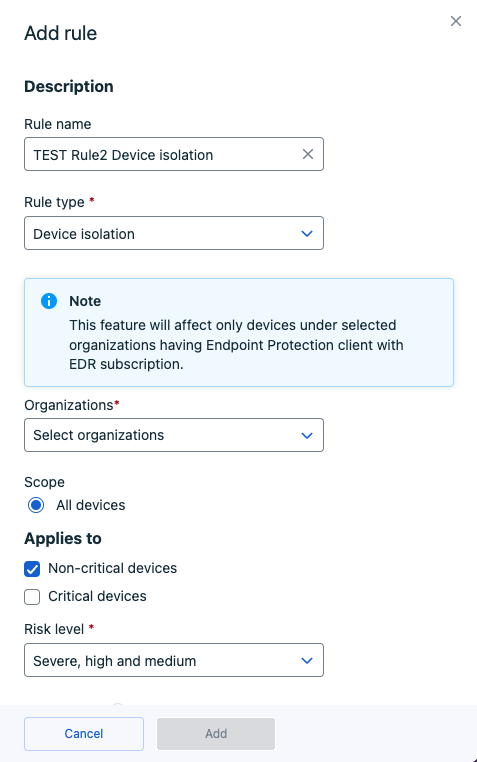
You can now create multiple Device Isolation rules for your organization, offering greater flexibility and control compared to the previous single-rule limitation.
Introducing Device Labels:
Organization-Level Support: Device Labels are now supported at the organization level, allowing for more precise targeting.
How to Use Device Labels for Device Isolation
Navigate to Automated Actions and initiate the rule creation process.
A popup will guide you through entering details such as the rule name and the scope of application.
While device isolation can be applied at the SOP level, using Device Labels is restricted to the Organization level.
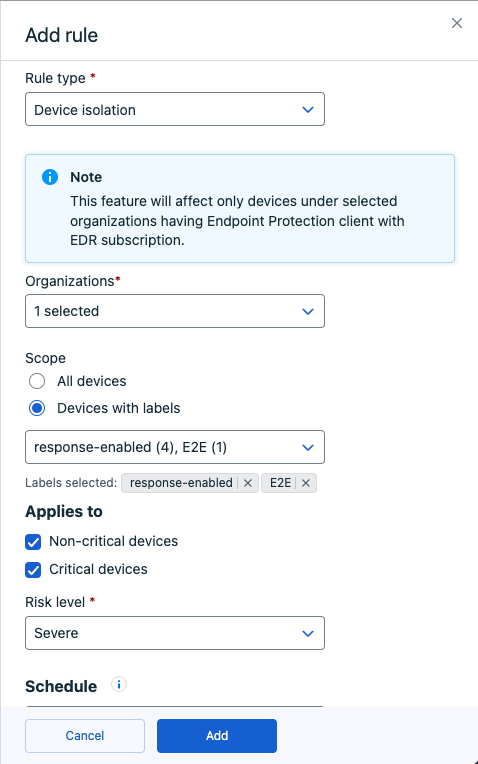
The option “Devices with the following labels” will be available at the Organization level.
Select the relevant labels for the devices you want to isolate.
Ensure the rule parameters align with your desired outcomes.
The newly created rules will be visible under Security Configurations/Automated Actions.
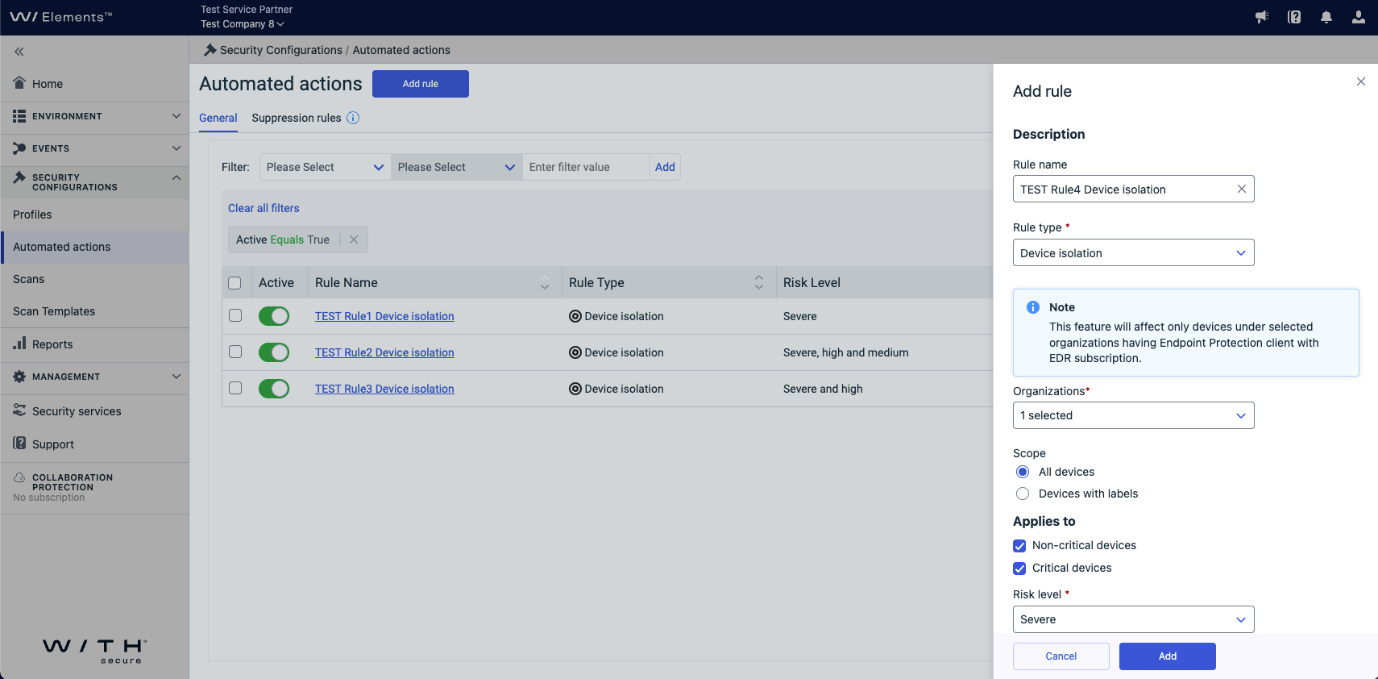
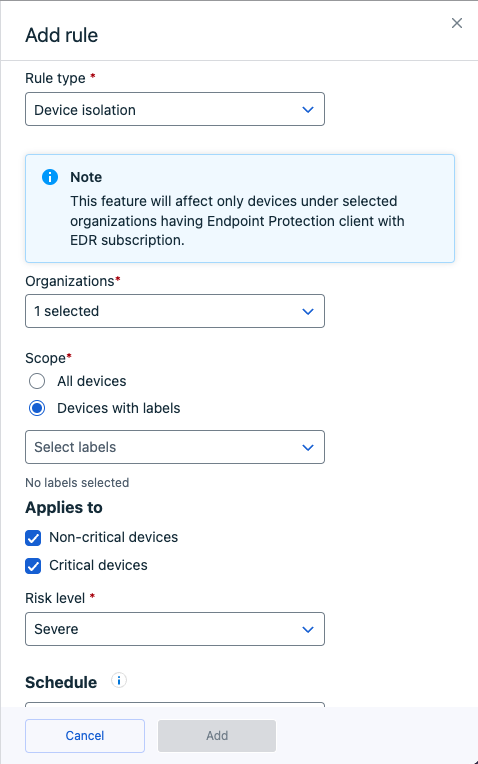
These new features enhance your ability to create and tailor rules to your organization’s specific needs, ensuring more accurate and effective threat management.
Note: Guidelines on how to add device labels (tags) can be found here.
-
Elements Identity Security: No Impact Expected from Upcoming Microsoft TLS Changes
Read more
In an upcoming change from Microsoft, they will be removing support for TLS versions lower than 1.2 from the Event Hub. This change is scheduled to take place on Friday 28th February 2025.
Our current Event Hub setup for the WithSecure Elements Identity Security for Entra ID product uses Microsoft’s default settings, which is already using TLS 1.2. However, some Event Hubs deployed in the past may have used an earlier version of TLS by default.
We have conducted thorough testing by manually updating our Event Hubs which use the older versions so that they now use TLS 1.2. We are pleased to report that there have been no issues processing data with TLS 1.2.
As a result, we expect no impact on our product when Microsoft updates the default settings to TLS 1.2. There is no need to re-deploy the onboarding scripts after this change. We assume that Microsoft will automatically migrate all Event Hubs to the new default value of TLS 1.2 once TLS 1.0/1.1 becomes unsupported.
No action is required on your part.
-
Some Exposure Management Identity recommendations not being updated after action
Read more
UPDATE: This issue has now been resolved.
We are facing an issue in Exposure Management Identity when calculating recommendation impact for set of recommendations – ‘Enforce MFA in your organization’, ‘Remind your users to change their password’ and ‘Reset passwords of users with risky login activity’.
As a result of the issue, the related Identity findings remain visible and recommendation impact remain same, even after the suggested changes are applied. The Identities page is showing correct user info.
We are working to address this issue as soon as possible.
-
What’s New in Elements: January 2025
Read more
Editor’s Highlights
During January, we released updates to most of our endpoint clients, as well as many changes to the products that reside in the cloud.
For Exposure Management, we have introduced a new Executive Summary report (currently in Beta), which is intended for senior management reporting.
Extended Detection and Response
Endpoint Protection
Elements Mobile Protection for IOS
An update to the WithSecure Elements Mobile Protection app for iOS (version 25.1.11308) was released on January 3, 2025.
What’s new:
- Improved app stability
WithSecure Elements Agent for macOS 25.1 – General availability
WithSecure Elements Agent macOS 25.1.54172 has been released to general availability (GA) on 3rd of February 2025.
This release brings
- Improved migration support from Client Security to Elements
Automatic un-installation of Client Security and activating newly installed Elements with key and profile id from installer package
- Improved migration support from Countercept to Elements
- Improved shutdown process for swupd
- Delayed wssensord start-up until sensor db has been downloaded
Sensor db is preserved during upgrade (for immediate sensor restart after upgrade)
- Hide Elements Agent user interface completely when subscription is for EDR only
Fixes
- Incorrect swupd process start-up (swupd process was launched incorrectly in some cases)
- Remote scan of software updates failed sometimes
- Software updater process sometimes failed to communicate with admind
The installer can be downloaded from here.
Elements Agent macOS 25.1.54172 supports following macOS versions:
- macOS 15 Sequoia
- macOS 14 Sonoma
- macOS 13 Ventura
WithSecure Elements Agent for Workstation and Server
A new version of the endpoint client for Microsoft Windows is available. This release makes the Elements Agent version 25.1 available (internal version 25.1.85).
The endpoints automatically upgrade, without a reboot.
This release introduces new features and fixes.
Features:
- We have improved reporting of user principal name and user logon time for Entra ID users.
- Agent now sends more detection data to the portal.
- Agent reports two new security parameters to the portal:
- Allow log on through Remote Desktop Services:Lists users or groups that can access the sign-in screen of a remote device through a Remote Desktop Services connection.
- Deny log on through Remote Desktop Services:Lists users that are prevented from logging on to the device through a Remote Desktop connection through Remote Desktop Services.

OPSWAT certification is pending and newly released version will be added to the WithSecure – OPSWAT site as soon as the product is certified.
Endpoint Detection and Response
EDR: Fix for Advanced Response Display Issue in Elements Security Center
We recently addressed an issue where the Elements Portal dashboard incorrectly displayed Advanced Response as disabled on multiple hosts, even though it was enabled and functioning locally.
Resolution & Next Steps:
- The Advanced Response status should now display correctly in the portal indicating if the feature is enabled in the profile, regardless of whether a device is online or offline.
- If Advanced Response still appears as disabled, ensure that the profile setting is enabled.
- You can verify the Advanced Response status by adding the “Advanced Response” column to the device list view (this column is hidden by default).
Thank you for your patience!
Email and Collaboration Protection
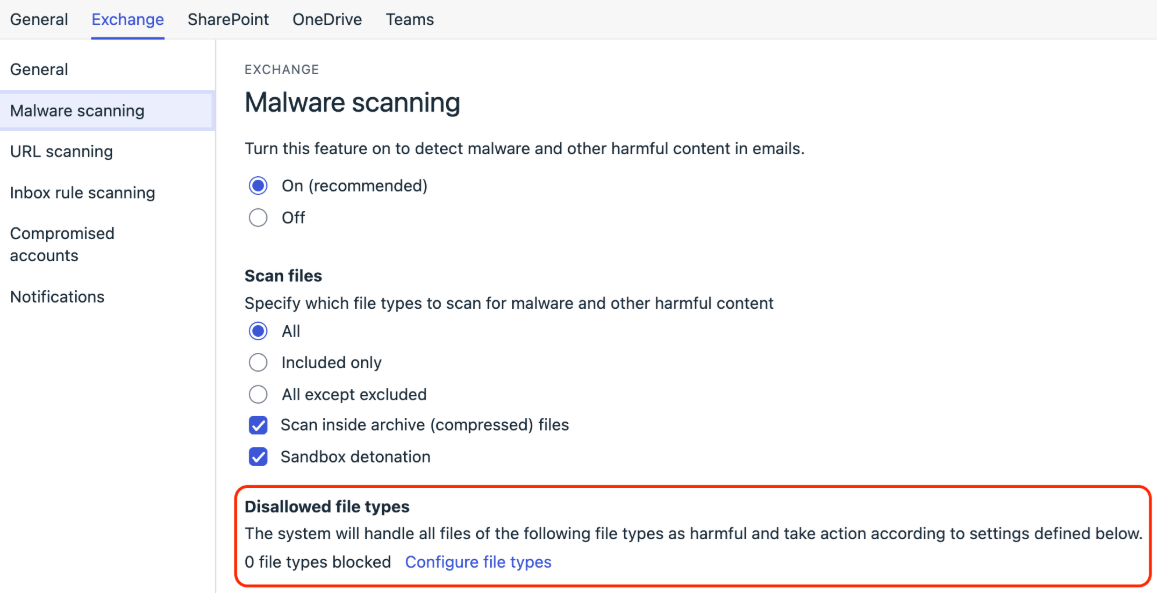
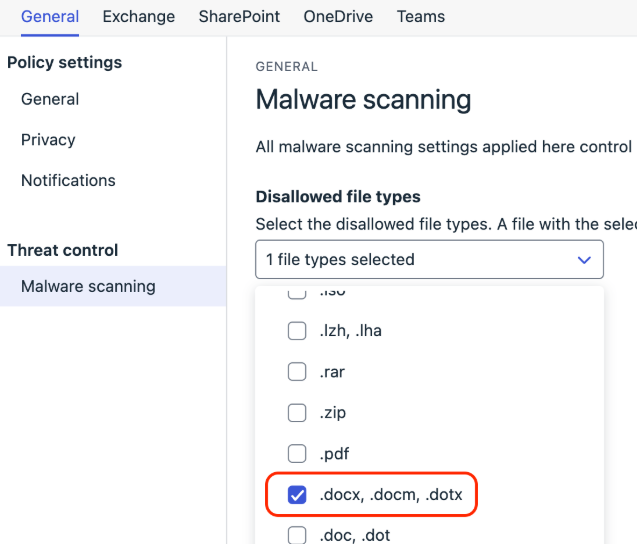
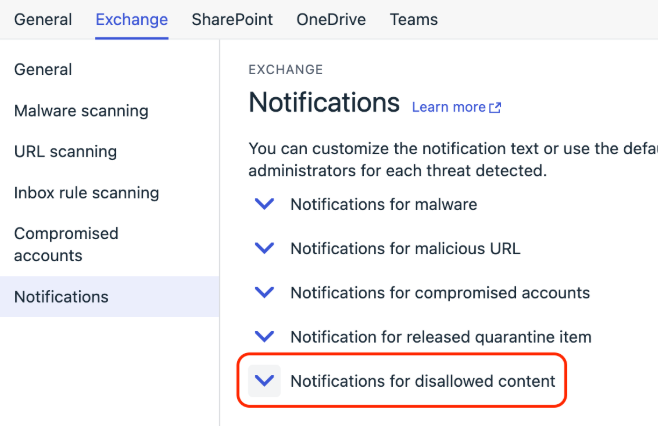
We’re pleased to introduce a new feature that lets you tailor notifications for disallowed file types.
Configuring Disallowed File Types:
- Go to the Policies view and select the Exchange tab.
- Click Malware Scanning.
- Under Disallowed file types, click Configure file types to specify which file types should be blocked.
Customizing Notifications:
- In the Policies view, navigate to the Exchange tab.
- Select Notifications.
- Under Notifications for Disallowed Content, customize the templates for both users and admins.
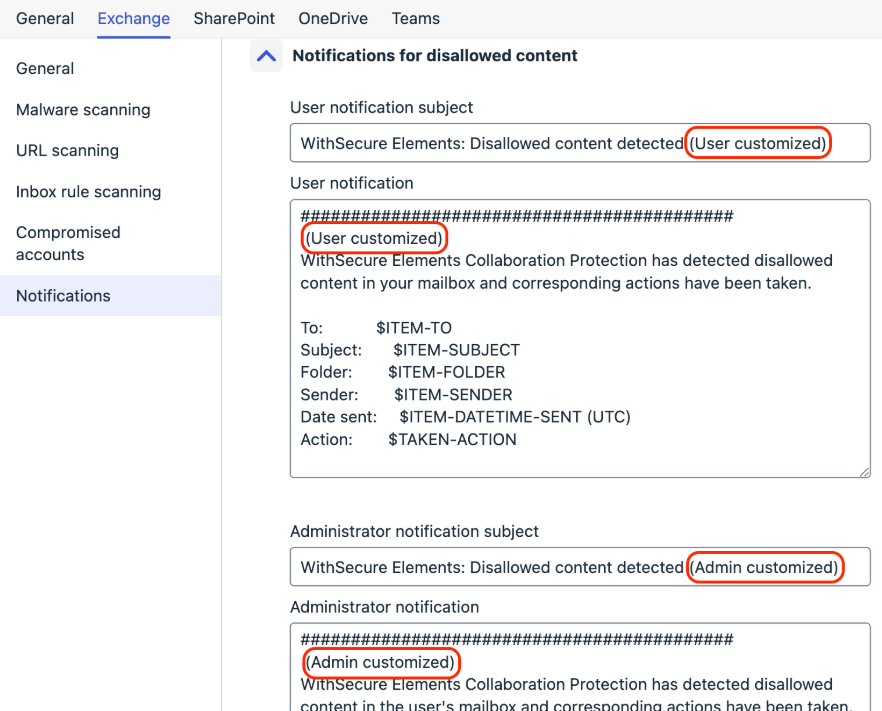
Click Save to apply your changes.
Important Notes:
- Ensure the policy is assigned to the cloud connection for it to take effect.
- To notify admins, the Admins Notification feature must be enabled.
Identity Security
WithSecure Elements Identity Security – General Availability
WithSecure Elements Identity Security is now officially in General Availability (GA) as of January 13, 2025.
Key highlights and features:
Enhanced detection logic for Business Email Compromise (BEC) attacks: Improved detection of email clients commonly used by attackers in BEC scenarios.
Identity Response actions: A major enhancement that enables Elements users to take immediate action to prevent attack impact. Identity Response actions are now available in the “Quick actions” section of Broad Context Detections (BCDs). Actions include:
Ending a compromised user’s current session
Resetting the password
Blocking user access
These actions integrate directly with Entra ID and are triggered with a single button press.
Luminen GenAI for Identity-based Broad Context Detections: This feature provides clear, actionable advice to assist with investigations, making responses easier and faster.
Exposure Management
Executive Summary PDF Report (Beta)
The executive summary PDF report is now available as a beta feature. Access it through: Home → Exposure.
Elevate to WithSecure Flow Improvements
Elevations can now be re-opened for up to 30 days after being closed, improving flexibility and workflow.
Improved Finding Detail Page
For VM System Scan findings, a link to the VM Scan page related to the finding has been added to the Finding Detail Page for easier navigation.
Identity Table to Exposure Findings Link Enhanced
The linkage between the Identities table (Environment → Identities → View Findings) and the Exposure findings table (Environment → Exposure → Findings tab) has been improved.
The landing view now displays findings specific to the selected identity, simplifying the user experience.
New Label for Exploitable Recommendations
The Highest Impact Recommendations table (Home → Exposure) now includes a new label, “Exploit exists“, to indicate when findings have known exploits based on threat intelligence data.
Enhanced Attack Path Details
The Attack Path details page has been improved for better usability and clarity.
Vulnerability Management
EVM System Scan
Support for detecting vulnerabilities in the following products was added to Authenticated Scanning:
- ACAT
- Amazon AppStream 2.0 Client
- Amazon DCV Client
- Amazon Redshift JDBC Driver
- Amazon Redshift ODBC Driver
- Apache Struts 2
- BeyondTrust Privileged Remote Access
- Chatwork
- Hasleo Backup Suite
- Intel Context Sensing Technology
- Intel Driver & Support Assistant
- Intel oneAPI DPC++/C++ Compiler
- Intel OSPRay Studio
- Intel OSPRay
- Thunderbolt Share
- Samsung Magician
- WinZip
- Zemana AntiLogger
Exposure Management for Cloud
- New feature to retrieve list of all resources belonging to a customer.
- New rules to find GuardDuty misconfigurations
- Improved performance and removal of False Negative for MFA Detection
- Bug fixes and stability improvements in the scanner.
- More accurate calculations for large numbers of accounts when processing finding and results.
- Improve performance of scanner
Elements Foundations
Elements Security Center
Elements Endpoint Protection Portal
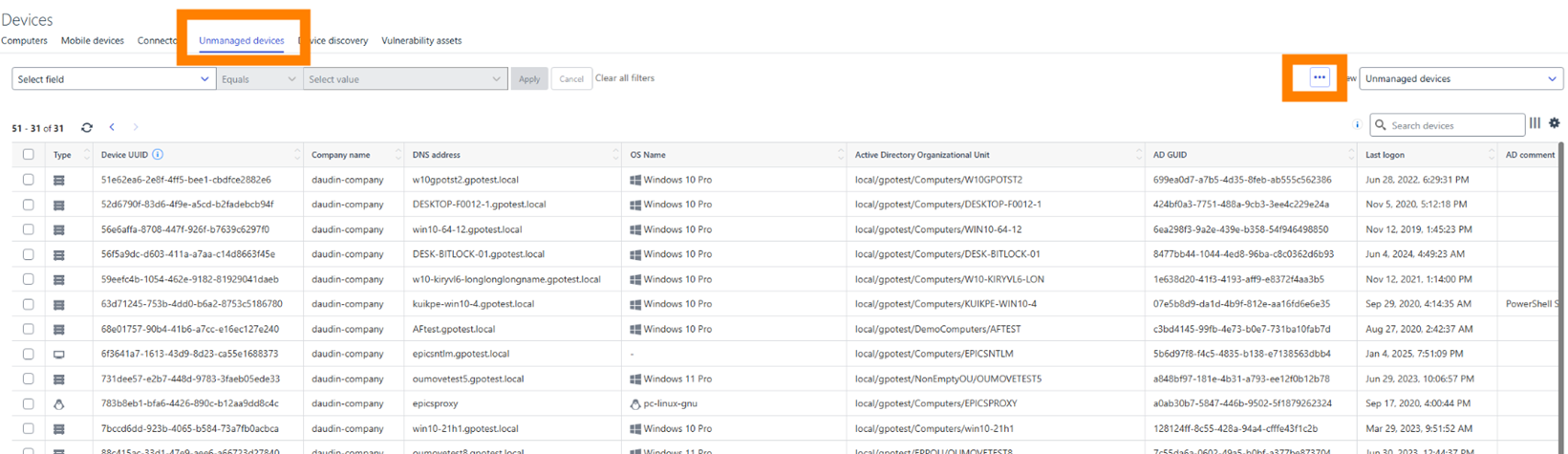
Improved Unmanaged Devices view:
- Consistent Layout – The page layout now aligns with other Device tabs.
- Enhanced Filtering – The unmanaged devices view now supports flexible filtering, similar to other Device tabs.
- Better Search & Sorting – You can now search and sort devices by UUID and labels.
- Customization Options – Added support for column selection, saved views, and row count customization.
- Limited Remote Actions – Unmanaged devices now support actions such as managing labels, updating importance and comments, and removing devices.
- Streamlined Scan Configuration – The button for initiating scans and configuring daily scans has been moved under the three-dot menu in the Devices view.
- Partner-Level Visibility – Scan results for all companies under a partner can now be viewed in the partner dashboard.
This version improves usability and consistency, making device management more efficient.
Updated End-of-Life Information
The Endpoint Protection home page for Windows, Mac, and Linux now reflects End-of-Life details for all versions still using the old Update Service.
Integrations
Elements API: Identity response actions
New identity response actions are now available, enhancing the management of Microsoft Entra ID.
New Actions:
- endCurrentSession – Ends the Microsoft Entra session of a user.
- resetPassword – Resets the Microsoft Entra password of a user.
- blockUserAccess –Blocks access for a user to all resources inside the Microsoft Entra ecosystem.
For detailed information and examples of these new Elements API features, refer to the API documentation.
In case you missed it
Upcoming: New Elements organization management features
We will soon be introducing some new functionality for Organization Management to the WithSecure Elements Security Center.
These changes will help our Elements Administrators to more effectively manage their environments.
You can find out more at this dedicated article.
Share your ideas with us
Our purpose is to co-secure the world with you – now as WithSecure™. To co-create the best possible cyber security products and services, we warmly recommend you share your ideas via the Ideas section of the WithSecure Community, now accessible directly from WithSecure™ Elements Security Center.
Further information
Changelogs and Release Notes for all parts of WithSecure™ Elements can be found at the Help Center
-
Release to Manufacturing: Elements Agent for Windows 25.1
Read more
We have released a new version of the Elements Agent for Windows. Version 25.1 is available for first time installations, and existing installations will receive this automatically. The internal version number is 25.1.85.
The endpoints automatically upgrade, without a reboot. No administrator action is required.
This release introduces new features and fixes.
Features:
- We have improved reporting of user principal name and user logon time for Entra ID users.
- Agent now sends more detection data to the portal.
- Agent reports two new security parameters to the portal:
- Allow log on through Remote Desktop Services:
Lists users or groups that can access the sign-in screen of a remote device through a Remote Desktop Services connection. - Deny log on through Remote Desktop Services:
Lists users that are prevented from logging on to the device through a Remote Desktop connection through Remote Desktop Services.
- Allow log on through Remote Desktop Services:

This version is certified by OPSWAT and got Platinum certification. Details can be found at https://www.opswat.com/partners/withsecure
Fixes:
This release introduces minor fixes for issues identified with the 25.1.82 build which was only released to Early Access
-
WithSecure Elements: Retention periods for Security Events
Read more
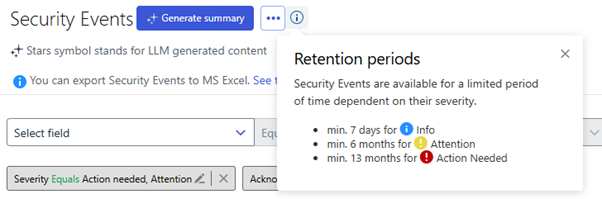
In the Elements Security Center, you can view Security Events under the Events menu.
Security Events data is stored for a limited time, depending on event severity. The maximum retention period is 14 months, but it may range between 13 and 14 months.
The exact retention period will vary depending on when the event happened, compared to the next scheduled batch deletion job being executed.
For further information on Security Events please visit the user guide here.
-
Upcoming: New Elements organization management features
Read more
UPDATE: The old methods for managing organizations will be removed on April 22nd 2025
As part of our ongoing work to unify workflows in WithSecure Elements, we will be introducing changes to Organization Management during February.
These changes will help our Elements Administrators to more effectively manage their environments.
Key features/changes:
- Introduction of device group concept that will lead into group level access management later this year. Group level access management will assist administrators of larger environments to effectively manage access to their assets.
- New Elements level organization view collecting related features into same place and deprecating duplicate views.
After the new changes have been released to the Elements Security Center, we are deprecating the following views, and they will be removed on April 22nd 2025 after the new functionality is available. This will allow the Administrators time to get used to the new functionality, while still having the old ways of working there during the transition.
The following pages will be eventually removed:
- Management / Subscriptions / Endpoint Protection Subscriptions
- Management / Organization settings / Endpoint Protection Accounts
- Management – Collaboration Protection / Users
- Management – Collaboration Protection / Subscriptions
- Management – Collaboration Protection / Organizations
- Management – Collaboration Protection / Settings
Management / Organization Settings
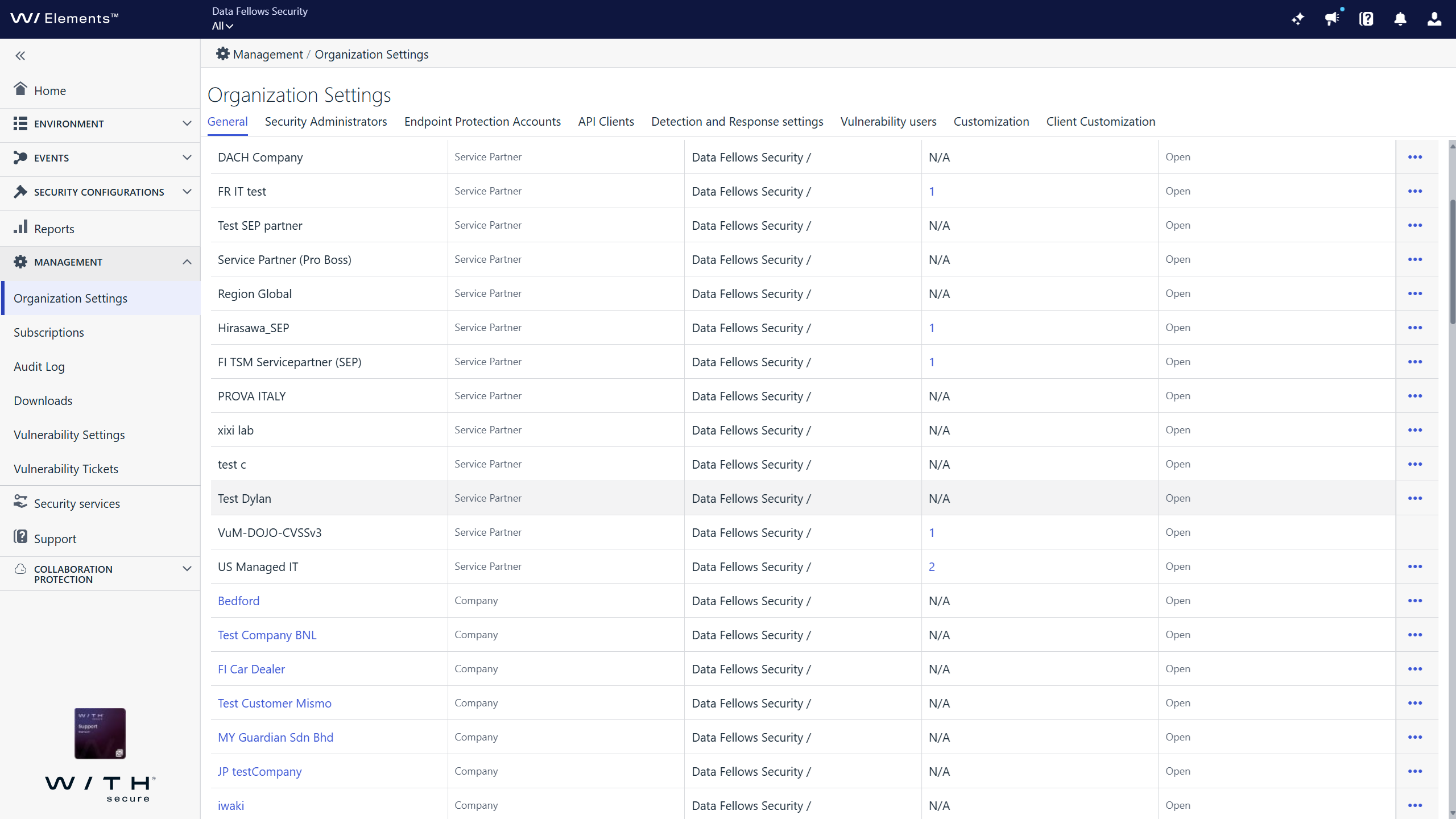
A new default tab “General” will be introduced, and this will be the new home for organization level management and settings.
For partners
[Image for demonstration purposes only, the data is from an internal test system]
The new General tab:
Lists the full organization hierarchy
This is similar to the existing scope selector, with settings management functionalities
Provides Filtering by
- organization name (Equals, contains conditions)
- organization type (company, Service partner)
- partner access setting
Operations
- Create, edit and delete service partner accounts
- Create and edit of endpoint client customization
- Enabling customer self-registration with subscription key
- Organization settings also has Portal and Agent customization functionalities, allowing partners to co-brand.
This tab replaces all functionalities under the following views:
- Endpoint Protection Accounts tab (all functionalities included elsewhere)
- Management – Collaboration protection views:
- Organizations
- Settings
- Users view replaced earlier by Management / Organization settings /Security Administrators
- Subscriptions view replaced earlier by Management / Subscriptions view
For Companies
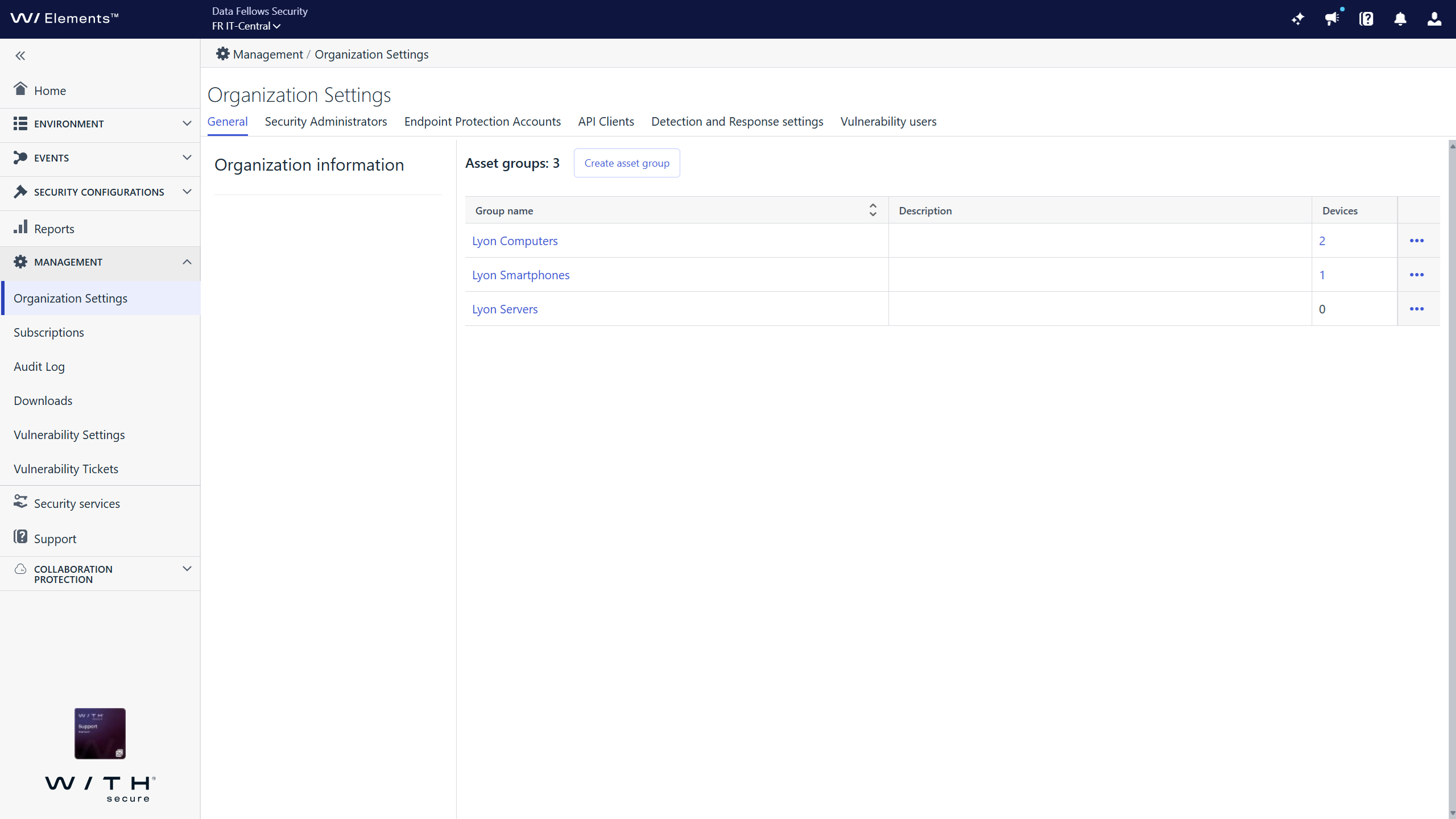
[Image for demonstration purposes only, the data is from an internal test system]
For companies, the General tab introduces:
Asset group management
Introduce Company level asset groups. This is a first step towards the introduction of group level access management, allowing full admin role on group only with read-only on company level. You can now define device groups manually by assigning device into management groups from Devices page and automatically from Profile assignment rules where with the same rule device can be assigned into group. You can already filter devices by group, filter security event coming from a group, and list software updates for devices in each group.
Access policy settings
It is possible for companies to restrict partner access to the following Elements functionalities for this organization
- Collaboration protection
- XM vulnerabilities
-
General Availability: WithSecure Elements Identity Security
Read more
UPDATE 2025-02-26: Added a link to our publicly available training module
We are happy to announce that our WithSecure Elements Identity Security is now officially in General Availability (GA). This means that it is available for all customers.
WithSecure Elements Identity Security is an Identity Threat Detection and Response (ITDR) solution. It protects organizations against identity-based attacks by detecting potentially compromised Microsoft Entra ID identities. User identities are often targeted by attackers to gain access to company data hosted on cloud applications. Elements Identity Security enables organizations to secure their remote workforce by quickly responding to identity-based attacks, including those targeting Entra ID Single-Sign-On (SSO).
Here are some highlights and features of what we’ve recently built together:
- Improved the detection logic for Business Email Compromise (BEC) attacks, by detecting email clients that are often used by attackers in these scenarios.
- A major jump in functionality, to include Identity Response actions which allows Elements users to prevent major impact from attacks. We have made Identity Response actions available on the “quick actions” section of the Broad Context Detections (BCDs). By pressing the button you immediately send a response action via an integration to Entra ID. The actions included are “End the compromised user’s current session”, “Reset the password” and “Block user access”.
- In addition, the launch of Luminen GenAI for Identity based Broad Context Detections, to assist with investigations by using easily, readable, and actionable advice.
You can find out more about WithSecure Elements Identity Security on our website.
There is also training available for this at
-
WithSecure Elements – No support for old clients
Read more
As previously announced, support for all older Elements clients has ended at the end of 2024.
Part of this end of life process for the older versions is for WithSecure to remove old backend services for delivering updates. This is due to our demerger from F-Secure.
This means that all engine and definition updates for these older non-supported versions have ended. For continued protection, please ensure that ALL your devices are using the latest supported WithSecure branded Elements version. It is a free update for customer with valid subscriptions, there is no need to purchase anything new.
For more details, please refer to the official announcement
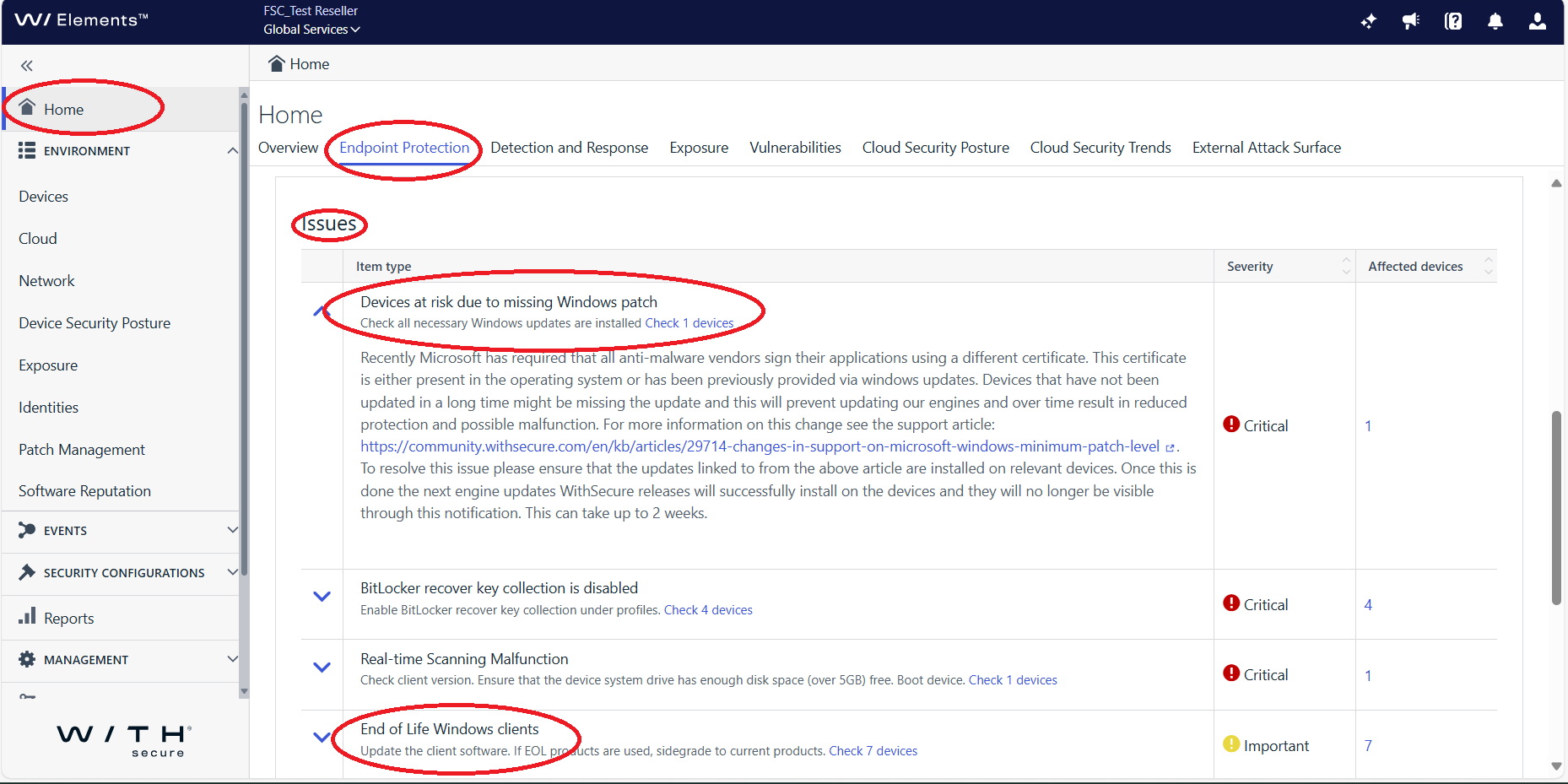
Checking for unsupported Elements clients
It is possible for the Elements security administrator to check for unsupported clients. Navigate to “Home / Endpoint Protection / Issues” in the Elements Security Center to find information on outdated clients.
Automatic updates for Elements Clients
Clients automatically update to the supported WithSecure branded versions, but there could be valid reasons why they have not yet done so:
- Unsupported Operating System – See Pre-requisites for using WithSecure Elements software below.
- Missing Microsoft ACS support – See Pre-requisites for using WithSecure Elements software below
- Reboot pending – Microsoft Windows may prevent the automatic upgrade of the Elements client, if there is a reboot pending. Please reboot to see if that allows the upgrade to continue.
- Automatic client updates have been disabled – These are controlled by Automated Tasks in the security profiles. Remove any automated task for “Allow WS elements agent update”
- Low disk space – The WithSecure Elements clients need sufficient free disk space to download and unpack the new version. Please ensure that you have free space on your computer.
For customers who are using “golden images” or other tooling to deploy the Elements software, these methods MUST be updated to use the latest installers.
Pre-requisites for using WithSecure Elements software
Supported Operating Systems
The computer MUST be using a supported version of the operating system
Please note: WithSecure ONLY supports versions that are still supported by the Operating System vendor.
Elements Agent for Windows Computers
- Microsoft Windows 10 (all 32-bit and 64-bit editions, including Windows 10 IoT Enterprise)
- Please note there is limited support for Windows 10 LTSB. The WithSecure local user interface is not available on this version, other functionality works normally.
- Microsoft Windows 11 (all editions)
Elements Agent for Windows Servers
- Microsoft® Windows Server 2016 Standard
- Microsoft® Windows Server 2016 Essentials
- Microsoft® Windows Server 2016 Datacenter
- Microsoft® Windows Server 2016 Core
- Microsoft® Windows Server 2019 Standard
- Microsoft® Windows Server 2019 Datacenter
- Microsoft® Windows Server 2019 Core
- Microsoft® Windows Server 2022 Standard
- Microsoft® Windows Server 2022 Datacenter
- Microsoft® Windows Server 2022 Core
- Microsoft® Windows Server 2025 Standard
- Microsoft® Windows Server 2025 Datacenter
- Microsoft® Windows Server 2025 Core
Elements Agent for Mac
- macOS 15 “Sequoia”
- macOS 14 “Sonoma”
- macOS 13 “Ventura”
Linux Security
- AlmaLinux 8, 9
- Amazon Linux 2
- Debian 10, 11, 12
- Oracle Linux 8, 9
- RHEL 8, 9
- Rocky Linux 8, 9
- SUSE Linux Enterprise Server 12 (Service Pack 5)
- SUSE Linux Enterprise Server 15 (Service Pack 2 or newer)
- Ubuntu 18.04, 20.04, 22.04, 24.04
Microsoft ACS compatibility
Since February 2023, WithSecure products for Windows REQUIRE that the operating system has been patched to support ACS signed files
Please see this article for more information.
-
What’s New in Elements: December 2024
Read more
Editor’s Highlights
WithSecure Elements Technical Trainings available for everyone
We are happy to announce that we have now made some of our technical trainings freely available for everyone.
By following the trainings, you can learn more about our Extended Detection and Response and Exposure Management solutions, including:
- How to use the Elements Security Center effectively to manage the solutions
- How to deploy the products that make up the solutions
- How to configure the products
- Daily Administration tasks, including responding to events
You can find the technical trainings here.
2024 MITRE ATT&CK® Evaluations: Enterprise (WithSecure EDR is a leader in detection-to-alert ratio)
In the latest round of MITRE testing, we excelled in the area of detection-to-alert ratio. In plain terms, this means that our EDR solution ensured accurate and early detection without unnecessary noise caused through irrelevant alerts.
These results reinforce our commitment to offering IT professionals with limited investigation resources the best-value cyber security solutions that deliver proven results time and again, only alerting when necessary – often avoiding thousands of time-consuming false positives.
See more:2024 MITRE ATT&CK® Evaluations: Enterprise | WithSecure™
Extended Detection and Response
Endpoint Protection
Elements Agent for macOS: Elements Agent / Client Security & network isolation
Important information for customers planning on upgrading to macOS Sequoia 15.1.1 or higher.
Network isolation on macOS 15.1.1 and higher does not currently work in conjunction with Apple’s built-in firewall.
WithSecure has been in contact with Apple and they have confirmed the issue. WithSecure continues to seek for a resolution together with Apple.
Elements Agent for macOS
WithSecure Elements Agent macOS 24.6.53972 has been released to general availability.
This release fixes an issue which caused product initialization to sometimes fail.
The product Installer can be downloaded from here, and the update is available for automatic update to existing installations.
Elements Agent macOS 24.6 supports following macOS versions:
- macOS 15 Sequoia
- macOS 14 Sonoma
- macOS 13 Ventura
Identity Security
Elements Identity Security: Identity Response Capability
We are thrilled to announce a significant update to our detection and response product. This release introduces the Identity Response capability, designed to enhance your responsiveness to security incidents involving compromised users.
By configuring this new feature, Elements Cloud will integrate seamlessly with Microsoft Entra ID, enabling you to take swift action on affected users.
How to Set Up:
- Navigate to the Environment -> Cloud page.
- Go to the Detection and Response tab.
- Follow the instructions to configure the Identity Response capability. To assist you further, we have provided a helpful onboarding video to guide you through the process of onboarding.
Executing response actions could not be easier. Do this directly from the Identity Broad Context Detections (BCDs), for quick, effective containment. The response actions included are:
- End the current user session
- Reset the users password
- Disable the users access
This capability helps prevent major impacts and stops attackers in their tracks.
Exposure Management
XM newsletter
Finding status management
We have now added Finding Status management. This is similar to recommendations status management, the user can manually adjust the impact on individual finding status. Only active findings are taken into account for risk score calculations.
More detailed information about scans
There is now more detailed information about the related scan(s) in the Recommendation details.
- “Scan subtype” column gives a hint on what scan type has led into the creation of the finding. e.g “System Scan” for vulnerability findings and “Azure (cloud scan)” for Cloud findings.
Note: This data is available for recent scans only. In case of old scans, a re-scan is required to populate it.
Filter alignment
Filters are now aligned across various XM views.
Identity list view:
MFA false-positives have been significantly reduced. Now more precise status appears on the UI. Note: As a result of this fix, users might notice more yellow colors on Identity list page.
Vulnerability Management
EVM Portal
New engine for Internet Discovery
The Internet Discovery page now utilizes the new scanning engine, Shodan.io.
Obsolete API Endpoints removed
We have now permanently removed some obsolete API endpoints and these are no longer available.
EVM System Scan
The ability to detect vulnerabilities in the following products was added to Authenticated Scanning for Windows:
- Apache Kafka Clients
- Autodesk Navisworks (Freedom, Manage, Simulate)
- Cisco Enterprise Chat and Email
- Cleo servers
- GitHub CLI
- Intel Processor Identification Utility
- NetApp SnapCenter Server
- NetCloud Exchange client
- Ollama
- Spring LDAP
Important note: Due to some corner cases that trouble some customers we had to temporarily disable calculation of all missing Microsoft Cumulative Updates and go back to the previous model. We will be actively developing solution for those cases so that the calculation will be back as soon as possible. Although this is unfortunate and detections may for the time not paint the whole picture, if any of the Cumulative Update is missing, there will be at least one vulnerability showing up in the reports.
Elements Foundations
Elements Security Center
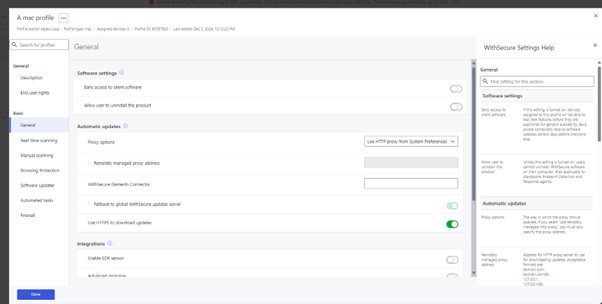
New Mac profile editor is now in production
An updated profile editor for Mac clients has been released
Integrations
Elements API
A bugfix has been released in the query devices endpoint (GET /devices/v1/devices).
Previously the response enum field firewallState contained a value “disabledMacos” while the correct and documented spelling is “disabledMacOs”. With the latest release the spelling in the response has been fixed and is now “disabledMacOs” (capital O as in Os).
Other items of interest
Threat Highlight Reports: December
Threat Advisory: Abuse of VPN features
Recently a proof-of-concept tool was released publicly that demonstrates how to deploy a rogue VPN server to exploit a feature found in multiple VPN products.
The tool demonstrates techniques to attack the SSL-VPN feature, that is found in VPN products including but not limited to: Cisco AnyConnect, SonicWall NetExtender, Palo Alto GlobalProtect, Ivanti Connect Secure
Because of insufficient digital certificate verification, attackers could manipulate the SSL-VPN communication process.
If successful, the NachoVPN tool allows for remote code execution, credential theft, traffic interception, and/or privilege escalation.
You can sign up to receive the monthly Threat Reports, with full details of these threats.
In case you missed it
End of support for F-Secure branded Elements clients
As 2024 closed, support for F-Secure branded Elements clients was stopped. All supported products have an equivalent WithSecure branded version, and in most cases these will have been taken into use automatically. You can find more information here.
Share your ideas with us
Our purpose is to co-secure the world with you. To co-create the best possible cyber security products and services, we warmly recommend you share your ideas via the Ideas section of the WithSecure Community, now accessible directly from WithSecure™ Elements Security Center.
Further information
Changelogs and Release Notes for all parts of WithSecure™ Elements can be found at the Help Center