
-
Upcoming Retirement of the Management → Organization Settings → Vulnerability users page in Elements
Read more
We would like to inform you that the Management → Organization Settings → Vulnerability users page in Elements will be retired by the end of 2025.
To help users prepare for this change, an info banner will soon appear directly on the Vulnerability users page.
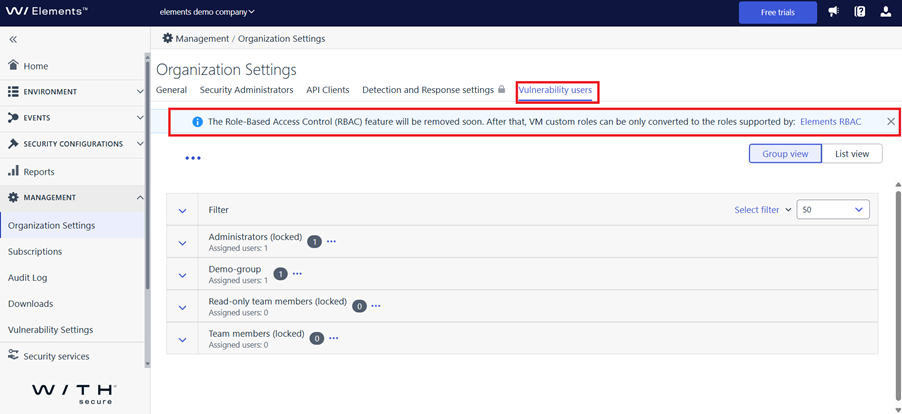
For some time, users will be limited to selecting from the three predefined roles visible in Elements. Existing custom roles will continue to function, but they will no longer be editable, as the UI for managing them will be removed. This is a temporary change as we work on improving the role management experience.
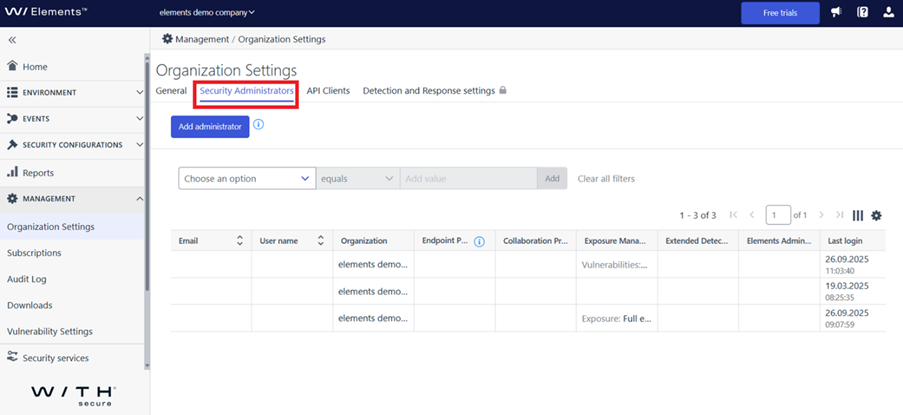
We encourage you to start using the Management → Organization Settings → Security Administrators page for all user-related tasks going forward. By doing this you will be ready for the time when we remove the old page.
Thank you for your continued trust and support!
-
System maintenance: Elements login – October 8th 2025
Read more
We will be performing system maintenance on October 8th 2025, to make important changes to the Access Control System used by WithSecure Elements. This maintenance is planned to start at 18.00 UTC, and is expected to last for a period of 15 minutes.
Before the maintenance period starts:
- An in-portal banner will remind users of the upcoming maintenance break. This will be visible 24 hours before the break.
During the maintenance period:
- Any login to the Elements Security Center, or user-related actions will be unavailable during the maintenance period
- New logins to Elements will not be possible. There will be a message on the login page with details of the maintenance period.
- Existing sessions MAY be affected. We advise our users to avoid critical actions during this period. An in-portal banner will remind users of this.
- Self-registration and the Provisioning API will also be affected during the maintenance period.
- The Elements API, and endpoint agents are NOT affected. These continue to function normally.
We apologise for any disruption that this short maintenance period causes.
-
System Maintenance: Monday 29th September 2025 – Delays in Response Action processing
Read more
UPDATE 2025-09-29 (18.00 UTC): Maintenance has been successfully completed. All deferred Response Actions have now been fully processed and normal processing has resumed.
UPDATE: We have now updated the schedule for this maintenance, after receiving feedback. Please note the date AND time have changed.
We need to perform some important maintenance on the Elements systems related to processing Response Actions. This maintenance is planned to start at 16.00 UTC on Monday September 29th, and is expected to take three hours to complete.
During the maintenance period:
- New Response Actions sent will not appear on the list of actions until maintenance is completed.
- The status of running Response Actions will not be updated.
After the maintenance period is completed, the system will fully process all Response Actions, and show the correct information in the Elements Security Center.
We apologize for any inconvenience this maintenance break may cause our customers.
-
What’s New in Elements – August 2025
Read more
Editor’s Highlights
Summertime is traditionally a quiet time for developing and releasing new features. During August, our teams have largely been focusing on improving existing functionality, to bring a better experience to our customers.
Exposure Management
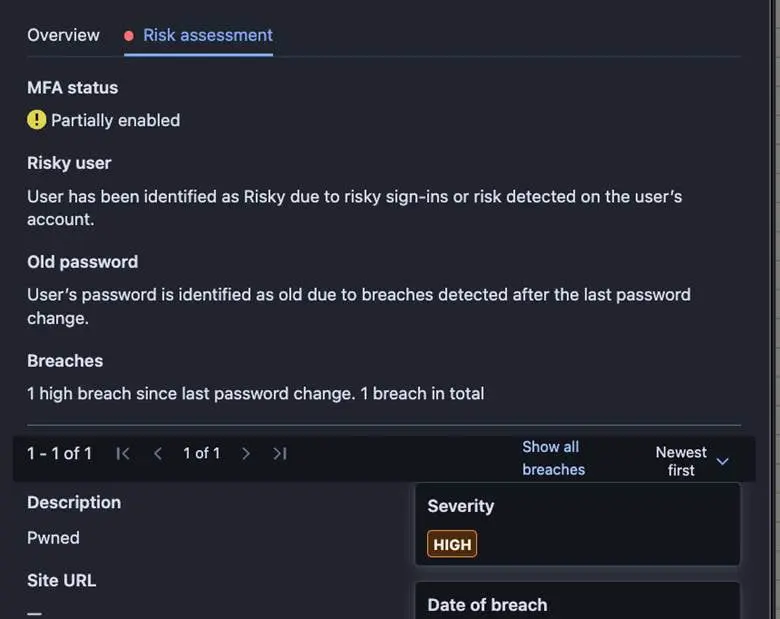
Enriched Identity risk assessment
The Identity risks assessment tab has been enriched with data impacting the calculation of Identity’s risk factor.
Exposure Management for Business
System Scan
Support for detecting vulnerabilities in the following products was added to Authenticated Scanning for Windows:
- Apache Commons Lang
- Apache Jackrabbit
- Apache Jena Fuseki
- Apache Struts Extras
- BeeDrive for desktop
- Comodo Dragon
- Elastic Beats
- hMailServer
- Logpoint AgentX Client
- MagicINFO Server
- Malwarebytes Binisoft Windows Firewall Control
- qBittorrent
- Reactor Netty
- Veeam Backup for Microsoft 365
- Veeam Recovery Orchestrator
- Wazuh Agent for Windows
Elements Foundations
Elements Security Center
New roles for managing access to XDR features
As previously announced, changes were made to the Security Administrators screen.
All Endpoint Protection(EPP) users in the system as of June 30, 2025, were automatically granted access to XDR features to maintain backward compatibility. New EPP users created after this date must have their XDR access explicitly assigned with one of the new XDR roles:
- Broad Context Detections
- Full editing or
- Read-only
- Response
- Execute responses or
- List Responses or
- No access
- Event Search
- Read-only or
- No access
Elements IAM Admin is the only role authorized to grant or revoke XDR access.
Integrations
WithSecure Elements API
New fields in Devices endpoint and Security Events
The latest release in Elements API brings several new fields to the query devices endpoint and human-readable descriptions to Security Events.
New device endpoint fields
More information on connectivity status, various security parameters, installation tags and browsing protection status are exposed from the query devices endpoint.
The full list of new device fields below:
- installationTags
- connectivityStatus
- unreachableConnectionAddresses
- unstableConnectionAddresses
- networkExtensionContentFilterServiceEnabled
- systemIntegrityProtectionEnabled
- systemExtensionEnabled
- guestAccount
- fullDiskAccessGranted
- defaultBrowser
- defaultBrowserStatus
- browsingProtectionExensionChrome
- browsingProtectionExensionFirefox
- browsingProtectionExensionSafari
- browsingProtectionExensionEdge
See more information on the fields from the api specification (under Devices).
New human-readable Security Events fields
Two new fields are added:
- message — details of the security event
- description — short general description of the type of the event
You can see examples of these fields from Security Events specification.
In case you missed it
WithSecure Elements Collaboration Protection and Microsoft SharePoint Embedded
You can find out more about support for Microsoft SharePoint Embedded here.
Update to Exposure Management to improve coverage for RPM based Linux
We recently significantly expanded our coverage of RPM based Linux distributions in Exposure Management. You can find out more in this dedicated article.
Share your ideas with us
Our purpose is to co-secure the world with you – now as WithSecure™. To co-create the best possible cyber security products and services, we warmly recommend you share your ideas via the Ideas section of the WithSecure Community, now accessible directly from WithSecure™ Elements Security Center.
Further information
Changelogs and Release Notes for all parts of WithSecure™ Elements can be found at the Help Center
-
New version of Elements Agent for Windows (25.4)
Read more
A new version of the endpoint client is available, and this release makes the Elements Agent version 25.4 available (internal version 25.4.231).
The endpoints automatically upgrade, without a reboot.
This release introduces new features (with Profile Editor Update) and fixes.
Features:
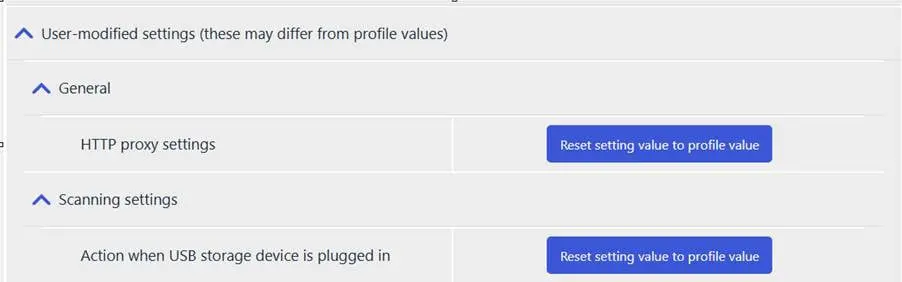
- User-modified settings reporting: Agent now reports user-modified settings to the portal.These settings can be reset to profile values remotely via the portal UI.
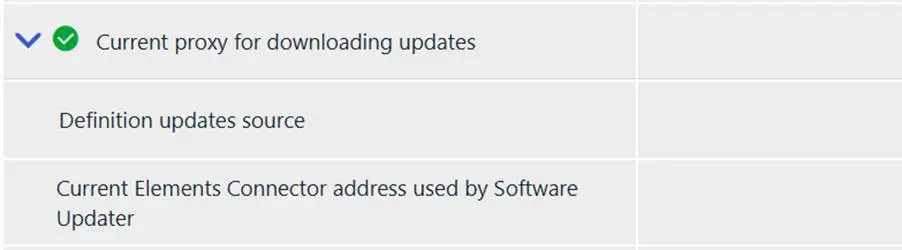
- Additional host information is now reported to the portal: Agent reports the current Elements Connector address used by software updater. Agent reports the current definition updates source address.
- Improved agent UI: The agent UI now provides clearer indications when protection is turned off.
- User-modified settings reporting: Agent now reports user-modified settings to the portal.These settings can be reset to profile values remotely via the portal UI.
-
Upcoming Retirement of the Devices → Device Discovery Page in Elements
Read more
We would like to inform you that the Devices → Device Discovery page in Elements will be retired by the end of 2025.
To help users prepare for this change, a notification will soon appear directly on the Device Discovery page.
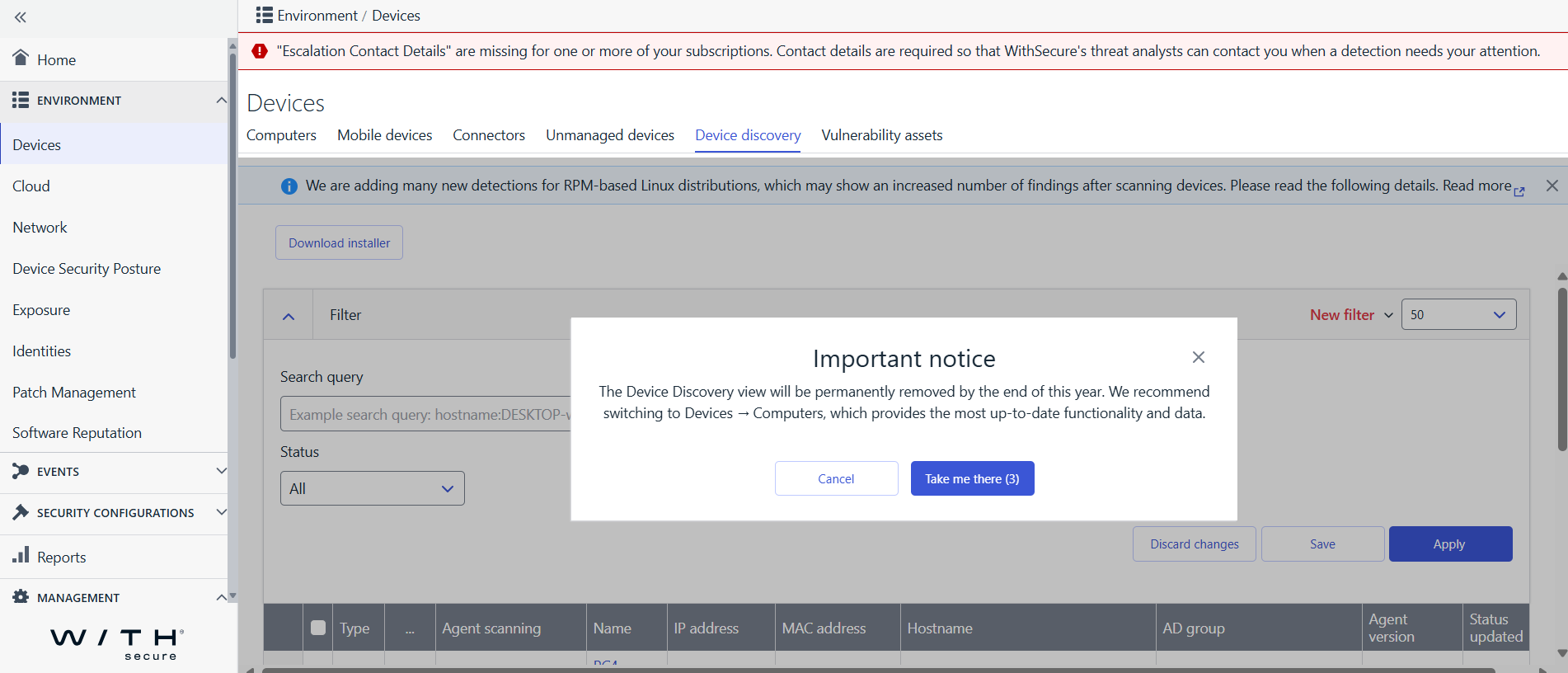
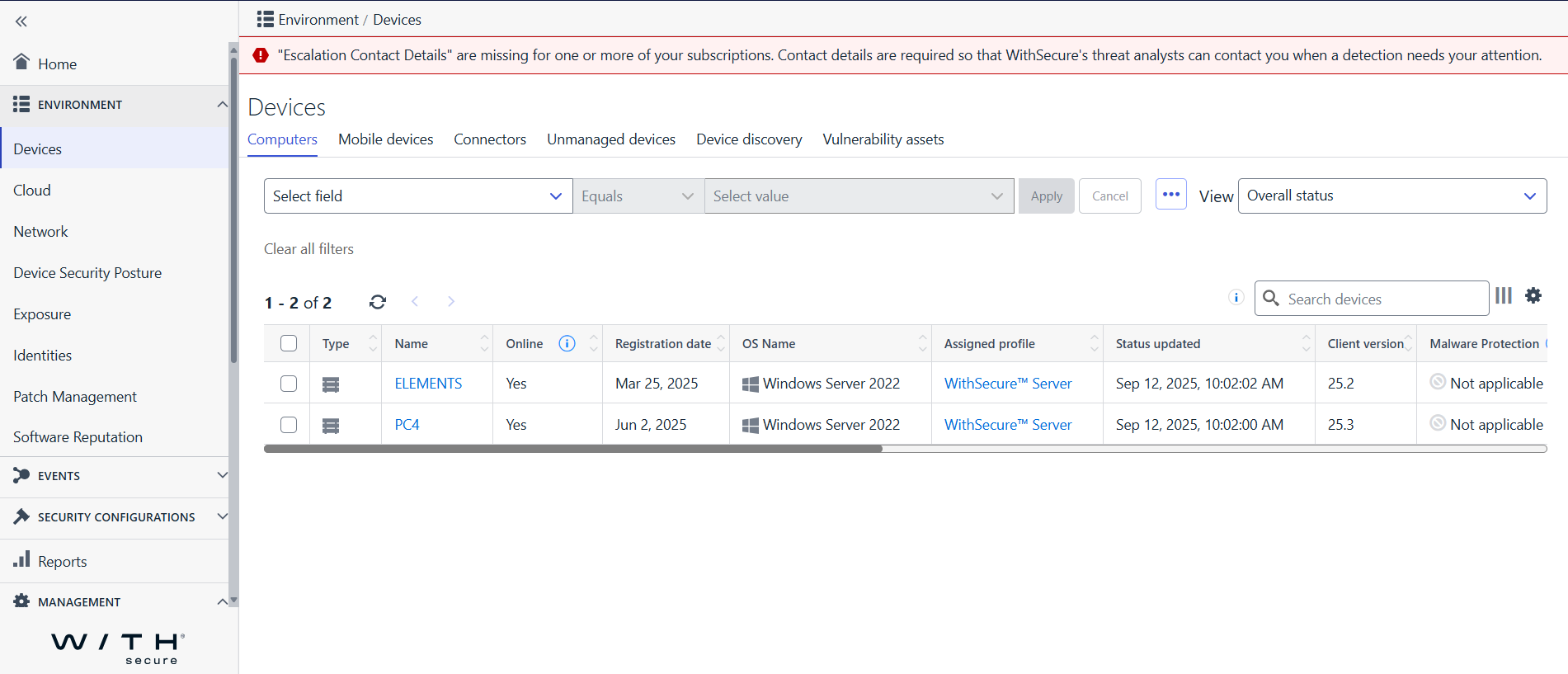
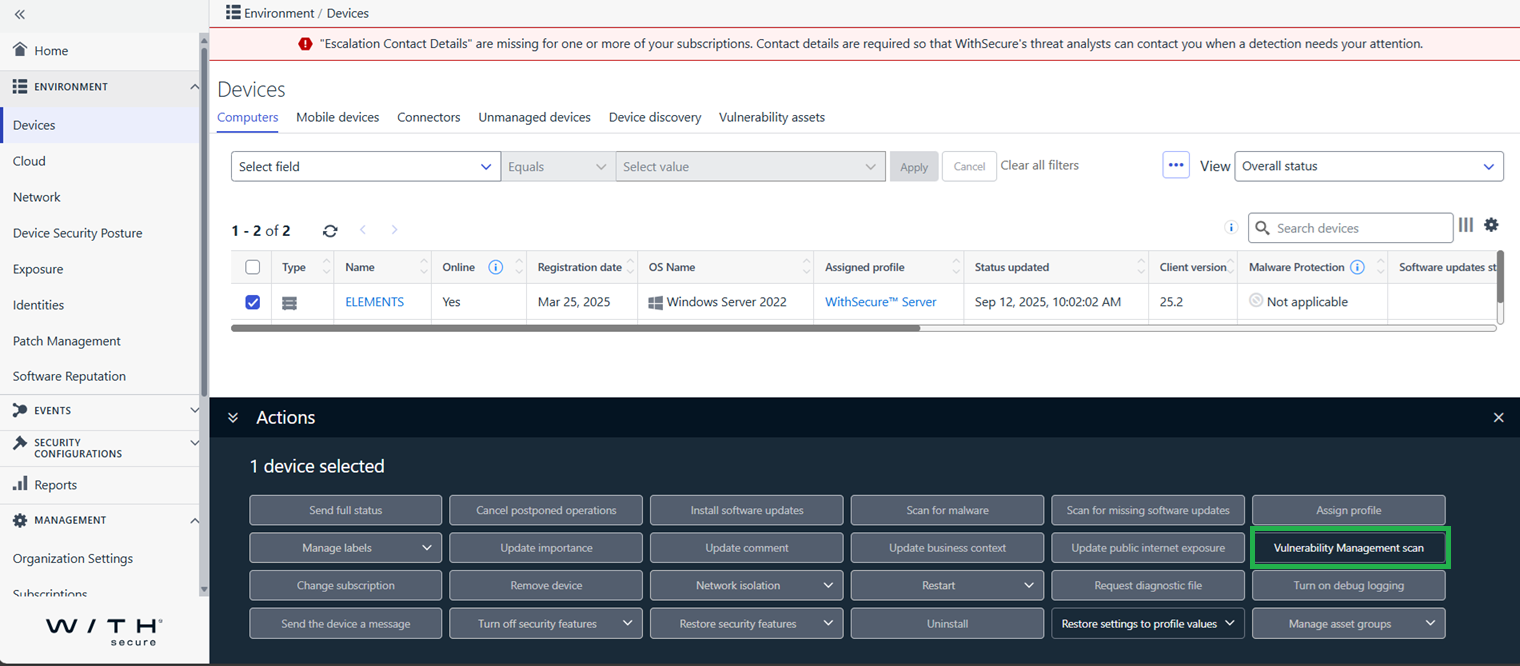
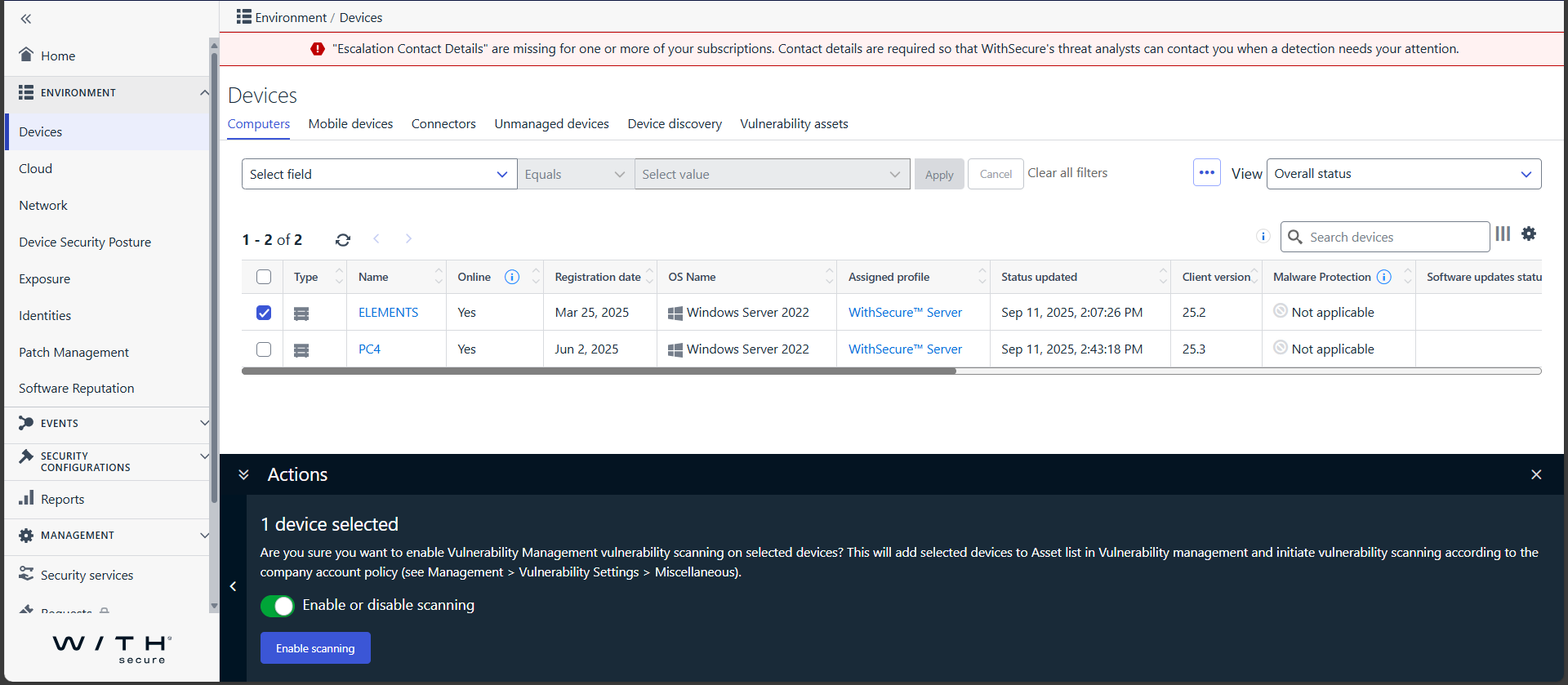
All actions previously performed on this page, as well as the information related to devices with the Elements Agent installed, are now available on the Devices → Computers page.
We encourage you to start using the Devices → Computers page for all device-related tasks going forward. By doing this you will be ready for the time when we remove the old page.
Target page
Action panel
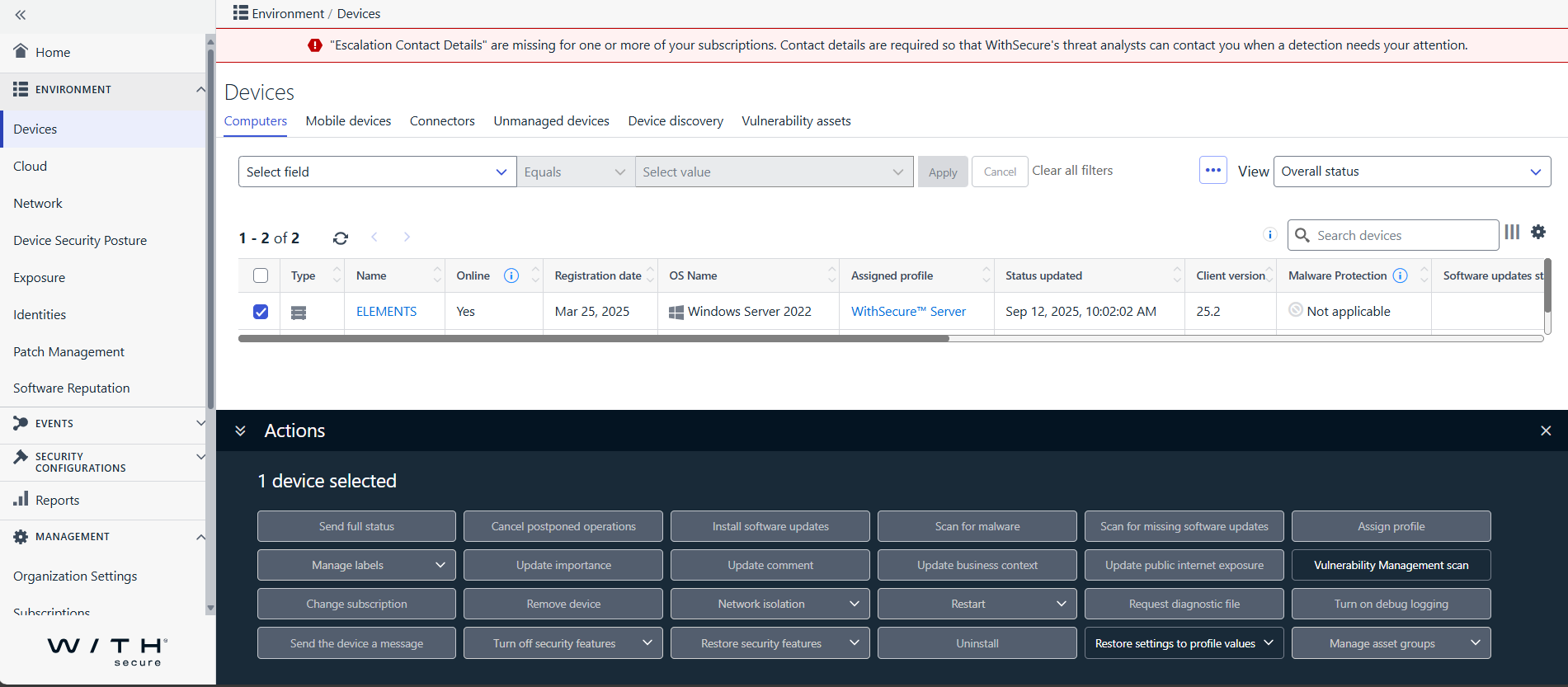
Action Selected
Confirmation dialog
Thank you for your continued trust and support!
-
Major Capricorn update for Endpoint Protection – September 2025
Read more
UPDATE 2025-09-16: The update is expected to be released on 17th September 2025, with version “WithSecure Capricorn Engine (2025-09-17_01). The total size of the update package will be ~63MB.
We will soon be releasing a major update for our Capricorn engine, used by our Endpoint Protection products. This is expected to be released on September 17th 2025.
Key Improvements
- Optimized database & extended machine learning → reducing pattern file sizes while maintaining the same high detection rate.
- Component size reduction of more than 40% → from 210 MB down to 126 MB total.
- Faster initialization & lower memory consumption → improving overall performance on endpoints.
Update Details
- Expected update delta size: ~79 MB.
- Platform coverage: This update applies to all WithSecure Endpoint Protection products that utilize the Capricorn engine — across Windows, Mac and Linux platforms.
- Download size: All affected endpoints will now download a larger one-time update package of approximately 79 MB during the rollout.
Deployment
- The update will be delivered automatically.
- No manual action or configuration is required.
- The release time will be confirmed 24 hours in advance through our community channels.
- Updates containing this release will start with “WithSecure Capricorn Engine (2025-09-xx-xx)”
- With this update, you can expect leaner, faster, and more efficient endpoint protection — without compromising security.
- Users of WithSecure ElementsEPP may wish to consider taking the Elements Connector into use, to help reduce internet access, if they have several deployed endpoints. You can find more details of how to deploy this at: Elements Connector Getting Started Guide
-
Elements Role Assignments changes – 15 December 2025
Read more
Last year, we announced that we are making changes to how user roles are assigned in WithSecure Elements.
The next step will be to disable the user and permission management capabilities for the following roles, on organizations that have the Identity and Access Management (IAM) role defined.
- Exposure Management > Exposure > Full Editing
- Exposure Management > Vulnerabilities > Management
- Collaboration Protection > Management > Admin
- Endpoint Protection > Full Editing (Computers & Servers)
Other capabilities of these roles is not affected by this change.
From 15 December 2025, organizations who have the IAM role defined:
- Will NOT be able to assign roles with the older methods
- Will ONLY be able to assign user roles when logged in with an IAM user
The vast majority of organizations in WithSecure Elements already have the IAM role enabled, and our goal is that all organizations will have this defined soon.
-
Important update to Exposure Management (28 August 2025) – improved coverage for RPM based Linux
Read more
We are improving coverage on findings for RPM based Linux distributions, and this is expected to be deployed to Production on 28th August 2025.
After this fix has been deployed, customers scanning Linux devices are advised:
The subsequent system scans are expected to have improved coverage resulting in an increase in findings on RPM based Linux distributions, including
- Red Hat Enterprise Linux
- Centos
- Oracle Linux
- Amazon Linux
- Suse Linux
- Alma Linux
DEB based distributions such as Debian Linux and Ubuntu Linux are not affected by this change.
-
WithSecure Elements Collaboration Protection and Microsoft SharePoint Embedded
Read more
On May 21st, 2024, Microsoft announced the general availability of SharePoint Embedded (Announcing SharePoint Embedded General Availability | Microsoft Community Hub )
What is SharePoint Embedded?
SharePoint Embedded containers are a core component of Microsoft’s SharePoint Embedded, an API-only, headless service that allows developers to integrate Microsoft 365’s document management capabilities into custom applications—without exposing the traditional SharePoint user interface.
A SharePoint Embedded container (also called a File Storage Container) is a secure, app-specific storage unit created within a Microsoft 365 tenant.
These containers:
- Are accessible only via APIs (primarily Microsoft Graph).
- Do not have a user interface—users interact with them only through the app that owns them.
- Are isolated per application, ensuring that only the owning app can access its containers.
- Support granular permissions, versioning, folder structures, and collaboration features like co-authoring in Office apps.
You can think of these containers asAPI-only document libraries that live inside a tenant, but are fully managed by your application.
Each container is associated with a Container Type, which defines:
- Access privileges: Only the owning application can access containers of its type.
- Billing model: Either trial (free, limited use) or standard (billed via Azure).
- Behavioural settings: Such as lifecycle policies, compliance, and collaboration features.
There’s a 1:1 relationship between an application and its container type. Developers can choose between:
- Trial Container Types: For development/testing, limited to 5 containers and 1 GB each.
- Standard Container Types: For production use, with full billing and scalability options
How does WithSecure Elements Collaboration Protection interact with these containers?
SharePoint Embedded Containers are currently NOT supported by WithSecure Elements Collaboration Protection.
Unlike traditional SharePoint Sites, where access is granted by the SharePoint Administrator, the SharePoint Embedded containers are fully isolated and owned by the application that uses them, meaning they are not accessible by Elements Collaboration Protection.
This means that currently the respective sites will be reported as “unavailable” in the SharePoint view in the portal.
These Embedded Containers can be easily identified in the Collaboration Protection “Site” field when they contain “/contentstorage/” as part of the URL.
If the application using the container deals with untrusted files, for example uploads from a user, we recommend the applications integrates with WithSecure Atlant to analyze this content.
WithSecure is evaluating how we can support these containers in the future.