
-
Identity Responses now available for Elements Identity Security
Read more
We are happy to announce that we have introduced Identity Response actions for Elements Identity Security.
Response is a vital aspect of any XDR solution to preventing significant impacts from cyberattacks. Therefore, Identity Response is a critical component of Elements Identity Security. Response actions provided by the Identity Response capability are designed to allow administrators to quickly minimize threats seamlessly through direct integration between Elements Cloud and your Entra ID instance.
Identity Response includes the following actions:
- End Current Session: Terminates the active session for a user.
- Reset Password: Forces a password change to secure the account.
- Block User Access: Restricts access for the user to prevent further malicious activity.
These actions can be used in various situations to contain a identity cyber threat.
Submit an Identity Response action
You can quickly and easily submit a response actions directly from the BCD saving you time during a crisis.
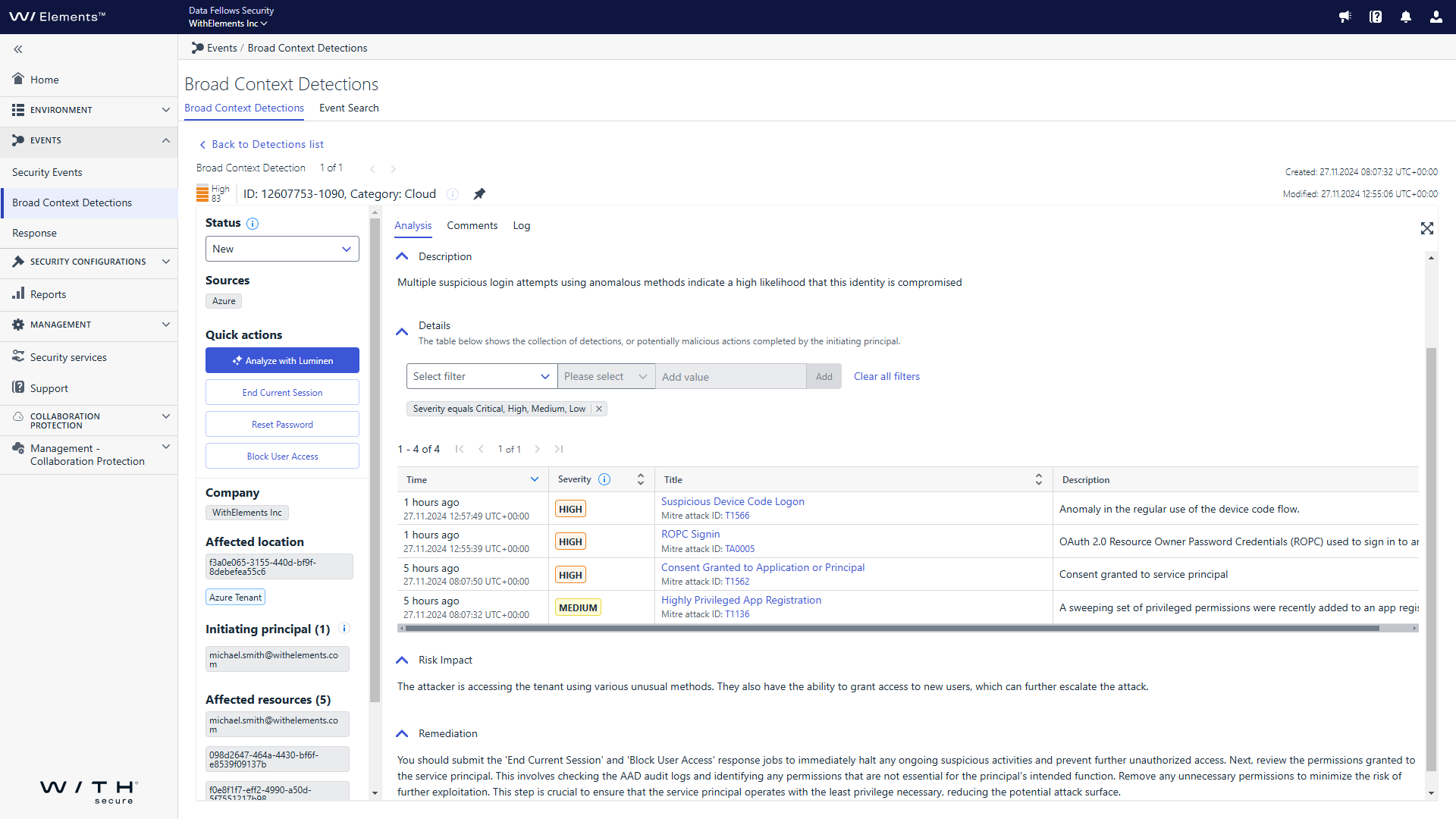
Identity Response actions can be viewed in the “Response” view, alongside endpoint responses.
Future plans
Identity Response will soon be available for organizations that have purchased XM for User to remediate risks highlighted by the exposure management tooling.
We are currently planning on implementing automatic identity response jobs during the first half of 2025.
If you have any feedback on the response jobs or would like to request additional Entra ID related actions, please use your Elements production login to create ideas for XDR in the Ideas section of the WithSecure Community
-
Release to Manufacturing: Elements Agent for Mac 24.6
Read more
We have released a new version of the Elements Agent for Mac, version 24.6.
This version fixes an issue which sometimes caused product initialisation to fail.
The new version will be installed and taken into use automatically. No administrator action is required.
-
What’s New in Elements: November 2024
Read more
Editor’s Highlights
Extended Detection and Response
Endpoint Protection
Elements Agent for Windows: version 24.6
A new version of the endpoint clients is available.
This release makes the Elements Agent version 24.6 available (internal version 24.6.339).
The endpoints automatically upgrade, without a reboot.
Features:
Elements Agent now supports migration from Countercept. Activating a subscription containing the EDR component uninstalls the Countercept Agent.
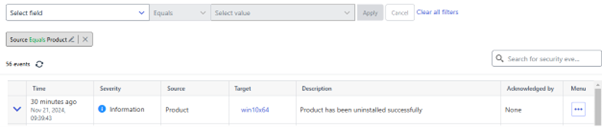
A new security event is sent when Elements Agent is uninstalled
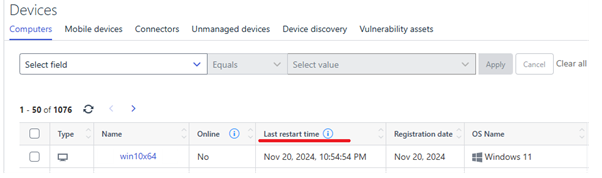
A new “Last restart time” status is sent to the portal
In addition:
- Elements Agent supports configuring APIPA (automatic private internet protocol addressing) addresses in Network location settings / Locations and rules.
- Elements Agent now supports Windows Server 2025.
Elements Agent for macOS: Release version 24.5.53798
A new version of the Elements Agent for macOS has been released
This release brings an EDR-only product variant
The Installer can be downloaded from here.
Elements Agent macOS 24.5.53798 supports following macOS versions:
- macOS 15 Sequoia
- macOS 14 Sonoma
- macOS 13 Ventura
Elements Mobile Protection: New release for iOS (24.8.11250)
An update to the WithSecure Elements Mobile Protection app for iOS (24.8.11250) has been released.
It includes the following new features and improvements:
- Allows users to block any processed URLs locally.
- Supports the “Block everything except allow list” setting.
- Supports extended filtering for alert notifications related to blocked URLs.
Endpoint Detection and Response
EDR: Filtering enhancement
With our new filtering enhancement, you can easily drill down and browse events from the agent. This allows you to use EventSearch to investigate the events and ignore events that are not useful to your investigation. This improvement is designed to make your experience with the portal smoother. Happy searching!
We have following improvements released to the Event Search view:
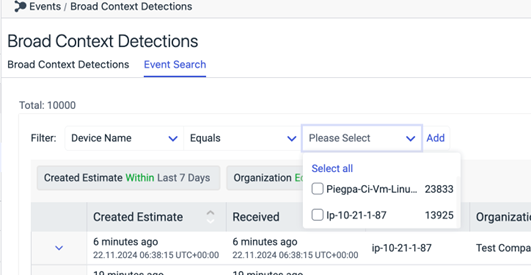
Pre-populated filters
When applying filters, the user can see the value dropdown being populated with all the unique values.
There are max 500 values that will be displayed in the dropdown. If admin cannot find the value in the list, they need to narrow down their search by applying appropriate filters.
Some of the fields will also have the option to select ‘Does Not Equals’ operator to search based in exclusions.
While applying filters, the admin can now select multiple values from dropdown. This applies to both the ‘Equals’ and ’Not Equals’ operators
EDR: Trigger response actions now available from with the BCD
In order to enable faster investigation and enhance the user experience for Endpoint BCDs, the Elements admin user can now trigger response actions from with the BCD details, so that they do not need to switch between the BCD view and the Response view while doing the investigation of a BCD.
How to submit a response action:
The admin can navigate to the Endpoint BCD in the Elements portal
In the BCD details -> Quick actions, admin can see the list of response actions that can be triggered for the BCD. Currently, the user can trigger following response actions:
Enumerate tasks
Enumerate processes
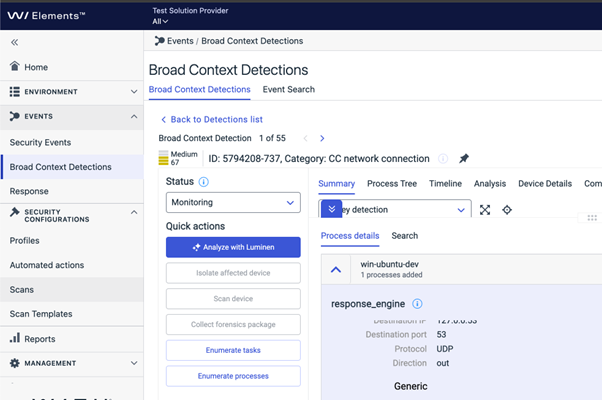
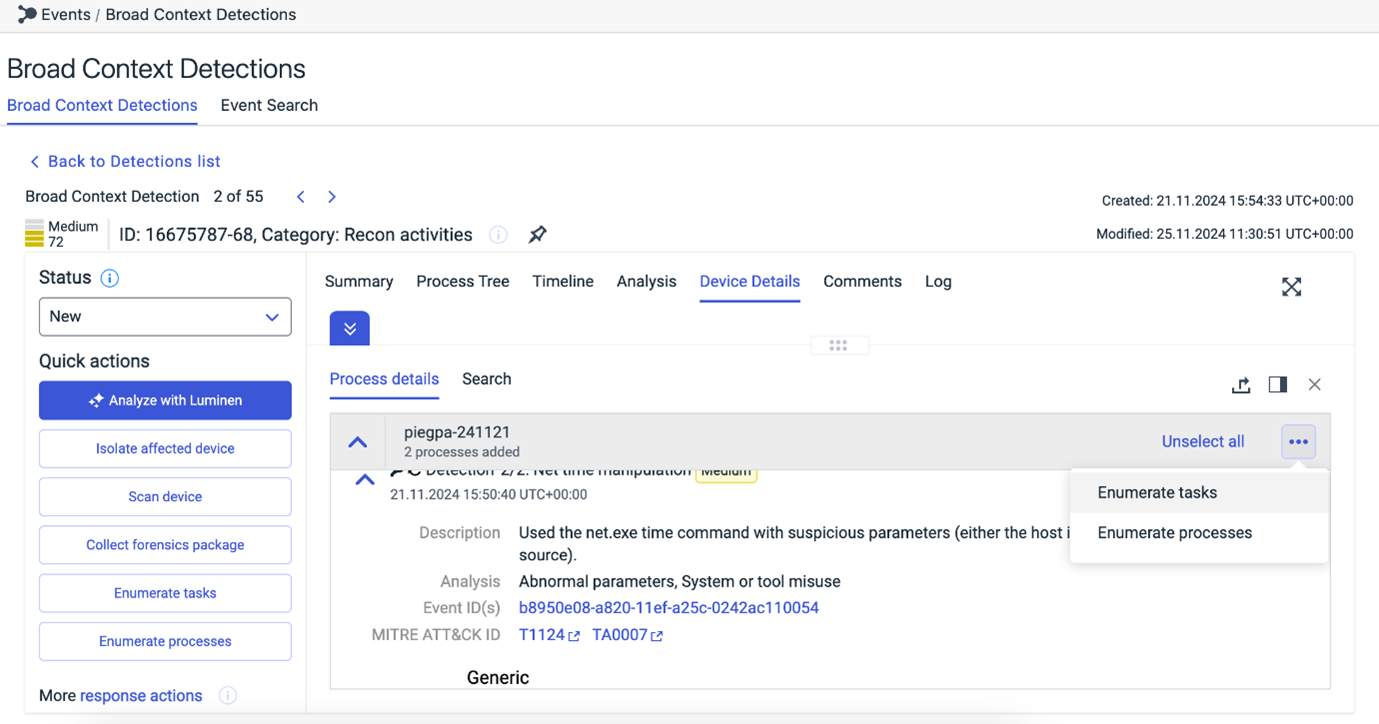
The admin also has the option to perform these response actions from the Process details
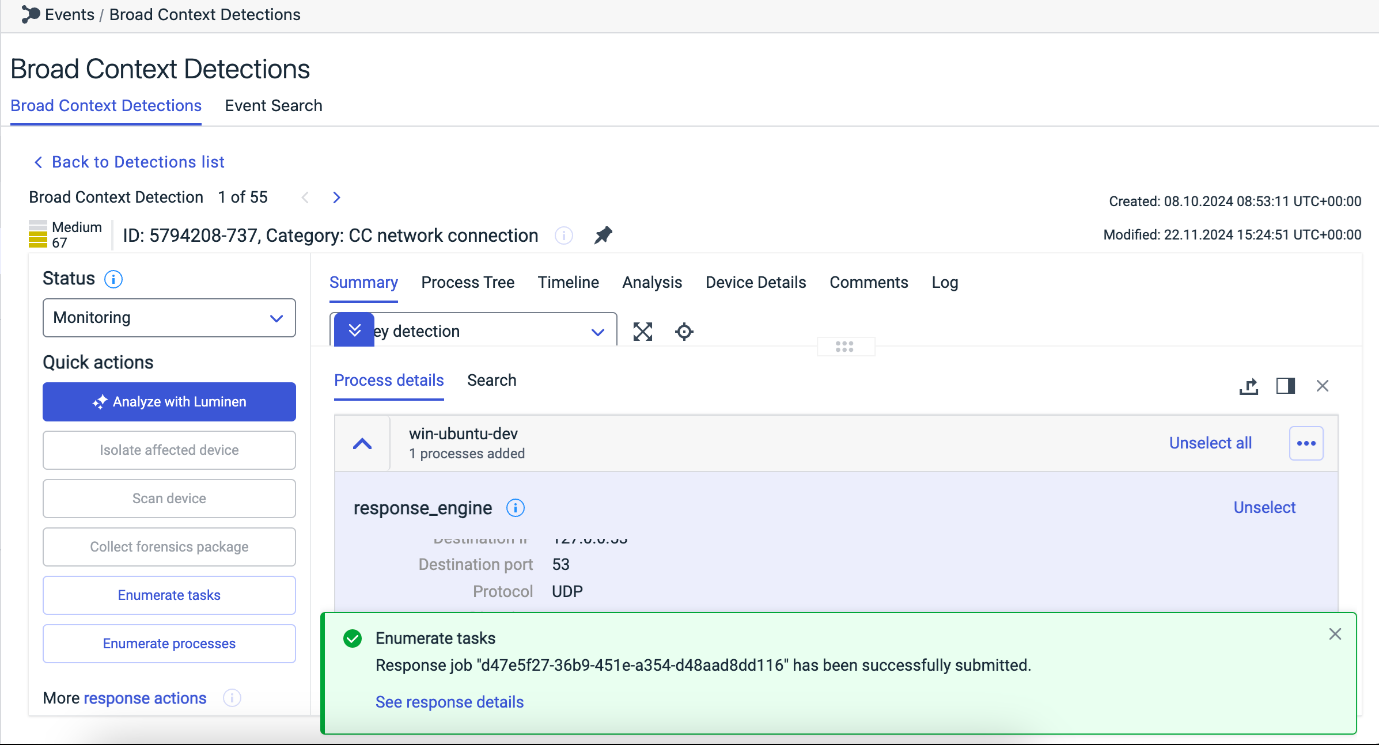
Once the admin triggers a response job, a pop message will be displayed and they can see if the response job was successfully submitted along with the link to the response details
On clicking the “See response details”, admin can view the details of the response job being submitted
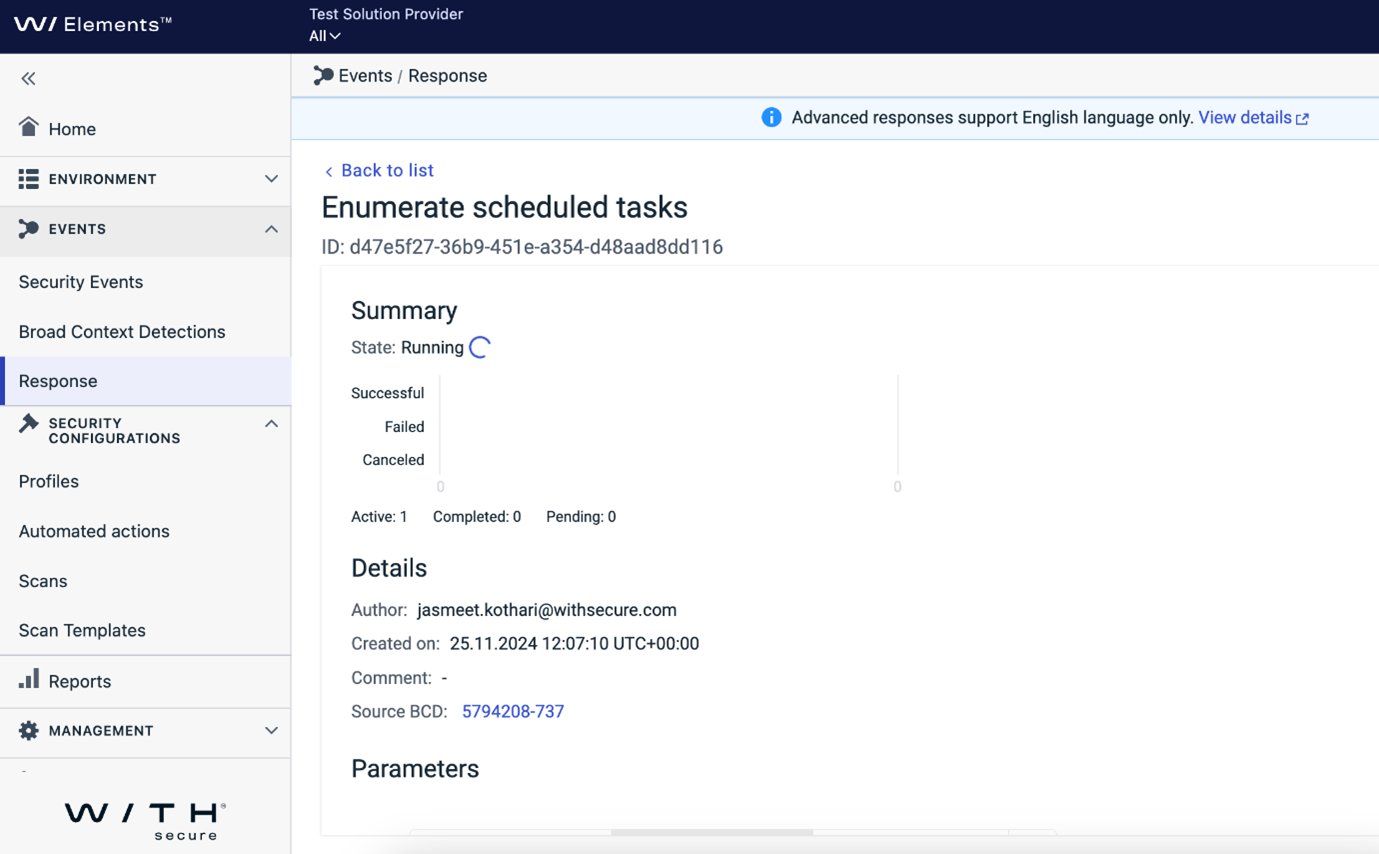
The admin can navigate back to the BCD by clicking the “Source BCD” link.
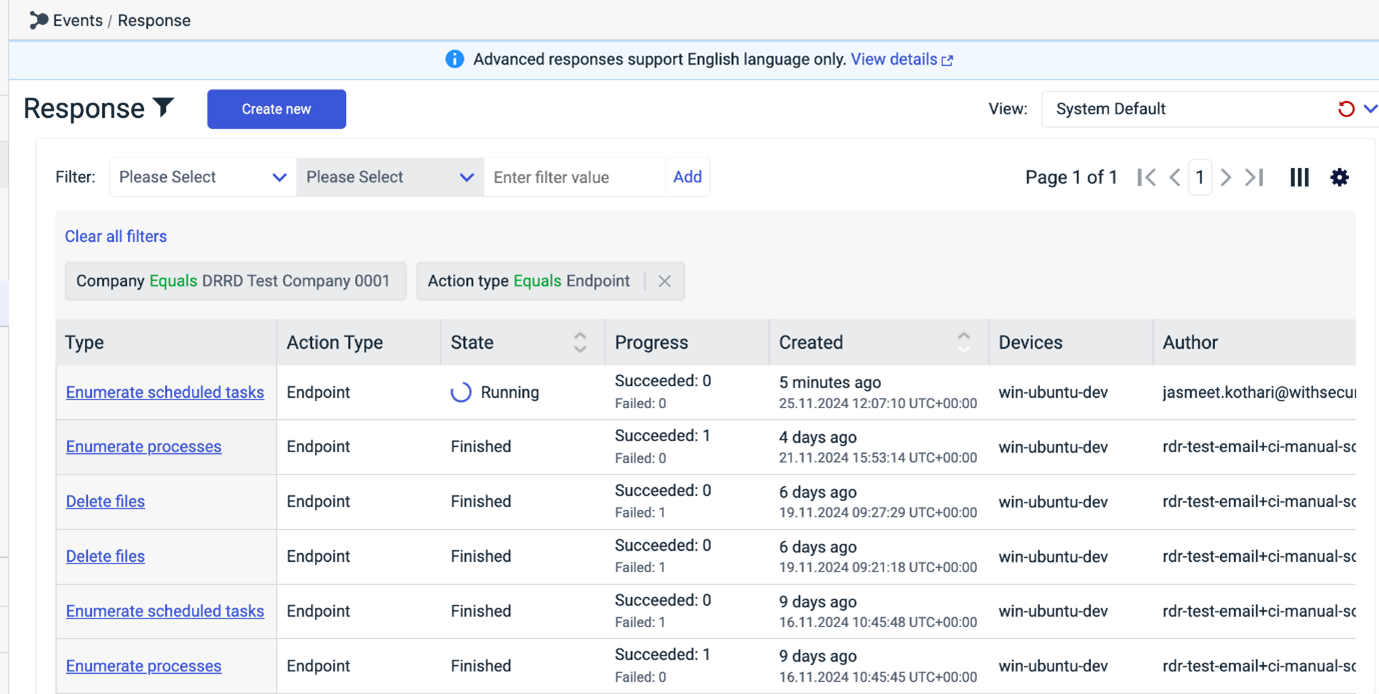
The admin can also view all the responses in the Response view. To see only the Endpoint responses, filter the data by Action Type = ‘Endpoint’.
Identity Security
Updates to Sign-in Detection Model
- Enhanced Location Context: We’ve improved our model to better recognize regular locations, reducing false alerts for impossible travel on a user-by-user basis.
- VPN Awareness: Our model now has enhanced detection for both personal and corporate VPNs. This improvement helps reduce false positives caused by VPN usage, which can make it appear as though you are signing in from a new location when, in fact, you are not. By recognizing VPN patterns, the model can more accurately determine your true location and reduce unnecessary alerts
Reducing Noise in Risk Sign-in Reports (for customers with Microsoft P2 license)
- Fewer Unactionable Alerts: We’ve removed alerts with too many anomalies that don’t require action, making it easier to focus on important issues.
- Suppressing Common Anomalies: We’re now suppressing frequent anomalies from known sources to reduce unnecessary noise.
Exposure Management
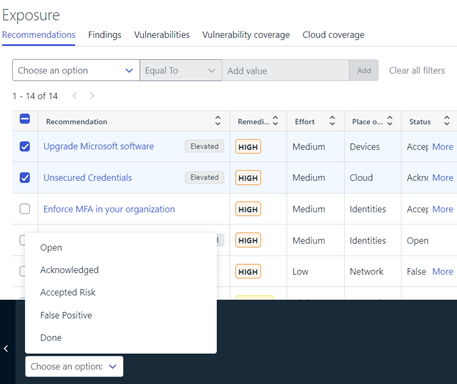
Status of multiple Recommendations can be now set from Recommendation List page
Multiple Recommendation selection will activate the action panel. The status will be saved to the recommendations for further tracking. e.g The status appearing on Home → Exposure widget will show only active recommendations (active recommendation = status not “Done” or “False Positive”)
“Findings in this recommendation” widget changes
This widget on the Recommendation detail page has a new “last seen” column showing the time stamp when last time this finding has been seen. This column gives clearer idea about how fresh the scan results are.
Improved remediation impact score precision
This will help with more accurate distinguishment of recommendations and more enhanced prioritization of them when their remediation impact scores are close to each other.
Identity audit log changes
When user modifies Identity properties such as importance and business context, are now available in Elements Audit Logs. In addition, when user does actions such as elevating a recommendation to WithSecure, these are also included.
Extended logic for checking identity’s MFA status
Correct MFA status is now shown on the Identity with traffic light colors depending on reported MFA status in O365, Portal and elsewhere by Microsoft.
New “Coverage” widget on Home → Exposure Widget
This new widget shows the Exposure Management coverage of a selected company from different angles.

Green Color in each area indicates whether the company has completed WithSecure Exposure Management onboarding successfully and scans are running perfectly on that area.
Orange Color: Indicates that the company has the proper licenses to get onboarded to the Exposure management, but not all configuration or onboarding is complete. in this case, by clicking on the area, user will be taken to a relevant view where the configuration or onboarding can be completed.
Gray Color: Indicates that the company does not have required licenses to get onboarded on the area. In this case, please reach out to the sales staff for more info on how to obtain the relevant license.
Vulnerability Management
EVM: System Scan
The ability to detect vulnerabilities in the following products was added to Authenticated Scanning for Windows:
- Acronis Cyber Files
- Autodesk Revit
- BandiView
- HP Hotkey Support
- Intel oneAPI Base Toolkit
- iTunes for Windows
- NetApp 7-Mode Transition Tool
- Okta Verify for Windows
- Solarwinds Kiwi CatTools
- Splashtop Personal and Business
- Splashtop Software Updater
- Synology Active Backup for Business Agent
- Synology Assistant
- Synology Cloud Station Drive
- Synology Drive Client
- Vagrant VMware Utility
Other items of interest
Threat Highlight Reports: November
Threat Advisory: Citrix Virtual Apps & Desktops (CVE-2024-8068 / CVE-2024-8069)
Citrix released a security advisory on November 12th 2024 regarding a vulnerability affecting their product “Virtual Apps & Desktops”.
The “Citrix session recording” feature of the product has a vulnerable implementation of the networking messaging ability (MSMQ HTTP messaging) used to connect the virtual desktop and Citrix session recording server.
Exploiting the vulnerability allows for privilege escalation to a SYSTEM-level user (as well as impersonating existing users).
Citrix advisory notes that the vulnerability requires certain conditions to be met (namely an authenticated user on the same active directory domain). However, the researchers who disclosed the vulnerability noted that having a session recording server reachable via the internet might allow for successful remote exploitation of the vulnerability.
A proof of concept was released on the same date as the advisory and soon afterwards attempts to exploit the vulnerability have been observed online.
Threat Advisory: Command & Scripting Interpreter
In October 2024 Splunk compiled multiple recent security reports. From this compilation, a technique stands out: Command and Scripting Interpreter (T1059)
This technique leverages the fact that most Operating Systems come with some built-in command-line interface and scripting capabilities.
Adversaries can abuse these technologies in various ways as a mean of executing arbitrary commands.
You can sign up to receive the monthly Threat Reports, with full details of these threats.
Further information
Changelogs and Release Notes for all parts of WithSecure™ Elements can be found at the Help Center.
-
New Feature – Suppress XDR BCDs based on Device Labels
Read more
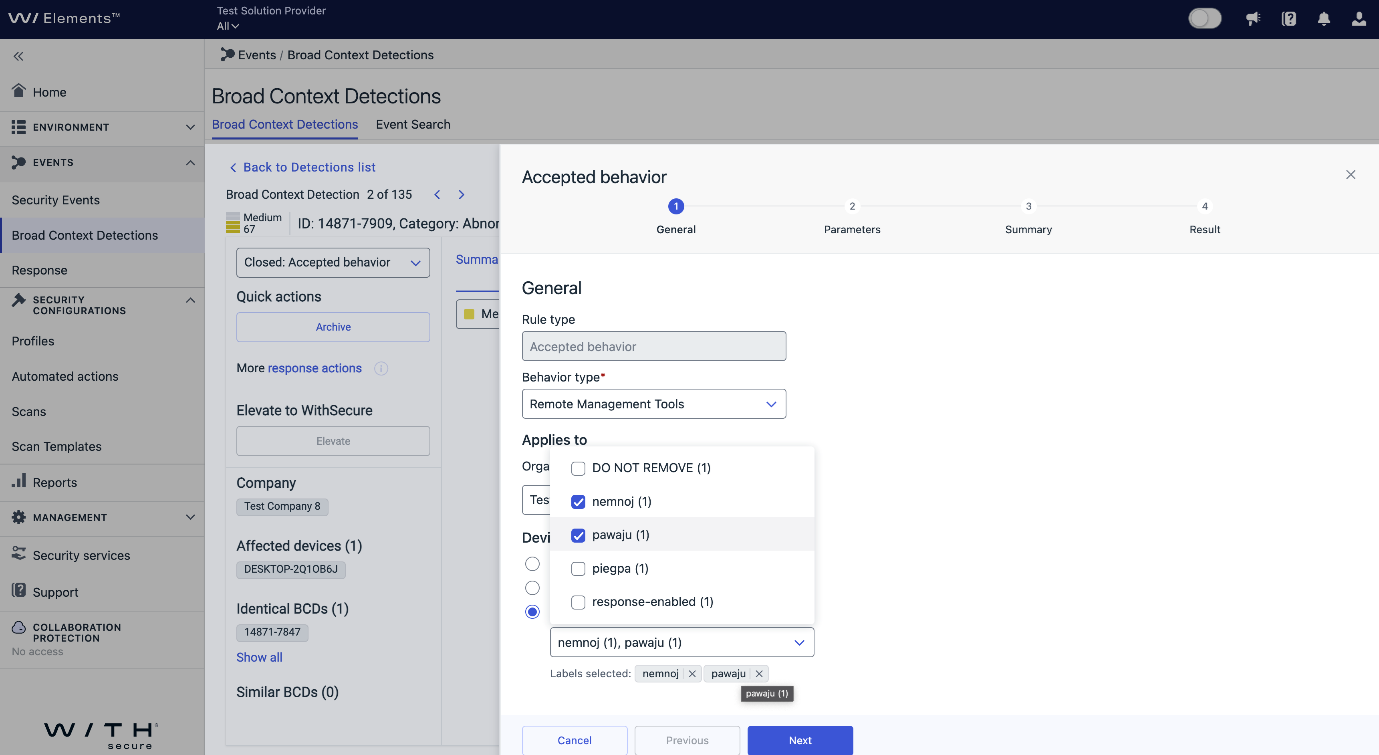
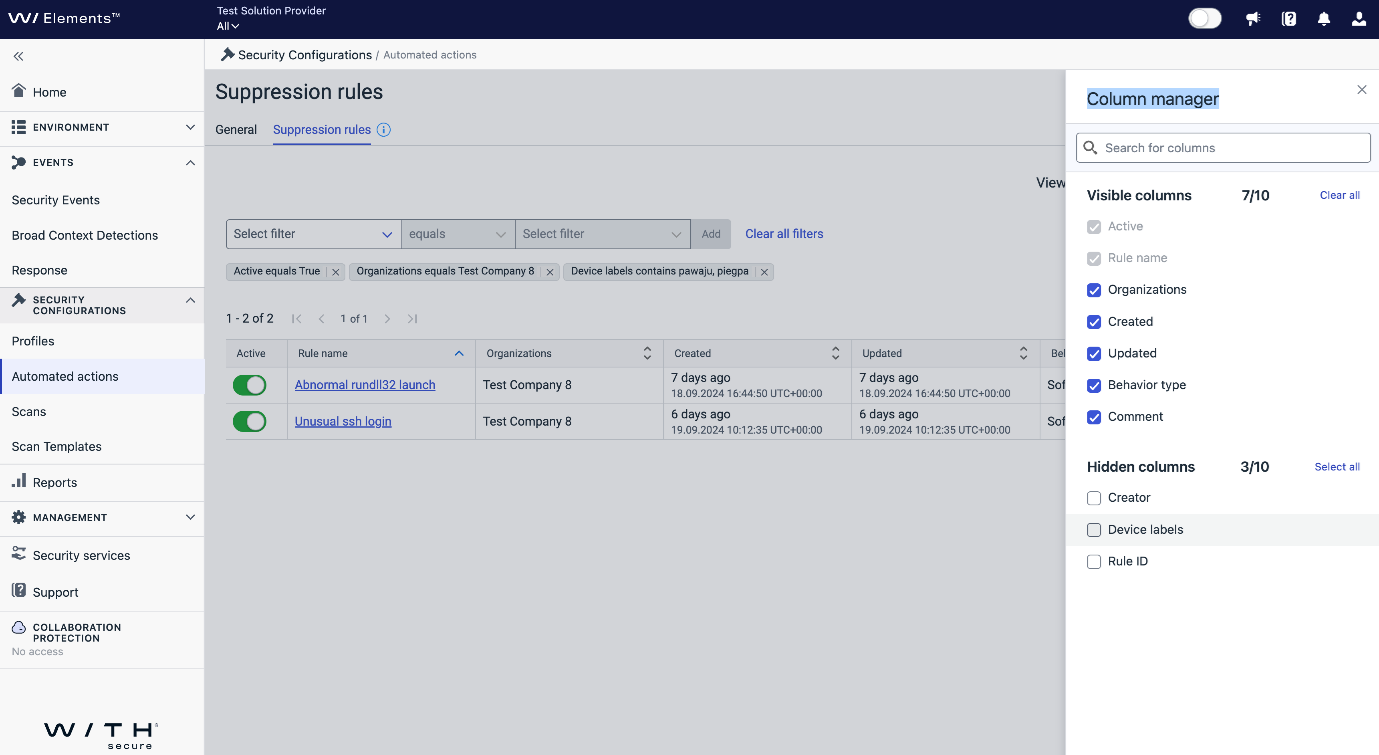
We are excited to introduce a new feature that allows you to apply suppression of Broad Context Detections (BCDs) based on device labels at the company level. This enhancement provides greater flexibility and precision in managing your security environment.
How to Use Device Labels for Accepted Behavior
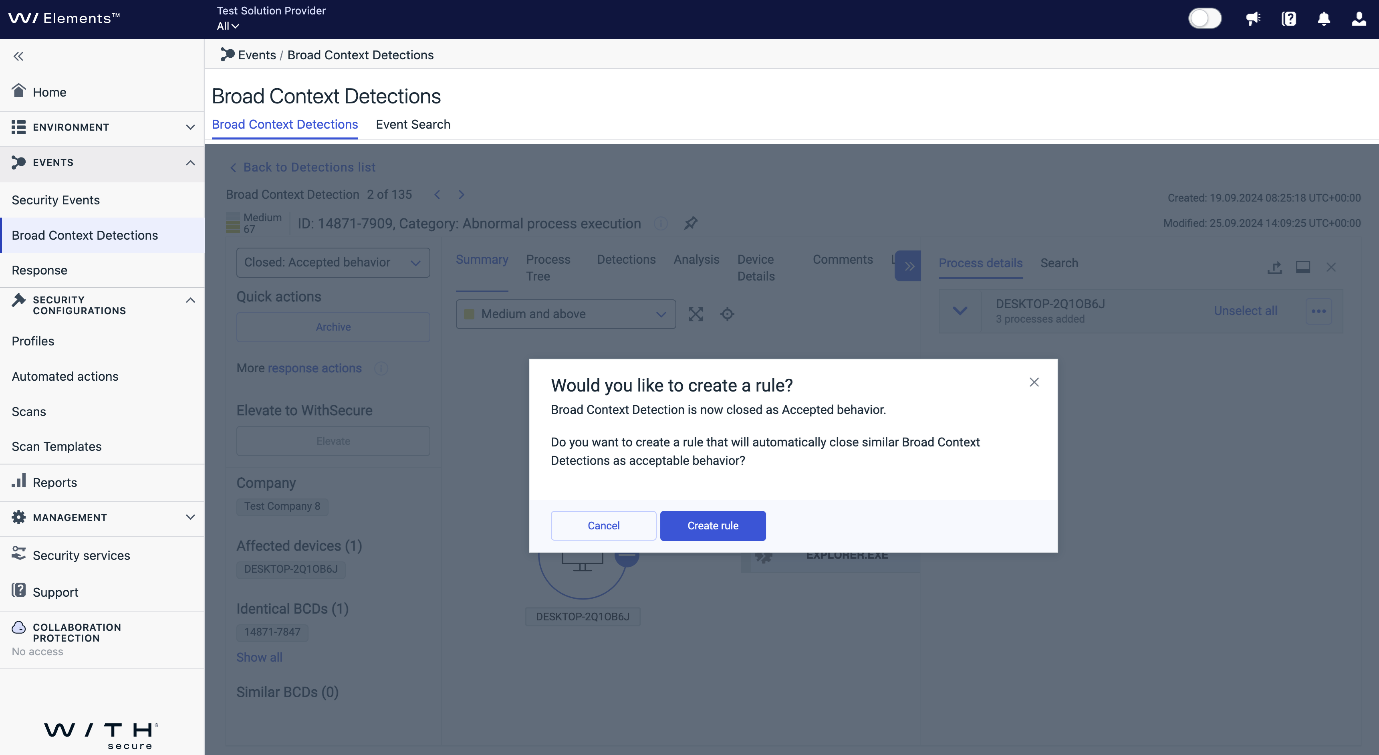
- Select the BCD: Identify the Broad Context Detection (BCD) you would like to silence and close it with the “Accepted Behavior” resolution code.
- Popup Options: A popup will appear, allowing you to choose between closing as a one-time action or creating a suppression rule.
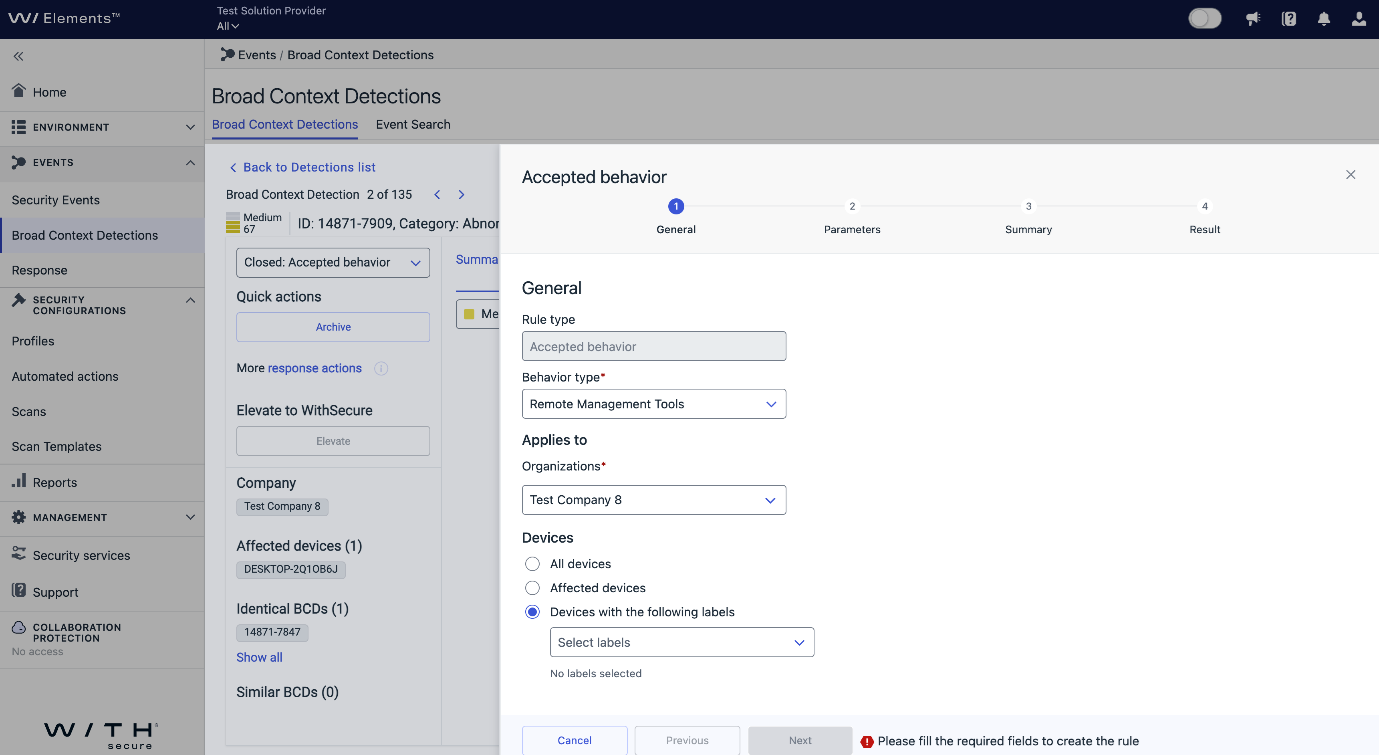
- Suppression Rule Wizard: A wizard will popup, and the option “Devices with the following labels” selection will be visible at the Company level.
- Choose Relevant Labels: Select the relevant labels where you want to apply the suppression for the key detections part of this BCD.
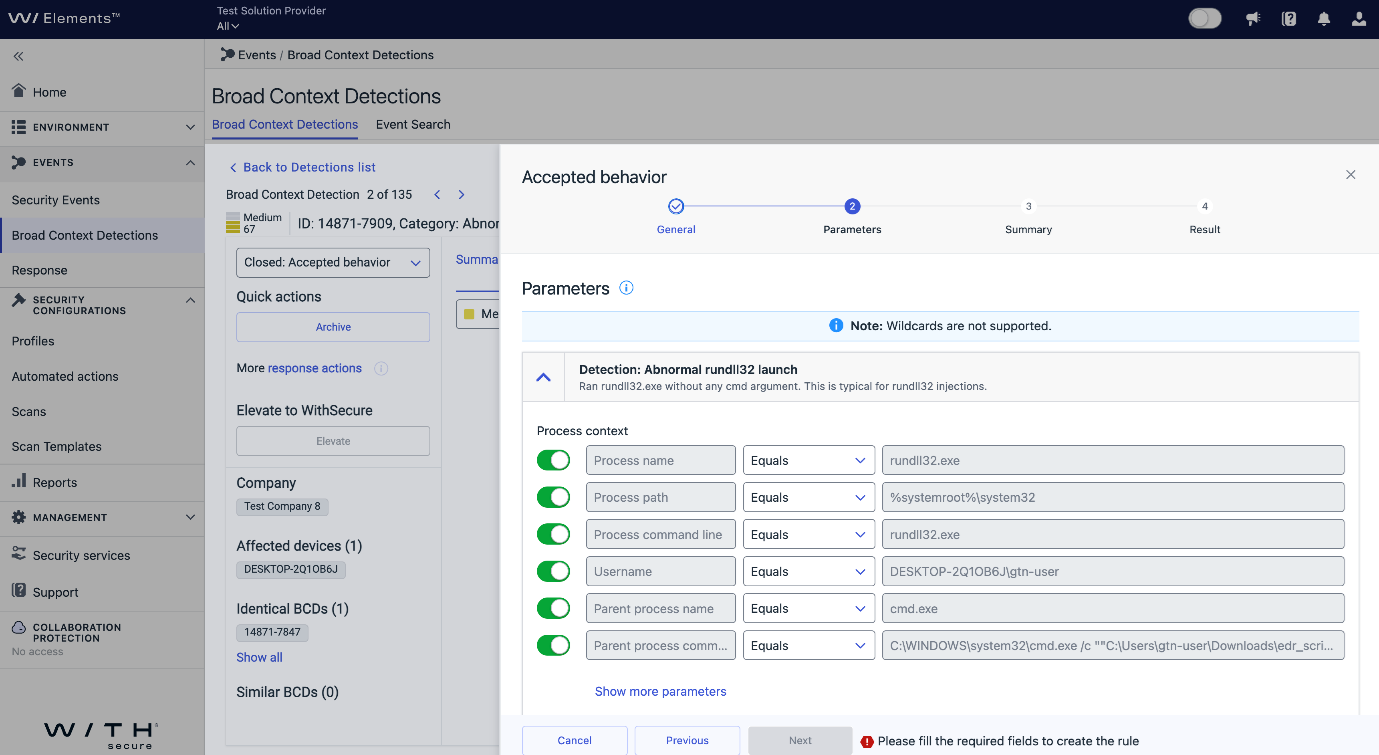
- Review Parameters: Ensure the parameters match the expected outcome of the suppression rule.
- Note: To silence a BCD, all the parameters of each key detection should match the newly created BCD to suppress it.
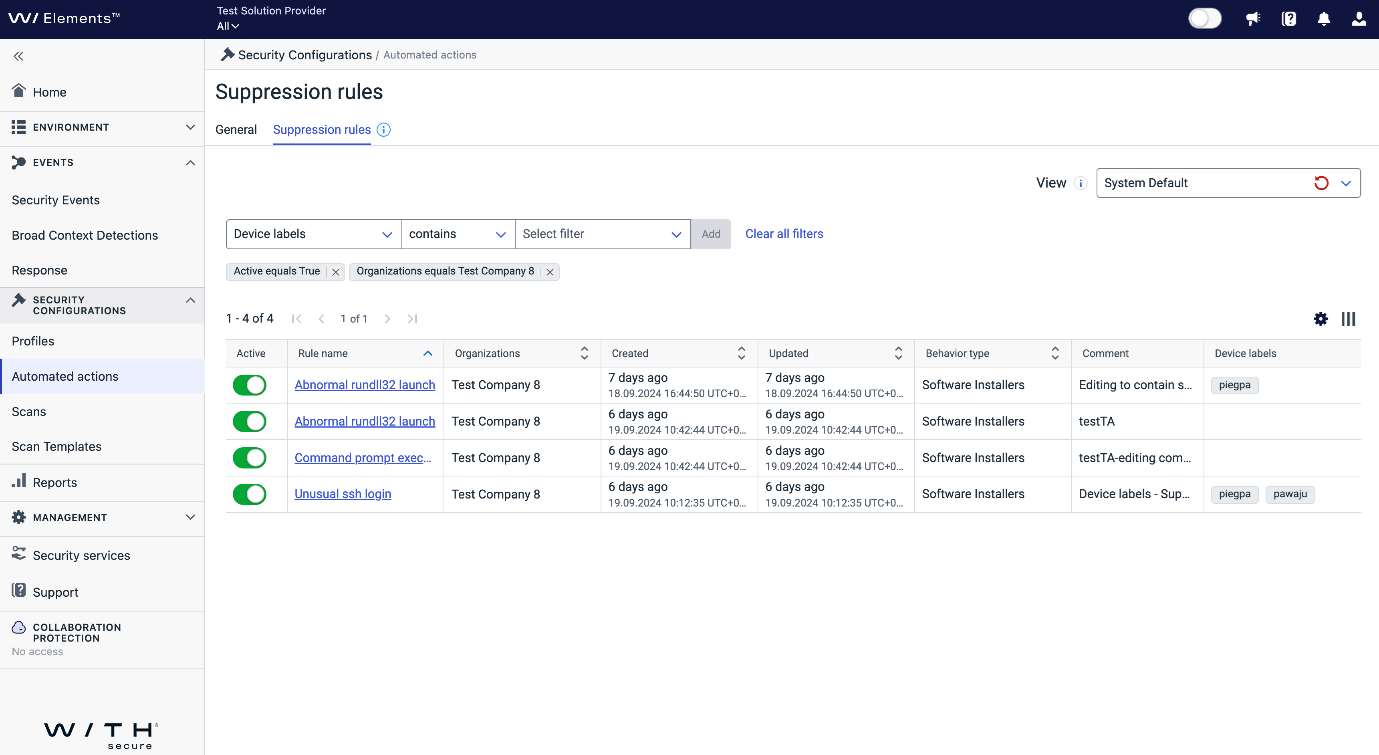
- View Suppression Rules: The newly created suppression rules will be visible in the Security Configurations/Automated Actions/Suppression Rules tab.
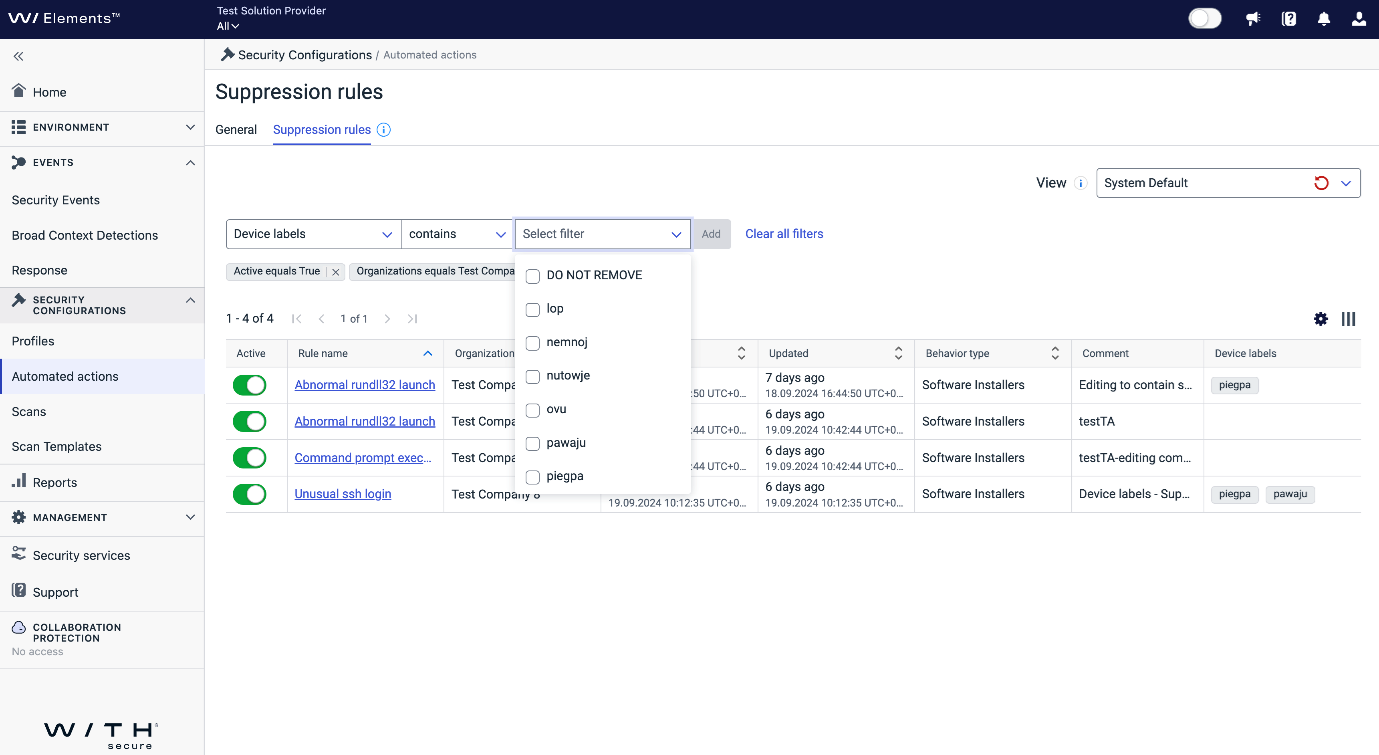
Note: Filtering the suppression rules based on device labels is possible.
This new feature enhances your ability to tailor suppression rules to your organization’s specific needs, ensuring more accurate and effective threat management.
Note: Guidelines on how to add device labels (tags) can be found here.
-
WithSecure Elements Technical Trainings available for everyone
Read more
We are happy to announce that we have now made some of our technical trainings freely available for everyone.
By following the trainings, you can learn more about our Extended Detection and Response and Exposure Management solutions, including:
- How to use the Elements Security Center effectively to manage the solutions
- How to deploy the products that make up the solutions
- How to configure the products
- Daily Administration tasks, including responding to events
And much much more!
Every Elements Administrator should take the trainings that apply to the solutions they use, and for best results we recommend following the trainings in the order they are presented.
For more information on the technical trainings, please visit the Technical Trainings page on our public website. Please note that these trainings are currently only available in English.
-
What’s New in Elements: October 2024
Read more
Editor’s Highlights
Our apologies for the late publication of What’s New in Elements this month, we aim to be back on a more regular schedule next month.
Extended Detection and Response
Endpoint Protection
We have recently made some small but important changes to the Endpoint Protection.
Install software updates remote operation would fail from the Devices view
This has now been fixed to ensure that the operation does not fail
“Computers by operating system” widget
This widget in the “Devices” system view would occasionally display data for mobile devices in the My report page. This has now been resolved
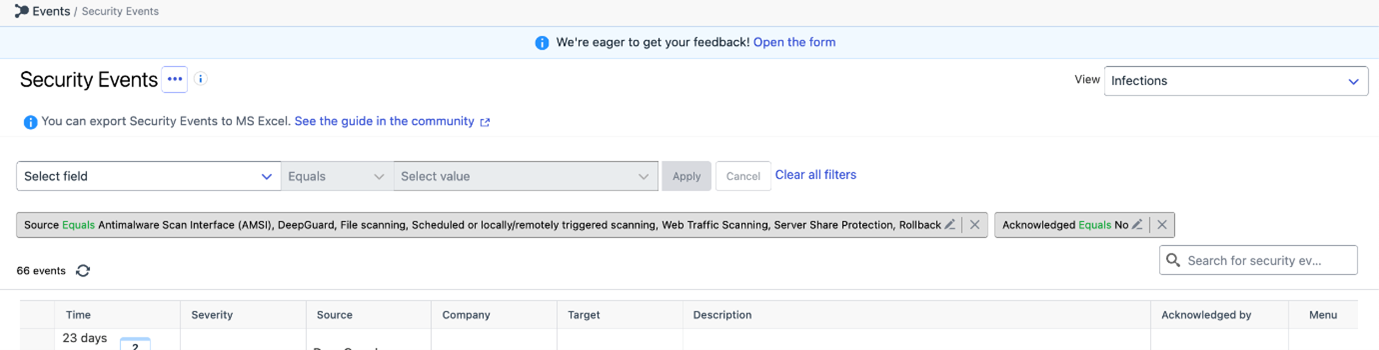
Include rollback into default security event view “infections”
Endpoint Detection and Response
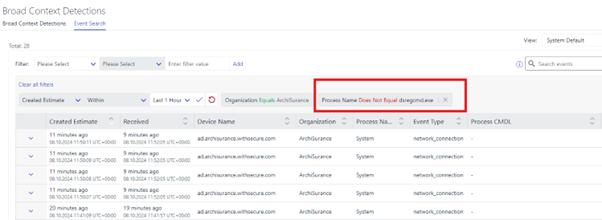
“Not equals” filter added to the Event Search view
This new filter helps admins easily exclude specific events, making it simpler to find exactly what they are looking for. This should help admins enjoy a more streamlined and efficient search experience!
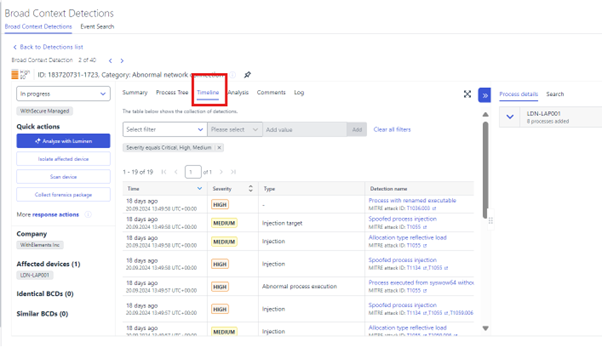
“Timeline” section added to the BCD details view
This feature lists detections in a table format for another alternative view to assist investigation in understanding sequence of events across multiple hosts.
Email and Collaboration Protection
Updated MFA detection methods for compromised accounts
Existing customers would need to re-authenticate Exchange in order to have the MFA status working (the old way of MFA detection was deprecated by Microsoft and therefore this update was needed). A banner will appear for customers who need to re-authenticate.
Exposure Management
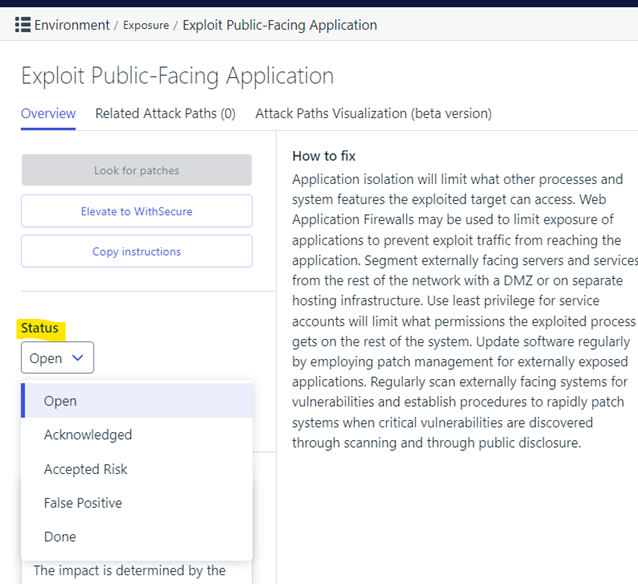
The Status of a Recommendation can be set from Recommendation details page
The status is saved to the Recommendation for further tracking. e.g The status appearing on Home → Exposure widget.
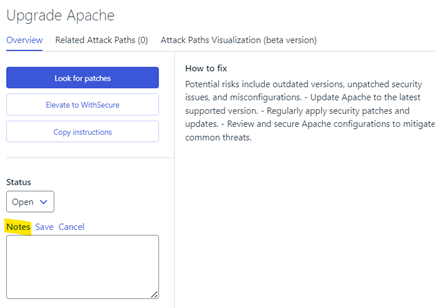
In addition to Status, Notes can be added to each recommendation e.g to give reason about why user has decided to set a specific status to a Recommendation
Vulnerability Management
EVM Portal
User creation has been disabled in Vulnerability Management
As part of the overall consolidation of user account management in WithSecure Elements, the ability to create users within Elements Vulnerability Management has been removed.
The Action button now redirects to Management → Organization Settings → Security Administrators view instead.
In addition, the related Vulnerability Management API endpoints have been marked with “End of Life” attribute.
EVM System Scan
The following products have new or updated detection capabilities within Authenticated Scanning for Windows:
- Apache MINA SSHD
- Apache CFX
- Spring Cloud Skipper
- Spring Security
In addition, we have improved detection of the Microsoft Cumulative Updates. It will now detect not only the missing of the newest security update packages, but it will report every cumulative update since the last time host was updated. This may cause significant raise of critical level vulnerabilities related to Windows Updates.
During scans, the MAC address of the target host is now ignored if it belongs to well known “popular” MAC addresses to avoid unwanted asset merge.
Cloud Security Posture Management
Elements Cloud Security Posture Management: Changelog
A new version of Elements Cloud Security Posture Management was released, bringing the following main changes:
- A fix for the cloud scanner sometimes not completing
- Better names for some cloud assets instead of just the IDs
- New rules for detecting potentially vulnerable MFA configurations using Security Defaults, Conditional Access Policies and individual user settings
Elements Foundations
Elements Security Center
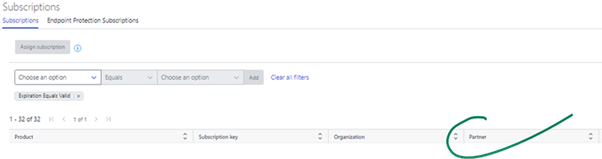
ESC: “Partner” column added to Subscriptions view
A new column ‘Partner’ has been added to the Management → Subscriptions view for SOP level users. When a Solution Provider (SOP) user is logged in, the column indicates which Service Partner (SEP) organization a company subscription belongs to:
ESC: Adjustments to Exposure Management roles
With the introduction of the Exposure Management capability into Elements, the corresponding user roles will be grouped into a single column and details section on the Security Administrators screen. This applies to the Exposure and Vulnerabilities (formerly Vulnerability Management) roles:
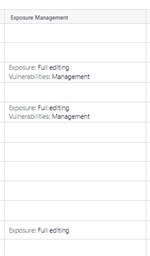
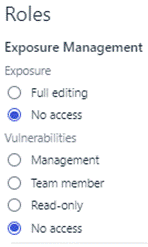
“Vulnerability Management – Admin” role has been renamed to “Exposure Management – Vulnerabilities – Management”.
“Vulnerability Management – Read-only team member” role has been renamed to “Exposure Management – Vulnerabilities – Read-only”.
ESC: Elements IAM role granted to self-registering companies
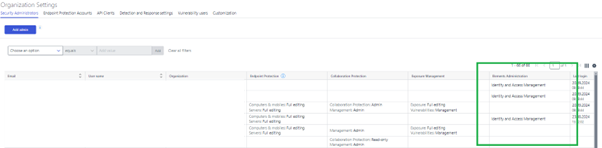
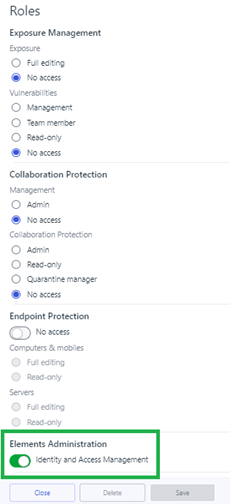
The Identity and Access Management (IAM) role is now visible in the Security Administrators view. This new role is authorized to grant and revoke all Elements permissions for security administrators within the IAM administrator’s organization and affiliated entities.
Currently, this role is granted to self-registering companies, and only other IAM administrators can assign this role to additional users.
We are about to begin the migration process, during which existing users who already have equivalent IAM permissions will be able to claim the IAM role. For more details, refer to the User Guide: Elements Identity and Access Management role | Welcome to WithSecure Elements | Latest | WithSecure User Guides.
Integrations
Elements API: Retrieve Latest Database Versions
We have introduced a new endpoint in the WithSecure Elements API that allows users to retrieve the latest versions of various databases. This endpoint provides up-to-date information on the current versions of databases used within the WithSecure Elements platform.
Endpoint: GET /databases/v1/latest-versions
Details:
- Purpose: Check the latest versions of databases
- Response: Returns a list of databases along with their latest version numbers.
- Usage: Ideal for ensuring that your systems are using the most current database versions for optimal security and performance.
For more information, please refer to the API documentation.
Other items of interest
Threat Highlight Reports: October
Threat Advisory: BlackBasta Internal Helpdesk Social Engineering
WithSecure MDR would like to bring to your attention a new attack type. Ranked as top 20 Ransomware Groups 2024, BlackBasta has been observed using social engineering to trick end-users. Threat actors (TA) via Microsoft Teams are posing as internal helpdesk, contacts employees to assist with ongoing spam, which is perpetrated by BlackBasta itself. During the assistance call the TA requests users to install Remote Monitoring and Management (RMM) tools, such as Anydesk or TeamViewer and starts to download and execute malicious tools on the target.
Threat Advisory: Lumma Stealer Malware
Lumma stealer is currently an active threat, with the malware operators employing multiple initial access techniques, and developers actively enhancing the malware’s capability. In September, it was reported that Lumma’s authors have implemented detailed measures to bypass Chrome’s recently implemented anti-infostealer defenses.
Throughout September, Lumma was reported as being delivered using a paste-and-run technique. A phishing email would direct victims to a CAPTCHA-prompt, which gives instructions for the users to enter Windows keyboard shortcuts that would open a terminal, then paste and run a malicious command inserted into the clipboard by the phishing site
The command causes the victim machine to retrieve and execute a malicious Lumma stealer binary.
Lumma is not exclusively propagated through email. In September, Lumma was also observed being pushed through Github comments masquerading as bug fixes
Threat Advisory: Windows downgrade attack, Kernel driver protection bypass
The technique abuses the windows update process to revert windows components on an up-to-date machine to older versions without the operating system changing the fully patched status.
The technique allows attackers to downgrade security features in the windows kernel, to bypass Driver Signature Enforcement (DSE), and deploy rootkits on fully patched systems
You can sign up to receive the monthly Threat Reports, with full details, at https://www.withsecure.com/en/expertise/research-and-innovation/research/monthly-threat-highlights-report
In case you missed it
Elements Portal: Federated Single Sign-On is now available
We have now introduced support for Federated Single Sign-On (FSSO) to WithSecure Elements.
This will allow users to authenticate and access several applications or services across different domains or organizations without the need to log in separately for each.
For more details of FSSO in WithSecure Elements, please see our dedicated article.
Share your ideas with us
Our purpose is to co-secure the world with you – now as WithSecure™. To co-create the best possible cyber security products and services, we warmly recommend you share your ideas via our Ideas Portal, now accessible directly from WithSecure™ Elements Security Center
Further information
Changelogs and Release Notes for all parts of WithSecure™ Elements can be found at the Help Center
-
Vulnerability Management API: Users management Endpoint Removal
Read more
We are removing two endpoints from the Vulnerability Management API.
Endpoints Affected:
- [POST] api/latest/Users
- [POST] api/integration/Users
These endpoints were meant to create new user accounts.
After 2024.12.01 these endpoints will be removed and no longer supported. The Elements Security Administrators view should be used to create new user accounts.
-
XDR Response Actions – Now available on Mac and Linux
Read more
Earlier, we introduced Response Actions for the Windows version of our XDR client.
With response actions, you can retrieve specific forensic artefacts from endpoints to gather more information and provide further context to an investigation surrounding suspicious events that have been detected. You can also slow down or stop an attacker from achieving their objectives and by containing threats as they are being discovered and blocking them immediately. This can be done to multiple endpoints at the same time if necessary.
These have significantly aided our partners and customers when working with detections, and we have now added Response Actions to our Mac and Linux agents.
To use Advanced Response actions, the feature must be enabled in the profiles used. This setting can be found in the “General” settings of the Windows/Mac/Linux profiles.
Due to the nature of the host operating systems, not all platforms support all of the actions.
Investigative Actions
Response Action
Windows
Mac
Linux
Retrieve Files
Yes
Yes
Yes
Retrieve Powershell History
Yes
Retrieve Event Log Entries
Yes
Retrieve Event Log files
Yes
Retrieve Event Log tracing entries
Yes
Retrieve Anti-Virus logs
Yes
Retrieve browser artifacts
Yes
Retrieve jumplist files
Yes
Retrieve MFT
Yes
Retrieve RDP cache files
Yes
Retrieve registry hives
Yes
Retrieve System Resource Usage Monitor database
Yes
Map registry
Yes
Retrieve MBR
Yes
Retrieve Amcache
Yes
Retrieve Prefetch
Yes
Retrieve Recently Accessed
Yes
Map file system
Yes
Yes
Yes
Netstat
Yes
Yes
Yes
Enumerate processes
Yes
Yes
Yes
Enumerate scheduled tasks
Yes
Enumerate services
Yes
Enumerate WMI persistence
Yes
Process memory dump
Yes
Yes
Full memory dump
Yes
Yes
Test connections
Yes
Containment Actions
Response Action
Windows
Mac
Linux
Kill process
Yes
Yes
Yes
Kill thread
Yes
Remediation Actions
Response Action
Windows
Mac
Linux
Delete files
Yes
Yes
Yes
Delete registry
Yes
Delete scheduled tasks
Yes
Delete services
Yes
Delete WMI persistence
Yes
For more information on the event types, please check the user guide
-
Elements IAM administrator role – Existing administrators can claim the new role
Read more
Recently, we announced a new role for WithSecure Elements called “Identity and Access Management (IAM)”.
We are happy to announce that this role can now be claimed by existing users who already have full administration rights to all organization resources. This “claim” functionality will be available until 30 April 2025.
After April 2025 all IAM related activities, such as account creation or assigning roles, will only be available for users who have the new IAM role. To get the IAM role after April 2025, customers should contact their WithSecure Sales partner in the first instance, or WithSecure Support.
When a user logs into the WithSecure Elements Security Center, the system will check if they already have the needed access rights, and will be prompted to “claim” the new IAM role where applicable.
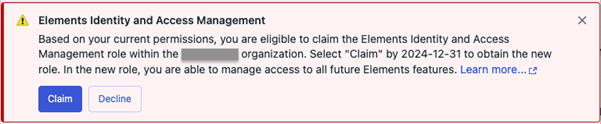
By clicking on “Claim”, they will be granted the new role. Once claimed, the prompt will not be shown for that user again.
If you are not eligible for IAM administrator, for example because of your company policy. click Decline.
Recommendations
As the new IAM role is very powerful, and is used to control access to other roles in the future, there are some things that should be done.
Create (or review) organization policies on user management
As the owner of the IAM role is all-powerful, and able to define who in the organization can perform which tasks, it is important to create and maintain a good policy on who is allowed to do what within Elements.
Claim (or grant) the IAM role for the appropriate people
Once the organization has a policy on granting access to their users, the designated people should claim the IAM role on login. The list of role assignments should be reviewed periodically, adding or removing people from the IAM role as needed.
For more information on the IAM role, please visit the original announcement, or check the User Guide.
-
Luminen: Your chance to provide feedback and improve the service
Read more
We are excited to share that after three months of positive feedback from our Luminen Early Access program, we have now extended this AI-powered functionality to all users for free!
Luminen™ is a generative AI capability embedded in WithSecure™ Elements Cloud. It enhances IT and cybersecurity teams’ situational awareness with natural language explanations of security events and Broad Context Detections™. Luminen™ provides summary reports in the user’s local language and advises on suitable remediations and security posture improvements.
Your feedback is crucial in helping us refine and improve Luminen. By sharing your insights through a short survey, you directly contribute to enhancing the user experience for everyone. The survey is open now and will run until Friday, 22nd of November. We look forward to your valuable insights!
The survey is anonymous, and WithSecure will treat your responses confidentially, You can read our privacy policy here.
You can find more information about Luminen here.
Thank you for your time and attention!
Take the survey: https://www.survey.withsecure.com/jfe/form/SV_erDl28gOdUPyDem