
-
WithSecure Ultralight Core Update
Read more
This notice relates to an upcoming release of Ultralight core that is expected to go to GA production on Thursday the 16th of April 2026.
During deployment, the update process may take slightly longer than usual, and in some cases the end-user might see a warning pop-up notification momentarily while the update is in progress.
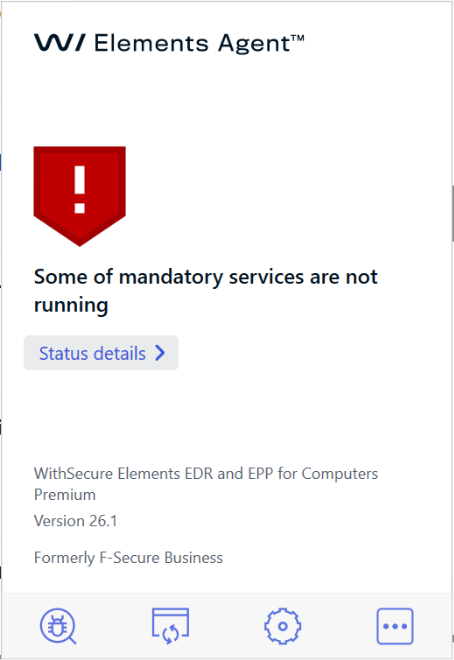
Third-party monitoring or compliance tools may also observe temporary warning messages or a brief change in compliance status during the update.
This is expected while the update is in progress and should return to normal once the update is completed.
If the pop-up remains visible or the update does not complete after a reasonable period, please contact your support channel for assistance.
-
Composite rule support for Outbreak Rules
Read more
We are now adding support for composite rules to the existing Outbreak Rules functionality, along with new conditions. These will allow for an outbreak rule to apply when two or more conditions are met, rather than a single condition in isolation.
We expect this functionality to be available for all customers on 2026-04-23.
How it works?
As an example, a rule could be added that would trigger if a device was both on the public internet and had critical vulnerabilities.
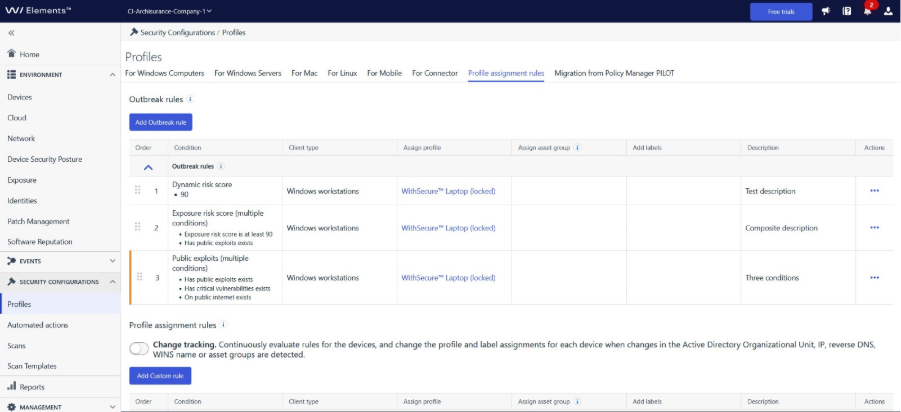
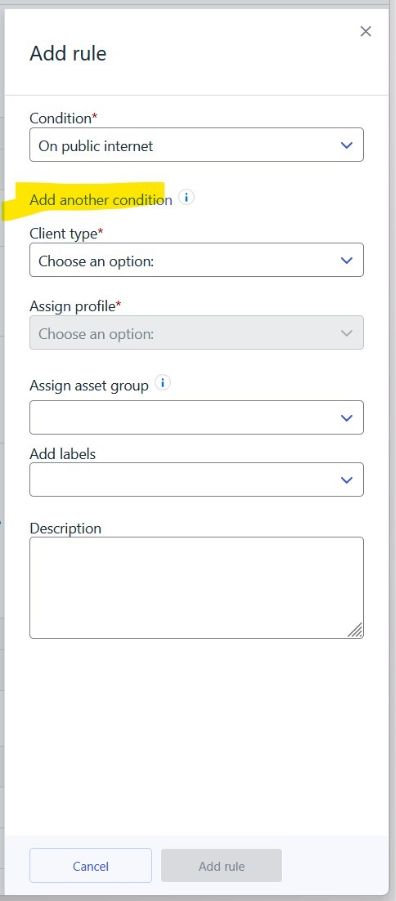
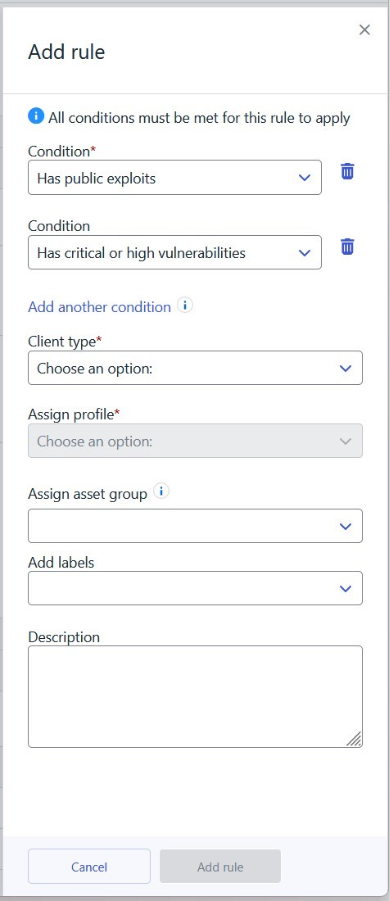
The new outbreak control conditions are as follows:
- Has public exploits
- Has critical vulnerabilities
- Has critical or high vulnerabilities
- Exposure Risk score
Additional notes
The existing Dynamic Risk score condition is being deprecated in favour of the Exposure Risk score. Existing rules will not be modified in this process and will work as before, but it will no longer be possible to assign Dynamic Risk score conditions to new rules. It will still be possible to edit existing rules.
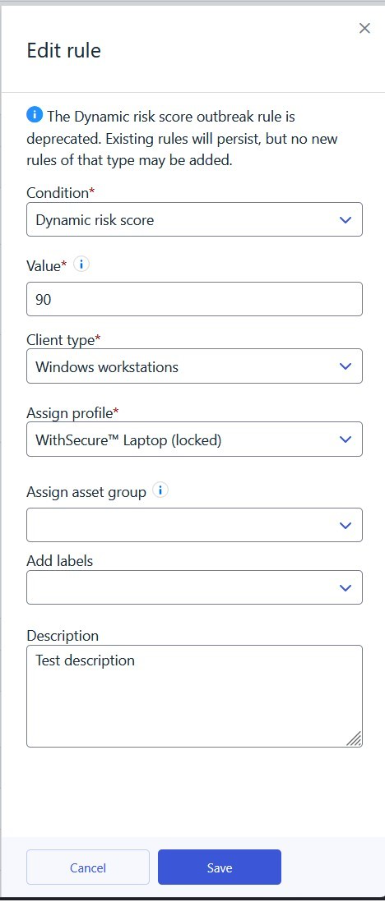
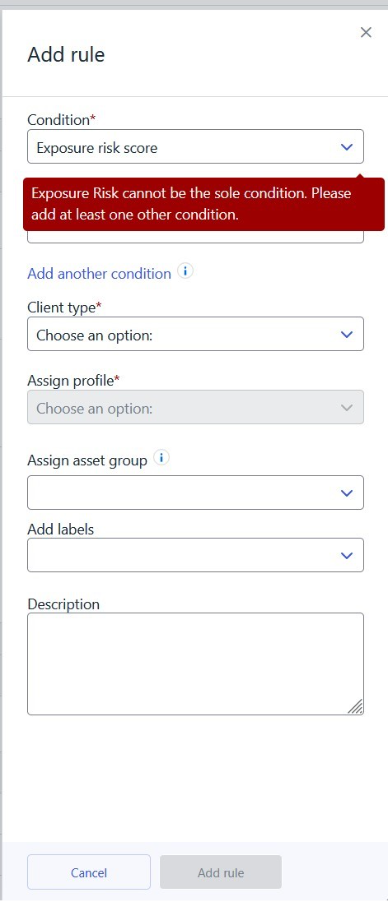
In some circumstances it may be difficult to reduce the Exposure Risk score; for this reason, that condition will be restricted to composite rules initially.
-
Detection & Response Report generation to be disabled
Read more
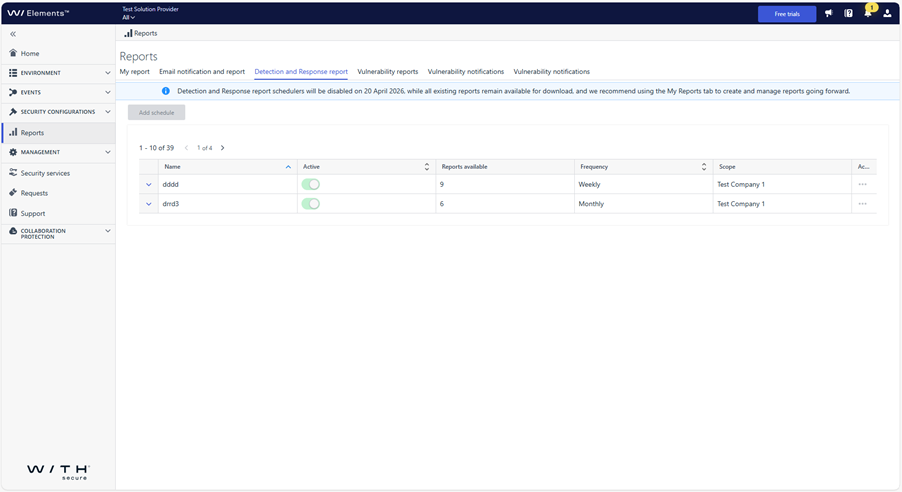
As part of our unification process for WithSecure Elements, we will be disabling the generation of new reports for the Detection & Response Reports view on the 20th April 2026.
The existing reports will still be available to download.
The Detection & Response Reports view is deprecated, and we recommend using the My report tab as the main place to work with reports.
-
What’s New in Elements – February 2026
Read more
Extended Detection and Response
Endpoint Protection
WithSecure Agent for Windows and Server
A new version of the endpoint clients is available and this release makes the Elements Agent version 26.1 available (internal version 26.1.549).
The endpoints automatically upgrade, without a reboot.
This release introduces new features
- Windows License Status is displayed under Security Parameters in the portal UI.

- SHA256 is now included in more security events.
- DataGuard icon changed to look more lightweight
- DriveProtector/BitLocker minor improvements
- Profile and definitions are downloaded faster if network configuration has changed (earlier network configuration did not affect at all and all checks were according to schedule)
- Allow untrusted browsers setting enables access from non-trusted browsers (requires portal too)
- Report AD guid if set
- Fix for Malware Protection reporting Disabled for healthy hosts
- Increase remote wsdiag size limit to 512 Mb (previously it was just 200Mb)
- Quarantine release tooltips explain file restoration reasons
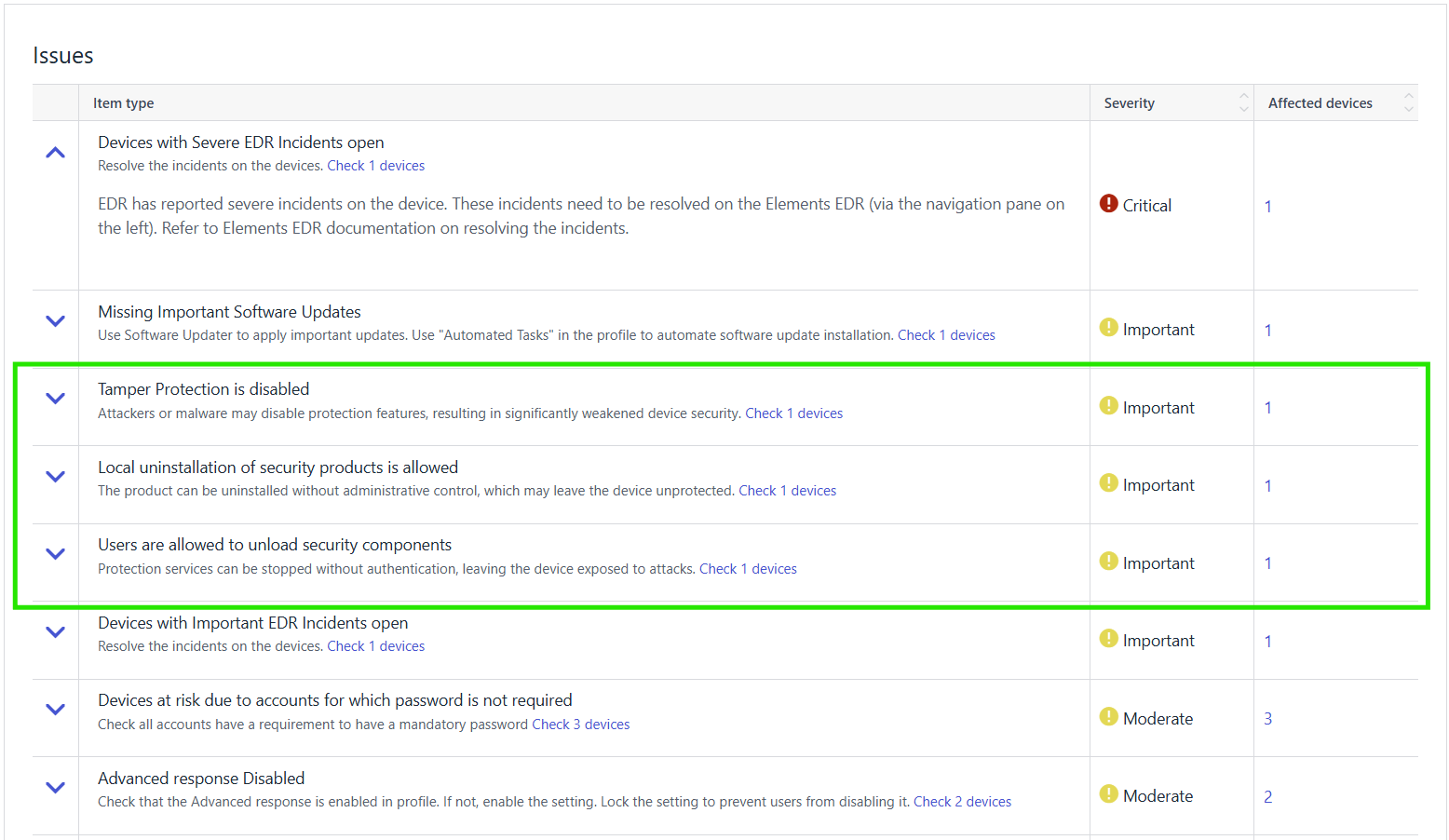
- New host issue detection and reporting for insecure configuration allowing Agent uninstallation (Empty uninstallation password status detection and reporting requires the portal release as well)
WithSecure Agent for MacOS
WithSecure Elements Agent macOS 26.1.55351 has been released.
This release brings
- Performance improvements in wsagent
- New response version with python 3.12
- Client side support for software inventory feature (available later in 2026)
Bug fixes
- “Allow” button in Browsing Protection is not clickable
Installer can be downloaded from
https://download.withsecure.com/PSB/latest/ElementsAgentInstaller.mpkg
Elements Agent macOS 26.1.55351 supports following macOS versions:
- macOS 26 Tahoe
- macOS 15 Sequoia
- macOS 14 Sonoma
WithSecure Agent for Mobile for Android
An update to the WithSecure Elements Mobile Protection app for Android (26.2.0023541) has been released.
Fixed issues:
- Fixed an issue where browser traffic was not captured on ChromeOS devices
- Fixed an issue where the last status update was showing an incorrect date
- Fixed an issue where all browser traffic was blocked in Mozilla Firefox
WithSecure Agent for Mobile IOS
An update to the WithSecure Elements Mobile Protection app for iOS (26.2.12082) has been released.
Improvements and bug fixes:
- New information alerts:
- Diagnostic file permission request
- Push notifications permission request
- Subscription will expire soon
- Network connectivity issues
- Critical bug fix for early logout on some big screen devices
- iOS 26 glass design disabled for better presentation
- Minor bugfixes and optimisations
Exposure Management
Exposure Management for Business
WithSecure Exposure Management Portal
An update has been made to the Exposure Management portal.
Changes include:
- Resolved multiple issues related to asset data inconsistency in Devices and Exposure Management views.
- Overall performance and security improvements.
- Agent scanning is now automatically enabled for all devices – both new and existing – in organizations with a newly activated Exposure Management subscription. No user action is required to initiate scanning on devices where the Elements Agent is already installed.
- Resolved an issue that prevented the asset risk score from being recalculated.
- Resolved an issue where vulnerability counters were not updating correctly in the following views:Devices → ComputersDevices → Unmanaged devices
- Resolved an issue that caused summary reports to remain stuck in the “Generating” state.
- Multiple security improvements.
- Unmanaged devices automatic tagging though automatic profile assignment rules have been added
WithSecure Exposure Management System Scan
Support for detecting vulnerabilities in the following products was added to Authenticated Scanning:
- Amazon S3 Encryption Client Java
- Apache Hadoop HDFS native client
- Apache SIS metadata
- Beats edition
- Dromara SaToken
- Spring Cloud Gateway Server MVC
- XStream
Support for detecting vulnerabilities in the following products was added to Authenticated Scanning for Windows:
- Acronis Cloud Manager
- Acronis True Image for Western Digital and for SanDisk
- AI Playground
- AnythingLLM
- ASUS Live Update
- DBeaver
- ESET Management Agent
- Fujitsu ServerView Agents
- Intel Killer Performance Suite
- IPTInstaller
- Kiro IDE
- NordVPN
- NXLog agent
- Soda PDF Desktop
- PDF Architect
- PDFsam Enhanced
- RustDesk Client for Windows
- SketchUp
- Synology Presto Client
- WD Discovery
- Whale browser
In case you missed it
Introducing Luminen Monthly Security Executive Summary Reports
As part of our growing use of Luminen Generative AI inside WithSecure Elements, we have now added Executive Summary Reports to the suite.
You can find out more details about this in this dedicated article.
Share your ideas with us
Our purpose is to co-secure the world with you – now as WithSecure™. To co-create the best possible cyber security products and services, we warmly recommend you share your ideas via the Ideas section of the WithSecure Community, now accessible directly from WithSecure™ Elements Security Center.
Further information
Changelogs and Release Notes for all parts of WithSecure™ Elements can be found at the Help Center
-
Extended Tamper Protection for WithSecure XDR products for Windows
Read more
With the latest release of Windows Sensor 2026.1, we introduced further tamper protection capabilities in our XDR products for Windows, including WithSecure EDR and WithSecure MDR.
With the rise of “EDRSilencers” being used to block communications from XDR to the backend systems, we have introduced a secondary way of communicating to the WithSecure servers. If the network connection to our sensor gets blocked, automatic steps are taken to restore communication.
In addition, we also will send an event of type “emergency_event” to inform the backend about changes made to the windows firewall.
Actions needed:
If you, as an administrator are monitoring your processes in the systems – make sure to update your monitoring and alerting to facilitate this new use case.
-
What’s New in Elements – January 2026
Read more
Editor’s Highlights
Apologies for a late publication of the January 2026 edition of What’s New in Elements. We hope this information is still important for you
Extended Detection and Response
Endpoint Protection
WithSecure Agent for Mobile Protection for Android
An update to the WithSecure Elements Mobile Protection app for Android (26.1.0023467) has been completed 12 January 2026.
It includes the following new features and improvements:
- Reverted temporary support for Android 12
WithSecure Agent for Linux
New Linux Security 64 and Elements Agent installers have been released (2026-01-14)
The new product installers released are as follows:
- Linux Security 64 Policy Manager installation package version 5.0.15, compatible with Policy Manager Server version 16.00 and above.
- WithSecure Elements Agent for Servers.
The updates fix several installation issues and removes compatibility with no longer supported Policy Manager versions.
If you have already successfully installed the product, there is no need to download or install these packages. The product installer is only needed for the initial setup process and does not need to be kept up to date afterwards.
WithSecure Client Security for Mac
Client Security for macOS v16.03 has been released to general availability (GA) on 19th of January 2026.
This release brings following new features:
- macOS 26 (Tahoe) support
- macOS 26 compatible icons
- Minimum required macOS version is now macOS 14
- Accessing SecurityCloud uses macOS native networking libraries
Fixed issues
- Fixes crashes in following components; wsuplinkd, wssettingsd, wssecuritycloudd and wsbootstrapnative
- ‘Allow new system extension’ dialog led to the incorrect settings page
- Chrome browsing protection was always shown as disabled in Elements Security Center and in local GUI
- Open Settings button was not localized properly
- Allow button in Browsing Protection was not ‘clickable’
WithSecure Agent for Mobile Protection for iOS
An update to the WithSecure Elements Mobile Protection app for iOS (26.1.12041) has been finalized 21.01.2026.
Fixed issues
- Improvements to Apple CarPlay compatibility with Network Gateway.
- Improvements to web content filtering and exception handling.
- Improvements to log file management.
- Improvements to security event reporting.
Important: Support for the following iOS versions was removed:
- iOS 15
- iOS 16
Email and Collaboration Protection
Exchange Application Permissions Update
The Collaboration Protection Exchange application has been updated with a new set of permissions in preparation for upcoming support for Microsoft Graph API. As a result, tenants already configured in the service may require re‑authorization.
When updated permissions are needed for one or more tenants, the Collaboration protection portal will display a banner prompting administrators to refresh the Exchange application permissions.
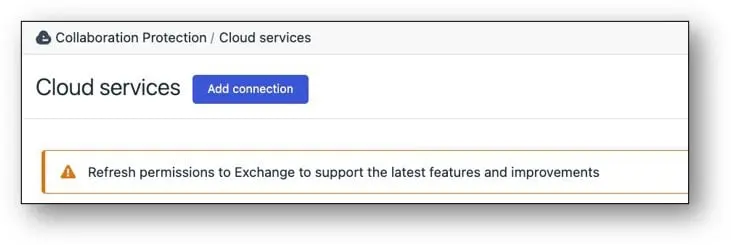
Please follow the on‑screen flow on Cloud services page to accept the new permissions, or refer to the Elements Collaboration Protection User Guide for detailed instructions on service authorization.
Exposure Management
Newly released functionality includes updates in the Identity onboarding process and Recommendations page partner level view:
Near Real-Time Identities for Newly Onboarded Tenants
Identity onboarding process has been improved. Until now, the list of identities for a newly onboarded Microsoft Entra tenant could take up to 24 hours to populate. With our new functionality, list of identities will populate in near real-time for successfully onboarded tenant. Instead of waiting hours, the process now completes in minutes, depending on scanning time and current processing queues.
This improvement is part of our ongoing commitment to provide up to date data in near real time including changes in the Identities data. Stay tuned for more updates as we continue to work on the improvements!
Recommendation list – partner level view
Recommendation list (Environment -> Exposure -> Recommendations) page is now available in the partner level views also. Page contains a list of recommendations for all organizations for which partner has access to.
Exposure Management for Business
WithSecure Vulnerability Management Portal
We have implemented many fixes to the portal, including
- Disabled editing of asset properties in preparation for migration to Devices → Computers and Devices → Unmanaged Devices views.
- Removed “archive assets period” and “store assets period” settings in preparation for migration to Devices → Computers and Devices → Unmanaged Devices views.
- Disabled the Vulnerability Users page and related API; use Security Administrators instead.
- Removed account locking after multiple failed API key attempts.
- API keys are now locked after 50 failed attempts, improving security without blocking the entire account.
- Agent scanning will now be automatically enabled for all new devices in companies with Vulnerability Management or Exposure Management subscriptions as soon as they are installed. This means no user interaction is needed to start scanning.
- Resolved issues with asset data inconsistencies between Exposure views and Devices views.
- Resolved issues with exporting scan reports in XML and DOCX formats.
- Resolved issues with computing weekly vulnerability statistics for the last week of the previous year and the first week of the new year.
- Resolved an issue in XLSX summary report. Cells in Platform Vulnerabilities tab are merged properly.
- Resolved an issue with reply-to field in email notifications. The field is empty now.
- Resolved an issue with delays occurring during automatic agent scanning enablement.
- Overall security improvements.
- Integrated asset retention mechanism with Devices → Computers view, Devices → Unmanaged Devices view. Devices removed from these views will be permanently deleted from the VM portal and Exposure Management views after 30 days.
- Overall performance improvements.
System Scan
Support for detecting vulnerabilities in the following products was added to Authenticated Scanning for Windows:
- Apache Tika core
- Apache Tika PDF parser module
- Control-M/Agent
- Eaton Intelligent Power Manager
- IBM App Connect Enterprise (ACE)
- IBM Semeru Runtime
Elements Foundations
Elements Security Center
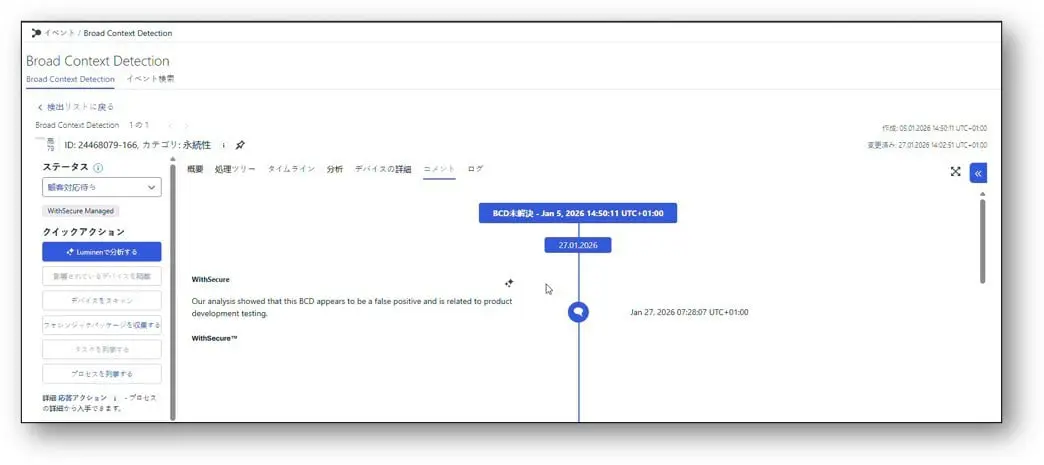
To make it easier for our Japanese MDR customers to work in their native language, we are introducing AI-powered on-demand translation for communication in elevated BCDs in Elements.
Starting from 1 February 2026, customers with an active MDR service and the Elements user interface set to Japanese will be able to exchange messages with analysts in elevated BCDs in Japanese, with translations provided on demand by an approved AI (LLM) service.
What is changing?
- In the BCD details view in Elements, users will see new options to translate comments on demand:
- from English to Japanese, and
- from Japanese to English.
- Japanese-speaking users can write and read BCD comments in their native language, while still being able to request an English version when needed.
- Translations are not automatic in the background – they are triggered explicitly by the user for each comment via dedicated translation buttons.
What does this mean for you?
- If you are an MDR customer using Elements in Japanese, communication in elevated BCDs becomes clearer, more natural, and easier to follow in your own language.
- You keep full control over when translations are requested, allowing you to focus on the comments that matter most.
- The way you work with elevated BCDs in Elements stays familiar – this enhancement adds a convenient translation capability on top of your existing experience, without introducing new complexity into your daily workflow.
We believe this improvement will significantly enhance the day-to-day experience of our Japanese MDR customers and pave the way for further localization and usability enhancements in the future.
Integrations
Elements API
Product related Security Events
The latest Elements API release brings new (WithSecure) Product Security Events.
The following new events are now supported:
- Product has been uninstalled successfully
- Product uninstallation has been canceled
- Product uninstallation has failed due to incorrect uninstallation password
- Product uninstallation has failed due to unknown reason
- Product uninstallation is not allowed
More information with examples is available in the Security Events reference page.
New device operations for categorization 2026-01-27
The latest Elements API release brings new device operations for helping in categorization of devices.
The following new device operations are now supported:
- Set a custom alias name for a device. This allows you to assign a human-readable name to a device for easier identification
- Set the importance level of devices. This helps prioritize devices based on their criticality to your organization
- Set business context information for a device. This allows you to associate devices with specific business units, departments, or purposes to help with organization and reporting
- Set device labels. This allows to you to categorize devices with custom labels
See the full Element API specification from here.
WithSecure Commercial API
The descriptions for the Create New Subscription and Change Subscription API endpoints were updated to better reflect their purpose and supported operations. No changes were made to request or response parameters.
Documentation-Only Updates to Endpoint Descriptions:
Create New Subscription
Provision a new Total Volume subscription for a new or existing licensee. This endpoint may also be used to grant access to an admin user in the Elements Security Center or to change the licensee (company) name. Granting access and changing the name can only be completed as part of a subscription creation request.
Change Subscription
Make changes to an existing Total Volume subscription. This endpoint may also be used to grant access to an admin user in the Elements Security Center as part of a subscription change request.
Other items of interest
WithSecure™ Labs – To the past and beyond: Andariel’s latest arsenal and cyberattacks
Executive Summary
WithSecure proactively identified and notified a European customer belonging to the public/legal sector of a breach attributed with high confidence to the Andariel group, a state-sponsored cyber group linked to the Reconnaissance General Bureau (RGB) 3rd bureau of Democratic People’s Republic of Korea (DPRK).
The attribution was based on the threat actor’s usage of unique malware, such as TigerRAT, command execution patterns, infrastructure linkages, and other technical and non-technical evidence that linked it to previous reports of Andariel activity.
We assess that the primary goal of this breach was cyberespionage. This was determined based on the group’s past objectives and the intrusion activity, but most notably the threat actor accessing documents relating to anti-money laundering on the victim host. DPRK is notoriously known for its money-laundering activity to evade international sanctions.
This investigation led WithSecure to the discovery of another set of attack conducted by this group against an Enterprise Resource Planning (ERP) software in Republic of Korea (ROK) in 2025. WithSecure determined that this particular ERP software had been a previous target of Andariel in 2017 and almost certainly again in 2024.
This further on led to the discovery of three new, previously undocumented RATs that WithSecure attributes to Andariel, namely StarshellRAT, JelusRAT, and GopherRAT.
The investigation also led WithSecure to discover a staging server used by the group. Through this staging server, we were able to find additional artifacts related to both attacks. We also discovered a mix of new and old techniques and tooling used by the group to conduct their latest attacks, including privilege escalation tools such as PrintSpoofer and PetitPotato, and the abuse of the trending bring-your-own-vulnerable-driver (BYOVD) technique that is used by other threat actors to kill AV/EDR products.
This report provides details on the two cyberattacks we investigated and analysis of the artifacts we found across the two attacks and on the staging server. WithSecure has engaged governments and select partners with advanced copies of this report.
Read more about it HERE
In case you missed it
New Feature: Notification Hub
We are introducing a new, centralized Notification Hub to replace most of the current banner-based announcements in Elements.
What’s new?
The Notification Hub is a unified place inside Elements where users can see important product messages, such as:
- Critical issues and outages
- Warnings and important operational updates
- General informational announcements
The goal is to make it easier for users to see what’s important, understand what has changed, and quickly act on relevant messages.
You can find more in this article
WithSecure Elements Exposure Management user roles for Vulnerability Management users
As part of the Elements Vulnerability Management (EVM) End-of-Life (EOL), EVM views were replaced with XM views and EVM subscriptions were migrated to Exposure Management for Business
You can find out more about this change in the dedicated article.
.
Share your ideas with us
Our purpose is to co-secure the world with you – now as WithSecure™. To co-create the best possible cyber security products and services, we warmly recommend you share your ideas via the Ideas section of the WithSecure Community, now accessible directly from WithSecure™ Elements Security Center.
Further information
Changelogs and Release Notes for all parts of WithSecure™ Elements can be found at the Help Center.
-
Introducing Luminen Monthly Security Executive Summary Reports
Read more
As part of our growing use of Luminen Generative AI inside WithSecure Elements, we have now added Executive Summary Reports to the suite.
The Monthly Security Executive Summary Report
The new Monthly Security Executive Summary is available at the Company level, and brings a Luminen-generated monthly summary of the current security posture for that Company. The report covers the previous full calendar month.
It provides a concise overview of a company’s security posture, highlighting key metrics and actionable insights. It begins with a high-level assessment of device management and protection status, then details specific areas such as encryption, password strength, update compliance, exposure to exploits, and operating system lifecycle. The exact content of the report depends on the type of subscriptions that are in use.
The report uses bullet points to present data in an easily digestible format, making it straightforward for stakeholders to understand risks and prioritize remediation efforts. As with the other Luminen features, the report is also automatically localized in the language configured in the Elements Security Center.
Overall, the report is structured to quickly inform executives about the current security situation, identify vulnerabilities, and support informed decision-making for improving organizational security.
The following image is an example output of the Executive Summary Report
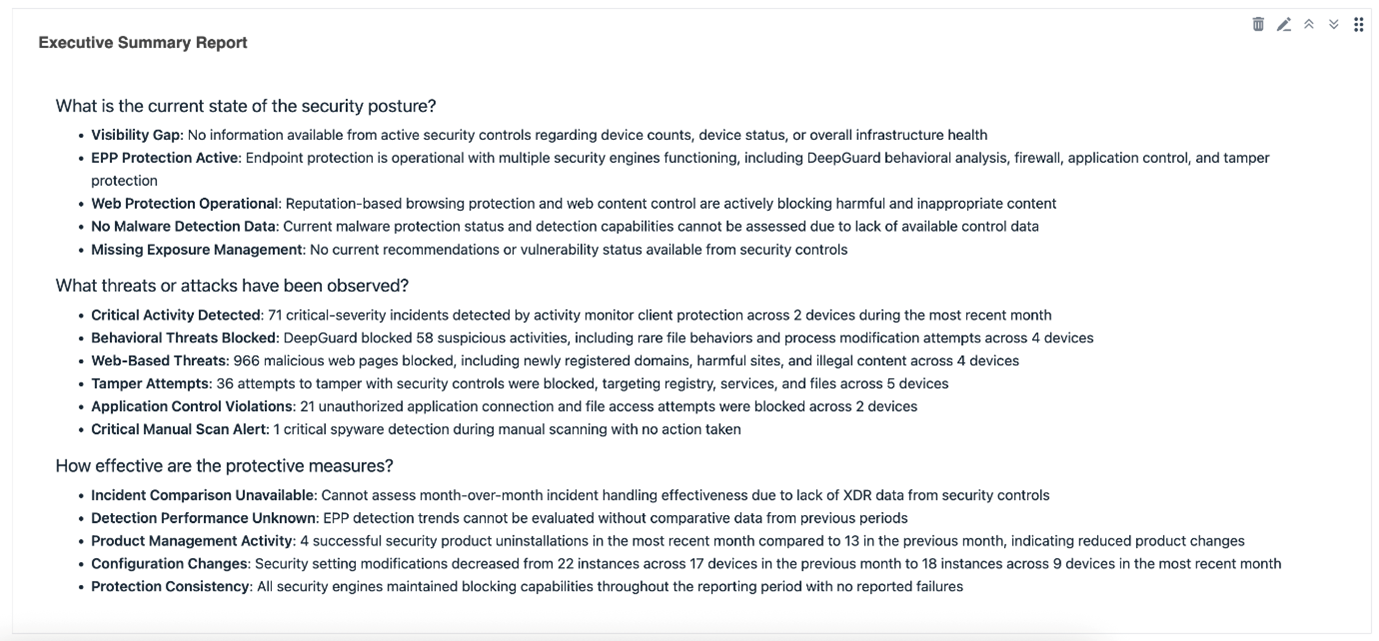
This report is suitable for anyone needing an overview of the security posture of their environment, whether it is an IT Manager or a Security Consultant.
How to get your company’s Monthly Security Executive Summary Report
Setting up a reporting widget for the Monthly Security Executive Summary Report is quick and easy. Just follow these simple steps:
Open the Elements Security Center using your web browser, and log in with your user credentials.
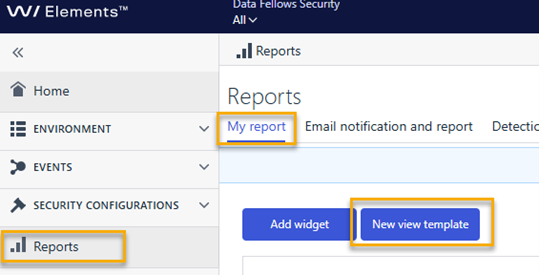
Click on Reports in the portal’s main navigation menu
Select My Report from the list of available options
Click New View Template to start creating a customized report view
These steps will help you generate a tailored report, allowing you to access relevant information.
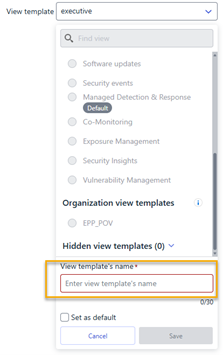
Give your template a distinct name, such as “Executive Report”, to easily identify it later when accessing or sharing reports.
After you have finished customizing your new view template, click Save to apply and store your changes. This ensures your report is ready for future access.
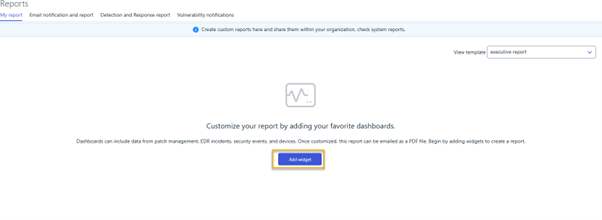
Click Add Widget from the newly created report to begin customization
It is possible to customize the dashboard so that you can easily get to the report, together with relevant data visualizations or metrics. This will allow you to tailor the report to highlight key information.
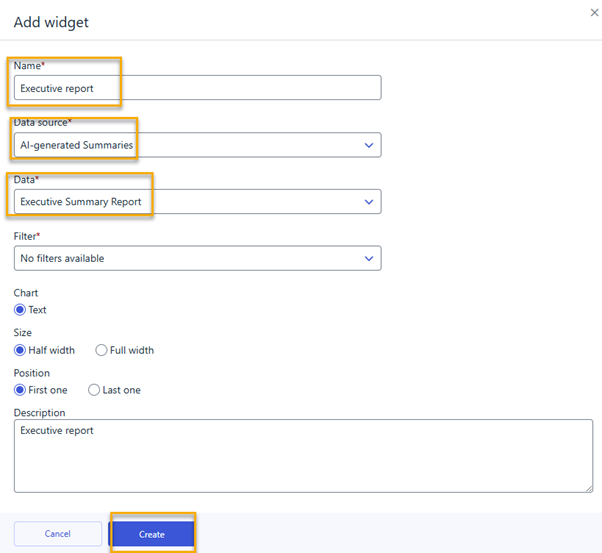
Assign a name to the widget
By assigning a name to the widget, such as “Executive Report”, it is possible to clearly identify its purpose.
For the data source, choose “AI-generated summaries” and under Data, select “Executive Summary Report”. Once these fields are completed, click “Create” to add the widget to your report view.
Note for Partners
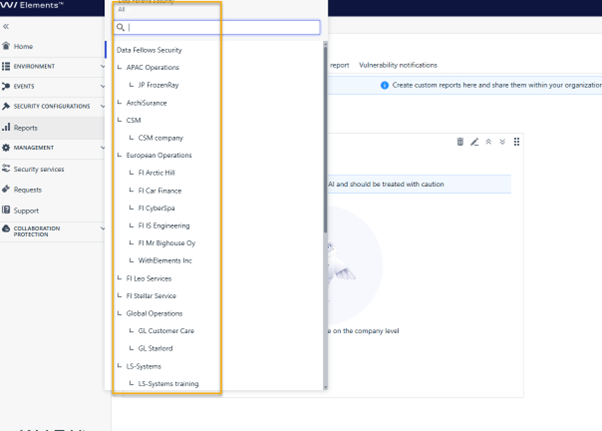
If you configure the Report creation process using your partner-level credentials, you can view the reports for each of the companies under your partner hierarchy. You configure the report and widget once, and it is automatically reusable across all companies.
Since this is a company-level Executive Report, you must choose a customer from the scope selector to generate their specific executive summary. You do not need to repeat the report creation process; simply select a different customer when needed to generate their executive summary report instantly.
-
Azure Subscription onboarding with CLAM
Read more
UPDATE 2026-03-05: This new functionality has now been deployed.
As part of our ongoing effort to simplify cloud onboarding and provide a unified experience across our Elements platform, we are introducing an update to how Azure Subscriptions are onboarded for exposure scanning.
The change is expected to be released during March 2026.
What is changing?
Following the earlier transition of Microsoft Tenant onboarding to Elements Cloud Account Management (CLAM) page, Azure Subscription onboarding will now also be handled through CLAM.This gives customers a consistent and centralized way to manage cloud accounts.
Who is affected?
This change applies only to customers using Exposure Management for Cloud (cloud security posture capabilities).
If you are not using Exposure Management for Cloud, no further action is required.
Do I need to take action?
No immediate action is required.Your existing connected Azure Tenants and Subscriptions will continue to function normally.
You will only need to take action when you want to onboard a new Azure Subscription for exposure (cloud security posture) scanning.
What happens when I want to add a new Azure Subscription?
If the Tenant associated with the subscription is marked as “Legacy” in the UI, you must first re‑onboard that Tenant via CLAM.
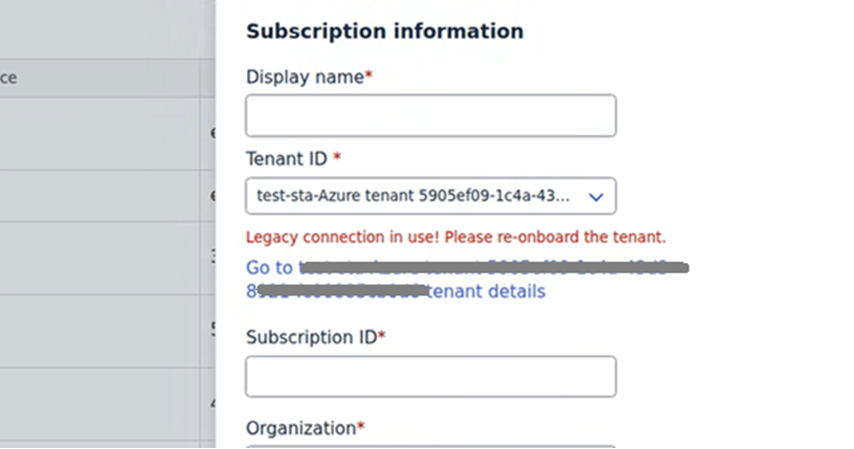
How to re‑onboard a Legacy Tenant
- Go to the Tenant’s page in Elements.
- Locate the Cloud Security Posture capability.
- Click “Connect now” to re‑onboard the Tenant.
- Once the Tenant connection has been re‑established in CLAM, onboarding new Azure Subscriptions will be enabled.
Important Note About PowerShell Script Downloads
After this change:
- Downloading the PowerShell onboarding script for Azure Subscriptions will only be possible if the parent Tenant’s Cloud Security Posture capability is already connected and active.
If the tenant has not been re‑onboarded yet, the system will prevent script download until the connection is re‑established.
-
Minor Maintenance break: Elements Collaboration Protection – 3 February 2026
Read more
We will be performing a small maintenance operation on WithSecure Elements Collaboration Protection on February 3rd, 2026 at 12.00 PM (UTC). This operation is expected to take a maximum of 5 minutes.
During the maintenance, users may experience issues logging in to Collaboration Protection or temporary failures while browsing Collaboration Protection portal pages.
There is no user action required during this maintenance period.
User impact during maintenance: LOW
-
New Feature: Notification Hub
Read more
We are introducing a new, centralized Notification Hub to replace most of the current banner-based announcements in Elements.
What’s new?
The Notification Hub is a unified place inside Elements where users can see important product messages, such as:
- Critical issues and outages
- Warnings and important operational updates
- General informational announcements
The goal is to make it easier for users to see what’s important, understand what has changed, and quickly act on relevant messages.
What does this change for you?
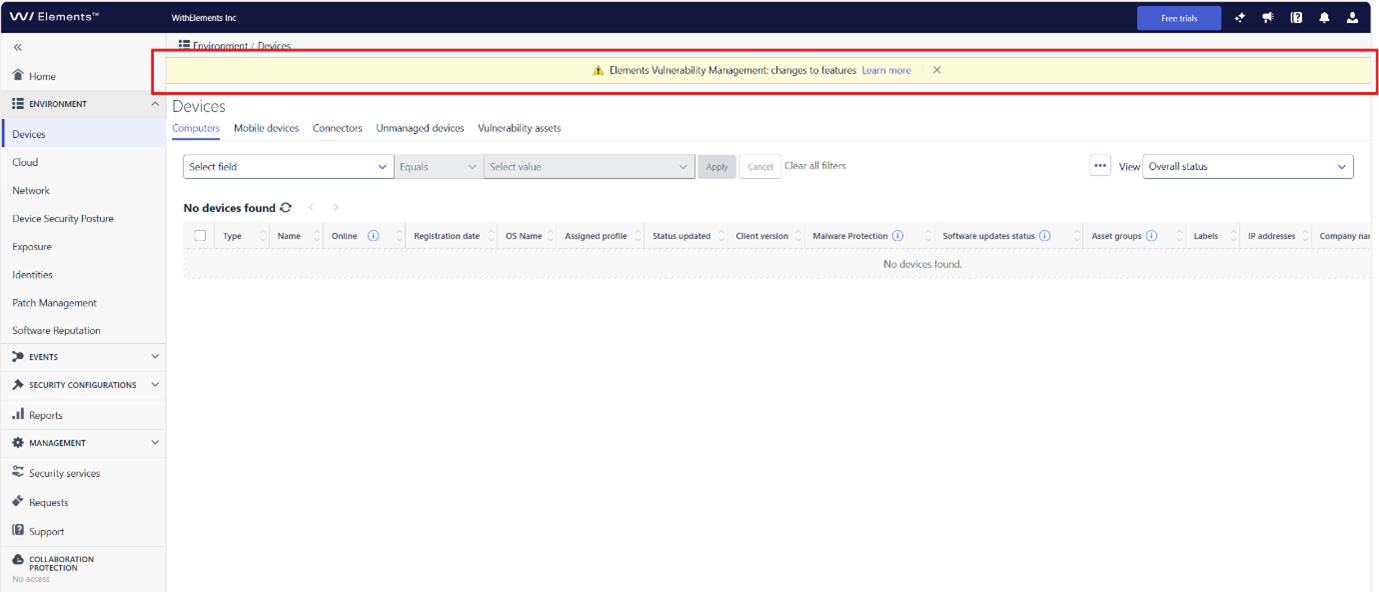
Product messages that were previously shown as banners are now delivered through the Notification Hub, giving you one central place to see important updates.
Existing notification banners
New Notification Hub
A bell icon in the top‑right corner highlights when there are new, unseen notifications, so you can quickly tell when something needs your attention.
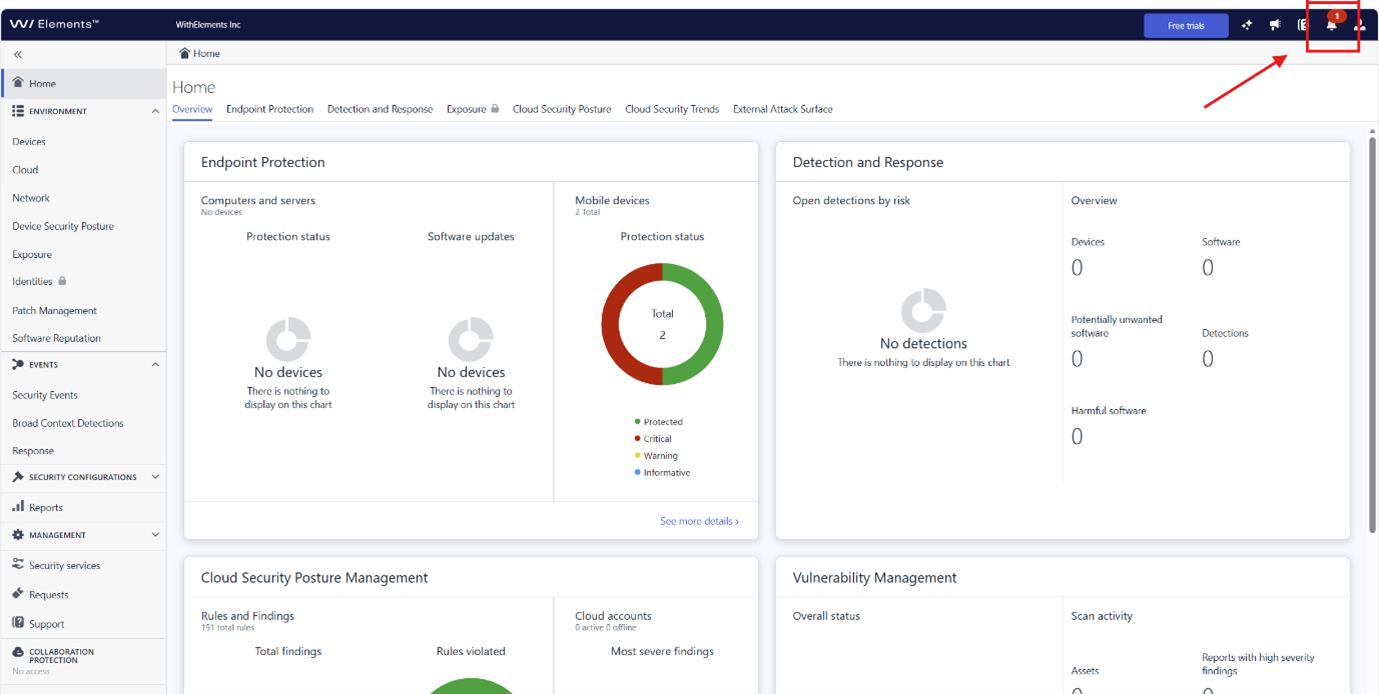
Opening the Notification Hub shows all new notifications in a dedicated panel, making it easy to review updates when it suits you.
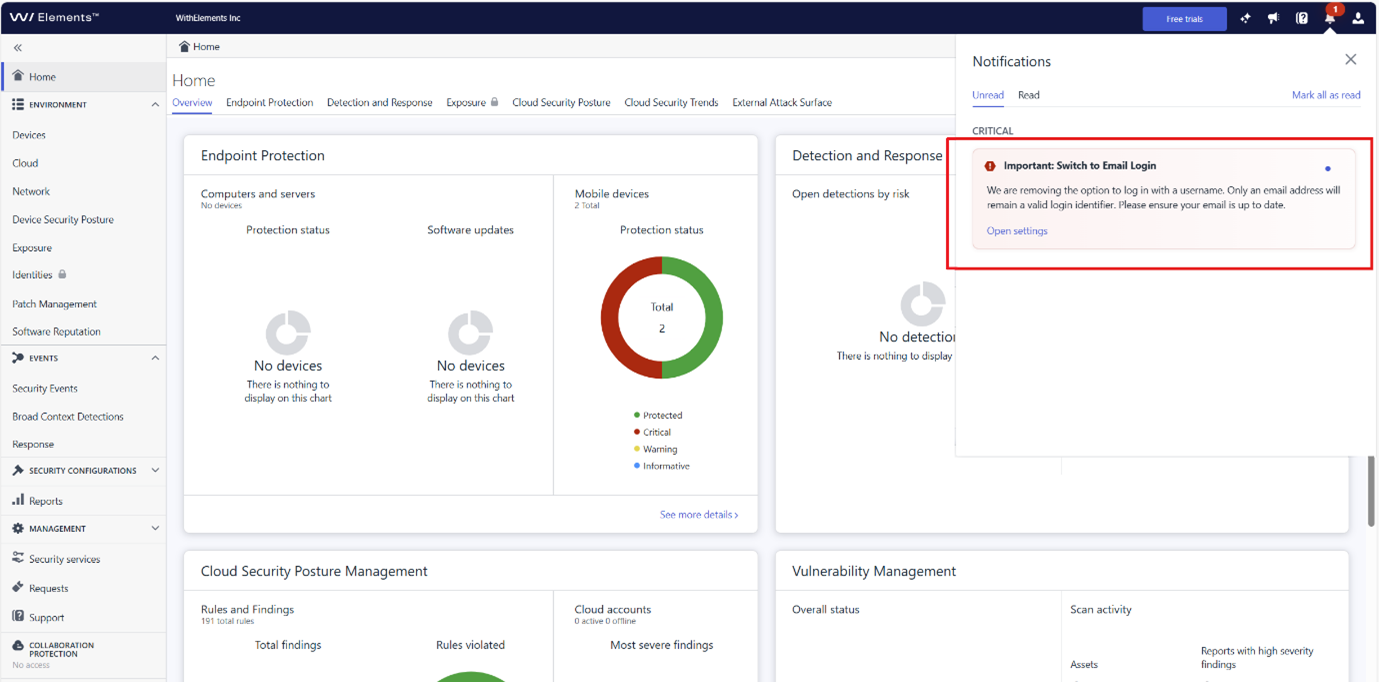
Notifications can be marked as read and remain available in the hub, allowing you to keep track of both new and past messages.