
-
What’s New in Elements – April 2026
Read more
Extended Detection and Response
Endpoint Protection
WithSecure Endpoint Security Portal
Following are the improvements we have made in the Endpoint Security Portal:
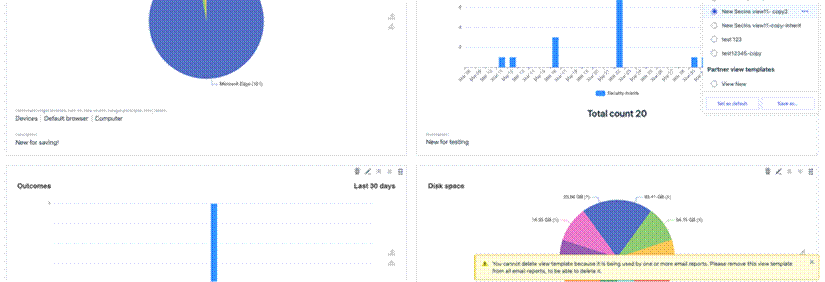
Improved user-facing message on attempt to delete view template that is used for updatable email reports.
Manage Operations screen optimized for large volumes of operations
To prevent timeouts for large partners, the Manage Operations screen now shows only the most recent 1,000 operations. If a partner has fewer than 1,000 operations, all are displayed and no flyout appears.


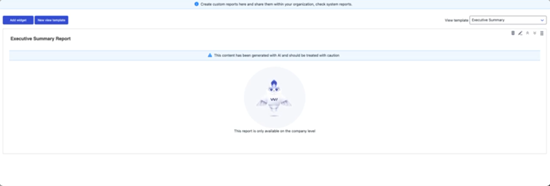
Added luminen animation to the reports
WithSecure Elements Agent for Mac
WithSecure Elements Agent macOS 26.2.55744 has been released.
This release brings
- Updated sensor component
- Updates to the Software updater component
- Bug fixes to client side support of software inventory feature (available later in 2026)
The Installer can be downloaded from
https://download.withsecure.com/PSB/latest/ElementsAgentInstaller_55744.mpkg
Elements Agent macOS 26.2.55744 supports following macOS versions:
- macOS 26 Tahoe
- macOS 15 Sequoia
- macOS 14 Sonoma
Elements Agent for Android
An update to the WithSecure Elements Mobile Protection app for Android (26.3.0023571) has been released.
Fixed issues:
- The Antivirus system scan no longer shows an incorrect “Incomplete” status
- The app now allows changing the state for recently created domains in the app UI
- The app no longer fails to apply App exceptions configured via the portal profile
Elements Agent for Windows and Server
A new version of the endpoint clients is available and existing customers have been automatically updated.
This release makes the Elements Agent version 26.2 available (internal version 26.2.301).
The endpoints automatically upgrade, without a reboot.
This release introduces new features (with Profile Editor Update).
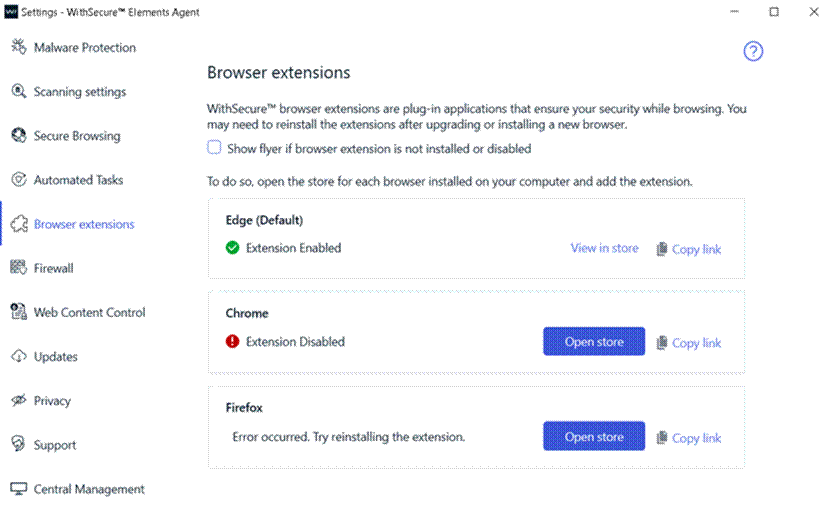
Browser Extensions Tab in Settings
A new “Browser Extensions” tab has been added to the Settings dialog. This tab shows the status of the Browsing Protection extension for each installed browser and provides options to open the browser’s extension store or copy the installation link.
New Network Isolation Security Events
Two new security events have been introduced to enhance visibility into network isolation actions.
“Computer has been isolated from the network”
“Computer has been released from the network isolation”

Remote Operation to Reset Security Cloud Cache
Added a new remote operation to reset the Security Cloud cache.

Enhanced Malware Protection Status Reporting
Improved the reporting of malware protection unload status during service startup.
Endpoint Detection and Response
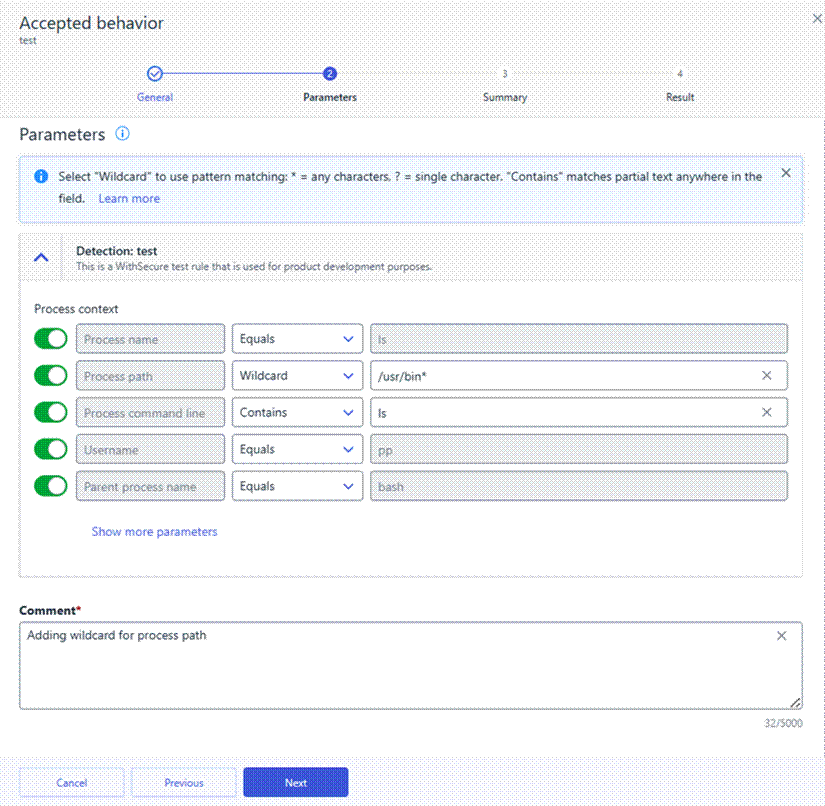
To help you create more flexible and maintainable suppression rules, wildcards are available for Accepted Behavior suppression rule parameters. Wildcards allow you to match patterns instead of exact values, making it easier to suppress recurring or similar events without creating multiple rules.
What are wildcards?
Wildcards let you define suppression rules using partial matches rather than exact strings. This is especially useful when values vary slightly, such as file names, paths, or user names.
The following wildcard characters are supported:
- * – matches any sequence of characters (including empty)
Example: *.exe matches file.exe, test.exe, .exe
- ? – matches any single character
Example: file?.txt matches file1.txt, fileA.txt
To treat wildcard characters as literal values, use the backslash (\) as an escape character:
- \* – matches a literal asterisk
Example: test\*.txt matches test*.txt
- \? – matches a literal question mark
Example: test\?.txt matches test?.txt
Supported parameters
Wildcards are supported in suppression rules for Accepted Behavior when matching the following parameters:
- Process name
- Process path
- Process command line
- Username
- Parent process name
- Parent process path
How to use wildcards
You can create or edit wildcard-based suppression rules in two ways:
- From Events → Broad Context Detections, when closing a detection as Accepted behavior and choosing to create a suppression rule.
- From Security Configurations → Automated actions → Suppression rules, by editing an existing rule.
In both flows, select Wildcard for the chosen parameter in the Parameters step, then define the pattern using *, ?, or escaped characters as needed.
Using wildcards helps reduce rule duplication, keeps configurations cleaner, and makes suppression rules easier to maintain over time
Exposure Management
Exposure Management Portal
Changes to the Exposure Management portal include:
- When a computer or umanaged device is restored, related findings are also restored in Exposure Management views.
- Resolved an issue with updating SSH authentication method in System Scans.
- Resolved an issue with updating TCP Scan Technique in System Scans.
- Resolved an Issue where Summary Reports failed to generate, preventing successful report creation.
- Improved Network scan tag filtering by allowing search by tag name.
- Resolved an issue on Network scans page, preventing opening device link in a new window.
- Resolved an issue where changing an Agent scan schedule could unintentionally re‑enable VM scanning that had been explicitly disabled by the user.
- Resolved an issue where new scan reports could cause findings to appear for devices that were already removed but still visible in Removed devices view.
- When the user’s name or surname is empty, the email address is displayed in multiple views.
- Resolved an issue preventing the removal of the last encryption key from the list.
- Resolved an issue where users without complete name information were displayed incorrectly. The email address is now shown when first name or last name is missing.
- Resolved an issue affecting the display of historical Web Scan reports. The report now renders correctly.
- Resolved an issue where users created in VM from ASC notifications were not properly reflected in FACS. User synchronization between systems has been fixed.
- Overall performance improvements.
- Overall security improvements.
Exposure Management System Scan
Support for detecting vulnerabilities in the following products was added to Authenticated Scanning for Windows:
- Amazon Athena ODBC Driver
- Arcserve UDP Console
- Dell PowerProtect Agent Service
- Devolutions Gateway
- ESET Protect
- HCL Traveler
- HP Device Manager
- IDrive for Windows
- Lenovo Diagnostics
- Lenovo Software Fix
- Malwarebytes Anti-Malware
- Podman Desktop
- Sentinel LDK
- TrueConf client
- Voidtools Everything
Support for detecting vulnerabilities in the following products was added to Authenticated Scanning:
- Elastic OTel Java
- pac4j-jwt
- Spring AI
Additionally, we added detection for vulnerable Axios library versions and support for detecting CVE-2026-40175 vulnerability. See this article for more information.
Exposure Management for Cloud
Improvements to Exposure Management for Cloud include:
- Fixed bug with first scans not being scheduled to run for certain accounts
- Performance and stability improvements
- New AWS rules:
- Amazon Bedrock lacks account-level guardrails
- Amazon Bedrock lacks organization-level enforced guardrails
- Amazon Bedrock agent does not have a guardrail configured
Elements Foundations
Elements Security Center
Enhanced “My Reports”
We are excited to introduce new enhancements to My Reports for MSP environments, designed to improve report management, consistency, and flexibility across organizational hierarchies.
Following are the new features
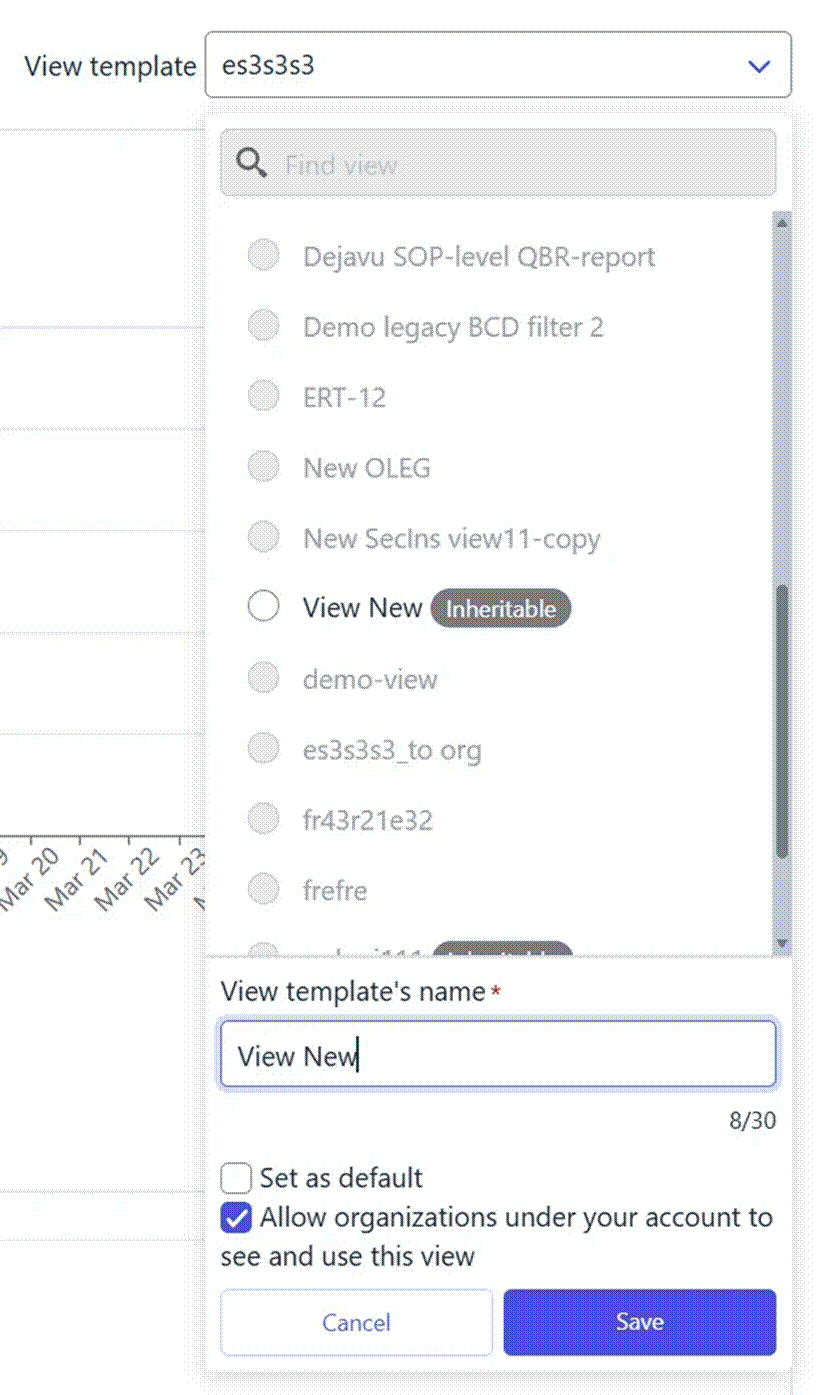
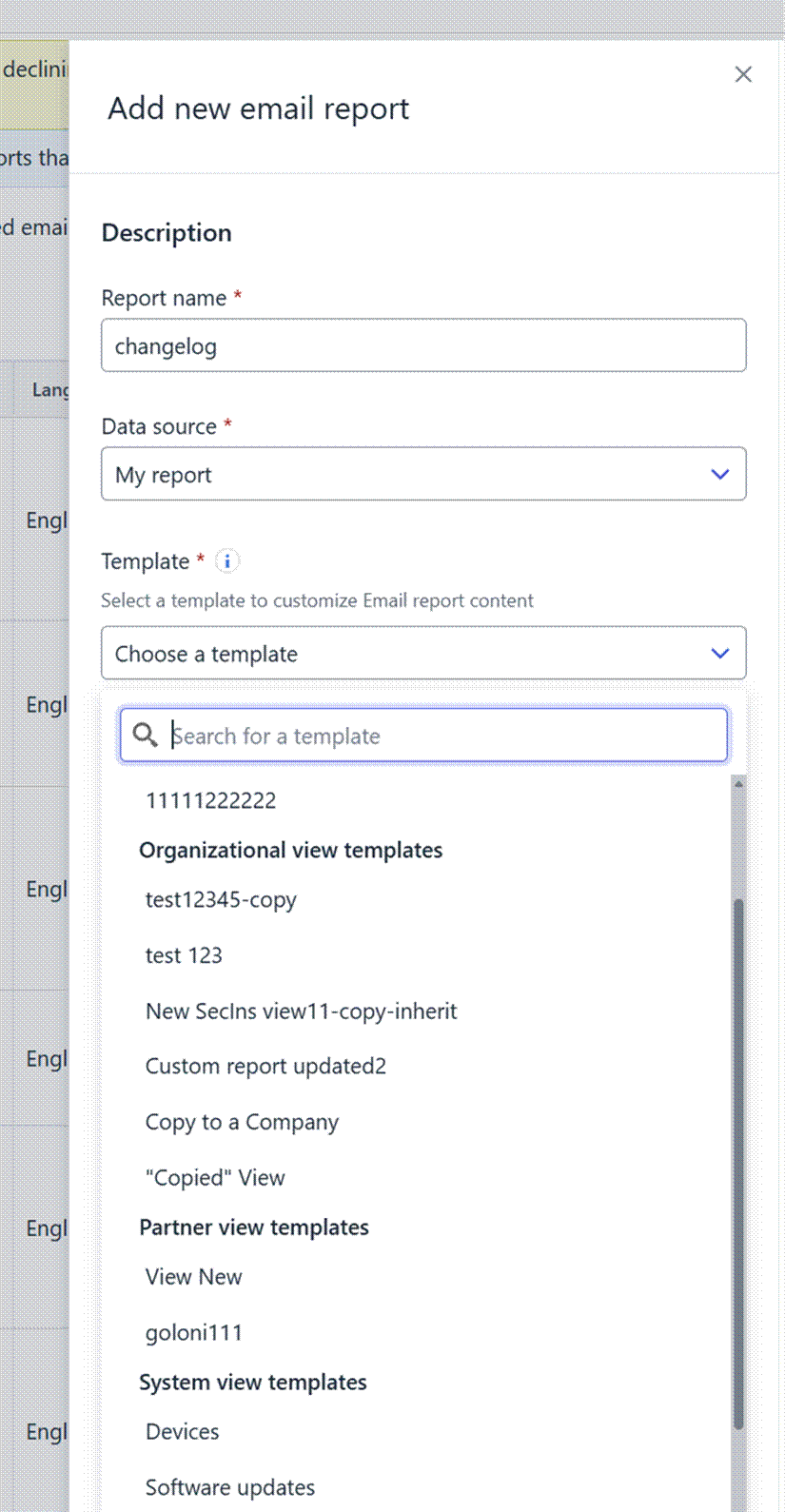
Inheritable View Templates
SOP administrators can now mark “My report” view templates as inheritable.
This means that:
- The template becomes visible to all underlying companies in the hierarchy
- Companies can use these templates to create reports within their own scope
Updatable Reports
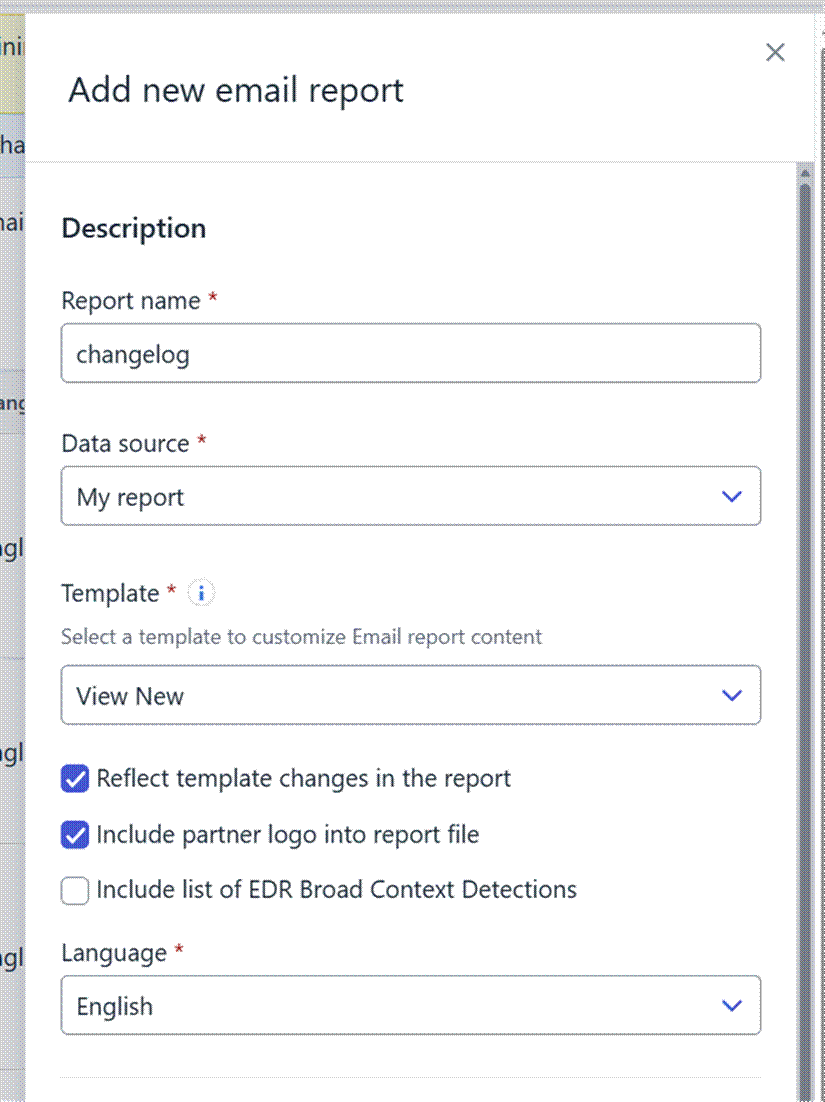
Administrators can now create updatable reports that are linked to a view template.
Key benefits:
- Reports automatically reflect any updates made to the associated template
- Ensures reports stay aligned with the latest structure and data requirements
- Reduces manual updates and maintenance
Important notes:
- This feature works only with organization-level or inherited view templates
- For inherited templates, it is now possible to include a partner logo in the generated PDF reports
Limitations:
- Previously created reports cannot be converted into updatable reports
- Once a report is created as updatable, it cannot be reverted to a non-updatable report
Integrations
Commercial API
Updated Documentation: all ‘/subscriptions’ endpoints combined to a single List Subscriptions endpoint with filter parameters
We’ve updated the documentation presentation for the following Commercial API endpoints to align with OpenAPI 3 specification requirements:
- Get subscription by buyer assigned account id
- Get subscription by reseller account id
Both endpoints share the same base URL but differ only by query parameters.
To comply with OpenAPI 3 YAML standards, they are now documented as a single endpoint: List Subscriptions.What changed:
- The above endpoints are now combined under List Subscriptions in the documentation
- Query parameters (buyer_assigned_account_id, reseller_account_id) are available as filters within the same endpoint
- Documentation structure updated to meet OpenAPI 3 requirements and improve compatibility with API tools
What did NOT change:
- No changes to endpoint logic or behavior
- No changes to request/response formats
- Existing integrations using:
- GET /subscriptions?buyer_assigned_account_id={buyer_assigned_account_id}
- GET /subscriptions?reseller_account_id={reseller_account_id}
continue to work exactly as before
This update is documentation-only and ensures consistent representation of the API without impacting functionality.
In case you missed it
Windows ARM64: Response Actions Support Now Available
We are pleased to inform that response actions are now supported on Windows ARM64 systems.
Windows ARM64 support has already been available for the Endpoint Protection Platform (EPP) and the EDR sensor. With this update, response capabilities are extended to Windows ARM64 endpoints, completing functional parity with other supported Windows architectures for Endpoint Detection and Response (EDR).
You can find out more about this release in our dedicated article.
Changes in Exposure Management
Coming slightly later than April, but important enough to communicate here, we made some important improvements in Exposure Management during late April and early May.
You can find out more information in the Exposure Management Changelog.
Share your ideas with us
Our purpose is to co-secure the world with you – now as WithSecure™. To co-create the best possible cyber security products and services, we warmly recommend you share your ideas via the Ideas section of the WithSecure Community, now accessible directly from WithSecure™ Elements Security Center.
Further information
Changelogs and Release Notes for all parts of WithSecure™ Elements can be found at the Help Center
In case you missed it:
-
Upcoming Change: Improved Exposure Management Scoring and Recommendation Prioritization (ETA June 2026)
Read more
We are introducing a new and improved scoring system for Exposure Management recommendations in WithSecure™ Elements. This update makes recommendation risk scoring easier to understand, more transparent, and more real-time, while also enabling richer reporting and long‑term security trend tracking.
This change is expected to be made during June 2026, and we will confirm the date once it has been set.
What is changing?
The updated scoring and prioritization model introduces:
- A clearer and more understandable recommendation risk score
- Detailed risk breakdowns directly in the Recommendations UI
- Near real‑time recalculation of recommendation priority
- Improved foundations for richer reporting and analytics
Why are we making this change?
The new scoring and prioritization system provides:
- Greater transparency into exposure risk
- Faster feedback on remediation actions
- Stronger confidence in recommendation ordering
- Improved reporting capabilities
- A more solid foundation for future analytics and insights
What will be visible to users?
The new scoring system will affect how the recommendations remediation impact is being calculated as well as asset exposure risk score.
This will change the order in which recommendations are sorted, also recommendation may move between impact levels, which is explained in more detail below.
In essence, the new scoring system will generate fewer inconclusive recommendations.
Clearer explanation of recommendation risk
In the updated Recommendations List various new columns related to recommendation scoring have been added. Not all new columns are visible by default. Remediation impact icon changed is now harmonized with other parts of Elements such as BCD views.
Two new default columns “Assets by importance” and “Finding instances” will be added to the recommendations view representing counters breakdown by affected assets by importance (high/medium/low) and findings distribution by impact (critical/medium/low), respectively.
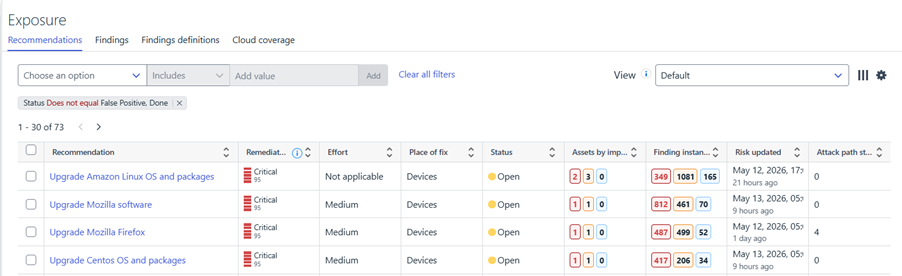
Users will be able to see why a recommendation has its current priority, including:
- How much of the recommendation risk is driven by attack paths
- How findings contributing to the recommendation are distributed across assets
- A breakdown of affected assets by importance and exposure
This makes it easier to:
- Understand what drives risk
- Explain prioritization decisions internally
- Focus remediation on the most impactful areas
The recommendations details UI
Asset exposure will show the new score in the scale of 0-100 with updated categorization icon which is now more aligned with other Elements UI such as BCDs. Also assets tab will show for each asset affected by the recommendation, findings count break down by impact (critical/medium/low)
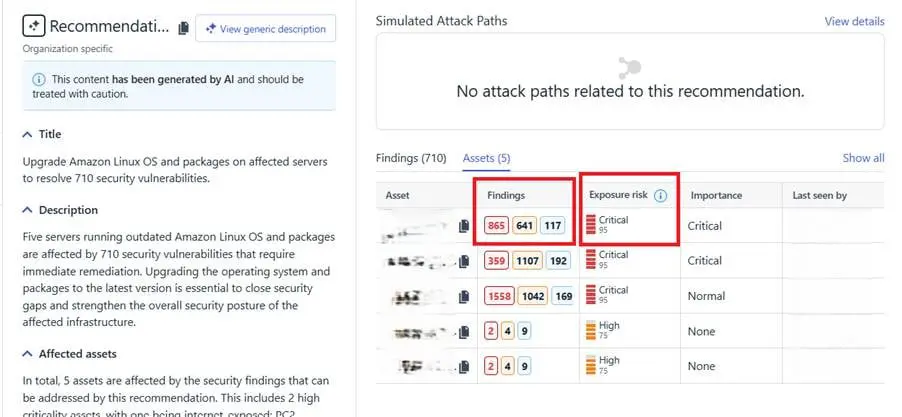
Near real‑time prioritization updates
Recommendation risk scores will be recalculated in near real time.
This means that actions such as:
- Fixing a vulnerability on a specific device
- Changing a device’s importance
- Modifying exposure to the internet
will be reflected immediately in the recommendation risk score, without waiting for scheduled recalculations.
Expected impact on recommendation prioritization
Based on internal analysis across customer environments, the impact of the new scoring system is expected to vary:
- For the majority of organizations (approximately 80%), there will be a moderate change in prioritization.
- The same recommendations are likely to appear near the top of the list
- However, their order may change based on more accurate and transparent risk factors
- Around 15% of organizations will see little or no change in either the selection or ordering of their top recommendations
- Approximately 5% of organizations may see a more significant change, with a different set of recommendations appearing at the top of their prioritization list
These changes reflect a more accurate representation of exposure risk rather than a change in the underlying findings.
Will customers need to take any action?
No action is required, unless any reports that partners deliver to their customers are heavily dependent on the ordering of the recommendations. Partners would then need to pass this information to their customers to avoid confusion.
The improved scoring and prioritization will be introduced automatically and we will communicate clearly when the update becomes available.
-
Beta integrations for Datto RMM and NinjaOne
Read more
We have released beta integrations connecting WithSecure Elements with Datto RMM and NinjaOne.
What they do
With these integrations, RMM administrators can automate the installation of WithSecure Elements Agents.
We will be adding more functionality to these integrations in future.
How to get started
Deployment guidance is available here:
Status and roadmap
These integrations are in beta while we finalise them for public release. They are fully functional with the current feature set.
We will announce general availability once beta testing is complete. Over time, they will replace the existing legacy WithSecure RMM integrations for Datto RMM.
-
Reviewing and Updating XDR Suppression Rules
Read more
Background
In 2024, we introduced the Accepted Behavior feature to our XDR products, which introduced Suppression Rules.
Suppression rules help reduce noise by automatically closing detections that are known to be acceptable.
However, to avoid creating blind spots, it’s important to routinely review older rules, confirm they still reflect current business reality, and update or disable them when needed.
This article explains why regular reviews matter, how the portal highlights older rules, and how to maintain an effective and compliant suppression rule set over time.
Why regular review of suppression rules is important
Business and environment changes
What was acceptable to suppress at one point may no longer be acceptable later. For example, if an organization stops using a particular tool that was previously allowed, an old suppression rule could hide genuinely suspicious activity if that tool reappears.
Risk of over-suppression
Suppression rules automatically close BCDs. If they are too broad or no longer well targeted, they can silence meaningful detections and reduce overall security visibility.
Evolving detection behavior
Detection logic and key detections can change over time. A BCD that was previously fully suppressed can become visible again if a new, non-suppressed key detection is added, so existing rules need to stay aligned with current behavior.
Forward-only effect
Suppression rules apply only to future BCDs, not to those created before the rule existed. Reviewing rules helps ensure they are still justified and useful for upcoming detections.
No automatic validation
There is no built-in way to verify that a suppression rule still matches the detections it was intended to cover. Without review, redundant, ineffective, or overlapping rules can remain in place.
Regular reviews keep suppression rules precise, justified, and aligned with current risk and usage, helping prevent blind spots while keeping the rule set manageable.
How the portal notifies users about old rules
The portal helps you identify outdated suppression rules by showing banners when rules have not been updated recently.
Per-rule banner
In the Suppression rule summary, a banner is displayed for each rule that hasn’t been updated for over 30 or 90 days.

Page-level banner
On top of the Suppression rule page, a banner appears after reaching the 90-day period and includes a link that lists all outdated suppression rules. You can also access the outdated list via View dropdown.

Step-by-step guide to reviewing and updating old rules
- List your active rules: Start by reviewing all active suppression rules (use the banners/system view to quickly filter to older rules).
- Confirm the original rationale: Revisit why each rule was created and confirm the suppressed behavior is still expected and acceptable.
- Check alignment with current detections: Detection behavior can evolve over time. Ensure each rule still matches how detections work today.
- Tighten scope for precision: Evaluate each rule’s conditions so it suppresses only the intended behavior. Rules that are too broad can hide meaningful detections and reduce visibility into security-relevant activity.
- Identify overlap and duplicates: Look for rules that duplicate or partially overlap others (especially where wildcards or broad conditions were used).
- Update or disable: If a rule is still required but imprecise, update it. If it’s no longer needed, disable it. Removing unused rules also helps stay within system limits for active suppression rules.
- Monitor after changes: Suppression rules apply only to future detections, so monitor new detections after changes to confirm the rule behaves as expected.
Best practices for maintaining effective suppression rules
- Keep rules precise: Target only the specific behavior that is known and accepted.
- Avoid over-suppression: Reduce noise without removing meaningful security signals.
- Review regularly: Environments, tools, and acceptable behavior change over time.
- Disable rules that are no longer needed: Keep the rule set manageable and preserve capacity for new rules.
- Watch for overlapping or duplicate rules: Regular reviews help remove redundant coverage.
- Monitor behavior after changes: Confirm that new detections behave as expected after rule updates.
- Use wildcards carefully: Poorly scoped wildcards can suppress unrelated detections and make rules hard to reason about.
- Treat rules as owned configuration: Assign ownership and maintain rules as part of ongoing security hygiene.
Compliance and retention information
Retention of suppression rules
Suppression rules are not deleted. This helps preserve configuration history and the context behind why detections were suppressed, supporting reference and audit needs.
Retention of suppressed incidents
Incidents that are automatically closed due to suppression rules are not deleted. Suppressed incidents are retained the same way as other incidents (for example, those resolved as accepted behavior). Suppression affects visibility and status, not data retention.
Retention period after subscription ends
When a customer subscription ends, data is not removed immediately. There is a short retention period after the last subscription expires during which customer data is still kept. After this period, the data is deleted in line with standard data removal processes described in the Elements privacy policy.
Compliance context
Because suppression rules and related incidents are retained for the duration of the customer relationship, they can support compliance, audit, and traceability requirements. This includes being able to understand why certain detections were suppressed and how incidents were handled over time.
-
Removing the Detection and Response report view (Reports tab)
Read more
We previously announced that we were disabling report generation for the Detection and Response view in the Reports tab.
The next step is the removal of the view completely. This change is expected to take place in production on June 1st 2026.
We recommend using the My Reports tab to create and manage your reports going forward.
-
TLS certificate provider update for GUTS2 backend (May 19, 2026)
Read more
We would like to inform you about an upcoming change to the TLS certificates used by the WithSecure GUTS2 Server (definition update backend), planned for May 19, 2026.
We are transitioning from DigiCert to Let’s Encrypt certificates. This update aligns our backend infrastructure with our existing services, where Let’s Encrypt is already in use, and helps us streamline certificate management while maintaining industry‑standard security practices.
What does this mean for you?
- No changes are expected for the majority of environments.
- The change will be transparent if your system trusts the ISRG Root X1 certificate (the root certificate used by Let’s Encrypt).
Common environments where no action is required:
- Windows systems with Windows Update enabled
- Environments where automatic root certificate updates are allowed (not restricted by GPO / MDM policies)
- Systems where ISRG Root X1 is not explicitly removed or blocked
When action may be needed:
- Systems with restricted certificate updates
- Environments with custom trust stores
- Devices where ISRG Root X1 is missing or not trusted
In such cases, please ensure that the ISRG Root X1 root certificate is present in your trust store.
WithSecure products currently require the following root certificates for TLS communication to WithSecure backends, therefore must be present on all machines, across all Operating Systems:
- Amazon Root CA 1
- Amazon Root CA 2
- Amazon Root CA 3
- Amazon Root CA 4
- Starfield Class 2 Certification
- Starfield Services Root Certificate Authority – G2
- DigiCert Global Root CA
- ISRG Root X1
- ISRG Root X2
All of these are included in the default trust stores of modern, up-to-date operating systems and should not require manual installation in the majority of deployments.
-
Major Capricorn update for Endpoint Protection – May 2026
Read more
UPDATE 2026-05-13: This has now been released to production with version “2026-05-13_01“
We will soon be releasing a major update for our Capricorn engine, used by our Endpoint Protection products. This is expected to be released on May 12th 2026.
This will result in a larger download as an updated version of the virus definition files are distributed.
Key improvementsOptimized databases through consolidation of overlapping detections, resulting in:
- Smaller footprint: Size on disk expected to decrease by ~160MB, decreasing by about half.
- Faster updates and reduced initialization disk I/O due to reduced database size
Update Details
- Platform coverage: This update applies to all WithSecure Endpoint Protection products — across Windows, Mac, and Linux platforms that utilize the Capricorn engine.
- Download size: All affected endpoints will now download a larger one-time update package of approximately 130-150 MB during the rollout.
Deployment
- The update will be delivered automatically.
- No manual action or configuration is required.
- The release time will be confirmed 24 hours in advance through our community channels.
- Updates containing this release will start with “WithSecure Capricorn Engine (2026-05-xx-xx)”.
- With this update, you can expect leaner, faster, and more efficient endpoint protection — without compromising security.
Users of WithSecure Elements EPP may wish to consider taking the Elements Connector into use, to help reduce internet access, if they have several deployed endpoints. You can find more details of how to deploy this at:
https://www.withsecure.com/userguides/data/pdf/ws_elements_connector_eng.pdf
-
Windows ARM64: Response Actions Support Now Available
Read more
We are pleased to announce that response actions are now supported on Windows ARM64 systems.
Windows ARM64 support has already been available for the Endpoint Protection Platform (EPP) and the EDR sensor. With this update, response capabilities are extended to Windows ARM64 endpoints, completing functional parity with other supported Windows architectures for Endpoint Detection and Response (EDR). For more information on Response Actions, please check the User Guide.
As a result, Windows on ARM64 now has full EDR coverage, including prevention, detection, investigation, and response.
Supported Windows Response Actions on ARM64
The following Windows response actions are available on Windows ARM64 endpoints.
Investigative actions
- Collect forensics package
- Enumerate processes
- Enumerate scheduled tasks
- Enumerate services
- Enumerate WMI persistence
- Map file system
- Map registry
- Netstat
- Process memory dump
- Retrieve Amcache
- Retrieve antivirus log files
- Retrieve browser artefacts
- Retrieve event log entries
- Retrieve event log files
- Retrieve event log tracing entries
- Retrieve files
- Retrieve folders
- Retrieve jumplist files
- Retrieve master boot record (MBR)
- Retrieve master file table (MFT)
- Retrieve Prefetch
- Retrieve recently accessed
- Retrieve registry hives
- Retrieve remote desktop protocol cache files (RDP)
- Retrieve System resource usage monitoring database (Scrumdb)
- Retrieve PowerShell history
- Test Connections
Containment and remediation actions
- Kill process
- Kill thread
- Delete file
- Delete registry
- Delete scheduled tasks
- Delete services
- Delete WMI persistence
Not Supported on Windows ARM64
The following response action is not supported on Windows ARM64 at this time:
- Full Memory Dump
All other Windows response actions listed above are supported and available for use on ARM64 systems.
Important note on ARM64 Channel Subscription
If you encounter issues after subscribing an endpoint to the ARM64 channel, a restart of the client may be required to ensure that the updated components and response capabilities are fully activated.
-
What’s New in Elements – March 2026
Read more
Extended Detection and Response
Endpoint Protection
WithSecure Agent for Mac
An update to WithSecure Elements Agent for macOS has been released to General Availability on 17th of March 2026.
This release brings
- Performance improvements in wsagent
- New response version with python 3.12
- Client side support for software inventory feature (available later in 2026)
Bug fixes
- “Allow” button in Browsing Protection is not clickable
Elements Agent for macOS supports following macOS versions:
- macOS 26 Tahoe
- macOS 15 Sequoia
- macOS 14 Sonoma
WithSecure Elements Mobile Protection for IOS
An update to the WithSecure Elements Mobile Protection app for iOS (26.3.12185) has been released.
Fixed issues:
- Critical bug fix for early logout during activation or after subscription is updated
- Stability improvements
- Shortcuts compatibility is supported: gives ability to enable / disable Mobile Protection while other application is on screen
WithSecure Endpoint Security Portal
Automatic labelling for unmanaged devices
The admins can now configure labelling rules for unmanaged devices, under Security configurations -> Profiles -> Profile assignment rules -> Unmanaged labelling rules
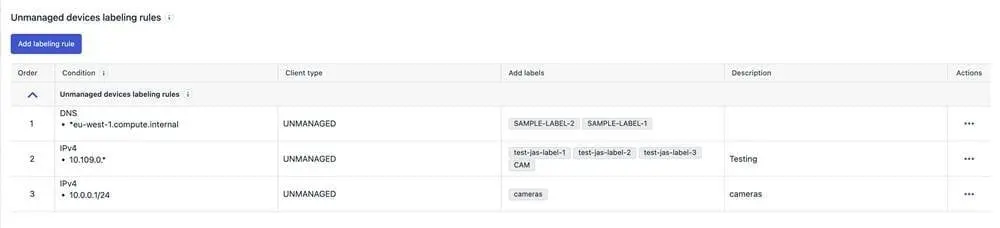
Once this is configured, any new unmanaged devices that satisfy the rules will have the labels assigned to it automatically.The admins can view the labels assigned in the Environment -> Devices -> Unmanaged devices view
The admins can also choose to immediately apply the labelling rules to all existing unmanaged devices, by choosing the option “Evaluate Labeling rules for all Unmanaged devices after saving“, when saving the rules
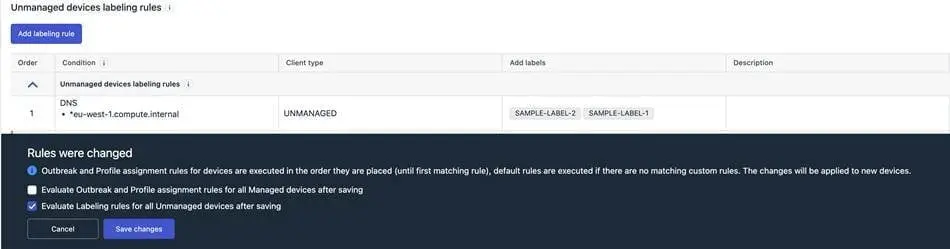
Endpoint Detection and Response
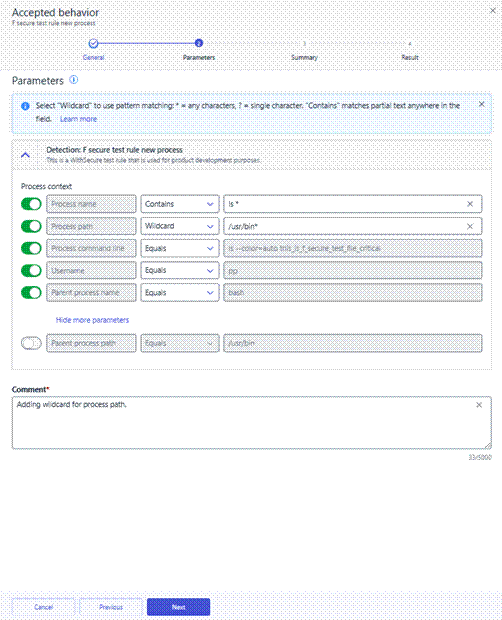
Wildcard support for Accepted Behavior suppression rules
To help you create more flexible and maintainable suppression rules, wildcards are available for Accepted Behavior suppression rule parameters. Wildcards allow you to match patterns instead of exact values, making it easier to suppress recurring or similar events without creating multiple rules.
What are wildcards?
Wildcards let you define suppression rules using partial matches rather than exact strings. This is especially useful when values vary slightly, such as file names, paths, or user names.
The following wildcard characters are supported:
- * – matches any sequence of characters (including empty) Example: *.exe matches file.exe, test.exe, .exe
- ? – matches any single character Example: file?.txt matches file1.txt, fileA.txt
To treat wildcard characters as literal values, use the backslash (\) as an escape character:
- \* – matches a literal asterisk Example: test\*.txt matches test*.txt
- \? – matches a literal question mark Example: test\?.txt matches test?.txt
Supported parameters
Wildcards are supported in suppression rules for Accepted Behavior when matching the following parameters:
- Process name
- Process path
- Process command line
- Username
- Parent process name
- Parent process path
How to use wildcards
You can create or edit wildcard-based suppression rules in two ways:
- From Events → Broad Context Detections, when closing a detection as Accepted behavior and choosing to create a suppression rule.
- From Security Configurations → Automated actions → Suppression rules, by editing an existing rule.
In both flows, select Wildcard for the chosen parameter in the Parameters step, then define the pattern using *, ?, or escaped characters as needed.
Using wildcards helps reduce rule duplication, keeps configurations cleaner, and makes suppression rules easier to maintain over time
Exposure Management
The latest release includes following updates in the external assets list (Network -> External assets):
DNS A Record History
External asset details now display only the latest DNS resolution result. Previously, the full DNS resolution history was shown.
External Asset Source
A new Source column has been added to the table, indicating how each external asset was discovered. List of assets can be filtered using Source. Possible values include:
- User import – Manually imported by a user via CSV.
- Internet – Manually added from the Internet Discovery page.
- DNS resolution – Automatically resolved via DNS from another asset.
- Subdomain discovery – Discovered through automated subdomain enumeration.
- Webscan – Automatically added based on Webscan activity.
External Asset Exposure Risk
A new Exposure Risk column has been introduced, showing the exposure risk of an external asset. Risk calculation is available only for assets with findings.
Exposure Management for Business
WithSecure Exposure Management Portal
Recent releases of the Exposure Management Portal have brought:
- Support for all ticket statuses when exporting tickets to a CSV file.
- A page size selector to the Discovery Scan details page.
- Resolved an issue where devices and findings were not removed from Exposure Management views after being removed from the Computers and Unmanaged Devices views.
- Resolved an issue where the VM Asset Risk Score was not recalculated when device importance or internet exposure was changed.
- Resolved an issue where assets did not appear in the summary report wizard when their importance value was not set.
- Overall performance improvements.
- Resolved an issue in the Summary Reports wizard that prevented clearing the Importance filter.
- Resolved an issue where a Summary Report could not be generated.
- Resolved an issue on the “Email notification and report” list page where language and email recipients were missing.
- Resolved an issue where vulnerability counters were not updated after changes to the software–vulnerability relationship.
- When computer or umnaged device is restored, related findings are also restored in Exposure Management views.
- Resolved an issue with updating SSH authentication method in System Scans.
- Resolved an issue with updating TCP Scan Technique in System Scans.
- Resolved an Issue where Summary Reports failed to generate, preventing successful report creation.
WithSecure Exposure Management System Scan
Support for detecting vulnerabilities in the following products was added to Authenticated Scanning for Windows:
- Canon IJ Scan Utility
- Dell Command | Intel vPro Out of Band
- Dell Connected Service Delivery SubAgent
- Dell NetWorker Management Console
- Devolutions Server (also in Remote Scan)
- Elastic Synthetics Recorder
- FinalCode Client
- GameLoop
- MobaXterm
- PowerShell Universal (also in Remote Scan)
- Visionline
Support for detecting vulnerabilities in the following products was added to Authenticated Scanning:
- Apache Avro Java SDK
- Apache Livy
- Apache PDFBox Examples
Exposure Management for Cloud
A new version of Exposure Management for Cloud has been released.
Highlights include:
- Improved Azure Subscriptions onboarding
- New automatic single scan execution and monthly schedule execution to all new accounts that passed validation
- New “on notification” scans
- Enhanced Row Level Security to customer accessible tables
- Improved scanner to get cloud provider findings
- Fixed bug where new customers would not have the resource scan scheduled
- Fixed issue with synchronization of data after connection is re-added by user
- Fixed cases of database connections not closed properly
- Fixed issue with repeated entries in the Finding timeline
Elements Foundations
Elements Security Center
Enhanced “My Reports”
We are excited to introduce new enhancements to My Reports for MSP environments, designed to improve report management, consistency, and flexibility across organizational hierarchies.
Following are the new features
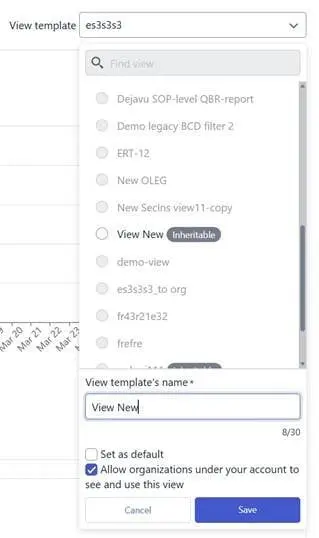
Inheritable View Templates
SOP administrators can now mark “My report” view templates as inheritable.
This means that:
- The template becomes visible to all underlying companies in the hierarchy
- Companies can use these templates to create reports within their own scope
Updatable Reports
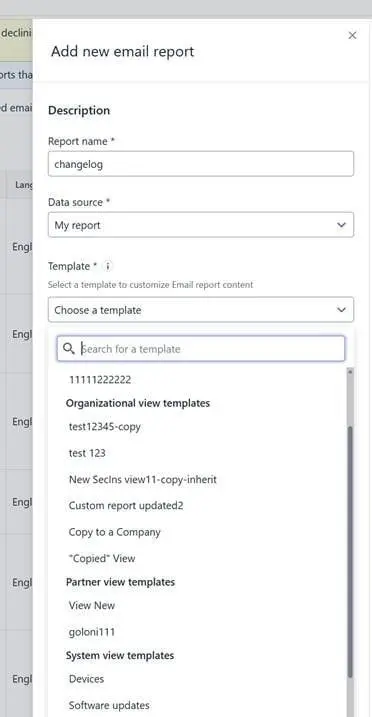
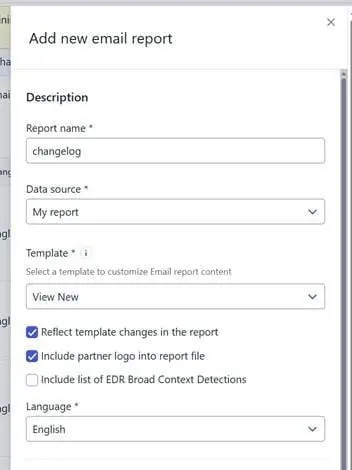
Administrators can now create updatable reports that are linked to a view template.
Key benefits:
- Reports automatically reflect any updates made to the associated template
- Ensures reports stay aligned with the latest structure and data requirements
- Reduces manual updates and maintenance
Important notes:
- This feature works only with organization-level or inherited view templates
- For inherited templates, it is now possible to include a partner logo in the generated PDF reports
Limitations
- Previously created reports cannot be converted into updatable reports
- Once a report is created as updatable, it cannot be reverted to a non-updatable report
Other items of interest
WithSecure Labs: The Changing Economics of Cybercrime-as-a-Service: What Defenders Need to Know
Back in 2023, when we last wrote about Cybercrime-as-a-Service, we described cybercrime as an economy that had figured out how to scale. Ransomware-as-a-Service affiliates, Initial Access Brokers, Crypter-as-a-Service providers, Malware-as-a-Service developers – each of them owning a role in the kill chain and each handoff between them monetized.
It looked like a trend back then. Now it looks like the baseline, the foundation on which everything else is getting built.
WithSecure Labs: Ivanti EPMM Exploitation: Hit-and-Run
During February 2026, there was a security incident related to the Ivanti EPMM solution, and WithSecure’s STINGR Group analysed it.
You can read the full details of the analysis over on the WithSecure Labs blog
In case you missed it
We recently introduced Cloud Account Management (CLAM) to WithSecure Elements, to unify and improve the way Azure Subscriptions are onboarded for exposure scanning.
You can read more details about this functionality in a dedicated article.
Share your ideas with us
Our purpose is to co-secure the world with you – now as WithSecure™. To co-create the best possible cyber security products and services, we warmly recommend you share your ideas via the Ideas section of the WithSecure Community, now accessible directly from WithSecure™ Elements Security Center.
Further information
Changelogs and Release Notes for all parts of WithSecure™ Elements can be found at the Help Center
-
CVE-2026-40175 for Axios JavaScript library
Read more
What is Axios?
Axios is a JavaScript library intended to ease interaction with internet HTTP services. It is used by some organizations to simplify their codebase compared to using standard browser functionality.
What is the vulnerability?
Prior to version 1.15.0, the Axios library is vulnerable to a specific “Gadget” attack chain that allows Prototype Pollution in any third-party dependency to be escalated into Remote Code Execution (RCE) or Full Cloud Compromise (via AWS IMDSv2 bypass).
Ref: https://nvd.nist.gov/vuln/detail/CVE-2026-40175
Has the vulnerability been fixed?
This vulnerability has been fixed in 1.15.0.
You can read more about how WithSecure has responded to this, and what steps you should take if you are using Axios, over in our dedicated article. Please note that any future updates we make related to this Axios vulnerability will be made on that article.