-
Improved Usability: One place to configure Proxy and Connector communication settings
Read more
UPDATE 2026-01-27: The updated Profile Editor for Windows is now available for use.
To ease the communication settings configuration, including http proxy servers and WithSecure Connectors management, we are about to release an updated Profile Editor for Windows endpoints.
Instead of configuring these services in multiple places in the profile, we’ve brought them together to a single Communication page as they perform related functions.
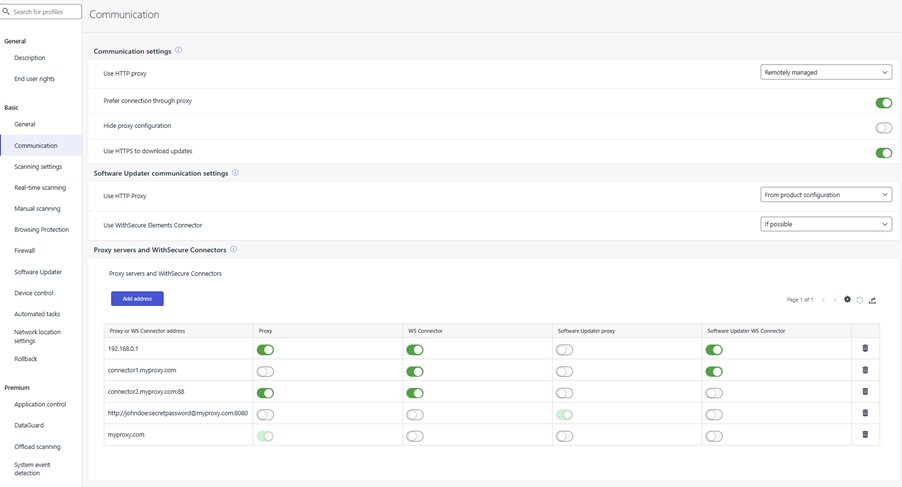
In addition to this, the usability of configuring the individual http proxy servers and WithSecure Connectors has been improved, with per-service configuration in a simple table. Each row must have at least one service enabled in order to save the profile.

Existing profile settings are mapped directly to the new profile editor page, there is no administrator action required. All existing proxy and connector functionality works the same as it does already.
-
What’s New in Elements – December 2025
Read more
Editor’s Highlights
Slightly later than normal due to winter vacations, here is a roundup of what happened with WithSecure Elements during December 2025.
Extended Detection and Response
Endpoint Protection
WithSecure Agent for Windows and Server
A new version of the endpoint clients is available. This release makes the Elements Agent version 25.5 available (internal version 25.5.416).
The endpoints automatically upgrade, without a reboot.
This release introduces new features (with Profile Editor Update).
Software Updater Engine
The software updater engine is now downloaded directly from the Update server instead of being bundled with the MSI installer, resulting in more efficient update delivery.
Enhanced Agent Connectivity Diagnostics
The agent now provides more comprehensive connectivity status information to the portal, enabling better troubleshooting and diagnosis of sensor connectivity issues.
Browsing Protection – Newly Registered Domain Blocking
Browsing protection now blocks newly registered domains when this feature is enabled from the portal, providing enhanced protection against potential threats from recently created domains.

Enhanced Proxy Settings Management
Starting with this version, any proxy settings provided during installation will be automatically replaced by the proxy value from the assigned profile after the first successful profile assignment, providing better administrative control.
WithSecure Agent for Mac
WithSecure Elements Agent macOS 25.5 has been released.
This release brings
- Updated sensor version 25.2.188
- Sensor now aware of “blocked” events from Firewall
- macOS 26 liquid glass update for Elements Agent user interface
- Built with Xcode 26 SDKs
- Discontinued support for macOS 13
Elements Agent macOS 25.5 supports following macOS versions:
- macOS 26 Tahoe
- macOS 15 Sequoia
- macOS 14 Sonoma
WithSecure Agent for Mobile Protection for IOS
An update to the WithSecure Elements Mobile Protection app for iOS (25.12.12002) has been released.
New Features:
- Added support for identifying and blocking newly registered domains that may host emerging threats.
- The app can now receive and apply proxy settings remotely from the WithSecure Elements Endpoint Protection portal, improving centralized management.
- Added safe search functionality to Safari extension to achieve feature parity with existing Chrome extension.
- Improvements to permission request handling.
- Improvements to app stability and UI
WithSecure Agent for Mobile Protection for Android
An update to the WithSecure Elements Mobile Protection app for Android (25.5.0023466) has been released
It includes the following new features and improvements:
- Added support for identifying and blocking newly registered domains that may host emerging threats.
- The app and the WithSecure Elements Endpoint Protection portal now supports remote proxy server(s) setting
- The app now displays scan results when applications are updated
- Android 10 through Android 12.1 support have been dropped
- Improvements to permission request handling
- Improvements to app stability
WithSecure Agent for Linux
Elements Agent for Linux and Linux Security 64 are now available for both AMD64 and ARM64 architectures on the latest distribution versions:
- Red Hat Enterprise Linux (RHEL) 10
- Rocky Linux 10
- AlmaLinux 10
- Oracle Linux 10
- Debian 13
Note: Full system memory dump remote operation is not yet supported for the RHEL 10, Rocky Linux 10, AlmaLinux 10, and Oracle Linux 10 distributions.
Exposure Management
Exposure Management for Business
New release includes updates on the Attack Path visualization and Environment→Network page:
AttackPath visualization
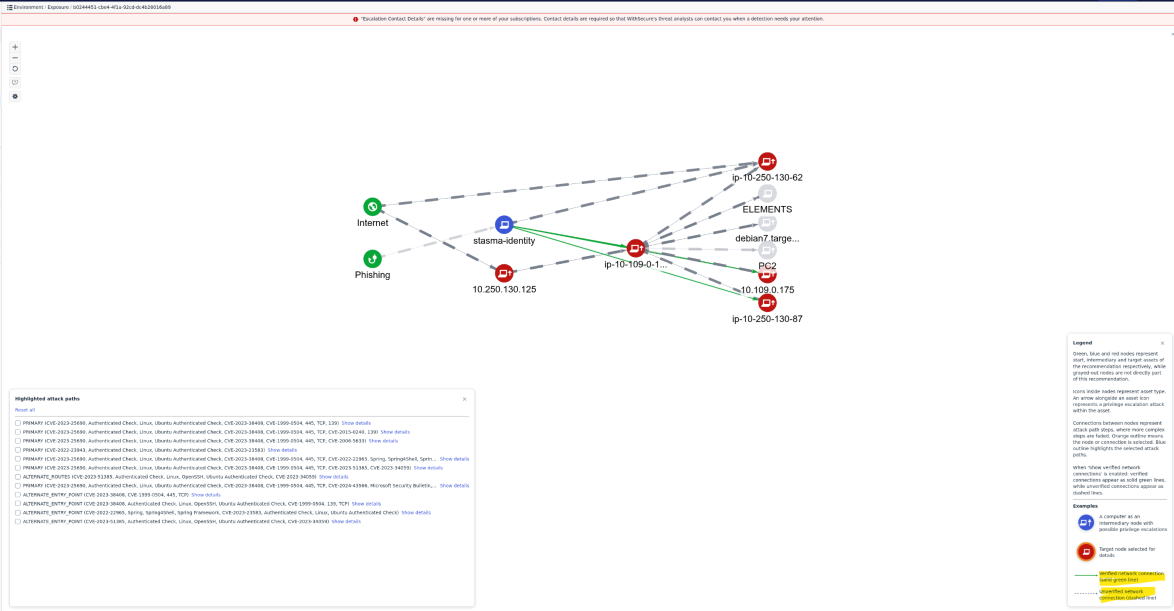
- The AttackPath visualization has now been updated to show verified connections between nodes in the attack path diagrams.
- An option to show verified network connections has been added to the main Attack Path visualization view. This option is enabled by default and may be toggled through the control panel.
- Connections are green when verified connection findings are available. Connections are shown as dashed lines where verifications are unavailable. Verifications will not be possible if the source node does not have the EDR agent installed. The step flyout now includes fields that show which ports are reachable from the source node.
- The legend panel includes new explanatory text and a key for the new line styles.
- The Attack Path simulator discards findings older than 30 days.
Environment → Network page
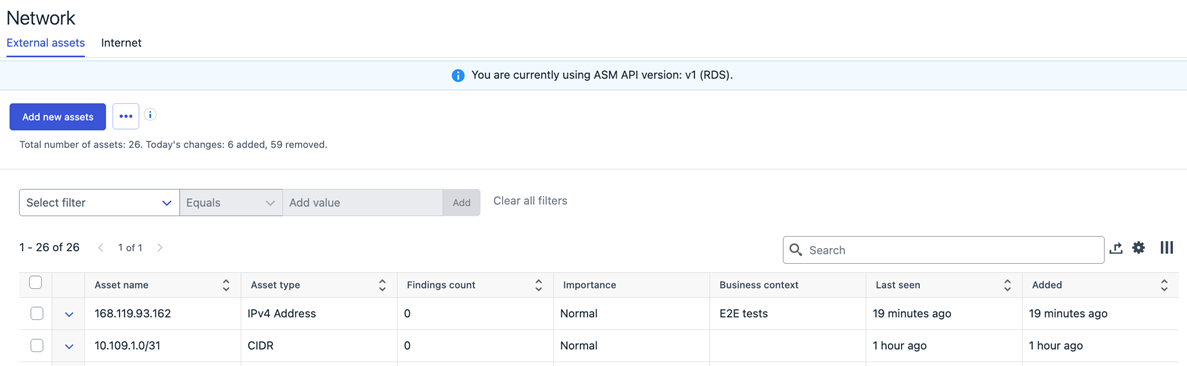
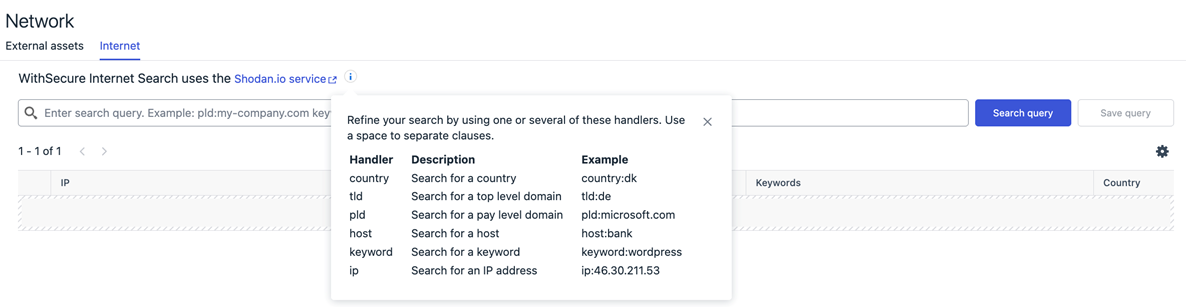
- List of company external assets in now default landing page on the Environment → Network page
- Page design has been updated while preserving all of the functionality as before
- Internet tab is moved as a secondary tab providing possibility to search for the publicly visible assets
- Page design has been updated while preserving all of the functionality as before
- Search results now contain also an indicator (checkmark) if publicly visible assets is already added to the scan group
WithSecure Vulnerability Management Portal
- Added a pop-up notification to inform users about the upcoming removal of Devices → Vulnerability assets page by the end of 2025.
- Resolved an issue causing the Vulnerability Management dashboard on the Home → Overview tab to display empty results instead of vulnerability data.
Exposure Management System Scan
Support for detecting vulnerabilities in the following products was added to Authenticated Scanning:
- Apache Syncope
- AWS JDBC Wrapper
- Spring Cloud Gateway
In addition, the detection of Oracle E-Business Suite Remote Code Execution Vulnerability (CVE-2025-61882) was added.
Support for detecting vulnerabilities in the following products was added to Authenticated Scanning for Windows:
- Ankitects Anki
- Apache Causeway
- Asustor Backup Plan
- Asustor EZ Sync
- Autodesk 3ds Max
- Autodesk Fusion and Fusion 360
- AWS PGSQL ODBC
- AWS Wickr desktop clients
- Fluent Bit
- GoSign Desktop
- HP System Event Utility
- Intel PresentMon
- Intel Thread Director Visualizer
- Joplin
- Lite XL
- MongoDB BI Connector ODBC
- MongoDB Connector for BI
- N-able Take Control Agent
- N-central windows agent and N-central probe
- Opera browser editions
- Razer Synapse
- SigTest
- SigTest Phoenix
- Synology ActiveProtect Agent
- Total Commander
- WatchGuard Mobile VPN with SSL client
Elements Foundations
Integrations
Elements API
New API Endpoints for Managing Elements API Credentials
We have introduced new endpoints to automate the management of API keys for the Elements API:
Create API Key
POST /api-keys/v1/create
- Generate a new API key for accessing the Elements API.
- Keys can be created at the organisation or Service Organisation Partner (SOP) level.
- By default, keys are read-only for security. Optionally, set readOnly to false for write access.
- Important: clientSecret is returned only once during creation—store it securely.
Delete API Key
DELETE /api-keys/v1/api-keys/{clientId}
- Permanently remove an API key by its ID.
- Deleted keys cannot be recovered or used for authentication.
List API Keys
GET /api-keys/v1/api-keys
- Retrieve all API keys for the current organisation or specify an organizationId when querying from SOP level.
For full details, including request/response formats and examples, refer to the API documentation.
Other items of interest
Want notifications for new changelogs?
Changelogs have moved! You can now find all product changelogs here: Product Changelogs
Want notifications for new changelogs?
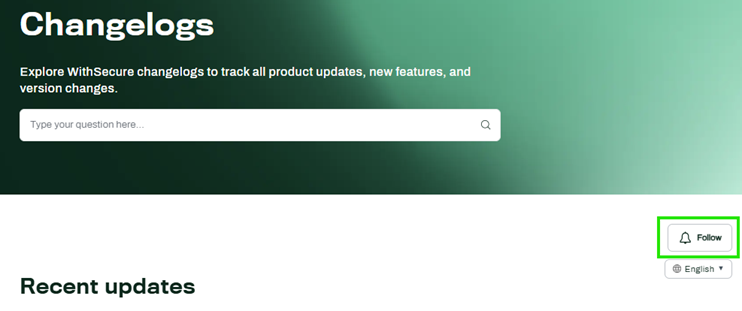
- For all products: Click the Follow button on the Changelog homepage to receive email notifications whenever new changelogs are published.
- For specific products only: At the moment, email notifications for individual product changelogs are not yet available in the Community. We’re actively working on enabling email notifications for individual changelogs and will let you know as soon as this feature is available.
- To make sure you don’t miss any updates in the meantime, we recommend subscribing to all changelog notifications (see above).
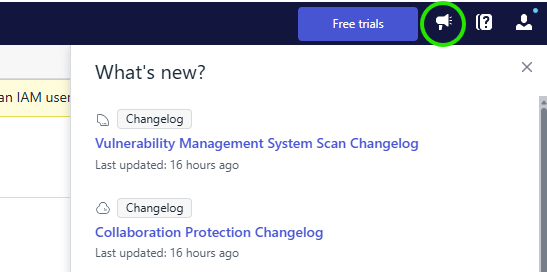
- You can also use notifications in Elements Security Center or save the product’s changelog page as a browser bookmark for quick access.
In case you missed it
Important Update: Sample Submission has moved to a new platform
From the beginning of 2026, the Sample Submission service has moved to a new platform. You can find more details in a dedicated article.
TangleCrypt: a sophisticated but buggy malware packer
Executive Summary
WithSecure’s STINGR Group is releasing a detailed technical analysis of TangleCrypt, a previously undocumented packer for Windows malware. The packer was found on two executables used in a recent ransomware attack and their payloads were both identified as an EDR killer known as STONESTOP that leverages the malicious ABYSSWORKER driver.
Key findings about TangleCrypt:
- The payload is stored inside the PE Resources via multiple layers of base64 encoding, LZ78 compression and XOR encryption.
- The loader supports two methods of launching the payload: in the same process or in a child process. The chosen method is defined by a string appended to the embedded payload.
- To hinder analysis and detection, it uses a few common techniques like string encryption and dynamic import resolving, but all of these were found to be relatively simple to bypass. The lack of any advanced anti-analysis mechanisms also makes manual unpacking of the payload rather straightforward.
- Although the packer has an overall interesting design, we identified several flaws in the loader implementation that may cause the payload to crash or show other unexpected behaviour.
Read more about it HERE
Share your ideas with us
Our purpose is to co-secure the world with you – now as WithSecure™. To co-create the best possible cyber security products and services, we warmly recommend you share your ideas via the Ideas section of the WithSecure Community, now accessible directly from WithSecure™ Elements Security Center.
Further information
Changelogs and Release Notes for all parts of WithSecure™ Elements can be found at the Help Center
-
Elements Exposure Management user roles for Vulnerability Management users
Read more
As part of the Elements Vulnerability Management (EVM) End-of-Life (EOL), EVM views were replaced with XM views and EVM subscriptions were migrated to Exposure Management for Business.
Following this change, the historical Vulnerability (Management) / VM Admin role no longer provides access to vulnerability findings lists UI. Access now requires the Exposure Management (Full Editing) role.Single scan results, as well as VM API endpoints returning vulnerabilities lists are not affected.
As a result, many ex-EVM administrators lost visibility to data they previously managed, causing customer confusion, partner escalations, and increased support load.
The Exposure Management (Full editing) role now grants access to all Exposure Management features, recommendations and findings, including vulnerability findings.
What have we done to address these limitations?
WithSecure performed a careful review of user rights, and we have granted the needed roles to existing users, where we can be sure that there is no impact on data security.
To streamline the transition from EVM to XM, we have granted:
- Exposure Management (Full editing) rights to all users with Vulnerabilities (Management) role, who already had the Elements IAM role. This was a one-time action.
- Exposure Management (Full editing) rights to Vulnerabilities (Management) users in organizations which do not have Identity Security onboarded. This was a one-time action.
Users who have had their roles updated will receive an automated email from WithSecure Elements advising them of this change.
What happens to the remaining users?
For the users where we could not grant the rights without risking an unwanted elevation of privileges, we will be contacting them by email to advise the next steps. These users will need to contact the person(s) within their organization who hold the Elements Identity and Access Management role, and request the XM Admin role.
For a full explanation of the User roles, please refer to the original announcement.
-
What’s New in Elements – November 2025
Read more
Extended Detection and Response
Email and Collaboration Protection
We have released an update containing a number of underlying libraries to improve performance, maintain compatibility and unify the use with other Elements Security Center components. Please note: These updates have resulted in minor adjustments to some UI styles.
Disclaimer in the email notifications
A new disclaimer message has been added to the external administrator email notifications with content configured in the policy. Disclaimer text is “You are receiving this email because your organization uses the WithSecure Elements Collaboration Protection solution, and an administrator has set up this notification. If you have any questions, please contact your administrator.”, in English.
Identity Security
Identity Inventory Capability
We have now introduced a new feature in WithSecure Elements Identity Security for Entra ID: the Identity Inventory capability.
How to Set Up:
- Go to the Cloud → Microsoft tenants page in Elements.
- Connect the new Identity Inventory capability by giving permission to read Entra ID data (no Azure subscription needed).
- Wait for the scan to complete (it may take up to 36 hours).
- View all identity data in Environments → Identities.
With Identity Inventory, you can easily see:
- All users and service principals
- Their types and roles
- MFA (Multi-Factor Authentication) status.
This update gives you a clear view of identities in your Entra ID environment.
Exposure Management
We are happy to share new improvements.
Finding definitions tab added under Environment -> Exposure
The Finding Definitions page now lists all potential finding types that Exposure Management can detect—across vulnerabilities, identities, cloud assets, and external attack surfaces. Unlike the Findings tab, this view includes definitions even if no asset is currently affected. It supports pagination, saved filters, and navigation to related data, consistent with other XM views.

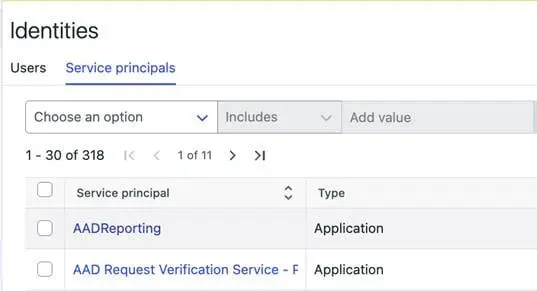
Service principal tab add under Environment -> Identities
The identities list now includes Entra service principals alongside users, providing basic information for each service principal. It supports pagination, saved filters, and navigation to related data, consistent with other XM views.
Vulnerability reports now have a new home
Vulnerability reports view are now available also under common Elements Reports > Email Notifications and report
The existing Reports > Vulnerability reports will run side by side until it’s totally deprecated in favor of its new home
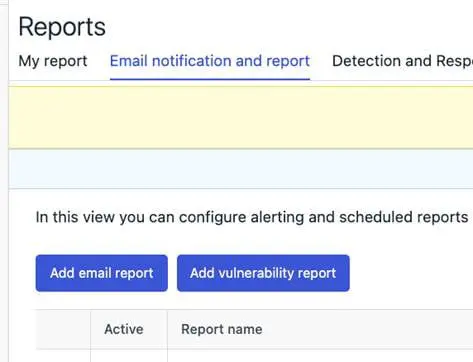
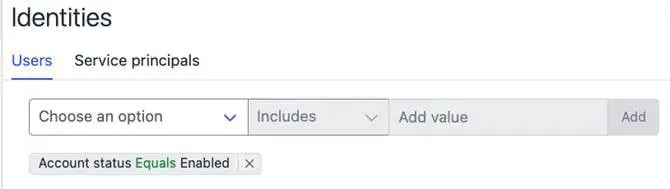
Identities page shows only active Identities by default
The Identities page now has a new default filter to show only identities with enabled account status for both Users and Service principals. To see all the identities, filter can be removed.
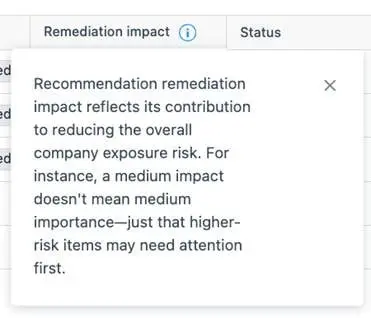
Scoring clarifications
To clarify how XM scoring works, info bubbles have been added to all relevant risk and impact columns in the Findings and Asset widgets, lists, as well as in recommendation and Findings details pages
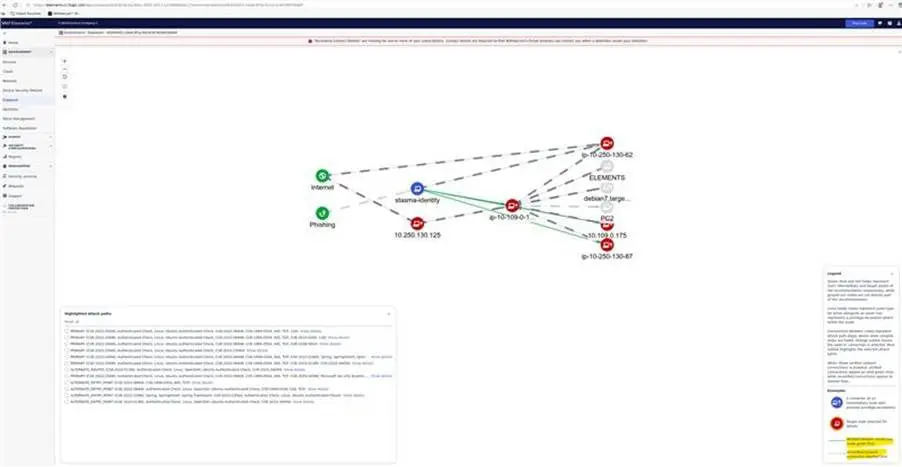
Attack path visualization
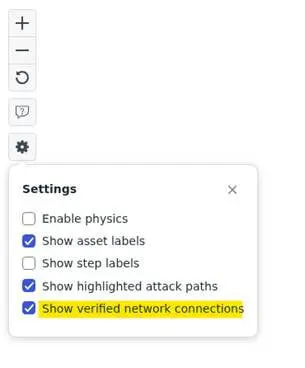
The Attack Path visualization has now been updated to show verified connections between nodes in the attack path diagrams.
An option to show verified network connections has been added to the main Attack Path visualization view. This option is enabled by default and may be toggled through the control panel.
Connections are green when verified connection findings are available. Connections are shown as dashed lines where verifications are unavailable. Verifications will not be possible if the source node does not have the EDR agent installed. The step flyout now includes fields that show which ports are reachable from the source node. The legend panel includes new explanatory text and a key for the new line styles. The Attack Path simulator discards findings older than 30 days.
Exposure Management for Business
WithSecure Vulnerability Management
- Resolved an issue where the Overall Status widget continued to display outdated vulnerability data even after all assets and scans were removed. The widget now correctly shows no data when no assets or scans are present.
- Resolved an issue where email notifications about low disk space on scan nodes were not being sent.
- Added a popup announcing the removal of the Vulnerability Users page by the end of 2025.
- Added pop-up notifications to inform users about the upcoming removal of the following pages by the end of 2025:
- Home → Vulnerabilities,
- Reports → Vulnerability reports,
- Exposure → Vulnerabilities,
- Exposure → Vulnerability coverage.
System Scan
Support for detecting vulnerabilities in the following products was added to Authenticated Scanning:
- Apache Flink CDC
Support for detecting vulnerabilities in the following products was added to Authenticated Scanning for Windows:
- AutoHotkey
- Bambu Studio
- baramundi Management Agent
- Dell Display and Peripheral Manager
- Eaton Intelligent Power Protector
- HP Client Management Script Library
- MailStore Outlook Add-in
- Netbird VPN
- Nixdorf Wincor PORT IO Driver
- NVIDIA App
- NVIDIA Nsight Graphics
- QNAP NetBak Replicator
- Raspberry Pi Imager
- Serviceware Processes
- Sony Optical Disc Archive Software
- Stashcat
Elements Foundations
Elements Security Center
Detection & Response Reports
In line with our plans for unification and streamlining the reporting experience, the Detection & Response Reports view in Elements has now been transitioned to read-only mode.
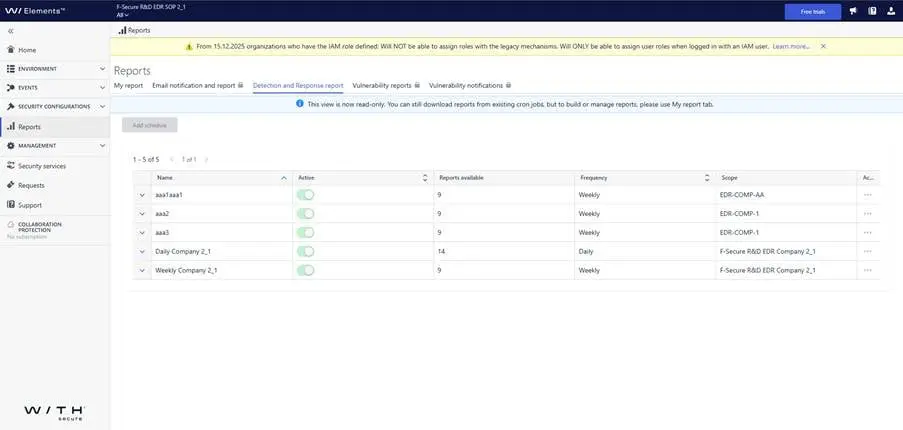
What does this mean?
- You can no longer create new schedulers or modify existing ones in the Detection & Response Reports view.
- Existing active schedulers will continue to generate reports, and you can still download these reports as usual, until the view is fully removed.
What should you do next?We encourage you to start using the My Report tab and set up your report there as soon as possible. My Report provides all the same reporting capabilities as the previous view – and even more. It offers an improved and more intuitive experience, with ongoing enhancements and new features planned. Moving to My Report now will ensure you have uninterrupted access to your reports and benefit from the latest updates.
The complete removal of the Detection & Response Reports view is planned for Q1 2026.
Endpoint Protection access now available across multiple organizations
Elements Security Center users (security administrators) can now be granted Endpoint Protection access to multiple organizations. This eliminates the need for email plus addressing (example+subaddress@example .com) to create additional W/ Business Accounts for a user’s base email address.
Previously, Elements Security Center users could hold roles in multiple organizations, except for Endpoint Protection roles. This exception has now been removed, and the other roles function as before.
Example
Suppose these two plus-addressed user accounts granted partner administrator Jon Doe access to only two of 10 companies under the partner’s Solution Provider:
- john.doe+A@Doe .com accesses company A.
- john.doe+B@Doe .com accesses company B.
Jon Doe had to log into Elements Security Center twice to work with companies A and B. Now, plus-addressed accounts are unnecessary. They can be replaced with a single john.doe@Doe .com account. The IAM administrator for the Solution Provider managing companies A and B (among 10 total) can grant Jon Doe access to both companies:
- Go to Elements Management > Organization Settings > Security Administrators view
- Change scope to company A
- Click “Add administrator” and enter john.doe@Doe .com
- Assign Endpoint Protection (or other) roles
- Click “Add”
- Change scope to company B
- Repeat steps 3-5 to assign roles for company B
Afterward, the user account john.doe@Doe .com sees companies A and B in the scope selector and can switch between them without separate accounts.
Effect on partner and company-level views
When a user is granted the EPP role at the partner level, it affects partner-level views. These views are not influenced by company-level role assignments, which neither restrict nor extend partner-level permissions when the partner organization is selected as the current view.
When viewing a single company, the EPP role granted to a user at the company level extends (i.e., adds to) the roles assigned at – and inherited from – the partner level.
Example
John Doe (john.doe@Doe .com) has read-only access to Solution Provider in the role Computers & mobiles: Read-only. He can list devices for companies A and B managed in this Solution Provider but cannot modify them due to lacking full editing rights. John can use the scope selector to direct Elements Security Center portal views to companies A or B, where he retains read-only permissions.
The Solution Provider IAM Administrator can grant John Doe the Computers & mobiles: Full editing role for company A only:
- Go to Elements Management > Organization Settings > Security Administrators view
- Change scope to company A
- Click “Add administrator” and enter john.doe@Doe .com
- Assign the Computers & mobiles: Full editing role
- Click “Add”
When John selects Solution Provider as scope, device lists for companies A and B remain read-only per partner-level access. Changing scope to company A enables him to edit devices there, while access to company B stays read-only.
Access across partner hierarchies
Cross-tenant security policy prevents access to company and partner organizations under different Solution Providers by default.
A user with access to an organization under one Solution Provider cannot be added to an organization under another Solution Provider unless WithSecure links the two Solution Providers with a trust relationship. Once a user account associates with one Solution Provider, attempting to grant permissions for an organization under another Solution Provider causes a “User cannot be added to this organization” error in the Security Administrators view.
Recommended action on email plus addressing (example+subaddress@example .com)
You can now use your primary account and email to add EPP access for multiple company or partner organizations. We recommend removing previously created plus-addressed accounts and assigning grants directly to the main account. Elements will provide access to multiple organizations without logging out and back in to switch contexts. All accessible organizations will appear in the scope selector after logging in with the primary email.
Note that Entra ID Federated SSO does not support plus addressing. Removing plus addressed user accounts enables federation of your email domain with Elements and allows Entra ID to serve as the primary identity provider for Elements Security Center.
Summary
- A Solution Provider partner user can be granted EPP access to selected:
- Service Provider organizations
- Company organizations
The administrator can switch between permitted organizations using the scope selector. They may lack access to other organizations or have read-only access to all, with higher access to manage selected organizations.
- A Service Partner user can be granted EPP access to selected company organizations
The administrator can switch between permitted companies using the scope selector. They may lack access to other companies or have read-only access to all, with higher access to manage selected companies.
- A partner does not need a dedicated plus-addressed account when managing only the EPP aspect of company security while other aspects are managed by the company or WithSecure directly (e.g., XDR, WithSecure Infinite)
The administrator can switch to the partially managed company using the scope selector, even if the company lies outside the partner Solution Provider hierarchy. Logging out and in with different account is not required anymore.
Integrations
WithSecure API: New response actions to enable new workflows
We’ve added new response action endpoints under
POST /response-actions/v1/execute/<name>to expand remote execution capabilities for both device and identity management.
This allows you to automate new workflows that involve acting on the target devices and identities.
This release increases the number of API supported response actions from 8 to 32.
Device response actions
The following device response actions are available:
- Create full memory dump – Uploads a full memory dump from the device
- Delete registry key or value – Deletes a specified Windows registry key or value
- Delete scheduled task – Deletes a specified Windows scheduled task
- Delete Windows service – Deletes a specified Windows service
- Delete WMI persistence objects – Deletes Windows Management Instrumentation (WMI) persistence objects
- Enumerate running processes – Enumerates running processes on the device
- Enumerate WMI persistence mechanisms – Enumerates WMI persistence mechanisms, including event consumers, filters, and bindings
- List file system structure – Lists the file system structure based on path matching patterns
- List registry keys and values – Lists Windows registry keys and values based on path matching patterns
- List scheduled tasks – Lists all Windows scheduled tasks on the device
- Retrieve amcache files – Retrieves the application compatibility cache file from the device
- Retrieve antivirus logs – Retrieves antivirus software log files for security analysis
- Retrieve browser artifacts – Retrieves the browser history from the device
- Retrieve event log tracing files – Retrieves .etl event log tracing files with records of system activities
- Retrieve files from device – Retrieves files from the device based on path matching patterns
- Retrieve jump list files – Retrieves jump lists stored in the AutomaticDestinations and CustomDestinations subfolders
- Retrieve master boot record – Retrieves the master boot record (MBR) from a specified drive
- Retrieve master file table – Retrieves the master file table (MFT) from a specified drive
- Retrieve network connections – Retrieves network connections, routing tables, interface statistics, and related process information
- Retrieve prefetch files – Retrieves Windows prefetch files with evidence of program execution
- Retrieve process memory dump – Retrieves a memory dump of a specific process
- Retrieve RDP cache files – Retrieves remote desktop protocol (RDP) bitmap cache files
- Retrieve recently accessed files – Retrieves information about recently accessed files and folders from user activity artefacts
- Retrieve registry hive files – Retrieves Windows registry hive files
- Retrieve SRUM database – Retrieves the system resource usage monitor (SRUM) database
- Retrieve Windows event log entries – Retrieves Windows event log entries based on specified filters
- Retrieve Windows event log files – Retrieves Windows event log files
- Terminate process – Terminates processes matching the specified patterns
- Terminate thread – Terminates a thread
Identity response actions
The following identity response actions are available for Microsoft Entra:
- Block user access in Microsoft Entra – Blocks access for a user to all resources inside the Microsoft Entra ecosystem
- End Microsoft Entra session – Ends the Microsoft Entra session of a user
- Reset Microsoft Entra password – Resets the Microsoft Entra password of a user
Response action results and attachments
Response actions are processed asynchronously: once triggered, you can monitor their progress.A new endpoint is available for retrieving the actual results of response actions that return data (for example, memory dumps or other files):
GET /response-actions/v1/responses/tasksBy using this endpoint, you can download any files or attachments produced by completed response actions. To determine when your action has finished, first poll the state via GET /response-actions/v1/responses. When the action is marked as finished, your attachments are ready for download from the tasks endpoint.
Start building
Full API documentation is available at Elements API Reference | WithSecure™ Connect
WithSecure Elements Connector
A new release of Elements Connector 25.44 for both Windows and Linux is now available.
This release includes the following changes:
Event forwarding:
- Language option for forwarded eventsA new setting in the Elements Connector profile allows localization of forwarded event messages.
- Support for Exposure Management (XM) eventsXM events are now supported, enhancing visibility into exposure-related data.
Vulnerability fixes:
- Java 17 update to (17.0.15 → 17.0.17)Addressed vulnerabilities: CVE-2025-53066, CVE-2025-53057.
- Spring Framework 6.2 update (6.2.3 → 6.2.11)Addressed vulnerabilities: CVE-2025-41248, CVE-2025-41249.
Other fixes and improvements
- Early-access group supportElements Connector now correctly supports early-access group updates, aligning behavior with public channel versions.
- Linux uninstallation FixFixed an issue where the update service was not properly removed during uninstallation on Linux systems
Other items of interest
Threat Advisory information
Docker Compose Path Traversal Vulnerability (CVE-2025-62725)
Technical Summary
- A critical vulnerability in Docker Compose‘s handling of OCI-based artifacts allows attackers to perform path traversal and write arbitrary files to the host system. This flaw stems from improper validation of layer annotations in YAML files, which are widely used in CI/CD pipelines and development environments.
- Attackers can exploit this flaw by tricking users into referencing a malicious remote artifact. This enables them to escape the Compose cache directory and write files anywhere the Compose process has permissions—potentially leading to full host compromise, data tampering, or privilege escalation.
Docker – runc Container Escape & Isolation Bypass
Technical Summary
- runc is the low-level container runtime used by Docker, Kubernetes, and other platforms to spawn and manage containers. Recent vulnerabilities in runc may allow attackers to escape container boundaries and gain unauthorized access to the host system.
- CVE‑2025‑31133 (CVSS 7.1): Exploits maskedPaths to bypass container filesystem isolation.
- CVE‑2025‑52565 (CVSS 8.4): Race condition in /dev/console mount allows container escape and arbitrary file writes.
- CVE‑2025‑52881 (CVSS 7.3): Bypasses Linux Security Modules (LSM) and enables arbitrary write gadgets, undermining host protections.
- These vulnerabilities can lead to privilege escalation, host compromise, and data tampering, especially in multi-tenant or production environments.
Share your ideas with us
Our purpose is to co-secure the world with you – now as WithSecure™. To co-create the best possible cyber security products and services, we warmly recommend you share your ideas via the Ideas section of the WithSecure Community, now accessible directly from WithSecure™ Elements Security Center.
Further information
Changelogs and Release Notes for all parts of WithSecure™ Elements can be found at the WithSecure User Guides page.
-
Integrating Autotask PSA to WithSecure Elements
Read more
WithSecure have announced the availability of a new integration with Autotask PSA as part of new Managed Service Provider (MSP) focus, designed to empower MSPs to deliver scalable, compliant, and profitable cybersecurity services. The integration helps MSPs to automate their workflows to deliver Advanced Endpoint Protection, Exposure Management, and Extended Detection and Response (XDR) capabilities and Managed Detection and Response (MDR) services with WithSecure Elements Cloud platform.
The seamless integration of WithSecure Elements with Autotask PSA delivers a comprehensive, multi-tenant and single-agent cybersecurity solution – plug in, power up, and let the integrated ticketing automate your workflows.
Background
WithSecure Elements has native integration capabilities to automate ticket creation workflow with Autotask PSA. Integration can be easily configured from Elements Security Center.
How to Get Started
Get integration credentials from Autotask
- Login to www.autotask.net management console
- Click “Admin” from navigation panel (left hand side)
- Under “Admin categories” select “Organization settings and users”
- Expand “Resources/Users (HR)”
- Click “Resources/Users”
- From “New” dropdown list select “New API User”
- In new Add API user popup window
- Fill mandatory general settings (names and email etc.)
- You can choose “API user (system) Can’t Read Costs” from “Security Level” options as this is enough for WithSecure Elements integration
- Under Credentials section click “Generate key” button
- Under Credentials section click “Generate secret” button
- Copy key and secret to be used in WithSecure Elements Security Center
- Under “API Tracking Identifier” select “Integration vendor” radio button
- From “Integration vendor” dropdown list select “WithSecure”
- Click “Save & Close” button on top of the page
You will need the following information to be able to configure the Autotask PSA integration in the Elements Security Center
- API username/key
- API password/secret
Go to Integrations section in Elements Security Center
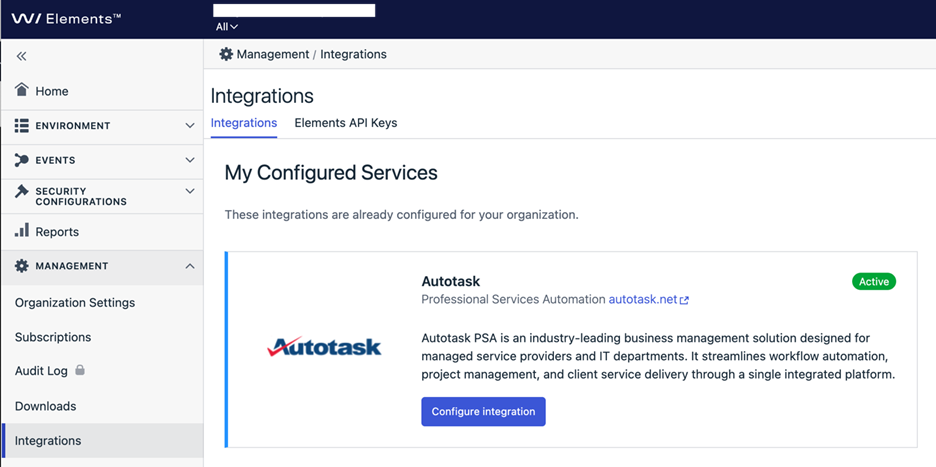
Select “Configure integration” from Autotask component
Configure integration
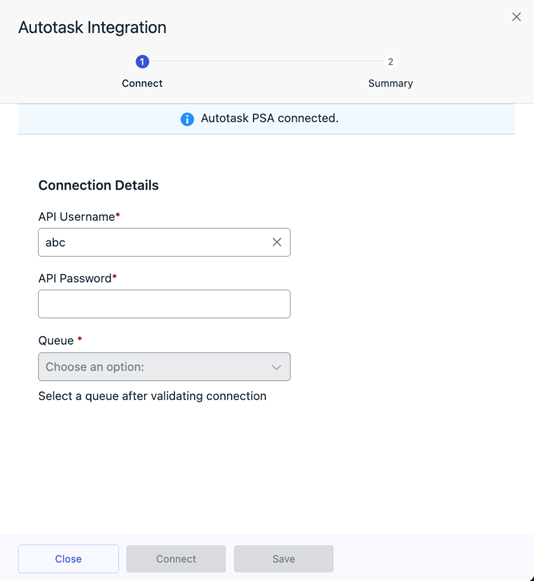
- Set API username as copied from Autotask management console
- Set API password as copied from Autotask management console
- Click connect to validate connectivity and load queue definitions from Autotask
- Select queue where WithSecure Elements creates tickets to
- Click save
- When ordering WithSecure products from WithSecure partner portal for a customer, include Customer company’s Autotask PSA reference ID in the in WithSecure Partner Portal “New order” form “End Customer Id” field.
- Ticket creation will automatically start for this company
- Monitor BCD tickets from Autotask PSA tool. Tickets have basic information about Elements Security Center activity with deep link WithSecure details.
To import existing customer accounts without “End Customer ID” when ordered, please contact WithSecure support.
Monitor BCD tickets from Autotask
Tickets have basic information about Elements Security Center activity with deep link to WithSecure details.
Availability
The integration is now available exclusively to WithSecure Partners in Elements Security Center. Free trials and company-managed subscriptions cannot access them. New partners should contact WithSecure to access dedicated partner features in WithSecure Elements.
-
Integrating WithSecure Elements and ConnectWise PSA
Read more
WithSecure have announced the availability the availability of a new integration with ConnectWise PSA as part of our new Managed Service Provider (MSP) focus, designed to empower MSPs to deliver scalable, compliant, and profitable cybersecurity services. The integration helps MSPs to automate their workflows to deliver Advanced Endpoint Protection, Exposure Management, and Extended Detection and Response (XDR) capabilities and Managed Detection and Response (MDR) services with WithSecure Elements Cloud platform.
The seamless integration of WithSecure Elements with ConnectWise PSA delivers a comprehensive, multi-tenant and single-agent cybersecurity solution – plug in, power up, and let the integrated ticketing automate your workflows.
Background
WithSecure Elements has native integration capabilities to automate ticket creation workflow with ConnectWise PSA. Integration can be easily configured from Elements Security Center.
How to Get Started
Setup integration in Connectwise PSA management console
- Select “My account” from top left corner user dropdown list
- Select “API keys” tab
- Select “+” icon (new item) to add new API key
- Define description field e.g. WithSecure Elements
- Click “save” icon to generate public and private keys
- Copy public and private keys for WithSecure Elements Security Center configuration
You will need the following information to be able to configure the ConnectWise PSA integration in the Elements Security Center
- Company ID (used e.g. to login to Connectwise PSA management console)
- Public Key
- Private Key
Go to Integrations section in Elements Security Center
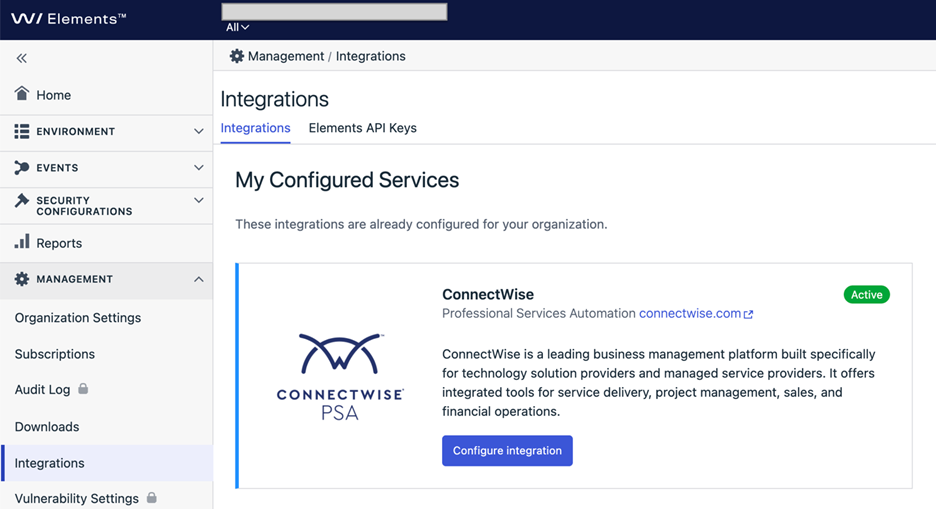
Click “Configure integration” button from Connectwise PSA component.
Configure integration
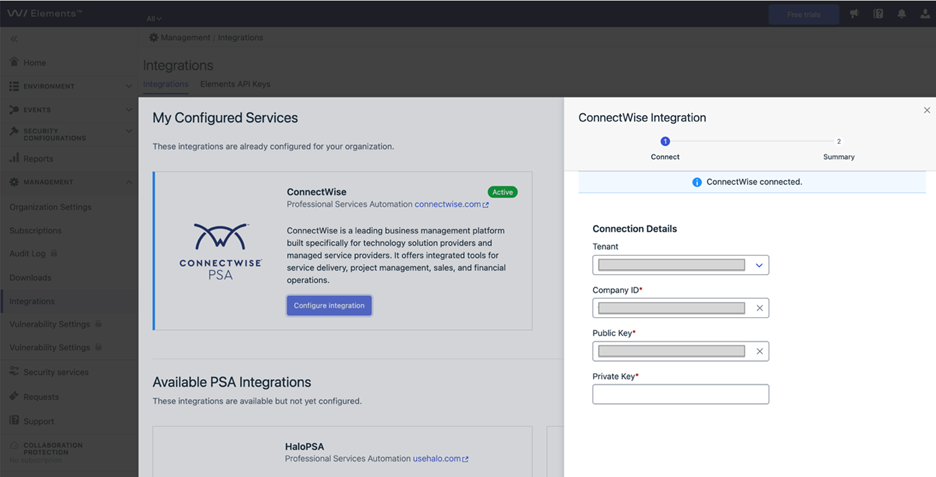
- Select your tenant from dropdown list (same as your Connectwise PSA management console url)
- Set “Company ID” (same as your Connectwise PSA management console Company ID)
- Set public and private keys as copied from Connectwise PSA management console.
- Click connect to validate connectivity
- Click “save”
- When ordering WithSecure products from WithSecure partner portal for a customer, include Customer company’s Connectwise PSA reference ID in the in WithSecure Partner Portal “New order” form “End Customer Id” field.
- Ticket creation will automatically start for this company
- Monitor BCD tickets from Connectwise PSA tool. Tickets have basic information about Elements Security Center activity with deep link WithSecure details.
To import existing customer accounts without “End Customer ID” when ordered, please contact WithSecure support.
Availability
The integration is now available exclusively to WithSecure Partners in Elements Security Center. Free trials and company-managed subscriptions cannot access them. New partners should contact WithSecure to access dedicated partner features in WithSecure Elements.
-
Integrating WithSecure Elements and HaloPSA
Read more
WithSecure have announced the availability of a new integration with HaloPSA as part of new Managed Service Provider (MSP) focus, designed to empower MSPs to deliver scalable, compliant, and profitable cybersecurity services. The integration helps MSPs to automate their workflows to deliver Advanced Endpoint Protection, Exposure Management, and Extended Detection and Response (XDR) capabilities and Managed Detection and Response (MDR) services with WithSecure Elements Cloud platform.
The seamless integration of WithSecure Elements with HALO delivers a comprehensive, multi-tenant and single-agent cybersecurity solution – plug in, power up, and let the integrated ticketing automate your workflows.
Background
WithSecure Elements has native integration capabilities to automate ticket creation workflow with HaloPSA. The integration can be easily configured from Elements Security Center.
How to Get Started
Setup connectivity in HaloPSA
- Login to your HaloPSA account
- Choose “Configuration” -> “Integrations” from Navigation menu on left hand side
- Select HaloPSA API
- Under “Applications” click “View applications” button
- From top right corner click “+New”
- Type in application name e.g. “WithSecure Elements”
- Make sure “Active” checkbox is checked
- Select “Client ID and secret” under “Authentication method”
- Copy “Client id” and “Client secret” to be inserted into WithSecure Elements Security Center.
- Under login type
- Select “Agent”
- Then choose an agent of your choice from the “Agent to login in as” dropdown menu. The tickets coming from WithSecure are created with the identity of the chosen agent
- Click Save
Go to the Integrations section in the Elements Security Center
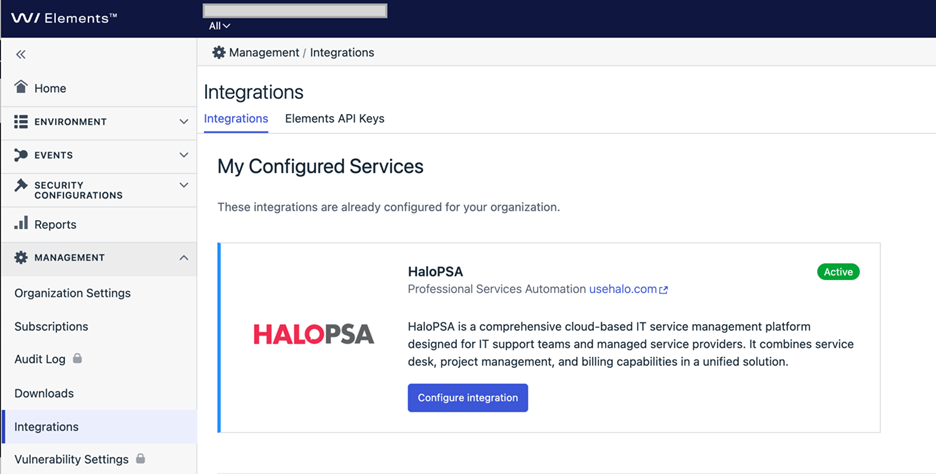
Click “Configure Integration”
Configure integration
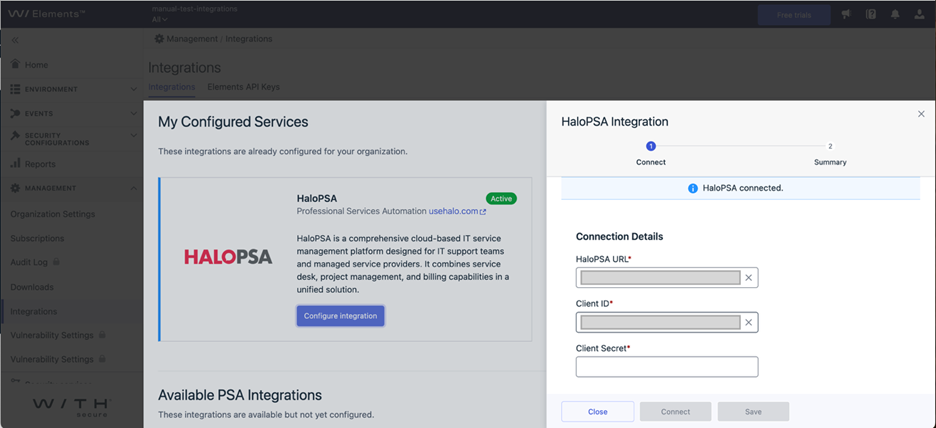
- Set URL (e.g. https://yourcompanytenant.halopsa.com)
- Client ID and Client Secret copied from HaloPSA
- Click connect to validate connectivity
- Click save
- When ordering WithSecure products from WithSecure partner portal for a customer, include Customer company’s HaloPSA reference ID in the in WithSecure Partner Portal “New order” form “End Customer Id” field.
- Ticket creation will automatically start for this company
- Monitor BCD tickets from HaloPSA tool. Tickets have basic information about Elements Security Center activity with deep link WithSecure details.
To import existing customer accounts without “End Customer ID” when ordered, please contact WithSecure support.
Availability
The integration is now available exclusively to WithSecure Partners in Elements Security Center. Free trials and company-managed subscriptions cannot access them. New partners should contact WithSecure to access dedicated partner features in WithSecure Elements.
-
Important Update: Sample Submission Is moving to a new platform
Read more
UPDATE – December 22, 2025:
The new platform is live and available as of December 22, 2025.
The old platform will be shut down on December 31, 2025.
What is changing?
By end of December 2025, we will retire the following sample submission channels:
- Current online submission form:
https://www.withsecure.com/en/support/contact-support/submit-a-sample - partner-samples @ file-samples.withsecure.com
- japan-samples @ file-samples.withsecure.com
All sample submissions will be handled through the new Sample Validation service in the WithSecure™ Elements Security Center.
About the change
Why this change?
The new platform provides:
- Stronger security and authenticated access
- Faster processing
- Full visibility and traceability of your requests
When will this change happen
- Planned rollout: End of December 2025
- After the official release, all sample submissions must be made via the Elements Security Center.
- Final release date will be communicated separately.
- The User Guide is now available.
What remains unchanged
- WithSecure Cloud Protection for Salesforce Analytics: You can continue Reporting of false positives and false negatives from Analytics.
- Report False Positive from Elements Security Events: You can continue Reporting of false positives.
- Report False Positive functionality implemented within the product (e.g., Browsing Protection, Quarantine) You can continue Reporting of false positives from any product that has the functionality.
Action Required
If you have a WithSecure™ Elements subscription
No immediate action is needed.
Once released, you will find the Sample Submission option directly in your Elements Security Center under the company scope selector.If you do NOT have a WithSecure™ Elements subscription
To continue submitting samples, you will need an WithSecure Elements account.
Note: This applies to existing customers using our other solutions ( On-Premises solutions (Business Suite, Atlant, Email and Server Security)
What will happen:
- You need to submit a a request for access to the new platform in advance of needing to use it. You can already request this access using our Support team link: Submit request
- WithSecure validates your customer information.
- An Elements account will be created for you to access the Sample Validation service. You will receive the access URL along with your initial login credentials.
- Current online submission form:
-
Elements Vulnerability Management: changes to features
Read more
EDIT January 15, 2026:
Update on feature changes and known issues (January 15, 2026)
This is an update on changes to the Vulnerability assets list that was discontinued at the end of December 2025, since the changes have caused the following known issues that will be addressed shortly:
- Device Details Page for Unmanaged Devices: Links from Elements Exposure Management (XM) views to device details may lead to a page not found error (404) if the device is unmanaged. Also, linkage from Scan pages to the device details might be broken for some devices.
- UPDATE 15.1.2026: This now works for most devices, but may still happen in extremely rare cases. This is being worked on to resolve the remaining cases.
- Software List Visibility: The software list on some unmanaged devices cannot be viewed at this time.
- UPDATE 15.1.2026: This now works for most devices, but may still happen in extremely rare cases. This is being worked on to resolve the remaining cases.
- Asset Properties Editing: Importance, tags, and other asset properties previously managed by EVM are temporarily not editable until data import is completed.
- UPDATE 15.1.2026: All of the properties referred to can be edited via the Elements Security Center. However the API for editing device labels is still being worked on.
Impact
- Some device properties such as importance and business context may be not editable
- UPDATE 15.1.2026: This issue is now fixed
- Some workflows involving unmanaged devices may be disrupted.
- UPDATE 15.1.2026: This issue is now fixed
- Customers may experience broken links and limited visibility of device details.
- UPDATE 15.1.2026: Most links and device details show now be fixed. For a limited number of devices, a “Device UUID not found” message may be displayed.
Mitigation Plan
The known issues will be resolved by January 12, 2026, at the latest.
In the meantime: You can continue using the Findings and Findings Definitions views under the Environment menu in Elements as substitutes for the old Vulnerabilities views. You can also navigate from Security configurations to Scans view to see a list of vulnerabilities from a specific scan, organized by device. If you encounter issues, please reach out to our support team for assistance.
We appreciate your patience and understanding as we complete these updates to transition from EVM to the more comprehensive and intelligent solution – WithSecure Elements Exposure Management (XM).
– –
We are preparing the End of Life (EOL) of WithSecure Elements Vulnerability Management (EVM), where EVM is replaced with the more comprehensive and intelligent solution – WithSecure Elements Exposure Management (XM).
XM includes and is not limited to
- From reactive and asset centric, to proactive and estate-wide security.
- Gain visibility on what attackers would be able to do in your estate.
- Easier and more efficient prioritization of work.
- AI assistance for remediating and documenting your exposure.
- Expand your visibility beyond devices. E.g. EntraID, Azure and AWS.
As part of our efforts to provide a unified user experience across Elements, we are improving our user interface related to Elements Vulnerability Management. This operation also means decommissioning a few Vulnerability Management features that were either inconsistent or not widely adopted nowadays
We are now highlighting these changes that will impact EVM, and also when you continue using similar features in the XM product.
EVM assets management
- Vulnerability assets list page will be discontinued by the end of December 2025. From now on, EVM assets can be accessed using Devices > Computers and Devices > Unmanaged pages as communicated earlier and by selecting “Vulnerability management” from the View drop down .
- API for EVM assets management will become read-only for all properties that can be managed using Devices pages. This includes fields like alias, importance and note/business context.
- Although EVM API for assets will still work in read-only mode, we encourage to migrate any integrations to use the Elements API.
- Environment / Devices / Device Discovery will be decommissioned as the functionality is already available in the Computers view
EVM user management
- The old user interface for managing EVM users, groups and roles will be discontinued by the end of December 2025 and Elements-wide “Security groups” feature will fully replace it in early 2026.
- EVM User management API is expected to be decommissioned
- Access management can be carried out using the Elements-wide Organization settings > Security administrator page.
EVM Dashboard
- The most used widgets are available at Reports / My Report (Circle and Gauge widgets are not going to be back ported due to miniscule usage)
- Existing EVM Dashboard page will be discontinued by the end of December 2025.
- All custom VM dashboards need to be re-created by the customer. Should you need any assistance, please log a support case with us.
EVM Summary reports
- All EVM Summary reports are available on Reports / Email notifications and reports page. New reports can also be configured there, and the old page will be discontinued by the end of December 2025.
- There will be no changes to reports-related part of EVM API.
- Although there is no decommission regarding EVM summary reports, they are considered legacy and we plan to extend only XM reporting capabilities.
EVM Vulnerabilities
- Exposure > Findings and Exposure Findings definitions pages are addressing the same needs as Vulnerabilities and Vulnerability coverage pages do in EVM, but the new views contain more data and of higher quality. Hence, Vulnerabilities and Vulnerability coverage pages became redundant and will be disabled soon.
- There will be no changes to vulnerabilities-related part of EVM API.
- Recommendation is to switch to Findings and Findings definitions views under Environment mega menu in Elements as a substitute for Vulnerabilities and Vulnerability coverage views
EVM Internet Discovery
- EVM Internet discovery page has undergone a visual update, but with no changes from the usability perspective.
- External assets page has become a default landing page for Environment -> Network menu, whereas the Internet discovery has become a secondary tab.
EVM Ticketing
- The feature is in sunsetting phase already now, meaning that it’s only available for customers and partners who have already used it in the past.
- The user interface will be disabled by the end of December 2025.
- EVM ticketing API will be maintained as operational to keep the existing integrations operational as well. Meanwhile we recommend using the Elements level API for the same outcome.
Security configurations / Scans / Network scans
- All scans-related pages are undergoing a visual update.
- Compliance (PCI) column will be removed from Network scans page by the end of December 2025. The related functionality will continue to be supported.
Management / Vulnerability Settings
- The page will undergo a visual update. “General settings” and “Security settings” tabs will get merged into a single view, as part of the simplification.
- The following settings will get decommissioned from user interface:
- Contact details, as they are not in use.
- Subscriptions, which are also available in Management > Subscriptions
- “Customization settings”, which are also available in “MANAGEMENT > Organization Settings > Customization” with following caveats:
- Existing VM settings will not be migrated. However, they have always only applied to VM scope and have never affected other parts of Elements.
- VM reports are currently using VM settings, but will start using Elements customization settings by the end of January 2026 (RADAR-32889)
- This will no longer be supported on company-level, but only for partners.
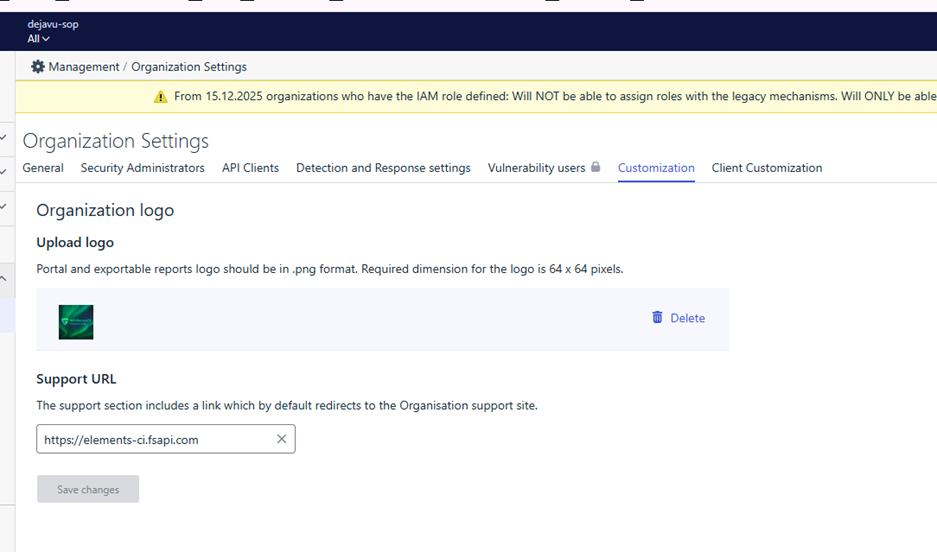
- Vulnerability statuses and workflow, as they are on their way to be superseded by XM statuses
- Assets archiving, as this will no longer be controlled by EVM. Automated assets clean-up will be performed with “Automated deletion” feature on Devices page.
- Restrict login based on IP address will not be available any longer as we are aligning authentication & authorization throughout the Elements.
- Force two-factor authentication, as this is already forced on Elements level.
- EVM API keys definition should be done via Vulnerability settings page, as they will cease to show on Elements user profile page.
- Device Details Page for Unmanaged Devices: Links from Elements Exposure Management (XM) views to device details may lead to a page not found error (404) if the device is unmanaged. Also, linkage from Scan pages to the device details might be broken for some devices.
-
WithSecure Commercial API specification is now available
Read more
As we move forwards in our digital transformation journey, we are today announcing the specification of our new Commercial API for Partners.
You can find the API Reference Guide here.
The new API will be available
- Staging access in Mid December,
- Production use in Mid January 2026.
New commercial API will replace the existing Provisioning API
- Read access to Provisioning API will continue until further notice
- Write accesses will be removed by end of February 2026. Your WithSecure contact will share with you write access (subscription creation, modification and termination) migration plan to the new API.
- No new write access to the Provisioning API will be granted
Summary
The WithSecure Commercial API offers a comprehensive set of endpoints exclusively for WithSecure™ partners operating in the Total Volume business model.
It enables partners, distributors, and resellers to perform various actions, including:
- Listing existing subscriptions
- Automated provisioning of Total Volume usage or quantity-based subscriptions
- Listing resellers (for distributors)
Total Volume business model
The WithSecure Commercial API enables our partners to automate commercial transactions using the WithSecure Total Volume business model.
In the Total Volume business model, all subscriptions are:
- Continuous until terminated
- Priced according to the frame agreement between WithSecure and the partner
- Invoiced monthly based on active subscriptions during the billing period
Total Volume subscriptions have two types:
- Usage-based — invoicing is based on the number of active assets during the month
- Quantity-based — invoicing is based on active order quantities during the month
How to gain access
To gain access to the WithSecure Commercial API, please contact the WithSecure™ Support Team or your WithSecure™ account manager.