
-
Release Announcement: New WithSecure client for macOS
Read more
Updates
2024-05-20: The WithSecure Elements and Countercept clients for Mac have now been released to all customers. Please note that it might take a day or so before all endpoints receive this update.
2024-05-15: Added information related to security posture when used as part of VPN authorization.
2024-04-16: Article revised to make it clearer which parts are for Elements and which for Countercept. Additionally clarified some aspects of controlling the software updates with MDMs, and providing a script to handle situations where old and new clients are installed.
2024-04-08: Include instructions for JAMF configuration
2024-04-03: Updated WithSecure System Extension sample profile
2024-02-15: Documented changes in product activation.
Background
We have now released a new version of our Mac software for WithSecure Elements, WithSecure Countercept.
As part of these releases, it is important to note that several things have changed.
Changes in network server addresses
For system and network administrators who tightly control their infrastructure’s ability to contact external servers, we strongly advise that they review the list of Server address changes at the WithSecure Community
Changes in Browser Extensions
Clients will also use WithSecure browser extensions. These can be found at:
If you use MDM or group policies to manage browser extensions it is recommended to allow or preinstall these extensions in advance.
You can use following IDs for MDM profiles:
- Google Chrome: imdndkajeppdomiimjkcbhkafeeooghd
- Mozilla Firefox:
- Extensions to install: https://download.withsecure.com/online-safety/ws_firefox_https.xpi
- Prevent extensions from being disabled or removed: ols_main@withsecure.com
The older F-Secure extension IDs can be removed from MDM later in May after the product upgrade to version 24.1.
Changes in Product Activation
To activate the product using the activator tool, enter the following command:
/Library/WithSecure/bin/activator --subscription-key "<subscription key>"VPN posture check
If your organization implements VPN posture check to ensure that the agent is running before allowing a connection, please adjust the rule to follow the new process name ‘wssensord’ (instead of ‘fssensord’ used in older product versions) located at:
- Elements: ‘/Library/WithSecure/ultralight/bin/com.withsecure.ultralight.wssensord.xpc/Contents/MacOS/wssensord’
- MDR: ‘/Library/WithSecure-mdr/ultralight/bin/com.withsecure.ultralight.wssensord.xpc/Contents/MacOS/wssensord’
Changes in MDM configurations
For customers who use MDM systems to control their IT environments, the following information is required in order to correctly manage the new clients.
Update Team ID / Bundle IDs
Replace the current Team ID from 6KALSAFZJC with V928P8X763.
Change the Elements Agent Bundle ID from com.f-secure.fsmac.gui to com.withsecure.wsagent.
Update the previous System Extension Bundle ID from com.f-secure.fsmac.gui.FSCSystemExtension to com.withsecure.wsagent.wssystemextension.
If you are using MDR, change the MDR Agent Bundle ID from com.f-secure.mdr.fsmac.gui to com.withsecure.mdr.wsagent
New installation locations
The installation location of the Elements Agent client binaries has been changed from /Library/F-Secure to /Library/WithSecure/bin.
The path within the Applications folder has now changed to /Applications/WithSecure.
For Countercept Agent, paths are now changed to /Library/WithSecure-mdr and /Applications/WithSecure-mdr correspondingly.
Important Notes
We strongly recommend creating two sets of MDM profiles. Maintain the old profiles until all devices update to the latest version. Once all devices have been updated to the new client software, the old MDM profile can be removed.
Alternatively, you can rely on the built-in product upgrade mechanism to get latest version automatically. For that, if your MDM enforces the installation when the product is detected as missing, please update the rule which detects the software so that it considers the identifier of the product taking both old and new bundle IDs and installation locations from the paragraphs above. Another option is to remove this enforcement, as upgraded product will stop using current bundle ID and will be detected by the MDM as a new product.This ensures uninterrupted security coverage during the transition.
If you do not use an MDM system, permissions for the system extension, content filtering, full disk access and user notifications must be given manually as done when you first install the product.
If you did not adjust the MDM profiles, and the current enforcement policies installed the old product version together with the newly upgraded version 24.1, you can run the following script to uninstall the old product version manually.
#!/bin/sh
uninstall_fs_system_extension() {

if ! systemextensionsctl list | grep "com.f-secure.fsmac.gui.FSCSystemExtension" | grep "activated" ; then

echo "F-Secure's system extension not detected"

return

fi
local app_bundle="/Applications/F-Secure/F-Secure Mac Protection.app"

if ! [[ -d "$app_bundle" ]]; then

    return

fi

local app_plist="$app_bundle/Contents/Info.plist"

local app_version=$(/usr/libexec/PlistBuddy -c "Print :CFBundleShortVersionString" "$app_plist")

local system_extension_version=$(systemextensionsctl list | grep "com.f-secure.fsmac.gui.FSCSystemExtension" | grep "activated" | cut -d "(" -f2 | cut -d ")" -f1)

if [[ "$system_extension_version" == "$app_version/1" ]]; then

    echo "Uninstalling F-Secure's system extension"

    local app_binary="$app_bundle/Contents/Macos/F-Secure Mac Protection"

    "$app_binary" --deactivate-system-extension

    local result="$?"

    if [[ "$result" -eq "0" ]]; then

        echo "System extension uninstalled successfully"

    else

        echo "Failed to uninstall system extension with error $result"

    fi

else

    echo "App's and system extension's versions don't match, can't uninstall"

fi
}
uninstall_fs_system_extension
/Library/F-Secure/bin/uninstall_MacProtection
Sample Profiles
For your convenience, we’ve included sample profiles containing the updated information. Use these as a guide while configuring your environments.
Elements Agent
Allow the WithSecure System Extension
<?xml version="1.0" encoding="UTF-8"?>

<!DOCTYPE plist

PUBLIC '-//Apple//DTD PLIST 1.0//EN'

'http://www.apple.com/DTDs/PropertyList-1.0.dtd'>

<plist version="1.0">

<dict>

<key>PayloadContent</key>

<array>

<dict>

<key>AllowUserOverrides</key>

<true/>

<key>AllowedTeamIdentifiers</key>

<array>

<string>V928P8X763</string>

</array>

<key>RemovableSystemExtensions</key>

<dict>
<key>V928P8X763</key>


<array>


<string>com.withsecure.wsagent.wssystemextension</string>


</array>


<key>6KALSAFZJC</key>

<array>

<string>com.f-secure.fsmac.gui.FSCSystemExtension</string>

</array>

</dict>

<key>PayloadDescription</key>

<string>Allows WithSecure System Extension</string>

<key>PayloadDisplayName</key>

<string>WithSecure System Extension</string>

<key>PayloadIdentifier</key>

<string>com.apple.system-extension-policy.213E79BF-4F5E-430D-AFED-D76EC62ACE96</string>

<key>PayloadType</key>

<string>com.apple.system-extension-policy</string>

<key>PayloadUUID</key>

<string>213E79BF-4F5E-430D-AFED-D76EC62ACE96</string>

<key>PayloadVersion</key>

<integer>1</integer>

<key>PayloadOrganization</key>

<string>WithSecure Oyj</string>

</dict>

</array>

<key>PayloadDisplayName</key>

<string>WithSecure Agent Profile</string>

<key>PayloadIdentifier</key>

<string>SAMPLE.00000000-0000-0000-0000-000000000001</string>

<key>PayloadRemovalDisallowed</key>

<false/>

<key>PayloadType</key>

<string>Configuration</string>

<key>PayloadUUID</key>

<string>00000000-0000-0000-0000-000000000001</string>

<key>PayloadVersion</key>

<integer>1</integer>

</dict>

</plist>
Allowing content filtering
<?xml version="1.0" encoding="UTF-8"?><!DOCTYPE plist PUBLIC "-//Apple//DTD PLIST 1.0//EN" "http://www.apple.com/DTDs/PropertyList-1.0.dtd"><plist version="1.0"><dict><key>PayloadContent</key><array><dict><key>UserDefinedName</key><string>WithSecure Firewall</string><key>PluginBundleID</key><string>com.withsecure.wsagent</string><key>FilterDataProviderBundleIdentifier</key><string>com.withsecure.wsagent.wssystemextension</string><key>FilterDataProviderDesignatedRequirement</key><string>identifier "com.withsecure.wsagent.wssystemextension" and anchor apple generic and certificate leaf[subject.OU] = "V928P8X763"</string><key>FilterSockets</key><true/><key>FilterPackets</key><false/><key>FilterBrowsers</key><false/><key>FilterType</key><string>Plugin</string><key>PayloadDescription</key><string>Allow WithSecure Firewall to filter network traffic</string><key>PayloadDisplayName</key><string>WithSecure Firewall</string><key>PayloadIdentifier</key><string>com.apple.webcontent-filter.9FF6DE99-59E2-47A1-8918-CE259D92E785</string><key>PayloadType</key><string>com.apple.webcontent-filter</string><key>PayloadUUID</key><string>9FF6DE99-59E2-47A1-8918-CE259D92E785</string><key>PayloadVersion</key><integer>1</integer><key>PayloadOrganization</key><string>WithSecure Oyj</string></dict></array><key>PayloadDisplayName</key><string>WithSecure Agent Profile</string><key>PayloadIdentifier</key><string>SAMPLE.00000000-0000-0000-0000-000000000001</string><key>PayloadRemovalDisallowed</key><false/><key>PayloadType</key><string>Configuration</string><key>PayloadUUID</key><string>00000000-0000-0000-0000-000000000001</string><key>PayloadVersion</key><integer>1</integer></dict></plist>Allowing Full Disk Access
<?xml version="1.0" encoding="UTF-8"?><!DOCTYPE plist PUBLIC "-//Apple//DTD PLIST 1.0//EN" "http://www.apple.com/DTDs/PropertyList-1.0.dtd"><plist version="1.0"><dict><key>PayloadContent</key><array><dict><key>PayloadDescription</key><string>Grant Full Disk Access to WithSecure processes</string><key>PayloadDisplayName</key><string>Grant Full Disk Access to WithSecure processes</string><key>PayloadIdentifier</key><string>com.apple.TCC.configuration-profile-policy.F8432F17-1ECD-420D-B3D0-2A35F0BB144E</string><key>PayloadUUID</key><string>F8432F17-1ECD-420D-B3D0-2A35F0BB144E</string><key>PayloadType</key><string>com.apple.TCC.configuration-profile-policy</string><key>PayloadOrganization</key><string>WithSecure Oyj</string><key>Services</key><dict><key>SystemPolicyAllFiles</key><array><dict><key>Identifier</key><string>com.withsecure.wsagent</string><key>IdentifierType</key><string>bundleID</string><key>CodeRequirement</key><string>identifier "com.withsecure.wsagent" and anchor apple generic and certificate leaf[subject.OU] = "V928P8X763"</string><key>Allowed</key><true/><key>Comment</key><string>Grant Full Disk Access to WithSecure processes</string></dict><dict><key>Identifier</key><string>com.withsecure.wsagent.wssystemextension</string><key>IdentifierType</key><string>bundleID</string><key>CodeRequirement</key><string>identifier "com.withsecure.wsagent.wssystemextension" and anchor apple generic and certificate leaf[subject.OU] = "V928P8X763"</string><key>Allowed</key><true/><key>Comment</key><string>Grant Full Disk Access to WithSecure's System Extension'</string></dict></array></dict></dict></array><key>PayloadDisplayName</key><string>WithSecure Agent Profile</string><key>PayloadIdentifier</key><string>SAMPLE.00000000-0000-0000-0000-000000000001</string><key>PayloadRemovalDisallowed</key><false/><key>PayloadType</key><string>Configuration</string><key>PayloadUUID</key><string>00000000-0000-0000-0000-000000000001</string><key>PayloadVersion</key><integer>1</integer></dict></plist>Allow user Notification for WithSecure Processes
<?xml version="1.0" encoding="UTF-8"?><!DOCTYPE plist PUBLIC "-//Apple//DTD PLIST 1.0//EN" "http://www.apple.com/DTDs/PropertyList-1.0.dtd"><plist version="1.0"><dict><key>PayloadContent</key><array><dict><key>NotificationSettings</key><array><dict><key>AlertType</key><integer>2</integer><key>BadgesEnabled</key><true/><key>BundleIdentifier</key><string>com.withsecure.wsagent</string><key>CriticalAlertEnabled</key><false/><key>NotificationsEnabled</key><true/><key>ShowInLockScreen</key><true/><key>ShowInNotificationCenter</key><true/><key>SoundsEnabled</key><true/></dict></array><key>PayloadEnabled</key><true/><key>PayloadDescription</key><string>Allow notifications for WithSecure products</string><key>PayloadDisplayName</key><string>Allow notifications for WithSecure products</string><key>PayloadIdentifier</key><string>com.apple.notificationsettings.A134E8B3-AE82-4AE9-8D39-F9976B5BEEE1</string><key>PayloadType</key><string>com.apple.notificationsettings</string><key>PayloadUUID</key><string>A134E8B3-AE82-4AE9-8D39-F9976B5BEEE1</string><key>PayloadVersion</key><integer>1</integer><key>PayloadOrganization</key><string>WithSecure Corporation</string></dict></array><key>PayloadDisplayName</key><string>WithSecure Agent Profile</string><key>PayloadIdentifier</key><string>SAMPLE.00000000-0000-0000-0000-000000000001</string><key>PayloadRemovalDisallowed</key><false/><key>PayloadType</key><string>Configuration</string><key>PayloadUUID</key><string>00000000-0000-0000-0000-000000000001</string><key>PayloadVersion</key><integer>1</integer></dict></plist>Countercept Agent
Allowing Full Disk Access
<?xml version="1.0" encoding="UTF-8"?><!DOCTYPE plist PUBLIC "-//Apple//DTD PLIST 1.0//EN" "http://www.apple.com/DTDs/PropertyList-1.0.dtd"><plist version="1.0"><dict><key>PayloadContent</key><array><dict><key>PayloadDescription</key><string>Grant Full Disk Access to WithSecure processes</string><key>PayloadDisplayName</key><string>Grant Full Disk Access to WithSecure processes</string><key>PayloadIdentifier</key><string>com.apple.TCC.configuration-profile-policy.F8432F17-1ECD-420D-B3D0-2A35F0BB144E</string><key>PayloadUUID</key><string>F8432F17-1ECD-420D-B3D0-2A35F0BB144E</string><key>PayloadType</key><string>com.apple.TCC.configuration-profile-policy</string><key>PayloadOrganization</key><string>WithSecure Corporation</string><key>Services</key><dict><key>SystemPolicyAllFiles</key><array><dict><key>Identifier</key><string>com.withsecure.mdr.wsagent</string><key>IdentifierType</key><string>bundleID</string><key>CodeRequirement</key><string>identifier "com.withsecure.mdr.wsagent" and anchor apple generic and certificate leaf[subject.OU] = "V928P8X763"</string><key>Allowed</key><true/><key>Comment</key><string>Grant Full Disk Access to MDR processes</string></dict></array></dict></dict></array><key>PayloadDisplayName</key><string>WithSecure Elements Agent Profile</string><key>PayloadIdentifier</key><string>SAMPLE.00000000-0000-0000-0000-000000000001</string><key>PayloadRemovalDisallowed</key><false/><key>PayloadType</key><string>Configuration</string><key>PayloadUUID</key><string>00000000-0000-0000-0000-000000000001</string><key>PayloadVersion</key><integer>1</integer></dict></plist>Configuring JAMF
First, Log in to the jamf portal
- Select Computers > Configuration Profiles. The Configuration Profiles page opens.
To create a new profile, first select New.
- On the New macOS configuration profile page, select Options > General.
Do the following:
- Enter a name for the new profile.
- From the Level drop-down menu, select Computer level.
- From the Distribution method drop-down menu, select Install Automatically.
To configure the system extensions, do the following:
- Under Options, select System Extensions.
- In the Display Name box, enter
Allow WithSecure’s extension
- From the System Extension Types drop-down menu, select Allowed System Extensions.
- In the Team Identifier box, enter
V928P8X763
- Under Allowed System Extension, enter
com.withsecure.wsagent.wssystemextension
- Under Removable System Extensions section, add
com.withsecure.wsagent.wssystemextension
- Select + to add a new Allowed System Extension and Teams IDs.
- In the Display Name field, enter
F-Secure System Extension Allow Removal.
- From the System Extension types drop-down menu, select Removable System Extensions.
- In the Team Identifier field, enter
6KALSAFZJC
- Under Removable System Extensions, add
com.f-secure.fsmac.gui.FSCSystemExtension
-
What’s New in Elements: December 2023
Read more
Editor’s Highlights
A slightly “lighter” update this time, compared to most months.
As it has been the holiday season in many parts of the world, we prefer not to release larger changes to our products and solutions during this period, to minimize any possible effects on our customers.
Upcoming changes to clients
As previously announced, we will be releasing new clients which have changed requirements during February 2024. Administrators are STRONGLY advised to read about these changes and take appropriate actions in preparation. You can find out more about this in the dedicated Community article
Elements Security Center
Reminder: Always use elements.withsecure.com when accessing the Elements Security Center
When we first launched Elements, it was part of the F-Secure family of products, and could be accessed using an f-secure.com URL. This old name is now fully deprecated, and users should always use the
URL.We strongly recommend that users update their bookmarks to ensure the correct address is used.
Elements Endpoint Protection
Elements Agent for Mac
WithSecure™ Element Agent 23.2.51507 Update – Now Available for All Customers
New Features:
- macOS 14 Sonoma Support: The agent now supports macOS 14 Sonoma.
- Automatic Auditd Activation: Auditd will automatically enable if needed for the sensor. Note: A reboot is required.
Compatibility: WithSecure™ Element Agent is compatible with the following macOS versions:
- macOS 11 Big Sur
- macOS 12 Monterey
- macOS 13 Ventura
- macOS 14 Sonoma
Elements Mobile Protection (Android)
An update to the WithSecure Elements Mobile Protection app for Android (23.5.0022636) has been released,
This release includes the following new features and improvements:
- The app now supports the following security parameters:
- Root device detection
- Devices connected to an open WiFi
- The app running on a simulator
- The app now supports the Infection deleted security event
Elements Vulnerability Management
EVM: System Scan
The following capability has been added to the Online Network check:
- Detect NetScaler ADC and NetScaler Gateway Sensitive information disclosure (“Citrix Bleed”)
The following capability has been added to authenticated scanning for both Windows and Linux
- Detect vulnerabilities in Elasticsearch for Apache Hadoop
The following capabilities have been added to authenticated scanning for Windows:
- Detect vulnerabilities in Trend Micro Apex One
- Detect vulnerabilities in RVTools
- Detect vulnerabilities in Rapid7 Insight Agent
- Detect vulnerabilities in WD Discovery Desktop App
- Detect vulnerabilities in Dell Command | Integration Suite for System Center
- Detect vulnerabilities in Dell Command | Configure
- Detect vulnerabilities in Dell Security Management Server
- Detect vulnerabilities in Dell Command | Update
- Detect vulnerabilities in Dell Command | Monitor
- Detect vulnerabilities in Dell Update
- Detect vulnerabilities in Dell SonicWALL Directory Connector
- Detect vulnerabilities in Dell Encryption
- Detect vulnerabilities in Dell Optimizer
- Detect vulnerabilities in WPS Office
- Detect vulnerabilities in Intel Chipset Device Software
EVM: Scan Node Agent
New versions of the Scan Node Agents have been released for Windows and Linux:
Linux Scan Node Agent
This release brings the following improvements
- Migrate existing Linux SNA installations to use fsapi.com endpoints
- Modify Linux SNA update process to use fsapi.com endpoints
Windows Scan Node Agent
This release brings the following improvements
- Migrate Windows SNA to use fsapi.com endpoints
- Remove user-visible references to f-secure.com
Other items of interest
Monthly Threat Highlights Report: November 2023
Exploited Vulnerabilities
- Apache ActiveMQ (CVE-2023-46604): This vulnerability allows a remote attacker to run shell commands by manipulating serialized class types in the OpenWire protocol to cause the broker to instantiate any class on the classpath. It is being actively targeted by ransomware groups including HelloKitty.
- Atlassian Confluence (CVE-2023-22518): This vulnerability can result in significant data loss when exploited by an unauthenticated attacker. It is being actively targeted by threat actors including ransomware groups.
- SysAid Server (CVE-2023-47246): This vulnerability is a path traversal vulnerability that leads to code execution. It was publicly disclosed on November 8, 2023, and was targeted by the Lace Tempest group on November 2, 2023.
- F5 BIG-IP (CVE-2023-46747): Threat actors are exploiting this vulnerability together with CVE-2023-46748 as part of an exploit chain in observed attacks in the wild. Patches are available to fix this issue, and F5 have released relevant advice.
- WinRAR (CVE-2023-38831): This vulnerability has been targeted by numerous threat actors since April 2023. In a recent campaign, it is alleged that Russia is using the vulnerability to target Azerbaijan, Greece, Romania, and Italy for the purposes of espionage.
SolarWinds Lawsuit
The SEC has filed a lawsuit against SolarWinds and its CISO, Timothy Brown, alleging that the defendants’ attitude and behaviors led to poor cybersecurity practices. The lawsuit alleges that SolarWinds’ public statements about its cybersecurity practices and risks painted a starkly different picture from internal discussions and assessments about the company’s cybersecurity policy violations, vulnerabilities, and cyberattacks.
Ransomware Trends and Notable Reports
- Increase in ransomware activity: There has been a 25% increase in ransomware activity compared to October 2023, which is a return to “normal” figures.
- LockBit’s CitrixBleed Campaign: This campaign highlights the danger associated with CVE-2023-4966 “Citrix Bleed,” a vulnerability in Citrix NetScaler ADC and Gateway which has allowed attackers to steal session cookies/tokens and therefore gain initial access into networks.
Stay informed about the latest cybersecurity threats and trends.
In case you missed it
Upcoming changes to the Elements Security Center
As part of our ongoing work to improve the usability of the Elements Security Center for administrators, we will be introducing some changes in January 2024. You can find out more details in a dedicated Community article
Account Security
The security of your Elements account is important to us, and should be important to you too. We’ve recently added extra options for using Multi-Factor Authentication with Elements, and there’s an article about it too
In addition, we have raised the minimum standard for passwords in Elements. Further details are available
Client changes in 2024
In February 2024, we will be releasing new client installers for the Elements products. While most of the changes are small, there are some slightly larger changes that Administrators need to be aware of. We have a separate article in the Community that lists these in more detail.
Share your ideas with us
Our purpose is to co-secure the world with you – now as WithSecure™. To co-create the best possible cyber security products and services, we warmly recommend you share your ideas via our Ideas Portal, now accessible directly from WithSecure™ Elements Security Center.
Further information
Changelogs and Release Notes for all parts of WithSecure™ Elements can be found at the Help Center
-
What’s New in Elements: November 2023
Read more
Editor’s Highlights
Elements Vulnerability Management Scan Node Agents
During the last month we have released new versions of the Scan Node Agents for Elements Vulnerability Management. If you have problems connecting these to our servers, please be sure to read the notes below.
Elements Security Center
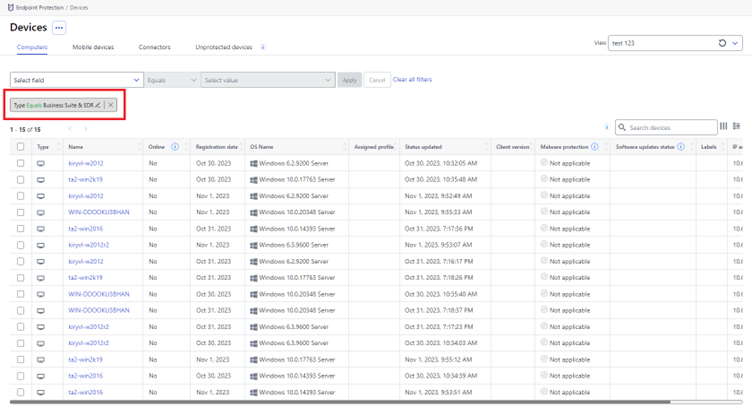
Business suite + EDR devices visibility
Devices using the Business Suite version of EDR are now visible in Elements Endpoint Protection devices view.
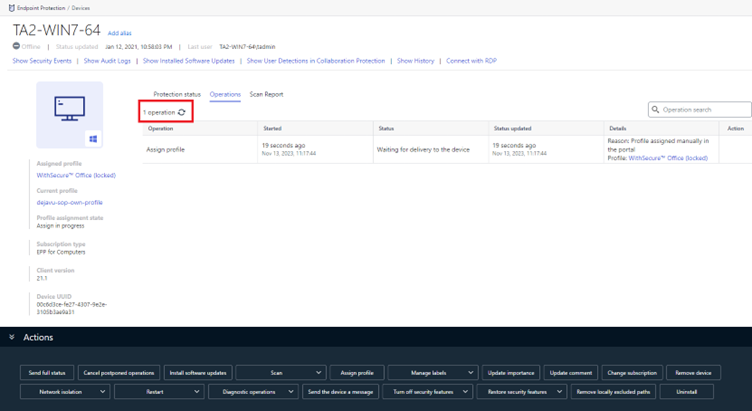
Reload button in Account and Device Details views
We have now added a reload button to manually refresh the page in account and device details operation views.
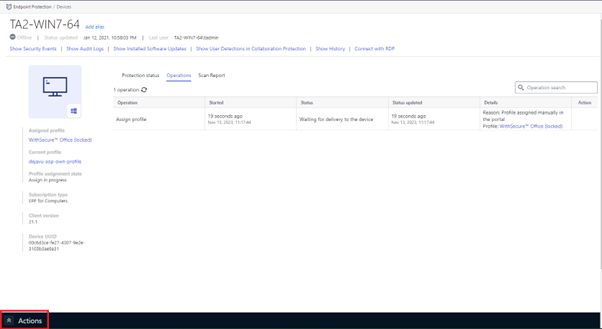
Collapsable Action panel
The Action panel can now be collapsed in device details and device listing views.
Company Administrator access to WS-Diag files
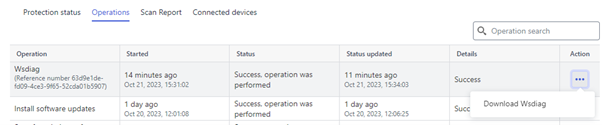
Company admins can now download WS-Diag from the portal operations view.
Elements Endpoint Protection
Elements Agent for Windows and Server Changes
This release makes the Elements Agent version 23.9 available (internal version 23.9.204).
The endpoints automatically upgrade, without a reboot.
Cancel postponed remote operations
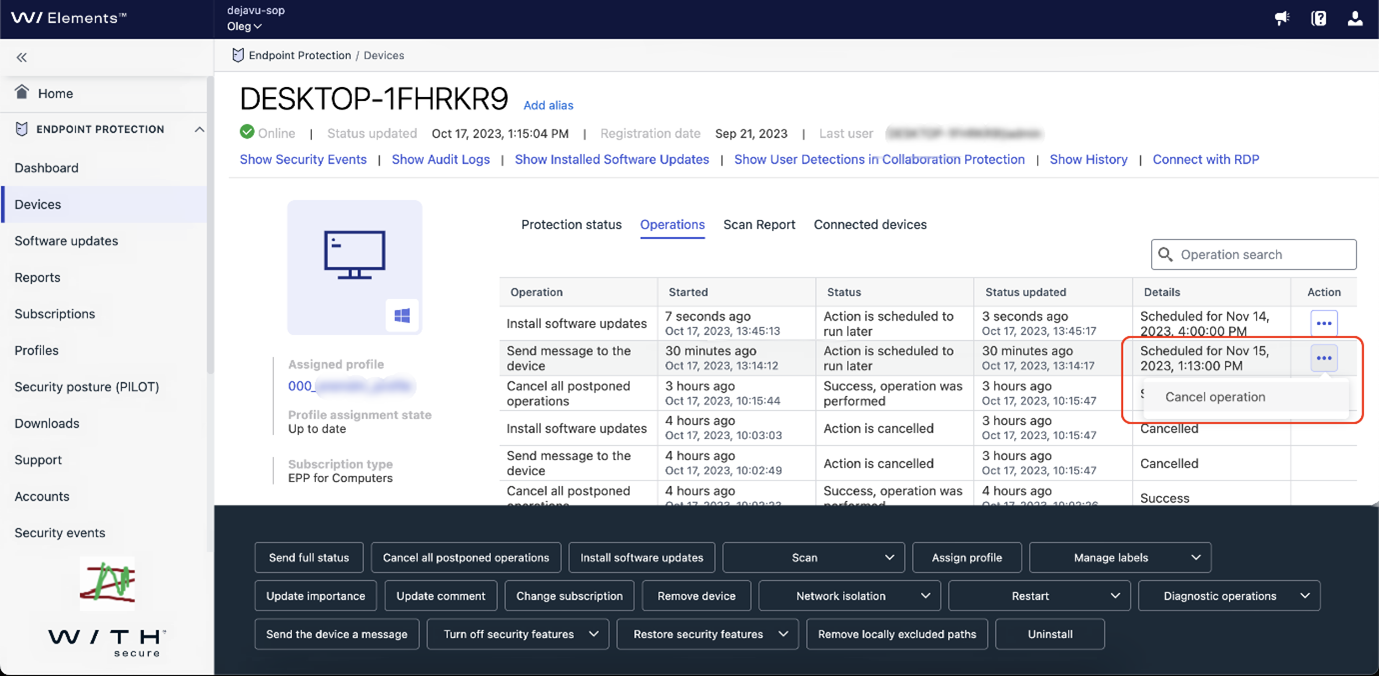
We have enhanced the remote operations by providing admins to possibility to cancel postponed remote operation(s). Remote operations which can be canceled are:
- Send the device a message
- Install software updates
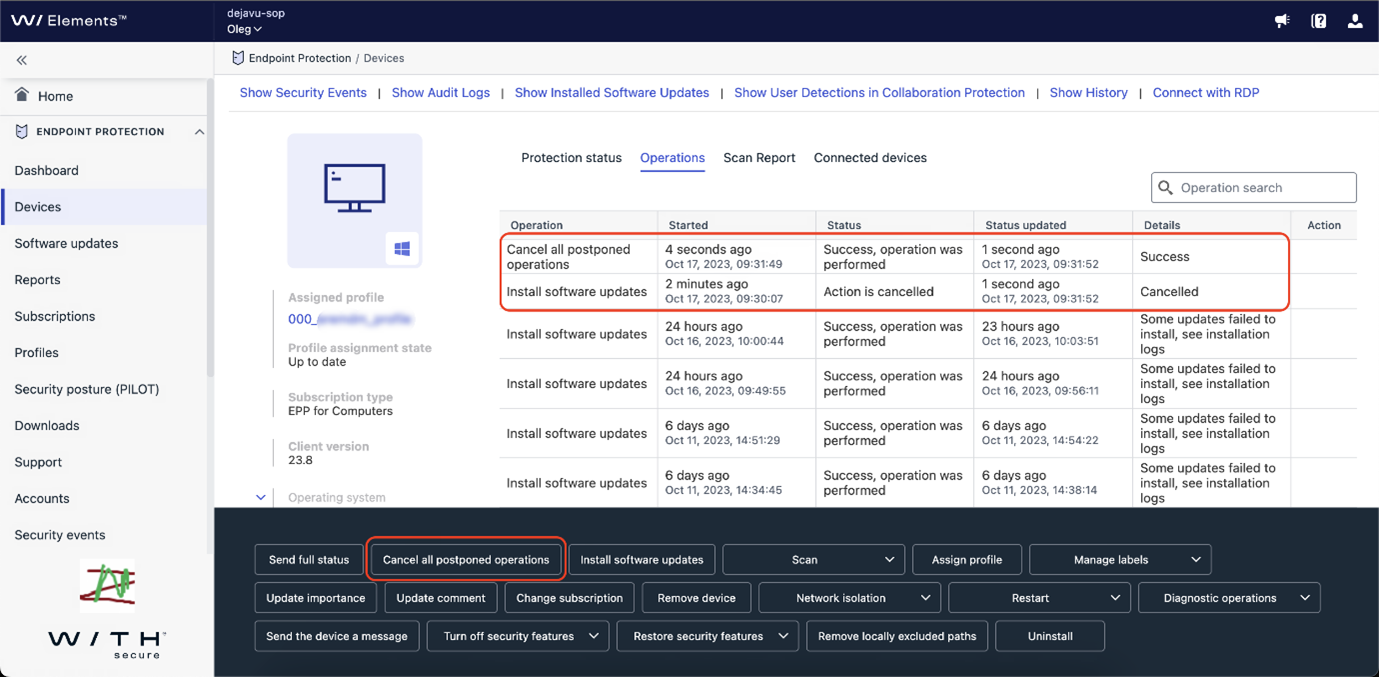
Now it is possible to cancel single remote operation or to cancel all postponed remote operations from the which support cancellation.
It is possible to cancel single operation from Device details view Operations tab, by choosing Cancel operation from the remote operation menu.
It is also possible to cancel all postponed remote operations for the device by pressing Cancel all postponed operation button from the action panel.
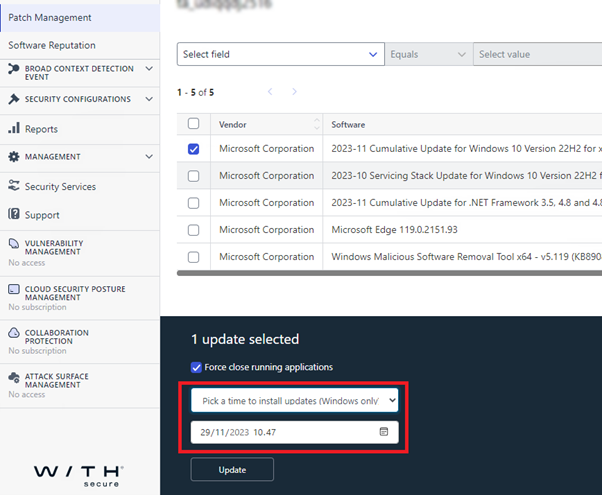
When installing single update it possible to postpone operation
When installing a single software update, instead of installing the update immediately, it is now possible to postpone the update to later time.
Support multiple proxies from .pac script file
In previous versions multiple proxies, during install time, was supported with –proxy argument but not from the .pac file. In this release we have enhanced the support for .pac file and now .pac file can also contain multiple proxy definitions.
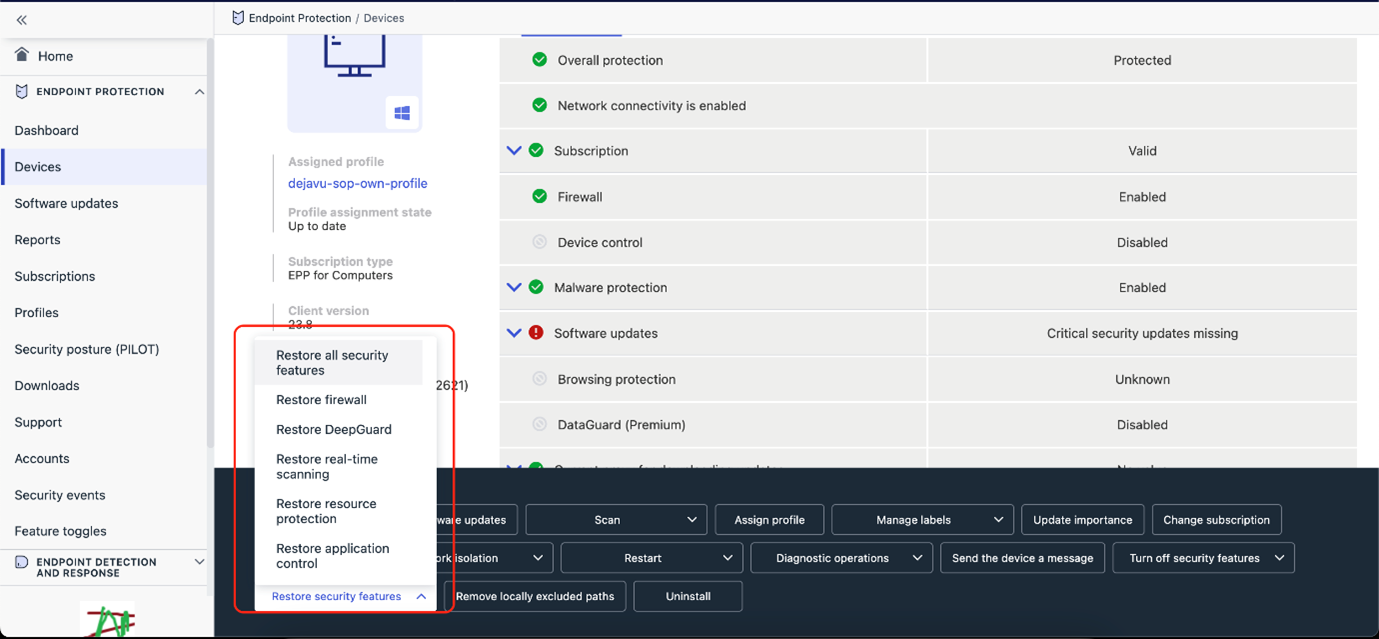
Remote operation to restore protection
In previous releases admins had the possibility to turn off security features from the action panel. Now we have added the possibility to restore security features from the action panel.
Elements Agent for Mac Changes
Our teams working on the Elements Agent for Mac hav been working hard to support macOS 14 “Sonoma”, and we are pleased to announce the Sonoma-compatible Elements Agent is now available for first time installation, as well as an automatic update to existing installations.
Elements Endpoint Detection and Response
Portal performance improvements
We have released changes to the portal which significantly improves its performance. This change should be noticeable for all users but especially for partners who have a large customer base – for example, improved performance should be seen when navigating between customers (using the scope selector) as there were some instances where the portal was slowing down when changing customer.
Due to this change, you may need to log out completely from Elements and clear your browser’s cache, local storage and cookies. This step is only necessary if you find the EDR portal getting stuck on loading and showing only a “spinner“.
Exporting data to CSV from the Event Search view
It is now possible to export Event Search results into a comma-separated value (CSV) file.
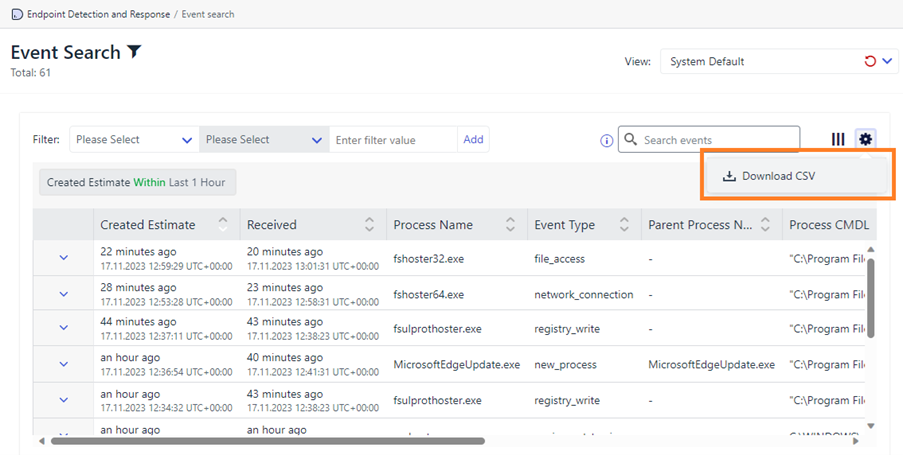
The exported data will align with how it is displayed in the portal – for example, if you have added/removed/reordered the columns then this will be the layout (of the data) in the CSV file.
Please note there is currently a maximum limit of 500 rows that can be exported at any one time.
Localisation is supported with this functionality.
Benefits
With this functionality, you now have more flexibility – for example, it allows you to share this information with fellow security analysts offline, combine it with telemetry from other systems, and/or carry out further analysis, such as, using pivot tables in Excel.
Elements Collaboration Protection
Support for Security Awareness Training Solutions
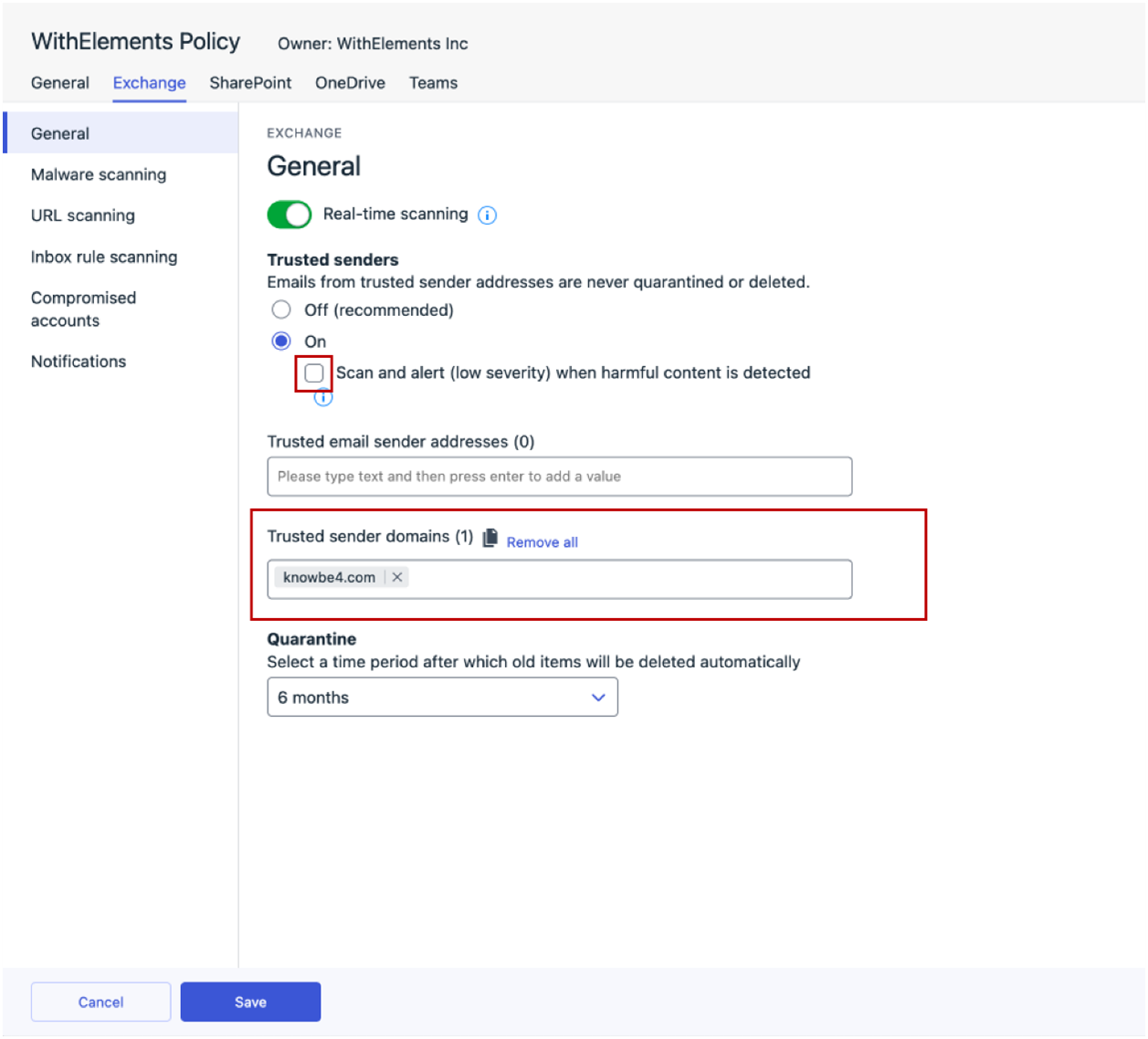
Collaboration Protection now supports security awareness training solutions, such as KnowBe4. To allow phishing training emails to pass through our security measures, admins need to whitelist the provider domain in the policy settings under ‘Trusted sender domains’.
Important Note: Please ensure that the “Scan and alert (low severity) when harmful content is detected” option is turned off to avoid triggering scan for these emails.
Elements Vulnerability Management
Elements Vulnerability Management: System Scan
The following capabilities have been added to authenticated scanning for Windows:
- Detect vulnerabilities in PDF-Tools
- Detect vulnerabilities in PDF-XChange PRO
- Detect vulnerabilities in Symantec Protection Engine
- Detect vulnerabilities in Dell Repository Manager
- Detect vulnerabilities in FSSO Windows CA and FSSO Windows DC Agent
- Detect vulnerabilities in FortiEDR Collector
- Detect vulnerabilities in Veeam ONE
- Detect vulnerabilities in Node.js
- Detect vulnerabilities in Dell OS Recovery Tool
- Detect vulnerabilities in Velociraptor
- Detect vulnerabilities in SolarWinds Network Configuration Manager
- Detect vulnerabilities in Dell OS Recovery Tool
- Detect vulnerabilities in Adobe RoboHelp
Elements Vulnerability Management: Windows Scan Node Agent
A new version of the Windows Scan Node Agent has been released.
Due to upcoming changes please remember to check the following article if you need to whitelist remote network addresses in your firewall configuration:
Network addresses for WithSecure Elements (cloud-managed products) – WithSecure Community
Elements Vulnerability Management: Linux Scan Node Agent
A new version of the Linux Scan Node Agent has been released.
Due to upcoming changes please remember to check the following article if you need to whitelist remote network addresses in your firewall configuration:
Network addresses for WithSecure Elements (cloud-managed products) – WithSecure Community
Integrations
Elements API: New capabilities
The Security Events Query endpoint supports new filters and response properties:
- EPP security events contain device label. Label is only present in events that were created after administrator had added label to EPP device,
- client can filter security events by targetId – id of EPP device or e-mail address of Office 365 user,
- client can filter security events by acknowledgement status. To select only not acknowledged events client should add acknowledged=false to request parameters,
- acknowledged events contains acknowledgement status:
- acknowledge date,
- name of user that acknowledged event.
Clients can use special value “no-value” in anchor parameter to get first page. It might be useful in various No-code or low-code services
Other items of interest
WithSecure and other Technology Providers
Did you know that WithSecure works with other technology providers, to help give you the best possible overall solution? You can find out more about these providers at our Technology partnership page.
In case you missed it
Upcoming changes to the Elements Security Center
As part of our ongoing work to improve the usability of the Elements Security Center for administrators, we will be introducing some changes in January 2024. You can find out more details in a dedicated Community article
Account Security
The security of your Elements account is important to us, and should be important to you too. We’ve recently added extra options for using Multi-Factor Authentication with Elements, and there’s an article about it too
In addition, we’re raising the minimum standard for passwords in Elements. Further details are available
Client changes in 2024
In early 2024, we will be releasing new client installers for the Elements products. While most of the changes are small, there are some slightly larger changes that Administrators need to be aware of. We have a separate article in the Community that lists these in more detail.
https://community.withsecure.com/en/kb/articles/31236-upcoming-changes-to-withsecure-elements-client-installations
Share your ideas with us
Our purpose is to co-secure the world with you – now as WithSecure™. To co-create the best possible cyber security products and services, we warmly recommend you share your ideas via our Ideas Portal, now accessible directly from WithSecure™ Elements Security Center.
Further information
Changelogs and Release Notes for all parts of WithSecure™ Elements can be found at the Help Center
-
WithSecure Elements Endpoint Detection and Response: Exporting data to CSV from the Event Search view
Read more
WithSecure Elements EDR has launched new functionality in the Event Search view where you can export the data from the view into a comma-separated value (CSV) file.
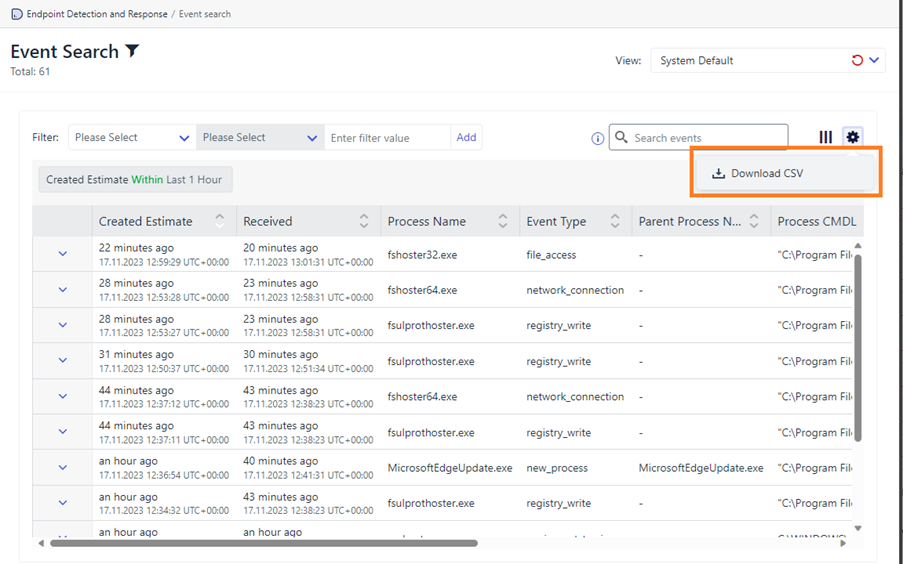
The exported data will align with how it is displayed in the portal – for example, if you have added/removed/reordered the columns then this will be the layout (of the data) in the CSV file.
Please note there is currently a maximum limit of 500 rows that can be exported at any one time.
Localisation is supported with this functionality.
Benefits
With this functionality, you now have more flexibility, for example, if you need to share this information with fellow security analysts offline, combine it with telemetry from other systems, and/or manipulate the data more for further analysis, such as, in Excel using pivot tables.
-
Changes to the Elements Security Center – 30 January 2024
Read more
Updates
2024-01-23 Added a new section informing about the update schedule
2024-01-09 Added a new section to help guide existing users to the new location of menu items.
System upgrade schedule
This change will be deployed to elements.withsecure.com on 30 January 2024 at 10.00 (UTC), and no downtime is expected. The changes will take effect the next time the user logs into the Elements Security Center, or the browser page is refreshed. In case of problems, we advise users to log in again.
Background
As you may have seen from our recent Elements Quarterly infoshare, we are currently implementing some changes to the Elements Security Center. These changes will simplify our customer’s lives when managing their security portfolio, and the Elements Security Center is a key part of that.
A short history of WithSecure Elements
Originally, the products that make up WithSecure Elements were entirely separate, with each product having it’s own portal, separate users, and separate partner/company organization structures. This worked, but was certainly not in the most efficient way.
To address this deficiency, we created the WithSecure Elements Security Center, which unified all of these separate products under one umbrella, with a single login, and aligned users and organizations.
But that was only the first step on the road to unification. While everything is in one place, our ambition level is higher, and we want the Elements Security Center to be focused on the needs of the user, and not constrained by the product subscriptions the customer has purchased.
So what are we actually changing?
Based on our own experiences, and from taking feedback from our users, it is clear that unification of some tasks and actions is needed.
We will group and merge items that are related to the operational tasks of the Elements user
For example, detections. Previously, these were in one place for Endpoint Protection and one place for Endpoint Detection and Response, so the user had to actually check both sections of the Elements Security Center. By having these all these grouped into a single section, it makes the life of the user so much easier.
Another example would be user and device management. These are clear administrative tasks, and it makes good sense to have these handled in a uniform way. By aggregating these tasks into one area of the Elements Security Center, we can help the user be more efficient in their day to day work.
When will we see the results of these changes?
While we would love to be able to say exactly when all these visionary changes will be available, it’s simply not possible to give an exact date. We will implement the changes in meaningful phases for the user during 2024, starting already in January 2024.
Changes take time to make. Our development teams are amazing, but changes take time to implement, test, and deploy. We need to do different parts at different times.
More optimized user interaction.We want to make the user interactions with the Elements Security Center feel more natural and optimized, so that the user can work more efficiently. At the same time, we need to ensure there’s no loss of functionality compared to the earlier Elements Security Center.
We will initially focus on our Endpoint Protection and Endpoint Detection and Response products, as this will bring the best improvements to the daily user operations within the Elements Security Center. These changes will be released to our customers on January 30th 2024.
Changes for Endpoint Protection and Endpoint Detection and Response
New navigation menu
One of the most important parts of a user interface is the ease of navigation between different parts of the interface.
By grouping similar activities, we aim to speed up the daily work of our users, and present the items in a manner that is consistent with the typical user actions. For example, checking detections is an action that is the same across Endpoint Protection and Endpoint Detection and Response, so it makes sense for these to be grouped together
All images presented in this article are for demonstration purposes, and may change slightly in the final version we release.
Elements Home
When an administrator logs into the Elements Security Center, they’re first presented with the Home page. This page serves as the main starting page, and includes content that is informative, easy to navigate, and comprehensive. It provides the right insights on the current security posture, in one view.
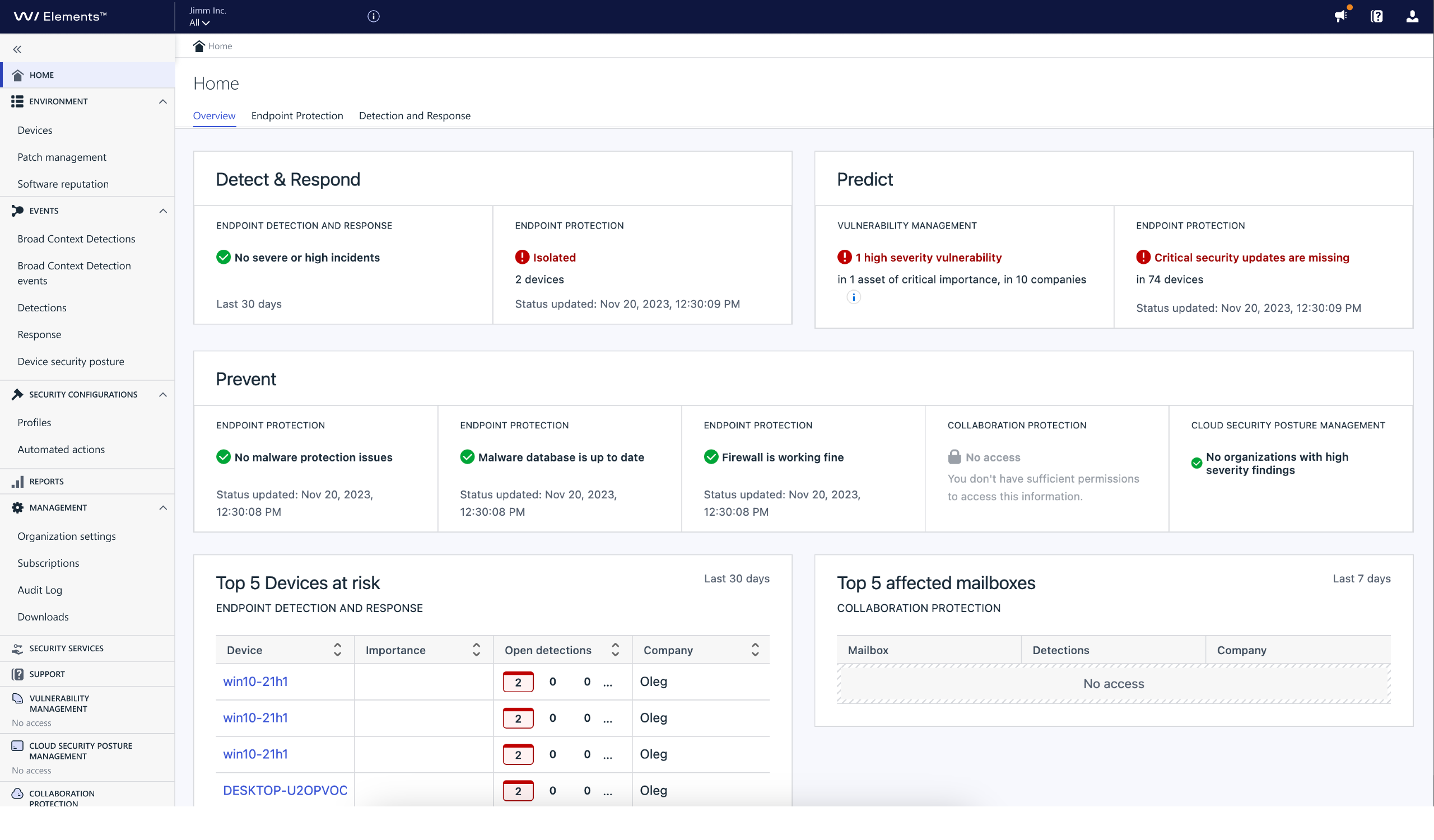
[Click image to see at full size]
Elements Endpoint Protection Dashboard
One of the most common actions an administrator performs is to check the status of their devices in Endpoint Protection.
With the updated dashboard, we have made the important information stand out so the administrator has an overview immediately visible. At the same time, a list of actions or concerns is visible, ranked by severity, which will help the administrator prioritize their own work in addressing problems.
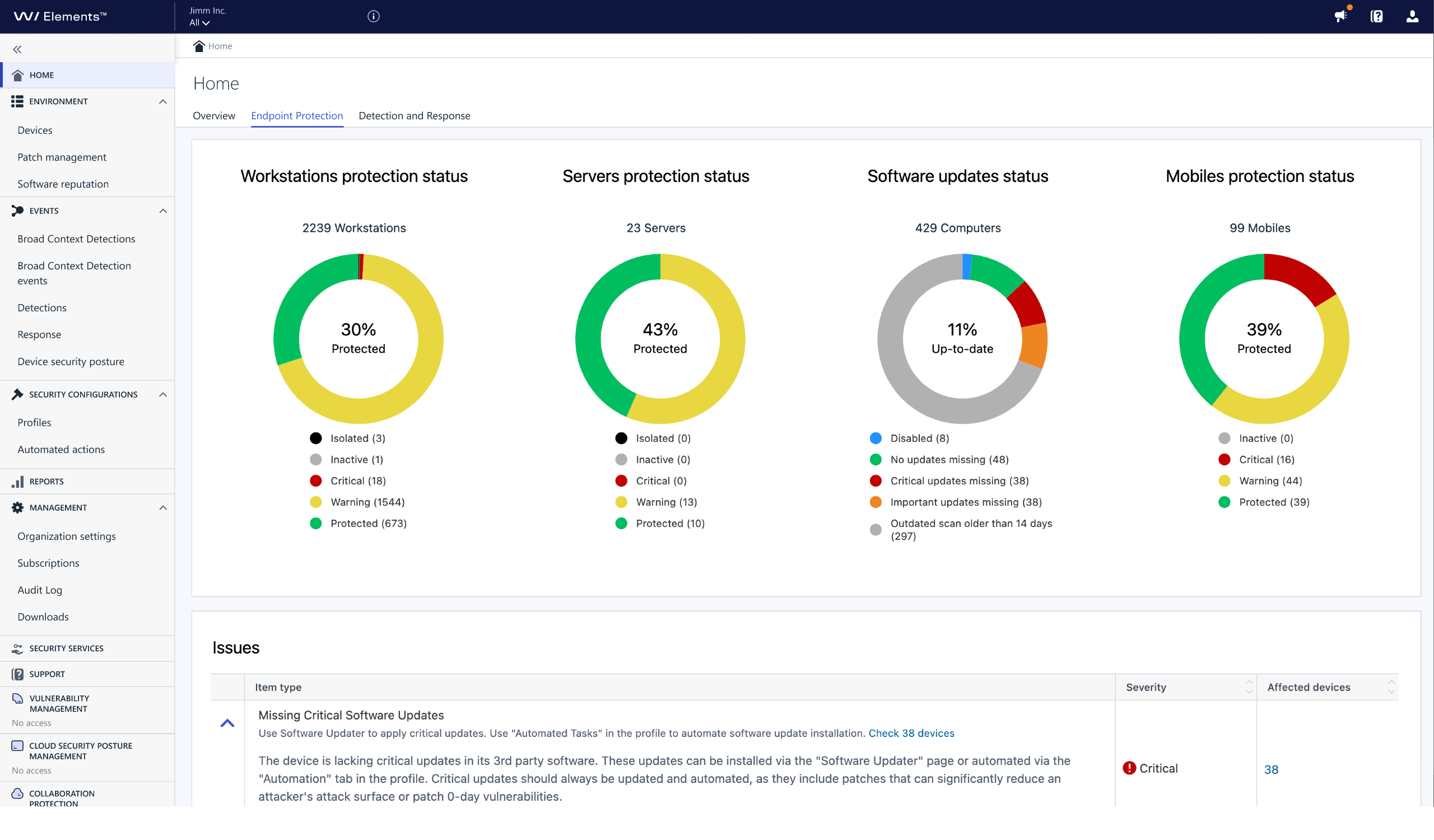
[Click image to see at full size]
Elements Reports
All of the Endpoint Protection and Endpoint Detection and Response reports have been placed together, enabling the administrator to access them from one convenient place.
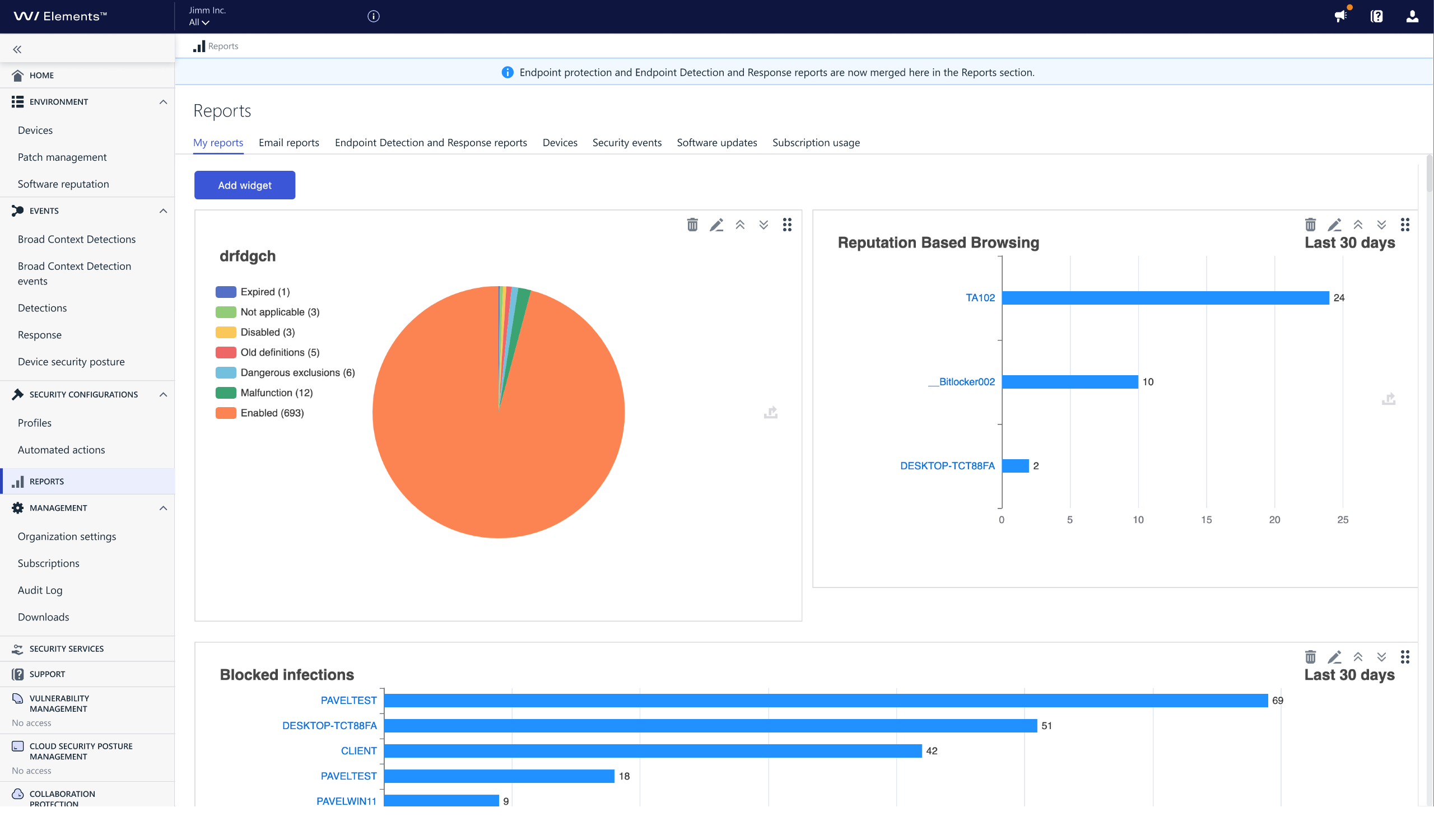
[Click image to see at full size]
Elements Security Services
All of the additional Security Services available for WithSecure Elements are now shown in one place in the Elements Security Center.
The Security Services are additional services offered by WithSecure, to help our customers and partners when they may not have the expertise available to handle some situations themselves.
This section also includes information on the organization’s entitlement to use the services, together with the current usage status, for example the number of available WithSecure Elevate tokens.
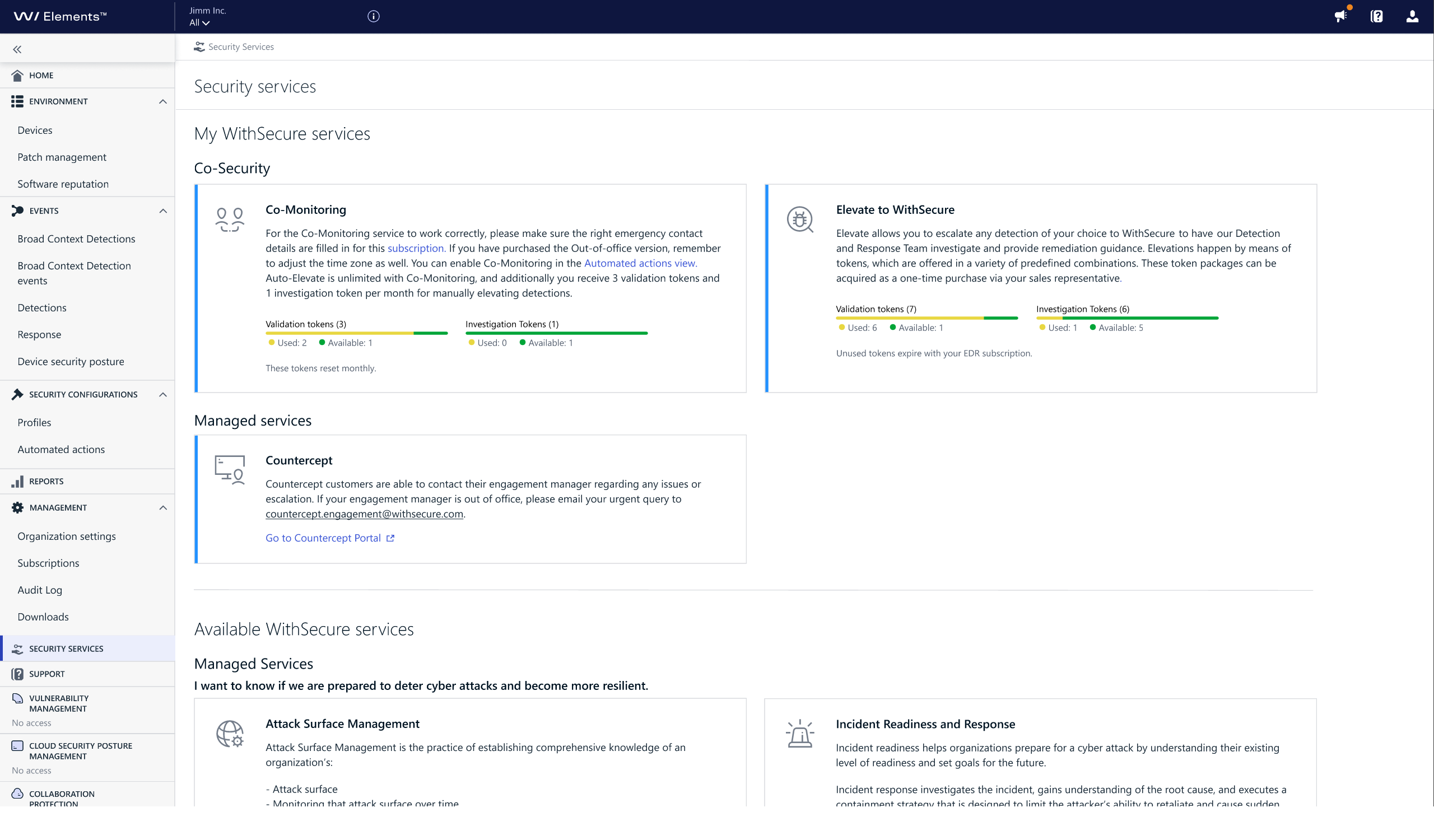
[Click image to see at full size]
What about other Elements Products?
We won’t be ignoring the other products, and “behind the scenes” changes will be made to support this work as we move forward. Eventually, the other products that are part of WithSecure Elements, such as Vulnerability Management, Collaboration Protection, and Cloud Security Posture Management will also be seamlessly integrated to the Elements Security Center.
Will the APIs be changing?
There will be no changes to the Elements APIs related to these visual changes. This is purely about how things are visualized in the Elements Security Center.
Where to find the menu entries after the change
All old portal functionalities are available, but their locations may have changed. Please check the images below to help you find the new locations of the functionalities.
Although these changes look complex, we believe that our users will quickly be able to use the menus. The change is likely to affect our long-term users more, as they will have “muscle memory” from using the older structure for so long. Newer users are likely to adapt more quickly, as they haven’t had the same amount of time to build this “muscle memory”
You can click on the images to see them at full size.
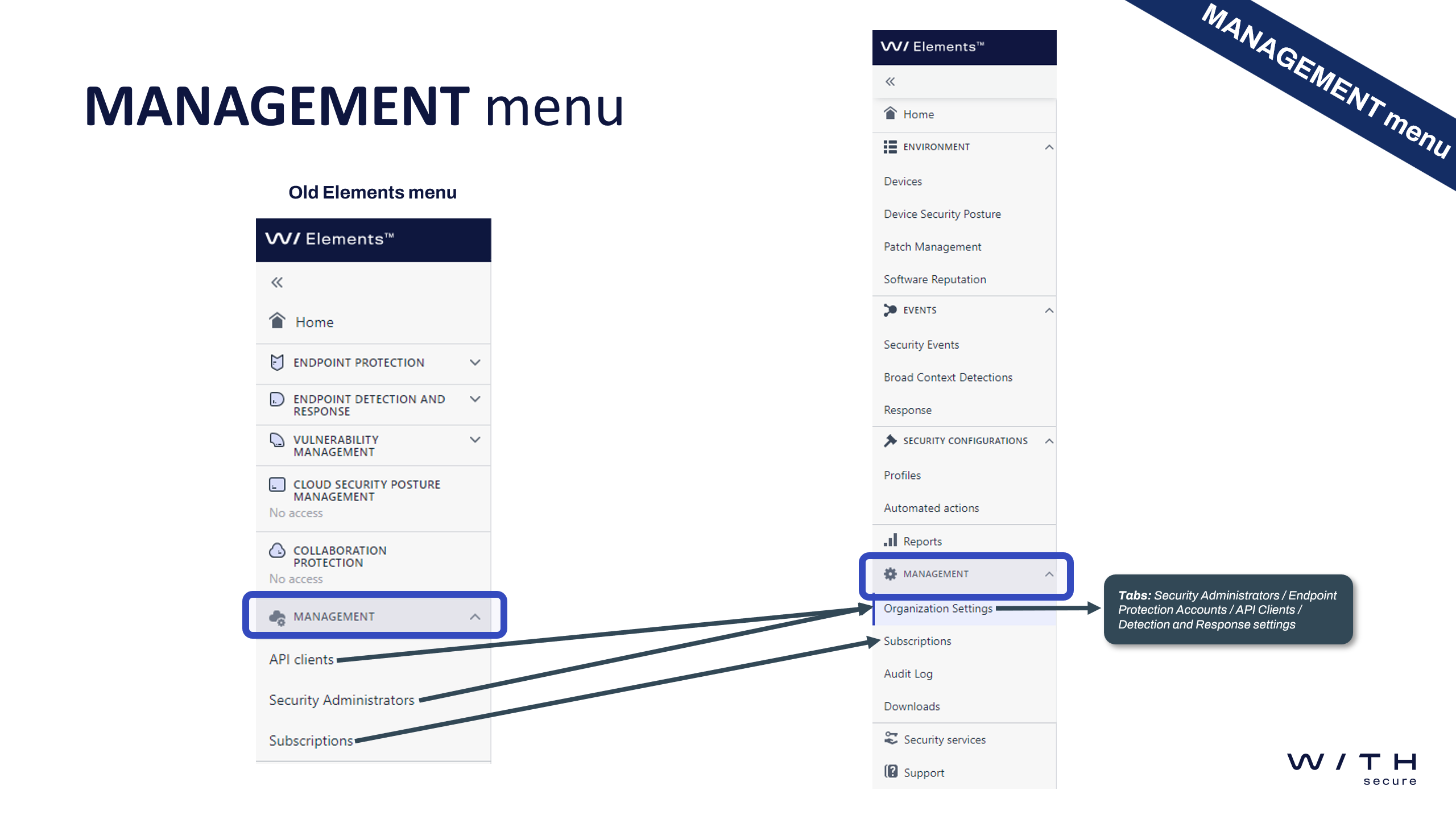
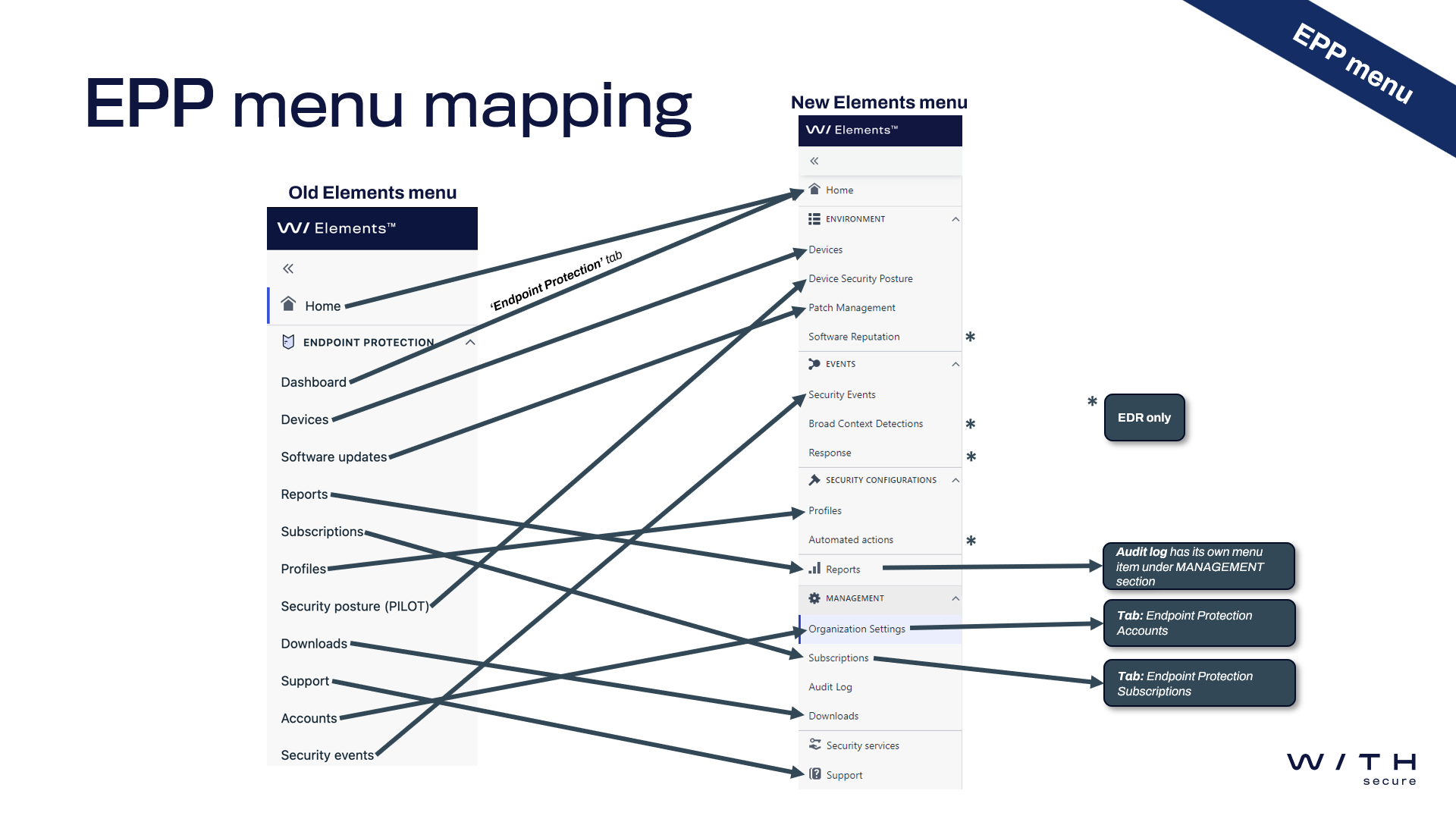
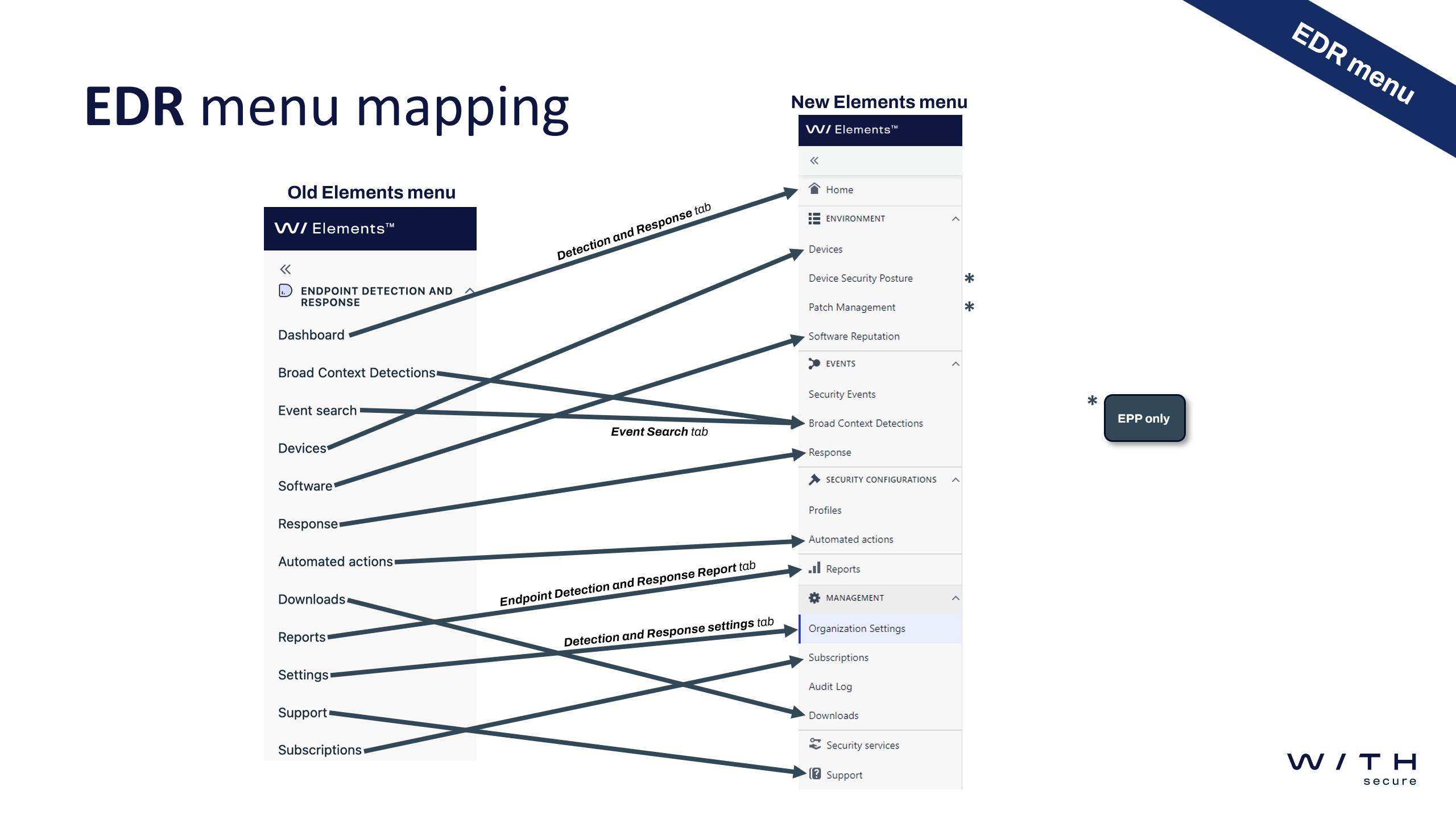
-
Password requirements change
Read more
Updates:
2023-12-18: The password requirements have now been changed (details below)
From Monday 18th December 2023 onwards, we will be changing the minimum requirements for passwords for WithSecure Elements.
The new rules are:
- Must have at least 10 characters
- Must have a mix of upper and lower-case letters (A-Z, a-z)
- Must contain at least one numeric digit (0-9)
- Must contain at least one special character
- Allowable characters are from the following list !”#$%&'()*+,-./:;<=>?@[]^_`{|}~
Existing accounts and passwords are not affected, but these rules will apply to all new accounts, and password changes to existing accounts.
WithSecure recommends the use of strong and unique passwords on all websites.
-
What’s New in Elements: October 2023
Read more
Editor’s Highlights
Elements API support many response actions
We’re excited to announce the launch of additional response actions in our production environment. These include:
- Assigning profiles
- Scanning for malware
- Displaying messages
- Enabling features such as debug logging
- Collecting diagnostic files
These enhancements are crucial for our partners working with SOAR, as they can now build playbooks to automatically trigger specific actions.
For instance, they can assign a restricted profile (instead of isolating) and display a message to inform the user about the reason for the restriction. The playbook could also immediately trigger a scan, set a profile to collect Microsoft event logs as security events, enable debug logging, or collect a diagnostic file. This allows an analyst to have more information at their disposal when they start working on an incident.
Endpoint Protection API is now deprecated
With the support of the “missing software update” feature in the Elements API, the Endpoint Protection API has been fully replaced. We urge you to transition to the Elements API as soon as possible, and ensure that your Elements Connector no longer uses the old Endpoint Protection API.
Elements Security Center
Introducing the Elements News Center
We are pleased to announce the release of Elements News Center, one of the latest features added to our Elements Security Center. This feature will make it easy for you to stay up to date on what is happening in the Security Center, read more about new features you might want to try out, quickly consult the latest changelogs, and be prepared to react to the ever-changing threat landscape.
You can find out much more about the News Center in our dedicated article
Elements Endpoint Protection Portal
Email Reports
Email reports can now be configured to be sent on daily, weekly or monthly intervals. Admins can also select the desired time of the day for when they want to receive the report.
Privacy Note for URL information
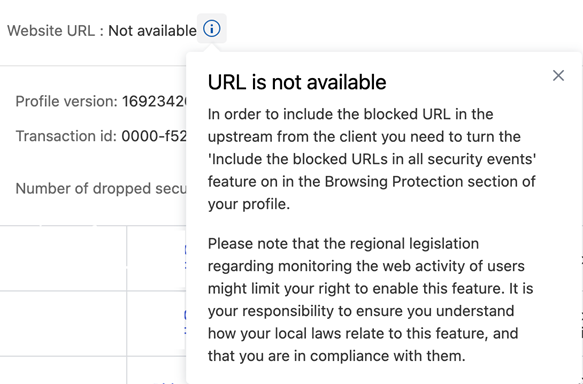
We have added an info in the Security Events details explaining why the website URL information is missing from the event together with a guidance on how to enable it in the profile.
Dynamic Risk Score and Outbreak Control
Dynamic risk score can now be used as a trigger for Outbreak control in Profile assignment rules. This allows the administrator to define even more rules to ensure that the endpoint device is more secure when there are active exploits on known threats.
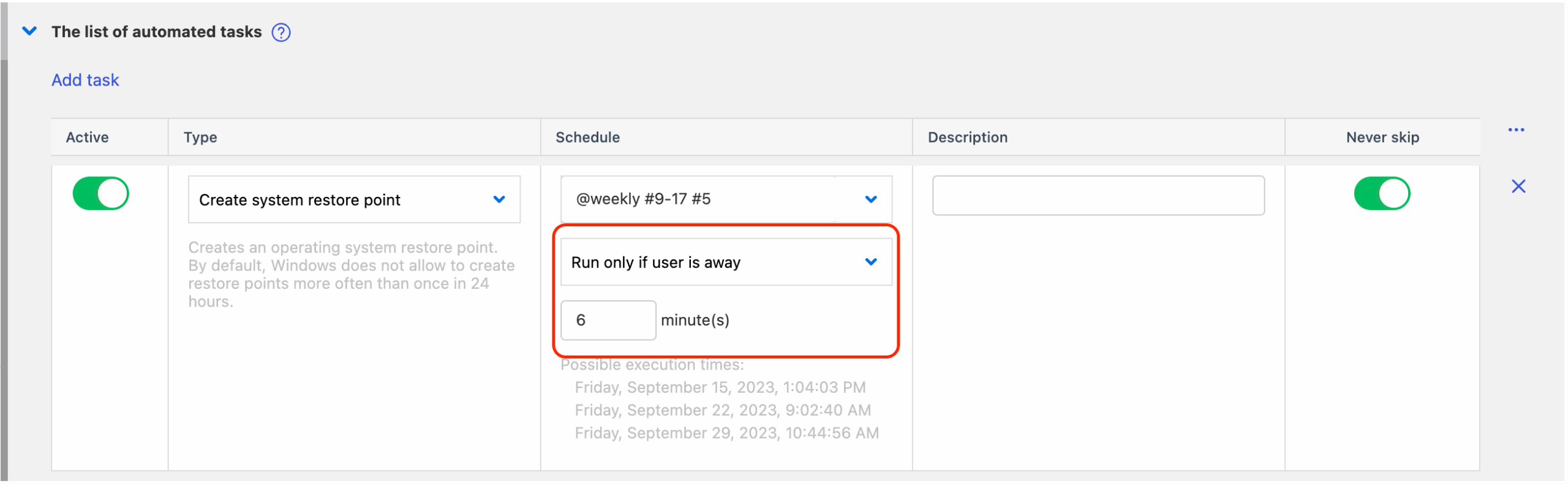
Automated tasks can run when user is away
It is now possible to define automated tasks that can be triggered after the user is “away”
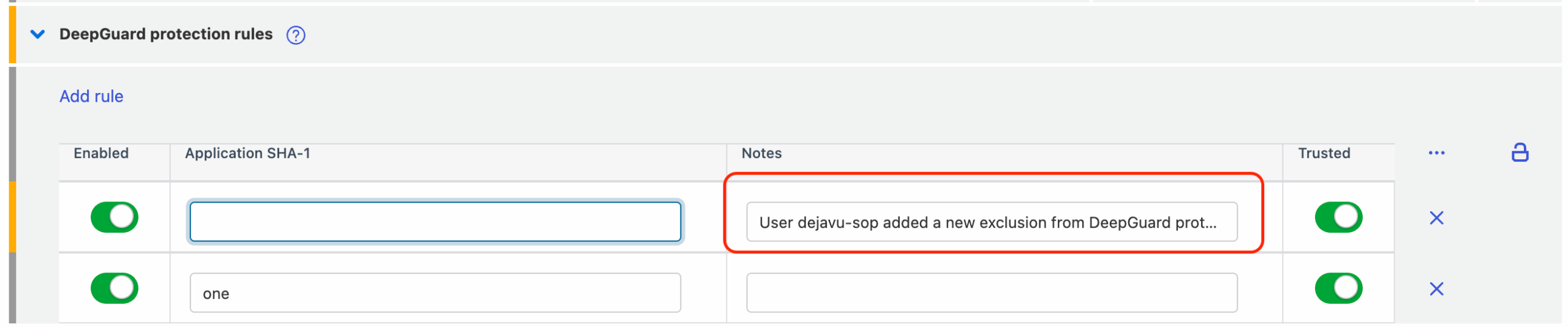
Custom notes for rules and exclusions
It is now possible to add custom notes for new exclusions and rules, so the administrator can make it clearer why it was added.
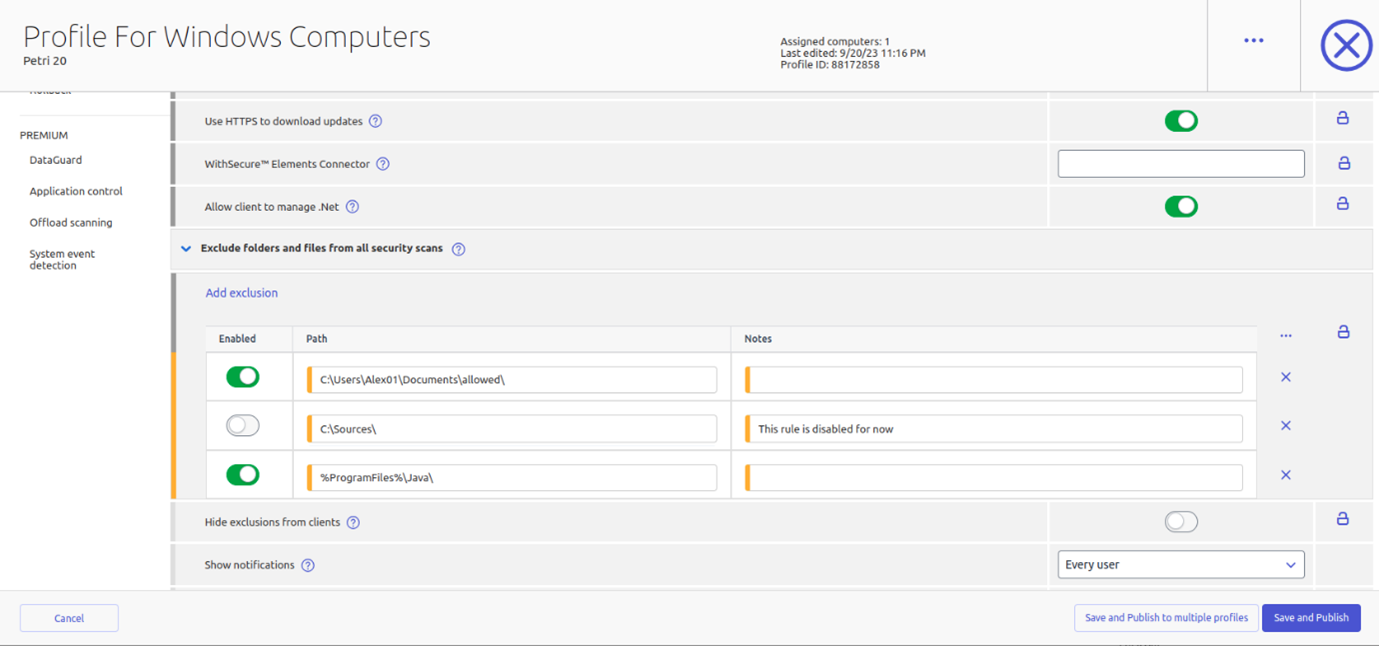
Global exclusions for all security scans
We have now added the possibility to define global exclusions for all scans.
Elements Endpoint Protection
Elements Mobile Protection for Android
An update to the WithSecure Elements Mobile Protection app for Android has been released.
This release includes the following new features and improvements:
- The Notifications view in the app shows all the operations that the administrator requests
- The Notifications view in the app supports filtering
- Subscription status is now moved to the About view
Elements Mobile Protection for IOS
An update to the WithSecure Elements Mobile Protection app for iOS has been released.
This release includes the following new features and improvements:
- The Notification view in the app now shows all operations requested by the admin
- The Notification view in the app now supports filtering functionalities
Elements Agent for Windows workstation and server
A new version of the endpoint clients is available, and the endpoints automatically upgrade, without a reboot.
This release brings the following changes:
Network installer improvements
This update includes new reliability improvements to the network installer; it handles network connectivity problems and error reporting better during the installation process.
Privacy and License Terms location
The Privacy Policy and End-User License Terms links have been changed to point to WithSecure site “download.withsecure.com”, having previously been using f-secure.com.
Diagnostic file renamed
The diagnostic file “fsdiag.zip” has been renamed to “wsdiag.zip”.
Old Installer warning
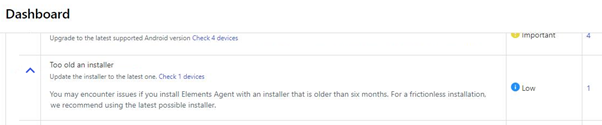
The Elements Security Center dashboard now displays a warning if the Elements Agent has been installed with an installer that is older than six months. For a frictionless installation we recommend using the latest possible installer.
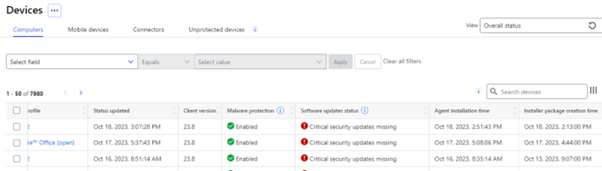
Additional information about Installation in Devices view
We have added extra information related to installation to the Elements Security Center’s Devices view. This includes Elements Agent installation time and Installer package creation time.
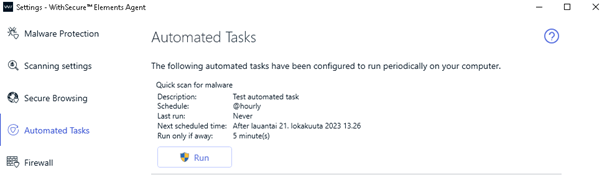
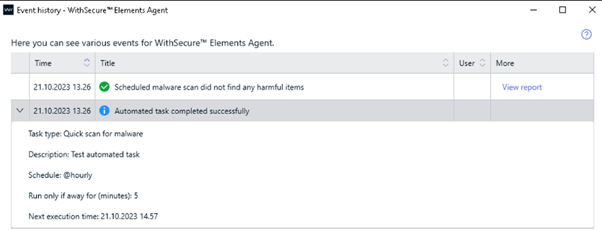
Improvements to Event History and Automated Tasks
The Agent Settings-Automated Tasks view and Event history list have been improved to show the Automated Tasks “away” option. Away option allows to run automated task after user has been away for defined number of minutes.
Elements Collaboration Protection
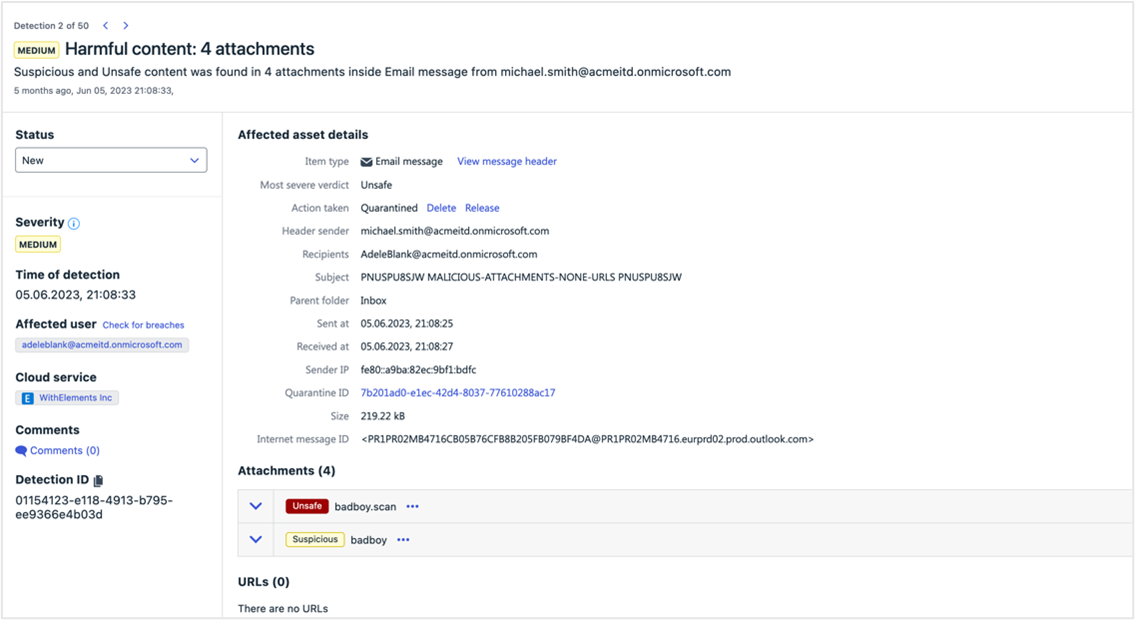
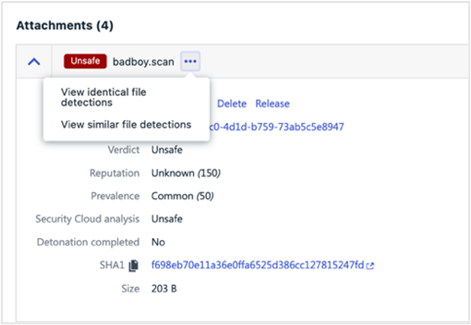
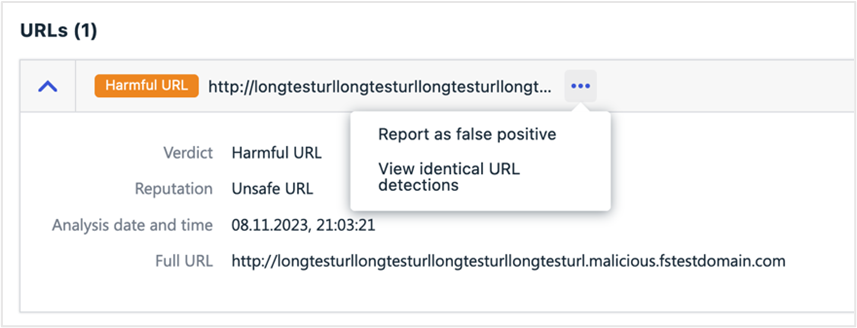
New detection details view
The Detection details view was renewed to serve better the security admins’ needs and support their day-to-day work flow.
The page got completely redesigned to support the Elements consistency in design and functionality. E.g. now a security admin can navigate between pre-filtered detections with no need to return to Detections view.
However, the update goes beyond the facelift. The response actions were introduced to that view to illuminate the unnecessary navigation between the Quarantine and Detection detail views. The additional information and cross linking are aiming to support the decision-making process.
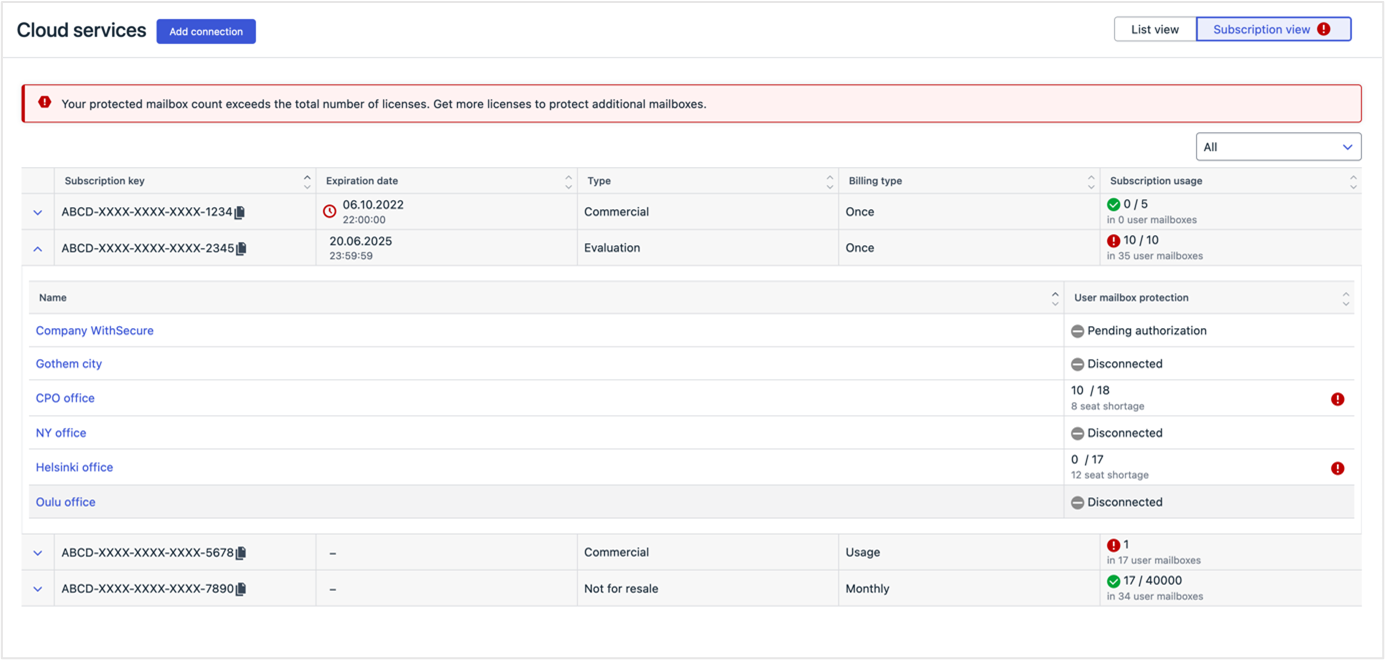
No more unprotected mailboxes due to license outage
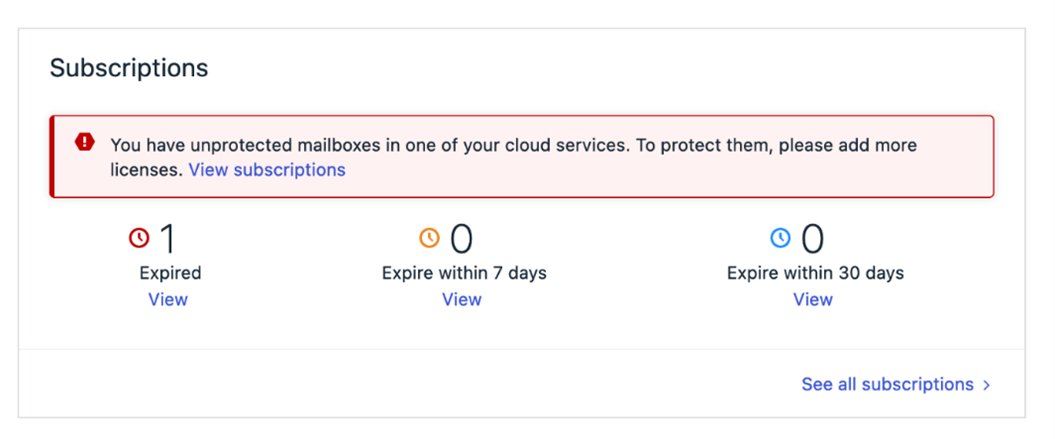
There is now a better overview of available licenses, their usage, and outages across cloud services. The redesigned subscriptions view on the Cloud Services page brings transparency to which assets are unprotected due to license outages.
Furthermore, the feature notifies security administrators on Dashboard and Cloud Services pages if the mailbox count exceeds the total number of licenses. This helps to ensure that the organization remains compliant with licensing requirements.
Elements Vulnerability Management
System Scan
The following capabilities have been added to authenticated scanning for Windows:
- Detect vulnerabilities in Vivaldi
- Detect vulnerabilities in JSCAPE MFT
- Detect vulnerabilities in Honeyview
- Detect vulnerabilities in GitHub
Additionally, the detection of the JSCAPE MFT Server product (without version) has been added to remote scanning.
Integrations
Elements API
Elements Collaboration Protection (ECP) Security Events
Security events related to email, Teams, Onedrive, Sharepoint have been added.
Please Note: To access these events, integrations need to change to a new API endpoint “Query EPP, EDR and Collaboration Protection Security Events” that replace the previous “Read list of security events”
Description added to both EDR incidents and detections endpoints
One may read the EDR incident analysis through API and add it to a report or a ticket. Human-friendly descriptions of the detection within an EDR incidents help triaging incidents within a SOAR.
Better filtering of devices
It is now possible to Filter using AD group, Operating System and public IP address
Query missing Softwares Update per device
It is now possible to check which devices have missing patches, and then get the list of missing patch.
With the release of these new functionalities in Elements API, we announced the end of life of the corresponding endpoint in Endpoint Protection API, and consequently Endpoint Protection API is fully deprecated.
Performance improvement in Incidents endpoint
To improve performance, the API caller should include archived=false in the query
Example:
curl -H “Authorization: Bearer $TOKEN” https://api.connect.withsecure.com/incidents/v1/incidents?archived=false
New response actions available
For the device operations endpoint support for the following new operations has been added:
- assign profile
- scan for malware
- show message
- turn on feature: debug logging
- collect diagnostic file
Other items of interest
Monthly Threat Highlights Report: September 2023
QakBot and DarkGate
QakBot is a banking Trojan that has been active since 2007. In recent years, it has been used to distribute ransomware and other malware. DarkGate is a new malware family that has been observed filling the void left by QakBot.
TeamsPhisher and Storm-0324
TeamsPhisher is a phishing tool that is designed to target Microsoft Teams users. Storm-0324 is a threat actor that has been observed using TeamsPhisher to distribute malware.
Malicious takeover of subdomains
This refers to a technique where threat actors take control of a subdomain belonging to a legitimate website and use it to host malware or launch phishing attacks.
Mis-scoring of a vulnerability in Juniper firewalls and switches
Refers to a vulnerability in Juniper firewalls and switches that was initially scored as low severity, but was later found to be more serious. The vulnerability could allow an attacker to bypass authentication and gain access to sensitive information.
Hacktivist attacks in Canada and Europe
Hacktivism refers to the use of hacking and other forms of digital activism to promote a political or social cause. The report highlights recent hacktivist attacks in Canada and Europe, including attacks on government websites and critical infrastructure.
Ransomware trends
Ransomware is a type of malware that encrypts a victim’s files and demands payment in exchange for the decryption key. The report provides statistics and trends on ransomware attacks, as well as highlighting several new ransomware families.
High-profile vulnerability and exploit issues
The report highlights several vulnerabilities and exploits that could be used by attackers to gain access to sensitive information or disrupt critical infrastructure. These include CVE-2018-0802, CVE-2018-8653, CVE-2018-0798, CVE-2023-23397, CVE-2017-0199, CVE-2017-11882, CVE-2010-0033, CVE-2023-28274, CVE-2010-4452, and CVE-2023-21716.
Monthly Threat Highlights Report: October 2023
Phishing campaign impacting Finland
Phishing campaign that is targeting Finnish organizations. The attackers are using a variety of tactics to trick users into giving up their login credentials, including sending fake emails that appear to be from legitimate sources.
Infostealer market
Current state of the infostealer market, which is a type of malware that is designed to steal sensitive information from infected systems. The report notes that the market is currently dominated by a few key players, and that the malware is often sold on underground forums.
Fallout following the compromise of Okta
Overview of the fallout following the compromise of Okta, a company that provides identity and access management services to many other third parties. The report notes that the attackers were able to access customer accounts at 1Password, Beyond Trust, and Cloudflare by abusing credentials, cookies, and session tokens contained within HAR files.
HTTP/2 rapid reset DDoS technique
A new DDoS technique that is designed to exploit a vulnerability in the HTTP/2 protocol. The technique involves sending a series of specially crafted requests that cause the server to reset the connection, which can result in a denial of service.
Hacktivist landscape
Current state of the hacktivist landscape, which has been further shaped by ongoing conflict in Israel. The report notes that hacktivist groups are increasingly using social media to spread their message and coordinate their activities.
Ransomware landscape
Statistics on known ransomware attacks, including the number of attacks and the amount of ransom demanded. The report notes that ransomware attacks continue to be a major threat to organizations of all sizes
Darkgate malware
The report includes a reference to a wider piece of research on the Darkgate malware, which is a financially motivated cybercrime actor that is using multiple malware families to target digital marketing professionals.
In case you missed it
Support for macOS 14 “Sonoma”
You can find out more about our current support for macOS 14 at our dedicated article
Network addresses for WithSecure Elements
For most customers, WithSecure Elements will work out of the box. However, some administrators tightly control the addresses that are reachable from their networks, and for them we have made a comprehensive list of all the servers our clients connect to.
Share your ideas with us
Our purpose is to co-secure the world with you – now as WithSecure™. To co-create the best possible cyber security products and services, we warmly recommend you share your ideas via our Ideas Portal, now accessible directly from WithSecure™ Elements Security Center.
Further information
Changelogs and Release Notes for all parts of WithSecure™ Elements can be found at the Help Center
-
Upcoming changes to WithSecure Elements client installations
Read more
UPDATES
2024-01-16: Added critical information related to ACS requirements
Overview
WithSecure will be introducing changes to our products and solutions, including client update mechanisms, starting in early 2024. This will affect all WithSecure Elements products that are installed to endpoints such as workstations, servers, and mobile devices. The changes also introduce new server addresses where the clients connect to.
We strongly recommend you bookmark this page and check back from time to time, as we will update it if more information becomes available.
Why are we making these changes?
On July 1st 2022, WithSecure and F-Secure became separate companies. As part of the separation, it was agreed that we would share some resources, but ultimately have them separated.
We are now at the stage where we have the new service resources in place. WithSecure products and services are transitioning to use them, and the old, shared resources will be retired during 2024. We want to communicate these changes, and any implied changes to the way our customers use and configure our products, so they are prepared and do not need to react urgently when the new resources are the only ones available.
In addition, the changes we are making will also help us longer-term in providing support and updates to our customers. We are also taking this opportunity to implement some things we simply could not do earlier due to the shared resources.
What are the actual changes?
Server address changes
One of the more significant changes is that we are taking into use backend services that are completely distinct from the services used by F-Secure products. This will allow us to control what happens in our backend systems to fully focus on the needs of our business customers and partners. The earlier systems had to also cope with consumer use-cases.
As some of our Elements partner and customers have strict rules on outgoing network connections (also known as “egress firewall rules”), we have published an up to date list of all the servers our clients connect to. You can find the list in this Community article.
New Download Locations
Customers using automated deployment systems to install the Elements clients, for example Remote Monitoring and Management (RMM) systems, should take care to update their processes to use the new installation package download locations. The only supported locations are those which are used in the Elements Security Center’s “Download” section, and any other location such as download.sp.f-secure.com are deprecated.
Browser Extensions
The new clients will also use WithSecure browser extensions. These can be found at:
Please note that these new WithSecure extensions will only work with the updated products, as they are strongly interconnected.
macOS changes
We have a separate article listing changes for macOS.
You can find this article here
ACS certificate requirements on Microsoft Windows
With these client changes, it is MANDATORY that Microsoft Windows installations have “ACS certificate compatibility”. Failure to patch Windows to provide this compatibility will result in loss of protection.
These changes were previously announced in February 2023.
You can find out more details at
When will these changes be made to the backend systems and endpoint clients?
The new backend systems are already in production, ready for the client installations to transition to start using them. The older systems will be decommissioned later in 2024.
In order for our client installations to use these new services, we will also need to publish updates to the existing clients.
The current schedule for this is still open, but we anticipate that the new clients will start to be deployed automatically during January 2024. Both the old and new backend services will run in parallel for several months to ensure a smooth transition between the old and new client installations.
-
WithSecure Elements and Multi-Factor Authentication
Read more
Why Multi-Factor Authentication is important
Multi-factor Authentication (MFA), sometimes interchanged with the term “Two-factor Authentication” or 2FA, is a method of increasing security during the login process to systems. This is something that many software and service vendors already use to increase the security of the user accounts, and many of our customers already use it with services such as Microsoft 365, Google or even their corporate VPN connections. WithSecure Elements has support for Multi-Factor Authentication.
When the user logs in to a system with their username and password, these credentials may already have been compromised, for example due to a vulnerability in their browser or password manager. These leaked credentials may be on some publicly accessible list, used by attackers to gain entry into systems.
With the addition of MFA, an extra step is needed to confirm that the account is actually owned by the person trying to log in, for example the use of an Authenticator application on the REAL user’s mobile device.
Recommendations for using MFA
WithSecure’s CISO Christine Bejerasco says:
“Password-based attacks are one of the most common and effective attack vectors we have observed. These attacks continue to be effective because they are cheap to perform, attackers can launch it from anywhere, and there are still services that use passwords as the only method of authentication. MFA was introduced to add an additional layer of authentication to make the attacker jump through an additional hoop to perform an effective compromise. This raises the cost of the attack and for most cybercriminals today, it’s sufficient to render this attack vector useless.”
WithSecure strongly recommends enabling MFA for all login-based services, wherever possible, to increase security.
Using MFA for WithSecure Elements
MFA support in WithSecure Elements includes the following options:
Push notifications in use with Auth0 Guardian Multi Factor Authenticator application
This will allow the approval of an authentication request with a single click of a button.
The Auth0 Guardian Multi-Factor Authenticator application is available in Google Play and the Apple AppStore
Verification code using an Authenticator application
Example authenticator applications are Microsoft Authenticator, Google Authenticator, or any TOTP based authenticator) either in your mobile device or computer
A six-digit authentication code will be sent to the Authenticator application, and this will need to be entered into the login dialog to continue.
We are not introducing a dependency on having a mobile device. For many, it is the best option, but there are Computer-based authenticator applications available.
Verification code using SMS
A six-digit authentication code will be sent to the user’s configured mobile phone number via SMS. This code will need to be entered into the login dialog to continue.
Please note that receiving SMS messages incurs an extra cost for some customers, so we recommend that it should be used only as a secondary backup mechanism, in case you lose access to your primary authentication method.
Good MFA practices for WithSecure Elements
WithSecure strongly recommends that all users enable MFA if they have not done so already.
- Configure at least two MFA methods for redundancy, because if you lose your authentication capability you will lose access to your Elements Security Center user account.
- Unify your username and email address. This is preparation for changes coming later.
Many cloud service providers already enforce the use of Multi-Factor Authentication (for example Salesforce) to increase the security of the user accounts. WithSecure will be introducing enforcement, but we are giving a grace period at present to allow our users time to get used to using MFA. More details will be communicated later.
To aid configuration of MFA on user accounts, for users who are not even aware of this option, we will start to prompt the user to configure MFA if it has not already been enabled. Enabling this now will make life easier when we do change to enforce the use of MFA.
-
Important Announcement: Deprecation of Endpoint Protection API
Read more
We would like to inform you that the Endpoint Protection API is being deprecated.
With the release of List missing software updates, all functionalities of the Endpoint Protection API are now available in the Elements API. The only exception are the subscription endpoints, which are available in the Provisioning API (only for partners). We will soon remove the ability to create API keys for the Endpoint Protection API.
Please note that the Endpoint Protection API is reaching its end of life, with the exception of the subscription and software update endpoints, which will still be supported until the 11th of March, 2024, and the 2nd of May, 2024, respectively.
We strongly advise against using the end of life API, as the data returned may not be accurate.
We encourage you to migrate to the Elements API, a superior API designed with user needs in mind. In addition to catering for traditional Endpoint Protection use cases, it also serves Endpoint Detection and Response use cases such as managing EDR incidents from a SOAR. It is a two-way API supporting many response actions.
Please also ensure that any Elements Connector does not use old endpoint protection API credentials. This can be checked from the Elements Security Center, in the device view connector section, column “legacy API is used”
For more information about WithSecure APIs, please visit