
-
Highlighted new features in Elements, Quarter 4 2022
Read more
Every three months, WithSecure publishes extra information on our website, detailing some of the exciting new features that have been released to WithSecure Elements.
In these pages, there’s more in-depth information, interviews with some of the people involved in the creation of the features, and also some short videos. These help to explain not only what we have released, but some of the reasons why we have made these changes to the products.
You can find details of the major feature highlights for the final quarter of 2022 at
We hope you’ll find these interesting!
PS You can find the previous quarter’s highlights at
-
What’s New in Elements: December 2022
Read more
Editor’s Highlights
We recently launched Server Share Protection, part of Elements EPP for Windows Servers, which brings advanced rollback functionality for fileservers when bad content is stored from remote devices. You can find more information in the Elements Endpoint Protection section below.
During December we also launched Teams Protection as part of Elements Collaboration Protection. This brings additional protection capabilities when using Microsoft Teams, including the prevention of links to harmful files shared in chats and channels. More information can be found in the section for Elements Collaboration Protection.
Elements Security Center
Improvements
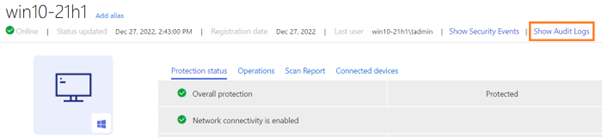
Device details page has a link to device specific audit logs
It is now possible to view audit logs relevant to one device.
Other Improvements
- Show quarantine action unconditionally for manual scanning type of event in Security Events and show a warning banner with an explanation once clicked if the file is too big or not an archive
-
Audit log improvements:
- “Source and Target” column simplified into “Target” and removed “Profile” and “Details” prefixes from the values of the column
- Audit logs has new filter for Device UUID
Elements Endpoint Protection
Improvements
WithSecure Elements Mobile Protection for iOS and iPadOS (19.2.285003) has been released
- The app is now faster and consumes less device resources.
- The app now uses the WithSecure brand.
- The assigned profile’s name and version are now visible in the user interface under the About section.
- Support for iOS versions 12 and 13 is dropped.
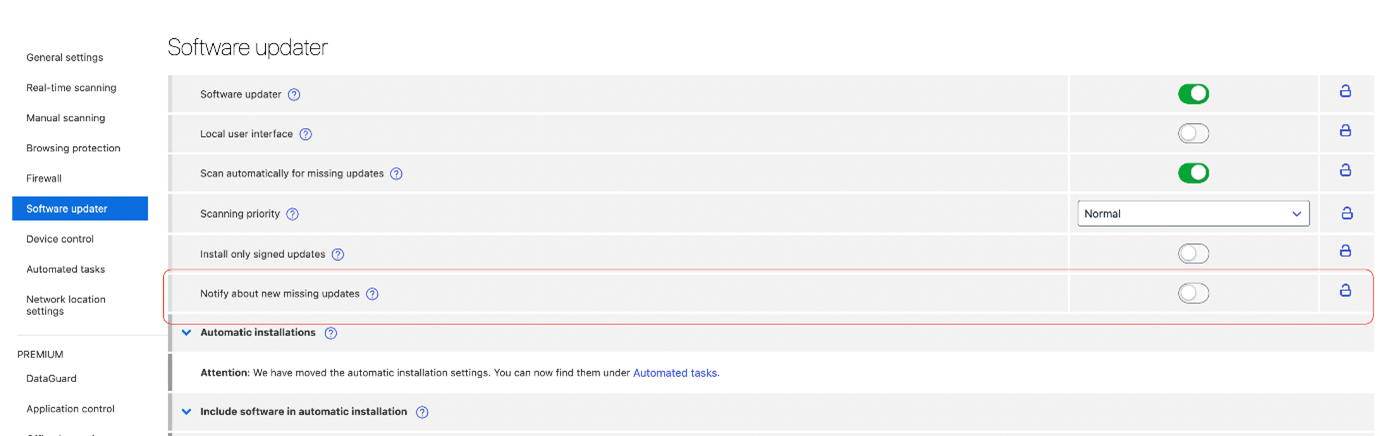
Software updater may notify users about new missing updates
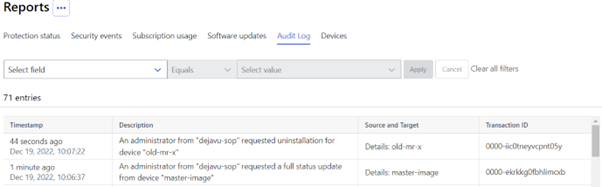
Additional items in Audit logs
The audit log now supports first 2 remote actions from portal: Send Full Status remote action, Uninstall remote action
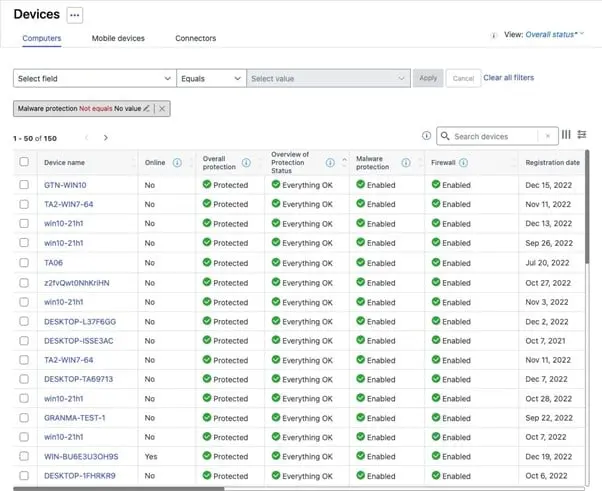
Additional Protection icons are now available
In the device list, protection icons have been added for Overview of Protection Status, Overall protection, Malware protection and Firewall columns.
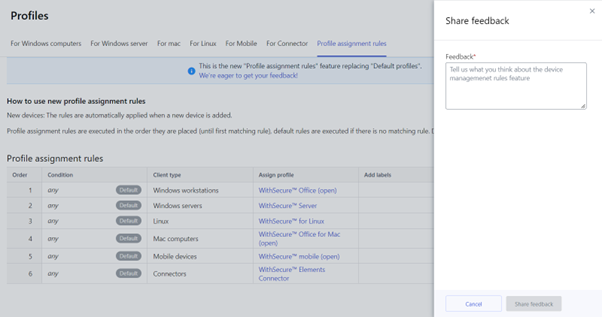
Feedback form for Profile Assignment rules is now available
It is now possible to provide feedback from the profile assignment rules section
[PREMIUM] System events detection
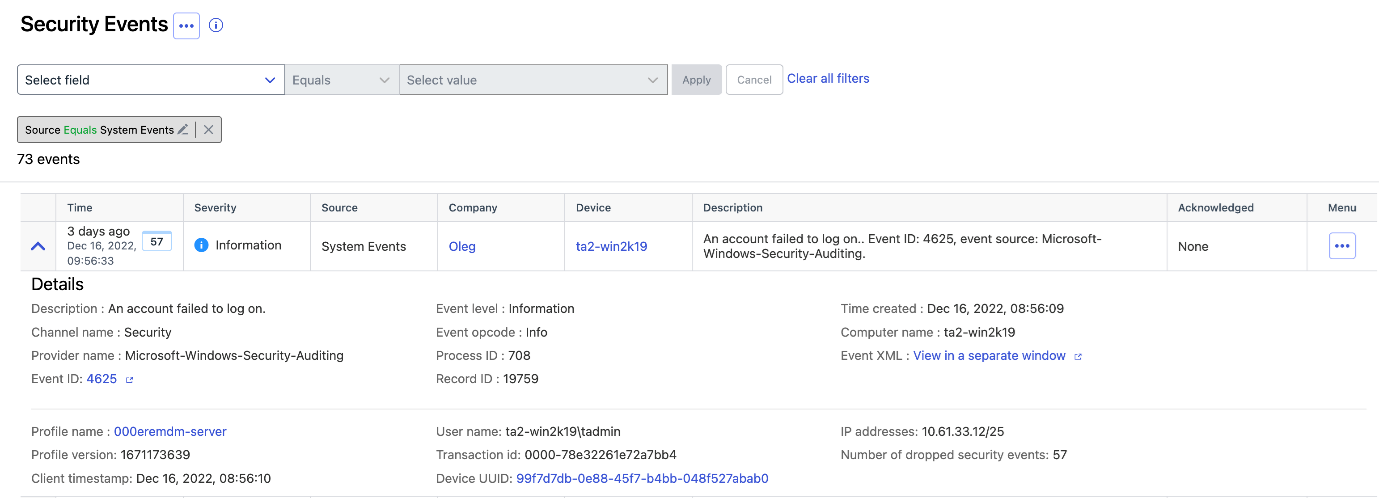
Starting from client release 22.9, some system events are sent to security events
The events are:
- Audit log was cleared
- User account was locked out
- An account failed to log on.
Apart from these many other system events may be enabled by administrator.
NEW FEATURE: Server Share Protection
Starting from client release 22.9 the Elements Agent running on Windows Servers is able to detect malware activity on server shared folders and restore files automatically if they are broken or encrypted by malware (by default it only reports a security event and does not restore files, administrator needs to enable the feature via profiles)
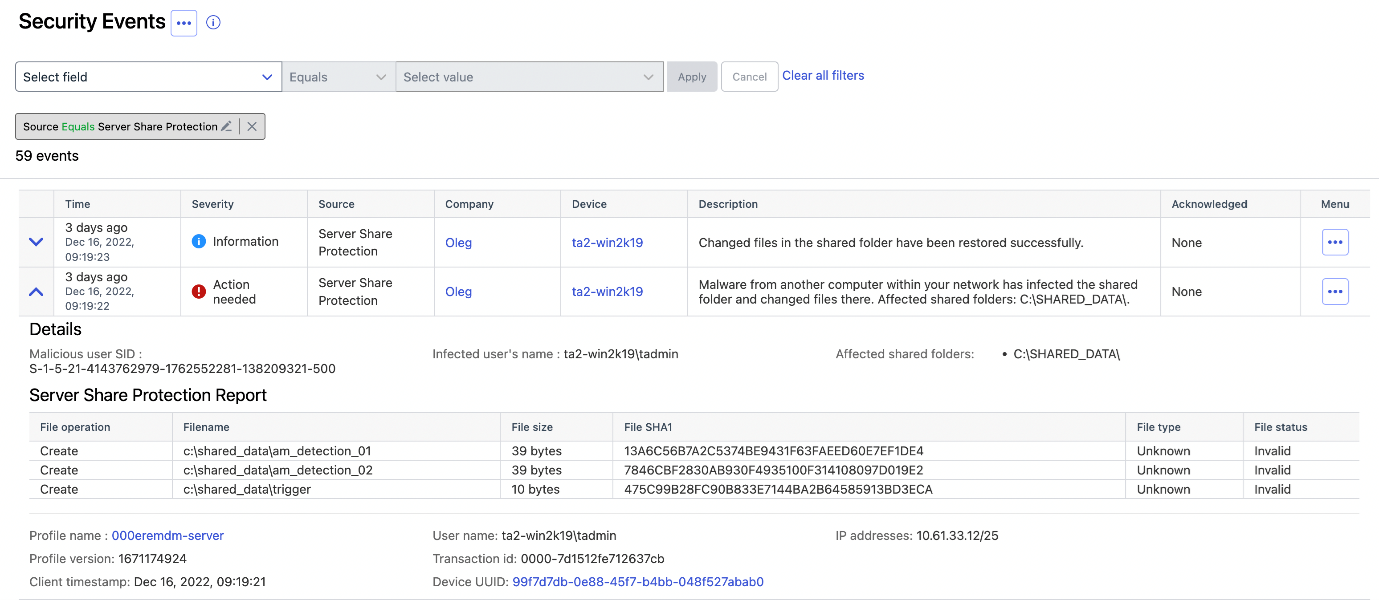
For further details, please see the Introducing Server Share Protection Community article.
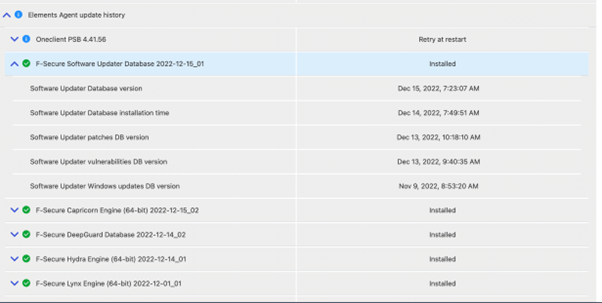
History of updates for each Windows device
The Administrator may check installation status of updates and see Software Updater Database version.
Elements Endpoint Detection and Response
New and updated response actions
WithSecure Elements EDR has launched new and updated features response actions.
Retrieve Browser artefacts
This response action retrieves browser history from the device.
If a device is infected with malware, it is very likely because the user has downloaded it via their web browser. By retrieving the browser history, you can find out where the malware was downloaded from (i.e. the source URL).
This new action can be found from response wizard.
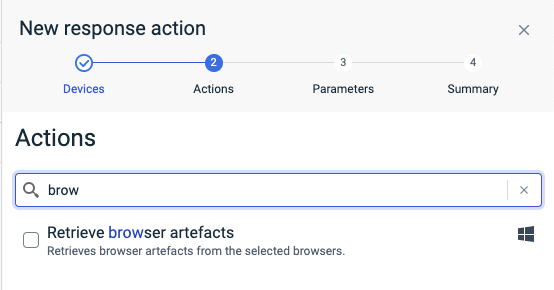
Action can be used to collect artefacts from various browsers. Artefacts can be collected for all user accounts (default) or for specified user only.
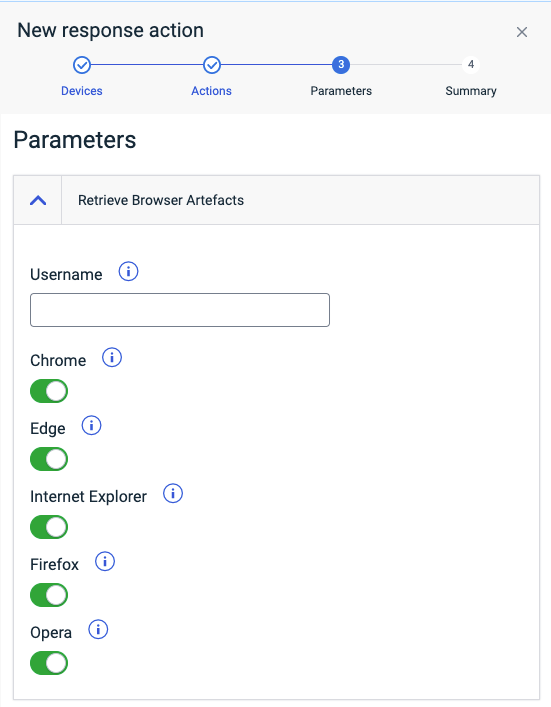
Like all other responses, this one can be run in multiple devices with one response definition and results from all selected devices will be available and stored in the management portal.
Delete files
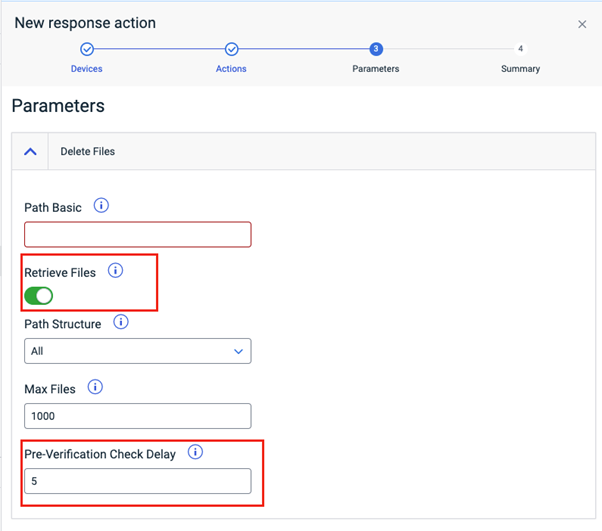
Delete files response action has two new parameters.
When deleting files from devices there is now option to retrieve file before deleting it. This simplifies work flow by combining two actions into one. This response action automatically verifies/checks that file deletion was successful. Delay between executing delete and verifying the result can be configured. This can be used to verify that e.g. persistence mechanism did not restore it after deletion.
Elements Collaboration Protection
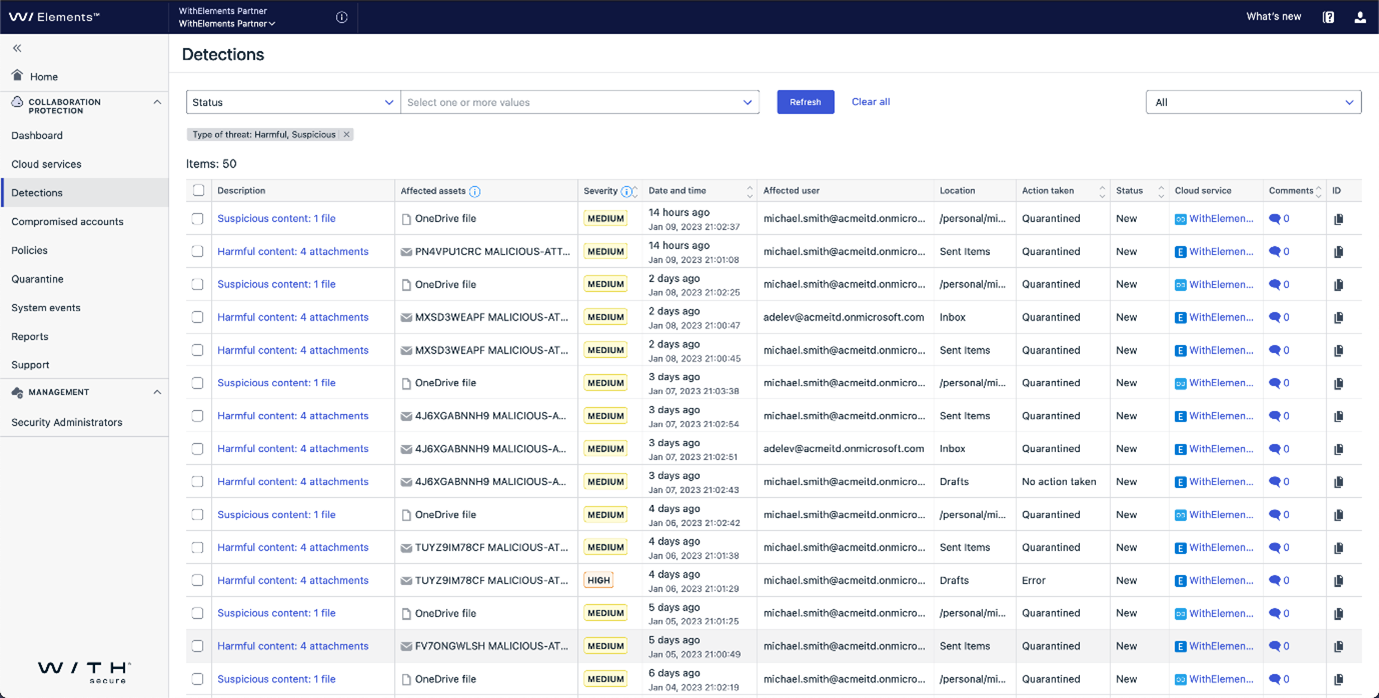
Detections view major redesign
The latest version of the Detections view accumulates the multiple enhancements to better support a day-to-day activity of security admin. The updated design emphasizes the important information, such as a description of security alert, its severity and affected asset. Additional crosslinks simplify the portal navigation.
NEW FEATURE: Teams Protection released
More and more organizations use Microsoft Teams for collaboration, including the sharing of documents.
It is quite common for users to upload files into Microsoft Teams, to share with colleagues and customers, and this introduces some risks. If the user’s device does not have adequate anti-malware protection installed, uploaded documents may contain malware or other undesirable content. Other users opening these files may end up having their devices infected, and naturally this is not wanted.
Teams Protection, part of WithSecure™ Elements Collaboration Protection, can now be used to scan uploaded content, and if it is found to be harmful the content can be deleted, or quarantined.
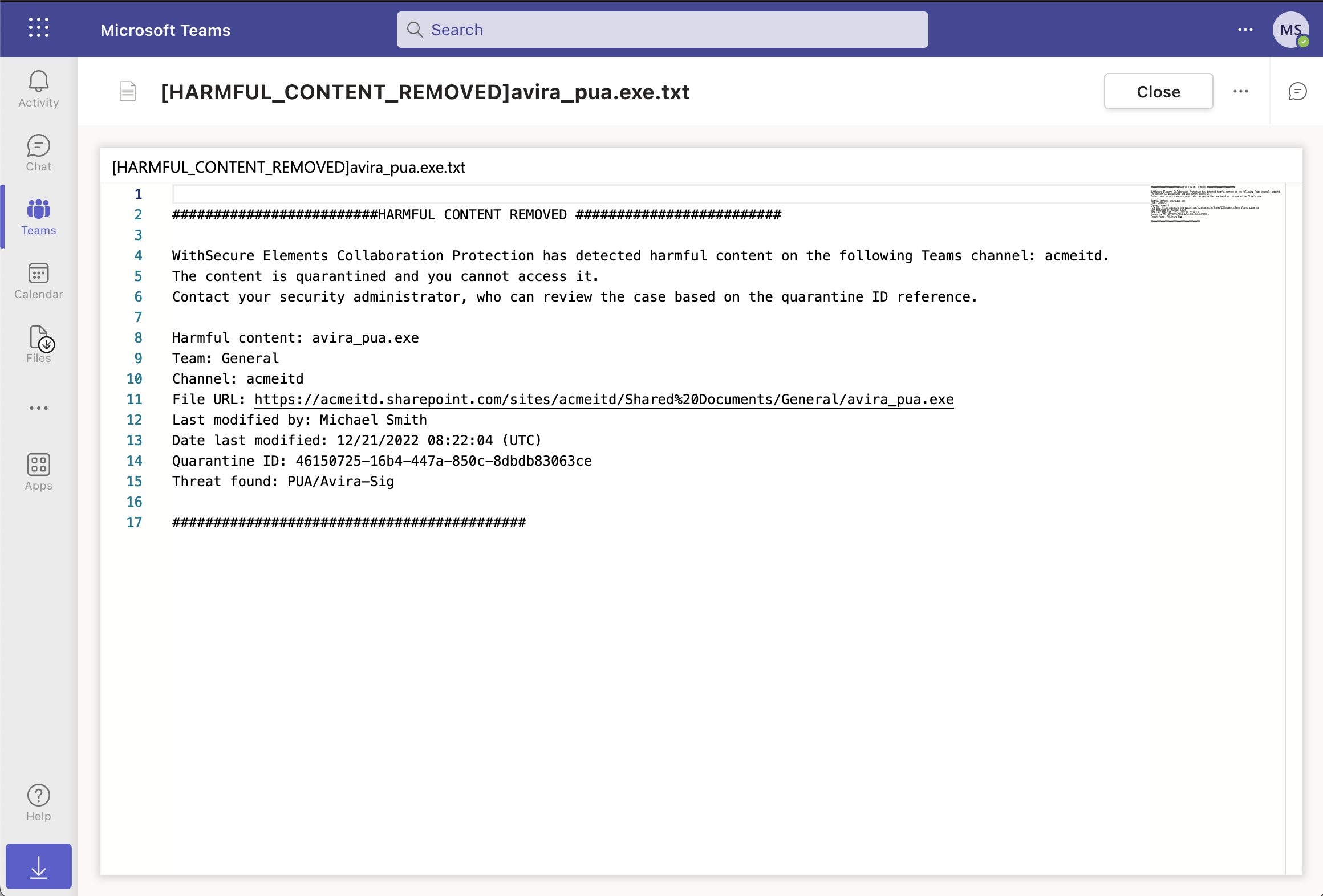
You can read more about it here in our separate release announcement
Elements Vulnerability Management
Improvements
Improved detection of Dheat
The Network scan is now able to detect Dheat attack vulnerability using the Diffie-Hellman key exchange via SSL/TLS and SSH protocols.
Integrations
Elements API changes in existing endpoints
We have recently made some changes in existing API endpoints:
- Devices and Security Events endpoints: parameter organizationId is now optional. If it is not present, default organization of authenticated client is used.
- Organizations endpoint: added new optional organizationId parameter, now endpoint lists organizations belonging to requested organization (including itself if type matches). If parameter is not present, default organization of authenticated client is used.
- Security events endpoint supports filtering by engine (e.g. EDR) or severity (critical)
- Security events endpoint supports a new engine: System events log. The type of events log sent must be configured from the EPP Profile
Changes in Endpoint Protection API
Security events endpoints are deprecated
The old security events endpoints are deprecated and should be replaced by the new Elements security events endpoints.
The following security events endpoints will stop working by 30.06.2023:
- List security events for a company
- List security events for a partner
- Poll for security events
Infections endpoints have been removed from documentation and will stop working at any time.
Other items of interest
November’s Threat Highlights Report
Ransomware: Trends and notable reports
- Quantum Locker targets Cloud Environments
- The Rise of Royal Ransomware
- BlackBasta linked to FIN7 Threat Actor
- US Govt issue HIVE ransomware advisory
Other notable highlights in brief
- DTrack activity targeting Europe and Latin America
- Emotet botnet operational after 5-month hiatus
- ProxyNotShell Exchange Exploits Available
- OpenSSL Vulnerability Downgraded
Research highlights
- DUCKTAIL, continued
- Machine learning accuracy forecast
You can download the full report here
Upcoming change to Elements Vulnerability Management
Starting from March 1st 2023, Elements Vulnerability Management will start to use CVSSv3 for scoring vulnerabilities. We have created a dedicated article relating to this change, including all the information our customers using Elements Vulnerability Management need to know.
In case you missed it
Reminder: Changes in internet domains for WithSecure™ Elements
As mentioned in the October edition of What’s New, WithSecure has now changed the domain names of some servers used to access the solution.
Please see https://community.withsecure.com/en/kb/articles/29681-changes-in-internet-domains-for-withsecure-elements for more details.
If you have encountered any issues after this change, please check the above article for solutions.
Share your ideas with us
Our purpose is to co-secure the world with you – now as WithSecure™. To co-create the best possible cyber security products and services, we warmly recommend you share your ideas via our Ideas Portal, now accessible directly from WithSecure™ Elements Security Center.

Ideas received are always evaluated by our team, and if suitable will be acted on. Some smaller items have been added in as little as 2 weeks from being suggested, to being delivered to customers in the solution! Bigger items will obviously take longer.
Further information
Changelogs and Release Notes for all parts of WithSecure™ Elements can be found at the Help Center
-
What’s New in Elements: November 2022
Read more
Elements Security Center
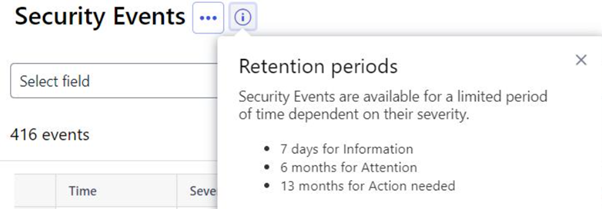
Retention information for Security Events
It is now possible to see the retention period for the Security Events, showing how long each will remain visible in the portal.
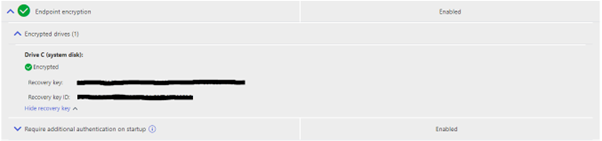
Improved Endpoint encryption and encrypted drive view
In the device details section, the level of details has been improved. This is only available for Windows devices as present.
Multi-factor authentication (MFA) enforcement available in Elements
It is now possible to enforce MFA for all Elements users in a specific Elements organization by request. The MFA enforcement can be requested by contacting WithSecure support.
Things to consider before enforcing MFA:
- Users must be informed in advance that MFA will be enforced so that they will have a phone with an authentication app. Call/SMS authentication is not currently supported.
- Any authentication app is supported but we recommend an app that supports backup (e.g. Authy, 1password, Microsoft Authenticator…)
- MFA is automatically enforced for any new users
- We cannot remove MFA enforcement (only disable it for new users)
- Any account used by API must be separate from an account used by real person. As long as an API account is used only for API calls, MFA is not forced. But if the account is also used for browser access, MFA will be enforced and API call will fail. To recover, login to the account with a browser, disable MFA from settings, logout.
- An account must be individual and cannot be shared by a team
- Phone lost: We cannot reset MFA after the phone is lost. The account will have to be deleted and recreated (occasionally requiring W/Secure support assistance). That is why the user should store the recovery codes or configure the backup in the authentication app.
- Phone changes: The authentication app typically offer solution covering the change of phone. One option is to login in portal with old phone, disable MFA and log out. Then login again, going through the MFA setting with the new phone.
- The MFA enforced settings is not visible in UI.
- Limitation: Only applicable to EPP/EDR and Vulnerability Management users
- For partners only: MFA enforcement is inherited by all resellers and companies in your hierarchy. They must be informed as well.
- For partners only: New created companies will be automatically set to MFA enforced.
- For partner only: “company move” (typical when two partners merge) is not supported. It only means that you must remind W/Secure to set MFA enforced on the company after the move.
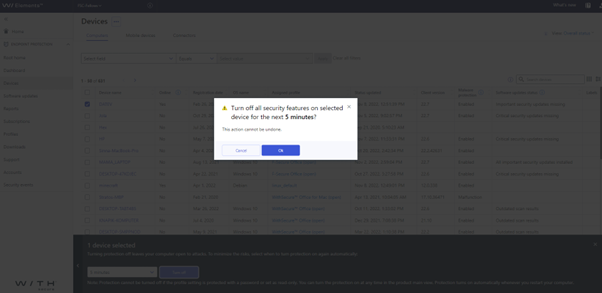
Confirmation dialog for potentially disruptive remote operations
A confirmation dialog has been added for potentially disruptive remote operations, to ensure the admin is completely sure they want to complete the action. This is because the actions are disruptive for the user of the device.
Confirmation is asked for the following operations:
- Restart system
- Network isolation
- System drive encryption
- Turn off security features
- Uninstall
- Request diagnostic file.
Info flyouts for some Device View fields
The info flyouts contain general information about the column and / or information about the possible values that the column in question can have.
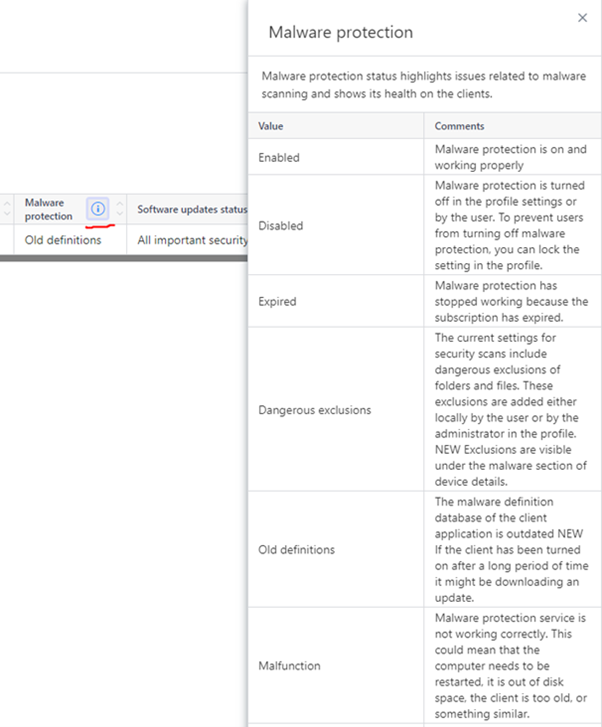
New Issue in Elements EPP dashboard
A new Issue type in Elements EPP dashboard has been added: “Servers no longer connected to Elements”.
This new issue type helps to identify which servers stopped communicating with Elements, potentially due to problems or misconfiguration.

Improved Audit Log
It is now possible to filter Audit Logs by Transaction ID. This can be helpful in some situations.
At the same time, audit log events were added when enabling and disabling Security events email notifications.
Improved subscription message for WithSecure Vulnerability Management
The popover message for ‘WithSecure Vulnerability Management’ in Subscription view has been improved to make it clearer when to use the VM subscription key.
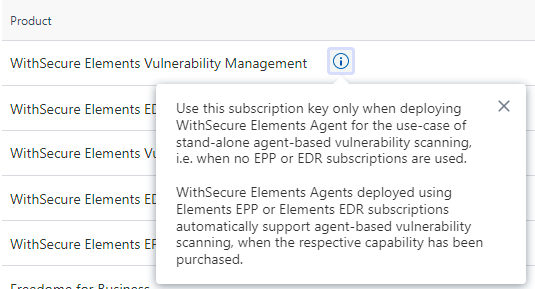
Improved timestamp formatting in exported CSV files
Timestamps are now in human-readable format in device CSV export files

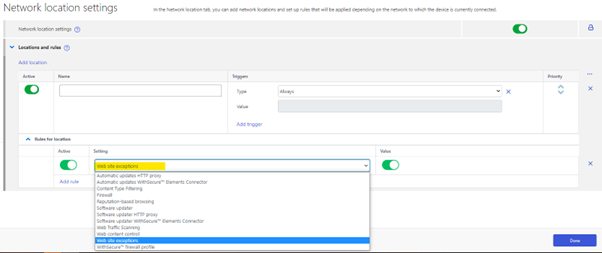
Browsing Protection exceptions added to Network Location Settings
It is now possible to enable the Browsing Protection/website exception via the “Network Location Settings”, allowing this to be location dependent. This is useful in some scenarios where the admin wants to allow access based entirely on the user’s current location.
Elements Endpoint Protection
Installation option to use Active Directory GUID as unique identifier
It is now possible to specify at installation time that the device should be identified using the Active Directory GUID, within the Elements solution.
This can be helpful in organizations using Active Directory, as it can prevent duplicate devices being created.
This installation option is available when installing using the EXE based installer, and also during MSI installation.

Elements Agent 22.8
This release makes the Elements Agent version 22.8 available (internal version 4.39.527).
The endpoints automatically upgrade, without a reboot.
- Added a remote operation to temporarily enable debug logs via remote operation
- Latest installed hotfix information reported to portal
Elements Protection for Mac 22.3.46135
This release for macOS introduces some new security postures, which are visible in the portal.
Linux Protection (Linux Security 64 version 12.0.409)
New versions of Linux Security 64 (version 12.0.409), FSBG (version 1.0.703), and BaseGuard (version 1.0.723) updates have been released. FSBG and BaseGuard are components of Linux Protection. These updates include the following changes:
- It is now possible to bypass distribution compatibility checks and run the product on systems that are not officially supported. The main use case for this feature is to enable running the product on various “clone” distributions that resemble one of the supported distributions.
- Improved integrity checker integration with updates installed via system package manager. Integrity checker baseline can now be automatically updated after a system update has been installed. Currently APT and DNF package managers are supported.
- Support has been added for using wildcards in on-access scanning.
Elements Collaboration Protection
The team has made several releases during November, completely transparently to the customers using the Collaboration Protection solution.
Amongst the changes in these releases:
- The solution now supports URLs of up to 2000 characters in length
- Various user interface improvements
- Additional Response Action: Removal of quarantined item
- Expired quarantined SharePoint sites are automatically deleted according to the policy
Elements Vulnerability Management
The team made two releases during November, again completely transparently to the customers.
Amongst the changes this month:
- Summary reports now contain the asset risk score and importance attributes in various formats (.xml, .xlsx, .docx).
- New reports use the new WithSecure brand.
- WithSecure brand styles and color palette have been applied to the portal.
- The status on the Device Discovery page has been extended with information about problems that may occur on the device which can block VM scanning. The expanded section of the row contains the issue explanation with a short guidance on how the problem can be solved.
Use of SSH credentials
It is now possible to provide SSH credentials (on Elements VM user interface) for network device scans.
You can use the existing SystemScan configuration template to define how to authenticate to a network device and Security administrator can use the existing System Scan configuration to define credentials for the network device scan. “Linux credentials” section has been renamed to “SSH credentials (Linux, network devices)”.
These credentials are used to authenticate to network devices and to extract operating system and firmware versions. These are reported in the vulnerability report as an informative finding, specific for each network device vendor. If the network device version is known to be vulnerable, the report will list related vulnerabilities. The current, first release supports Cisco IOS, Cisco IOS XE, and FortiOS and will be extended with other network device vendors in upcoming versions.
Methods to authenticate network devices will be extended as well in the future.
Integrations
Security Events specification is visible in production
The API information relating to Security Events is now publicly available. This information can be useful to customers integrating to our solutions.
- List of events:
- API reference:
Elements API update
It is now possible to use the Security Events endpoint to fetch events for partner organizations.
Other items of interest
Elements Changelogs rationalization
As part of the unification process at WithSecure, the publishing of changelogs has been consolidated to make them accessible in a consistent manner.
Below you can find links to all of the changelogs.
- Elements Endpoint Protection Portal
- Elements Endpoint Detection and Response
- Elements Collaboration Protection
- Elements Agent for Windows/Servers
- Elements Agent for Mac
- Elements Agent for Linux (LS64)
- Elements Mobile Protection Android
- Elements Mobile Protection iOS
- Elements Vulnerability Management portal
- Elements Vulnerability Management Web Scan
- Elements Vulnerability Management System Scan
- Elements Vulnerability Management Discovery Scan
- Elements Vulnerability Scan Node Agent
- Elements Connector
- Elements API
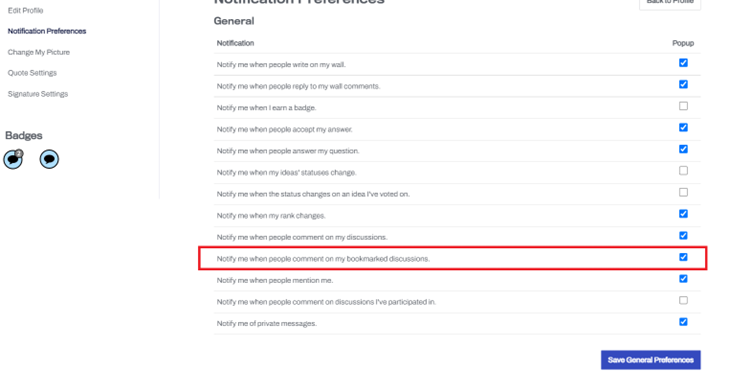
It is possible to subscribe for notifications when a log has been updated:
- First you need to go to specific thread and click to bookmark the thread.
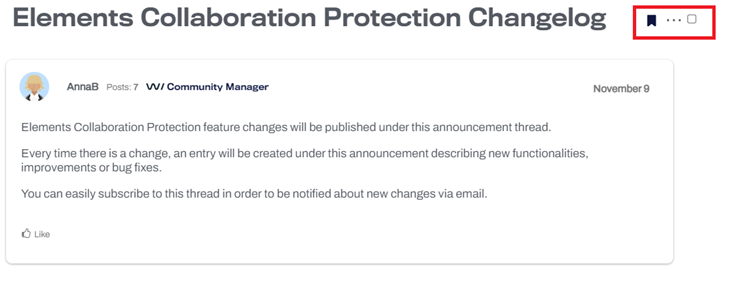
- Then please go to your profile settings → notification preferences and choose to be notified when people comment on my bookmarked discussions.
Threat Highlights – October 2022
- Military targets attacked
-
Fortinet vulnerability under active attack
- Ransomware: Trends and notable reportsAutomobile dealer group Pendragon held to $60m ransom
- “Prestige” ransomware hits Poland and Ukraine
- BlackByte abuse vulnerable drivers to bypass security
- Other notable highlights in briefGitHub rife with malicious code
- Two new Microsoft Exchange vulnerabilities being actively exploited
- FBI issue Iran hack-and-leak warning
- LinkedIn addresses fake profiles
- Abusing Chromium’s application mode to phish
- Healthcare sector report on commonly abused tools
- Joint report outlines top vulnerabilities exploited by China
- Zimbra vulnerability widely exploited
- Threat data highlights
In case you missed it
Reminder: Changes in internet domains for WithSecure™ Elements
As mentioned in the October edition of What’s New, WithSecure is changing the domain names of some servers used to access the solution.
Please see https://community.withsecure.com/en/kb/articles/29681-changes-in-internet-domains-for-withsecure-elements for more details.
Share your ideas with us
Our purpose is to co-secure the world with you – now as WithSecure™. To co-create the best possible cyber security products and services, we warmly recommend you share your ideas via our Ideas Portal, now accessible directly from WithSecure™ Elements Security Center.

Further information
Changelogs and Release Notes for all parts of WithSecure™ Elements can be found at the Help Center
-
What’s New in Elements: October 2022
Read more
Elements Security Center
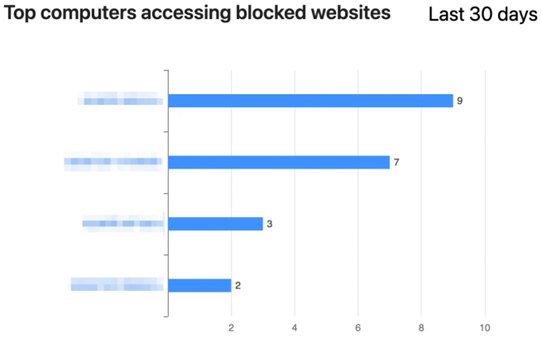
Top computers accessing blocked websites
A new Top computers accessing blocked websites graph has been added to the Security Events reports
Changes in internet domains for WithSecure™ Elements
For the first few months, we have maintained the WithSecure™ Elements system using the elements.f-secure.com domain, with redirecting to the portal at elements.f-secure.com.
Now we are taking the next step towards moving all the services to the withsecure.com domain.
Please read our community article listing the details.
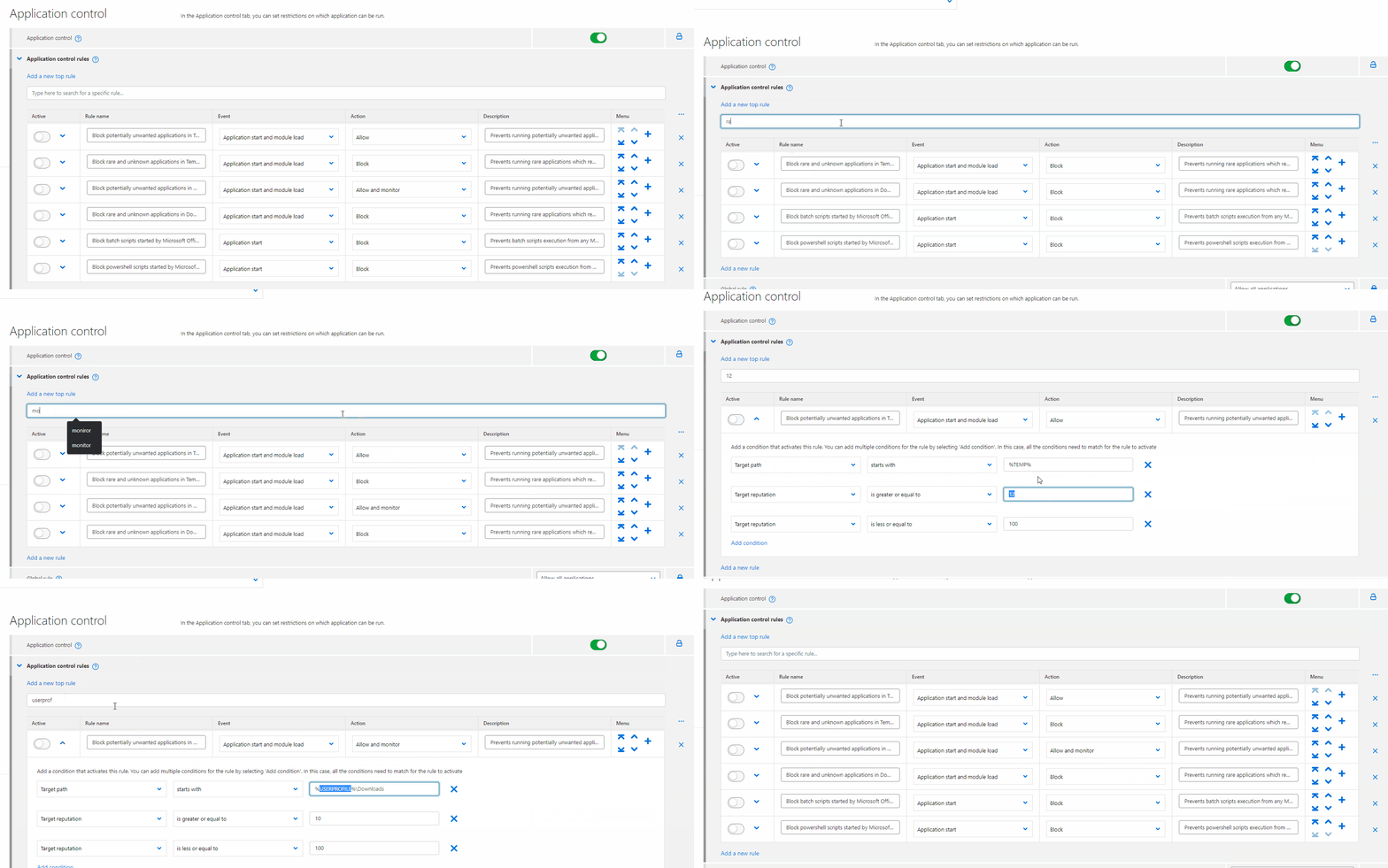
Filter / search Application Control rules
It is now possible to filter Application Control rules, for example to just list ones you are interested in. This is especially useful if you have many rules.
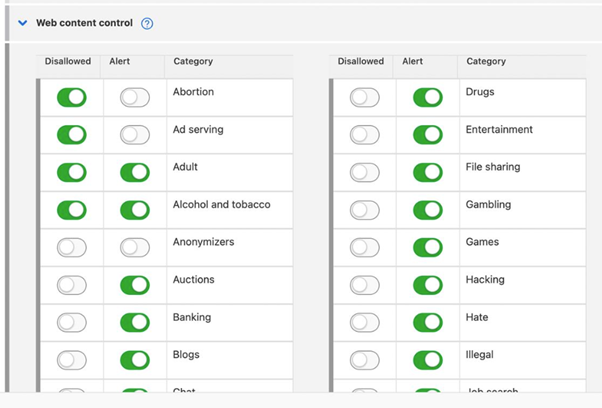
Configure alerts per Browsing Protection category
We have now added the ability to configure alerts per browsing protection category. The Administrator can select which browsing protection category blocks send alerts and which are silently blocked.
Editable Sample Submission URL
We have added a choice in the profile editor to edit Sample submission URL for browsing protection.

This option allows administrators to have an internal sample submission system, which they can use to pre-check samples before they are submitted to WithSecure.
Elements Endpoint Protection
Tamper Protection on Windows– Enabled by default
Tamper Protection, a feature in WithSecure Elements Endpoint Protection for Windows, protects the most important parts of the product from malicious tampering.
For example, with Tamper Protection enabled, it’s not possible to stop the background services needed to protect the device. Until now, Tamper Protection has been disabled by default, meaning that the security administrator has needed to enable this functionality to increase the protection against bad actors. We are seeing an increase in attacks that try to uninstall our product or kill our processes before infecting the device.
Starting from 19th October 2022, we changed the default setting of this feature so that it is automatically turned on for all new profiles. This change means that, out of the box, customers have increased protection. Different regions will get the change at different dates.
You can read more information in our separate article:
Tamper Protection on Windows– Enabled by default – WithSecure Community
Elements Agents 22.7
A new version of the endpoint clients for Windows has been made available.
This release makes the Elements Agent version 22.7 available (internal version 4.38.440). The endpoints automatically upgrade, without a reboot.
Features:
- Improvements to a new feature that send selected Windows Security Events to portal
- Added ability to change sample submit URL in browser block
- We are continuing to change file and service descriptions and names to contain the WithSecure name
Elements Collaboration Protection
While the Elements Collaboration Protection development team is working hard on some new features, they’re still taking time to ensure the existing released functionality works in an optimal manner. So there has been a couple of updates this month, which are there to fix minor issues and improve stability.
So, what are they working on? It’s no big secret, they are adding further functionality to help and protect users of Microsoft Teams. We don’t want to give all the details out at the moment, as some things are still subject to change, but we are adding scanning for files shared in Microsoft Teams chats and channels, which will prevent harmful content from being shared with the chat/channel members.
Elements Vulnerability Management
Device scanning with provided access credentials
We have added the ability to scan network devices with access credentials, which gives more possibility to detect information on those devices than was possible earlier.
For example, by providing access credentials, it is possible to extract exact version information of the software used on the device, which allows Elements Vulnerability Management to provide a much more accurate report on any vulnerabilities present.
This first release comes with the support for Cisco IOS, Cisco IOS XE, and FortiOS devices, and will be extended to other network device vendors in the future.
Integrations
Elements API: new framework
Elements API is a new API framework that will eventually cover all parts of the Elements solution. For the initial launch it provides:
- API Credentials UI. API credentials can be managed for all Elements solutions. It allows the admin to apply a policy to renew credentials after a certain time or to delete unused credentials. API credentials are now independent of users.
- Organization endpoint. This allows a partner to list all the companies that it has as customers.
- Security Events endpoint. This allows the listing of all security events including EDR incidents. Eventually this will replace the events endpoint in Endpoint Protection API.
Documentation:
Other items of interest
Elements Quarterly: the evolution of Elements Q3/2022
We have recently updated our WithSecure™ Elements pages with information about the recently launched features we have added to Elements.
This update includes 9 videos displaying new & advanced topics which help add understanding and aid you when engaging with your customers.
List of topics:
- This quarter in a nutshellOneDrive ProtectionDemo: how to enable OneDrive Protection in just a few clicks
- Read how to protect your file collaboration on M365 from the team behind the new feature.
- Advanced response capabilities:The right action at the right time
- Real-life attack simulation
- Gain a deeper understanding of our new set of response capabilities.
- Asset Risk Score in Vulnerability Management:Clearly understand your true risk status
- Demo: Asset Risk Score in WithSecure™ Elements’ Vulnerability Management
- Risk-based vulnerability management
- Risk-based vulnerability management – why, what, how?
- Endpoint Encryption: Keep your data untouched by attackers, but always available to you
In case you missed it
Share your ideas with us
Our purpose is to co-secure the world with you – now as WithSecure™. To co-create the best possible cyber security products and services, we warmly recommend you share your ideas via our Ideas Portal, now accessible directly from WithSecure™ Elements Security Center.

Further information
Changelogs and Release Notes for all parts of WithSecure™ Elements can be found at the Help Center
-
What’s New in Elements: September 2022
Read more
Elements Security Center
Linux Malware Protection status now visible in the devices view:

URL inclusion in security events
For profiles, browsing protection section, a new setting has been added “Include the blocked URLs in all security events”.

By default we only include information on blocked domains when the site was blocked for security reasons. Now you have an option to also include blocked sites when the feature is for enforcing policy (such as Content Control). Due to differences in local legislation regarding monitoring online activity of employees, this feature is disabled by default
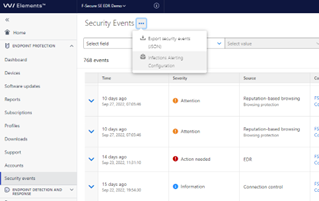
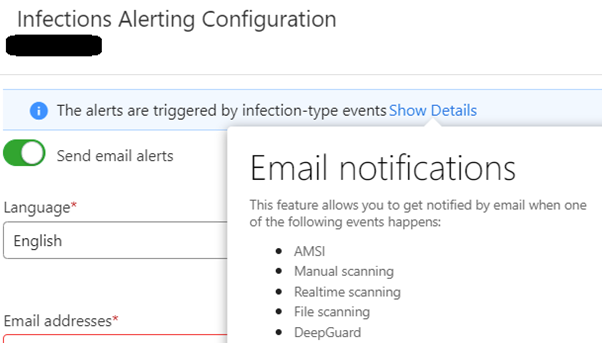
Email notification for infection alerts moved to security events
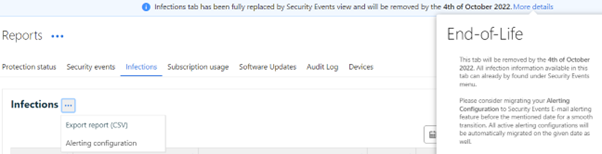
To improve its visibility, the configuration of infection alerts is moved to Security events section.
Please note this feature only supports infection types of Security events:
We migrated everyone who has configured emails in the old old Reports -> Infections -> Alert configuration feature to receive them from the new Security Events side.
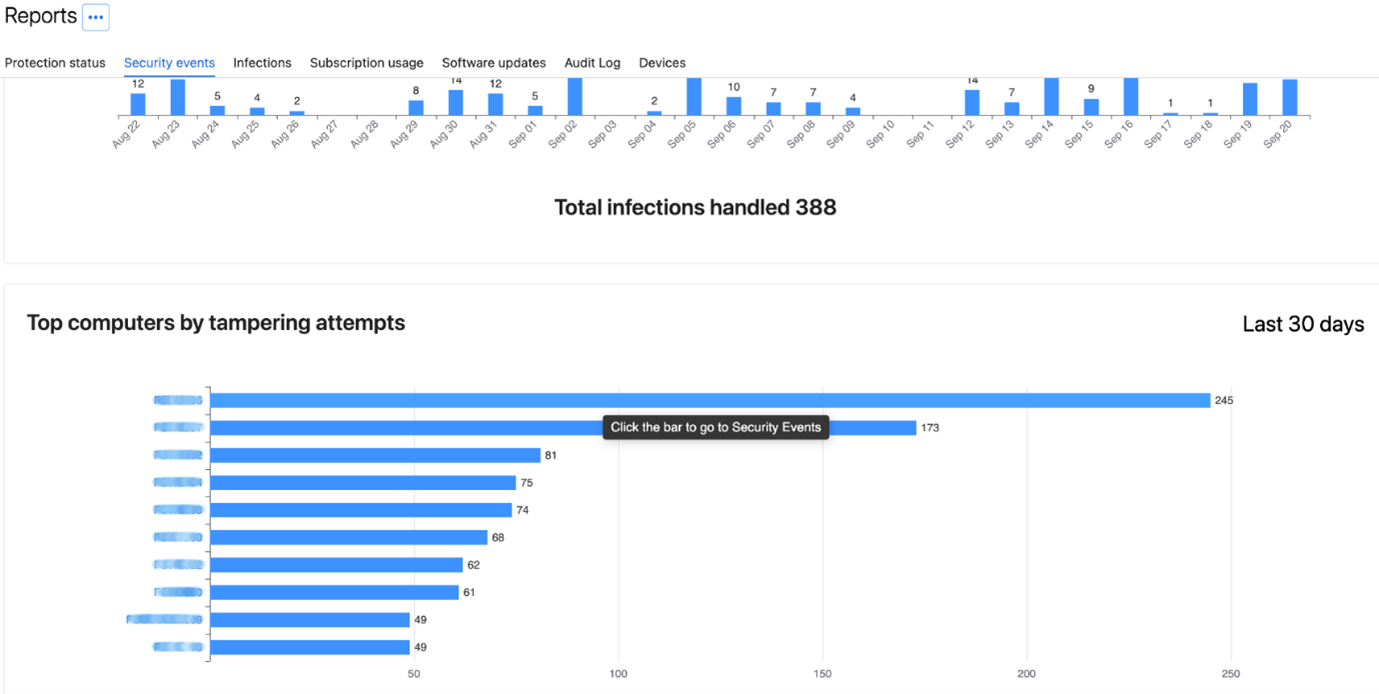
New Chart reporting Top Computers by Tampering Attempts
A new chart in Reports under Security Events section has been added: Top computers by tampering attempts.
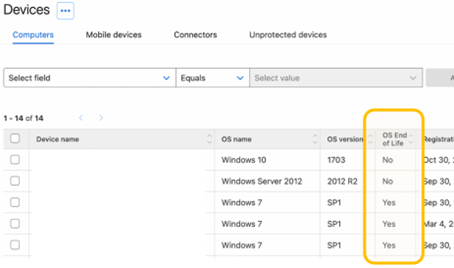
Device list shows End of Life status of the Windows Operating System
We introduced new column in device list: OS End of Life. It shows if Windows device is running an OS version that is no longer supported by Microsoft.
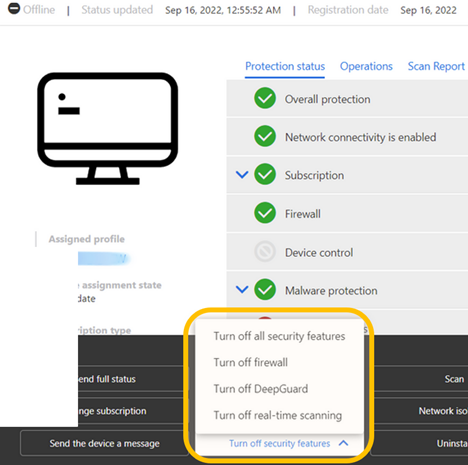
Option to temporarily turn off security features
It’s now possible to temporarily turn off security features. It has been added as operation in device view.
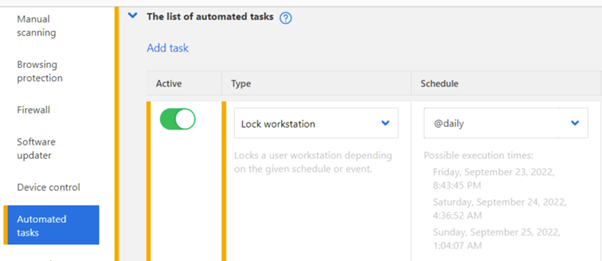
Lock Workstation automatically
A new type of automated tasks has been added: Lock workstation. It locks user workstation depending on the given schedule or event.
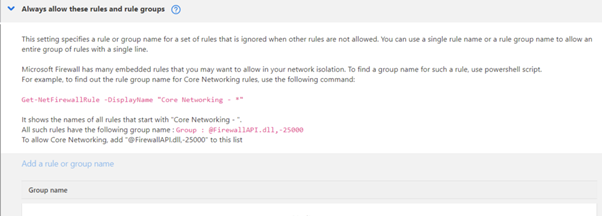
Additional options in Firewall profile
A new Table has been added to the Firewall profile. It allows to always allow specific rules and rule groups.
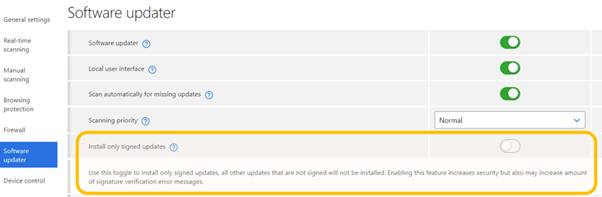
Allow “signed only updates” in Software Updater
In Software Updater settings a new toggle has been introduced: Install only signed updates. When turned on all unsigned updates will not be installed. Enabling this feature increases security as only verified updates will be installed.
Elements Endpoint Protection
Elements Endpoint Agent 22.6 (Early Access)
A new version of the endpoint clients is made available and our Early access program participants started seeing it on 26.09.2022. Full availability starts one week later.
The endpoints get automatically upgraded, without a reboot.
This release introduces new features and fixes so be sure to enable Early access program on some of your computers to try this out.
Feature changes include
- Full list of IP addresses will be shown in each alert in portal
- AD GUID can be used as unique UUID during installation
- App control alerts and rules support parent command line options
- Added functionality of waiting for Software Updater process to end before proceeding to collect logs
- Client now reports amount of duplicated alerts it has filtered out and it’s visible in Security Events on portal.
- Added a new feature to send selected Windows Security Events to portal (requires Premium subscription)
- Multiple improvements in Connection tool: allow to copy list of all required URLs, added description for SSL errors, allow to install missing certificates etc

Elements Agent for Mac Early Access
We have now started upgrading existing F-Secure Computer Protection & Rapid Detection and Response for Mac to the new WithSecure™ Element Agent 22.3.46135, for clients participating in the Early Access program. Wider production rollout of this upgrade will start soon.
New Release: Elements Mobile Protection for Android
New WithSecure Elements Mobile Protection for Android (18.5.0020216) has been released on 03.10.2022.
New features and improvements:
- The app now uses the WithSecure brand.
- The profile version is now visible in the About view.
- OS Security patch is now visible in the WithSecure Elements Endpoint Protection portal.
- Support was added for Samsung Knox.
Elements Endpoint Detection and Response
Elements EDR – new response actions
WithSecure Elements EDR has launched new features and functionalities.
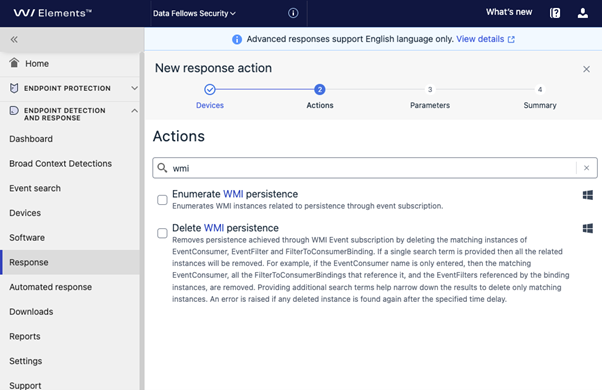
- New investigative response action: Enumerate WMI persistence
- New remediation response action: Delete WMI persistence
These actions are designed to determine whether Windows Management Instrumentation (WMI) persistence mechanisms are in use by an attacker and to delete specified WMI objects related to persistence.
You can find these new advanced features “Response” page “Create new” action wizard:
Read more (online user guide):
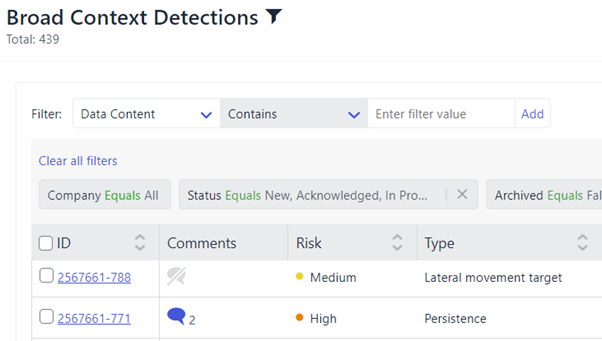
New: Comments Broad Context Detection list view
By clicking comment icon in Broad Context Detection view you can have quick view to latest comments without a need to move into details view. This enables efficient review of comments without additional page changes.
Inside BCD:

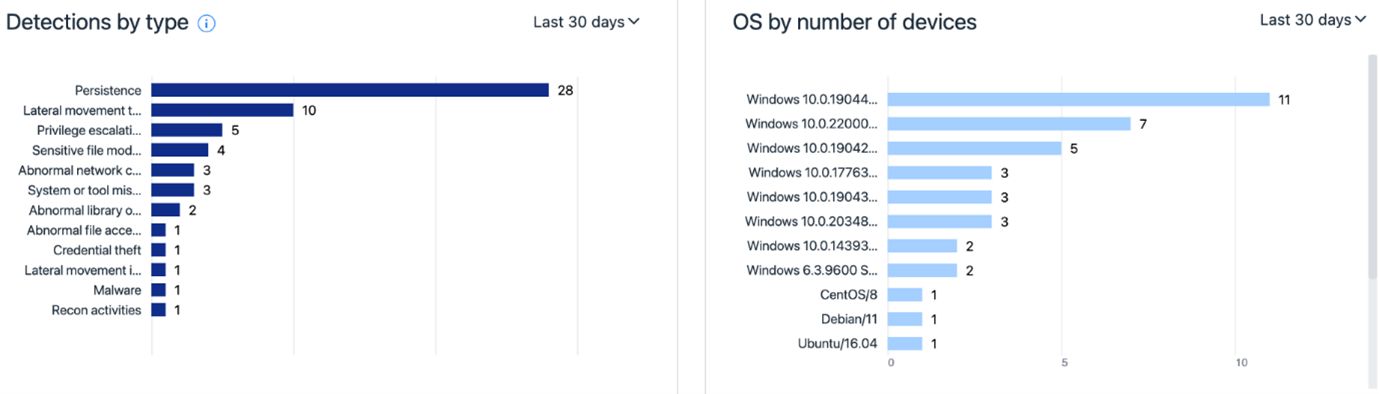
The EDR Dashboard has been renewed:
- Broad Context Detection information is the dashboard is actionable meaning that when clicked user can deep-dive into details behind the numbers.
- For example when clicking a section in a graph or the number in the legend you can get access to details of those 29 High risk level Broad Context Detections with a single click
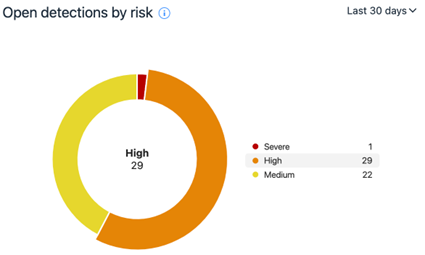
There is new information items available showing e.g. Broad Context Detection type and device operating system breakdown.
Elements Collaboration Protection
During the last month we’ve improved the stability of Elements Collaboration Protection, and also updated the localizations. In addition, there have been improvements to the performance of the solution.
Elements Vulnerability Management
During September, the behaviour of the selection grids has changed. When the user selects items, the “Select all” action only refers to the data seen on the current page (subset of data).
The multi-page selection remains only in the Summary Reposts wizard when Assets are in use to define the scope.
Integrations
Elements Provisioning API
The following products are now supported in Provisioning API:
· WithSecure™ Elements EDR for Computers
· WithSecure™ Elements EDR for Servers
· WithSecure™ Elements Vulnerability Management
Terminate subscription:
This new API call allows to remove the subscription by using the key as
Other items of interest
Vulnerabilities in on-premise Microsoft Exchange
On September 29th 2022, Microsoft announced that some previously unknown vulnerabilities had been found in their Microsoft Exchange product.
WithSecure’s teams immediately started assessing the issue, and determining what we can do to help affected customers. Our ongoing summary can be found here, and as the situation evolves we will keep the article updated.
Labs Research Blog redesigned
Our Labs Research Blog has been redesigned, and is now fully in line with the new WithSecure branding.
In the blog, our Labs staff detail some of the items they’ve been working on, together with links to public advisories that customers may encounter. As a bonus, there’s some tools that our team find useful, or have developed themselves.
WithSecure™ Threat Highlights Report – September 2022
Access the monthly Threat Highlights Report PDF – following this link.
- Iran attacks Albania
- Uber and Rockstar breached by “Tea Pot”
-
Russian ‘hacktivist’ groups have close ties to GRU
- Ransomware: Trends and notable reportsLockBit bug bounty and leaks
- Sparta ransomware
- Nations targeted by ransomware
- BianLian ransomware
- Ragnar Locker deep dive
- Technical analysis of Redeemer
- ExMatter for exfiltration and corruption
- Other notable highlights in briefRaspberry Robin spread through print shops
- Censys state of the internet
- MooBot leverages D-Link vulnerabilities
- BEC group targets schools
In case you missed it
Share your ideas with us
Our purpose is to co-secure the world with you – now as WithSecure™. To co-create the best possible cyber security products and services, we warmly recommend you share your ideas via our Ideas Portal, now accessible directly from WithSecure™ Elements Security Center.

Further information
Changelogs and Release Notes for all parts of WithSecure™ Elements can be found at the Help Center
-
What’s New in Elements: August 2022
Read more
Elements Security Center
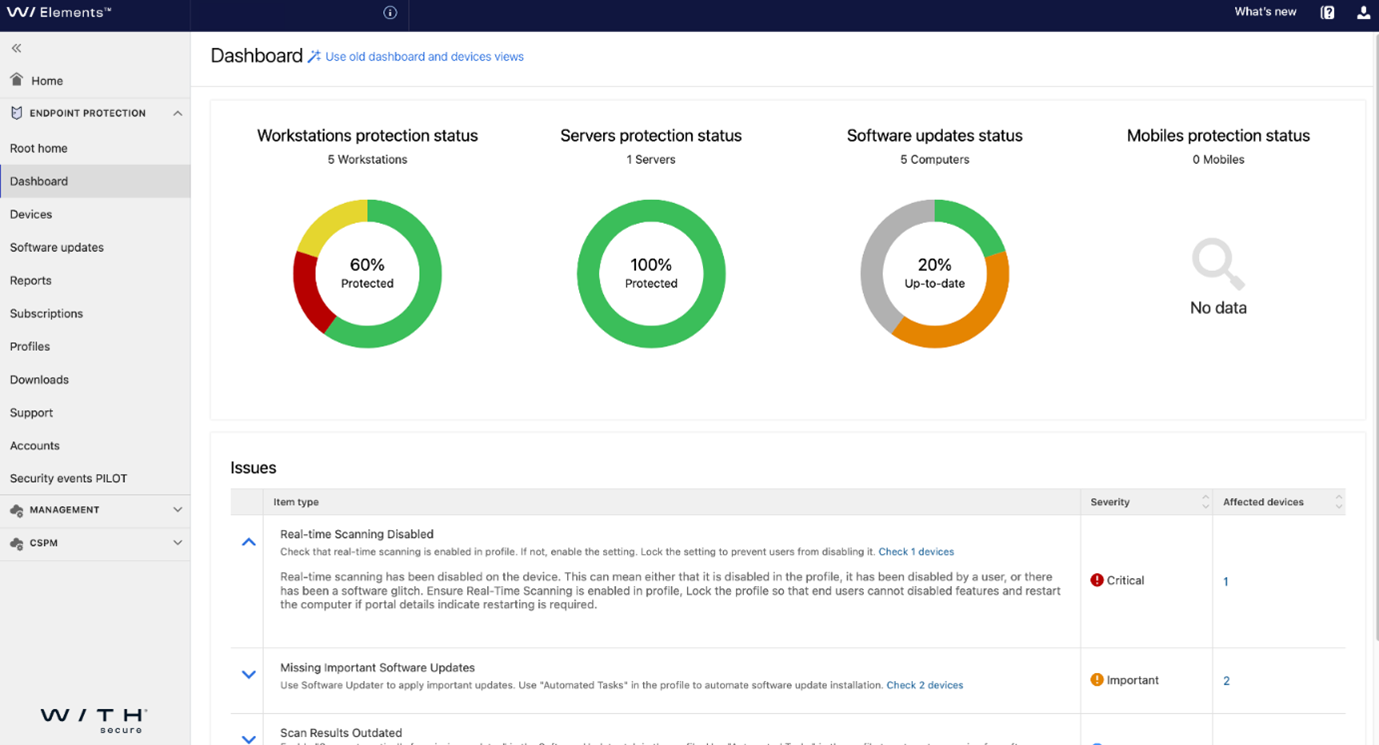
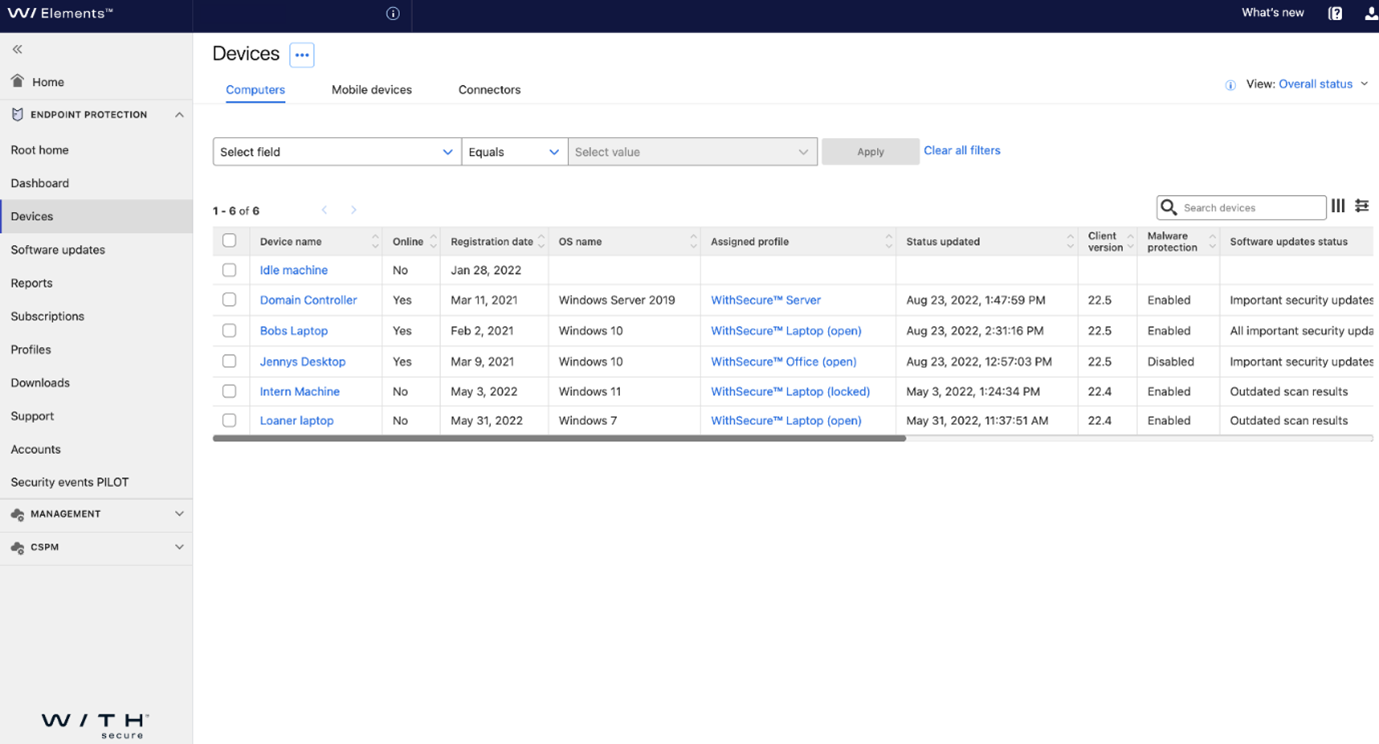
Elements Portal – new Dashboard and Devices
We have now made the new Dashboard (Advisory Service) and the Devices page the default views, with the older pages still being available for those who wish to use them.
The Dashboard will list following:
· Devices that have a reboot pending
· Devices that have malware protection disabled, malfunction or expired
· Devices that have dangerous exclusions in profiles / local settings
· Devices that have outdated malware definitions
· Devices that have outdated scan results for software updates
· Devices that are missing critical or important software updates
· Devices that have firewall disabled (profile or GPO)
· Devices that have low disk space (less than 5GB)
· Devices that have severe or high EDR incidents
· Elements Connectors that have certificates which are expiring soon
· Device view allows customized set of columns to be shown
· Device view allows custom views to be saved
· Device view allows more flexible filtering capabilities
The toggle to switch between old and new views will remain on the dashboard still a while longer as we migrate final features and iron out any potential issues discovered.
Please note that there might be differences in the data shown in new and old views. New views utilize different services, different data sets and different logic to show information. Old views utilized data that was pre-calculated and updated periodically whereas the new views the data is more real time and better reflect the current status and more accurate information.
New items:
- Dashboard will now also show an issue item for Windows clients which are no longer supported
- “Change subscription” operation is now available also on new device view
New Dashboard view:
New Devices view:
Elements Security Center – Removing pending invitations
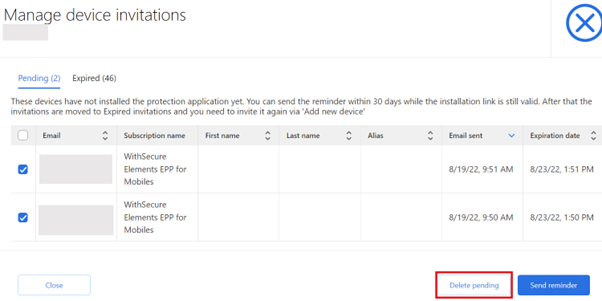
If an email invitation to install a client has been sent by mistake, it can be removed from “Manage device invitations” view. After the removal, invitation emails are still in the invitees’ mailboxes, but activation links are invalidated.
Elements Endpoint Protection
WMI Provider enabled by default
We made one configuration change which partners and customers need to be aware of. The WMI Provider is now enabled by default. For details please see the online manual.
Elements Agents 22.5
A new version of the endpoint clients is now available. This release makes the Elements Agent version 22.5 available (internal version 4.36.3020).
The endpoints automatically upgrade, without a reboot.
Features:
-
Added new automated task to lock workstation and trigger on workstation lock
- Added more events:Report and show in portal if RDP is enabled on device
- Report account lock threshold to portal
- Report changed exclusions to portal
- Report ODS events and excluded URLs to Application Windows Event log
- Report IPv4 and IPv6 addresses separately
- Added remote action to temporarily turn off protection features from portal
- SafeSearch for Bing on Edge uses now built in system functionality
- WithSecure Firewall has a new feature to allow certain rules and groups of rules when “disable all rules” option is selected. It’s useful if you want, for instance, to disable all rules except Network Discovery
- WithSecure Firewall now allows to use user environment variables in application names.
- More disk encryption information is sent to portal
GUI changes:
- Software Updater shows flyer with notification about found new updates
- Running scheduled scan is possible to cancel now in event history
- Tray icon shows now red and yellow statuses in case of problems
Elements Endpoint Detection and Response
Feature update – opening incident in new tab
WithSecure Elements EDR feature update has introduced following improvements:
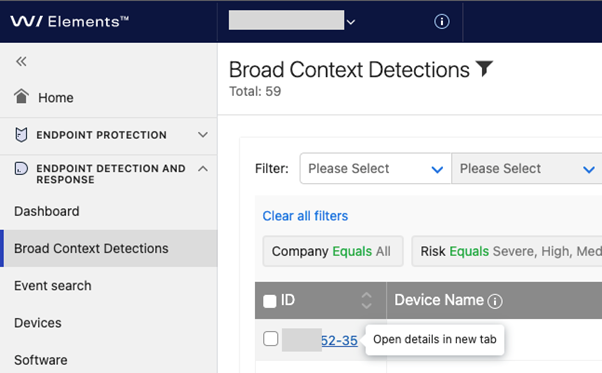
- Broad Context Detection list view supports opening of incidents in a new tab. This option is available by right-clicking while hovering above the Broad Context Detection ID field in the table.
Elements Collaboration Protection
New features and improvements:
- Improvements to the user interface and product functionality
- The filtering of items in the Cloud service Details was improved
- Links in the Support tab were updated and localized
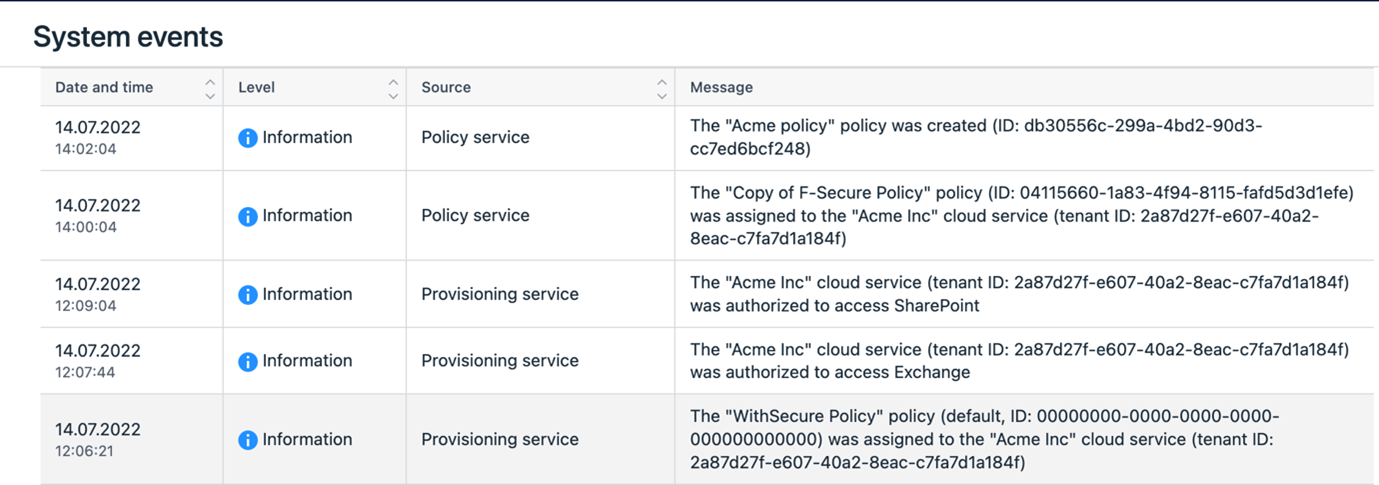
- Improvements to the readability of system events
Elements Collaboration Protection privacy policy update
The Elements Collaboration Protection privacy policy document has been updated to reflect the product evolvement. It covers the statement on how personal data processing is with the introduction of new functionality.
Please take a look and share with end customers where needed.
Go to Corporate business privacy policy and choose WithSecure™ Elements Collaboration Protection on the left hand side menu.
Other items of interest
WithSecure™ Threat Highlights Report – August 2022
Access the monthly Threat Highlights Report PDF – following this link.
- August 2022
- Top malware strains 2021
- Mailchimp and Twilio incidents highlight the supply chain issue
- State-backed actors target Confluence vulnerability
- Microsoft disrupt Callisto Group
-
Ransomware: Trends and notable reports
- ENISA’s ransomware threat landscapeA history lesson on Ransomware
- A look at Initial Access Brokers
- Newcomers: SolidBit
- Other notable highlights in brief
- Research highlights: WithSecure™ ransomware threat update
System- Status – status.withsecure.com
As a WithSecure™ partner you should be subscribed to our System Status. Due to recent domain change, you likely have to re-subscribe to all incidents or to selected of your interest.
Subscribe options are: email, phone, Slack, Atom/RSS or by contacting our support about an incident.

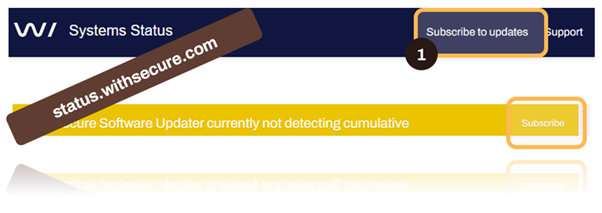
On our Service status and DB updates webpage you can also track the latest versions of our database updates.
In case you missed it
Domain changes for accessing WithSecure™ Elements
As F-Secure Business is now WithSecure™, we will shortly be moving the Elements portal and related services so they work under the withsecure.com domain. Once this change is made, the portal will be accessible using the URL .
To aid partners and customers during this transition, we will be redirecting access made via automatically to the new domain. However, we do advise any partners or customers to ensure that they whitelist this new URL to ensure continued access.
In addition to the main portal access, the authentication URL used for sign-in will also change to one using a withsecure.com address.
Please note: Once the new domains are taken into use, users who are logged in to the portal will need to re-authenticate. This is a one-time action, but is unfortunately unavoidable due to the change. To ease this transition, we will schedule the change so that it occurs during off-peak hours.
API access URLs are not affected by this change, and existing client installations continue to work without any changes being needed to Access Control Lists.
Share your ideas with us
Our purpose is to co-secure the world with you – now as WithSecure™. To co-create the best possible cyber security products and services, we warmly recommend you share your ideas via our Ideas Portal, now accessible directly from WithSecure™ Elements Security Center.

Further information
Changelogs and Release Notes for all parts of WithSecure™ Elements can be found at the Help Center
https://elements.f-secure.com -
What’s New in Elements: June/July 2022
Read more
It has been quiet here due to well-earned vacations, but we have not stopped working behind the scenes to provide you with continued security. Here’s a high-level summary of Elements news since the last update.
Updated on 24 August 2022 to add information about upcoming domain changes for Elements.
Elements Security Center
Reporting streamlined – Broad Context Detections are now reported in Security Events
Security Events has started reporting EDR BCDs that are severe, high or medium risk incidents.
They are also available via Elements Connector 22.18/22.19 release or through the API ().
Elements Endpoint Protection
Elements Endpoint Agent 22.4
A new version of the endpoint clients is now available.This release is for all variants of Elements Endpoint Protection, and updates them to version 22.4 (internal version 4.35.1073). The endpoints get automatically upgraded, without a reboot.
This release introduced new features and fixes. Several of the new features rely on portal changes, and naturally we have updated that to match. We do recommend that customers enable the Early access program on some of your computers to try new versions out before general release.
Features:
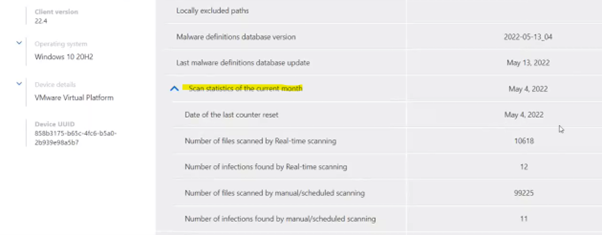
- Added monthly counters: how many files were scanned last month, how many issues were detected and so on (in the Device details).
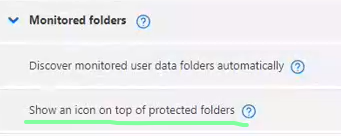
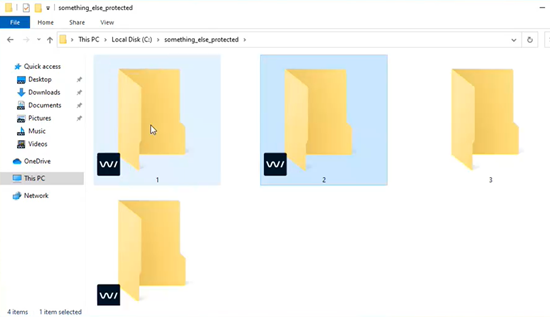
- Added an option, in the profile, to show overlay icon on all folder and files protected by DataGuard (Profile > DataGuard).
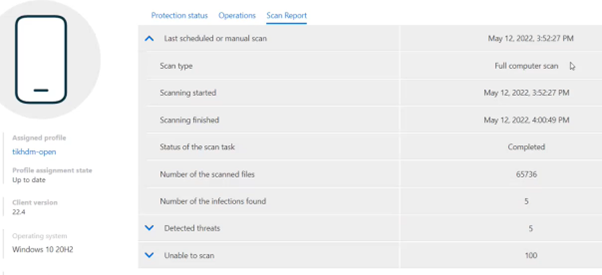
- Scan reports and device listing in portal have more info about last performed scan.
- Added a possibility to define maximum temp file size for unpacking archives during scanning (Profile > General settings).

- All alerts which are sent to portal are also saved to the Windows Application Event log.
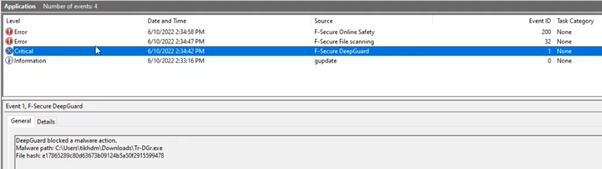
- Improved proxy detection – it always uses default system proxy as well when automatic proxy discovery is enabled.
- Remote and local restart requests are visible in recent events UI.
- WMI automatically removes special characters from product name (for instance, trademark).
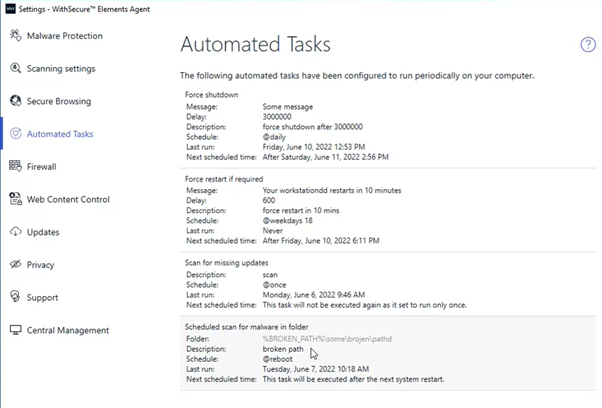
- Automated tasks had several improvements: Added ability to scan a folder.

- Added possibility to define a timeout for power management tasks (reboot in 10 minutes, for instance).
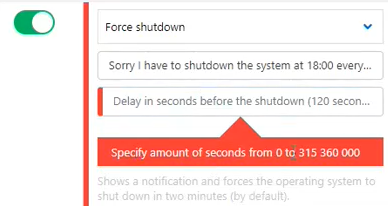
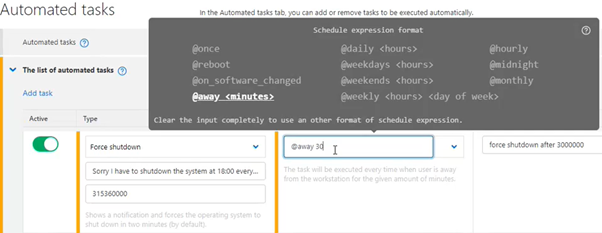
- Added a new @away trigger to execute a task when user is away from the device for defined amount of time.
- Local view of automated tasks in the Agent UI. Note, the broken path is greyed out, as we recognize it is an invalid.
Elements Endpoint Protection portal
The latest release of the Elements Endpoint Protection portal introduces changes to support the latest client features, many smaller fixes, and a new way that we present information in the Dashboard.
Introducing a toggle to enable new Dashboard and Devices views
We are introducing a new dashboard view along with making the new devices view more easily available. These views won’t be made as defaults yet, but you can find a toggle from the Dashboard that allows you to switch back and forth between the versions.
Things to note regarding new views: The Dashboard will now look the same on both partner and company levels
Dashboard will list following:
- Devices that have a reboot pending
- Devices that have malware protection disabled, malfunction or expired
- Devices that have dangerous exclusions in profiles / local settings
- Devices that have outdated malware definitions
- Devices that have outdated scan results for software updates
- Devices that are missing critical or important software updates
- Devices that have firewall disabled (profile or GPO)
- Devices that have low disk space (less than 5GB)
-
Devices that have severe or high EDR incidents
- Elements Connectors that have certificates which are expiring soonDevice view allows customized set of columns to be shown
- Device view allows custom views to be saved
- Device view allows more flexible filtering capabilities
Elements Endpoint Protection Audit Log
A new feature is activated in the Audit Log view. Next to the event timestamp you are able to filter by which administrator initiated the action.
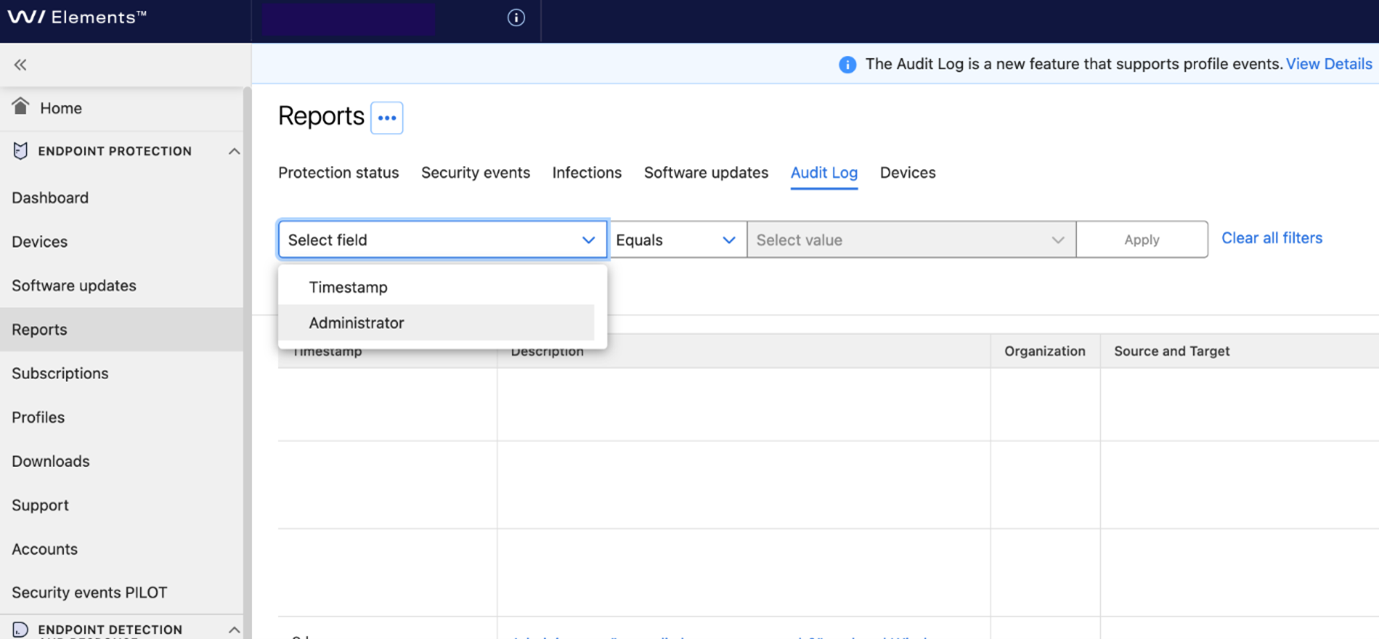
Other Improvements:
- If company has Active Directory data then default profiles tab always shows the Active Directory section.
- Current version and target version for Microsoft products on device updates screen is shown as N/A.
F-Secure CP&RDR upgrade to WithSecure™ Element Agent 22.3.45064 has started for Mac clients participating in Early Access
New features and noticeable changes:
- Product is now rebranded as WithSecure™ Elements Agent
- New GUI:
- redesigned menubar agent now contains up to date protection status
- there is no longer a separate app with product status
- local product settings are now available in menubar, System Preferences pane is no longer installed with the product
- WithSecure™ Elements Agent no longer requires Rosetta2 on Apple Silicon Macs
- Single installer is now working with different Elements production environments based on the activation key
Business Suite Client/Server to Elements migration installers updated (bs2cp)
We have updated the .jar files which are needed to migrate from Business Suite to Elements. The Package details have also been updated to reflect our new corporate naming and version.
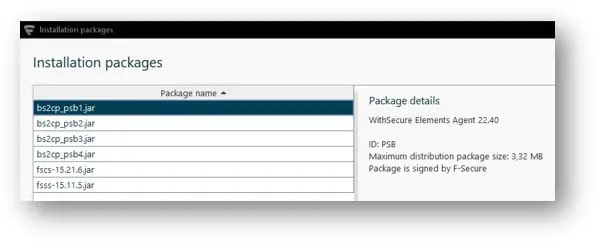
In some cases the migration installation could fail with the old installers. The faulty versions have been replaced. They can be found under the Migrating computers section of the WithSecure™ Elements Endpoint Protection online user guide.
Please download the latest jar (select the correct one for your Elements environment) and exchange them in your personal storages and / or what you already imported into the Policy Manager, before beginning or continuing your migration projects.
Elements Endpoint Detection and Response
Customized device isolation notification message
- A message is shown in endpoint when device is isolated manually or automatically.This setting is under Firewall -> Firewall rules for WithSecure profile: Network isolation -> A customized message about an isolated computer.
New response action is introduced to “Retrieve event log entries” from Windows devices
- This Action can be used to retrieve e.g. only specified Windows event log id, or specified log name or log entries within given time range.
- More details can be found from admin guide:
New version of response action ”Kill process” has been introduced
- This response gives option to combine retrieving process memory dump with given flags and killing the process for more efficient response workflow.
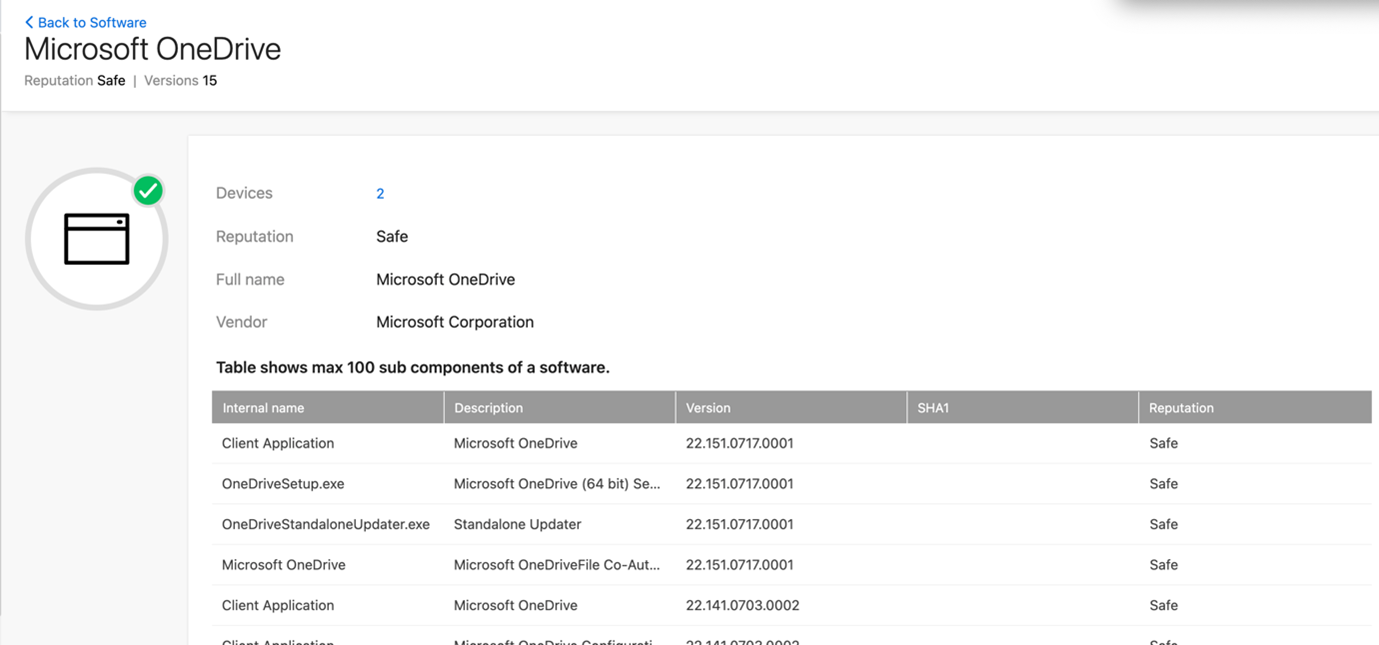
Software reputation listing now includes breakdown of components under each software application
- From each component version, hash and reputation information is shown.
- Problem where component details could not be accessed when software name is undefined has been fixed.
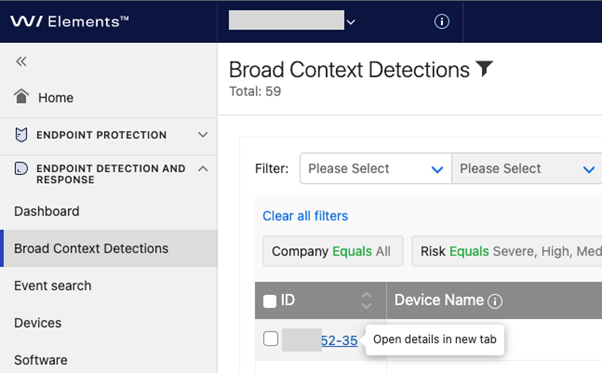
Broad Context Detection list view supports opening of incidents in new tab.
- Option is available with mouse right click on top of Broad Context Detection ID field in the table.
Elements Collaboration Protection
We have made multiple releases of Elements Collaboration Protection, and the following summarizes all the releases
New features and improvements
- Improvements to the user interface and product functionality
- Updated the notification logic to exclude repetition, for example, for deleted malicious email messages.
- Protection for OneDrive is available to all our WithSecure Elements Collaboration Protection (ECP) customers with no additional cost. OneDrive Protection detects and blocks known and unknown ransomware and malware from your Microsoft OneDrive, enabling your workforce to collaborate and share files via OneDrive and Teams chats, securely. For more information on how to set up the OneDrive protection, see the WithSecure Elements Collaboration Protection Administrator guide.
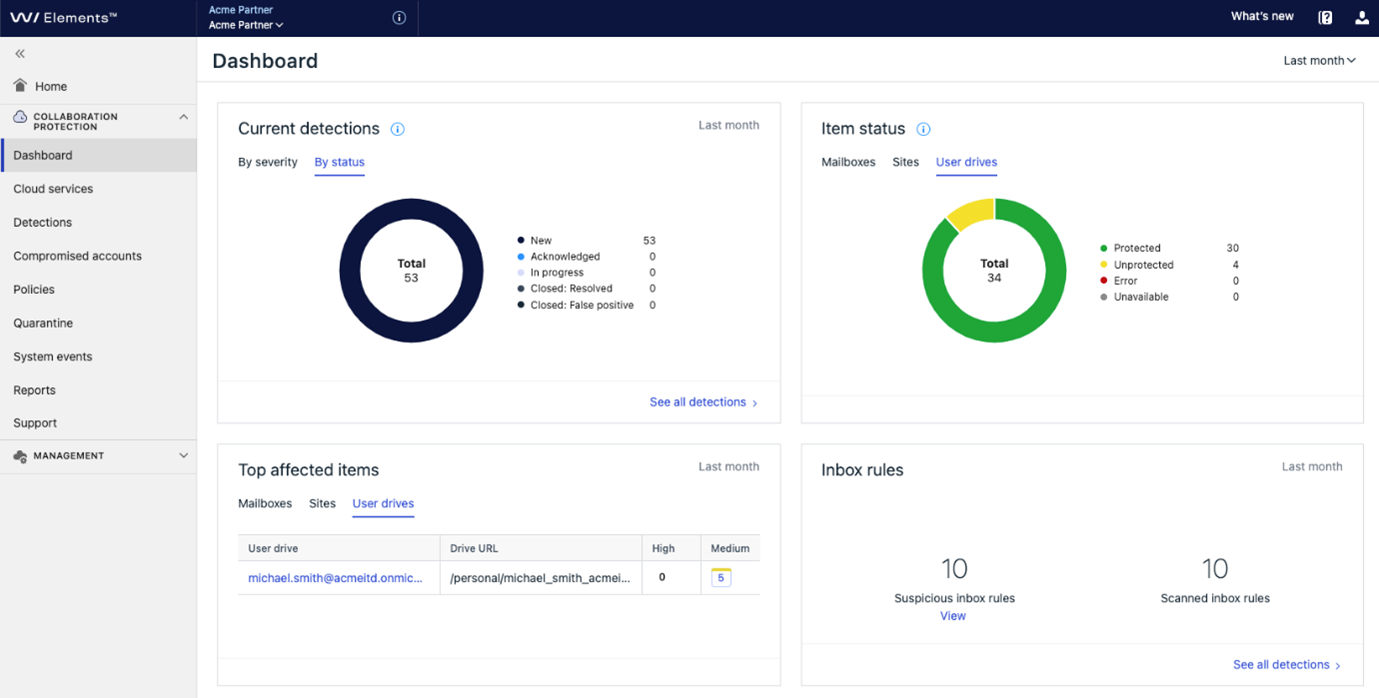
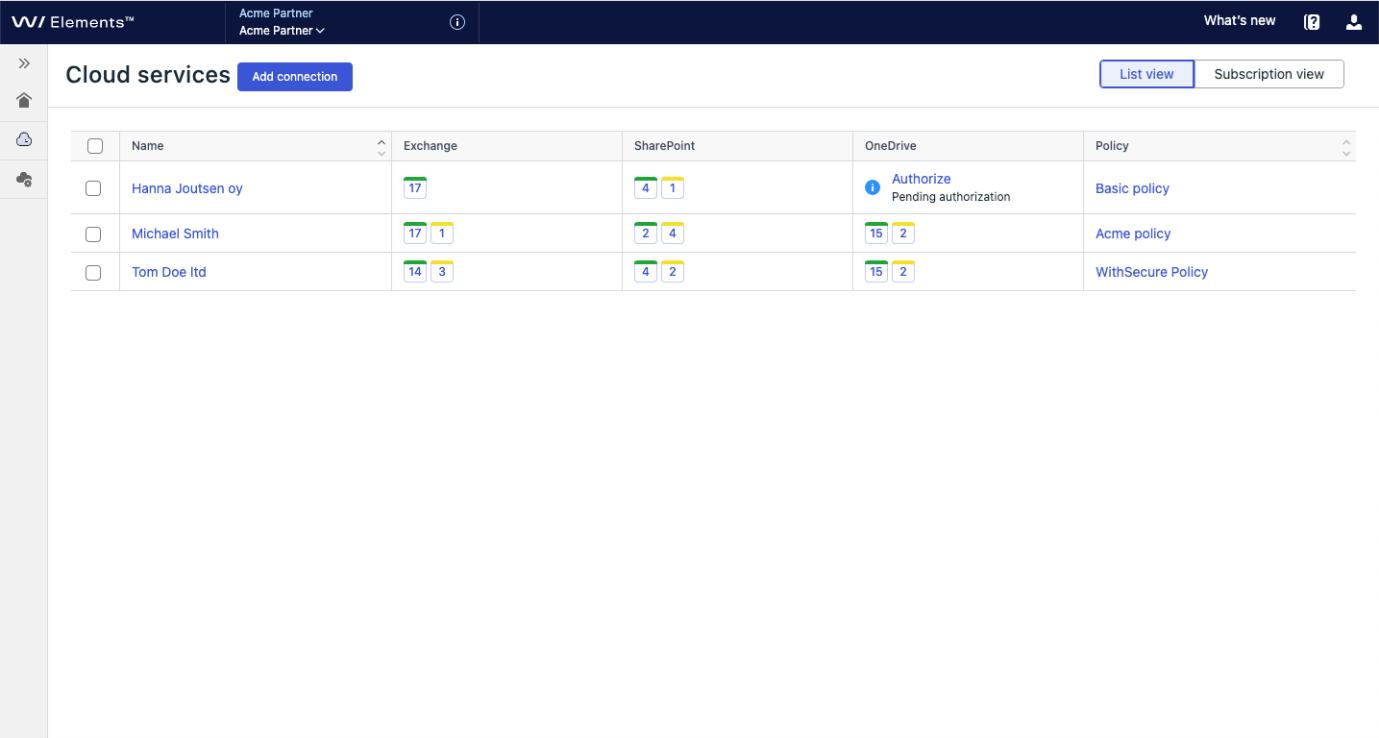
You can find more information on this feature at the dedicated community article.
Elements Vulnerability Management
The team has made several releases for Elements Vulnerability management, and these bring the following:
New features and improvements:
- Added pagination and additional filtering on the Device discovery page. From now on, admin can discover and review more than 500 devices without changing filter options.
- Status indicator of the Reports page has been extended with guidance and reference ID whenever the report generation task cannot be completed.
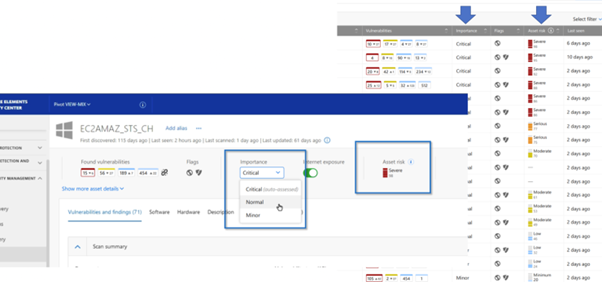
- Introducing VM Asset Risk Score. It is a step towards risk-based vulnerability management – an approach that reduces vulnerabilities across your attack surface by prioritizing remediation effort based on the risks they pose to your organization. Along with Asset Risk Score, the solution includes the ability to specify asset importance, a new attribute which plays a significant role in the risk evaluation. Within this release, the asset risk score and asset importance are exposed to the Asset list and Asset details page, and the visibility will be extended to dashboards and reporting in the future.
You can click the “i” next to Asset Risk, for more information in the portal.
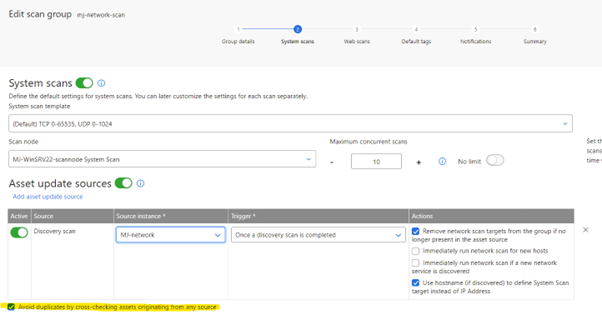
- The new cross-check functionality allows users to specify if the system should make additional verification to avoid creating duplicates of the same scanned hosts within a single Scan group. Duplicates can be caused by Asset Update Source Automation in some specific use cases, typically with the combination of human-made changes in the portal. The expected result, after enabling this feature, is a cleaner Scan group (no two or more same scans) and less hassle mainly with the different scan target names.
- Added the ability to search devices by using case-insensitive requests in a Search query on the Device discovery page.
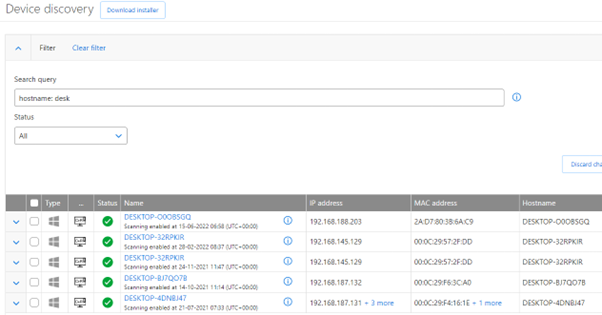
- Added an ability to exclude certain vulnerabilities from the risk score evaluation by changing its status to “Accept the risk”, for example.
- Up to this point, vulnerability instances that affected assets that were already archived were taken into account in the scores on the Vulnerability list and in the vulnerability details view. This has been changed, and they are now excluded by default. You can include them by changing the default filter.The latest Scan Node in available in the Elements Vulnerability Management portal no longer require .NET Core 2.2 for the installation and usage.
Integrations
Elements Connector release
A new release 22.18 (Windows) / 22.19 (Linux) is rolled out with the following changes:
New features:
- Support EDR BCD incidents in Security Events forwarding to SIEM systems. This feature is planned to be released into production back-end later this week.
Fixed issues:
- Includes latest spring4shell updated binaries, so after new installation you don’t need to apply any hotfixes anymore.
First time installers are now released and have also been delivered via automatic channel update, so your Connector should already be at the latest level.
Provisioning API updates
Getting a list of subscriptions for a company or a partner is now possible. Details in
Other items of interest
Getting the latest information on WithSecure™ service status
Did you know that WithSecure has a publicly available service that provides information about ongoing incidents? You can access this service here and it is even possible to subscribe to it so that you can be informed by several different methods. Simple click on “Subscribe to Updates” at the top, and choose the method you want, and ensure that you don’t miss any important status announcements. Customers who previously used the F-Secure status service should re-subscribe to this new service, as it caters for B2B customers exclusively.
Domain changes for accessing WithSecure™ Elements
As F-Secure Business is now WithSecure™, we will shortly be moving the Elements portal and related services so they work under the withsecure.com domain. Once this change is made, the portal will be accessible using the URL .
To aid partners and customers during this transition, we will be redirecting access made via automatically to the new domain. However, we do advise any partners or customers to ensure that they whitelist this new URL to ensure continued access.
In addition to the main portal access, the authentication URL used for sign-in will also change to one using a withsecure.com address.
Please note: Once the new domains are taken into use, users who are logged in to the portal will need to re-authenticate. This is a one-time action, but is unfortunately unavoidable due to the change. To ease this transition, we will schedule the change so that it occurs during off-peak hours.
API access URLs are not affected by this change, and existing client installations continue to work without any changes being needed to Access Control Lists.
Changes in WithSecure™ License Terms and Privacy Policies
As we have separated our B2B (Business) and B2C (Consumer) businesses, we are in the process of updating our License Terms and Privacy Policies to better reflect this. The new License Terms will take effect during September, and the Privacy Policies are being updated on a slightly different schedule.
There are no substantive changes to the Privacy Policies. The main changes in the License Terms were to remove the B2C references, update the changing process and to make the text clearer and easier to follow. You can find out more details of the upcoming License Terms changes here.
WithSecure™ Threat Highlights Reports
May 2022 highlights
- Advisory on initial access techniques
- Emotet back at full power
-
BPFDoor, an insidious backdoor
- Ransomware: Trends and notable reports:Is this the end of Conti?
- Iran is carrying out ransomware attacks
- Operator of Thanos builder charged
- The return of REvil?
Access the May Threat Highlights Report PDF – following this link.
June 2022 highlights
- Follina, an exploited vulnerability in MSDT
- Emotet back at full power
- State-backed actors target Confluence vulnerability
-
Law enforcement takes down Flubot
- Ransomware: Trends and notable reportsA look at the ransomware ecosystem
- LockBit is updated to 3.0
- An advisory on Karakurt
- “Ransomware” targeting Elasticsearch
- The costs of ransomware to businesses
Access the June Threat Highlights Report PDF – following this link.
July 2022 highlights
- Trickbot group attack Ukraine
- Brute Ratel being abused by threat actors
- Black Basta on the rise
- Ransomware: Trends and notable reports
- BlackCat under the spotlight
- Vice Society
- A closer look at LockBit 3.0
- Hive joins BlackCat in using Rust
- CISA produce alert on MedusaLocker
- HavanaCrypt, a new group with novel tactics
- Q2 statistics from Digital Shadows
Access the July Threat Highlights Report PDF – following this link.
Security Advisories
You may have seen that WithSecure has released several Security Advisories relating to the products we have in use with our customers.
We have started publishing these for any vulnerability in the interests of “being open”. We believe that only by being transparent with our customers, can we truly stand beside our customers. We will hide nothing when it comes to vulnerabilities. You can always find the latest information on vulnerabilities in our software at the Security Advisories page on our public website.
One thing that we are really proud of is the fact that virtually all of the vulnerabilities found in our Elements software can be patched, fully automatically, without the customer needing to do anything at all.
WithSecure Detects New Infostealer Malware DUCKTAIL
WithSecure has discovered an ongoing operation, dubbed “DUCKTAIL”, that targets individuals and organizations operating on Facebook’s Ads and Business platform. Based upon analysis and gathered data, WithSecure has high confidence that the operation is conducted by a Vietnamese threat actor. The chain of evidence suggests that the threat actor’s motives are financially driven.

Detection
WithSecure Endpoint Detection and Response
WithSecure’s Endpoint Detection and Response detects multiple stages of the attack lifecycle. This will generate a single incident with detailed detections, including:
- Ducktail infostealer detected
- File download headless browser
- Dotnet telegram bot module load
- Web-browser database file accessed
- Abnormal connection to telegram api
WithSecure Endpoint Protection
WithSecure Endpoint Protection offers multiple detections that detect the malware and its behavior. Ensure that real-time protection as well as DeepGuard are enabled. You may run a full scan on your endpoint. Our products currently offer the following detections against the malware:
- Trojan:W32/DuckTail.*
- Trojan:W32/SuspiciousDownload.A!DeepGuard
- Malicious certificate blocking
In case you missed it
Early Access for pre-release builds is now available for Mac and Windows
Early Access is available in the general settings section of the Mac and Windows profiles. After a device is assigned a profile with this setting enabled, it will receive the latest product version before it is released to channels for the silent upgrade. The upgrade will still happen silently and identical to the regular update. We reserve up to 2 weeks for the build to be available in Early Access before it is pushed to all the clients. We also may reduce the early access stage to the minimum in case a release contains some urgent vulnerability fixes. We strongly encourage using the Early Access feature to verify upcoming changes, before they are applied to the real production fleet environment.
Share your ideas with us
Our purpose is to co-secure the world with you – now as WithSecure™. To co-create the best possible cyber security products and services, we warmly recommend you share your ideas via our Ideas Portal, now accessible directly from WithSecure™ Elements Security Center.

Further information
Changelogs and Release Notes for all parts of WithSecure™ Elements can be found at the Help Center
https://help.f-secure.com/product.html#business/edr/latest/en/concept_41F4F6089A0540CDB825811DEDDEDCF0-latest-en
https://elements.f-secure.com -
What’s New in Elements: May 2022
Read more
Elements Endpoint Protection
Elements EPP portal updates
An update containing performance improvements to Software Update views has been rolled out to all environments. Viewing and manipulating even bigger data sets of installation records or missing updates is now much faster overall.
At the same time the reliability of listing missing updates has been improved.
Send messages to Windows EPP clients
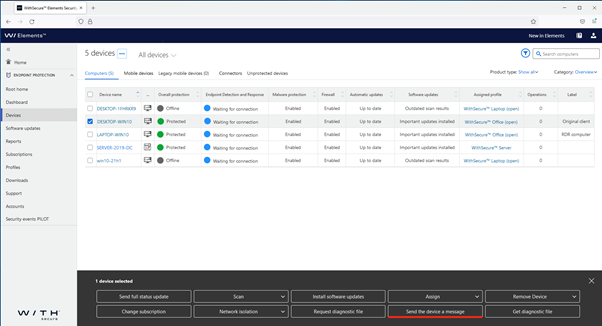
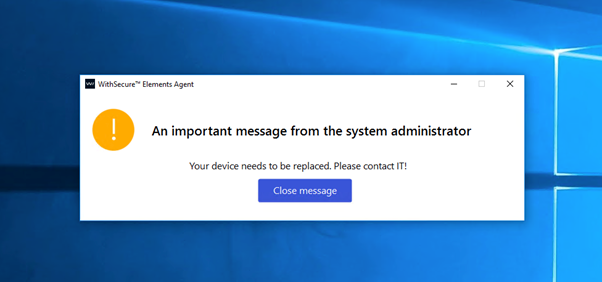
Administrators can now send messages from portal to Windows EPP clients. Note: the feature requires Elements EPP Windows agent version 22.3+ to display the message.
To send a message to a device, or multiple devices, first select them in the Devices view, and click on “Send the device a message”
At the bottom of the window, type the message you want to send to the device(s)
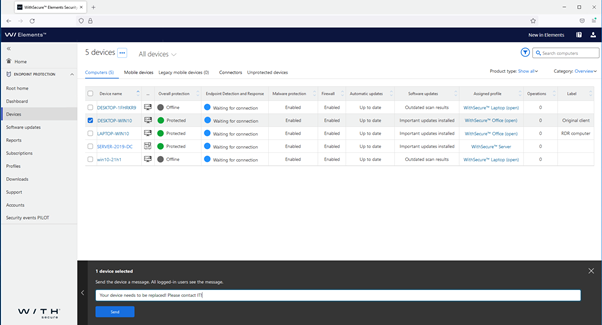
After “Send” is clicked, the message will be sent to the selected Elements Windows agents, and displayed on-screen
New Computers view available under Devices (Pilot)
We have been doing a lot of work in the background, creating a modern, efficient way of displaying information about devices. This new view, although not yet complete, has now been made available for customers who want to try it as an alternative to the long-standing Devices view.
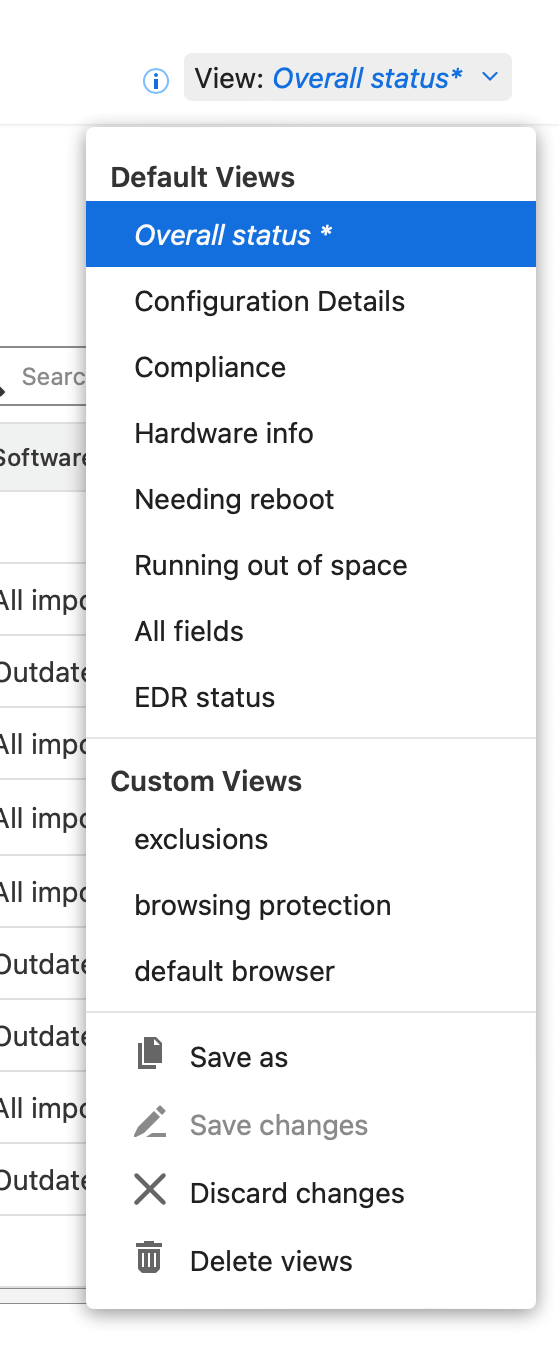
This new view will allow customers to create views based on data they select and save those for later, and also use them for reports.
Administrators wishing to take the new view into use can select it by navigating to the Device view, and selecting “Switch to Computers PILOT”
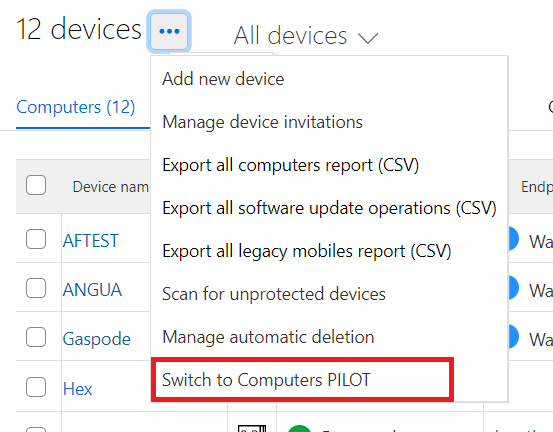
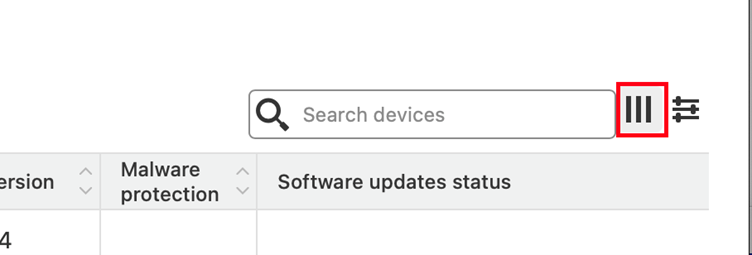
To start the configuration of a filter, select the three-bar icon next to the Search box
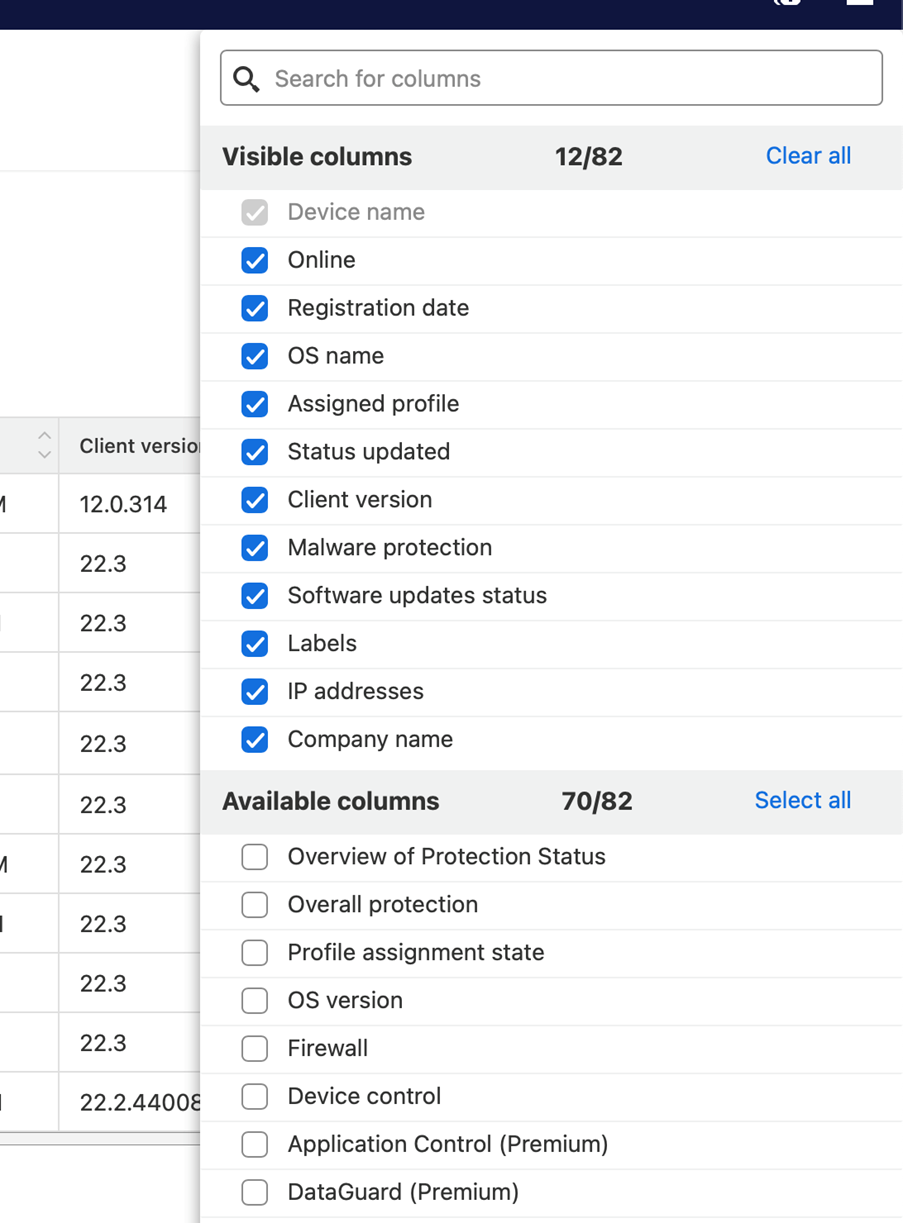
It is possible to select which fields you are interested in with the dialog that opens
And once you have a filter/view created, you can save it for future use:
Computer Protection and RDR for Mac build 44008
Computer Protection and RDR for Mac build 44008 is now available for downloading in all environments.
The major change for this release is that On-demand scan is now starting properly on Apple Silicon Macs.
Coming Soon: WithSecure™ branded Elements client for Mac
Our development team has been working hard to produce the WithSecure™ branded version of the Elements Client for Mac. At this time, we are not entirely sure when it will be available for our customers, but we wanted to make sure you are aware of the upcoming release.
We will update this article if it is released before the next newsletter.
Elements Endpoint Detection and Response
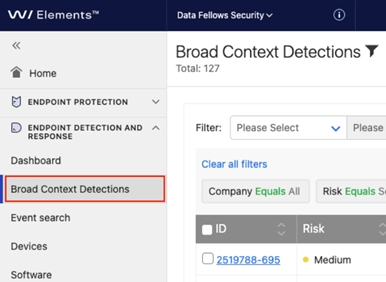
New Broad Context Detection list view
The “Detections” navigation item has been changed to “Broad Context Detections” to match name of the page with content.
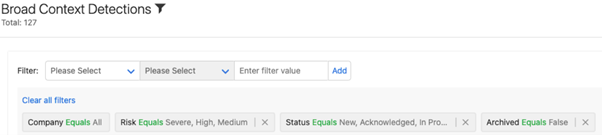
New filtering options for Broad Context Detections (BCD)
BCDs can be filtered freely using various conditions
- Company
- Risk level
- BCD type
- Device ID
- Detection time
- Modification time
- BCD status (new, acknowledged, in progress, monitoring, closed)
- Resolution for closed incidents (confirmed, unconfirmed, false positive, auto false positive)
- Archived
- Elevation state
-
Pinned state
- Data contentFinds matches from following fields of BCD
- Organization id
- Created
- Modified
- Type
- Risk level
- Risk value
- And from following field related to detections inside BCDDetection name
- Detection description
- Detection analysis
- Executable name
- Executable path
- Parent process executable name
- Device IP
- Device name
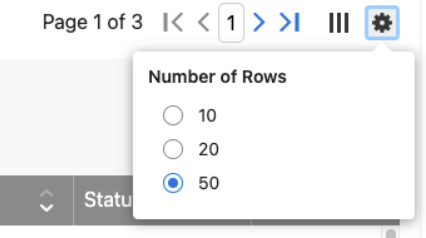
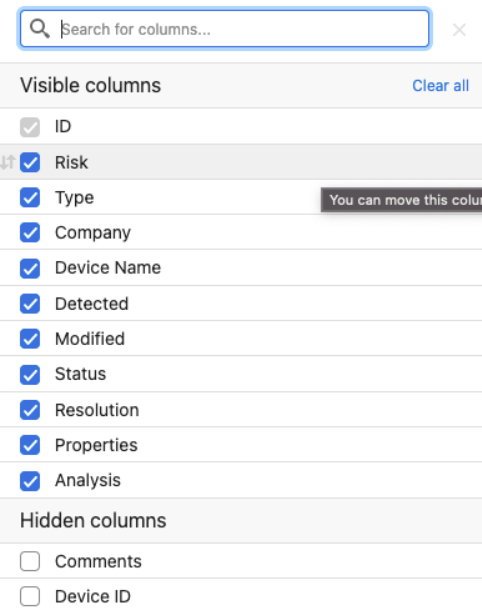
Customization of views
- Shown columns can be customized (columns show, order of columns, number of rows per page)
- Page changes moved to header so that its always visible
- Rows per page can be selected
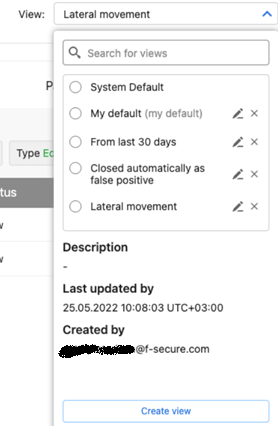
Save your customizations as custom views
Once you have built view as you prefer (filters, row number, column order and visibility) you can save those as a view.
You can select your own default view that will be applied when you enter Broad Context Detections list page.
Elements Collaboration Protection
Elements Collaboration Protection new features and improvements
- An email address is now required for notifications
- Improvements to the portal user interface
- Unavailable mailboxes are now removed after a 14-day retention period
Elements Vulnerability Management
With the latest Vulnerability Management updates, the default state for vulnerabilities on the system scan and asset details view has been switched to “New and current findings”. Moreover, the “All findings” state now displays also mitigated findings.
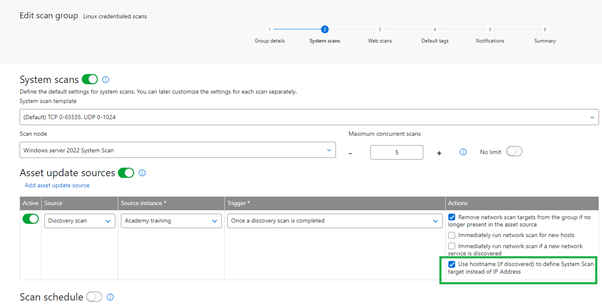
A new configurability option has been added to the asset source update mechanism for scan groups. It is now possible to choose whether the system should use hostname or IP address, to define the System Scan target.
Scan Node now includes support for Debian 10-11 and Ubuntu 18.04 – 22.04
As more customers have been updating to newer versions of their Linux operating systems, we’ve now added support for more variants of Debian and Ubuntu on which Elements Vulnerability Management Scan Node can be installed.
Asset Risk Score has now entered the Pilot phase
We have added a Risk Score for assets to the Vulnerability Management. This will enable security specialists to see at a glance the real risk that associated to an asset. The score is calculated from a combination of several internal values, and will help the specialist prioritize items that need to be acted on. Along with Asset Risk Score, the solution includes ability to specify asset importance, a new attribute which plays significant role in the risk evaluation.
Usability improvements for the Device Discovery report
To make the Device Discovery report more usable, we’ve added pagination to it, and at the same time removed the limit on the number of items displayed. In addition, new filter options allow the user to quickly list devices on which vulnerability management capabilities have not been enabled so far.
Other items of interest
WithSecure™ Threat Highlights Reports
April 2022 highlights
- CNI targeted with ICS malware
- FA Fatigue: A new attack technique
- The disruption of ZLoader
-
A breakdown of ContiLeaks
- Ransomware: Trends and notable reportsA look at Blackcat/ALPHV
- Russia in the crosshairs
- Quantum: a 4-hour attack
- LockBit strike Rio de Janeiro finance department
- BlackByte breakdown
- Nokoyawa, a Nempty strain
May 2022 highlights
- Advisory on initial access techniques
- Emotet back at full power
-
BPFDoor, an insidious backdoor
- Ransomware: Trends and notable reports:Is this the end of Conti?
- Iran is carrying out ransomware attacks
- Operator of Thanos builder charged
- The return of REvil?
You can access the full monthly Threat Highlight Reports by following this link.
Integrations
Provisioning API updates
With the launch of WithSecure, we have created a new url to reflect our new brand
Partners using the Provisioning API should update the following url at first opportunity.
Production:
New url: https://commercial.connect.withsecure.comDeprecated url: https//boop.f-secure.com
Staging:
New url: https://commercial-test.connect.withsecure.comDeprecated url: https://boop-test.f-secure.com
The existing access whitelist entries will still apply.
The deprecated URLs will not be supported after 06.11.2022
Get subscription
This new API call allows to get all the details of a subscription by querying with the key as described in
This new API call allows to get all the details of a subscription by querying with the key as described in
Register a Service Partner (SEP)
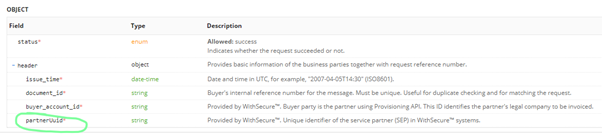
This API endpoint now returns partnerUUID in the response. You may refer to API Reference in
The Provisioning API provides a set of endpoints for WithSecure™ partners to automatically provision subscriptions, usage-based security subscription bundles and related service partners. Reports API allows usage-based security billing together with the Provisioning API. It allows WithSecure™ partners to query the actual usage of active subscriptions. The Provisioning API is only available for partners. If you need access to it, contact your account manager.
Endpoint Protection API
Poll for security events:
This new API endpoint is specifically meant for polling for changes in Security Events. By providing boundaries using server_timestamp query parameters clients have full control over the data set they are interested in. Moreover the data is sorted in the ascending order by the timestamp parameter allowing for easy replay of historical data also simplifying the polling for new events use cases.
Additional JavaScript code snippet is also attached to illustrate the advised approach to reading historical data and polling for the new events.
Further information
Changelogs and Release Notes for all parts of WithSecure™ Elements can be found at the Help Center
-
What’s New in Elements: April 2022
Read more
Elements Endpoint Protection
Early Access for pre-release builds is now available for Mac and Windows
Early Access is available in the general settings section of the Mac and Windows profiles. After a device is assigned a profile with this setting enabled, it will receive the latest product version before it is released to channels for the silent upgrade. The upgrade will still happen silently and identical to the regular update. We reserve up to 2 weeks for the build to be available in Early Access before it is pushed to all the clients. We also may reduce the early access stage to the minimum in case a release contains some urgent vulnerability fixes. We strongly encourage using the Early Access feature to verify upcoming changes, before they are applied to the real production fleet environment.
Computer Protection and EDR for Mac build 42929
We released a new version of the Elements product for Apple Mac computers. As part of this release, the device serial number is now reported to the portal and is visible in the device details, which may help the administrator identify the device better. Another improvement was made in the performance of the Xfence functionality.
With the same release, support for macOS 10.14 Mojave was removed.
This new release is available for download in the Elements Security Center and as the pilot release through Early Access mentioned above.
Elements Endpoint Protection for Windows has been updated for the WithSecure brand
We have a new version of the Windows client software available, which introduces the WithSecure brand, together with several new features:
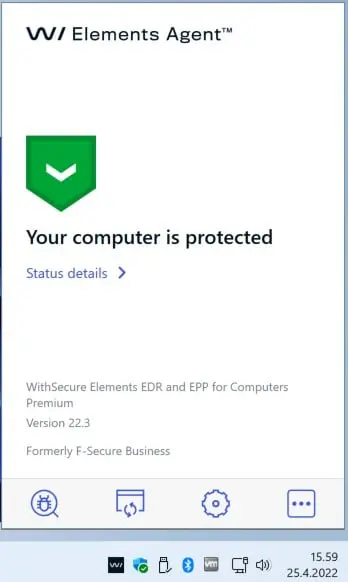
- This release introduces WithSecure brand. Note that client has also a new icon in System tray.
- Information about default browser is sent to portal, which can help the administrator solving potential issues.
- Multiple improvements for Vulnerability Management module.
- Software Updater now supports an option to allow or disable installation of unsigned updates. This has been added as some third party applications supported by Software Updater are released without a digital signature.
- The administrator can choose to hide exclusions from the local user.
- A custom network isolation message can be shown when isolating the computer.
- The “App and file control” dialog has a new tab “Vaults”. It lists vaults that are configured on the computer.
At the moment, this release is available through the Early Access program, and will become generally available starting on 9th May. Please note that the update of clients will be made gradually, so some customers will not receive it immediately at that time.
New Elements Mobile Protection for Android has been released
With the latest release of Elements Mobile Protection for Android, we have made it possible for the administrator to force a scheduled scan on the device. This can be a requirement for some customers, particularly if they require certification.
Additionally:
- The last scan report is now visible in the WithSecure Elements Security Center, under the Endpoint Protection section.
- Network Protection can now be turned off and locked in the WithSecure Elements Security Center.
Elements Endpoint Detection and Response
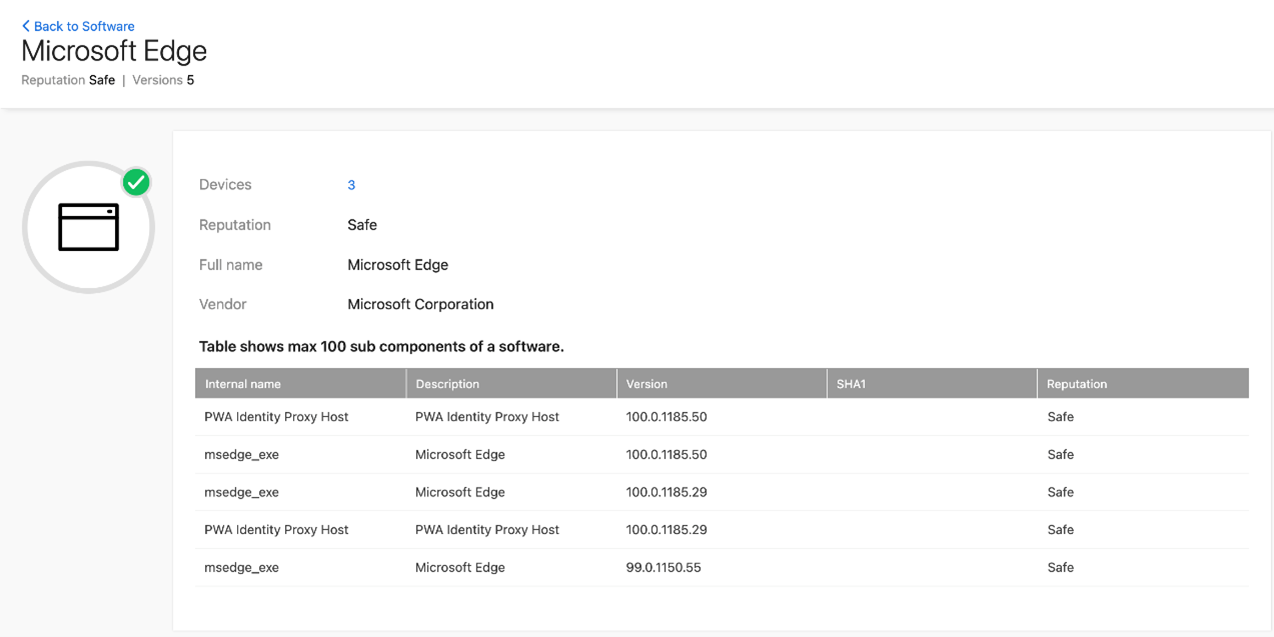
Elements Endpoint Detection and Response – Software reputation information
EDR software reputation information has been improved to have more complete reputation coverage. Each application software that is detected to be running in the endpoint has full sub-component information available with version and reputation.
Elements Collaboration Protection
This month, we’ve made several releases to Elements Collaboration Protection. These releases include several usability improvements, extended administrator permissions controlling the modification and authorization of cloud services, and improved details in the Quarantine.
While we were making the releases, we also fixed several issues that had been reported, and added translations to some texts that were previously only shown in English.
Elements Vulnerability Management
Elements Vulnerability Management – Spring4shell detection
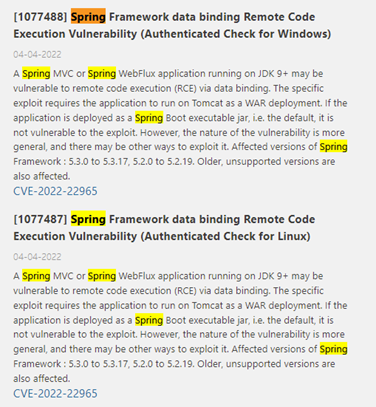
We’re constantly looking at reported vulnerabilities in software, both our own and that provided by third party vendors. One high-profile vulnerability recently was in the Spring framework used by many vendors, reported as CVE-2022-22965 and called Spring4shell.
During April, we added detection for this vulnerability to Elements Vulnerability Management, and this can be used by customers to see if they are affected.
Another area of improvement in Elements Vulnerability Management is the scheduling and download of reports in various formats, including XML, Excel, or Word. It’s possible to automatically send a link to these reports by email, optionally setting a lifetime on the availability.
Elements Security Center
During April, several updates were made to the Elements Security Center.
The features and improvements include
- Select-box with search to choose profile to assign in the new Computers PILOT view (Devices)
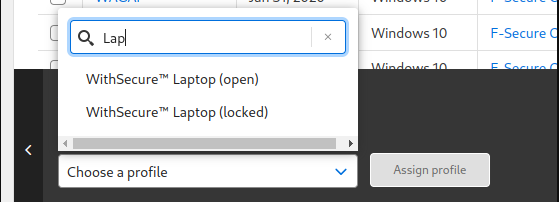
- Predefined profiles were renamed to use the new WithSecure™ brand name from F-Secure
- You can now enable or disable EDR sensor on the device without the need to change the subscription type or the subscription key.
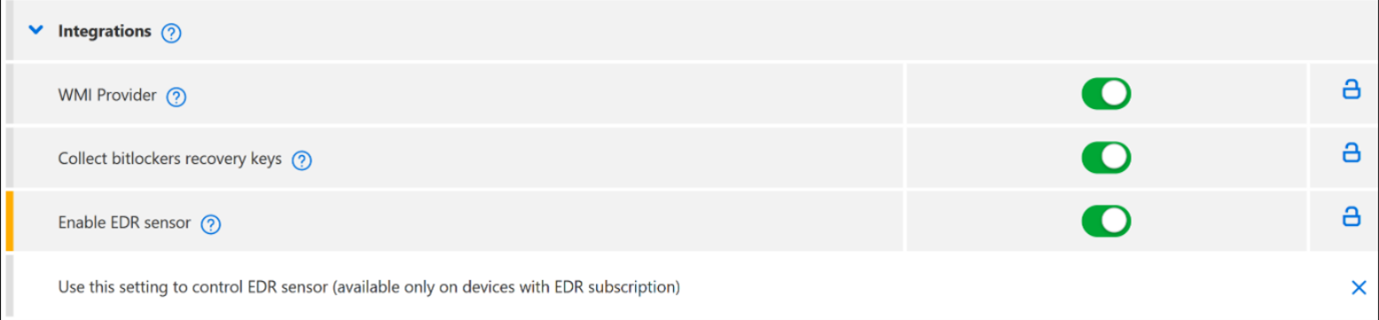
Other items of interest
WithSecure™ Preference Center relaunched
Our partners & clients can subscribe to our newsletters, event invitations, offers and other marketing messages.
Elements Connector general availability
We have now made the Elements Connector available for all customers. This application performs several useful actions which can help the administrator:
- Integration with third-party monitoring and SIEM systems, including Splunk.
- Reduce bandwidth usage by caching antimalware and software updates.
- Proxying of updates and upstream information.
- Managed through Elements Security Center
- Automatically updated when a new version is released.
The Elements Connector is available for free from the Elements Security Center in the EPP Downloads section.
For further details, please see the Getting Started Guide
Customers using this release should especially note that the installer currently available requires this hotfix to be applied, which provides an updated Spring Framework (5.2.20), which fixes recently reported vulnerability CVE-2022-22965.
With the release of Elements Connector, we are dropping support for the F-Secure Endpoint Proxy, and customers using that should take the Elements Connector into use at their earliest opportunity. Customers still using the F-Secure Endpoint Proxy should note that it is also vulnerable to CVE-2022-22965, and should be replaced with the Elements Connector.
In case you missed it
Endpoint Protection API new security events listing
Some partners and customers integrate their internal systems to our Elements systems via an API, and we have recently made some changes.
Security Events provides extensive data on activities that the WithSecure engines detected. In addition to infections, it also reports security events generated by application control, Dataguard, tamper protection, browsing protection.
Two new API endpoints below provide listing by company or partner but also filtering (e.g. by device, by engine)
https://connect.withsecure.com/api-reference/psb#get-/companies/-companyUuid-/security-eventshttps://connect.withsecure.com/api-reference/psb#get-/partners/-partnerUuid-/security-events
As we are moving forward with the Security Events which contains infection information and much more, we are deprecating the old infections endpoint and customers using it should start to use the Security Events endpoints at their earliest opportunity.
The following infections Endpoint will stop working by 29.10.2022
https://connect.withsecure.com/api-reference/psb#get-/companies/-companyId-/infectionshttps://connect.withsecure.com/api-reference/psb#get-/companies/-companyUuid-/computers/-computerId-/infectionshttps://connect.withsecure.com/api-reference/psb#get-/partners/-partnerId-/infections
Further Information
Changelogs and Release Notes for all parts of WithSecure™ Elements can be found at the Help Center
-
What’s New in Elements: March 2022
Read more
Share your ideas with us
Our purpose is to co-secure the world with you – now as WithSecure™. To co-create the best possible cyber security products and services, we warmly recommend you share your ideas via our Ideas Portal, now accessible directly from WithSecure™ Elements Security Center.
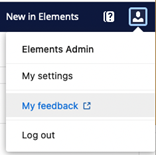
You can login to the Ideas Portal behind the top corner user menu. Just click “My feedback”.
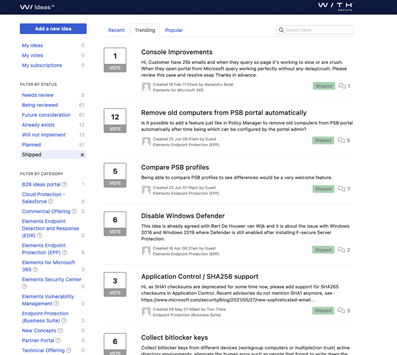
You can add your own ideas, vote for, and build on top of ideas of others. You can also see the status of submitted ideas – our goal is to evaluate and implement as many of these gems as we can. We are looking forward to your suggestions.
Take a glance – clarified reporting
We have made software update reporting simpler, more visual, and more informative for you. You can now find graphs about installed patches, and missing critical patches. You can also find information about the most frequently missing patches by vendor. You can find the right information easily by filtering by the protected platform type. Offline devices are now shown on the dashboard, too.
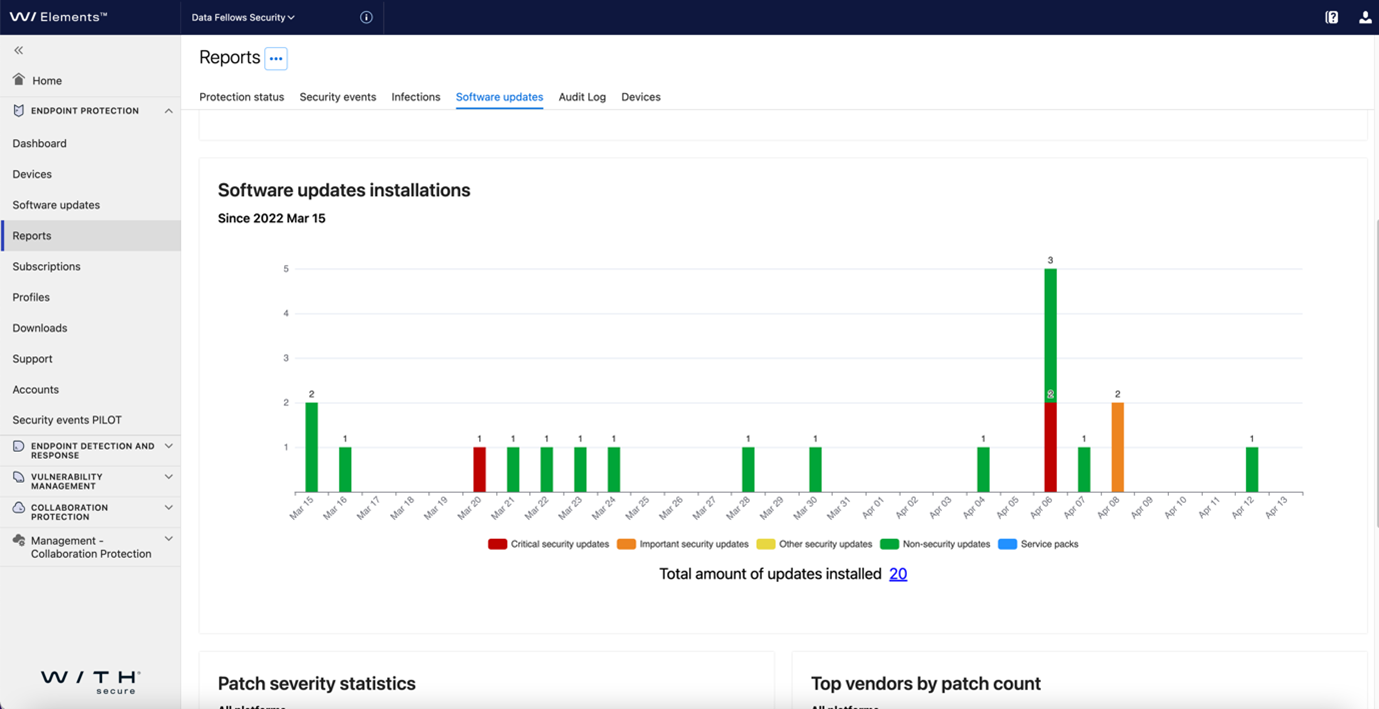
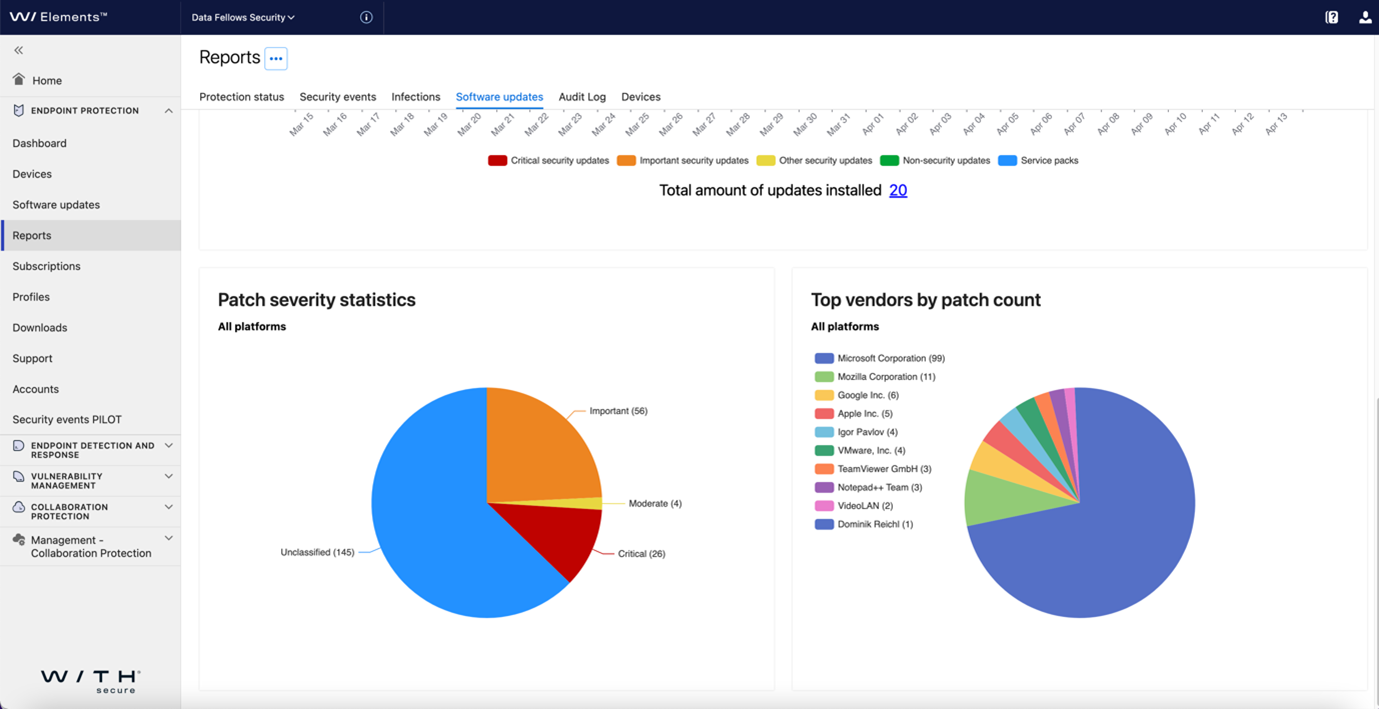
In addition to the enhanced reporting on software updates, you can also export security events, enabling you to better leverage security data in third-party security management and reporting systems. This data is exported in JSON format, allowing compatibility with many tools.
Latest changes in WithSecure™ Elements Mobile Protection
To offer your mobile devices better and more effortless protection, we have made several improvements to WithSecure™ Elements Mobile Protection including:
- Traffic protection logs are cleared when you remove VPN profiles from devices
- We have streamlined your user experience by removing non-essential views from the menu
Advanced response actions are now available globally
Our recently released comprehensive set of response actions is now available to WithSecure™ Elements Endpoint Detection and Response customers globally. Besides earlier EMEA release, US and APAC regions are now fully supported, too. Visit the help center to learn how to upgrade your threat response capabilities.
WithSecure™ Elements Vulnerability Management is now available on usage-based pricing
You can now get WithSecure™ Elements Vulnerability Management as a usage-based subscription. This means more flexibility and better adaptability to you. You can bundle vulnerability management with the rest of your usage-based subscriptions, pay only for what you use and ramp usage up or down effortlessly.
Log4J tweaks
- WithSecure™ Elements Vulnerability Management endpoint agent now detects Apache Log4j as authenticated network scan
- Speeded up local Log4j file scans
- Web Scan has a new Log4J vulnerability check
WithSecure™ brand is live and visible
F-Secure Business is now WithSecure™, which is reflected in Elements Security Center and Business log-in page in the form of new logos, names and other visual brand identity components such as fonts and icons.
Previously F-Secure Elements for Microsoft 365 has been changed to WithSecure™ Elements Collaboration Protection.
Further changes related to the new brand will arrive over the coming months, and we recommend that you follow the brand change page as we will announce changes there. To keep up-to-date with everything else, you can subscribe to newsletters and stay posted about upcoming events on our Preference Center.
Get the latest threat insights from our latest WithSecure™ Threat Highlights Report
Get up-to-date with the latest developments in the cyber threat landscape. We have recently published our March 2022 Threat Highlights Report. You will find insights about Okta LAPSUS$ Compromise, recent Russian threat activities, the latest attacks against US Government and emerging trends in the ransomware scene.
In case you missed it
WithSecure™ Elements Endpoint Protection reporting was recently enhanced with Audit Logs, where you’ll get clarity on all the profile changes made in Endpoint Protection. You will find information about profile updates, creations, and deletions filtered by time.
More Information
Please find more information in the release notes:
- WithSecure™ Elements Endpoint Protection Release notes
- WithSecure™ Elements Endpoint Protection, Computer Protection for Mac Release notes
- WithSecure™ Elements Mobile Protection release notes
- WithSecure™ Elements Collaboration Protection release notes
- WithSecure™ Elements Vulnerability Management news
- WithSecure™ Elements Vulnerability Management, Discovery Scan release notes
- WithSecure™ Elements Vulnerability Management, System Scan release notes
- WithSecure™ Elements Vulnerability Management, Web Scan release notes