
-
What’s New in Elements – April 2025
Read more
Editor’s Highlights
We are currently gearing up to our annual SPHERE event for Partners, which will include the launch of some new products and services. Stay tuned for more information!
Extended Detection and Response
Endpoint Protection
Elements Agent for Windows and Server updated
A new version of the endpoint clients has been released. This release makes the Elements Agent version 25.2 available (internal version 25.2.408).
The endpoints automatically upgrade, without a reboot.
Enhanced Lock Workstation Task
We have improved the functionality of the Lock Workstation automated task to ensure it does not interrupt ongoing Microsoft Teams meetings, providing a seamless experience during active calls.
Optimized Software Updater Rescans
We have introduced a cooldown period to reduce the frequency of Software Updater rescans triggered by Windows updates, minimizing redundant scans and improving system performance.
Exposure Management
Luminen (Elements AI) enhanced recommendation descriptions
These are now globally available to all XM partners and customers.
When visiting recommendation details page, AI generated description and title are shown
There is the possibility of giving feedback by clicking on thumbs-up and thumbs-down icons at the bottom of the recommendation description
Please see the following item for more information.
Recommendation algorithm improvements
The algorithm has been improved to generate less “Inconclusive” recommendations
Luminen comes to Exposure Management
Last year, we introduced both Luminen (WithSecure AI assistant) and WithSecure Exposure Management (W/XM) in our annual launch event, Sphere. Since then, one of the most frequently asked questions we are getting must be “when is Luminen coming to XM”?
We are happy to announce that Luminen has now landed to XM. And what a beautiful match it is! Luminen is now responsible for creating remediation instructions for all the issues that XM scans are detecting. Luminen is combining public information with content explicitly written by our security specialists. And as Luminen is an international cyberpunk owl, the update also brings the much-requested translations to many languages incl. Japanese, French and German.
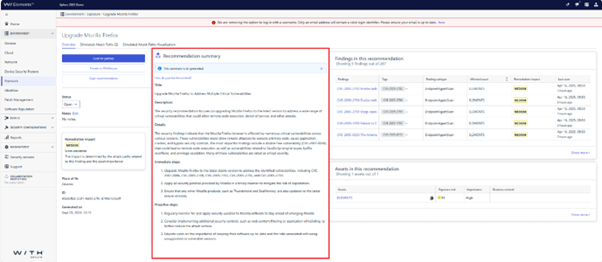
The initial release includes universal instructions for both immediate remediation and also for proactive steps. It will be followed shortly with what we like to call context sensitive instructions. These instructions utilize the information about your particular assets to produce more detailed remediation instructions.
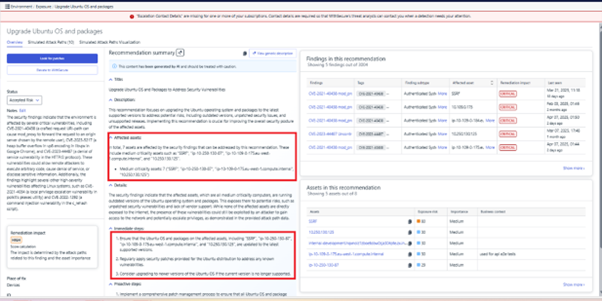
We will continue developing Luminen and introducing even more helpful features in the future. Stay tuned for more Luminen magic!
Exposure Management for Business
Exposure Management Portal
Better integration to the Devices view
We have now integrated the VM portal with the Devices → Computers view. Scanning controls (“enable/disable”) are coming soon. The Device Discovery view now automatically reflects the current scan status of devices from the Devices → Computers view.
Improved performance of data sync
We have improved the performance of including Assets and Vulnerabilities within Exposure Management.
Exposure Management System Scan
Support for detecting vulnerabilities in the following products was added to Authenticated Scanning:
- AWS SAM CLI
- Apache Parquet Avro
- bandizip
- Dell Common Event Enabler
- BleachBit
- Dell Wyse Management Suite Repository
- FileWave Client
- Ghostscript
- Gladinet CentreStack
- IBM Aspera Desktop App
- IBM QRadar WinCollect Agent
- MySQL Shell
- NoMachine
- Prisma Access Browser
- Spring Cloud Config
Elements Foundations
Integrations
Elements Connector
A new release of Elements Connector 25.17 for both Windows and Linux is now available. This release includes the following changes:
- Linux service
- The Elements Connector now runs as a systemd unit, extending support to modern Linux distributions.
- Java Runtime Environment
- Upgraded to JRE 17 for enhanced performance and security.
- Spring Framework
- Updated Spring Framework to version 6.2.4.
- Updated Spring Security to version 6.4.4.
- Removal of old update server
- Elements Connector no longer attempts to connect to the old update server (https://guts2.sp.f-secure.com), which was taken offline earlier this year.
- Security enhancements
- Addressed multiple recently discovered vulnerabilities, including:
JRE vulnerabilities: CVE-2024-21147, CVE-2024-21140, CVE-2024-21235, CVE-2025-21502
Spring vulnerabilities: CVE-2024-38829, CVE-2024-38828, CVE-2024-38820, CVE-2024-38819, CVE-2024-38816
- MSI installation fix
- Resolved an issue with MSI installation, where non-default HTTPS port was reverted back to default.
- New supported platforms
- Linux: Added support for Alma 9, Oracle 9, RHEL 9, and Rocky 9.
- Windows: Added support for Windows Server 2025.
- General improvements
- Missing update version cache is refreshed in every polling interval instead of 1 hour.
- Other fixes and enhancements for better stability and performance.
Elements Connector 25.17 supports the following operating systems:
Windows:
- Windows Server 2016
- Windows Server 2019
- Windows Server 2022
- Windows Server 2025
- Windows 10
- Windows 11
Linux:
- Alma Linux 8, 9
- Debian 11, 12
- openSUSE Leap 15
- Oracle Linux 8, 9
- Red Hat Enterprise Linux 8, 9
- Rocky Linux 8, 9
- SuSE Linux Enterprise Server 12, 15
- SuSE Linux Enterprise Desktop 12, 15
- Ubuntu 18.04, 20.04, 22.04, 24.04 LTS
NOTE! Known Limitations of Early access versions distribution
We want to inform you about a known limitation with the Elements Connector when used to redistribute definition updates to managed Elements agents for Windows and Mac. If any connected devices are enrolled in the early access client software program, early access versions might inadvertently be distributed to all devices fetching definitions from this Connector instance.
To ensure smooth operation and avoid unintended early access updates distribution, please set up a separate Connector instance to serve definitions to the early access agents group, or disable the use of the Connector for devices in the early access group. This limitation will be addressed in future Connector versions.
Installation Options
- First-Time Installers: Available on our Software download page.
- Automatic Channel Upgrade: Scheduled for Monday, May 5th 2025.
Elements API
Elements API Cookbook
We’ve introduced the Elements API Cookbook to help customers integrate with the Elements API. It includes step-by-step recipes for common use cases, with example solutions written in Python.
Incident filters
Two new filters—updatedTimestampStart and updatedTimestampEnd—have been added to the incidents listing endpoint. These filters make it easier to retrieve recent updates, improving the efficiency of polling for incidents and detections.
Check out the new poll detections recipe in the Cookbook for details.
Duplicate handling
A new exclusiveStart flag has been added to help avoid duplicate entries during incident polling.
Retrieving Exposure Management Security Event information
It is now possible to use the Elements API to retrieve Exposure Management Security Event information.
You can find out more by checking the API documentation
Share your ideas with us
Our purpose is to co-secure the world with you – now as WithSecure™. To co-create the best possible cyber security products and services, we warmly recommend you share your ideas via the Ideas section of the WithSecure Community, now accessible directly from WithSecure™ Elements Security Center.
Further information
Changelogs and Release Notes for all parts of WithSecure™ Elements can be found at the Help Center
-
New Feature: EDR – Smarter Suppression with Key Detection Awareness
Read more
We have introduced an enhancement to suppression logic that makes managing accepted behavior more efficient and accurate.
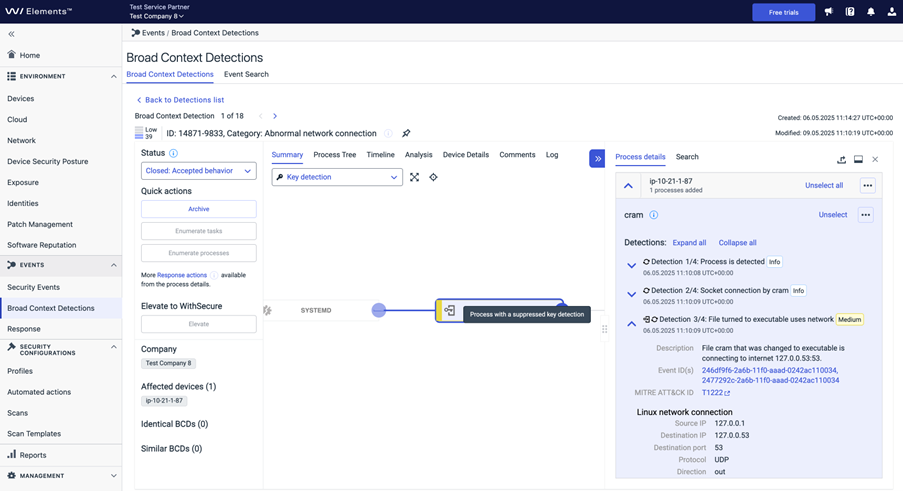
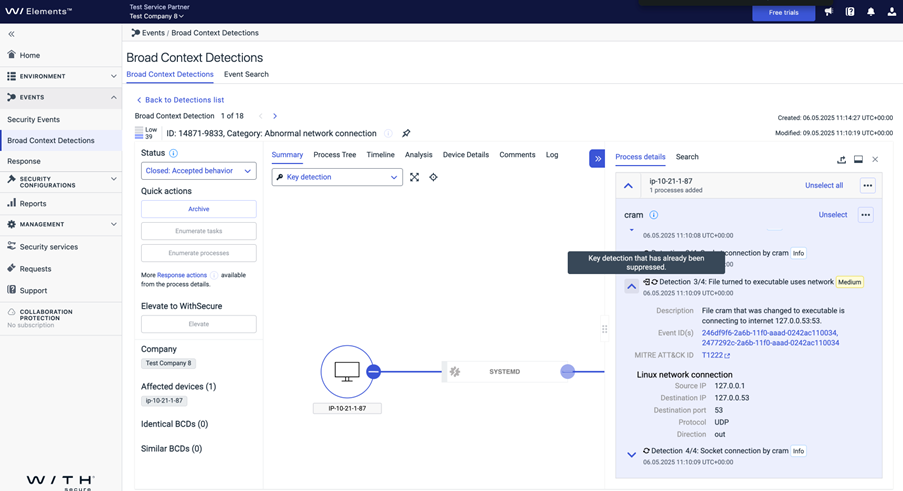
As a reminder, a key detection is one which, on it’s own, would produce a new BCD (Broad Context Detection). A suppressed key detection indicates that the respective behavior has been suppressed by an existing suppression rule.
What’s New?
Easily View Suppressed Detections
When a key detection is suppressed, it is now marked with a distinctive symbol in the BCD. This means you can easily tell which key detections have been suppressed by existing rules.
No More Duplicate Rules
When suppressing a new BCD that includes previously suppressed key detections, this helps avoid reconfiguring rules for already suppressed key detections.
Improved Rule Limit Handling
The existing limit of 5 key detections per suppression rule now excludes already suppressed key detections, giving you more flexibility when creating new rules.
Why It Matters
This update reduces noise, prevents duplication, and ensures accepted behavior is handled consistently and automatically — saving time and improving clarity in your detection management.
-
Action Needed: WithSecure Elements Collaboration Protection permissions MUST be reviewed
Read more
Background
WithSecure Elements Collaboration Protection relies on it being granted certain privileges, in order to interact with the Microsoft 365 tenant.
During the last week, we observed that the permissions we have been requesting are no longer enough for us to find the list of Microsoft 365 SharePoint sites under a tenant. We have updated WithSecure Elements Collaboration Protection to request the necessary extra privilege, but this only applies to new deployments.
For existing deployments, it is not possible for us to add these permissions on behalf of the customer, due to security access controls. Customers who deployed WithSecure Elements Collaboration before 14th May 2025 are advised to refresh their permissions using the instructions below.
Actions Needed
If you are using WithSecure Elements Collaboration Protection for your Sharepoint or Microsoft Teams, you MUST perform a refresh of the permissions in order to maintain protection.
The refresh can be completed with the following steps:
- Logging in to the Elements Security Center
- Navigating to the Collaboration Protection section
- Select Cloud Services from the left hand menu
- From the Cloud Services pages select the Tenant. An action menu will become visible and select “Refresh permissions to Sharepoint” a new permission consent will be requested, including all the necessary permissions
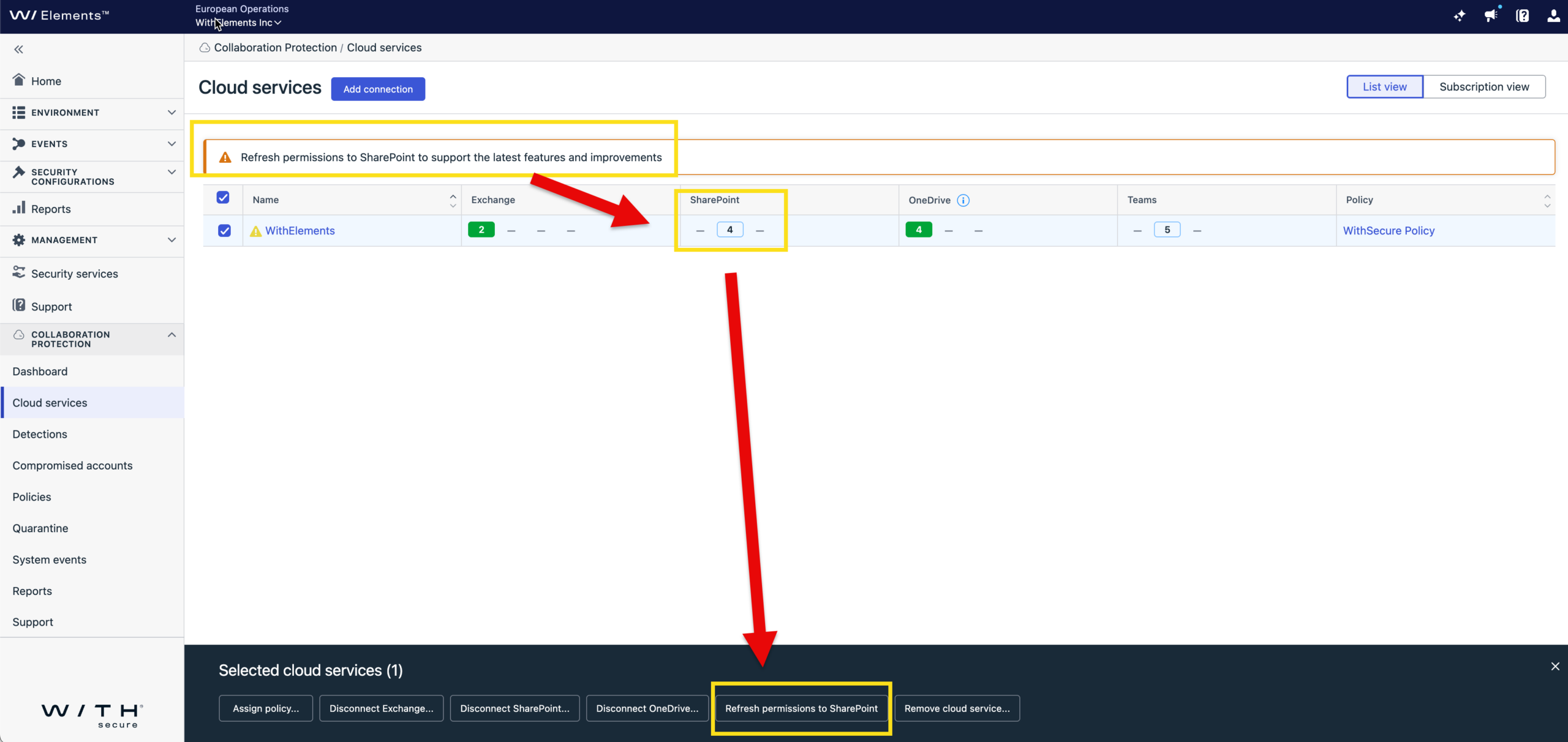
This MUST be completed by all Elements Collaboration Protection customers to maintain Sharepoint and Teams coverage. Please note: This action REQUIRES Microsoft 365 Admin rights to perform, so you might need to request this from your Tenant administrator.
-
Changes to the Windows EPP Scanning Components – May 2025
Read more
UPDATE 2025-05-17: We have resolved the earlier issues, and the new schedule for release is:
- 2025-05-19 to Early Access
- 2025-05-26 to Production
The dates in the article below have been updated to reflect the new schedule.
UPDATE 2025-05-07:
The Early-Access release for Ultralight Core intended to go out today 7th of May 2025 has been postponed due to further issues found during pre-release testing. We apologize for the delays related to this particular release, but are committed to make sure that we release content with highest possible quality. We will advise on the release schedule for the new update.
This is a notification that a minor update to our Windows agent will be issued on Wednesday 14th May 2025.
This update contains general maintenance improvements for WithSecure Ultralight, which provides the scanner framework, and introduces a new ‘wsulavprothoster‘ service, or ‘wsulavprothoster_mdr’ service in case of the Countercept Agent, executing ‘fsulprothoster.exe‘ process.
The update does not contain any other changes to process, or service names. All existing services and processes remain.
Please note that the Operating System should be Azure Code Signing (ACS) compliant to receive this update.
The update is planned for early access on Monday 19th of May 2025, with a General Availability release on Monday 26th of May 2025.
Integrations
For partners and customers who have custom integrations in their endpoint devices to ensure that the EPP product is functioning correctly, we advise that these integrations are reviewed to ensure correct functionality. We do not anticipate any issues related to this change, but naturally we cannot check your custom integrations.
-
Luminen comes to Exposure Management
Read more
Last year, we introduced both Luminen (WithSecure AI assistant) and WithSecure Exposure Management (W/XM) in our annual launch event, Sphere. Since then, one of the most frequently asked questions we are getting must be “when is Luminen coming to XM”?
I’m happy to announce that Luminen has now landed to XM. And what a beautiful match it is! Luminen is now responsible for creating remediation instructions for all the issues that XM scans are detecting. Luminen is combining public information with content explicitly written by our security specialists. And as Luminen is an international cyberpunk owl, the update also brings the much-requested translations to many languages incl. Japanese, French and German.
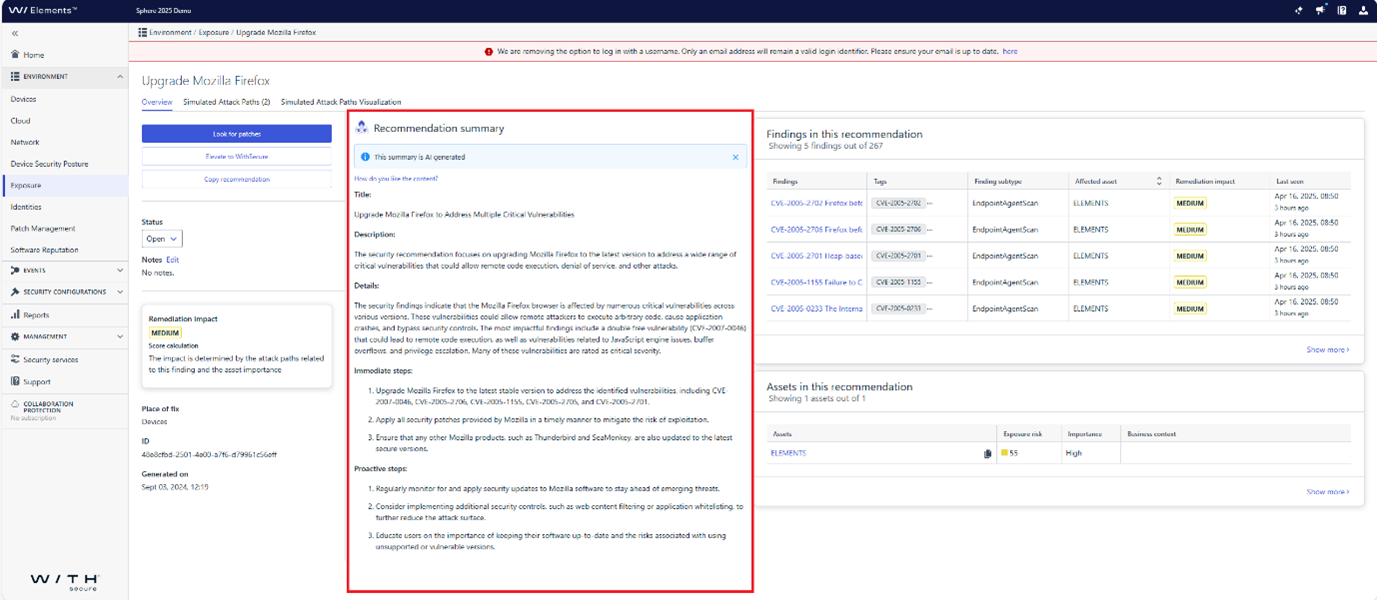
The initial release includes universal instructions for both immediate remediation and also for proactive steps. It will be followed shortly with what we like to call context sensitive instructions. These instructions utilize the information about your particular assets to produce more detailed remediation instructions.
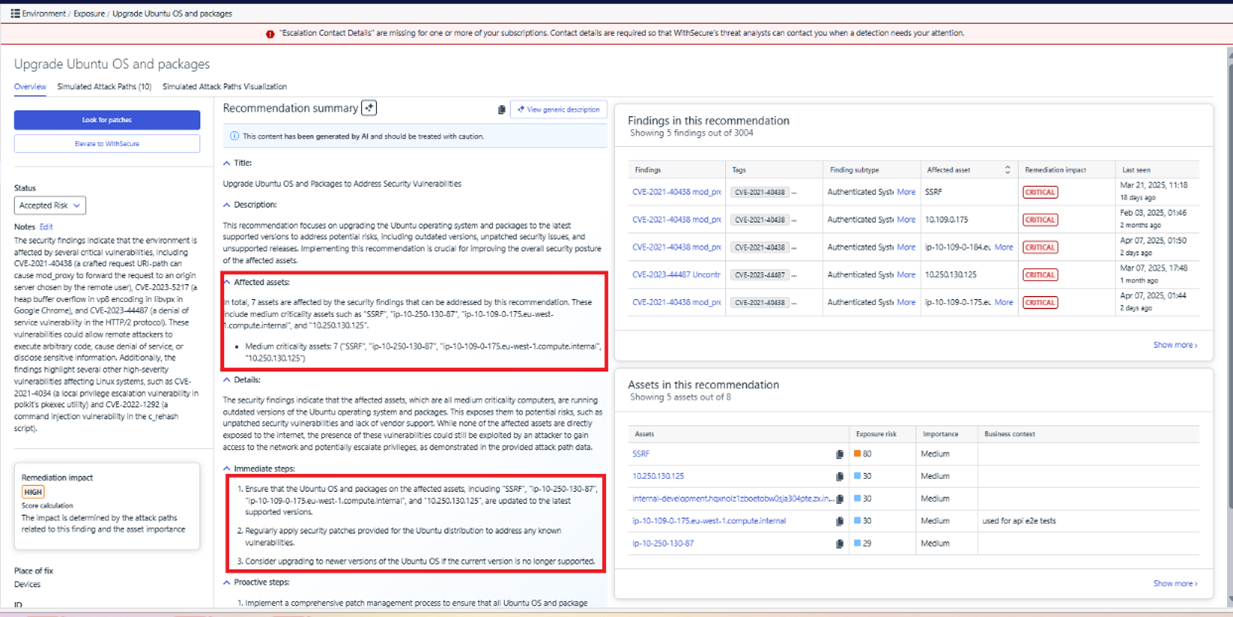
We will continue developing Luminen and introducing even more helpful features in the future. Stay tuned for more Luminen magic!
-
What’s New in Elements – March 2025
Read more
Extended Detection and Response
Endpoint Protection
Elements Agent for Mobile update for iOS
We’ve updated the WithSecure Elements Mobile Protection app for iOS (version 25.5.11428) as of April 1, 2025.
It includes the following new features and improvements:
- The app now supports “Allow external DNS” setting
- Improvements to app stability
- Improvements to Safari Extension filtering algorithm
- The network now resets automatically when the DNS setting changes.
Endpoint Detection and Response
Elements EDR – Response views language support
Response views now support all languages available in the Elements Security Center:
- English (US)
- Finnish
- French
- German
- Italian
- Japanese
- Polish
- Portuguese (Brazil)
- Spanish (Latin America)
- Swedish
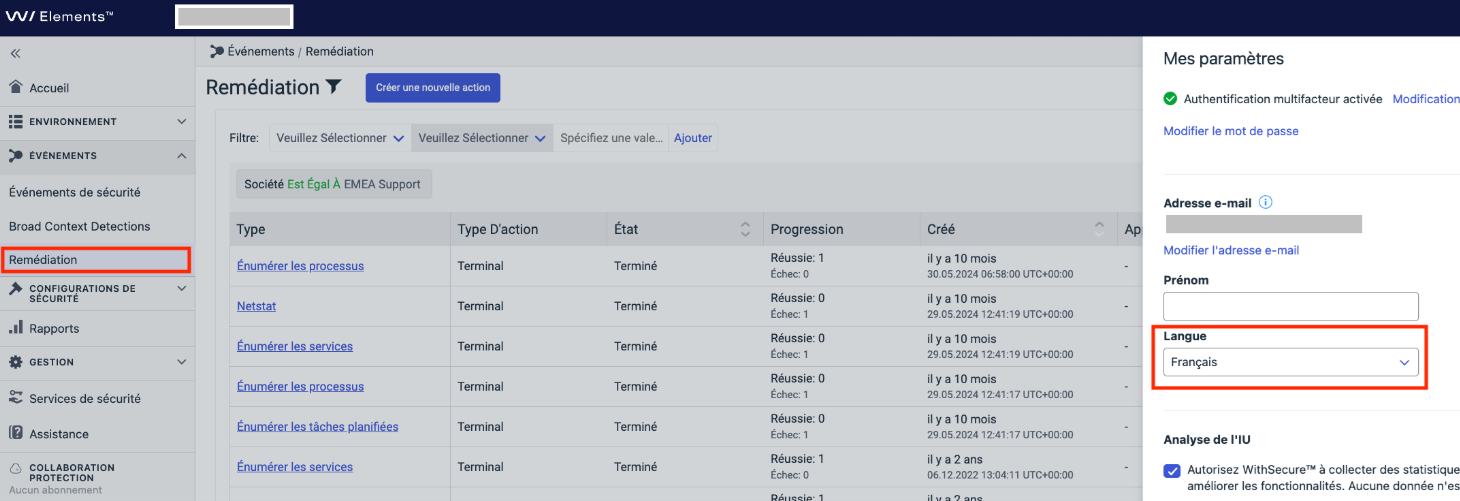
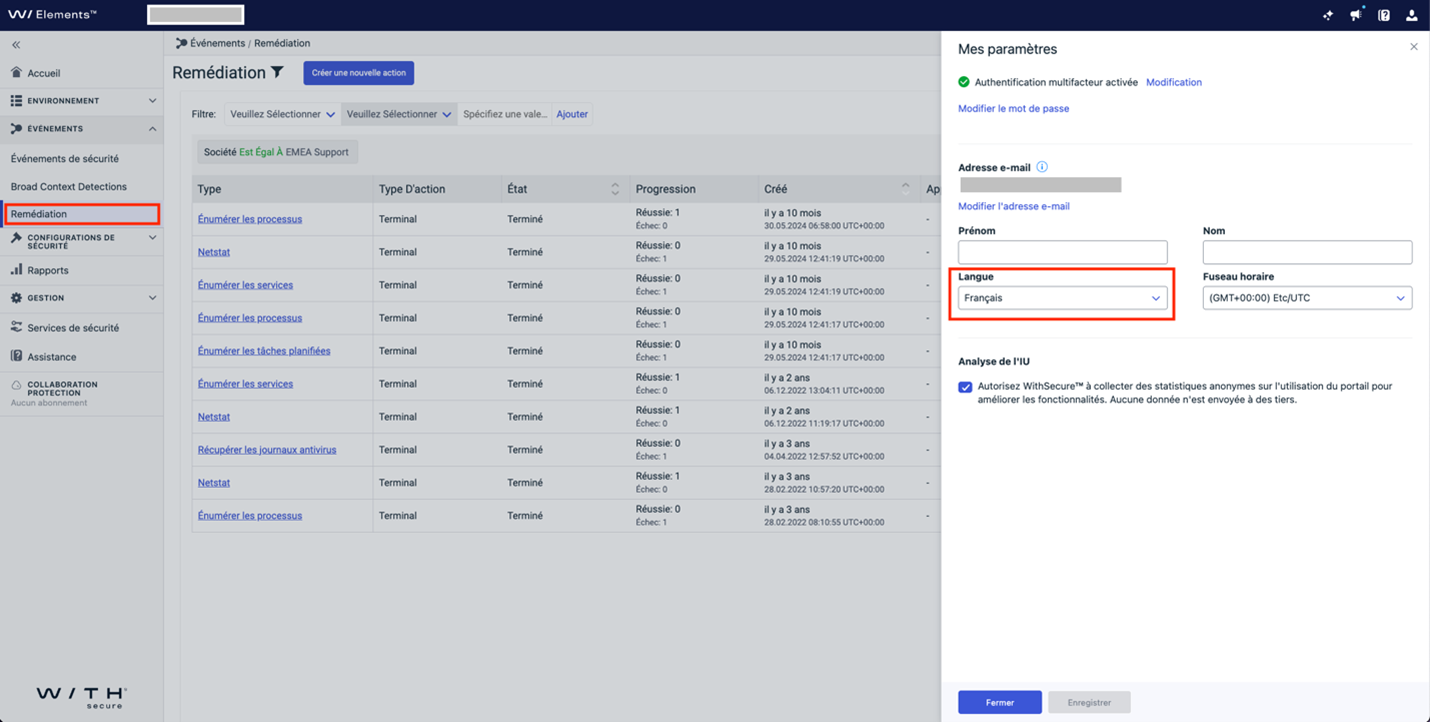
This enhancement ensures a more inclusive and accessible experience for our global user base.Here is an example of our French localization of Response views.
Exposure Management
We have released updates to Exposure Management with following changes:
- Two new Identity findings are introduced for Entra ID tenants by analyzing the user’s role assignments with corresponding recommendation to review privileged roles and their permissions:
Entra ID tenant has more than 5 global administrators
Entra ID tenant has more than 10 privileged roles
- Recommendation list page (Home => Exposure => Recommendation) has now a possibility to filter recommendations by status value. It is currenlly possible to filter only using one value. Multi-value filtering is coming. By default, list now filters recommendations having status Done.
- Previously, in Elements attack path simulation, MITRE TTPs were linked to the MITRE website, while WithSecure extensions were not linked anywhere. With this update, WithSecure TTP extension IDs in the UI now link to https://ti.withsecure.com, providing direct access to detailed information.
Exposure Management for Business
Exposure Management Portal
We have released an update to the Exposure Management portal, which includes the following changes:
- Resolved an issue in network scan and scan group configuration where the severity condition ignored critical vulnerabilities, preventing email notifications from being sent after a network scan was completed.
- Agent scanning will now be automatically enabled for new devices with Vulnerability Management or Exposure Management subscriptions as soon as they are installed. This means no user interaction is needed to start the scanning process. Devices with other subscriptions will require manual activation for scanning.
- Resolved an issue where user deletions were incomplete, causing access issues for new accounts created with the same email address.
- Resolved a potential vulnerability that could have led to unauthorized access to Scan Nodes.
- Resolved an issue where an insecure direct object references (IDOR) vulnerability in user permissions could lead to privilege escalation.
- Resolved an issue where email notifications from vulnerability scanning were not being sent.
System Scan
Support for detecting vulnerabilities in the following products was added to Authenticated Scanning:
- Absolute Secure Access
- Apache Camel
- Apache Commons VFS
- Dell SupportAssist OS Recovery
- Docusnap
- Duet Display
- Exasol JDBC Driver
- HPE Insight Remote Support
- JetBrains TeamCity
- MetaDefender Core
- MetaDefender ICAP Server
- MongoDB Shell (mongosh)
- Nakivo Backup & Replication
- Paragon Partition Manager
- Privilege Management for Windows
- Progress Telerik Fiddler
- RemotePC
- RustDesk
- SolarWinds Web Help Desk
In addition, the detections of Windows Cumulative updates have now been divided into families. Warning: This change may result in significant change of findings and numbers of CVEs related to Windows Cumulative Updates
Elements Foundations
Elements Security Center
Subscriptions View improvements
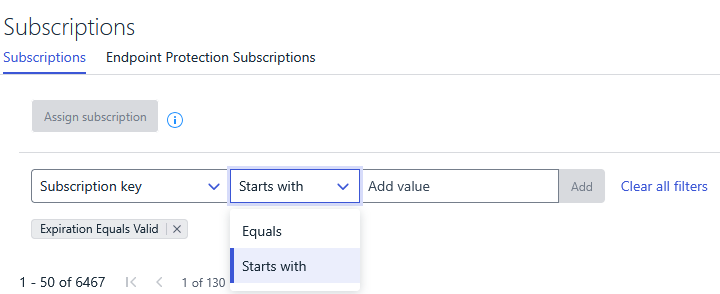
We’ve made performance enhancements and added prefix matching to the subscription key filter in the Subscriptions view:
- Subscriptions now load faster.
- Filtering by subscription key is quicker, especially for organizations with many subscriptions.
- You can now filter using a “Starts with” condition to match keys by prefix.
Other items of interest
Threat Advisories
Ruby vulnerabilities (SAML & GraphQL)
Technical Summary
Ruby is a programming language widely used in designing web-facing services and applications.
Recently published advisory contains three vulnerabilities that can be exploited remotely without user interaction. The vulnerabilities are:
CVE-2025-25291/ CVE-2025-25292 : Authentication bypass in the ruby-saml library. An attacker with access to a valid signed SAML document from an Identity Provider (IdP) could impersonate or authenticate as another user.
CVE-2025-27407: Remote code execution in the Ruby GraphQL library. An attacker could exploit this by transferring a maliciously-crafted project via the Direct Transfer feature.
Advisory – Oracle Cloud Compromise
Summary
Since Friday 21st March, Our Threat Intelligence team has been monitoring a claim that an exposed vulnerable Oracle cloud subdomain was compromised in a large supply chain attack impacting up to 140,000 victims.
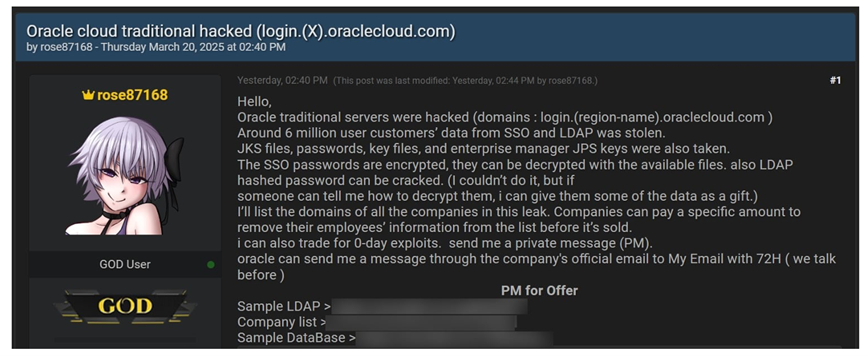
Such claims (of varying magnitude) are relatively common across deep and dark web forums and social media. By looking at the reputation and “reliability” of the threat actor, evaluating what limited data or information the offending actor may have shared about the breach as proof of veracity and what statements the victim company has made help us to pass assessment on the legitimacy of the claims posed by the threat actor.
You can sign up to receive the monthly Threat Reports, with full details of these threats.
In case you missed it
We will soon be removing some older Organization Management screens in Elements Security Center. You can find out more in the dedicated community article.
Share your ideas with us
Our purpose is to co-secure the world with you – now as WithSecure™. To co-create the best possible cyber security products and services, we warmly recommend you share your ideas via the Ideas section of the WithSecure Community, now accessible directly from WithSecure™ Elements Security Center.
Further information
Changelogs and Release Notes for all parts of WithSecure™ Elements can be found at the Help Center
-
Response views now support all Elements Security Center languages
Read more
We are excited to announce a significant update to our Elements Security Center language support!
Response views now support all languages available in the Elements Security Center:
- English (US)
- Finnish
- French
- German
- Italian
- Japanese
- Polish
- Portuguese (Brazil)
- Spanish (Latin America)
- Swedish
This enhancement ensures a more inclusive and accessible experience for our global user base. Dive in and enjoy seamless interactions in your preferred language!
Here is an example of our French localization of Response views.
-
Removal of deprecated Organization Management screens in Elements Security Center
Read more
As previously communicated, as part of the restructuring of organization management in WithSecure Elements, we will be removing the old methods of management on 22nd April 2025.
The methods being removed are:
- Management / Subscriptions / Endpoint Protection Subscriptions
- Management / Organization settings / Endpoint Protection Accounts
- Management – Collaboration Protection / Users
- Management – Collaboration Protection / Subscriptions
- Management – Collaboration Protection / Organizations
- Management – Collaboration Protection / Settings
Collaboration Protection
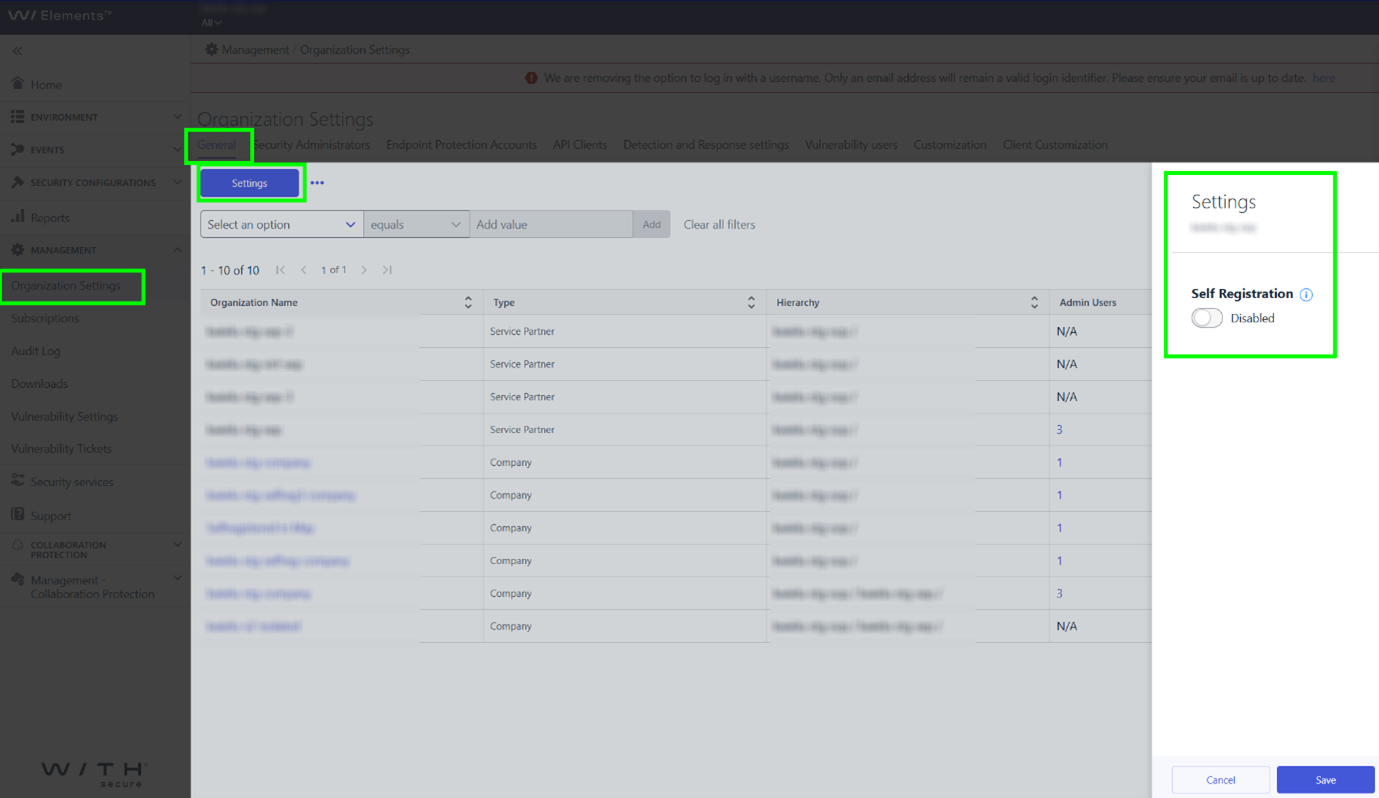
The replacement functionality is already available. Please see figure below to find new location of Collaboration Protection management capabilities.
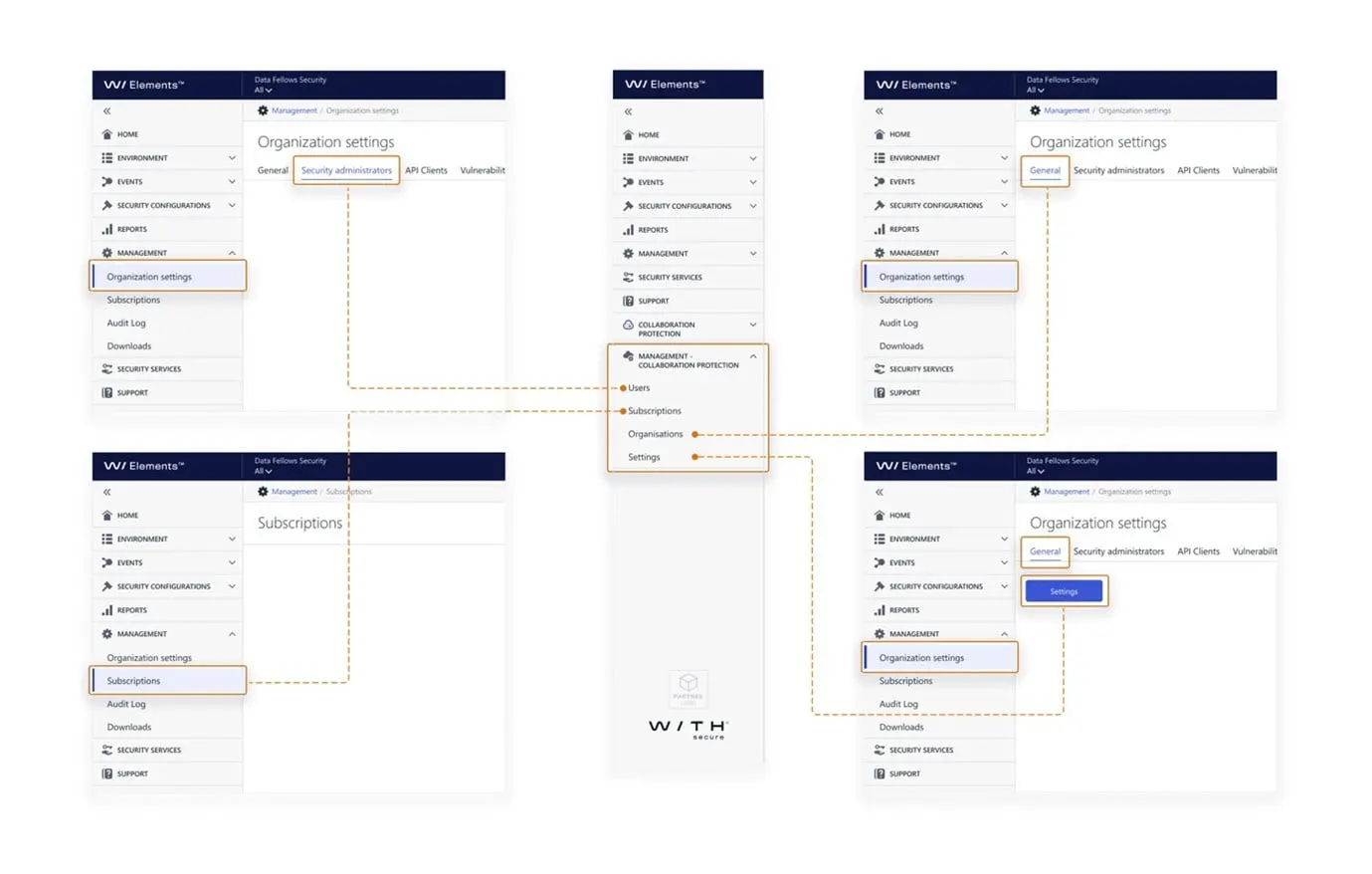
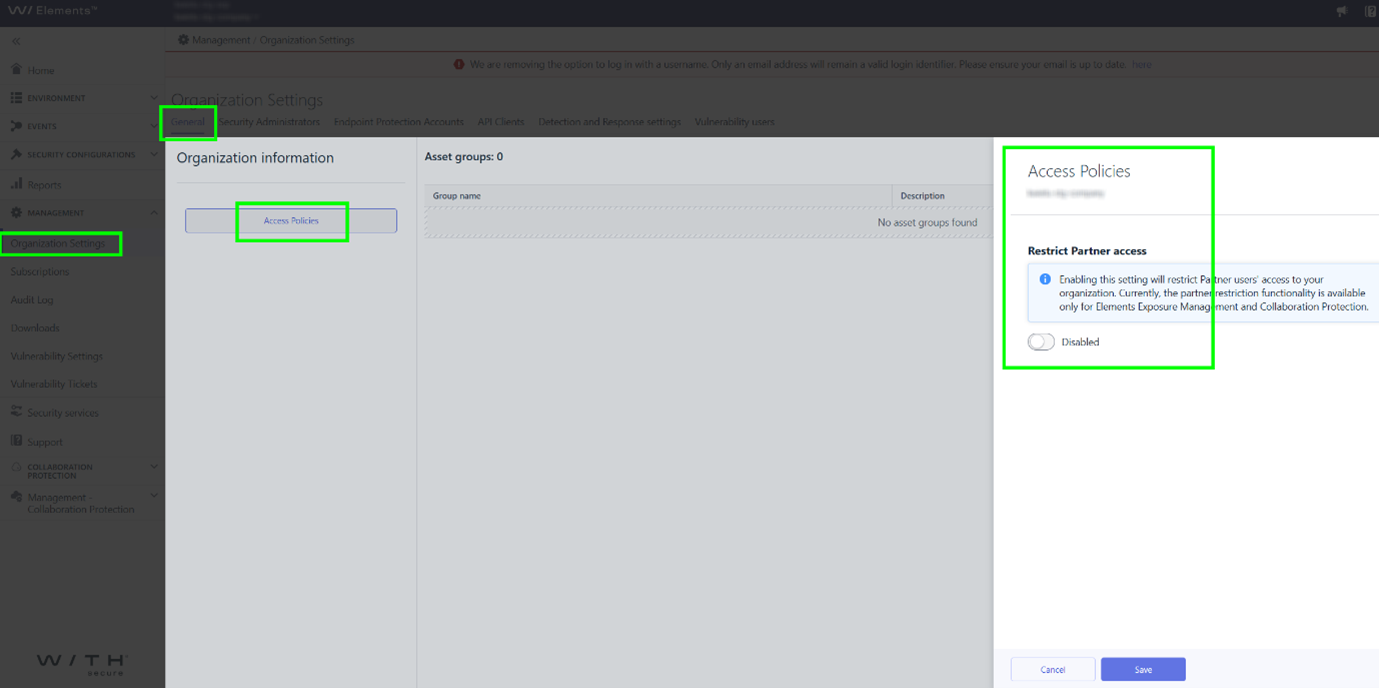
Please Note: When logged in with a company level account, Organization settings / General / Settings is actually “Access Policies“. The above diagram represents what a user with a partner level account would see.
Most of the functionality of these methods is now included directly in Management / Organization Settings.
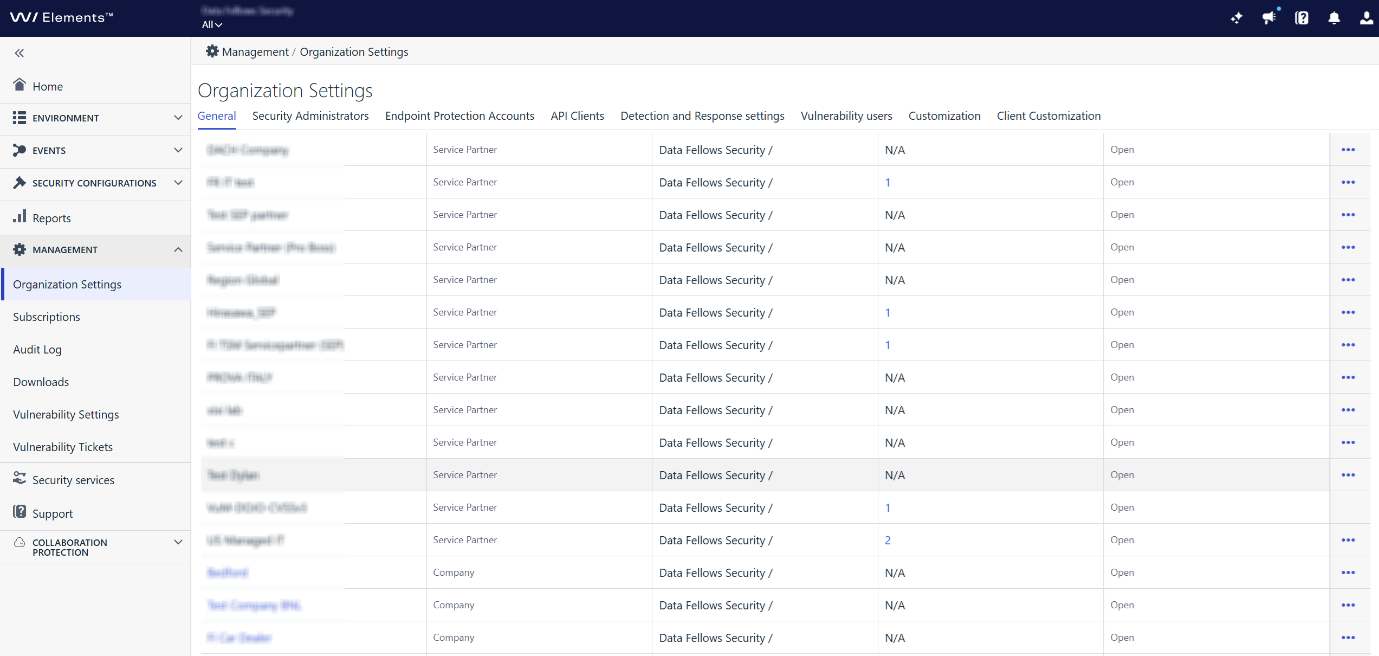
User Management
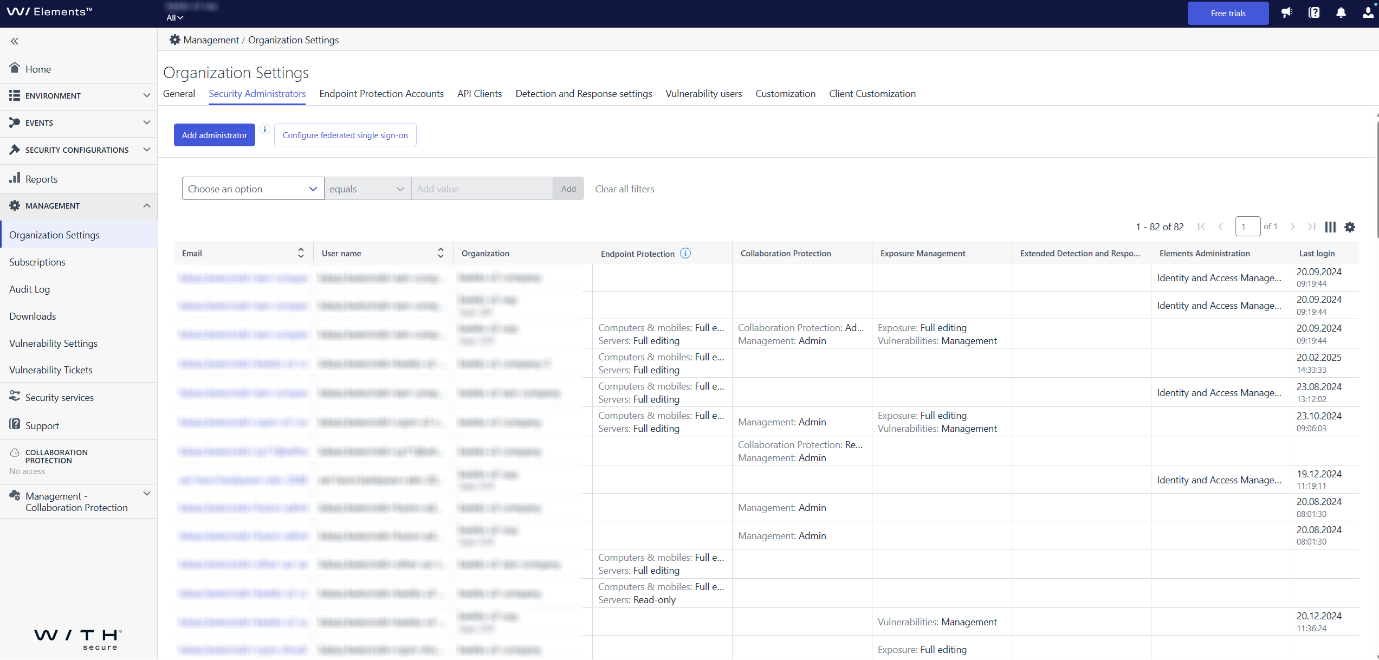
Company configuration (for Partner Administrators)
Restrict Partner access (for Company Administrators)
Endpoint Protection
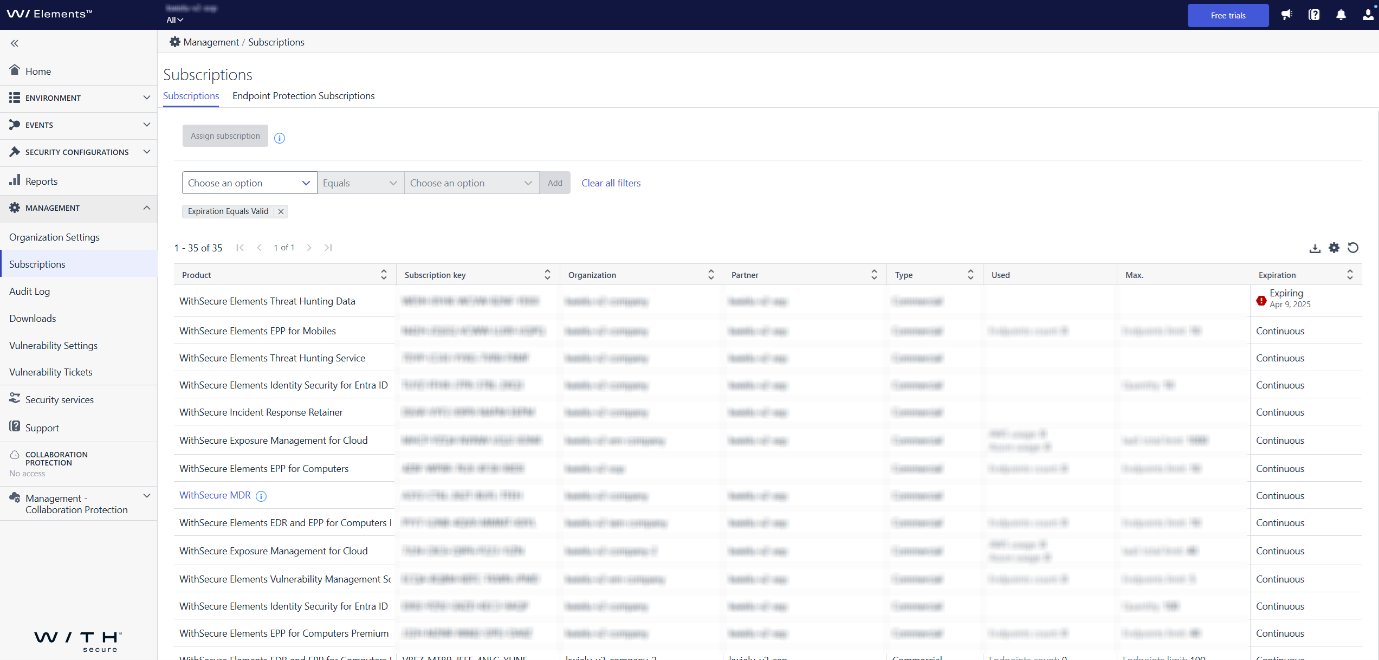
The functionality of Management / Organization settings / Endpoint Protection Subscriptions is now included in Management / Subscriptions.
Management / Organization settings / Endpoint Protection Accounts is now replaced by:
- Management / Organization Settings / Security Administrators
(for managing Elements portal users and permissions) - Management / Organization Settings / General
(for managing organizations by partners)
-
What’s New in Elements – February 2025
Read more
Editor’s Highlights
As part of our ongoing work to unify workflows in WithSecure Elements, we have introduced changes to Organization Management. Read more about this in the Elements Foundation section below.
Extended Detection and Response
Endpoint Protection
Elements Mobile Protection for iOS
An update to the WithSecure Elements Mobile Protection app for iOS (25.3.11393) has been released.
It includes the following new features and improvements:
- Improvements to app stability
Elements Mobile Protection for Android
An update to the WithSecure Elements Mobile Protection app for Android (25.1.0023199) has been released.
It includes the following new features and improvements:
- The app and WithSecure Elements Security Center now support security events for certificate validation failure
- The app now supports the Chrome extension for ChromeOS
- Added a tutorial view for ChromeOS users
- Network Gateway now uses a cache to reduce the amount of recurrent validations
- The app now supports updating user data
- Redesigned the app Settings interface
- Improvements to how tracking attempts are counted
- Improvements to app stability
Fixed issues:
- The app now shows the correct timestamp for the last status update
Endpoint Detection and Response
Elements Detection and Response: Enhanced BCD investigation
We have now released more enhancements that allows users to execute response jobs directly from the BCD details view. This eliminates the need to manually copy information to external tools, streamlining the investigation process and improving response time.
What’s New?
- Execute response jobs without leaving the BCD page – Users can now initiate response actions directly from the BCD details view.
- Pre-populated parameters – Job parameters are automatically populated where possible, reducing manual input and errors.
- Support for offline execution – Response actions can be queued even when the device is offline and will execute once it is back online.
Supported Response Jobs
- Delete Files
- Retrieve Files
- Kill Processes
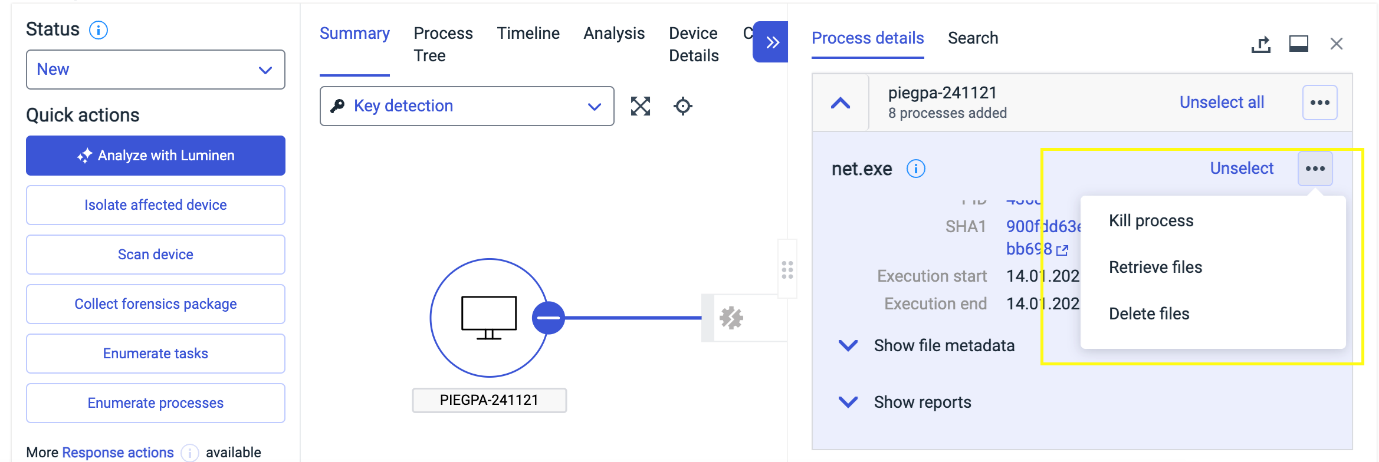
Note: Any BCD created after January 10, 2025, will include the necessary provision to execute jobs directly from the BCD view. However, older BCDs created before this date lack the required data and will have this feature disabled.
Email and Collaboration Protection
A new version has been released.
Main changes:
- Elements Collaboration Protection will mark mailboxes that have lost the connection to Microsoft as TemporaryFailure. The mailboxes should recover by itself in a short period of time. Admins can turn on notifications in this kind of events in policy settings.
- Enhanced the reporting accuracy of active mailboxes
- Enhanced/aligned the licence counts between views
- Enhanced translation for Japanese users
Exposure Management
We have released Exposure Management with following changes:
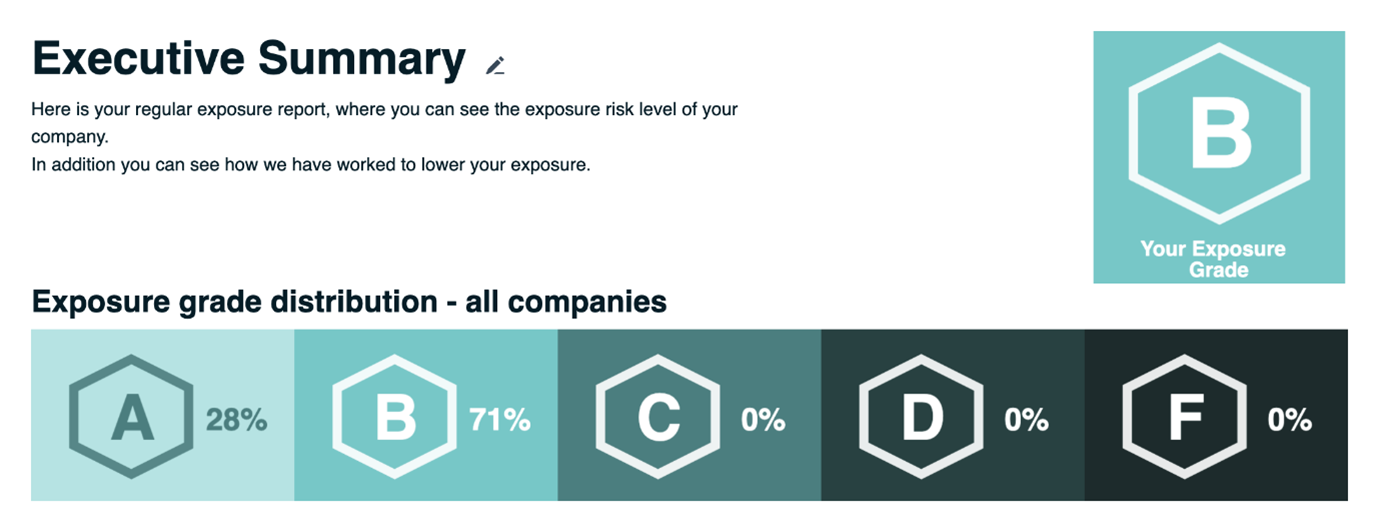
- Executive summary report (beta version) now contains also company exposure risk as a visual grade with reference to how you are doing compared to other companies using WithSecure XM. Executive summary report is available in the Exposure dashboard page accessible via Home -> Exposure.
- We have fixed an issue where not all recommendations were visible and some of the findings were not included in the visible recommendations. For the cases where recommendations were not included in the recommendation hierarchy, we are showing “inconclusive” as state. We advise to look inside those recommendations to see the finding specific remediation impact and relative remediation guidance.
- Cloud findings which are not visible in the latest scan are now properly removed from Exposure management and their impact to the Cloud recommendation is re-calculated.
- Several minor bug and performance improvements.
Exposure Management for Users
System Scan
Support for detecting vulnerabilities in the following products was added to Authenticated Scanning:
- Admin By Request
- Apache Commons Configuration
- Apache Felix Webconsole
- Beckhoff TwinCAT Package Manager
- Brother iPrint&Scan
- Bruno
- CheckMK Agent
- Citrix Secure Access
- Dell NetWorker
- Dell NetWorker Client
- Dell System Update
- Dell Wyse Device Agent
- Discord
- exacqVision Client
- Filseclab Twister Antivirus
- FlashFXP
- FortiClient Endpoint Management Server (EMS)
- Git Credential Manager
- JavaServer Faces (JSF)
- JetBrains dotTrace
- JetBrains ETW Host Service
- JfreeChart
- JGraphT Core
- KMPlayer
- Monica Desktop
- PlantUML
- Postman
- Sandboxie Plus
- SketchUp Pro
- SumatraPDF
- Veritas Data Insight
- VIPRE Advanced Security
Elements Foundations
Elements Security Center
As part of our ongoing work to unify workflows in WithSecure Elements, we have introduced changes to Organization Management.
These changes help our Elements Administrators to more effectively manage their environments.
Key features/changes:
- Introduction of device group concept that will lead into group level access management later this year. Group level access management will assist administrators of larger environments to effectively manage access to their assets.
- New Elements level organization view collecting related features into same place and deprecating duplicate views.
The following screens will be removed on April 22, 2025, as this release introduces features that fully replace them:
- Endpoint Protection Accounts tab (all functionalities included elsewhere)
- Management – Collaboration protection views:
- Organizations
- Settings
- Users view replaced earlier by Management / Organization settings /Security Administrators
- Subscriptions view replaced earlier by Management / Subscriptions view
Further details can be found in the Community announcement: Upcoming: New Elements organization management features – WithSecure Community
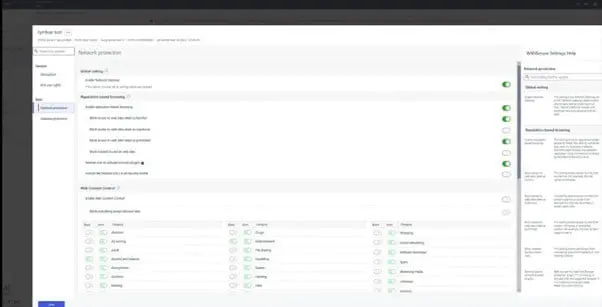
New Mobile profile editor is now in Production
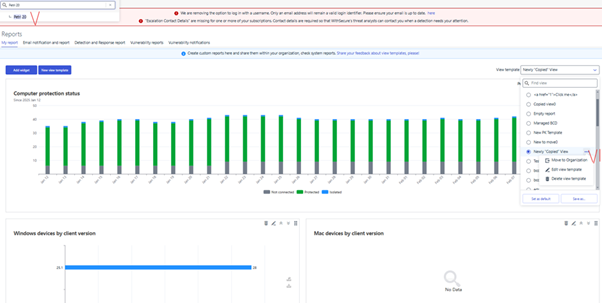
Improvements to the View Template Selector
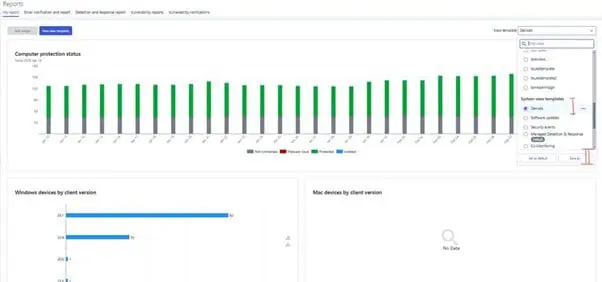
The modification has been applied to the View Template Selector behavior in reports. It is now associated with the scope selector chosen, rather than being tied to the logged-in user account.
As an admin I would like to be able to copy the current view:
To copy any view:
- Select desired view.
- Press “Save as …”
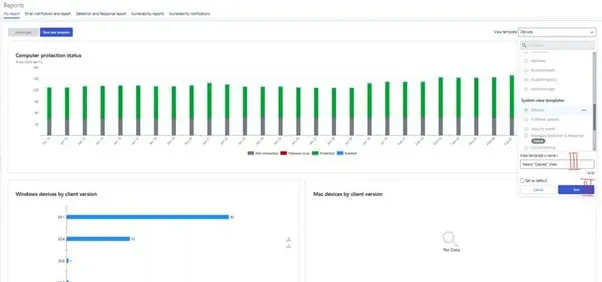
- Enter a new unique name.
- Press “Save”.
As an admin I would like to copy the view to company’s organization views section:
Create a view in the partners view (aka SOP view).
- Follow the four steps from the example above.
- In the scope selector select a desired company. (Important!)
- In the view template selector chose a view that needs to be moved to a particular organization/company.
From the three-dot menu select “Move To Organization”, provide a new name if needed and save.
Other items of interest
Threat Advisory: January
Advisory – Git Clone2leak credentials
Technical Summary
Git is a popular version control system used for managing and collaboratively contributing to programming projects. A security researcher has disclosed vulnerabilities in Git components that could be abused to leak credentials of software developers who are using Git.
Due to mishandling of Git messages, an attacker could trick Git into leaking credentials when a user clones or interacts with a malicious code repo, the impacted components of Git are:
Github desktop and Git credential manager, where misinterpreting a carriage return “\r” character allows credentials to be sent to an attacker-controlled server (CVE-2025-23040 / CVE[1]2024-50338).
Git LFS abuse of mishandling of newline “\n” character allows an attacker to have credentials sent to a malicious server (CVE-2024-53263).
Github CLI and Github codespaces permissive credential helpers allowing an attacker to steal authentication tokens by tricking a user into cloning a repo (CVE-2024-53858)
You can sign up to receive the monthly Threat Reports, with full details of these threats.
In case you missed it
Enhanced Device Isolation Capabilities for XDR
We recently introduced enhanded Device Isolation capabilities for XDR. You can find out more at the dedicated article.
Share your ideas with us
Our purpose is to co-secure the world with you – now as WithSecure™. To co-create the best possible cyber security products and services, we warmly recommend you share your ideas via the Ideas section of the WithSecure Community, now accessible directly from WithSecure™ Elements Security Center.
Further information
Changelogs and Release Notes for all parts of WithSecure™ Elements can be found at the Help Center
-
COMPLETED: System Maintenance: WithSecure Elements Exposure Management for Cloud – 12th March 2025
Read more
UPDATE 2025-03-13 / 10:27 UTC: The maintenance has been completed and all functionality is now available.
We will be having an extended maintenance break for WithSecure Elements Exposure Management for Cloud, starting at 17:00 UTC on 12th March 2025. This maintenance break will last potentially until 12:00 UTC on 13th March. We will update this article as needed if the situation changes.
During the break we will be making some large changes within the backend systems to significantly improve the performance and scalability of the system, benefiting all customers.
During the maintenance break, the Exposure Management for Cloud pages will not be accessible for users, and any scans will be postponed until after the break is completed.
All other functionality of WithSecure Elements Exposure Management will work correctly during the maintenance break.
Please note that this maintenance break does not affect WithSecure Countercept Exposure Management customers in any way.
We apologize for any inconvenience this causes our customers.