
-
WithSecure Elements Mobile Protection: Complete End of Support for full-network VPN
Read more
As previously announced, support for full-network VPN is coming to an end on 25th April 2024 and some of our users are still using older versions of the Mobile Protection clients.
Please read the whole article as it contains some information that could affect your users.
These older clients, especially those with VPN turned on, will not function correctly once the VPN service is terminated, and may even be blocked from using the network. For this reason, we’ve created a new profile “WithSecure™ mobile (VPN disabled)”, available to everyone, which can be applied to all legacy devices (using Mobile Protection version 23.x or older). This profile has the VPN functionality turned off by default.
Alternatively, if the customer requires more advanced customization of their profile, we strongly recommend that they update their clients to version 24.x as a matter of urgency.
If a client update is not possible at this time:
EITHER
- modify existing profiles for earlier clients to turn off VPN and possibly also Lock the setting to prevent the end user turning it back on.
OR
- Assign the “WithSecure™ mobile (VPN disabled)” profile to the clients
On 23rd April 2024, WithSecure will apply this profile AUTOMATICALLY to all endpoint devices that are running the older version of the client software AND have VPN enabled in profile, to ensure they can continue to access the network. Please note that we are unable to store the details of the older profile, so partners and customers will need to manually apply the correct profile once the client is updated to 24.x
You can find full information about the Mobile Protection release here.
-
Changes to the Elements Security Center – May 2024 – Cloud Security Posture Management
Read more
UX Merge: Part 2 – Cloud Security Posture Management
In January 2024, we released the first part of our new user experience changes for the Elements Security Center, bringing the Endpoint Protection and Endpoint Detection and Response products closer together.
Now we are moving forward towards the next part of the changes. This time round, we will be bringing Cloud Security Posture Management into the new navigation structure, bringing cross-functional benefits for users of the wider range of Elements solutions.
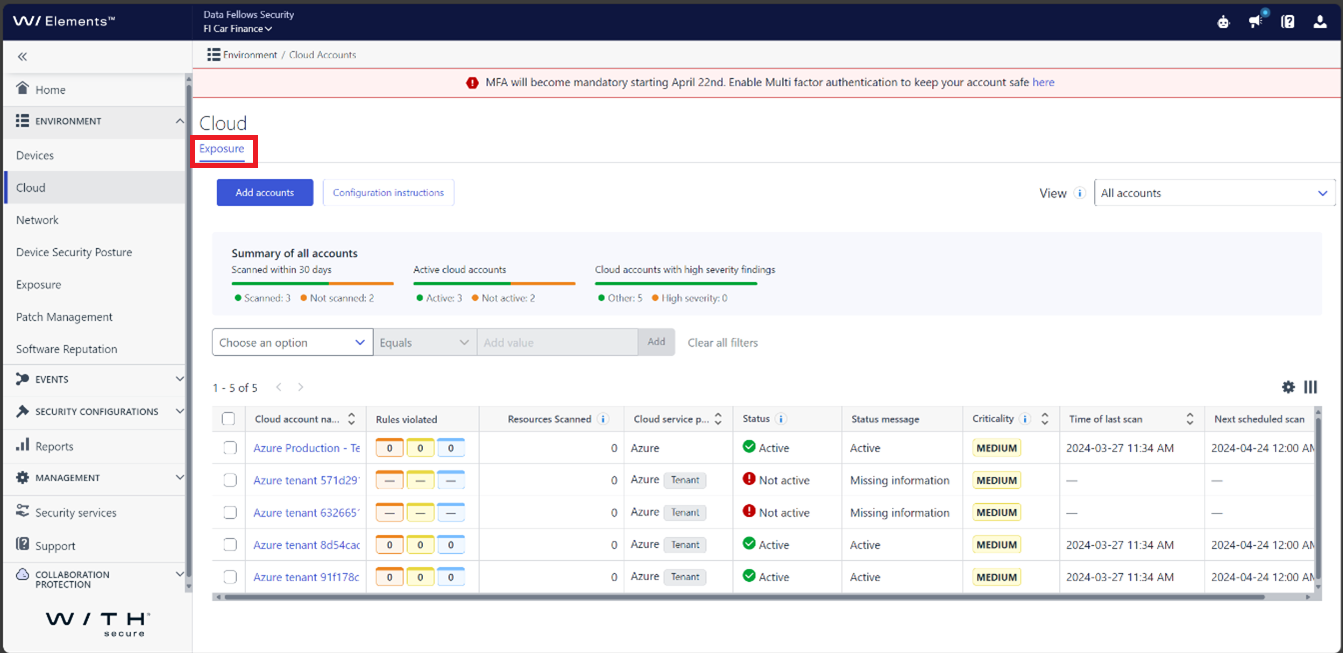
Please Note: The screenshots included in this article are for example purposes only. Our team is still finalizing the changes, and the version eventually released may look slightly different to what is shown here.
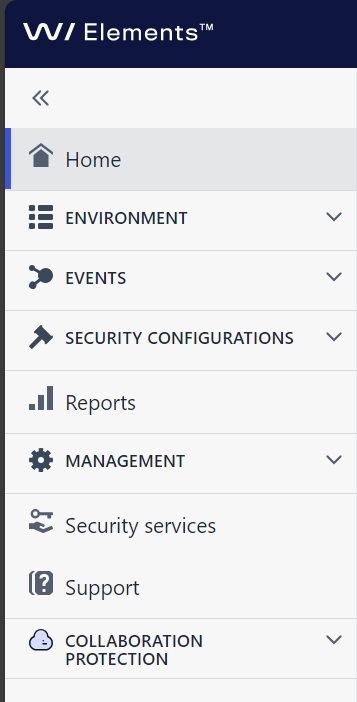
As with the earlier changes, we have taken into account usability and feedback from users when redesigning the Elements Security Center. While we appreciate that it takes a little time to get used to change, we are sure that you will appreciate these changes once you’ve spent a little time with them.
We anticipate that these changes will be released to our customers during May 2024.
Changes for Cloud Security Posture Management
The existing navigation structure for Cloud Security Posture Management will be removed, and the items underneath that will be moved to the new shared navigation.
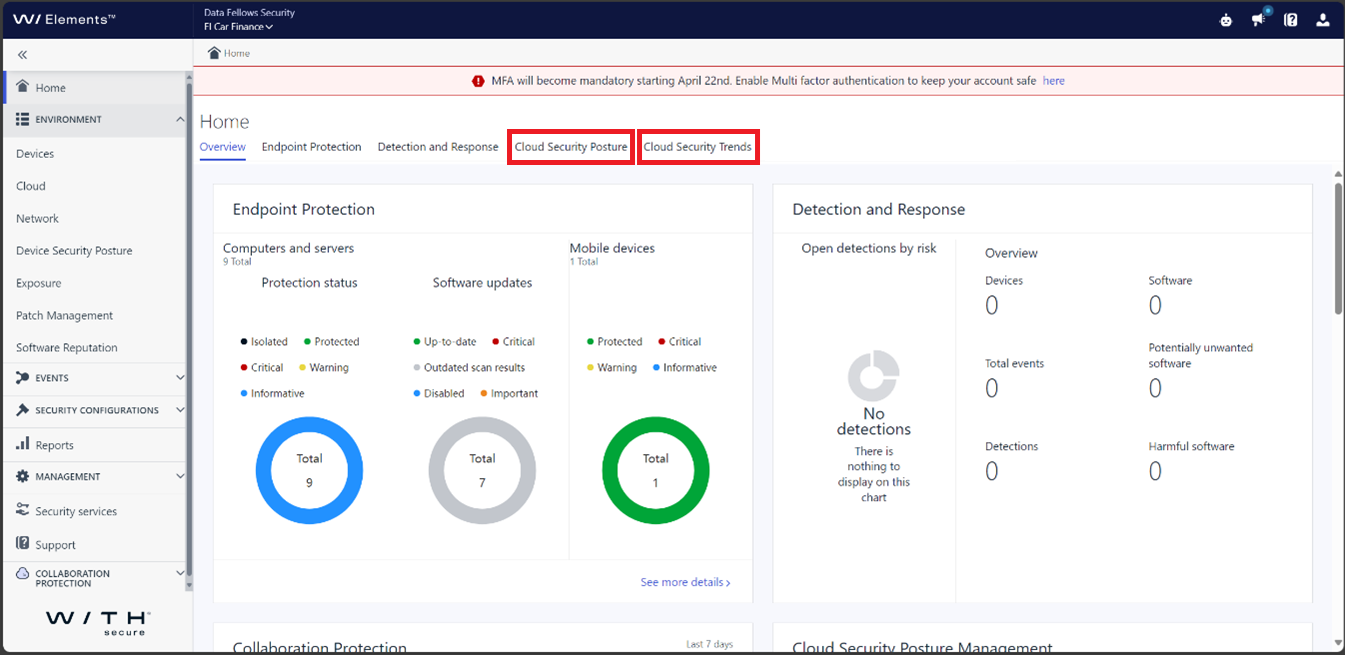
The Dashboard content will be moved under the Home page, with two new items there:
- Summary becomes Cloud Security Posture
- Trends becomes Cloud Security Trends
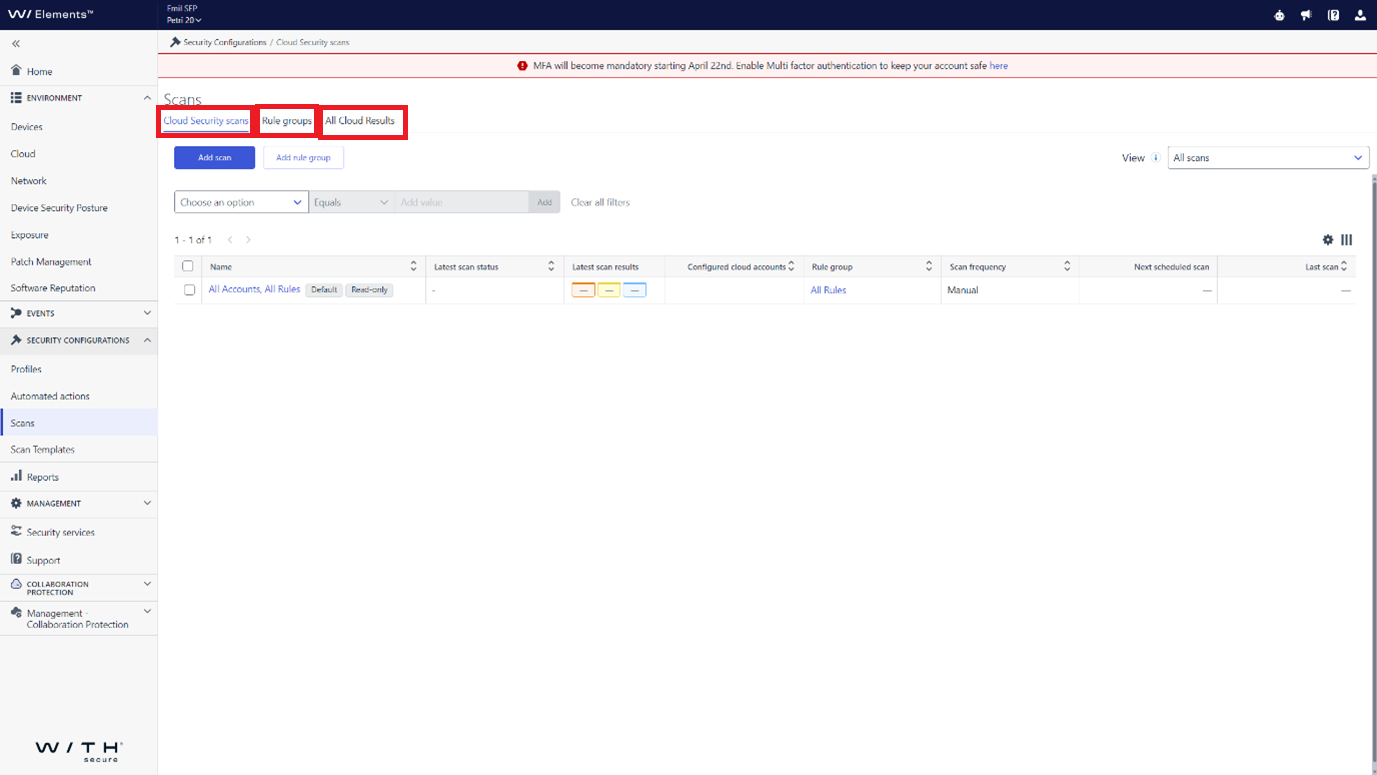
The three different views under the current Scans and Results page will move under Security Configurations / Scans as separate tabs: Cloud Security Scans, Rule Groups, and All Cloud Results.
The current Rules page will move under Exposure / Cloud Coverage
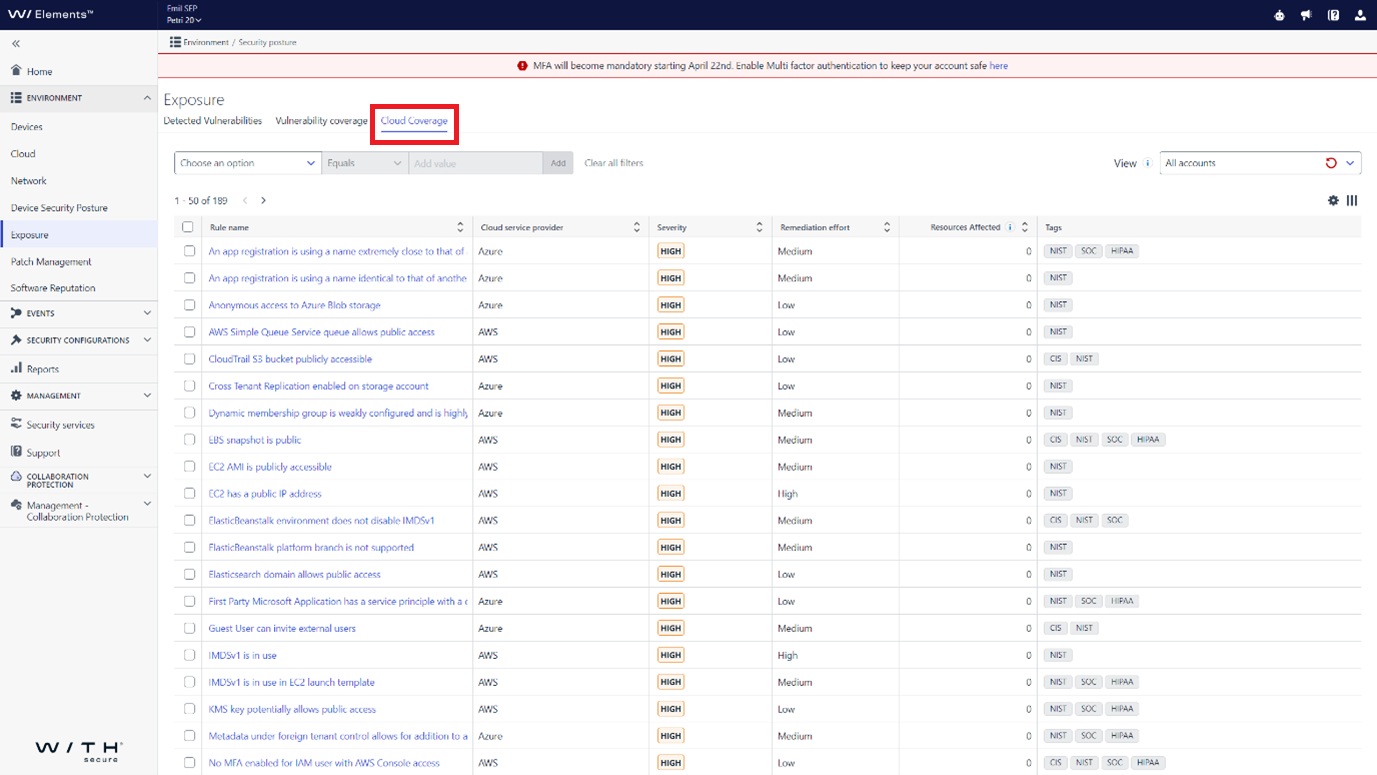
Please note that the movement of Rules is a transitional one until we launch a new product at SPHERE24 . At that time it will have a new permanent “home” in the navigation.
Cloud Accounts will move under a new main menu item Cloud as a tab Exposure
-
What’s New in Elements: March 2024
Read more
Editor’s Highlights
Upcoming release: Elements Agent for Mac 24.1
A new version of the Elements Agent for Mac is coming soon. Admins are required to create WithSecure MDM profiles to support seamless migration: Please see the Elements Agent for Mac changelog for more details.
Elements Security Center
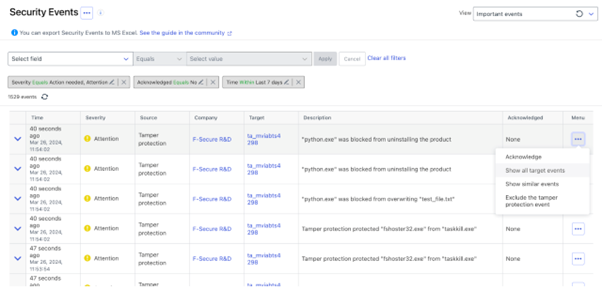
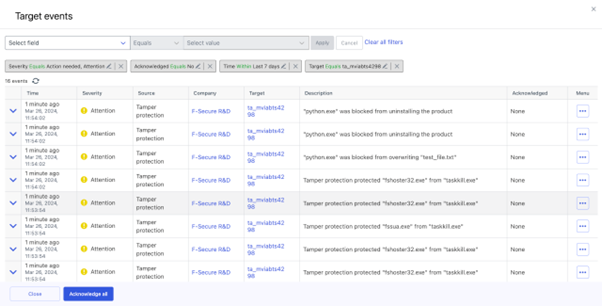
Mass acknowledgement of security events based on target
It is now possible to perform a mass acknowledgement of security events
Other Improvements
Devices page
Searching for host name is now supported in the Device view
Reports
We have renamed the ‘Email Reports’ tab to ‘Email and Notification Report’ Additionally, we have clarified the accompanying information text. The purpose of this enhancement is to emphasize that this feature serves as a valuable tool for notifying users about non-compliant devices (e.g., devices with malware protection disabled) or for receiving alerts related to specific events (e.g. Malware blocked or EDR incident).
Reports/My report
If a user has not yet created any reports, they will now see an option to access pre-defined widgets. This enhancement aims to help users understand the types of dashboards they can create.
When adding a dashboard to ‘My Report’, the template name (data field) is now clearly displayed below the dashboard. This enhancement ensures transparency and helps users understand the data sources used to build their customized dashboards.
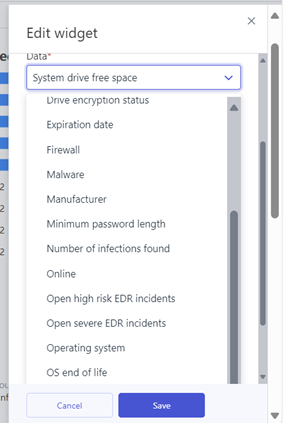
We have expanded the device information available for creating reports within ‘My Reports’. Users now have access to a wider range of parameters when building their customized reports.
Reports/Email and notification report
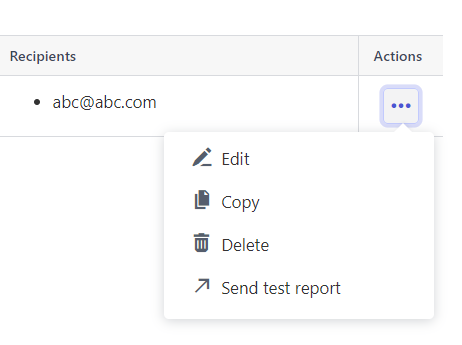
Users can now send a test report directly from the ‘Reports/Email and Notification Report’ section. This option simplifies the process of testing new email notifications or reports.
Elements Endpoint Protection
Elements Agent for Computers and Servers: Version 24.2
A new version of the endpoint clients is available and this release makes the Elements Agent version 24.2 available (internal version 24.2.187).
The endpoints automatically upgrade, without a reboot.
Features:
New WithSecure Elements agent update mechanisms.
We are taking into use backend services that are completely distinct from the services used by F-Secure products. Therefore this release also introduces new server addresses where the endpoints connect to. The switch to the new backend services happens like the usual automatic endpoint upgrade. It requires minimal extra bandwidth.
Note that if endpoint is missing the ACS (Azure Code Signing) dependencies it won’t be upgraded automatically to 24.2 (and will be automatically upgraded once the ACS issue is resolved).
For more information see Changes in support on Microsoft Windows – Minimum patch level – WithSecure Community
Support for Windows on ARM64 processors
We are pleased to announce that version 24.2 of ‘WithSecure Elements EPP for Computers’ and ‘WithSecure Elements EPP for Computers Premium’ introduces support for Windows ARM64 devices. The following features are supported:
- Heuristic & behavioral analysis
- DeepGuard
- Extensive web protection
- Firewall management
- Integrated patch management
- Device control
- Rollback
Elements Mobile Protection: Release new Mobile Protection
We have now released a new version of Elements Mobile Protection for both Android and iOS devices.
Briefly, this version brings the following benefits:
Improve the overall user experience and reliability when browsing traffic is being protected
- A new Network Gateway component to protect network traffic, also utilizing the WithSecure Security Cloud, for seamless and fast scanning
- Note: The Network Gateway component on the device will replace the current VPN functionality
- A new Browsing Protection plugin for Mobile Safari on iOS devices
- Visibility to Elements Mobile Protection events in the Elements Security Center
As some of the changes are quite significant, we have created an article with Frequently Asked Questions
Elements Endpoint Detection and Response
Element Endpoint Detection & Response: New status “Waiting for customer” available for Broad Context Detections
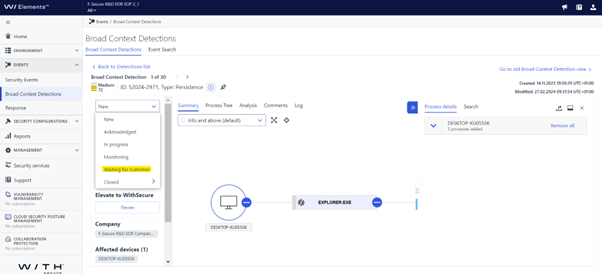
User can now update the status for a BCD as “Waiting for customer”
‘Waiting for Customer – The incident is now awaiting confirmation / response from the end customer before it can be progressed.’
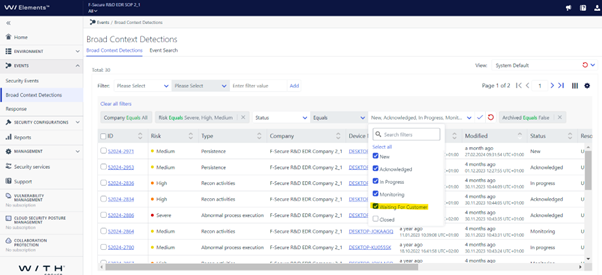
The user can also filter the BCDs by this status:
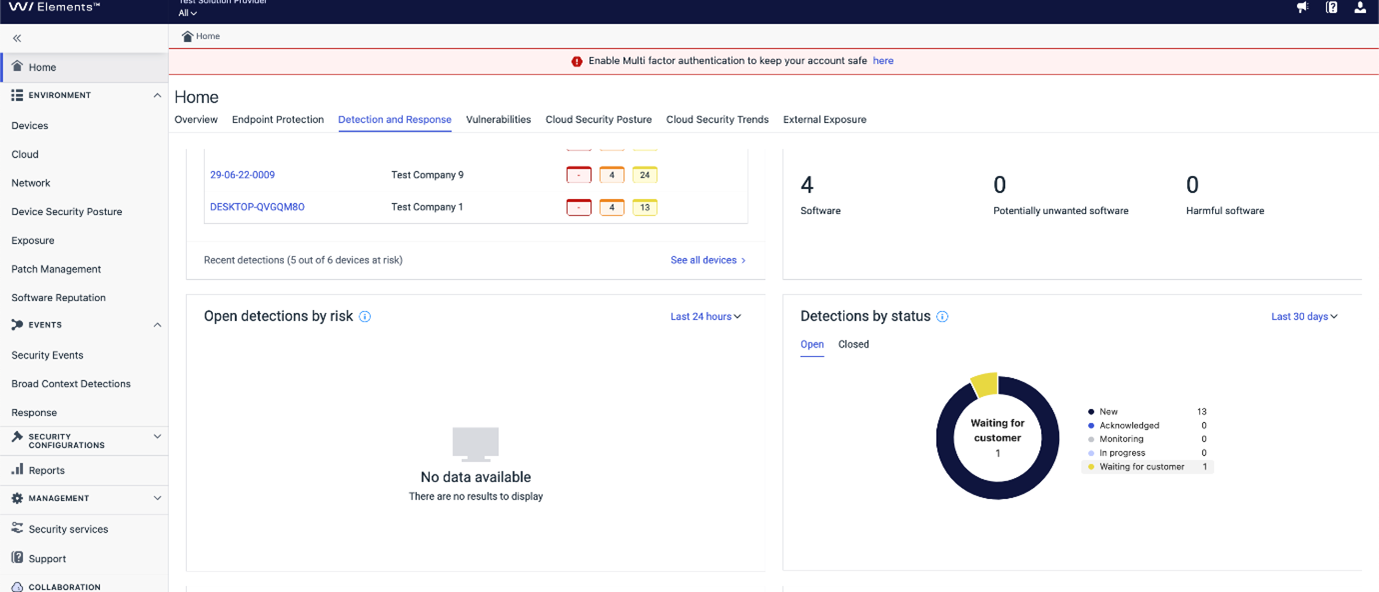
The dashboard also gives an overview of the status:
Elements Vulnerability Management
EVM: System Scan
Detections have been added to check for vulnerabilities in the following products, in authenticated scanning on Windows:
- Lenovo Diagnostics Tool
- Lenovo System Update
- Lenovo Service Bridge
- Lenovo Power Management Driver
- Lenovo Vantage
- Lenovo System Interface Foundation
- Dell Update
- Dell Digital Delivery
- Dell SupportAssist Enterprise
- Dell SupportAssist and Dell SupportAssist for Business PC
- Intel Battery Life Diagnostic Tool
- Intel Dynamic Tuning Technology
- TeamViewer Meeting
- TeamViewer Host
- cURL
- Devolutions Workspace
- FontForge
- Snow Inventory Agent
- Puppet Bolt
- PaperCut editions
- Secure Connect Gateway – Application Edition
Other items of interest
Monthly Threat Highlights Report: February 2024
Here is more information on the key problems included in the February 2024 Threat Landscape Update report:
- Mass Exploitation Incidents: ongoing mass exploitation incidents involving vulnerabilities in Ivanti ConnectSecure and ConnectWise ScreenConnect, emphasizing the critical need for organizations to patch these vulnerabilities promptly to prevent widespread compromise.
- Ransomware Attacks: the continuation of ransomware attacks in February, with varying opinions and statistics on the state of the ransomware sector. This indicates the persistent threat posed by ransomware actors and the importance of robust cybersecurity measures to mitigate such attacks.
- Machine Learning and LLMs for Malicious Activities: Machine Learning and Large Language Models (LLMs) for malicious activities such as fraud and autonomous hacking. This highlights the evolving tactics used by threat actors and the need for advanced detection and mitigation strategies in cybersecurity defenses.
- Phishing/Maldoc Exploits: significant increases in phishing/maldoc exploits targeting client software are noted in the report. Specific vulnerabilities such as CVE-2023-21716, CVE-2023-38831, CVE-2023-23376, and CVE-2023-23397 are highlighted, indicating the prevalence of these exploit techniques and the importance of timely detection and prevention measures.
- Lazarus Group Exploiting Windows Driver Zero-Day: the report mentions the Lazarus Group exploiting a Windows driver zero-day vulnerability (CVE-2024-21338) to disable security tools. This underscores the threat posed by sophisticated threat actors and the need for organizations to stay vigilant against such targeted attacks.
In case you missed it
Multi-Factor Authentication Enforcement
From April 22nd 2024, we will start to enforce the use of Multi-Factor Authentication when accessing the WithSecure Elements Security Center. You can find out more details at our dedicated article
Share your ideas with us
Our purpose is to co-secure the world with you – now as WithSecure™. To co-create the best possible cyber security products and services, we warmly recommend you share your ideas via our Ideas Portal, now accessible directly from WithSecure™ Elements Security Center.
Further information
Changelogs and Release Notes for all parts of WithSecure™ Elements can be found at the Help Center
-
Urgent Maintenance: Cloud Security Posture Management 2024-04-11
Read more
Unfortunately, we need to perform some urgent maintenance on the Elements Cloud Security Posture Management backend services.
This maintenance will start on 11th April 2024 at 10.00 UTC, and is expected to be completed within 6 hours, although hopefully quicker than that.
During the maintenance period, it will not be possible to access the Cloud Security Posture Management section of the Elements Security Center.
We apologise for the late notification of this change, and any inconvenience it may cause to our customers.
-
New Elements Mobile Protection Release
Read more
This article will be updated as needed to answer extra questions. We strongly suggest that you bookmark it and check back from time to time.
The localized versions of this article are generated automatically using Machine Translation. The original English article should be used in case of translation anomolies.
Updates
2024-05-16 Added information about Mobile Protection global availability
2024-04-19 We have just published a new profile to all production environments which will help prevent old clients being blocked from the network. You can read all the details in a separate article
2024-04-08 We have now released a version of Elements Mobile Security for Android, which enables the Network Gateway functionality. Please note that it may take several days for this to be available to all customers.
2024-04-04 Updated the MDM section with a note not to enforce the Network Gateway (VPN) on Android at the moment due to the missing functionality
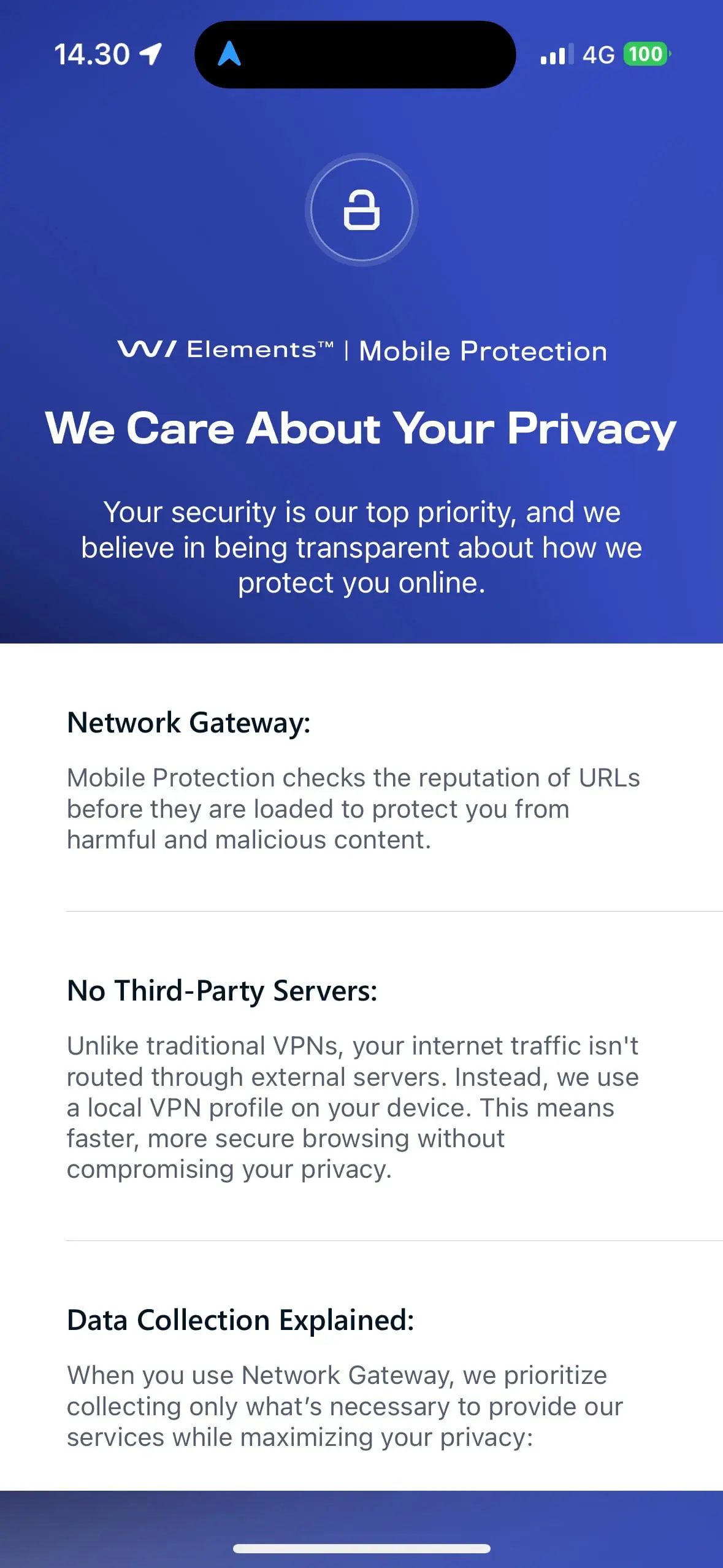
2024-03-29 We have now released a small update to the iOS client which now removes the privacy notice prompt during upgrades. The upgrade should now be fully automatic without prompts.
2024-03-28 The new Mobile Protection clients for iOS and Android have now been released, and the Elements Security Center can now be used to administer them. Updates from Google Play and the App Store will happen automatically, but it may take a short time for all installations to receive these updates due to the way the stores work.
NOTE: The Android client version released does not have the Network Gateway functionality enabled (see Limitations below), but the team is actively working on this and it will be released soon.
When upgrading from a previous version of Mobile Protection on iOS, the user is prompted to accept the privacy notice to have a functioning application
2024-03-27 We have resubmitted the client to the App Store for review, and this is in progress. We will post a further update as soon as we know the new schedule, but we anticipate that the delay will be short.
2024-03-26 We have unfortunately run in to a last-moment issue which is stopping us releasing the new version. We will post an update as soon as we know the new schedule, but we anticipate that the delay will be short.
General
What are the new features/capabilities in this release?
In short:
- Improve the overall user experience and reliability when browsing traffic is being protected
- A new Network Gateway component to protect network traffic, also utilizing the WithSecure Security Cloud, for seamless and fast scanning
- Note: The Network Gateway component on the device will replace the current VPN functionality
- A new Browsing Protection plugin for Mobile Safari on iOS devices
- Visibility to Elements Mobile Protection events in the Elements Security Center
The new clients will be released from 28th March 2024. Please note that the release will be a “phased rollout” for upgrades, with new installations being available immediately. Upgrades do not require any end-user interaction, other than checking the app store.
Limitations
The initial Android release will not have the Network Gateway capability, as we found some last minute issues blocking several important applications. We are working hard on being able to release this as soon as possible. When this is available, it will be automatically deployed to all endpoint devices.
Overview of Functional Changes
What does the Network Gateway do?
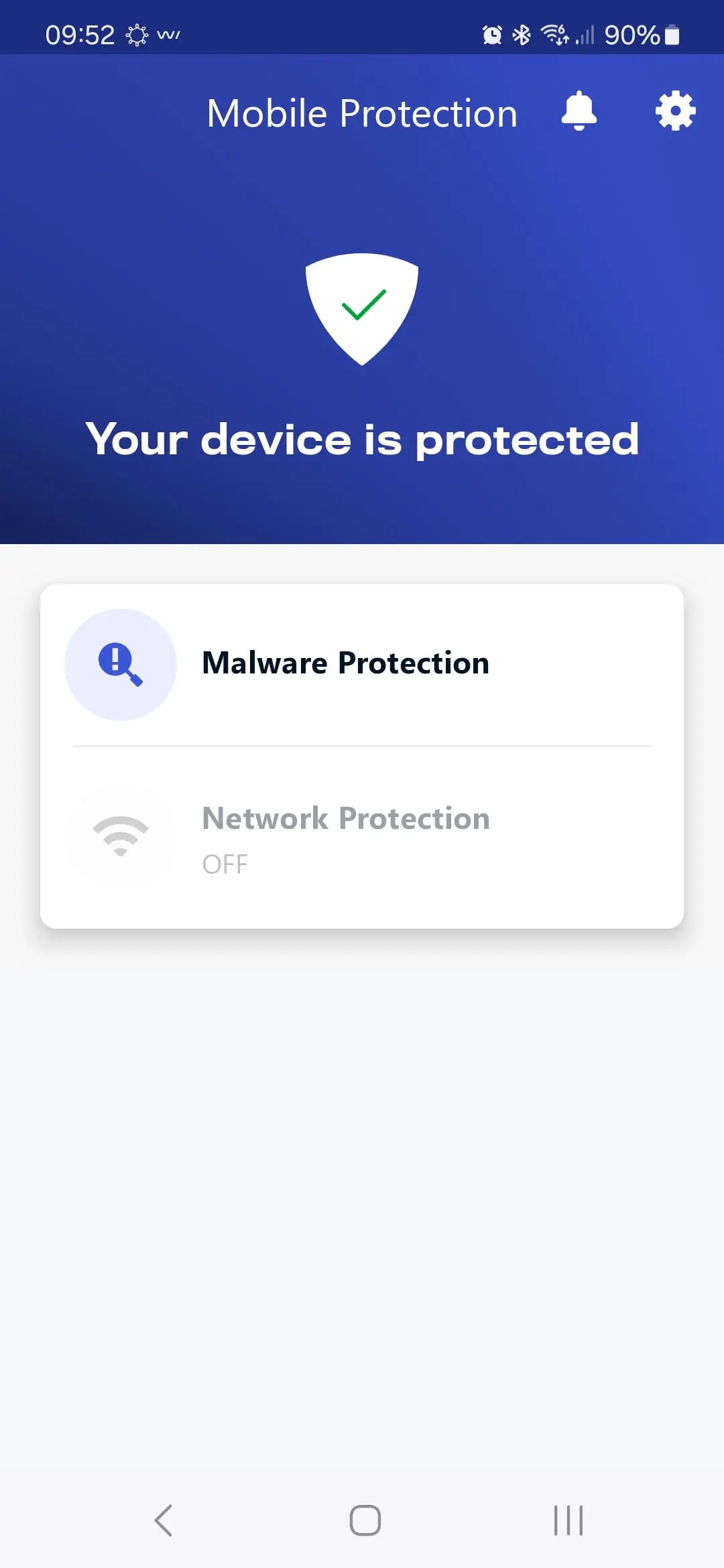
The Network Gateway acts as a“device VPN”, intercepting all mobile application traffic and is used to validate any URLs visited with our reputation service, just the same as used in other WithSecure products.
This involves checking the domain names against a list of known URLs If the Network Gateway detects a malicious or phishing request, it will block it and notify the mobile phone app.
If the URL is categorized as Adult, Gambling, or one of many other categories, this information is returned to the Mobile Protection application, and can be used to block traffic based on profile settings set by the Security Administrator.
What does the Mobile Safari extension do?
The Mobile Safari browser extension on Apple devices is designed to seamlessly integrate with existing VPN setups, ensuring that all iOS users can enjoy the same level of protection, without needing to use the Network Gateway.
Event visibility in the Elements Security Center
By providing visibility to Elements Mobile Protection events in the Elements Security Center, the security administrator can react quicker to potential issues.
Other changes
There will be no significant changes to the mobile app’s UI, howver some views will simply be removed, for example Traffic protection, Choose virtual location, and some VPN-related settings.
Elements Security Center Changes
Together with the new application release, we will also be making changes to the Elements Security Center. These include an updated Profile Editor to allow configuration of the new functionality.
Elements Mobile Protection availability globally
WithSecure Elements Mobile Protection is now available in many more countries than earlier.
This is possible because the full-network VPN has been removed from the product, which affected our ability to distribute the earlier product.
Please note some countries are still prevented from using Mobile Protection due to Embargoes, Sanctions, and Export Controls.
Questions and Answers
Discontinued capabilities
With this release, we are discontinuing the following capabilites
- Choose Virtual Location
- Network Encryption (full VPN)
IMPORTANT NOTE: The existing VPN functionality will stop working on 1st April 2024, and we advise all partners and customers to ensure they have upgraded to the new version before that date.
Why is this new solution better for the customers than the previous one?
The previous Mobile Protection solution used a VPN service connecting to an external exit node, and routed all the network traffic through it. This introduced latency and gave a negative customer experience in some cases, for example while playing games or using some chat applications. Additionally, in some networks, VPN protocols were blocked, or authentication was needed before using WLAN. Due to these inconveniences, many end users turned the VPN off, and our upstream statistics show this.
The previous version also required having the Mobile Protection app running so it could send status updates to the management portal. If the phone killed the application to free up memory (very common on mobiles) then traffic would be protected but the device details would not be updated in the portal.
The new Network Gateway solution resolves these issues, as we’ve moved protection inside the device and it is much more lightweight.
In addition, we expect a lot better protection coverage & user experience due to this improved functionality. The new application will send status updates via a network extension which is not killed by the device’s operating system, meaning that the information in the portal is more up to date.
On top of this, now the protection is more accurate and happens on the device. This means that we will be able to give a lot better visibility to threats we protected against in the management portal.
Has all documentation been updated?
All documentation will be updated online at the time of release.
Browser Extensions
Do we get a browser extension with this release
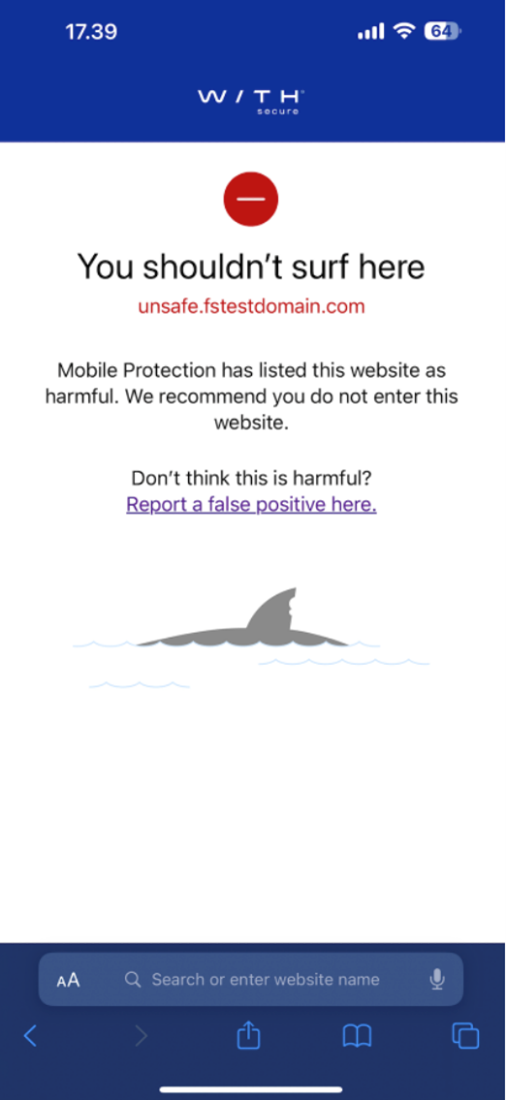
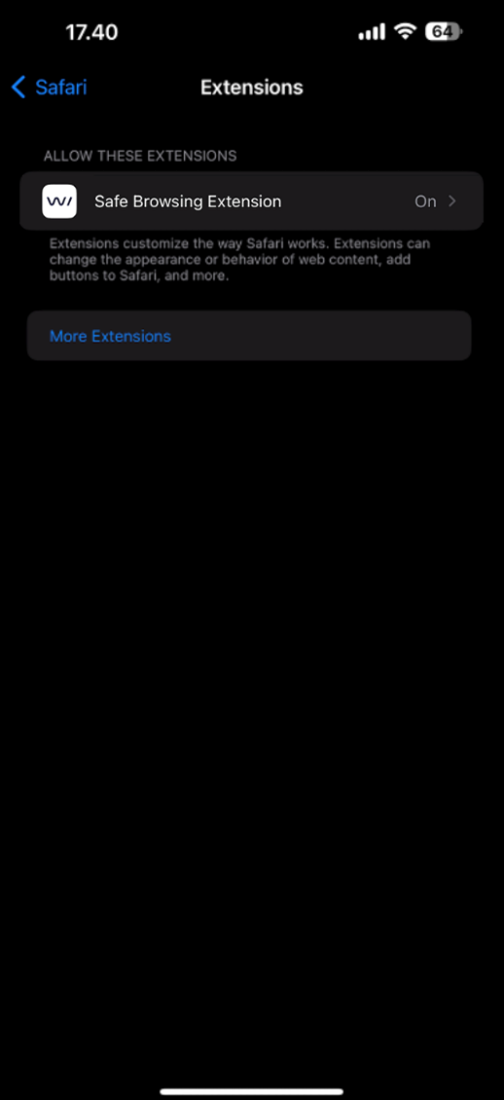
For iOS devices, we have included an extension for the Safari browser, which integrates seamlessly into existing VPN setups.
How do I enable the browser extension?
You can enable the browser extension in the Safari settings.
Which browsers we will support by browser extension in iOS/Android?
Mobile Safari on iOS devices. At the moment Android does not support browser extensions for Chrome.
Does this mean that we won’t create this extension at all to Android browsers?
As soon as Google add extension support to Chrome on Mobile devices, we plan to add support for this to Mobile Protection.
If there’s no extension for Android, what options do I have for blocking and filtering?
On Android, the device needs to have the Network Gateway enabled.
What are the benefits of using the Safari extension on iOS?
The Safari extension gives extra capabilities on iOS. Because it works “inside” the Safari browser, we get more fine-grained information on the sites browsed, including the full URL. This is very handy when browsing some forums for example, where a sub-section might be analyzed in more depth.
In addition, the extension can be used in cases where the device also is using a Device VPN solution.
So do I need the Network Gateway on iOS?
If you are using any browser other than Safari, you should enable the Network Gateway. This will then perform similar tasks to the extension, but will also work on all applications on the device.
If you are using a “full VPN” on your Apple device, you cannot use the Network Gateway at the same time. This is a limitation set by Apple.
Can we support both protocols HTTP and HTTPS? so does browser extension bring HTTPS support?
The Network Gateway already improves protection compared to what was previously offered and supports HTTP & HTTPS. It checks all HTTP traffic and domain-level HTTPS traffic. The Safari extension on iOS can also check HTTPS traffic with more fine-grained control (full path).
Installations
Are we going to release a new App to Apple App Store / Google Play ?
The new version of Mobile Protection that will support the Network Gateway (“Device VPN”) will be available as a regular update (App Store/Google Play).
Upgrades
How can my users become aware that they need to upgrade?
Security Administrators can send their own message from the Elements Security Center, and customize the words and language to suit their users. This can be achieved by going to the Devices view, then Mobile devices. Select all devices, and in the actions dialog at the bottom of the screen select the “Send the device a message” option and follow the guidance.
MDM management
Is it required to change MDM configuration?
In general, No. However, if you are using your MDM to control the application updates, please make sure the new version is released to all users.
Important for managed Android devices, the Network Gateway (VPN) functionality should NOT be forced “on” at the moment, due to the missing functionality in the Android client.
-
What’s New in Elements: February 2024
Read more
Editor’s Highlights
Elements Endpoint Agent is now available for Windows running on the ARM64 processor!
Find out more in the Elements Endpoint Protection section.
Elements Security Center
Elements Portal: Multi-Factor Authentication (MFA) Banner
As every administrator should activate MFA to keep their company (and customers) safe, Element Security Center is now displaying a red banner each time an administrator logs without MFA.
By clicking on “here” in the banner, the administrator can easily activate MFA by clicking on “enable” in the My Settings view.

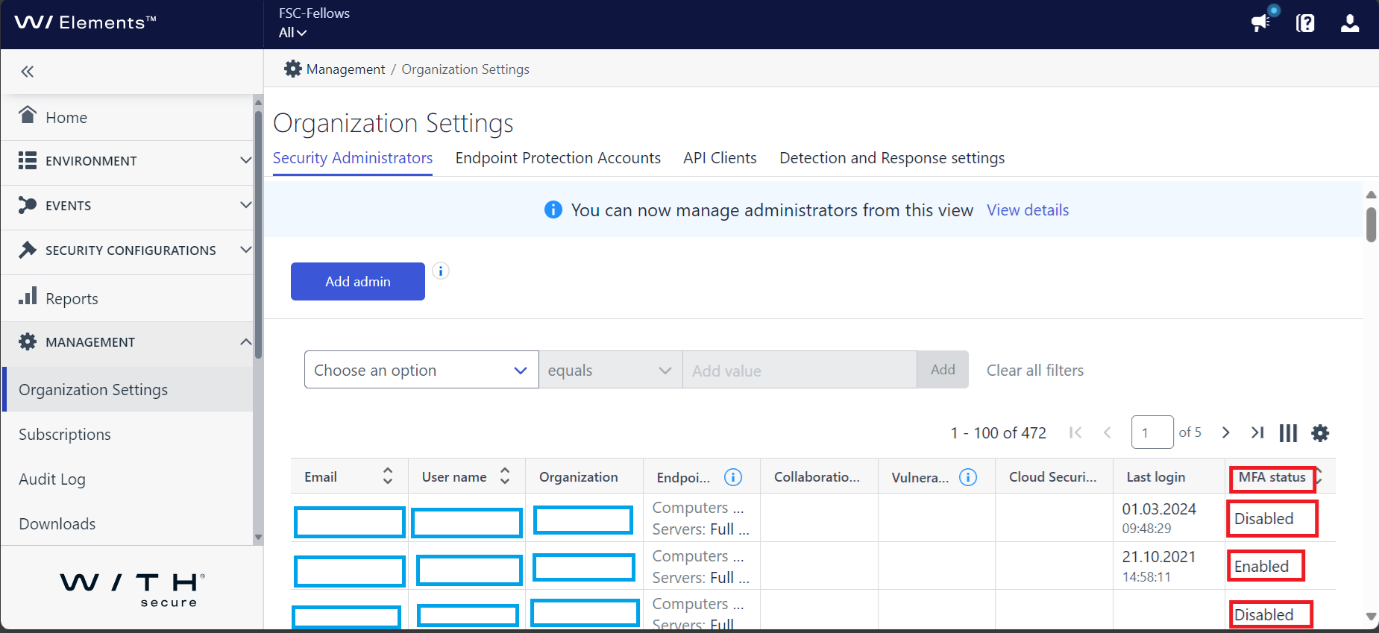
Reminder: From Security administrator table under organization settings, you can and should verify that all administrator in your organization have enabled MFA.
New features
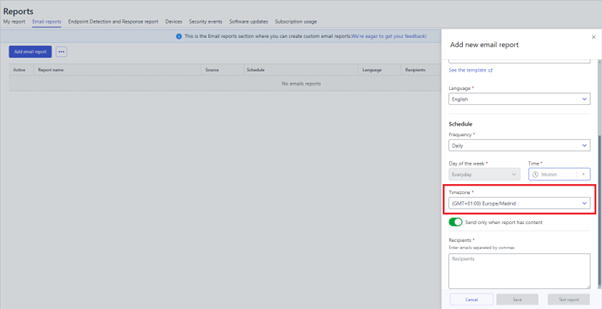
Admins can now select the time zone they want to use when configuring Email reports.
Improvements
- EDR device classification confidence is now visible in the device listing.
- Vulnerability counters are now displayed as icons in the device listing.
Elements Endpoint Protection
Elements Agent: Windows Workstations & Servers
On 2 April 2024 Elements Agents will switch to WithSecure browser extensions:
If you use MDM or group policies to manage browser extensions it is recommended to allow or preinstall these extensions in advance.
You can follow instructions Setting up Browsing Protection via GPO user guide and use following IDs:
- Google Chrome: imdndkajeppdomiimjkcbhkafeeooghd
- Microsoft Edge: aambijcigikmdoehgjhdepcpieghopdl
- Mozilla Firefox:
- Extensions to install: https://download.withsecure.com/online-safety/ws_firefox_https.xpi
Any old F-Secure extension IDs can be removed from MDM or group policies later in March after the switch.
The same extensions will be later used in next versions of Elements EPP for Mac.
WithSecure Elements Agent for Windows version 24.2
A new version of the endpoint clients is now available, and this release makes the Elements Agent version 24.2 available (internal version 24.2.187).
The endpoints automatically upgrade, without a reboot.
This release introduces new features and fixes.
Features:
- This release introduces new WithSecure Elements agent update mechanisms.
- We are taking into use new backend services that are completely distinct from the services used by F-Secure products. Therefore this release also introduces new server addresses where the endpoints connect to. Switch to the new backend services happens like the usual automatic endpoint upgrade. It requires minimal extra bandwidth.
- Note that if endpoint is missing the ACS (Azure Code Signing) dependencies it won’t be upgraded automatically to 24.2 (and will be automatically upgraded once there is no ACS issue anymore). For more information please see our community article
- We are pleased to announce that version 24.2 of ‘WithSecure Elements EPP for Computers’ and ‘WithSecure Elements EPP for Computers Premium’ introduces support for Windows ARM64 devices. The following features are supported:
- Heuristic & behavioral analysis
- DeepGuard
- Extensive web protection
- Firewall management
- Integrated patch management
- Device control
- Rollback
Elements Vulnerability Management
EVM: System Scan
We have now added vulnerability detection capabilities for the following products to authenticated scanning for Windows:
- Mullvad VPN
- FileZilla Client
- Regify Regipay Client
- Dell Pair
- OpenEXR Viewer
- Citrix StoreFront
- SolarWinds Access Rights Manager
- ockwell FactoryTalk Activation Manager
- MOVEit Automation
- Acronis Cyber Protect Cloud Agent
- Qlik NPrinting Designer
- Qlik GeoAnalytics
- UltraVNC
- Trend Micro Apex Central
- Autodesk Design Review
- PDF24 Creator
- Datto RMM (Remote Monitoring and Management)
- PeaZip
- TightVNC
- Intel Extreme Tuning Utility
- Intel Memory and Storage Tool
- Wix Toolset
- ZED! and ZED! Free
- PRIMX ZONECENTRAL
- ConnectWise ScreenConnect
Integrations
Elements Connector: new release 24.05
A new release 24.05 has been rolled out with the following changes:
Support Event Forwarding for Elements Collaboration Protection security events
Support serving updates from new WithSecure GUTS2 update server
This change ensures, that WithSecure Elements endpoint agents can receive updates via Elements Connector, when using the new WithSecure GUTS2 server address.
More about the related network address changes can be found from here
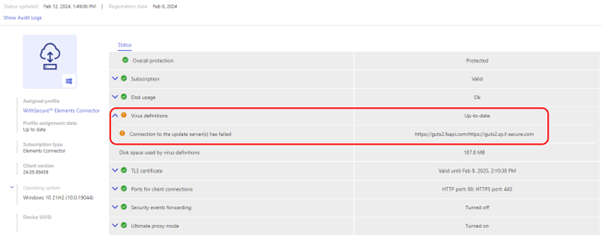
GUTS2 update server connectivity indicators in Elements Security Center
In this release we will highlight if GUTS2 server addresses are unreachable, and managed clients might stop receiving updates when using Elements Connector for caching updates.
This warning will be visible as a warning in Connector device view in Elements Security Center:
Improvements for upgrade installation on RPM-based Linux systems
Improvements for installation on Windows
The new version is available as a first-time installer, as well as a channel upgrade.
Elements API: Change log
Device statistics
Elements API client can read statistics of EPP devices from query endpoint. When request contains HTTP header Accept: application/vnd.withsecure.aggr+json Elements API selects all devices matching query parameters and depending on query parameters and groups items by selected property. If client requests histogram then API return statistics for last 30 days.
Device count
Elements API uses value of parameter count which represents name of property that is used to group devices by. In response API return list of items where each one represents different value of property and number of devices having such value.
Example query like curl -v -X GET-H “Accept: application/vnd.withsecure.aggr+json” “https://api.connect.withsecure.com/devices/v1/devices?count=protectionStatus” groups devices by property protectionStatus.
{
“items” : [
{ “count” : 1, “protectionStatus” : “isolated” } ,
{ “count” : 16, “protectionStatus” : “malwareIssue” },
{ “count” : 4, “protectionStatus” : “notConnected” },
{ “count” : 88, “protectionStatus” : “protected” },
{ “count” : 11, “protectionStatus” : “subscriptionExpired” }
]
}
From response client can find that query found:
- 1 device with protection status equal isolated
- 16 devices with protection status equal malwareIssue
- 4 devices with protection status equal notConnected
- 88 devices with protection status equal protected
- 11 devices with protection status equal subscriptionExpired
Device histogram
Elements API uses value of parameter histogram which represents name of property that is used to group devices by. In such case API return statistic for each day in last 30 day. Response contains list of items sorted in descending order where each element has format
{ “count”: <number of devices>, <name of property>: <value of property>, “date”: <statistic date> }
Example query like curl -v -X GET-H “Accept: application/vnd.withsecure.aggr+json” “https://api.connect.withsecure.com/devices/v1/devices?histogra=protectionStatus” generates histogram for property protectionStatus .
{
“items” : [
{ “count” : 1, “protectionStatus” : “isolated”, “date”: “2024-02-14”},
{ “count” : 16, “protectionStatus” : “protected”, “date”: “2024-02-14”} ,
{ “count” : 5, “protectionStatus” : “isolated”, “date”: “2024-02-13”},
{ “count” : 12, “protectionStatus” : “protected”, “date”: “2024-02-13”}
]
}
From response client can find that:
on 2024-02-14:
- there was 1 device with protection status equal isolated
- 16 devices with protection status equal protected
and on 2024-02-13
- there were 5 devices with protection status equal isolated
- 12 devices with protection status equal protected
In case you missed it
Changes in Business Accounts
We recently published news items on changes to the WithSecure Business Accounts:
Multi-Factor Authentication Enforcement Schedule
Share your ideas with us
Our purpose is to co-secure the world with you – now as WithSecure™. To co-create the best possible cyber security products and services, we warmly recommend you share your ideas via our Ideas Portal, now accessible directly from WithSecure™ Elements Security Center.
Further information
Changelogs and Release Notes for all parts of WithSecure™ Elements can be found at the Help Center
-
WithSecure Business Account: Changes in login flow
Read more
At WithSecure, we continue to develop flexible but secure Elements portal access features.
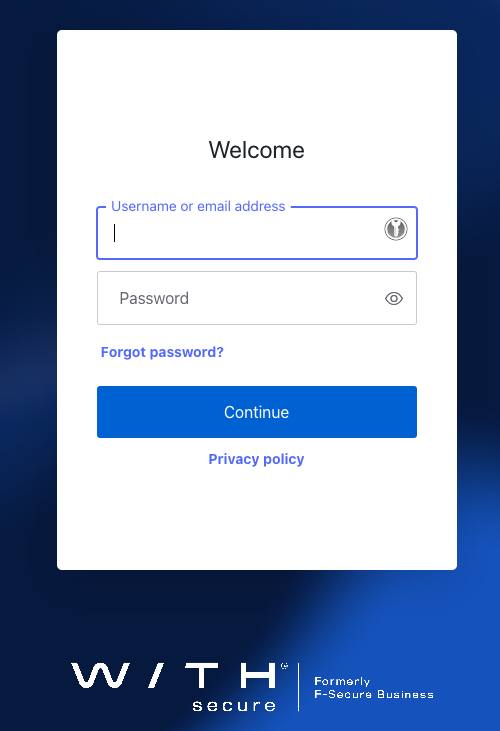
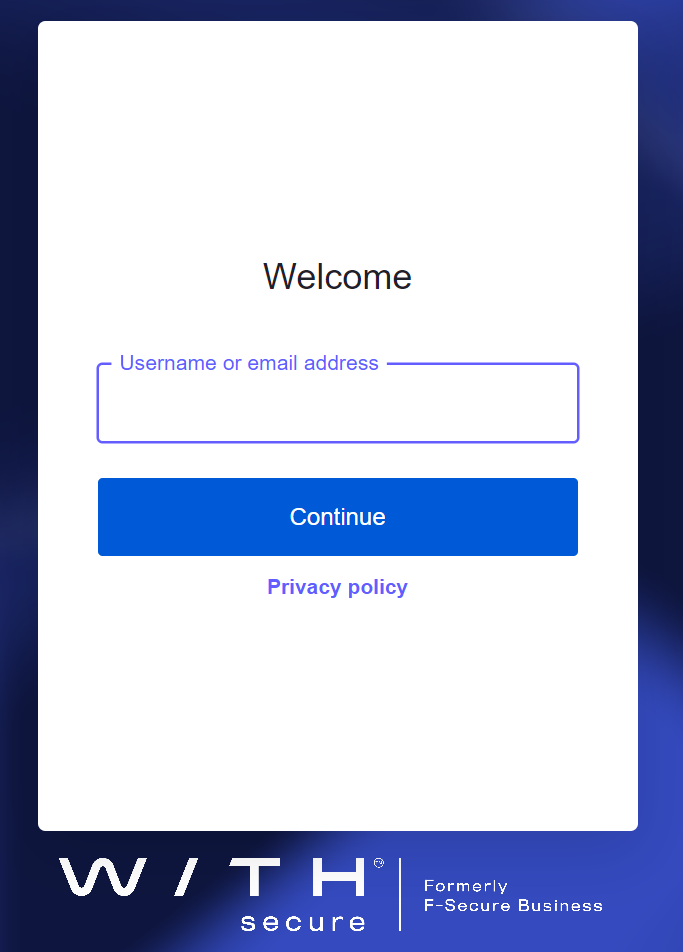
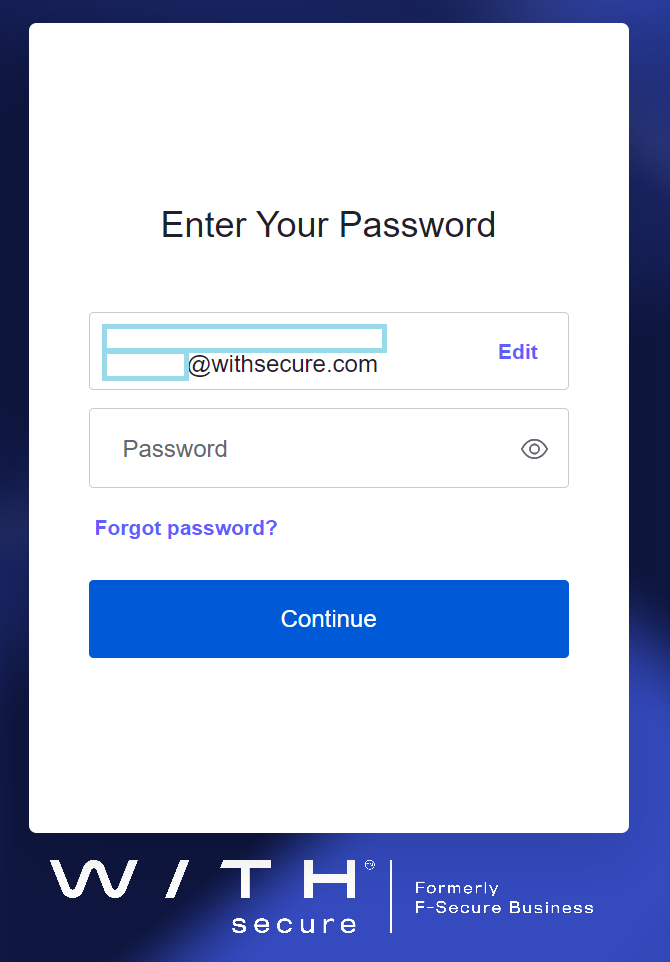
To get ready for the next stage we will change portal login flow to follow an ‘identity first’ model. The impact of this change is that email address and password are no longer given in a single transaction.
Summary
This is very common login flow model used today by many software vendors, for example Microsoft and Google, and we will also start to follow this flow starting 31 March 2024.
Current login dialog
Future Design
In the future, the email address (identity) will be asked first, and then authentication methods will be applied as separate steps.
If Multi-Factor Authentication is configured for the account, there will be an additional dialog (example only, actual display depends on your MFA options):
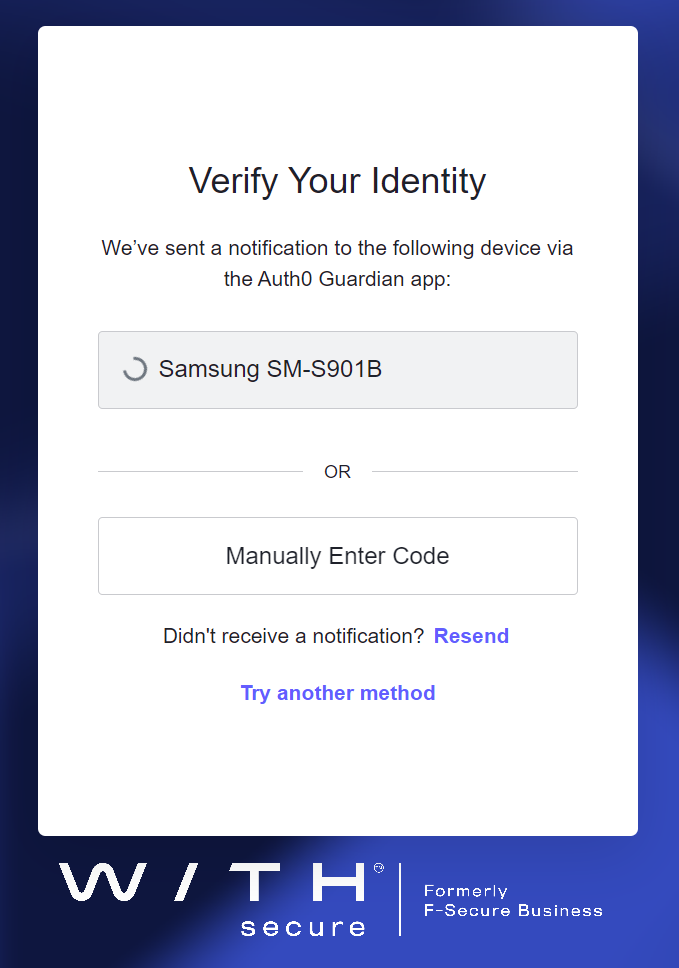
Please note that the use of MFA will become a mandatory step during the coming months. See our dedicated article for more information.
-
WithSecure Business Accounts: Multi-Factor Authentication enforcement
Read more
Starting from 22 April 2024, the use of a WithSecure Business Account for WithSecure Elements will also require that Multi-Factor Authentication (MFA) is used by everyone.
This change will immediately affect logins to:
- WithSecure Elements
If the same account is also used with any of the other services that use the WithSecure Business Account, these services will also use MFA. Such services include:
- WithSecure Community
- WithSecure Partner Portal
- Any other service that uses the WithSecure Business Account, either currently or in the future.
Currently the only way to configure MFA is through the Elements Security Center, but we will add this possibility to other services later.
Accounts that are only used for the WithSecure Community or WithSecure Partner Portal are not affected at this time, only accounts shared with WithSecure Elements.
We are making this change because as a cyber security vendor, our solutions must follow industry best practices and ensure that sensitive information and powerful capabilities are not misused due to password compromise. By using MFA, we can make life more difficult for attackers. Please see our recent article “Raising the bar” for more information about how MFA helps us all.
Enforcement schedule
MFA enforcement will begin on 22 April 2024, but please note that some geographical regions will start at different times. This will give users time to enable MFA before enforcement starts.
In the Elements Security Center, there has been a banner highlighting the lack of MFA for users since 1 February 2024. This message will be updated to include information about the enforcement schedule.
Starting from 22 April 2024, enforcement will be introduced for users in Europe, Middle East, and Africa (EMEA), as well as the Americas.
Users in the Asia-Pacific region will have longer to take MFA into use due to operational reasons, and their enforcement will happen starting on 31 July 2024.
What if I don’t have MFA configured?
Currently, when a user logs in to the Elements Security Center, and they have not yet configured MFA, they will see a banner advising them to configure MFA with their account. A link in the banner will start the configuration for them. They can skip this if they do not currently have time to complete the configuration, and continue to work normally in the Elements Security Center.
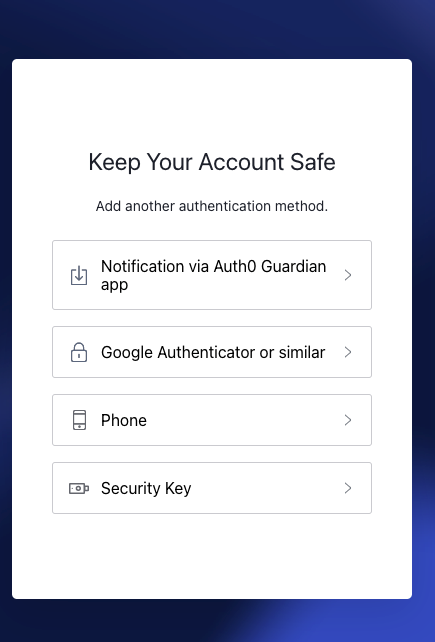
Once enforcement is enabled, after the next login the user will be prompted to configure an authentication method. They will not be able to use the Elements Security Center until they have enabled MFA.
For this reason, we strongly advise that MFA is configured already during the pre-enforcement period, so that this change is less disruptive later. Security Administrators can already check for MFA status for all users in their organization using the “Management / Organization Settings” view in the Elements Security Center.
For users already following the best practices and recommendations, there is no impact of these changes.
MFA methods available
There are multiple methods available for authenticating your Business Account credentials when you log in. In addition, device biometrics from laptops or smartphones can be used to simplify login from trusted devices when some of the following authentication methods are configured.
Choose the most secure authentication method available to you. FIDO2 is the best option, followed by authenticator apps. SMS should only be used as a last resort. Note that if you lose your mobile device and have not backed up your security keys or authenticator app, you will lose access to your account, so SMS can be used as a backup method in such situations.
Security keys (USB)
We support passkey technology with hardware security keys such as Yubico Yubikey, Google Titan, and others that support the FIDO2 standard
Smartphones as a security key storage
In addition to hardware security keys, it is also possible to use similar technology directly from smartphones and tablets which support the FIDO2 standard.
Authenticator apps for TOTP (Time based One Time Password)
When you log in using your WithSecure Business Account with TOTP authentication configured, you will be prompted to enter a time-limited security code as secondary identification. This security code can be displayed to you using an application supporting TOTP.
Some options for smartphones and laptops:
- Microsoft Authenticator, Google Authenticator, and many others for smart phones
- Password managers for laptops, for example 1Password, KeepassXC, and many others
Auth0 Guardian Authenticator app supporting push notifications
The Auth0 Guardian application can also be used. This application is available for Android and iOS, and it can receive a simple push notification when you log in using your WithSecure Business Account.
SMS for OTP (One Time Password)
It is possible to use SMS for receiving a one time password, which then needs to be entered into the login dialog. We recommend only using this as part of a secondary “fallback” method of authenticating, as the SMS messages may incur a cost to the user, and also SMS messages may be vulnerable to security breaches.
Find out more
You can find out more about how to configure MFA in the Welcome to WithSecure Elements guide
-
WithSecure Elements Announcements now available in more languages!
Read more
We are pleased to announce that we will soon be providing Elements Announcements in additional languages.
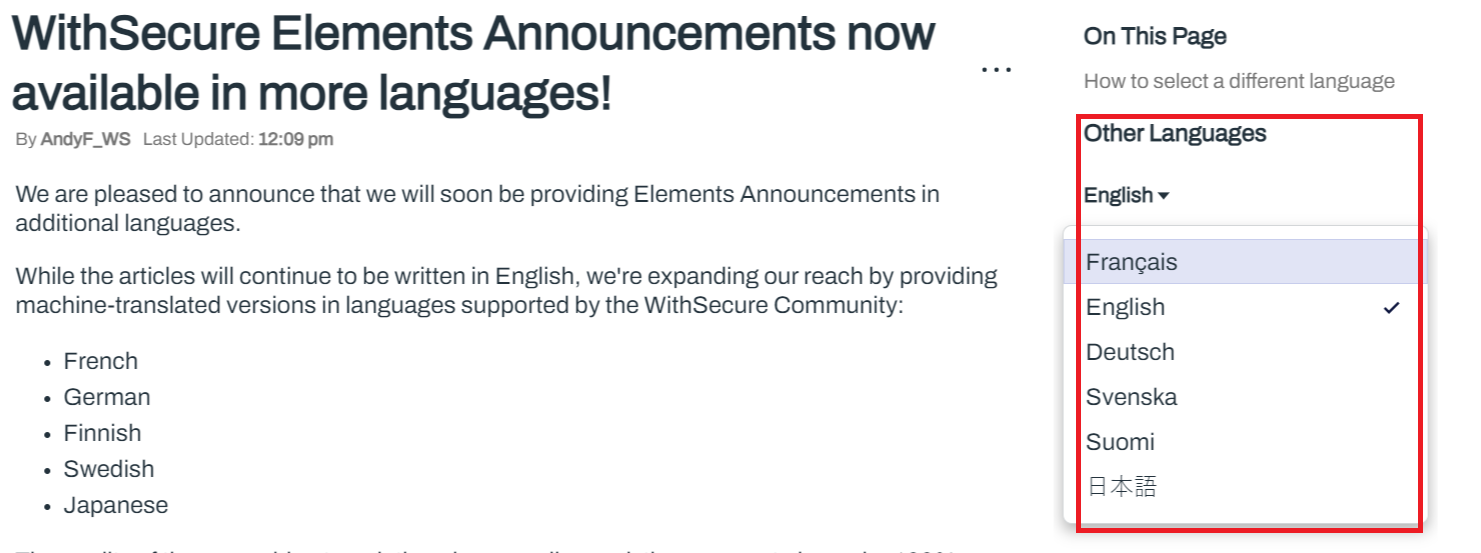
While the articles will continue to be written in English, we’re expanding our reach by providing machine-translated versions in languages supported by the WithSecure Community:
- French
- German
- Finnish
- Swedish
- Japanese
The quality of these machine translations is generally good, they may not always be 100% accurate. Please refer to the original English version of the article.
How to select a different language
When viewing an article in the WithSecure Community’s Troubleshooting section, there will be an “Other Languages” option on the right hand side. Simply click to open the drop-down menu, and you will see if other languages are available for that article.
Please keep in mind that we have not translated all existing articles yet. However, all new articles will be translated into multiple languages.
-
What’s New in Elements: January 2024
Read more
Elements Security Center
Changes to the Elements Security Center
On 30th January 2024, we published changes to the Elements Security Center, bringing the Endpoint Protection and Endpoint Detection and Response functionality closer together.
This is an important part of our overall design vision to make Elements Security Center more user-focused for day to day tasks, bringing related functionality together and reducing the number of pages where similar functionality is used for the different parts of WithSecure Elements.
You can find out more details about the changes in our dedicated article.
Elements Endpoint Protection
Elements Mobile Protection update for Android (23.5.0022639)
An update to the WithSecure Elements Mobile Protection app for Android (23.5.0022639) has been released
The app now supports the following security parameters:
- Detection for network using a proxy
- Detection for available disk space
Elements Agent for Windows and Server
A new version of the endpoint clients is available. This release makes the Elements Agent version 24.1 available (internal version 24.1.85), and the endpoints automatically upgrade without a reboot.
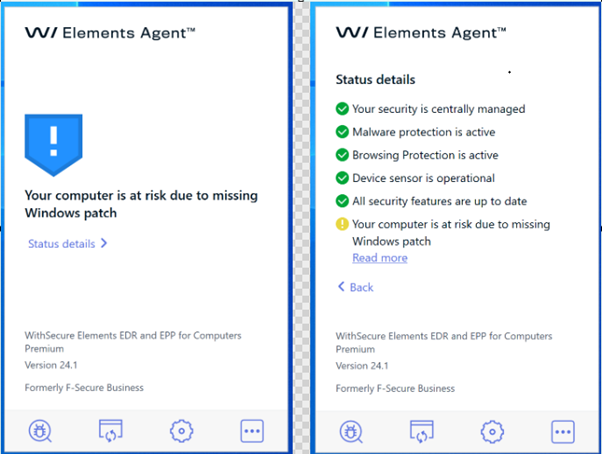
More visibility about the problems if endpoint is missing the ACS dependencies
This release adds more visibility about the problems if endpoint is missing the ACS (Azure Code Signing) dependencies.
For more information see the separate article on ACS dependencies
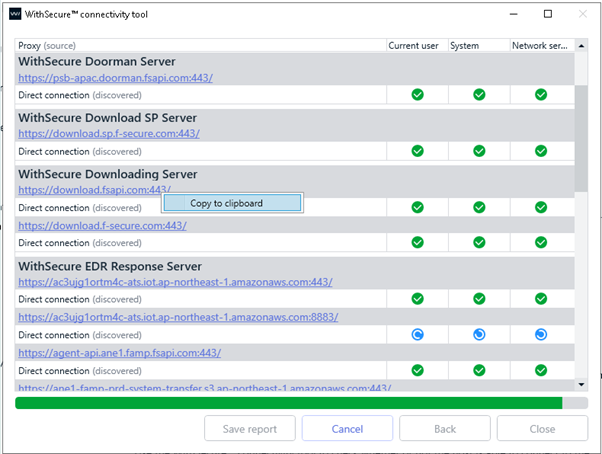
Improved Connectivity tool report view
The Connectivity Tool report view has improved user experience. It’s now possible to select and copy listed URLs to Clipboard.
New system event in System Events detection
A new system event (EventID 865, SoftwareRestrictionPolicies) will be available in system events detection.
This event is triggered (if enabled in profile) when user attempted to run a program that is not allowed by the policy.

Pre-Notification: Upcoming changes to WithSecure Elements Mobile Protection
During the first quarter of 2024, we will be releasing a new version of this product, and we want to let you know in advance so you can make your end-users aware.
These changes will bring Elements Mobile Protection close to the rest of the Elements product family, in terms of functionality. We are modernizing how we protect network traffic, and at the same time providing more visibility into the security of the device. These are essential for modern B2B applications.
Changes in a nutshell:
- Improve the overall user experience and reliability when browsing traffic is being protected.
- Network Gateway to protect network traffic, also utilizing the WithSecure Security Cloud for seamless fast and reliable scanning
- Introduce a Browsing Protection plugin for Safari on iOS
- Providing visibility to Elements Mobile Protection events in the Elements Security Center.
- Network Gateway on the device will replace the current VPN functionality
To improve the reliability and security of browsing traffic, we will be implementing a “Network Gateway” on the device. This will replace the current VPN functionality of the mobile clients, which routes all device network traffic to an external “VPN exit node”. With the Network Gateway, you will no longer be able to select a VPN exit node, but you will benefit from more comprehensive protection of your browsing traffic. Please note that network traffic will not be encrypted with this new functionality.
The user will not need to install a new application.
We are currently finalizing the changes for these new clients, and we will provide an update once we have a firm release date. At the same time, we will provide a link to more information on the changes and any steps partners or customers should be aware of.
Elements Endpoint Detection and Response
EDR: Process tree
We have enabled new Process Tree view in Elements Detection and Response.
This is a proof-of-concept using completely new components and lots of refactored code, so we would greatly appreciate feedback to improve it further.
Please, report all bugs and possible performance issues. It does not provide all functionality of “old” tree, but missing elements will be added soon.
We hope that this will help our users to investigate Broad Context Detections on deeper level using new version of EDR BCD Details.
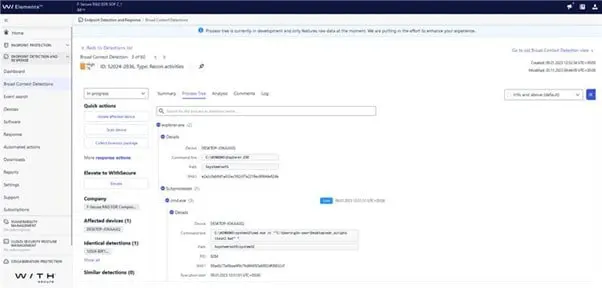
Note: The Old process tree view is still available.
Elements Vulnerability Management
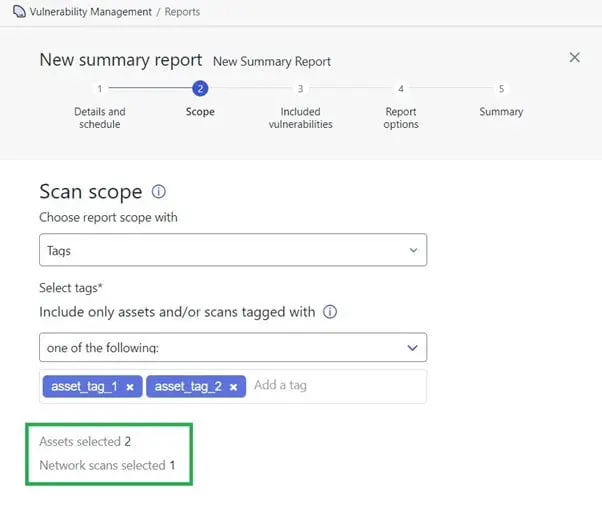
EVM: Portal Changes
Summary report configurator updated to correctly display values of selected assets and scans.
Integrations
Elements API
Statistics of Security Events
The Elements API client can read statistics from query endpoint. When a request contains the HTTP header
Accept: application/vnd.withsecure.aggr+jsonthe Elements API selects all events matching query parameters, groups events by selected property. In response client receives number of items in each group.
Example
curl -v -X POST

-H "Accept: application/vnd.withsecure.aggr+json" -d "count=engine"

-d "engineGroup=epp -d "persistenceTimestampStart=2024-01-01T00:00:00Z"

""
Example cURL reads statistics for EPP security events that have been created after 2024-01-01. Client uses parameter count=engine to group events by property engine.
{

"items" : [{

"engine" : "manualScanning",

"count" : 10

}, {

"engine" : "tamperProtection",

"count" : 143

}, {

"engine" : "firewall",

"count" : 17

}, {

"engine" : "deepGuard",

"count" : 22

} ]

}
The received response contains information that API found 10 events from manualScanning, 143 events from tamperProtection, 17 from firewall and 22 events from deepGuard
Elements API Cookbook contains example statistic request implemented in Python.
Other items of interest
Monthly Threat Highlights Report: December 2023
- Significant data breaches affecting US telecoms provider Xfinity, US mortgage lender MrCooper, and DonorView, a provider of a cloud-based charitable donation platform
- Active exploitation of the zero-click Outlook/Exchange exploit by Russian APT, identified as Unit 26165 of the Russian GRU.
- Analysis of exploit data focusing on changes over time in WithSecure and VirusTotal detection data, including fluctuations in the use of specific CVEs.
- Ongoing events surrounding Israel and Palestine with associated hacktivist proxies active in the cyber arena for both sides.
- Continuation of ransomware attacks, albeit in lower numbers than previous months, and signs of potential return of Qakbot after being taken down by Law Enforcement Agencies.
- Exploration of interesting vulnerabilities, both old and new, with a different approach to analyzing the data on these vulnerabilities.
Significant Data Breaches
- Xfinity: The US telecoms provider Xfinity experienced a significant data breach, with the Personally Identifiable Information (PII) of 35 million people stolen. The breach was attributed to a server vulnerable to CitrixBleed that was left unpatched for 2 weeks, allowing attackers to compromise it.
- MrCooper: The US mortgage lender MrCooper had the PII of 15 million individuals stolen. The data compromised included that of every current and former customer of the company or its sister brands, potentially even including individuals who have applied for a loan through MrCooper.
- DonorView: A cloud-based charitable donation platform, DonorView, experienced a breach resulting in the exposure of PII, including payment information, as well as details of children, their medical conditions, and attending doctors. The data was accessible from an unsecured Internet-connected database.
Active Exploitation of Zero-Click Outlook/Exchange Exploit by Russian APT
Microsoft identified CVE-2023-23397 as being actively exploited by the Russian state-sponsored actor known as APT28, Forest Blizzard, or Fancy Bear, identified by the US and UK as Unit 26165 of the Russian GRU. This activity was ongoing in December 2023, and Microsoft worked with Polish Cyber Command to identify and mitigate the techniques used by the attacker.
Analysis of Exploit Data
The report analyzes exploit data, focusing on changes over time in WithSecure and VirusTotal detection data. It highlights fluctuations in the use of specific CVEs, including significant increases in detections for vulnerabilities in Microsoft Office, Oracle Java JVM, and a specific set of drivers from MalwareFox AntiMalware. The report also notes a spike in exploit attempts for CVE-2023-23397, possibly related to the activity described by Microsoft or caused by other actors following Microsoft’s reporting.
Ongoing Hacktivist Activity
The report mentiones ongoing events surrounding Israel and Palestine, with associated hacktivist proxies active in the cyber arena for both sides.
Ransomware Trends and Notable Reports
The report highlights a sharp decrease in ransomware activity from November 2023, with several law enforcement actions possibly impacting the numbers. However, tracked ransomware activity in December 2023 was still significantly higher than December 2022, with a 41.51% increase in victims. The report also provides insights into specific ransomware brands and trends observed throughout 2023.
Stay informed about the latest cybersecurity threats and trends.
In case you missed it
New client releases and related changes
We will soon be releasing new versions of our clients for Windows, Mac, and mobile devices.
For ALL clients
Server address changes
One of the more significant changes is that we are taking into use backend services that are completely distinct from the services used by F-Secure products. This will allow us to control what happens in our backend systems to fully focus on the needs of our business customers and partners. The earlier systems had to also cope with consumer use-cases.
As some of our Elements partner and customers have strict rules on outgoing network connections (also known as “egress firewall rules”), we have published an up to date list of all the servers our clients connect to. You can find the list in this Community article.
New Download Locations
Customers using automated deployment systems to install the Elements clients, for example Remote Monitoring and Management (RMM) systems, should take care to update their processes to use the new installation package download locations. The only supported locations are those which are used in the Elements Security Center’s “Download” section, and any other location such as download.sp.f-secure.com are deprecated.
Browser Extensions
All clients will also use WithSecure browser extensions. These can be found at:
Please note that all Windows EPP versions will switch to using these new WithSecure extensions from early March.
For Windows Clients
All Windows clients now need Microsoft ACS support to correctly function. This was previously announced in February 2023. From client version 24.1, the client will not install updated to newer versions without the required ACS support, and will remain at 24.1 level. Once the devices are patched, they will be upgradable to newer versions.
For Mac Clients
We have just published a dedicated article on the changes coming with the next release for macOS. This includes MDM changes, as well as network addresses and browser extensions.
For Mobile Clients
Please see the section in Endpoint Protection “Pre-Notification: Upcoming changes to WithSecure Elements Mobile Protection”
Share your ideas with us
Our purpose is to co-secure the world with you – now as WithSecure™. To co-create the best possible cyber security products and services, we warmly recommend you share your ideas via our Ideas Portal, now accessible directly from WithSecure™ Elements Security Center.
Further information
Changelogs and Release Notes for all parts of WithSecure™ Elements can be found at the Help Center