
-
Maintenance Break: Elements Collaboration Protection – 12th November 2024 / 17.00 UTC
Read more
UPDATE 2024-11-04: Article updated to clarify the expected duration of the break, as well as system limitations during the maintenance.
We will be performing system maintenance on the Elements Collaboration system on 12th November 2024 at 17.00 UTC.
We anticipate that the maintenance break will last just a few minutes, and during the maintenance some administrative actions will not be available in the Elements Security Center.
During the break, no data will be lost, however some notifications may take a short time to appear after the maintenance break is over.
-
New API feature: Checking the latest versions of product databases
Read more
For several years, we have had a web-based page known as dbtracker.f-secure.com, which was useful for finding out the latest versions of the various engines and databases used by our products.
This service will be terminated in December 2024, as it is outdated and no longer suitable for WithSecure customers.
We have now introduced a new entry point to the Elements API that can be used to retrieve the equivalent information from our production systems.
Endpoint: GET /databases/v1/latest-versions
Details:
- Purpose: Check the latest versions of databases
- Response: Returns a list of databases along with their latest version numbers.
- Usage: Ideal for ensuring that your systems are using the most current database versions for optimal security and performance.
Please Note: Even if a newer version of a database has been released, your endpoints may not have received it yet due to the frequency the endpoint clients applications check for updates.
For further details about how to use this new endpoint, please check
https://connect.withsecure.com/api-reference/elements#get-/databases/v1/latest-versions
For information on getting started with the Elements API, please check
-
New Feature: Federated Single Sign-On is now available for WithSecure Elements
Read more
Update 2024-12-03: Added information about WithSecure Elements Identity Security, and WithSecure Elements Exposure Management, which can protect your users from identity-based attacks.
What is Federated SSO?
Federated single sign-on (FSSO) is a mechanism that allows users to authenticate and access several applications or services across different domains or organizations without the need to log in separately for each.
Users may already be familiar with this if they access their own organization’s systems using the same account, usually the same account they use to log into their workstations. The same account is often used for their email, or Microsoft Teams, meaning they log in once and that’s it.
FSSO simplifies access across various systems by allowing users to authenticate once and move seamlessly between different applications or services. It enhances security and user experience by eliminating the need for multiple logins.
How to use Federated SSO to access WithSecure Elements
Once an organization decides to implement Federated SSO to access WithSecure Elements, there’s a few basic things to do:
Ensure that your domain users have accounts in WithSecure Elements
For every user in your organization that should be able to access WithSecure Elements, an account must be created within Elements.
NOTES:
- Federated SSO can only work with plain email addresses such as firstname.lastname@company.org. Addresses of the form firstname.lastname+elements@company.org will not work.
- Email aliases do not work with FSSO, so always use the primary email address for the account.
- IAM administrators can still create accounts outside of federated domains. Any such existing accounts will continue to function and will require an Elements password upon login. The ability to define policies that restrict organization access to federated accounts only will be added in future releases of Elements.
- If a linked user cannot be authenticated, for example if they have been removed from the Entra ID domain, they will be unable to access WithSecure Elements.
Link your domain to WithSecure Elements
As a Global Administrator user within your organization’s Entra ID tenant, you must link your domain to WithSecure Elements.
After successfully linking WithSecure Elements and the Entra ID tenant, the administrator must finally enable FSSO within Elements.
Logging into WithSecure Elements
Once all the above steps have been completed, users will be able to log into WithSecure Elements with their Entra ID account.
NOTE: The first time the user logs in after federation has been taken into use, they will be prompted for their Elements password and Entra ID domain password. On future access to WithSecure Elements, the user should be prompted only if there is no valid Entra ID authentication available. See the User Guide for more information.
Protecting your Entra ID users from Identity-based attacks
Did you know that you can help protect your Entra ID users by taking WithSecure Elements Identity Security into use.
This will protects organizations against identity-based attacks by detecting potentially compromised Microsoft Entra ID identities that are used by attackers to access Microsoft 365 or other cloud-based services.
Minimize Identity-related risks using WithSecure Elements Exposure Management
WithSecure Elements Exposure Management is a world class solution for checking your infrastructure for misconfigurations and vulnerabilities. It can be help you minimize risks related to identities by catching for example disabled MFAs, Old passwords, and possible Identity leaks.
Final Note
You can find comprehensive documentation on the whole process of configuring and using FSSO in the Elements User Guide. Please note: At the time of publishing this article, the localized userguides are still being worked on, so please check the English guide.
-
What’s New in Elements: September 2024
Read more
Editor’s Highlights
Advanced Response Actions are now available on macOS
We’re happy to announce that EDR Advanced Response Actions are now available for macOS. Please see the item WithSecure Elements Agent macOS 24.3.53367 below for more information.
Extended Detection and Response
Endpoint Protection
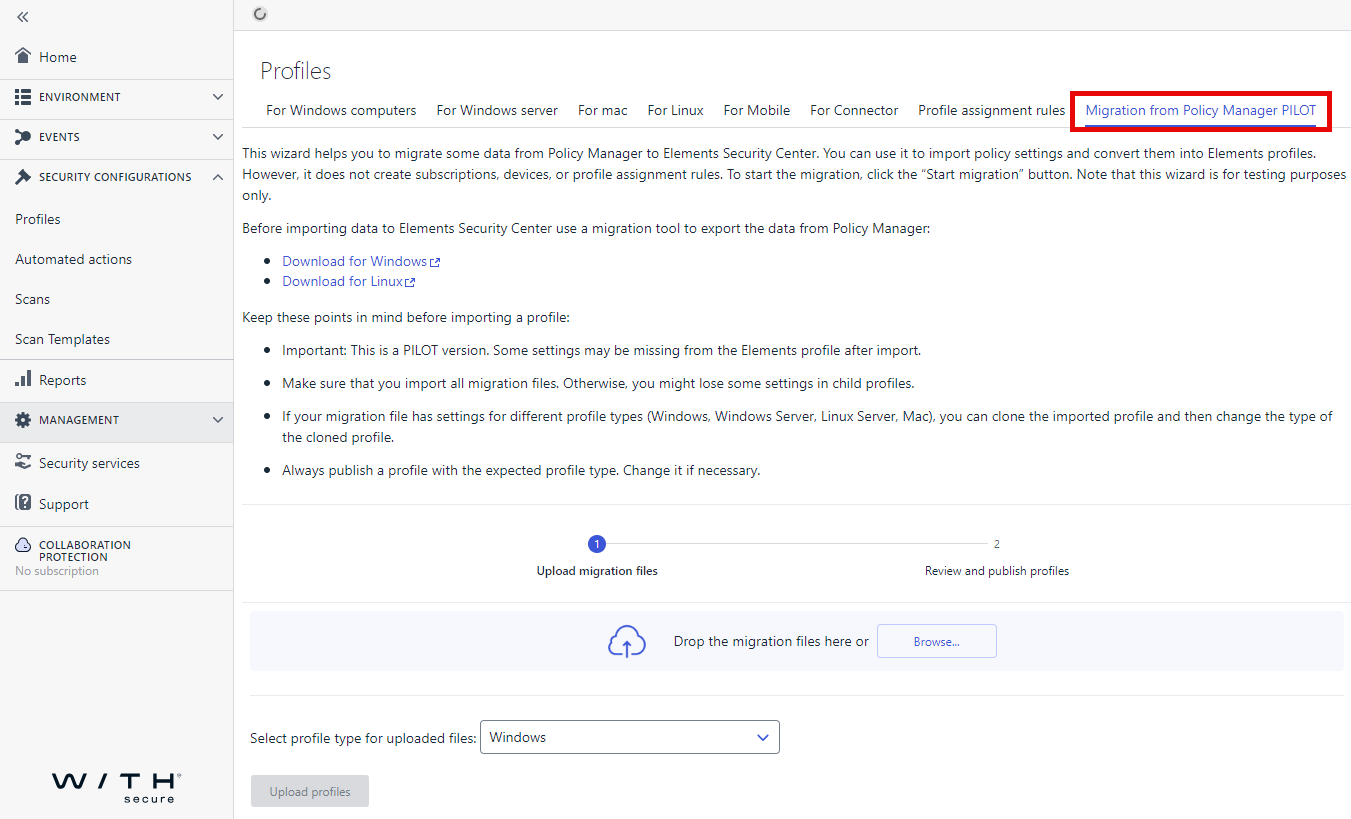
EPP: Migration from Policy Manager (PILOT)
We have released a new wizard that can help you with migration from the Business Suite (Premium) to our Elements products and we are eager to hear your feedback.
This wizard helps you to migrate some data from Policy Manager to Elements Security Center. You can use it to import policy settings and convert them into Elements profiles. However, it does not create subscriptions, devices, or profile assignment rules. To start the migration, click the “Start migration” button. Note that this wizard is for testing purposes only.
Keep these points in mind before importing a profile:
Important: This is a PILOT version. Some settings may be missing from the Elements profile after import.
Make sure that you import all migration files. Otherwise, you might lose some settings in child profiles.
If your migration file has settings for different profile types (Windows, Windows Server, Linux Server, Mac), you can clone the imported profile and then change the type of the cloned profile.
Always publish a profile with the expected profile type. Change it if necessary.
WithSecure Elements Agent macOS 24.3.53367
A new version of WithSecure Elements Agent for macOS has now rolled out to Production and is available for all customers.
Added features:
- Advanced response actions are now available for macOS
- Software updater user interface component enabling better visibility and control of application updates
Other:
- This release is not compliant with macOS Sequoia
- Official macOS 15 Sequoia support is scheduled later in 2024 with version number 24.4.
- Before upgrading, please read article about the network addresses
Elements Mobile Protection IOS updates
An update to the WithSecure Elements Mobile Protection app for iOS (24.7.11129) has been completed 9 September 2024.
It includes the following new features and improvements:
Improvements to URL validation
- The app now supports the update of User Data
Elements Mobile Protection: Android version 24.7.0023004
An update to the WithSecure Elements Mobile Protection app for Android (24.7.0023004) has been released.
It includes the following new features and improvements:
- Replaced “Traffic protection” with “Recent activity”
- Redesigned the main app interface for improved user experience
- Extended details are now available for checked URLs
- The app now supports reporting false positives
- Added filtering by category and status to the “Recent Activity” view
- The counter of processed and blocked URLs is now more preciseThe app now displays a notification when a URL is blocked
EPP Portal
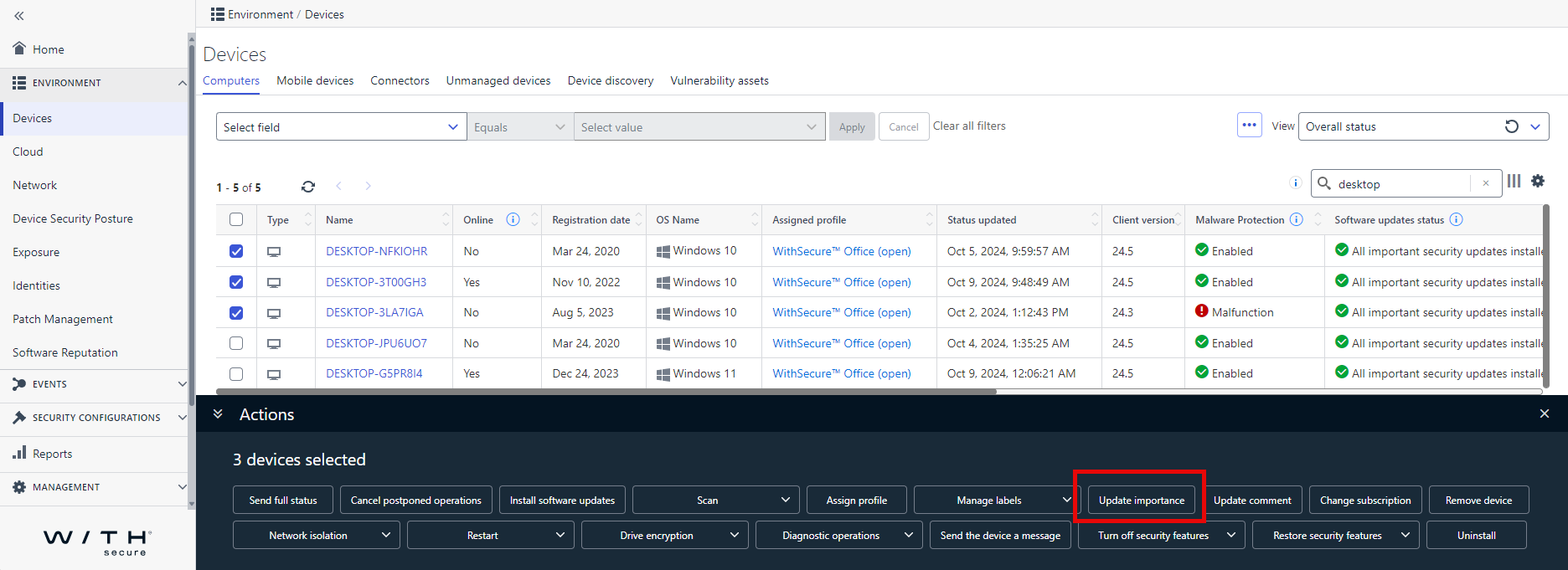
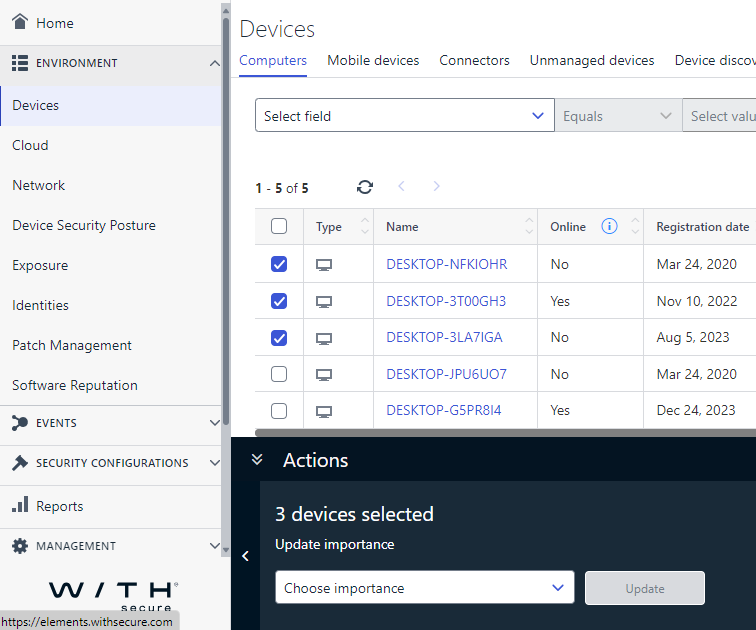
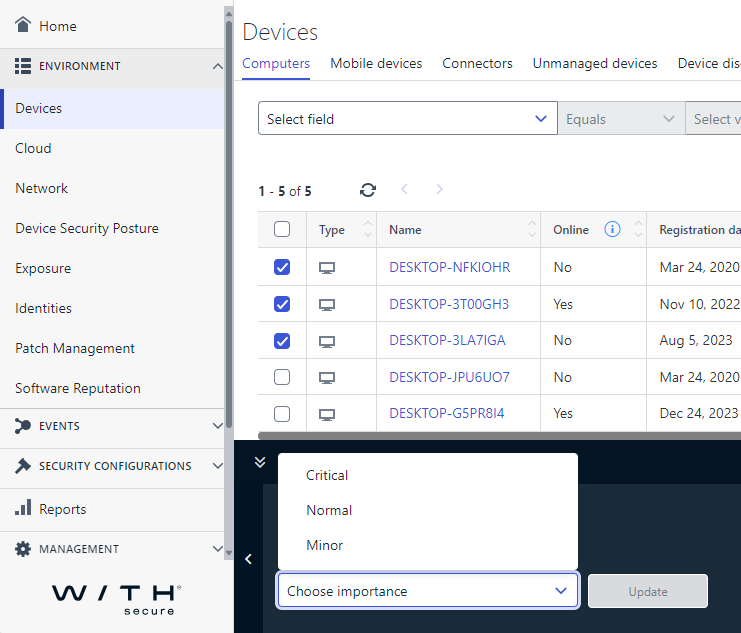
Device importance can now be updated from the device listing view
Multiple selection and edit by query are both supported.
Endpoint Detection and Response
Elements XDR: New Feature for Reopening Closed BCDs
We are pleased to introduce a feature that allows Partners and Customers to reopen closed BCDs within 30 days, regardless of the resolution code. This ensures any critical questions can be addressed post-closure.
You can find full details of this new feature in its own dedicated article.
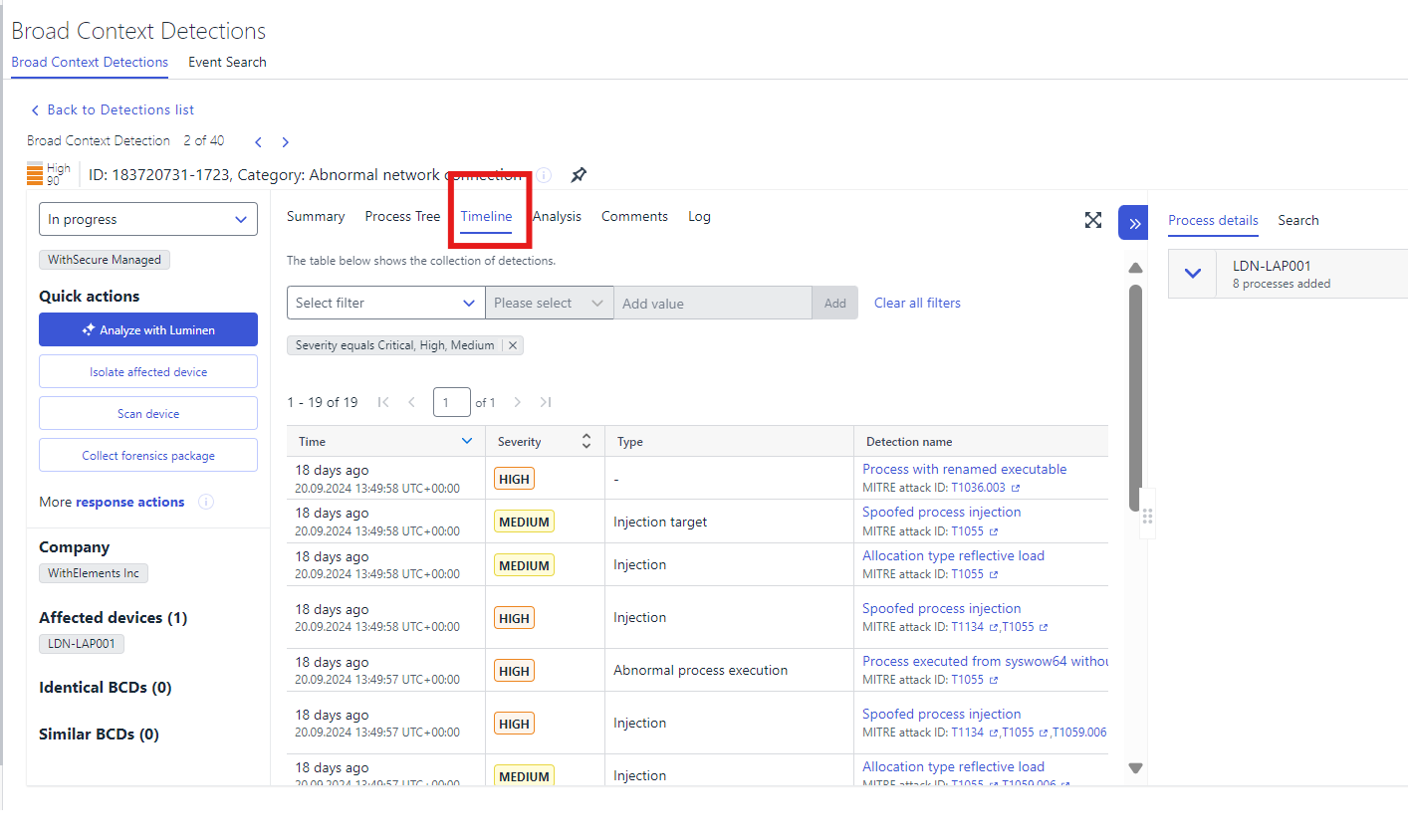
Elements XDR: New ‘Timeline” section in the BCD details view
We’ve introduced a new “Timeline” section in the BCD details view. This feature lists detections in a table format for another alternative view to assist investigation in understanding sequence of events across multiple hosts.
Exposure Management
Vulnerability Management
Attack Path Simulation
We have now released a new feature to Exposure Management, which models how an attacker can exploit your environment, and presents this to you visually.
You can find full details of this new functionality in its own dedicated article.
EVM: System Scan
The capability to detect vulnerabilities in the following products has been added to authenticated scanning for Windows
- Zabbix Agent
- Zabbix Agent 2
- Spring HATEOAS
- Cisco Smart Licensing Utility
- Veeam Backup & Replication
- Intel oneAPI HPC Toolkit
- Intel Rapid Storage Technology
- Webroot Antivirus
Elements Foundations
Elements Security Center
Elements Security Center “Add subscription key” moved and replaced by “Assign subscription”
The “Add subscription key” feature, previously available on the now deprecated Endpoint Protection Subscriptions screen, is currently available for all types of subscriptions on the Management / Subscriptions screen.
On the new screen located “Management > Subscriptions”, the feature is called “Assign subscription” and is initially accessible to either partner or company users who have full (server and client) access to Endpoint Protection. Just like before, an existing key associated with a partner account can be assigned to a company.
The company must be selected from the Scope Selector.
New view:
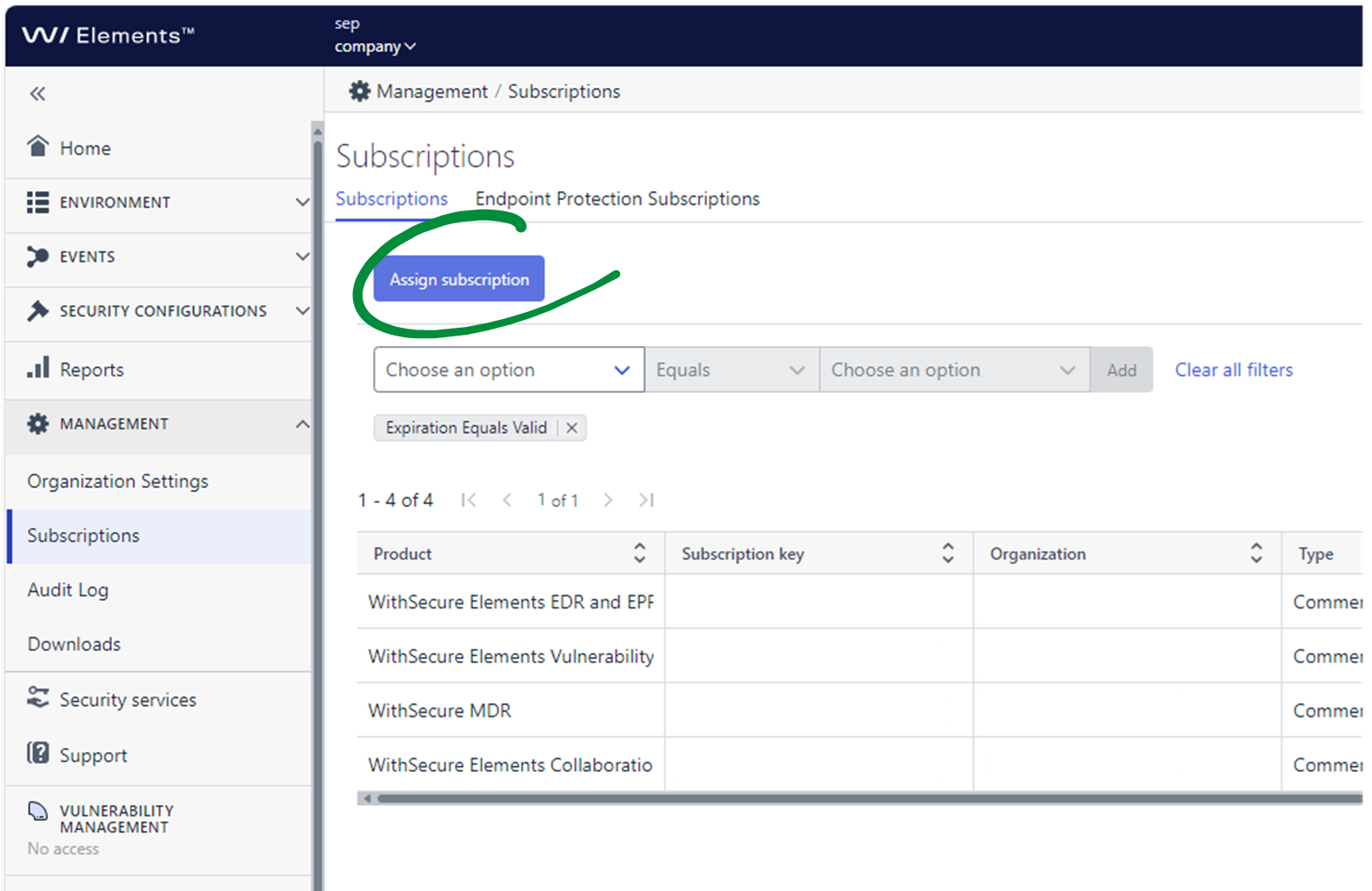
Clicking the “Assign subscription” button brings up a flyout where the subscription key currently associated with the partner account can be entered.
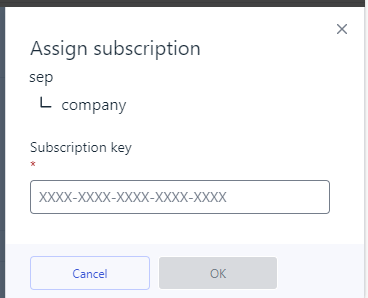
Clicking “OK” moves the subscription to the company account currently selected in the Scope Selector.
With this change, the old Endpoint Protection Subscriptions screen becomes obsolete and is scheduled for removal on January 1, 2025.
Elements Security Center: Email change functionality moved to a dedicated page
The option to change the email of the user currently logged in to Elements Security Center, which was previously available directly on the My settings screen, has been moved to a separate page. Changing the email will now also change the username to the same value as the new email.
To change your email, go to My settings and click Change email.
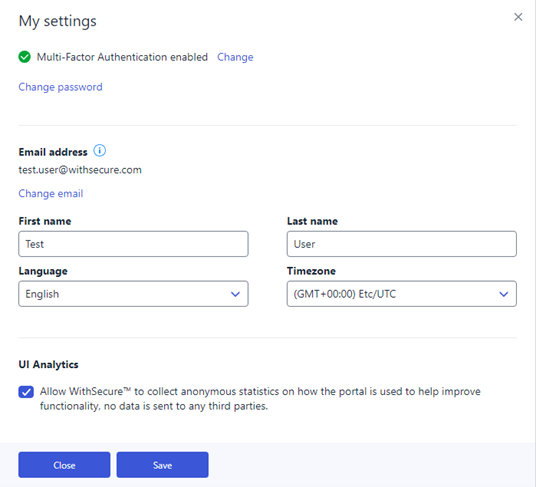
You will be redirected to a separate screen. The screen will display your current email and allow you to provide a new one.
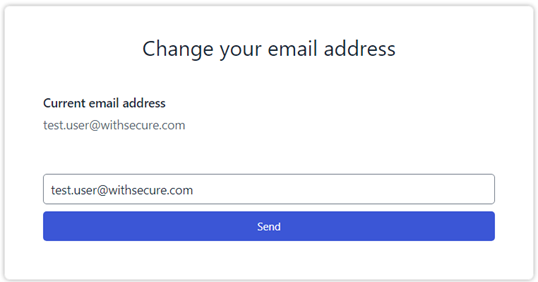
If your username is different from the email, a warning will be displayed that changing your email will result in setting the username to the same value.
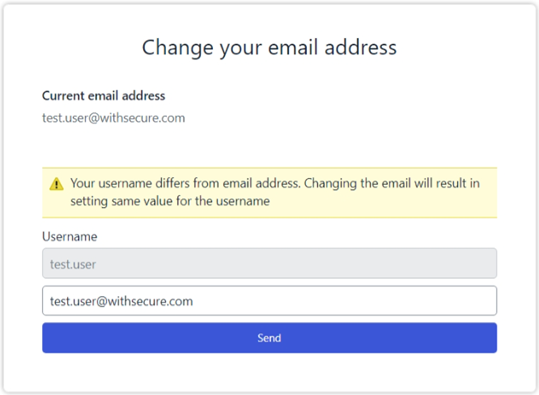
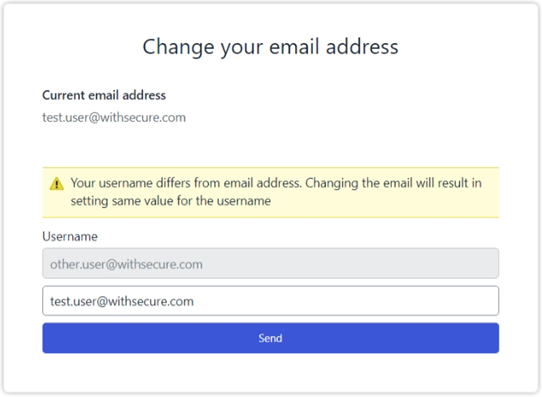
To change your email, provide a new value and click Send. You will be asked to authenticate again before the operation is carried out.
After your email is changed, you will be automatically redirected back to Elements Security Center.
Integrations
Elements API
The latest Elements API release brings new incident sources from the incidents endpoint.
There is a new query parameter <source> in the /incidents/v1/incidents endpoint.
The <source> parameter can be one or many of these (separated by comma):
- endpoint – The incident contains detections raised by endpoint events
- cloud – The incident contains detections raised by cloud events
- customer – The incident is a support request originated from the customer
- endpointExpert – The incident was raised manually by the MDR service team
If the <source> argument is not given, the incidents endpoints returns incidents from all possible sources.
Please see the api definition for more details on the incident endpoint:
https://connect.withsecure.com/api-reference/elements#get-/incidents/v1/incidents
Other items of interest
Gartner recognition
As one of 15 global vendors, Gartner recognized WithSecure in the 2024 Gartner® Magic Quadrant™ for Endpoint Protection Platforms for our ability to execute and completeness of vision.
For more information, please visit our website
In case you missed it
Navigation changes in Elements Security Center
We recently announced changes to the navigation structure within the Elements Security Center.
You can find out more about the changes in the announcement.
Share your ideas with us
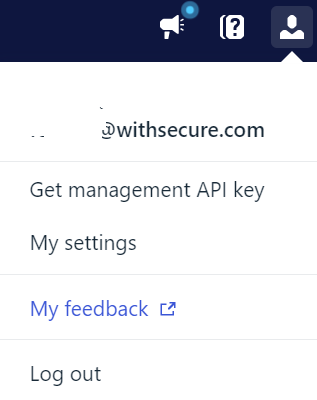
Our purpose is to co-secure the world with you – now as WithSecure™. To co-create the best possible cyber security products and services, we warmly recommend you share your ideas via our Ideas Portal, now accessible directly from WithSecure™ Elements Security Center.
Further information
Changelogs and Release Notes for all parts of WithSecure™ Elements can be found at the Help Center
-
WithSecure Elements and F-Secure branded clients – End of support 2024-12-31
Read more
As we have previously announced, due to infrastructure changes needed as part of our separation from F-Secure, the use of F-Secure branded clients is deprecated.
The clients WILL stop working at the end of 2024, and will provide no protection at all.
Customers using these deprecated clients MUST upgrade them to WithSecure branded versions before this date to ensure continued protection.
IMPORTANT NOTE: There is no need to purchase any new products. Your existing subscription keys continue to work for WithSecure-branded clients!
Possible reasons why the clients have not been updated automatically
Unsupported operating system
You may be using an operating system that is no longer supported by WithSecure Elements. Please note that the following versions are supported:
Microsoft Windows: Windows 10 and Windows 11
Microsoft Windows Server: Windows Server 2016, Windows Server 2019, Windows Server 2022
macOS: macOS 14 “Sonoma”, macOS 13 “Ventura”, macOS 12 “Monterey”
iOS: iOS 15 or later
Android: Android 11 and later
For Microsoft Windows, please note that Microsoft have changed the certificate they require security software vendors to use for signing software. The new certificate was added to Windows via software updates 3 years ago so this only affects computers that are at an older patch level. If a device does not support the ACS certificate it will show a critical protection status, and the EPP dashboard issue list contains an entry linking to affected devices. You can find out more details about this in our dedicated article.
Customer used our functionality to delay when updates happen
WithSecure Elements has functionality which will allow some client updates to be deferred. This is not intended to be used to delay the updates indefinitely. The easiest way to verify this is:
Go to the device list
Set a filter for ”status updated” -> within the last 7 days
Set a filter for “client version” -> not equals 24.4 or 24.5
Save the view from the view menu with a name such as “unsupported clients”
You can navigate to view profile settings by clicking on the assigned profile, then check the “automated tasks” section to verify if there is a task delaying updates. If there is, change the schedule to match your next maintenance window
Customer has some clients that requested a reboot after first installation and the reboot was never done
If the client requested a reboot after initial install but it was not done, it is possible that the client is not checking for updates. Using the view created above, open device details, navigate to the “Elements Agent update history” section and expand it. Check the status next to “Oneclient PSB” if it is requesting a reboot.
Disk space is really low
Elements clients will check for available disk space before trying to update. If your device has less space than needed for the update, the update is not applied. You can identify devices that have insufficient disk space from the EPP dashboards issue-list. Clear some space on the disk by deleting old content or moving it to another drive, and reboot the device. When the client starts again it will check for space, and if there is enough then the update will proceed.
Firewall prevents connection to an important network endpoint
WithSecure Elements Clients require access to some very important servers that we host. If connections are not possible, in some cases no update is detected, and this will keep the device at an older version. To identify devices that might have problems with connectivity navigate to the device list, click on the 3-bar icon next to device search, filter available columns for “connectivity” and select the fields “connectivity status” and “connections failing always”. This will add these new columns to the device list. If you filter the list to only show devices with “disconnected” connectivity status it will make it easy to review which domains they have issues connecting to and verify your firewall or proxy configurations to allow them. Please check this community article for a list of required connections.
-
Elements IAM administrator role available in self-registration
Read more
Why are we introducing this role?
As WithSecure Elements evolves, we will be adding new roles for specific purposes. For example, a company may only want to grant access to certain parts of Elements to specific users. This is known as Role Based Access Control, or RBAC.
To facilitate the management of these roles, and granting users permissions to use them, we are introducing a new role to WithSecure Elements Security Center, which will be the gatekeeper of all user management and role assignments in the future
More changes related to RBAC will follow, and these will be announced separately.
The role in more detail
Users with the new Identity and Access Management (IAM) role will be able to grant and revoke all Elements role permissions for other Administrators within the IAM administrator’s own organization, as well as in child organizations. In effect, this means an IAM administrator at partner level can also grant authorization for their own customer’s users.
By adding this role to organizations, we can simplify and streamline the actions needed when we introduce other roles in the future.
Eventually, user creation and modification permissions will be removed from other roles within Elements, with only users with the IAM role able to create and modify users. This will lead to increased security for the organizations, as only trusted admins will be able to grant access.
Availability of the role
Starting immediately, we will grant the IAM role during company self-registration, where this is allowed. This means that for most new companies, one of the very first thing they will do after receiving their subscription information is to create a user with IAM. This will be in addition to other subscription-specific role assignments such as Security Administrator for Endpoint Security
To find out more about privileges, please see the user guide
Later on, we will enable reminders within the Elements Security Center, to prompt users that the IAM role can be claimed. These changes will be announced separately.
In Summary
- The Elements IAM role is granted as part of the Self-registration process for new customers.
- This applies to organizations where self-registration is allowed. Once self-registration has been completed, the user will get the IAM role and any additional roles related to the actual subscription used in the self-registration form
- You can also find more information in the changelog
-
WithSecure Ideas Platform Migration
Read more
UPDATE 19 November 2024:
Issue Resolved: Account Linking for Ideas
The issue where ideas were not automatically linked to user accounts upon logging into the Community has now been resolved. Thank you for your patience and understanding while we addressed this matter. If you experience any further issues, please don’t hesitate to reach out.
UPDATE 25 October 2024:
Since migrating ideas to the Community, we’ve encountered two issues:
- Account Linking Issue: Ideas are not automatically linked to user accounts upon logging into the Community.
- Search Functionality Limitation: Ideas are currently not searchable through the Community’s main search bar.
We apologize for any inconvenience and are actively working on solutions. Thank you for your patience!
UPDATE 16 October 2024:
The migration has been delayed by 24 hours.
———————————————————————————————————————-
The WithSecure Community will be down for maintenance from 16 October 22:00 EEST / 21:00 CEST / 20:00 BST / 15:00 ET to 17 October 2024 10:00 EEST / 09:00 CEST / 08:00 BST / 03:00 ET. During this time, we will be migrating WithSecure Ideas to the Community platform. We apologize for any inconvenience and appreciate your understanding.
We would like to inform you that the tool we use for collecting WithSecure ideas is migrating to the WithSecure Community on 15 October.
During the migration, ideas.withsecure.com will be unavailable from 14 October through 16 October. After the migration, you can access WithSecure Product Ideas on the WithSecure Community directly:

All ideas submitted before 14 October 2024 will be migrated to the new platform, and rest assured, all data will be preserved during the process.
Creating or Accessing Your Account
To access the updated platform, WithSecure Product Ideas on Community, please use your WithSecure business credentials.
If you already have a Community account, your previously submitted ideas will be automatically linked, as the system connects them via your email address.
If you do not yet have a Community account, registering is quick and easy. This can be done using “sign in” and “register” respectively. When you create a new account, your previously submitted ideas will also be automatically linked to your newly created Community account, as the system connects them via your email address.
Your nickname (username) will default to the part of your email address before the “@” symbol (e.g., johndoe@example.com will have the username ‘johndoe’). You can update your nickname in your Account & Privacy Settings after registration.
Anonymous Access
Please note that anonymous access to the Ideas Portal is not available.
We have changed the way we collect your valuable ideas. By joining the Community, you can now share your insights, engage in discussions, learn from others, and connect with fellow users.
To participate or provide feedback, you’ll need to log in to the Community. If you don’t have an account yet, registering is quick and easy — just click on the “sign in” or “register” options.
Access via Elements Security Center
If you use the same account to access the Elements Security Center and the WithSecure Community, you can still use the link to the Ideas Portal in the Elements Security Center (“Feedback” under the user menu). Enter your WithSecure business credentials to access the platform.
Access via Partner Portal
If you use the same account to access the Partner Portal and the WithSecure Community, you can still use the link to the Ideas Portal in the Partner Portal (“My Ideas” in the top menu). Enter your WithSecure business credentials to access the platform.
Stay Informed
Bookmark Categories
Bookmark the categories most relevant to you to stay updated on ideas and discussions.
Notification Preferences
Go to your Community profile under Notification Preferences to enable either platform notifications or email notifications (or both). Here, you can also sign up for an automatic weekly digest, which will send you a summary of the categories you’ve bookmarked every Wednesday.
Please note: all users must be logged in to view and post ideas on the new platform.
We look forward to seeing your contributions on the new platform.
Additional resource: see the full Guide to WithSecure Ideas for New Community Users here.
-
Exposure Management: Attack Path Simulation – Looking at your environment with an attacker’s eyes
Read more
Attack Path Simulation illustrates how attacker can exploit your environment.
It models how attacker can take advantage of different vulnerabilities and misconfigurations to move inside the network and to find valuable targets.
Attack Path Simulation is a core feature of WithSecure Exposure Management (XM), for pointing out your most vulnerable assets. It has already been part of XM’s Remediation Impact scoring system throughout the Early Access period.
We are now bringing the visualization of the attack path simulation, with which you are able to:
- Familiarize with the attacker point of view
- See which vulnerabilities and misconfigurations are part of an attack path and should be thus acted on
- Convince your stakeholders why a certain finding needs fixing
You can find any detected attack paths from Environment / Exposure / Recommendation in the column Related attack paths.
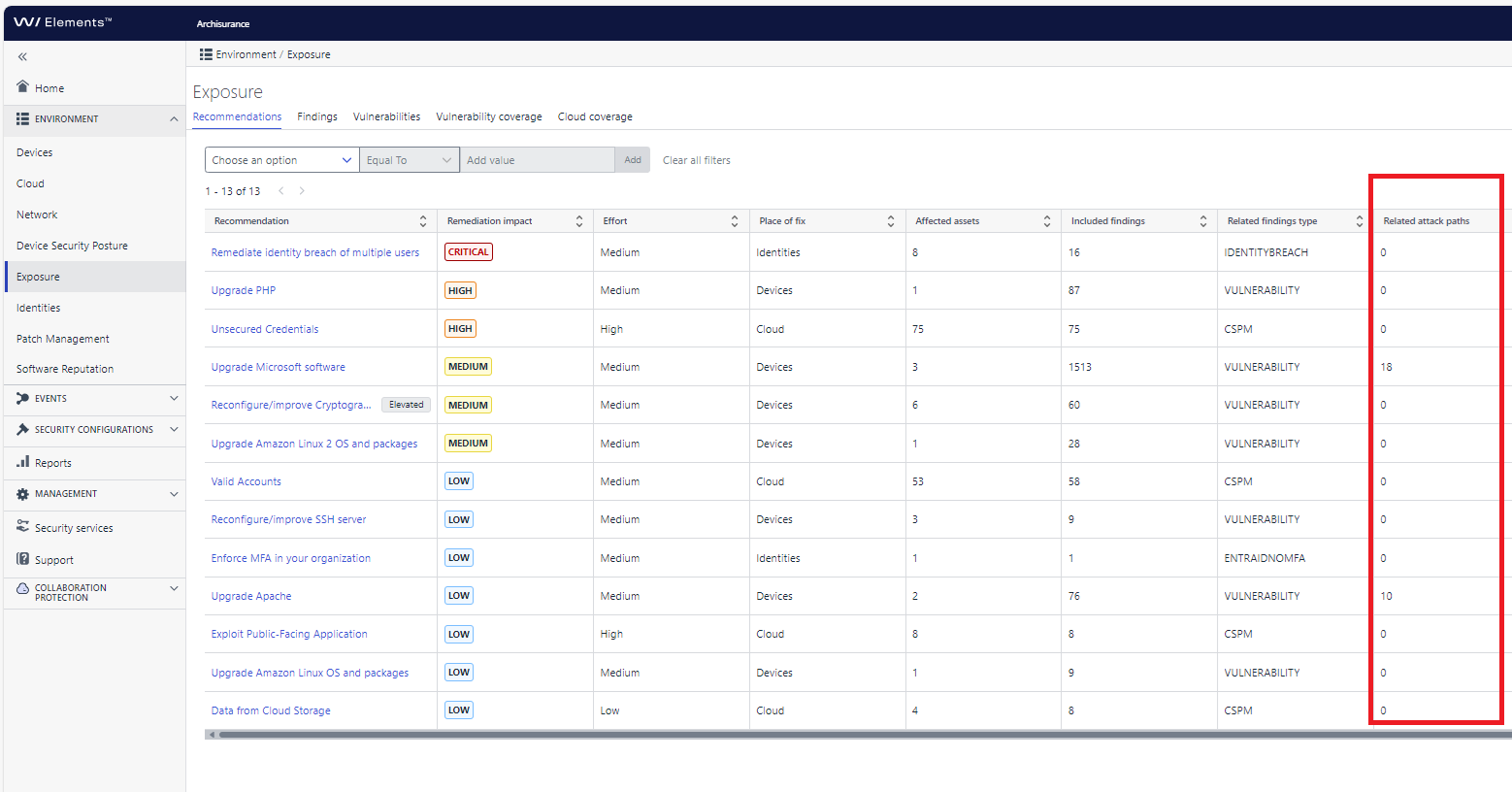
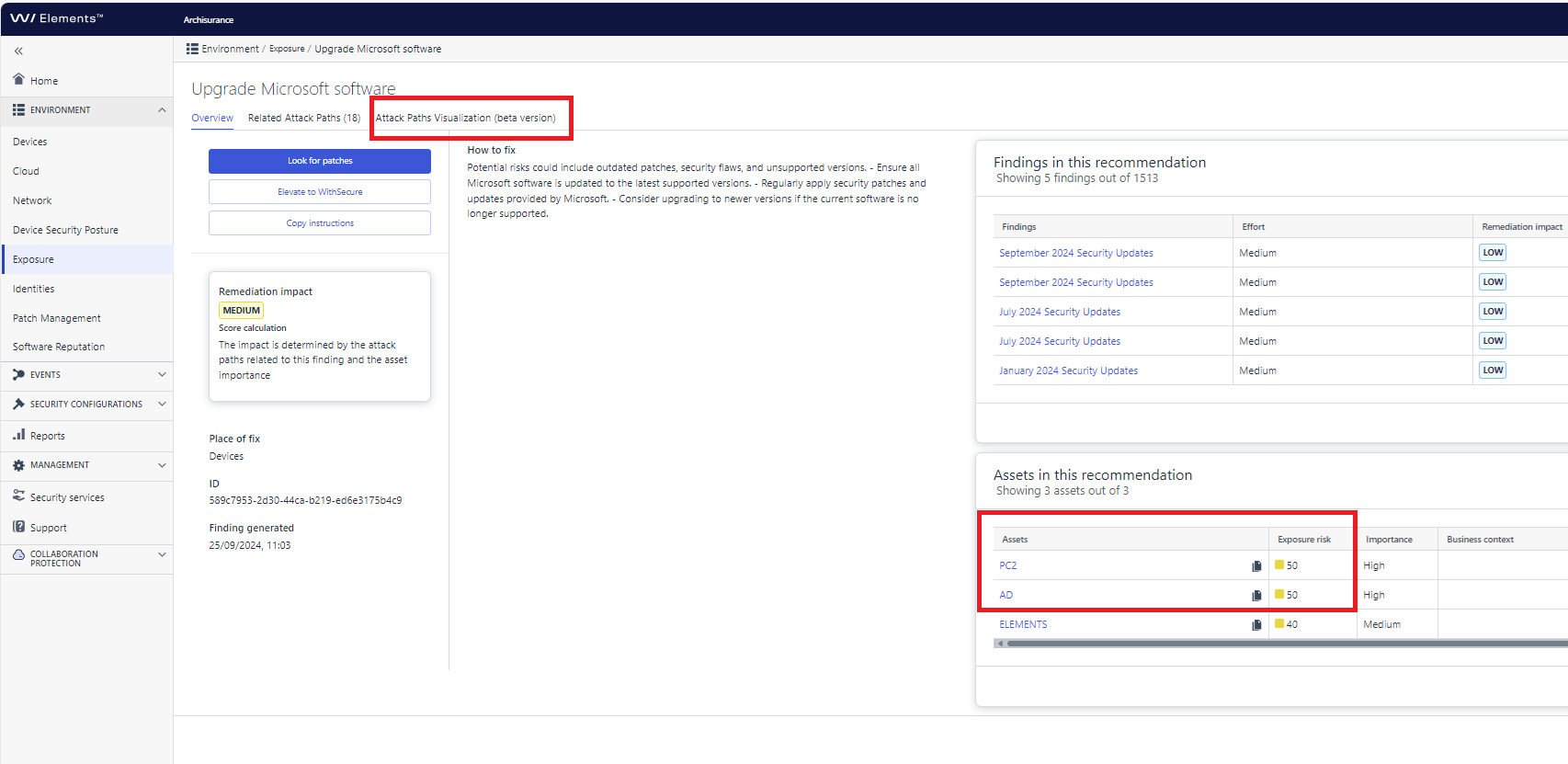
Click to open one recommendation (with non-zero value) in the Related attack paths. If you don’t have any (non-zero values), you can pat yourself on the back for having a really good security posture.
Notice how the two of the assets have higher score than the third. This is because they are part of an attack path and have higher importance as well.
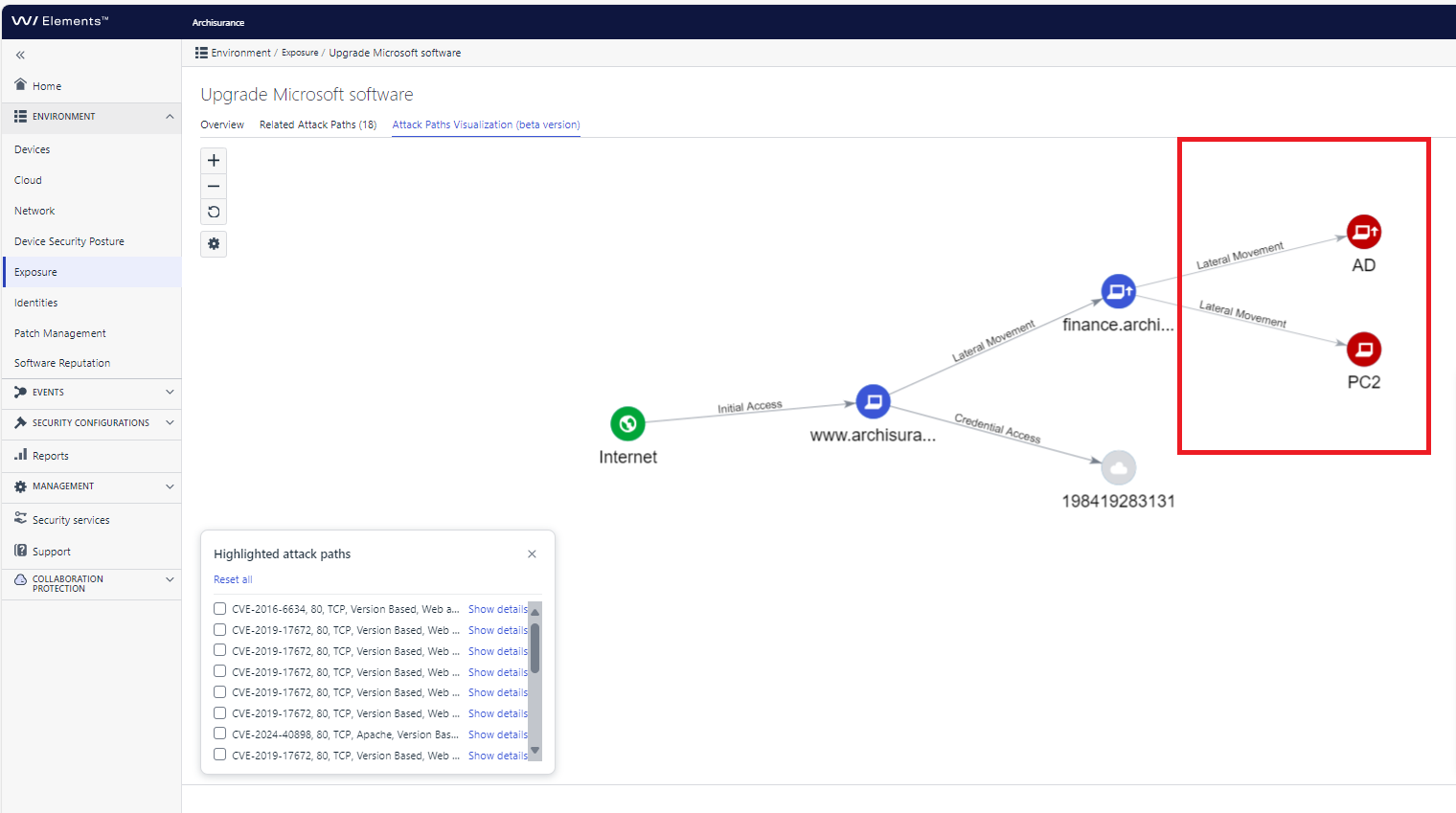
Click the Attack Path Visualization tab. Here you can see the assets and how vulnerabilities and misconfigurations in other assets could be used to breach these particular assets.
Have you already checked your attack paths? We highly recommend checking these as part of your regular activities as an XM admin.
WithSecure™ Elements Exposure Management uses patent-pending AI-based attack path simulation technologies for heuristic exposure hunting and adversarial exposure validation.
-
XDR: New Feature for Reopening Closed BCDs
Read more
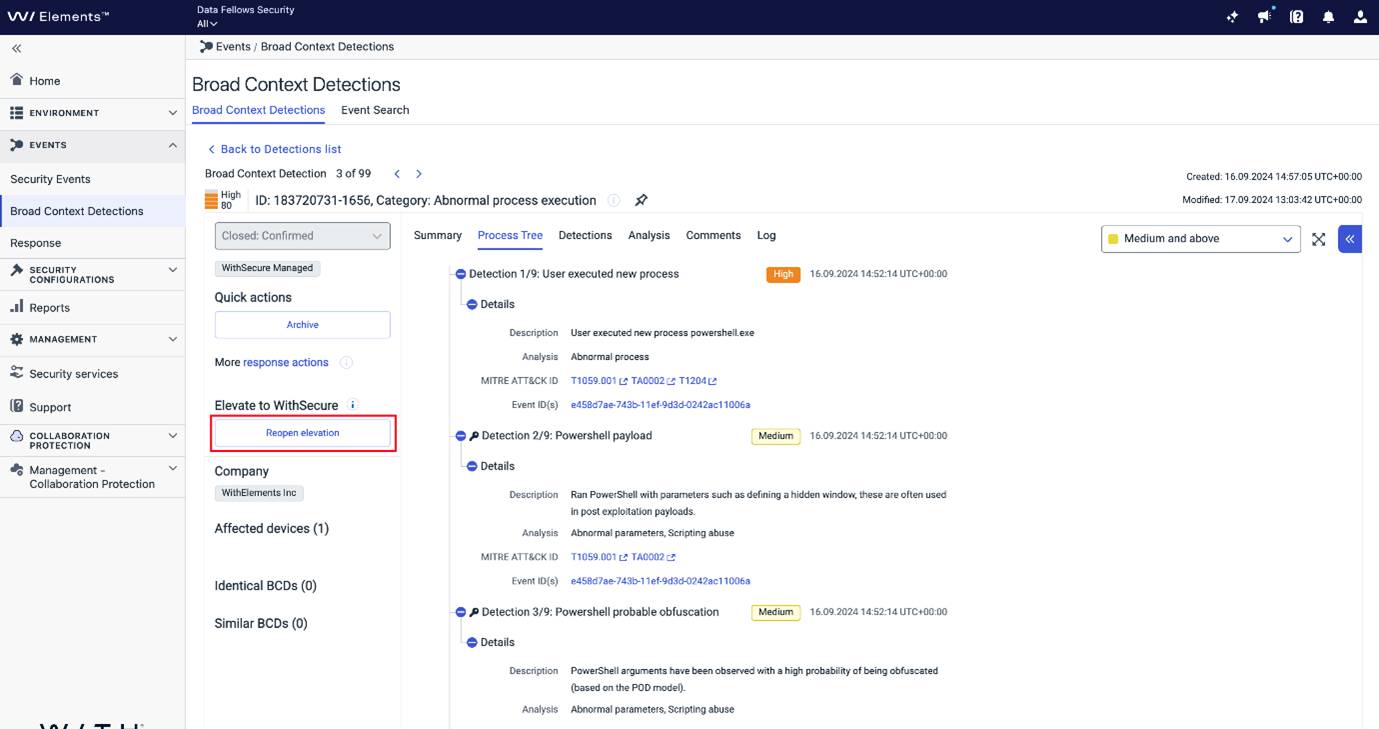
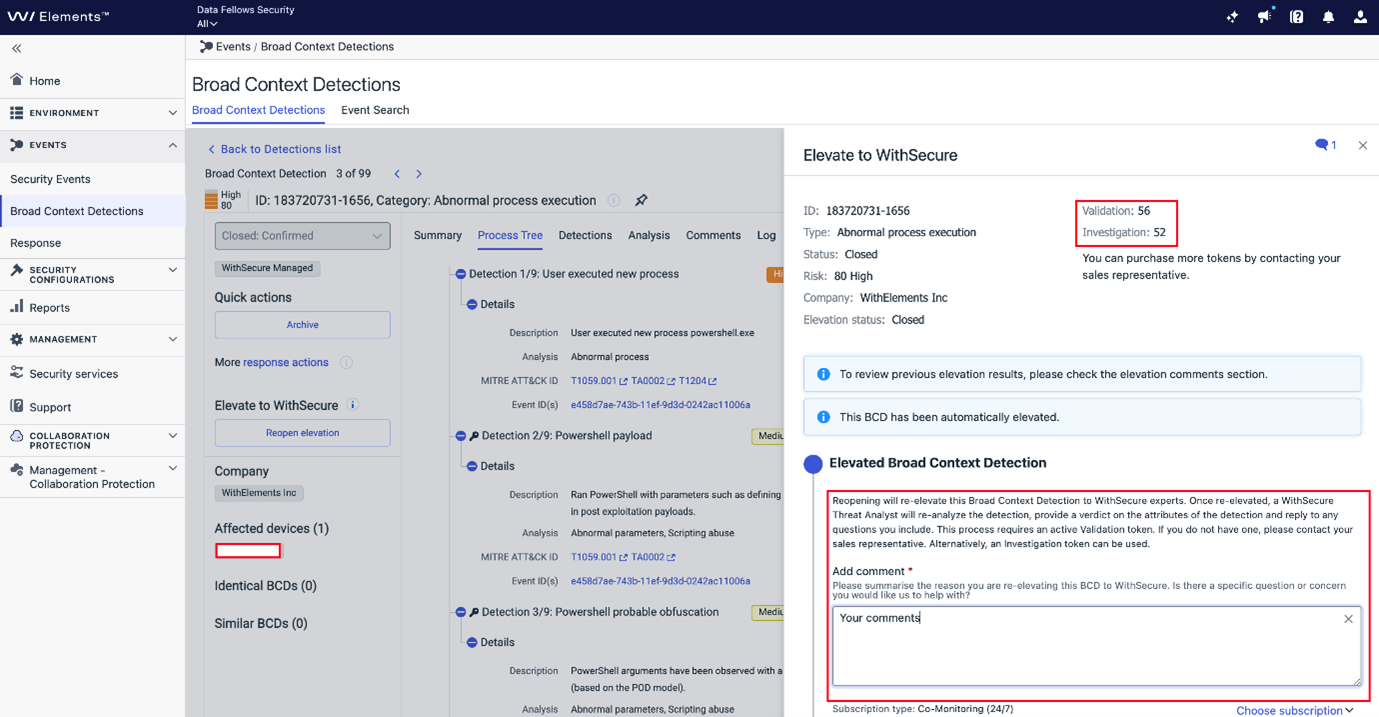
We are pleased to introduce a feature that allows Partners and Customers to reopen closed BCDs within 30 days, regardless of the resolution code. This ensures any critical questions can be addressed post-closure.
Key Points:
- Reopen Elevation: Available for BCDs closed within the last 30 days. This option is disabled if any comments from WithSecure are older than 30 days.
- Validation: Re-opening requires a Validation token. If none are available, an Investigation token will be used.
- Notification: WithSecure Security Analysts will be notified of reopened tickets.
- Automatic Closure: Reopened Elevations close automatically after 7 days once handled by WithSecure Security Analysts, or after 7 days if customer feedback is required and not received.
- Manual Closure: Partners or Customers can close reopened elevations at any time.
- Non-Elevated BCDs: Follow the “Elevate to WithSecure” process if not previously elevated.
This feature enhances support by addressing concerns even after closure, ensuring no issue goes unresolved.
-
What’s New in Elements: August 2024
Read more
Editor’s Highlights
This edition of What’s New in Elements is shorter than normal, as August was vacation time for many of our team members. Of course those who were working during the month continued adding value to Elements, we’re always producing something.
Extended Detection and Response
Endpoint Protection
EPP Portal
Advisory shown when BitLocker recover key collection is disabled
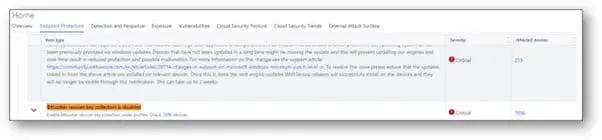
Advisory shown when BitLocker recover key collection failed

EPP Mobile Protection app for iOS
An update to the WithSecure Elements Mobile Protection app for iOS (24.5.11113) has been released
It includes the following new features and improvements:
- Replaced “Traffic protection” with “Recent activity”
- Redesigned the main app interface
- Extended details now shown for checked URLs
- The app now supports false positive reporting
- The app now supports proxy chain
EPP Mobile Protection app for Android
An update to the WithSecure Elements Mobile Protection app for Android (24.6.0022858) has been released.
It includes the following fixed issues:
- The app now checks if a proxy is configured on the system level
EPP Elements Agent for macOS
WithSecure Elements Agent macOS 24.3.53323 has been released to our early access customers on 26th of August 2024. As usual, full availability will start 1-2 weeks later.
This release includes improvements to software updater and fixes to bugs which were causing agent to crash occasionally + other minor bug fixes.
The Installer can be downloaded from here.
Endpoint Detection and Response
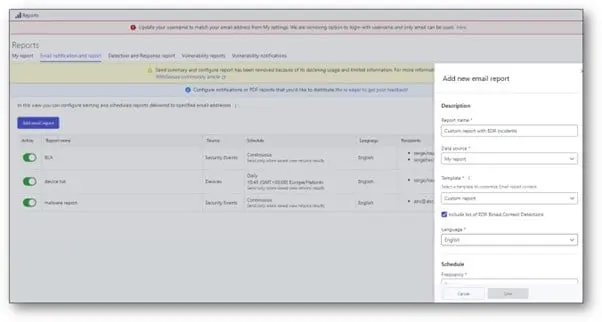
Custom PDF report with EDR security incidents
When emailing a report using “My report” as data source, it is now possible to add the list of EDR incidents (Broad Context Detection) in the PDF report by simply clicking a tick-box as below.
Exposure Management
Vulnerability Management
Upcoming changes to Navigation in Elements Security Center
Earlier, we started re-vamping the navigation in Elements Security Center, to make the navigation less product-centric, and more about the capabilities of Elements.
We will soon be making the next set of changes, which will bring Elements Vulnerability Management (EVM) capabilities to the new navigation. For those customers who have already been using Elements Expososure Management during the Early Access phase, these changes should be familiar.
These changes will be released to the Elements Security Center on September 30th 2024, and will bring Elements Vulnerability Management capabilities closer to the rest of Elements.
You can find out more details about the changes in our dedicated community article.
EVM System Scan
The following products have been added or updated in the detection capabilities for authenticated scanning for Windows:
- Dell Power Manager
- Cato Networks Windows SDP Client
- Mp3tag
- Splashtop Streamer
In case you missed it
Luminen skills for all Elements users
After 3 months of positive feedback from our Luminen Early Access program, which brought AI-powered reporting and analytics to both Broad Context Detections and Security Awareness, we are now taking the first steps on enabling this level of functionality for more of our users. What is crucial, Luminen will be automatically visible and accessible to all users and free!
You can find out more details, including the schedule, at our dedicated community article.
End of support for old installers
As a reminder, we will soon be stopping support for the use of very old product installers. Customers using product installers dated 2022 or earlier should ensure that they are using the latest installers.
You can read more information about this at the WithSecure Community article
All WithSecure services with one user login
Access to WithSecure systems is based around the WithSecure Business Account. This account is your single login for all services that you have been granted access to.
We have now created a new unified login page which brings all the access points together, and we hope you’ll use it as your entry to our systems. As we introduce new products and services using the WithSecure Business Account, these will be added to the page too!
You can find out more in community article.
Why Robust Updates are important
During July, many organizations were badly affected by a faulty update released by one of our competitors. These organizations included airports, airlines, banks, and many others too.
We have taken the time to create an article explaining why these updates, and any updates for that matter, should be robust and well tested before release.
You can find the article on our public website
Share your ideas with us
Our purpose is to co-secure the world with you – now as WithSecure™. To co-create the best possible cyber security products and services, we warmly recommend you share your ideas via our Ideas Portal, now accessible directly from WithSecure™ Elements Security Center.
Further information
Changelogs and Release Notes for all parts of WithSecure™ Elements can be found at the Help Center