
-
What’s New in Elements – July 2025
Read more
Editor’s Highlights
This edition of What’s New in Elements covers the final week of June, together with the whole of July.
Extended Detection and Response
Endpoint Protection
WithSecure Elements Agent for Windows and Server
A new version of the endpoint clients is available. This release makes the Elements Agent version 25.3 available (internal version 25.3.159).
The endpoints automatically upgrade, without a reboot.
This release introduces new features (with Profile Editor Update) and fixes.
Features:
- Application Control Enhancements: Added new rule types for BCD creation, OR condition to group multiple conditions in a single rule for greater rule flexibility.
- Disk Encryption: New option to encrypt system or all fixed drives directly from the profile editor, in addition to remote operations.
- Option to choose between classic or modern Windows 11 context menu for malware scanning.
- Introduced a new Artificial Intelligence category for URL filtering.
- Added support for disabling Device Control through remote operations.
- Added a new option to disable the sending of security events for denied sites. When this setting is turned off, administrators will no longer receive security events related to access attempts on denied sites.
- Introduced a new option: Skip a scheduled scan while the device is running on battery. Enable this setting to prevent scheduled scans from running when the device is on battery power, preserving battery life.
- A new ‘Computer Description’ value, defined using the System Properties Control Panel applet (sysdm.cpl), is sent to the portal and is available as a new column in the Devices list and in the Operating system accordion in Device details (hidden if empty).
WithSecure Elements Agent for macOS
WithSecure Elements Agent macOS 25.3.54466 has been released to general availability (GA) on 14th of July 2025.
This release brings
- Improved product telemetry
Fixes
- wsavd process was running even when the real time scanning was disabled
- Notification about missing Chrome extension even when Chrome extension was properly installed
- wsbootstrapnative crash
Installer can be downloaded from here.
Elements Agent macOS 25.3.54466 supports following macOS versions:
- macOS 15 Sequoia
- macOS 14 Sonoma
- macOS 13 Ventura
WithSecure Mobile Protection for Android
An update to the WithSecure Elements Mobile Protection app for Android (25.3.0023315) has been released.
It includes the following new features and improvements:
- The app now supports SMS Protection for anti-phishing detection
- The app and the WithSecure Elements Endpoint Protection portal now support the SMS Protection setting
Fixed issues:
- Improvements to app stability
WithSecure Elements Mobile Protection for iOS
An update to the WithSecure Elements Mobile Protection app for iOS (25.9.11666) has been released.
It includes the following new features and improvements:
- The app now supports SMS Protection for anti-phishing detection
- Added permission request screens for iPad devices
Fixed issues:
- The app now correctly includes the category information in Browsing Protection security event
- Improvements to app stability
Exposure Management
In brief, we have made changes in WithSecure Exposure Management as follows:
- Correction to some of the links navigating to Asset or Findings page using filter where filter was not applied when navigating.
- Identity’s MFA status
- New MFA status (Inconclusive) has been introduced for the cases where MFA status can’t be sufficiently determined at the moment due to the complexity of the used Conditional Access Policies.
- Recommendations list view: status indicators added as colored bullets to the Status column:
- Red bullet: Indicating that the recommendation is new and requires attention
- Yellow bullet: Indicating that a recommendation that has has been closed during the past 30 days, has been re-opened, mainly due to new findings and requires attention
- Green bullet: Indicating that the recommendation has been resolved. mainly due to findings being mitigated and recommendation severity has dropped to “Inconclusive”.In this case, the recommendation also gets closed automatically.
- Summary report:
- Recommendation Fixed chart shows the break down of fixed recommendation by actor. Actor can be either User (closing a recommendation manually) or Automation (explained the logic above on the Green bullet status above)
- Simulated Attack Path Visualization
- Minor design improvements
- Terminology change – Attack path step “Simplicity” is now called “Complexity”.
- Improved workflow from recommendation details to related findings and assets
- Recommendations details page introduces a tabbed widget for Findings and Assets related to a recommendation
- Findings tab of the widget grouping the findings by finding type to avoid cluttered view by repeating finding instances on different assets.
- Findings table rows (having finding definitions now) can be expanded to visit the affected assets. eg for CVE vulnerabilities there is now only a single row by expanding which, affected assets by that single CVE can be viewed.
- Findings widget shows first few findings only, to see them all in a fly out, “Show All” link on the top of the table has to be clicked on
- Simulated attack path visualization “preview” added to the recommendations detail page as a new widget
- Attack path preview widget with a best effort approach highlights the critical asset in the attack path
- New EASM recommendations added for misconfigurations within web applications
- Requires setting up a vulnerability web scan against the target that runes the web application. Please refer to this document for how to set up a web scan.
Exposure Management for Business
WithSecure Vulnerability Management Portal
Fixed issues and minor improvements:
The Internet Discovery page now supports pagination, allowing access to all discovered services. Previously, the list was limited to 500 results. With this update, results beyond the initial 500 can be easily viewed on additional pages, making it simpler to explore the full set of findings.
New features and improvements:
The following deprecated API endpoints have now been removed:
- /ContentSecurityPolicyReport,
- /Account/signin,
- /Account/oauthsignin.
System Scan
Support for detecting vulnerabilities in the following products was added to Authenticated Scanning for Windows:
- Advanced Port Scanner and Advanced IP Scanner
- Apache EventMesh Runtime
- Bitvise SSH Client
- Cyberduck and Mountain Duck
- Dell iDRAC Tools
- Embarcadero Dev-CPP
- GoCD Agent and GoCD Server
- Hibernate Validator
- KEPServerEX
- ManageEngine Exchange Reporter Plus
- MarkText
- Streamline NX Client
- TSplus
In addition, Windows authenticated and endpoint agent scans are capable of detecting latest Microsoft SharePoint Server Remote Code Execution Vulnerabilities (CVE-2025-53770 and CVE-2025-53771)
Exposure Management for Cloud
Number of Findings Reduced? – Here’s Why
We’ve introduced a new Azure-specific rule: Inconclusive MFA-based Conditional Access Policy for user
This rule runs at the tenant level and is related to two existing rules concerning Conditional Access Policies and MFA.
What’s changed? If the new tenant-level rule is violated, the related user-level rules will be skipped.
What to expect: You may notice a lower number of findings in your scan results and in the Cloud Security Trends dashboard. This is expected and reflects the improved logic.
Let us know if you have any questions or feedback!
Elements Foundations
Elements Security Center
New Profile Editor for Windows Computers and Servers
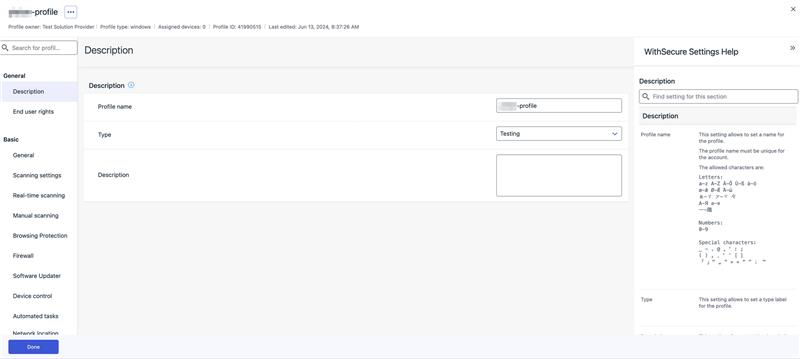
We’re pleased to announce the release of the new Windows Computers and Servers profile editors.
This release brings the following changes:
- UI redesign for profile editors, compare profiles, save and publish to multiple profiles
- Help section is now on the right
- End user rights section added to control the settings on the client UI
- Some table layout changes
- New: the new profile editor also includes the capability to create custom IOC (Indicators of compromise) rules
New roles for managing access to XDR features
We are excited to announce the introduction of new roles designed to enhance the segregation of duties and permissions.
You can find out more about this in a dedicated article.
In case you missed it
Automated Actions Now Support Response Jobs for Identity Security for Entra ID BCDs
We are thrilled to announce that our Automated Actions feature has been extended to support running response jobs for Identity Security for Entra ID BCDs (Broad Context Detections). Find out more in the dedicated article.
Share your ideas with us
Our purpose is to co-secure the world with you – now as WithSecure™. To co-create the best possible cyber security products and services, we warmly recommend you share your ideas via the Ideas section of the WithSecure Community, now accessible directly from WithSecure™ Elements Security Center.
Further information
Changelogs and Release Notes for all parts of WithSecure™ Elements can be found at the Help Center
-
Automated Actions Now Support Response Jobs for Identity Security for Entra ID BCDs
Read more
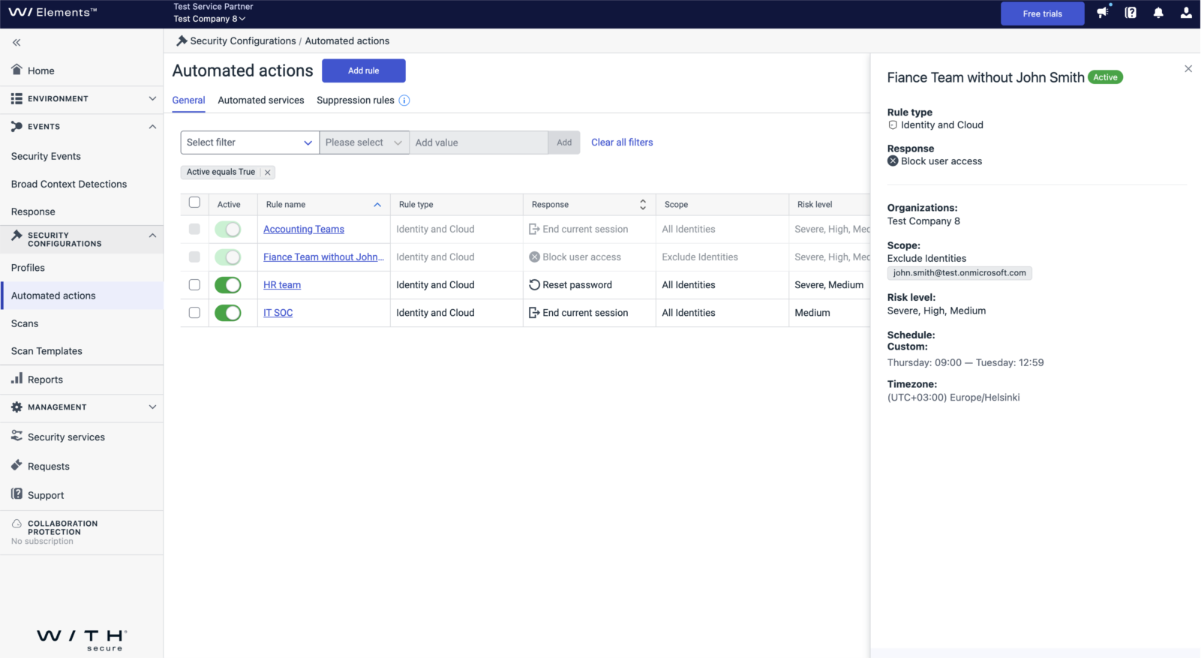
We are thrilled to announce that our Automated Actions feature has been extended to support running response jobs for Identity Security for Entra ID BCDs (Broad Context Detections). This enhancement is designed to provide more robust and efficient identity security management, particularly for cloud environments, ensuring that your systems are protected with minimal manual intervention.
New Capabilities:
- Customizable Response Actions: You can now select from three specific response jobs—End Current Session, Reset Password, and Block User Access—to run for BCD risks starting from Medium and above.
- Exclusion Options: We have introduced the ability to exclude certain identities from running these jobs, providing more control and flexibility in managing your security protocols.
- Custom Scheduling: Automated actions can now be scheduled to run outside business hours if desired, offering flexibility to minimize disruption to daily operations.
Note: In the customer’s Azure tenant, the WithSecure Enterprise Application for Identity Response utilizes the User Admin role to adhere to the principle of least privilege and minimize risk. This imposes limitations on performing WithSecure Identity Response actions against the primarily privileged roles, see the guide.
How to Set Up Automated Actions:
- Add Rule: Navigate to Automated Actions and click on “Add Rule”.
- Give a Name: Enter a name for your rule.
- Select Rule Type: Choose “Identity and Cloud” as the rule type.
- Select the Response: Choose the response actions you want to implement.
- Target Organization: Select the organization you want to target with two options:
- Multi-Organization: Limits the scope to all identities.
- One Organization: Extends the scope so you can exclude some of the principals.
- Choose Risk Level: Select the risk level or any combination from the following:
- Medium
- High
- Severe
- Select Schedule: Choose between Continuous or Custom scheduling.
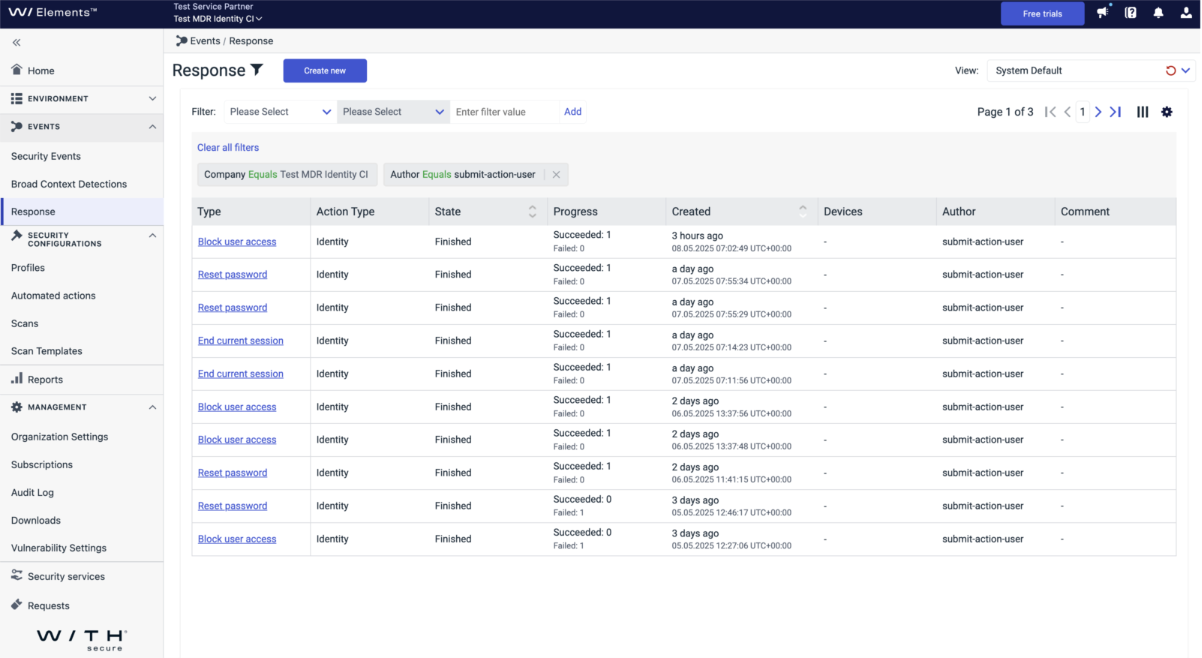
Once a rule is matched, the response run will be logged in the Response section.
With these new capabilities, you can now automate critical identity security tasks, reducing the risk of security breaches and enhancing overall system integrity, especially within cloud environments. Stay tuned for more updates as we continue to improve and expand our security solutions.
Full Setup Workflow for Automated Actions in Identity Security
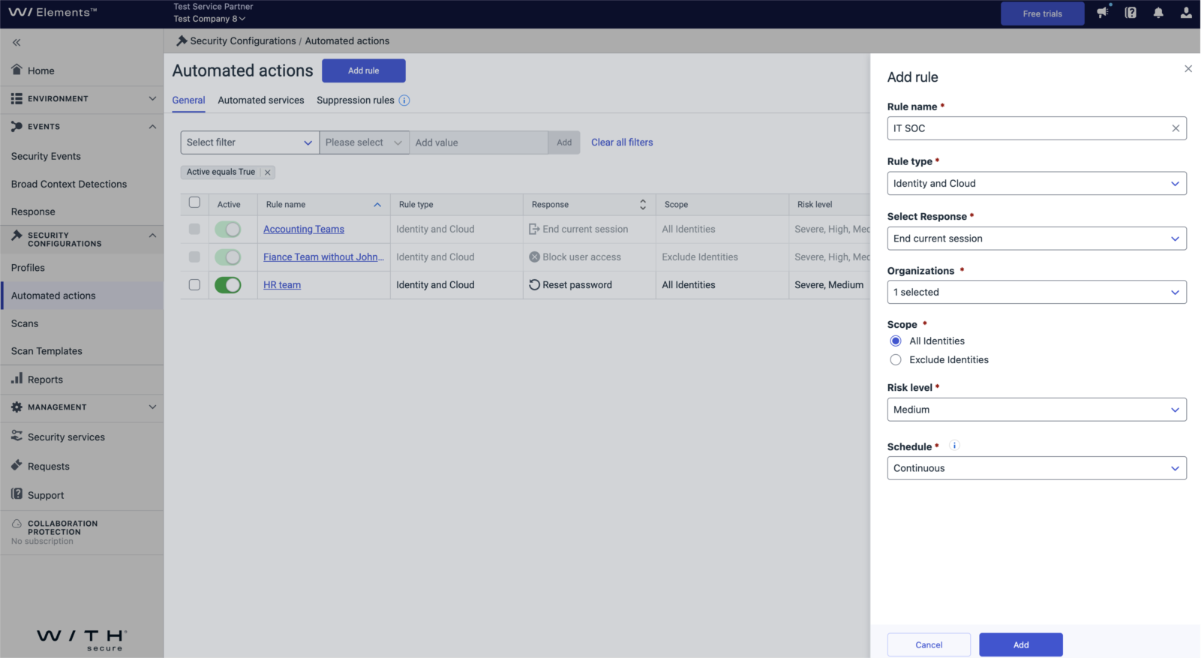
Outcome – Rule Creation Interface
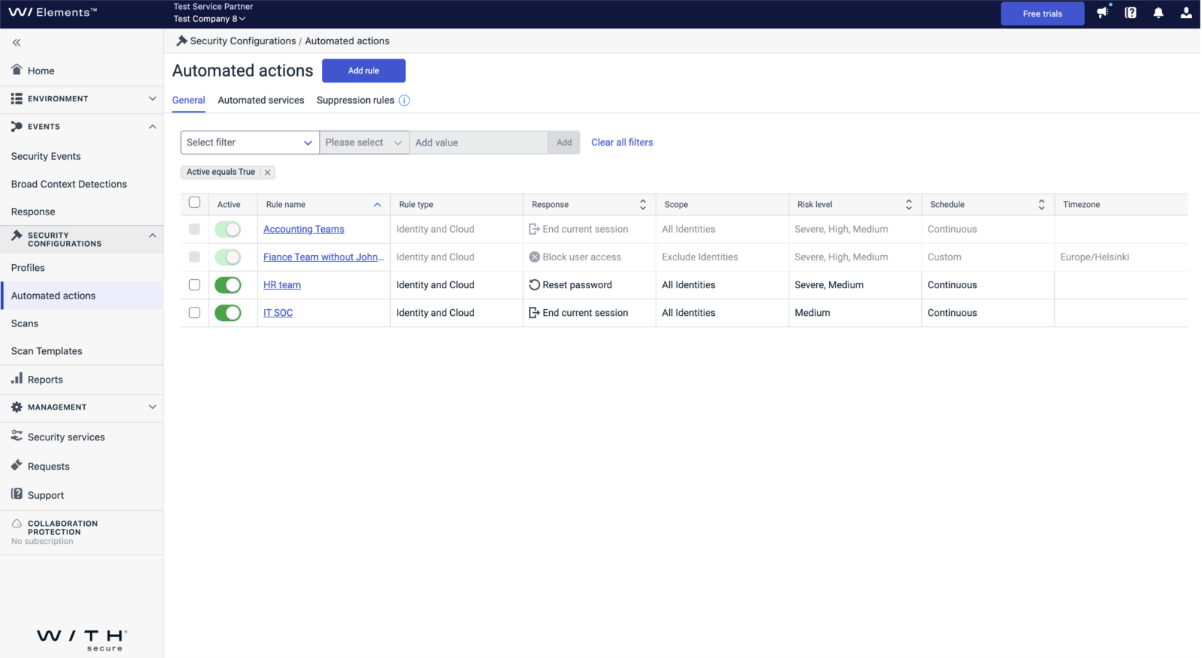
Outcome – Response Job Execution Log
-
New Email Notification Enhancements for Elements MDR Services
Read more
We’re excited to share an important update to the email notification system under the Detection and Response settings for Elements MDR services. These enhancements are designed to improve your experience by reducing notification volume and ensuring that the messages you receive are more relevant and actionable.
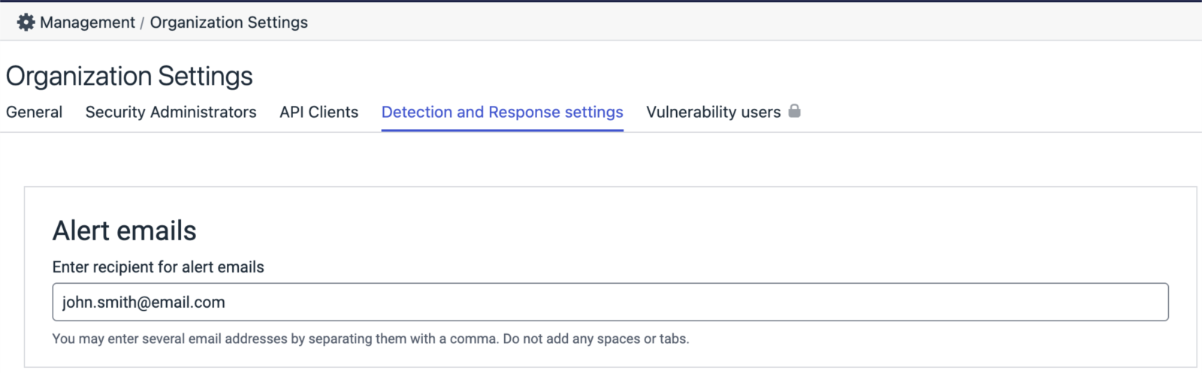
What’s Changing?
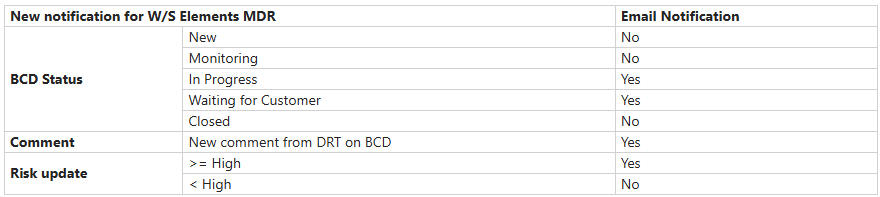
The updated system introduces smarter notification logic that filters out less critical updates, helping you focus on what truly matters. This change applies specifically to BCDs (Broad Context Detections) that are part of our Managed Services. ️
Note: There are no changes to the EDR notification system at this time.
New Notification Rules
Here’s a breakdown of when you’ll receive email notifications under the new system:
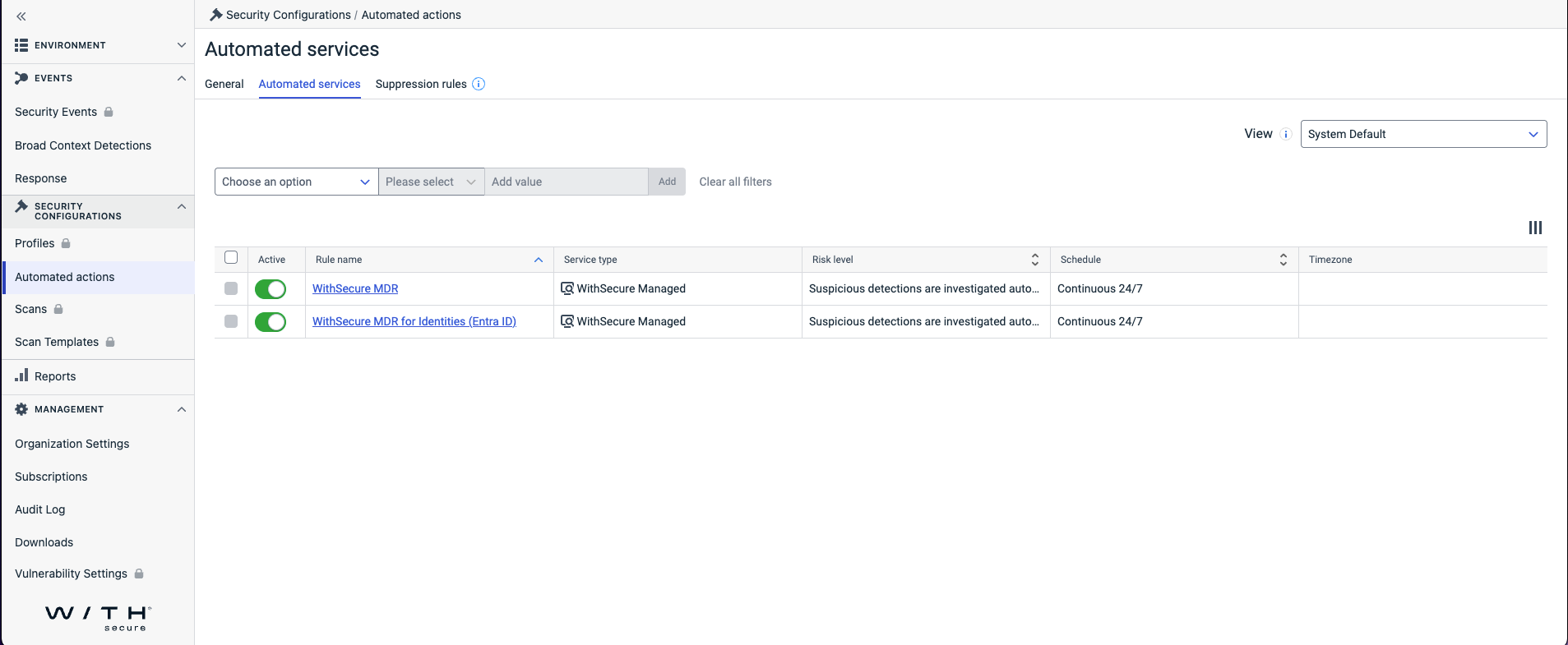
Activation Requirement
This new notification system will only take effect once the MDR rules is enabled at Security Configurations > Automated actions > Automated services.
Please ensure this rule is active to benefit from the improved notification experience.
-
New version of Elements Agent for Windows
Read more
A new version of the endpoint clients is available and our Early access program participants will start seeing it starting on 26.06.2025. Full availability starts one week later and takes some days to reach all customers.
This release makes the Elements Agent version 25.3 available (internal version 25.3.159).
The endpoints automatically upgrade, without a reboot.
This release introduces new features (with Profile Editor Update) and fixes.
Features:
- Application Control Enhancements: Added new rule types for BCD creation, OR condition to group multiple conditions in a single rule for greater rule flexibility.
- Disk Encryption: New option to encrypt system or all fixed drives directly from the profile editor, in addition to remote operations.
- Option to choose between classic or modern Windows 11 context menu for malware scanning.
- Introduced a new Artificial Intelligence category for URL filtering.
- Added support for disabling Device Control through remote operations.
- Added a new option to disable the sending of security events for denied sites. When this setting is turned off, administrators will no longer receive security events related to access attempts on denied sites.
- Introduced a new option: Skip a scheduled scan while the device is running on battery. Enable this setting to prevent scheduled scans from running when the device is on battery power, preserving battery life.
-
New roles for managing access to XDR features
Read more
We are excited to announce the introduction of new roles designed to enhance the segregation of duties and permissions.
This functionality is currently scheduled to be released on Monday 30th June.
Who will get the roles?
Moving forward, new users who have access to Endpoint Protection (EPP) features will not automatically gain access to Extended Detection and Response (XDR) features. Instead, XDR and EPP capabilities can be allocated to separate user groups and combined as needed. Please see below for information about existing users as we introduce the new roles.
What do the various roles allow?
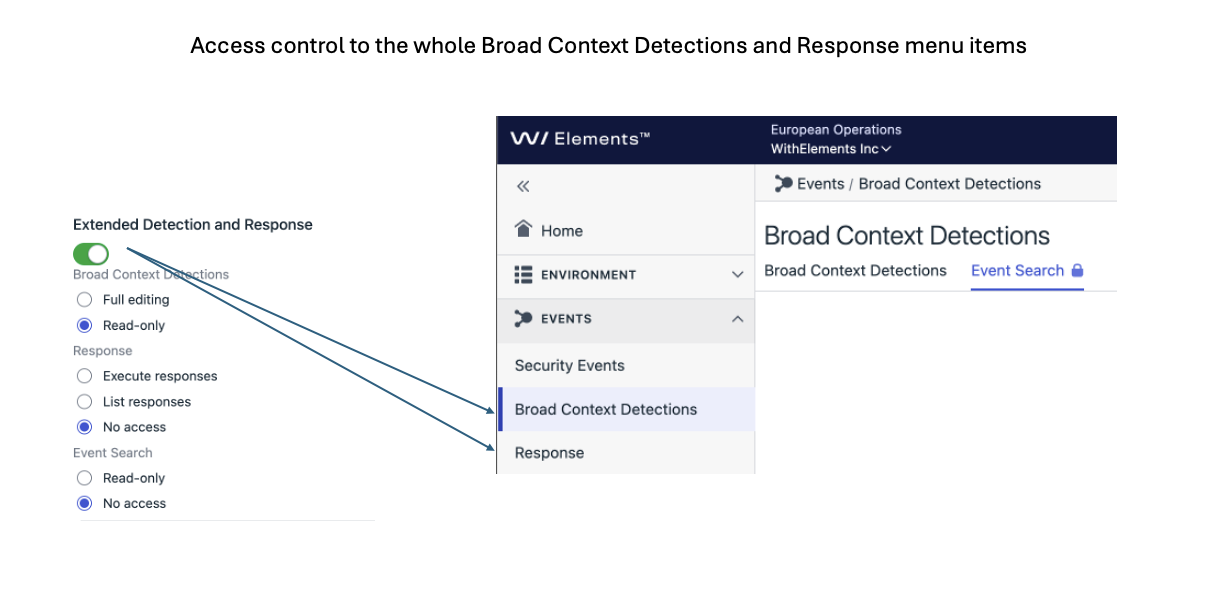
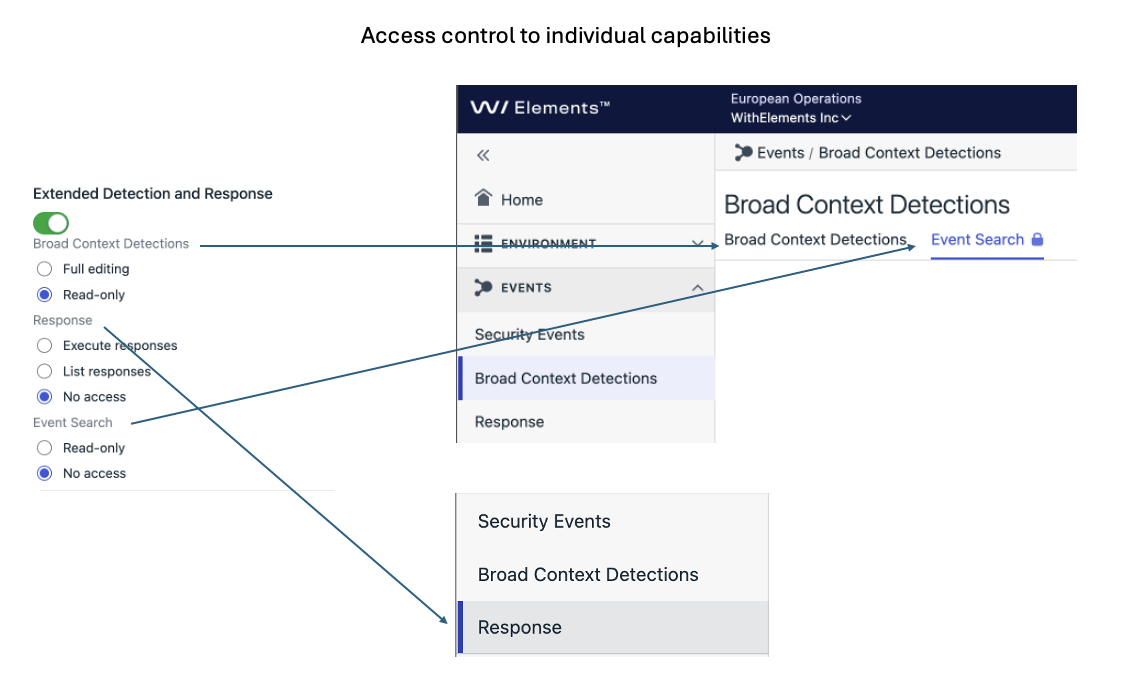
The minimum access level for XDR features includes the ability to view Broad Context Detections, without access to response actions or event searches. This access can be further expanded by combining roles that are specifically focused on the following three functional areas of XDR:
- Broad Context Detections
- Full editing or
- Read-only
- Response
- Execute responses or
- List Responses or
- No access
- Event Search
- Read-only or
- No access
I currently have an EPP role. What do I get as part of this new role introduction?
All existing EPP users at the time we introduce this change will be automatically granted access to XDR features in order to maintain backward compatibility:
User currently has
User will get
Computers & mobiles: Full editing
Servers: Full editing
Event Search: Read-only
Broad Context Detections: Full editing
Response: Execute responses
Computers & mobiles: Read-only
Servers: Read-only
Event Search: Read-only
Broad Context Detections: Read-only
Response: List Responses
Computers & mobiles: Full editing
Servers: Read-only
Event Search: Read-only
Broad Context Detections: Full editing
Computers & mobiles: Read-only
Servers: Full editing
Event Search: Read-only
Broad Context Detections: Full editing
Response: Execute responses
During migration period, new users assigned Endpoint Protection (EPP) roles will automatically receive XDR roles. However, once the migration is complete, newly created Endpoint Protection users will not have access to XDR features by default.
- Broad Context Detections
-
What’s New in Elements – June 2025
Read more
Editor’s Highlights
The Editor’s summer vacation period is starting, so this month’s What’s New in Elements is coming slightly earlier than normal, and only contains the updates for the first three weeks of June. The last week of June will be included in the next edition of What’s New in Elements, but for those curious about what has been released please check the changelogs (link in Further Information below)
Extended Detection and Response
Endpoint Protection
WithSecure Elements Agent for macOS
WithSecure Elements Agent macOS 25.2.54389 has been released to general availability (GA) on 16th of June 2025.
This release brings
- A profile editor setting to hide/show Elements GUI
- Improved response module status reporting
- Elements Agent now reacts to subscription changes in near real-time
It also fixes:
- Various crashes in wsuplinkd, wssettingsd and wsswupd
- Elements Agent token activation issue
- Network isolation issue when macOS native firewall was enabled
- Allow new system extension popup window opened a wrong page in System Settings
- Chrome browsing protection incorrect status issue
The Installer can be downloaded from:
https://download.withsecure.com/PSB/latest/ElementsAgentInstaller_54389.mpkg
Elements Agent for macOS supports following macOS versions:
- macOS 15 Sequoia
- macOS 14 Sonoma
- macOS 13 Ventura
WithSecure Elements Mobile Protection for iOS
An update to the WithSecure Elements Mobile Protection app for iOS (25.6.11430) has been completed 15 April 2025.
It includes the following fixes:
- Fixed an issue where Network Protection could interfere with certain applications’ internet connectivity
Email and Collaboration Protection
We are delighted to share that we have released an important improvement of the release from quarantine feature for Teams. The feature has shown some reliability issues in the recent past. We were able to identify the root-cause and address it accordingly, improving the overall reliability considerably.
Additionally, a fix was released to address the discrepancy in mailbox usage counts in the ECP Portal. As a result, the mailbox usage counts showed in “Cloud Services” section is fully synced and aligned with the usage counts showed in “Management/Subscriptions” section
Exposure Management
XM newsletter week 24
Findings list – Tags column values can be copied to clipboard by clicking on a value, making it easier for creating multi-value filters such as filtering by Tag column
State of the views – can now be saved as a “saved views” on XM UI, Findings, Recommendations and Identity
- Currently only filters and column selection can be saved
- State of the ordering (sorting on a column) can not be saved yet. (upcoming feature)
- Sharing a view to other users on organization level is not supported yet. (upcoming feature)
Attack Path Simulator – visual enhancements
- Link from attack path step to the respective recommendation added
Improvements to c-level reporting – Also known as theExecutive Summary Report
- Recommendations fixed, shows the actual number of recommendations being moved to Closed state per week (Done, False-Positive). Bar chart title adjusted accordingly
- In case selected date period has start and end date falling in the middle of a year week, report adjusts the date selection to include the complete week stats from the begin and ending of the range.
- Color theme of the report adjusted
Exposure widget-based reports available in My Reports
- Access via Reports menu -> My report (tab) -> from view template drop down select “Exposure Management”
- Report can be customized via widgets and saved as a template
- Tabular data widgets supported
- Bar charts and line charts from executive summary are supported
- Widget-based reports can (not) yet be exported or scheduled. (upcoming feature)
Exposure recommendations available in Security Events
- Access via Events menu -> Security Events (submenu) -> from “View” drop down select “XM recommendations” (available only for those having WithSecure Endpoint Protection)
- A change in a recommendation status will result in an event in Security Events
- Security Events can be configured to be sent as email to external systems
- Security Events can be exported to JSON
New “Last seen” column in the Identities page
- New column has been added to the Identities table to indicate when Identity’s Entra ID data has been refreshed last time. Column is hidden from the default view, and can be added to the view.
Identity breach findings
- Finding description texts have been updated to include breach severity info.
Exposure Management for Business
System Scan
Support for detecting vulnerabilities in the following products was added to Authenticated Scanning for Windows:
- Apache IoTDB JDBC driver
- Apache Pekko Management
- Dell Trusted Device Agent
- Dell Trusted Device
- Dot (desktop application)
- FileZ
- GFI MailEssentials
- HashiCorp Vault
- Intel MPI Library
- Intel QuickAssist Technology (QAT)
- IZArc
- LegionSpace
- Snowflake ODBC Driver
- Solarwinds Platform
- Srimax Output Messenger
- Storage Center-Dell Storage Manager (DSM)
- XenServer VM Tools
- Yandex Telemost
Additionally, Authenticated Linux and Windows scans are now capable to detect directories of installed Python packages.
Exposure Management for Cloud
We have released an update to Exposure Management for Cloud which extends support for EntraID Dynamic membership rules.
In addition, this release improves the performance and scalability of the scanner.
Other items of interest
Threat Advisory: ScreenConnect
ScreenConnect versions 25.2.3 and earlier is vulnerable to a ViewState code injection attack.
ViewState is used by Web Forms to maintain page state and is encoded in Base64 format secured with machine keys. Accessing these keys requires privileged system-level access. If compromised, an attacker could craft malicious ViewState data, potentially leading to remote code execution on the server.
It was noted that a lot of organizations and companies have left ScreenConnect’s server exposed to the internet, making this a serious risk. Unless there is a strong business case, servers should not be exposed to the internet
Share your ideas with us
Our purpose is to co-secure the world with you – now as WithSecure™. To co-create the best possible cyber security products and services, we warmly recommend you share your ideas via the Ideas section of the WithSecure Community, now accessible directly from WithSecure™ Elements Security Center.
Further information
Changelogs and Release Notes for all parts of WithSecure™ Elements can be found at the Help Center
-
What’s New in Elements – May 2025
Read more
Editor’s Highlights
In-Product Trials available across the Elements portfolio
Until now, if you wanted to try out a different part of the Elements portfolio of products, you needed to fill in a web form, or contact your partner.
Now, you can order a trial version of another part of Elements easily and directly from the Elements Security Center.
You can find out more about In-Product trials here.
Find out more about Exposure Management with the Demo mode
To help our customers and partners to get familiar with Exposure Management capabilities in the WithSecure Elements Security Center, a new feature “Exposure demo mode” has been introduced.
Exposure demo mode is available for all Elements Security Center users and can be accessed from user menu. Find out more here.
New Products and Services launched at SPHERE25
Each year, we hold an event in Helsinki for our partners, and this year was no different.
At SPHERE25 we launched several new products and services, and you can find out more about these here.
Extended Detection and Response
Endpoint Protection
During May, we made a small but important change to the scanning components on Microsoft Windows.
Partners and Customers who use custom integrations to monitor the state of protection are advised to read more details about this change here.
Email and Collaboration Protection
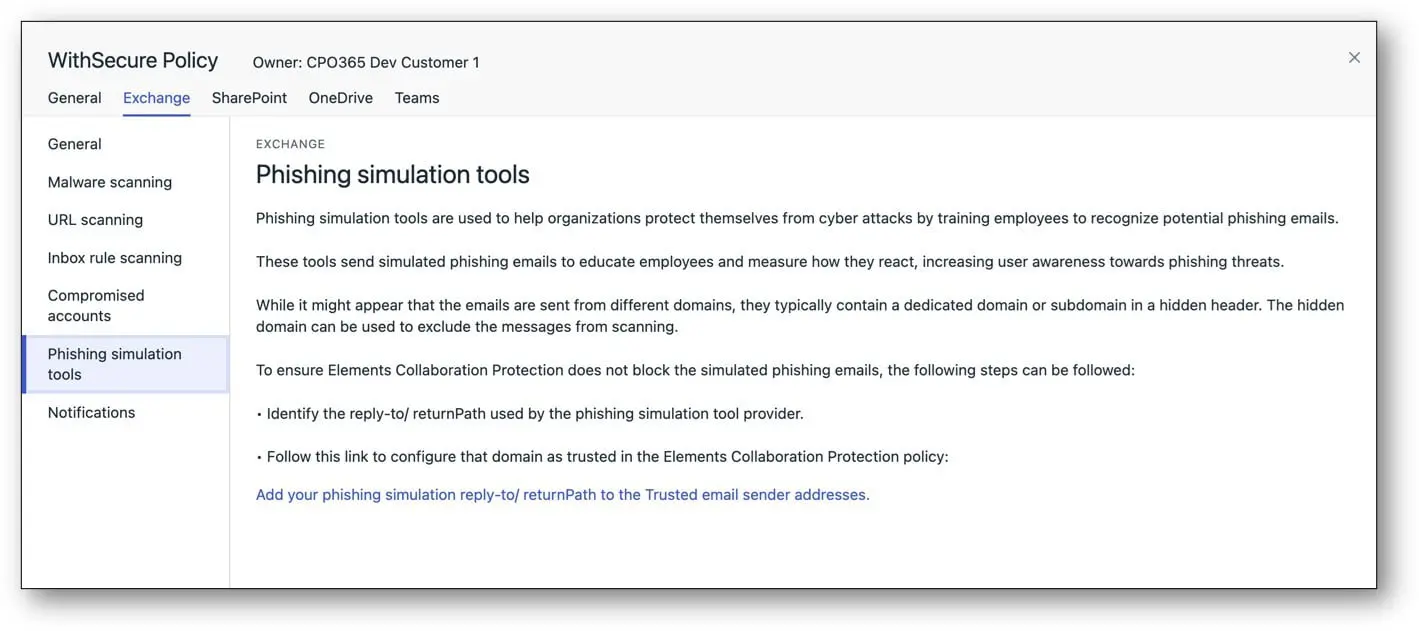
Phishing simulation tools update
We have added clear description and instructions on how Phishing Simulation Tools can be utilised without causing any conflicts in Element Collaboration Protection.
Under the Policy section in Elements Collaboration protection there is a specific policy item, “Phishing Simulation Tools”.
At the end of the policy there will be a link to the existing section: Policies/Exchange/Trusted email sender addresses
This existing feature can be used for allowing the Phishing Simulation Tool to work properly.
Please find below a screenshot of the introduced section in the Elements Collaboration Protection policy section:
WithSecure Collaboration Protection fix released
We have released a fix for the license control mechanism. This fix ensures proper calculation of the licenses in use, even when a mailbox is temporarily failing to connect to the Microsoft Services. Before this fix, mailboxes on temporarily failure state were excluded from the calculation, leading to a situation where the total amount of used licenses was inaccurate.
Exposure Management
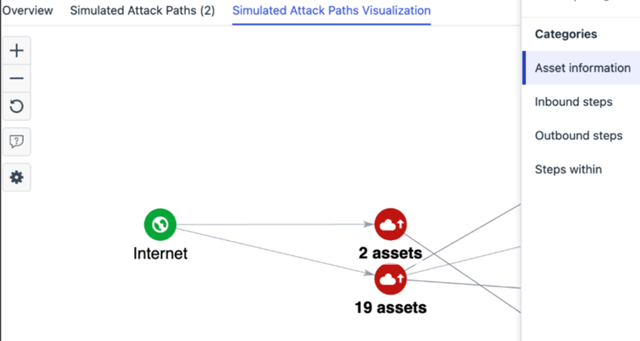
Attack path visualization
- Added a link to primary finding in step details
- Grouping of similar assets to tidy up the view
Exposure views filtering
- Exposure views now support filtering by multiple values, e.g filters like “FindingSource Includes Identity, Network” are possible
- Exposure multi-value filters can be repeated with different operations to support logics such as “Tags Include NIST KISA” “Tags Does not include HIPPA”
“MFA status” column in the Identities page
- New tooltip has been added to clarify the meaning of different MFA statuses Identity can have
- An adjustment to the MFA status logic has been made, when checking Entra ID Conditional Access policies. This might result in some of the Identities statuses changing from ‘Partially enabled’ to ‘Enabled’.
New “Account status” column in the Identities page
- New column has been added to the Identities table to indicate if the Identity’s account is enabled or disabled. Column is hidden from the default view, and can be added to the view. New filter has been also added, enabling filtering by account status.
Exposure Management for Business
Exposure Management System Scan
Support for detecting vulnerabilities in the following products was added to Authenticated Scanning:
- Amazon Corretto Java
- Erlang/OTP
- Netwrix Password Secure
- SoftEther VPN
- Spring Data Commons
Elements Foundations
Integrations
Elements API
Exposure Management recommendations as Security Events
You can see the new event specification from the API documentation for Security Events.
The Security Events are retrievable via the security events endpoint defined here.
Cloud-based incidents
The latest release of the Elements API introduces new incident types from cloud sources. This update enhances our threat detection capabilities by incorporating incidents from Azure and AWS environments. These incidents include identity and access management threats as well as cloud workload-based threats.
New Incident Source Types:
- identityAzure: Incidents related to Azure identity and access management detections.
- workloadAzure: Incidents detected from Azure workloads.
- workloadAws: Incidents detected from AWS workloads.
For a detailed overview of the API specifications for incidents, please refer to the complete documentation.
Share your ideas with us
Our purpose is to co-secure the world with you – now as WithSecure™. To co-create the best possible cyber security products and services, we warmly recommend you share your ideas via the Ideas section of the WithSecure Community, now accessible directly from WithSecure™ Elements Security Center.
Further information
Changelogs and Release Notes for all parts of WithSecure™ Elements can be found at the Help Center
-
New products and services launched at SPHERE25
Read more
As many of you are aware, we recently held our SPHERE25 event here in Helsinki, where we had many partners and customers attending. As part of the event, we launched several new products and services, and enhanced some existing ones, to further expand our Elements Cloud portfolio.
Here is a brief summary of the new launches:
Elements Exposure Management 2.0
Last year we launched Elements Exposure Management during the SPHERE24 event, and during the last year we have seen a massive amount of interest in the solution. But we don’t rest on our laurels, we’ve been adding new features all through the year.
This year we’re happy to announce the following significant improvements:
- Boost the efficiency of your Elements XM experience with Luminen GenAI’s localized remediation instructions.
- C-suite Reporting shows the value of your exposure management activities as an Executive Summary.
- Secure your hybrid attack paths (on-premises + cloud) with advanced threat protection against the latest cloud and identity threats.
- Quickly demonstrate Elements XM’s value with the new in-product sales demo environment.
- Enjoy the streamlined Elements XM onboarding experience.
- Send Elements XM recommendations to ticketing and SIEM systems via API.
Public Website: XM
Elements XDR Cloud Security for Azure
All new at SPHERE25 is our Elements XDR Cloud Security for Azure.
As more and more organizations start transitioning to hosting some or all of their infrastructure in Azure, it is really important that they secure their Azure cloud environment. Elements XDR Cloud Security for Azure is just what they need.
Ease the path to your cloud transformation
Enable your cloud transformation by securing Azure cloud resources, ensuring your critical company data is kept safe when you move to the cloud or use hybrid setups (cloud + on-premise).
Minimize financial losses due to data breach
Reduce your business risk and minimize financial loss from breaches by having security controls that enable quick response to cloud incidents.
Fortify operational processes in the cloud
Keep your cloud infrastructure operational with reduced business risk, continued cloud-based service availability, and minimized operational downtime.
Public Website: XDR
WithSecure Elements Infinite
For several years, we have had WithSecure Elements, bringing solutions such as Endpoint Security, Collaboration Protection, and more recently Exposure Management in a single unified Security Center.
And we’ve also had WithSecure Countercept, a separate, fully-managed MDR solution.
This year at SPHERE25 we are excited to announce that the WithSecure Countercept service is now part of the WithSecure Elements ecosystem, and is now called WithSecure Elements Infinite, bringing everything under the same unified Security Center.
Turnkey Premium Solution – Always On
Fully managed, SLA-backed and human delivered premium security service. 24/7/365 monitoring of your environment by certified Threat Hunters.
From Pre-Incident to Post-Incident protection – Full Process Coverage
Continuous improvement of your security posture and cyber resilience. We help you meet your compliance obligations.
Build a True Partnership – Dedicated Human Resources at Your Service
Our certified threat hunters and cyber security experts together with the customer management team act as an extension of your internal security team, handling the heavy lifting for you.
Public Website: Elements Infinite
WithSecure Luminen
Partners and customers who have WithSecure Elements also have access to the WithSecure Luminen GenAI assistant, introduced last year at SPHERE24. Over the last year we have been improving the Luminen skills, and we currently have the following:
Summary reports with Security Awareness Assistant
- The reports summarize security events within the last 7 days, and in multiple local languages.
Investigation Assistant
- Natural language explanations of Broad Context Detections™.
- Immediate assistance to the user to understand the detections in context.
- Investigation Assistant for endpoint, cloud and identity BCDs.
Luminen for Exposure Management (New in 2025!)
- Luminen can now give recommendations for exposures in localized languages.
NEW! With the new Security Awareness Assistant, you gain a comprehensive 360 situational awareness for your assets, whether you use Elements as a product or service. Luminen now seamlessly unifies proactive and reactive security measures, enhancing your overall protection.
What to do next
As with all WithSecure offerings, these new products and services are available through our wide partner network.
For Customers
Existing customers can find out more by reaching out to your Partner.
If you aren’t an existing customer, you can find your nearest WithSecure sales partner via our Partner Locator.
Alternatively, you can contact us via the form on each of the product webpages, although please note that the level of interest in our new products and services has exceeded even our own high expectations, and we will need a little time to process all enquiries. Please be patient, we will get round to responding as soon as possible 😊
For Partners
Existing WithSecure partners can find more information via your dedicated Partner Portal account.
And if you would like to become a WithSecure partner, please find out more at our Partner Program page.
-
In-Product Trials now available for other Elements Products
Read more
We are excited to inform you that it is now possible for existing customers to start trialling other parts of the Elements Cloud eco-system, directly from the Elements Security Center.
And better still, these Trials are FREE for 30 days and you’re under no obligation to purchase!
Getting Started
To get started, click the “Free Trials” button in the top bar of the Elements Security Center.
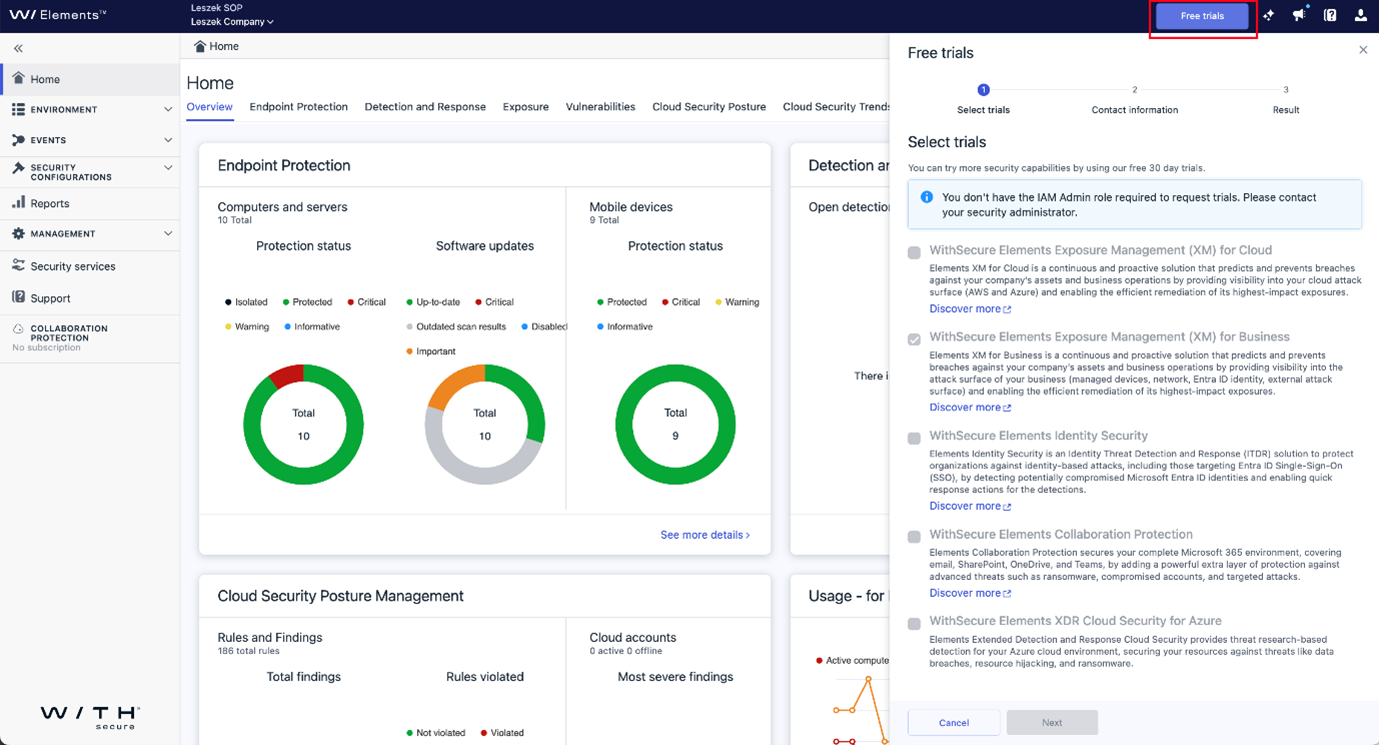
This will open a dialog which will allow you to select which Elements product you want to take into trial use.
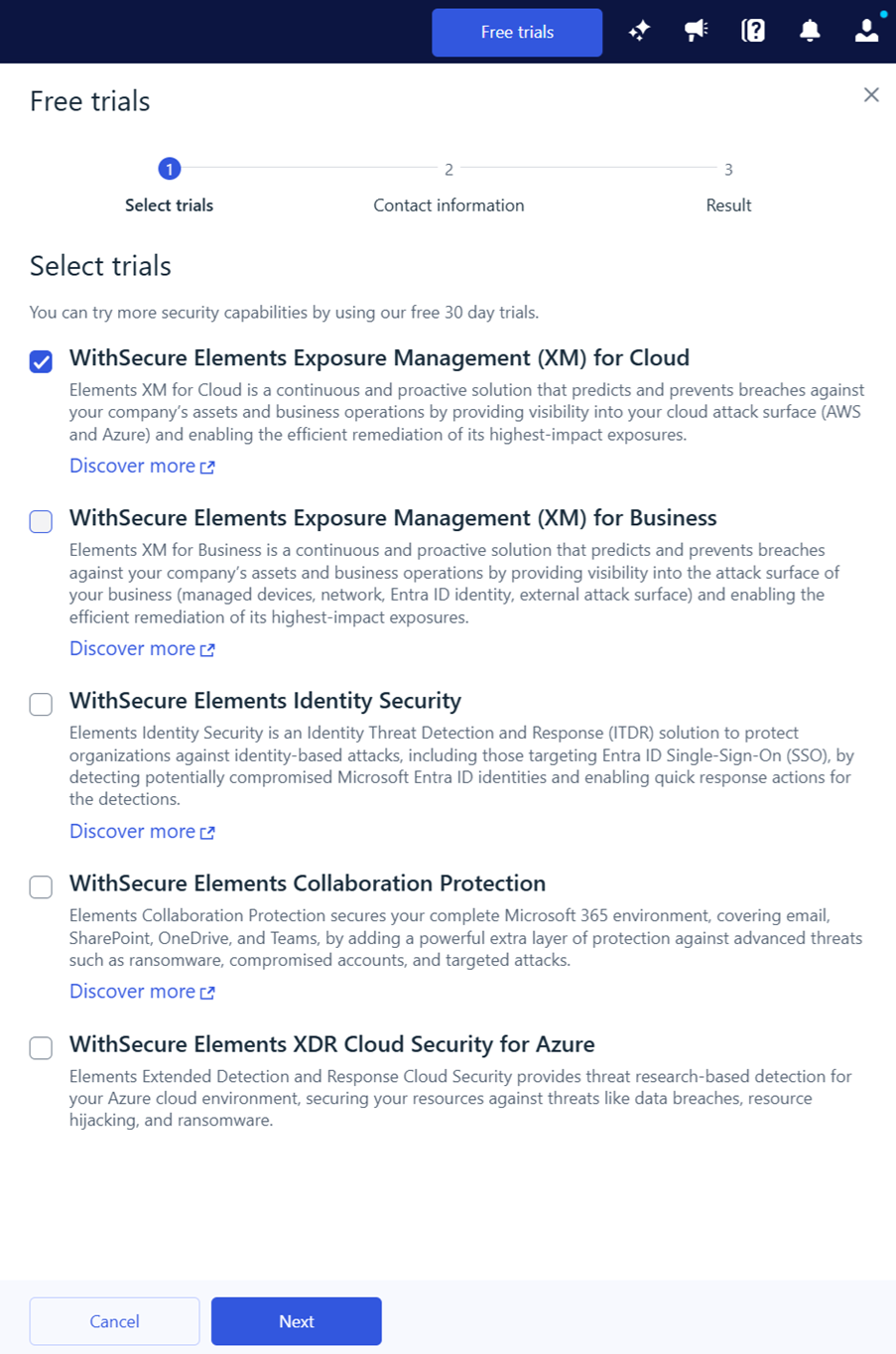
Notes:
In order to proceed with the trial selection, your current user must:
- already have the Elements IAM role.
- for partners, note that a company must be set in the scope selection. In-Product Trials are always at the company level.
Once you have selected the product(s) to trial, click “Next”, and you will asked for some contact details. These are required so we can correctly configure your trial subscription and know who to contact later.
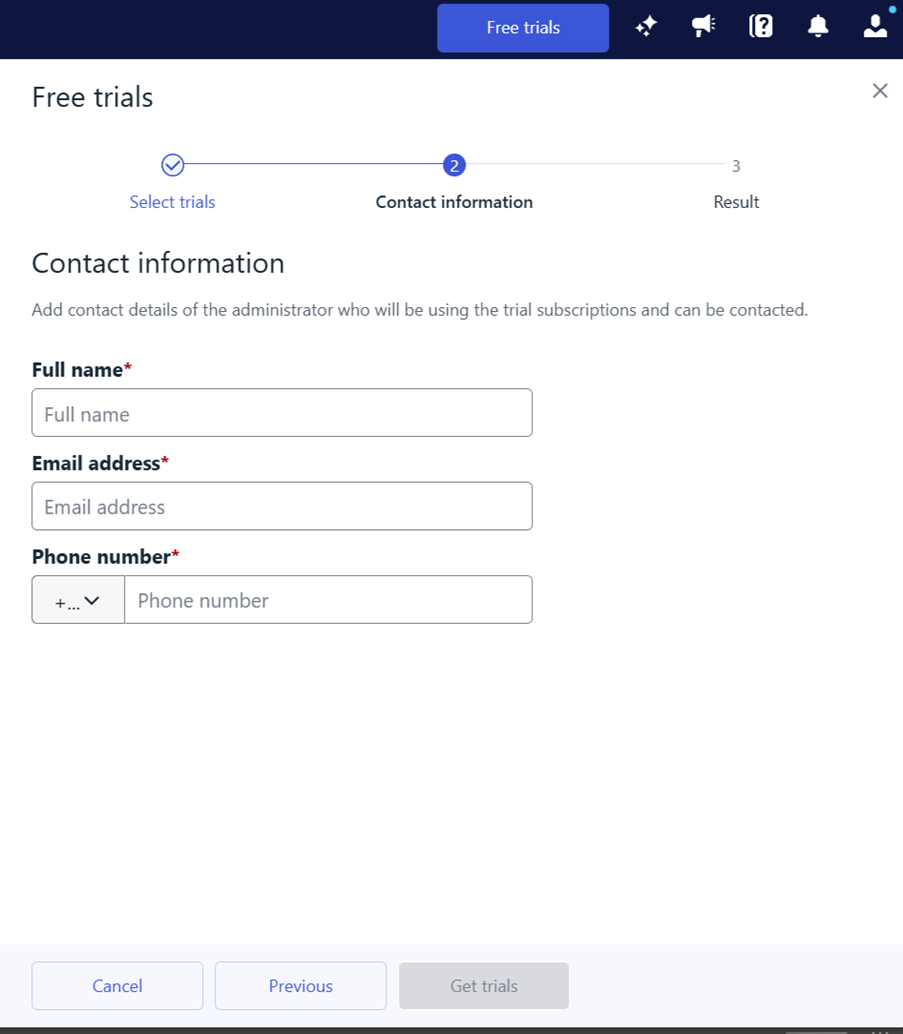
Once you have entered your contact details, click “Get trials”
At this point, the Elements Cloud will allocate you a 30 days trial subscription for your selected product, and it will be automatically added to your current organization.
Notes:
- After the subscriptions have been added to your organization, they might not show up in the Subscriptions view until your next login.
- For some products, there is additional configuration required, and you may need to follow one of our Quick Start Guides.
At the end of the Trial period
At the end of the trial period, the subscription(s) will expire. Just before this. A WithSecure Sales Representative will contact you to check if you want to convert the trial subscription into a full subscription.
You are under no obligation to continue. We contact you to ensure that if you do wish to take the product into permanent use, we can convert the trial to a full subscription for a seamless transition.
Please Note: After a trial version has been used, it will not be possible to request another trial until a period of 4 months has elapsed. This is to prevent misuse of the trial subscriptions.
-
Introducing Exposure demo mode in the Elements Security Center
Read more
UPDATE 2025-05-28: The Exposure Management Demo mode is now live and available to all Elements users.
To help our customers and partners to get familiar with Exposure Management capabilities in the WithSecure Elements Security Center, a new feature “Exposure demo mode” will be introduced later in May.
Exposure demo mode is available for all Elements Security Center users and can be accessed from user menu.
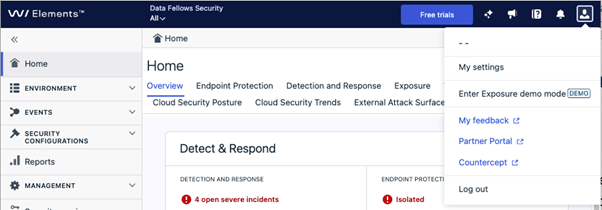
Once the demo mode is active, the portal color will change, the scope selector will disappear, and a welcome note is shown. If you logout while being in demo mode system will remember the state from where you left off.
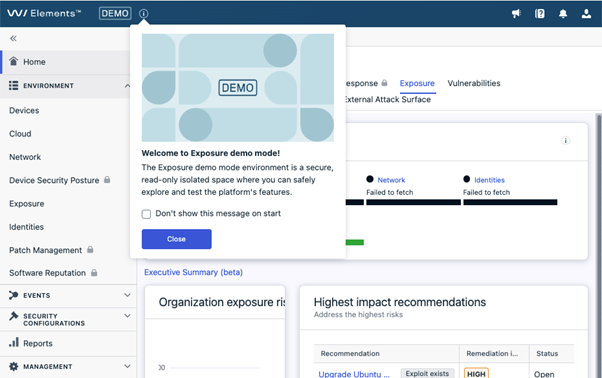
In the Exposure demo mode you can see rich and topical Exposure Management content. You can get familiar with all available actions, but without the option to execute state changing actions.
WithSecure Elements security capabilities that are not available yet in the demo mode (e.g. related to XDR portfolio) are indicated with lock icon.
To return to the normal portal mode for managing your Elements environment, simply exit the demo mode from user menu. You can return at any time.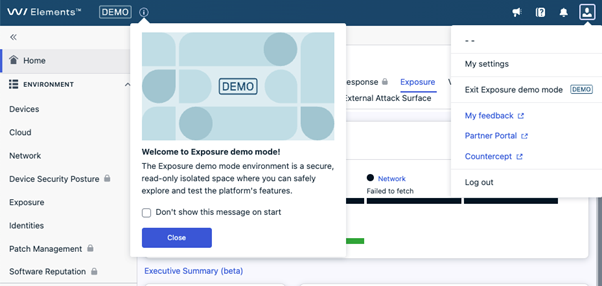
NOTE: Some users may earlier have been granted access to the WithSecure Exposure demo company called “Elements demo company”. This feature will fully replace old demo company, and the old demo company will not be any more available from scope selector.