
-
What’s New in Elements: April 2023
Read more
Editor’s Highlights
Breaking News
Even though this article relates to releases in April, we want to announce that Software Updater for Mac is now available. Please see
for more information. Fuller details will be included in the May What’s New article.Elements Security Center
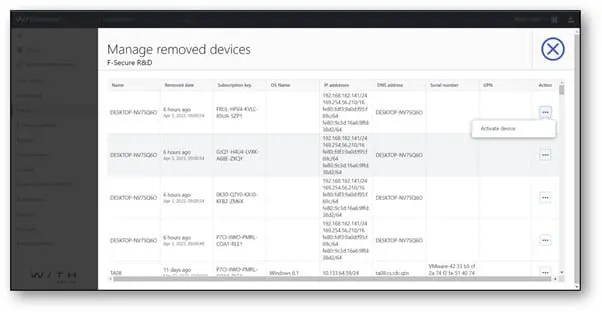
It is now possible to manage devices that have been removed
Administrators can use this feature to restore individual devices that have accidentally been removed or blocked. This feature will replace the existing “Restore devices from blocklist”. This feature is placed under three-dot menu in device list view.
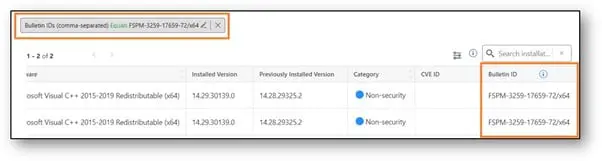
Software Updater summaries have more information and improved filtering
- Help text has been added for Bulletin ID columns
- The Bulletin ID column has been added to Installation Logs tab
- It is now possible to filter all devices that have installed some patch using Bulletin ID filter on Installation Logs tab.
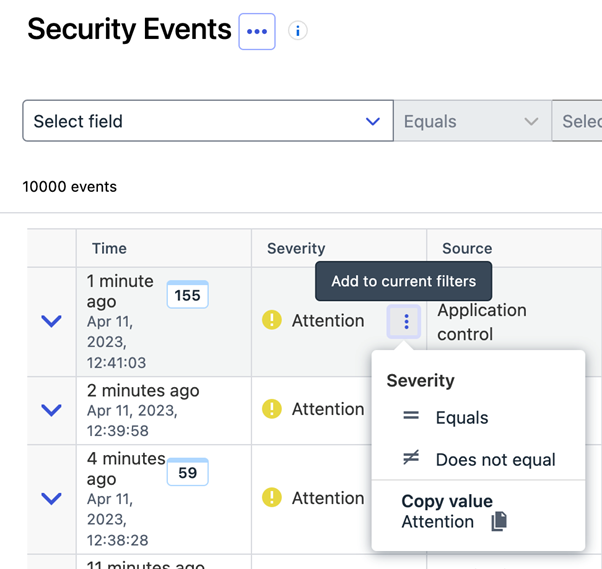
Quick Filters are now available for selected columns in the Security Events table.
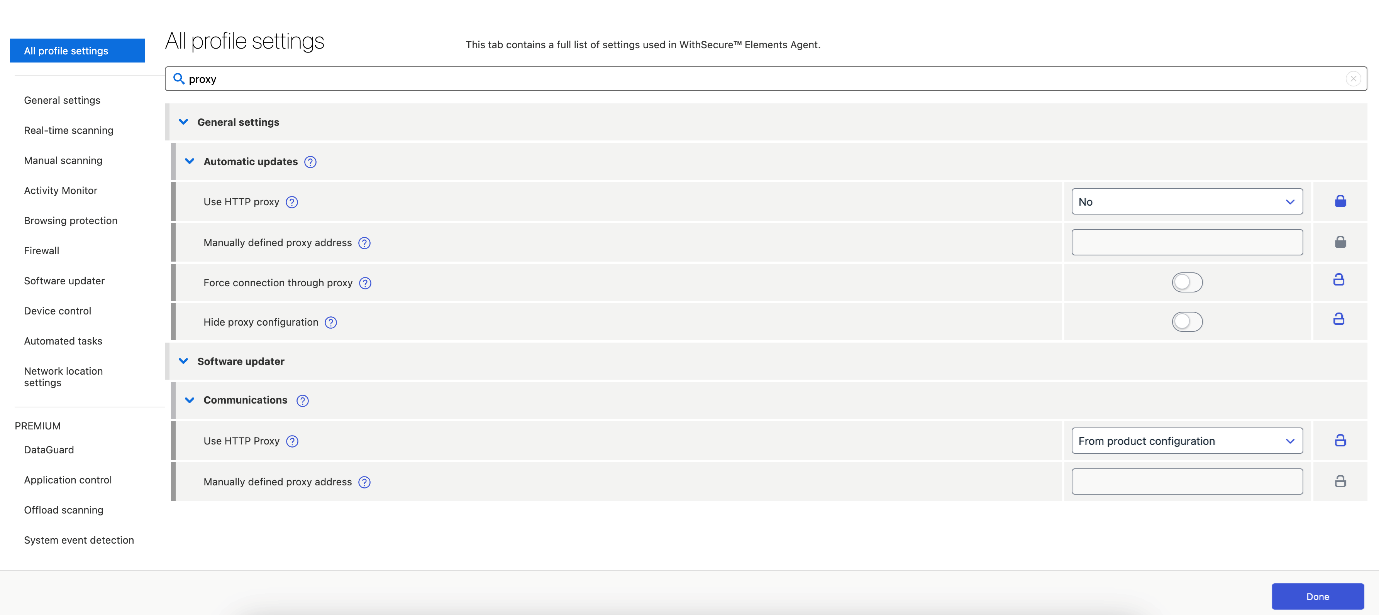
Profile editor changes
- We have added a new section called “All settings”. This section contains all possible profile settings in one view.
- There is now a search box on top of every section which allows to free form search for settings or their values.
New unprotected devices features
- The administrator can now enable automatic daily scanning for a company.
- Devices found by the scan now can be marked as trusted and it is also possible to add comments for the devices found by the scan.
- It is now possible to filter the list of unprotected devices by Active Directory Group and trusted status.
Device listing changes
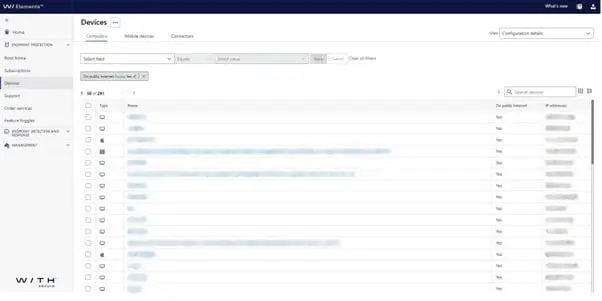
- A new column was added to the device listing, called “On public internet”. This describes whether any of IPv4 addresses of the device are public.
Security Events changes
Additional Quick Filters are now available in the expandable section:
- Filtering by device

- Filtering by device label

In the Security Events section we have introduced a feedback form to
encourage customers sharing their feedback about recent additions and
ideas for future features.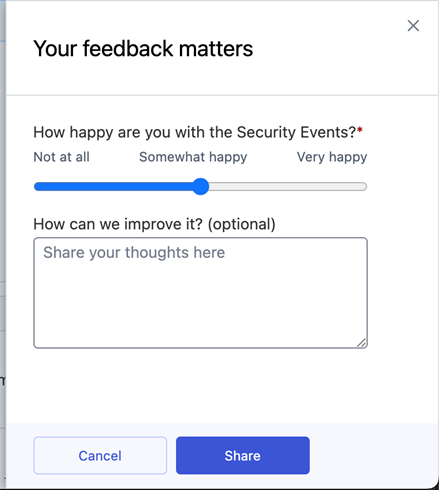
Elements Endpoint Protection
WithSecure Elements Agent for Windows and Server version 23.3
A new version of the endpoint clients is available.
This release makes the Elements Agent version 23.3 available (internal version 23.3.570), and the endpoints automatically upgrade, without a reboot.
Authenticode signing changes
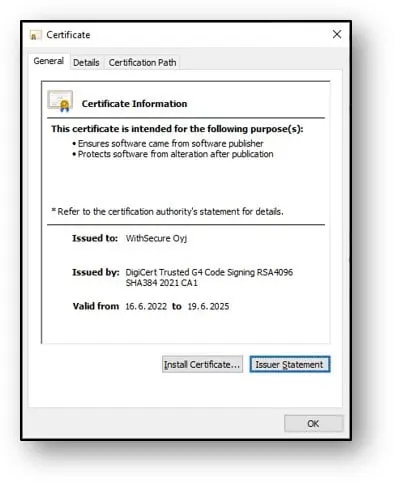
This release is signed with a new WithSecure Authenticode certificate. Our very old installers don’t know this signature and will not trust it. If you use very old network installer – please upgrade to latest otherwise your installations will fail.
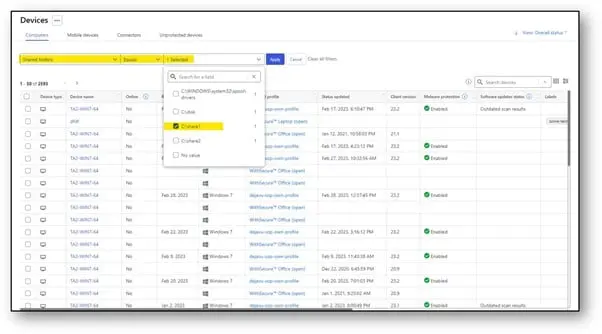
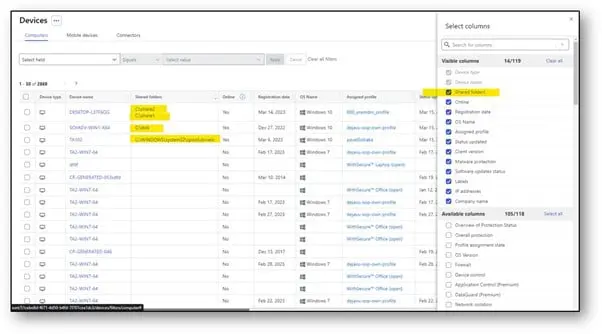
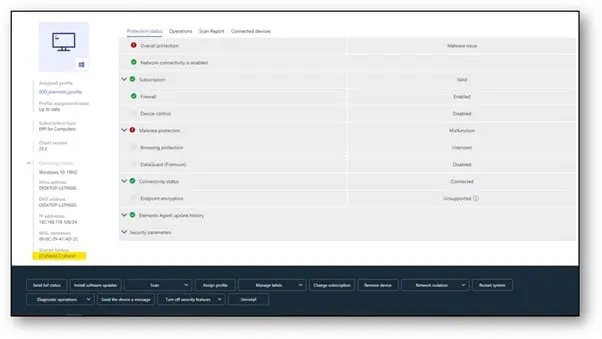
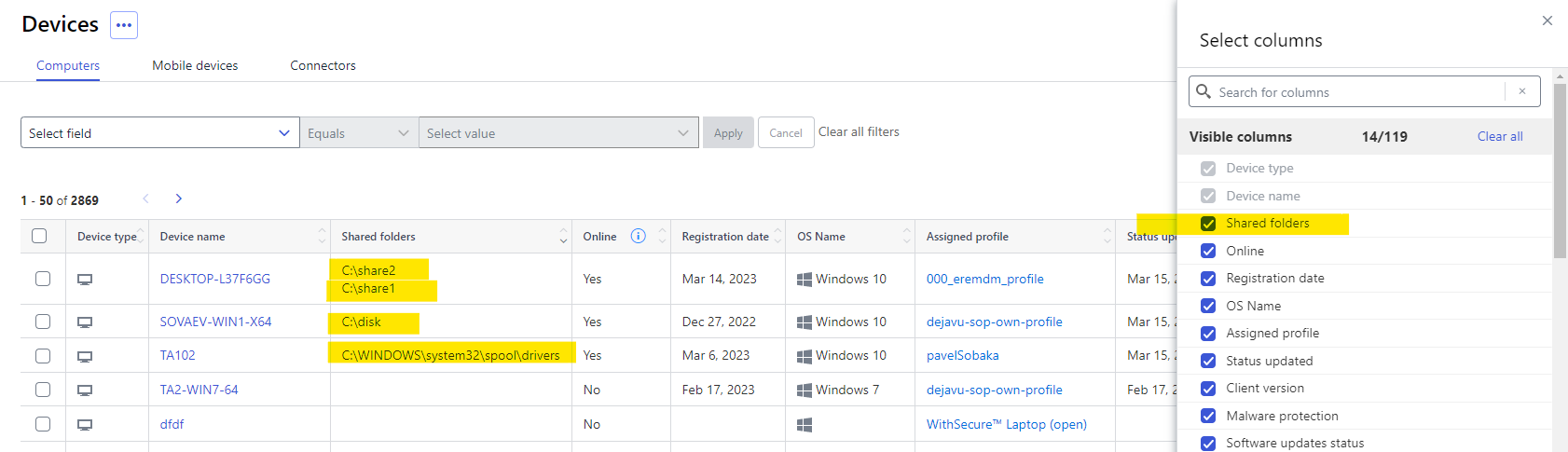
Automatically discovered network shares are displayed in the portal
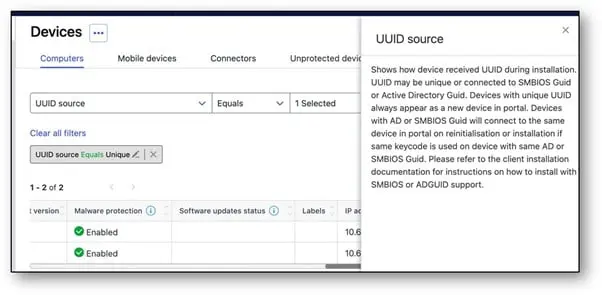
The Devices view now shows the UUID type the device was installed with (unique, smbios or adguid)
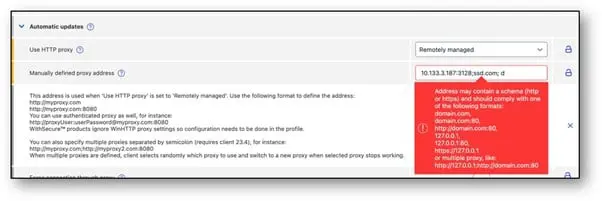
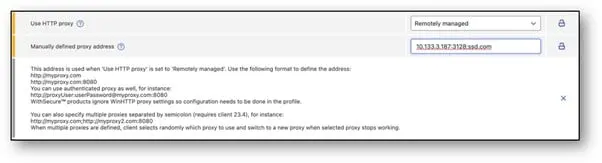
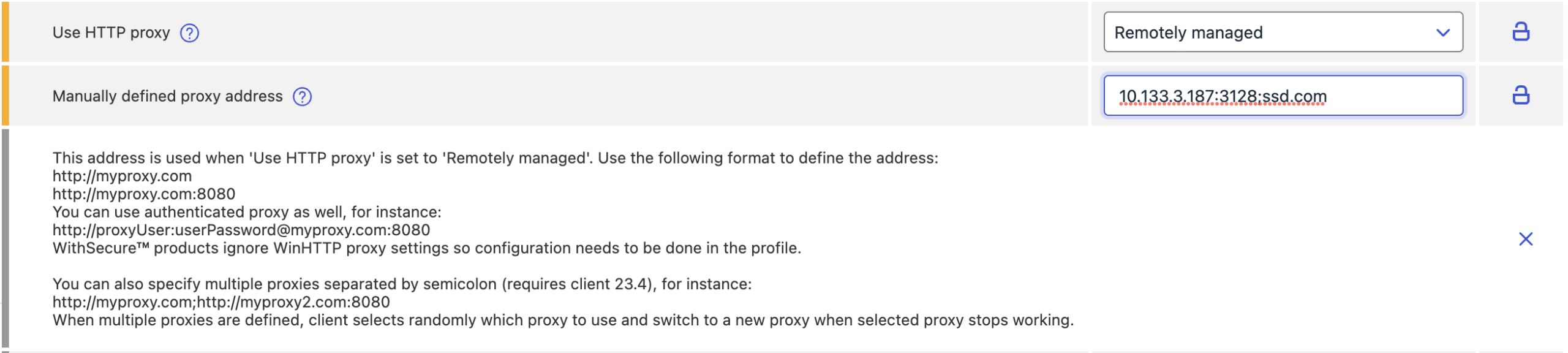
Multiple proxies support
Profiles now support specifying multiple proxies and Connectors separated by semicolon. Please note that clients prior to 23.3 don’t support multiple proxies and may break so it’s advised to use it only with new clients or wait for all devices to upgrade to 23.3 first.
Delay automatic USB scan
When inserting a USB device, the automatic scan is now delayed for 5 seconds to give device control time to disable the device if needed.
Connectivity report in fsdiag
This release checks accessibility of 2 new URLs:
These URLs will be taken into use in a future version of the Elements Agent so please verify they are not reported as not accessible for your devices.
Elements Vulnerability Management
Added support for ed25519 and SHA2 keys in scan templates and configurations
RSA-SHA1 keys are deprecated by OpenSSH and no longer supported on newer systems like Ubuntu 22.04 LTS. By adding additional key exchange algorithms, we ensure scanning can continue uninterrupted.
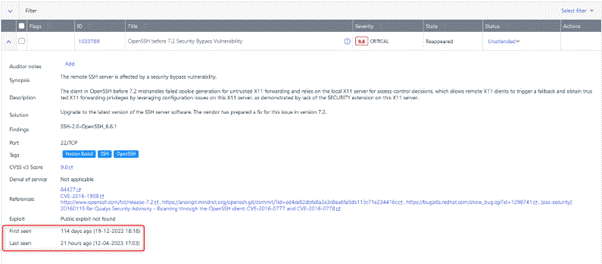
Enhanced vulnerability instance detail view
We have now added a ‘First seen’ date, which indicates the date when the vulnerability instance was initially discovered. Also added a ‘Last seen’ date to the vulnerability instance detail view, which reflects the most recent occurrence of the vulnerability instance in an incoming report.
Elements Vulnerability Management System Scan
We have now added multiple detection capabilities to the System Scan:
- Detect vulnerabilities in NXLog Community Edition in authenticated scanning for Windows
- Detect vulnerabilities in 3CX Desktop App in authenticated scanning for Windows including CVE-2023-29059 vulnerability (about trojanized versions of the software).
- Detect vulnerabilities in PostgreSQL JDBC Driver in authenticated scanning for Windows and Linux
- Detect vulnerabilities in Wondershare MobileTrans in authenticated scanning for Windows
- Detect vulnerabilities in Wondershare Filmora in authenticated scanning for Windows
- Detect vulnerabilities in Wondershare PDFelement in authenticated scanning for Windows
- Detect vulnerabilities in Wondershare Repairit in authenticated scanning for Windows
- Detect vulnerabilities in Wondershare Creative Center in authenticated scanning for Windows
- Detect vulnerabilities in Wondershare PDF Reader in authenticated scanning for Windows
- Detect vulnerabilities in Wondershare Edrawmax in authenticated scanning for Windows
- Detect vulnerabilities in Wondershare Recoverit in authenticated scanning for Windows
- Detect vulnerabilities in Wondershare Anireel in authenticated scanning for Windows
- Detect vulnerabilities in Wondershare DemoCreator in authenticated scanning for Windows
Integrations
Reminder: Legacy APIs will stop working soon
We are progressively deprecating the Endpoint Protection API and replacing it by Elements API.
The following endpoint will reach their end of life soon:
- Computers endpoint: 30th of May 2023 (see change log)
- Security events endpoint: 30th of June 2023 (see change log)
- Companies endpoint: 31st of July 2023 (see change log)
- Invitations endpoint: 3rd of November 2023 (see change log)
Elements API: Managing EPP invitations
An authorized client can manage EPP invitations:
- list pending or expired invitations
- create new invitation – installation link with one-time password is sent to specified recipient
- delete invitation – pending invitation is canceled and can’t be used anymore
- renew expired invitation or resend pending invitation
The Legacy EPP API for managing invitations is deprecated.
Other items of interest
Monthly Threat Highlights Report: March 2023
Ransomware: Trends and notable reports
- CISAs pre-ransomware notification initiative
- Dole attack shows real world impact
- Rise of Royal
- Nevada is Nokoyawa
- Magniber’s SmartScreen bypass
- Ransomware newcomers
Other notable highlights in brief
- Best practices in cyber
- Hydrochasma gathering intelligence
- I2PMiner targeting MacOS
- Lumma Stealer targets content creators
- T-Mobile constantly targeted by SIM-swappers
- Android banking trojan tracker
- Breach Forums down!
- Ultrasonic attacks
You can also Download report
In case you missed it
Share your ideas with us
Our purpose is to co-secure the world with you – now as WithSecure™. To co-create the best possible cyber security products and services, we warmly recommend you share your ideas via our Ideas Portal, now accessible directly from WithSecure™ Elements Security Center.

Further information
Changelogs and Release Notes for all parts of WithSecure™ Elements can be found at the Help Center
-
Software Updater for Mac
Read more
We are pleased to announce that Software Updater for Mac has now been released, and our customers using Mac can take it into use.
This brings the ability to check and update many third-party applications to the latest versions, ensuring that your fleet of devices is free of vulnerable software, which is one of the attack vectors used by cyber criminals to infiltrate your networks.
This functionality is currently available for customers who have opted in to Early Access via their Elements profile, but will be available to all customers in the coming days.
-
Introducing Elements Scope Management and Elements Portfolio Visibility in the WithSecure Elements Security Center
Read more
UPDATE 24.5.2023 Reminder: The change will be deployed today
As we move forwards with the WithSecure Elements portfolio, it is important that we unify as many Elements concepts as possible, so that users of any of the constituent solutions are at ease when new products are introduced.
In the first stage, we will introduce a new Scope Selector, which will show every organization available to the logged-in administrator. This will be deployed solution by solution, starting with Endpoint Protection, with others following in the next weeks. You can find out more details on this below under Elements Scope Management.
Later in May we plan to release further updates to the Elements Security Center, including In-Product Portfolio Visibility. This change will go live on 24.5.2023
Elements Scope Management
The Scope Selector is used within the Elements Security Center to allow the administrator to choose the correct organization for making changes.
For End-Customer administrators, this has limited functionality as they can only see organizations they have the right to administer.
For Partner-level administrators, they may be able to administer multiple organizations, so it is really important that they can select the correct one quickly and easily.
To make administrator’s work even more efficient, we will be introducing a “Common Scope Selector”. This will be used across the entire Elements system, and will show every organization available to the logged-in administrator, together with a visual hint about which Elements subscriptions apply for the organizations:
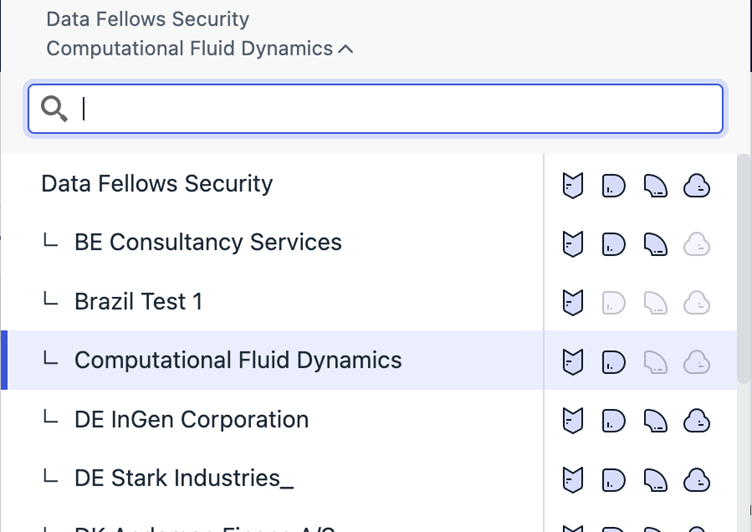
In the screenshot above, the four icons to the right of the organization show whether they have Endpoint Protection, Endpoint Detection and Response, Vulnerability Management and Collaboration Protection, respectively. If we add further Elements solutions to the portfolio in the future, these will also be included here.
Please Note: The icons will appear gradually, as each of the Elements Solutions deploys the change.
When the administrator switches between different constituent parts of Elements, for example between Endpoint Detection and Response and Endpoint Protection, the scope selector will ensure that the same organization is used in the newly selected product.
In-Product Portfolio Visibility
Until now, the Elements Security Center has only displayed menu items on the left-side for solutions where there is an active subscription.
The Elements menu behavior has now been revised to complement the Common Scope Selector functionality, and all main left-side menu entries are always visible, whether there is an active subscription for that particular solution or not.
In the case where there is no active subscription, selecting that menu item will display a simple message explaining what that solution is, with a link for more information. In the future, the administrator will be able to order a trial for that solution, for that organization.
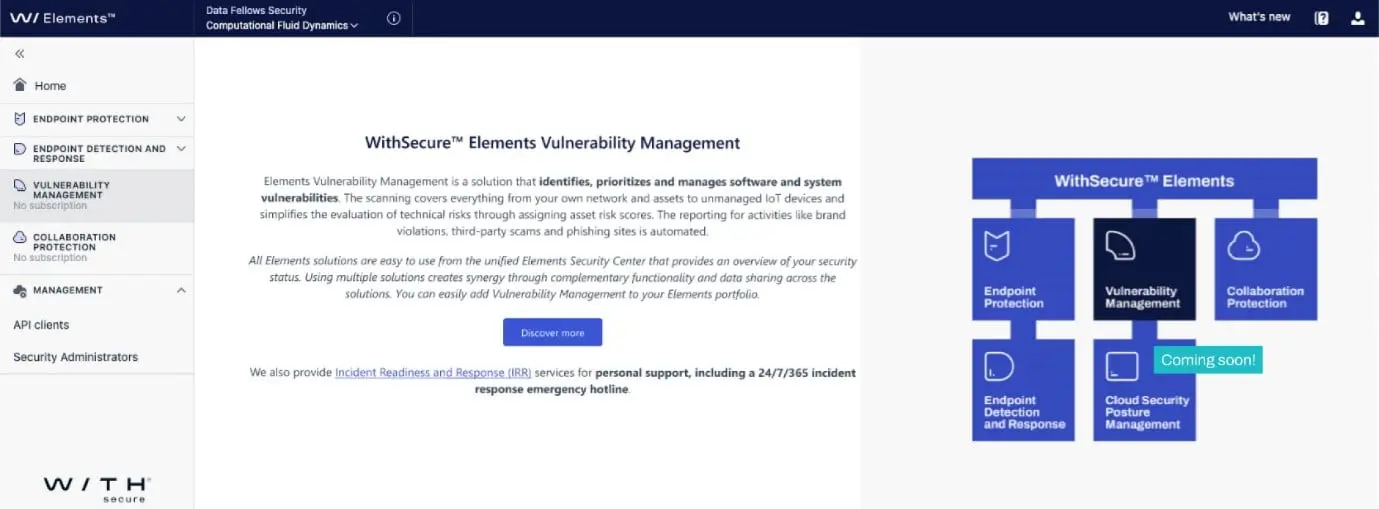
In this example, the Discover more link would take the user to the solution page for Elements Vulnerability Management
Please Note: This is an example image, and may change slightly before release.
As a customer, is there any action I need to take?
Everything is migrated for you, and only the visual aspects change. As a partner or customer, you may want to provide a link to this article to your Administrators, so they are aware of the changes.
-
Changes in Elements
Read more
UPDATED: Changes in Windows minimum patch level requirement
In February we announced changes in the minimum required patch level on Microsoft Windows for WithSecure Products. These changes are now mandatory. Please see the article listed below for more details.
Changes in Elements Collaboration Protection
On May 15th 2023, WithSecure will be deploying an update to Elements Collaboration Protection to introduce the organization hierarchy used in other parts of WithSecure Elements. You can find more details at
Changes in Elements Security Center
During May 2023, we will be deploying an update to the Elements Security Center which unifies navigation between organizations, and also introduces more visibility to other items in the Elements Portfolio
-
Upcoming changes to Elements Collaboration Protection and organizational hierarchy
Read more
On May 15th 2023, WithSecure will migrate customers using Elements Collaboration Protection to follow the Elements Organizational Hierarchy.
What is the Organizational Hierarchy?
The WithSecure Elements business model supports a three-tier hierarchical model.
At the top level is the Solution Provider. This type of organization can manage the security of any directly-managed Companies they may have, as well as their Service Partners and the Service Partner’s Companies. The Solution Provider is WithSecure’s direct customer.
At the next level is the Service Partner. They can manage the security of their own customer Companies, but have no access to their parent Solution Provider’s other organizations.
And at the lowest level, there is the Company. These are the end-customer organizations, and are only able to manage their own security. In some cases, Companies will come directly under the Solution Provider.
Until now, Elements Collaboration Protection has not fully supported this hierarchical model, so we will be upgrading the systems to follow . This will allow deeper integration of Collaboration Protection with the rest of the Elements portfolio, as we move forward with development.
As a customer, what will I see after the upgrade?
All organization data for Elements Collaboration Protection will be migrated to the new structure within our systems. This will happen transparently to customers, and the system will be completely operational at all times. Please note: the user will need to log in again after our migration, in order to see the changes.
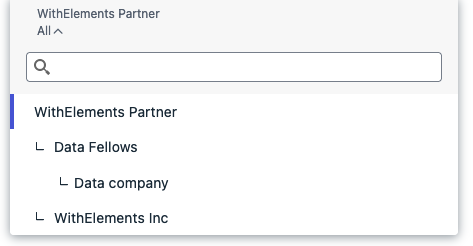
After this step is taken, the administrator will be able to access their customers in exactly the same was as they do at present:
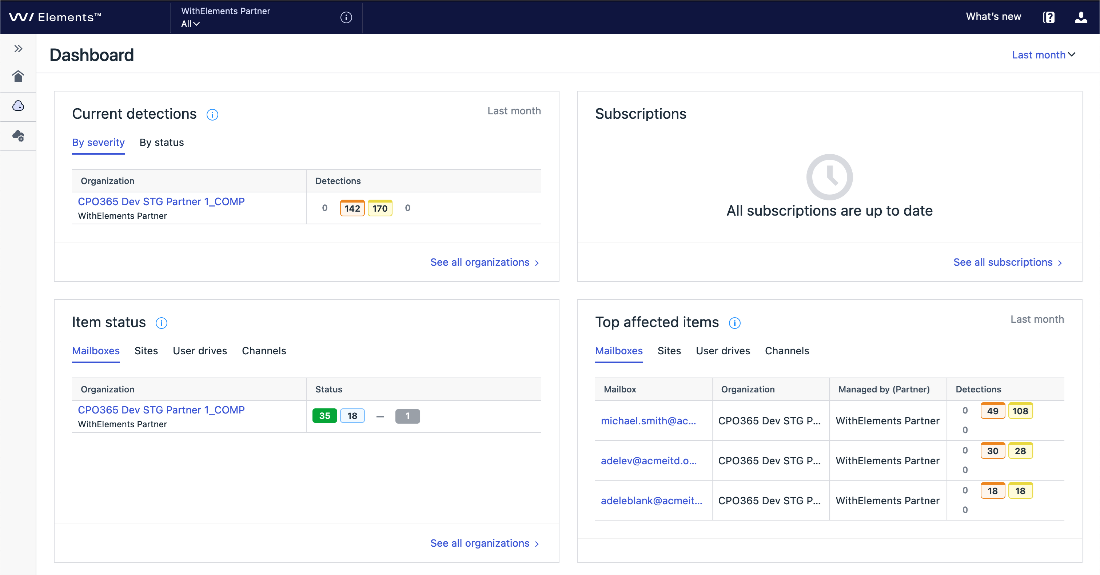
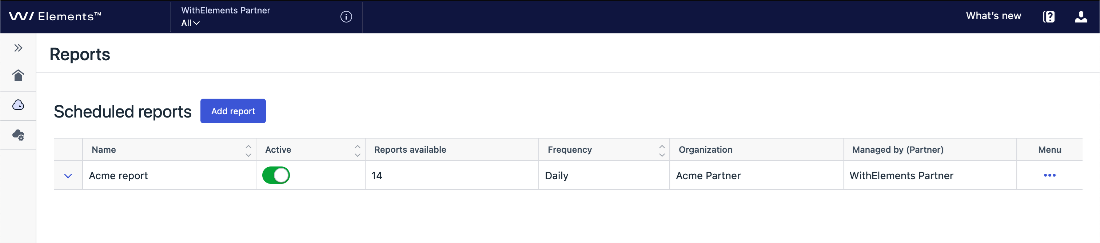
Accordingly, we have also included the partner information in the Collaboration Protection dashboard where it makes sense to do so.
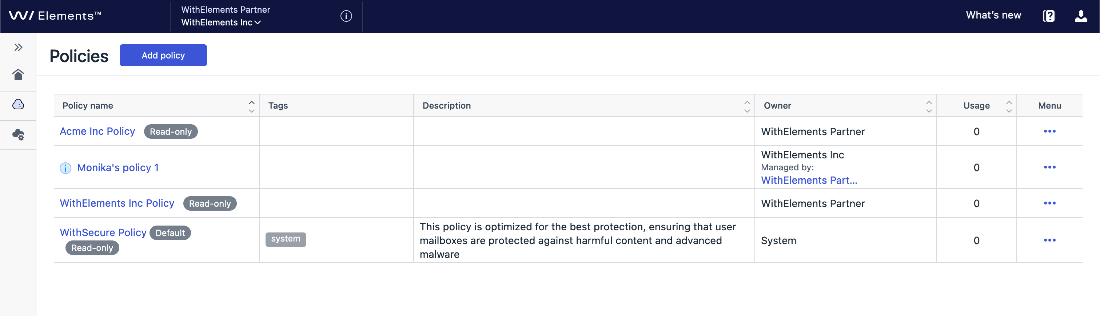
Policy settings
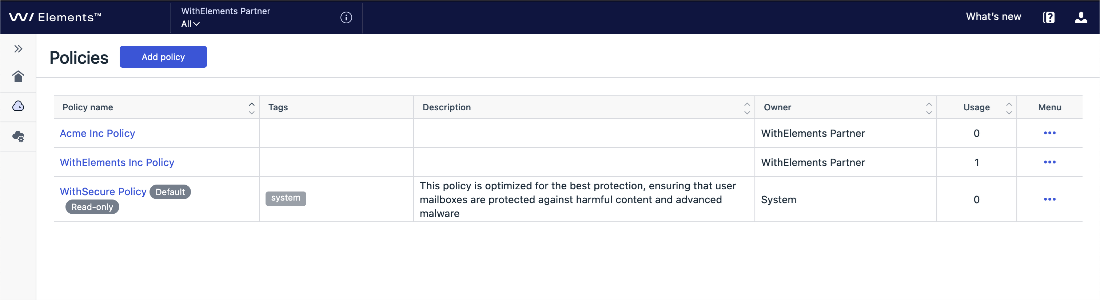
Policies have also moved to the 3-layer hierarchy: private and public visibility setting will be replaced by owner reference.
Policies are only visible and editable for users with appropriate rights. For example, only a company administrator can see and modify the policies they have created for their own company. Solution Provider or Service Partner administrators cannot see profiles created at a lower level.
Only the owner of a profile has the right to edit that profile.
Solution Provider level policy settings
Service Partner level policy settings
-
What’s New in Elements: March 2023
Read more
Editor’s Highlights
Outbreak Control – This new feature brings a powerful capability to dynamically and temporarily increase security when an EDR detection has been made on devices. You can find out more in the Elements Security Center section below.
Elements Security Center
New Features
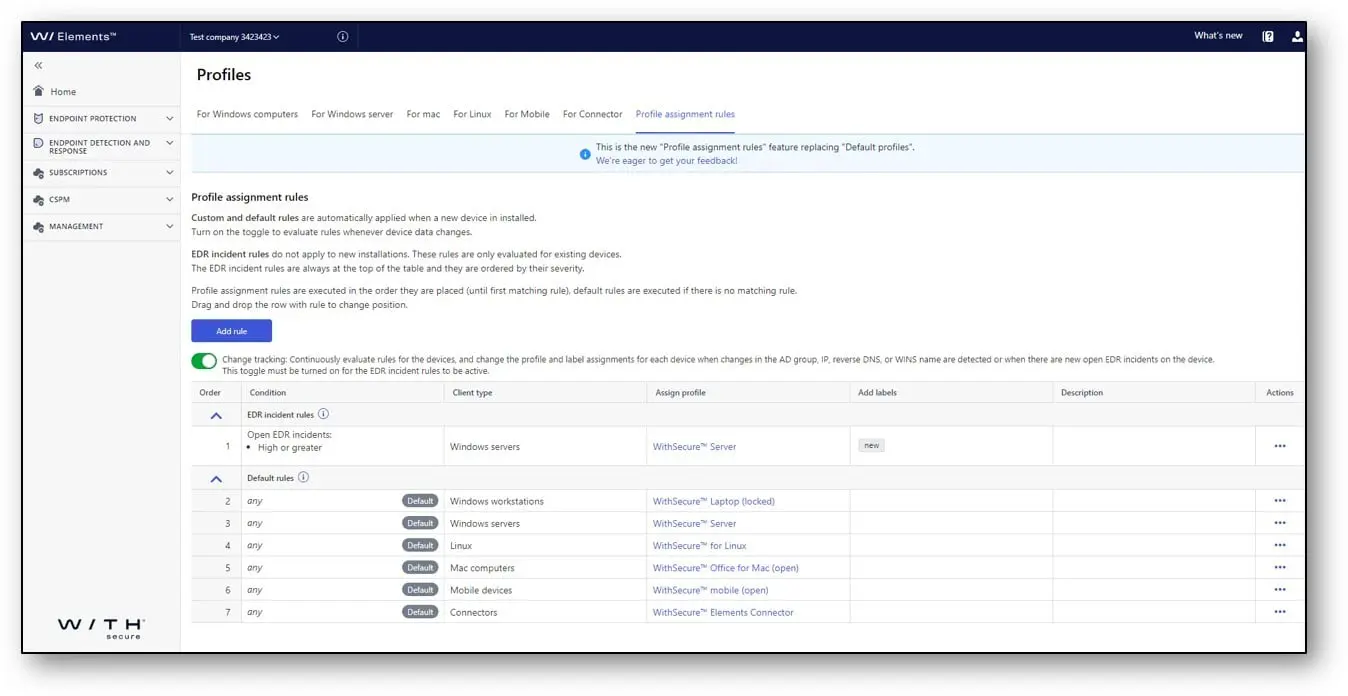
Outbreak control: Outbreak control is an extension for profile assignment rules. When change tracking is enabled, you can create a rule that automatically reacts to open EDR detections and assigns a hardened profile and custom labels to the affected endpoint. Once the detection is closed it will automatically change the profile and labels back based on your other rules
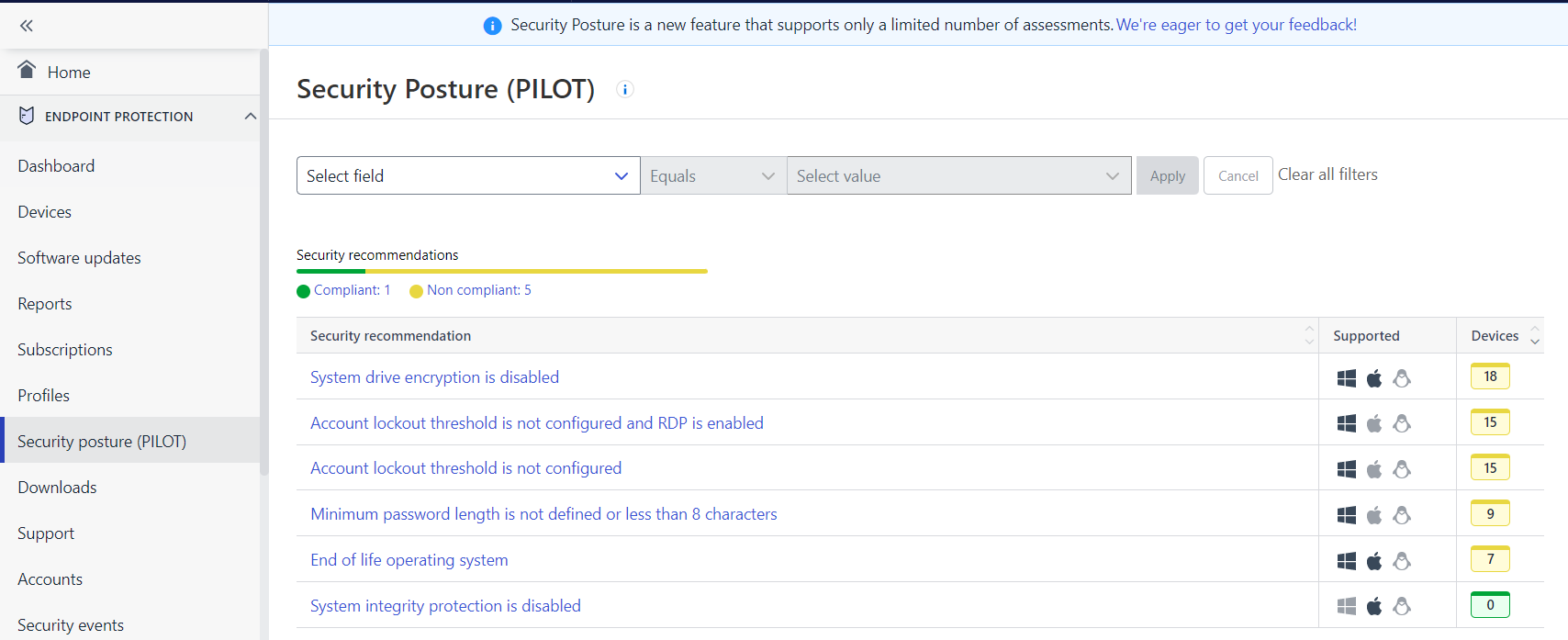
Security Posture (piloting release) Security Posture analyzes your devices and profiles to find common weaknesses that lead to devices being compromised or confidential data being leaked. You can click on the items to see further explanations and instructions.
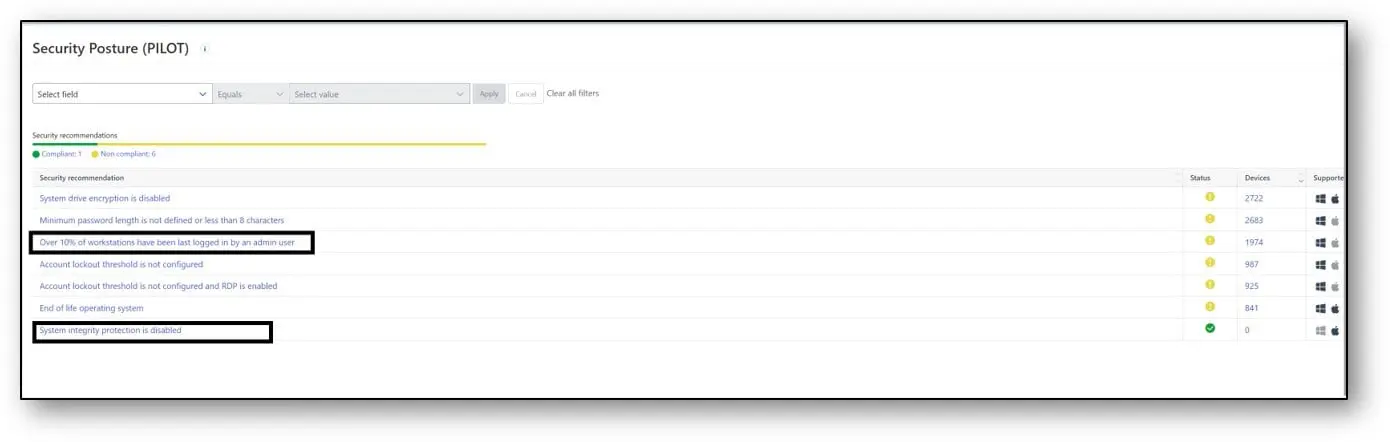
Slightly later in the month, we also added two more new recommendations: “Over 10% of workstations have been last logged in by an admin user” and “System integrity protection is disabled”.
Improvements
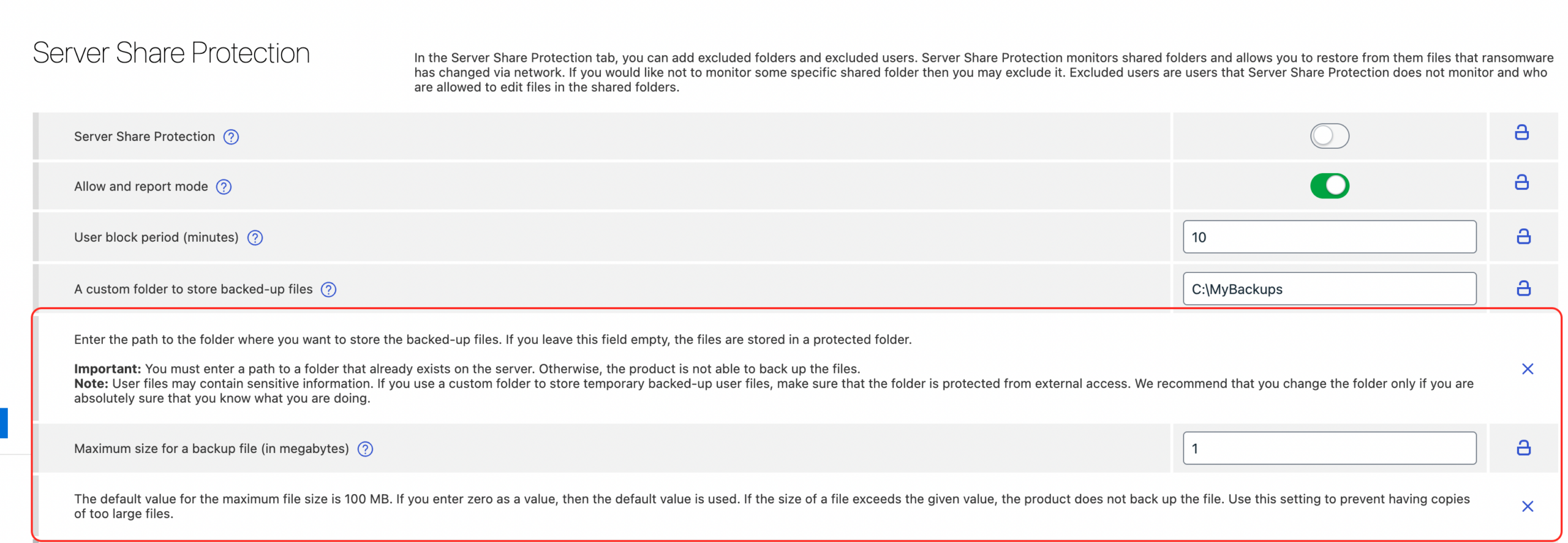
Server Share Protection: We have added the possibility to set a folder for backups and to set a maximum backup file size.
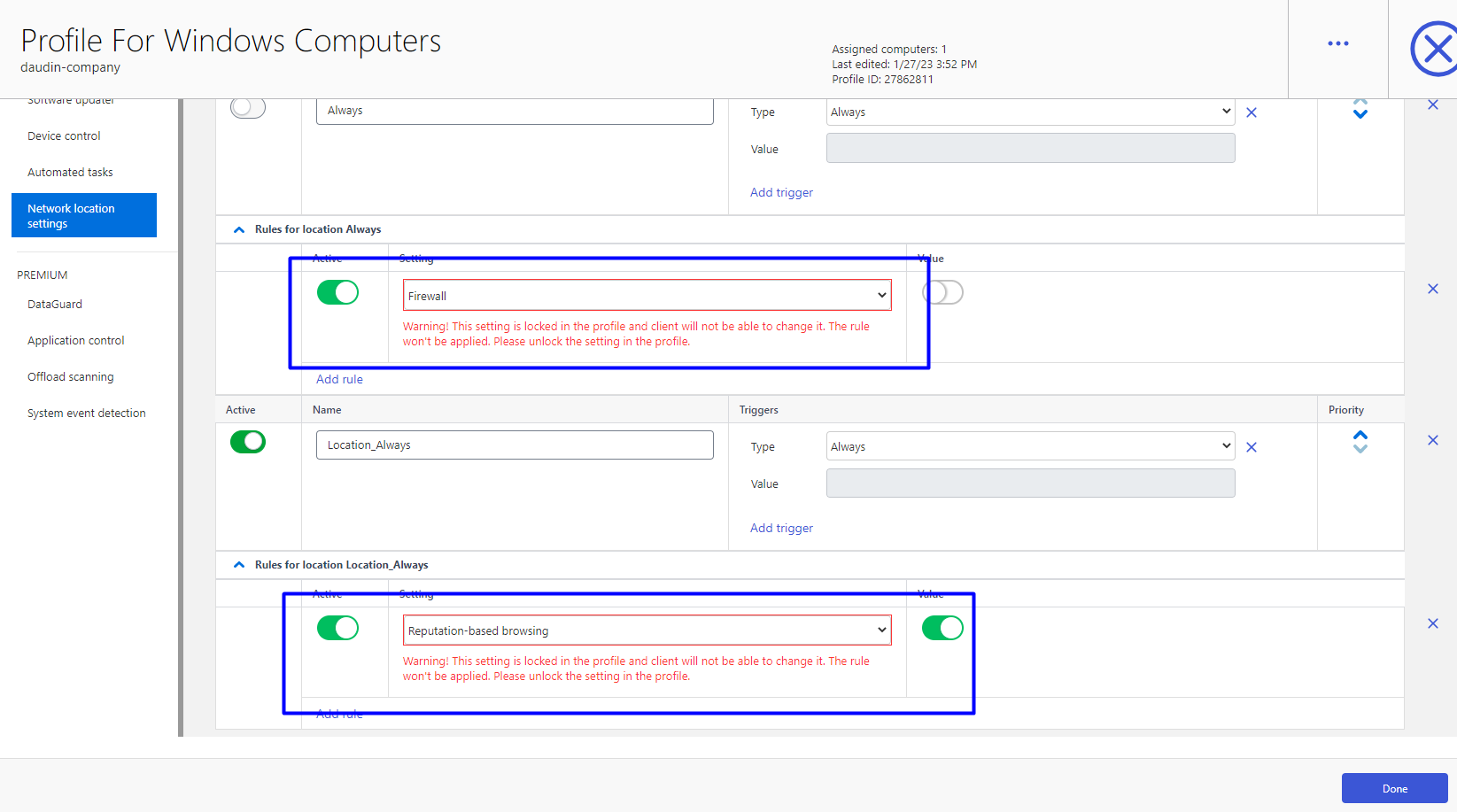
Network Location Settings. It is now possible to override settings even if they are locked in the profile. The red notification is not needed anymore.
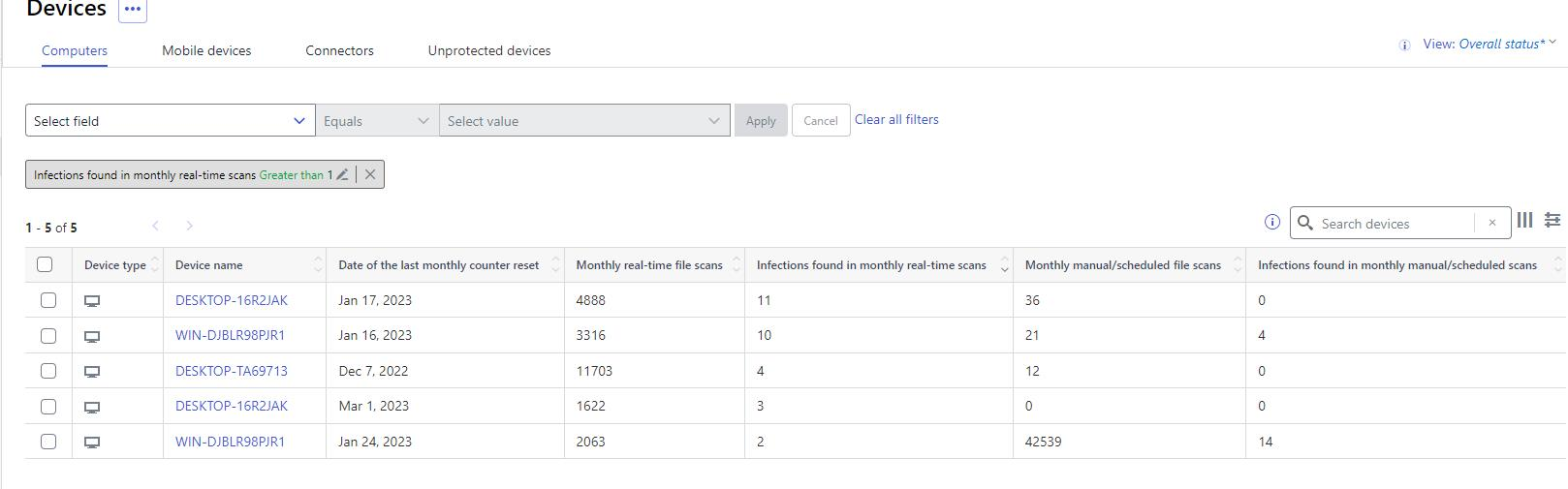
Device View. Monthly scanning counters have been added to the devices view. You can see how many files were scanned and how many issues were found during the month. These counters can be used to make queries.
My Reports. Customers can now provide feedback about the new My Reports view. We are gathering feedback to further improve and make this new functionality more useful.
Audit Logging. Changes and operations done in the profile assignment rules page are now visible in the Audit Log.
Device Details. We have improved the readability of local and admin exclusions in the device details by rendering the path as a list. If any of the exclusions are considered dangerous they are now highlighted in the list.
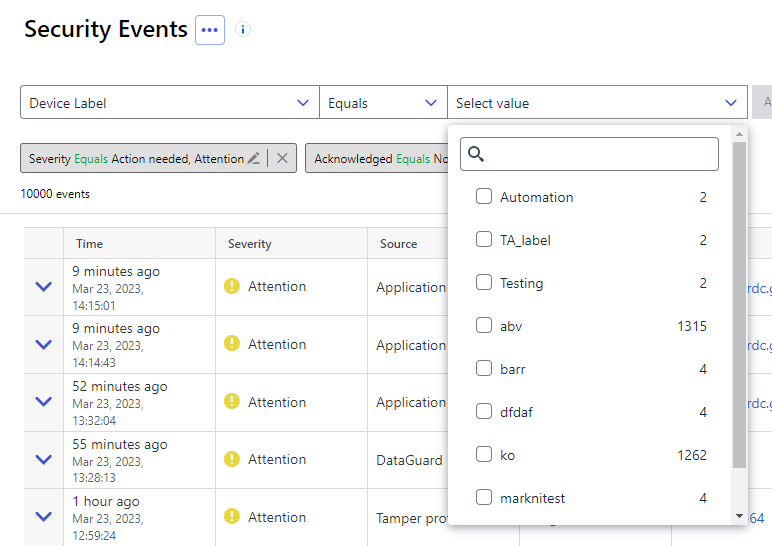
Security Events. Events can now be filtered by the device labels. It is important to note that any changes to the labels assigned to the device are to be visible only in the events happening after the label change was made. No changes to historical data is ever made.
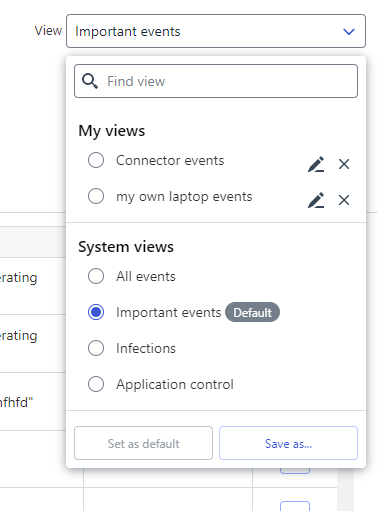
Similar to what has already been available in the Devices view now also Security Events view supports Saved Views. With the initial release a set of predefined system views is shipped together with an option to create custom user views.
Multiple Proxy Support (Windows). We have added multiple proxy support to windows proxy settings. This will be available with clients 23.4+
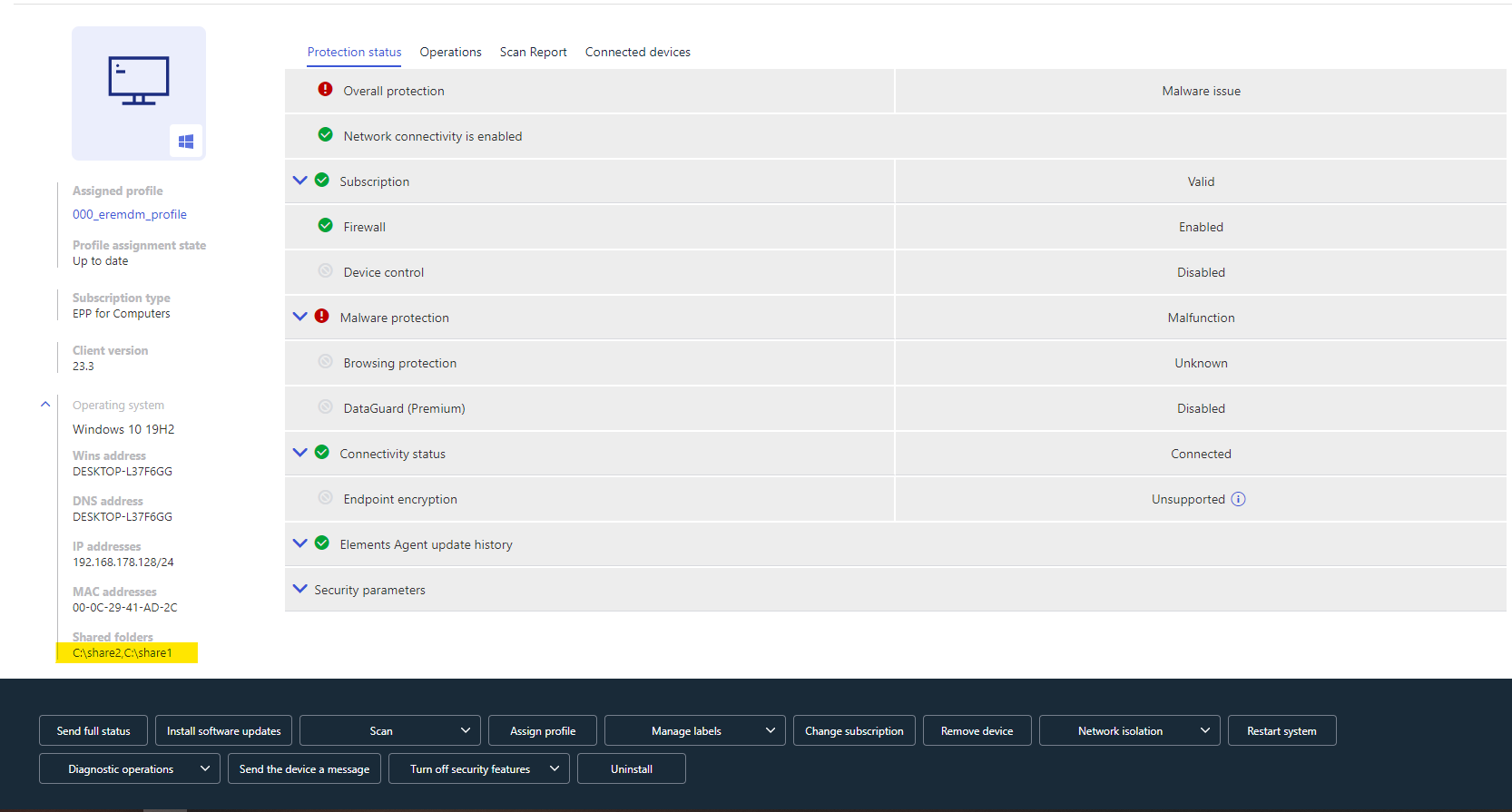
Show discovered shared folders. To increase visibility of folders shared from a device, for example useful with Server Share Protection, we now show ”shared folders” in the Devices view and the Devices details pages.
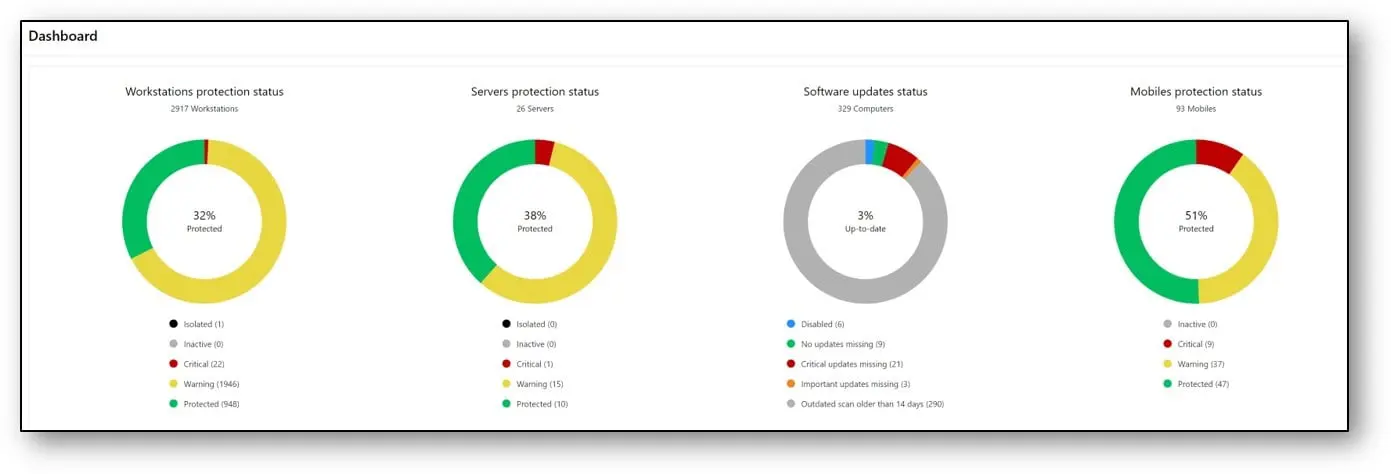
Advisory dashboard. The pie-charts are now displayed with legends to aid readability and understanding.
Elements Endpoint Protection
WithSecure Elements Mobile Protection app for iOS released
An update to the WithSecure Elements Mobile Protection app for iOS (23.0.10134) has been released. It includes the following new features and improvements:
- The app is now more reliable when running in the background.
- The About view in the app and the WithSecure Elements Endpoint Protection portal now show if a device is enrolled in an MDM.
- The app no longer has a blurry screen in the multitasking apps manager.
- When terminated, the app now shows a notification and informs the WithSecure Elements Endpoint Protection portal.
- The app and the WithSecure Elements Endpoint Protection portal now support remote operations.
- The app version format is now compliant with the other WithSecure products.
Elements Collaboration Protection
New features and improvements:
Hidden inbox rules. The hidden inbox rules expound a serious threat in Microsoft Exchange Online. The threat actors could abuse the inbox rules as one of the instruments of the targeted attacks, e.g., to spread malware among user contacts, attempt to steal or destroy information. The hidden rules make these attacks almost impossible to detect with out of the box tools. Elements Collaboration Protection introduces the new feature: ‘Suspicious hidden inbox rules’. That feature allows the detection of suspicious rules, and notifies the user and security administrator about them, so they could respond to the potential attack vector.
SharePoint URL. A site URL info was added for SharePoint assets in cloud services view as extra information to differentiate sites.
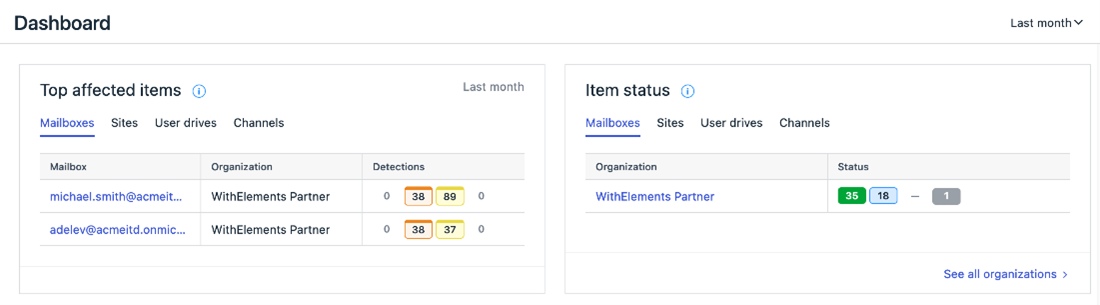
Visual improvements. The assets and status tags were updated across the Collaboration protection portal to improve visibility and unify user experience.
Elements Vulnerability Management
Elements Vulnerability Management Portal
CVSS v3.1
Elements Vulnerability Management has introduced a new scoring system to align with industry standards and vulnerability scoring in Elements EPP. Vulnerability scoring changes from CVSS v2 to v3.1. The 4-level vulnerability severity scale changes to 5-level.
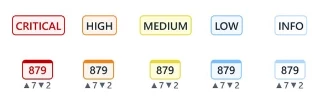
The transition to CVSSv3 scoring system has a significant impact on the vulnerability evaluation, as it provides a more comprehensive and accurate way of assessing the severity of vulnerabilities. The new 5-level vulnerability severity scale is a consequence of transitioning to CVSSv3 and provides better visibility to the most critical vulnerabilities, out of high-severity vulnerabilities.

The following link provides more detailed information regarding the CVSSv3: https://www.first.org/cvss/v3.1/user-guide.
The transition to CVSSv3 scoring for organizations’ vulnerability data in the portal may take some time. The primary indicator is the scan schedule and the frequency of re-evaluation of vulnerabilities for specific scan targets. For traditional, network-based vulnerability scanning, we recommend that you rerun all scans to obtain vulnerability data and severity counters that are calculated according to the new scoring system.
The vulnerability severity counters will start providing 5 different severity levels, including Critical, High, Medium, Low, and Info. Note that from now on, the red color is reserved for Critical vulnerabilities, while High vulnerabilities are presented in orange.
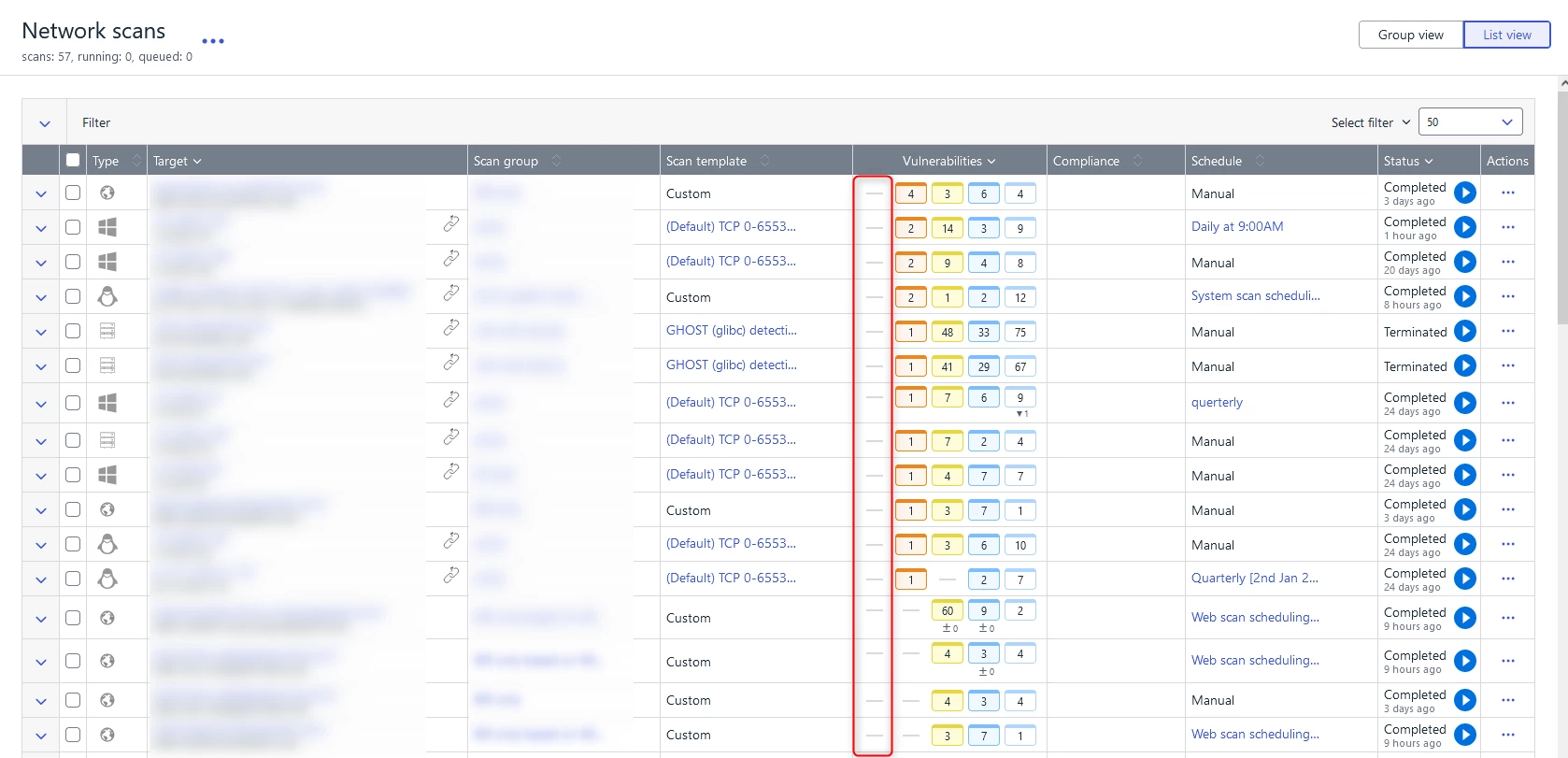
The changes in vulnerability scoring do not only apply to the most critical vulnerabilities with a CVSSv3 Base Score of 9.0 or higher. As part of this transition, you may notice that the same vulnerability scored in both v2 and v3 can have a different result in new severity scores. Our research indicates that the average base score increases from 6.5 in CVSSv2 to 7.4 in CVSSv3.
To help customers identify vulnerabilities with a changed score, the Elements VM portal introduces an informative icon (with help text) that is next to the vulnerability title. As seen in the example screenshot, the icon provides information that the severity scoring has changed, which may result in the vulnerability being re-categorized from Medium to High severity, for example.

For reference or to compare the current vulnerability score with the past, go to the Vulnerability Details page that shows both the CVSSv3/v2 vector and base score.
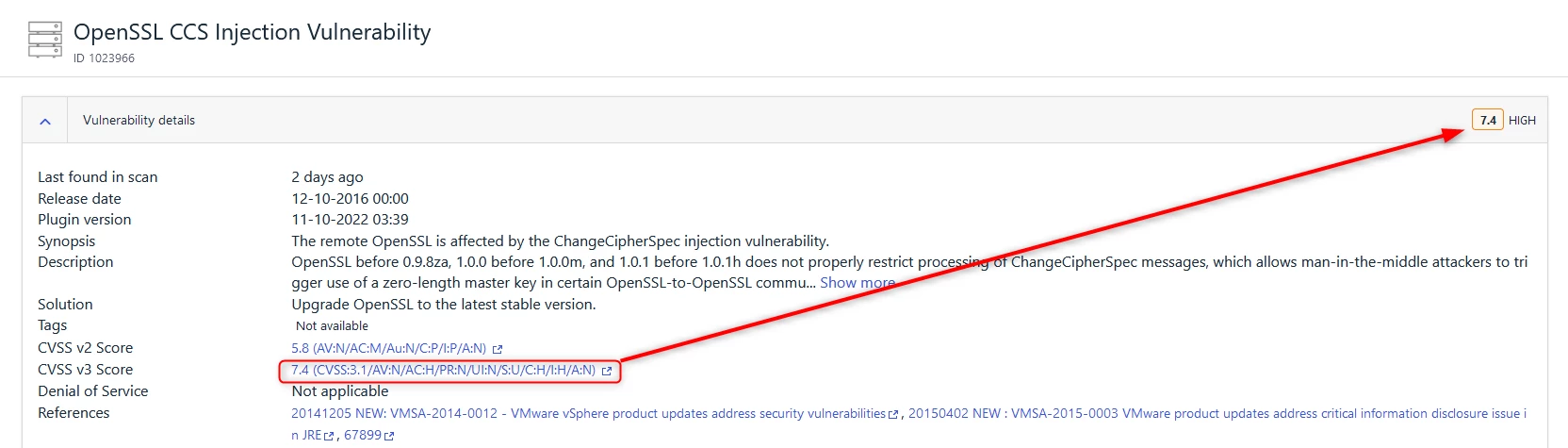
A similar scenario can occur in the assets’ Activity log or in the historical overview of individual System/Web scan reports, because vulnerabilities that are evaluated after March 8 may have been assigned new severity scores aligned with CVSSv3.
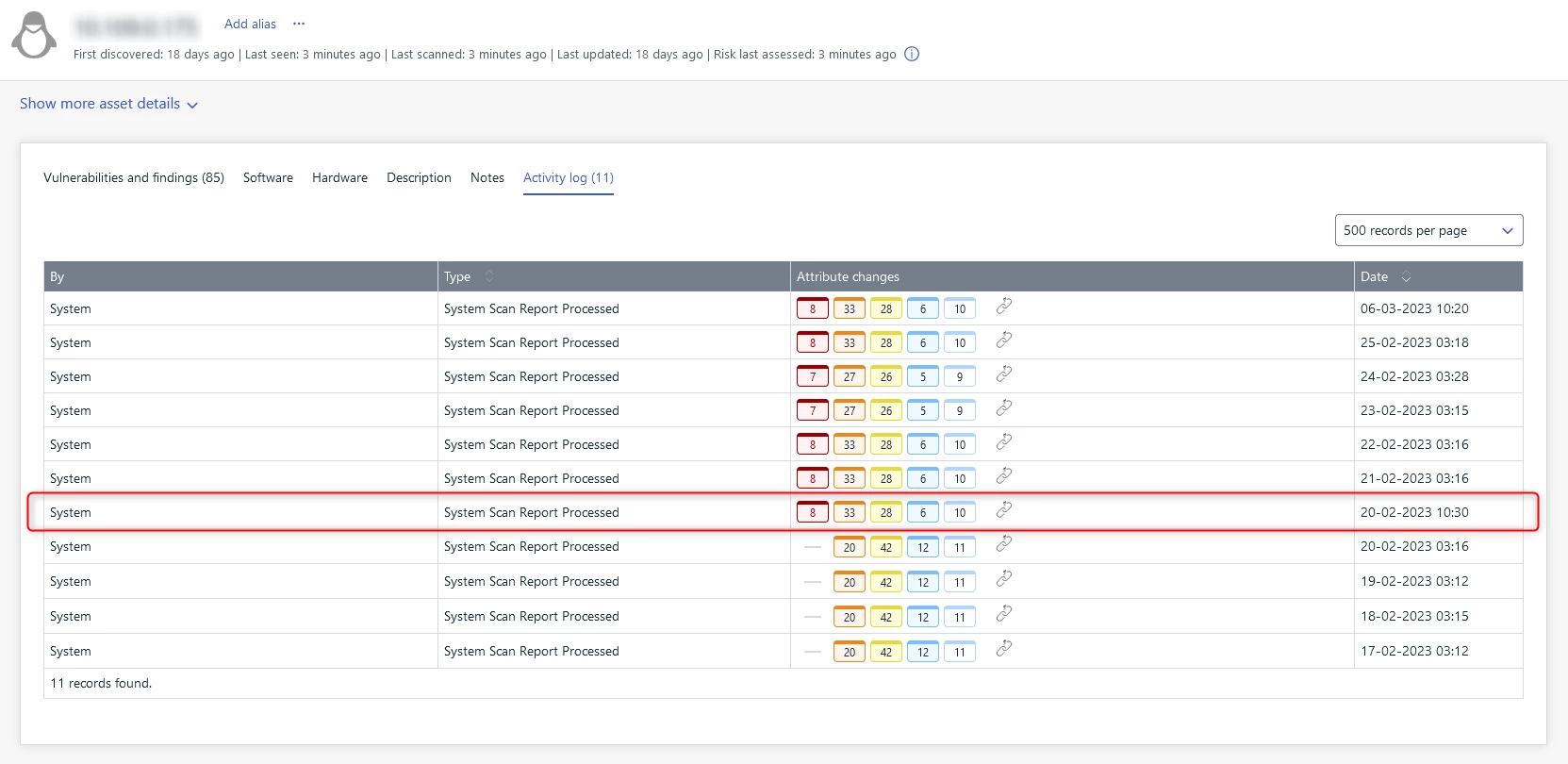
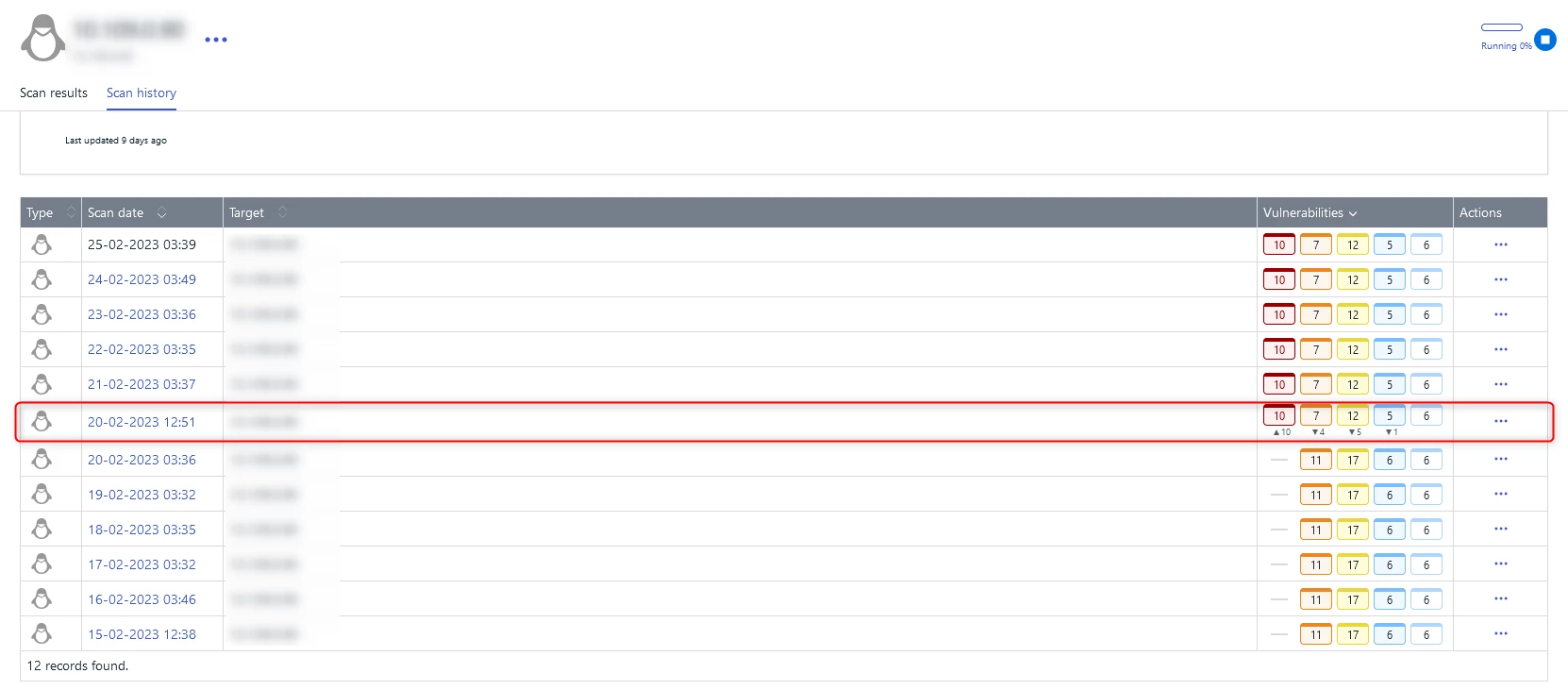
To expedite the migration process, we recommend that you perform manual re-scans for all targets. This can help to quickly overcome any inconveniences and challenges associated with comparing previous scan cycle results with the current security posture.
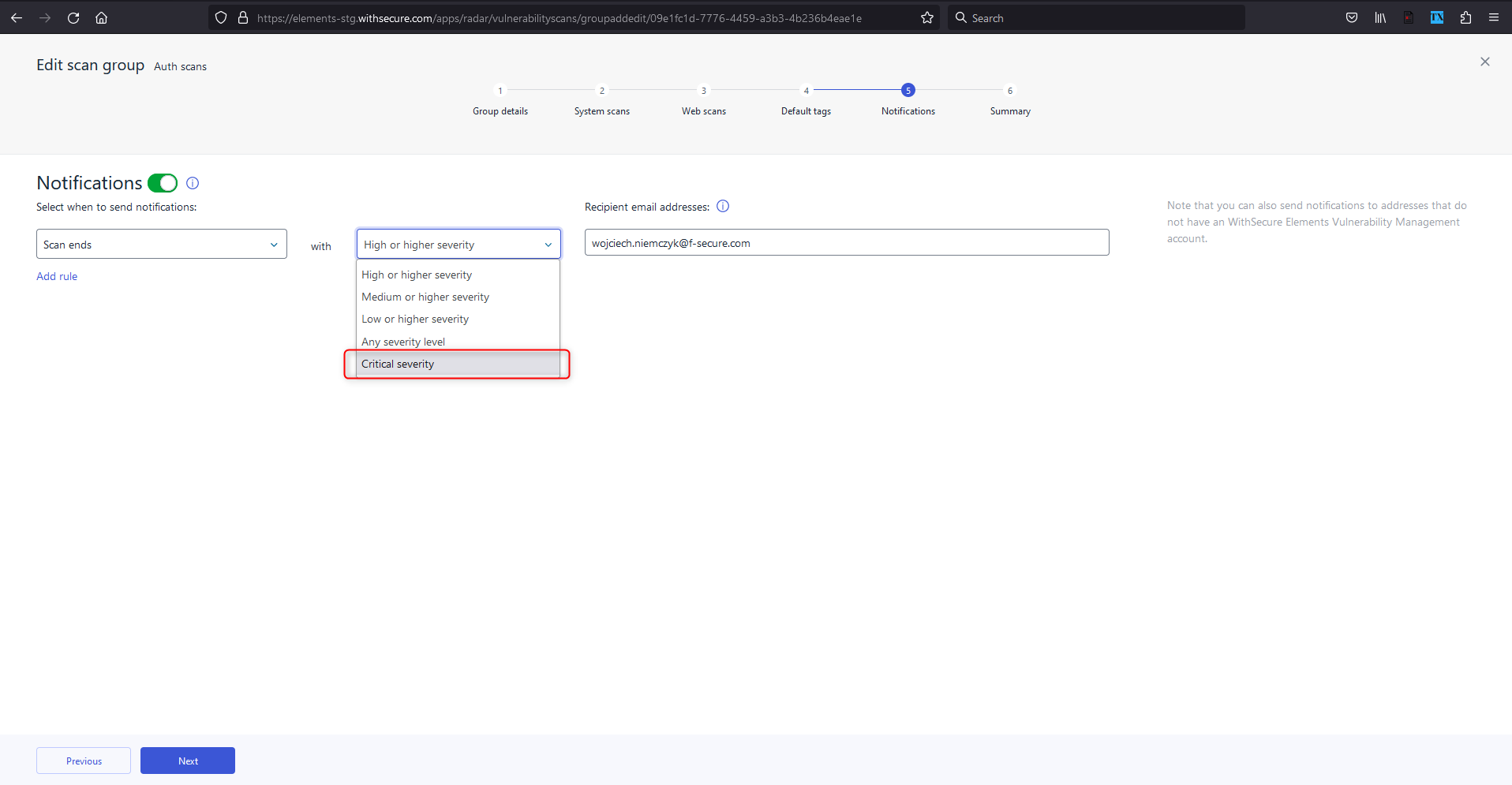
In addition, the email notifications have been updated to comply with the new CVSSv3 standard.
Elements Vulnerability Management System Scan
During March, we added the capability to detect vulnerabilities in multiple products to the System Scan’s authenticated scan on Windows:
- Sophos Connect Client
- McAfee Active Response
- HP Support Solution Framework
- IrfanView
- Watchdog Anti-Virus
- Intel Manageability Commander
- Amazon AWS WorkSpaces client
- Cisco Secure Endpoint (formerly Advanced Malware Protection (AMP) for Endpoints)
- NSClient++
- GIMP
- Intel Trace Analyzer and Collector
- Git LFS
- HP Version Control Agent
- HP Insight Management Agents
- IBM Spectrum Protect (aka Tivoli Storage Manager) Client
- OpenVPN Connect
- OpenVPN Community edition
Integrations
Elements API
Listing EDR detections and isolating computer from network
Listing detections of EDR incident – This allows the acquisition of details of an EDR incident in order to perform triage from a third party platform . The client can use the incident ID received from security events to query the list of detections from EDR detection engine.
Isolating computer from network and releasing from isolation – The client can send acommand that isolates workstation or server at risk. Support for other remote operations will be extended in the future.
Reading list of remote operations – The client can check status of remote operation for
particular computer.Triggering remote operations is only allowed for clients with Read/Write permissions.Getting Started guide contains information how to add credentials with required permissions.
Other items of interest
WithSecure Elements Quarterly Launch
Once a quarter, we take a more detailed look at some of the things we have released. You can find the things we are most excited about at
In case you missed it
Compromised 3CX desktop app in a supply chain attack
Trojanized versions of the 3CX desktop app (VOIP) are being used in an ongoing supply chain attack.
Read more from here what WithSecure can do to help customers.
Share your ideas with us
Our purpose is to co-secure the world with you – now as WithSecure™. To co-create the best possible cyber security products and services, we warmly recommend you share your ideas via our Ideas Portal, now accessible directly from WithSecure™ Elements Security Center.

Further information
Changelogs and Release Notes for all parts of WithSecure™ Elements can be found at the Help Center
-
What’s New in Elements: February 2023
Read more
Editor’s Highlights
Elements Connector
A new version of the Elements Connector (internal version 23.05.97280) has been rolled out starting on 28.02.2023. The endpoints automatically upgrade, without a reboot.
The Elements Connector Ultimate proxy is introduced with this release. Please see below for more details.
Elements Security Center
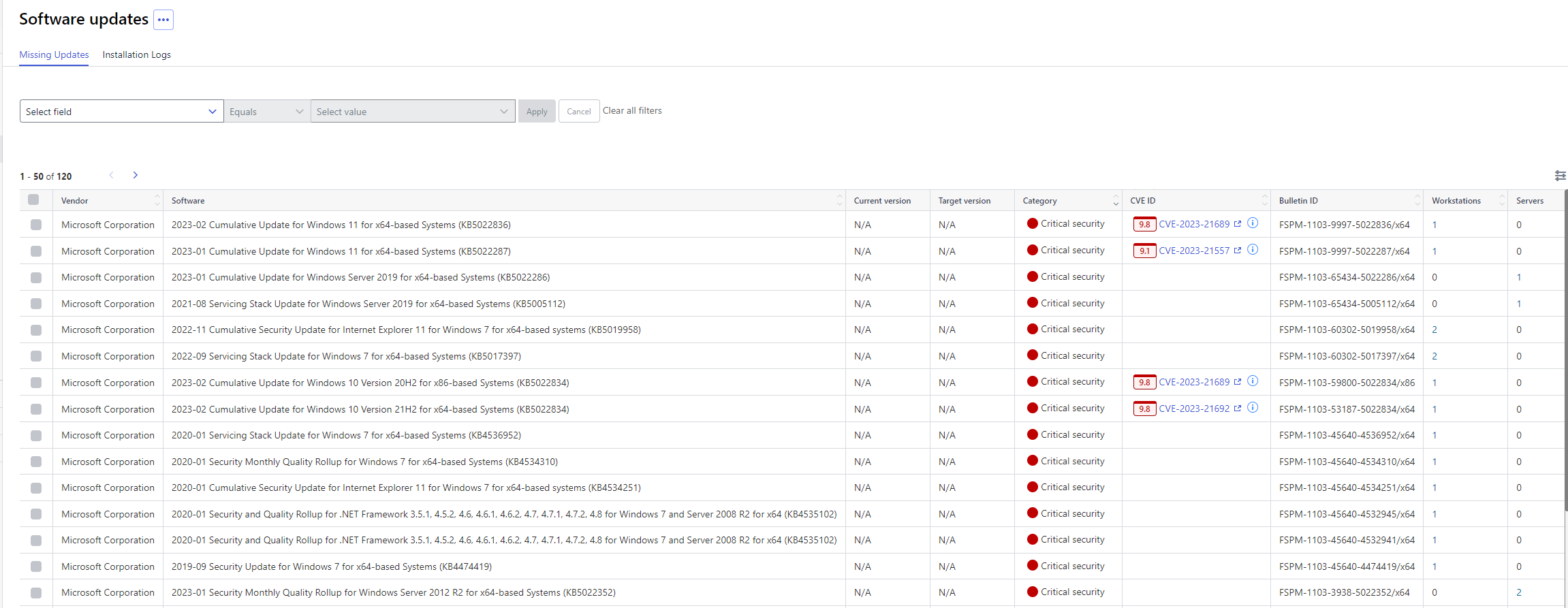
Software updates tab now respects readOnlyWorkstations and readOnlyServer user permissions
For example if user is logged with readOnlyWorkstation then all update checkboxes affecting only workstation will be hidden.Also when select all or individual update checkbox is clicked then operations wizard has update button enabled only for which user is permitted.
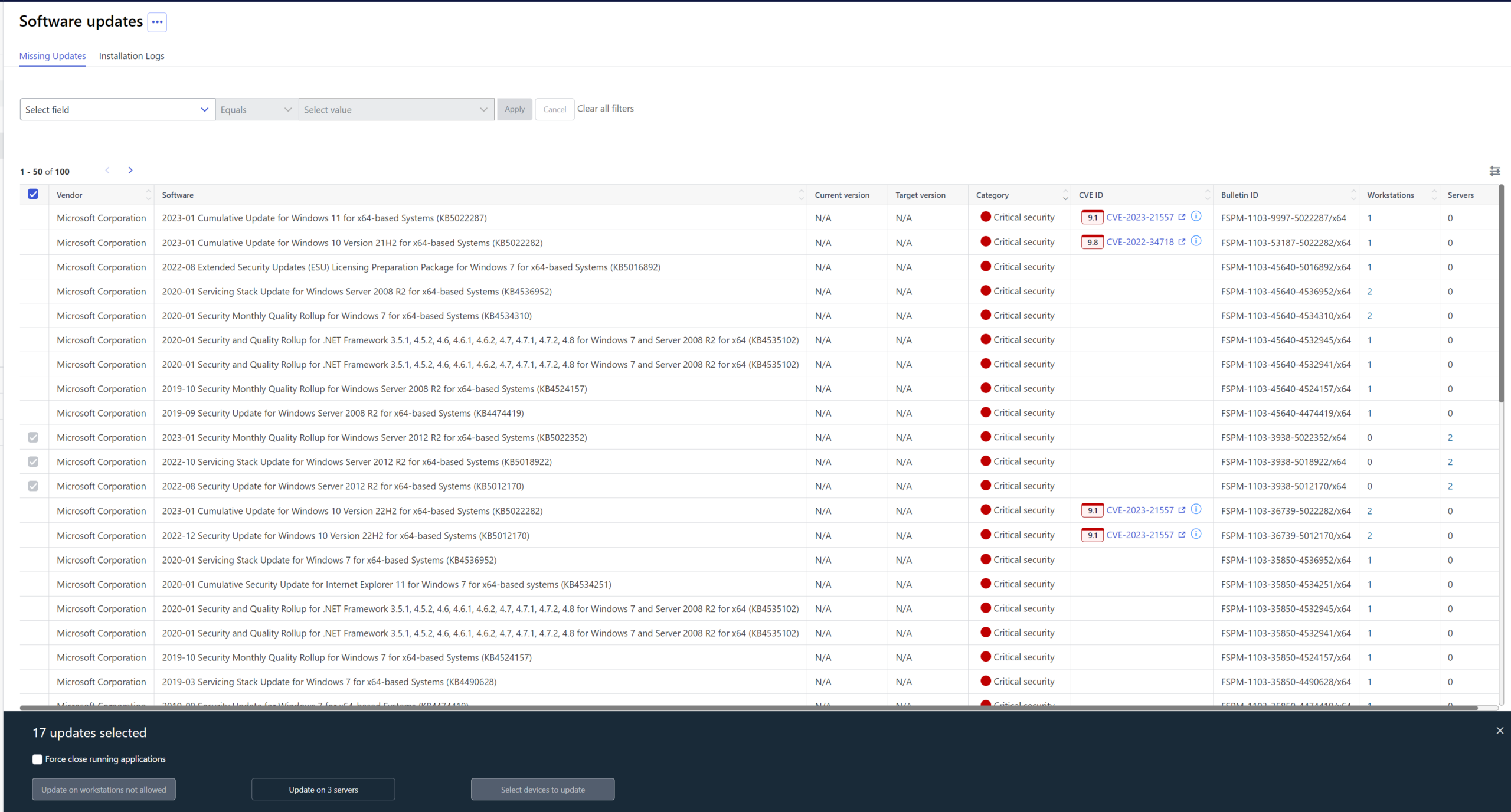
Show disabled checkboxes for missing updates instead of hiding them for full readOnly, readOnlyWorkstations or readOnlyServers users
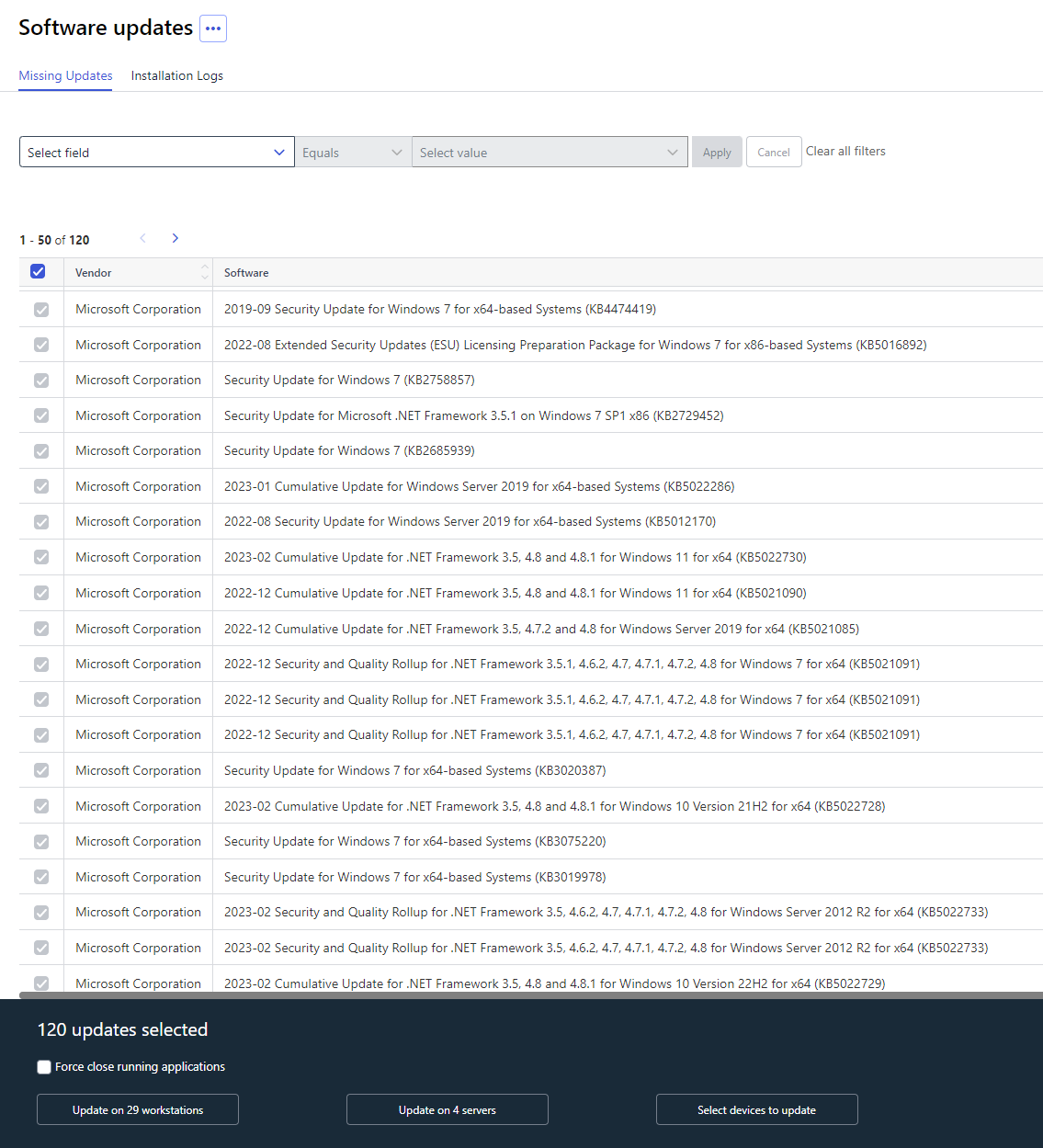
Select devices to update button is enabled now when select all updates clicked
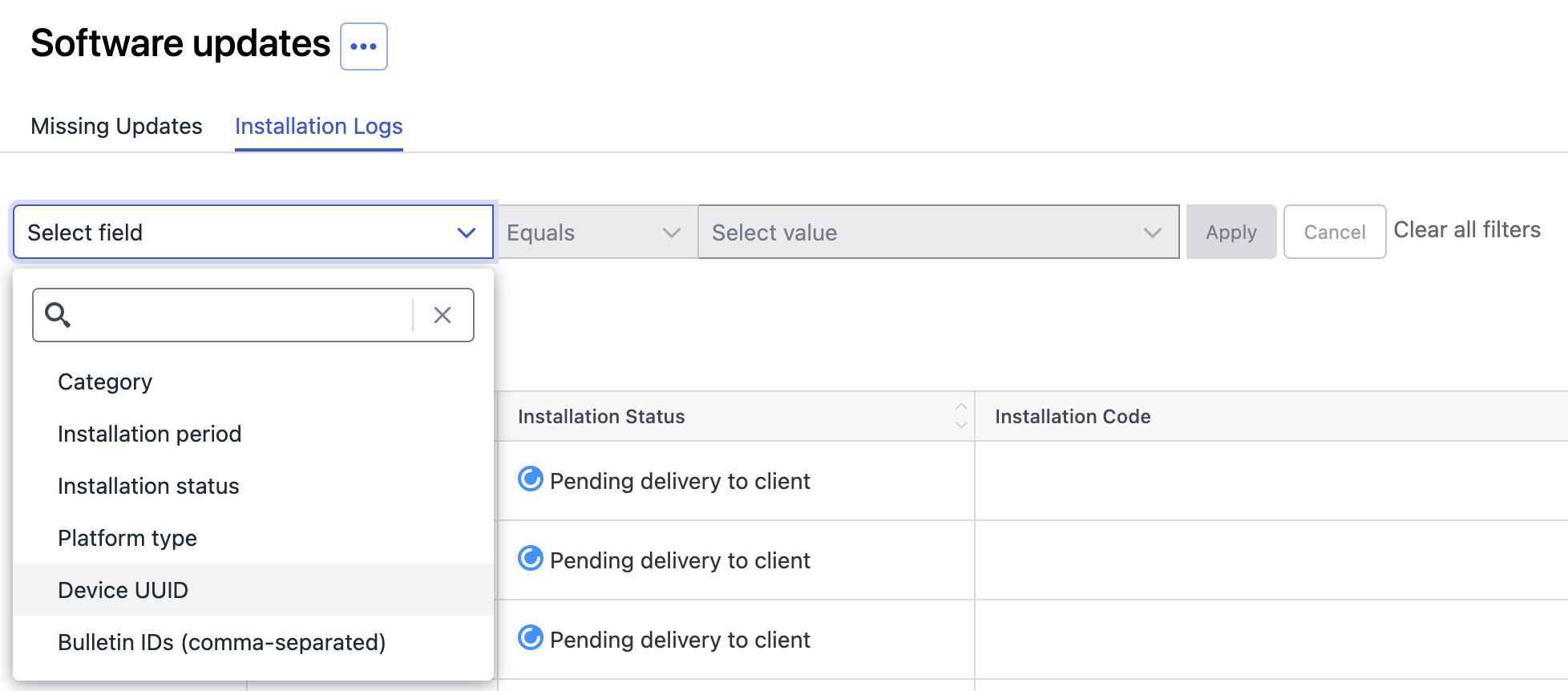
Installation Logs of Software Updates can now be filtered by the Device UUID and List of BulletinIDs
Additionally the filters in general in both Missing Updates and Installation Log tabs are persistent. Same as in Security Events and Audit Log.
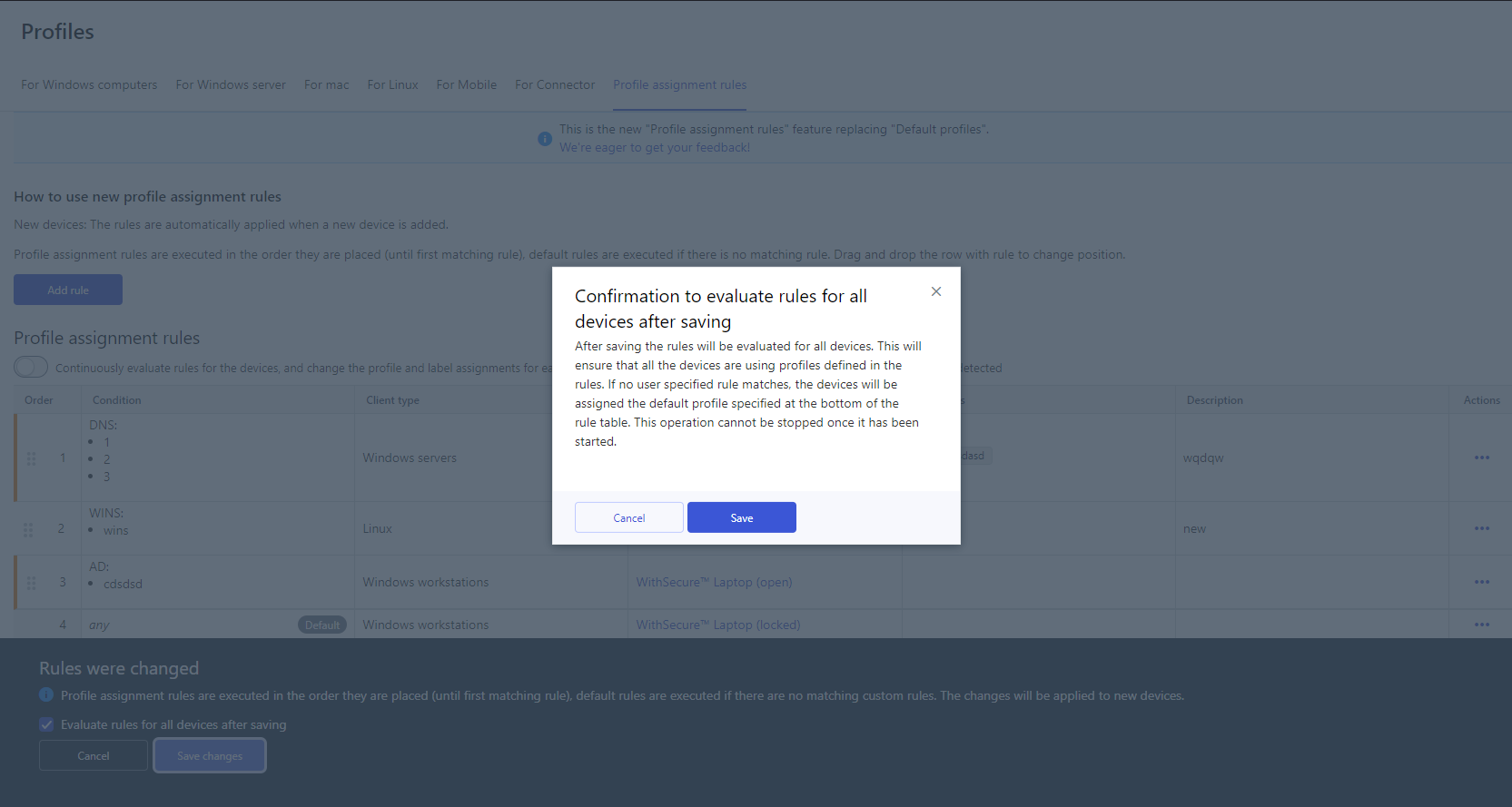
Added confirmation popup for evaluating rules for all devices after saving
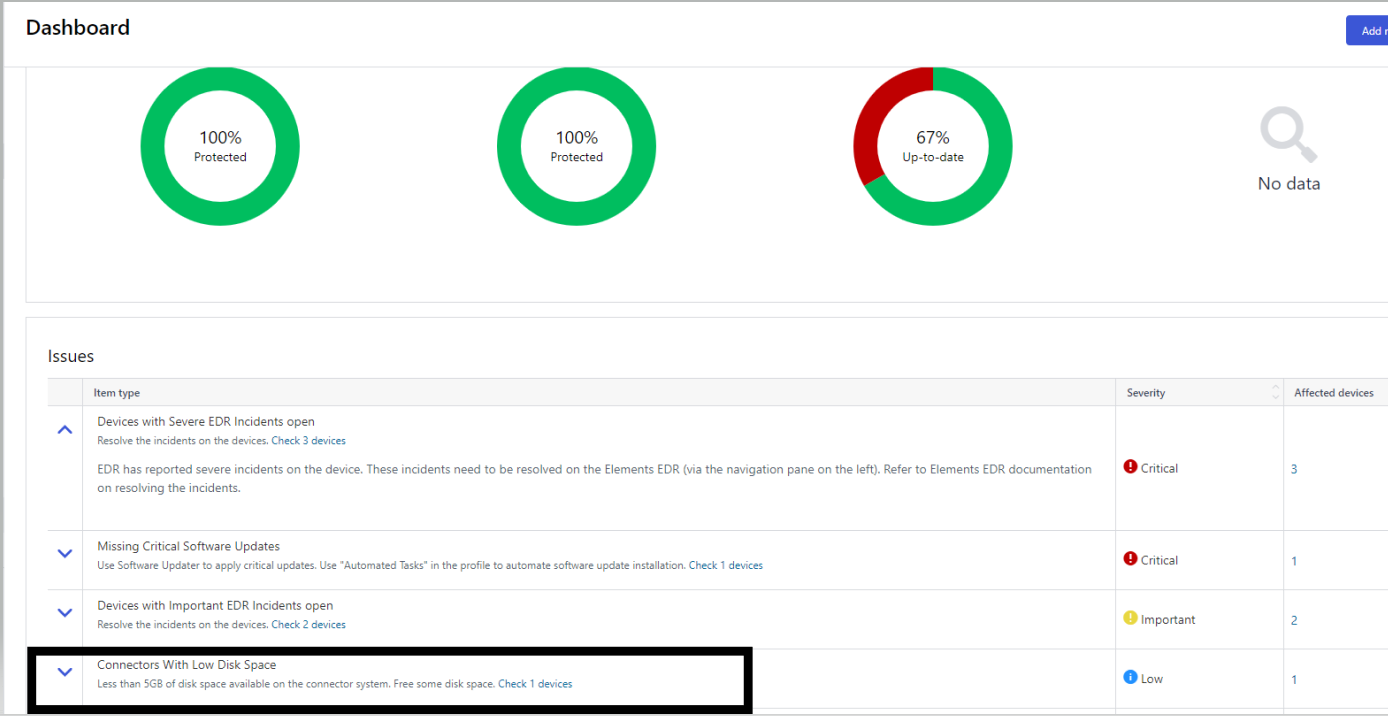
Update advisory entry for Connector low disk space to use 5GB instead of 20GB
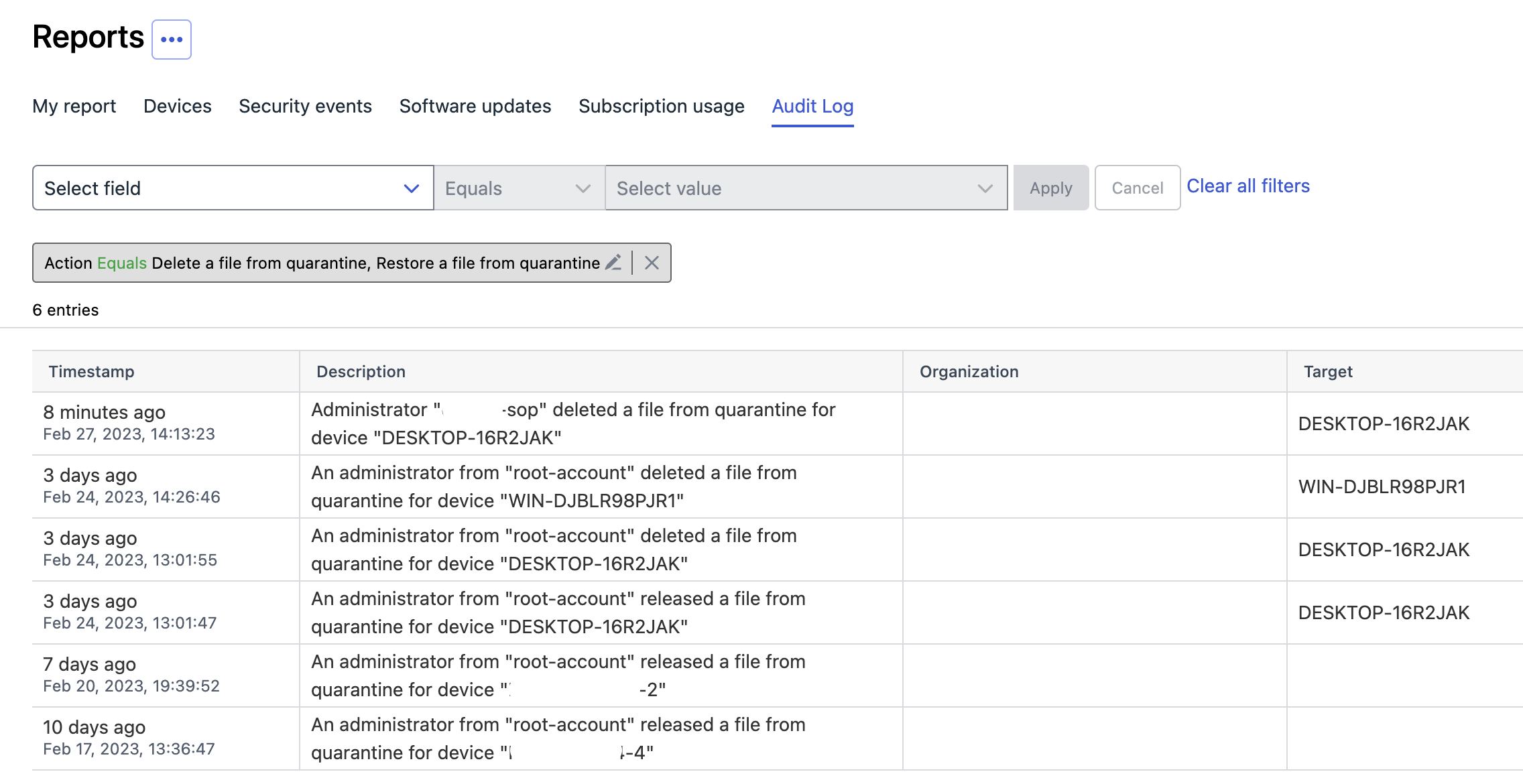
Audit Logs added for quarantine related operations are now accessible from Security Events list
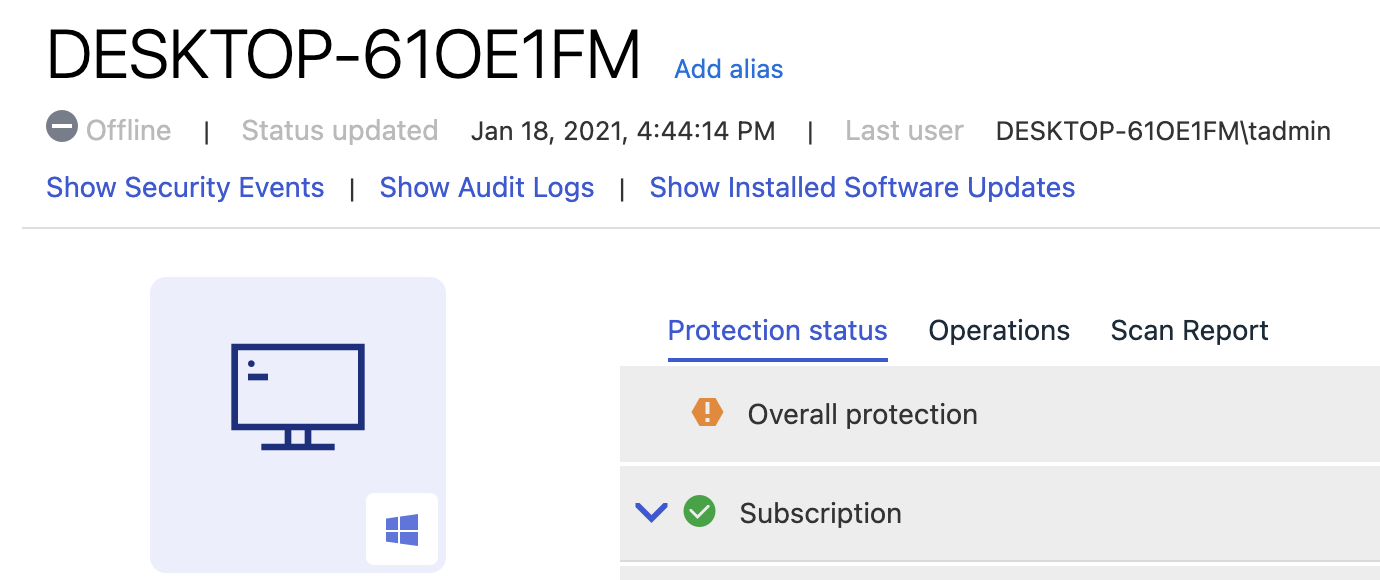
Navigation from Device Details to the filtered Installation Log is now possible
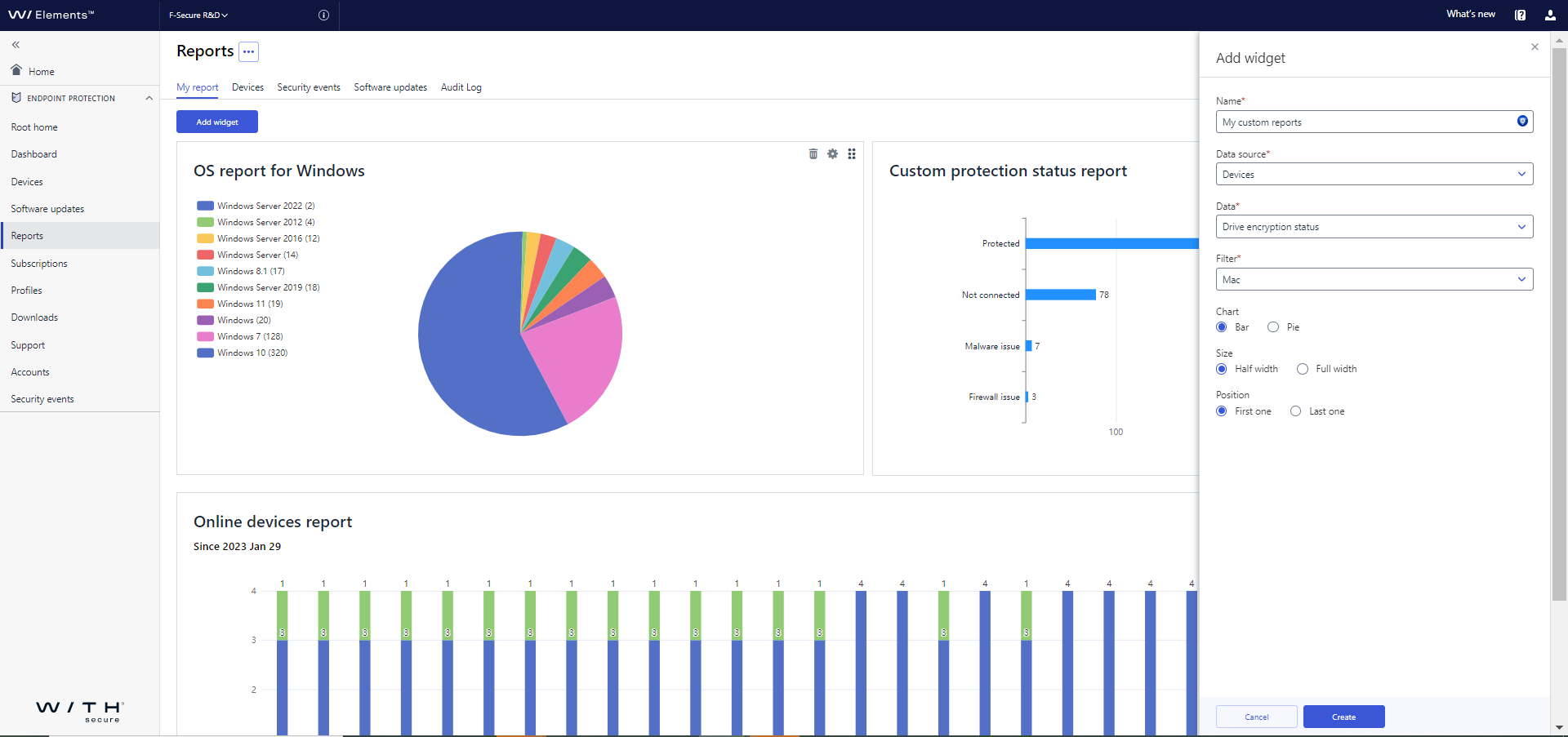
UI improvements to Custom report for devices
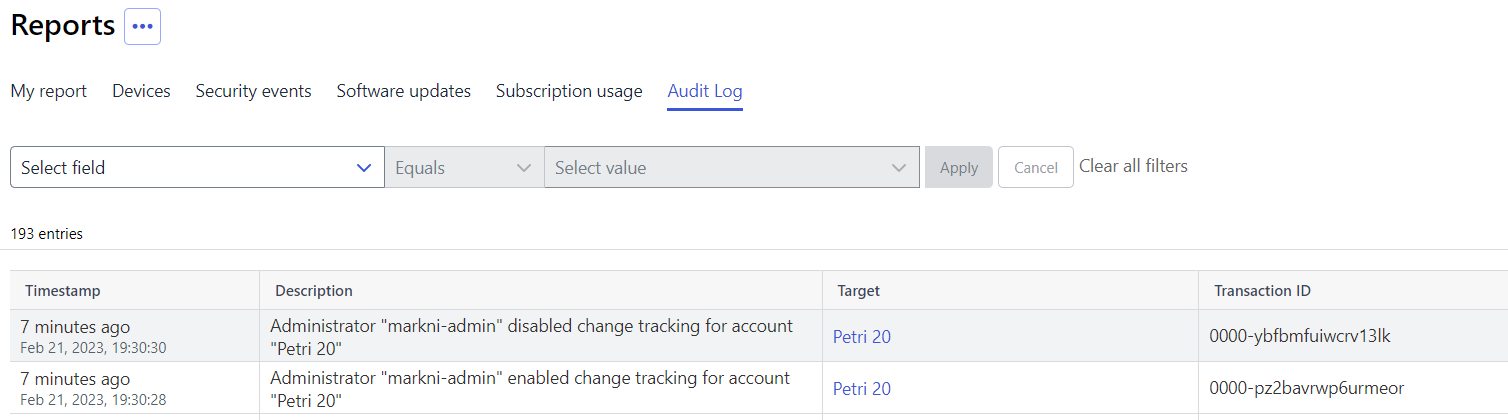
Added enabling / disabling change tracking to audit logs
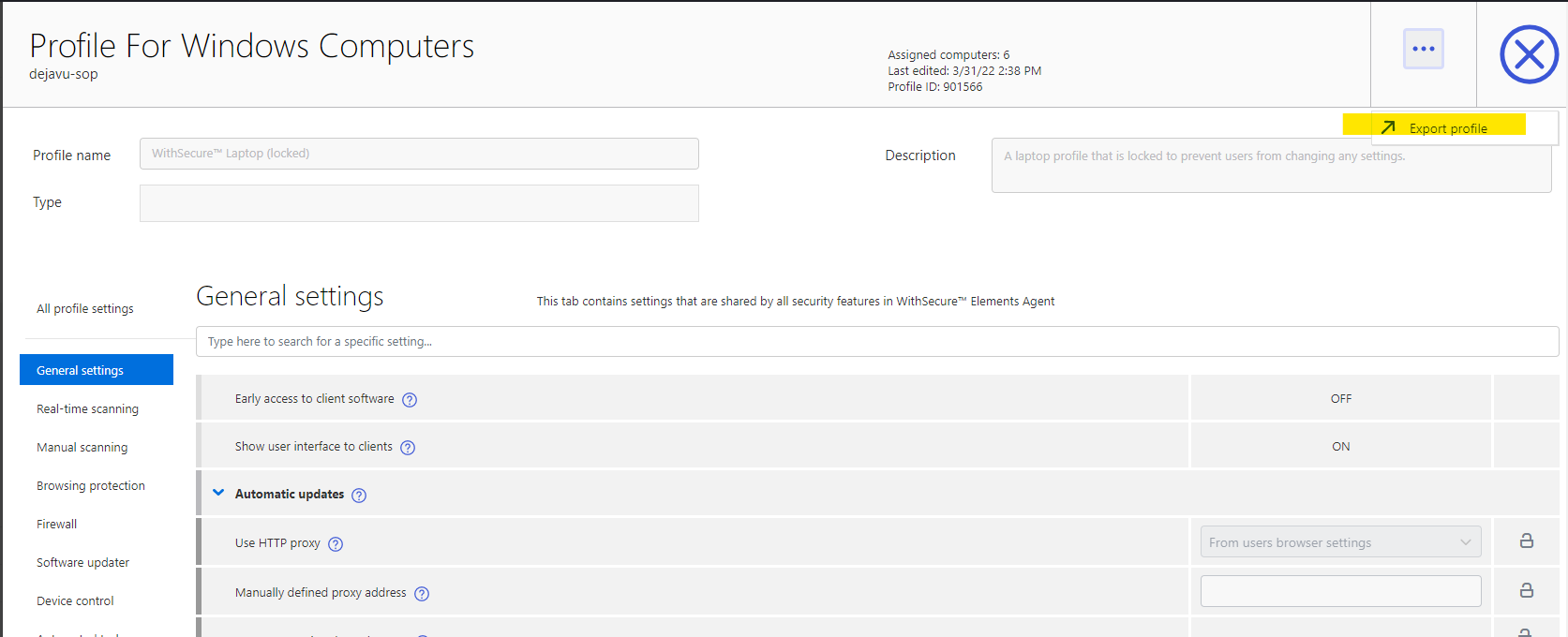
Added possibility to export a read-only profile
Elements Endpoint Protection
WithSecure Elements Agent for Windows and Server new version 23.2
A new version of the endpoint clients is available.
This release makes the Elements Agent version 23.2 available (internal version 23.2.1150).
The endpoints automatically upgrade, without a reboot.
A new security event is triggered if Server Share Protection backup fails because folder does not exist

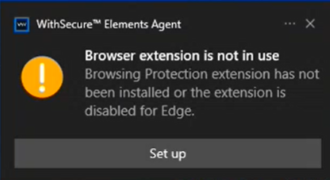
Elements agent shows a flyer if browsing protection is enabled but browser extensions are not installed or not activated
This feature can be enabled from “Remind user to activate browser plugins” in Browsing protection settings of the portal’s profile editor.
In addition:
- Elements Agent user interfaces have new WithSecure style.
- Vulnerability scanning task will work in Element agent even if Automated tasks feature is disabled in profile.
- Deploying Elements agent as Win32 app in MS Intune is supported.
- “Hide exclusions from clients” option hides now exclusions also from the scan report.
- Turn off security features turns off also features that are locked in the profile.
- Network location settings changes also settings that are locked in the profile depending on the network location.
- Software updater marks now updates as security updates faster than before.
- Elements agent does not send empty IPv4 and IPv6 addresses to portal anymore.
Elements Collaboration Protection
Elements Collaboration Protection Update
This latest release adds:
- New response action for SharePoint OneDrive and Teams policy settings: immediate deletion of malicious content
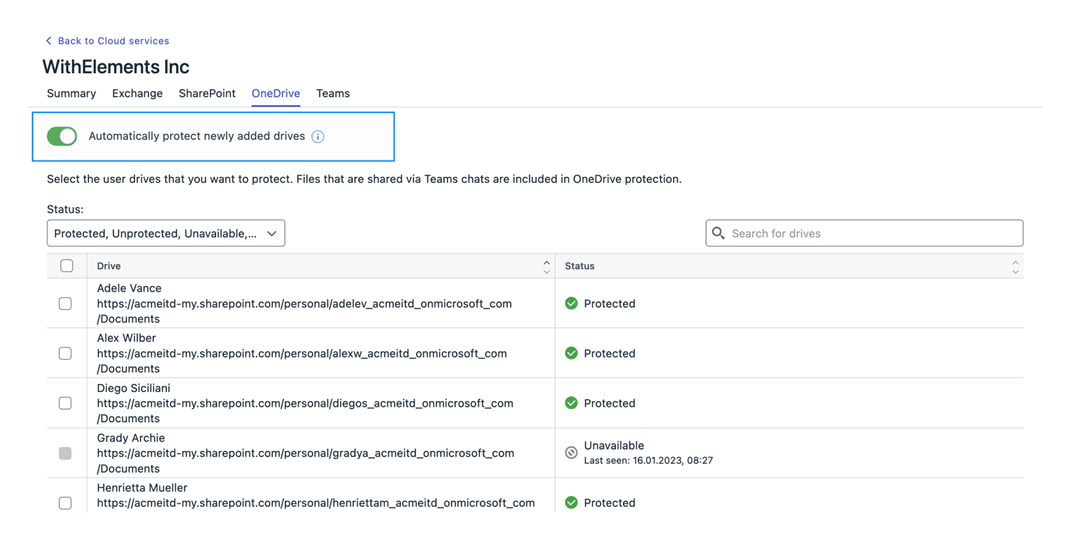
- The possibility to automatically protect newly added assets in SharePoint and OneDrive
Elements Vulnerability Management
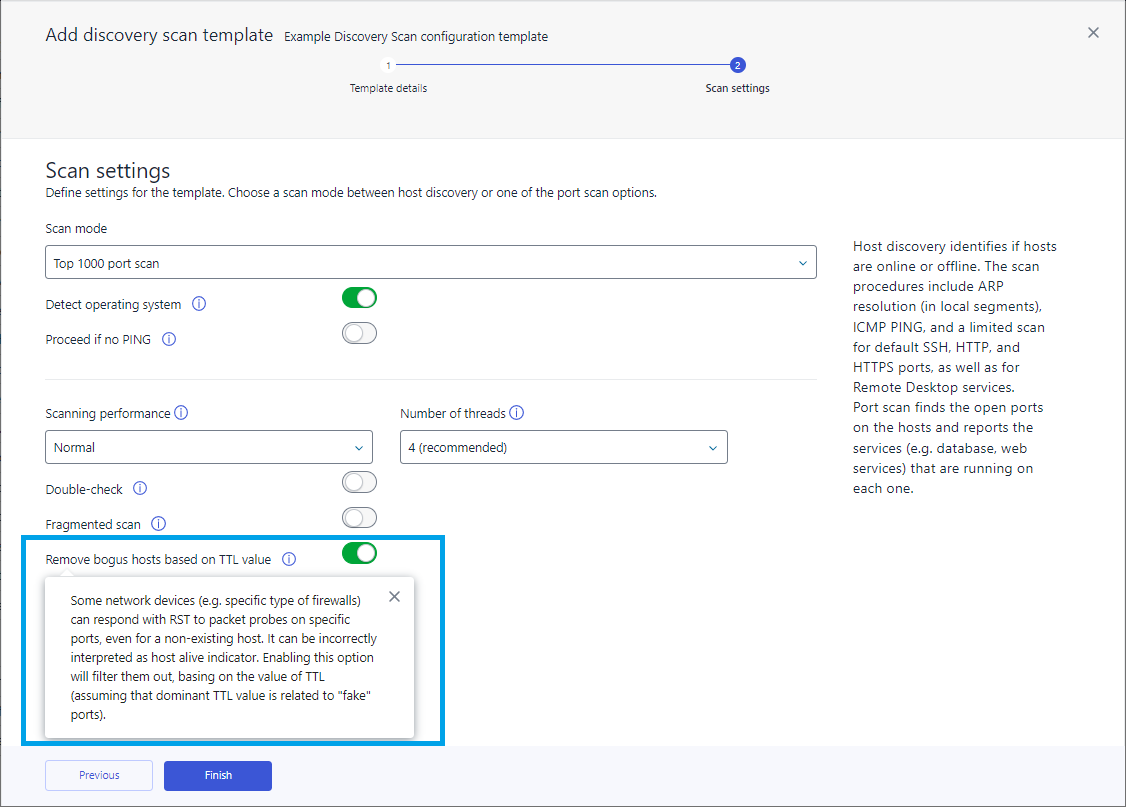
Option of ignoring false positives on the Discovery scan configuration user interface
By filtering out false or unreliable hosts based on their TTL (Time to Live) value, it helps to ensure that only accurate and trustworthy information is utilized within the network.
Updates to Web scan configuration section.
The default HTTP headers configuration has been moved to the Web scan section and custom headers now replace the default headers. A new option to include the Web scan product identifier in the User-Agent HTTP header has also been added.
Elements Vulnerability Management System Scan
This release includes:
- Capability to detect vulnerabilities in Sunlogin Client in authenticated scanning for Windows
- Capability to detect vulnerabilities in McAfee Security Scan Plus in authenticated scanning for Windows
- Capability to detect vulnerabilities in Tailscale in authenticated scanning for Windows
- Capability to detect vulnerabilities in Securepoint SSL VPN Client in authenticated scanning for Windows
- Capability to detect vulnerabilities in Windscribe VPN in authenticated scanning for Windows
- Capability to detect vulnerabilities in Aviatrix OpenVPN Client in authenticated scanning for Windows
- Capability to detect vulnerabilities in Acronis Cyber Protect Home Office in authenticated scanning for Windows
Elements Vulnerability Management Web Scan
This release includes:
- Added 401 Unauthorized response code as a correct return code for the login page
- Added support for CVSSv3
- Added logout monitoring to the regular crawler
Elements Vulnerability Management System Scan
This release includes:
- Capability to detect vulnerabilities in Adaware Protect in authenticated scanning for Windows
- Capability to detect vulnerabilities in AnyDesk in authenticated scanning for Windows
- Capability to detect vulnerabilities in Stormshield SSL VPN Client in authenticated scanning for Windows
- Capability to detect vulnerabilities in Sophos Exploit Prevention in authenticated scanning for Windows
- Capability to detect vulnerabilities in McAfee Data Loss Prevention (DLP) Endpoint in authenticated scanning for Windows
- Capability to detect vulnerabilities in HP Connection Optimizer in authenticated scanning for Windows
- Capability to detect vulnerabilities in pgAdmin in authenticated scanning for Windows
- Capability to detect vulnerabilities in Hotspot Shield VPN client in authenticated scanning for Windows
- Capability to detect vulnerabilities in Avast Secure Line VPN in authenticated scanning for Windows
- Capability to detect vulnerabilities in Kaspersky VPN Secure Connection in authenticated scanning for Windows
Integrations
Elements API change in existing endpoints
- filtering by device serial number and protectionStatusOverview
- New fields for software update: last software scan and install timestamps were added to response (for device type computer)
- engine and severity query parameters support multiple values
WithSecure Connector 23.05
A new version of the Elements Connector (internal version 23.05.97280) has been rolled out starting on 28.02.2023. The endpoints automatically upgrade, without a reboot.
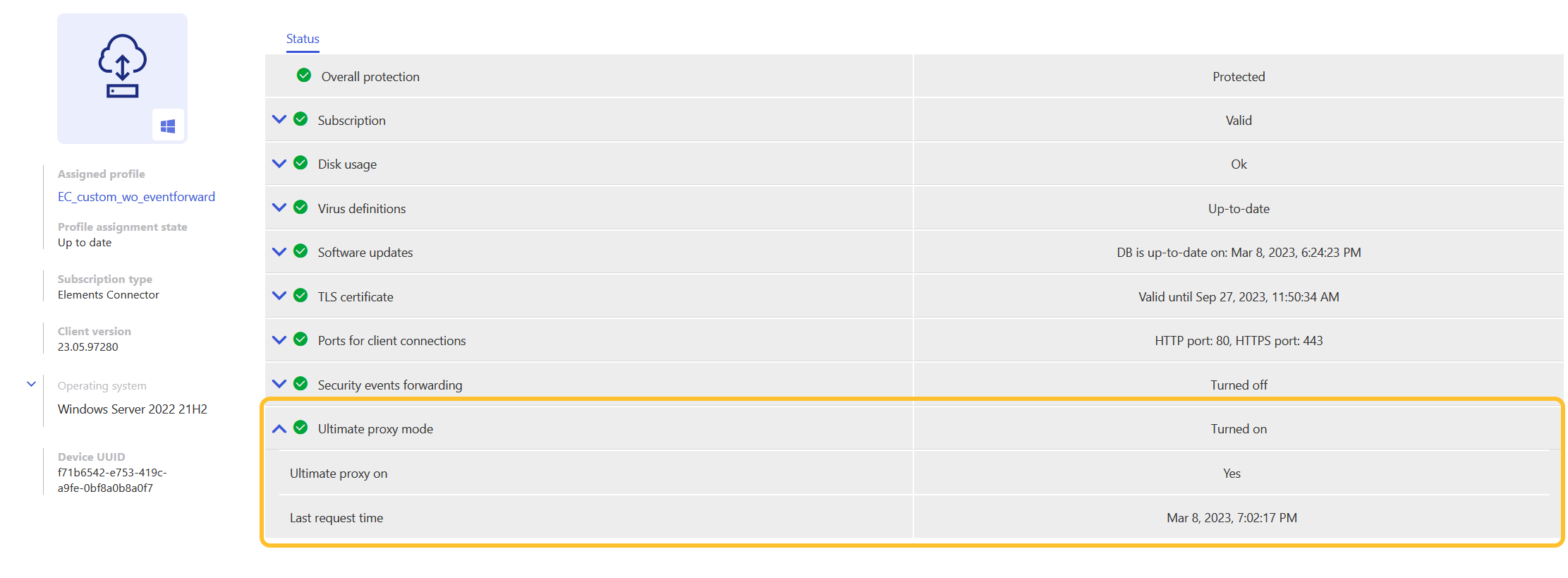
The Elements Connector Ultimate proxy is introduced with this release
This feature allows Connector to act as a proxy for all traffic between WithSecure endpoints and cloud services simplifying firewall configurations and allowing the use of WithSecure products in semi-closed environments. It extends GUTS2 and SWUP caching only mode and is enabled for all Connectors by default.
Chained Connectors are now possible
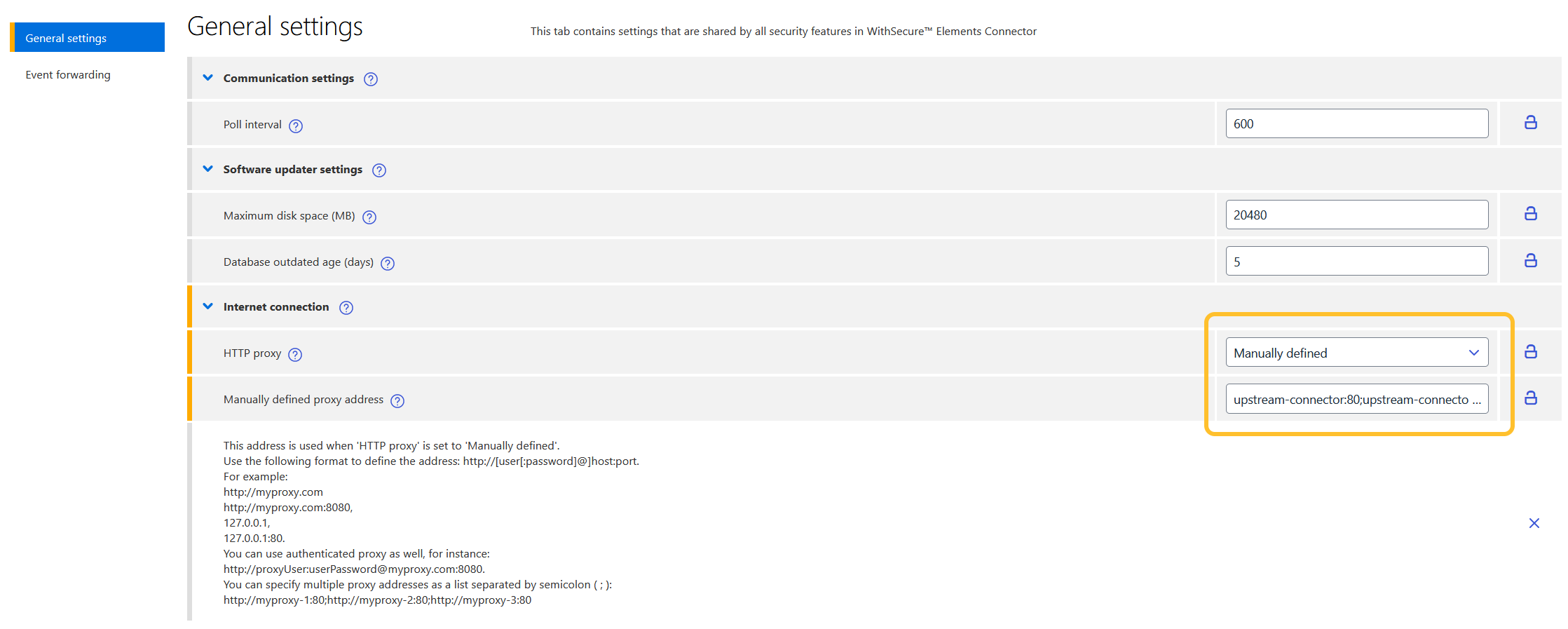
It is now possible to chain Elements Connectors so that it uses another one to reach the backends. For that, you need to specify the upstream connector in the profile as an HTTP proxy. You can specify multiple Connectors using a semicolon.
Elements Connector starts using the new Elements API to forward security events
If Connector was already configured to use Event Forwarding, it continues using current credentials after the upgrade, follow API configuration instructions to reconfigure and start using the new Elements API.
Multiple HTTP proxy support
Support for multiple HTTP proxies has been introduced so that Elements Connector remains connected in case of proxy failure. You can specify multiple HTTP proxies using a semicolon. If the connection becomes unstable, Elements Connector starts using the next proxy from the list:
http://myproxy-1:80;http://myproxy-2:80;http://myproxy-3:80Elements Connector integration for Microsoft Sentinel
We have now made Elements Connector available in the Azure Marketplace.
Elements Connector is now branded as WithSecure
This release introduces WithSecure brand. Previous releases were branded as F-Secure.
Forwarded events now have WithSecure vendor name
If your SIEM is configured to filter based on the vendor name, this filter has to be adjusted.
Other items of interest
Monthly Threat Highlights Report: February 2023
Ransomware: Trends and notable reports
- ESXiArgs
- The end of Hive???
- Alphv attack on Munster
- Technological University
- The $10k ransomware manual
- TV provider Dish experience ransomware attack
- Newcomers: Nevada
- Newcomers: Mimic
Other notable highlights in brief
- GoAnywhere exploitation
- Zoho ManageEngine exploitation
- KeePass problems
- QR code phishing
- Sh1mmer exploit can unenroll managed Chromebooks
- IceBreaker target gaming/gambling companies
You can download the full report for reading later.
In case you missed it
Changes to your WithSecure Business Account
On Wednesday 8th of March we made some changes to the WithSecure Business Account (formerly F-Secure Business Account), and we would like to remind you of these. You can read more from the following article
End of Support for Windows 7 and Windows Server 2008
In 2019, F-Secure Business (now WithSecure) communicated that product support for Windows 7 and Windows Server 2008R2 would end in January 2023 for Elements and Business Suite products, in line with Microsoft’s own Extended Security Updates program.
These Operating System versions are no longer supported by Microsoft and will receive no further security updates.
To allow our customer base a little additional time to upgrade their devices, WithSecure will provide support for these products on legacy Operating Systems until 30 June 2023.
As such, both Microsoft and WithSecure strongly encourage customers to upgrade to supported versions as soon as possible.
The affected versions are:
- Microsoft Windows 7 (all variants)
- Microsoft Windows Server 2008 (all variants, including 2008R2)
You can read more from the following link
Changes in support on Microsoft Windows – Minimum patch level
In a world where cyber criminals seek to exploit even the smallest vulnerabilities to get access to your devices and data, it is really important to maintain your operating systems to the latest vendor patch level.
All Operating System vendors, including Microsoft, Apple, Google and all the Linux vendors, strongly recommend that their customers patch their devices regularly with the latest available patches, to help reduce the threat.
Using an unpatched operating system is risky, and WithSecure always recommends keeping patches up to date.
Occasionally, software vendors will change their requirements on minimum supported versions of operating systems, often in alignment with the OS vendor. Microsoft now requires a minimum patch level of October 2021 for certain types of files included in third-party software, and WithSecure is changing its requirements in alignment.
Read more from the following link
Reminder: Elements Vulnerability Management introduces new scoring system – CVSSv3
In order to align with industry standards and vulnerability scoring in WithSecure Elements Endpoint Protection, Elements Vulnerability Management will introduce CVSSv3 vulnerability scoring.
What is happening?
Since the introduction of Elements Vulnerability Management, it has used CVSS v2 for vulnerability scoring.
Starting from March 8, 2023 Elements Vulnerability Management uses CVSS v3.1.
Read more from the following article
Share your ideas with us
Our purpose is to co-secure the world with you – now as WithSecure™. To co-create the best possible cyber security products and services, we warmly recommend you share your ideas via our Ideas Portal, now accessible directly from WithSecure™ Elements Security Center.

Further information
Changelogs and Release Notes for all parts of WithSecure™ Elements can be found at the Help Center
-
WithSecure domain changes – Impact during weekend of 18.3.2023 – 20.3.2023
Read more
Background information
As part of the transition towards WithSecure from F-Secure Business, we will be making some significant changes to our IT infrastructure during the weekend of 18.3.2023 to 20.3.2023.
Some of these changes will have temporary impact on our products and services.
Affected Services
During the weekend, we will be fully moving our email systems to the new withsecure.com domain. The changes include, but are not limited to, a temporary delay in incoming emails. This affects all mailboxes at WithSecure.
Simultaneously, we are removing the old @f-secure.com email addresses. Customers and partners are advised to only use the replacement @withsecure.com email addresses. All @withsecure.com addresses are already operational.
We ask that our partners and customers are patient during this period.
In some cases, this change in emails will also have an additional effect on some services:
Elevate to WithSecure (Elements Endpoint Detection and Response)
During the maintenance period, requests to Elevate to WithSecure from the EDR portal will be delayed.
While the button will still be clickable, the actual elevation request will be queued for later delivery. Once the email-related changes are complete, the elevation request will be delivered to our team, and acted on.
We will add a message in the EDR section of the Elements Security Center to remind users of this during the maintenance period.
-
Changes to WithSecure Business Account from 8 March 2023
Read more
We are changing the functionality of the WithSecure Business Account, used to log into Elements and other WithSecure services, from 8th March 2023.
Users are advised to check the full details of this change at
-
What’s New in Elements: January 2023
Read more
Editor’s Highlights
Upcoming changes to WithSecure Business Account
In early March, we will be upgrading the WithSecure Business Account, which will give us more possibilities for integrations in the future. The Business Account is used to log in to services such as Elements, or the WithSecure Community. For more information, including user actions needed, please see our dedicated article in the WithSecure Community
New view for Broad Contect Detections
We are in the process of introducing a new Broad Context Detection (BCD) view that will help improve viewing, navigating and filtering the data whilst investigating detections. Please see the Endpoint Detection and Response section below for more information.
Elements Security Center
Profile Assignment rules allow multiple values
Currently, when a device changes its AD group, IP, DNS or WINS, it is possible to automatically assign a profile and labels based on the rules to that device
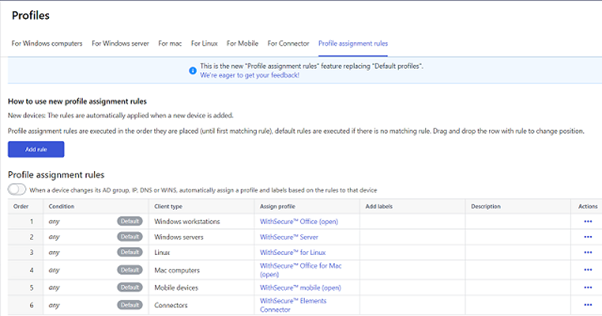
The profile assignment rules now support multiple values in a single rule. This means it is possible to match multiple IP segments, DNS/WINS patterns or Active Directory groups with a single rule.
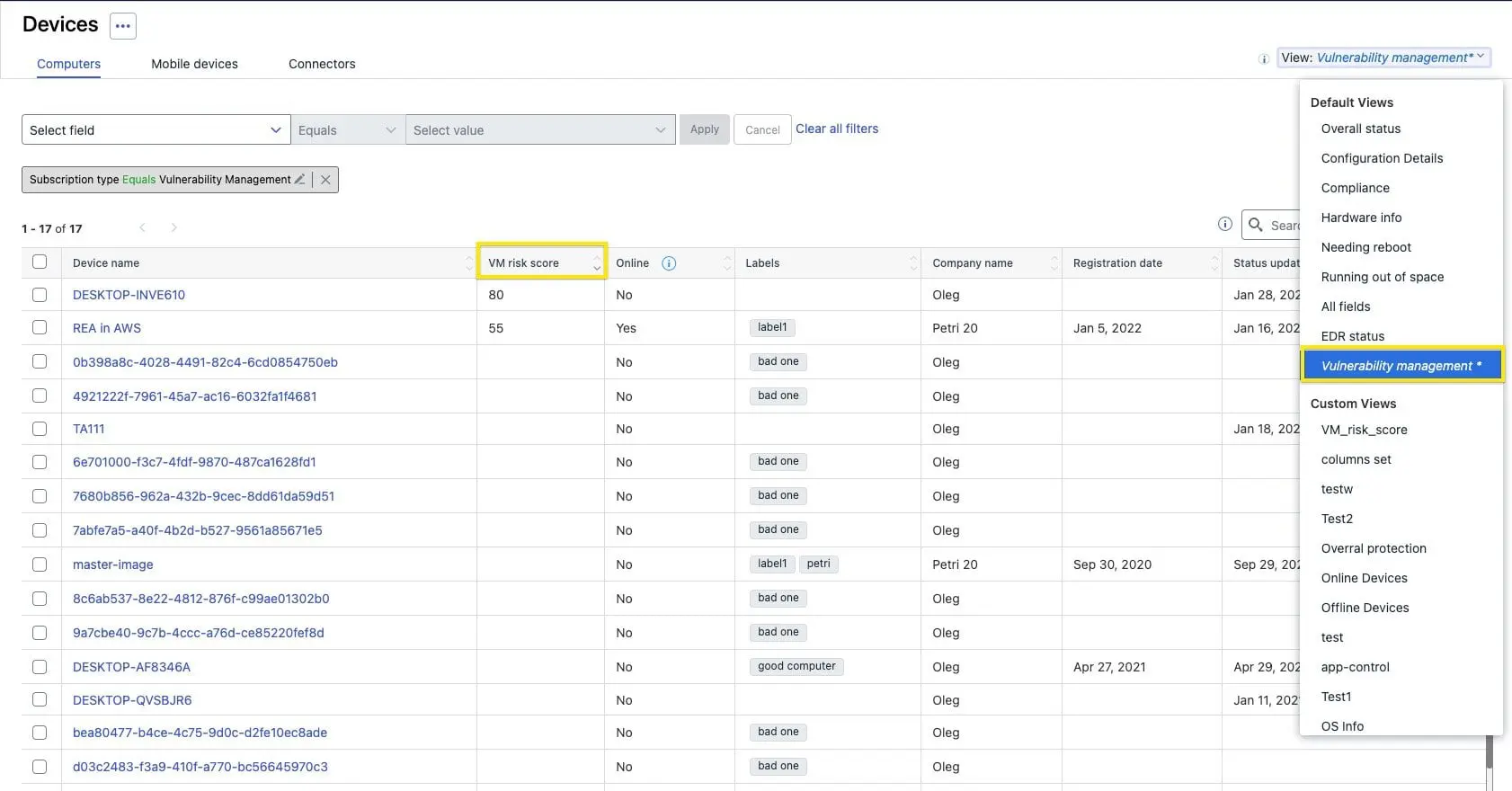
Vulnerability Management Risk Score visible in Device listing
The Risk Score from Elements Vulnerability Management is now visible in the device listing. We have also added a new default view “Vulnerability management”.
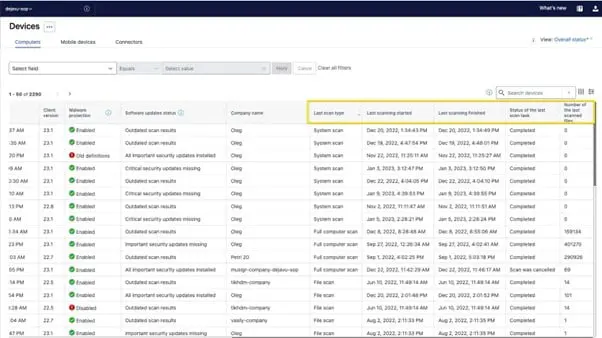
Device list now contains the last scanning status
We have now added the last scanning status columns into devices list
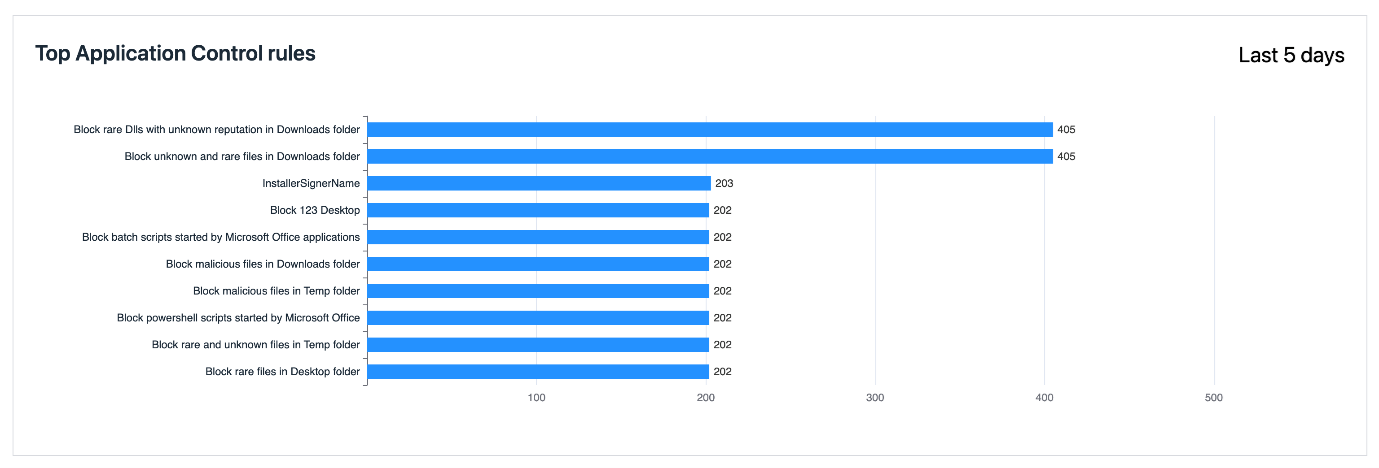
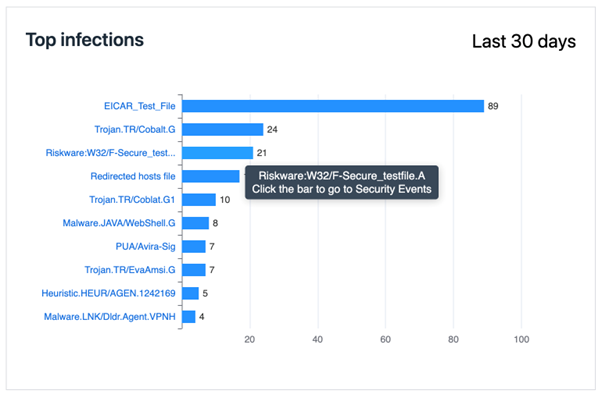
Top 10 most applied Application Control Rules are now visible in reports
Administrators visiting the “Reports → Security Events” tab can now see a list of the top 10 rules triggered.
New Software Updates views released
These new views provide improvements, new features and changes compared to old ones:
- Installation related tabs are merged. All installation related information can now be found under single tab called “Installation Logs”. The “Installation summary” style view is currently missing from the UI and will be reintroduced later via grouping functionality
- Improved installation status information for Installation logs. On top of the existing installation status, you can now also find more specific installation code / reason for all performed installations per device
- Access “View affected devices” from the Computers and Servers columns directly. Previously this information was only available via the Action panels “View affected devices” button.
- Number of affected devices on action buttons. When you perform a selection on set of updates, you can now also see the combined total of devices to be updated on the action panel.
- Select all – Previously when using select all checkbox the selection affected only the updates visible at the given time. With the new views, the select all includes all updates matching the filters used currently.
- Force close – Certain updates require target application to be closed before installing the updated. Now you can force the application to be shut down from the portal when making the installation request.
Ability to search in filter rules in the Device View
The Administrator can now use search in filter values in device view. This will help them quickly find relevant rules for updating.
Additional items added to Audit Logging
- FSdiag download actions are audited
- “Show message” operations are audited
- Audit logs support follow two new remote operations “Turn security off” and “Assign Profile”.
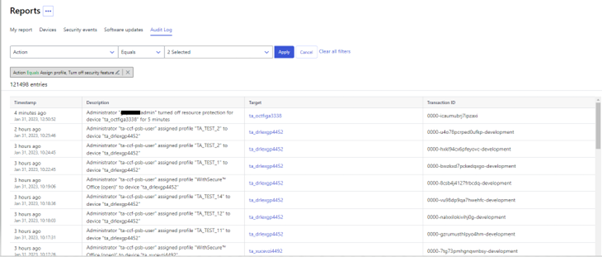
- Audit logs can be now filtered by the audit action type.
- All device-related audit logs allow navigating to a device by clicking the link in the target column
- Device deletions are audited and visible in the Audit Logs page
Elements Endpoint Protection
Elements Agent 23.1
A new version of the endpoint clients is now available. This release makes the Elements Agent version 23.1 available (internal version 23.1.433).
The endpoints automatically upgrade, without a reboot.
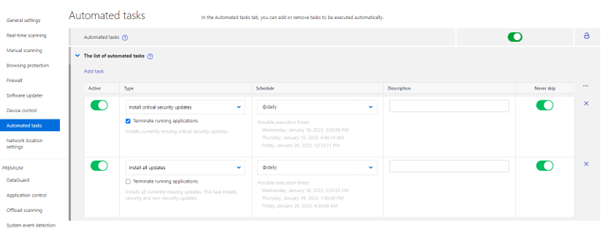
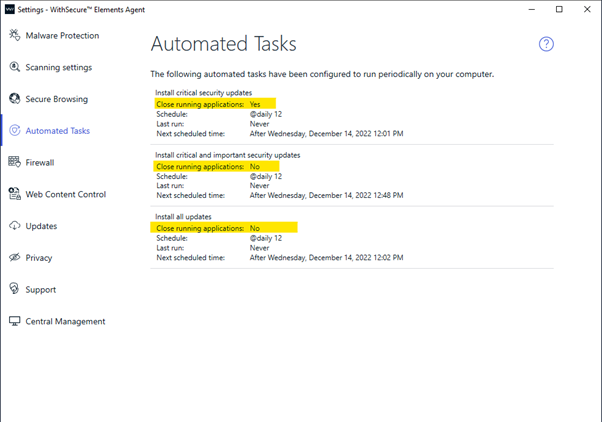
Support “Terminate running applications” toggle in Software Updater Automated Tasks.
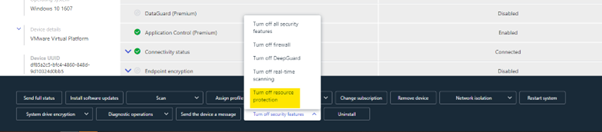
Added a remote action to turn off Tamper Protection temporarily.
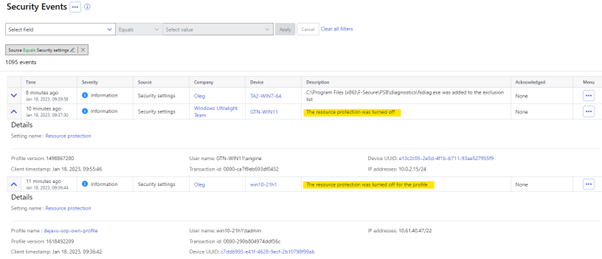
Added an alert to portal when user disables Tamper Protection locally.
Remote Operations can temporarily disable locked Security features
You can now use remote operations to temporarily disable locked security features, no need to unlock them in profile. That way you don’t need to weaken your security posture to be able to temporarily disable features.
New Installer Filenames
With this release we are changing file names for installers, to properly represent the brand of the product. These are now ElementsAgentInstaller.exe and ElementsAgentOfflineInstaller.msi. The old file names are still available to download but will not be published in future.
Elements Endpoint Detection and Response
Preview of new Broad Context Detection view now available
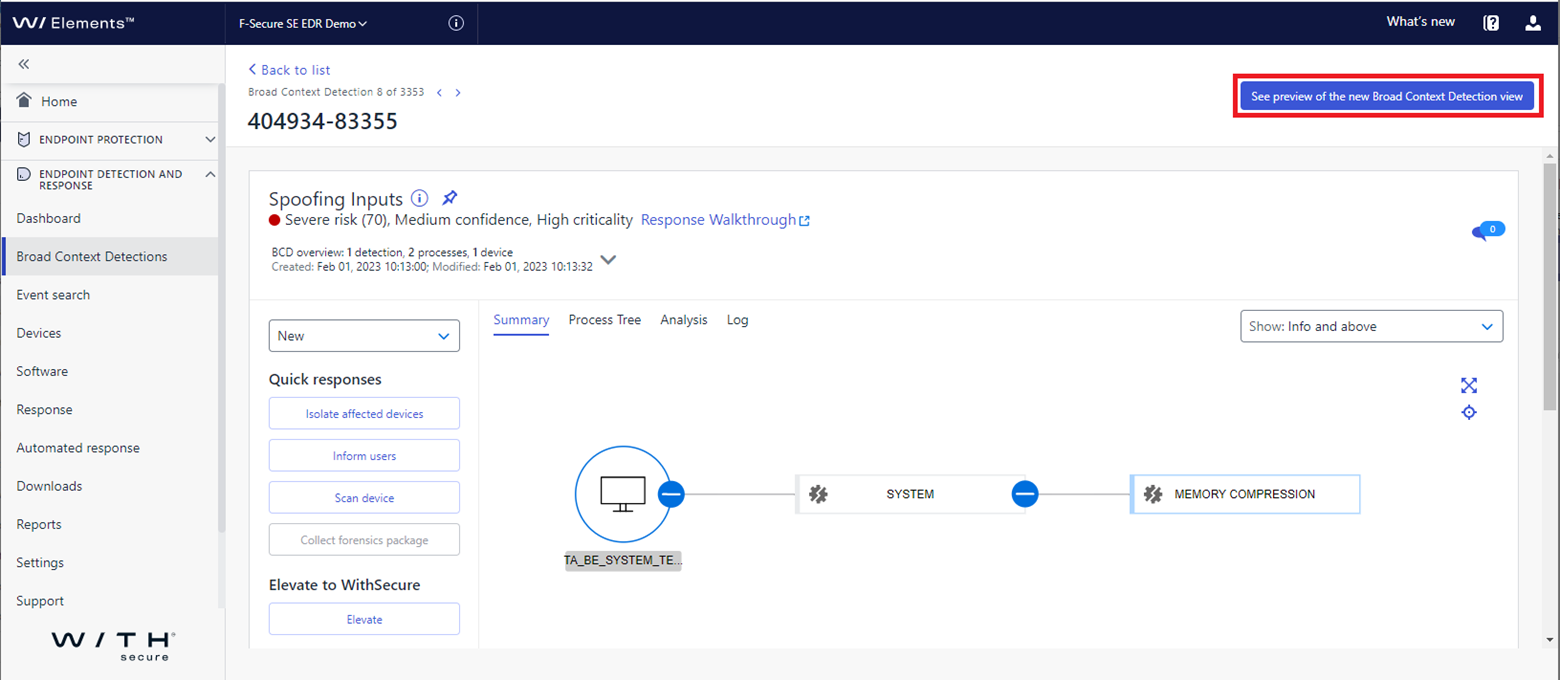
We are in the process of introducing a new Broad Context Detection (BCD) view that will help improve viewing, navigating and filtering the data whilst investigating detections. You can view the new BCD version by clicking on the link at the top right of the BCD page.
The new BCD view combines the summary process tree and the process details so they are visible together on the same page with no need to switch between the two tabs. Also, the process details are visible on whichever tab you are viewing making it easier to view the process data, for example, when writing up your findings.
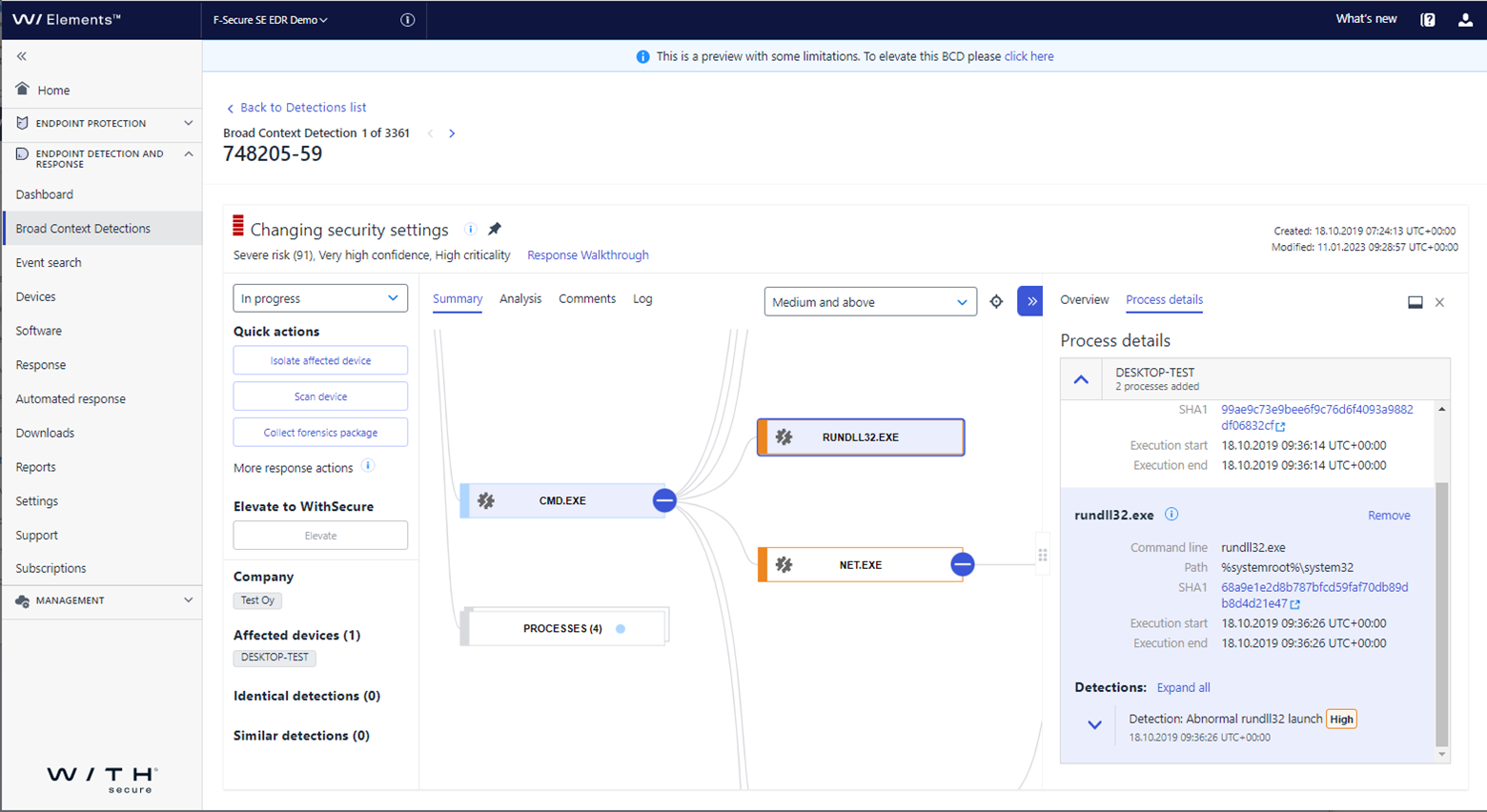
It is still a work-in-progress and there is continued focus on improving useability – such as, selecting/de-selecting multiple data points – and the ‘Elevate’ service. Please do check it out and give us your feedback to help us shape the final version for you. This can be done via our Elements Ideas portal – ideas.withsecure.com.
Elements Collaboration Protection
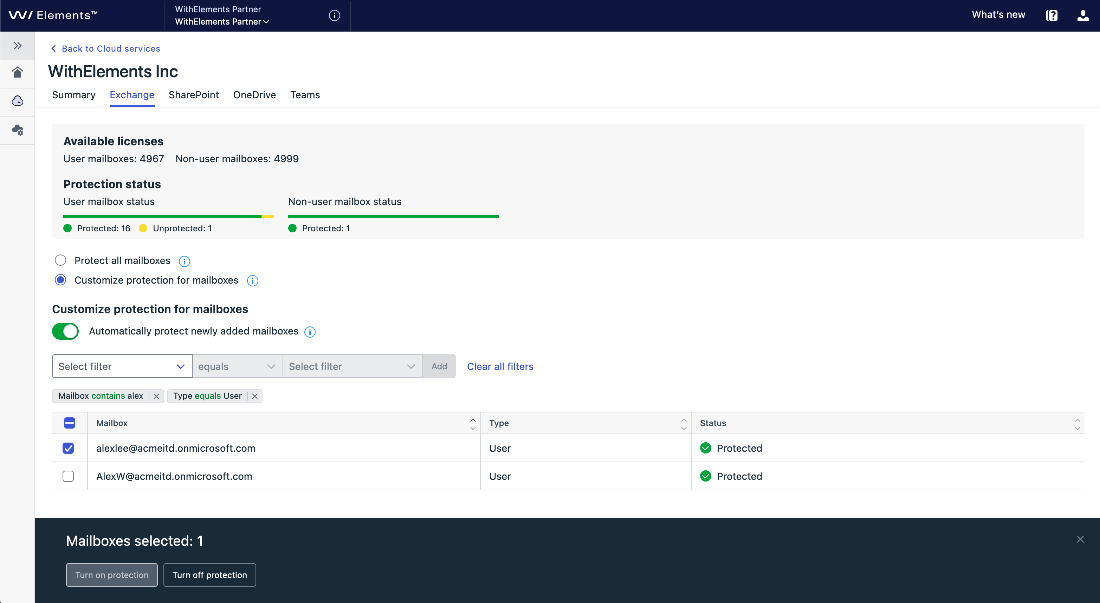
Improvements for Mailbox Protection Management
The filter feature is introduced for mailbox management in Exchange tab under Cloud Services. This enhances management of mailboxes protection, in particular for large tenants. The mailbox list can be pre filtered before changing a protection status by protection status or mailbox type or by a user name or domain.
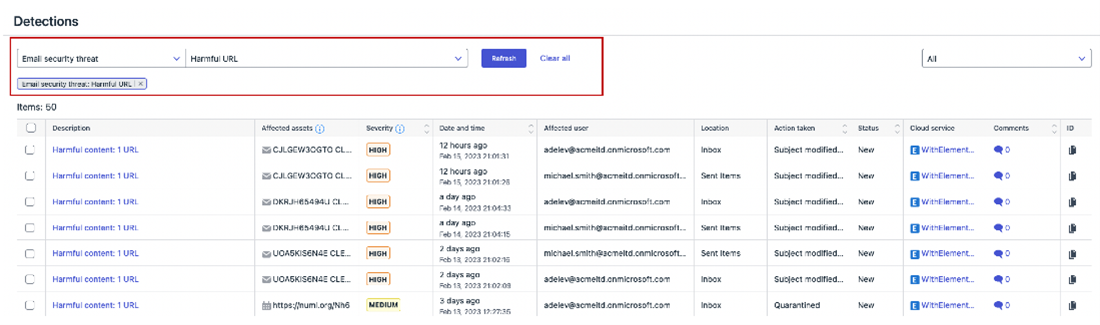
Detections new filter
The detections with Exchange origin can now be filtered by type of email security threat: suspicious URL, suspicious attachment, harmful URL or harmful attachment.
Other improvements
- The Protection Trend widget includes the unsafe content detected in OneDrive and Teams
- The quarantine statistic on partner level is updated more frequently
Elements Vulnerability Management
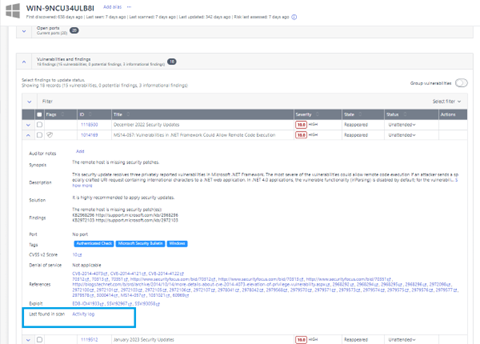
Added a direct link from a single vulnerability instance in the asset details view to the Activity log tab.
With this connection, we have made it easier for admin to realize from which scan the individual vulnerability is originating. It is especially important in case when vulnerability list is developed from various sources, including network and agent-based scans.
AlmaLinux joined the list of Linux distributions supported by Elements VM Authenticated Scan
By popular request, we have now added support for AlmaLinux to the platforms supported by Authenticated Scan
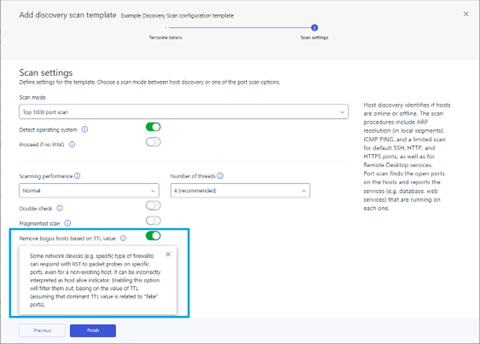
Eliminate bogus hosts in Discovery Scan
The option of ignoring false positives on the Discovery scan configuration user interface has been added. By filtering out false or unreliable hosts based on their TTL (Time to Live) value, it helps to ensure that only accurate and trustworthy information is utilized within the network.
For more information, please refer to Elements VM changelog in WithSecure Community:
Reminder about upcoming change to take CVSSv3 into use
Starting from March 1, 2023 Elements Vulnerability Management will start using CVSS v3.1
Integrations
Changes in Elements and Endpoint Protection API
Companies endpoints are deprecated: Clients should use instead Organizations endpoint from Elements API.
Support for Companies endpoint will end by 31.07.2023
Elements API changes in existing endpoints
Devices endpoint now supports filtering by device serial number. You can find durther information at
Other items of interest
Threat Analysis: No Pineapple!
Our crack team of Threat Analysts have created an in-depth article about a new threat from North Korea’s Lazarus Group, which targets the Medical Research and technology sectors.
As the analysis progressed, our teams created detections for both our EPP and EDR solutions, helping to protect our customers.
You can read more about this on our Labs website
December 2022 – Threat Highlights Report
Monthly highlights:
Ransomware: Trends and notable reports
- RansomBOGGS
- Ikea struck by Vice Society
- Guatemala hit by Onyx
- Trigona launch leak site
- Rackspace attack causes widespread issues
Other notable highlights in brief
- Twitter data breach exposed 5-400 million phone numbers
- Citrix and Fortinet patch actively exploited vulnerabilities
- Dolphin backdoor used by APT37
- InTheBox, a web-inject marketplace
- Infraguard breach
Research highlights
- CISA’s known exploited vulnerabilities catalog
You can download the full report here: Download Report
January 2023 – Threat Highlights Report
Monthly highlights:
- GoTo (LogMeIn) breach
- The rise of Emotet (again)
- SEO poisoning at an all-time high
- Mac malware of 2022
Ransomware: Trends and notable reports
- Royal Mail hit by LockBit… affiliate
- A history of LockBit
- BianLian decryptor and shift to I2P
- Newcomers: CatB
- An interview with Mallox
Other notable highlights in brief
- Nordic common cybersecurity strategy
- Cellebrite & MSAB XRY data leaked
- OWASSRF, a technical write-up
- Breach of Slack
- Poland warns of Russian cyber attacks
- Denmark struck by Russian hacktivist DDoS
- Freejacking
- SugarCRM actively exploited
- Kela report on cybercrime in 2022
You can download the full report here: Download report
WithSecure™ Elements Quarterly Launch
The Elements Quarterly Launch is here again, highlighting the key developments of Q4/2022.
This time we introduce two major Elements evolutions: Microsoft Teams protection in WithSecure™ Elements Collaboration Protection and Server share protection against ransomware in WithSecure™ Elements Endpoint Protection.
Read more on the campaign page:
In case you missed it
Elements Vulnerability Management will soon be updated to use CVSSv3 ratings, instead of the current CVSSv2. You can find out more information about this change, including potential actions you will need to take, at our dedicated Community article
Share your ideas with us
Our purpose is to co-secure the world with you – now as WithSecure™. To co-create the best possible cyber security products and services, we warmly recommend you share your ideas via our Ideas Portal, now accessible directly from WithSecure™ Elements Security Center.

Further information
Changelogs and Release Notes for all parts of WithSecure™ Elements can be found at the Help Center

https://community.withsecure.com/categories/withsecure-elements-vulnerability-management
https://www.withsecure.com/en/solutions/software-and-services/elements/withsecure-elements-quarterly
