
-
Introducing the Elements News Center
Read more
We are pleased to announce the release of Elements News Center, one of the latest features added to our Elements Security Center.
What is it?
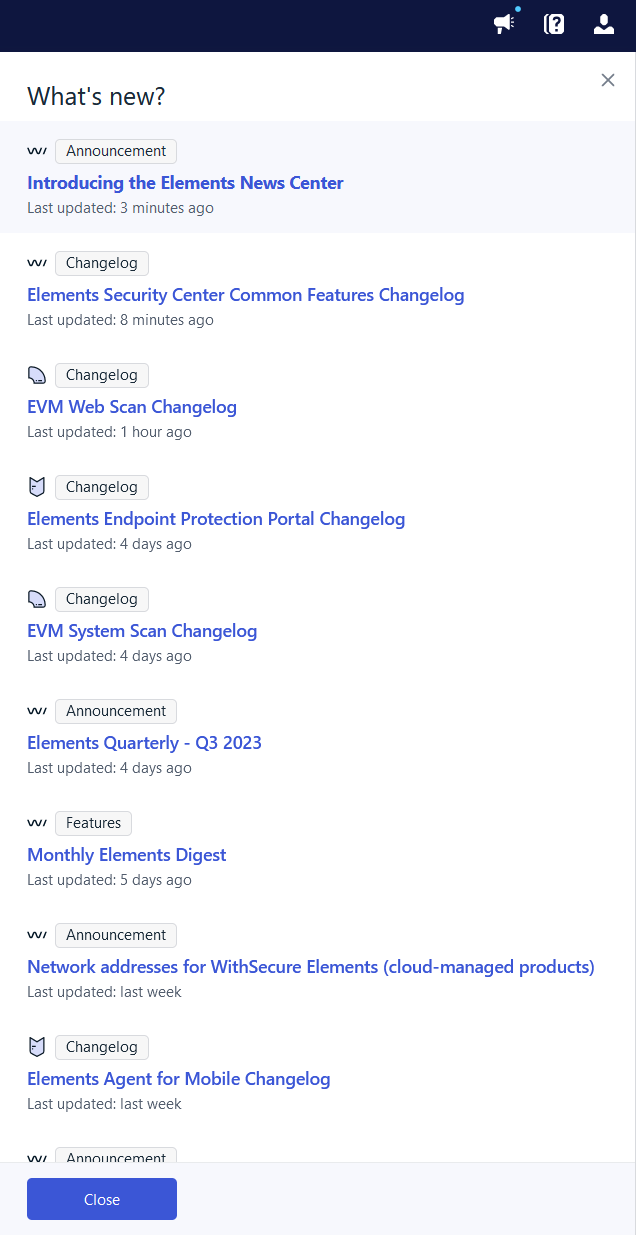
The Elements News Center combines all relevant product news and info in an easy-to-access location in the Elements Security Center. It includes changelogs, monthly feature digests, and other announcements. This feature will make it easy for you to stay up to date on what is happening in the Security Center, read more about new features you might want to try out, quickly consult the latest changelogs, and be prepared to react to the ever-changing threat landscape.
How does it work?
Entries in the News Center work like channels, and each channel can get a ping (i.e. shows as “new”) when an update has been posted to it. Elements Announcements are the exception to this, as they appear individually. Clicking an item will open the latest update in a new tab. The feature does not include operational notifications.
Where to find it
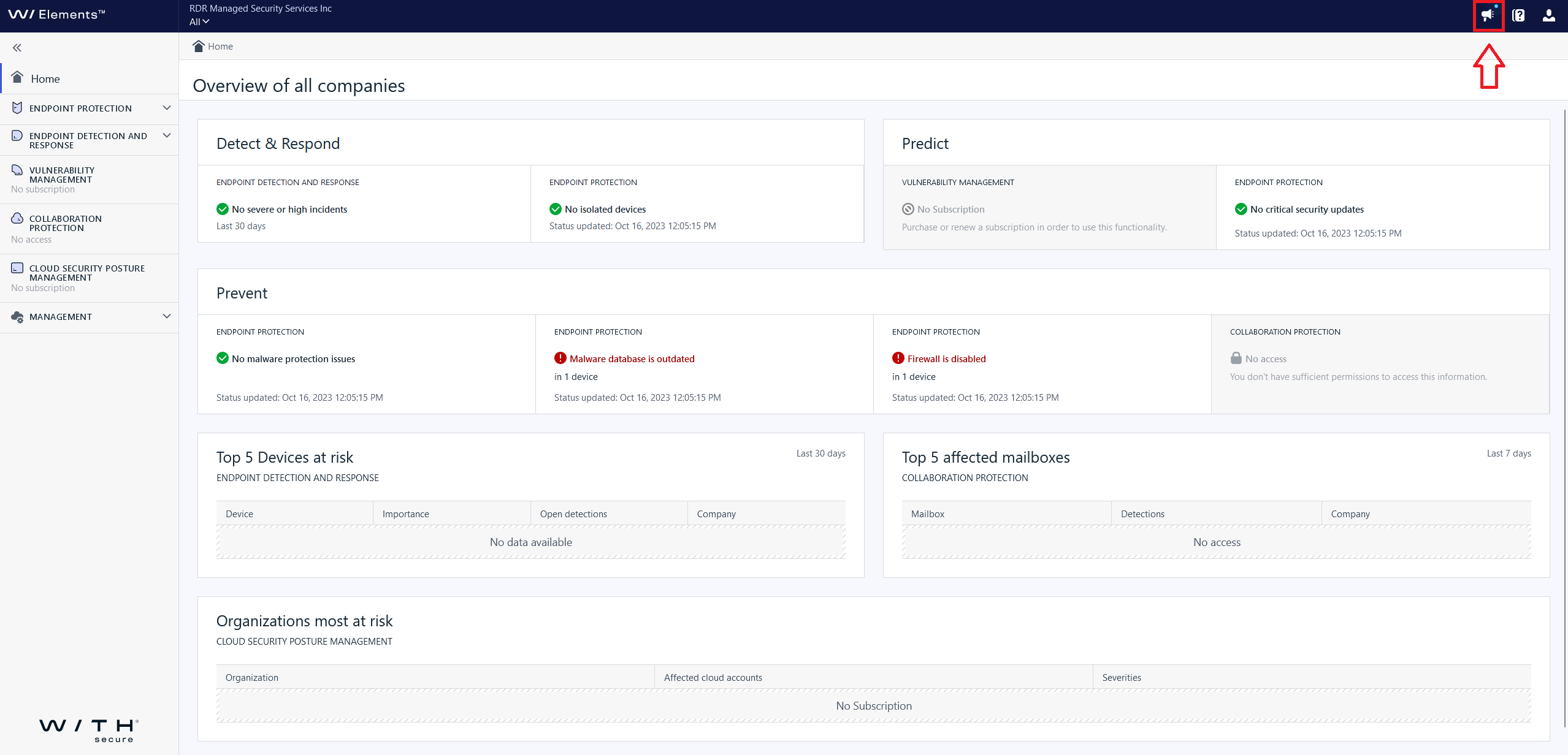
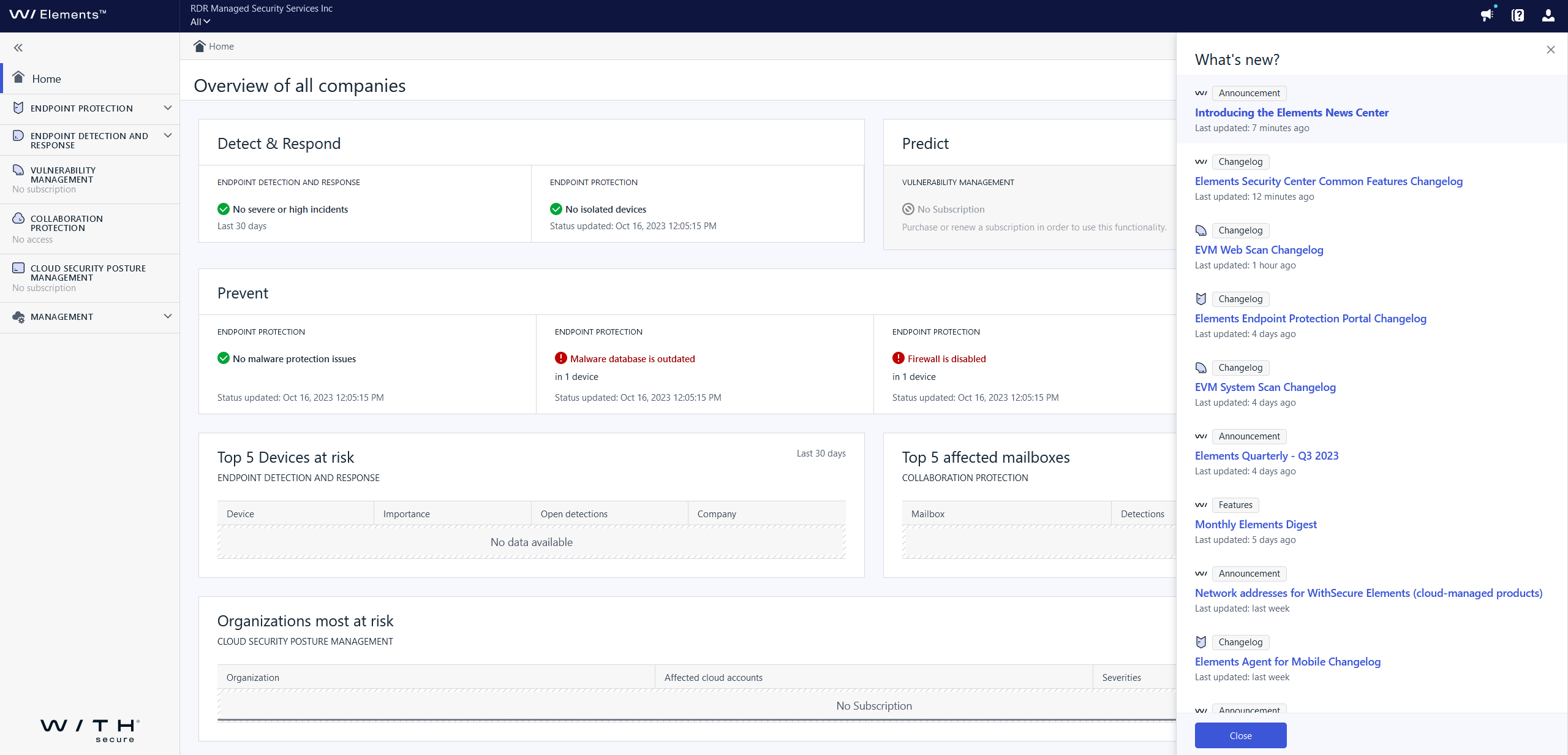
You can find the Newsfeed in the top right corner of the Security Center, behind the megaphone. Clicking this icon will open a sidebar and doesn’t interrupt your workflow. A blue dot on the megaphone indicates that there are new updates.
Coming soon
In future releases we plan to include added functionalities, additional content types, and personal customization options. The News Center will be your number one stop for Elements News!
-
What’s New in Elements: September 2023
Read more
Editor’s Highlights
Dynamic Risk Scoring for Elements Vulnerability Management
WithSecure Elements Vulnerability Management now makes use of Dynamic Risk Scoring, to adapt the Risk Score based on current events and known exploits. You can find more information below in the Elements Vulnerability Management section.
Revised Broad Context Detections view in Elements Endpoint Detection and Response
We have made some changes to how BCDs are presented within Elements EDR. You can find more details under Elements Endpoint Detection and Response below. We think you’ll like the changes!
Elements Security Center
Added filter by a device OS type for Security events
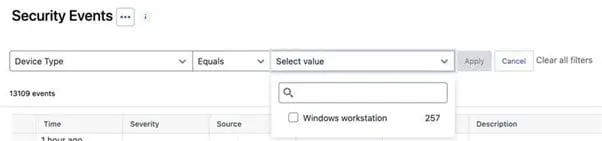
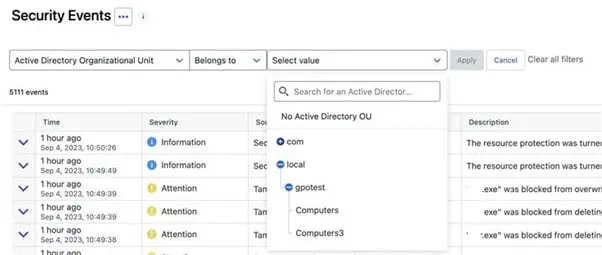
Added filter by Active Directory Organzational Unit for Security events
Unprotected devices that have previously had WithSecure EPP client installed
If these devices have been explicitly deactivated by the administrator, they are now considered protected, so that they will not appear in Unprotected devices listing.
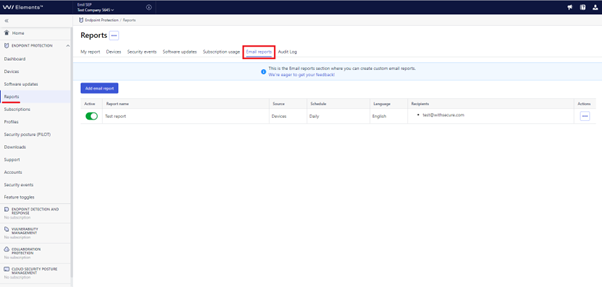
Email reports view has been added
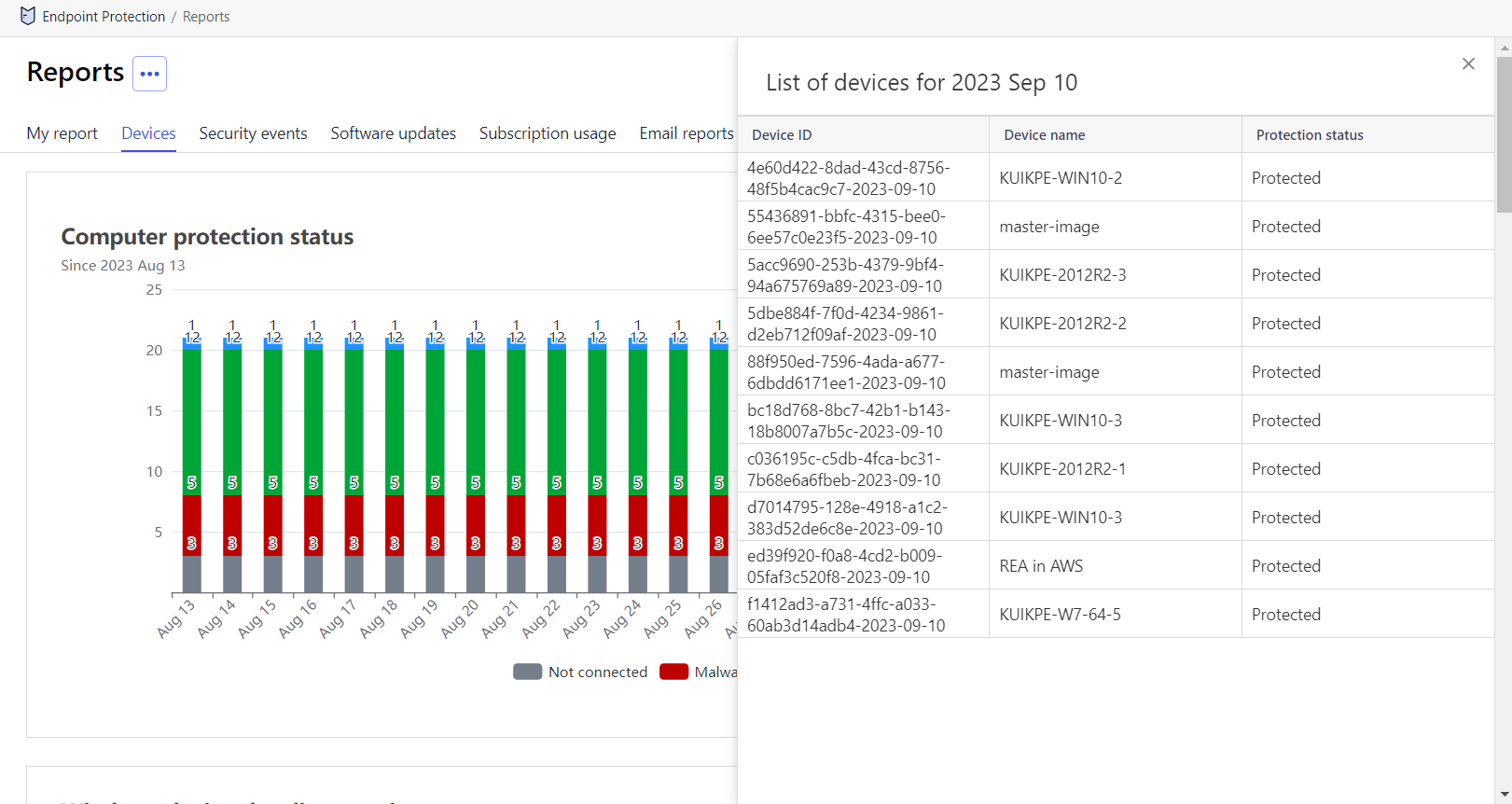
Devices Status report now has an info flyout
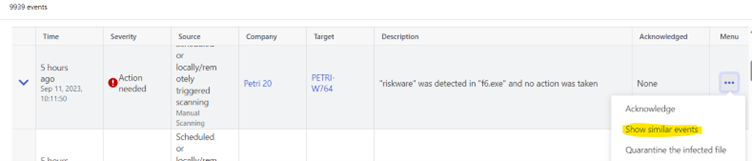
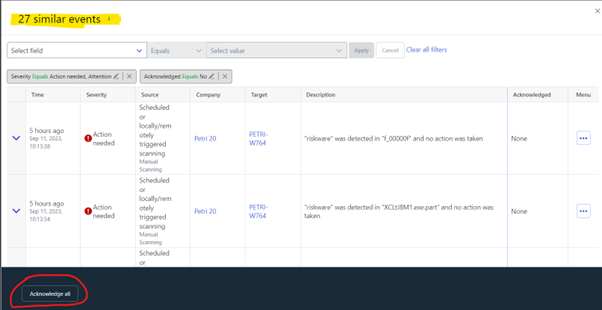
Similar events feature
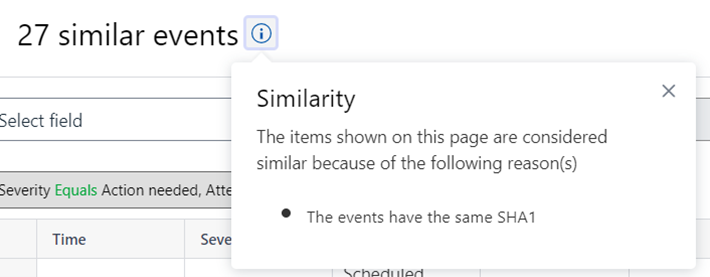
We have added a feature intended to help security administrators look at the whole picture and acknowledge multiple events at once. In the action menu there’s a new item “Show similar”, which opens the flyout with all the similar events. The Info icon near the title will show why do we think that these events are similar. The filters are copied from the main view, and you can adjust them to narrow your search further or to limit amount of events shown. On the bottom of the view there’s “Acknowledge all” button, which sends the acknowledgement request for all events currently visible in the view. Please note that acknowledging many events might be time consuming and won’t appear in the portal right away. There’s also an upper limit of 10000 events to be acknowledged simultaneously.
Please note:
- Read-only users can’t acknowledge events even with “acknowledge all” feature.
- Available only for events starting from the 1st of Sep 2023. The action is not present for older events.
macOS 14 Sonoma notifications
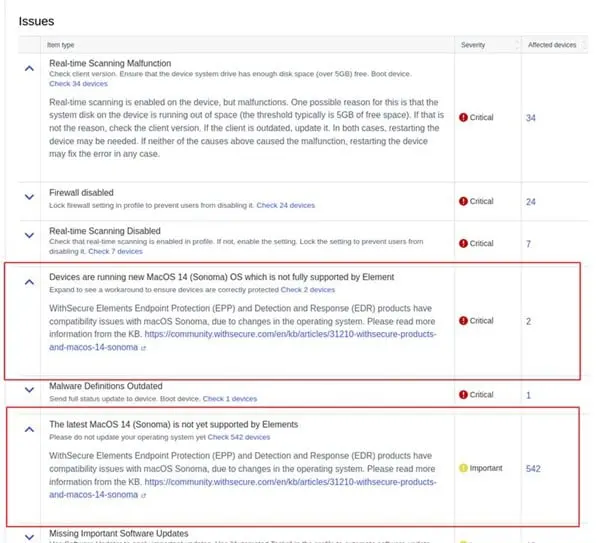
Apple has released the next major operating system version 14 (Sonoma) ahead of schedule, and our agent is not yet compatible with it. We have now two new issues in the EPP dashboard advising not to upgrade yet and showing which devices have already upgraded to the new OS version.
Elements Endpoint Protection
Elements Agent for Windows workstation and server: version 23.7
A new version of the endpoint clients is available.
This release makes the Elements Agent version 23.7 available (internal version 23.7.416).
The endpoints automatically upgrade, without a reboot.
New away option in automated tasks.
The “away” option allows to run automated task after user has been away for defined number of minutes. Example “@away 5” would run task after user have been away for 5 minutes.

New automated task to create restore point.
There is new automated task which allows to create system restore point in the client.

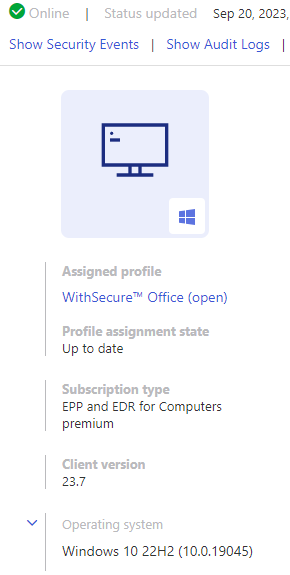
Improvements how windows operating system version is reported.
The client now sends also windows build number and build number is visible in the device details.
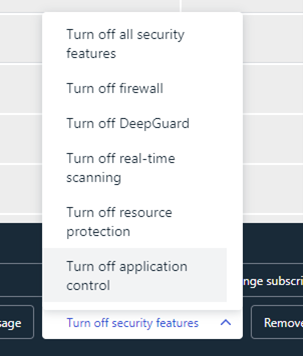
Remote action to turn off application control.
There is new remote action to turn off application control.
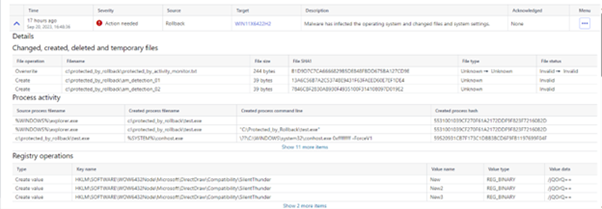
Improved security events to contain information also about quarantined registry entries.
If rollback did happen and restored registry entries, the security event generated from the event was missing information about the restored registry entries. Now the event contains information about the restored registry entries.
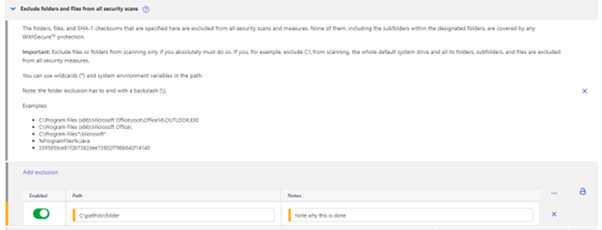
Security scanning exclusions improvements
It is now possible for administrators to enabled and disable individual rules, instead of removing the rules completely. Also, it is possible to write a comment for the exclusion.
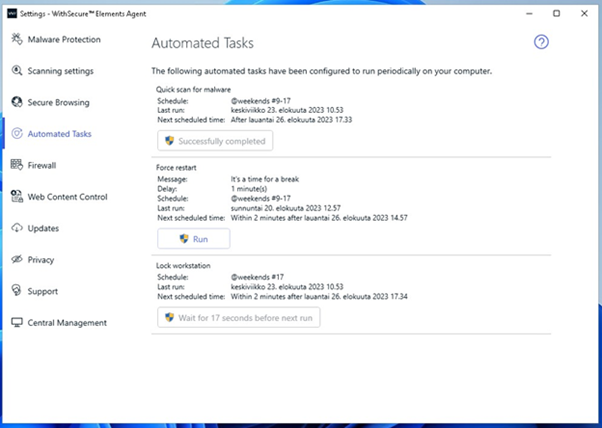
Running automated task from client user interface
It is possible to run automated task from the client user interface. Running task is only possible for administrative users and must be enabled from the profile separately.

Elements Endpoint Detection and Response
New Automated Actions view
WithSecure Elements EDR has released a new view called ‘Automated actions’.
This replaces the old ‘Automated response’ view.
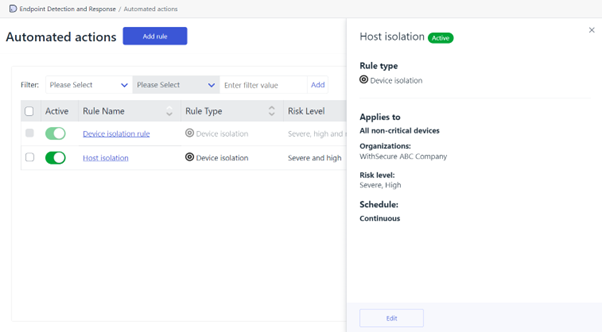
What has changed?
The functionality stays the same and you can still configure ‘Device isolation’ rules that run 24/7 and specify the risk level, like with the original ‘Automated response’ view, however you can now create an action rule with ‘custom’ scheduling where you can input specific hours for when you want a rule to run, for example, outside of office hours.
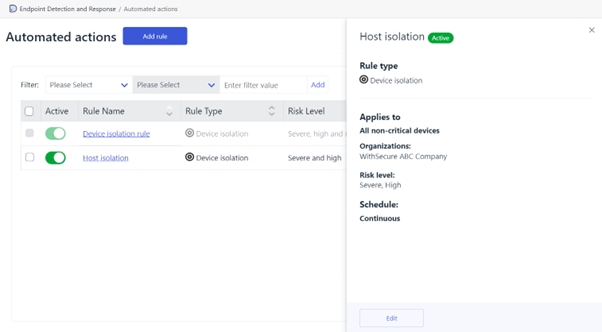
The new ‘Automated actions’ view includes all existing Device Isolation rules, so there is no need to worry about having to re-create them.
It includes the new ‘custom’ scheduling, so specific days and times can be applied for when you want the rules to run, for example, from 17:00 until 09:00 the next morning.
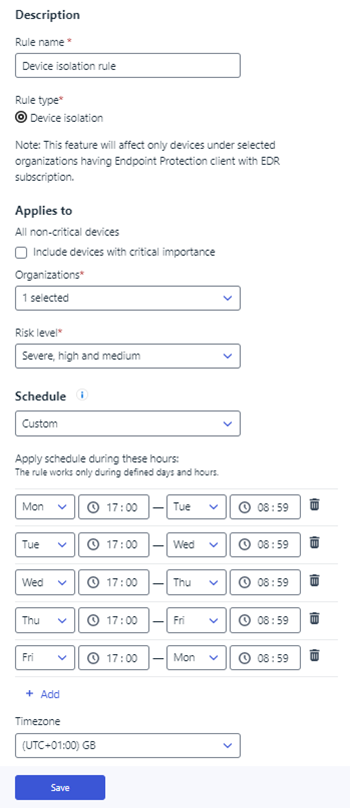
Lastly, the existing ‘Automated response’ view is still available for the next two weeks, in read-only mode, so you have time to get used to the new view.
Why?
Not only does this new feature provide custom scheduling but it also starts to build towards our vision to include more automated actions within Elements – initially, with the co-monitoring service and the new email notifications with risk level selection, but also for more response actions in the future.
This new Automated Actions view is now available to use in Elements.
New Broad Context Detection details view
The new Broad Context Detection (BCD) details view has been fully released into production and is now the default view, replacing the old Broad Context Detection details view.
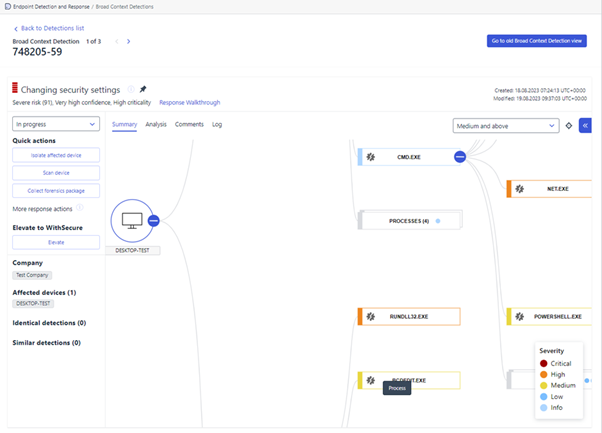
What has changed?
The new BCD details view has become the default view so when you click on the ‘Broad Context Detection’ menu option in Elements, you will now be presented with this new view.
The old BCD details view is still available to use, for a limited time, to give you more time to familiarise yourself with the new BCD view. You can navigate to the old BCD view via the ‘Go to old Broad Context Detection view’ button in the top right corner of the page.

You are able to elevate BCDs from within the new BCD details view, unlike before when it was in ‘Preview’ mode where you had to navigate back to the old BCD view to elevate a detection. The new view supports both manual and automatic elevations and works exactly the same as the old view.
You are also able to change the default Elevation subscription token selected. The subscription expiring the soonest is selected by default, however you can now see all available subscriptions and change it to another one if you so wish.
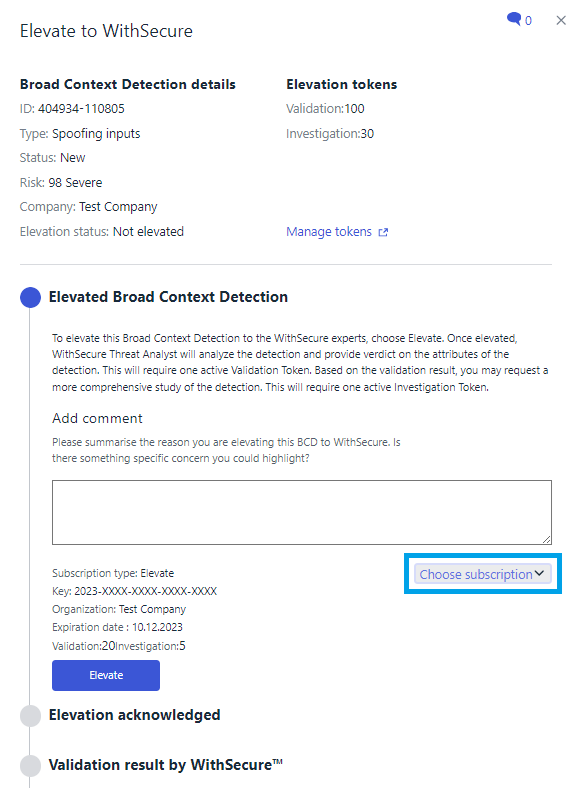
Extra information has been added to the new view to help you interpret the information displayed.
Elements Collaboration Protection
Blocking file types
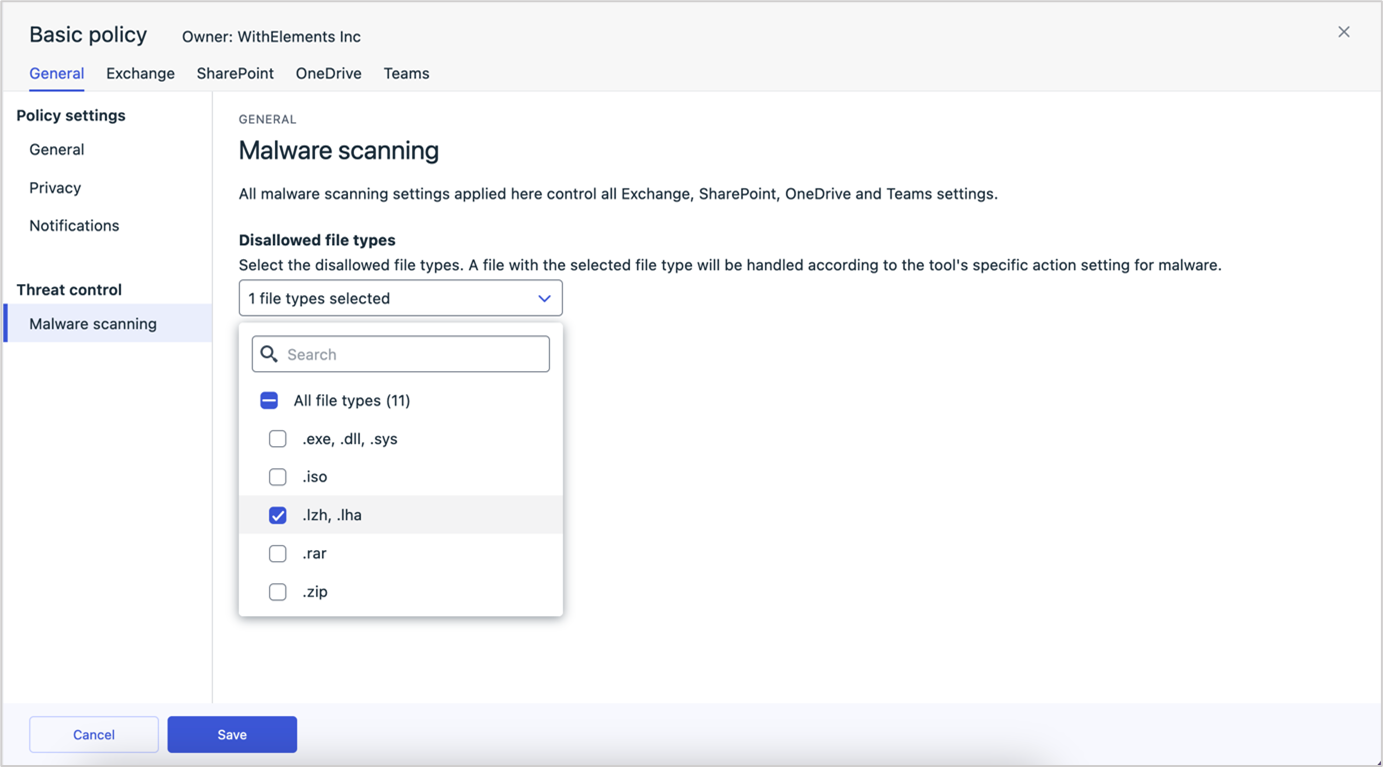
The new feature “Blocking file types” was has been enabled for all Collaboration Protection customers.
The policy settings were expanded to allow blocking of certain file types. Administrators can select the file types to be disallowed within the protected ecosystem, from a list curated by our security experts. The system will handle all files of the selected file types as harmful and act according to a tool specific policy setting. The feature does not rely on the file extension but leverages intelligent file type recognition.
Elements Vulnerability Management
Dynamic Assets Risk Score has been enabled.
The Static Asset Risk Score was calculated based only on the CVSS base score, with an additional boost for old and/or exploitable vulnerabilities, enhanced with the asset importance mark and internet exposure flag.
Here are the improvements introduced in the second version of Asset Risk Score, that is called “Dynamic Risk Score” with different boost factors:
The score is slightly (from -10% up to +60%), corrected with EPSS (exploit prediction) score together, when there are no signs of exploitation
- It is boosted between 20-70% when there is an exploit. The boost depends on our knowledge about the maturity of the exploit or observation of incidents related to the vulnerability.
- It is boosted according to the number and age of cyber security reports describing the vulnerability
- With other impacting factors such as:
- Taking into account a few most severe vulnerabilities, as opposed to static risk score that only took the first top one.
- Taking into account the asset importance that is set by the customer.
- Taking into account the visibility of the asset from public internet.
Elements Vulnerability Management: System Scan
The Elements Vulnerability Management System Scan was updated to detect vulnerabilities in the following products as part of authenticated scanning for Windows:
- Siemens JT2Go
- QNAP QVR Pro Client
In addition, a non-version based detector was added for the VMWare Aria Operations For Networks remote code execution vulnerability (CVE-2023-34039)
Elements VM Scan Node Agent: Linux
A new version of the Linux Scan Node Agent was released, fixing several known issues and also adding registration towards the Elements Vulnerability Management system.
Integrations
Endpoint Protection API: Subscriptions endpoints end of life on 11th of March 2024
The old subscriptions endpoints are deprecated and should be replaced by the subscription endpoints in the Provisioning API. To use this API, you need to request Read-only Provisioning API credentials from WithSecure Support. Access to Provisioning API is only for partner (SOP) accounts.
The following Endpoint Protection API subscriptions endpoints will stop working on the 11.03.2024:
- Get company subscription details
- Get partner subscription details
- List company subscriptions
- List partner subscriptions
- Remove computers from subscription (replaced by Elements API endpoints “Update device state” or “Delete device”)
REMINDER: Elements Connector: Customers still using the (End of Life) Endpoint Protection API to login need to change API authentication credentials
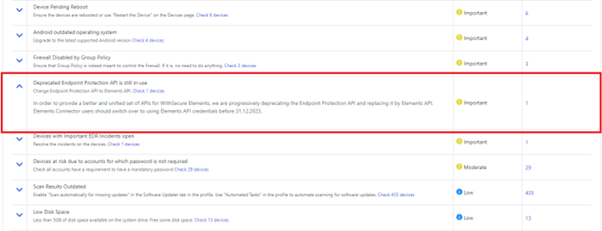
In order to provide a better and more unified set of APIs for WithSecure Elements, we are progressively deprecating the Endpoint Protection API and replacing it by Elements API. If your Elements Connector is used to stream security events from the WithSecure Elements portal to your SIEM and was configured before 23.05 release, it might be still using Endpoint Protection API.
The Elements Security Center will warn you if actions are needed in the Issues list:
A Corresponding warning is also shown in the Connector device view:
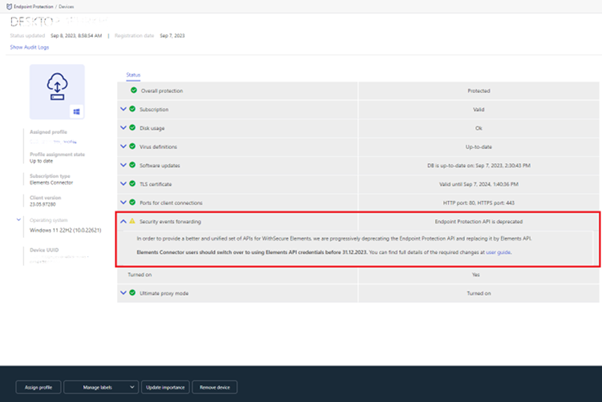
In order to preserve event forwarding functionality please switch over to using Elements API credentials before 31.12.2023. You can find full details of the required changes in the userguide.
In case you missed it
Reminder: WithSecure products and macOS 14 “Sonoma”
As you may be aware, Apple have announced that the next version of macOS (version 14, also known as “Sonoma”) will be released on September 26th 2023.
Unfortunately, this release has introduced incompatibilities with some WithSecure products.
The affected products for Mac are:
- WithSecure Elements Endpoint Detection and Response
- WithSecure Elements Endpoint Protection
- WithSecure Client Security (formerly F-Secure Client Security)
- WithSecure Countercept
We have created a Knowledge Base article which details the current status of our support for Sonoma. Our current advice is to NOT upgrade to Sonoma at this time, unless it is critical for your business.
WithSecure is working hard to address these issues and will provide updates via the Knowledge Base page.
Share your ideas with us
Our purpose is to co-secure the world with you – now as WithSecure™. To co-create the best possible cyber security products and services, we warmly recommend you share your ideas via our Ideas Portal, now accessible directly from WithSecure™ Elements Security Center.

Further information
Changelogs and Release Notes for all parts of WithSecure™ Elements can be found at the Help Center
-
Elements Quarterly – Q3 2023
Read more
We are always proud of what our many teams have achieved, but once a quarter we make a bigger splash about things we are particularly proud of.
During Q3/2023, our teams managed to make a new product, a new service offering, and many new product features available to our partners and customers, and at the same time prepare for some larger upcoming changes.
You can read more about these items at our Elements Quarterly page.
-
New Products and Services for WithSecure™ Elements
Read more
We are pleased to announce that we have a new product and a new service for WithSecure™ Elements, now available to our all our customers and partners.
WithSecure™ Elements Cloud Security Posture Management
WithSecure™ Elements Cloud Security Posture Management enables our partners and customers to check their cloud environments for potential risks and misconfigurations. This product can check your Azure and Amazon AWS environments for issues which can potentially lead to data leakage or attack, and it builds on the extensive knowledge of our Analysts and Threat Hunters, from real-world experience.
The primary benefits are:
- Identifies and prioritizes misconfigurations based on risk level with accompanying mitigation instructions.
- Configuration checks for many aspects of security, including overly permissive IAM privileges, unencrypted data at rest, cloud instances with access to public IP addresses, and many any others
- Powered by consulting expertise and research to ensure checks fit within threat models and add real security value to organizations.
- Easy to use dashboard where important information that requires attention is provided in easy-to-interpret graphs.
- Multi-company and multi-cloud management in a single easy-to-use portal along with endpoint security, collaboration protection and vulnerability management products.
Read more about WithSecure™ Elements Cloud Security Posture Management
WithSecure™ Co-Monitoring Service
The new WithSecure™ Co-Monitoring Service allows customers without a “round the clock” security team to deploy Elements Endpoint Detection and Response, safe in the knowledge that WithSecure is working with them, covering for them during the whole 24 hours of the day.
Cyber threats don’t keep office hours, and if you have a gap in your investigation, validation and remediation capabilities, WithSecure™ Co-Monitoring helps. Our Detection and Response Team will stand shoulder to shoulder with you, helping co-secure your estate.
Some of the highlights of WithSecure Co-Monitoring Service:
- 24/7 monitoring. Maintains a constant watch over severe risk detections in your IT environments, ensuring complete visibility and protection.
- Threat investigation. Validate and investigate detections to establish if they are true positives that require immediate action to avoid an incident, or false positives which can be closed.
- Incident escalation. Ensure that incidents are escalated in a timely fashion to the correct customer representative(s) with the authority and ability to respond.
- Guidance and response. Pragmatic, expert advice on how to contain and remediate each incident – for example, recommending network isolation of the affected systems or termination of malicious processes.
Read more about the WithSecure™ Co-Monitoring Service
-
Network addresses for WithSecure Elements (cloud-managed products)
Read more
Update: accessory.radar-prd.fsapi.com replaced with cve.accessory.elements.withsecure.com
Update: Removed information on SPI servers, as these are no longer in use. See this article for the reason why.
Update: Removed all F-Secure.com addresses. These are no longer available, and all customers and partners should use the new addresses.
For most customers, WithSecure Elements products will function correctly without needing to know which servers the products connect to.
However, some administrators tightly control which network addresses they allow their clients to connect to (“Egress control” or “outbound connections”), and it is mandatory that they allow connections to the following addresses. WithSecure cannot guarantee the functionality of the products if access to these addresses is blocked.
The product may not function correctly if access to these network addresses is not allowed.
Please note that all the following require outbound connections to TCP/443 unless otherwise stated.
Recommendations
WithSecure recommends, where possible, that administrators allow outbound access to all address under the withsecure.com and fsapi.com domains. We do appreciate that this is not always possible due to firewall configuration limitations, or even from an operational perspective, so we are publishing an explicit list of server addresses.
In addition, there are some addresses from other domains (such as amazonaws.com), and these should be explicitly added as individual addresses, and never added as a wildcard firewall entry
Please note that we do not guarantee this list of addresses is complete or will stay unchanged, so we strongly recommend bookmarking these articles for future reference. We will update these articles whenever needed.
WithSecure Elements endpoint agents will be updated automatically, but administrators should prepare for this in advance by ensuring endpoints can reach the following addresses.
Important notes
Some service addresses are specific to geographical regions
For example, some servers are dedicated to customers in EMEA (Europe, Middle East, Africa), AMER (the Americas), and APAC (Asia Pacific). We indicate these where relevant, and administrators only need to grant access to the ones relevant to their installations.
WithSecure Elements
Remote fsdiag upload server
- ane1-fsdiag-upload.s3.ap-northeast-1.amazonaws.com (APAC)
- ew1-fsdiag-upload.s3.eu-west-1.amazonaws.com (EMEA)
- ue1-fsdiag-upload.s3.amazonaws.com (AMER)
WithSecure COSMOS Server
- client-api.public.prod.ew1.cosmos-prd.fsapi.com (EMEA)
- client-api.public.prod.ue1.cosmos-prd.fsapi.com (AMER)
- client-api.public.prod.ane1.cosmos-prd.fsapi.com (APAC)
- api.prd.ew1.cosmos-prd.fsapi.com (EMEA)
- api.prd.ue1.cosmos-prd.fsapi.com (AMER)
- api.prd.ane1.cosmos-prd.fsapi.com (APAC)
WithSecure Doorman server
- psb-emea.doorman.fsapi.com (EMEA)
- psb-amer.doorman.fsapi.com (AMER)
- psb-apac.doorman.fsapi.com (APAC)
- baseguard.doorman.fsapi.com
- api.doorman.fsapi.com
- api.prd.glb.doorman.fsapi.com
- api.prd.ew1.doorman.fsapi.com
WithSecure Entitlements server
- provisioning.ew1.entitlements.fsapi.com (EMEA)
- provisioning.ue1.entitlements.fsapi.com (AMER)
- provisioning.ane1.entitlements.fsapi.com (APAC)
- provisioning.global.entitlements.fsapi.com
WithSecure Download Servers
- download.fsapi.com
WithSecure EDR response servers
- ac3ujg1ortm4c-ats.iot.eu-west-1.amazonaws.com (also TCP/8883) (EMEA)
- ac3ujg1ortm4c-ats.iot.us-east-1.amazonaws.com (also TCP/8883) (AMER)
- ac3ujg1ortm4c-ats.iot.ap-northeast-1.amazonaws.com (also TCP/8883) (APAC)
- c3hquxgihnj763.credentials.iot.eu-west-1.amazonaws.com (EMEA)
- c3hquxgihnj763.credentials.iot.us-east-1.amazonaws.com (AMER)
- c3hquxgihnj763.credentials.iot.ap-northeast-1.amazonaws.com (APAC)
- ew1-famp-prd-system-transfer.s3.eu-west-1.amazonaws.com (EMEA)
- ue1-famp-prd-system-transfer.s3.us-east-1.amazonaws.com (AMER)
- ane1-famp-prd-system-transfer.s3.ap-northeast-1.amazonaws.com (APAC)
- agent-api.ew1.famp.fsapi.com (EMEA)
- agent-api.ue1.famp.fsapi.com (AMER)
- agent-api.ane1.famp.fsapi.com (APAC)
WithSecure GUTS2 Server
- guts2.fsapi.com (also TCP/80)
WithSecure KARMA Server
- a.karma.sc2.fsapi.com
WithSecure Mind Server
- restmc.mind.sc2.fsapi.com
WithSecure Push Poll Server
- poll.push.fsapi.com (EMEA)
- poll.push-na.fsapi.com (AMER)
- poll.push-apac.fsapi.com (APAC)
Push Register Server
- registrar.push.fsapi.com (EMEA)
- registrar.push-na.fsapi.com (AMER)
- registrar.push-apac.fsapi.com (APAC)
WithSecure DIS Server
- api.disobus.fsapi.com
Update Service
- api.prd.glb.us-prd.fsapi.com
CCR Service
- 692.psb.prd.gw.fsapi.com (APAC)
- apac.psb.prd.gw.fsapi.com (APAC)
- 691.psb.prd.gw.fsapi.com (EMEA)
- 6910.psb.prd.gw.fsapi.com (EMEA)
- 694.psb.prd.gw.fsapi.com (EMEA)
- emea.psb.prd.gw.fsapi.com (EMEA)
- emea2.psb.prd.gw.fsapi.com (EMEA)
- emea3.psb.prd.gw.fsapi.com (EMEA)
- 710.psb.prd.gw.fsapi.com (AMER)
- amer.psb.prd.gw.fsapi.com (AMER)
WithSecure Elements Vulnerability Management
If you are using WithSecure Elements Vulnerability Management, you additionally need to grant access to the following services
After the change
api.radar-prd.fsapi.com
- This is the main address of the Elements VM REST API, that is used by customers and Scan Nodes.
- NOTE: Any customer or partner integrations will need to change to this address to avoid loss of functionality. This change can already be made, the new DNS name is already functional and working as a direct replacement.
sn-api.radar-prd.fsapi.com
- Radar Update Service address, used to manage Scan Nodes and deliver product and engines updates to them.
updates-api.radar-prd.fsapi.com
- Secondary Radar Update Service address used to manage all VM Portals, publish vulnerability coverage and serve some smaller use cases.
cve.accessory.elements.withsecure.com
- Callback service used by scanning engines to verify remote code execution vulnerabilities.
-
Customer Survey – Sustainability
Read more
WithSecure and Sustainability
WithSecure is a company which aims to develop technology, and also take care of society and the world we live in. We believe that we can make a change by empowering our customers to adjust their settings in a responsible and informed manner. We want to provide visibility on the sustainability impact of the settings, in particular the impact on the planet through energy-intensity of the features.
User behavior in relation to environmental data
In particular, those of you who attended our SPHERE’23 event may remember our idea of enriching the profile editors with more context. This concept is exciting, but before proceeding with development, we would like to examine how environmental aspects are perceived and how effectively this data could influence our user’s choices, as quality of protection remains and will always be top priority for WithSecure.
WithSecure & Poznan University of Economics and Business joint research
You are very welcome to contribute to greater good and join our scientific research, prepared in cooperation with professionals in the field of User Behavior analysis from Poznan University of Economics and Business!
The link below will take you to the page with our study, and we estimate that it will take about 3 minutes to complete. Rest assured that your answers remain anonymous and any conclusions will be generalized. Your privacy is always important to us.
The survey is open until 10th October 2023.
-
What’s New in Elements: August 2023
Read more
Editor’s Highlights
WithSecure Products and macOS 14 “Sonoma”
Unfortunately, we are not quite ready to support the new macOS 14 “Sonoma” version that Apple is releasing. You can find our current status and recommendations in our dedicated article.
Elements Security Center
Uninstalled devices are now shown in Managed Removed Devices view
This view shows devices where Elements agent was uninstalled, currently supporting Windows agents only.
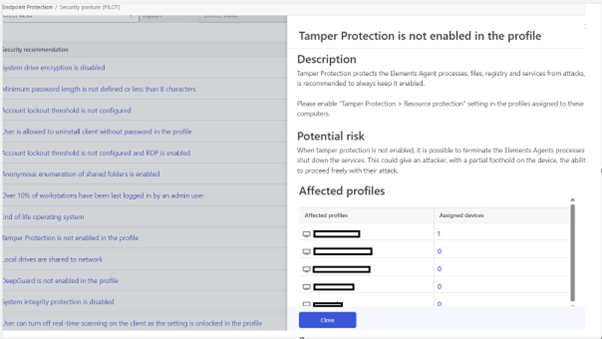
Security posture new profile based assessments
A new form of security posture analysis points have been added. These analyse data from the profile settings to warn admins about potentially risky configuration.
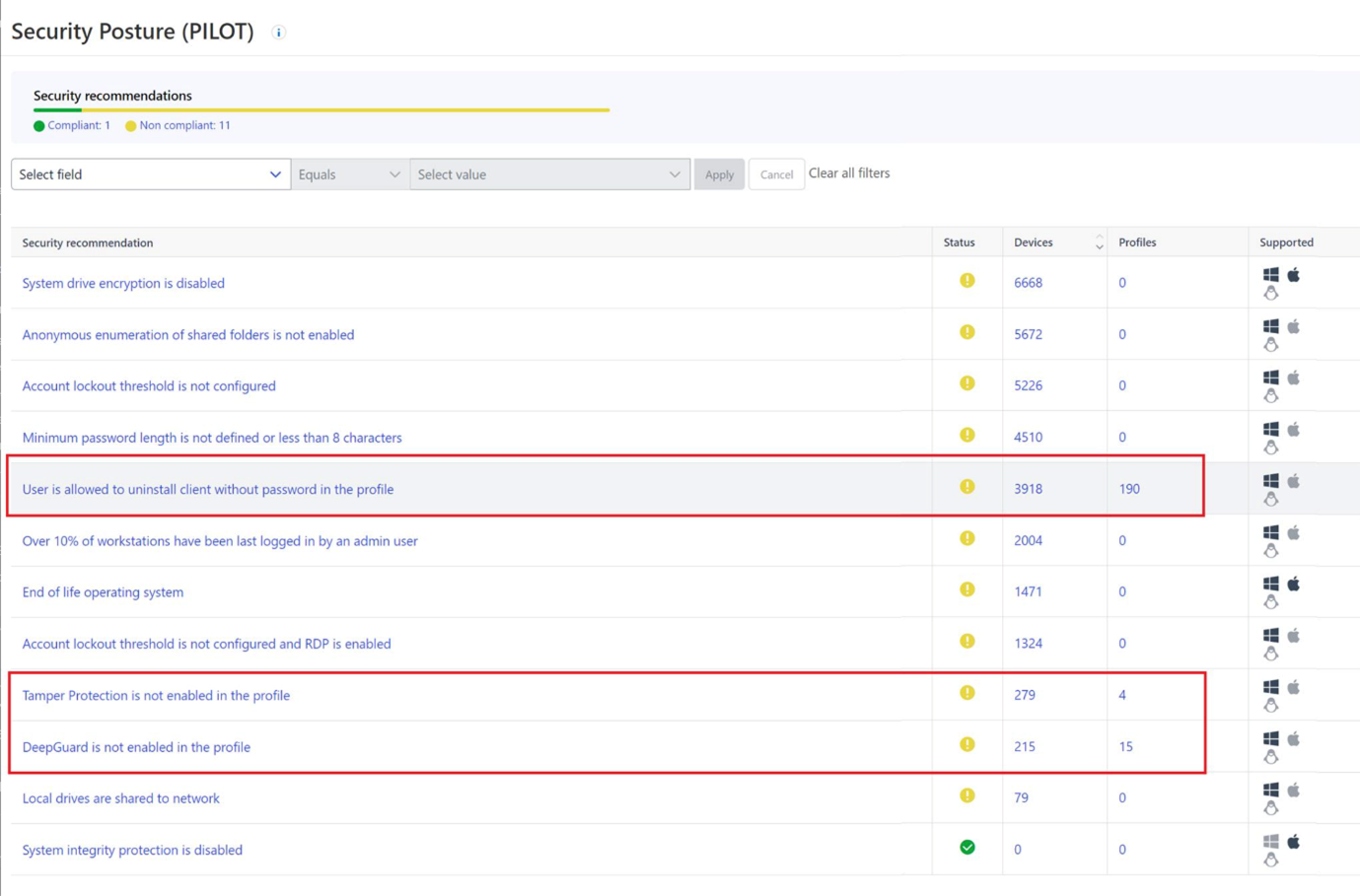
Devices assigned to the affected profile are shown under security posture
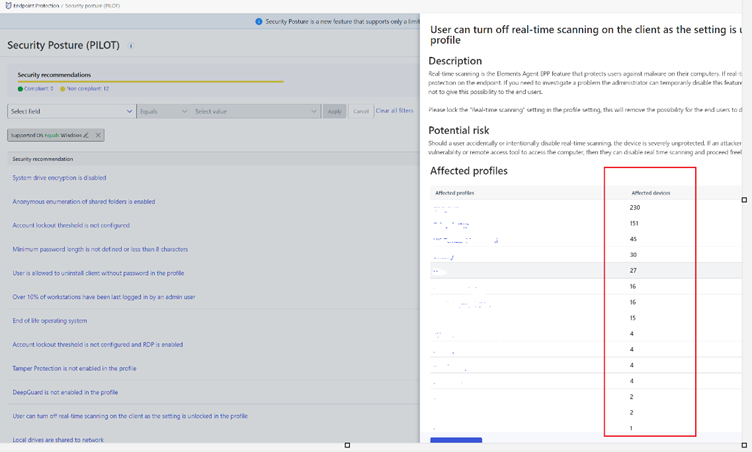
Device count and platform shown in Security Posture view
The profile based assessments flyout now shows the device count for each affected profile together with a platform type icon that links to device view.
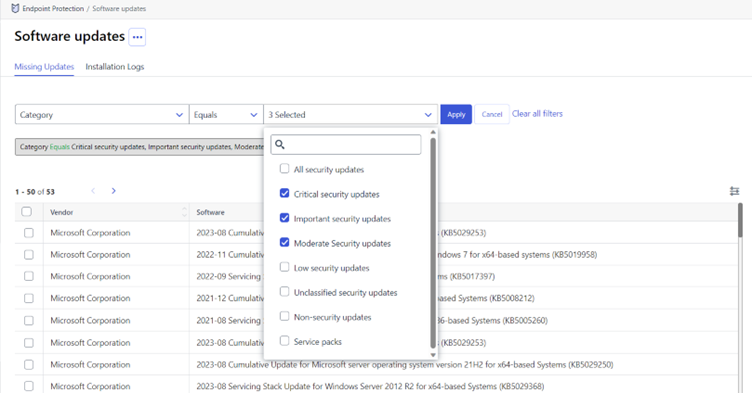
Missing updates and installation logs now can now be filtered
Security Events now includes Collaboration Protection events
Information on the number of malicious URLs and attachments discovered by Collaboration Protection was added to Security Event details of the Collaboration Protection Email Scan Event.
The “Other Elements Solution view” in Security Events now also contains all Collaboration Protection events.
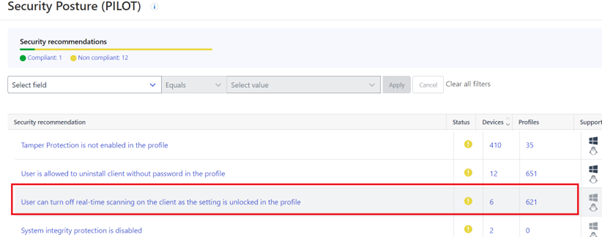
New profile based security posture
The security posture now shows if the “User can tun off real-time scanning on the client as the setting is unlocked in the profile”.
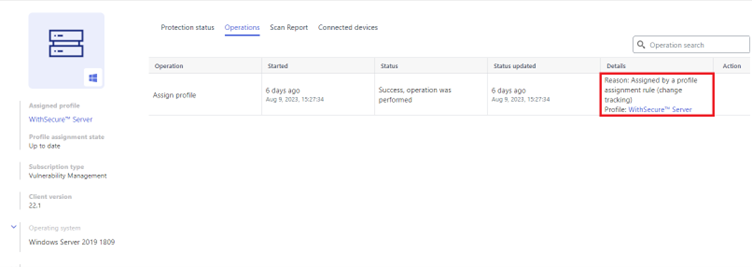
Explanation of what caused a profile assignment shown in device details
The reason for triggering a profile assignment for a device are now visible in the device details operations table.
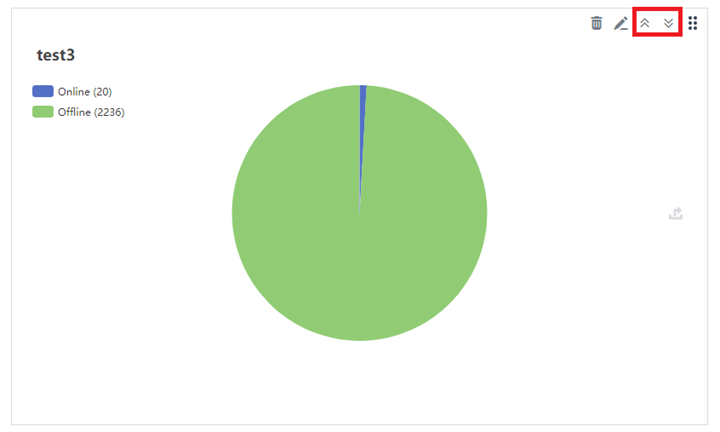
Possibility to organize graphs added to Custom Reports view
We have now added buttons for moving graphs to first and last places in the custom reports view. This can help administrators prioritize the information displayed, to suit their own needs.
Elements Endpoint Protection
Elements Agent for Windows and Server – Version 23.6
This release makes the Elements Agent version 23.6 available (internal version 23.6.394).
The endpoints automatically upgrade, without a reboot.
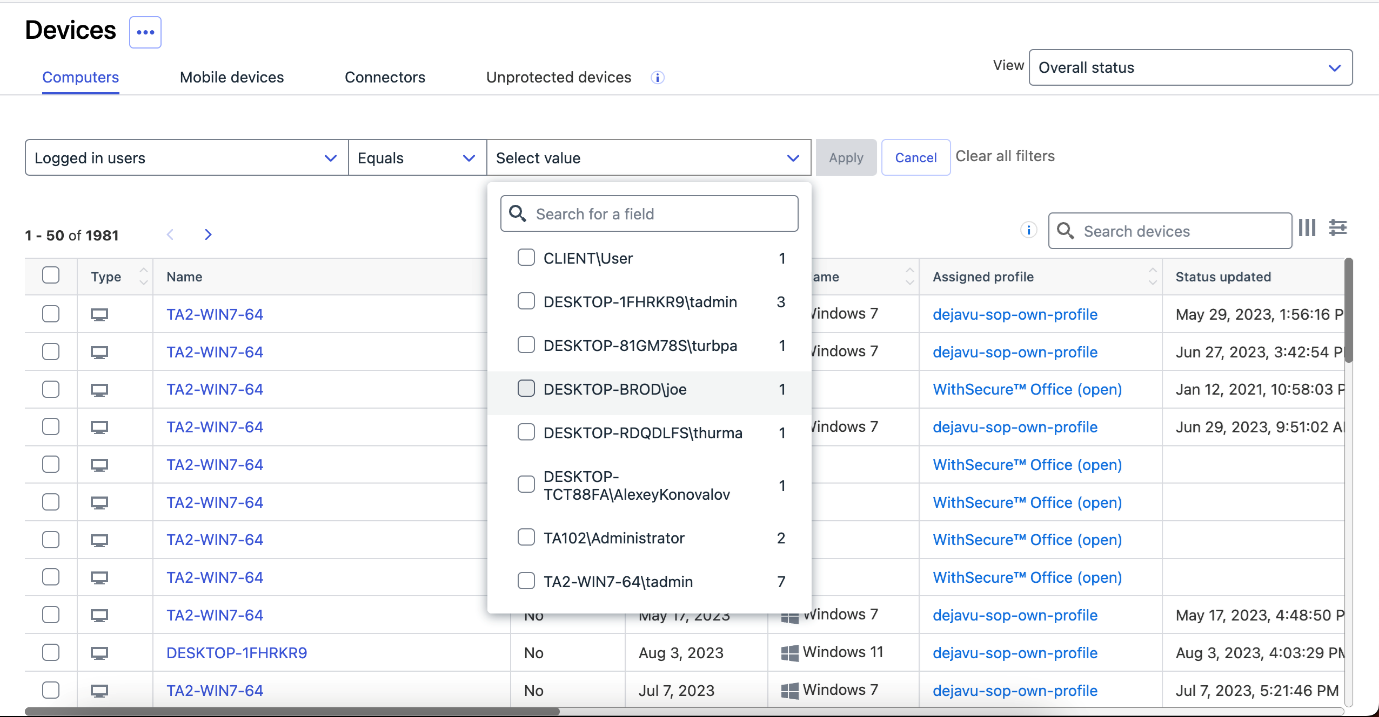
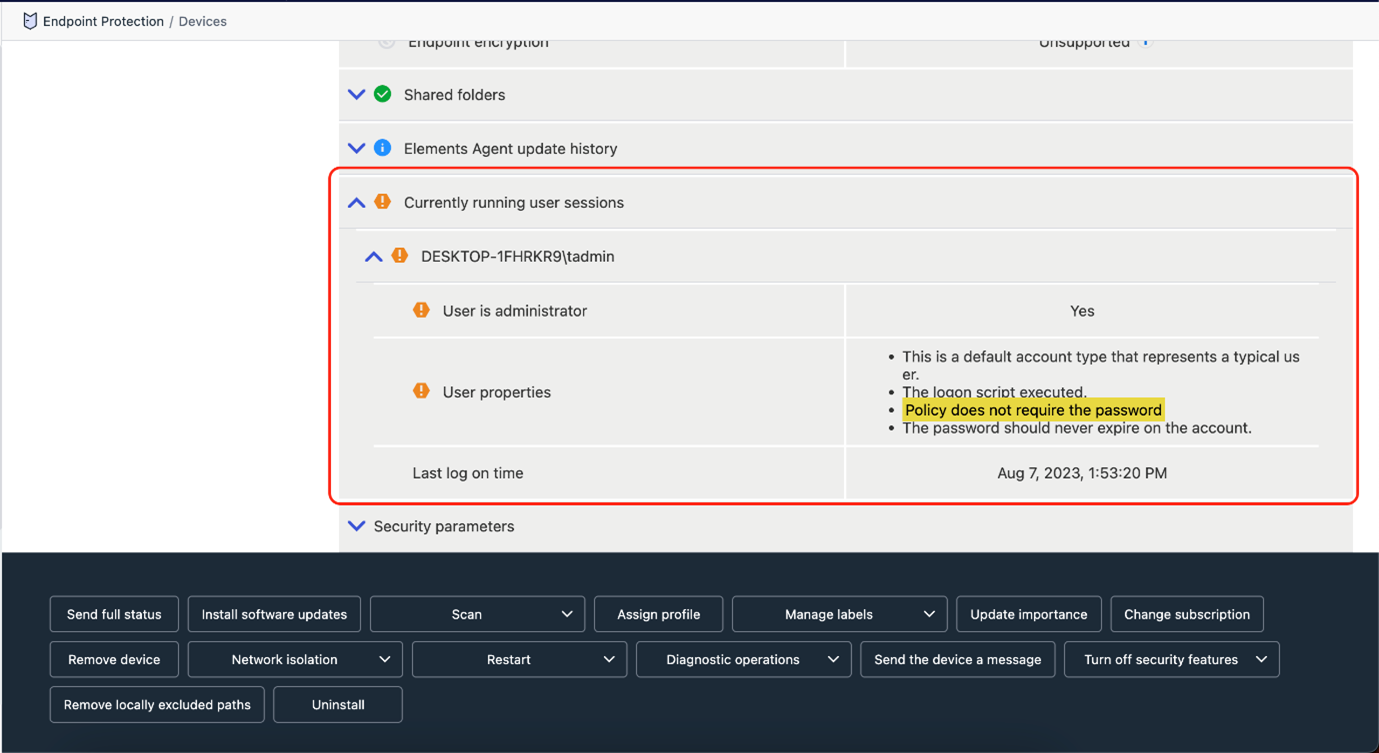
Report info about all currently logged in users
You can now search for all devices that a user has logged on to.
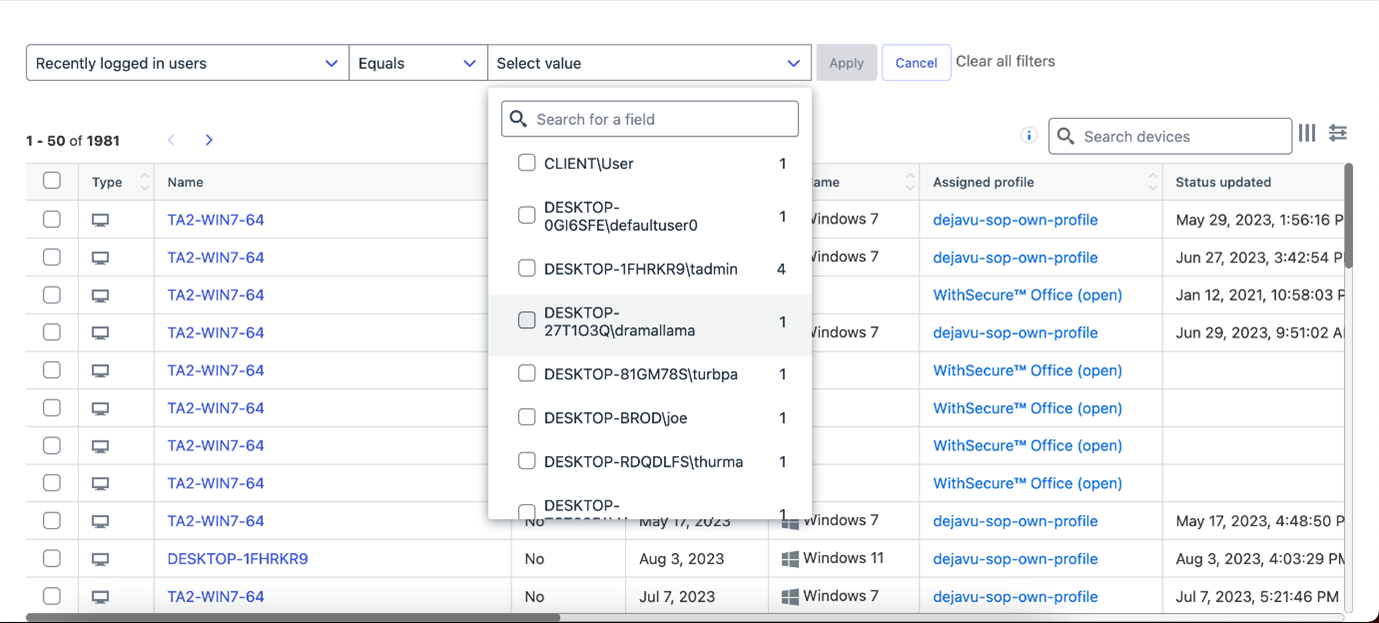
We also report all recently logged in users so you can find devices where user was logged in recently.
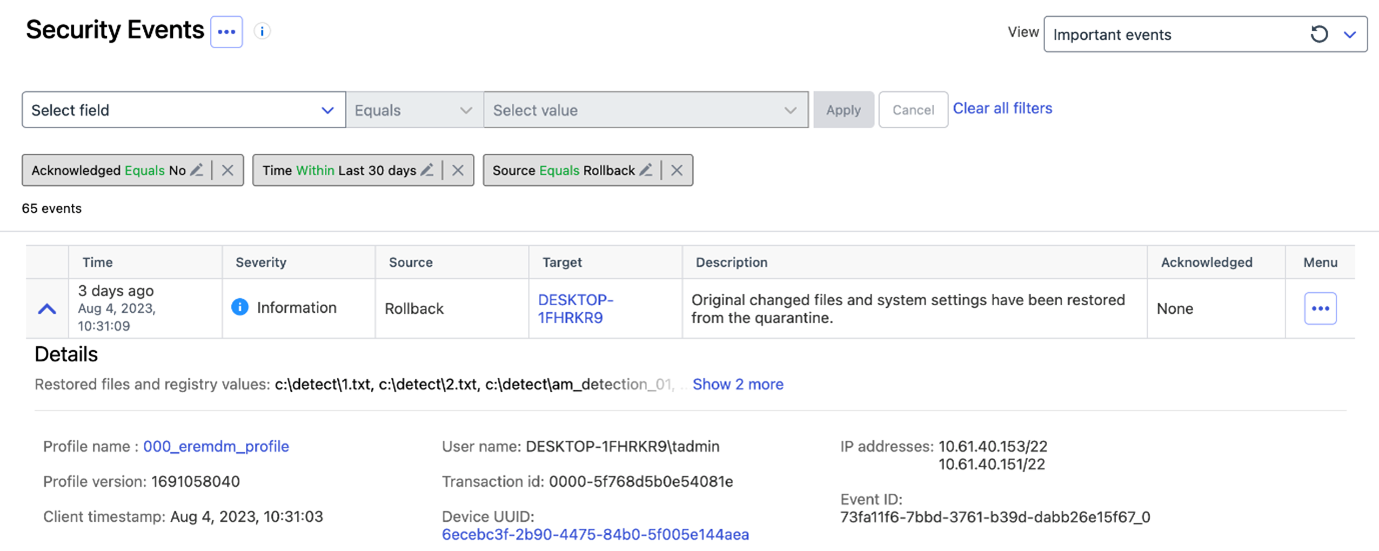
Rollback feature sends alert when user restores Rollbacked files
Elements Endpoint Detection and Response
We recently released some changes to the EDR Broad Context Detection views. You can find more information on this change in a separate article.
Elements Collaboration Protection
Automatic protection for new Teams channels
The “Automatically protect newly-added assets” setting for SharePoint tool is now covering onboarding of the newly-added Teams channels. If this setting is turned off, you need to manually select the asset that needs to be protected. Note, that after the new release the existing Teams channels would not be protected automatically, only the newly-added.
Elements Vulnerability Management
EVM System Scan
The following products were added to the detection component of the EVM Authenticated System Scan for Windows
- CVeritas InfoScale Operations Manager (VIOM)
- Cisco Duo Authentication Proxy
- IBM Aspera Cargo
- IBM Aspera Connect
- WireGuard client
- Duo Authentication
- Cisco Duo Device Health Application
- IBM SPSS Statistics
- Citrix ShareFile Storage Zones Controller
- Dell Wyse Management Suite
- Mattermost Desktop
- Acronis Cyber Backup
- Acronis Cyber Protect
- Automox Agent
- Kofax Power PDF
Elements Vulnerability Management Portal
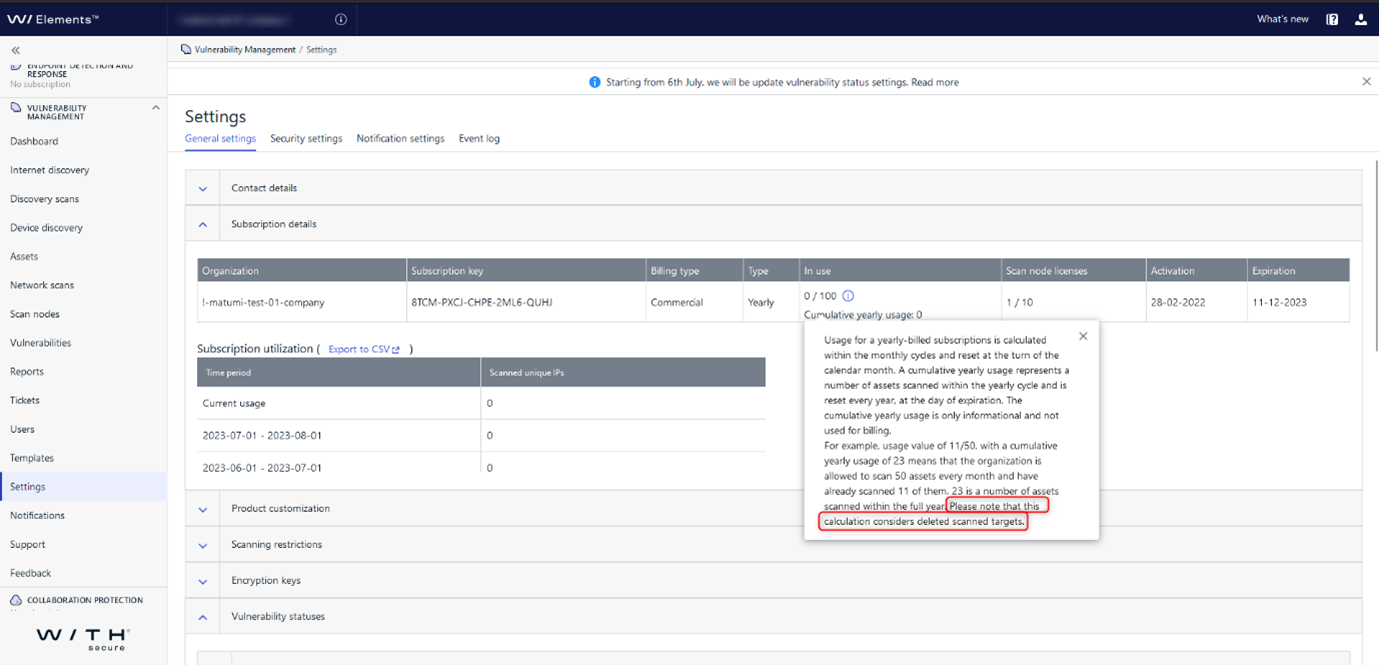
Clarified usage calculation explanation
The usage calculation was improved in the Subscription details section of the Settings page to address the inclusion of deleted scanned targets. The calculation considers deleted scanned targets to ensure accurate tracking.
Integrations
Elements API: cookbook and new filter for incidents
Elements API Cookbook
To help our customers integrate with Elements API we created the Elements API Cookbook. It contains recipes with descriptions of common use cases and example solutions implemented as Python procedures.
Changes in the Incident endpoint
New filters : risk level, updatedTimestampStart & updatedTimestampEnd to enhance incidents and detections polling as filtering by updatedTimestamp helps getting recent updates (seeCookbook – poll detections).
New fields: RiskScore (number representing the incident’s risk) and categories (for example CREDENTIAL_THEFT)
New endpoint to Add comment to an incident: This allows the addition of a ticket number or an explanation about the incident as a comment in the incident’s details view in Element Security Center.
Endpoint Protection API is deprecated
We kindly remind you that the following endpoints have reached their end of life and should not be used anymore:
– infections
– security events
– companies
– computers
The following endpoints are deprecated and soon end of life
Invitations: End of Life : 3rd of November, 2023
Subscriptions: End of Life: 11th of March, 2024
WithSecure Elements Connector
In order to provide a better and more unified set of APIs for WithSecure Elements, we are progressively deprecating the Endpoint Protection API and replacing it by Elements API. If your Elements Connector is used to stream security events from the WithSecure Elements portal to your SIEM and was configured before 23.05 release, it might be still using Endpoint Protection API.
Elements Security Center will warn you if actions are needed in the Issues list:
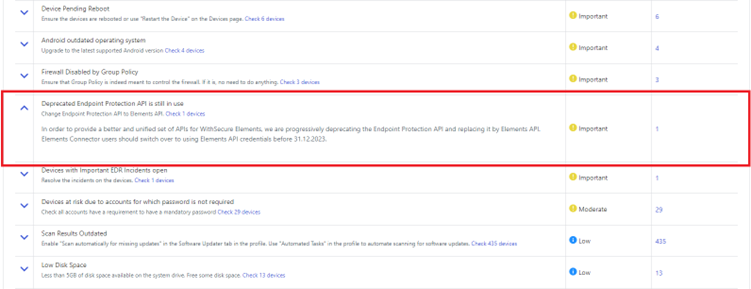
Corresponding warning is also shown in the Connector device view:
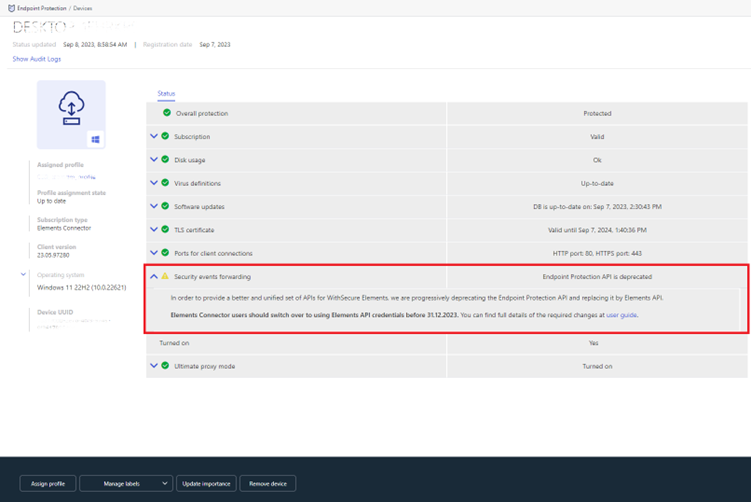
In order to preserve event forwarding functionality please switch over to using Elements API credentials before 31.12.2023. You can find full details of the required changes in the userguide.
Other items of interest
Monthly Threat Highlights Report: August 2023
New vulnerabilities in Ivanti products
Several vulnerabilities in Ivanti Endpoint Manager Mobile (EPMM), formerly known as MobileIron, that have been identified and exploited by a highly sophisticated threat actor. These vulnerabilities include CVE-2023-35078 and CVE-2023-35081, which allow for arbitrary unauthenticated file writes and can be used to upload and execute files and deploy web shells.
Exploitation of WinRAR vulnerabilities
One of two vulnerabilities in WinRAR is already being actively exploited, and the other is likely to be weaponized due to the prevalence of WinRAR.
Affiliate campaign installing a malicious “Digital Pulse” proxy
Affiliate campaign that installs a malicious “Digital Pulse” proxy, which can be used to intercept and modify web traffic.
Changing hacktivist landscape
Assessment of the changing hacktivist landscape, including the emergence of new groups and the tactics they are using.
Ransomware trends and statistics
Ransomware landscape, including statistics from known attacks, and highlights newcomers “Cloak”, “Metaencryptor”, and “Ransomed”.
Threat data highlights
Overview of vulnerabilities that have been heavily discussed on social media, as well as VirusTotal trends and other threat data highlights.
In case you missed it
Share your ideas with us
Our purpose is to co-secure the world with you – now as WithSecure™. To co-create the best possible cyber security products and services, we warmly recommend you share your ideas via our Ideas Portal, now accessible directly from WithSecure™ Elements Security Center.

Further information
Changelogs and Release Notes for all parts of WithSecure™ Elements can be found at the Help Center
-
What’s New in Elements: July 2023
Read more
Elements Security Center
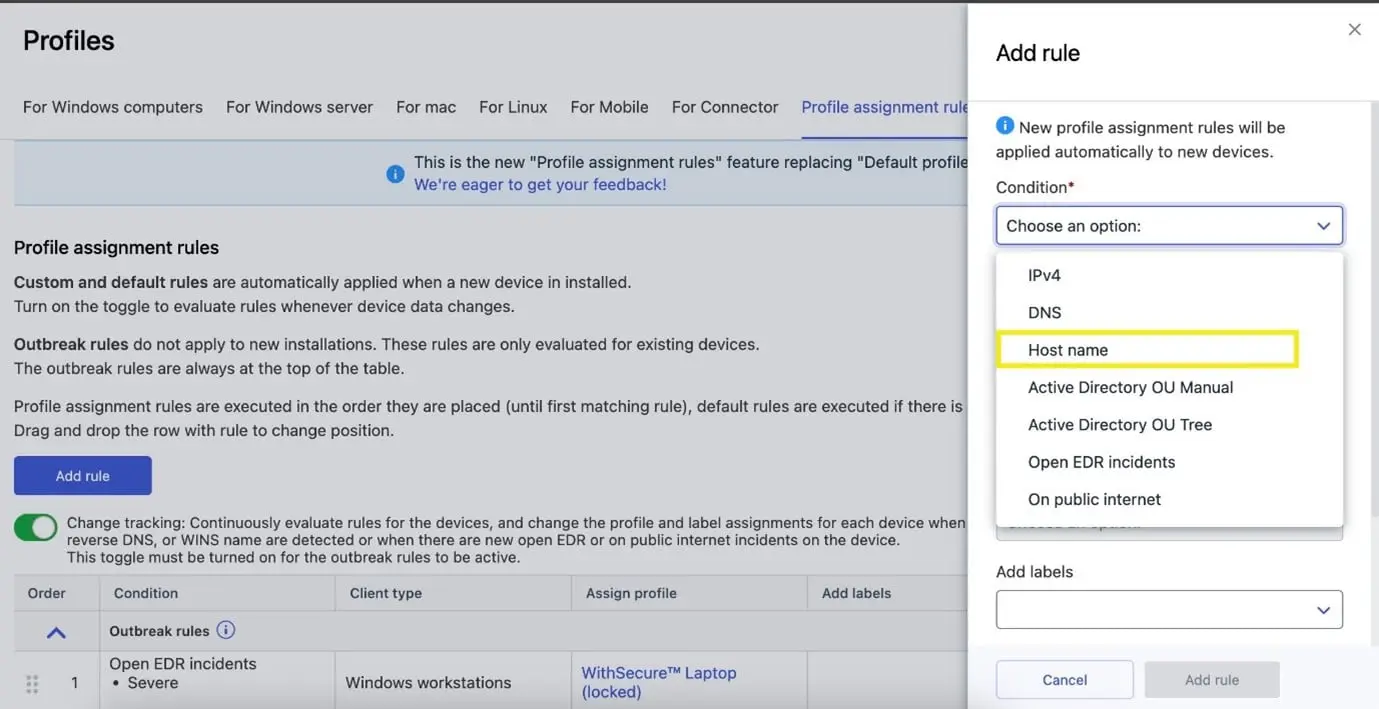
“WINS” has been renamed to “Host name” in profile assignment rules
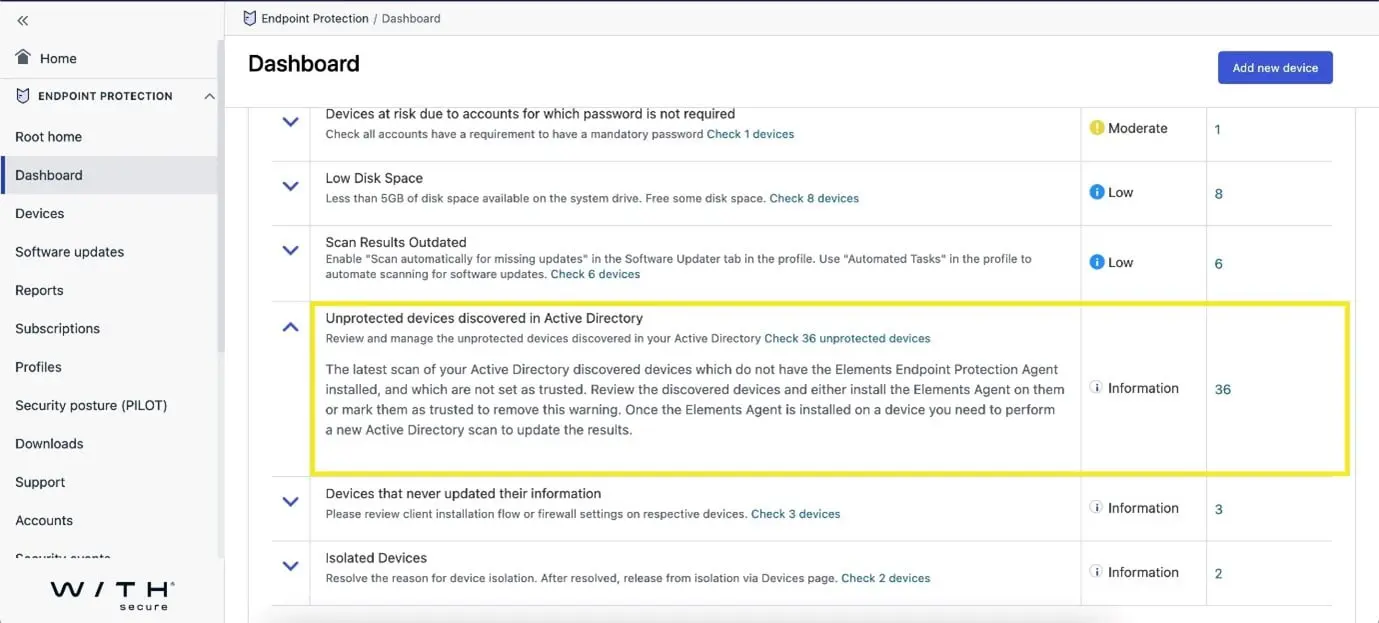
Dashboard- Issue list now shows the number of untrusted devices for a company
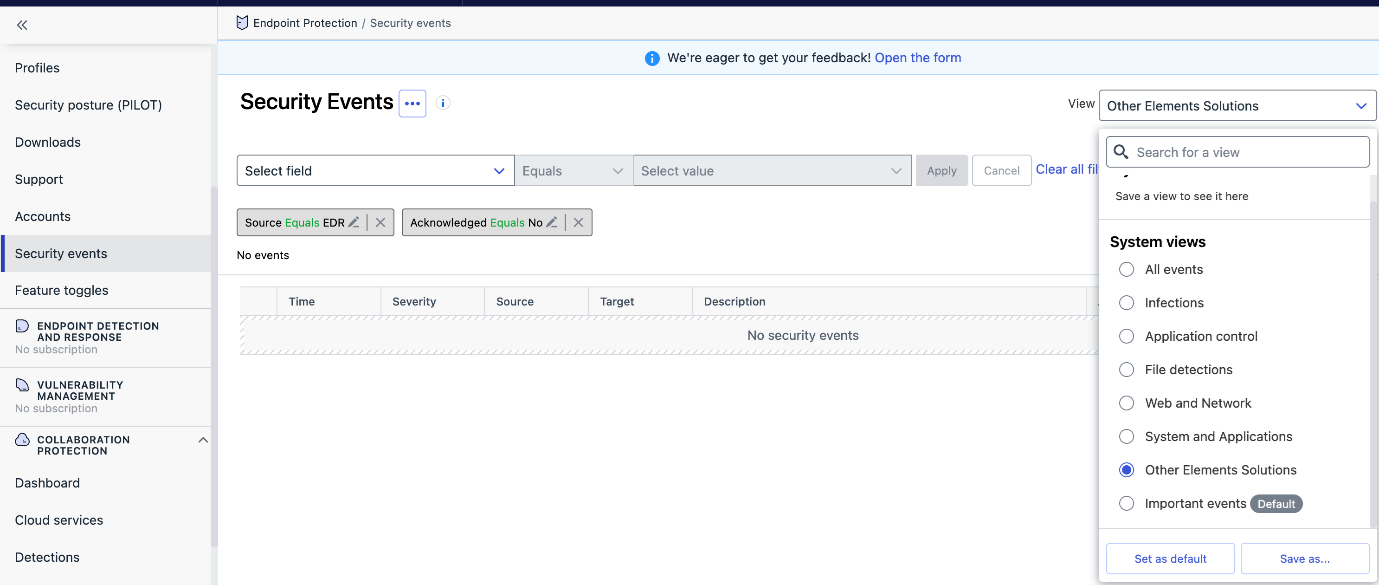
New System Views have been added to Security Events
- File detections
- Web and Network
- System and Applications
- Other Elements Solutions
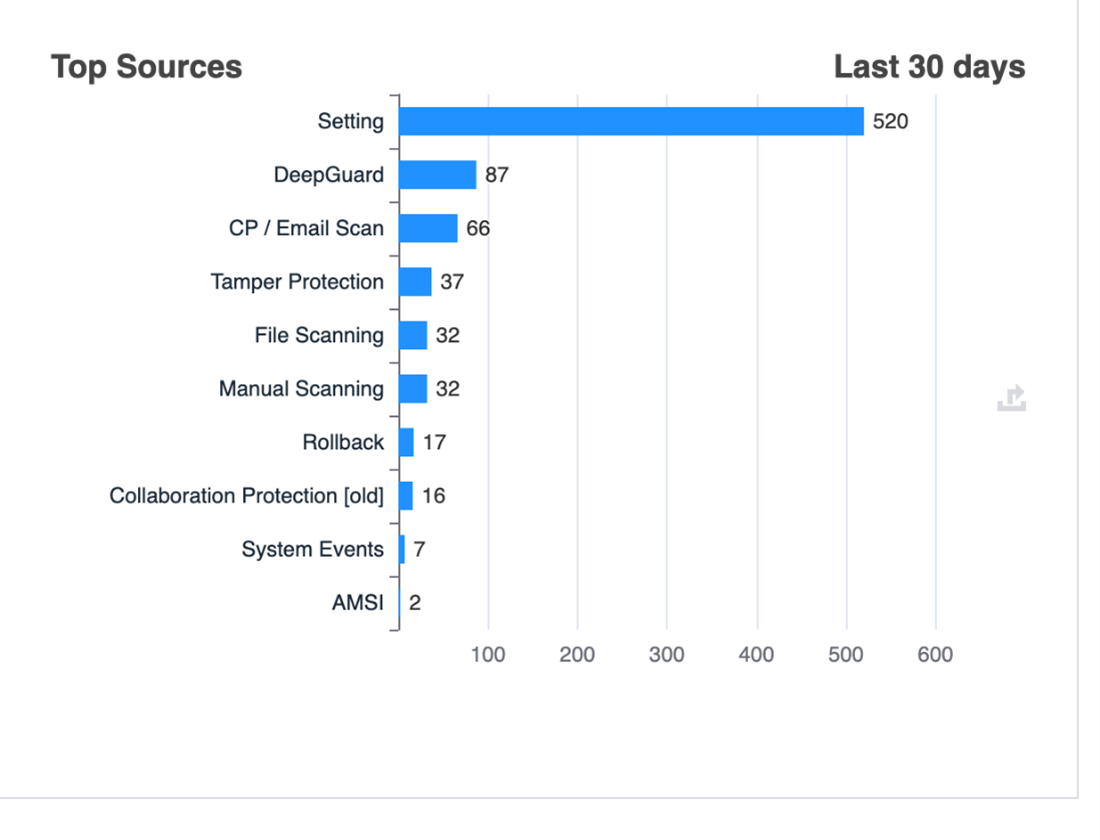
New charts have been added under Security Events tab
We have added some new charts in the Reports section to show the number of events grouped by their source.
In addition, there are charts for:
- Web Content Control – Top Blocked Categories
- Data Guard – Top Blocked Applications
- Device Control – Top Rules Blocking Devices
- Tamper Protection – Top Alert Types
- System Events – Top Event Types
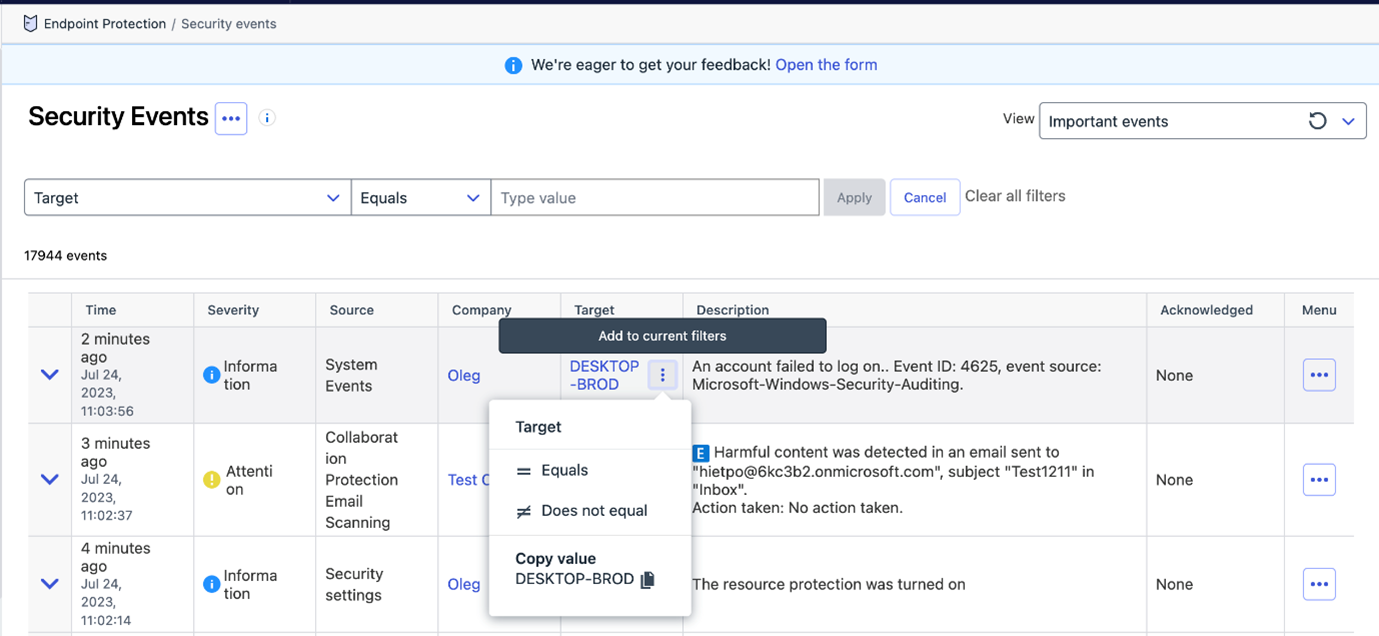
Security Events can be filtered by the Target column (both in Filter Panel and as a Quick Filter)
- filter is effective for events from the 1st of June 2023 onwards
- for older events “Device UUID” filter should be used as a fallback option.
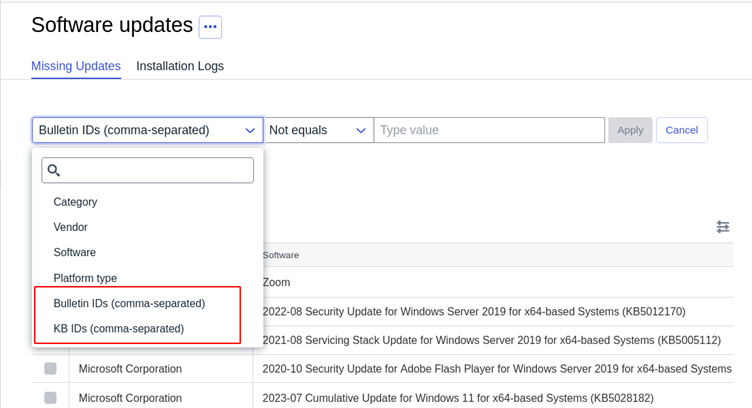
Missing updates are now filterable by Bulletin id and KB id
Security Events acknowledgement Operations are now audited
These acknowledgements are visible under Reports → Audit Log for analysis.
Elements Endpoint Protection
Elements Mobile Protection: iOS version 23.1.10291 released
An update to the WithSecure Elements Mobile Protection app for iOS (23.1.10291) has been released.
This release brings:
- Improved and more efficient error handling during the activation phase
- The app now supports:
- quick actions to turn on/off Network Protection
- per-app VPN via shortcuts automation
The app together with the WithSecure Elements Endpoint Protection portal now support:
- “Request diagnostic file” remote operations
- the following security parameters:
- Changes in notification permissions
- Jailbroken device detection
- Devices connected to an open WiFi
- The app running on a simulator
- The app being a clone
- Checking for person-in-the-middle vulnerabilities
- Outdated operating system
- The network uses proxy configuration
- Checking for available disk space
Elements Mobile Protection: Android version 23.1.0022525
An update to the WithSecure Elements Mobile Protection app for Android (23.1.0022525) has been released.
This release includes:
- The app is now more reliable when running in the background
The app together with the WithSecure Elements Endpoint Protection portal now show
- if a device is enrolled in an MDM
- The app version format is now compliant with the other WithSecure products
- The assigned profile’s name and version are now visible in the user interface under the About section
- The app now request the user new needed permissions after an update
The app and the WithSecure Elements Endpoint Protection portal now support the following remote operations:
- Request diagnostic file
- Send the device a message
- Start malware scan
- Send full status
And the following security parameters:
- Changes in notification permission
- Changes in location permission
- Changes in file access permission
Additionally the following security events:
- Infection found
Elements Endpoint Detection and Response
Although we have not yet released this change to production, we have announced an upcoming change to the EDR automated actions. You can find more details of this change at a dedicated community article
Elements Collaboration Protection
The onboarding logic for the newly-added mailboxes was revisited to meet users expectations and needs.
Previously, when the “Automatically protect newly-added mailboxes” option was turned on, newly-added mailboxes were automatically protected. If there were not enough licenses, the protection was removed from older mailboxes (following an alphabetical order).
In this release, the newly-added mailboxes are automatically protected only if there are enough available licenses.
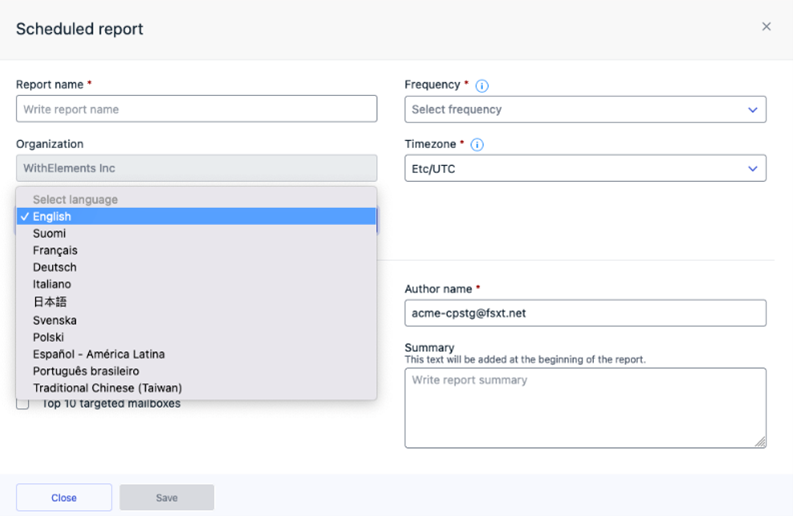
In addition, reports are now available in multiple languages:
English, Finnish, French, German, Italian, Japanese, Swedish, Polish, Spanish, Portuguese and Traditional Chinese (Taiwan).
Administrators could generated report in preferred language, but also edit language settings for already scheduled reports. The language defined in user settings is set as a default for report localization. This feature ensures the convenient report format aligned with the language preferences of target audience.
Elements Vulnerability Management
Elements Vulnerability Management Portal
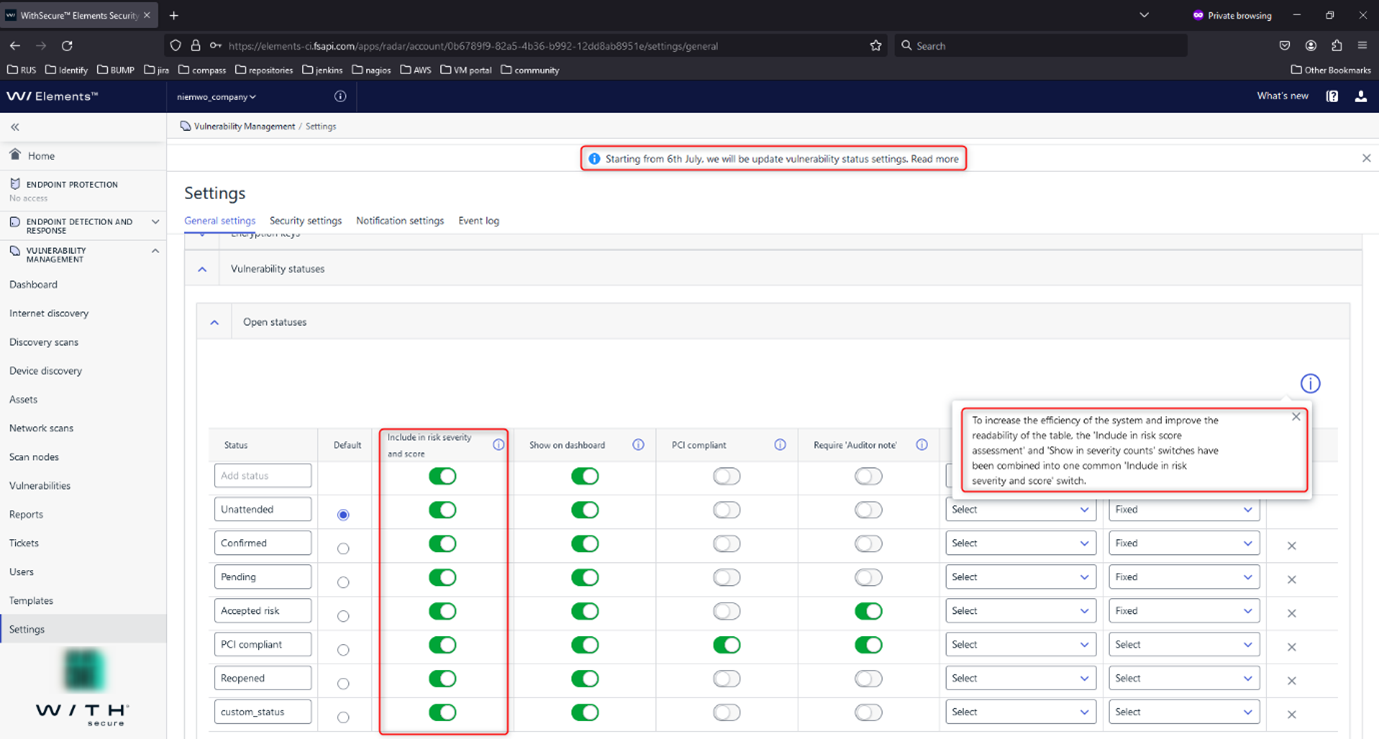
To enhance system efficiency and table readability, we have merged the ‘Include in risk score assessment’ and ‘Show in severity counts’ switches into a single, unified switch called ‘Include in risk severity and score’.
When this switch is disabled for a specific vulnerability status:
- The vulnerabilities with that status will not be considered when evaluating asset risks.
- The vulnerabilities with that status will not be counted in the overall vulnerability counts.
This update aims to streamline the configuration process and provide users with more clarity and control over the risk and severity assessment of vulnerabilities.
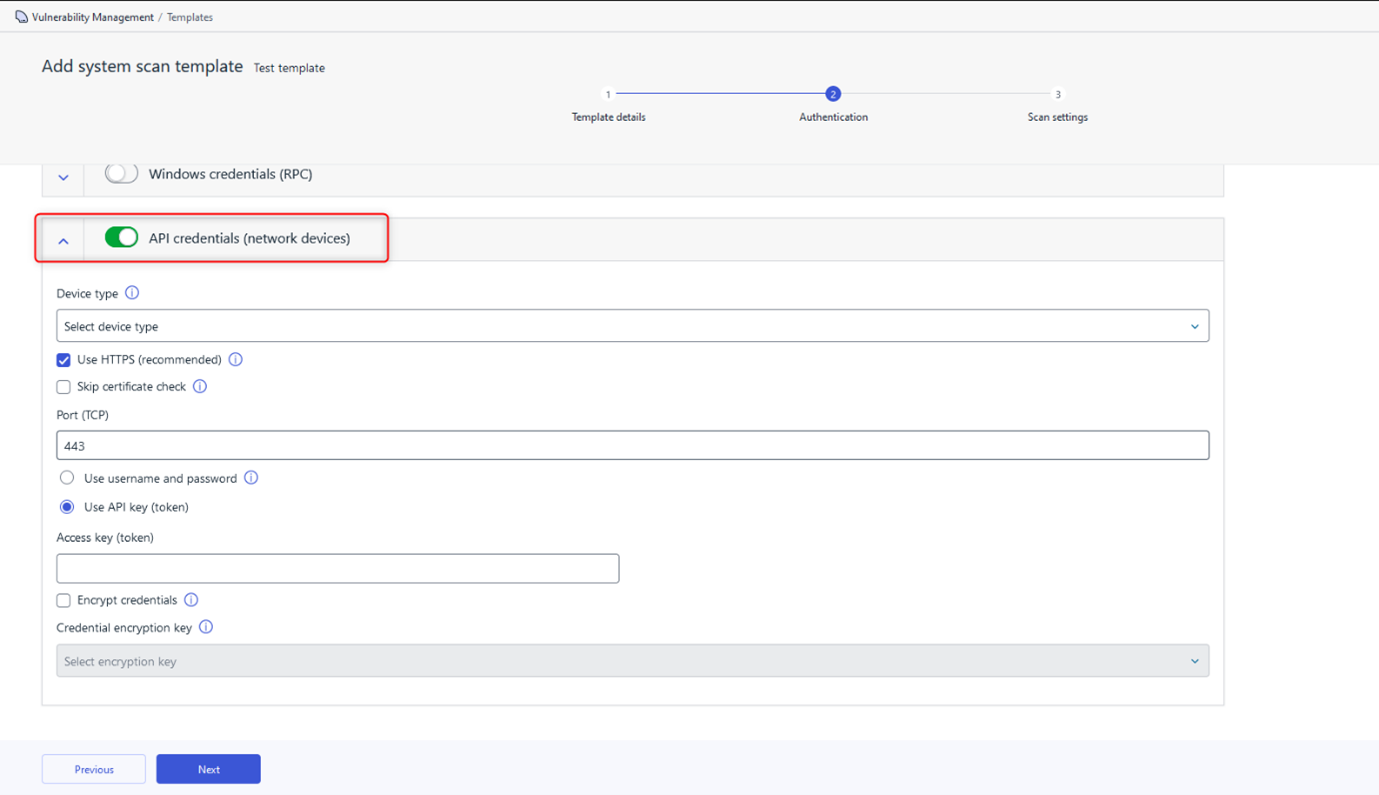
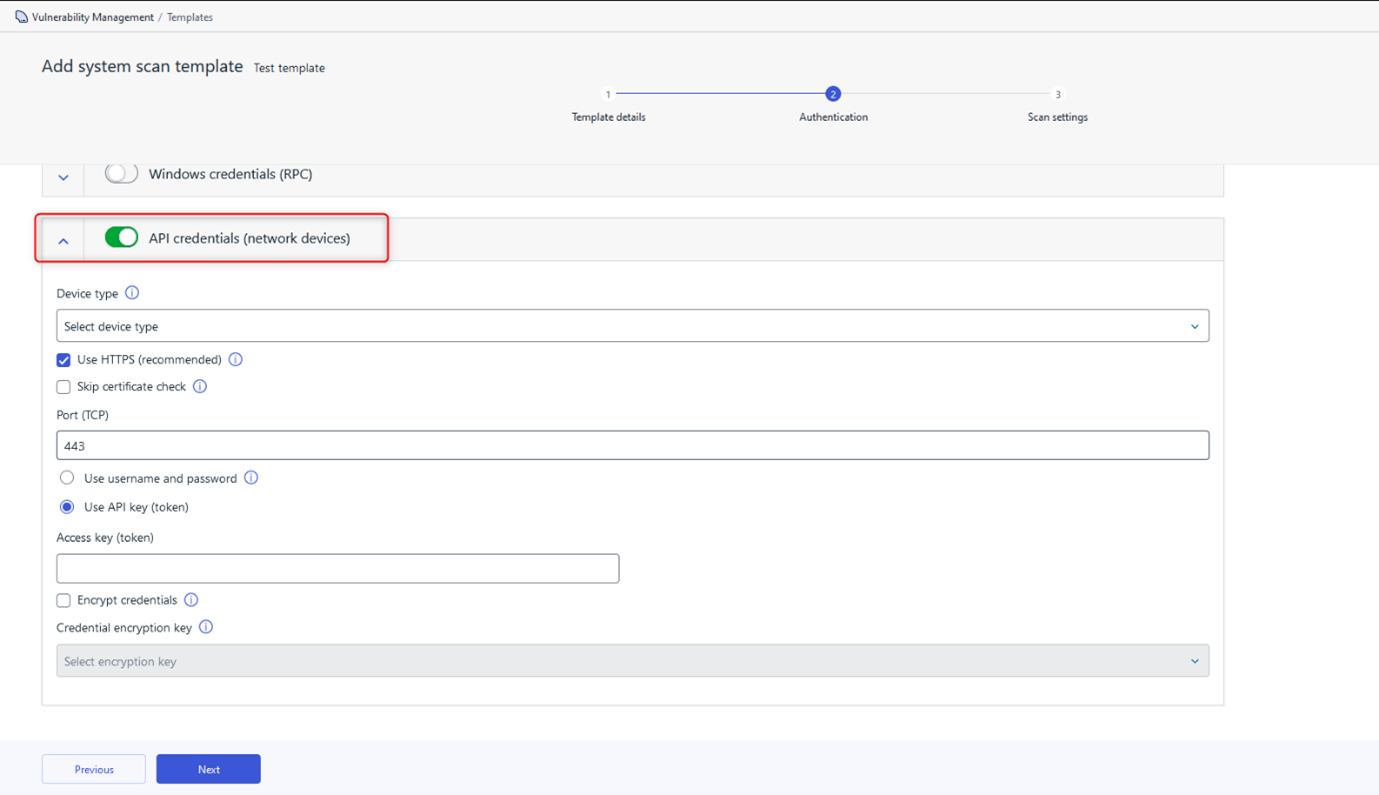
We have also added portal support for authenticated network device scans using API key credentials. Users can now authenticate scans by providing a secret API token to the remote device.
Elements Vulnerability Management System Scan
The following capabilities have been added to authenticated scanning in Windows
- Detect vulnerabilities in Progress MOVEit Transfer
- Detect vulnerabilities in GLPI Agent
- Detect vulnerabilities in Dell Display Manager
- Detect vulnerabilities in Veeam Agent
- Detect vulnerabilities in Bitwarden Desktop
- Detect vulnerabilities in Audacity
- Detect vulnerabilities in Citrix Virtual Apps and Desktops
- Detect vulnerabilities in Nessus Network Monitor
- Detect vulnerabilities in HPE Integrated Smart Update Tools
- Detect vulnerabilities in Atera Agent
- Detect vulnerabilities in NinjaRMM Agent
- Detect vulnerabilities in QNAP QVPN Device Client
Additionally:
- Report vulnerabilities detected for MongoDB software also in authenticated Windows and endpoint agent scan.
Elements Vulnerability Management Linux Scan Node Agent
A new version of the Linux Scan Node Agent has been released, which brings the following changes:
Base64 decoding for credentials used in Api mode scan
Portal support for authenticated network device scan via API
Integrations
Elements API:
Managing status of EDR incident
A new endpoint for managing the status of EDR incidents is now available. It allows an MSSP to update the status of an EDR incident from their SOC platform (eg SOAR). This is important not only to keep the status up-to-date in the Elements Security Center, but also to automatically whitelist certain incidents when closing as false-positive.
New filters for devices and incidents
Some new filters have been added for Incidents and Devices:
- Incidents: new filter riskLevel has been introduced to the incidents listing endpoint. It may be used to list incidents with higher risk levels.
- Devices: new filter subscriptionKey has been introduced to the devices listing endpoint. It allows the possibility to list only devices from specified subscription key.
Other items of interest
Monthly Threat Highlights Report: June 2023
The mass exploitation of a vulnerability in MOVEit by Clop
The Clop ransomware group has exploited a vulnerability in MOVEit, a secure file transfer software, to gain access to sensitive data belonging to multiple organizations. The attack resulted in the leaking of data belonging to 78 organizations.
The use of “Bring Your Own Vulnerable Driver” (BYOVD) techniques in terminating AV/EDR
We look into a technique used by threat actors to bypass antivirus (AV) and endpoint detection and response (EDR) systems by exploiting vulnerabilities in third-party drivers. This technique involves the attacker bringing their own vulnerable driver to the system, which can then be exploited to gain access to sensitive data.
Activity relating to the Chinese APT group Volt Typhoon
Chinese Advanced Persistent Threat (APT) group known as Volt Typhoon is known to favor exploiting vulnerabilities in Fortinet products to gain initial access to targeted systems.
The poisoning of mods for popular video game Minecraft
Threat actors have created malicious mods for the popular video game Minecraft. These mods were designed to steal users’ login credentials and spread malware.
Hacktivism landscape updates
Latest developments in the world of hacktivism, including new groups, tactics, and targets. Hacktivism is a form of cyber activism where individuals or groups use hacking techniques to promote a political or social agenda.
Ransomware trends
We look into the identification of three new ransomware groups and updates on the scale of attacks and statistics relating to the most active groups throughout June.
In case you missed it
Share your ideas with us
Our purpose is to co-secure the world with you – now as WithSecure™. To co-create the best possible cyber security products and services, we warmly recommend you share your ideas via our Ideas Portal, now accessible directly from WithSecure™ Elements Security Center.

Further information
Changelogs and Release Notes for all parts of WithSecure™ Elements can be found at the Help Center
-
What’s New in Elements: June 2023
Read more
Editor’s Highlights
Elements Security Center – Scope Management
We have made some changes in the way the organizational scope is shown in the Elements Security Center, which make it more consistent across all parts of the Elements portfolio. You can find more details below.
Elements Security Center
New Features
Chart export
All charts in the reports page can now be exported as SVG files
Device history
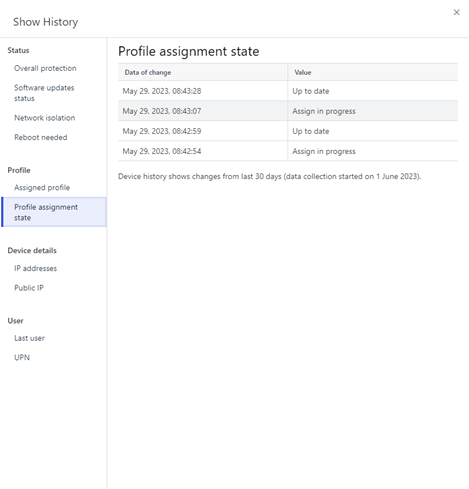
Added a history log of device data changes to device details.
Currently supported fields are: Overall protection, Software updates status, Network isolation, Reboot needed, Assigned profile, Profile assignment state, IP addresses, Public IP, Last user and UPN.
Changes to saved views
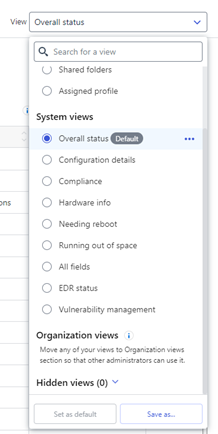
Custom views can now be shared by using the “Move to organization views” button. Organization views are visible to all admins at the same organization level.
It is now possible to set a view as default. Default view will be applied by default the next time you log into portal.
Organization and system views can now be hidden.
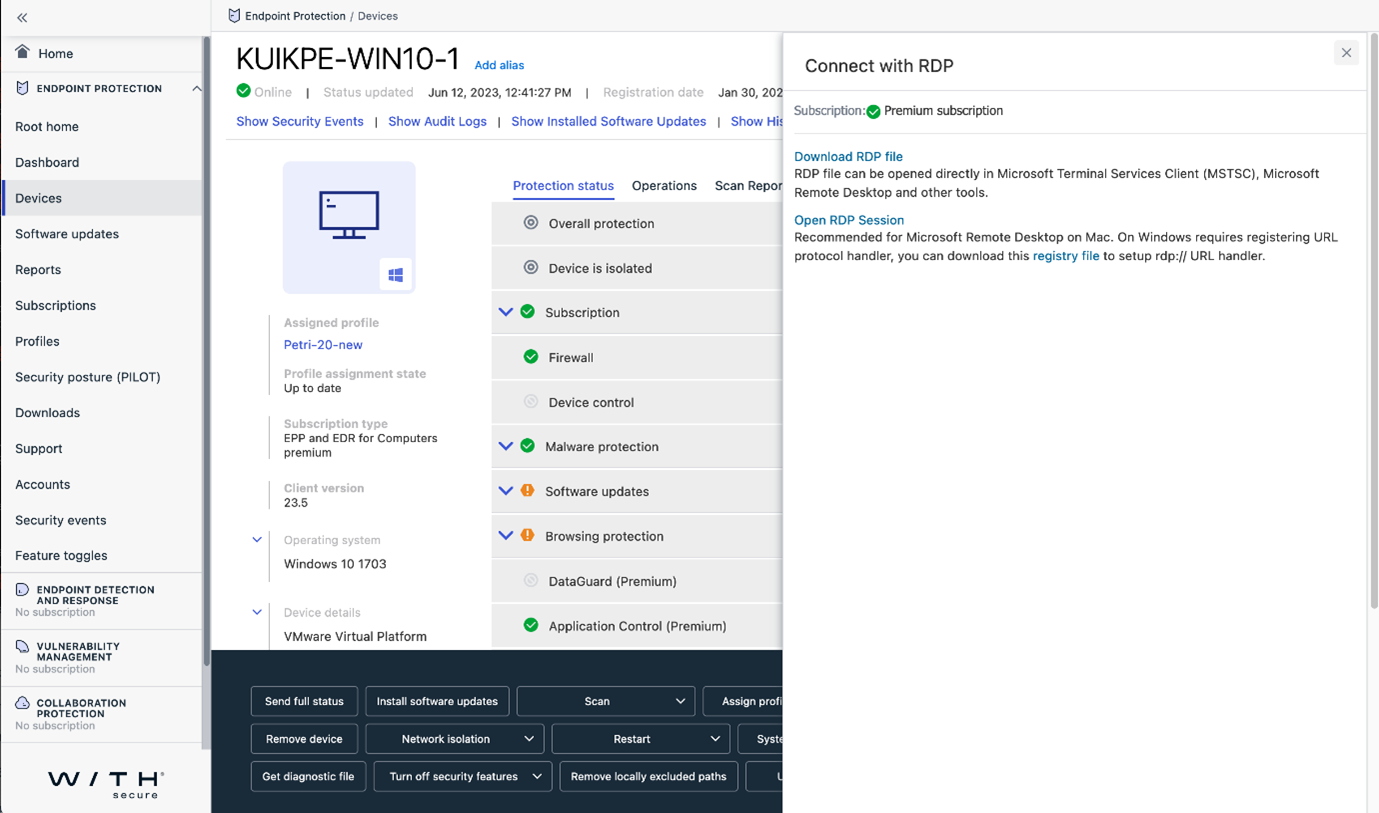
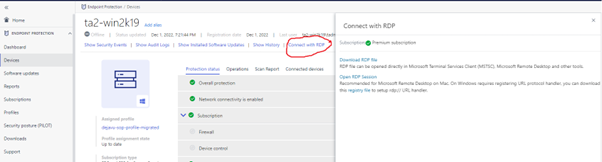
Device details now has an option to Connect with RDP
It is now possible to connect with RDP to computers directly from Elements portal.
Please Note: This features requires a premium subscription.
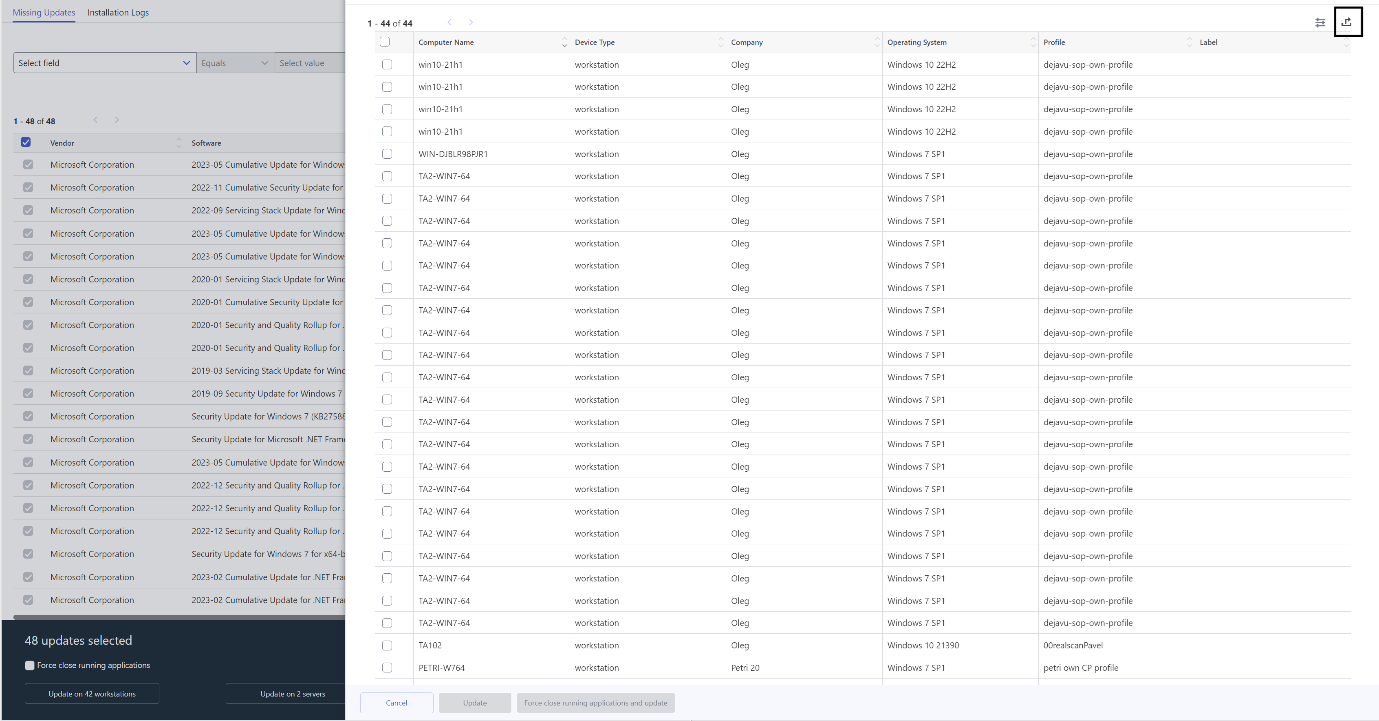
Export affected devices
It is now possible to export the list of affected devices from flyout for selected missing updates.
Software updates installation log changes
The log now shows separate column for KB ID

Elements scope management.
Elements scope management
Elements Security Center scope management has been introduced. This changes the way how WithSecure Elements Security Center is used to manage multiple Companies under Solution Provider (SOP) or Service Partner (SEP) organisation.
All companies under same organisation hierarchy
Elements Security Center has one organisation hierarchy. This is tree like three level hierarchy to help to manage large amount of companies. With Elements scope management this three level hierarchy is shared and synchronised across all Elements security capabilities.
Elements scope selector user interface component visualises organisation hierarchy and highlights what types of subscriptions each company has (see picture below).
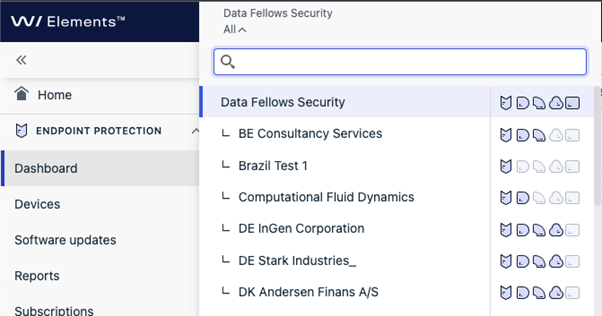
Here “Data Fellows Security” is top level Solution Provider (SOP) organisation having multiple companies under it. Elements scope selector shows indicator of subscription type within company and shows union of available subscription types for Solution Provider and Service Partner organisations.
In the example “BE Consultancy Services” company has Endpoint Protection, Endpoint Detection and Response, and Vulnerability management subscriptions (highlighted icons). “BE Consultancy Services” does not have Collaboration Protection or Cloud Security Posture Management subscriptions (dimmed icons).
Synchronised scope selection
With these improvements scope selection within Elements is fully synchronised between different parts of the Elements Security Center. This means that when you change organisation while being in Endpoint Protection dashboard and then move to any other part of Elements Security Center e.g. to Collaboration Protection dashboard your organisation selection is always preserved until you explicitly pick another organisation scope.
Menu synchronisation
Navigation menu of Elements Security Center adapts to features that are available for selected organisation and current user.
Sample below shows navigation menu behaviour when selected organisation has limited set of subscriptions available.
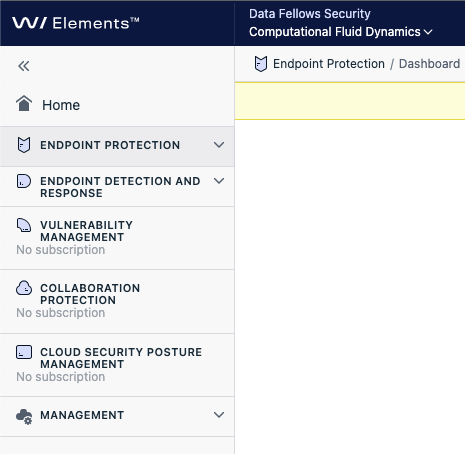
The company called “Computational Fluid Dynamics” only has Endpoint Protection and Endpoint Detection and Response subscriptions so other Elements security capabilities are not available due to missing subscription. Common management functionalities are available for all organisations.
In cases where organisation has subscription but users access to given security capability is limited this is indicated in Elements menu with “No access”. In sample below user does not have access role to Cloud Security Posture Management while organisation does have subscription for it.
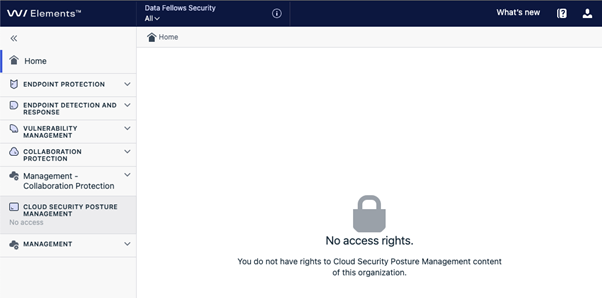
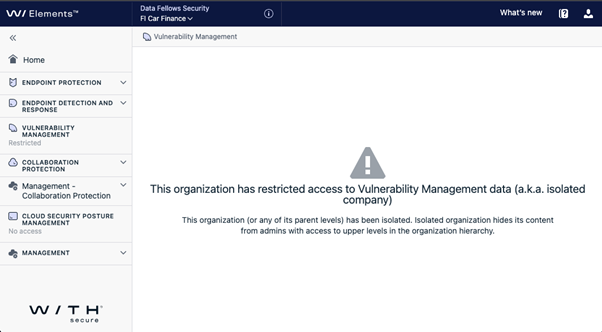
It is also possible that company organisation has restricted Solution Provider and Service Partner access to their company data. These cases are indicated with “Restricted” label in corresponding menu item (see sample below).
Elements Endpoint Protection
Elements Agent for Windows and Server new version 23.5
A new version of the endpoint client for Windows is available. This release makes the Elements Agent version 23.5 available (internal version 23.5.378).
The endpoints automatically upgrade, without a reboot.
WithSecure Rollback
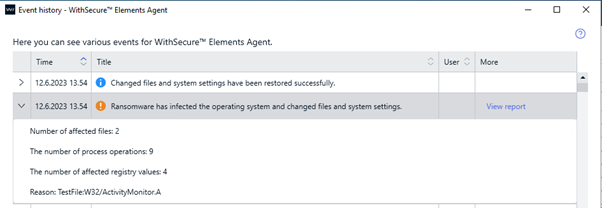
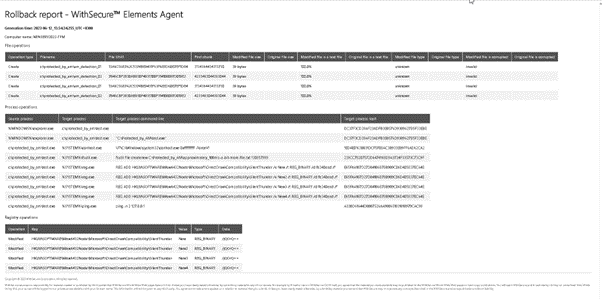
We have added a new feature to the client, which can rollback unwanted changes in the unlikely event that some malware has been allowed to run.
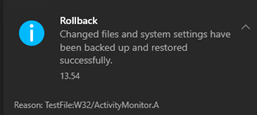
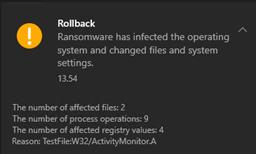
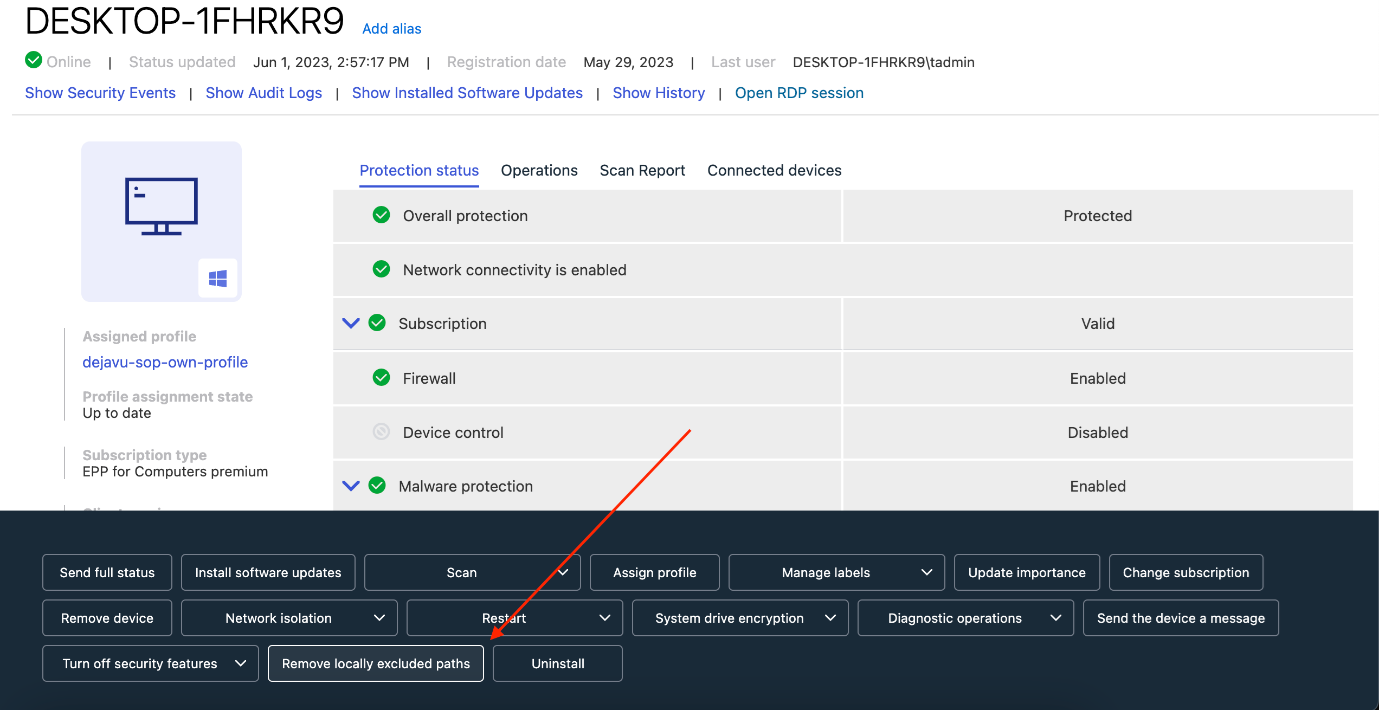
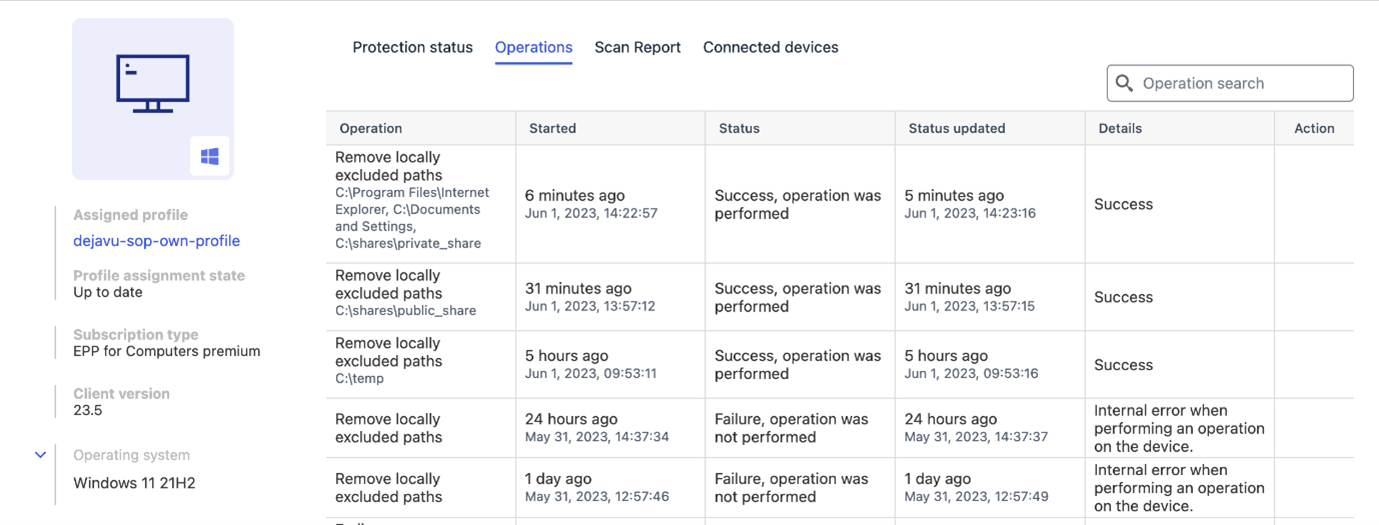
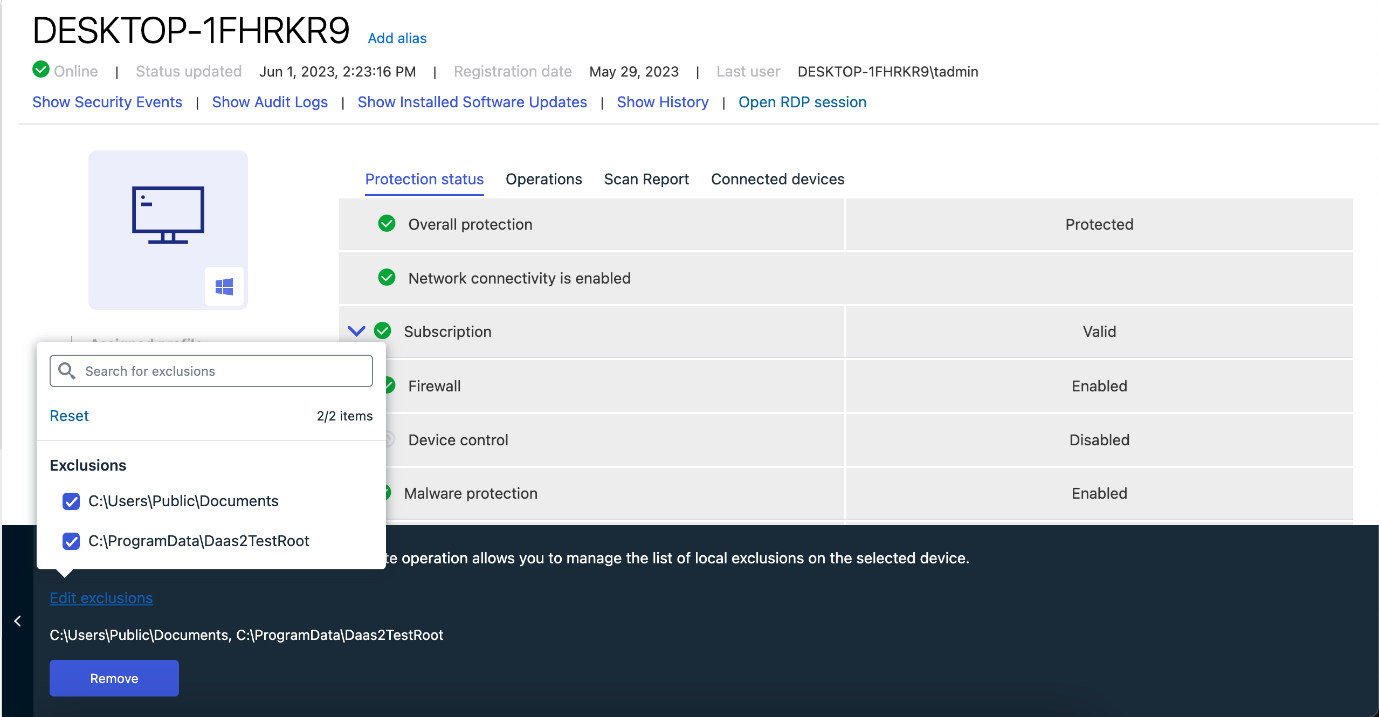
Remote change of local exclusion lists
It is now possible to remotely change local exclusion lists, directly from the Elements Security Center.
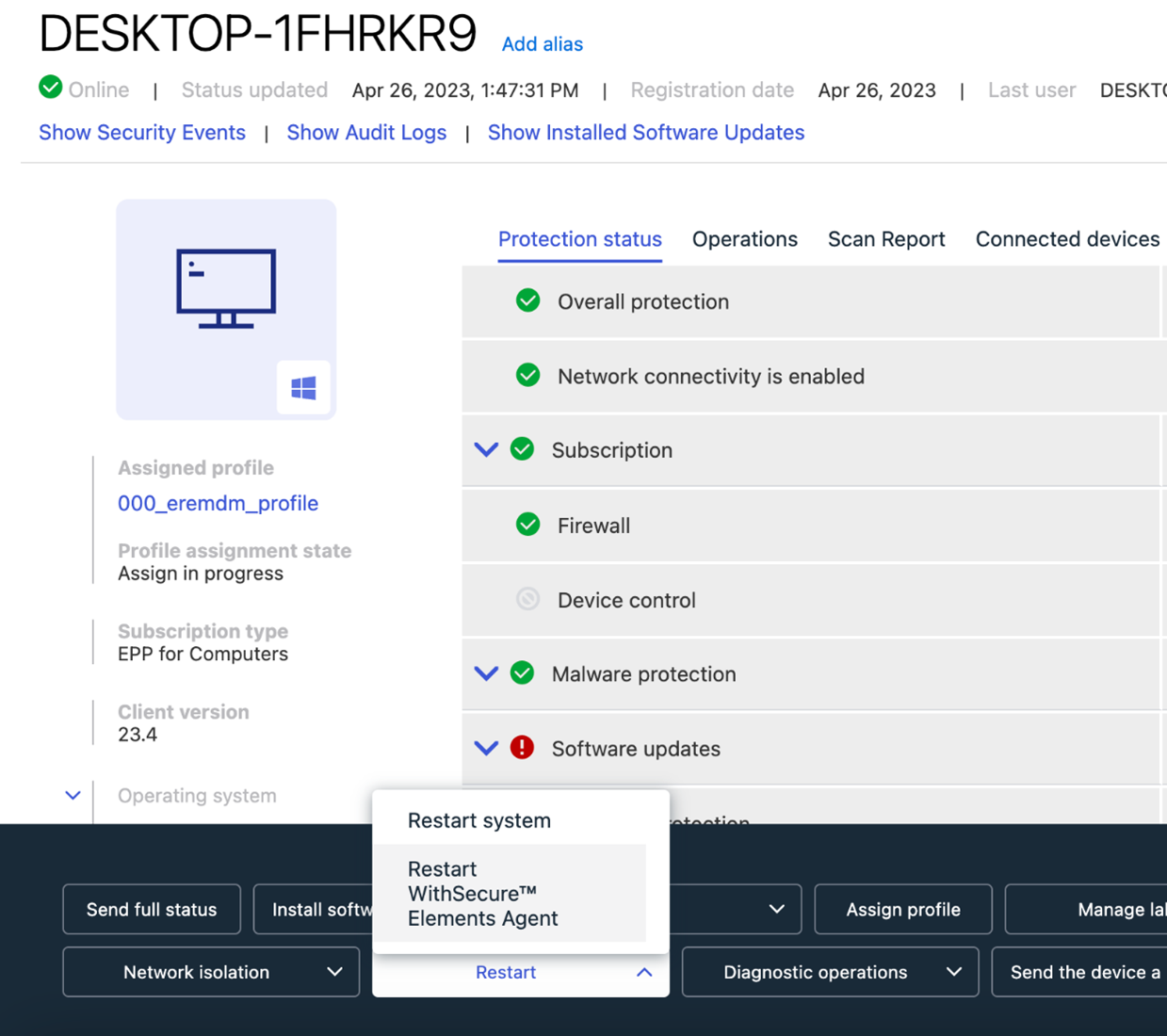
Remote Action to restart Elements Agent
We have added a new remote operation to restart Elements Agent right from the Elements Portal. Restarting services allows to fix various client problems without making a system reboot.
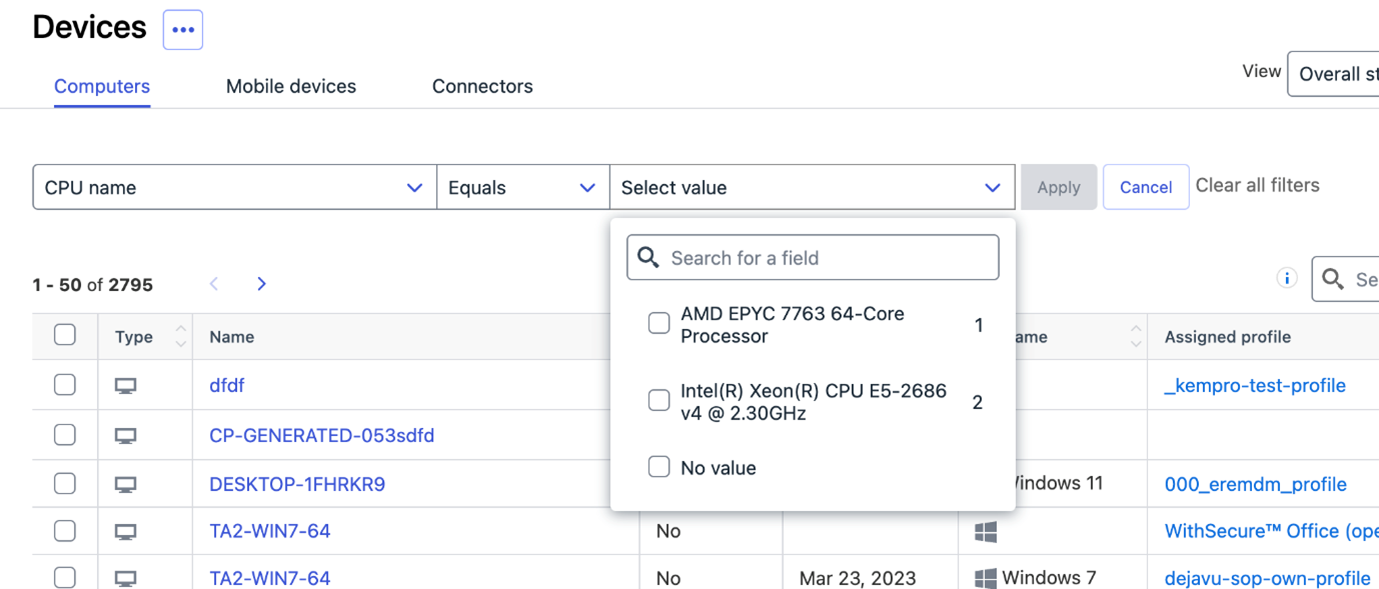
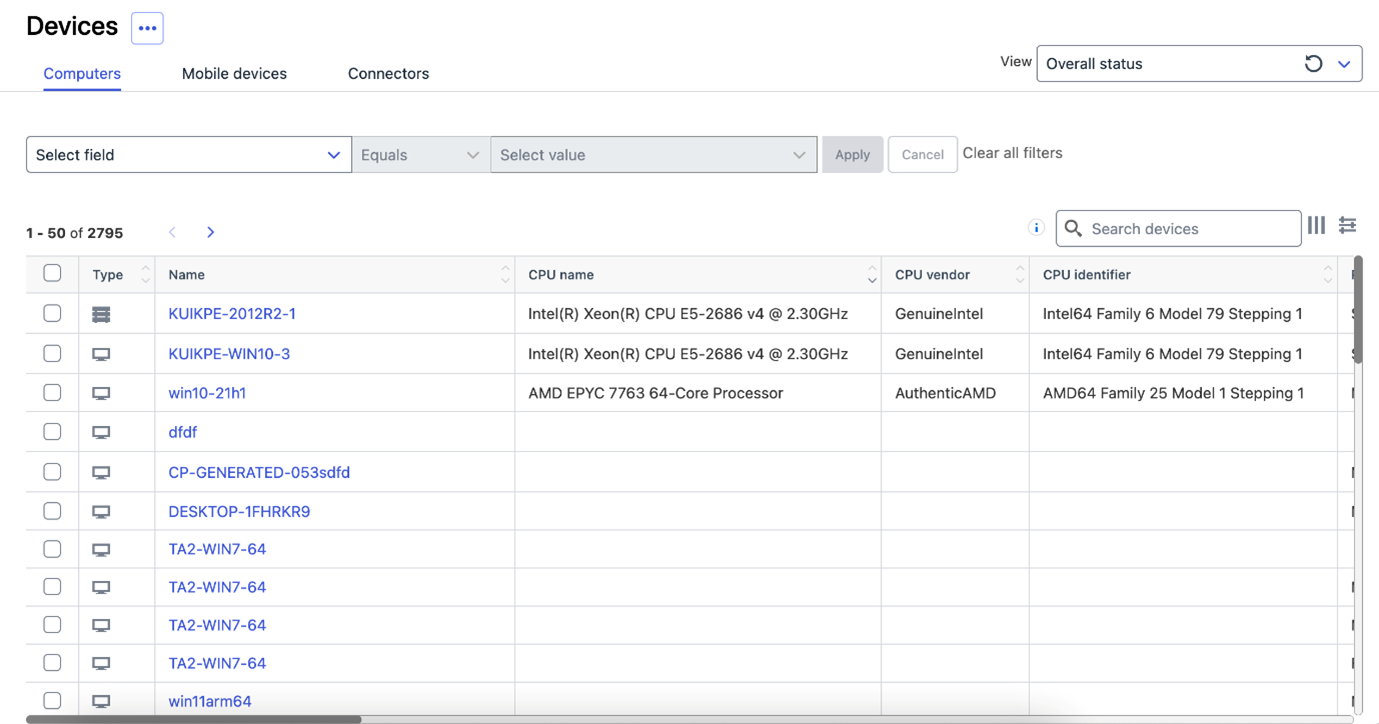
CPU information reported to Security Center
The Elements Agent now reports CPU information to the portal
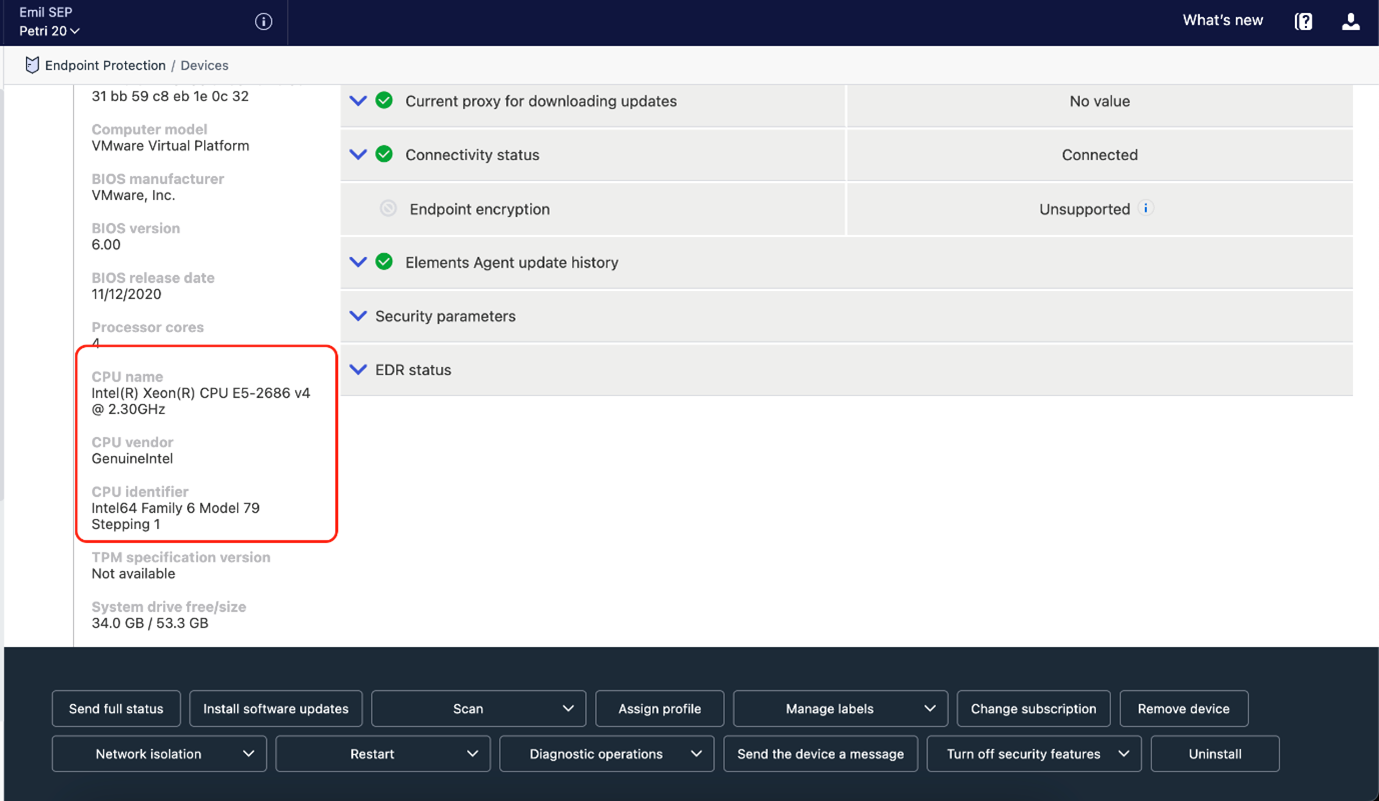
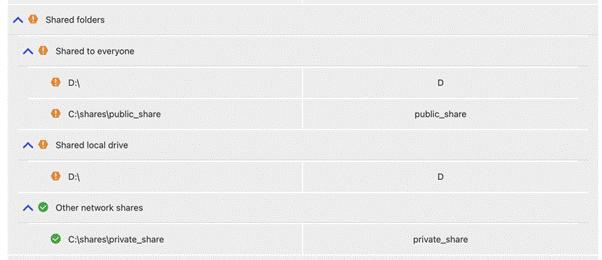
Agent includes more information to Elements Security Center
The Agent now sends more information about shared folders and logged in users to the portal
Client now reports if RDP is enabled on client
The agent reports if the RDP services is enabled on the client, allowing the Elements Security Center to show an option to login with RDP
Elements Endpoint Detection and Response
New response actions released.
WithSecure Elements EDR has launched new response actions.
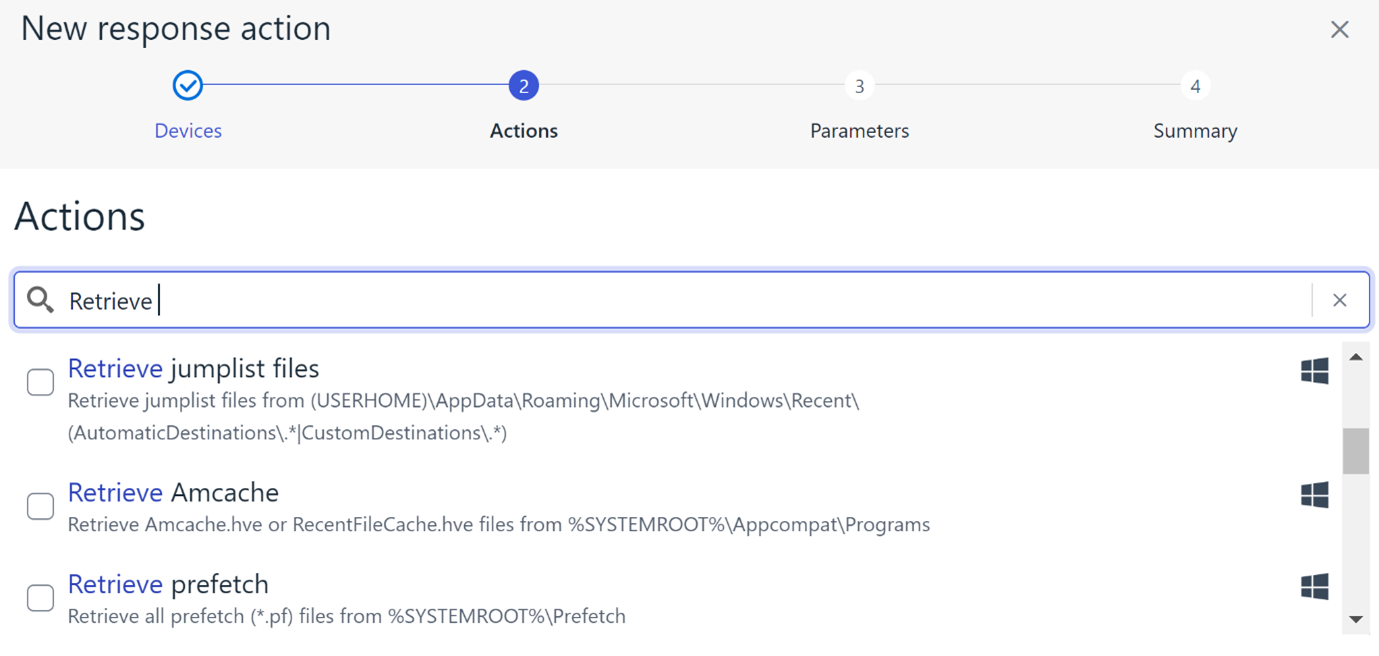
The new response actions include:
- Retrieve Amcache
- Retrieve event log tracing entries
- Retrieve jumplist files
- Retrieve Prefetch
- Retrieve RDP cache files
- Retrieve Recently Accessed Files
- Retrieve System Resource Usage Monitor database
These new response actions focus on identifying if persistence has been achieved on endpoints and provides a quick way for detection teams to collect this information.
The new response actions can be easily found using the search functionality within the Response wizard.
As with all other Response actions, these can run simultaneously on multiple devices with one response definition and results (from the selected devices) available and stored within the Elements portal.
New automated way to suppress repeating false positives
A new way to suppress noise has been implemented to XDR Detection pipeline. After this change was applied, the incident (aka BCD) creation delays have been much less than before!
Closed – False Positive: The incident has been closed and is no longer monitored. The detection was not malicious.
Closed – Auto False Positive: The incident has been closed automatically as false positive based on identical incidents that have been closed as false positive.
To optimize system performance, an automated suppression mechanism will activate if any detection part of an incident marked as false positive repeats more than 4 days within a 30 days period, or repeats more than 5 times a day.
If later an incident earlier marked as False positive is marked as Confirmed, all identical incidents are automatically reopened. In such event also the automated suppression mechanism would be deactivated for future detections.
Elements Collaboration Protection
In June the Collaboration Protection team completed the sequence of improvements on the product backend and infrastructure systems. These improvements are set of long lasting and architectural changes covering switch to multi-tenancy, recovering on critical points, overcoming technical limitations and technical debt.
The key outcomes of these changes are:
- Faster response time, time on scanning and taking action upon detected harmful content
- Decrease of a tenant onboarding time, correspondently time on initial protect
- System stability and reliability.
Elements Vulnerability Management
System Scan
The following capabilities were added to authenticated scanning for Windows:
- Detect vulnerabilities in USB for Remote Desktop
- Detect vulnerabilities in Tracker PDF-XChange Editor
- Detect vulnerabilities in Fortinet
- Detect vulnerabilities in OpenSC
Elements Vulnerability Management Portal
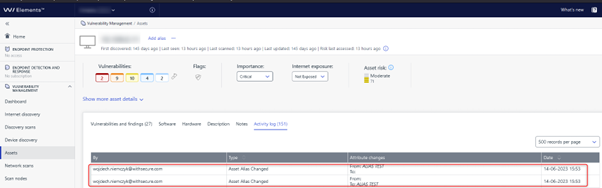
Added an activity log for the deletion of asset alias events
This log provides visibility into the actions taken when an asset alias is deleted, allowing for better tracking and auditing of asset management activities.
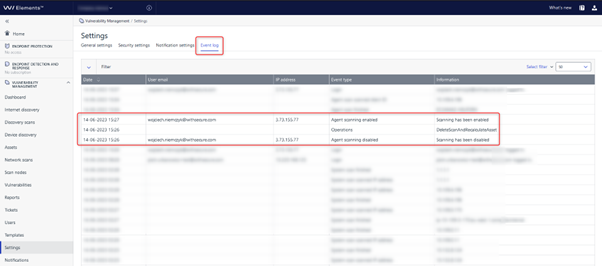
Added event logging functionality for enabling and disabling agent scanning.
Integrations
Endpoint Protection API: Provisioning invitations endpoints end of life on 3rd of November 2023
The old invitations endpoints are deprecated and should be replaced by the new Elements devices endpoints:
The following Endpoint Protection API invitation endpoints will stop working on 03.11.2023:
- Create new invitation
- List pending or expired invitations
- Remove invitations
- Renew expired invitations
- Resend pending invitations
Reminder: In order to provide a better and unified set of APIs for WithSecure Elements, we are progressively deprecating the Endpoint Protection API and replacing it by Elements API. The following endpoints will reach their end of life soon as indicated earlier in this change log:
- Computers endpoint: 30th of May
- Security events endpoint: 30th of June
- Companies endpoint: 31st of July
Provisioning API
Update Service Partner (SEP) name
This new API call allows to change an existing Service Partner(SEP) name by using the unique identifier as described in this link.
Elements API
New properties have been added to to device list endpoint
- Total and free space on system drive
- Total and free physical memory
- Vulnerability Management risk score. That values is calculated only for devices with active VM module
- EDR incidents counters
- Computer model and BIOS version
- Version of malware database and timestamp of its last update
- List of MAC addresses
- Property that indicates if user has administrator privileges
Manage devices
New endpoints have been published:
- Update device state – client can block or inactivate devices
- Remove devices – client can delete device
- List devices endpoint was updated and now devices can be filtered by state. Also, state field is always returned in the response.
List incidents
A new endpoint has been published:
- List incidents – client can view list of the incidents in the organization
Other items of interest
Monthly Threat Highlights Report: May 2023
Monthly highlights
Newly introduced top-level domains
The report highlights the dangers associated with newly introduced top-level domains and how they can be exploited by cybercriminals to launch phishing attacks and other malicious activities.
Bypassed vulnerabilities in Microsoft Outlook
The report discusses a recent vulnerability in Microsoft Outlook that was patched but could still be bypassed due to a bug in the HTML platform. This vulnerability could allow attackers to execute malicious code on affected systems.
Actively exploited vulnerabilities in common WordPress plugins
The report identifies several actively exploited vulnerabilities in common WordPress plugins, including a high-severity reflected cross-site scripting (XSS) flaw in the Advanced Custom Fields plugin.
The growing infostealer marketplace
The report provides an update on the state of the growing infostealer marketplace and how it is being used by cybercriminals to steal sensitive information from individuals and organizations.
The state of hacktivist groups
The report provides a brief update on the state of so-called hacktivist groups and their activities, including recent attacks against government agencies and corporations.
The current state of ransomware
Finally, the report takes a closer look at the current state of ransomware and identifies several newcomers to this growing threat landscape.
In case you missed it
Share your ideas with us
Our purpose is to co-secure the world with you – now as WithSecure™. To co-create the best possible cyber security products and services, we warmly recommend you share your ideas via our Ideas Portal, now accessible directly from WithSecure™ Elements Security Center.

Further information
Changelogs and Release Notes for all parts of WithSecure™ Elements can be found at the Help Center
-
What’s New in Elements: May 2023
Read more
Editor’s Highlights
WithSecure launches Elements Cloud Security Posture Management
With many organizations moving some or all of their infrastructure to cloud services such as AWS or Azure, it’s important that this infrastucture is secure. Our new Elements Cloud Security Posture Management can analyze and suggest changes to make these more secure. More details below.
Software Updater for Mac
We have released Software Updater for Mac. This addition brings much-requested functionality to our Mac EPP product. You can find more details below
Elements Security Center
Elements Endpoint Protection Portal
New features:
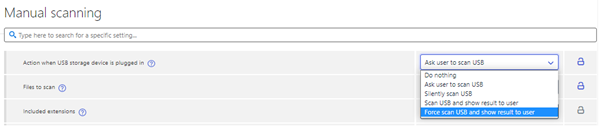
Force USB scan
Added “Force scan USB and show result to user” option. (This requires WithSecure Elements Agent 23.4)

Security Events Trend Detector
Security events trend detector for infections shown in Dashboard view’s Issue list. This is an experimental feature looking at risky trends in the amount of malware infections from your computers over the last two weeks. At present it looks for two specific trends:
- A large spike or sudden increase in detections
- A strong growing trend towards the end of the two week time window
Our suggestion is that you investigate if everything seems normal by using the check report link to look in the Security Events reporting page at the following items:
- The infections handled report shows a count of the same detections, is there a growing trend?
- Computers generating large numbers of detections can be identified from the “Top computers” graph, clicking the name of a computer will show you specific detections
- Top infections will show most common detections, this can help investigation
Acknowledging security events will exclude them from trend detection but not from the reporting page. This can be used to make this warning go away, otherwise it will vanish once the trend changes or settles. Please use the feedback form at the top of Security Events to give us feedback.
Security Events navigation from Infections handled chart
It is now possible to navigate from Infections Handled chart (Reports → Security Events tab) to a Security Events list filtered to a day corresponding to the clicked bar. This is to foster faster investigation of spikes in the handled infections.
Improvements:
Active Directory Group renamed
Active Directory Group has been renamed Active Directory Organizational Unit (abbreviated as OU in some places where space is restricted) in Device, Unprotected Devices and Profile Assignment Rules views. This is done to be more precise on what kind of data our clients collect from Active Directory.
DataGuard paths display
DataGuard included paths and trusted applications are now rendered as a list in device details.

Status icons added
Status icons have been added to the Device list for Application control, Device control, and Software update status.

Elements Endpoint Protection
Elements Agent for Windows and Server version 23.4
A new version of the endpoint clients is available and our Early access program participants already use it. Full availability starts from 20.6.2023
This release makes the Elements Agent version 23.4 available (internal version 23.4.163).
The endpoints automatically upgrade, without a reboot.
This release introduces new features and fixes,
Features:
Disable Alerts for Application Control events
It is now possible to disable alerts for certain Application control rules.
Application control rules have a new setting “Security event” that can be used to define what kind of security event the rule triggers if any.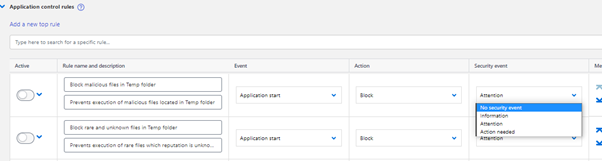
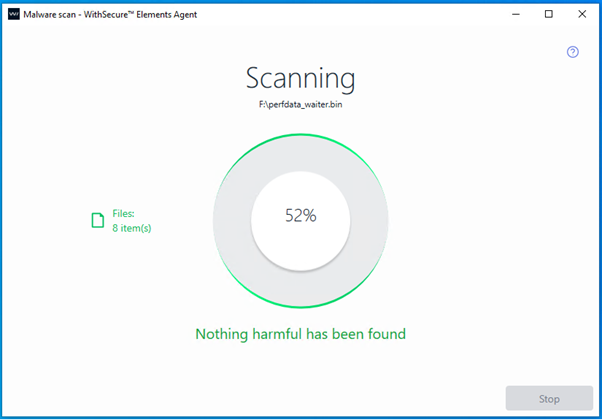
USB Scan Stop button can be disabled
The Administrator can disable Stop button of the Scanning dialog for USB scans to prevent end users from stopping the USB device scans. This feature can be enabled from the profile’s Manual scanning page. Setting is “Action when USB storage device is plugged in”.
Additions to WMI interface
Elements Agent WMI interface provides now RebootStatus class. This class contains two Properties.
- Pending (True/False)
- Reason (“swup” / “update” / “virus” / “spyware” / “critical” / “malfunction”).
Elements Mac Agent version 23.1.50165
Features:
Software Updated
Software Updater can be enabled in the Mac profile editor.

You can specify which software you would like to include/exclude from scan results or automatic installations
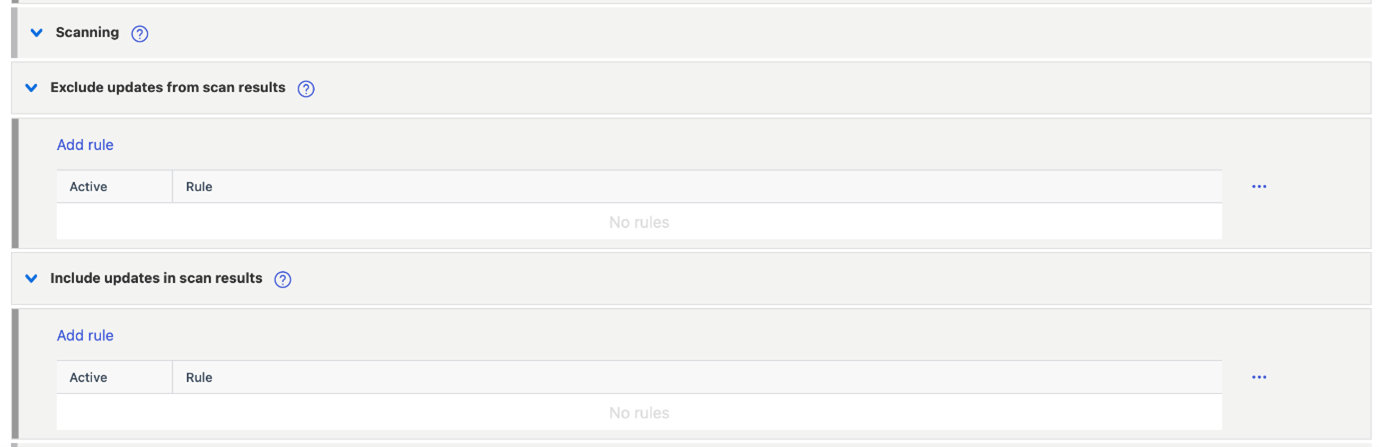
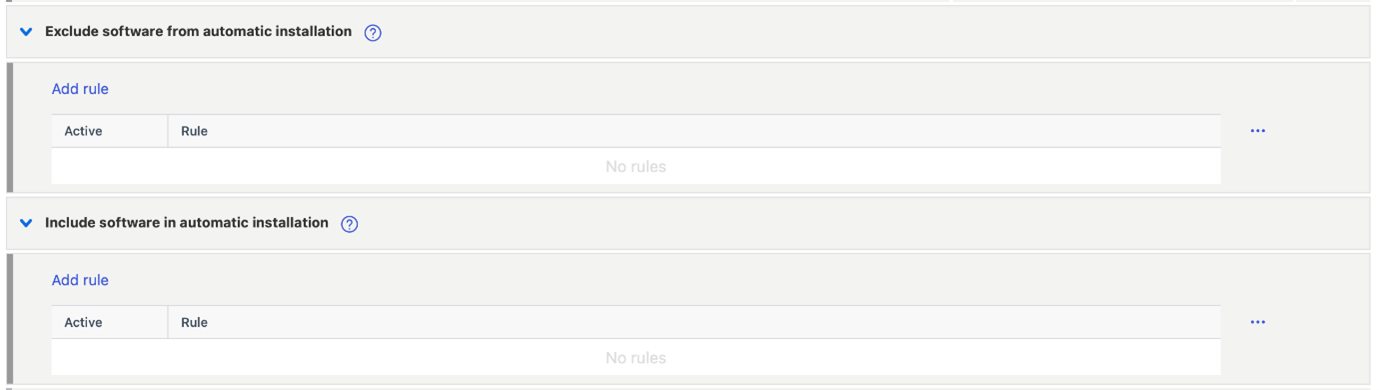
Running applications can be force-closed or update installation can be cancelled.

Software updates can be downloaded via HTTP proxy or from Elements Connector
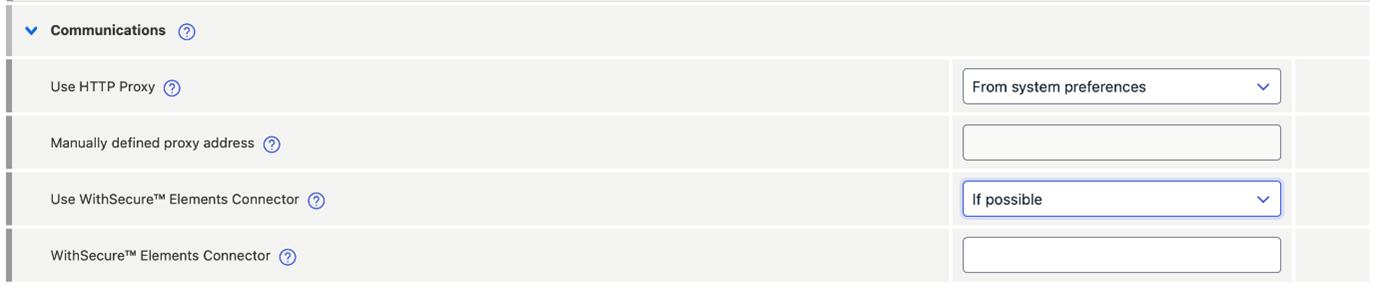
Software updater can scan for missing software or install updates automatically, these operations can be scheduled in the Automated tasks section of the profile.
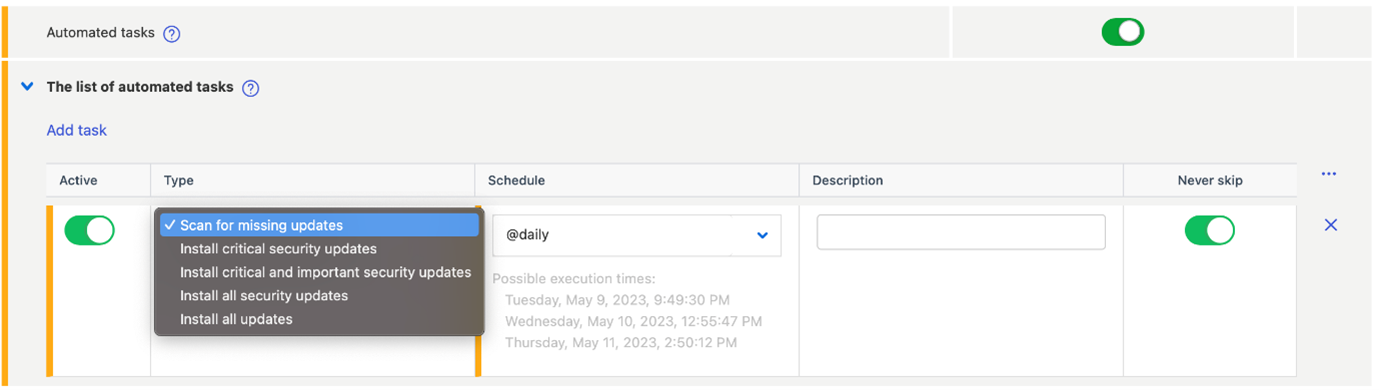
Other changes
- Automatic InTune deployment support
- Adds an option to download definition updates from via HTTP
Elements Collaboration Protection
New features and Improvements
The filter “Affected assets” was introduced to detections list.
- The new functionality allows to search detections across all the protected tools: by a file name shared in SharePoint, OneDrive and Teams, or by email subject.
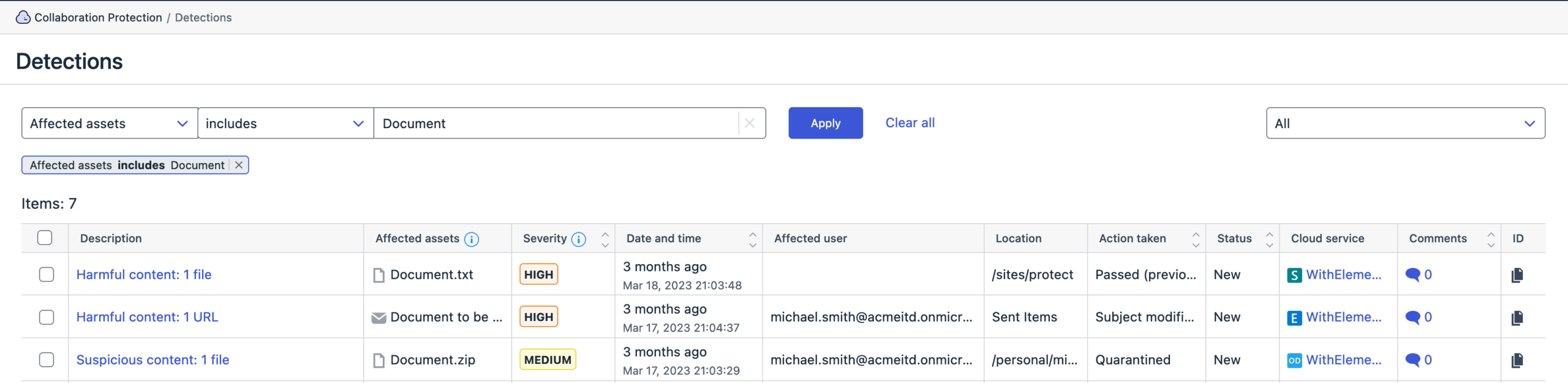
We have also reduced false positives for deleted emails
Elements Vulnerability Management
Elements Vulnerability Management System Scan
New features
Capability to detect vulnerabilities in:
- Beekeeper Studio in authenticated scanning for Windows
- Qualys Cloud Agent in authenticated scanning for Windows
- Acronis Snap Deploy in authenticated scanning for Windows
- Golang in authenticated scanning for Windows
- Nessus Agent in authenticated scanning for Windows
- Stimulsoft Designer (Desktop) in authenticated scanning for Windows
Integrations
Endpoint Protection API: Provisioning invitations endpoints end of life on 3rd of November 2023
The old invitations endpoints are deprecated and should be replaced by the new Elements devices endpoints:
The following Endpoint Protection API invitation endpoints will stop working on the 03.11.2023:
- Create new invitation
- List pending or expired invitations
- Remove invitations
- Renew expired invitations
- Resend pending invitations
Reminder: In order to provide a better and unified set of APIs for WithSecure Elements, we are progressively deprecating the Endpoint Protection API and replacing it by Elements API. The following Endpoint Protection endpoints end of life dates are below:
- Computers endpoint: 30th of May, 2023
- Security events endpoint: 30th of June, 2023
- Companies endpoint: 31st of July, 2023
Provisioning API update
Update Service Partner (SEP) name
This new API call allows to change an existing Service Partner(SEP) name by using the unique identifier as described in
Elements API: New properties in devices list
New properties have been added to to device list endpoint:
- total and free space on system drive
- total and free physical memory
- Vulnerability Management risk score. That values is calculated only for devices with active VM module
- EDR incidents counters
- computer model and BIOS version
- version of malware database and timestamp of its last update
- list of MAC addresses
- property that indicates if user has administrator privileges
Other items of interest
Threat Highlight Report – April
Threat Intel monthly highlights: Ransomware gangs get Papercuts, Lockbit and BlueNoroff get into MacOS, pro-Russian ‘hacktivism’ continues and 3CX continues.
- Ransomware: Trends and notable reports
- Capita
- Nokoyawa – CVE-2023-28252
- Rorschach Ransomware discovered
- Other notable highlights in brief
- DuckTail new update?
- APT41 HOODOO
- Service Location Protocol Vulnerability
- Google Chrome Zero Day attacks
- Continued targeting of Networking Devices
You can Download the full report here
In case you missed it
WithSecure launches Elements Cloud Security Posture Management
At our recent SPHERE23 event, we launched a new product, Elements Cloud Security Posture Management.
This is designed to help organizations who are using Cloud platforms for their infrastructure, to find and resolve any configuration issues before the bad guys do.
You can find out more about Elements Cloud Security Posture Management on our website
Share your ideas with us
Our purpose is to co-secure the world with you – now as WithSecure™. To co-create the best possible cyber security products and services, we warmly recommend you share your ideas via our Ideas Portal, now accessible directly from WithSecure™ Elements Security Center.

Further information
Changelogs and Release Notes for all parts of WithSecure™ Elements can be found at the Help Center