
-
Upcoming major Capricorn update for Endpoint Protection
Read more
UPDATE 2024-09-24:
We anticipate that this update will start being delivered to our customers from 9.00 UTC 25.09.2024, but it is unfortunately not possible to give an exact time due to the way client installations check for updates
We plan to release a major Capricorn database update on September 24th, 2024. This will be delivered to Elements Endpoint Protection installations on Windows, Mac and Linux automatically.
You can find more details about this update, in a separate article
-
All WithSecure services with one user login
Read more
At WithSecure, we require authentication to access many of our services. This requires the use of a WithSecure Business Account.
But did you know, it is possible to access any WithSecure service with the same Business Account? Once you’re logged in to one service, you can access any other services that you have been granted access to, without needing to log in again.
This makes hopping between the various services transparent, quick and easy.
But that’s not all. There is now a new, accessible login page that can be used as your entry point for accessing all the WithSecure services.
Simply bookmark the page “Login to WithSecure services”, and your life will be made a little bit easier.
-
Luminen skills for all Elements users
Read more
UPDATE 2024-09-18: Luminen skills are now available for all users!
UPDATE 2024-09-11: Luminen skills have now been enabled for all users of our Platinum and Gold partners.
After 3 months of positive feedback from our Luminen Early Access program, which brought AI-powered reporting and analytics to both Broad Context Detections and Security Awareness, we are now taking the first steps on enabling this level of functionality for more of our users. What is crucial, Luminen will be automatically visible and accessible to all users and free!
Starting from 11th September 2024, we will be enabling these reports for all users who are customers of our Platinum and Gold level partners. After we have done this, we will monitor our systems to ensure that it is functioning and performing perfectly with the increased number of users.
When we are satisfied that everything is working correctly, we will gently increase the range of users until eventually everyone has access to these reports. We anticipate that this will happen on 18th September 2024.
What will users see?
Users will see a one-time pop-up (the exact text will change and will be localised) informing them that Luminen is available.
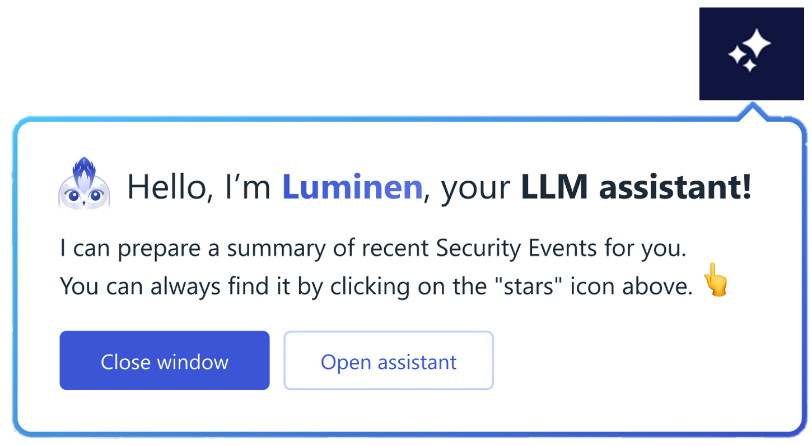
Luminen speaks your language. It will automatically produce content in the same language that Elements UI is set to.
You can find out more about Luminen on our website.
Privacy and security
We take the Security and Privacy of our users seriously, and we have updated out Privacy Policy to cover Luminen.
If someone doesn’t want LLM to process their data – it’s enough to not trigger Luminen features. Luminen does not proactively do any processing.
-
Upcoming changes to Navigation in Elements Security Center
Read more
Earlier, we started re-vamping the navigation in Elements Security Center, to make the navigation less product-centric, and more about the capabilities of Elements.
We will soon be making the next set of changes, which will bring Elements Vulnerability Management (EVM) capabilities to the new navigation. For those customers who have already been using Elements Expososure Management during the Early Access phase, these changes should be familiar.
The changes in a nutshell
The first thing the user is likely to notice is that Vulnerability Management has been removed as a section heading in the navigation menu. This is part of the “capability based” vision.
It is important to note that the functionality of Vulnerability Management does not change, only the navigation structure.
Example changes
Device Discovery and Vulnerability assets for EVM moves under Environment / Devices
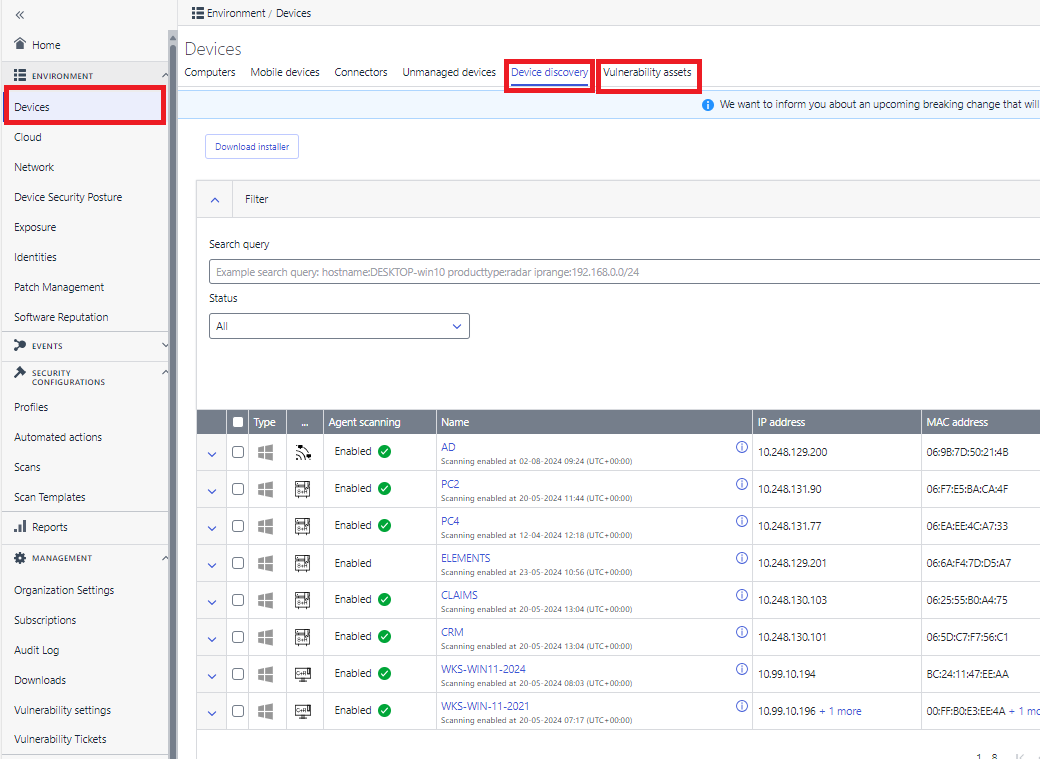
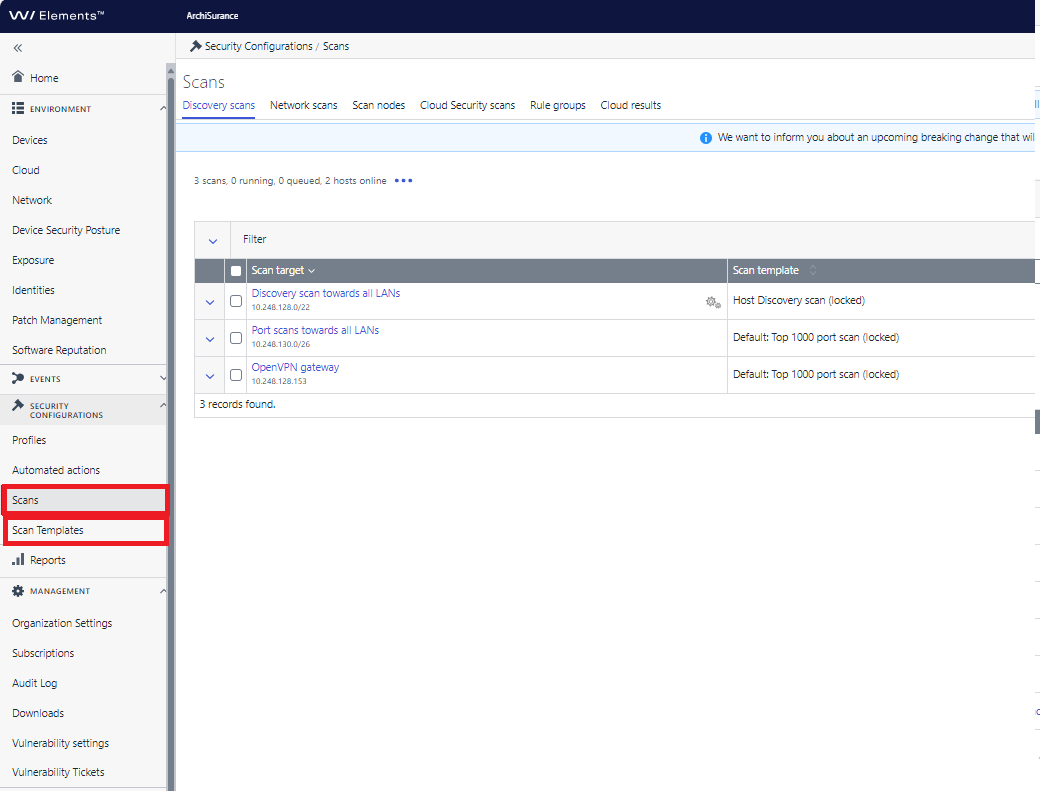
Scans and Scan Templates move under Security Configurations.
In addition, the various scan types have been grouped under a single Scans navigation entry.
The full list of changes
Old location
New Location
Vulnerability Management / Dashboard
Home / Vulnerabilities
Vulnerability Management / Internet Discovery
Environment / Network / Internet
Vulnerability Management / Discovery Scans
Security Configurations / Scans / Discovery Scans
Vulnerability Management / Device Discovery
Environment / Devices / Device Discovery
Vulnerability Management / Assets
Environment / Devices / Vulnerability Assets
Vulnerability Management / Network Scans
Security Configurations / Scans / Network Scans
Vulnerability Management / Scan Nodes
Security Configurations / Scans / Scan Nodes
Vulnerability Management / Vulnerabilities
Exposure / Vulnerabilities
Vulnerability Management / Reports
Reports / Vulnerability Reports
Vulnerability Management / Tickets
Management / Vulnerability Tickets
Vulnerability Management / Users
Management / Organization Settings / Vulnerability Users
Vulnerability Management / Templates
Security Configurations / Scan Templates
Vulnerability Management / Settings
Management / Vulnerability Settings
Vulnerability Management / Notification
Reports / Vulnerability Notifications
Vulnerability Management / Support
Support / Vulnerability Management Support
Vulnerability Management / Feedback
Support / Vulnerability Management Feedback
Schedule
These changes will be released to the Elements Security Center on September 30th 2024, and will bring Elements Vulnerability Management capabilities closer to the rest of Elements.
-
Why robust product updates are so important
Read more
The major IT outage in July 2024 caused by a faulty CrowdStrike update has brought many questions to us from our Partners and Customers, the most important one being “What steps does WithSecure take to avoid distributing a faulty update”.
We have now taken time to create an informative article on our public website, which documents the overall process.
Please note that this is a summary of the steps taken, the actual internal process is much more detailed than shown in this article.
-
WithSecure Elements integration with Microsoft Sentinel – Support Update
Read more
From 31st August 2024, Microsoft will deprecate some functionality in Azure, and this will affect the use of the WithSecure Elements Connector for forwarding Event data into Sentinel.
WithSecure recently released a “serverless” integration that Sentinel users can use to get Elements event data into Sentinel, and it is strongly recommended that our Sentinel customers take this into use as soon as possible. You can find further information about this at our dedicated Community article
If, for any reason, you cannot immediately change over to the serverless integration, it is possible to continue using the Elements Connector. However, in order to continue using this, customers using Sentinel need to make some configuration changes inside Azure. The instructions for this can be found in Microsoft’s own documentation.
We strongly recommend that our customers move to the serverless integration, as this is the method of integration to which we will introduce any new functionality.
-
What’s New in Elements: July 2024
Read more
Editor’s Highlights
Starting from this edition of What’s New, we will be taking into use some new product naming conventions, to align with our global website.
Extended Detection and Response (XDR), which includes
- Endpoint Security, containing
- Endpoint Protection (EPP)
- Endpoint Detection and Response (EDR)
- Email and Collaboration Protection (CP)
- Identity Security (IS)
Exposure Management (XM), which includes
- Vulnerability Management (VM)
- Cloud Security Posture Management (CSPM)
Co-Security Services, which includes
- Managed Detection and Response (MDR)
- Co-Monitoring Service
- Incident Response
Elements Foundation (FND), which includes
- API Integrations
- Any portal functionality that is not covered by a specific Product category above
Extended Detection and Response
Endpoint Detection and Response
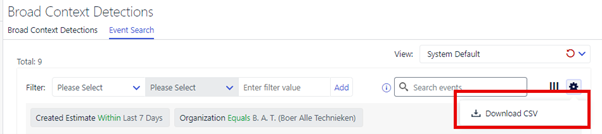
EDR: EventSearch CSV export improved
We have recently improved the EventSearch CSV export to increase the limit of events that can be exported from 500 to 5000, with the aim of providing Elements users easy access to review and analyze EDR telemetry in a flexible way.
EDR: Introducing Advanced Response actions for Linux
We have now released a new set of ‘Advanced Response’ actions for Linux. This means you are now ableto retrieve files, retrieve network connections, and kill processes on Linux endpoints. In the next quarter, we are expanding this coverage to Linux SE devices as well as Mac endpoints.
For the full list of response actions, please check the
.The Linux response actions can also be triggered from the Elements API, see the API documentation at
Email and Collaboration Protection
We have now added a retry bypassing lock, when a SharePoint/Teams/OneDrive file fails to be moved due to locked state.
Identity Security
Security Event visibility
Administrators can now see the security events related to Identity BCDs and their details
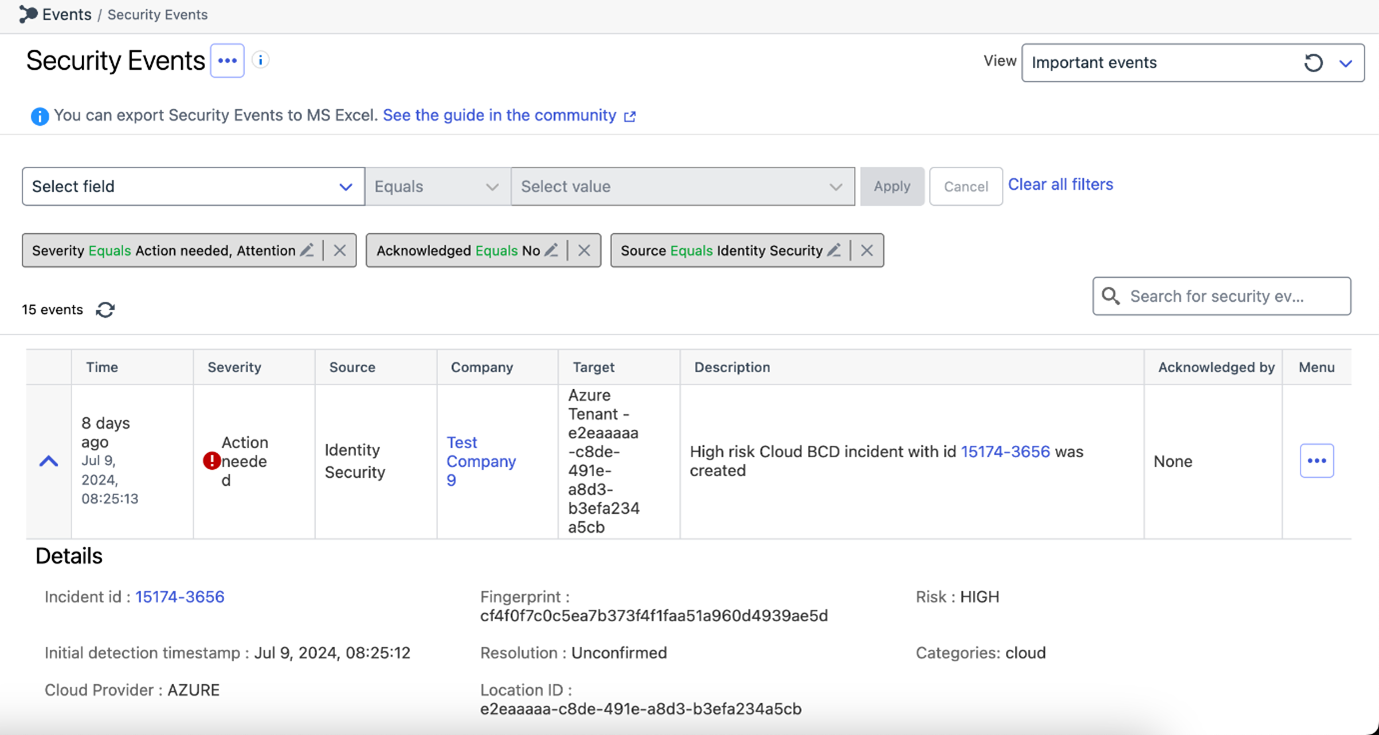
You can also create email notifications for these events, by creating a view that filters events based in the Source as ‘Identity Security’. Once you configure an email report based on this view, you can receive email notifications on continuous frequency for the Identity events
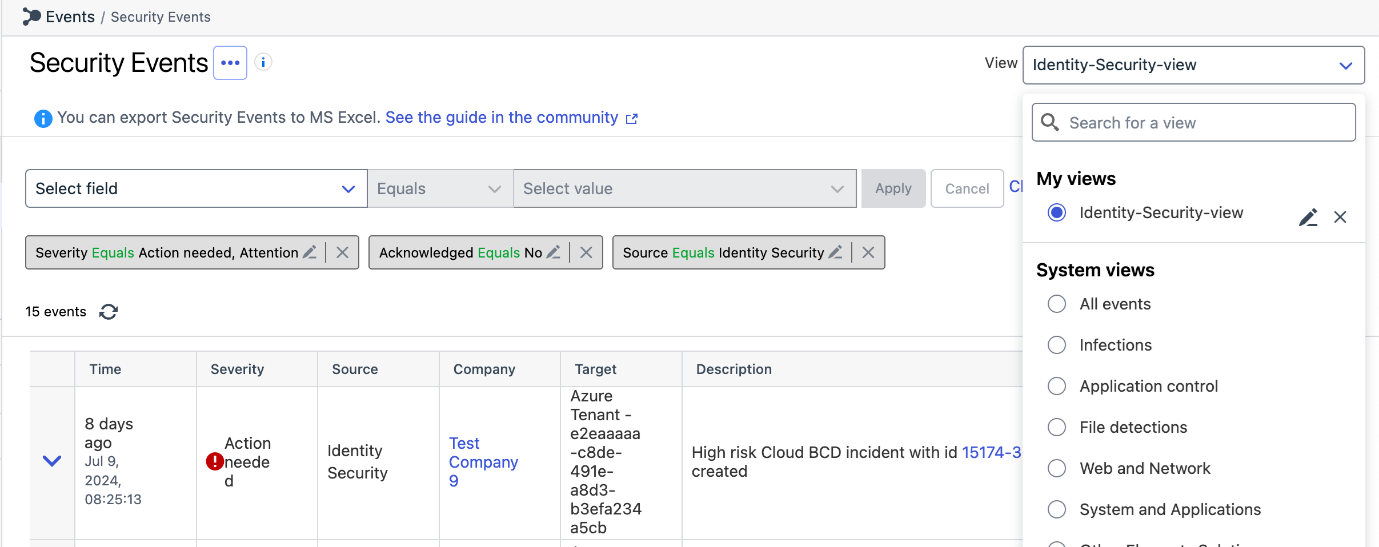
The admin can perform similar actions on these events as they do for other events like ‘Acknowledge’, ‘Show all target events’, ‘Show all similar events’
Exposure Management
Vulnerability Management
EVM: Windows Scan Node Agent
We have now released a new version of the Windows Scan Node Agent
This version correctly recognizes newer versions of the Microsoft C++ Redistributable.
EVM: System Scan
We have added detections for checking vulnerabilities in the following products to authenticated scanning for Windows
- Citrix uberAgent
- ProtonVPN
- Mozilla Thunderbird (also in endpoint agent scans)
- Citrix Provisioning
- Citrix Workspace app
- Dell Alienware Command Center
- Siemens Automation License Manager
- ONLYOFFICE DocumentServer
EVM: Portal
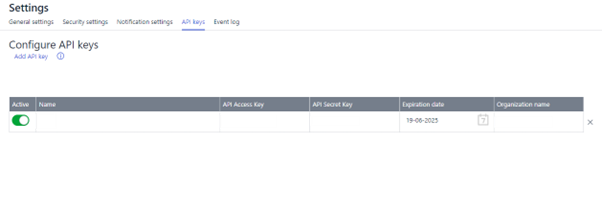
API Keys view moved
The API Keys view has been moved to organization settings page and is available as a tab at the top of the page.
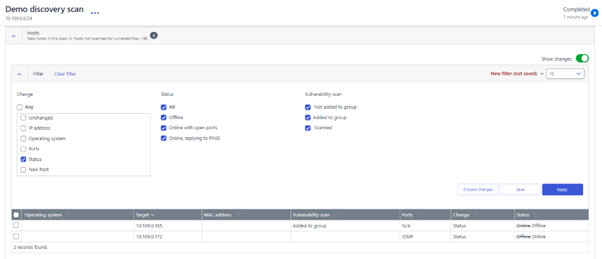
Discovery Scan details view updated
We have resolved an issue where Discovery Scan details view was not displaying hosts that had changed status from online to offline, when filtered by “status change”. It’s necessary to restart the scan.
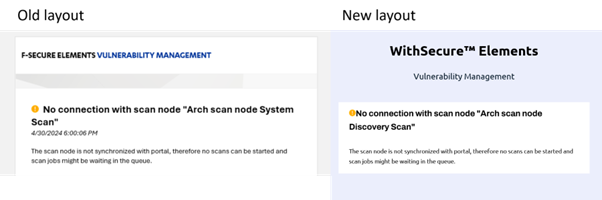
Scan node immediate notifications layout has been updated
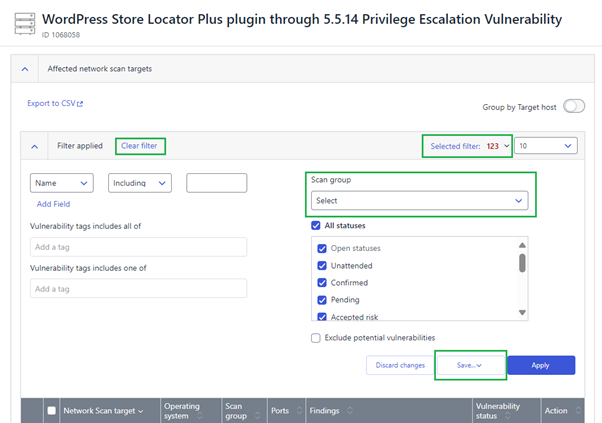
Resolved multiple issues in Vulnerability details view
In ‘Affected network scan targets’ section filtering by scan groups has been fixed, as well as saving, updating, restoring and clearing the filter.
Elements Foundations
Elements Security Center
Partner logo on Elements Security Center
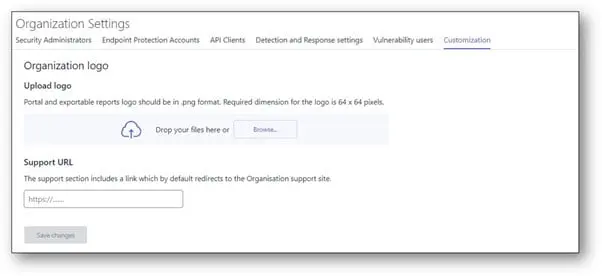
Partners may want to display their logo on Elements Security Center when used by their resellers or customers. We had solution to show partner logos in EPP and Vulnerability Management portals. As we unify our offers in Element Security Center, we need the partner logo available for the full Elements Security Center.
A new “customization” tab under Organization settings from where a partner (SOP level) can insert a logo and a support url. The logo will be displayed in the bottom left corner of Element Security Center and visible in all pages. It will replace any logo that might have been configured in old EPP or Vulnerability Management solution.
If the url is configured, it will replace WithSecure support url in the support tab (behind “go to the website” link).
Multi Factor Authentication is now mandatory in Elements
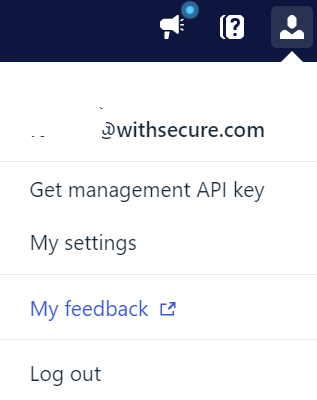
As of August 1st 2024, Multi-Factor Authentication (MFA) is mandatory for all Elements users. Users who have not set up an MFA method will be required to do so upon their next login.
In case you missed it
End of support for old installers
As a reminder, starting from 1st August 2024 we have stopped supporting installation using very old product installers. Customers should ensure that they are using the latest installers.
The installers used MUST now be AT LEAST
- Windows version 24.3.300
- Mac version 24.1.52031
- Linux version 12.0.482
You can read more information about this at the WithSecure Community article
Share your ideas with us
Our purpose is to co-secure the world with you – now as WithSecure™. To co-create the best possible cyber security products and services, we warmly recommend you share your ideas via our Ideas Portal, now accessible directly from WithSecure™ Elements Security Center.
Further information
Changelogs and Release Notes for all parts of WithSecure™ Elements can be found at the Help Center
- Endpoint Security, containing
-
Multi-Factor Authentication (MFA) Mandatory for WithSecure Accounts
Read more
Overview
Multi-Factor Authentication (MFA) has been mandatory for Elements accounts in Europe and the Americas since May 2024. As of August 1, 2024, users in Asia are also covered by this policy. This requirement will now extend to all remaining WithSecure Business Accounts, including access to:
- Partner Portal
- WithSecure Community
- WithSecure Academy
Implementation
Starting August 2024, users logging into these sites must set up an MFA method. Logging in without MFA will not be possible. Users will see a “Keep Your Account Safe” screen and should follow on-screen instructions to enable MFA:
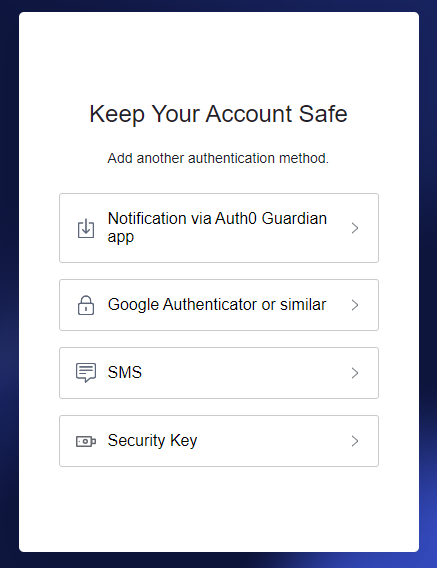
Once enabled, users must verify their identity using the chosen method, ensuring only authorized access even if the password is compromised.
Managing Authentication Methods
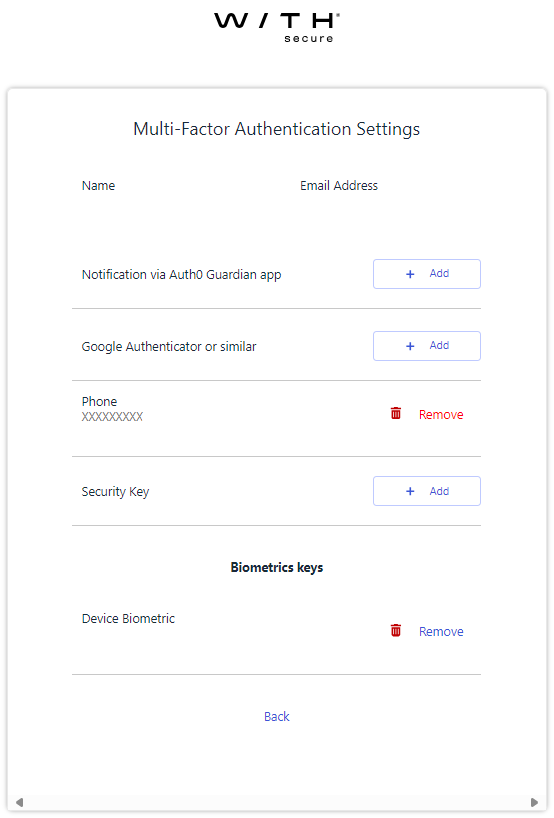
Keep your MFA device safe. You will lose access to WithSecure services if you cannot authenticate yourself. Configure a new device before replacing the current one.
To manage your MFA device (add, change, or remove), you use the Elements Security Center portal. Please note that if you do not have an account for WithSecure Elements, you will not be able to access any WithSecure Elements functionality. There is no security risk in using this method.
To manage the device:
- Log into the Elements Security Center.
- Use the profile icon in the top right to access account settings:

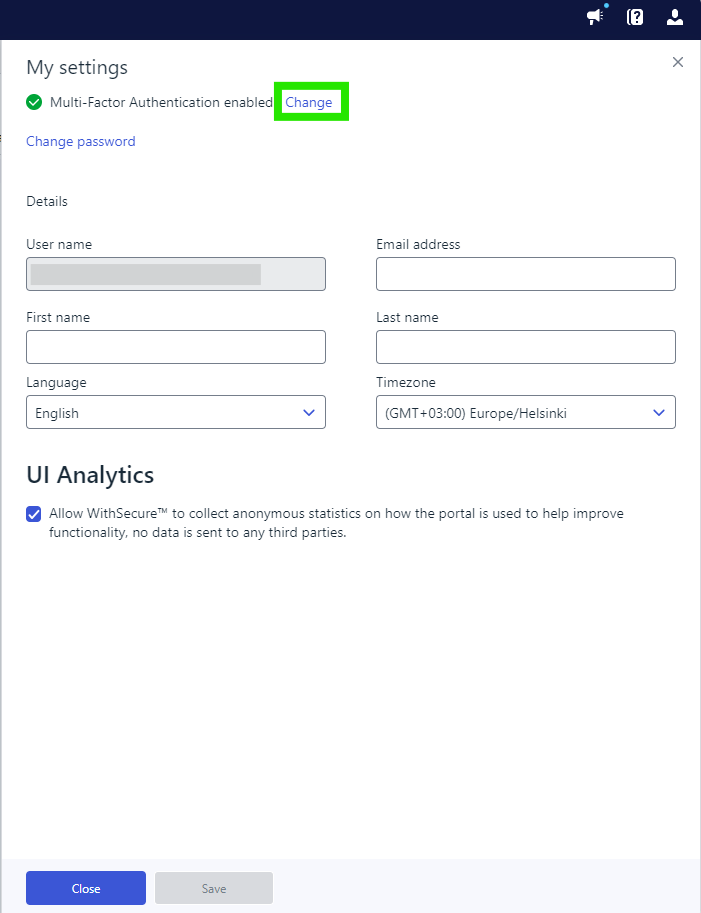
- Use the “Enable” or “Change” link next to the Multi-Factor Authentication status:
Enable:
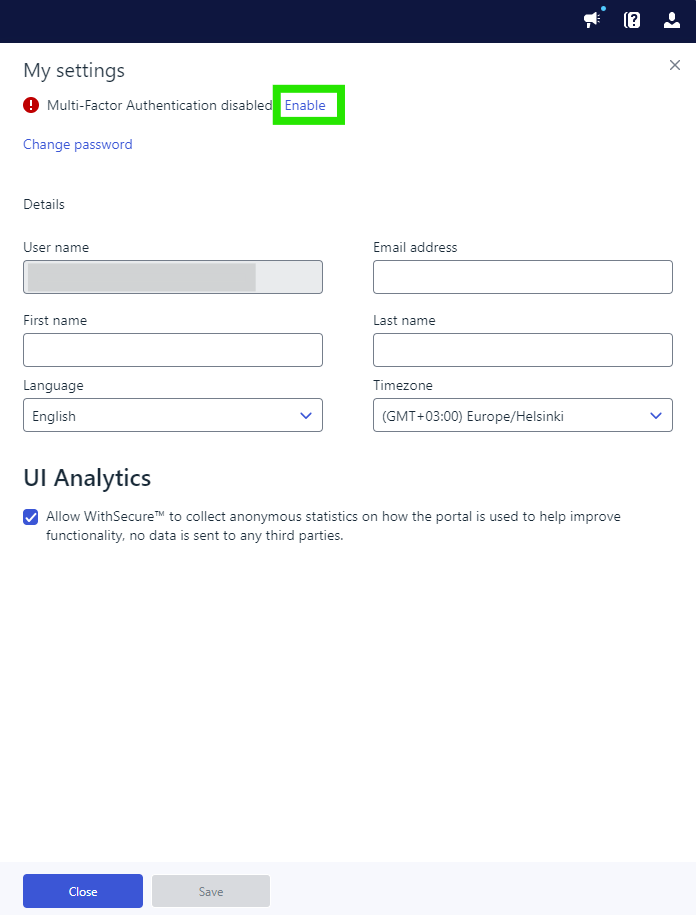
Change:
- Add or remove MFA devices as needed. To replace a device, please remove the current one and then add the new one:
MFA changes in the Elements Security Center apply to the Partner Portal, Community, and WithSecure Academy websites.
Previous Announcement
For more details on the initial MFA enforcement announcement made in March 2024, please refer to this article.
Need Help?
For assistance with enabling MFA or questions about the process, consult our MFA Setup Guide.
-
What’s New in Elements: June 2024
Read more
Elements Security Center
Ability to email custom reports as PDF
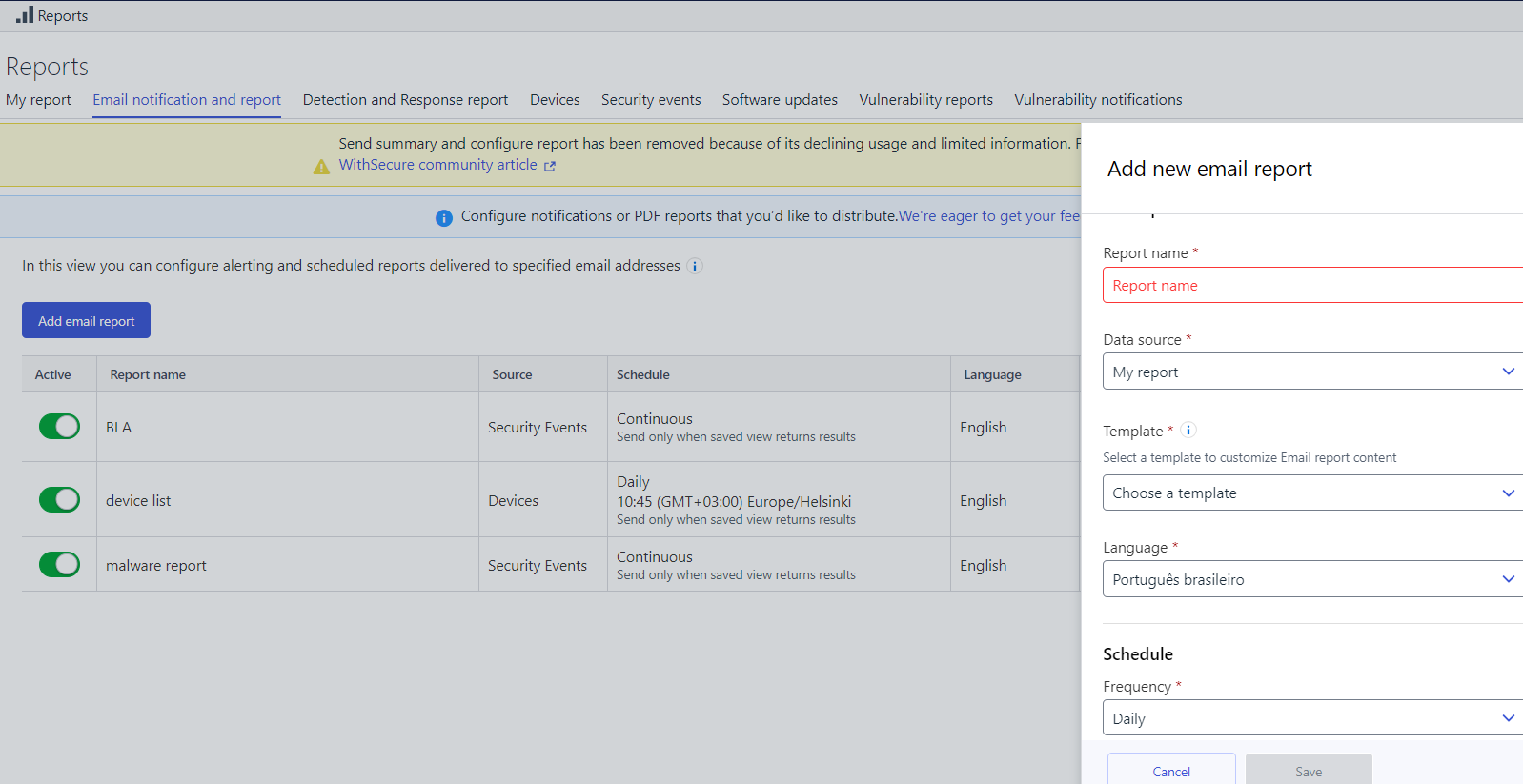
It is now possible email custom reports in PDF format, by following the instruction below:
- Add Widgets:
- Navigate to the “My Report” tab.
- Add the desired widgets to create your custom report.
- Save the view template.
- Set Up Email Reports:
- Go to the “Email Notification and Report” tab.
- Click on the “Add Email Report” button.
- In the flyout, select the personal or organization view template you saved in the “My Report” section.
- Configure Email Settings:
- Specify the language for the report.
- Set the schedule (daily, weekly, or monthly).
- Add recipients to the recipient list.
- Recipient Experience:
- Recipients will receive an email from WithSecure.
- The email will contain a button to download the report as a PDF.
- The PDF includes both the dashboard and the description from the “My Report” page.
- The report remains available for 7 days.
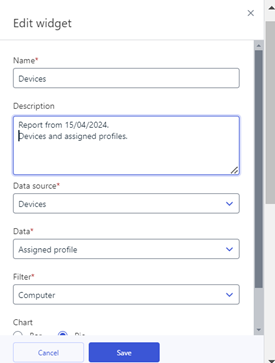
The screenshot below shows how the user can add/create description within ‘My Reports’ tab. Users now can mark or add/edit any desirable and explanatory information, also remove description if necessary. The description will be visible both on screen and in the PDF report.
Elements Endpoint Protection
WithSecure Elements Agent for Windows: Version 24.4
A new version of the Windows endpoint clients is available to our Early access program participants, with full availability starting in August.
This release makes the Elements Agent version 24.4 available (internal version 24.4.356).
The endpoints automatically upgrade, without a reboot.Features:
- We have enhanced our compatibility with Squid Proxy 6 and above, ensuring smoother operations.
- This release includes an updated software updater engine, providing more reliable and efficient updates.
- We have enabled offload scanning in the portal’s profile editor. This premium feature allows for more efficient resource usage by offloading scanning tasks.
WithSecure Mobile Protection for Android: Version 24.5.0022817
This release includes the following new features and improvements:
- The app and the WithSecure Elements Endpoint Protection portal now support the security parameter for unsupported OS
- The app and the WithSecure Elements Endpoint Protection portal now support the web content control setting
- The StrandHogg vulnerability was removed
- Improvements to app stability
Elements Endpoint Detection and Response
Next generation of our detection engine
Partners and customers will see a new and improved risk score against all EDR Broad Context Detections. The new model learns from your environment using resolution closure codes to assess detection logicperformance. By identifying areas for enhancement, we aim to refine and improve our detection capabilities, achieving a significant reduction in reported BCDs.
For more information view the full article here: Next Generation XDR Detection Engine – WithSecure Community
WithSecure Endpoint Detection and Response: Accepted Behavior released
We have now introduced “Accepted Behavior” to all customers.
It is now possible to create suppression rules that accept the behavior of a user or process. This feature aids in silencing Broad Context Detections (BCDs) for expected behavior. Partners and customers using WithSecure’s EDR solution can utilize this functionality to allow specific behavior in their environments. For example, if you trust a process called “XYZ” associated with software “ABC,” you can suppress similar BCDs to avoid unnecessary alerts.
Accepted Behavior works by suppressing key detections within a BCD. Each BCD contains one or more key detections that highlight suspicious behavior. Organizations can create suppression rules based on their specific circumstances. However, users should be cautious not to suppress too broadly, as legitimate behavior might also be affected.
Limitations of the release include enabling “accepted behavior” on BCDs with up to 5 key detections. We will soon be addressing this and dealing with cases where identical rules are created due to repeating key detections.
You can find full details about Accepted Behavior in our dedicated article.
Elements Collaboration Protection
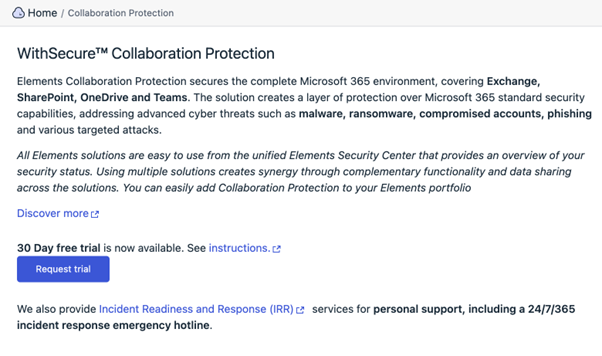
Try Collaboration Protection Now with Our New In-Product Trial
In-Product Trial for Collaboration Protection is now available in production. EPP admins can easily create an evaluation subscription directly from the product interface.
Key Highlights:
- Easy Activation: Simply click on Collaboration Protection at the company scope to start your trial.
- Streamlined Setup: The subscription process is quick and easy—just enter your email and phone number.
- Self-Subscription: Follow a straightforward self-subscription flow to get started.
This new feature allows you to explore and experience the benefits of Collaboration Protection with minimal effort. Try it out today and see how it can enhance your collaboration security.
Elements Vulnerability Management
EVM: System Scan
The following applications have been added to the list for detecting vulnerabilities, in authenticated scanning for Windows:
- Progress Telerik Reporting
- Progress Telerik Test Studio
- Progress Telerik UI for WinForms
- Intel VTune Profiler
- Intel Graphics Performance Analyzers
- Intel Graphics Performance Analyzers Framework
- Intel Power Gadget
- IBM Cognos Controller
- Ivanti Endpoint Manager
- FileCatalyst TransferAgent
- Dropbox Desktop
- JetBrains RustRover
- JetBrains GoLand
- JetBrains DataSpell
- JetBrains DataGrip
- JetBrains CLion
- JetBrains Aqua
- VIPRE Antivirus Plus
- Hancom Office
- Veeam Backup Enterprise Manager
- Ashlar-Vellum products
EVM: Portal changes
- Elements Vulnerability Management supports SNMP for system scan configuration. Users can now configure authentication using SNMP v3.
- Product subscription names in Device Discovery view have been updated. Read more.
Integrations
WithSecure Elements API: Create response actions
The Elements API allows a user with EDR subscription to create a response action.
Example query like (use all on one line, this example is split to multiple lines here for clarity):
curl -X POST -H "Authorization: Bearer {token}"   -H "Content-Type: application/json"
     -d '{"organizationId": "{organizationId}", "type": "netstat", "comment": "test",
         "targets": ["{deviceId}"], "parameters": {"maxFileHash": 10}}'
{
id: “{actionId}”
}
The response contains the id of created action.
WithSecure Elements Connector: Version 24.25
A new release of Elements Connector 24.25 for both Windows and Linux is now available. This release includes the following changes:
- Security Updates:
- Upgraded Spring Framework to version 5.3.34, addressing CVE-2024-22262.
- MSI Installation Fix:
- Resolved an issue with MSI installation in localized Windows environments.
- Fix for DNS Resolving:
- Addressed DNS resolving issues through upstream HTTP proxies when using isolated DNS.
- New Channel Subscriptions for WS-GUTS2:
- Elements Connector now subscribes to the following WS-GUTS2 channels:
- swup-win-db
- sidegrade
- elements-connector-win
- elements-connector-linux
- Elements Connector now subscribes to the following WS-GUTS2 channels:
Installation Options:
- First-time installers are now available on our Software download page.
- The channel upgrade is scheduled for Tuesday, June 25th.
New integration of WithSecure Elements to Microsoft Sentinel released
A new integration of WithSecure Elements to Microsoft Sentinel has been published in the Azure marketplace.
The new integration is more secure, serverless and requires no maintenance from the customer. It brings all security events supported by the Elements API to MS Sentinel.
Alternatively, the connector can be installed from the command line by following the instructions in github.
How it works
The integration allows ingesting WithSecure Security Events into Microsoft Sentinel Logs Workspace. It periodically polls Security Events from Elements backends and forwards it to Azure cloud. A Sentinel administrator can then use the ingested events to create Workbooks, Playbooks and use other useful Sentinel features.
Other items of interest
Monthly Threat Highlights Report: May 2024
- Emphasis on the importance of multi-factor authentication (MFA) in preventing cyberattacks, as demonstrated by the compromise of Change Healthcare due to a lack of MFA on a Citrix account.
- Organizational changes at Microsoft in response to security failures, such as tying senior executives’ pay awards to prioritizing security over new features and partnering deputy CISOs with engineering teams.
- Ongoing law enforcement actions against cybercriminals, including the action against LockBit and the initiation of a secure-by-design pledge by the US government cybersecurity agency, CISA.
- Response to zero-day vulnerabilities in SSL VPN solutions, with Norway’s NCSC recommending organizations to switch to more secure alternatives like IPSec IKEv2 VPNs or 5G data connections.
- Insights into AI security news, including research on how hackers are leveraging generative AI to enhance their offensive capabilities and strategies to defend against such attacks.
The key findings in the May 2024 Threat Highlight Report include:
- Ransomware Trends: The report highlights the compromise of Change Healthcare due to a lack of multi-factor authentication (MFA) on a Citrix account, emphasizing the importance of MFA in preventing cyberattacks .
- Organizational Changes at Microsoft: Microsoft has announced organizational changes in response to security failures, such as tying senior executives’ pay awards to prioritizing security over new features and partnering deputy CISOs with engineering teams .
- Law Enforcement Actions: Law enforcement actions against cybercriminals, such as the ongoing action against LockBit and the initiation of a secure-by-design pledge by the US government cybersecurity agency, CISA, have been noted .
- Zero-Day Vulnerabilities in SSL VPN Solutions: CheckPoint’s Firewall VPN gateways experienced a zero-day vulnerability, leading Norway’s NCSC to recommend organizations to switch to more secure alternatives like IPSec IKEv2 VPNs or 5G data connections .
- AI Security: Research on how hackers are using generative AI to enhance their offensive capabilities and strategies to protect against such attacks have been highlighted in the report .
- Statistics and Summaries: Several companies have published reports on cybersecurity statistics and trends for 2023, providing insights into the evolving threat landscape.
In case you missed it
Important Announcement: End of installation support for deprecated Elements Agent registration API
Due to changes announced in Upcoming changes to WithSecure Elements client installations we will soon remove the ability to install Agents from old installer versions depending on obsolete Elements Agent registration API.
We strongly advise against using old installers and recommend to always take the latest versions from the Download Center or Elements Security Center.
Starting from 1.08.2024 it will be impossible to make new Agent deployments using installers published in 2022 or earlier.
Public Holidays coverage for WithSecure Co-Monitoring Service
We are delighted to announce that we are officially launching the Public Holidays coverage for the Co-Monitoring Out of Office service.
This coverage is currently available for the following countries, and for country-wide public holidays only:
- Nordics: Finland, Norway, Sweden, Denmark
- DACH: Germany, Austria, Switzerland
- UK: England, Wales, Scotland and Northern Ireland
- USA: Federal holidays only, not unique state holidays
- Netherlands
- Belgium
- France (mainland only)
- Italy
- Estonia
- Republic of Ireland
- Singapore
- Japan
Countries not listed above cannot currently use the Public Holiday coverage, but we will consider adding more in the future.
Please contact your WithSecure Sales Representative for more details. For End Customers, this is typically the partner that you purchased your WithSecure products and services from.
Share your ideas with us
Our purpose is to co-secure the world with you – now as WithSecure™. To co-create the best possible cyber security products and services, we warmly recommend you share your ideas via our Ideas Portal, now accessible directly from WithSecure™ Elements Security Center.
Further information
Changelogs and Release Notes for all parts of WithSecure™ Elements can be found at the Help Center
- Add Widgets:
-
What’s New in Elements: May 2024
Read more
Editor’s Highlights
New products and services launched at SPHERE24
We recently held out annual partner event SPHERE in Helsinki, and during this we announced several new products and services.
You can find out more about these new launches in a dedicated Community article
Removal of old F-Secure.com domain names for WithSecure Elements
As announced early in 2023, we have changed all of our domain names used by WithSecure Elements to use the withsecure.com address space. Until recently, the old elements.f-secure.com redirected to elements.withsecure.com, but now that redirection has been removed as we no longer have any influence on f-secure.com.
Please always use to access the Elements Security Center. We recommend you add this to your browser bookmarks, and remove any old entries using elements.f-secure.com
Elements Security Center
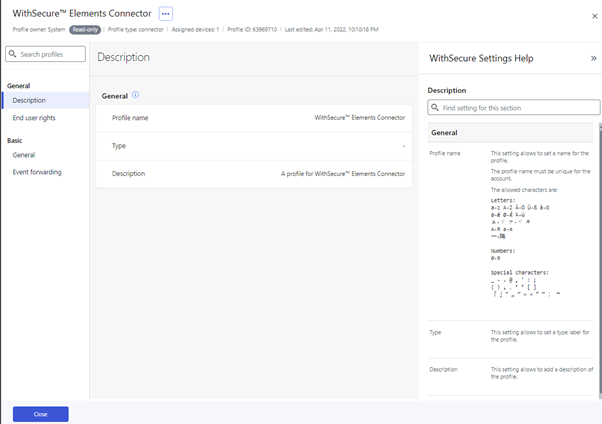
New UI for the connector profiles
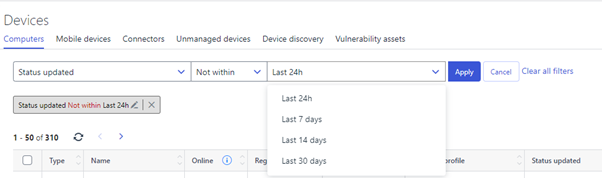
Added “Not within” filter option to Devices view filter panel
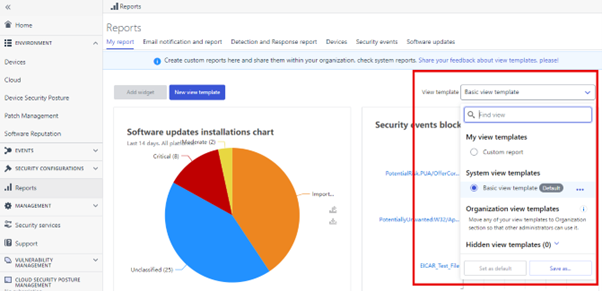
Custom reports from templates
We have added a view template selector that allows the creation of multiple custom reports. Once a view is created, it can be part of an organization, making it visible to all admins within the same organization. We have also introduced system view templates to provide basic default view that is a generic example of widgets. You can set what is your default view or hide default and organization views that are not useful to you.
Elements Endpoint Protection
Rollback Enabled by default
After some careful consideration, we have now enabled by default the Rollback feature of Windows EPP in the WithSecure supplied profiles.
As Ransomware attacks are becoming more prevalent, we feel that this functionality is more and more important for our partners and customers.
We strongly recommend that all partners and customers enable this feature, as it will help prevent unwanted outcomes when a Ransomware is detected.
WithSecure Element Agent for Mac: Version 24.1.52031
A new version of WithSecure™ Elements Agent for Mac has now rolled out to Production and is available for all customers.
Actions required:
MDM profiles must be updated as instructed in the dedicated article for this release
You can update products deployed by MDM using the first time installer.
This release introduces new WithSecure Elements agent update mechanisms. We are taking into use backend services that are completely distinct from the services used by F-Secure products. Therefore this release also introduces new server addresses where the endpoints connect to. Switch to the new backend services happens like the usual automatic endpoint upgrade and will require full definitions download.
- The product is now signed with WithSecure signature and installed to the new location:
/Library/WithSecure (instead of /Library/F-Secure used for earlier versions)
/Applications/WithSecure (instead of /Applications/F-Secure used for earlier versions)
activator tool is now moved to /Library/WithSecure/bin/activator
- Background connectivity checker tool is now added to the product. Client now detects and reports connectivity issues to the Element Security Center to highlight Firewall misconfiguration to the administrator.
- Elements Agent is now using the new Browsing Protection extensions. If you use MDM or group policies to manage browser extensions it is recommended to allow or preinstall these extensions as instructed on page Announcement: New WithSecure client for macOS.
- Auditd is not required for the sensor to function on Sonoma and we will gradually reduce dependency on auditd on older OS versions.
WithSecure™ Element Agent is compatible with the following versions:
- macOS 12 Monterey
- macOS 13 Ventura
- macOS 14 Sonoma
Dropped functionality:
- macOS 11 Big Sur support is discontinued. Elements Agent won’t be upgraded on Big Sur and older OS versions and will remain running the previous product version until its end of life. WithSecure recommends upgrading these endpoints to macOS 12 or above to ensure uninterrupted service. Please upgrade Elements Agent manually if the version running is 22.4 and older. Versions 23.1 and newer will be upgraded automatically.
WithSecure Element Mobile Protection for IOS 24.4.10902
An update to the WithSecure Elements Mobile Protection app for iOS (24.4.10902) has been released.
It includes the following new features and improvements:
- Improved the app battery consumption
- Removed the security parameter “Available Disk Space” to comply with the latest Apple regulations
- Updated the port used by Network Gateway to avoid interference with other standalone applications
- The app now handles profile settings even when it is not running
- The app now sends upstream data even when it is not running
Elements Endpoint Detection and Response
EDR: Accepted Behavior
We’re excited to announce the introduction of the Accepted Behavior feature! This powerful tool allows you to create suppression rules that recognize and accept user or process behavior, effectively silencing BCDs for expected activities.
Discover more about this feature here.
Elements Vulnerability Management
EVM: System Scan
Authenticated scanning for Windows can now detect vulnerabilities in the following products:
- Splunk Universal Forwarder
- Veeam Service Provider Console
- SketchUp Viewer
- Veritas Backup Exec Remote Agent
- Quest KACE Agent
- R for Windows
- Intel Media SDK
- JAVS Viewer
- Intel Processor Diagnostic Tool
- Intel Inspector
Integrations
Withsecure Elements API
List created response actions.
Advance response action is a feature that allows responders to execute actions directly on attack targets when an attack is detected in order to aid with the incident investigation and containment.
Listing of response actions with filtering is now available with Elements API.
Example query like curl -X GET -H “Authorization: Bearer {token}” https://api.connect.withsecure.com/response-actions/v1/responses?organizationId={organizationId}&order=asc
{"items": [{"id": "18f99eba-81a0-4000-8b87-366b26bb7c01","type": "string","state": "created","progress": {"devicesCount": 0,"pendingTasksCount": 0,"errorTasksCount": 0,"activeTasksCount": 0,"completedTasksCount": 0,"successfullyCompletedTasksCount": 0},"createdTimestamp": "1970-01-01T00:00:00.000Z","updatedTimestamp": "1970-01-01T00:00:00.000Z","devices": [{"deviceId": "18f99eba-81a0-4000-8ac9-f6243f1f6901"}],"author": {"id": "18f99eba-81a0-4000-8906-2164b4581501","source": "oneId","username": "string"},"comment": "string","result": "succeeded"}],"nextAnchor": "string"}The response contains the list of created response actions for the organization. It contains action type, creation time, result and other parameters.
A new integration of WithSecure™ Elements via Function for Microsoft Sentinel
WithSecure™ Elements via Function for Microsoft Sentinel has been published in the Azure marketplace.
The new integration is more secure, serverless and requires no maintenance from the customer. It brings all security events supported by the Elements API to MS Sentinel.
You can find out more at the dedicated community article
In case you missed it
End of Installation support for deprecated Elements Agent registration API
We will be stopping installation for very old installers, and you can find out more details in the dedicated article
Do note that all current installers will still work correctly. This only affects installers we produced some time ago, so we recommend always using the latest installer to deploy our products.-
Share your ideas with us
Our purpose is to co-secure the world with you – now as WithSecure™. To co-create the best possible cyber security products and services, we warmly recommend you share your ideas via our Ideas Portal, now accessible directly from WithSecure™ Elements Security Center.
Further information
Changelogs and Release Notes for all parts of WithSecure™ Elements can be found at the Help Center