
-
Minor Maintenance break for WithSecure Exposure Management 2025-12-02
Read more
We will be performing a small maintenance operation on WithSecure Elements Exposure Management on December 2nd, 2025 at 11.00 AM (UTC). This operation is expected to take a maximum of 30 minutes.
During the maintenance, there might be delays in accessing the data on Environment -> Network pages. Pages will be available again once maintenance is completed with reorganized Network Assets and Internet tabs.
There is no user action required during this maintenance period.
User impact during maintenance: LOW
-
Changing an Elements Vulnerability Management agent to use an Elements Exposure Management subscription
Read more
Existing customers of WithSecure Elements Vulnerability Management (EVM) who migrate to WithSecure Elements Exposure Management (XM), and use the EVM-only client, will need to change it to use a new subscription key.
How to change the subscription
This is really easy to do, simply follow these steps:
Log into the Elements Security Center
Navigate to Environment / Devices / Computers
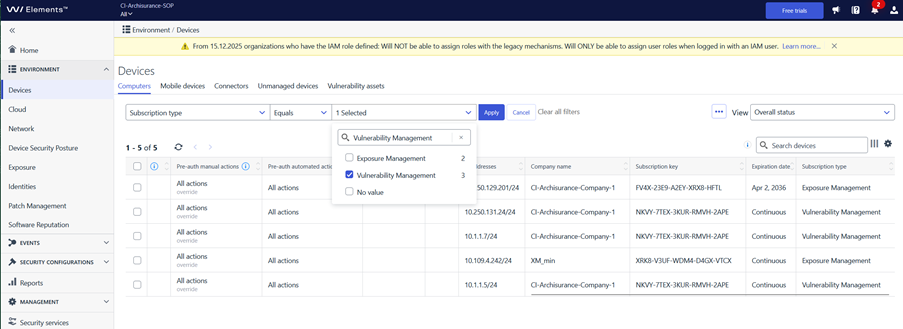
Set the filtering to “Subscription type” “Equals” “Vulnerability Management” as shown in this image
Select all devices that match the filtering
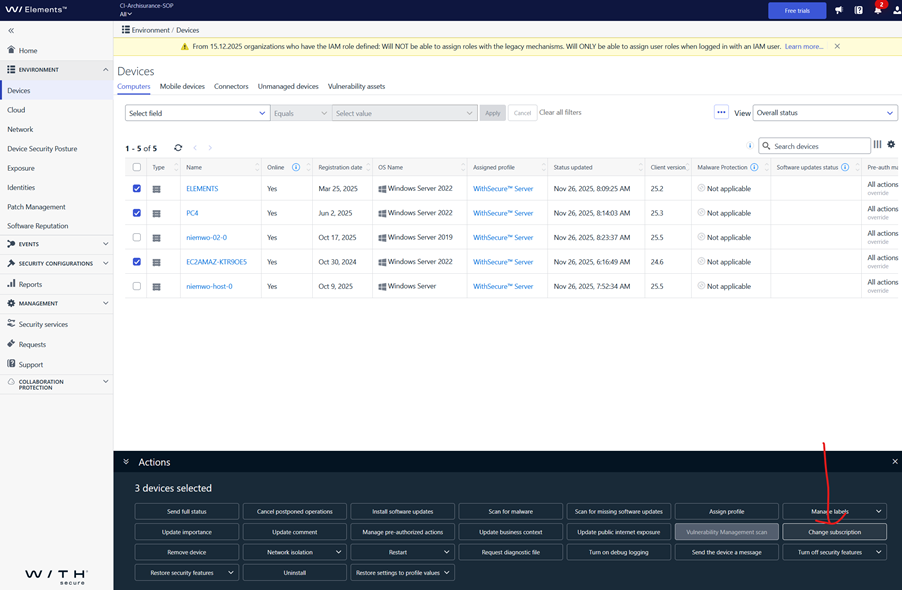
Click “Change Subscription” in the lower pane.
Enter the new subscription key for Exposure Management
That’s all you need to do. The new key will be assigned to all the selected devices.
-
Exposure Management: Synology DSM Detections now available via SSH Scan
Read more
Update 2025-11-28: SSH scanning for Synology DSM is now available to all customers. SSH scanning is now the only reliable way to detect the DSM version in use.
Summary
We would like to inform our partners and customers about an important change in how Synology DSM vulnerabilities are detected in WithSecure™ Elements Exposure Management and WithSecure™ Elements Vulnerability Management.
Following recent changes from Synology, their devices no longer report the full DSM version via the unauthenticated network banner. This impacts detection reliability for unauthenticated scans.
Change Details
What changed:
- Synology has stopped exposing full DSM version information in its network banner (previously available without authentication).
- This change caused inaccurate version recognition for versions with minor release number and potential false positives in EVM/XM.
Action taken:
- To maintain scan integrity, unauthenticated DSM version-based plugins have been temporarily disabled for undetectable versions.
- This impacts approximately 70% of Synology DSM versions.
- For the remaining 30%, unauthenticated detections continue to operate normally.
Upcoming Improvement: SSH Authenticated Scanning for DSM
We are actively working on an enhancement to extend SSH authenticated scanning to fully support Synology DSM.This will restore precise version and vulnerability detection through secure, authenticated methods.
Estimated delivery:
We anticipate that the improvement will be deployed by the first week of December 2025. We will update this article once the deployment has been made.
What Customers Should Do
Once the new SSH scanning capability becomes available:
- Enable SSH access on Synology DSM devices via the DSM web interface.
- Update your scan configurations to use Authenticated System Scan with SSH credentials/keys.
- Verify permissions and connectivity to ensure full coverage.
-
What’s New in Elements – October 2025
Read more
Extended Detection and Response
Endpoint Protection
Elements Agent for Linux Now Available for ARM64 Architecture
We are pleased to announce that Elements Agent for Linux now include support for ARM64-based systems.
Installation packages are available for download in the Download Center and in the Elements Portal.
WithSecure Mobile Protection for IOS
An update to the WithSecure Elements Mobile Protection app for iOS (25.10.11981) has been released
It includes the following fixed issues:
- The app and the WithSecure Elements Endpoint Protection portal now support the SMS Protection setting
- The “Recent Activities” view now shows occurrences for processed and blocked URLs
- Added a filtering option at the top of the list of checked URLs
- Added main screen for iPad devices
- Improvements to app stability
- Fixed an issue where Network Protection could interfere with certain applications’ internet connectivity
WithSecure Mobile Protection for Android
An update to the WithSecure Elements Mobile Protection app for Android (25.4.0023361) has been released
It includes improvements to app stability
Exposure Management
We are happy to share many improvements to WithSecure Exposure Management
Recommendation list page (Exposure -> Recommendations)
Recommendation list “Generate on” column is now showing the time of when the recommendation was given in the context of organization. Please note that historical recommendations may show very recent timestamp due to the fact that this info is only available since very recently.
Saved views on Findings, Recommendations and Identities pages
Preserving the state of ordering is now supported by saved views.
Unified Cloud Microsoft tenant configuration
New connection management for Identity Inventory released
Identity details – Risk assessment tab
There is now new possibility to filter Identity breaches by severity
Finding definitions tab added under Environment -> Exposure
The Finding Definitions page now lists all potential finding types that Exposure Management can detect—across vulnerabilities, identities, cloud assets, and external attack surfaces. Unlike the Findings tab, this view includes definitions even if no asset is currently affected. It supports pagination, saved filters, and navigation to related data, consistent with other XM views.

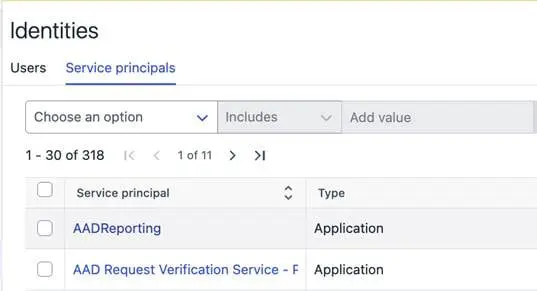
Service principal tab add under Environment -> Identities
The identities list now includes Entra service principals alongside users, providing basic information for each service principal. It supports pagination, saved filters, and navigation to related data, consistent with other XM views.
Exposure Management for Business
New Feature: Identity Inventory
Identity Inventory is a new capability in WithSecure™ Elements that provides a unified place for administrators to configure and manage Entra ID tenants. It simplifies Tenant management by centralizing visibility and control within the Elements Security Center.
You can find out more about Identity Inventory in this dedicated article
Exposure Management Portal
- Improved overall performance.
- Added an info banner to the Vulnerability Users page announcing its upcoming deprecation for all customers.
- Disabled Vulnerability Users page for new Exposure Management customers.
- Added support for logarithmic scales in the VM Histogram widget.
- Resolved an issue that caused errors when opening historical Web Scan reports.
- Resolved an issue where email notifications about low disk space on scan nodes were not being sent.
- Disabled Dashboard page by hiding the tab for new Exposure Management customers.
System Scan
Support for detecting vulnerabilities in the following products was added to Authenticated Scanning:
- Apache Zeppelin
- Snappy Java
Support for detecting vulnerabilities in the following products was added to Authenticated Scanning for Windows:
- FPGA Support Package for the Intel oneAPI DPC++/C++ Compiler
- Intel Advisor
- Intel Connectivity Performance Suite
- Intel Distribution for GDB
- Intel DPC++ Compatibility Tool (DPCT)
- Intel Integrated Performance Primitives (IPP)
- Intel oneAPI Data Analytics Library (oneDAL)
- Intel oneAPI Deep Neural Network Library (oneDNN)
- Intel oneAPI DPC++ Library (oneDPL)
- Intel oneAPI Math Kernel Library (oneMKL)
- Intel oneAPI Threading Building Blocks (oneTBB)
- NetSupport Manager
- QEMU
- Schneider Electric Software Update
Elements Foundations
Integrations
WithSecure Elements API
New remote operation (Send Full Status)
We have added API support for the sendFullStatus remote operation, allowing administrators to request a full status report from devices. This operation is available for both computer and mobile devices and requires no additional parameters. After the operation is sent, the target device(s) will asynchronously send their status to the Elements Cloud.
Read more from the api specification page under POST /devices/v1/operations endpoint.
New API Endpoint: Get Incident Updates
We have added a new endpoint to the Elements API that provides programmatic access to incident update history.
Endpoint Details
GET /incidents/v1/updates
Description
This endpoint retrieves the complete history of changes made to a specific incident (Broad Context Detection). Each update represents a modification to the incident over its lifecycle, including status changes, detection additions, comments, and other modifications.
Key Capabilities
Update Types Tracked
- Status changes (patch)
- Detection additions, removals, and modifications
- User comments
- Response actions
- Incident merges
- Risk level adjustments
- Category changes
- Threat investigation and validation results
State Tracking
Each update includes stateBefore and stateAfter objects, allowing you to see exactly what changed. This includes status, resolution, risk level, and categories.
Origin Information
Updates include source information indicating whether the change was made by:
- A user (with display name)
- An automated engine
- A response action
Pagination Support
Results can be paginated using anchor-based navigation, with a configurable limit of 1-100 updates per request (default 50).
Filtering
Filter updates by type to retrieve only relevant changes (e.g., only comments or only status changes).
Customer Benefits
- Complete Audit Trail: Access the full history of incident modifications for compliance and reporting purposes.
- Accountability: Identify who made specific changes to incidents through origin tracking.
- Integration Support: Build automated workflows that respond to specific types of incident updates.
- Change Analysis: Compare before and after states to understand the evolution of an incident.
- Efficient Data Retrieval: Use type filtering to retrieve only relevant updates, reducing unnecessary data transfer.
- Scalability: Pagination support allows handling incidents with extensive update histories.
Read more from the Elements API specification page under “Get Incident Updates”.
New “restart” remote operations
We have added two new remote operations to the Elements API device operations endpoint that enable programmatic system and agent restarts.
Operations Overview
The new operations “restartSystem” and “restartProduct” are available via the POST /devices/v1/operations endpoint.
New Operations
restartProduct
Restarts the WithSecure agent software on a device without restarting the entire system.
restartSystem
Restarts the entire device (full system reboot).
Batch Capability
Both operations support batch execution on up to 5 devices per request.
Benefits
- Agent Troubleshooting: Restart the WithSecure agent without disrupting the user’s work by avoiding a full system reboot.
- Maintenance Automation: Integrate system restarts into automated maintenance workflows following software updates or configuration changes.
- User Communication: Provide advance notice to users with custom messages before system restarts, improving user experience.
- Efficient Remediation: Quickly restart multiple devices as part of incident response or troubleshooting procedures.
- Granular Control: Choose between agent-only or full system restarts based on the specific troubleshooting or maintenance requirement.
- Operation Tracking: Track restart operations using returned operation IDs to verify execution on remote hosts.
Read more from the Elements API specification under “Trigger remote operations on devices”.
New response actions to enable new workflows
We’ve added new response action endpoints under
POST /response-actions/v1/execute/<name>
to expand remote execution capabilities for both device and identity management.
This allows you to automate new workflows that involve acting on the target devices and identities.
This release increases the number of API supported response actions from 8 to 32.
Device response actions
The following device response actions are available:
- Create full memory dump – Uploads a full memory dump from the device
- Delete registry key or value – Deletes a specified Windows registry key or value
- Delete scheduled task – Deletes a specified Windows scheduled task
- Delete Windows service – Deletes a specified Windows service
- Delete WMI persistence objects – Deletes Windows Management Instrumentation (WMI) persistence objects
- Enumerate running processes – Enumerates running processes on the device
- Enumerate WMI persistence mechanisms – Enumerates WMI persistence mechanisms, including event consumers, filters, and bindings
- List file system structure – Lists the file system structure based on path matching patterns
- List registry keys and values – Lists Windows registry keys and values based on path matching patterns
- List scheduled tasks – Lists all Windows scheduled tasks on the device
- Retrieve amcache files – Retrieves the application compatibility cache file from the device
- Retrieve antivirus logs – Retrieves antivirus software log files for security analysis
- Retrieve browser artifacts – Retrieves the browser history from the device
- Retrieve event log tracing files – Retrieves .etl event log tracing files with records of system activities
- Retrieve files from device – Retrieves files from the device based on path matching patterns
- Retrieve jump list files – Retrieves jump lists stored in the AutomaticDestinations and CustomDestinations subfolders
- Retrieve master boot record – Retrieves the master boot record (MBR) from a specified drive
- Retrieve master file table – Retrieves the master file table (MFT) from a specified drive
- Retrieve network connections – Retrieves network connections, routing tables, interface statistics, and related process information
- Retrieve prefetch files – Retrieves Windows prefetch files with evidence of program execution
- Retrieve process memory dump – Retrieves a memory dump of a specific process
- Retrieve RDP cache files – Retrieves remote desktop protocol (RDP) bitmap cache files
- Retrieve recently accessed files – Retrieves information about recently accessed files and folders from user activity artefacts
- Retrieve registry hive files – Retrieves Windows registry hive files
- Retrieve SRUM database – Retrieves the system resource usage monitor (SRUM) database
- Retrieve Windows event log entries – Retrieves Windows event log entries based on specified filters
- Retrieve Windows event log files – Retrieves Windows event log files
- Terminate process – Terminates processes matching the specified patterns
- Terminate thread – Terminates a thread
Identity response actions
The following identity response actions are available for Microsoft Entra:
- Block user access in Microsoft Entra – Blocks access for a user to all resources inside the Microsoft Entra ecosystem
- End Microsoft Entra session – Ends the Microsoft Entra session of a user
- Reset Microsoft Entra password – Resets the Microsoft Entra password of a user
Response action results and attachments
Response actions are processed asynchronously: once triggered, you can monitor their progress.A new endpoint is available for retrieving the actual results of response actions that return data (for example, memory dumps or other files):
GET /response-actions/v1/responses/tasks
By using this endpoint, you can download any files or attachments produced by completed response actions. To determine when your action has finished, first poll the state via GET /response-actions/v1/responses. When the action is marked as finished, your attachments are ready for download from the tasks endpoint.
Start building
Full API documentation is available at Elements API Reference | WithSecure™ Connect
Other items of interest
Threat Advisory October: Docker Compose Path Traversal Vulnerability (CVE-2025-62725)
Technical Summary
- A critical vulnerability in Docker Compose‘s handling of OCI-based artifacts allows attackers to perform path traversal and write arbitrary files to the host system. This flaw stems from improper validation of layer annotations in YAML files, which are widely used in CI/CD pipelines and development environments.
- Attackers can exploit this flaw by tricking users into referencing a malicious remote artifact. This enables them to escape the Compose cache directory and write files anywhere the Compose process has permissions—potentially leading to full host compromise, data tampering, or privilege escalation.
Share your ideas with us
Our purpose is to co-secure the world with you – now as WithSecure™. To co-create the best possible cyber security products and services, we warmly recommend you share your ideas via the Ideas section of the WithSecure Community, now accessible directly from WithSecure™ Elements Security Center.
Further information
Changelogs and Release Notes for all parts of WithSecure™ Elements can be found at the Help Center
-
System Maintenance: XDR-related updates – 24th November 2025
Read more
We will be performing some system maintenance on our WithSecure Elements backend systems on 24th November 2025, at 8.00 UTC.
This maintenance is expected to take a maximum of 30 minutes.
During the maintenance period:
- EDR/MDR-related views in Elements will be impacted
- Customer are still protected throughout the maintenance period.
- Events will keep flowing, and BCDs will continue to be created.
- No data is lost, but there might be small delay in processing
- If customers are using the Elements APIs directly they can retry after the maintenance break is over. All data that was created during maintenance will be there
Note: WithSecure Countercept is not affected by this Maintenance break
We apologize for any disruption this maintenance period may cause.
-
Exciting New Release: Identity Inventory for XDR!
Read more
We are happy to announce a new capability for WithSecure™ Elements: Identity Inventory. This functionality will benefit customers of both WithSecure Elements Identity Security for Entra ID, and WithSecure Elements XDR Cloud Security for Azure
Background
This update gives you a clear and complete view of all identities in your cloud environment.
With Identity Inventory, you can easily see:
- All users and service principals
- Their types and roles
- MFA (Multi-Factor Authentication) status
How to Get Started
- Go to the Cloud → Microsoft tenants page in Elements.
- Connect the new Identity Inventory capability (you only need to give permission to read Entra ID data – no Azure subscription needed).
- After the scan is complete (it may take up to 36 hours), you will see all identity data in Environments → Identities.
Why is this important?
- You get complete visibility into who and what has access in your cloud environment – now directly inside Elements, without needing to switch to the Azure portal.
- It helps you identify potential risks, such as accounts without MFA or unexpected roles.
- No extra Azure subscription or complicated setup is needed.
This new capability helps you spot risks early and keep your cloud environment secure by giving you a clear picture of all identities.
What’s Next?
BCDs (Broad Context Detections) will be linked to Identities. This means you will be able to easily see which identities are related to specific detections, making investigations and understanding security events even easier.
-
Elements Vulnerability Management: Feature changes as End-of-Life approaches
Read more
Introduction
We are preparing the End of Life (EOL) of WithSecure Elements Vulnerability Management (EVM), where EVM is replaced with the more comprehensive and intelligent solution – WithSecure Elements Exposure Management (XM).
XM includes and is not limited to
- From reactive and asset centric to proactive and estate-wide security.
- Gain visibility on what attackers would be able to do in your estate.
- Easier and more efficient prioritization of work.
- AI assistance for remediating and documenting your exposure.
- Expand your visibility beyond devices. E.g. EntraID, Azure and AWS.
We are now highlighting a few fundamental changes that will impact EVM, and also when you continue using similar features in XM product.
EVM Ticketing User Interface
We have decided to discontinue the EVM ticketing system user interface. The earliest date this will occur is 1st December-2025, and by the end of 2025 at latest. The EVM ticketing related user interface can no longer be accessed.
While the ticketing workflow and the related history will continue to be supported via the EVM API, we recommend utilizing statuses of Exposure Management Recommendations and Findings. The recommendations are also accessible via the Elements Security Events API, which can be used to integrate to an external ticketing system. Please reach out to your WithSecure contact to get additional help for the transition.
In case you need to access or modify the EVM ticketing data or configuration via the Elements user interface, we recommend doing it before December 2025.
EVM Vulnerability Users
As previously announced we are changing the way EVM users are managed.
We have decided to migrate Vulnerability Users as part of Elements Role Based Access Control (RBAC). The following user interface is no longer accessible, and the earliest this change will happen will be 1st December 2025:
Management / Organization Settings / Vulnerability Users
The roles and accesses within will continue to function.
While the EVM API can be still used to manage the access, we recommend using the Elements level RBAC found in:
Management / Organization Settings / Security Administrators
This view allows managing user permissions using one of the 3 default roles: Administrator, Team member or Read-only team member. If the user was previously assigned to a custom VM role or roles, it will be represented as a single “Vulnerabilities:Custom” role. VM custom roles can only be revoked using Security Administrators view.
A screenshot below presents the matrix of privileges assigned to the 3 default roles that can be managed via Elements-level Security Administrators page

Further changes
We expect changes also to the following areas, as we start using Elements wide solutions.
- Environment / Devices / Device Discovery
- The functionality is already available in the Computers view
- Environment / Devices / Vulnerability assets
- The functionality is going to be available at dedicated views
- Devices / Computers
- Devices / Unmanaged soon
- Environment / Exposure / Vulnerabilities
- The functionality is going to be available at Environment / Exposure / Findings
- Further details to come
- Environment / Exposure / Vulnerability coverage
- The functionality is going to be available at Environment / Exposure / Findings definitions
- Further details to come
- Home / Vulnerability Management Dashboard
- The most used widgets are going to be available at Reports / My Report
- Further details to come
- Reports / Vulnerability Reports
- Will be moved under Reports / Email notifications and reports
- Further details to come
The following items will be reimplemented within Elements to become available across the whole of the Elements portfolio:
- Reports / Vulnerability Notifications
- Vulnerability Settings / Notification Settings
- Vulnerability Settings / Event Log
We are currently evaluating how we will present the following capability to the users
- Security configurations / Scans / Network scans
- Compliance (PCI)
-
Upcoming Retirement of the Environments -> Devices → Vulnerability assets page in Elements
Read more
We would like to inform you that the Environments -> Devices → Vulnerability assets page in Elements will be gradually retired by the end of 2025.
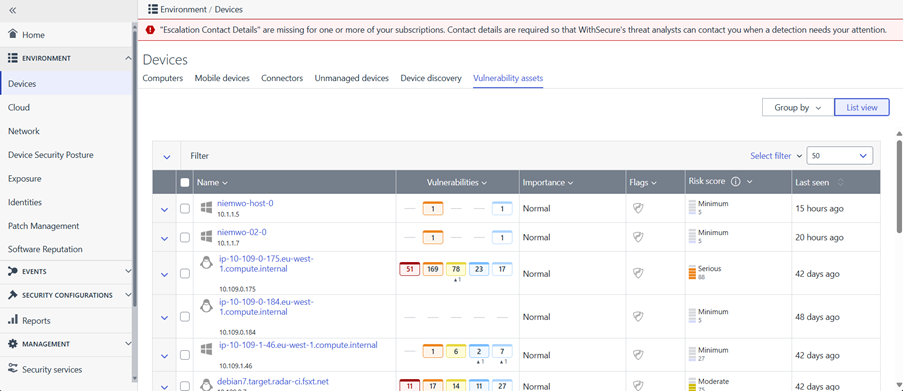
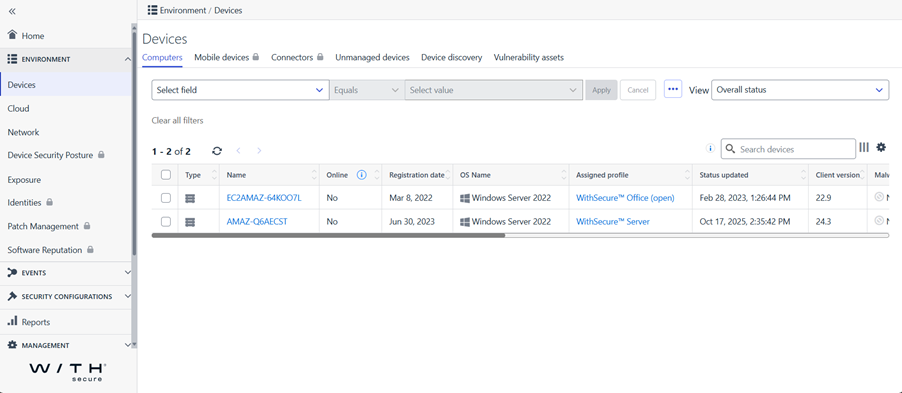
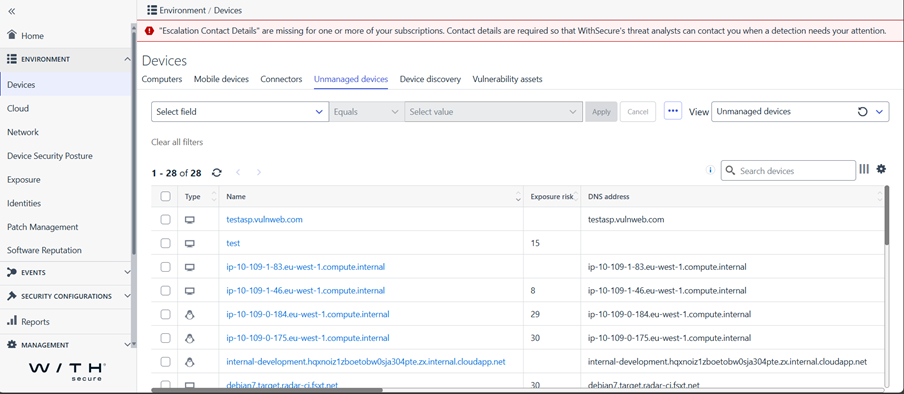
After November 1st, 2025, editing of several fields and properties on Vulnerability assets page (both list view and details view) will be disabled. Most actions previously performed on these pages, as well as asset-related information, are now available on the Computers page and Unmanaged Devices page.
We encourage you to start using the Environments -> Devices -> Computers page and Environments -> Devices -> Unmanaged Devices pages for asset-related tasks going forward. By doing this, you will be fully prepared for the eventual removal of the old page.
Also, the following Vulnerability Management API endpoints will be disabled after November 1st, 2025.
- POST api/latest/assethosts/
- POST api/latest/assethosts/description
- POST api/latest/assets/
- POST api/latest/assets/{assetId}/note
- DELETE api/latest/assets/name/{assetId}
- PUT api/latest/assets/tags/batch
- PUT api/latest/assets/notes/batch
- POST api/latest/assets/{assetId}/tags
- DELETE api/latest/assets/{assetId}/tags/{technicalName}
For more details, please refer to Vulnerability Management API:
https://api.radar-prd.fsapi.com/apidoc/index.html
Thank you for your continued trust and support!
-
What’s New in Elements – September 2025
Read more
Extended Detection and Response
Endpoint Protection
WithSecure Elements Agent for Windows and Server
A new version of the endpoint clients is available, and this release makes the Elements Agent version 25.4 available (internal version 25.4.231).
The endpoints automatically upgrade, without a reboot.
This release introduces new features (with Profile Editor Update) and fixes.
Features:
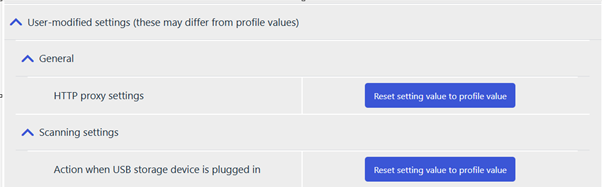
User-modified settings reporting:
- Agent now reports user-modified settings to the portal.These settings can be reset to profile values remotely via the portal UI.
Additional host information is now reported to the portal:
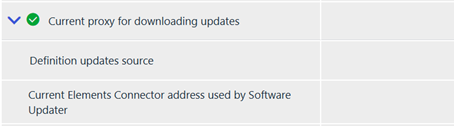
- Agent reports the current Elements Connector address used by software updater.
- Agent reports the current definition updates source address.
Improved agent UI:
- The agent UI now provides clearer indications when protection is turned off.
WithSecure Elements Agent macOS
WithSecure Elements Agent macOS 25.4.54641 has been released to general availability (GA) on 24th of September 2025.
This release brings
- Updated sensor version 25.1
- macOS 26 (Tahoe) support
Installer can be downloaded from here.
Elements Agent macOS 25.4.54641 supports following macOS versions:
- macOS 26 Tahoe
- macOS 15 Sequoia
- macOS 14 Sonoma
Exposure Management
Luminen Enhancements
We’ve enhanced Luminen, our LLM-powered helper, to deliver clearer and more relevant descriptions for recommendations by taking into account organization-specific findings. All of this is done in a privacy-protected manner, ensuring that your data remains secure while making recommendations easier to understand and act upon. There is a possibility to switch from generic recommendations to organization specific and back.

Finding Details page
We’ve also enhanced the Findings details page with AI-generated CVE descriptions for vulnerabilities that appear in XM Recommendations. This update provides clearer, more contextual insights into CVEs, helping security teams better understand the nature and impact of vulnerabilities without needing to cross-reference external sources.
Enhancements to identity features
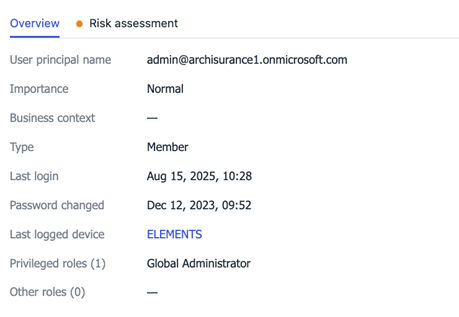
- Identity information has been enriched with Entra ID role information (visible in the Identity details flyout). Information is provided separately for privileged and non-privileged roles.
- New column “Last login device” is now available in the Identities table showing the information to which device Identity has logged in. In case customer has EPP license, there is also a link to the given device. Information about time of the login is available in the Identity’s details flyout.
Exposure executive summary report
This report is now available in My Reports
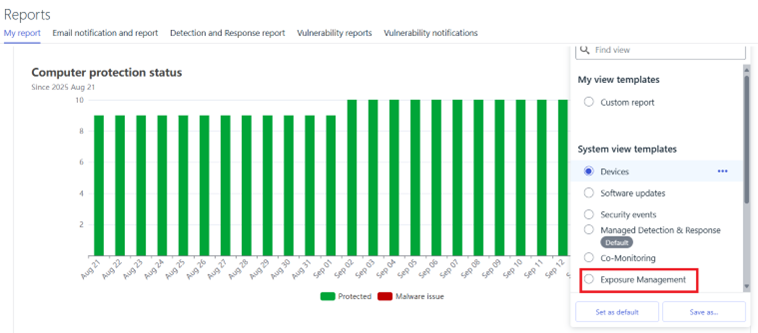
Summary report can be scheduled for being emailed like any other My Report templates via “Emails notifications and reports” tab under Reports menu
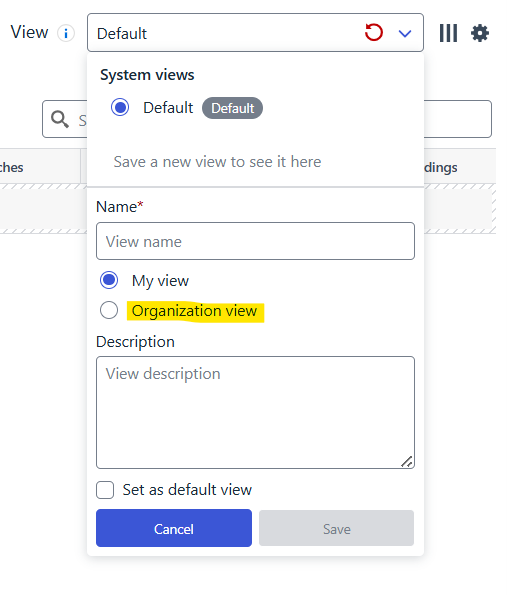
Shareable Views
Threat Intelligence visibility
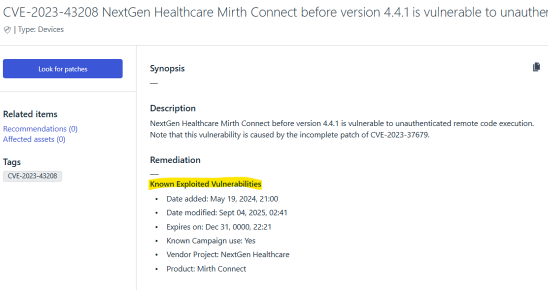
Threat intel CISA KEV information of CVEs are now visible on the UI if the CVE is known for having a public campaign
Exposure Management for Business
System Scan
Support for detecting vulnerabilities in the following products was added to Authenticated Scanning for Windows:
- Atlassian Jira Service Management (previously known as Jira Service Desk)
- CCleaner
- Greenshot
- HP Security Manager
- Poly Lens Desktop
- Seagate Toolkit
Support for detecting vulnerabilities in the following products was added to Authenticated Scanning:
- Apache DolphinScheduler
- Apache Fory
- Apache Kafka
- Apache Kafka Connect API
- Apache Kafka Connect Runtime
- Apache Seata
Elements Foundations
Integrations
Elements API: New Remote Operation: scanForUpdates
We’ve added a new remote operation that allows you to scan for available software updates on target devices.
What it does:
- Remotely triggers a scan for available software updates on selected devices
- Works on computer-type devices only
- Requires no additional parameters – simply specify the target devices
This complements the existing installSoftwareUpdates operation by providing a way to check what updates are available before deciding whether to install them.
Read more from the Elements API specification page and look for the POST /devices/v1/operations endpoint.
Elements API: New remote operation: Install Software Updates
The installSoftwareUpdate remote operation is now available in the WithSecure™ Elements API. This operation allows you to remotely install software updates on your managed devices.
Features
- Install updates by severity level (critical, important, or everything)
- Install specific updates using bulletin IDs
- Target individual devices or device groups
- Option to force close applications during updates
This remote operation is supported for the “computer” device type only.
Read more from the Elements API specification page and look for the POST /devices/v1/operations endpoint.
Other items of interest
Threat Advisory:Citrix NetScaler
CVE-2025-7775 – Remote Code Execution (RCE) Vulnerability
Technical Summary
- On August 26, 2025, Shadowserver reported that over 28,000 Citrix NetScaler instances remained unpatched against CVE-2025-7775, a critical RCE vulnerability.
- The vulnerability allows unauthenticated attackers to execute arbitrary code remotely on affected appliances. Exploitation in the wild has been confirmed by its inclusion in the CISA KEV (Known Exploited Vulnerabilities) list [1].
- Germany was identified as one of the top affected countries, alongside the United States, indicating widespread risk among European enterprise environments.
- Unpatched systems are actively being scanned and targeted.
NEW: WithSecure Elements: Customer onboarding welcome email flow
We’re excited to announce that the Customer Onboarding Welcome Email Flow is now live in production!
Newly onboarded customers and partners purchasing a product for the first time will automatically receive onboarding emails. This applies to both company-managed and partner-managed scenarios.
What’s Included in the Flow
- Welcome to Elements, Getting started guidance
- “Have you logged into Elements Security Center?” reminder
- Useful resources for using WithSecure Elements
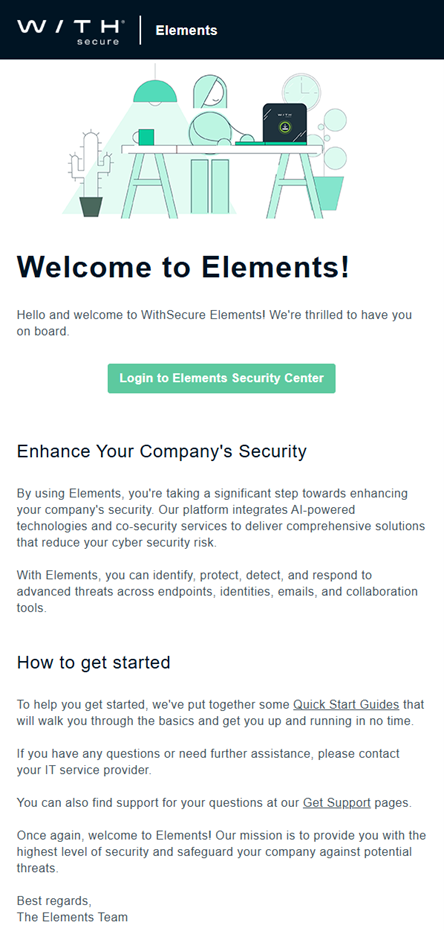
Email 1: Welcome to Elements, Getting started guidance
This mail is sent immediately after the purchase is registered in our system.
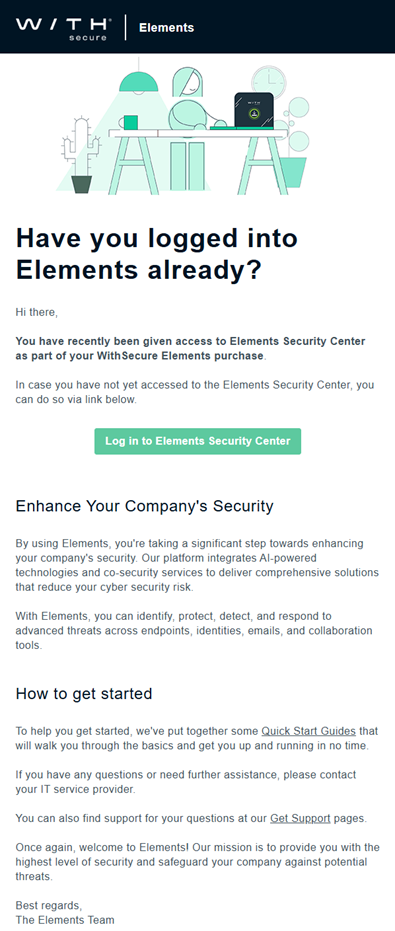
Email 2: “Have you logged into Elements Security Center?” reminder
This mail is sent two days after the purchase is made.
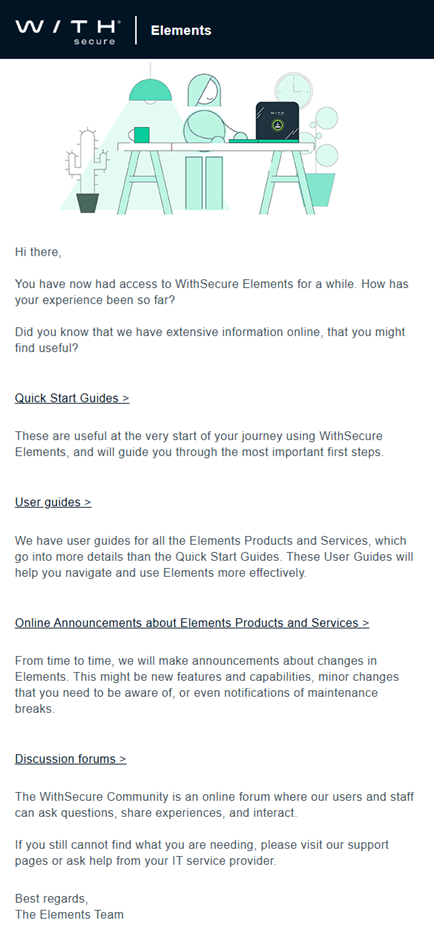
Email 3: Useful resources for using WithSecure Elements
This mail is sent 9 days after the purchase is made.
In case you missed it
Elements Role Assignments changes – 15 December 2025
Last year, we announced that we are making changes to how user roles are assigned in WithSecure Elements. You can read more about the next steps in our dedicated article.
Retirement of Vulnerability Management Users settings
We will be retiring the settings page for organizing Vulnerability Users by the end of 2025, with management of these being moved to a more central “Elements-Wide” location.
You can find out more in this dedicated article.
Share your ideas with us
Our purpose is to co-secure the world with you – now as WithSecure™. To co-create the best possible cyber security products and services, we warmly recommend you share your ideas via the Ideas section of the WithSecure Community, now accessible directly from WithSecure™ Elements Security Center.
Further information
Changelogs and Release Notes for all parts of WithSecure™ Elements can be found at the Help Center
-
New Feature: Identity Inventory
Read more
What is it?
Identity Inventory is a new capability in WithSecure™ Elements that provides a unified place for administrators to configure and manage Entra ID tenants. It simplifies Tenant management by centralizing visibility and control within the Elements Security Center.
What it replaces
This feature replaces earlier methods of managing Entra ID tenant connections to Elements Exposure Management — eliminating the need for manually running scripts and offering a more streamlined onboarding experience
Phased Rollout
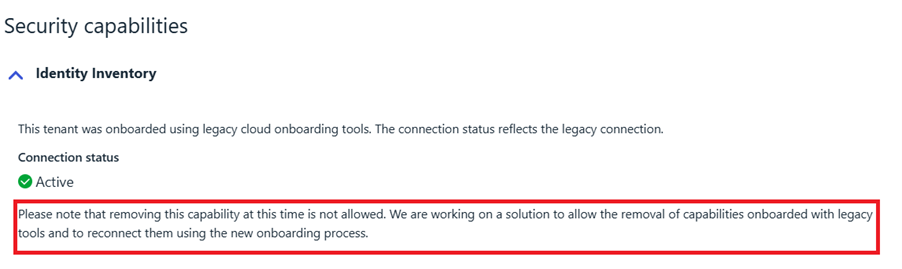
The Identity Inventory feature will be released in phases. Some functionalities may not be immediately available to all users. The user interface will guide you through any actions that are not yet accessible. For instance:
What’s in the Initial Release
For Elements Exposure Management (XM) Users
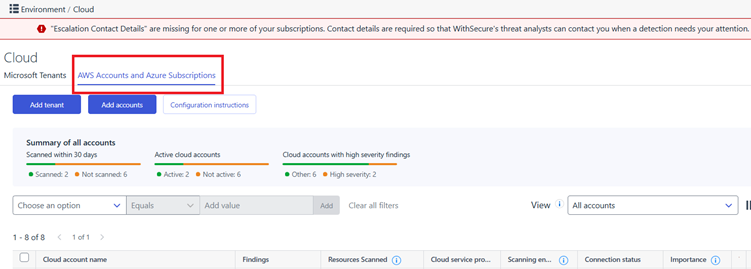
- The Exposure tab under Environment → Cloud will be renamed to:AWS Accounts and Azure Subscriptions
What it does
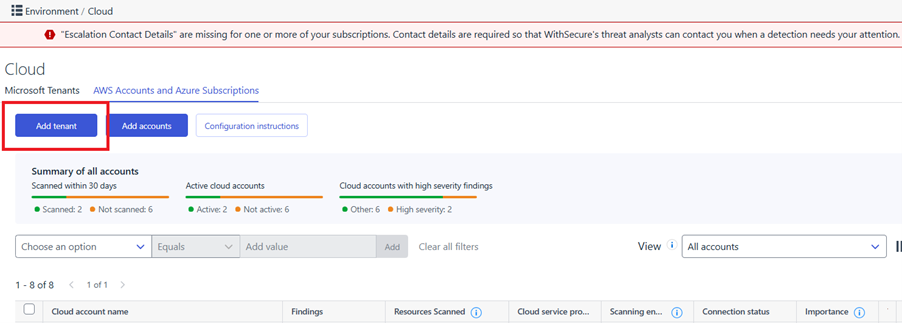
- Introduces a new “Add Tenant” button under: Environment → Cloud → AWS Accounts and Azure Subscriptions
- Moves all XM cloud accounts of type “Tenant” to be managed exclusively under: Environment → Cloud → Microsoft Tenants
How to onboard/re-onboard
- New XM customers: Use the new “Add Tenant” button to onboard Entra ID tenants via Identity Inventory.
- Existing XM customers: If a tenant was previously onboarded using the legacy method (via PowerShell script), these tenants cannot be deleted at this time. This limitation will be addressed in an upcoming release, which will enable re-onboarding of Entra ID tenants through the new Identity Inventory feature. Once available, this enhancement will fully transition tenant management to a script-free process.
More information can be found in the user guide
What is Coming in Subsequent Releases
For Elements Identity Security or EntraID (IDsec) Users
- Identity Inventory will also be available under: Environment → Cloud → Microsoft Tenants
- You will be able to view your Entra ID identities directly through the Elements Security Center, unlocking new identity-focused views and features.
- Note: Scripts will still be needed for configuring Elements Identity Security at the current time.
A separate article will be published with more details once this part is finalized.